

Key takeaways
• The Firebase Dynamic Links alternative is two parts, not one. FDL shut down on 25 August 2025 and its links now 404. Replace it with verified Android App Links for URLs you own, plus a deferred-linking provider (Branch, AppsFlyer, Adjust, Singular) or a DIY backend to carry context across a Play Store install.
• Android 14+ hard-enforces foreground service types. Every startForeground() needs a declared foregroundServiceType and the matching runtime permission, or the app crashes with SecurityException. There are now 14 types, not 11.
• Android 17 changed the rules again. On API 37 (June 2026), a backgrounded app that touches audio must run a foreground service with while-in-use capability that is not shortService. For a call app that means a phoneCall|microphone|camera service, a CallStyle notification, and Jetpack Core-Telecom.
• Pick the right background primitive. Foreground service for user-visible long-running work; shortService for sub-3-minute bursts; WorkManager for retryable batch jobs. Android 16 makes jobs started from a service obey JobScheduler quotas.
• We ship this in production. Fora Soft runs phoneCall services and verified App Links on Android 14–17 apps like ProVideoMeeting, Second Phone, and BrainCert.
Why Fora Soft wrote this playbook
We have built Android apps for video calling, telemedicine, and e‑learning since 2005 — 250+ projects, 50 in-house engineers, a 100% Upwork success score. Every customer-facing app we ship needs two things that got much harder between 2023 and 2026: a deep-link scheme that survives a cold install now that Firebase Dynamic Links is gone, and a foreground service that keeps a call alive after the screen locks.
This is the field guide we hand new Android engineers on our video-conferencing and custom software teams. It is deliberately dual-topic because real call apps hit both walls in the same sprint: the dead invite links after the FDL shutdown, and the foreground-service crash after a targetSdk bump. If you want the architecture background behind the call layer, our WebRTC architecture guide covers the media side; this piece covers the platform plumbing around it.
Read it top to bottom and you will know how to ship deep links and foreground services on Android 14 through 17 without breaking Play review, without crashing on cold start, and without leaving a single dead firebase-dynamic-links import in the build.
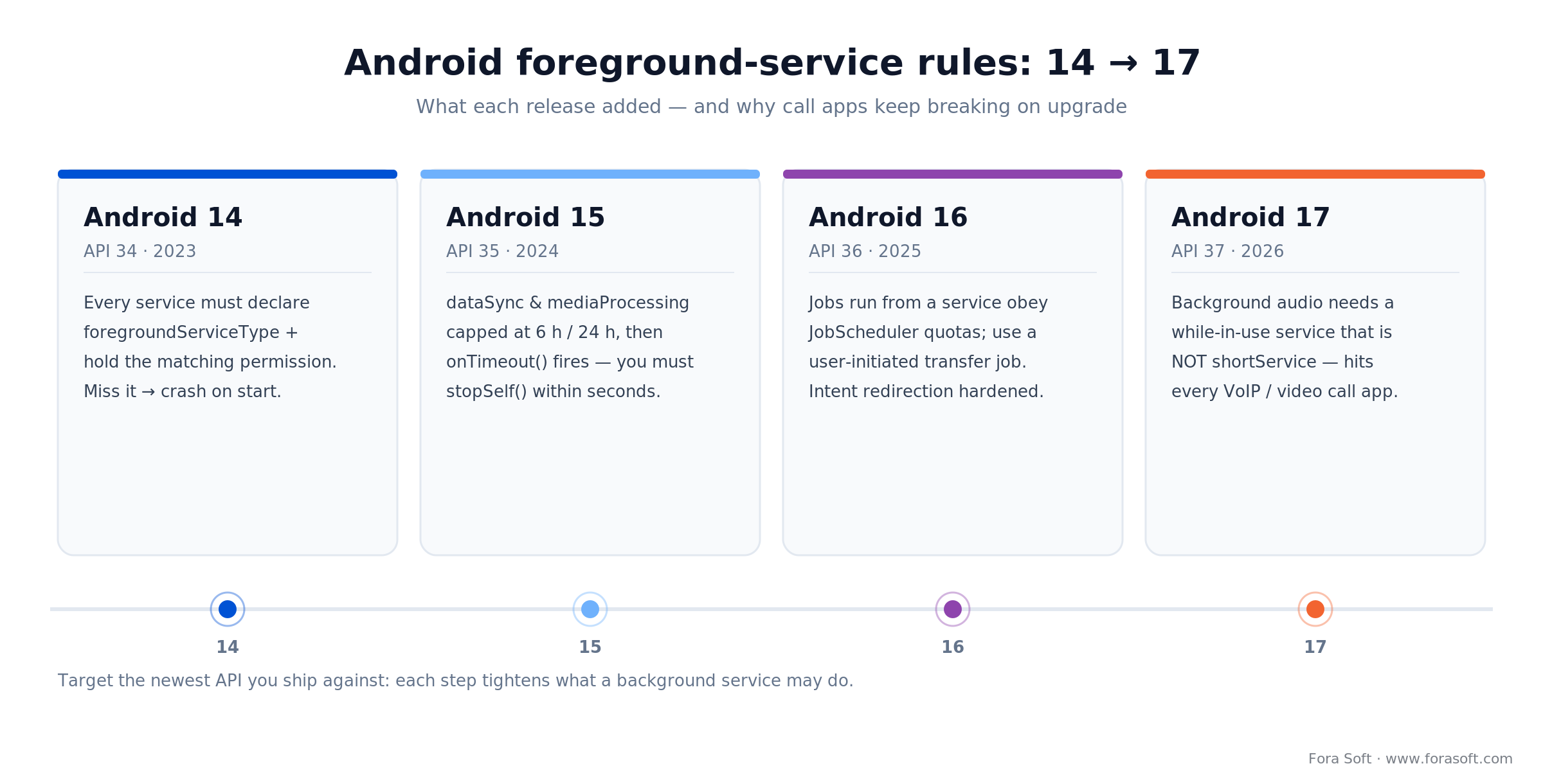
Figure 1. How each Android release from 14 to 17 tightened foreground-service rules — and why call apps break on upgrade.
Seeing ForegroundServiceStartNotAllowedException or dead invite links after an upgrade?
We have migrated deep links and foreground services across dozens of video-calling and telehealth apps. Paste your manifest or a broken link — we will tell you what is missing in 30 minutes.
What changed from Android 14 to 17 — the 90-second briefing
Four releases and one shutdown rewrote this playbook. Skim before you touch code.
1. Android 14 (API 34, 2023) — foreground service types. Any app targeting API 34 must declare a foregroundServiceType on every <service> and pass the same type mask to startForeground(). Miss the type → MissingForegroundServiceTypeException; miss the runtime permission → SecurityException.
2. Android 15 (API 35, 2024) — timeouts. dataSync and mediaProcessing services each get a cumulative six hours per 24‑hour window, tracked separately. When the budget runs out, the system calls Service.onTimeout(int, int) and you have a few seconds to call stopSelf() or it throws. Call-type services (phoneCall, mediaPlayback) are not time-capped.
3. Android 16 (API 36, June 2025) — job quotas and intent hardening. Jobs started while a foreground service runs (JobScheduler, WorkManager, DownloadManager) now obey their standby job quotas; for user-triggered transfers use a user-initiated data transfer job, which is exempt. Android 16 also hardens intent redirection by default, with a per-intent removeLaunchSecurityProtection() opt-out for the rare case it breaks a legitimate flow.
4. Android 17 (API 37, June 2026) — background audio. Apps that play audio, request audio focus, or change volume in the background must have a visible activity or a foreground service that is not shortService. Target API 37 and that service also needs while-in-use capability, granted when it starts from a user action or while the app is visible. For VoIP and video apps this is the newest reason a plain background service drops the call.
5. The deep-link shutdown. Firebase Dynamic Links shut down on 25 August 2025. Every page.link URL and custom-domain FDL link now returns an error (HTTP 404), and the SDK returns null or throws. The next three sections are the Firebase Dynamic Links alternative that actually holds up in 2026; the foreground-service half follows.
Firebase Dynamic Links alternatives: the 2026 migration path
Answer first: the Firebase Dynamic Links alternative is verified Android App Links for the URLs you own, plus a deferred-linking provider (Branch, AppsFlyer OneLink, Adjust, or Singular) or a DIY backend when links must survive a fresh install. There is no single drop-in replacement, because FDL bundled two jobs — routing a link into an installed app, and carrying context through a Play Store install — and Google split them across App Links and third-party attribution.
Three terms get used interchangeably; only two still matter. Custom-scheme deep links (myapp://meeting/123) are simple and old, fine for internal flows and adb testing but not user-shareable marketing links. Verified Android App Links (https://yourdomain.com/meeting/123) are HTTPS URLs you own, auto-verified so Android 12+ opens the app with no chooser dialog — the modern default. Firebase Dynamic Links is dead: shut down 25 August 2025, links now 404, SDK removed.
So which provider replaces the deferred half? The four production options we deploy, plus DIY:
| Provider | Strengths | Starting price | Best for |
|---|---|---|---|
| Branch | Mature deferred deep linking, rich link analytics, Google-referenced FDL migration path | Free tier up to 10k MAU | Most consumer apps migrating from FDL |
| AppsFlyer OneLink | Strong attribution, marketing suite, enterprise contracts | Custom quote | Marketing-heavy apps with paid acquisition |
| Adjust | Fraud prevention, deep-link customisation, strong in gaming | Custom quote | Mid-to-large apps with ad spend |
| Singular | Unified attribution + deep linking, growing FDL-migration share | Custom quote | Teams consolidating MMP tools |
| DIY backend | Total control, zero vendor fee, you own the data | Engineering time only | Lean link volume with a web team |
For most B2B communication apps we ship, Branch is the cleanest migration: it accepts existing FDL-style links, keeps the deferred-install flow intact, and the free tier covers pilots. For growth apps already running AppsFlyer or Adjust, their deep-link products fold into the existing attribution stack. If you own a web team and your link volume is modest, the DIY path below is a real Firebase Dynamic Links alternative with no vendor bill.
Reach for a vendor SDK when: links drive paid acquisition, you need install attribution, or match rate matters more than a monthly bill. Reach for DIY when: links are internal or invite-only, volume is low, and you already run a web backend.
Verified Android App Links: setup in five steps
1. Add an intent filter with autoVerify="true". On the Activity that handles deep links:
<activity android:name=".ui.MainActivity" android:exported="true">
    <intent-filter android:autoVerify="true">
        <action android:name="android.intent.action.VIEW" />
        <category android:name="android.intent.category.DEFAULT" />
        <category android:name="android.intent.category.BROWSABLE" />
        <data android:scheme="https" android:host="links.example.com" />
        <data android:pathPattern="/meeting/.*" />
    </intent-filter>
</activity>
2. Publish assetlinks.json on your domain, served from https://links.example.com/.well-known/assetlinks.json with Content-Type: application/json and no redirects.
[{
  "relation": ["delegate_permission/common.handle_all_urls"],
  "target": {
    "namespace": "android_app",
    "package_name": "com.example.calls",
    "sha256_cert_fingerprints": [
      "14:6D:E9:83:...:5B:4C:29"
    ]
  }
}]
Use the Play App Signing SHA-256 from the Play Console, not your upload key. A wrong fingerprint is the number-one reason App Links silently fall back to the chooser dialog. The official Android App Links guide documents the verification states.
3. Handle the intent in the Activity.
override fun onCreate(savedInstanceState: Bundle?) {
    super.onCreate(savedInstanceState)
    handleDeepLink(intent)
}

override fun onNewIntent(intent: Intent) {
    super.onNewIntent(intent)
    handleDeepLink(intent)
}

private fun handleDeepLink(intent: Intent) {
    val data = intent.data ?: return
    when (data.pathSegments.firstOrNull()) {
        "meeting" -> {
            val id = data.pathSegments.getOrNull(1) ?: return
            callManager.joinMeeting(id)
        }
    }
}
4. Verify with adb.
adb shell pm get-app-links com.example.calls
adb shell am start -a android.intent.action.VIEW \
    -d "https://links.example.com/meeting/abc" com.example.calls
5. Add a server-side fallback. Point links.example.com/meeting/* at a tiny page that detects Android vs iOS, renders the join screen, and redirects to the Play Store if the app is not installed. This replaces the “go to Play, then open the app” behaviour FDL used to provide.
Reach for App Links alone when: your users already have the app, or a fresh-install user landing on the web fallback is acceptable. Add a deferred provider only when the invite must reopen the exact context after a Play Store install.
Deferred deep linking after Firebase Dynamic Links
Deferred deep links carry context across a Play Store install: click an invite on a fresh device, install from Play, and the first launch drops you straight into the meeting. Verified App Links cannot do this alone because the install interrupts the intent. Figure 2 shows where the chain breaks and what fills the gap.
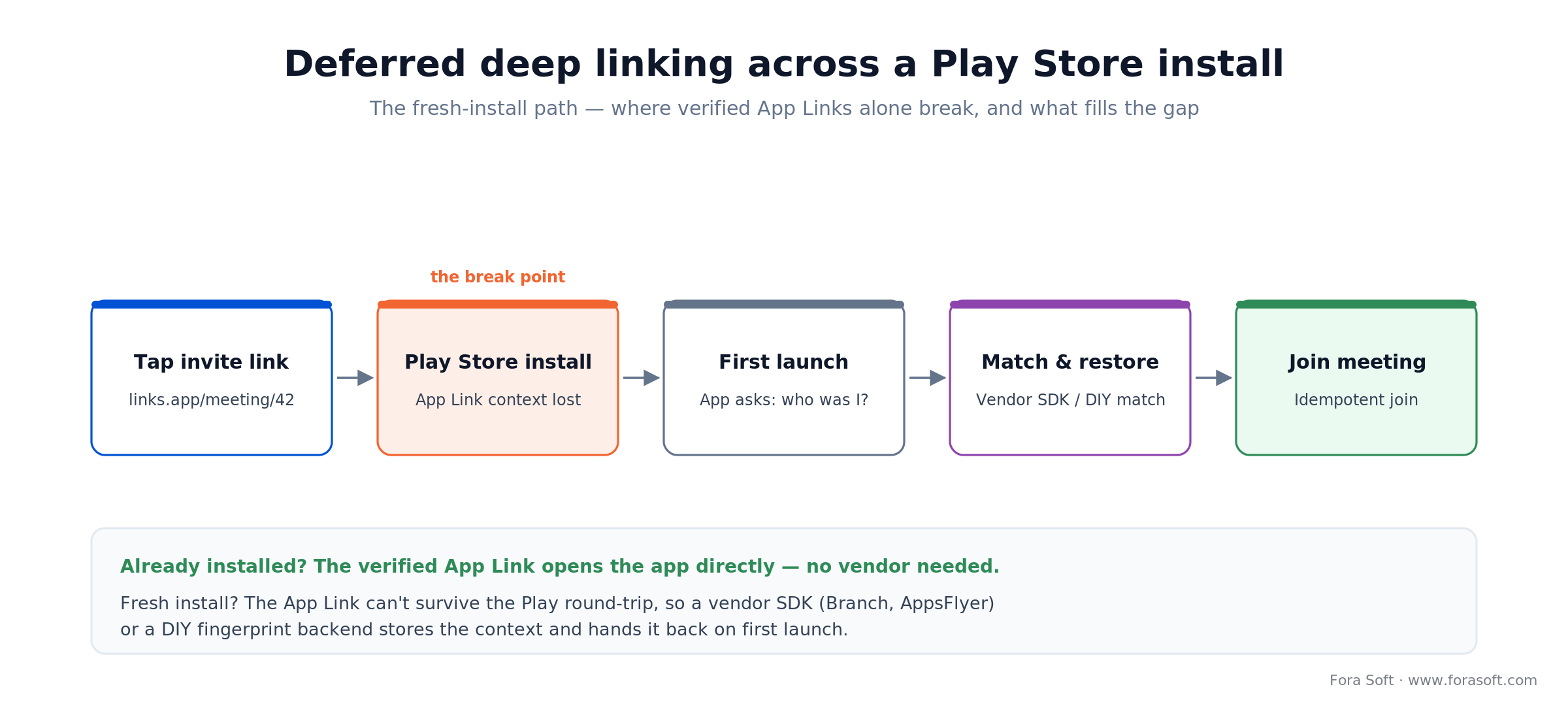
Figure 2. Where a verified App Link breaks on a fresh install, and how a vendor SDK or DIY match restores the meeting context.
With a vendor SDK the store-and-match step is one integration: the SDK fingerprints the click, and on first launch it hands back the original link data. Branch, AppsFlyer, Adjust, and Singular all do this cross-platform, so one integration covers Android App Links and iOS Universal Links together.
DIY deferred deep links (when you do not want a vendor)
If your link volume is small and you own a web stack, you can ship deferred deep linking in a weekend:
- Serve the shareable URL (
https://links.example.com/meeting/abc) from your own web server. - On the landing page, store a hashed fingerprint (IP + user-agent + screen size + timestamp) against the context id in a short-TTL Redis record.
- Redirect to the Play Store if the App Link is not installed; launch the app directly if it is.
- On first launch after install, the app POSTs the same fingerprint. If it matches a pending record under 30 minutes old, return the meeting id.
- Idempotent join on receipt — the user lands in the meeting.
Match rates sit around 85–90%, below vendor SDKs (95%+) but fine for internal or low-volume flows. For anything ad-driven, take the vendor — the extra points of match rate pay for the fee.
Migrating off Firebase Dynamic Links this quarter?
We move invite, referral, and onboarding flows from dead FDL links to verified App Links plus Branch or a DIY backend — without losing the deferred-install experience. Bring your link audit.
The 14 foreground service types and the permission each needs
Now the call-infrastructure half. A foreground service tells Android “this work is user-visible, do not kill it,” and enforces the contract with a persistent notification. That is why a call belongs in one: Doze, App Standby, and per-vendor task killers (Xiaomi, Vivo, OnePlus) reap a plain Service within minutes — mid-call. Since Android 14 the type you declare must match the permission you hold, or startForeground() throws. Android 15 added mediaProcessing; the current list is 14 types, not the 11 most tutorials still show — the official Android foreground service types reference is the source of truth. Keep this as a manifest review checklist.
| Type | Required runtime permission | Typical use |
|---|---|---|
phoneCall |
FOREGROUND_SERVICE_PHONE_CALL + ManageOwnCalls / Telecom role |
VoIP calls, conferences, WebRTC |
microphone |
FOREGROUND_SERVICE_MICROPHONE + RECORD_AUDIO |
Voice recording, audio messaging |
camera |
FOREGROUND_SERVICE_CAMERA + CAMERA |
Video call, live streaming |
mediaPlayback |
FOREGROUND_SERVICE_MEDIA_PLAYBACK |
Music, podcast, background video |
mediaProjection |
FOREGROUND_SERVICE_MEDIA_PROJECTION + consent |
Screen sharing, recording |
mediaProcessing |
FOREGROUND_SERVICE_MEDIA_PROCESSING (6h/day cap) |
Transcoding, media export (Android 15+) |
location |
FOREGROUND_SERVICE_LOCATION + location permission |
Navigation, ride-hailing, fitness |
health |
FOREGROUND_SERVICE_HEALTH + a health permission (ACTIVITY_RECOGNITION, READ_HEART_RATE, or BODY_SENSORS on API 35 and lower) |
Workout and wellness tracking (Android 14+) |
connectedDevice |
FOREGROUND_SERVICE_CONNECTED_DEVICE + BT / UWB / NFC |
Wearables, car kits, peripherals |
dataSync |
FOREGROUND_SERVICE_DATA_SYNC (6h/day cap) |
Uploads, downloads, backup |
remoteMessaging |
FOREGROUND_SERVICE_REMOTE_MESSAGING |
Chat sync across devices |
shortService |
None (auto-stops after ~3 min) | Short flushes, cache clears, outbox drain |
systemExempted |
FOREGROUND_SERVICE_SYSTEM_EXEMPTED |
Device-policy, EMM, security apps (restricted) |
specialUse |
FOREGROUND_SERVICE_SPECIAL_USE + Play declaration |
Anything else (rare; needs Play review) |
Reach for specialUse when: none of the 13 concrete types fit and you can justify the work in a Play Console declaration. Expect manual review — do not use it as a catch-all to dodge the correct type.
Pattern A — a foreground service for a VoIP or video call
The canonical call service ORs three types together: phoneCall|microphone|camera. You need the three matching runtime permissions, plus POST_NOTIFICATIONS on Android 13+. Figure 3 shows what the one service holds; the code below is the minimal pattern we ship.
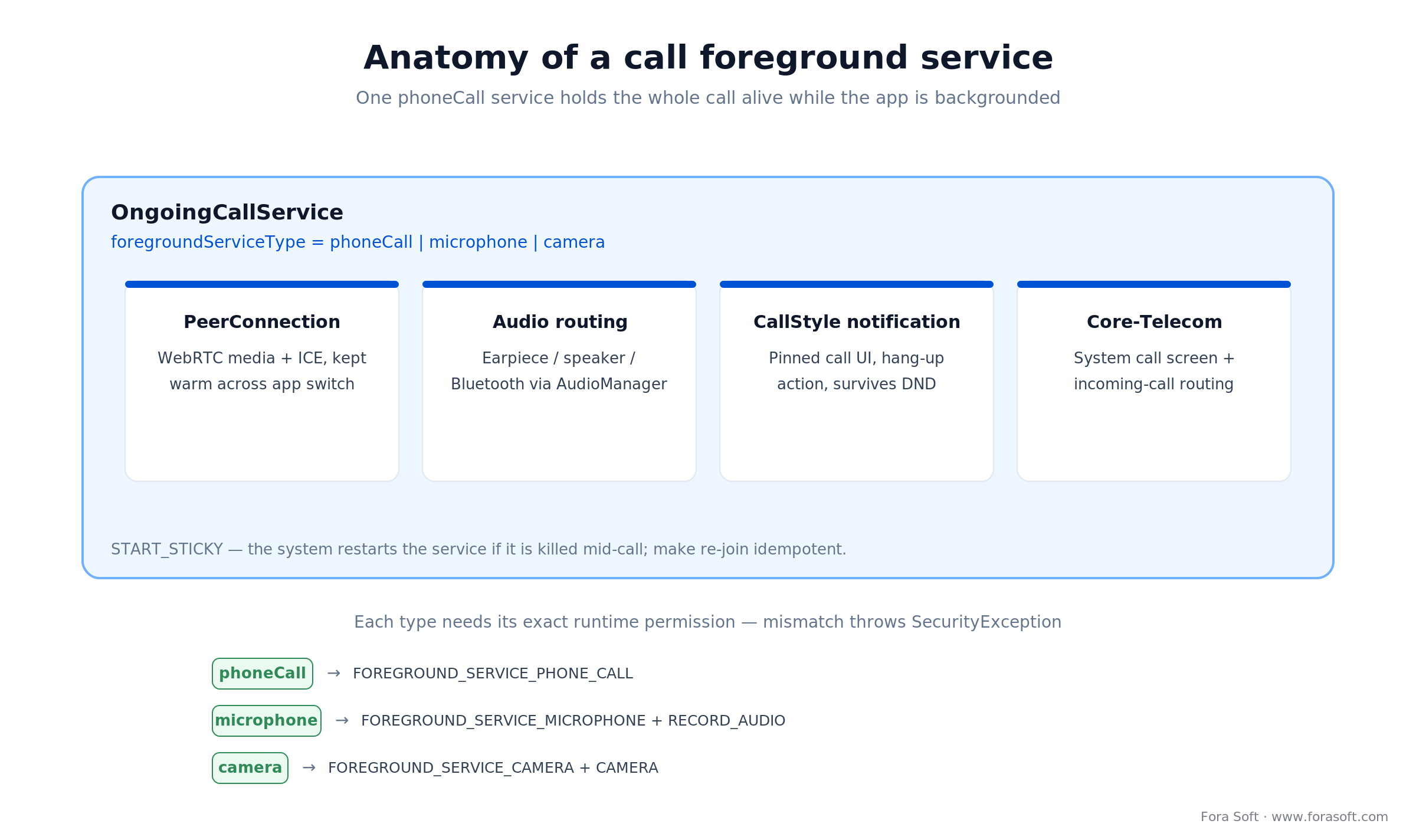
Figure 3. One phoneCall|microphone|camera foreground service holds the WebRTC call, audio routing, CallStyle UI and Telecom together.
Step 1. Manifest declarations
<uses-permission android:name="android.permission.FOREGROUND_SERVICE" />
<uses-permission android:name="android.permission.FOREGROUND_SERVICE_PHONE_CALL" />
<uses-permission android:name="android.permission.FOREGROUND_SERVICE_MICROPHONE" />
<uses-permission android:name="android.permission.FOREGROUND_SERVICE_CAMERA" />
<uses-permission android:name="android.permission.POST_NOTIFICATIONS" />
<uses-permission android:name="android.permission.RECORD_AUDIO" />
<uses-permission android:name="android.permission.CAMERA" />
<uses-permission android:name="android.permission.MANAGE_OWN_CALLS" />

<service
    android:name=".call.OngoingCallService"
    android:enabled="true"
    android:exported="false"
    android:foregroundServiceType="phoneCall|microphone|camera" />
Step 2. The service class (Kotlin, Hilt-injected manager)
@AndroidEntryPoint
class OngoingCallService : Service() {

    @Inject lateinit var callManager: AbstractCallManager

    override fun onBind(intent: Intent): IBinder? = null

    override fun onStartCommand(intent: Intent?, flags: Int, startId: Int): Int {
        val notification = CallNotificationBuilder(this).buildCallStyle(callManager.currentCall)
        ServiceCompat.startForeground(
            this,
            ONGOING_NOTIFICATION_ID,
            notification,
            ServiceInfo.FOREGROUND_SERVICE_TYPE_PHONE_CALL or
                ServiceInfo.FOREGROUND_SERVICE_TYPE_MICROPHONE or
                ServiceInfo.FOREGROUND_SERVICE_TYPE_CAMERA,
        )
        return START_STICKY
    }

    override fun onDestroy() {
        super.onDestroy()
        callManager.teardown()
    }
}
Two non-obvious details save pain later. Use ServiceCompat.startForeground(...) rather than the raw overload — the compat helper applies the Android 14 type argument on every API level. And START_STICKY is usually right for a call: the system restarts the service if it gets killed, so make your CallManager idempotent about re-joining.
Step 3. Start and stop reactively
// Bind service start to the call state flow.
callManager.isInCall
    .distinctUntilChanged()
    .collect { inCall ->
        val intent = Intent(context, OngoingCallService::class.java)
        if (inCall) {
            ContextCompat.startForegroundService(context, intent)
        } else {
            context.stopService(intent)
        }
    }
The five-second race to startForeground() after startForegroundService() trips every team once. Miss it and Android throws ForegroundServiceDidNotStartInTimeException. Build the notification synchronously, before any network calls.
CallStyle notifications and Core-Telecom
Answer first: for a call foreground service, use Notification.CallStyle (Android 12+) and pair it with Jetpack Core-Telecom. CallStyle pins the call notification to the top of the shade, uses the system call UI, and coexists with Do Not Disturb — it is the only way to publish a call notification a Pixel or Samsung phone will not throttle or collapse.
val person = Person.Builder().setName(callerName).setIcon(callerAvatar).build()
val hangUpIntent = PendingIntent.getService(
    this, 0,
    Intent(this, OngoingCallService::class.java).setAction(ACTION_HANG_UP),
    PendingIntent.FLAG_IMMUTABLE or PendingIntent.FLAG_UPDATE_CURRENT,
)

val notification = NotificationCompat.Builder(this, CHANNEL_ID_CALL)
    .setSmallIcon(R.drawable.ic_call)
    .setContentIntent(fullScreenIntent)
    .setOngoing(true)
    .setCategory(NotificationCompat.CATEGORY_CALL)
    .setStyle(NotificationCompat.CallStyle.forOngoingCall(person, hangUpIntent))
    .build()
Pair CallStyle with Core-Telecom (androidx.core:core-telecom) and you get automatic audio routing to Bluetooth headsets, phone-app Do-Not-Disturb compatibility, and the system incoming-call UI on Android 14+. Core-Telecom is also how you register the call with the OS so an incoming call can start a service without tripping the background-start rules.
Reach for CallStyle + Core-Telecom when: your app places VoIP or video calls and must coexist with the system phone UI. Skip it for pure media playback, uploads, or navigation — those belong in MediaStyle or a default notification.
Android 17: background-audio and while-in-use rules for calls
Answer first: on Android 17 (API 37, June 2026) a backgrounded app that plays audio, holds audio focus, or changes volume must have a visible activity or run a foreground service that is not shortService. Target API 37 and the service also needs while-in-use (WIU) capability. This is the change most likely to break a working call app on the 2026 upgrade.
A service earns WIU capability when it starts from a user-initiated operation or while the app is visible — tapping answer, tapping call, or being in the foreground. A service started from a cold background broadcast does not get WIU, so its audio calls are throttled. Two practical rules follow.
Start the call service from a user action or Telecom, never a bare background receiver. Route incoming calls through Core-Telecom or a full-screen-intent notification so the start is attributed to the user. Do not downgrade a call to shortService to dodge a permission. On API 37 that class of service cannot hold background audio, so the call goes silent after the app backgrounds.
If you already run a phoneCall|microphone|camera service started from a user action, you satisfy the Android 17 audio rule for free. The apps that break are the ones streaming audio from a plain dataSync or shortService worker. When in doubt, test with adb shell dumpsys media.audio_flinger and watch for muted focus after backgrounding.
Upgrading a call app to Android 16 or 17?
Background-audio and while-in-use rules quietly break VoIP apps on the 2026 upgrade. We audit the service start-path, CallStyle, and Telecom wiring and hand back a fixed-scope plan.
shortService vs foreground service vs WorkManager
Three primitives, three mandates. Using the wrong one gets your app throttled, killed, or rejected by Play. Figure 4 is the decision in one glance.
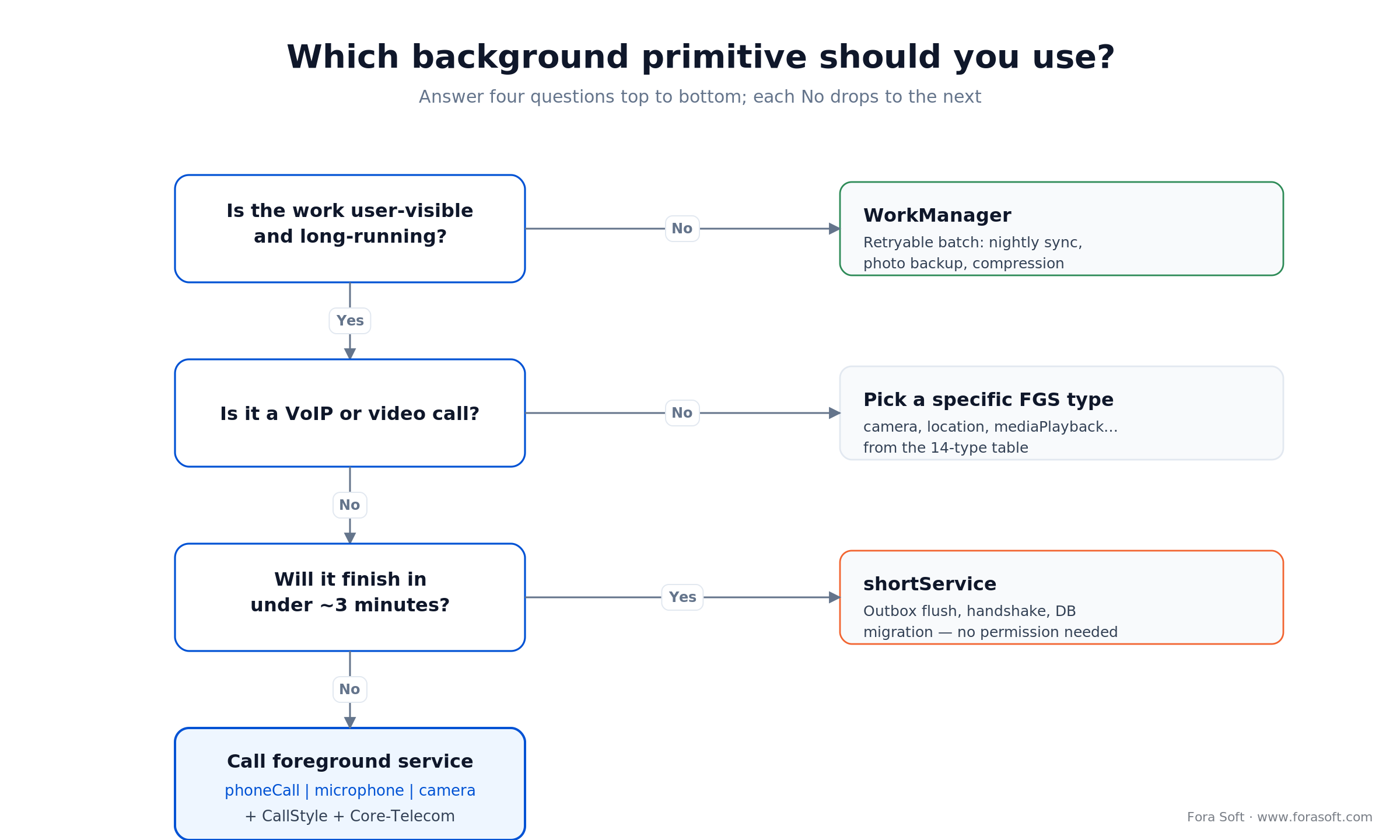
Figure 4. Which background primitive to use: WorkManager for batch, shortService for sub-3-minute bursts, a typed FGS for calls.
1. Foreground service. Long-running, user-visible work: calls, live uploads with a progress UI, turn-by-turn navigation. Needs a declared type, permission, and persistent notification. No time cap on phoneCall or mediaPlayback; six-hour daily cap on dataSync and mediaProcessing from Android 15.
2. shortService. A bounded sub-3-minute burst — flushing an outbox, finishing a handshake, migrating a database. No permission needed, strict timeout, and (from Android 17) no background audio. The system kills it if you overrun.
3. WorkManager. Retryable, deferrable batch work: periodic upload, nightly sync, background compression. It can escalate to a foreground worker via setForeground() with a ForegroundInfo that still needs type + permission; otherwise it uses JobScheduler, which is Doze-friendly. On Android 16, jobs it runs while a service is active obey JobScheduler quotas, so long batch jobs should use a user-initiated data transfer job.
Rule of thumb: if the user watches it happen, use a foreground service or WorkManager-foreground. If it is a background obligation that can wait for charging and Wi-Fi, use plain WorkManager.
The crashes every team hits on Android 14 to 17
1. MissingForegroundServiceTypeException. You forgot android:foregroundServiceType on the <service>, or the type argument in startForeground(). Fix: add both, matched.
2. SecurityException: Starting FGS of type phoneCall requires FOREGROUND_SERVICE_PHONE_CALL. The manifest declares the type but the <uses-permission> is missing. Fix: add the exact permission from the 14-type table.
3. ForegroundServiceStartNotAllowedException. You called startForegroundService from the background without an approved exemption. Fix: trigger from a high-priority FCM message, a full-screen intent, or after a user action; for incoming calls use Core-Telecom.
4. ForegroundServiceDidNotStartInTimeException. Your service took longer than five seconds to reach startForeground(). Fix: build the notification first, then do network calls; never block onStartCommand on disk or network.
5. Silent audio after backgrounding (Android 17). Not an exception — worse, a support ticket. The service is not WIU-capable or is a shortService, so the OS mutes its audio focus in the background. Fix: start the call service from a user action or Telecom and give it a real call type.
Cost math: what an FDL migration and FGS rework cost
Answer first: the App Links half is cheap engineering; the deferred half is where you choose between a vendor bill and a bit more code. Figure 5 puts the effort and the ongoing cost side by side.
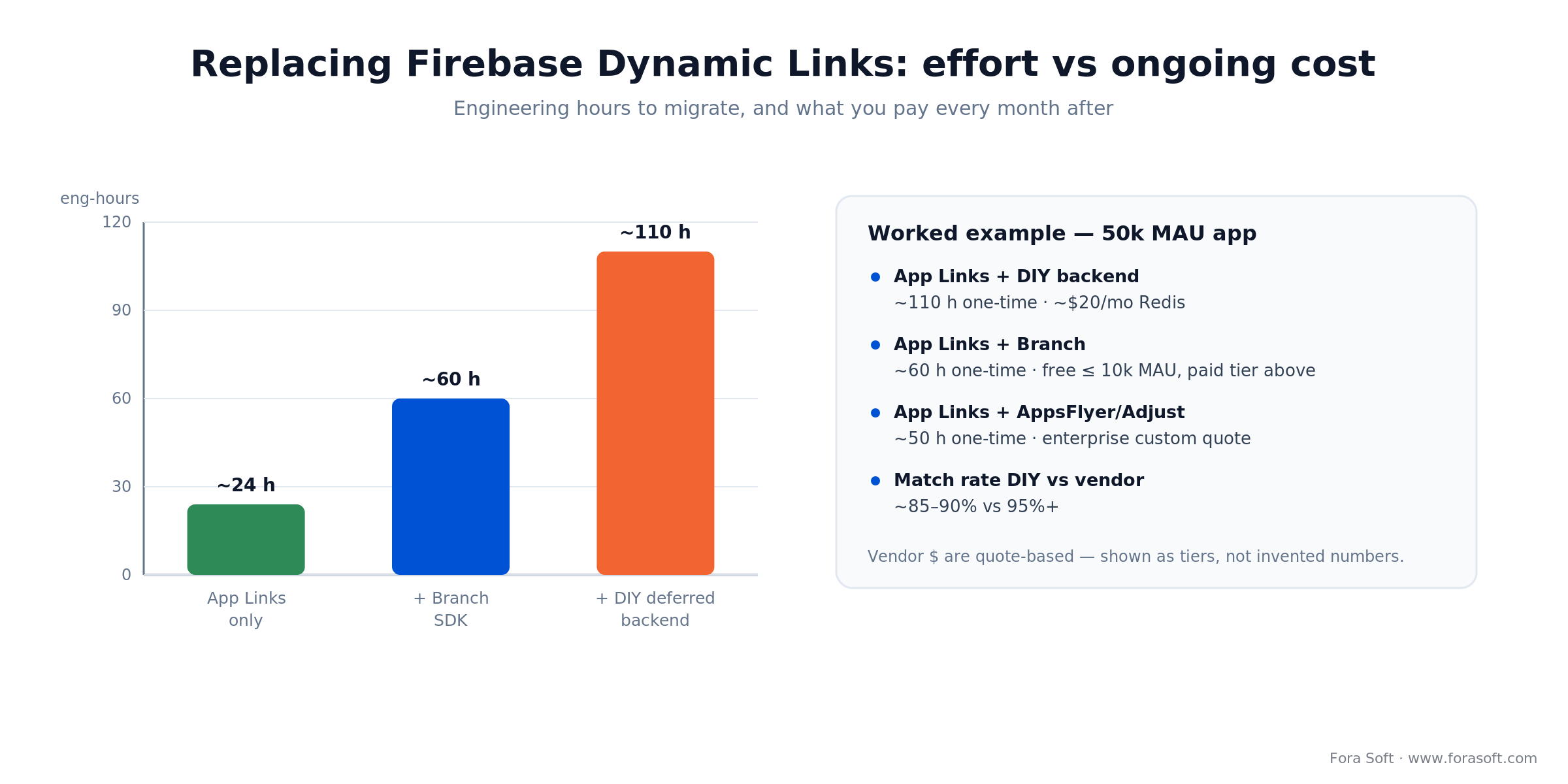
Figure 5. Engineering hours to replace Firebase Dynamic Links (App Links only, + Branch, + DIY backend) and what each costs monthly.
Worked example, a 50k-MAU call app. Verified App Links plus intent handling is roughly 24 engineering hours — manifest, assetlinks.json, server fallback, testing. Layering Branch is about 60 hours one-time; the SDK is free to 10k MAU, then a paid tier. A DIY deferred backend is about 110 hours one-time plus roughly $20/month for Redis, and you own the data. The foreground-service rework for Android 14–17 — typed services, CallStyle, Core-Telecom, crash cleanup — is a separate line, usually 60–120 hours depending on how many services you run.
The arithmetic that decides vendor vs DIY: a vendor costs (integration hours) + (monthly fee), a DIY backend costs (more integration hours) + (small hosting) + (5–10 points lower match rate). At low volume the DIY line wins; once paid acquisition rides on those links, the vendor match rate is worth more than its fee. We size both against your real link volume in the audit. Our Agent Engineering workflow compresses these hour estimates, so treat the numbers as conservative ceilings, not floors.
Mini case — migrating a video-calling app to Android 14 to 17
A client running a WebRTC video app with about 800k MAU came to us in mid-2025 with two fires. Crashlytics was logging thousands of MissingForegroundServiceTypeException per day after a targetSdk bump to 34, and half their onboarding still pointed at Firebase Dynamic Links with three months to the shutdown.
Our six-week plan: rewrite the call service with phoneCall|microphone|camera and ServiceCompat.startForeground, migrate to CallStyle notifications, pipe through Core-Telecom, publish verified App Links with an assetlinks.json on the marketing domain, and wire Branch for deferred deep linking on ad campaigns. Total scope: about 380 engineering hours, accelerated with our Agent Engineering workflow.
Outcome: the foreground-service crash rate fell to zero within 14 days on API 34. Install-to-first-meeting conversion from shared invites rose 11% because App Links skipped the browser interstitial. When Android 16 and 17 landed, the same architecture needed only a WIU-aware start-path review, not a rewrite. Want a similar audit? Book a 30-min architecture review.
A decision framework — pick the right pattern in five questions
1. Will users share a link that opens straight into the app? Yes → verified App Links with assetlinks.json. No → a custom scheme covers internal flows.
2. Must those links survive a Play Store install? Yes → Branch, AppsFlyer, Adjust, Singular, or a DIY fingerprint backend. No → App Links alone cover you.
3. Do you depend on install attribution for paid ads? Yes → AppsFlyer, Adjust, or Singular covers attribution and deferred linking together. No → Branch or DIY is simpler and cheaper.
4. Is the background work a VoIP or video call? Yes → phoneCall|microphone|camera service + CallStyle + Core-Telecom, started from a user action for Android 17 WIU. No → pick the specific type from the 14-row table.
5. Is the work user-visible and long-running? Yes → foreground service. No → WorkManager, or shortService for a sub-3-minute burst.
Five pitfalls we keep finding in audits
1. Shipping with firebase-dynamic-links still in the build. It does not fail at compile time, but every old link now 404s. Remove the dependency, audit every invite flow, and replace with App Links plus Branch or DIY.
2. Using the upload-key fingerprint in assetlinks.json. Play App Signing re-signs your APK, so publish the Play App Signing SHA-256, not your local keystore. Check Play Console → Setup → App signing.
3. Calling startForegroundService from the background. Android 12+ throws ForegroundServiceStartNotAllowedException without an approved exemption. Route incoming calls through Core-Telecom or a full-screen-intent notification.
4. Downgrading a call to shortService to dodge a permission. It looks free, but it caps at ~3 minutes and, since Android 17, cannot hold background audio. Use the real phoneCall type.
5. Ignoring cold-start intent handling. A deep link tapped when your Activity is dead arrives in onCreate; if it is alive, in onNewIntent. Handle both or the link silently no-ops half the time.
KPIs: what to measure after the migration
Quality KPIs. Crashlytics rate of ForegroundService*Exception per 1,000 sessions (target under 0.1), ANR rate during onStartCommand (target 0), and App-Link verification rate in Play Console Vitals (target over 95% of installs).
Business KPIs. Install-to-first-meeting conversion from shared invites (baseline before migration, uplift target over 10%), week-1 retention for users who arrived via a deep link, and deferred-link match rate (vendor 95%+, DIY 85–90%).
Reliability KPIs. Median call duration before the service is killed (target over 30 minutes), time from backgrounding to call drop (target: never), and Bluetooth audio reconnection success rate (target over 99%). On Android 17, add background audio-focus retention after backgrounding.
When not to use a foreground service at all
Reaching for a foreground service by instinct gets your app flagged by Play’s background-location and foreground-service policies. Three red flags:
1. Batch work without a user-visible reason. Photo backup, nightly index rebuild, log shipping. Use WorkManager with constraints and let Android pick a charging plus Wi-Fi window.
2. “Keep-alive” for push messaging. Use FCM high-priority messages; do not run a permanent service to poll your backend.
3. Location tracking after the app is closed. Android 10+ gates this behind background-location permission and Play requires a declaration form. If the user sees no active session, you probably should not be tracking them.
FAQ
What is the best Firebase Dynamic Links alternative in 2026?
There is no single drop-in. The Firebase Dynamic Links alternative is verified Android App Links for links you own, plus a deferred-linking provider (Branch, AppsFlyer, Adjust, or Singular) or a DIY fingerprint backend when links must survive a Play Store install. Branch is the most common migration because it accepts FDL-style links and has a free tier to 10k MAU.
What happens if I leave Firebase Dynamic Links in my app?
As of 25 August 2025 the page.link domains and custom-domain FDL links return an error (HTTP 404) and the SDK returns null or throws on getDynamicLink(). Old invite URLs in the wild are dead. Remove the SDK, migrate to verified App Links on your own domain, and layer Branch or a DIY backend for deferred linking.
How many foreground service types are there on Android?
Fourteen as of Android 16: camera, connectedDevice, dataSync, health, location, mediaPlayback, mediaProcessing, mediaProjection, microphone, phoneCall, remoteMessaging, shortService, specialUse, and systemExempted. mediaProcessing was added in Android 15; tutorials that say 11 predate it.
Why does startForeground() crash with SecurityException on Android 14 if my manifest looks correct?
Check two things: the exact FOREGROUND_SERVICE_* permission for your declared type must be a <uses-permission>, and you must pass the same type mask to ServiceCompat.startForeground(service, id, notification, type). The manifest and the Kotlin call have to agree.
What changed for foreground services in Android 15, 16, and 17?
Android 15 caps dataSync and mediaProcessing at six hours per day with an onTimeout() callback. Android 16 makes jobs started from a service obey JobScheduler quotas and hardens intent redirection. Android 17 requires background audio to run under a while-in-use service that is not shortService — the change most likely to affect a call app.
Do I still need a foreground service if my WebRTC call runs under singleTop launch mode?
Yes. Launch mode affects Activity reuse, not background execution. The foreground service is what keeps your process alive when the user switches apps or locks the screen. Without it, aggressive OEMs (Xiaomi, Vivo, OnePlus) drop the call within a minute.
How do I test verified App Links before pushing to Play?
Publish assetlinks.json with the Play App Signing SHA-256, then run adb shell pm get-app-links your.package and look for “verified: true” per host. On-device, open a deep-link URL from Gmail or Chrome: no chooser dialog means App Links work. Google’s Statement List Tester also validates the JSON against your domain.
Does the same deep-link setup work on iOS?
The concept mirrors it: iOS Universal Links are the App Link equivalent, backed by an apple-app-site-association file at /.well-known/apple-app-site-association. Your backend serves one file for Android and one for iOS. Branch, AppsFlyer, Adjust, and Singular handle both platforms in one integration.
Can a shortService foreground service handle a voice call?
No. shortService caps at about three minutes and, since Android 17, cannot hold background audio. VoIP calls use the phoneCall type, paired with microphone and camera when transmitting audio or video, and Core-Telecom for incoming calls.
What to read next
ANDROID UX
Custom Android Call Notifications
Build the CallStyle notification your foreground service pins to the shade.
ANDROID WEBRTC
Implement Screen Sharing in an Android App
The MediaProjection + foreground service pattern for screen capture.
ANDROID AUDIO
Audio Output Switching on Android
Route audio between earpiece, speaker, and Bluetooth during a live call.
DISTRIBUTION
Distribute Android Apps Beyond Google Play
Alternative stores, direct APK, and how deep links behave outside Play.
Ready to ship an Android 14-to-17-clean call app this sprint?
The deep-link and foreground-service layers are the first place a modern Android release punishes a lazy implementation. On the link side, retire every firebase-dynamic-links import, publish a correctly-signed assetlinks.json, and pick the Firebase Dynamic Links alternative — App Links plus a vendor or DIY backend — that matches your growth stack. On the service side, pick the right type from the 14-row table, declare the matching permission, wire CallStyle and Core-Telecom for calls, and start the service from a user action so it stays while-in-use on Android 17.
If you would rather hand the migration to a team that has done it a dozen times, that is what we do. Bring your manifest, Crashlytics dashboard, and link audit, and we will give you a concrete plan in one call.
Want a 30-minute review of your FGS and deep-link stack?
We will look at your manifest, Crashlytics, and link flow, then sketch the highest-impact fixes for Android 14 through 17.
.png)
