

.avif)
Key takeaways
• ONVIF Profile M standardizes analytics metadata, not pixels. It lets a camera from Axis, a VMS from Milestone, and an MQTT broker from AWS agree on what “person crossing line at 14:22:03” looks like on the wire.
• Mandatory vs optional matters more than the Profile M badge. Metadata streaming and analytics configuration are mandatory in the Profile M v1.1 spec; pull-point events, MQTT JSON events, the rule engine, object classes, geolocation and face/LPR metadata are conditional (“if supported”) — always read the Declaration of Conformance (DoC) before buying.
• Adoption is lopsided. Axis, Bosch, Dallmeier, Hanwha and Milestone XProtect lead; mid-tier and budget brands (Hikvision, Dahua) still lean on proprietary SDKs. Plan for a mixed fleet for at least another 2–3 years, and pair Profile M with Profile T: ONVIF ends Profile S support on March 31, 2027.
• Detection capacity is a hardware question, not a Profile M question. Profile M transports metadata; the number of plates/faces per frame depends on sensor resolution, WDR, frame rate, analytics SoC (Ambarella CV, Jetson, Axis ARTPEC) and your confidence threshold.
• Custom integration is where most projects stall. Metadata archival, class taxonomy mapping, NTP drift, and MQTT event storms are the four recurring traps — budget roughly 230–410 engineering hours for a production Profile M VMS integration with our Agent Engineering workflow (AI coding agents under senior engineers), 40–60% more without it.
Updated October 2026: Profile S end of support (March 31, 2027) and what it means for Profile M pairing, Profile V release candidate, spec-accurate mandatory vs conditional features, EU CRA reporting and US FCC rules for camera fleets.
Why Fora Soft wrote this playbook
Fora Soft has been shipping video-streaming and surveillance software for 21 years. Of the 250+ products we have delivered, the IP-camera, VMS, body-worn, courtroom recording, and video analytics projects share one recurring pain: metadata. Streams are easy — RTSP, H.264, H.265, done. Metadata is where multi-vendor deployments fall apart, and where ONVIF Profile M is supposed to help.
This playbook pulls together what we have learned integrating Profile M and the surrounding ONVIF analytics stack on real projects: what the spec actually requires, what the camera marketing team quietly omits, how to validate a DoC in five minutes, how to wire a Profile M stream into a VMS that was originally built around proprietary SDKs, and when you should simply skip Profile M and use a vendor SDK directly. See our video surveillance services and project portfolio for context on the scale and industries we work in.
Stuck choosing Profile M vs a proprietary SDK?
A 30-minute call with a Fora Soft engineer will save you weeks of integrator-level trial and error on camera shortlists and VMS architecture.
What is ONVIF Profile M? What it standardizes
Short answer: ONVIF Profile M is the ONVIF standard for analytics metadata and events: it defines how a camera or analytics server streams object detections, publishes events (over the metadata stream, the ONVIF event service or MQTT) and exposes its analytics and rule configuration to a VMS, NVR or cloud client. ONVIF released Profile M on June 30, 2021; the current text is specification v1.1 (2024), an editorial revision of v1.0.
Where Profile S and Profile T handle video streaming, Profile M handles everything that describes what is inside the stream — object detections, events, scene descriptions, and the configuration of the analytics module that produces them. For a deeper tour of the other profiles (S, G, T, C, D, A) see our companion piece, ONVIF Profiles in Security Systems.
In concrete terms, Profile M guarantees three things across compliant cameras, encoders, and VMS clients:
1. A mandatory metadata stream. Object bounding boxes, center-of-gravity, class labels and simple attributes are serialized as ONVIF Scene Description XML inside an RTP payload. Any Profile M client can parse these fields without proprietary drivers.
2. A standard event model. Detection and rule-engine events can travel inside the metadata stream, over the ONVIF Events service (XML over SOAP, pull-point) or over MQTT with JSON payloads. The spec makes pull-point events and MQTT conditional rather than mandatory, so a conformant device supports whichever paths its DoC declares — MQTT is what opens the door to IoT brokers and cloud analytics.
3. A configurable analytics service. Clients can discover which analytics modules a device runs (motion, tamper, line-crossing, people counting, LPR, face), tune their parameters, and subscribe to their events — all without vendor-specific firmware tools.
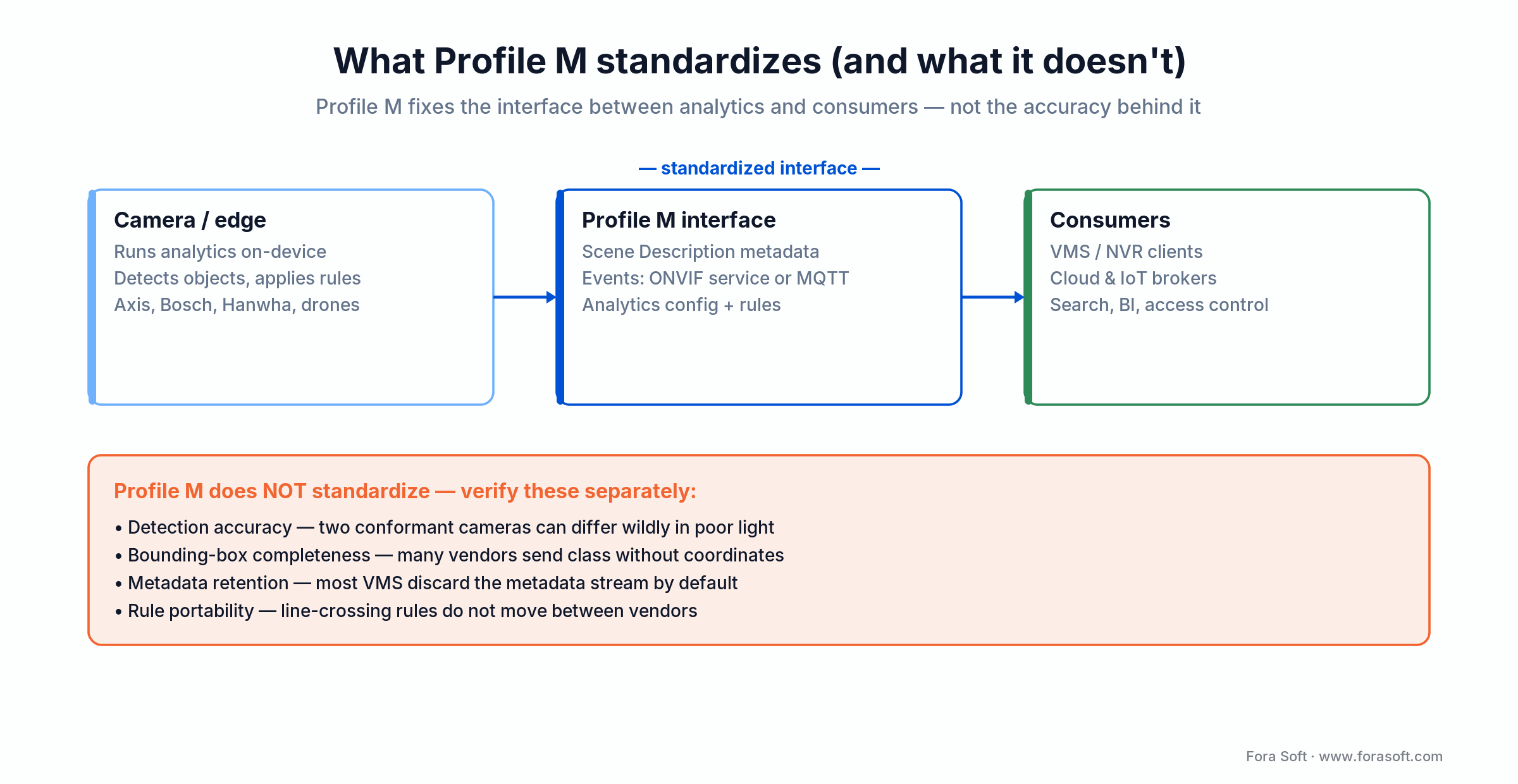
Figure 1. What Profile M standardizes, and the four things it deliberately leaves to you.
How Profile M relates to Profiles S, T, C, and G
Profile M never replaces a streaming profile — it layers on top. A useful camera almost always pairs Profile M with Profile T (advanced streaming, H.265, alarm handling) and frequently Profile G (edge storage). If you are doing access control with face or plate triggers, Profile C joins the stack. The rule of thumb: Profile S/T moves pixels, Profile M moves meaning, Profile C moves access decisions, Profile G moves archives. For a product-by-product breakdown of which profile you actually need, see our ONVIF profile decision guide in Fora Soft Learn. The menu itself is changing in 2026: ONVIF is retiring Profile S because its username-token authentication no longer meets current security practice, and Profile V for cloud video reached release-candidate status in July 2026.
ONVIF profiles at a glance, October 2026 (sources: ONVIF Profile S deprecation Q&A; Profile V release candidate, July 2026):
| Profile | What it covers | Status (October 2026) | What it means for a Profile M project |
|---|---|---|---|
| Profile S | Basic video streaming | Legacy: last conformance claims with the June 2026 test tools; support ends March 31, 2027 | Do not specify for new projects; pair Profile M with T instead |
| Profile T | Advanced streaming: H.264/H.265, digest auth, HTTPS, metadata streaming, motion/tamper events | Active (2018); ONVIF’s named successor to S | Default streaming partner for Profile M |
| Profile G | Edge recording and playback | Active | Add when cameras record to SD/NVR at the edge |
| Profile M | Analytics metadata, events, MQTT, rule and analytics configuration | Active (2021; spec v1.1, 2024) | The subject of this guide |
| Profiles A, C, D | Access control configuration, clients and peripherals | Active | Add when plate or face events open doors |
| Profile V | Cloud video: outbound device connection, WebRTC live view, encrypted cloud recording, OAuth 2.0 security add-on | Release candidate (July 2026); ONVIF expects to finalize it by end of 2026 | Watch if your VMS is cloud-first |
Two add-on specifications matter for Profile M buyers as well: the TLS Configuration Add-on (2024) lets clients configure encrypted management traffic, and the ONVIF Security Baseline specification was published in version 25.12 (December 2025). Ask vendors which of them a camera’s firmware implements, alongside the Profile M DoC.
The Profile M metadata model in 60 seconds
Every Profile M device produces a Scene Description that is structured like a tree. The root represents the scene (camera view). Each detected object is a child node with a set of mandatory and optional fields. Understanding this structure is the single most useful thing a VMS engineer can do; nearly every integration bug traces back to misreading one of these fields.
| Field | Mandatory? | Meaning | Why it breaks in the field |
|---|---|---|---|
| BoundingBox | Yes, when Shape is present | Rectangle in normalized coordinates (−1…1). | Normalization direction varies by vendor; flip Y axis if boxes appear mirrored. |
| CenterOfGravity | Yes, when Shape is present | Single point representing object location. | Some cameras only populate this for certain classes (e.g., Vehicle, not Face). |
| ObjectId | Yes | Stable tracking ID within the session. | Resets on camera reboot; re-identification across cameras is out of scope. |
| Class/Type | Optional | Human, Vehicle, Animal, Face, LicensePlate, Bag… | Taxonomies differ (“Person” vs “Human”); you will need a mapping table. |
| Appearance | Optional | Color, size, face descriptor, plate text, vehicle make. | Rich fields most often missing; verify per-DoC before relying on them. |
| GeoLocation | Optional | Lat/lon/alt, often derived from PTZ calibration. | Requires calibrated PTZ / fixed scene; uncalibrated output is nearly useless. |
| Confidence | Optional | Detector score 0…1. | Some cameras output 1.0 for every detection; treat it skeptically until validated. |
Reach for Profile M metadata when: you need to search, replay, or alert on objects across a multi-vendor camera fleet without writing N adapters. Skip it when all cameras and the VMS are from the same manufacturer — the native SDK will expose more fields with less ceremony.
Events, MQTT, and the IoT bridge
Profile M inherits ONVIF’s event service (XML over SOAP, pull-point or base notification) and adds an optional MQTT binding with JSON payloads. The MQTT bridge is the piece most projects actually care about: it turns a camera into a first-class IoT device that any broker (HiveMQ, Mosquitto, EMQX, AWS IoT Core, Azure IoT Hub or Azure Event Grid’s MQTT broker) can ingest. Google retired Cloud IoT Core in August 2023, so older reference designs that point there need a different broker.
One detail from the Profile M v1.1 text that saves design time: if a device declares MQTT event support, it must support both plain mqtt and TLS-secured mqtts transports and accept at least one configured broker; MQTT over WebSockets is conditional.
A typical deployment looks like this
1. Camera (analytics on edge). Detects objects, applies rules (line crossing, loitering, counting), publishes JSON events to an MQTT topic such as site/building-a/cam-17/events/line-crossing.
2. Broker. Local Mosquitto for low-latency alerting, or a cloud broker (AWS IoT Core) for multi-site aggregation. TLS and client certificates are non-negotiable for production.
3. Consumers. The VMS subscribes for visual search and archive indexing. A business intelligence service subscribes for retail counting. An access control system subscribes for LPR plate triggers. None of them needs to know anything about the underlying camera vendor.
4. Event storm guardrails. Set the confidence threshold no lower than 0.7 on alerting topics (analytics-only topics such as retail heatmaps can run lower, see below), aggregate by object ID at the publisher, and use broker-side topic filtering. A busy urban camera can emit 30–100 events per second at default thresholds, and we have seen unbatched streams saturate a $50/month cloud broker plan in under an hour.

Figure 2. One Profile M event stream, many subscribers, over the ONVIF event service or MQTT.
Reach for MQTT + Profile M when: your analytics needs multiple consumers (VMS, BI, access control, SCADA) and/or cloud aggregation. Stay on plain ONVIF events when you have a single VMS consumer inside the same LAN.
Designing an MQTT event pipeline?
We have shipped MQTT – ONVIF bridges for retail, smart-city, and industrial clients. Bring your topology and we will tell you where it will break first.
How to read a Declaration of Conformance in five minutes
“Profile M compliant” on a spec sheet is a marketing claim; the DoC is the contract. Every ONVIF-certified product has a DoC PDF listed at onvif.org/conformant-products. The PDF lists every tested feature, mandatory and optional, with a tick for each one actually implemented by the product and firmware version you are buying.
The 8-point DoC checklist
1. Firmware version. Conformance is granted to a specific firmware build. Upgrading can (and sometimes does) break compliance. Lock firmware in your deployment bill of materials.
2. Metadata streaming. Always mandatory. Verify the stream URL pattern and RTP port range.
3. Analytics service. Always mandatory. Confirm the WSDL endpoint and the list of exposed analytics modules.
4. MQTT events. Conditional. If you need IoT integration, this ticket must be ticked; a ticked MQTT row means mqtt and mqtts transports are both implemented. Check QoS 1/2, WebSocket support and the authentication mode.
5. Rule engine. Optional. Line crossing, loitering, tailgating, counting — only here if this is ticked. Otherwise the camera emits raw detections and you build rules downstream.
6. Object classes. Optional. Map the listed classes to your canonical taxonomy. A camera with only Human + Vehicle will not give you LPR or face metadata.
7. Geolocation. Optional. Usually tied to PTZ calibration or preset fields of view.
8. Authentication. Digest mandatory; WS-Security and HTTPS optional but strongly preferred. Skip any device without HTTPS for a 2026 deployment. If you sell into the EU, also ask how the vendor handles vulnerabilities: the Cyber Resilience Act’s reporting duties for actively exploited vulnerabilities apply since September 11, 2026, with full CRA obligations from December 11, 2027.
Who actually ships Profile M in 2026
Profile M landed in 2021; adoption has been steady but uneven. Across all profiles ONVIF counted more than 33,000 conformant products in October 2025, but Profile M is a small slice of that number, so always filter the conformant-products search by Profile M and firmware version. Enterprise camera brands moved first; mid-tier and budget brands are still catching up. Our fleet observations across client deployments look roughly like this:
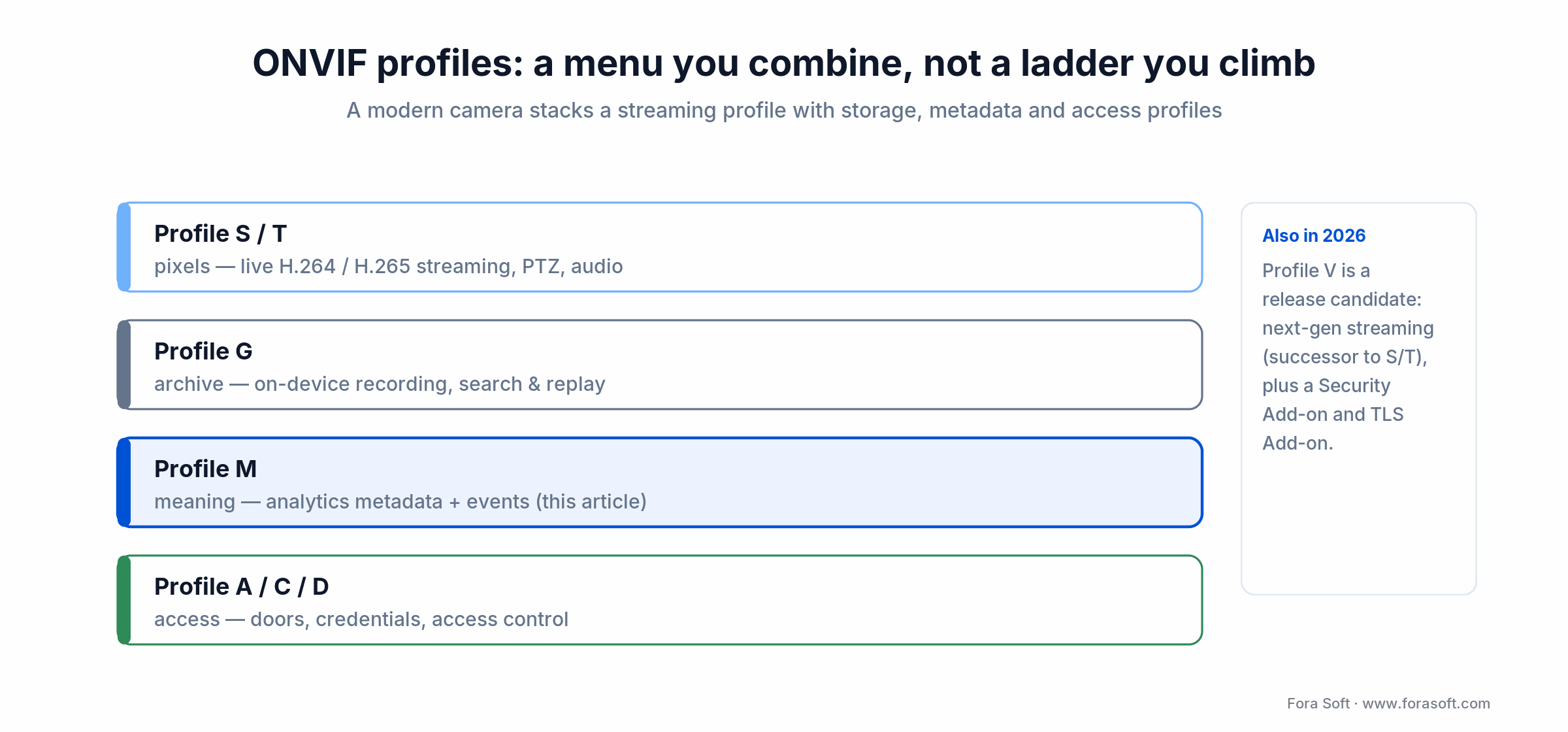
Figure 3. ONVIF profiles are a menu you combine, not a ladder you climb.
| Tier | Representative brands | Profile M status | Integration note |
|---|---|---|---|
| Enterprise IP cameras | Axis, Bosch, Dallmeier, Hanwha, Pelco | Broad; select model families certified. | Rich metadata, MQTT on most 2023+ firmware. |
| VMS platforms | Milestone XProtect, Genetec, Avigilon | Consumption ahead of production. | Milestone XProtect is Profile M conformant (tested August 2022; Professional+, Expert and Corporate editions); check others per release. |
| Mid-tier IP cameras | Vivotek, Lorex, i-PRO | Partial, many models. | DoC varies widely; validate per model. |
| Budget / high-volume | Hikvision, Dahua, Reolink, Uniview | Rare; mostly proprietary. | Expect ISAPI/SDK integration, not Profile M. |
| Cloud / VSaaS | Eagle Eye, Verkada, Spot AI | Ingest ONVIF video; Profile M metadata support is limited. | Expect the platform’s own analytics; confirm metadata import before you buy. Profile V (cloud) is the profile to watch here. |
Bottom line: in any mixed fleet that includes Hikvision or Dahua, you still need a proprietary SDK path for at least part of the system. US buyers have a second reason to plan that path as a migration rather than a permanent adapter: Hikvision and Dahua have been on the FCC Covered List since 2021, NDAA Section 889 bars their equipment from US federal procurement, and FCC restrictions on devices built with certain Covered-List components took effect in October 2026 (Caixin, October 2026). Our AI-powered IP camera trends piece goes deeper on the SoC roadmap behind these differences.
How many people or plates can a Profile M camera actually recognize?
This is the most common question buyers ask, and it has nothing to do with Profile M. Profile M standardizes how detections travel. Capacity is determined by five hardware and scene factors:
1. Sensor resolution and pixels-on-target
The surveillance standard IEC 62676-4 uses pixel density on target: about 250 px/m to identify a person and 125 px/m to recognize a known one. Worked example: a 4K (3840 px wide) sensor with a 60° horizontal field of view covers an 11.5 m wide scene at 10 m, or about 330 px/m — identification grade across the frame; a 2 MP (1920 px) sensor at the same distance gives about 165 px/m, recognition only. License plates typically need 130–200 pixels across the plate width; use your ANPR vendor’s figure. The physics do not care what metadata protocol is used.
2. Analytics SoC horsepower
Axis ARTPEC-9, Ambarella CV25/CV52-class SoCs and NVIDIA Jetson Orin modules (in edge boxes and analytics servers) all show up in Profile M deployments. Low-end SoCs cap out at 20–40 simultaneous detections; high-end ones exceed 200. The DoC will not tell you this — check the product datasheet, or ask the vendor.
3. Frame rate and motion
Vehicles at 60 km/h traverse a typical FOV in under a second. At 15 fps the plate is blurred in most frames; at 30–60 fps with a fast electronic shutter you get usable ALPR reads. Frame rate and shutter speed trade against low-light sensitivity — the vendor datasheet will spell this out.
4. WDR, IR and low-light behavior
Shadowed entrances and backlit doorways kill face detection faster than any code. 120 dB WDR, starlight sensors, and IR illumination are the usual fixes. See our write-up on real-time video processing with AI for scene-level recommendations.
5. Confidence threshold
Every analytics module is configurable. Lower the threshold and capacity climbs — with a matching rise in false positives and MQTT load. For retail heatmaps we typically run at 0.55; for access control at 0.85; for LPR plate text at 0.80 after cross-validation.
Reference architecture for a Profile M-native VMS
This is the blueprint we use when a client asks Fora Soft for a VMS that is Profile M-native from day one. It is deliberately simple; the complexity lives in the adapters. The analytics that feed it usually come from our computer vision for video surveillance work, so the metadata schema and the detectors are designed together.
1. Edge layer. Profile M cameras (Axis, Bosch, Dallmeier) publish RTP metadata and MQTT events. For non-Profile-M cameras (Hikvision, Dahua) run a thin analytics integration gateway that translates proprietary SDKs into Profile M JSON.
2. Broker. Mosquitto cluster on 2 Hetzner AX-52 servers for in-region deployments; AWS IoT Core for multi-region clients. TLS 1.2 or newer (1.3 where camera firmware supports it) plus client certs.
3. Metadata store. TimescaleDB (on top of PostgreSQL) for time-series event indexing; S3 / Backblaze B2 for ONVIF Scene Description XML blobs keyed by camera ID and timestamp. Retention 30–180 days on hot storage depending on vertical.
4. VMS core. Stream manager (GStreamer + Janus) for video; event router for metadata. Web client streams video via WebRTC; metadata via WebSocket overlays.
5. Analytics bus. Kafka or NATS internally; downstream consumers are the search service, alerting service, and BI pipelines.
6. Clients. Web, iOS, Android; see our Android SDK for video surveillance breakdown for the mobile side.
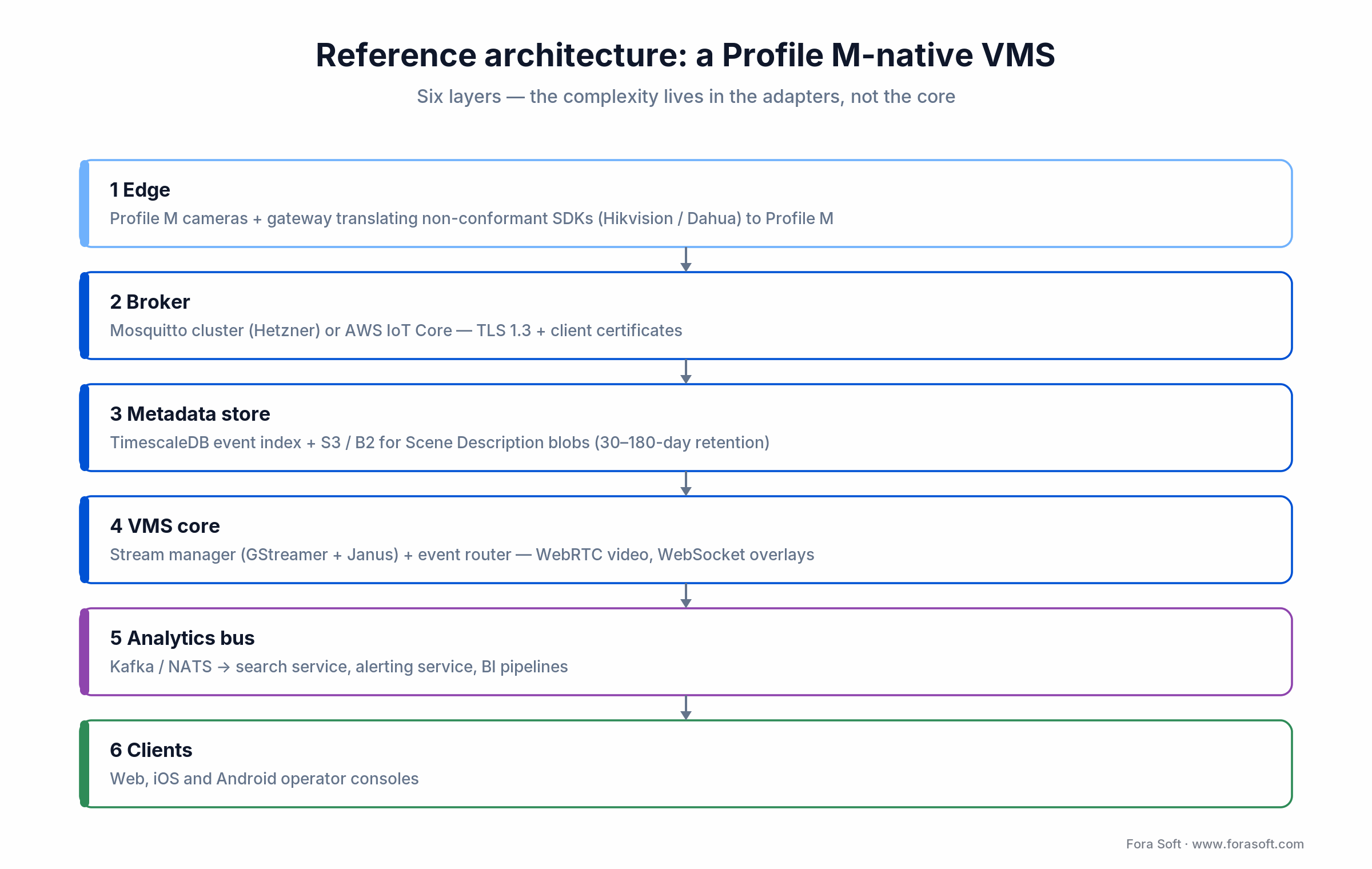
Figure 4. The Profile M-native VMS reference architecture Fora Soft ships from.
Reach for a Profile M-native VMS when: your roadmap includes at least two camera vendors and downstream BI or SCADA consumers. Skip it if you are locked in with one vendor and only the security team will ever look at the stream.
Five production use cases where Profile M pays off
License plate recognition at the gate
Profile M emits a LicensePlate object with bounding box, plate text (optional), and a confidence score. A dual-camera setup (one for scene context, one with LPR-tuned optics) is common. We typically cross-validate plate reads against a secondary ALPR server because optional plate-text fields do not carry guarantees on OCR accuracy. When the camera’s own OCR is not good enough, our AI video recognition software team builds the server-side ANPR and face pipeline that consumes Profile M detections and returns verified reads to the VMS.
Building access control with face triggers
Profile M does detection, not 1:N face recognition. The common pattern is: camera detects a Face and exports the crop via ONVIF or RTSP snapshot, a downstream face recognition service (in-house or a vendor benchmarked in NIST FRTE) resolves the identity, Profile C opens the door. Keeping the face template DB outside the camera is both a privacy and a maintainability win.
Retail heatmaps and queue analytics
Object IDs + timestamps + bounding boxes are enough to build dwell-time heatmaps, aisle-to-aisle funnels, and queue length graphs. MQTT JSON plays directly into BI tooling (Grafana, Looker). For a deeper look see our piece on retail video analytics.
Perimeter and intrusion detection
Line-crossing and zone-intrusion rules in the camera’s rule engine, published as Profile M events, feed a central alerting service. Combined with classical AI-based anomaly detection, this covers 80% of typical perimeter workflows.
Industrial safety compliance
PPE detection (hard hats, hi-vis vests, gloves) is increasingly shipped as a Profile M analytics module on industrial-grade cameras. We have built this for construction and oil and gas clients; a read-through of hard-hat detection in video surveillance and machine-learning algorithms for surveillance anomalies captures the ML-side decisions.
Mini case — multi-vendor fleet, one Profile M backplane
Situation. A regional physical-security integrator came to us with a 240-camera estate spread across three office campuses: Axis P-series on the perimeter, Bosch Flexidomes indoors, and a legacy rack of 60 Hikvision DS-series that had to live out its warranty. Three SDKs, three event models, and a monitoring team that was about to hire two extra operators just to babysit the dashboards.
The 10-week plan. Week 1–2: DoC audit of every Axis and Bosch model, Hikvision triage (no Profile M). Week 3–5: Profile M consumer for Axis/Bosch plus an ISAPI→Profile M gateway for the Hikvision rack. Week 6–7: MQTT broker (Mosquitto cluster on Hetzner), Timescale metadata store, search API. Week 8–9: operator console integration, NTP governance, alert rules. Week 10: acceptance, load test, runbooks.
Outcome. End-to-end alert latency dropped from ~3.2 s to under 900 ms, 30-day metadata search queries returned in < 1 s p95, and the ops team stopped maintaining three separate vendor plugins. No extra operator headcount was needed. For similar multi-vendor fleet stories, see our scalable VMS engineering decisions piece.
Tooling that makes Profile M work in practice
ONVIF Device Manager. Free Windows tool, still the fastest way to sanity-check a new camera. Will show you the metadata stream, the analytics service, and the event topics without a line of code.
gSOAP + onvif-sdk. For a production C/C++ consumer, generate your WSDL bindings with gSOAP; Python shops usually reach for the onvif-zeep library. Expect to maintain a local copy of the WSDLs — resolving WSDL/XSD imports online is brittle.
onvif2mqtt / onvif-mqtt. Open-source bridges that translate ONVIF XML events to MQTT JSON. Good as a reference; bring your own error handling and auth before putting it near production.
MQTT Explorer. GUI MQTT client for inspecting topics and payloads live. Essential when you are debugging the event-storm moment.
ONVIF conformance test tool. Vendor-only, but if you are building a device you will live in it. ONVIF reference implementations (Happytime ONVIF Server, for example) are useful for test benches.
Wireshark + RTP dissectors. When Scene Description XML looks broken, the RTP payload is where the truth is. Keep a tcpdump runbook handy.
Five integration challenges Profile M does not fix
1. Metadata is not archived by default. Most VMS platforms record video, discard the metadata stream, and then wonder why forensic search is useless a week later. Configure parallel metadata archival (we typically use JSON sidecar files plus a Timescale index) before you bring anything live.
2. Class taxonomies drift. Axis “Human”, Hanwha “Person”, Bosch “Pedestrian” — same thing, different strings. Maintain a mapping table and log unknown classes; you will want to know when a firmware update quietly introduces a new one.
3. Time sync is assumed, not enforced. Profile M does not mandate NTP. A 900 ms drift between camera and VMS makes metadata look like it belongs to a different frame, and investigators start doubting the system. Enforce NTP with <100 ms target accuracy and alert on drift >500 ms.
4. Optional features silently differ. Two cameras from the same vendor on the same line can ship different optional features depending on firmware SKU. Always test the DoC-declared feature set on the exact hardware revision, not a demo unit.
5. Rule engines are not interchangeable. Line-crossing rules configured on an Axis camera are not portable to a Bosch camera — Profile M standardizes the event output, not the rule authoring format. Build your configuration in a vendor-agnostic model and compile down to each camera’s rule API.
What a Profile M VMS really costs to integrate
These are the engineering estimates we give clients before kickoff. Numbers assume our Agent Engineering-accelerated workflow; non-accelerated teams should expect 40–60% more hours.
| Workstream | Fora Soft hours | Scope |
|---|---|---|
| Profile M consumer (discovery, auth, WSDL) | 80–130 | WS-Discovery device onboarding, metadata stream parsing, analytics service configuration. |
| MQTT bridge + schema mapping | 30–60 | Broker config, TLS, topic taxonomy, JSON mapping, deduplication. |
| Metadata archive + search | 60–100 | TimescaleDB schema, S3 blob store, REST search API. |
| NTP + calibration tooling | 20–40 | Drift monitoring, bounding-box calibration UI, geofence editor. |
| Proprietary-SDK adapters (per brand) | 40–80 | Hikvision ISAPI / Dahua SDK / Axis VAPIX bridged into Profile M. |
| Total for a production Profile M VMS | ~230–410 | Excludes general VMS features (video, user, storage, reports). |
Typical camera hardware cost bands we see on BOMs: $400–$800 for entry-level Profile M (basic detection, no MQTT), $900–$1,800 mid-tier (face/plate + MQTT), $2,000–$4,000+ for high-resolution analytics cameras with WDR, IR, and on-device rule engines.
Need a tight estimate for your Profile M VMS?
Send us your camera shortlist, target architecture, and deployment size. We will come back with a fixed-scope Phase 0 in 2–3 business days.
A decision framework — when to mandate Profile M in five questions
Q1. Will the camera fleet be multi-vendor? If yes, weight the decision strongly toward Profile M. If you are single-vendor for the foreseeable future, the native SDK usually exposes more features faster.
Q2. Will multiple systems consume the same analytics stream? VMS + BI + access control + SCADA = Profile M + MQTT. Single VMS only = Profile M events or even proprietary events is fine.
Q3. Is the feature set flexible? If you need face recognition, Profile M alone is not enough — you will add a recognition service. If you need only detection + events, Profile M covers the use case cleanly.
Q4. Do you have integrators comfortable with SOAP / gSOAP / MQTT / RTP? SOAP and RTP are legacy stacks for most web teams. If the team is JavaScript-only, budget extra hours for the on-ramp.
Q5. Do you control firmware upgrades? If yes — a tight change-control regime — Profile M conformance locking is easy. If firmware is upgraded ad-hoc by field techs (common), plan for a staging rig that revalidates DoC features before rollout.
Three or more “yes” answers — adopt Profile M. Fewer — stick with a vendor-native approach and re-evaluate at the next hardware refresh.
Five pitfalls that sink Profile M projects
1. Treating the Profile M badge as a feature list. The badge says “we passed a conformance test with a specific firmware”. It does not say the camera supports plate OCR, MQTT, or geolocation. Always read the DoC.
2. Under-specifying confidence thresholds. Leaving defaults on in a busy scene floods the broker, the store, and the alerting UI. Set class-specific thresholds and monitor the event rate from day one.
3. Forgetting the metadata archive. Six months into production, the SOC asks “what was in that zone at 02:14 last Tuesday?” and gets video with no metadata overlay. Design the archive before go-live, not after.
4. No NTP governance. Every camera and every server on its own NTP policy = clock drift. Standardize on a single stratum-1 source and alert on drift.
5. No plan for non-conformant cameras. In any real deployment with more than 20 cameras, at least one will be non-conformant or off-spec. Build the gateway layer up front instead of scrambling later.
KPIs: what to measure on a Profile M pipeline
Quality KPIs. Recall ≥ 0.85 on object classes in scope; precision ≥ 0.80; class confusion rate ≤ 5%. Validate quarterly with labelled test sets per site, not once at commissioning.
Business KPIs. End-to-end alert latency (camera detection → operator console) < 1 s; search query latency over 30-day metadata < 2 s at p95; false-alarm acknowledge rate in the SOC < 3%.
Reliability KPIs. Metadata stream uptime ≥ 99.5% per camera per month; NTP drift < 100 ms p99; MQTT broker throughput headroom ≥ 30% above peak observed.
When Profile M is the wrong answer
Profile M is not free. It adds a WSDL learning curve, a metadata archive, a class-mapping service, and an operations burden (DoC governance, NTP). Skip it when:
Single-vendor deployment. A Milestone + Axis or Genetec + Hanwha setup gets more features out of the native driver. Profile M is insurance for vendor flexibility.
Sub-10 camera projects. The overhead of Profile M plumbing does not amortize over small sites. Stick with RTSP + events and a single analytics container.
Consumer-grade or “cloud-camera” products. If you are building a product where the camera is bundled with a cloud backend (think Ring or Nest territory), Profile M adds rigor you will not use; a proprietary protocol is lighter.
Ultra-low-latency alerting. For sub-100 ms alerting (trading floor surveillance, perimeter intrusion at critical facilities), direct WebRTC + in-band alarm metadata can beat the Profile M path. Use Profile M for archive and BI, not the hot path.
Reach for a proprietary SDK when: you need a specific advanced feature (best-in-class LPR, face search, behaviour analytics) that only one camera vendor ships, and you are ready to accept vendor lock-in on that path.
FAQ
What is ONVIF Profile M?
ONVIF Profile M is the ONVIF profile for analytics metadata and events. It standardizes how cameras and analytics servers stream object metadata, publish detection events (including over MQTT) and expose analytics configuration to VMS, NVR and cloud clients. It was released on June 30, 2021; the current specification is v1.1 (2024).
What does the end of Profile S mean for Profile M cameras?
Nothing breaks in deployed systems: existing Profile S products stay conformant until the vendor withdraws the DoC. But the June 2026 ONVIF test tools are the last for new Profile S claims, and support ends on March 31, 2027, so specify Profile T as the streaming profile next to Profile M.
What is ONVIF Profile V and does it replace Profile M?
No. Profile V, a release candidate since July 2026, covers cloud video: the device connects outbound to a cloud VMS, streams live video over WebRTC, sends events and uploads encrypted recordings. It can be combined with other profiles; analytics metadata stays the job of Profile M.
Is “ONVIF compliant” the same as “Profile M compliant”?
No. ONVIF compliance is broad; it can mean Profile S (streaming), G (storage), T (advanced streaming), C (access control), M (metadata), D (access control peripherals), or A (access control configuration). Profile M compliance is a specific subset for metadata and analytics. A camera can be ONVIF compliant without ever passing Profile M.
Does Profile M require Profile T or Profile S?
Profile M itself does not require a streaming profile, but in practice, every camera you would actually buy ships Profile M together with either Profile T or Profile S so that a client can pull video and metadata with the same toolkit. The ONVIF spec treats Profile M as layered on top of whatever streaming profile the device implements.
Is MQTT mandatory in Profile M?
No. MQTT event handling is a conditional feature in Profile M v1.1: mandatory only for devices that claim it, and then both mqtt and TLS-secured mqtts transports are required. Pull-point events over the ONVIF event service are conditional too; only metadata streaming and analytics configuration are mandatory. Check the DoC for MQTT before you architect an IoT pipeline around it.
Can I do facial recognition with Profile M alone?
Only detection, not 1:N recognition. Profile M can carry a face bounding box and, optionally, an opaque face descriptor. Turning that into an identity match requires a separate face-recognition service and template database. That is almost always how you want it anyway, for privacy and maintainability.
How do I know if a specific camera supports MQTT under Profile M?
Download the Declaration of Conformance from onvif.org/conformant-products and look for the MQTT event interface row. If it is ticked, the camera passed the conformance test for MQTT; if not, the feature is not guaranteed even if the marketing sheet lists “IoT ready”.
Does Profile M guarantee LPR plate text accuracy?
No. The plate-text attribute is optional, and the spec only standardizes how to carry the text and a confidence value — not how accurate the OCR is. OCR quality depends on the camera’s analytics module, resolution, angle, and lighting. For production ALPR, validate independently.
Does my VMS automatically archive Profile M metadata?
Most VMS platforms do not. They record video and sometimes index key events, but the full Scene Description metadata is discarded by default. If forensic search is in scope, configure a sidecar metadata store (we use TimescaleDB plus S3-compatible object storage for scene-description blobs).
How many cameras can one Profile M consumer handle?
In our deployments, a single consumer process on a modest VM (4 vCPU, 8 GB RAM) handles 60–120 cameras at typical event rates (< 20 events/s/camera). Past that, shard by camera ID across workers, and let the broker do the fan-out. Profile M event volume scales linearly with camera count and confidence thresholds.
Does upgrading firmware break Profile M conformance?
It can. Conformance is granted to a specific firmware build. Most vendors retest on major releases, but occasional regressions happen. Treat firmware upgrades like any other production change: test on a staging rig against your own ingestion pipeline, then roll forward.
What to Read Next
ONVIF deep dive
ONVIF Profiles in Security Systems
The companion guide to S, G, T, C, D, A — how each profile slots into a modern VMS.
Analytics
Object Recognition Camera Solutions with ML
Why the ML pipeline matters more than the protocol for detection accuracy.
IP camera trends
AI-Powered IP Cameras: Trends to Watch
The SoC and edge-AI roadmap that is accelerating Profile M adoption.
VMS design
12 Essential Features of a Modern VMS
Where Profile M support fits into the wider VMS feature matrix in 2026.
Ready to build Profile M into your product?
ONVIF Profile M gives multi-vendor surveillance systems something that took nearly a decade to materialize: a common language for detections and analytics events. The badge alone is not a strategy — the real work is reading DoCs correctly, specifying cameras by hardware and scene requirements, building a metadata archive, and keeping MQTT event storms in check. Done well, Profile M cuts integration from months to weeks and keeps the door open to every downstream analytics consumer you have not thought of yet.
Done badly, it becomes another line item that did not deliver. If you want to skip the learning curve, Fora Soft has already shipped the gateway, the consumer, the archive and the operational playbook across retail, smart-city, industrial, and enterprise security projects.



The handbook · 7 volumes
Fora Soft Video Engineering Handbook
Profile M gives every camera the same metadata language; what you compute from that metadata is an AI and video problem. Our seven-volume handbook covers the full stack from encoding and delivery to sound and AI; for a VMS, start with Volume 6 on detection, tracking, OCR and archive search, then Volume 1 for the H.264 and HEVC streams underneath. Written by Nikolay Sapunov, CEO at Fora Soft.
Browse the handbook on Amazon →7 volumes · 9,000+ pages · Kindle & paperback
Let’s turn Profile M into a product advantage
Bring your camera list, your integration goals, and any proprietary SDK pain you are living with. We will map the shortest path to a Profile M-native VMS.

