


Scaling a video management system from 100 to 10,000 cameras is not a bigger version of the same architecture. It is a different one. Scalable video management systems stand or fall on five engineering decisions: ingestion, storage tiering, the edge-versus-cloud compute split, transcoding, and auto-scaling policy. Get those five right and observability, compliance, and cost fall into place. Get any one wrong and the system buckles the day you cross 500 concurrent streams. This playbook is how we build them.
Key takeaways
• Five decisions, not five features. Ingestion mix, storage tiering, edge/cloud split, transcoding, and auto-scaling policy decide whether a VMS scales.
• Monolith to microservices stops being optional at ~500 streams. Ingest, storage, analytics, and the user plane each need their own scaling axis.
• Storage is 40–60% of the bill. A 7-day hot / 83-day warm tiering split cuts a 1,000-camera storage cost from ~$45k to ~$11k a month.
• Edge-first inference cuts upstream bandwidth 90–95%. Where a model runs matters more than which model it is.
• Scale on stream count and queue depth, not CPU. CPU is a lagging signal; by the time it spikes, streams are already dropping.
Why Fora Soft wrote this scalable VMS playbook
We have built video and surveillance software since 2005: 250+ projects, 50 in-house engineers, and one product that lives exactly at the scale this article is about. V.A.L.T. is our video management platform for regulated recording. It serves 770+ US organizations (police departments, universities, and behavioral-health clinics) with 50,000+ users and thousands of concurrent camera streams under HIPAA and CJIS retention rules.
This is the distilled version of what that taught us: the failure modes below are ones we have debugged at 3am, not ones we read about. If you are choosing whether to build, buy, or extend a video surveillance and VMS platform, the five decisions here are where the money and the risk actually sit. Everything downstream is a consequence of getting them right.
Read this if: you run more than 50 cameras or multiple sites, and a spreadsheet of camera counts has started turning into an architecture problem. Below ~50 cameras on one site, a packaged NVR is fine — this playbook is for the point where it stops being fine.
What makes a video management system scalable?
A video management system is scalable when each part of it grows on its own axis without forcing the others to grow with it. Concretely: adding 1,000 cameras raises ingest and storage load but leaves the search API untouched; a spike in operators watching live raises the media-router load but not the transcode queue. A scalable VMS separates those axes so you provision the one under pressure and pay for nothing else. A non-scalable VMS couples them, so one busy subsystem drags the whole platform, and the monthly bill, up with it.
That definition is the test we apply to every design review. If a proposed change makes two subsystems scale together that used to scale apart, it is a regression, however clean the code looks. The five decisions below are the load-bearing ones. Figure 1 shows where each sits on the path a frame travels from a camera to an operator’s screen.
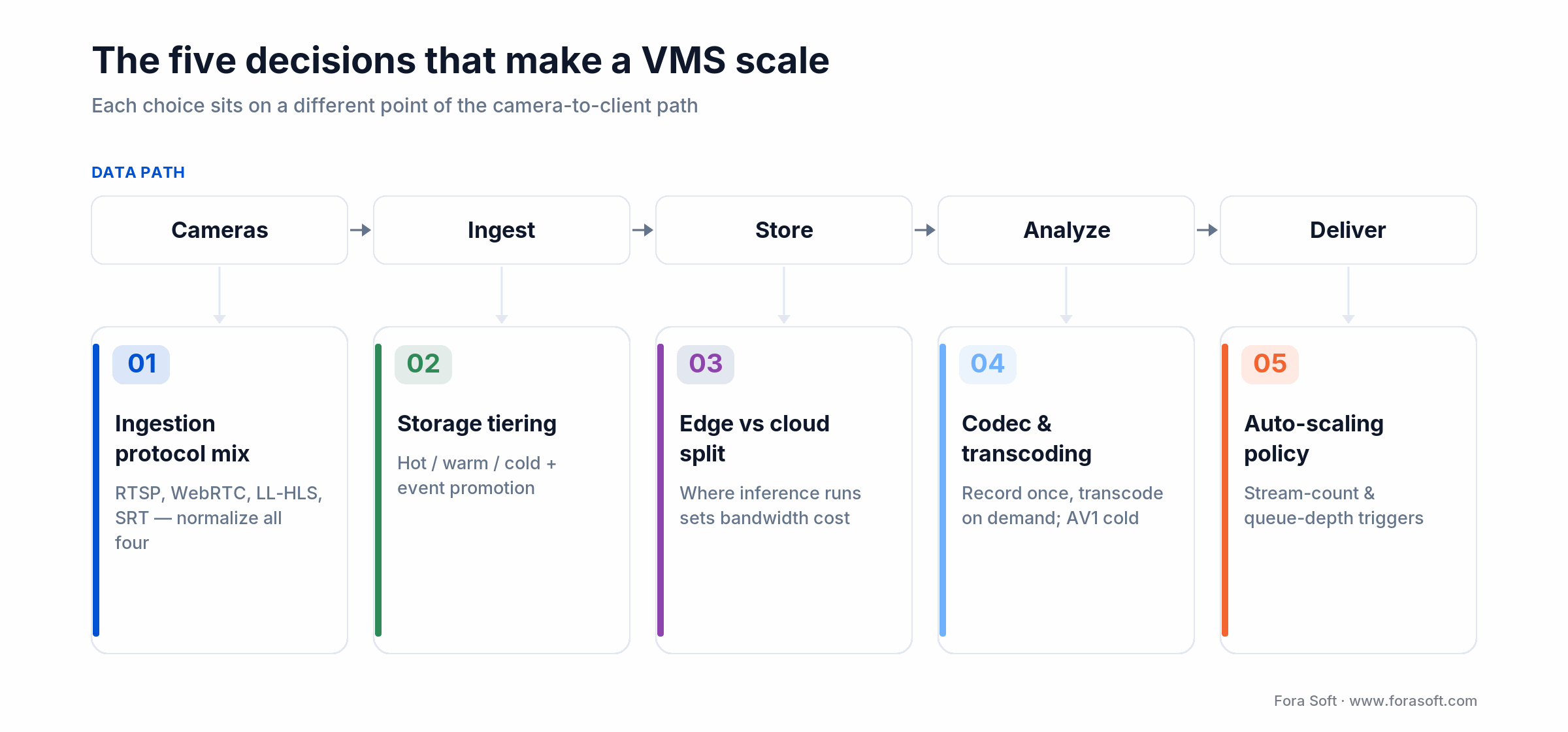
Figure 1. Each of the five decisions governs a different stage of the camera-to-client path.
Decision 1 — Ingestion protocol mix
Every camera and stream speaks one of four protocols. Supporting all four is the baseline; picking the right default for new onboarding is where the payoff is. You will not get to standardize on one. Camera vendors and viewer apps force you to carry them all.
| Protocol | Latency | Best for | Watch-out |
|---|---|---|---|
| RTSP | ~200–500 ms | Legacy IP cameras, LAN | NAT traversal pain; no default encryption (add SRTP/RTSPS) |
| WebRTC | ~80–200 ms | Live monitoring, operator dashboards | Complex SFU ops at scale |
| LL-HLS / DASH | ~2–4 s | Public viewer fan-out, CDN-backed | Not viable for interactive control |
| SRT / RTMP | ~1–3 s | Contribution feeds, remote cameras | Not browser-native (RTMP is EOL in Chrome) |
Our 2026 default for a greenfield build: WebRTC for operator live view, LL-HLS for public fan-out, RTSP for legacy camera ingest, SRT for wide-area contribution. Run all four through one media server that normalizes on the way in and re-packages on the way out — Flussonic, Wowza, or a custom Pion-based Go service. The normalization layer is the whole point: downstream services should never know or care which protocol a frame arrived on.
Standardize new onboarding on WebRTC when: operators need sub-second live view and you control the client. Keep RTSP as the fallback path — every camera speaks it, and you will need it for the 15% of hardware that never behaves.
Decision 2 — Storage tiering
Storage is 40–60% of total cost of ownership at scale, so this is the decision that quietly decides your margin. The mistake we see most: record everything at full bitrate to hot storage “just in case,” then hit the retention cliff six months in when the monthly bill doubles. Tiering is the fix, and it has four moving parts.
Hot tier — last 7 days
SSD-backed object storage (S3 Standard, GCS Standard) or local NVMe on-prem. Full bitrate, indexed by event and time, retrieval under 100 ms. This is where live review and incident response happen, and it is the only tier that needs to be fast.
Warm tier — 8 to 90 days
S3 Standard-Infrequent Access or GCS Nearline, re-encoded to roughly 35% of the hot bitrate unless a regulation mandates full fidelity. Retrieval in seconds. Event-tagged clips get promoted back to hot on demand, so an investigator never waits.
Cold tier — 90+ days
S3 Glacier Instant Retrieval for compliance-grade retention (HIPAA, GDPR, CJIS) without the hot-tier price. Data stays milliseconds-available but carries a per-GB retrieval fee on read, so it fits archives you rarely touch. For most workloads, 90% of the data lives here after 90 days and is never read again.
Event-triggered promotion
Anomaly detection, manual bookmarks, and case reports automatically promote the matching time windows back to hot storage. This is what makes tiering compatible with investigations: the cost model is cold, but the workflow feels hot on anything flagged.
Skip flat hot storage when: retention runs past ~30 days. Past that point a tiering policy pays for itself inside one billing cycle — the worked example below puts real numbers on it.
Decision 3 — Edge vs. cloud compute split
Where inference runs (on the camera, on an edge appliance, or in the cloud) is the single biggest driver of bandwidth cost and analytics latency. It matters more than which model you pick.
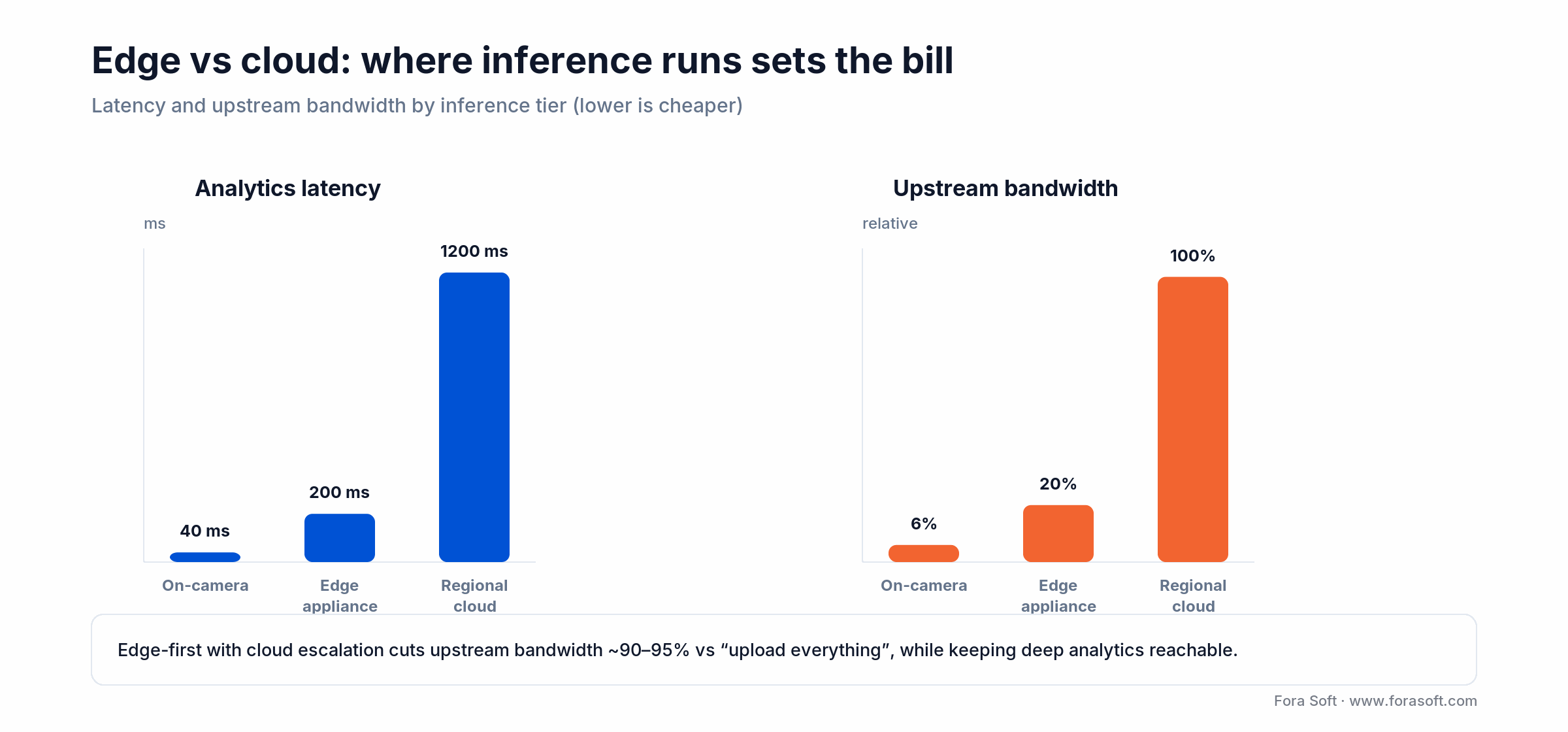
Figure 2. Latency and upstream bandwidth by inference tier. Pushing work to the edge collapses both.
| Location | Latency | Bandwidth | Model ceiling |
|---|---|---|---|
| On-camera | <50 ms | Lowest (metadata only) | YOLO-nano, MobileNet class |
| Edge appliance (local) | 100–300 ms | Low (LAN only) | YOLO-medium, ResNet, Whisper |
| Regional cloud | 500 ms–2 s | High (full stream upload) | Any — VLMs, large diffusion |
The pattern that wins in 2026 is edge-first with cloud escalation. On-camera models filter 99% of frames on motion and basic object class. Edge appliances run mid-size models on anything flagged. Only low-confidence clips escalate to a cloud anomaly-detection model for deep reasoning. That cuts upstream bandwidth 90–95% against a naive “upload everything” pipeline while keeping the deepest analytics reachable.
Run inference at the edge when: you have more than a handful of cameras per site and pay for egress. Treat on-camera AI as a free bonus, never the primary layer — most cameras ship a frozen inference chip you cannot retrain on your data.
Decision 4 — Codec and transcoding strategy
Transcoding is where a VMS quietly consumes unbounded compute. Two rules keep it sane, and one codec call keeps storage cheap.
Rule 1 — Record once, transcode on demand
Store the camera’s native codec (usually H.264 or H.265) at source bitrate. Generate lower-resolution variants only when a viewer asks, and cache them briefly. Pre-building a full adaptive-bitrate ladder for every camera is the fast path to a six-figure monthly compute bill.
Rule 2 — Offload to hardware encoders
NVIDIA NVENC, Intel Quick Sync, and Apple VideoToolbox each deliver 10–30× the throughput of CPU x264 at usable quality. On AWS, one g5.2xlarge handles 30–50 concurrent live transcodes that would need a c5.12xlarge on CPU. Budget it as a first-class line item, not an afterthought.
AV1 is ready — for the cold tier first
Hardware AV1 encode (NVIDIA Ada and Blackwell, Intel Arc, AMD RDNA4) now runs at real time. Per the Alliance for Open Media, AV1 gives roughly 30% bitrate savings over H.265 at equal quality — large money on a storage-dominated workload. The play: transcode warm- and cold-tier clips to AV1 on ingest rollover, and keep the hot tier in H.264/H.265 for decode compatibility with older client devices.
Reach for AV1 when: clips are aging into warm or cold storage and will rarely be decoded on legacy hardware. Keep hot-tier playback in H.264 so a ten-year-old browser or body-cam dock can still open it.
Decision 5 — Auto-scaling trigger policy
VMS load is spiky by nature: shift-end reviews, incident responses, scheduled archive pulls. CPU-based auto-scaling reacts too late — by the time CPU climbs, streams are already dropping. Two signals work better.
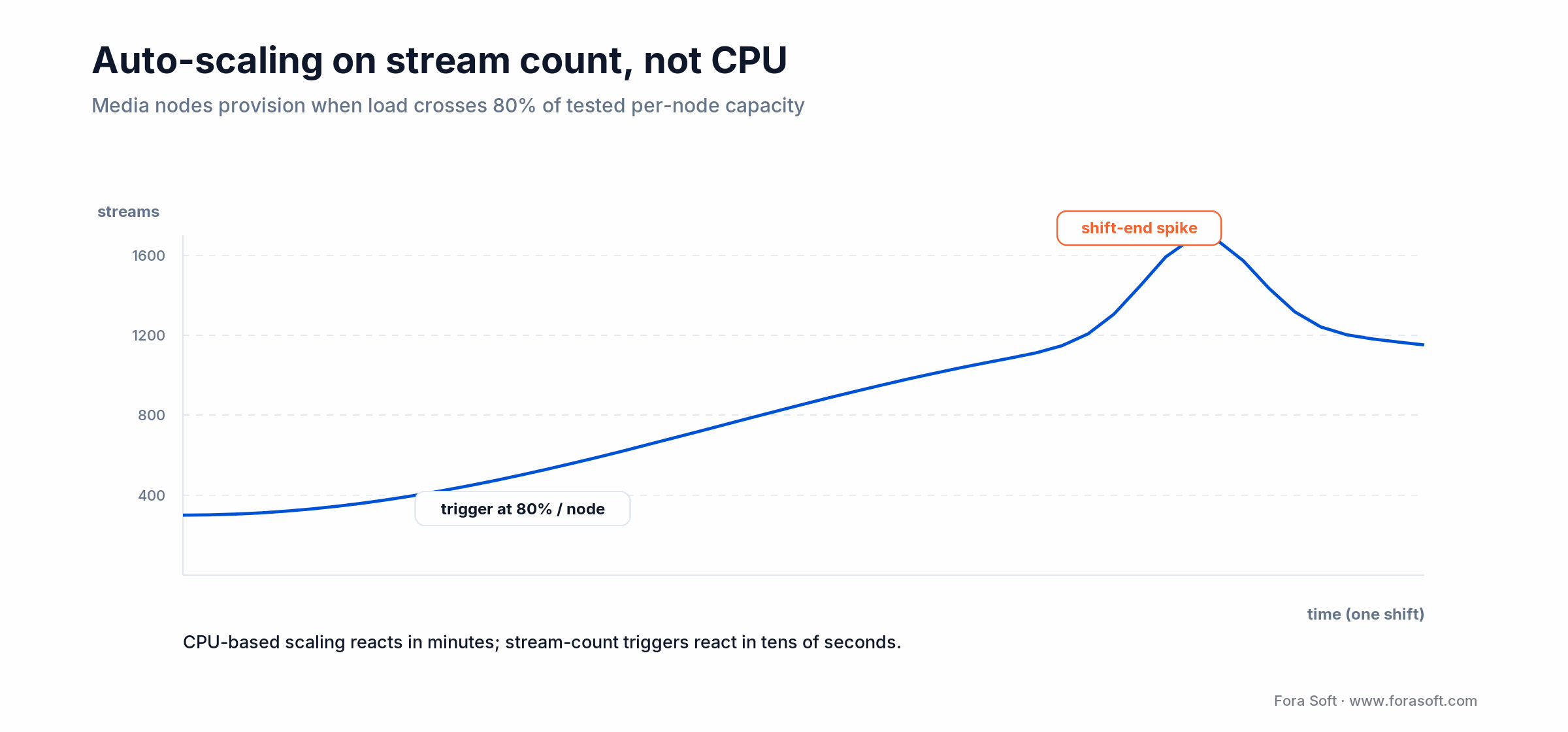
Figure 3. Provisioning on stream count fires tens of seconds before a CPU trigger would, ahead of the shift-end spike.
Trigger A — stream count per media node. When any media server crosses 80% of its load-tested stream-per-node capacity, provision a node and route new connections to it. This fires in tens of seconds, not minutes.
Trigger B — queue depth on transcode workers. Watch the backlog of pending jobs, not worker CPU. When queue depth exceeds a five-minute processing window, add workers; when it stays quiet for 15 minutes, scale down.
Pair those with spot instances for stateless transcode workers (they can die mid-job; the queue redrives) and reserved instances for stateful media servers. Typical saving: 40–60% on transcode compute against all-on-demand.
Not sure which of the five your architecture gets wrong?
Send us your scale target, compliance region, and camera mix. You will walk away from one call with a one-page gap analysis and a prioritized fix list.
The microservices decomposition that scales
Past ~500 concurrent streams, a monolithic VMS becomes a deployment liability: one bad release blocks live monitoring, storage, and user management at once. The decomposition we ship most often gives every service its own scaling axis, its own datastore, and its own deploy cadence. An event bus (Kafka or NATS JetStream) decouples them so a slow transcode worker never stalls the live path.
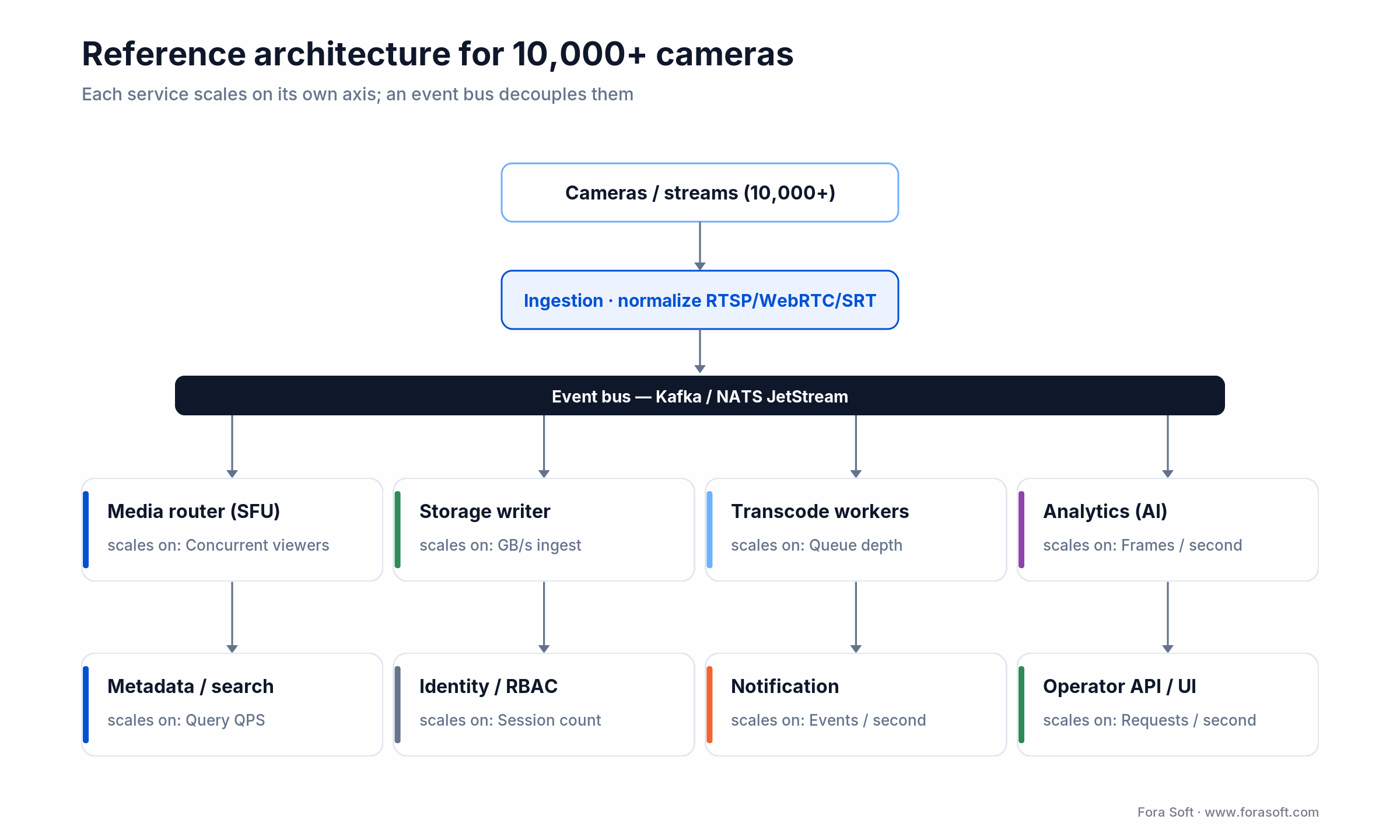
Figure 4. A reference architecture for 10,000+ cameras. Each service scales on the axis noted beneath it.
| Service | Responsibility | Scaling axis |
|---|---|---|
| Ingestion | Accepts RTSP/WebRTC/SRT, normalizes to an internal format | Stream count |
| Media router (SFU) | Routes live streams to operator clients | Concurrent viewers |
| Storage writer | Chunks, encrypts, writes to object storage | GB/s ingest |
| Transcode worker | Lower-resolution variants, AV1 warm-tier conversion | Queue depth |
| Analytics | Runs AI inference, emits events | Frames per second |
| Metadata / search | Indexes events and clips, serves queries | Query QPS |
| Identity / RBAC | AuthN, AuthZ, multi-tenant isolation | Session count |
The failure domain of a bad transcode-worker release no longer reaches live monitoring. Kubernetes plus a service mesh (Istio or Linkerd) plus event streaming is the usual 2026 substrate — but only past the threshold where it earns its operational cost, which the FAQ pins down.
Storage cost math: what 1,000 cameras really cost
Numbers make this decision concrete, so here is the arithmetic in full, at AWS S3 US list prices for 2026 (S3 pricing). One 2 Mbps 1080p stream writes 2 Mbps × 86,400 s = 21.6 GB per day. At 1,000 cameras and 90-day retention that is 1,000 × 21.6 × 90 ≈ 1.94 PB.
Flat on S3 Standard ($0.023/GB-month): 1,944,000 GB × $0.023 ≈ $44.7k per month.
Tiered 7-day hot / 83-day warm. Hot: 1,000 × 21.6 × 7 = 151,200 GB × $0.023 ≈ $3.5k. Warm, re-encoded to 35% bitrate on S3-IA ($0.0125/GB): 1,000 × 21.6 × 0.35 × 83 = 627,480 GB × $0.0125 ≈ $7.8k. Total ≈ $11.3k per month — about $400k saved a year from one tiering decision. Figure 5 charts the two side by side.
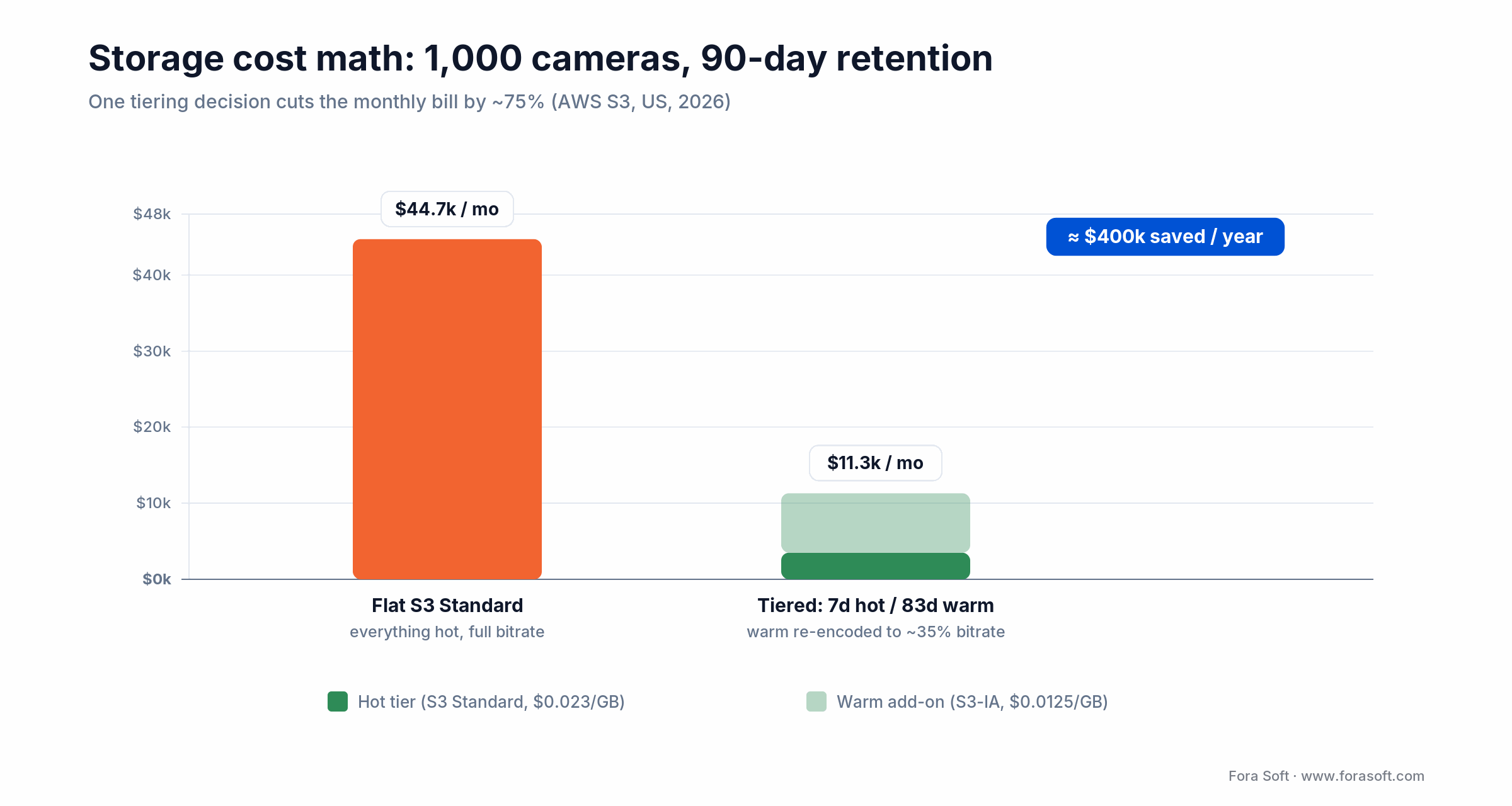
Figure 5. Flat storage versus a hot/warm tiering split, 1,000 cameras at 90-day retention (AWS S3, US, 2026).
For the oldest footage, Glacier Instant at $0.004/GB is about a third the price of Standard-IA, so extending retention to a full year with a cold tier adds roughly $8 per camera per month. The blended cost then lands near $20 per camera per month at one-year retention, versus the $45-plus a flat hot bucket would cost. We keep our development estimates conservative because we build with Agent Engineering, so the number you get is one we can actually hit, not a hopeful range.
Observability before scale, not after
The most painful scaling failures we have debugged share one cause: observability was bolted on after trouble, not designed in. Four telemetry surfaces have to exist before you cross 500 concurrent streams, or you are debugging blind past that point.
- Per-stream health metrics — frames ingested, bitrate delivered, packet loss, segment-publish latency — as Prometheus time series with a label per camera.
- End-to-end trace IDs that follow a frame from ingest through transcode to storage write, sampled with OpenTelemetry and pushed to 100% under investigation.
- Synthetic probes that pull a reference stream from each region and check playback latency, resolution, and decode integrity — these catch silent failures before any operator files a ticket.
- Storage access patterns — which cameras, time ranges, and users hit hot versus warm versus cold — so you can re-tune the tiering policy every quarter as the workload shifts.
Compliance is an architecture constraint, not a checklist
HIPAA, GDPR, CJIS, and sector rules (FERPA for education, PCI for retail) shape the architecture, not just the policy binder. The recurring requirements are encryption in transit (TLS 1.3) and at rest (AES-256-GCM with customer-managed keys), region-pinned storage so EU data never leaves the EU, append-only tamper-evident audit logs, and role-based access that reaches down to a single camera and time window.
Two patterns belong in v1 because retrofitting them is a months-long project: per-tenant encryption keys in a KMS, so a breach of one tenant’s data cannot cascade; and region-aware routing in the ingestion layer, so a camera on an EU network never has its frames routed through US infrastructure regardless of where the operator logged in. Shipping both at v1 costs a few engineering days. We learned that order the hard way, on V.A.L.T., where CJIS and HIPAA rules touch every recording.
Building under HIPAA, CJIS, or GDPR?
We have shipped VMS platforms that pass regulated audits in healthcare, education, and law enforcement. Book a call and we will map your compliance surface to concrete architecture constraints.
Case study: V.A.L.T. at 770+ organizations
V.A.L.T. is our video management platform for interview recording, training review, and clinical supervision. It runs at 770+ US organizations — police departments, universities, medical and behavioral-health facilities — with 50,000+ users and thousands of concurrent camera streams, and we have been its sole development team for over ten years.
How the five decisions shipped in it:
- Ingestion mix: RTSP and ONVIF for cameras, WebRTC for live operator review, SRT for remote contribution rooms.
- Storage tiering: a 7-day hot / 83-day warm / multi-year cold split for footage under CJIS and HIPAA, with event-triggered promotion wired straight into the case-management UI.
- Edge/cloud split: room-level edge boxes handle motion detection and participant tracking; the cloud handles transcription, speaker diarization, and cross-case search.
- Transcode: NVENC-accelerated H.264 for live playback, AV1 conversion at warm-tier rollover, cutting storage cost by about 35%.
- Auto-scaling: stream-count triggers for media nodes, queue-depth triggers for transcode workers, on a mixed reserved-plus-spot fleet.
The platform holds sub-200 ms live latency across US regions, and onboarding a new organization, often 50 to 500 cameras, is a same-day provisioning task, not a deployment project. That is the payoff of getting the five decisions right once: growth becomes configuration, not re-architecture. Want a similar assessment of your stack? Book a 30-min scoping call and we will walk your architecture against these five decisions.
Build, buy, hybrid, or open-source: the comparison
A decision grid for the four typical 2026 paths. Pick the row that matches your team size, regulatory surface, and time-to-value target — not the one that sounds most ambitious.
| Approach | Best for | Build effort | Time-to-value | Where it breaks |
|---|---|---|---|---|
| Buy off-the-shelf SaaS | Teams < 10 engineers, generic use case | Low (1–2 weeks) | 1–2 weeks | Vendor lock-in, customization limits |
| Hybrid (SaaS + custom layer) | Mid-market, mixed use cases | Medium (1–2 months) | 1–3 months | Integration debt, two systems to run |
| Build in-house | Enterprise, unique data or compliance | High (3–6 months) | 6–12 months | Engineering velocity, talent retention |
| Open-source self-hosted | Cost-sensitive, strong technical team | High (2–4 months) | 3–6 months | Operational burden, security patching |
If you are comparing named platforms rather than approaches, here is how the major VMS vendors line up against the five scaling decisions. We build the custom column; the others we have integrated against in the field.
| Platform | Deployment | Open standards | Edge AI | Scales best for | Watch-out |
|---|---|---|---|---|---|
| Milestone XProtect | On-prem / hybrid | ONVIF + RTSP | Partner add-ons | Large multi-site on-prem | Windows-bound, license sprawl |
| Genetec Security Center | On-prem / hybrid / cloud | ONVIF + RTSP | Native + partners | Regulated, unified security | Heavyweight, costly at small scale |
| Avigilon Alta / Unity | Cloud + on-prem | ONVIF (camera-centric) | Native on-camera | Camera-plus-VMS bundles | Best only inside Avigilon hardware |
| Eagle Eye Networks | Cloud-native VSaaS | ONVIF + RTSP | Cloud analytics | Multi-site, low on-prem ops | Bandwidth and egress at scale |
| Verkada | Cloud + proprietary cameras | Limited ONVIF | Native on-camera | Fast hybrid deployment | Vendor and camera lock-in |
| Custom build (our approach) | Any: edge, cloud, hybrid | ONVIF/RTSP + WebRTC/SRT | Your models, edge-first | Unique compliance or tenancy | You own the ops, or we run them |
Reach for a custom build when: compliance, multi-tenancy, or a specific analytics workflow is your product, not a feature you bolt on. If a packaged VMS feature set already covers you, buy it and spend the saved months elsewhere.
A decision framework in five questions
Five questions settle most build-versus-buy VMS debates faster than a month of meetings.
1. How many cameras in 24 months? Under 50 on one site, buy an NVR. Past a few hundred or multi-site, the five decisions here start deciding your cost structure.
2. What compliance regime? HIPAA, CJIS, or GDPR with customer-managed keys pushes you toward custom or hybrid; a generic SaaS rarely exposes the controls auditors ask for.
3. Is analytics your product or a feature? If search-by-event or a specific detector is the reason customers pay, own it. If you just need boxes-around-people, a packaged platform is fine.
4. What is your egress bill? If cloud egress already hurts, the edge/cloud split is your highest-ROI decision and argues for infrastructure you control.
5. Do you have a platform team? Kubernetes, a service mesh, and an event bus need care and feeding. No platform team means buy or hybrid, or hire one — that is the team we are.
Five pitfalls that break VMS at scale
1. Recording everything hot. The single most expensive default. Without a tiering policy, storage cost compounds until the finance team notices — usually right after a retention-policy change doubles it.
2. Splitting into microservices too early. Below ~500 streams, a premature microservice split adds operational overhead that a small team pays for daily and rarely recovers. Do it when deploy time crosses ten minutes, not before.
3. Trusting camera-vendor AI as the analytics layer. Frozen inference chips cannot be retrained on your data. Build on an edge box you control and treat on-camera AI as a bonus.
4. Auto-scaling on CPU. CPU is a lagging signal. By the time it climbs, the media node is already dropping streams. Scale on stream count and queue depth instead.
5. Bolting on compliance late. Per-tenant keys and region-aware routing are a few days at v1 and a multi-month migration afterward. Every regulated project we rescue skipped them at the start.
The KPIs that prove the architecture holds
Quality KPIs. Live glass-to-glass latency (target sub-200 ms on WebRTC), decode success rate per region from synthetic probes (target > 99.9%), and analytics false-alarm rate (tune until operators stop ignoring alerts).
Business KPIs. Blended storage cost per camera per month (about $11 at 90-day retention with tiering, ~$20 at one-year), transcode compute cost per 1,000 stream-hours, and time-to-onboard a new site (target same-day, not project-length).
Reliability KPIs. Availability on the live path (target 99.95%+), mean time to detect a silent stream failure (synthetic probes, not tickets), and recovery time after a single node loss (target zero dropped recordings via queue redrive).
When not to build a custom scalable VMS
Honesty sells better than a pitch, so here is when the answer is not us. If you run under 50 cameras on one site with generic monitoring needs, a packaged NVR or a cloud VMS subscription beats any custom build on both cost and time. If your requirements are wholly covered by an off-the-shelf platform and you have no compliance or analytics angle of your own, buying is the right call — do not pay engineers to rebuild a solved problem.
Custom scalable video management systems earn their cost when compliance, multi-tenancy, a specific analytics workflow, or an egress bill you cannot escape makes the packaged option the expensive one. If none of those is true today, bookmark this page and revisit it when one becomes true. It usually does.
Frequently asked questions
How many concurrent camera streams can one media server handle?
It depends on codec, resolution, and whether the server decodes or just relays. One Wowza, Flussonic, Janus, or Pion node on an AWS c5.4xlarge typically handles 200–500 concurrent 1080p H.264 streams in relay mode, dropping to 50–150 when decoding for AI or transcoding. Load-test your own number before you commit — vendor benchmarks run optimistic.
What is the realistic storage cost for a 1,000-camera VMS at 90-day retention?
About 1.94 PB of data. Flat on S3 Standard that is ~$44.7k a month; with a 7-day hot / 83-day warm split at 35% warm bitrate it drops to ~$11.3k, about $11 per camera per month. Extend retention to a full year with a Glacier cold tier and the blended cost lands near $20 per camera per month — still predictable enough to quote fixed-price.
When should we move from a monolith to microservices?
When deploy time passes ten minutes, or when one bad release has blocked live monitoring more than once. Both usually land between 300 and 700 concurrent streams. Migrating earlier just because it is “correct” adds overhead a small team pays for every day.
Do we need Kubernetes for a scalable VMS?
Below 1,000 concurrent streams in a single region, no — Docker Compose, systemd, and a load balancer are simpler and cheaper. Above 1,000 streams or across regions, Kubernetes turns net-positive because its auto-scaling, rollout, and service-discovery primitives start paying for their operational cost. Prefer managed EKS/GKE/AKS unless you have a strong platform team.
How do we handle multi-tenant isolation in a shared VMS cloud?
Three layers: per-tenant encryption keys in a KMS so object-storage data is cryptographically isolated; row-level security or per-tenant schemas in the metadata database; and RBAC enforced at the API gateway, not only in the UI. Tag every cross-tenant access attempt in an audit log. Never rely on application code alone — one bug becomes a cross-tenant breach.
Can we run the whole VMS on-premises?
Yes, and for some regulated workloads it is the only option. The five decisions still apply — you substitute MinIO or Ceph for S3, on-prem Kubernetes for EKS, and physical NVENC GPUs for g5 instances. Budget two to three times the engineering effort for platform bring-up and ongoing operations; the logical architecture is unchanged.
Is AV1 worth adopting for surveillance video in 2026?
For warm and cold storage, yes — roughly 30% smaller than H.265 at equal quality, which is real money on a storage-dominated workload, and hardware encode now runs at real time on recent NVIDIA, Intel, and AMD silicon. Keep the hot tier in H.264 so older client devices and body-cam docks can still decode without a fallback path.
What to read next
VMS features
12 Essential Features of Modern VMS Software in 2026
The feature surface a scalable VMS should expose once the architecture underneath is right.
Security
Secure Cloud Video Management: The Architecture View
How encryption, key management, and tenancy fit the tiered storage model above.
AI analytics
Anomaly Detection Models for Video Surveillance
The models that run in the analytics service — and where each one runs best.
Streaming
Scalable Enterprise Video Streaming With MDM
The delivery-side companion when your VMS also fans out to managed devices.
Scalable VMS: five decisions, not five features
Scalable video management systems are not won by the best camera vendor or the biggest cloud region. They are won by making five architectural decisions early (ingestion, storage tiering, the edge/cloud split, transcoding, and auto-scaling) and building observability and compliance into the foundation instead of bolting them on.
The platforms that reach 10,000+ cameras are not the ones with the most features. They are the ones whose founding team got these five right on day one, so everything after was configuration. If you are at the point where camera counts are turning into an architecture problem, that is exactly the conversation we like having.
Building or scaling a VMS?
We have shipped VMS platforms from 100-camera pilots to 10,000+ camera production. Book a call and we will validate your plan or flag the two things most likely to break at scale.

