


Pick the wrong VMS software and you inherit a decade of pain: cameras you cannot swap, footage no court will accept, and a storage bill that grows faster than your headcount. This guide covers the 12 features that separate real video management software in 2026 from a glorified DVR — written by the team at Fora Soft, which has shipped surveillance and real-time video platforms since 2005. (We mean VMS in the video-surveillance sense — the software that ingests cameras, records, and runs analytics — not the OpenVMS operating system or the staffing tools that share the acronym.) Get these right and you compress incident response from roughly 18 minutes of manual scrubbing to under a minute. Skip them and your team is still paying operators $8–15 an hour to watch dead air.
Key takeaways
• AI analytics is table stakes now, not a premium add-on. Edge inference clears 95%+ accuracy on people and vehicles and cuts alert fatigue sharply — it pays back in operator hours inside a quarter.
• Open beats locked-in — and Profile T is the 2026 bar. ONVIF Profile T (not S) is the modern baseline: it brings H.265-capable streaming, analytics and events into scope, so you can mix Axis, Hanwha and Bosch without rip-and-replace.
• Hybrid storage is the only sane economics. Hot on local NVR, warm on NAS, cold in S3 or Azure cuts 3-year TCO by 35–50% versus all-cloud.
• Compliance is a feature, not a checkbox. GDPR, HIPAA, CCPA and the FCC Covered List (Hikvision, Dahua) all have teeth in 2026. Build them in or pay for it later.
• Custom VMS software only pays off above a threshold. 10,000+ cameras, proprietary analytics, regulatory isolation, or a hyper-vertical workflow. Below that, a tuned Genetec or Milestone deployment usually wins.
Why Fora Soft wrote this playbook
Fora Soft is a software development company founded in 2005. We have shipped 250+ projects in 21 years, with video surveillance and real-time video as core verticals. We have built VMS software that US police departments trust on the witness stand — V.A.L.T., a forensic-grade interview recording system used in law enforcement and academic research. We shipped Netcam Studio, a multi-camera VMS web UI that speaks ONVIF to dozens of IP camera brands in production. And we built the aerial surveillance pipeline for DSI Drones, where the AI classifies targets from a moving camera in real time.
We run AI agents on every engagement now. Our AI integration practice compresses delivery enough that we stand up a working VMS prototype in weeks, not quarters. So treat this as a build spec, not a marketing roundup. Every feature here is something we have integrated, debugged, or ripped out and replaced in production. When you are ready to compare notes, our computer-vision-for-surveillance team does this weekly.
Building or modernizing VMS software in 2026?
A 30-minute call with our video surveillance team. Bring your camera count, your compliance footprint, and your top three pain points. You leave with a prioritized roadmap.
The 2026 VMS market in numbers
A quick map of where the category sits. The video management software (VMS) market is worth roughly $6.0–6.9B in 2026 and compounding at 17–19% a year through the early 2030s, per SkyQuest and Market Research Future. North America holds about 41% of spend, Asia-Pacific about 33%. The structural shift underneath those numbers matters more than the headline: analytics moved from premium to baseline, and cloud-managed deployments are growing about 16% a year while pure on-prem shrinks.
| Metric | 2024 | 2026 | Note |
|---|---|---|---|
| Global VMS market size | ~$4.5–5.0B | $6.0–6.9B | 17–19% CAGR |
| Deployment mix (on-prem/hybrid/cloud) | 68 / 20 / 12% | 58 / 28 / 14% | Cloud share rising fastest |
| Regional share (NA / APAC) | — | 41% / 33% | Global Growth Insights |
| Avg incident response | ~18 min (manual) | under 1 min (AI) | Manual triage still 8–25 min |
| Banned-vendor exposure | rising | FCC Covered List | Hikvision, Dahua, Hytera |
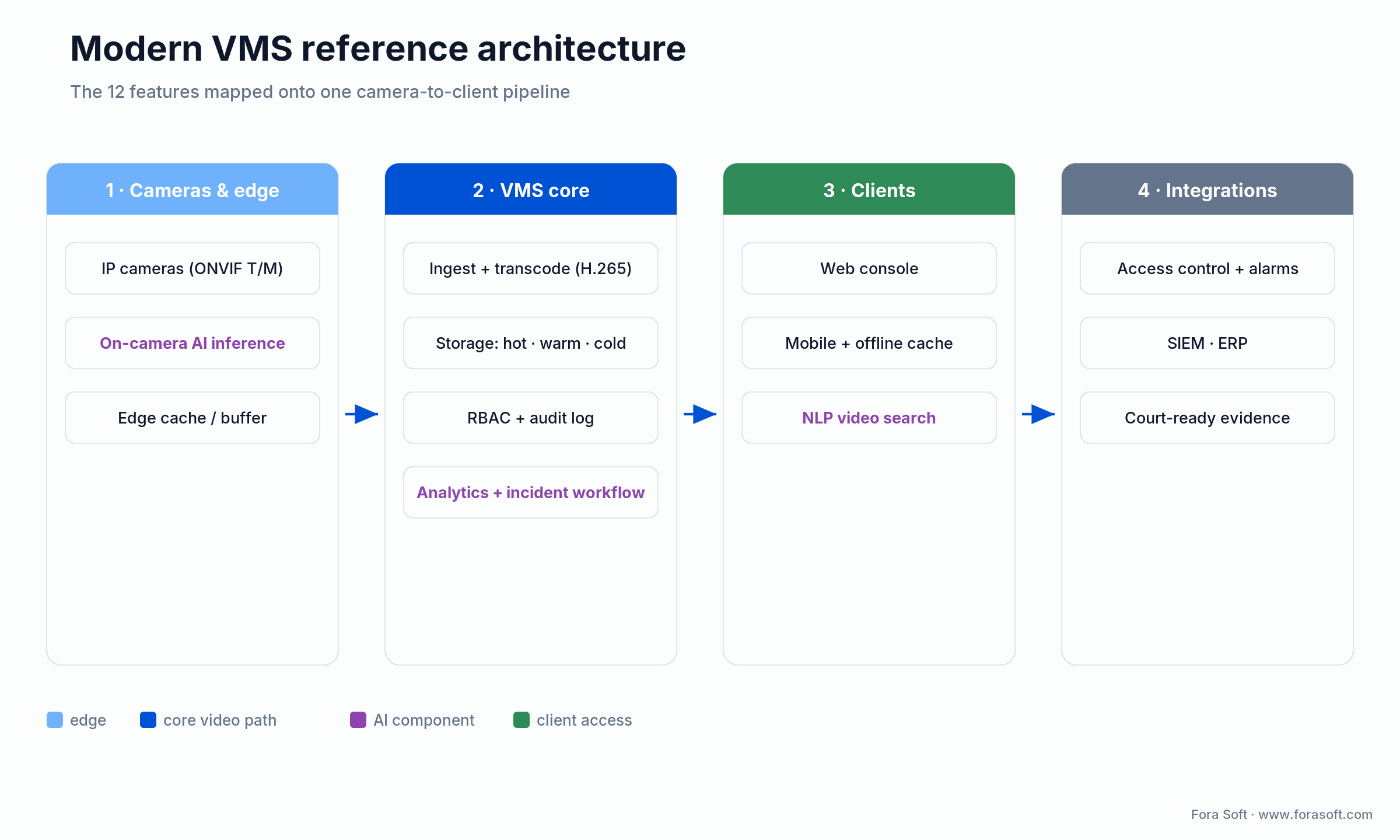
Figure 1. The whole article on one page: the 12 features mapped onto a camera-to-client VMS pipeline.
The rest of this guide walks that pipeline left to right: what to demand at the camera and edge, what the VMS core has to do, how clients and integrations close the loop, and where the money actually goes.
Feature 1 — AI-powered video analytics
Real-time object detection (people, vehicles, packages, weapons), behavior classification (loitering, tailgating, crowd density), and anomaly flagging — without the false-positive flood that motion-trigger systems generate. Modern engines hit 95–99% accuracy on pedestrian and vehicle classification at 200–500 ms end-to-end alert latency on edge SoCs like the Axis ARTPEC-8 or Hanwha Wisenet 7.
Why it matters in 2026. Human review runs $8–15 an hour per operator, and every false alert burns that time. Good analytics cut the false-positive load and drop average incident response from ~18 minutes to under one. Cost: $2,500–8,000 one-time for an edge analytics engine, or $0.50–2.50 per camera per month on SaaS. The catch: accuracy numbers on a vendor slide are measured on clean daytime footage — test on your worst camera, at night, in rain, before you sign.
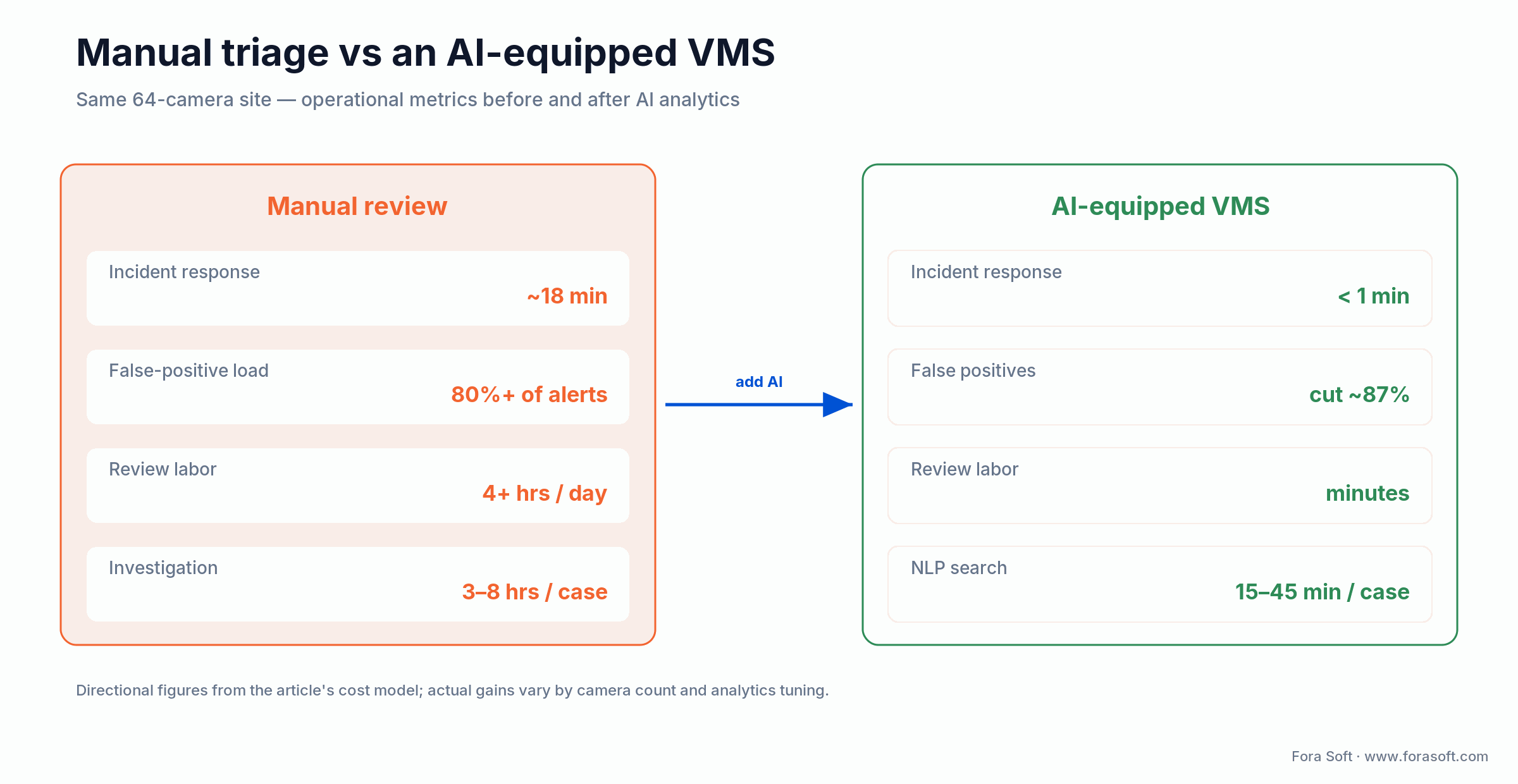
Figure 2. The same 64-camera site before and after AI analytics, and where the operator hours actually go.
Reach for AI analytics when: your team spends more than 4 hours a day on video review, or your motion-alert false-positive rate is north of 80%. Below that, tuned motion zones may be enough.
Feature 2 — Open architecture and ONVIF
ONVIF is the standard that lets a Genetec server talk to an Axis camera, a Hanwha NVR and a Bosch encoder without proprietary firmware. Here is the 2026 correction most listicles miss: Profile T, not Profile S, is the modern baseline. Profile S only covers H.264 streaming, PTZ and basic motion events. Profile T raises the bar to H.265-capable streaming, imaging control, analytics and event subscription — the things a serious VMS actually needs (PTZ and two-way audio stay conditional, required only when the hardware has them). Pair it with Profile M for analytics metadata (bounding boxes, human/vehicle/face/plate classes, line-crossing and counting events) and Profile G for edge recording and playback. We keep a full breakdown in our ONVIF profiles guide.
Why it matters. Multi-vendor is the norm, and ONVIF is what prevents the rip-and-replace trap. Specify profiles by name in every camera RFP line — “Profile T + Profile M” — not just “ONVIF compliant,” which is nearly meaningless on its own. The June 2026 spec update (v26.06) even added metadata aspect-ratio transforms and multi-dimensional sensor data, so the analytics surface keeps widening. Cost: $0 for the standard, $500–2,000 in interop testing per new camera model.
Reach for strict ONVIF Profile T/M when: you run more than one camera brand, or you expect to. Single-brand shops can lean on the vendor stack — everyone else pays for openness in avoided migrations.
Feature 3 — End-to-end encryption and zero-trust IAM
AES-256 for video in transit (TLS 1.3) and at rest. Role-based access control (RBAC) with attribute-based policies (ABAC). Audit logs that capture every login, download and export. A zero-trust posture (verify every request, assume the network is hostile) is what separates a system that survives an audit from one that leaks on the first phished credential.
Why it matters in 2026. GDPR Article 32, HIPAA Security Rule 164.312 and CCPA all mandate encryption at rest, audit logs and granular permissions. And the threat is not hypothetical: the FCC keeps flagging surveillance gear with documented backdoors and CVSS-9.8 vulnerabilities. Cost: $1,500–5,000 for the encryption layer plus $3,000–8,000 for LDAP/SSO integration. Do this once, correctly, at the foundation — retrofitting encryption into a live VMS is miserable.
Feature 4 — Multi-site scalability with edge cache
One pane of glass that manages 10 sites or 10,000 with the same UI, plus local edge caching at every site so recordings survive a WAN outage. Done right it cuts backbone bandwidth 60–80% versus all-cloud upload — a 64-camera HD site drops from roughly 300 Mbps to 50–80 Mbps of egress.
Why it matters. Retail, healthcare and logistics chains demand identical SOPs across geographies. Edge cache buys you 72–168 hours of critical-zone recording even with the corporate link down. Cost: $8,000–25,000 for the multi-site control layer plus $6,000–18,000 per edge appliance.
Reach for multi-site federation when: you run more than 5 locations on the same SOP and your WAN cannot tolerate continuous 200 Mbps+ uploads from each site.
Feature 5 — Hybrid storage and lifecycle management
Automatic tiering: hot data (7 days) on local NVR at $4–8 per TB one-time, warm (30–90 days) on NAS or SAN, cold (1–7 years for compliance) in S3 or Azure Blob at $18–45 per TB per year. Smart deletion enforces retention limits automatically. The single biggest lever is the codec: H.265 roughly halves the bitrate of H.264 at the same quality, which halves the storage bill before you touch tiering.
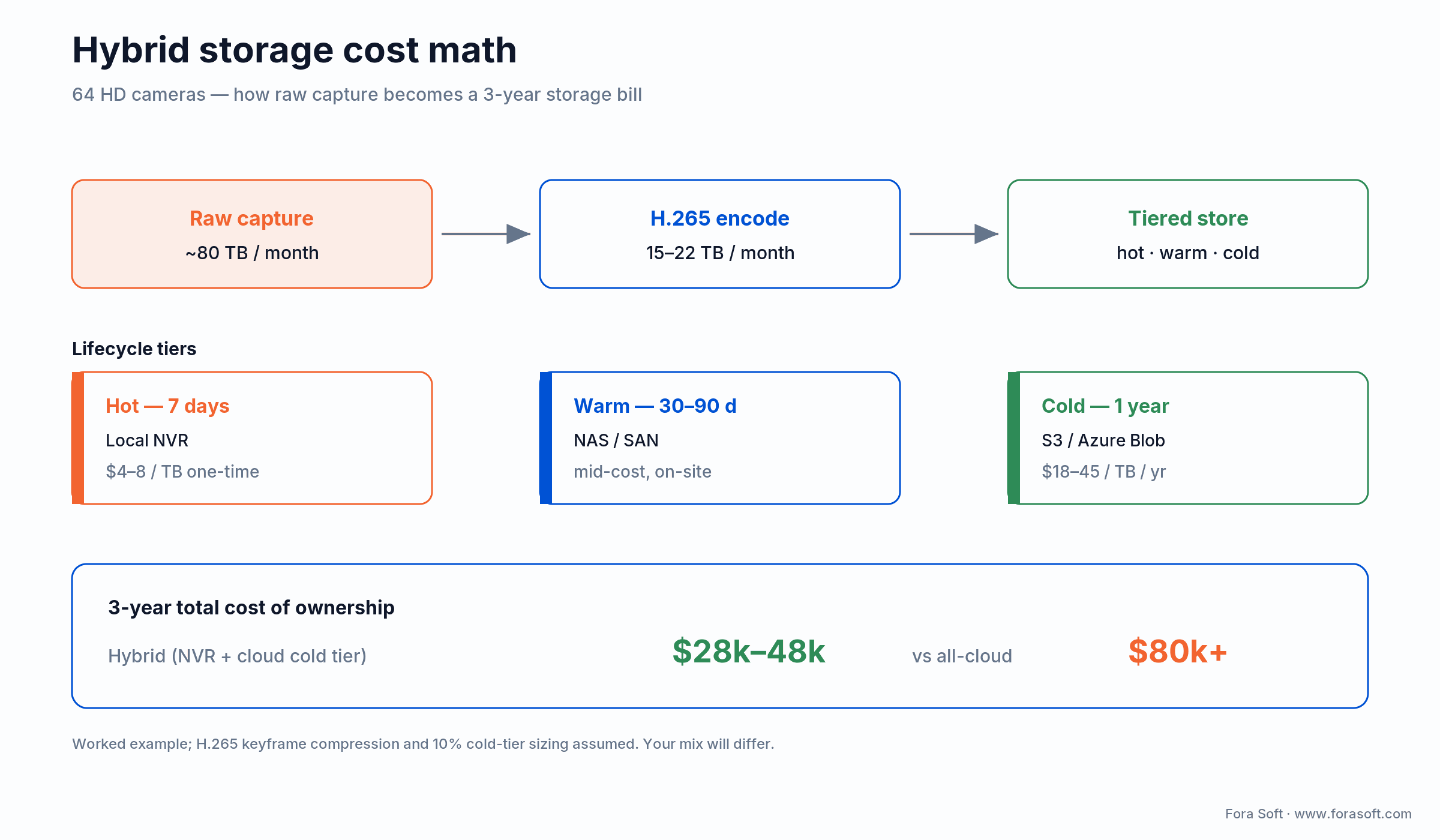
Figure 3. A 64-camera worked example: raw capture, H.265 encode, lifecycle tiers, and the 3-year TCO versus all-cloud.
Worked example. A 64-camera HD deployment generates ~80 TB/month raw; H.265 gets you roughly halfway, and motion-based recording plus smart-codec tuning takes it the rest of the way to 15–22 TB retained. Size the cold tier at ~10% of retained data and cloud spend lands around $15–25/month. Three-year storage TCO: $28k–48k hybrid versus $80k+ all-cloud for the same retention. The cloud premium is real, and it compounds every month you keep footage.
Reach for hybrid storage when: your retention requirement exceeds 30 days and your camera count exceeds 30. NVR-hot plus cloud-cold beats all-cloud on TCO every time at that scale.
Feature 6 — Deep integrations: access control, alarms, SIEM
Bidirectional APIs into door locks, intrusion alarms, HR systems, ERP (SAP, Oracle) and SIEM (Splunk, Microsoft Sentinel). One incident then triggers correlated alarms, access logs, video review and a case ticket in a single workflow instead of four disconnected screens.
Why it matters. Siloed security is slow security. A unified workflow drops average incident response from ~45 minutes to single digits. Genetec ships 150+ native integrations; Milestone leans on a large SDK partner ecosystem. Cost: $5,000–20,000 per integration; a full enterprise build runs $40k–150k. Scope the integrations you truly need — each one is a maintenance surface, not a free checkbox.
Feature 7 — Low-latency streaming (WebRTC and LL-HLS)
WebRTC for live view at 300–800 ms end-to-end; LL-HLS as the firewall-friendly fallback at 2–4 seconds, versus the 8–25 seconds of standard chunked HLS. (On the LAN, RTSP/RTP is still the workhorse for camera-to-VMS transport; the latency problem is on the delivery leg to browsers and phones.) For emergency response, retail loss prevention and remote investigation, sub-2-second feedback is the difference between catching an event and reviewing it.
Why it matters. Standard-latency HLS is unfit for live monitoring in 2026. If a vendor demos live view with a visible lag, that is your future control-room experience. Cost: $2,000–6,000 for the streaming stack plus $200–800/month for CDN edges if you fan out to many remote viewers.
Feature 8 — Privacy, compliance and audit trails
Automated PII redaction (face blur, license-plate masking), retention-policy enforcement aligned to GDPR, HIPAA and CCPA, full audit logs of every access, download and export, and compliance reports you can generate on demand rather than reconstruct after an incident.
Why it matters in 2026. GDPR fines reach €20M or 4% of global turnover; HIPAA penalties now exceed $2M per violation category per year after inflation adjustment; CCPA breach damages run $100–750 per consumer per incident. On the supply-chain side, the FCC’s 2022 equipment-authorization order and its Covered List block new authorizations for Hikvision, Dahua and Hytera gear in public-safety, government and critical-infrastructure use (the FCC is still refining the exact “critical infrastructure” definition in a 2025 rulemaking after a court remand), and FAR 52.204-25 extends the NDAA Section 889 “use” ban to federal contractors. Legacy gear is not forced out, but new products, spares and expansions are constrained. Cost: $1,500–4,000 for the compliance module plus ongoing monitoring.
Feature 9 — Mobile-first apps with offline cache
Native iOS and Android with push notifications, local caching of critical footage for 24–72 hours, two-way audio to intercoms and biometric sign-in. Operators are not chained to a desk, and a well-built mobile app cuts response from 20+ minutes to 3–5 on the alerts that matter.
Why it matters. Offline cache means an investigation continues even when the phone drops connectivity in a stairwell or basement. The trap: ship a mobile web wrapper instead of native apps with WebRTC and adoption collapses — we have seen deployments where monthly active use never cleared 10%. Cost: $0 with the platform’s stock app, or $8,000–25,000 for a white-labelled build.
Feature 10 — AI-assisted natural-language search
“Show me a red car at gate 3 yesterday” returns ranked clips in seconds by querying analytics metadata (color, object type, location) instead of scrubbing raw footage. That collapses investigation time from 3–8 hours to 15–45 minutes on a typical case.
Why it matters. Manual review is the hidden cost center of every surveillance operation. Natural-language search is the feature investigators notice on day one. Cost: $5,000–15,000 one-time plus $2–5 per camera per month for the analytics layer that feeds it. Accuracy depends entirely on the metadata quality upstream — garbage classifications in, useless search out.
Want a feature-by-feature gap analysis of your VMS?
Send us your camera count, vendor and biggest pain point. We return a 12-feature scorecard plus a custom-build estimate, no charge.
Feature 11 — Edge AI on cameras
Deep neural networks running on the camera itself — Axis ARTPEC-8, Hanwha Wisenet 7, Bosch. The camera transmits metadata (labels, bounding boxes, events) instead of full video, which drops a monitoring stream from 3–8 Mbps to 150–400 Kbps: a 90%+ bandwidth saving, with no analytics-server fleet to maintain and sub-100 ms per-frame inference.
Why it matters. Edge AI moves the compute to where the pixels are, so latency and bandwidth both drop. The gotcha: around a third of early on-camera-AI rollouts hit CPU overload on cameras not specced for dual-network inference, and dropped frames follow. Spec for the models you actually plan to run, and field-test before bulk procurement. Cost: $400–800 premium per AI-capable camera, no added server cost.
Feature 12 — Unified incident workflow
One pane of glass for triage, annotation, assignment, escalation, evidence export and audit — linking video clips, access logs, alarm events and audit trails into a court-defensible case file with full chain of custody. This is the feature that turns “we have the footage somewhere” into “here is the sealed evidence package.”
Why it matters. Multi-system correlation drops investigation time 45–60%, and chain-of-custody documentation is a hard requirement in most 2026 compliance regimes. Average closure time runs ~6 hours with an integrated workflow versus a full day without. This is exactly the class of problem we solved building V.A.L.T. for courtroom use. Cost: $3,000–8,000 one-time plus $0.25–1.00 per user per month.
The 12 features at a glance
| # | Feature | Quantified gain | Typical cost | 2026 vendors |
|---|---|---|---|---|
| 1 | AI analytics | fewer false alerts | $0.50–2.50/cam/mo | Genetec, Milestone, Hanwha |
| 2 | ONVIF T / M / G | no vendor lock-in | $0 (standard) | Axis, Hanwha, Bosch certified |
| 3 | Encryption + zero-trust | survives audit | $1.5k–5k | Genetec, Milestone, Verkada |
| 4 | Multi-site + edge cache | −60–80% bandwidth | $8k–25k + appliances | Genetec, Milestone |
| 5 | Hybrid storage | −35–50% TCO | $3k–12k setup | Genetec, Avigilon Unity |
| 6 | Deep integrations | 45 → 8 min response | $5k–20k each | Genetec (150+), Milestone |
| 7 | WebRTC + LL-HLS | 300–800 ms latency | $2k–6k + CDN | Genetec, Verkada |
| 8 | Compliance + audit | fines avoided | $1.5k–4k | Genetec, Milestone |
| 9 | Mobile + offline | 20 → 3–5 min | $0–25k | Genetec Mobile, XProtect Mobile |
| 10 | NLP search | 3–8 h → 15–45 min | $5k–15k + /cam/mo | Avigilon, Genetec |
| 11 | Edge AI on cameras | −90% bandwidth | $400–800 /cam premium | Axis, Hanwha, Bosch |
| 12 | Incident workflow | −45–60% investigation | $3k–8k | Genetec, Milestone, Avigilon |
The 2026 VMS vendor map
Two camps now share the enterprise conversation: the established VMS platforms and a wave of AI-native challengers. Pick by deployment posture, compliance footprint and the integrations you cannot live without.
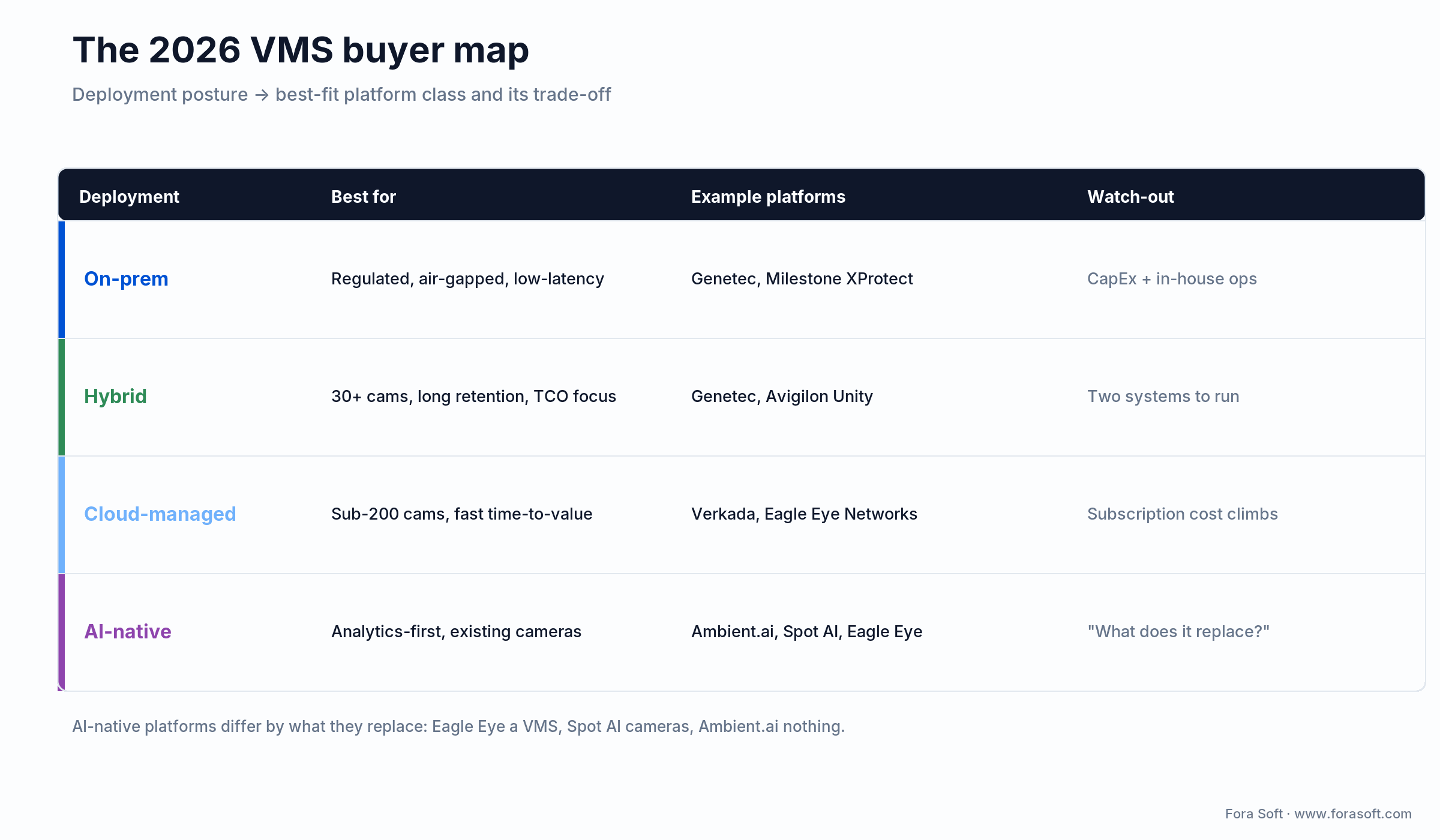
Figure 4. Deployment posture points to a platform class, and each class has one honest trade-off.
The established platforms
Genetec Security Center unifies video, access control, license-plate recognition and analytics with event correlation across all of it; 150+ native integrations; on-prem and hybrid strong. Best for large multi-site enterprises. Milestone XProtect is open-SDK and federation-first, from XProtect Express+ up to XProtect Corporate; best when you want maximum customization headroom. (Milestone retired its free Essential+ tier with the 2025 R2 release, so the 2026 entry point is paid.) Avigilon Unity (Motorola Solutions) leads on AI — Appearance Search and anomaly detection at scale. Hanwha Wisenet and Axis Camera Station are camera-vendor stacks with excellent edge AI, best when a hardware refresh is part of the project. Verkada is cloud-managed — cameras carry on-board solid-state storage and stream to the cloud — and the fastest to stand up for sub-200-camera sites.
The AI-native challengers
A newer class was built analytics-first and cloud-first — not a recorder with AI bolted on afterward. The cleanest way to tell them apart is to ask what each one replaces. Eagle Eye Networks replaces your recorder and VMS: it is the full cloud system of record (and, since its December 2025 merger with Brivo, part of an access-plus-video suite). Spot AI replaces your cameras-and-recorder, or layers onto existing cameras as an intelligence layer with “Video AI Agents.” Ambient.ai replaces nothing — it is a threat-detection brain that reads your existing feeds and raises alerts. We break the trio down in depth in our AI-native VMS explainer.
Reach for an AI-native platform when: analytics is the whole point and you want it fast — but answer “what does it replace?” first, because that decides whether it augments or rips out your current stack.
Supply-chain note. Hikvision, Dahua and Hytera sit on the FCC Covered List. Most enterprise RFPs now default-exclude them regardless of federal status, and for anyone touching federal work that exclusion is mandatory. If you want the full vendor breakdown, see our roundup of top video surveillance software companies.
2026 pricing — what you actually pay
Numbers below are observed 2026 ranges. Real quotes swing with camera count, geography and integrator margin, so treat these as sanity checks, not quotes.
Per-camera VMS license. Open source (ZoneMinder, Shinobi, Frigate): $0 software, but budget the engineering. Commercial perpetual on-prem: Genetec around $200–300 per camera at the base tier and $400+ for enterprise; Milestone XProtect Corporate roughly $300–500 per camera. (Milestone retired its free Essential+ tier in 2025 R2, so the 2026 entry point is the paid Express+.) Both add annual maintenance on top.
Cloud subscription. Verkada is camera-as-a-service — hardware and software bundled at roughly $199–400 per camera per year (about $17–33 per camera per month once you spread it out). Eagle Eye and other cloud VMS land in a similar band. Scrutinize retention tiers and data-egress charges; that is where cloud quotes hide their real cost.
Total 64-camera, 3-year TCO. Roughly $28k–65k for a well-run on-prem or hybrid deployment including maintenance and AI analytics. A premium cloud subscription over the same window can reach $60k–90k. If your SaaS line is outrunning your camera count, that is the signal to model a custom build, which often lands leaner than the day-rate math above.
A decision framework — pick your path in five questions
Q1. How many cameras and how many sites? Under 200 cameras at 1–3 sites points to Verkada, Eagle Eye or Axis Camera Station. For 200–5,000 cameras across 5–50 sites, look at Genetec, Milestone or Avigilon. Above 5,000 across global sites, it is Genetec or a custom hybrid.
Q2. What is your compliance footprint? Single jurisdiction with no federal contracts leaves the field open. EU and GDPR-heavy work favors Milestone or Genetec. US federal or defense narrows you to Genetec, Milestone or Avigilon; Hikvision and Dahua are off the table.
Q3. Who manages it day to day? Internal IT with a security background can run commercial on-prem. Outsourced to an integrator, cloud SaaS cuts your support burden. With no dedicated security ops, go cloud-managed (Verkada, Eagle Eye).
Q4. How aggressive is your AI roadmap? Basic motion detection runs on any vendor. Behavior analytics plus NLP search points to Avigilon, Genetec, or an AI-native layer like Ambient.ai. Custom models on proprietary data are custom-build territory.
Q5. What integrations are non-negotiable? List your access control, alarm, ERP and SIEM systems before you spec anything. Genetec leads on native integrations; Milestone wins on SDK flexibility. An exotic must-have integration can push you toward custom on its own.
Five pitfalls that derail VMS rollouts
1. Bandwidth underestimation. Real deployments routinely blow past planned WAN usage by 40–80%: a 5 Mbps estimate becomes 8–9 Mbps for 16 HD cameras once you account for scene motion and I-frame spikes. Budget with H.264 assumptions (not the H.265 best case) and add 25% overhead.
2. Fragmented compliance. Access logs in one system, video in another, alarms in a third. When an incident trail has gaps, the whole case can fall apart. Mandate SIEM integration at the RFP stage, not after go-live.
3. Mobile app abandonment. Ship a slow web wrapper and monthly active use quietly dies within six months. Ship native apps with WebRTC and real push delivery, and demo the mobile UX to operators before rollout.
4. Edge camera AI overload. AI workloads spike CPU past 80% on cameras never specced for dual-network inference, and frames drop. Field-test the exact models on the exact hardware before you buy a pallet of cameras.
5. Multi-vendor interop failures. Even with ONVIF, integrations hit edge cases — metadata parsing, auth timeouts, codec mismatches. Run factory acceptance tests on every camera-plus-NVR combination with ONVIF Device Manager before deployment.
KPIs to measure before and after rollout
Quality KPIs. Alert-to-acknowledgment time (target under 60 seconds with AI), AI false-positive rate (under 5%), PII-redaction accuracy (above 96%) and incident closure time (target under 8 hours with an integrated workflow).
Business KPIs. Per-camera all-in annual cost (target under $200 on-prem), security headcount per 100 cameras, insurance-premium impact (documented compliance often trims 5–15%) and incident-driven loss reduction year over year.
Reliability KPIs. System uptime (target above 99.9%), edge-cache hit rate during a WAN outage (target 100% on critical zones), audit-log completeness (100% of access events) and camera-online ratio (above 99% on a rolling 30-day window).
Build vs. buy — when custom VMS software wins
Off-the-shelf wins for the typical enterprise. Custom VMS development becomes the right call when two or more of these are true.
1. Scale. 10,000+ cameras across global sites where per-camera SaaS pricing eats your margin. A custom platform can pay back in 12–24 months.
2. Proprietary analytics. Industrial machine vision, robotics, or loss-prevention models trained on your own data that vendor APIs cannot ingest.
3. Regulatory or air-gapped isolation. Defense, classified or TEMPEST-rated environments where commercial cloud and external APIs are forbidden.
4. Hyper-vertical workflow. Body-worn evidence platforms, courtroom interview recording (the V.A.L.T. category), drone fleets with custom telemetry. Off-the-shelf VMS does not model your workflow.
5. Hyper-scale edge. 10,000+ cameras needing sub-200 ms inference decisions with custom codec optimization.
Reach for a custom VMS when: you hit two or more of the conditions above and your SaaS bill is climbing faster than your camera count.
Mini case — V.A.L.T., Netcam Studio and DSI Drones
V.A.L.T. is a courtroom-grade interview and observation recording platform used by US police departments and academic researchers. Forensic chain of custody was the entire point — off-the-shelf VMS could not produce evidence packages that survive cross-examination, so we built it from the encryption and audit-log layer up.
Netcam Studio is a multi-camera VMS web UI running in production for thousands of small-and-mid-business sites. It speaks ONVIF to dozens of IP camera brands, ships motion detection and event-driven recording, and includes a mobile app with offline cache. It is proof that a focused VMS can match commercial alternatives at a fraction of the per-seat cost.
DSI Drones is an aerial surveillance pipeline that classifies targets in real time and hands the operator a clean event stream instead of raw video. That is the same edge-AI pattern on-camera neural nets bring to fixed installations.
Want a similar build? Book a 30-minute call and we will benchmark your current setup and tell you which features move the needle fastest.
When NOT to upgrade or replace your VMS
Some replacements are not worth doing. Three situations where staying put is the right call.
1. Your current system is under 3 years old and the cameras are healthy. A platform refresh runs $30k–200k+; if the incumbent handles your camera count and your metrics are within target, the ROI is not there.
2. The bottleneck is process, not technology. Slow incident response usually traces to an undertrained ops team and undocumented SOPs, not the VMS. Fix the process before you spend on software.
3. You have not measured anything yet. Replacing a VMS with no baseline on false-positive rates, closure times or storage cost is procurement on vibes. Spend two weeks measuring first.
FAQ
What is VMS software?
VMS (video management software) is the platform that ingests IP camera streams, records and stores the video, runs analytics, and gives operators live view, search and incident tools — the software brain of a surveillance system. Note the acronym is overloaded: it also refers to the OpenVMS operating system and to vendor-management (staffing) systems, which are unrelated.
What is the single most important VMS feature in 2026?
AI analytics with edge inference. It is the only feature that pays back in operator hours saved within the first quarter, and it has reached the accuracy and latency thresholds (95%+, under 500 ms) that make it production-ready rather than experimental.
Should I move my VMS to the cloud in 2026?
For sub-200-camera sites and SMBs, often yes — SaaS removes the operational burden. For 200+ cameras, hybrid (on-prem hot data plus a cloud cold tier) almost always wins on TCO. Pure cloud at enterprise scale runs 2–3x more than hybrid and still carries a latency hit.
Are Hikvision and Dahua still safe to deploy?
For US federal contracts, agencies or contractors handling federal data — no; the FCC Covered List and NDAA Section 889 block them. For commercial use outside that scope they remain technically usable, but most 2026 enterprise RFPs default-exclude them over supply-chain and cybersecurity due-diligence.
How much does a 64-camera VMS deployment cost over 3 years?
Roughly $28k–65k for a commercial on-prem or hybrid deployment with maintenance, AI analytics and a hybrid storage tier. Premium cloud subscriptions land closer to $40k–90k. Open source (Frigate, ZoneMinder) zeroes the software line but adds $30k–80k in engineering and ops over the same window.
What ONVIF profile should I require in RFPs?
Profile T as the 2026 baseline (it covers H.265-capable streaming, analytics and events; Profile S is now the floor, not the target). Add Profile M for analytics metadata and Profile G for edge recording. Specify the profiles by name in every camera line item.
When does custom VMS software become cheaper than commercial?
When two or more of these are true: 10,000+ cameras, proprietary analytics or workflows, regulatory isolation, hyper-vertical use cases, or per-seat SaaS costs above ~40% of your annual security-software budget. With our agent-engineering practice the custom build typically pays back inside 12–24 months at that scale.
What is the biggest risk on an AI-equipped VMS?
Unverified models in regulated jurisdictions. Facial recognition and behavioral analytics carry GDPR, BIPA (Illinois) and emerging EU AI Act exposure. Document the model, its bias testing and its retention policy before you switch the feature on, and offer an opt-out path where the law requires one.
What to read next
Custom VMS
Custom VMS Development — the complete build guide
When off-the-shelf is the wrong answer — architecture, cost and a working spec.
Vendor landscape
Top Video Surveillance Software Companies in 2026
Genetec, Milestone, Hanwha, Avigilon, Verkada and the build-vs-buy verdict for each.
AI analytics
AI-Powered Video Analytics — the 2026 security playbook
A practical playbook for AI analytics on a working VMS — what to ship, what to skip.
Edge vs cloud
Edge AI vs Cloud AI — latency and cost breakdown
The decision math behind on-camera AI versus cloud-side analytics, with 2026 numbers.
Standards
ONVIF Profiles S, T, G, M Explained (2026)
The no-nonsense guide to ONVIF profiles and why Profile T is the new baseline.
Ready to ship VMS software that competes?
The 12 features above are the minimum bar for serious VMS software in 2026: AI analytics, ONVIF Profile T/M openness, end-to-end encryption, multi-site scale with edge cache, hybrid storage, deep integrations, low-latency streaming, compliance and audit, mobile-first apps, NLP search, edge AI on cameras and a unified incident workflow. Get the first three right and you have a credible product. Get all twelve and you compete with anything Genetec or Milestone ships out of the box, plus the AI-native challengers now crowding the same buyers.
If your path is custom, whether V.A.L.T.-class forensic workflows, drone-driven aerial surveillance, or industrial vision, we have shipped that in production, and our AI-agent workflow keeps those timelines shorter than the day-rate math here suggests. Bring your camera count, compliance footprint and biggest pain point, and we will scope a path forward.
Let’s scope your VMS roadmap
A 30-minute call with our video surveillance team. You leave with a 12-feature scorecard, a build-vs-buy verdict and a cost ceiling, on us.

