


Key takeaways
• An IP camera app is a streaming product, not a video player. The hard parts are RTSP / WebRTC ingest, NAT traversal, ONVIF discovery, low-latency live view, multi-camera grids, push alerts, and offline-resilient playback, not rendering one MJPEG frame.
• Pick transport by flow, not dogma. Local LAN → RTSP + ExoPlayer / AVPlayer (200–500 ms). Remote → WebRTC over TURN (300–700 ms). Cloud DVR → LL-HLS / DASH (2–5 s). A real IP camera app speaks all three.
• Battery, data, and security are what get an app uninstalled. Naive 1080p preview drains ~32%/hr and burns ~43 GB/day per camera; H.265 + hardware decode + 480p-on-cellular roughly halves the battery and cuts data by 4×.
• Push classification to the edge. An on-device or on-NVR person / parcel / vehicle classifier cuts 60–80% of false motion alerts — the difference between ~90 and ~18 notifications a day.
• Realistic budgets (2026). PoC $20–40k, MVP $80–180k, production white-label SaaS $200–500k. We shipped NETCAM on these exact patterns.
Why Fora Soft wrote this guide
Most “how to build an IP camera app” write-ups are really app-store roundups. They tell you which viewer to download, then stop exactly where the engineering starts. This one starts there. We build real-time video and AI products, and we’ve shipped the parts that break: NAT traversal, multi-vendor onboarding, battery-safe live view, and alert pipelines that don’t cry wolf.
Fora Soft has delivered 250+ software products since 2005 with 50+ in-house specialists and a 99% job-success score on Upwork. We built NETCAM as a customer-facing IP camera app, run surveillance and AI on VALT (police, courts, and medical training — up to nine simultaneous IP cameras per session, HIPAA), and build drone-surveillance backends for DSI Drones. If you need a partner rather than a checklist, our video surveillance development team does this full time.
Building an IP camera app or white-label SaaS?
Bring your camera fleet, target latency, and rough budget. We’ll spend 30 minutes mapping a stack and giving you an honest estimate, no slide deck.
What is an IP camera app, really
An IP camera app is a mobile client that discovers, authenticates to, and streams live and recorded video from network cameras — over RTSP, WebRTC, or HLS — and layers on alerts, multi-camera views, two-way audio, and access control. In other words, a production IP camera app is a small distributed streaming system with a phone on one end and a camera fleet on the other. The rendering is the easy 10%. The transport, security, and battery behaviour are the other 90%.
Here’s the catch that surprises first-time builders: the same app has to behave completely differently depending on where the viewer is standing. On the couch, connected to home Wi-Fi, you want sub-500 ms RTSP straight off the camera. On the train, behind carrier-grade NAT, that same RTSP pull just times out — you need WebRTC and a relay. Reviewing last night’s footage, you don’t care about latency at all; you want cheap, seekable HLS. One UI, three transports underneath.
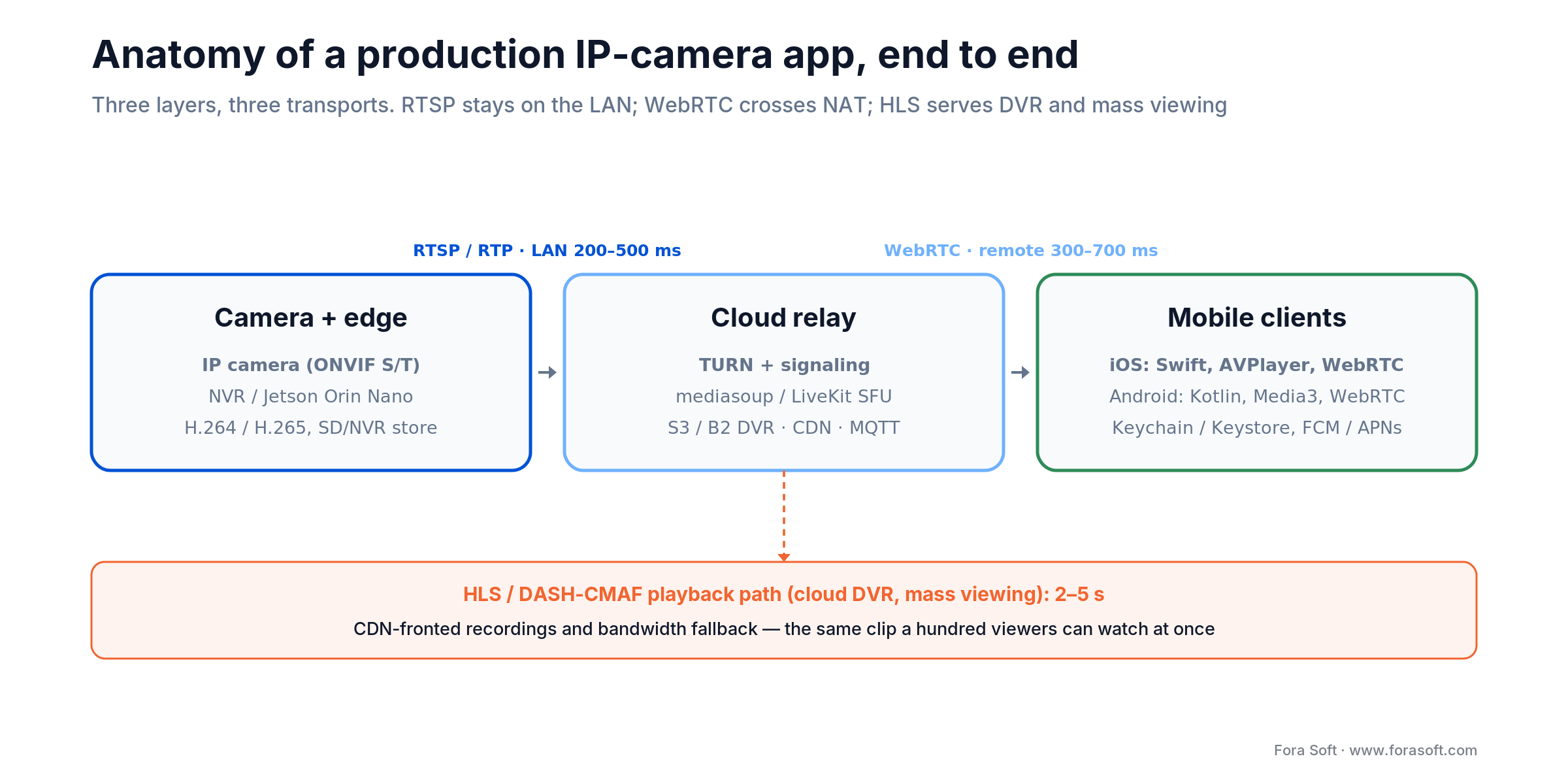
Figure 1. The three layers of a production IP camera app and the transport each hop uses.
Pick the transport: RTSP, WebRTC, HLS
Which protocol should an IP camera app default to? All three, each for the flow it wins. RTSP is the lingua franca of IP cameras and the fastest path on a LAN. WebRTC is the only one that reliably crosses mobile NAT and carries two-way audio, and it is the layer our WebRTC developers build for remote live view: TURN, ICE and two-way talk. HLS (and DASH-CMAF) is the cheap, cacheable way to serve recordings and fan out to many viewers. The table below is the short version; the reasons follow.
| Transport | Latency | Best for | Client stack |
|---|---|---|---|
| RTSP / RTP | 200–500 ms (LAN) | Local viewing, ONVIF cameras | ExoPlayer / AVPlayer / FFmpeg |
| WebRTC | 300–700 ms | Remote / NAT-traversal, two-way audio | LiveKit / mediasoup / Janus + TURN |
| LL-HLS / DASH-CMAF | 2–5 s | Cloud DVR, mass viewing | CDN-fronted (Cloudflare, CloudFront) |
| Vendor P2P SDK | 300–800 ms | Consumer cameras (Reolink, Wyze) | Vendor SDK + relay |
RTSP itself is standardised. RTSP 2.0 is RFC 7826, and every ONVIF camera exposes an RTSP URL for its H.264/H.265 stream. That makes RTSP the one transport you can count on being there. The problem is that a raw RTSP pull assumes a route to the camera, which you rarely have from a phone on cellular.
Reach for RTSP when: the viewer and camera share a LAN and you want the lowest-effort, lowest-latency path. Fall back the moment the phone leaves the network.
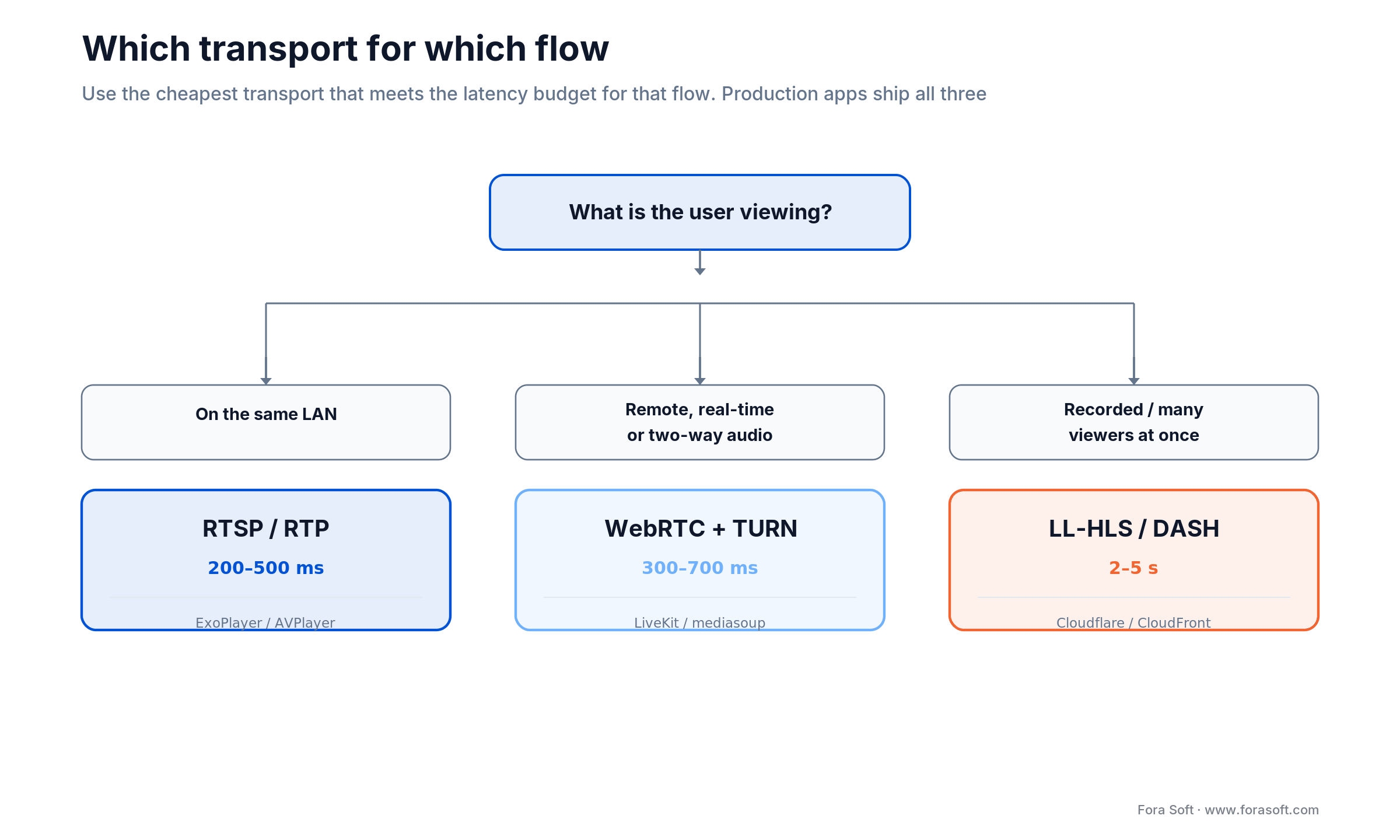
Figure 2. One question — what is the user viewing — picks the transport for each flow.
How to choose transport per flow
The rule is boring and it works: use the cheapest transport that meets the latency budget for that flow. Live monitoring of your own driveway from the kitchen? RTSP. Talking down a delivery driver from the office? WebRTC, because you need remote reach and a return audio channel. Scrubbing yesterday’s clips, or a dashboard where a dozen people watch the lobby? HLS, because you want caching and concurrency, and nobody minds a two-second delay.
Reach for WebRTC when: the viewer is off-network, you need two-way audio, or a direct pull fails. Budget a TURN relay — 5–15% of remote sessions can’t hole-punch through carrier-grade or symmetric NAT and must relay.
Reach for HLS / DASH when: latency can be 2–5 s and you value cost and scale — cloud DVR playback, bandwidth fallback on a weak connection, or one stream watched by many. CDN-fronted segments are far cheaper than holding a hundred WebRTC sessions open.
Apps that ship only one transport feel broken on at least one flow. A LAN-only RTSP app is useless on the road. A WebRTC-only app burns relay cost and battery for playback it could have served from a CDN. Build the abstraction once, a single live-view surface with a transport picker underneath, and every future feature rides on it.
The feature set buyers expect in 2026
A 2026 IP camera app is judged against Ring, Reolink, and Eufy, whether or not that’s fair. These are the features users now treat as table stakes, grouped by the job each does.
Discovery and onboarding. ONVIF Profile S/T discovery on the LAN, QR onboarding, manual RTSP URL entry, and vendor SDK plug-ins for cameras that don’t speak ONVIF. The bar is onboarding a camera in under 90 seconds; past that, people give up and leave a one-star review.
Live view. Multi-camera mosaic (1, 4, 9, 16 grid), pinch-to-zoom (digital plus PTZ where the camera supports it), audio mute, and two-way push-to-talk. Single-tap fullscreen with a hardware-accelerated decoder, not a software one.
Recording and playback. Local SD-card playback over the RTSP backchannel, cloud DVR over HLS/DASH, event-based clip export, time-lapse, and a scrubber with a motion-density bar so the reviewer jumps straight to the interesting seconds.
Alerts. Push over FCM and APNs for motion, person, parcel, and vehicle, plus a silent push to nudge reconnection. On-device classifiers keep the noisy ones off the lock screen. More on that below.
Sharing and permissions. Multi-user accounts, read-only viewer roles, time-bound shared links, and family-account fan-out. Export with optional face blur for privacy, which is increasingly a legal requirement, not a nicety.
Reference architecture
A production IP camera app is four tiers. Get the seams between them right and features slot in; get them wrong and every new camera line is a rewrite.
1. Camera and on-prem edge. RTSP/ONVIF-native cameras, H.264 and H.265 streams, SD-card or NVR storage. Where you need edge AI, a Jetson Orin Nano on the NVR runs person/vehicle detection in tens of milliseconds (see the numbers below) instead of shipping every frame to the cloud.
2. Cloud relay. TURN servers for NAT traversal, an SFU (WebRTC-based, mediasoup or LiveKit) for fan-out, S3 or Backblaze B2 for DVR storage, a CDN (Cloudflare Stream or CloudFront) for HLS delivery, and MQTT or Redis for the event bus.
3. Mobile clients. Native iOS (Swift, AVFoundation/AVPlayer, WebRTC framework) and Android (Kotlin, Media3/ExoPlayer, WebRTC SDK). Background tasks for push and re-auth; secrets in Keychain and Keystore, never in plain preferences.
4. Backend services. Auth (OAuth 2.0 / OIDC), a device registry, an event service, billing (Stripe), an audit-log service, and AI workers that run the edge-vs-cloud split we walk through in Edge AI vs Cloud AI for Video Surveillance.
ONVIF discovery and onboarding
How does an IP camera app add a camera without the user reading a manual? ONVIF. ONVIF Profile S is the interoperability standard almost every modern IP camera implements; it handles discovery, configuration, and the RTSP stream URI. Profile T adds H.265, motion-alarm event subscription, two-way audio, and analytics metadata. ONVIF is the control plane; RTSP is the media plane it hands you.
The onboarding flow that works: WS-Discovery probe on the LAN to find cameras, pull the stream profiles over ONVIF, let the user pick the camera, store a per-device session token, and you’re live. Add QR onboarding for cameras that print a code, and a manual RTSP field for the stubborn ones. Keep the whole thing under 90 seconds and you’ve beaten most incumbents on the one screen that decides whether the app gets used.
Supporting multi-vendor cameras
Can one app support consumer, prosumer, and enterprise cameras at once? Yes, behind a clean adapter layer. Roughly every camera shipped in the last five years falls into one of three buckets: ONVIF Profile S/T (the majority), a documented HTTP/RTSP API (Reolink and friends), or a proprietary vendor SDK (Hikvision, Dahua, Tuya, Ezviz). Model each as an adapter that returns the same thing (a stream handle, a capability set, an event stream) and the live-view UI never learns which camera it’s talking to.
We default to that pattern in white-label apps because it turns “add a new camera line” from a re-architecture into a one-to-two-week integration. The alternative — branching camera logic through the UI — is how apps end up with a different bug on every device. One caveat worth stating: vendor SDKs vary wildly in quality and update cadence, so budget real time for the long tail, and keep an ONVIF fallback for when an SDK goes stale.
Need a multi-vendor, white-label, or AI-alerts IP camera app?
We’ve built the adapter-layer pattern across surveillance, telehealth, and edutainment. Bring the camera list and the constraints.
Battery, data, and the mobile constraints
This is where IP camera apps live or die, and where the desktop-VMS mental model fails hardest. A phone is battery- and data-constrained in a way an NVR never is, so the numbers deserve real arithmetic, not hand-waving.
Battery. A continuous 1080p H.264 RTSP preview drains roughly 25–40% per hour on a modern phone. Call it 32%/hr with the screen on. Switch to H.265, force the hardware decoder, and drop to 720p after 60 seconds of inactivity, and that roughly halves to ~14%/hr. H.265 carries the same picture at 40–50% lower bitrate than H.264, which means fewer bytes to decode and fewer radios lit up. New to codecs? Our Learn primer on digital video foundations covers why the codec choice moves every other number on this page.
Cellular data. Here’s the math people skip: a 24/7 1080p stream at 4 Mbps is 4 × 86,400 s ÷ 8 ÷ 1,000 ≈ 43 GB per day, per camera. That vaporises a mobile plan in an afternoon. Default to 480p on cellular (~11 GB/day), offer a snapshot-only mode under 1 GB/day, and reserve full 1080p for Wi-Fi or an explicit override.
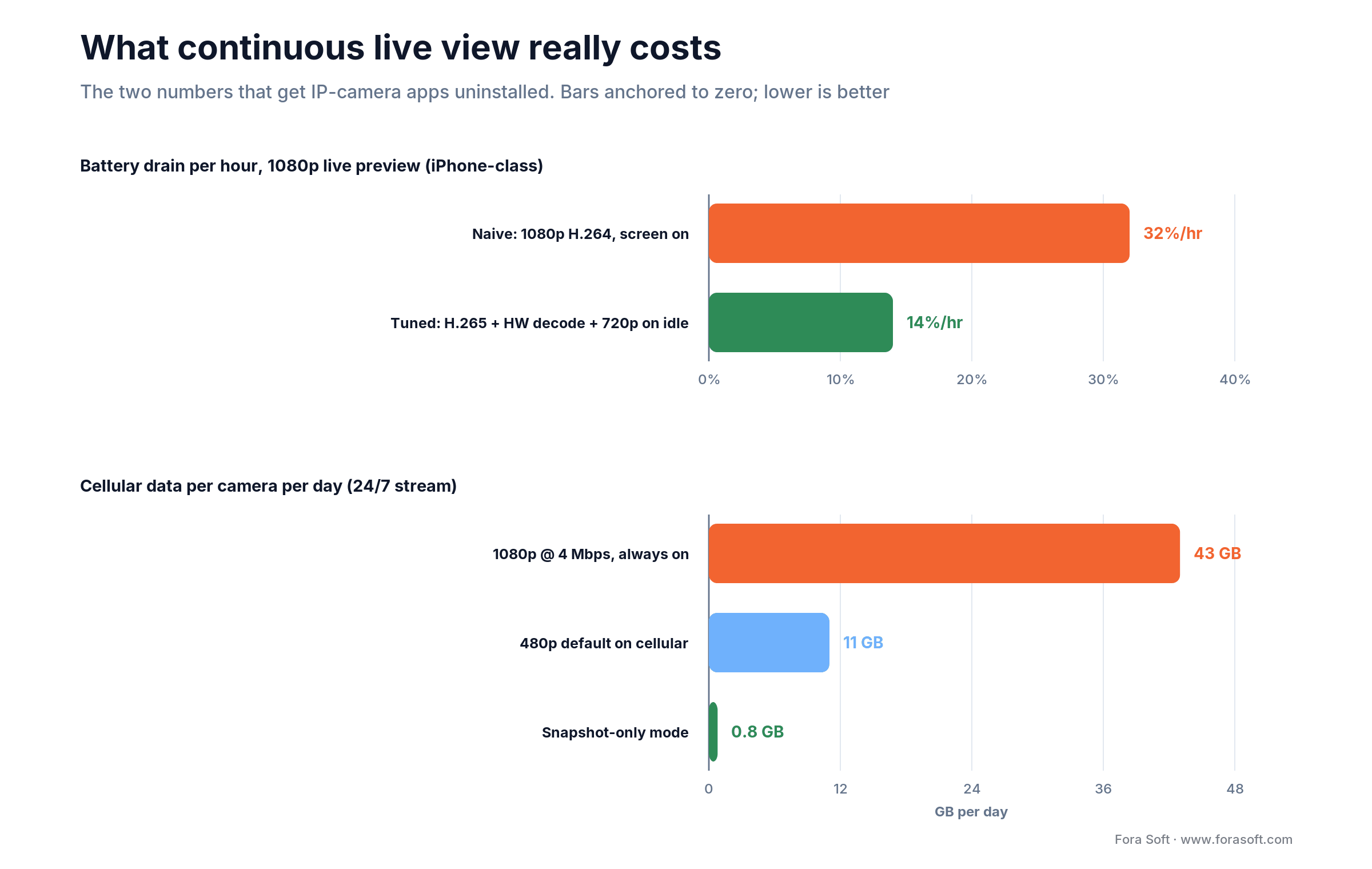
Figure 3. The two numbers that get IP camera apps uninstalled — and how tuning halves the battery and quarters the data.
NAT and push. Two more mobile realities. Direct RTSP rarely survives double NAT or carrier-grade NAT, so always ship a WebRTC + TURN fallback and expect 5–15% of traffic to relay. And FCM and APNs are best-effort, not guaranteed — add a foreground polling reconnection and design alerts that tolerate late delivery instead of auto-dismissing after 30 seconds.
Cutting false alerts with edge AI
How do you stop an IP camera app from crying wolf? Classify before you push. A plain motion trigger fires on foliage, headlights, shadows, and pets — easily ~90 alerts a day per busy camera, and users mute notifications within a week. Run a person / parcel / vehicle classifier on the device or NVR before the push fires and you drop 60–80% of that noise — roughly 90 alerts down to 18.
The models are cheap enough to run locally now. TFLite on Android and CoreML on iOS handle on-phone inference. On an NVR, a Jetson Orin Nano runs YOLOv8-class detection in 16–50 ms (YOLOv8n around 16 ms, INT8 around 23 ms) at 7–9 W, per 2025 benchmarks. That’s faster than a cloud round-trip, and the footage never leaves the premises: a latency win and a privacy win at once.
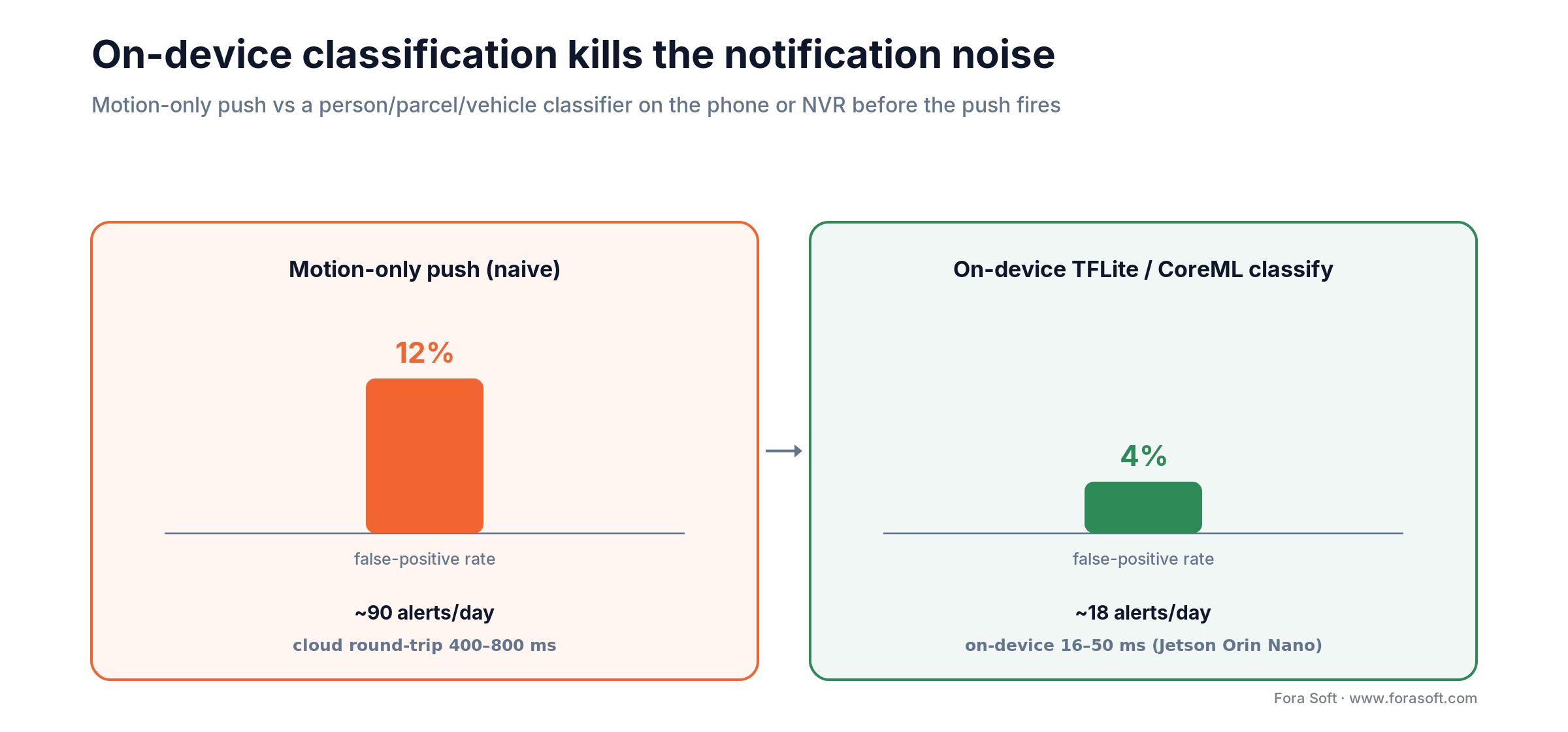
Figure 4. Motion-only push vs an on-device classifier — false-positive rate and daily alert volume, before and after.
We’ll be honest about the ceiling: on-device models trade a little accuracy for speed and privacy, and the hard cases (weapon detection, reliable face recognition) still belong on a server or in the cloud. The pattern that wins is tiered — cheap high-volume detection at the edge, escalate only the hard, accuracy-critical calls upstream.
Security and compliance you can’t skip
Camera footage is among the most sensitive data a phone touches, and the single most common failure is boring: leaked credentials. Plain-text RTSP URLs in logs, in screenshots, or in unencrypted preferences are how most IP camera apps get popped. Store per-device session tokens (not raw RTSP URLs) in Keychain and Keystore, gate them behind a biometric check (Face ID or fingerprint), and never log a full URL, even at debug level.
Encryption. RTSP over TLS, WebRTC over SRTP (on by default), HLS over HTTPS. Never expose RTSP on port 554 straight to the internet. That’s a Shodan search away from a stranger watching your customer’s living room.
Regulation. GDPR for EU users, BIPA for Illinois, CCPA for California. If you do biometric identification, the EU AI Act classifies that as high-risk and pulls in real obligations. And on hardware: NDAA Section 889 bars US federal agencies and contractors from Hikvision and Dahua gear, and the FCC has blocked new equipment authorizations for both — enforcement tightened again in October 2025. If any of your buyers are federal-adjacent, keep those vendors off the supported list.
Reach for a compliance review early when: you serve EU users, run any face or biometric analytics, or sell into government, healthcare, or education. Retrofitting consent, retention limits, and redaction after launch costs far more than designing them in.
Cost model: PoC, MVP, production
What does it cost to build an IP camera app? Below are the ranges we quote in 2026. We use Agent Engineering internally, which compresses timelines and lets us land under typical system-integrator quotes for the same scope — but the honest answer is that scope, not vendor, drives the number.
| Stage | Scope | Cost | Timeline |
|---|---|---|---|
| PoC | iOS + Android, RTSP + WebRTC, 4-cam grid | $20–40k | 4–8 weeks |
| MVP | Multi-cam, push, cloud DVR, 2-way audio, ONVIF onboarding | $80–180k | 3–5 months |
| Production / white-label SaaS | Multi-tenant, AI alerts, audit, billing, compliance | $200–500k | 6–12 months |
| Annual ops + maintenance | SDK updates, OS churn, infra, support | 15–20% of build | Ongoing |
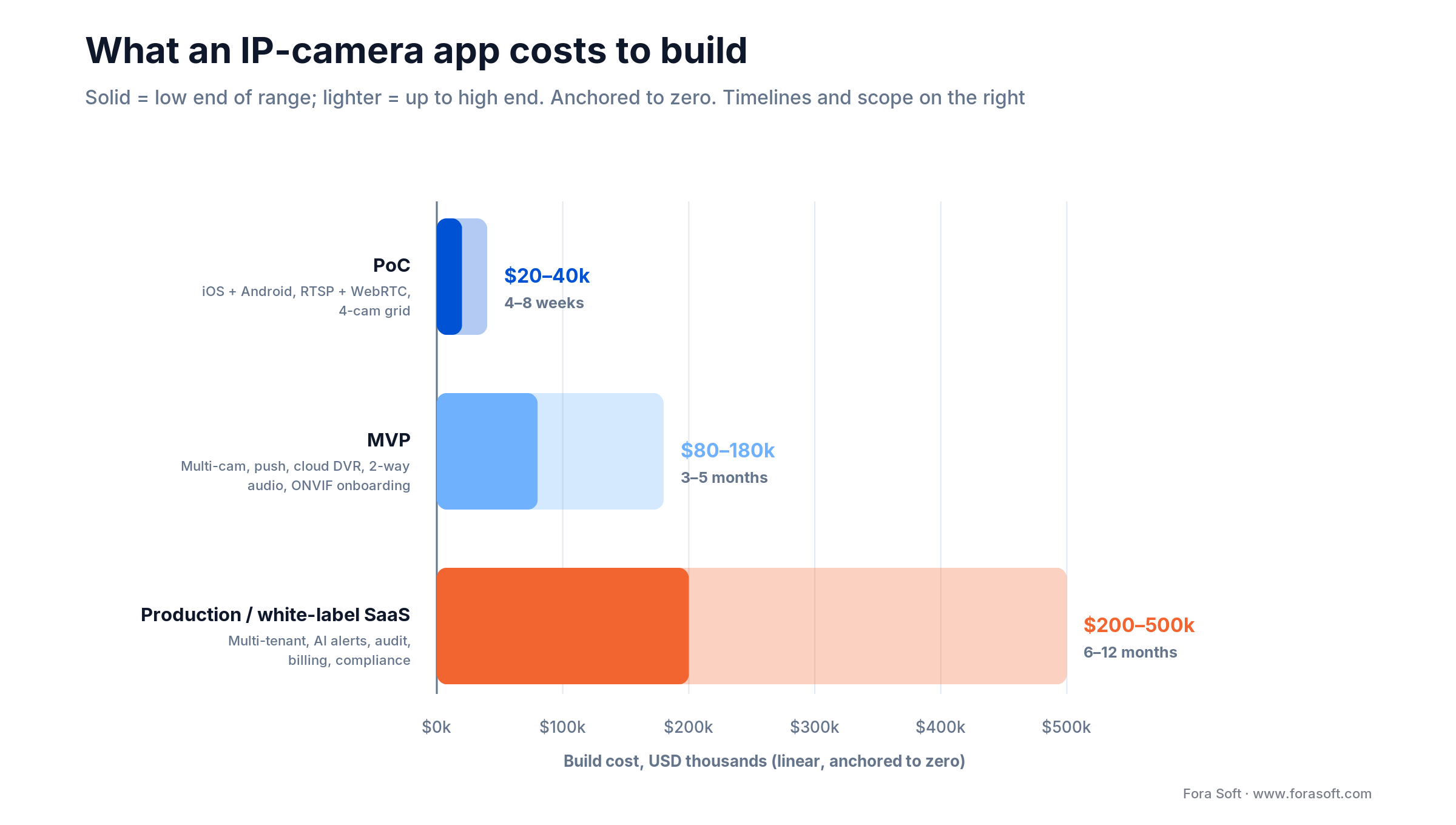
Figure 5. Build cost and timeline by stage, low-to-high range anchored to zero.
A worked example. Say you want an MVP: iOS and Android, RTSP + WebRTC + HLS, ONVIF onboarding, a 9-camera grid, cloud DVR, and person-detection push. That’s squarely in the $80–180k band and 3–5 months. Add multi-tenant white-labeling and audit logging and you cross into production territory. Budget 15–20% of the build per year for maintenance — camera SDKs and mobile OS releases don’t sit still, and an app that rots gets uninstalled.
Build vs buy: five questions
Before you fund a custom IP camera app, answer these five. If most answers are “no,” an off-the-shelf SDK is cheaper and you should take it.
1. Multi-vendor? Do you need cameras from several makers under one app? Off-the-shelf SDKs are single-ecosystem; custom earns its keep the moment you cross vendors.
2. AI differentiation? Is your edge a smarter alert, a niche detector, or an analytics dashboard? If the intelligence is the product, you can’t buy it off a shelf.
3. White-label / SaaS? Are you reselling the app under other brands or per-tenant? Multi-tenancy and theming are custom work by definition.
4. Compliance? Do HIPAA, GDPR, BIPA, or NDAA constraints exceed what a consumer SDK will sign up for? Then you own the data path, which means you own the app.
5. Roadmap control? Will you be shipping features for years? Renting a vendor’s SDK means renting their roadmap and their outages.
Reach for build when: two or more of the above are “yes.” One “yes” and you should price a hybrid — buy the transport SDK, build the differentiating layer on top. Zero and you don’t need us yet, and we’ll tell you so.
KPIs to track from day one
Quality. First-frame time under 1.5 s, P95 live latency under 700 ms, rebuffer ratio under 0.5%, push delivery above 98% within 5 s. These are what “feels instant” actually means in numbers.
Business. Onboarding completion above 80%, daily-active cameras over installed cameras above 70%, crash-free users above 99.5%. If onboarding leaks, nothing downstream matters.
Reliability. Reconnection after a WAN drop under 10 s, false-positive AI-alert rate under 5%, and audit-log replay possible for any retained event. The alert number is the one users feel every single day.
Five pitfalls that sink IP camera apps
1. Battery drain on continuous preview. Left naive, live view eats ~32%/hr and the app gets blamed for the dead phone. Hardware decode, H.265, and 720p-on-idle are non-negotiable — the same discipline we cover in 10 Ways to Optimize Android Apps for Smooth Video Streaming.
2. No NAT fallback. Ship RTSP-only and the app works in the demo (on Wi-Fi) and fails in the field (on cellular). Always carry a WebRTC + TURN path.
3. Notification noise. Motion-only push trains users to mute you inside a week. Classify on the edge before you push.
4. Treating push as reliable. FCM and APNs drop and delay. Add foreground reconnection polling and stop auto-dismissing alerts.
5. Credential leakage. Plain-text RTSP URLs in logs or preferences are the number-one security hole. Tokens, Keychain/Keystore, biometric gate, no full-URL logging.
Mini case: NETCAM
Situation. An IP camera vendor needed a customer-facing app with multi-camera live view, two-way audio, on-device motion alerts, and shareable family accounts — across direct-to-consumer cameras that mixed ONVIF and proprietary protocols.
What we shipped. Native iOS and Android with RTSP-on-LAN plus WebRTC-remote dual transport, ONVIF onboarding, FCM/APNs alerting on an MQTT event bus, on-device TFLite person detection to cut false positives, and Keychain/Keystore credential storage. The same backend powers a white-label tier for resellers.
Outcome. First-frame time landed under 1.2 s on Wi-Fi, daily-active-over-installed cameras held above 70%, and the false-positive notification rate dropped from ~12% to under 4% once classification moved on-device. See the project, or book a similar assessment and we’ll map it to your fleet.
When you should NOT build a custom app
If you ship a small consumer camera line and just need viewing, don’t build from scratch — white-label SDKs from Tuya, Ezviz, or your camera ODM are cheaper and faster, and they’ll be fine. Custom only pays back when you have multi-vendor support, AI differentiation, white-label SaaS ambitions, or compliance requirements an off-the-shelf SDK won’t meet. We’d rather point you to the SDK than sell you a build you don’t need — it’s how we end up building the version you do need, later.
FAQ
RTSP, WebRTC, or HLS — which should an IP camera app default to?
All three. RTSP for local LAN view (200–500 ms), WebRTC for remote real-time and two-way audio (300–700 ms), HLS for cloud DVR and high-concurrency viewing (2–5 s). The rule is: use the cheapest transport that meets the latency budget for that flow.
How do I support cameras that don’t speak ONVIF?
Put every camera behind an adapter interface. ONVIF Profile S/T covers most; documented HTTP/RTSP APIs (Reolink and similar) cover the next slice; vendor SDKs (Hikvision, Dahua, Tuya) cover the rest. The UI stays identical across all three.
What does it cost to build an IP camera app?
PoC $20–40k (4–8 weeks), MVP $80–180k (3–5 months), production white-label SaaS $200–500k (6–12 months), plus 15–20% of build per year for maintenance. Scope drives the number more than anything else.
How do I keep battery drain reasonable on continuous preview?
Hardware decoder, H.265 over H.264, drop to 720p after 60 s of inactivity, picture-in-picture instead of fullscreen on backgrounding, and a snapshot-mode fallback on cellular. That takes ~32%/hr down to ~14%/hr.
How do I cut false-positive motion alerts?
Run a TFLite or CoreML classifier on the device or NVR before the push fires. Person / parcel / vehicle classification removes 60–80% of motion noise (foliage, headlights, pets) without a cloud round-trip — roughly 90 alerts a day down to 18.
Do I need a TURN server?
Yes. 5–15% of remote sessions can’t establish a direct connection because of carrier-grade or symmetric NAT. Self-hosted coturn is fine; a managed TURN service works for low volume.
Is it legal to run face recognition in an IP camera app?
It depends on where your users are. BIPA (Illinois), GDPR (EU), and CCPA (California) all regulate biometric data, and the EU AI Act treats biometric identification as high-risk. Make it opt-in, store consent, and offer face blur on export. We translate the rules into product decisions, but we’re not your lawyers.
Can one app handle both consumer and enterprise cameras?
Yes — a clean adapter layer behind one live-view UI handles ONVIF, vendor SDK, and proprietary HTTP. We default to that in white-label apps so adding a camera line is a 1–2 week integration, not a re-architecture.
What to Read Next
Mobile
10 Ways to Optimize Android Apps for Smooth Video Streaming
ABR, codec tuning, and battery-friendly defaults.
Architecture
Edge AI vs Cloud AI for Video Surveillance
The latency math behind sub-second mobile alerts.
AI
Top Anomaly Detection Models for Video Surveillance
Which detectors actually cut false positives.
Trends
2026 Android Video Surveillance Trends
Five AI features reshaping mobile-first surveillance.
Engineering
Scalable Video Management Systems in 2026
Where the mobile app fits in a horizontally scalable VMS.
Ready to ship an IP camera app users won’t uninstall?
Build the transport layer to speak RTSP, WebRTC, and HLS; treat battery and cellular data as first-class constraints; push classification to the edge so alerts stay trustworthy; and bake credential security and compliance in from the schema up. Do those four and you’ve cleared the bar the app-store viewers never reach.
The fastest way to start is a 30-minute call with our mobile and video team. Bring your camera fleet and your rough numbers; we’ll come back with an architecture, a transport plan, and a quote we can defend.

The book · Volume 2 of 7
Video Streaming: A Complete Guide to Video Delivery: From Network Protocols and Transport to Ingest, HLS, and MPEG-DASH
Picking RTSP, WebRTC or HLS per flow is the decision that sets latency and data use in an IP camera app. Volume 2 goes deeper into that layer: what the network does to a stream, TCP versus UDP and congestion control, NAT traversal, and HLS, DASH and CMAF packaging for recorded clips. Mobile teams can use it to explain every second of delay in their live view. Written by Nikolay Sapunov, CEO at Fora Soft.
Read it on Amazon →Kindle & paperback · Fora Soft Video Engineering Handbook
Let’s scope your IP camera app
Bring your camera fleet, target users, and rough budget. We’ll come back with an architecture, a shortlist, and an honest estimate.

