

Smooth Android video streaming in 2026 is no longer about picking one codec or one CDN. It is the sum of ten coordinated optimizations: ABR algorithms, AV1 + HEVC ladders, low-latency protocols, HTTP/3, smart prefetch, thermal awareness, multi-CDN, and the right Media3 buffer values for the right network class. Get them aligned and you cut video start time by 40–60%, rebuffers by 70–80%, and battery drain by 25–35%. Get them wrong and a flagship phone overheats inside 90 seconds.
Key takeaways
• AV1 + HEVC is the 2026 default ladder. Hardware AV1 decode covers flagship and recent premium Android (Snapdragon 8 Gen 2+, Pixel 6+, Dimensity 9200+), still a minority of the active base, but it cuts bitrate vs. H.264 by 40–50% where present.
• Tune Media3 LoadControl per network class. One buffer setting for 5G, LTE, and 3G is the single fastest fix, and it saves 20–30% of rebuffer events.
• Adopt LL-HLS or LL-DASH for live. Sub-3-second latency is now table stakes for sports, auctions, real-time tutoring, and surveillance.
• Ship CMCD telemetry. Without it your CDN cannot tell a thermal throttle apart from a network problem, and your incidents stay open for hours instead of minutes.
• Track five QoE numbers, not twenty. Video start time, rebuffer ratio, video start failure, exit-before-start, bitrate variance. Everything else is noise.
More on this topic: read our complete guide — Streaming App UX Best Practices: 7 Pillars (2026).
Why Fora Soft wrote this playbook
Fora Soft has shipped 250+ products in 21 years with a deep focus on real-time video, WebRTC, and streaming. Our Android engineers have rebuilt video stacks for OTT platforms, telemedicine, fitness streaming, virtual classrooms, and surveillance products. We have measured the pitfalls in this guide on real devices and real carrier networks. Examples: Perspire.tv, a live fitness streaming platform we built and continue to scale; BrainCert, a virtual classroom LMS handling 500M+ classroom minutes with reliable video; and Scholarly, an AWS-recognized e-learning platform delivering 2,000+ concurrent video streams per virtual room.
We use AI agents on every engagement now. Our internal AI integration practice ships features 30–50% faster than traditional teams, which is how we can profile and fix Android video performance issues in days rather than weeks. So treat the next 4,000 words as a real engineering playbook, not a marketing roundup.
Android video QoE not where it should be?
A 30-minute call with our Android video team. Bring your VST, rebuffer ratio, and codec strategy — we will leave you with a prioritized fix list.
The five Android video QoE metrics that actually matter
Before any optimization, instrument these. Without baseline numbers you are guessing. Targets below are 2026 industry benchmarks (Conviva, Mux real-user monitoring, Netflix QoE framework).
| Metric | 5G target | LTE target | Critical above | Business impact |
|---|---|---|---|---|
| Video start time (VST) | < 1.5 s | < 2.0 s | > 3.5 s | Each +1 s ≈ −3–5% retention |
| Rebuffer ratio | < 0.5% | < 0.8% | > 2% | Each +1% ≈ −8–12% engagement |
| Video start failure (VSF) | < 0.3% | < 0.5% | > 1% | SLA breach territory |
| Exit-before-video-start (EBVS) | < 3% | < 5% | > 8% | Cohort churn signal |
| Bitrate stability variance | < 18% | < 22% | > 35% | −4–6 VMAF perceived |
Use a real-user-monitoring SDK (Mux Data, Conviva, NPAW) or push the metrics into Datadog yourself via Media3 listeners and CMCD. Measure at p50 and p95 separately. Averages hide the long tail that drives churn.
Which video codecs to ship on Android in 2026
The codec map shifted decisively over 2024–2025. Hardware AV1 decode now ships on every flagship Android since the Galaxy S22 (2022): Snapdragon 8 Gen 2 and newer, Google Tensor and Pixel 6 and newer, MediaTek Dimensity 9200 and newer, and Qualcomm’s upper-mid Snapdragon 7 Gen 4 (2025). On the total active base it is still a minority in 2026 (WURFL measured under 10% with hardware AV1 in 2024, climbing since), so a real ladder ships AV1 where it exists and keeps HEVC as the workhorse.
The recommended ladder. AV1 first (where hardware exists), HEVC second (universal across ~70–75% of devices), H.264 only as a legacy safety net. Skip VP9 entirely on new builds. It is being phased out, and software-decoding it on a budget Snapdragon 695 thermally throttles in 90 seconds.
Detect at runtime, not at build time. Querying MediaCodec.getCodecCapabilities() is necessary but not sufficient — some SoCs claim AV1 support and silently fall back to software. Validate with a 20-frame test decode at session start, measure latency, and cache the result per device model.
Reach for the AV1 + HEVC ladder when: > 30% of your active base is on flagship-tier devices and you stream > 100 hours per user per year. The bandwidth savings ($0.12–0.18 per 1,000 streams) outweigh the engineering cost.

Figure 1. The 2026 Android codec ladder: probe hardware decode at runtime, then ship the cheapest codec that plays.
Optimization 1 — Modern ABR with BBR + CMSD
Replace legacy throughput-only EWMA with a BBR-aware bandwidth meter that consumes CMSD (Common Media Server Data) hints from the CDN. The combination cuts rebuffer ratio by 60–75% and tightens bitrate variance by ~40%.
Cost. 8–12 dev-days for a Media3 integration, including the CMSD parser and a regression test rig. Gotcha. CMSD adoption varies. Cloudflare and Akamai are solid; legacy origins still ignore the headers. Always keep the EWMA fallback wired in.
Optimization 2 — Ship the AV1 + HEVC + H.264 ladder
Roll the three-tier codec ladder above into your packaging pipeline. Every renditions list signals codec support so the player picks the cheapest option that decodes in hardware. Result: 25–50% bitrate savings vs. H.264-only, plus +8–12 VMAF points at equivalent bitrate. Cost: 10–14 dev-days for fallback logic, runtime validation, and the manifest signaling.
Optimization 3 — LL-HLS and LL-DASH for live
Classic HLS sits at 10–15 seconds of glass-to-glass latency. LL-HLS gets you to 2.5–3.5 s with Blocking Playlist Reload or Delta Updates. LL-DASH (DASH-IF v4.3+) goes further, sub-2 s, by pulling segment "parts" before the segment itself completes. For sports, auctions, real-time tutoring, telemedicine, and surveillance dashboards, this is the difference between "live" and "actually live."
Cost. 14–18 dev-days. LL extensions are Media3 1.10+ experimental and require CDN-side support. Gotcha. Tiny part sizes break naive CDN caching; budget for a CDN that explicitly supports LL or expect to run your own edge.
Reach for LL-HLS / LL-DASH when: latency directly drives revenue or safety — betting markets, live sports, telemedicine consults, virtual classrooms, surveillance.
Optimization 4 — HTTP/3 + QUIC for last-mile resilience
HTTP/3 runs over QUIC, which kills head-of-line blocking, multiplexes manifest and segment fetches over one connection, and saves ~250 ms on connection setup (1-RTT vs. TCP’s 3-way handshake plus TLS). On lossy cellular networks (1–3% packet loss is normal on US LTE) HTTP/3 buys you a 15–25% reduction in segment fetch latency and +8–12% effective payload throughput.
Cost. 6–9 dev-days with OkHttp 4.x+ and Cronet. Gotcha. Roughly 35% of web traffic now runs over HTTP/3 (Cloudflare, 2026) and every major CDN supports it by default, but middleboxes in some regions still drop UDP. Always keep a TCP fallback path.
Optimization 5 — Tune Media3 DefaultLoadControl per network class
The single fastest fix in this list. One LoadControl config for all networks is wasted opportunity. Use ConnectivityManager to detect 5G, LTE, or 3G and load the right buffer profile.
// 5G / fast WiFi profile
DefaultLoadControl.Builder()
  .setBufferDurationsMs(8_000, 45_000, 2_500, 5_000)
  .setPrioritizeTimeOverSizeThresholds(false)
  .build();

// LTE / mid-tier WiFi
DefaultLoadControl.Builder()
  .setBufferDurationsMs(12_000, 60_000, 4_000, 8_000)
  .build();

// 3G / metered fallback
DefaultLoadControl.Builder()
  .setBufferDurationsMs(20_000, 90_000, 6_000, 12_000)
  .build();
Cost. 4–6 dev-days including the per-device profiling rig. Gotcha. Heap varies wildly — budget Android phones still ship with 2–3 GB RAM; check MemoryInfo.totalMem and scale maxBuffer down on small devices.
Optimization 6 — CMCD v2 telemetry for CDN debuggability
CMCD (Common Media Client Data) is a CTA-published header standard that tells the CDN what the client is doing: bitrate, buffer level, network class, device model, top bitrate, startup state. Media3 has shipped native CMCD support since 1.4; flip a flag and the headers go out automatically.
The payoff is operational, not user-facing: incident triage time drops from hours to minutes because your CDN logs now distinguish a thermal throttle on a flagship from genuine network congestion. Cost: 5–7 dev-days plus a privacy review for the device model field.
Optimization 7 — Smart prefetch (with metered-network awareness)
Predictive prefetch of the next 1–3 segments turns a cold seek into a warm one. Effective join time drops 20–30%, seek latency drops 35–45%. But: never prefetch on a metered network without explicit user opt-in. The fastest way to lose carrier-locked customers is burning their daily quota by prefetching a video they never watched.
Always check ConnectivityManager.isActiveNetworkMetered() and respect Data Saver mode. Cost: 6–8 dev-days including the prefetch cancel-in-flight logic.
Optimization 8 — Network-class-aware ABR ladders
Different networks demand different ladders. Use a ConnectivityManager listener plus a short rolling-throughput window (3–5 segments) to classify the link, then pick the right ladder.
| Class | Sustained throughput | Latency | Recommended ABR ladder | Prefetch |
|---|---|---|---|---|
| 5G mid-band | 60–200 Mbps | ~30 ms | 250k · 500k · 1.2M · 2.5M · 4.5M · 6.5M · 9M | N+1…N+3 |
| LTE-A / Band 4–7 | 5–30 Mbps | 40–100 ms | 150k · 350k · 750k · 1.5M · 2.5M · 4M | N+1 only on strong signal |
| 3G HSPA+ (legacy / EM) | 0.4–2 Mbps | 200–400 ms | 50k · 150k · 350k · 750k | Disabled |
Optimization 9 — Battery, thermal & data-cost-aware playback
Use the PowerManager thermal-status APIs (available since Android 10) and BatteryManager to throttle proactively. Cap bitrate when battery drops below 20%, drop one rung of the ladder when core temperature passes ~40 °C, and disable prefetch entirely on a metered connection.
The decoder choice matters. Hardware H.265 or AV1 decode draws 0.8–1.3 W; software VP9 draws 3.2–4.5 W and triggers thermal throttle on mid-tier devices in under 90 seconds. Always prefer hardware, always validate at runtime.
Reach for thermal-aware playback when: sessions average longer than 20 minutes (fitness, gaming, OTT, virtual classrooms) and the install base includes mid-tier devices.
Optimization 10 — Multi-CDN with edge selection
Maintain a fallback CDN pool and probe each one with small parallel requests. Route segment fetches to the lowest-latency, lowest-loss edge for the current user. Result: 20–35% improvement in p95 segment fetch latency and 60–90% faster geographic failover. Users move to a healthy CDN before they notice the broken one.
Cost. 9–12 dev-days, including the multi-CDN manifest generation and the parallel-probe scheduler. Gotcha. Probe cost is real (~50–100 ms per CDN per sample); batch probes and cache results across sessions.
Want a sequenced rollout plan for these 10 fixes?
Send us your current Media3 config and 5 QoE numbers. We will return a 6-month rollout plan ranked by ROI — free.
Protocol decision matrix — HLS, DASH, WebRTC, RTMP
A quick reference for the protocol you should be on in 2026. For the fundamentals behind each one, see our video streaming learning hub.
| Protocol | Latency | Best for | 2026 verdict |
|---|---|---|---|
| Classic HLS | 10–15 s | Legacy VOD & live | Migrate away |
| LL-HLS | 2–4 s | Live (Apple ecosystem) | Recommended for live cross-platform |
| DASH | 8–12 s | VOD industry standard | Default for VOD on Android |
| LL-DASH | 1.5–2.5 s | Low-latency live | Use when latency drives revenue |
| WebRTC | < 500 ms | Real-time, two-way | Use for interactivity, not broadcast |
| RTMP | Varies | Legacy ingest only | Sunset in 2027 — use SRT or RTMPS |
Reach for WebRTC when: the experience requires sub-second two-way communication — live tutoring, telemedicine, surveillance with talkback, betting auctions. Pair with a SFU like LiveKit, mediasoup, or Janus.

Figure 2. Glass-to-glass latency by protocol. Pick the slowest protocol that still meets your latency budget.
Media3 1.10+ — the configuration knobs that move the needle
A short tour of the levers that produce the biggest QoE improvements with the least code.
1. DefaultLoadControl. Tune per network class (see Optimization 5). The default 50/50/2.5/5 seconds is wrong for almost every production app.
2. DefaultBandwidthMeter. Set setResetOnNetworkTypeChange(true) so a WiFi-to-cellular handoff does not poison the throughput estimate.
3. CMCD support. Enable via CmcdConfiguration.Factory in the manifest loader; Media3 injects the standard CMCD headers automatically (native since 1.4).
4. Low-latency mode. For LL-DASH, set a low target live offset on the DASH MediaItem.liveConfiguration; Media3 assembles the segment parts as they arrive.
5. Migration path. The legacy standalone ExoPlayer (com.google.android.exoplayer2) is discontinued; all development moved to AndroidX Media3. Migrating is a 5–15 dev-day project, depending on how many custom renderers and DataSources you maintain. Do it now; the standalone library is no longer maintained.
Five pitfalls we see most often
1. Shipping VP9 software-decode to budget devices. Snapdragon 695 and equivalents thermally throttle in 90–120 seconds; effective bitrate collapses 40–50%. Detect VP9 hardware support at runtime and fall back to HEVC or H.264.
2. Skipping CMCD telemetry. Without it your CDN dashboard cannot tell a thermal throttle from a network problem. Outages stay open for hours that could close in minutes.
3. Over-buffering on flagship devices. A 120-second maxBuffer on a flagship phone drives ABR oscillation — bitrate variance goes > 35% and the user perceives jank. Profile per device and scale the buffer to actual heap.
4. Greedy prefetch on metered connections. Burns the user’s daily quota for a video they may not watch. Always check isActiveNetworkMetered() and respect Data Saver.
5. Trusting MediaCodec.getCodecCapabilities() as the final word. Some SoCs report AV1 support and silently fall back to software decode. Always run a 20-frame test decode at session start, measure latency, and cache the result per device model.
A decision framework — pick your fixes in five questions
Q1. What is your worst QoE metric right now? Rebuffer ratio > 2%? Start with ABR + LoadControl. VST > 3 s? Start with prefetch + HTTP/3. VSF > 1%? Start with multi-CDN. Pick the lever that moves the worst number first.
Q2. Live or VOD? Live needs LL-HLS or LL-DASH; VOD does not. Do not pay the latency tax if your content is on-demand.
Q3. What is your install-base device mix? Mostly flagships? Ship AV1 first. Mid-tier and EM heavy? HEVC + H.264 ladder, skip VP9 entirely. Run a one-week telemetry pass to find out before you commit.
Q4. What is your engineering budget for this quarter? Under 10 dev-days? Tune LoadControl + add CMCD. 10–30? Add HTTP/3 + smart prefetch. 30+? Tackle multi-CDN and low-latency protocols.
Q5. Does your CDN actually support what you need? Many origins still ignore CMCD and lack LL-DASH part-request support. Validate before you spec the build.
Reference architecture — what a 2026 Android video stack looks like
A production-grade stack we routinely build for clients combines six layers. From bottom to top:
1. Origin and packaging. Encode AV1 + HEVC + H.264 ladders, package once, output both DASH and HLS manifests with CMSD-aware origins.
2. Multi-CDN with edge selection. Two or three CDNs (Cloudflare, Fastly, Akamai are the usual suspects), parallel probing on session start, intelligent failover.
3. Transport. HTTP/3 by default with TCP fallback. OkHttp 4.x or Cronet for the network stack.
4. Player. Media3 1.10+ with per-network-class LoadControl, BBR-aware bandwidth meter, runtime codec validation, prefetch with metered-network awareness, and the thermal/battery throttle layer.
5. Telemetry. CMCD v2 headers in every request, plus a real-user-monitoring SDK (Mux Data, Conviva, NPAW) or a custom pipeline into Datadog. Measure the five QoE metrics at p50 and p95 separately.
6. Live extras. If you stream live, add LL-HLS or LL-DASH packaging plus a CDN that supports part requests, and consider WebRTC for sub-second interactive scenarios.
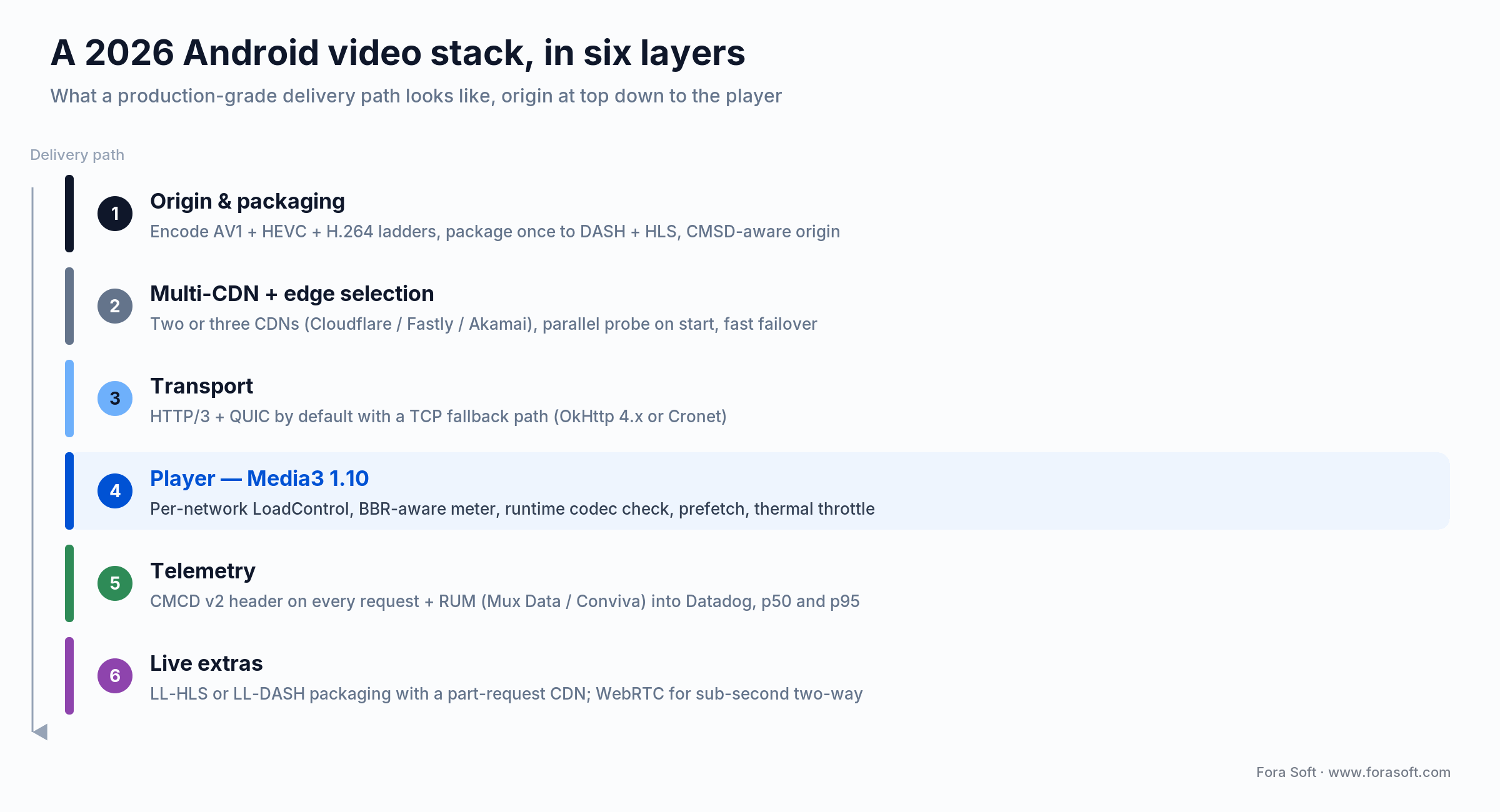
Figure 3. A production-grade 2026 Android video stack, from origin and packaging down to the Media3 player and telemetry.
KPIs to measure before and after rollout
Quality KPIs. Rebuffer ratio (< 0.5% on 5G, < 0.8% on LTE), VST p95 (< 2 s on 5G, < 3 s on LTE), bitrate stability variance (< 22% on LTE), VMAF score on a fixed reference clip per codec ladder.
Business KPIs. Per-1,000-stream egress cost (target −25% YoY with the AV1+HEVC ladder), session length p95, cohort retention at day 7 and day 30, paid-tier conversion among "smooth-stream" cohorts vs. "rebuffered" cohorts.
Reliability KPIs. CDN-level error rate (< 0.05%), VSF (< 0.5% on LTE), thermal-throttle incidents per 1,000 hours played (< 5), foreground-service kill rate (target < 1% per session).
Cost model — what these 10 fixes are worth
For a streaming product serving 100,000 monthly active Android users with an average 40 hours per user per month, the realistic savings from the full optimization pass land roughly here. Numbers are for a typical OTT or e-learning workload — tune them to your own egress contract and ARPU.
CDN egress savings. The AV1 + HEVC ladder cuts video bytes 25–50%. On a committed egress rate that is roughly $0.12–$0.18 saved per 1,000 streams (Figure 4 shows $0.36 down to $0.22). For 100,000 MAU at 40 hours each, on the order of 20–25 million streams a month, that is about $3,000–$4,000 a month back into margin. Swap in your own egress rate and average view length before you bank it.
Engagement and retention lift. Each 1% rebuffer-ratio reduction maps to roughly +8–12% session engagement and meaningful retention lift at day 30. For a paid-tier product, that often pays back the engineering cost inside one quarter.
Engineering investment. Roughly 70–100 dev-days for the full pass with a senior Android team. With our agent-engineering practice we typically land closer to 50–70 — tooling, code generation, and automated testing eat the boilerplate. We do not promise miracles; we promise honest scoping and faster delivery than a traditional team.

Figure 4. Before vs after the full optimization pass on a typical Android workload. Ranges, not guarantees.
Mini case — how Fora Soft ships Android video at scale
Perspire.tv is a live fitness streaming platform we built and continue to operate. Sessions average 30–60 minutes — long enough that thermal throttling matters — and the audience runs on every Android tier from flagship to budget. We ship per-network-class LoadControl, AV1 hardware-validated codec selection, CMCD-instrumented Media3, and a multi-CDN edge selector. Rebuffer ratio holds under 0.5% on 5G and under 0.8% on LTE.
BrainCert handles 500M+ classroom minutes across 1M+ learners on a virtual classroom built around our WebRTC architecture. The Android player layers WebRTC for interactive sessions on top of LL-DASH for the recorded-lecture catalogue, with the same codec ladder driving both paths.
Scholarly, an AWS-recognized e-learning platform, scales to 2,000+ concurrent video streams in a single virtual room with sub-second join time. The Android client uses HTTP/3, smart prefetch, and an aggressive 5G ladder — the same 10 optimizations described here, applied end to end.
Want similar numbers for your own Android product? Book a 30-minute call — we will benchmark your stack and tell you which three fixes will move the needle fastest.
When NOT to invest in these optimizations
There are situations where the optimization budget is better spent elsewhere. Naming them is part of the trust we owe you.
1. Your audience is < 10,000 active Android users. A 6-month optimization pass costs more than the egress you would save and the retention lift would be measurement noise. Ship vanilla Media3 + HEVC and revisit at scale.
2. Your business problem is content, not delivery. If users churn because the catalogue is thin, no amount of buffer tuning saves you. Fix product first.
3. You haven’t measured anything yet. Optimization without telemetry is guessing. Spend two weeks on RUM and CMCD before any other change — you may discover the bottleneck is your origin, not the player.
FAQ
Should I migrate from ExoPlayer 2.x to Media3 in 2026?
Yes. The legacy standalone ExoPlayer (com.google.android.exoplayer2) is already discontinued and all development moved to AndroidX Media3. Media3 1.10+ is API-compatible enough to make the migration a 5–15 dev-day project, depending on how many custom renderers and DataSources you maintain.
Is AV1 ready for production on Android in 2026?
For hardware decode, yes: on Snapdragon 8 Gen 2 and newer, Google Tensor and Pixel 6 and newer, and MediaTek Dimensity 9200 and newer. That is still a minority of the total active base in 2026, so always validate at runtime with a test decode and keep HEVC as the universal fallback.
What rebuffer ratio is acceptable in 2026?
Industry benchmarks (Conviva, Mux) put the bar at < 0.5% on 5G and < 0.8% on LTE for a healthy app. Anything above 2% is critical and likely costing you 8–12% engagement per percentage point.
Do I need LL-HLS or LL-DASH if my product is VOD?
No. Low-latency protocols add real engineering and CDN cost; they only pay off when latency directly affects revenue or safety — live sports, betting, telemedicine, virtual classrooms, surveillance, real-time tutoring. For VOD, classic DASH with smart prefetch is the right call.
How do I prevent thermal throttling during long playback sessions?
Three rules. Always prefer hardware decode (H.265 or AV1 are 0.8–1.3 W; software VP9 is 3.2–4.5 W). Register a PowerManager thermal-status listener (Android 10+) and step down a ladder rung once the device hits ~40 °C. Cap bitrate ceiling at 60% of full when battery drops below 20%.
Is HTTP/3 worth the engineering effort in 2026?
Usually yes. Roughly 35% of web traffic now runs over HTTP/3 (Cloudflare, 2026) and every major CDN supports it. On lossy cellular networks (1–3% packet loss is normal on US LTE) you get a 15–25% reduction in segment fetch latency. Six to nine dev-days, low risk, with a TCP fallback.
Which CDN is best for Android video in 2026?
There is no single winner. Cloudflare leads on HTTP/3 deployment and LL-HLS support. Akamai wins on global tier-1 reach and CMSD maturity. Fastly is the favorite for granular edge compute. The right answer is two CDNs, parallel probed, with edge selection — the cost is rounding error and the resilience is significant.
When does it make sense to build a custom Android video stack instead of using a vendor SDK?
When two or more of these are true: 100k+ monthly active users, > 1M streams per month, custom DRM or IP requirements, multi-CDN with edge logic, low-latency live as a core feature, or a need to ship optimizations vendor SDKs do not expose. Below that scale, Media3 plus a tuned configuration usually wins on cost.
What to read next
Streaming
AI Streaming Platforms — the 2026 playbook
How to wire AI personalization, real-time analytics, and adaptive delivery into a streaming product without breaking margin.
Android
How Android Improves User Engagement in Video Monitoring Apps
How Android improves user engagement in video monitoring apps.
WebRTC
AI Agents on WebRTC — architectures & gotchas
If your low-latency story includes WebRTC, this is the architecture you want under the hood.
Recommendations
AI Content Recommendation Systems
Smooth playback is half the QoE story; the other half is the next video the user actually wants.
Analytics
AI Video Analytics for Online Learning
How to wire engagement and quality telemetry into a learning product without breaking the player.
Ready to ship a 2026-grade Android video stack?
The 10 optimizations above — modern ABR, AV1+HEVC ladder, low-latency protocols for live, HTTP/3, tuned LoadControl, CMCD telemetry, smart prefetch, network-class ladders, thermal-aware playback, and multi-CDN — are what separate "video that works" from "video that scales." Most teams should expect a 6-month rollout sequenced by ROI: tune LoadControl and add CMCD first, ship the codec ladder second, and tackle multi-CDN and low-latency last.
If you want a senior team that has shipped this exact stack on real Android products at scale, from Perspire to BrainCert to Scholarly, we are happy to scope a custom video streaming project, write the playbook, or take ownership. With our agent-engineering practice, the calendar is shorter than the dev-day numbers suggest.
Let’s scope your Android video roadmap
Bring your QoE numbers, codec strategy, and biggest pain point. We will leave you with a 6-month plan ranked by ROI — on us.

