


Key takeaways
• An AI streaming platform is a managed video API with AI built in. In October 2026 Mux, Cloudflare Stream, Bunny Stream, AWS IVS and api.video all bundle live, VOD and at least one AI service (captions, transcription, summaries or chapters). The real choice is which vendor fits your latency tier and traffic shape, and which AI you still own.
• Think in five layers. Ingest, transcode, delivery, player, and a cross-cutting AI layer. You can rent the first four from Mux, Cloudflare Stream, Bunny Stream or AWS IVS and spend your budget where you differentiate.
• Pick your latency tier before your vendor. Standard HLS runs 6–30 s, LL-HLS 2–5 s, WebRTC under 0.5 s. Each tier rules out half the vendor list, so decide it first.
• Delivery is the bill that surprises people. One 1080p viewer-hour is about 1.35 GB. At October 2026 list rates that viewer-hour costs about $0.06 on Cloudflare Stream or Mux, about $0.014 on Bunny Stream’s per-GB CDN, and $0.144 as Full HD low-latency output on AWS IVS. The AI models are rarely the expensive part.
• Compliance is architecture, not paperwork. EU AI Act Article 50 disclosure (applies from 2 August 2026; machine-readable marking for systems already on the market by 2 December 2026), the DSA, and accessibility law shape your vendor list on day one. Retrofitting them later is the expensive path.
Updated October 2026: vendor matrix and cost math re-checked against October 2026 list prices (Mux, Cloudflare Stream, Bunny Stream, AWS IVS, api.video, LiveKit), Cloudflare Stream WebRTC GA, EU AI Act dates after the Digital Omnibus.
Why Fora Soft wrote this playbook
We’ve built real-time video and streaming products since 2005 — 250+ projects, and a large share of them are exactly this: live and on-demand video with an AI layer bolted on or built in. We’ve shipped an on-demand movie service, a WebRTC virtual classroom that does $3M a year, and a surveillance product, VALT, that now runs for 770+ organizations and 50,000+ users. So when a founder asks “should we use Mux or build our own?” we’re usually answering from a repo, not a slide.
This is the working document we use to scope AI video streaming builds. It covers what the term actually means in 2026, the five-layer stack you’re buying, which vendors and AI features are worth the money, where the milliseconds and the dollars go, and when not to build at all. Two of our shipped systems sit behind the examples: Vodeo, an on-demand movie-rental app, and BrainCert, a WebRTC virtual-classroom LMS. If you want us in the room, that’s our video and audio streaming team.
One honest note on cost and speed: Agent Engineering and modern tooling have cut our timelines about 40% in 18 months. A build that used to take 16 weeks now ships in 10–12. We still do the hard parts — pipeline tuning, the AI integration, compliance — we just ship them faster and price them lower than we could two years ago.
What an AI streaming platform actually is in 2026
An AI streaming platform is a system that ingests, encodes, delivers, and plays live and on-demand video — and uses machine learning at one or more of those stages to make the product cheaper to run or better to watch. In practice in 2026 it is either a managed video API with AI services attached (Mux, Cloudflare Stream, Bunny Stream, AWS IVS, api.video) or your own pipeline with the same layers. The AI isn’t a separate product; it’s a layer that touches the pipeline you’d have built anyway. This playbook is about choosing that platform; for the feature-by-feature breakdown, see our guide to AI video streaming platform features.
People mean five different things when they say it, and the buying decision changes with each:
Recommendations and personalization: ML ranks what each viewer sees next. This is the one with a proven dollar figure attached — more on that below.
Quality enhancement: AI super-resolution, denoise, and frame interpolation clean up or upscale video, live or in post. Useful when your source is user-generated or your bandwidth is tight.
Understanding and search: models transcribe, caption, chapter, tag, and index video so it’s searchable and moderatable. This is what makes a 50,000-hour catalog usable.
Real-time agents: live translation, voice assistants, and interactive overlays that respond during the stream. The newest category, and the one WebRTC makes possible.
Moderation and safety: models flag nudity, violence, and abuse in real time so a human doesn’t have to watch everything. Non-negotiable once you host user content.
The market: where the money is moving in 2026
Growth in streaming has moved from subscriptions to ads. 3Vision’s Video Markets Tracker (reported by IBC, August 2026) puts Western European streaming revenue at $53.3B in 2026, rising to $74.9B by 2031; inside that, AVOD grows from $17.5B to $26.7B (+53%) while SVOD grows 35%, and FAST reaches $3.4B by 2031. Ampere Analysis expects ad-supported tiers in North America to pass $45B in 2026.
That shift is the reason AI moderation, ad insertion, and recommendation systems went from nice-to-have to core platform requirements: ad revenue depends on watch time and brand-safe inventory, and both are AI problems. It is also why every managed video API now competes on the AI services it bundles, not only on price per minute.
The five-layer stack: what you’re actually buying
Every streaming product, from a single embedded player to Netflix, is the same five layers. Naming them makes the build-vs-buy call obvious, because you can rent some layers and own others.
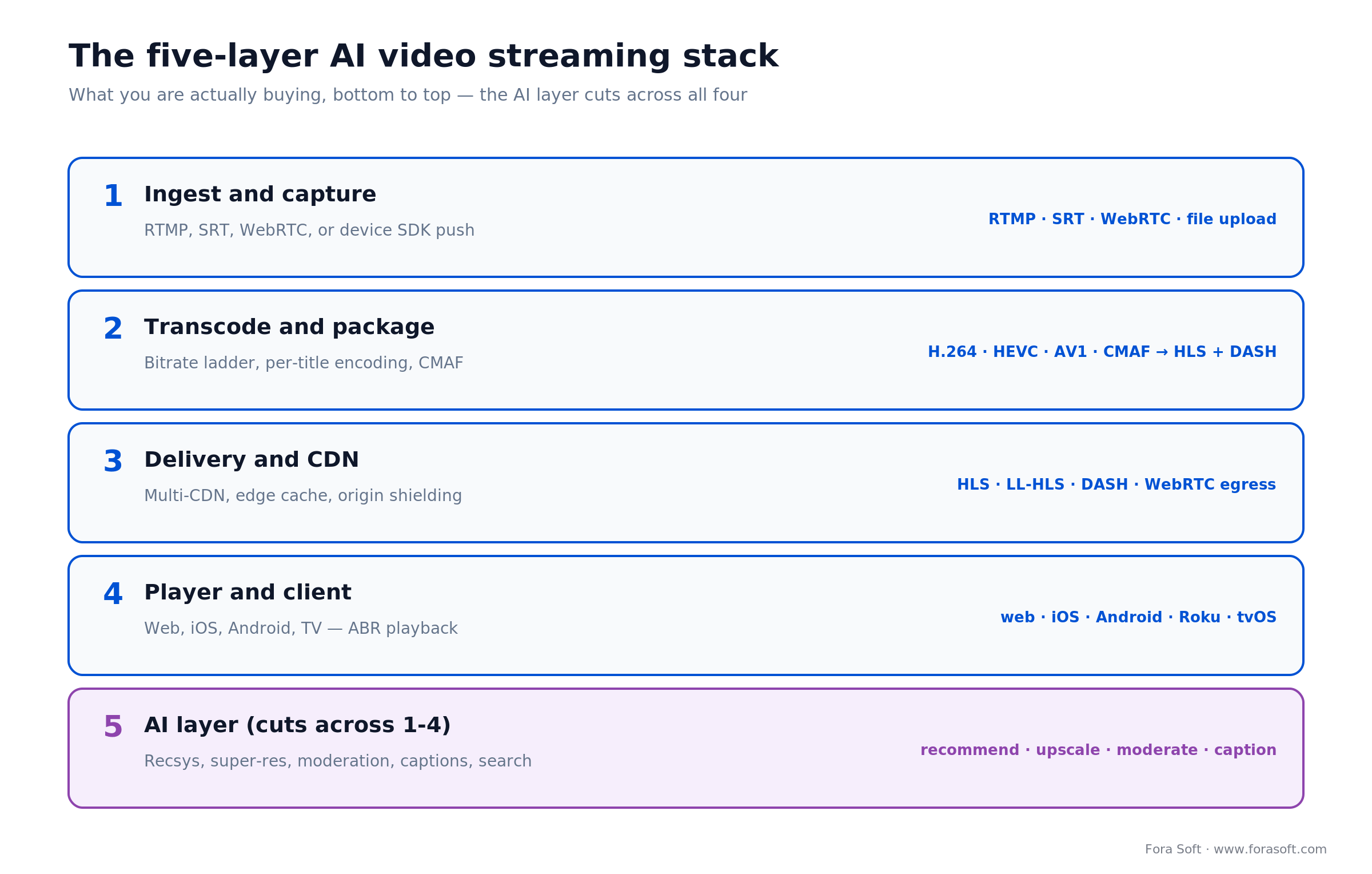
Figure 1. The stack, bottom to top. The AI layer is not a sixth box. It plugs into the four below it.
1. Ingest and capture. Getting the source in: RTMP from an encoder, SRT for contribution over lossy networks, WebRTC for sub-second two-way, or a device SDK for a phone camera. This is where noise suppression and denoise run if you need them.
2. Transcode and package. One mezzanine file becomes a bitrate ladder — several resolutions so a phone on 4G and a TV on fiber both get a smooth stream. Per-title AI encoding tunes that ladder per video to cut bytes. Package once as CMAF and you serve both HLS and DASH. Codec internals live in our video streaming course; here it’s a product decision, not a byte-layout one.
3. Delivery and CDN. Bytes reach players through a CDN, usually multiple, with edge caching and origin shielding. This is the layer that dominates your bill, and the one people underestimate. We’ll do the math below.
4. Player and client. The app on web, iOS, Android, Roku, and tvOS that runs adaptive bitrate (ABR) — switching quality on the fly as bandwidth changes. Getting ABR and startup time right is most of perceived quality.
5. The AI layer. Recommendations, super-resolution, moderation, captions, and search. Each hooks into one of the four layers below. Rent layers 1–4 and this is where a focused team spends its money.
AI features that move the needle in 2026
Not every AI feature earns its keep. Here’s where AI actually plugs into the pipeline, and which features return real numbers versus which are demo candy.
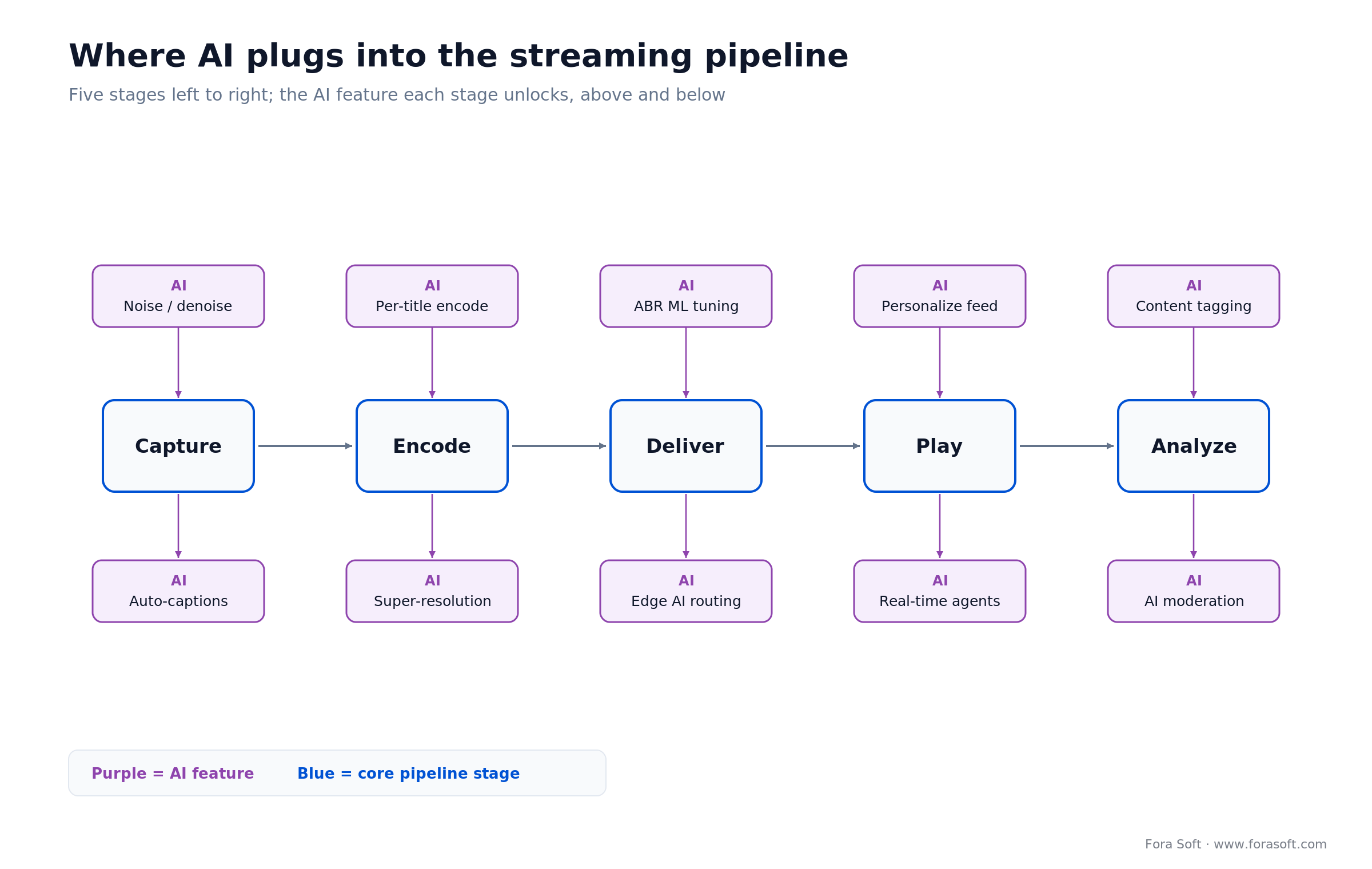
Figure 2. The AI feature each pipeline stage adds. Start at the stages where your product actually hurts.
Recommendations pay for themselves. Over 80% of what people watch on Netflix comes from recommendations, not search, and Netflix’s own engineers estimated that personalization and recommendations save the company about $1B a year in churn (Gomez-Uribe and Hunt, ACM TMIS, 2015). Even a 1% churn improvement is worth real money at scale. If you only ship one AI feature, ship this one.
Super-resolution earns its place when source quality is out of your control. NVIDIA Maxine’s Video Super Resolution runs AI upscaling in real time on NVIDIA GPUs as an SDK you drop into an SFU or relay, alongside denoise and background effects on the same GPU. It’s the realistic path to real-time AI upscaling in 2026. For mastering VOD offline, Topaz Video AI and Real-ESRGAN do higher-quality passes without the latency budget. We break the toolset down in our AI video enhancement comparison.
Captions and search make a catalog usable. Whisper-class transcription turns hours of video into indexed, searchable, accessible text. Cloudflare Stream generates captions with Whisper on Workers AI at no extra cost; Mux Robots runs summaries, chapters, key moments and caption translation, with 100,000 free units a month since September 2026; api.video charges $0.10 per minute for transcription. This is cheap, high-return, and it doubles as accessibility compliance.
Moderation is the one you can’t skip. Once viewers upload or go live, you need real-time NSFW, violence, and abuse detection. Mux Robots includes a moderation workflow, AWS Rekognition covers it on the hyperscaler side, and specialist APIs such as Hive score live frames. The full user-engagement stack — recommenders, ABR, and real-time agents — is its own three-layer playbook.
Not sure which AI features are worth building?
We’ve shipped recommendations, super-resolution, and moderation into live and VOD products. Tell us your catalog, audience, and stack and we’ll tell you which features return real numbers — and which to skip — on a 30-minute call.
AI streaming platforms compared: the 2026 vendor matrix
There is no single best AI streaming platform in 2026: pick Cloudflare Stream or Mux for bundled live, VOD and AI captions; Bunny Stream when raw delivery cost per GB matters most; AWS IVS or LiveKit when latency under a few seconds is the product. The managed video APIs have converged on similar features and split on pricing model, latency and the AI they ship. Here’s the honest read on the seven you’ll actually shortlist, with list prices we checked on vendor pricing pages in October 2026.
| Platform | Best for | Built-in AI (Oct 2026) | List price anchor (Oct 2026) | Where it breaks |
|---|---|---|---|---|
| Mux | Premium OTT and SaaS where playback data drives the product | Mux Robots: summaries, chapters, key moments, moderation, caption translation; auto live captions; MCP server | $0.001/min delivered at 1080p; first 100,000 min/month free | Add-ons (DRM $100/mo + $0.003/license, Plus/Premium encoding) add up |
| Cloudflare Stream | Cheap VOD and live for teams already on Cloudflare | Whisper captions included; Media Transformations for frames and clips | $1 per 1,000 min delivered, $5 per 1,000 min stored; encoding free | Fewer knobs; WebRTC (WHIP/WHEP) streams can’t be recorded yet |
| Bunny Stream | High-volume, cost-sensitive VOD libraries; EU-based | AI transcription ($0.10 per language-minute) | CDN from $0.005/GB (volume) or $0.01/GB (EU & NA); storage $0.01/GB | Basic analytics; you assemble AI beyond transcription |
| AWS IVS | Low-latency and real-time interactive live | Pairs with Rekognition, Transcribe and Bedrock in your AWS account | Full HD low-latency output $0.144/hr (NA); real-time $0.072/participant-hr | Thin VOD tooling; AI is yours to wire |
| api.video | Pay-as-you-go, fast integration | Transcription $0.10/min, summaries $0.10/min, chapters | Delivery from $0.0017/min; encoding free | Smaller vendor; fewer enterprise controls |
| LiveKit Cloud | Sub-second two-way video and real-time AI agents | Agents framework for voice and video AI in the room | Ship plan from $50/mo; WebRTC overage $0.0005/min; agent sessions $0.01/min | Not a VOD platform; pair it with a VOD API |
| Bitmovin / Kaltura | Enterprise, education, deep control | Per-title encoding (Bitmovin); AI tools for education catalogs (Kaltura) | Enterprise quotes | Pricing and onboarding weight |
One vendor for live, VOD encoding and AI metadata? Mux comes closest in October 2026: live and on-demand on one API, free basic encoding, auto-generated live captions, and Mux Robots for summaries, chapters and moderation. Cloudflare Stream bundles live, VOD and free Whisper captions at the simplest price. Reach for Bunny Stream when: you serve a large VOD library and per-GB egress is the bill. Reach for AWS IVS or LiveKit when: latency under a few seconds is the whole point. Mux vs Bunny in one line: Mux sells analytics and AI on top of delivery; Bunny sells the cheapest delivery and leaves the AI to you.
Latency tiers: pick before you pick a vendor
Latency is the first decision, because it rules out half the vendor list before you compare anything else. Glass-to-glass delay — camera to viewer’s screen — comes in three tiers, and each one is a different technology.
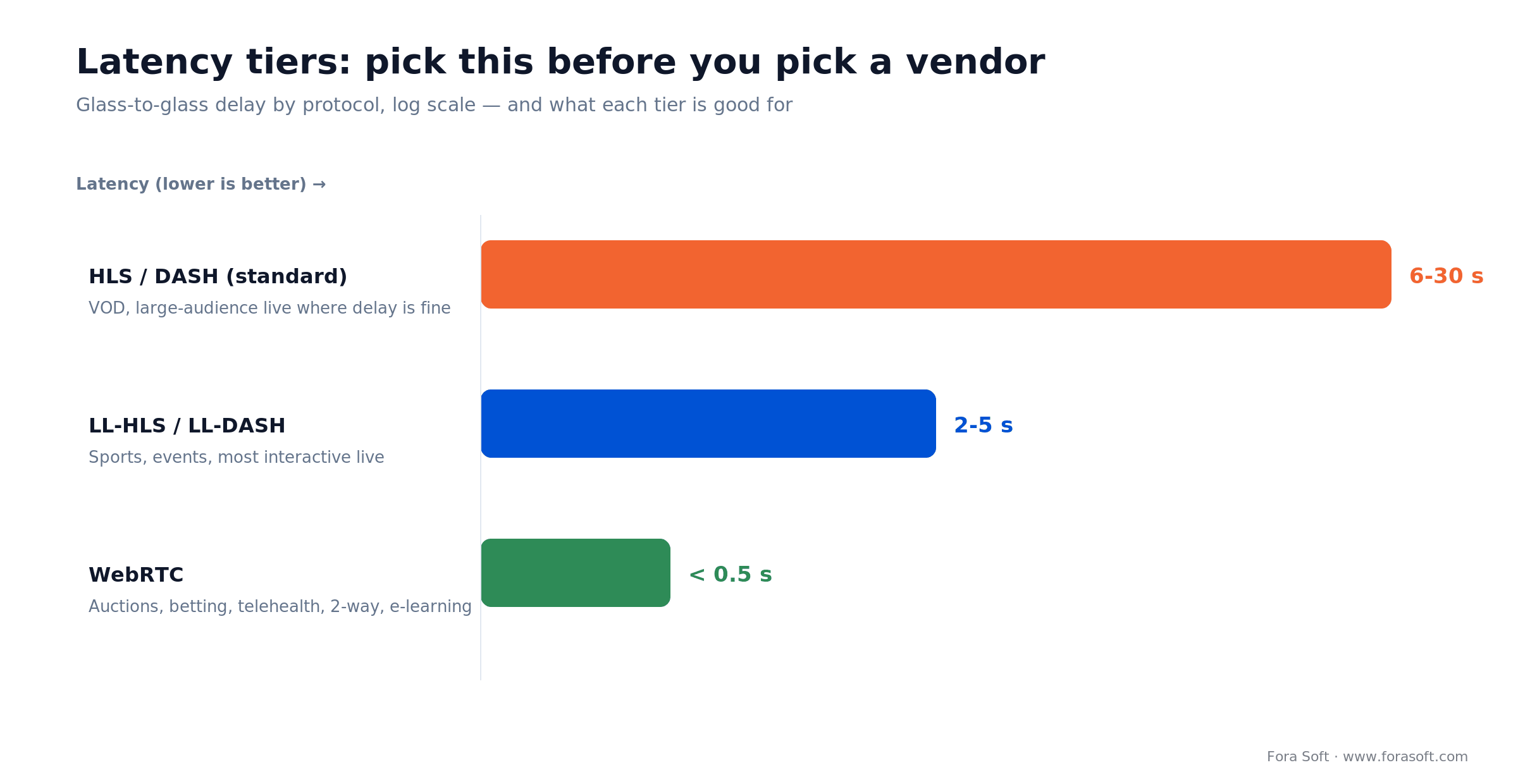
Figure 3. The three latency tiers and what each one is good for. Lower latency costs more per stream.
Standard HLS/DASH (6–30 s) is the cheap, infinitely scalable default. It’s right for VOD and for large-audience live where a few seconds of delay doesn’t matter — a keynote, a concert, a church service. Every CDN on earth caches it well.
Low-latency HLS/DASH (2–5 s) is the sweet spot for most interactive live: sports, auctions where a few seconds is tolerable, live shopping, watch parties. It keeps the CDN-scale economics of HLS while closing most of the gap.
WebRTC (under 0.5 s) is the only tier for true two-way or bet-the-moment interaction: telehealth, live betting, remote auctions, e-learning where a student raises a hand, and any real-time AI agent. It’s more expensive per stream and needs an SFU, which is a layer we most often own end to end. Cloudflare made WebRTC playback in Stream generally available on 15 October 2026 at the same $1 per 1,000 delivered minutes; LiveKit Cloud charges $0.0005 per participant-minute over plan and AWS IVS real-time $0.072 per participant-hour in North America. If you’re weighing real-time architectures, our AI for video engineering course goes deep on the trade-offs.
Practical rule: don’t buy latency you don’t need. WebRTC for a one-way webinar is paying for a race car to sit in traffic. Match the tier to the interaction, then let it eliminate vendors that can’t hit it.
Recommendation engines: the retention layer
A recommendation engine is the AI feature with the clearest return, because it attacks churn directly. No managed video API ships one in the box, so this is usually the first layer you own: start with collaborative filtering on your own watch data and add a ranking model when the data justifies it. The model math lives in our AI for video engineering material, and the pipeline-by-pipeline view is in our playbook on machine learning in video streaming.
Video understanding: search, chapters, moderation
Video understanding is where the platforms differ most in 2026. One transcription pass gives you search inside videos, chapters, tags and summaries: Mux Robots and api.video sell these as metered services, Cloudflare Stream and Bunny Stream give you captions or transcripts and leave the rest to you. Moderation follows the same split, with Rekognition or a specialist API scoring live frames so a human reviews flags, not everything. Our AI video analytics breakdown covers the detection side in depth.
Monetization: AVOD, FAST, and the ad-tech layer
Because the growth is in ads, the monetization layer is now an engineering problem, not just a business one. The three models — subscription (SVOD), ad-supported (AVOD/FAST), and transactional (TVOD) — each need different plumbing, and most 2026 products run a hybrid.
The engineering fork that matters is server-side vs client-side ad insertion. Server-side ad insertion (SSAI) stitches ads into the video stream on the server, so ad-blockers can’t strip them and playback stays smooth, at the cost of more infrastructure. Client-side is simpler but leaks revenue to blockers. If ad revenue is your growth story, SSAI is usually worth the complexity. We go deep on the money side in our AI monetization playbook.
Where AI earns ad money: recommendations raise watch time (more ad inventory), moderation keeps that inventory brand-safe (higher CPMs), and churn ML protects the subscriber base underneath. The three AI features aren’t separate line items. They compound on the same revenue.
Compliance: the 2026 rules in one table
Compliance decides your vendor list on day one, so map it before you write code. The headline for 2026 is the EU AI Act’s transparency rule: from 2 August 2026, if your platform generates or manipulates video, audio, images, or text with AI, you must disclose it and mark synthetic media in a machine-readable way. The Digital Omnibus (in force 27 July 2026) gave generative systems already on the market until 2 December 2026 for the marking duty and moved Annex III high-risk duties to 2 December 2027. Here’s the surface most streaming products actually touch.
| Rule | What it requires | Applies to | Key date |
|---|---|---|---|
| EU AI Act Art. 50 | Disclose AI-generated/edited media; machine-readable synthetic marking | Any AI media features, EU users | 2 Aug 2026; Art. 50(2) marking for systems already on the market: 2 Dec 2026 |
| EU AI Act (high-risk) | Prohibited practices already live; high-risk duties phased in | Biometric / sensitive edge cases | Art. 5: 2 Feb 2025; Annex III: 2 Dec 2027; Annex I: 2 Aug 2028 |
| DSA | Notice-and-action, illegal-content duties, transparency | Platforms hosting user content in EU | In force |
| GDPR | Consent, data residency for viewer data, voices, faces | Anyone with EU viewers | In force |
| Accessibility (ADA / EAA) | Captions, audio description, perceivable AI disclosures | Consumer services, US & EU | EAA: in force Jun 2025 |
| COPPA (if kids) | Parental consent; no behavioral ads to under-13s | Any content aimed at children | In force |
Cost model: what an AI streaming platform costs to run
The cost that surprises people isn’t the AI. It’s delivery. One 1080p viewer-hour at 3 Mbps is about 1.35 GB of egress. Multiply that by your audience and delivery dwarfs everything else. Here’s the worked math for a mid-size product.

Figure 4. The delivery bill for 10,000 viewers watching 2 hours a month, at US list rates checked in October 2026.
Take 10,000 viewers watching 2 hours a month: 20,000 viewer-hours, about 27 TB delivered. That is 1.2 million delivered minutes. On Cloudflare Stream ($1 per 1,000 minutes) it’s $1,200/month. On Mux (1080p at $0.001/min, first 100,000 minutes free, cheaper tiers above 500,000) it’s at most about $1,100. On Bunny Stream’s per-GB CDN ($0.01/GB in Europe and North America) the same 27 TB is about $270, and AWS IVS low-latency Full HD output ($0.144 per viewer-hour) is about $2,880 before input hours. Per-minute APIs bundle encoding, player and AI; per-GB CDNs win on raw egress, and the gap grows with bitrate. Now the rest of the bill against that same workload:
| Cost component | What drives it | Rough monthly |
|---|---|---|
| Delivery / CDN | GB (or minutes) delivered — dominates | $270–2,880 |
| Encoding | Minutes ingested (one pass per asset) | $50–300 |
| Storage | GB stored — grows with catalog | $50–400 |
| AI: captions + moderation | Minutes processed (e.g. Mux live captions $0.024/min after 6,000 free; api.video transcription $0.10/min) | $200–800 |
| AI: recsys / model serving | Compute, only if you run custom | $300–1,500 |
The takeaway from the math: delivery is 40–70% of a streaming bill, and the AI features are a rounding error next to it. So optimize egress first: codec choice, per-title encoding, multi-CDN — before you worry about the cost of a caption model. We keep the numbers conservative on purpose; if a figure looks too good, it’s a negotiated rate, not a list one.
Want a real cost model for your numbers?
Give us your audience size, watch hours, bitrate, and target latency and we’ll build the delivery-plus-AI bill against real 2026 rates — and tell you which vendor mix is cheapest for your shape of traffic.
Reference architecture: the 2026 default
If you started a new AI video streaming product today and asked us for the sane default, it’s this: rent the pipeline, own the AI and the product. Concretely — a managed video API (Mux or Cloudflare Stream) for ingest, transcode, and delivery; a standard player SDK with your own UI; and your engineering effort concentrated on the AI layer and the data that feeds it.
For VOD, that means the managed API handles encoding and CDN, Whisper-class transcription feeds search and captions, and a recommendation service reads your watch events. For low-latency live, swap in AWS IVS or an LL-HLS path. For true real-time, add a WebRTC SFU (LiveKit, mediasoup, or Janus) — the one layer worth owning when interaction is the product. The point of the default is that it puts your scarce engineering time on the 20% that differentiates you, not the 80% that’s a solved commodity.
You only leave this default for a real reason: extreme scale where CDN egress at retail rates hurts, data-residency rules that a managed API can’t meet, or an AI feature so central that owning the media path is the point. Our OTT platform engineering course walks the full box-by-box build if you’re headed that way.
Build vs buy: the honest decision
Buy the pipeline unless streaming is your core product and you have a real reason to own the media path. For 80% of teams — an app that happens to include video, a course platform, a marketplace with live demos — a managed API is faster, cheaper, and more reliable than anything you’d build in the first year. You get global CDN, per-title encoding, and AI captions on day one for a metered bill.
You build when the media stack is the product: a streaming-first company at scale where egress economics flip the math, a regulated deployment that needs data residency or on-prem, or a differentiating AI feature — real-time translation, a custom recommendation model, an interactive agent — that only works if you own the pipeline. That’s where our AI integration team tends to come in: not to rebuild Mux, but to own the layer that makes you different.
The hybrid most teams actually ship: managed API for the pipeline, custom code for the AI and the product experience. You get commodity infrastructure at commodity prices and spend your engineers where the differentiation is. Pure build-everything is rarely the right first move.
Mini case: an AI retrofit on an e-learning platform
The situation. An education platform in our portfolio, BrainCert, runs live virtual classrooms and a growing library of recorded sessions on a WebRTC-based stack. As the recorded catalog grew past a few thousand hours, learners couldn’t find anything: search was title-only, there were no captions, and completion rates on recorded content were sliding while support tickets about “where’s the part about X” climbed.
The plan. We didn’t rebuild the pipeline; we added the AI layer. A Whisper-class transcription pass over the back catalog produced captions, chapters, and a searchable transcript index. Those transcripts fed semantic search, so “the scene where the instructor explains recursion” became a result, not a scrub through a two-hour recording. Captions also closed an accessibility gap the platform needed to close anyway. The whole retrofit sat on top of the existing player — no migration, no downtime. It is the same pattern our virtual classroom development team uses on other WebRTC learning products.
The outcome. Recorded-content search went from title-match to inside-the-video, learners found material without opening a ticket, and captions made the catalog usable for deaf and hard-of-hearing students. The pattern generalizes: most streaming products already have the pipeline; the win is adding understanding on top of it. Want a similar assessment of your catalog? Grab 30 minutes with us and we’ll scope it.
Sitting on a catalog nobody can search?
We retrofit AI search, captions, and recommendations onto existing streaming products — no pipeline rebuild, no downtime. Tell us what you’ve got and we’ll sketch the retrofit and a realistic timeline.
5 pitfalls that kill AI streaming projects
1. Underestimating delivery cost. Teams model the AI bill and forget that egress is 40–70% of the total. A pilot that’s cheap at 100 viewers is a five-figure monthly bill at 100,000. Model delivery at target scale before you commit to a bitrate ladder.
2. Buying latency you don’t need. WebRTC everywhere feels modern and triples your per-stream cost for a one-way webinar. Pick the tier that matches the interaction, not the one that sounds impressive.
3. Jumping to deep-learning recommenders too early. A neural ranker needs watch data you don’t have yet. Ship collaborative filtering first, collect signal, and upgrade when the numbers justify it. The simple model usually captures most of the win.
4. Treating compliance as a launch-week task. EU AI Act disclosure, GDPR data residency, and captions all shape your architecture. Retrofitting synthetic-media marking or a consent flow after launch costs multiples of building it in. Map it in week one.
5. Building the pipeline you could have rented. Rebuilding encoding and CDN to save a metered bill is the classic first-year mistake. Own the AI and the product; rent the commodity. If you’re rebuilding Mux, you’re spending your differentiation budget on plumbing.
KPIs: how to tell if your AI layer is working
Quality KPIs. Startup time (target under 2 s), rebuffer ratio (under 0.5% of playback time), and video-start failures (under 1%). These are the numbers that decide whether people stay past the first minute, and ABR tuning moves them directly.
Business KPIs. Watch time per user, recommendation click-through, and churn rate. If your recommendation engine is working, watch-time-from-recommendations climbs and churn falls, and those two are the ROI of the whole AI layer.
Reliability KPIs. Stream uptime (99.9%+), moderation precision and recall (you want high recall on genuinely harmful content), and caption accuracy (word error rate under 10% on clean audio). Track these from day one; they’re the difference between a demo and a service.
When NOT to build a custom AI streaming platform
Don’t build when video is a feature, not your product. If you’re adding a few hundred hours of course content or occasional live demos, a managed API plus their built-in AI covers it. Building your own pipeline is months of work to reach parity with a metered service you could switch on today.
Don’t build custom AI models when the off-the-shelf ones are good enough, which in 2026 they usually are. Whisper for captions, Hive or Rekognition for moderation, a managed vector store for search. These beat what a small team trains from scratch, and they improve without your effort. Save custom modeling for the one feature that’s genuinely your edge. And don’t build at all if the honest answer is that an existing product already does what you need. We’ll tell you when that’s the case, because a happy client who spent wisely refers more work than a big project that shouldn’t have happened.
A decision framework — pick your stack in five questions
Five questions route most teams to the right stack. Answer them in order; the first “yes” that forces a build is usually your real constraint.
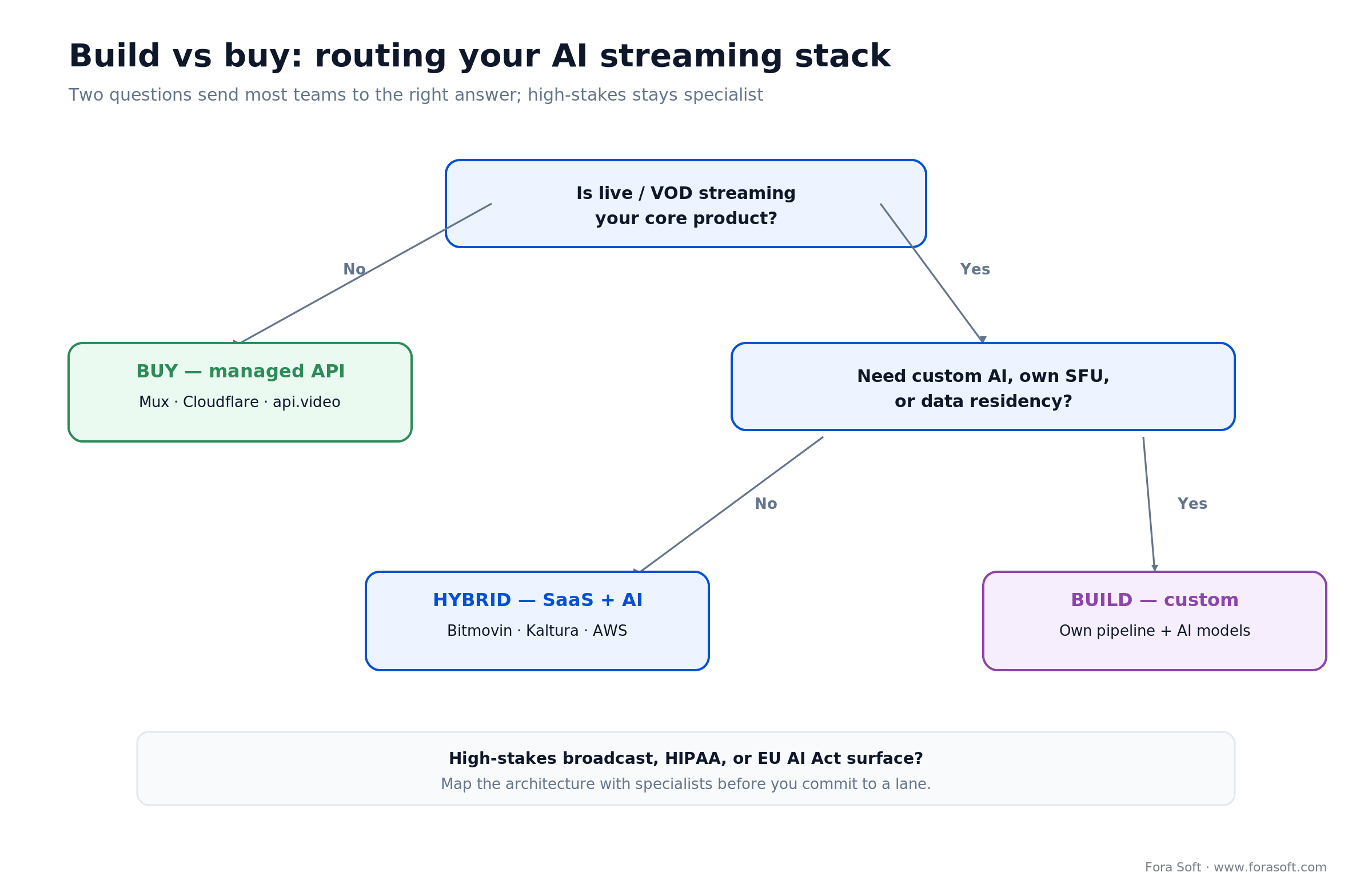
Figure 5. Two questions send most teams to buy, hybrid, or build; high-stakes deployments stay with specialists.
1. Is streaming your core product, or a feature? Feature → buy a managed API and stop reading. Core product → keep going.
2. What latency do you actually need? 6–30 s → any HLS vendor. 2–5 s → LL-HLS vendors. Under 0.5 s → WebRTC, and you’ll likely own an SFU.
3. Do you have data-residency or on-prem rules? Yes → a managed cloud API may be off the table; plan for self-hosted delivery. No → rent the pipeline.
4. Is an AI feature your differentiation? If a custom recommender, real-time translation, or interactive agent is the reason people choose you, own that layer — and only that layer.
5. What’s your egress at target scale? If retail CDN rates at your projected audience exceed a committed-use or self-hosted plan, the math starts favoring more ownership. Below that line, managed wins. If two or more answers point to “build,” talk to a team that’s shipped it — that’s exactly what our team that builds scalable AI video streaming on mediasoup and LiveKit does, without the per-minute SaaS bill.
Integration playbook: the 10–14-week path
A first production AI video streaming build, on the rent-the-pipeline default, is a 10–14-week job with Agent Engineering. Here’s the shape we run.
| Weeks | Phase | Deliverable |
|---|---|---|
| 1–2 | Scope & compliance map | Latency tier, vendor shortlist, GDPR/AI Act surface |
| 3–5 | Pipeline integration | Ingest, transcode, delivery, player working end to end |
| 6–9 | AI layer | Captions, search, recommendations, moderation live |
| 10–12 | Hardening & QoE | ABR tuning, load test, disclosure UX, analytics |
| 13–14 | Launch & iterate | Production rollout, KPI dashboard, first tuning pass |
FAQ
What is an AI streaming platform?
It’s a system that ingests, encodes, delivers, and plays live and on-demand video and uses machine learning at one or more of those stages — for recommendations, captions, search, moderation or upscaling. In 2026 it is usually a managed video API such as Mux, Cloudflare Stream or Bunny Stream with AI services attached, plus the AI layer you own.
Which is the best AI streaming platform in 2026?
There’s no single winner. Mux leads on analytics and bundled AI (Mux Robots); Cloudflare Stream on simple per-minute pricing with free Whisper captions; Bunny Stream on per-GB delivery cost; AWS IVS and LiveKit on low-latency and real-time interaction; api.video on pay-as-you-go simplicity. Pick by latency tier and traffic shape first.
Is there a service that bundles live streaming, VOD encoding and AI metadata?
Yes. Mux runs live and on-demand on one API with free basic encoding, auto-generated live captions and Mux Robots for summaries, chapters and moderation. Cloudflare Stream bundles live, VOD and free AI captions; api.video adds transcription and summaries at $0.10 per minute.
Mux vs Bunny vs Cloudflare Stream: which is cheapest?
For pure delivery, Bunny Stream: 27 TB a month costs about $270 at $0.01/GB, against about $1,100 on Mux and $1,200 on Cloudflare Stream at October 2026 list rates. Mux and Cloudflare include encoding, player and AI services in the per-minute price, so compare the whole bill, not egress alone.
Which streaming APIs deliver ultra-low latency globally?
For sub-second two-way video, use WebRTC: LiveKit Cloud, AWS IVS real-time ($0.072 per participant-hour) or Cloudflare Stream’s WebRTC playback, generally available since 15 October 2026. For 2–5 seconds at CDN scale, AWS IVS low-latency or LL-HLS on Mux works.
Should I build or buy an AI streaming platform?
Buy the pipeline unless streaming is your core product. For most teams a managed API plus its built-in AI is faster and cheaper than building. Build only when you need extreme scale economics, data residency, or a differentiating AI feature that requires owning the media path.
How much does an AI streaming platform cost to run?
Delivery dominates. 10,000 viewers watching 2 hours a month is about 27 TB, or roughly $270 on Bunny Stream, $1,100 on Mux, $1,200 on Cloudflare Stream and $2,880 on AWS IVS low-latency output at October 2026 list rates. Encoding, storage, captions and moderation usually add a few hundred to low thousands.
Do I have to disclose AI-generated video to users?
In the EU, yes. EU AI Act Article 50 applies from 2 August 2026: disclose AI-generated or manipulated audio, video, images and text, and mark synthetic media in a machine-readable way. Generative systems already on the market before that date have until 2 December 2026 for the marking duty.
Can AI upscale live video in real time?
Yes, within a latency budget. NVIDIA Maxine’s Video Super Resolution runs on NVIDIA GPUs and can sit inside a WebRTC SFU or relay. For offline VOD mastering, Topaz Video AI and Real-ESRGAN give higher quality without the real-time constraint.
How long does it take to build an AI streaming product?
On the rent-the-pipeline default, about 10–14 weeks: two weeks of scope and compliance, three for pipeline integration, four for the AI layer, then hardening and launch. Owning the media path (custom SFU, self-hosted delivery) adds time. Agent Engineering has cut our timelines roughly 40% in 18 months.
What to read next
Features
Essential AI streaming features
The feature-by-feature companion to this build-vs-buy playbook.
Monetization
AI monetization for streaming
SSAI, churn ML, and the eight ways AI turns watch time into revenue.
Engagement
AI user-engagement tools
The three-layer playbook for recommenders, ABR, and real-time agents.
Enhancement
AI video enhancement tools
Five upscaling and denoise tools compared for streaming pipelines.
Trends
The future of AI video streaming
Where the pipeline and the AI layer are heading next.
Ready to scope your AI streaming build?
Choosing an AI streaming platform in 2026 is a buying decision for most teams and a building decision for a few. Think in five layers, rent the pipeline, and spend your engineering where you differentiate — usually the AI layer and the product experience. Pick your latency tier first, because it eliminates half the vendors. Model delivery cost at real scale, because it’s 40–70% of the bill and the AI is a rounding error next to it. Ship the recommendation engine, because it’s the one AI feature with a proven return. And map compliance in week one, because EU AI Act disclosure and accessibility are cheaper built in than bolted on.
If you want a second opinion on buy vs build, or a team that’s shipped live, VOD, and e-learning streaming with AI on top, we’re a 30-minute call away — and we’ll tell you honestly which path fits your product.



The handbook · 7 volumes
Fora Soft Video Engineering Handbook
An AI streaming platform is a delivery stack with recommendation, search and moderation layered on top. Our seven-volume handbook covers that stack from encoding and delivery to sound and AI; start with Volume 6 for video understanding, search and RAG over the archive, and Volume 3 for ABR, CDNs and the economics of delivery. Written by Nikolay Sapunov, CEO at Fora Soft.
Browse the handbook on Amazon →7 volumes · 9,000+ pages · Kindle & paperback
Ready to scope your AI streaming project?
We’ve shipped AI into live, VOD, and e-learning streaming since 2005 — 250+ projects. A free 30-minute call and we’ll tell you honestly whether to buy, build, or hybrid, and what the real timeline and bill look like.

