

Key takeaways
• Six AI patterns ship reliably in 2026. Voice assistants, real-time ASR & translation, computer vision, generative content, recommendations, and content moderation. Everything else is still research or still slideware.
• Buy the model, build the feature. GPT-5, Claude 4, Whisper, and YOLO11 are commodities now. Your moat is the workflow, the data you feed them, and the UX that surfaces the answer, not training a foundation model.
• Most founders pay 3–5× too much. A typical first AI feature ships for $15k–$50k on API-first architecture, not the $200k+ quoted by agencies who still estimate like 2023. We ship in weeks using Agent Engineering.
• Token cost is rarely what kills the feature. It’s a bad retrieval step, hallucinated answers in a legal/medical context, false positives in moderation, or latency over 1.5s on a voice interaction. Get those right before optimising spend.
• Fora Soft has shipped all six patterns in production. FRP (voice DJ assistant), BlaBlaPlay (moderation & recs), FashionAI (CV), ALDA (generative learning), Translinguist (62-language real-time translation) — each with measurable outcomes we reference in this piece.
Why Fora Soft wrote this playbook
Fora Soft has been building video, audio, and real-time software since 2005. Over the last three years we rewired our delivery around Agent Engineering — spec-first pipelines, automated code generation, and continuous eval loops, so we can ship production-grade AI features in weeks instead of quarters. That change matters to the buyer reading this: we estimate faster and lower than agencies still billing for hand-written boilerplate.
This playbook pulls together what we’ve learned shipping AI into five live products — Franchise Record Pool, BlaBlaPlay, FashionAI, ALDA, and Translinguist — spanning six distinct feature patterns (voice, ASR/translation, vision, generation, recommendations, moderation). We reference each of them by name below with the actual tech stack, the failure modes we hit, and the measurable outcomes. See our AI integration service or the FRP case for proof before you read on.
If you’re a founder or CTO deciding whether AI is a feature, a pivot, or a distraction. This is the short, opinionated version we give our own prospects in a scoping call.
Is AI the right next feature for your product?
30 minutes with our CTO — we’ll pressure-test your use case, name the fastest path to a shippable v1, and tell you honestly if you should wait.
The six AI feature patterns that actually ship
Almost every successful AI feature we’ve shipped maps to one of six patterns. If your idea doesn’t fit one of them, the probability you’re doing research rather than product goes up sharply. Slow down and prototype with an off-the-shelf API before committing roadmap time.
| Pattern | Typical use case | First-choice tech | v1 effort | Fora Soft shipped it in |
|---|---|---|---|---|
| Voice assistant | “Make me a Latin pop playlist, 150 BPM” | Whisper + GPT-5 + Polly/ElevenLabs | 3–5 weeks | FRP |
| Real-time ASR & translation | Multilingual video calls & conferences | Deepgram + GPT-5 + ElevenLabs TTS | 6–10 weeks | Translinguist (62 languages) |
| Computer vision | Object / clothing / face recognition | YOLO11/26 + CLIP + TFLite/CoreML on-device | 5–8 weeks | FashionAI |
| Generative content | Syllabi, playlists, outfits, first drafts | OpenAI Responses API + JSON schema | 2–4 weeks | ALDA |
| Recommendations | Personalised feed, prompts, playlists | Embeddings + pgvector / Pinecone | 3–6 weeks | BlaBlaPlay, FRP |
| Content moderation | Hate speech, PII, safety signals | Whisper + fine-tuned classifier | 4–6 weeks | BlaBlaPlay |
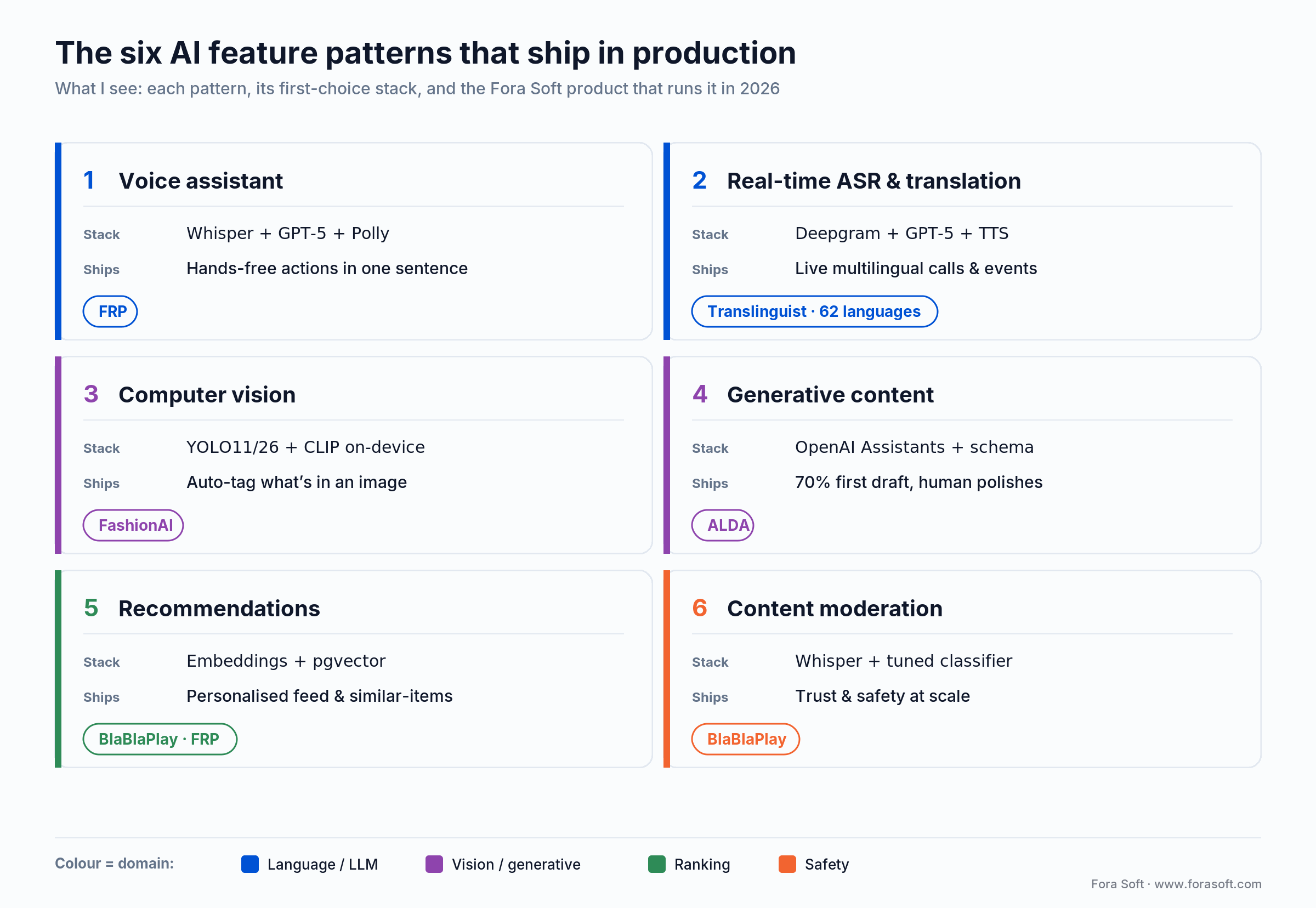
Figure 1. The six patterns, their first-choice 2026 stack, and the Fora Soft product running each in production.
Notice what’s not in the list: “train our own foundation model.” Outside of deep-pocketed research labs, that’s almost always the wrong move in 2026. The interesting engineering today happens in the 20% of the stack closest to your users — retrieval, UX, evals, guardrails — not in re-inventing GPT.
Pattern 1 — Voice assistants and voice-controlled search
Voice is the highest-payoff pattern for any product where users have their hands busy: DJs mid-set, drivers, surgeons, warehouse workers, creators, parents. You replace a multi-step UI with one sentence: “Make a Latin pop playlist, 150 BPM, no Bad Bunny.”
On Franchise Record Pool — the DJ platform with 720,000 licensed tracks from Sony Music, Universal and Virgin Records — we shipped a voice DJ assistant on top of Whisper (transcription), GPT-5 (intent extraction), the FRP catalogue search, and Amazon Polly (response voice). DJs now go from idea to saved playlist in a single sentence instead of the old five-step filter UI.
Anatomy of a production voice pipeline
1. Capture. 16kHz mono PCM from the mic, streamed in 250 ms chunks. Echo cancellation and VAD happen client-side (WebRTC’s built-ins are fine).
2. Transcribe. Whisper (large-v3 for batch, gpt-4o-transcribe for real-time at ~$0.006/min, or gpt-4o-mini-transcribe at ~$0.003/min), Deepgram Nova-3 (~$0.0077/min) when you need <300 ms partials, or AssemblyAI when you want sentiment/entity tagging out of the box.
3. Understand. An LLM call with a strict JSON schema and a tool-use prompt: intent, entities, slot values. Keep this behind a function-calling boundary so your backend never blindly evals free-form strings.
4. Act. Call your actual API. This is the part every AI tutorial skips. It’s also 80% of your engineering effort.
5. Respond. TTS back to the user (Polly, ElevenLabs, or Azure) or a UI render. Target <1.2 s end-to-end; anything over 1.5 s feels broken.
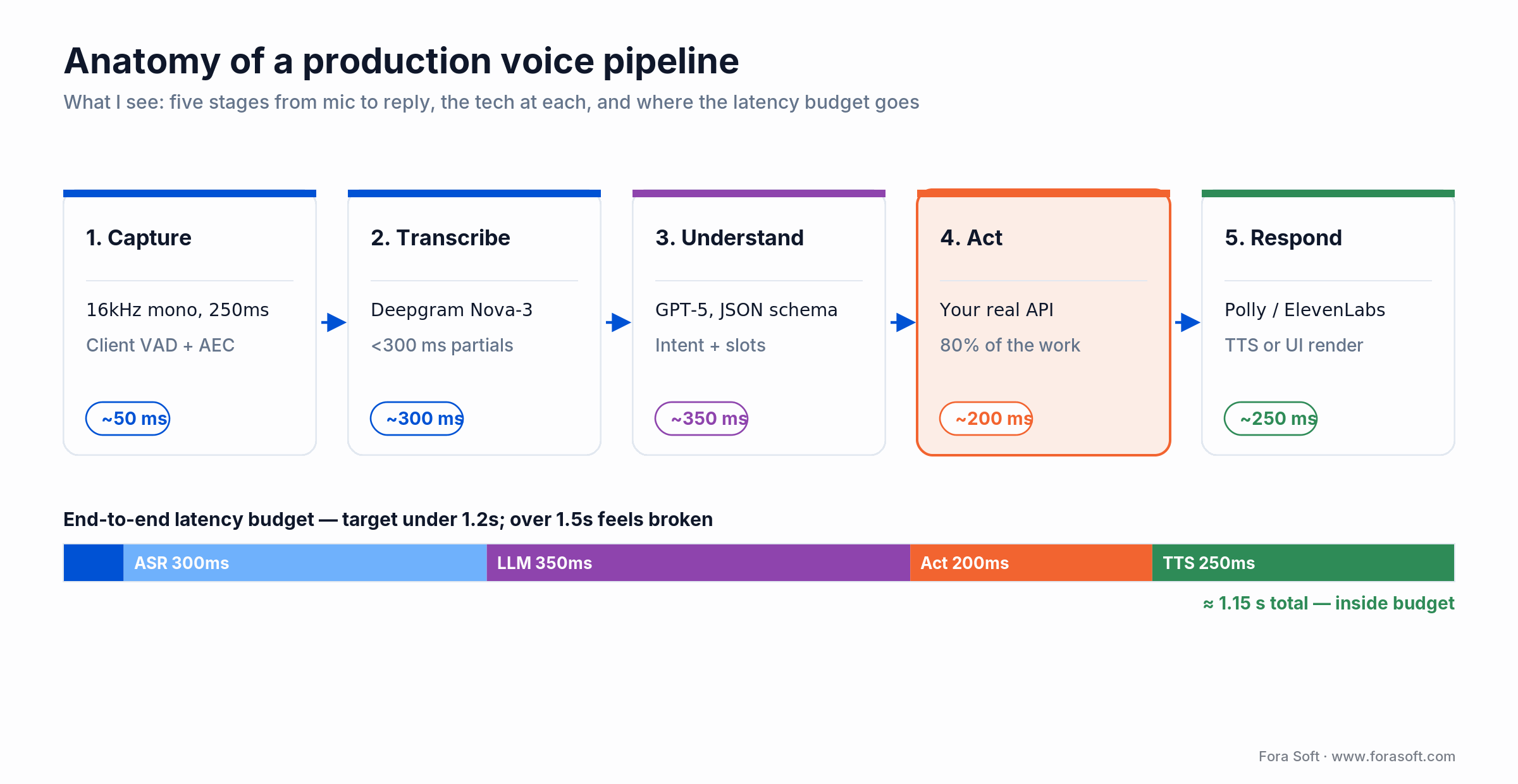
Figure 2. The five-stage voice pipeline and where the sub-1.2s latency budget actually goes.
Reach for a voice assistant when: the target user has hands-busy contexts, the action graph has clear verbs (create, find, modify), and saving even 3 clicks per session compounds over daily use.
Pattern 2 — Real-time transcription and translation
Real-time ASR and translation is the second most common AI request we get. It’s also where bad product decisions cost the most money, because streaming is billed per-minute-connected, not per-word-spoken.
We built Translinguist (and its sibling Video Interpretations platform) to handle live events with simultaneous, consecutive, and sign-language interpretation across 62 languages. Each participant hears only their language; subtitles auto-generate; special terms and proper nouns are preserved via a custom glossary layer. See our playbook on multilingual translation in video calls for the deeper architecture.
Whisper vs Deepgram vs AssemblyAI (our one-minute verdict)
Whisper (batch / async). Cheapest at ~$0.006/min. Best when you can tolerate 500–900 ms latency or run async. Since August 2025 OpenAI’s gpt-realtime API gives true streaming, but it’s a different price class: budget on the order of $0.06/min of audio input, not Whisper batch rates.
Deepgram Nova-3. Sub-300 ms partials, ~$0.0077/min pay-as-you-go. First choice when you need genuine real-time (voice agents, live captions, DJ-style hands-free).
AssemblyAI. ~$0.0042/min effective (it bills session-duration, which in practice adds ~65% overhead). Best if you need transcription plus sentiment / PII redaction / entity detection bundled.
Reach for real-time translation when: your product is a live video/voice surface (conferences, telehealth, courtroom, classroom) and every participant speaks a different language. If the conversation can wait 10 seconds, async Whisper is usually far cheaper: you’re billed per audio-minute, not per minute-connected, so silence isn’t metered.
Pattern 3 — Computer vision and object recognition
Computer vision shipped into mainstream product the moment small YOLO detectors (YOLOv8 through the current YOLO11/YOLO26) and CLIP got small enough for mobile. We used both on FashionAI, the closet-organising app we trained to recognise not just clothing type, fabric, colour and pattern — but also sleeve length, neckline, pattern motifs, and Indian ethnic wear categories the pre-trained datasets don’t cover.
The stack: TensorFlow Lite running the YOLOv8m model for object detection, Apple Vision and PyTorch for richer feature extraction, and OpenAI’s CLIP for semantic embeddings that power the “go find me a red kurta I’d wear to brunch” recommendation. For the production-hardening pattern see our computer vision engineer hiring guide.
On-device vs cloud — the one decision that drives the rest
On-device (TFLite / CoreML / NNAPI). No per-inference cost, privacy-preserving, works offline, but you’re limited to nano-class detectors (YOLO11-nano, ~3–22 MB). Use this when inference runs on user photos/video and you have retention risk.
Cloud. YOLO11-m/l/x on a GPU VM, ~$0.001–$0.01 per image. Use this when one image is worth a round-trip (legal docs, medical scans, insurance claims) or accuracy matters more than latency.
Hybrid. A nano detector on-device for the common case, escalate to cloud for edge cases. This is the pattern FashionAI runs: 95% of closet photos finish in 180 ms on-device; unusual ethnic wear gets a cloud second opinion.
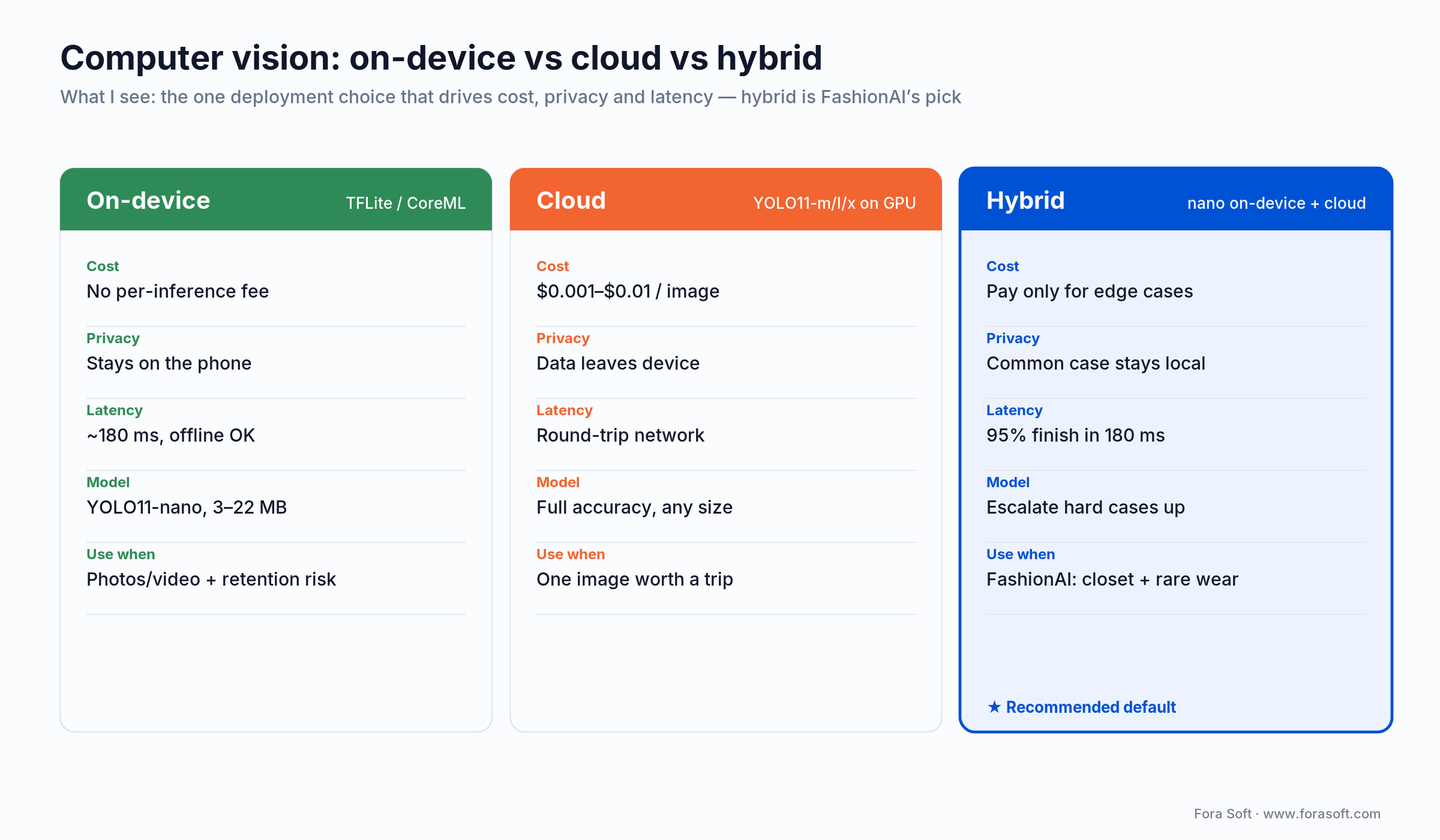
Figure 3. On-device vs cloud vs hybrid CV deployment — the choice that drives cost, privacy and latency.
Reach for computer vision when: your users would otherwise manually tag what’s in an image (clothing, receipts, rooms, food, defects) and you can collect >2,000 labelled examples of the edge cases generic models miss.
Pattern 4 — AI-generated content and first drafts
Generative content is the most “obvious” AI pattern, and the one that fails fastest when shipped naively. The winning pattern is never “press a button, get 800 words, hope.” It’s “press a button, get a 70% draft that follows my schema, human polishes the rest.”
ALDA, our AI learning assistant for US college and university faculty, generates syllabi that have to match institution-specific templates (credit hours, assessment format, accreditation tags). We don’t free-prompt GPT; we use the OpenAI Responses API with Structured Outputs, inject the institution’s syllabus template as a required schema, and let the professor edit in context. Faculty report a roughly 4× time saving on first drafts.
Five rules for generative features that don’t embarrass you
1. Structured output, always. Force JSON schema output, then render it. Never pipe raw model text into your UI.
2. Ground on your data. Retrieval-augmented generation (RAG) cut hallucination rates by 40%+ in 2025 domain benchmarks (MEGA-RAG, public-health QA), and grounding answers on your own data beats an ungrounded model on factual accuracy.
3. One evaluator per feature. Automated evals (Ragas, LangSmith, or a rolled-your-own pytest suite) run on every prompt change. No evals = you’ll regress silently in week 3.
4. Always a human in the loop for high-stakes output. Syllabi, legal text, medical summaries, financial advice — draft, then human confirms. No exceptions.
5. Show the sources. Users trust generated content markedly more when citations render alongside, and it’s the cheapest UX win in the AI stack.
Reach for generative content when: users currently start from a blank page and the first 70% of the output follows a predictable structure (syllabus, job description, workout plan, meal plan, product spec).
Pattern 5 — Recommendations and personalised feeds
Recommendations are the quietest win. Nobody tweets about a good feed, but retention, session length, and ad revenue all move immediately.
On BlaBlaPlay — the anonymous voice-card social network — we used two recommendation layers. First, a “what topic should I record?” prompt generator (OpenAI API with a daily-rotating seed based on trending cards). Second, a feed re-ranker that uses embeddings of the user’s listened/favourited cards against the pool of fresh cards. After shipping both, “silent response” rates on voice cards dropped sharply and average session length rose by a meaningful double-digit percentage.
On FRP, the same pattern powers “similar tracks” and “other DJs who played this played…” — classic collaborative filtering rebuilt on OpenAI embeddings + pgvector instead of the old matrix factorisation pipelines that took 10× the engineering.
The reference stack for a first recommendation system
User activity  →  Event queue (SQS / Redpanda)
                      ↓
               OpenAI text-embedding-3-small
                      ↓
               pgvector (or Pinecone at scale)
                      ↓
   ANN query (top-k, cosine) + rerank (BGE / Cohere rerank)
                      ↓
           Feed API + A/B flag + click logging
Reach for recommendations when: you have >500 items in the catalogue, at least a few thousand active users generating signal, and a feed/list surface where the current ordering is chronological or random.
Pattern 6 — Content moderation and trust & safety
Every UGC product eventually has a moderation problem. AI moderation isn’t optional once you pass a few thousand daily posts. Human-only queues melt, and platform-provided moderators (Apple, Google, Meta) can shut you off if the default ML classifiers flag your app before you do.
BlaBlaPlay’s moderation layer has three stages. First, Whisper transcribes each voice card server-side. Second, a fine-tuned classifier detects slurs, threats, and targeted abuse. Third, flagged cards go into a moderator queue (not auto-deleted) where the admin decides. CoreML runs a fast pre-filter on-device so obvious violations never hit the server.
The false-positive trap (and how to avoid it)
Out-of-the-box moderation APIs mis-classify identity terms (“Muslim,” “gay,” disability language, AAVE) as abusive far more often than mainstream English — a well-documented bias. Precision varies widely between vendors and shifts with every model update, so benchmark on your own content before you commit. Ship the classifier you trust, add a human review layer on the first 500 flags per category, and log every appeal.
Reach for AI moderation when: users generate text/voice/image content, the moderation queue is growing faster than you can hire, and a false-positive costs less (in trust) than a false-negative costs (in PR damage).
The AI stack we reach for (and when)
We’re deliberately opinionated. These are the components we default to in 2026, and the alternates we reach for when the default doesn’t fit.
| Layer | Default | Alternate | Why the switch |
|---|---|---|---|
| LLM | GPT-5 / GPT-5-mini (OpenAI) | Claude Sonnet 4.6 / Opus 4.6 | Long context, complex reasoning, agent workflows |
| Budget LLM | GPT-5 Nano ($0.05/$0.40 per M tokens) | DeepSeek V3.2 / Gemini 2.5 Flash | Volume workloads, cost-floor use cases |
| Real-time ASR | Deepgram Nova-3 | AssemblyAI / OpenAI Realtime | Need PII redaction / sentiment bundled |
| Batch ASR | Whisper (large-v3) | Self-hosted faster-whisper on GPU | Data residency / air-gapped |
| TTS | ElevenLabs / Amazon Polly | Azure Neural TTS | Enterprise SLAs, HIPAA |
| Vision | YOLO11 / YOLO26 + CLIP | Detectron2, SAM2, GPT-5V | Segmentation-heavy, zero-shot tasks |
| Vector DB | pgvector (Postgres) | Pinecone, Weaviate, Qdrant | >50M embeddings, low-p99 latency |
| On-device | TFLite (Android) / CoreML (iOS) | ONNX Runtime Mobile | Cross-platform, ARM/x86 parity |
| Eval & obs | Ragas + LangSmith | Custom pytest + OpenTelemetry | On-prem, regulated data |
Build vs buy vs hybrid — how to decide
The 2026 consensus in every serious build-vs-buy analysis is the same: buy the heavy core, build what differentiates, blend with AI on the glue layer. A six-month build requiring two FTEs ongoing rarely beats buying when you factor in RAG pipeline updates, model retraining, and integration maintenance.
The three-option framing we use with clients
Option A — Buy the SaaS. Zapier/Make + an off-the-shelf AI SaaS (Jasper, Intercom Fin, etc.). Fastest. Ceiling is the vendor’s imagination, not yours. Best when AI is a checkbox feature, not the value prop.
Option B — Build on APIs. OpenAI/Anthropic/Deepgram + your backend + your UX. This is 80% of what we ship. You own the workflow and data, vendors own the models. Cost: $15k–$50k for v1, 3–8 weeks with our Agent Engineering workflow.
Option C — Build foundational. Train or fine-tune your own model. Only when your data is genuinely proprietary and the model is the moat (rare). Budget is seven figures minimum.
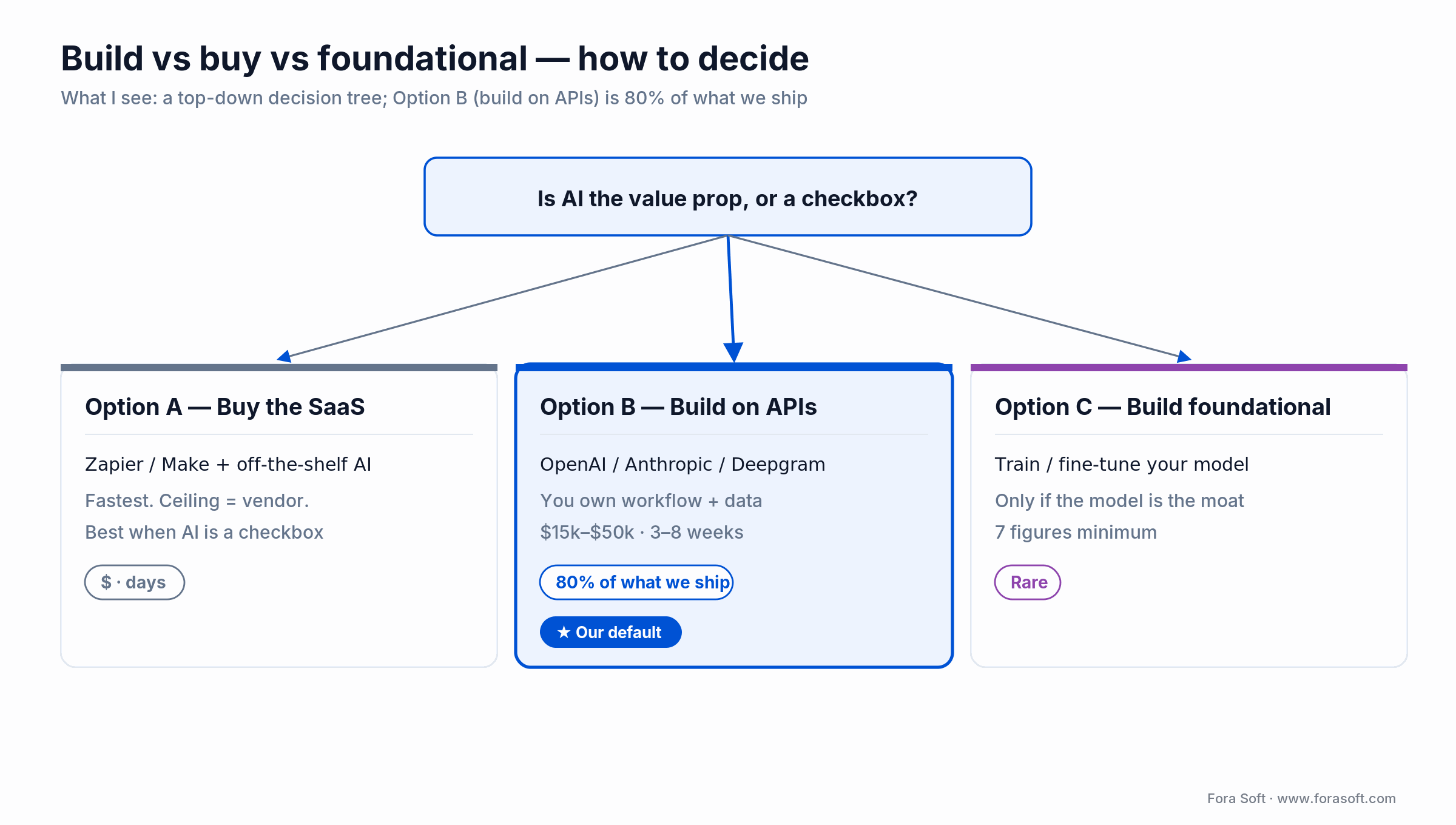
Figure 4. Build vs buy vs foundational — Option B (build on APIs) is 80% of what we ship.
Reach for Option B (build on APIs) when: AI is part of what makes your product better than competitors’, you have differentiated data or workflow, and your team (or your partner’s) already ships backend + mobile in production.
Need a second opinion on build vs buy?
We’ll map your AI use case to one of the six patterns, name the stack, and give you an honest first estimate in 30 minutes.
Mini-case — FRP’s voice DJ assistant
Situation. Franchise Record Pool gives 40,000+ professional DJs access to 720k licensed tracks from Sony Music, Universal, and Virgin Records, plus deep Serato DJ integration. The catalogue was the feature — but discovery was a five-step filter UI that DJs didn’t touch mid-set.
12-week plan. Weeks 1–3: wire Whisper + GPT-5 function calls to the FRP search API. Weeks 4–6: build the voice UI, add Polly response. Weeks 7–9: train an intent classifier on 2,000 logged DJ requests. Weeks 10–12: music-recognition (“What track did another DJ just remix?”) plus eval suite on 500 real queries.
Outcome. Playlist creation time collapsed from five filter steps to one sentence. DJ sessions now include voice-triggered playlist edits mid-set; music-recognition adds discovered tracks straight to the DJ’s crate. See the full FRP case study for the architecture.
Mini-case — ALDA syllabus generator
Situation. US college faculty spend 8–15 hours per course authoring syllabi, assessment rubrics, and lecture plans that must match institution-specific templates (credit hours, accreditation tags, learning outcomes taxonomy). Existing AI tools generated generic content that had to be rewritten.
12-week plan. Weeks 1–2: ingest institution syllabus templates, map them to a JSON schema. Weeks 3–6: build on the OpenAI Responses API with tool calls for section generation and inline editing. Weeks 7–9: RAG layer over prior syllabi and the institution’s course catalogue. Weeks 10–12: eval suite + instructor-in-the-loop UX.
Outcome. Syllabus first-draft time dropped roughly 4×. Faculty retain full editorial control; the AI draft conforms to their institution’s template out-of-the-box. See the ALDA project page.
Mini-case — Translinguist’s 62-language live interpretation
Situation. International events (conferences, courtrooms, classrooms) still rely on human simultaneous interpreters — expensive, scarce, impossible to scale for long-tail language pairs. Machine translation existed, but concatenating generic ASR + MT + TTS sounded robotic and lost speaker intent.
12-week plan. Weeks 1–3: language detection + speaker diarization on the live audio stream. Weeks 4–6: pipe into an LLM translation layer with domain glossaries (legal, medical, technical). Weeks 7–9: neural TTS that preserves pace, intonation, pauses. Weeks 10–12: sign-language interpretation track + subtitle generation.
Outcome. 62 languages supported end-to-end, each participant hears only their target language, subtitles auto-generate, and specialist terminology (case names, medical conditions, product names) survives translation thanks to per-event glossaries. See the Video Interpretations case for the full architecture.
What AI features actually cost to ship
Every analyst range on AI dev cost is useless without anchoring. Published 2026 ranges span $40k–$400k “for most business use cases.” That’s the truth, but the distribution is bimodal. API-first features cluster at the lower end; bespoke training drags the upper end.
| Feature scope | Typical v1 | Fora Soft range | Ongoing token / infra |
|---|---|---|---|
| Chat or voice assistant on existing data | 3–5 weeks | $15k–$30k | $300–$2k / month |
| Generative content / first-draft tool | 2–4 weeks | $10k–$25k | $200–$3k / month |
| Recommendations / feed re-rank | 3–6 weeks | $18k–$35k | $200–$1.5k / month |
| Real-time translation / ASR pipeline | 6–10 weeks | $35k–$70k | $0.01–$0.02 per user-minute |
| Computer vision (on-device + cloud fallback) | 5–8 weeks | $25k–$60k | $50–$1k / month + data |
| Content moderation (voice or text) | 4–6 weeks | $18k–$40k | $100–$1k / month |
Two notes. First, these ranges assume API-first architecture and our Agent Engineering workflow — we estimate faster than agencies still billing hand-written boilerplate. Second, we’ve deliberately not quoted fine-tuning or foundation-model training ranges — the right answer there depends on dataset size and compute budget, and we don’t want to hand-wave a number you’d hold us to.
A decision framework — pick the right AI feature in five questions
Q1. Does the feature save users time on a task they do at least weekly? If no, you’re probably building a demo, not a retention feature. Stop.
Q2. Which of the six patterns does it map to? Voice, ASR/translation, vision, generation, recommendations, moderation. If none fit, you’re in research mode — prototype with an off-the-shelf API for two weeks before writing a spec.
Q3. What’s the cost of a wrong answer? Low (rec feed): ship. Medium (first-draft syllabus): add human review. High (medical, legal, financial): add human sign-off, structured output, and citations mandatory.
Q4. Do you have enough proprietary data to make the feature better than a generic API? If yes, you have a moat: invest in RAG and evals. If no, buy the SaaS and compete on UX.
Q5. Can you afford the worst-case token bill at 10× current DAU? If the answer makes you wince, redesign: cache aggressively, batch, use the budget tier (GPT-5 Nano, Gemini Flash, DeepSeek) for the easy calls and escalate to the flagship only for hard ones.
Five pitfalls we keep seeing
1. Shipping without evals. The most common failure. A feature works on launch day, silently regresses in week 3 when OpenAI updates the model, and the team only notices when users complain. Build an eval suite before you build the feature.
2. Free-prompting into production. If your backend accepts whatever the LLM returns as free text, someone will prompt-inject their way into your database. Always force structured output (JSON schema, function calls), validate, then act.
3. Ignoring token caching. OpenAI and Anthropic both give ~90% off cached input in 2026. Most teams don’t instrument cache hits for the first six months and overspend by 5–10×.
4. Over-trusting moderation APIs. Generic classifiers over-flag reclaimed slurs, AAVE, and identity terms. Always layer a human appeal path, not because you distrust the model, but because the model distrusts your users asymmetrically.
5. Estimating like it’s 2023. Teams still pricing AI features at $150k–$300k for v1 are either billing research-lab rates or haven’t moved to Agent Engineering. If your estimate doesn’t improve 2–3× on 2023, you’re leaving time and money on the table.
KPIs — how to tell the AI feature is earning its keep
Quality KPIs. Groundedness (% of answers supported by retrieved context, target >0.9), hallucination rate (target <2%), task success (% of sessions that complete the intent, target >0.8), human-override rate (% of AI drafts edited >20%, target <0.5).
Business KPIs. Activation lift on sessions that use the AI feature (target +15–30% vs control), 30-day retention lift (target +5–15%), revenue per user for paid AI features (set pricing so gross margin >60% after token cost), support ticket deflection (target 10–30% for AI chat assistants).
Reliability KPIs. p95 latency (voice: <1.2 s; text generation: <3 s), model cost per active user (target < 15% of revenue per user), cache-hit rate (>50% in mature features), eval pass rate held above 0.85 on every prompt/model change.
When NOT to add AI to your product
We turn down AI work roughly every other scoping call. The most honest signals that AI is the wrong next feature:
- Your core product hasn’t found PMF. AI won’t fix a retention problem, it’ll just add a confusing surface.
- The task needs deterministic output (tax calculations, compliance documents, code that must compile). Use rules and types; LLMs are probabilistic by design.
- Your data is <500 documents / <5k items. RAG shines at scale; at this size a curated FAQ beats a RAG chatbot on both accuracy and cost.
- Latency budget is <100 ms. Even the fastest real-time models are hundreds of ms; if you need millisecond response, pre-compute and cache.
- Your team has never shipped production backend + mobile. AI is the icing; you need the cake first.
Want a similar assessment for your product?
We’ll tell you which of the six patterns fits, what the first shippable v1 looks like, and roughly what it costs — in one 30-minute call, no slides.
FAQ
How quickly can Fora Soft ship a first AI feature?
For a scoped feature mapping to one of the six patterns, v1 usually lands in 3–6 weeks with our Agent Engineering workflow. That includes backend, the AI pipeline, evals, and a shippable UI — not a prototype.
Do we need to train our own model?
Almost never. 2026 foundation models (GPT-5, Claude 4, Gemini 2.5) plus RAG and a thin fine-tune cover >95% of product use cases. Training from scratch makes sense when your data is the moat and no commercial model captures your domain.
What’s the typical ongoing token / inference bill?
For a launched SaaS-scale feature, we see $0.01–$0.08 per active user per day on API-based stacks, dropping to $0.002–$0.02 once caching and model-tier routing (Nano/Flash for easy calls, flagship for hard ones) are in place.
How do you handle data privacy and compliance?
We default to OpenAI/Anthropic enterprise endpoints (data not used for training) or Azure OpenAI / AWS Bedrock for HIPAA, GDPR, and SOC 2 regulated workloads. For data-residency requirements we self-host open-source models (Whisper, Llama, Mixtral) on clients’ own infrastructure.
Will AI make my product cheaper to build overall?
For the AI feature itself: yes, dramatically. API-first architecture plus Agent Engineering cuts feature-build time 2–3× vs 2023 norms. For the surrounding product (auth, UI, payments, compliance) the cost barely moves — AI doesn’t reduce the non-AI surface you still need to build.
OpenAI, Anthropic, or open source — who do you recommend?
OpenAI GPT-5 for most product surfaces (cheaper at flagship tier, the Nano tier is ~20× below Claude Haiku for volume calls). Anthropic Claude when you need long context or careful agent workflows — their cache control is granular and their large-context flat pricing is unbeatable. Open source (Llama, Mixtral, Whisper) for data-residency or air-gapped deployments.
What does Fora Soft do differently that makes estimates lower?
Agent Engineering — spec-first pipelines, agentic code generation, continuous evals. The boilerplate that used to take two engineers a week now takes a morning. We pass that saving through to estimates instead of absorbing it as margin, which is why our v1 ranges run below agency norms.
Can you work with our existing team?
Yes — we staff from a dedicated-team or augmentation model as often as a turnkey project. We pair with your engineers on the AI pipeline, evals, and infra, and hand over full knowledge transfer before we leave.
What to Read Next
Methodology
Spec-driven Agent Engineering
How we ship production AI features 2–3× faster than the 2023 baseline.
Playbook
How to Build Apps with AI
The end-to-end pattern for shipping AI-native apps — not just bolt-on features.
Deep-dive
Multimodal AI Agents with LiveKit
The voice + video + tool-use pattern we use for real-time agent products.
Case reference
Multilingual Translation in Video Calls
The Translinguist architecture, explained — ASR, MT, TTS, and glossary layers.
Hiring
Hire Computer Vision Developers
What to look for when staffing a CV team — skills, stack, and production signals.
Ready to ship AI that actually earns its token bill?
Every AI feature that ships well in 2026 looks roughly the same under the hood: a buy-the-model, build-the-workflow stack, structured output, retrieval grounding, evals, and a human-in-the-loop where stakes are high. The six patterns — voice, ASR/translation, vision, generation, recommendations, moderation — cover almost every product idea worth building this year.
Fora Soft ships all six in production today. If you’ve read this far and have a concrete feature in mind, the next step is a 30-minute call: we’ll map your idea to the right pattern, propose the stack, and give you an estimate honest enough that we’d be embarrassed to walk it back later.
Let’s scope your first AI feature this week
30 minutes, no slides. You leave with a named pattern, a named stack, and an estimate range you can take to your board.

