


Key takeaways
• The real question isn’t how to spend less. It’s how to reduce software development costs without moving the bill to production. Cut waste; protect the checks that catch problems while they’re cheap.
• Scope is the biggest lever. The Standish Group found 64% of features are rarely or never used (2002). An MVP stops you paying to build them before anyone asks.
• The cheapest hourly rate is a mirage. Loaded cost lands at 1.4–1.8x the headline rate; right-shoring with senior oversight beats bottom-fishing.
• Two piles of money are sitting on the floor: about 27% of cloud spend is wasted (Flexera, 2025), and a defect caught in production costs 60–100x its design-phase fix.
• Never cut testing, discovery, review, or project management. Poor software quality already costs the US $2.41 trillion a year (CISQ, 2022). Those four keep your defects in the 1x column.
You’ve got a software budget that won’t stretch far enough, and every line item looks negotiable. So here’s the honest answer to how to reduce software development costs without wrecking the product: cut waste, not the safety net. Tighten scope to an MVP, reuse instead of rebuild, right-shore with senior oversight, automate the repetitive work, and right-size your cloud. Those lower the bill and keep it lowered. We’ve shipped 250+ projects since 2005, including plenty of rescues after someone cut the wrong corner, so this is the playbook of levers that actually work, with the cost math to back each one.
Why Fora Soft wrote this playbook
We’re Fora Soft. We’ve built software since 2005: 250+ products with a 50-person in-house engineering team and a 100% job-success score across every Upwork contract we’ve closed. A good chunk of that work is fixing projects where someone tried to save money and spent more. So we know both sides of this question: how to build lean on purpose, and what it costs to build cheap by accident.
Reducing cost isn’t about spending less on everything. It’s about spending on the right things and refusing to pay for the wrong ones. The wrong ones are waste: features nobody uses, cloud instances nobody sized, code that gets written twice. The right ones are the checks that keep a small problem small. Cut the first pile hard; leave the second alone. We build with a proper custom software team, publish the engineering discipline behind it in our technical knowledge base, and when a project’s already over budget we start with a code audit before we change a line.
This is the companion to our piece on what NOT to cut. That one is the list of false economies. This one is the positive version: the levers that genuinely lower the bill, ranked by how much they move and how fast they pay off.
Staring at a quote that feels too high?
Send it over. We’ll show you which levers apply to your project and roughly what each one saves — free, no pitch, grounded in 250+ projects since 2005.
First, know where the money actually goes
You can’t cut what you can’t see. Before you touch a budget, map it — because the instinct is to shave the visible line items (the developers), and the real savings are usually somewhere else. A rough but reliable split of a build dollar looks like this: development around 45%, avoidable rework around 15%, QA and testing around 18%, project management around 12%, and cloud and infrastructure around 10%.

Figure 1. Where one build dollar goes. Orange is where the waste hides (rework, over-provisioned cloud); blue is the safety net you protect. Trim the first, keep the second.
Two things jump out. First, rework is a line item — roughly one dollar in seven spent building the wrong thing and building it again. That’s pure waste, and it’s avoidable with discovery and review. Second, the build is only the beginning: software maintenance runs 60–80% of total lifetime cost (IEEE). The cheap-to-build option that’s expensive to maintain isn’t cheap; it just sends the invoice later. Keep that in view, because half the “savings” on the table are really deferrals wearing a discount sticker.
Lever 1: Ship an MVP, not the wishlist
The single biggest way to reduce software development costs is to build less. Not worse. Less. Every feature you don’t build in v1 is design, code, test, and maintenance you don’t pay for, forever. And most features don’t earn their keep: the Standish Group famously found 45% of features are never used and another 19% rarely (2002). Treat it as directional, not gospel (it was four internal apps), but every product team that’s measured usage since has found the same shape. You’re paying to build things nobody touches.
A Minimum Viable Product is the fix: ship the smallest thing that delivers real value, put it in front of users, and let their behaviour, not a spec meeting, tell you what to build next. To decide what makes the cut, we use the MoSCoW method, which sorts every feature into four buckets:
- Must have. The product is pointless without it — login, the core transaction, the one thing users came for.
- Should have. Important, but the product works for a first cohort without it. It waits.
- Could have. Nice, low-priority, cut at the first sign of budget pressure.
- Won’t have (this time). Explicitly parked. Naming these is how you stop them sneaking back into scope.
Ship the Must-haves, learn, then spend on the Should-haves that evidence actually justifies. It’s the same discipline behind cutting features to launch early: you build the right half of the product once instead of the whole thing twice.
Reach for an MVP when: you’re building something new and the requirements are still guesses. If you’re rebuilding a known system with a fixed spec, scope discipline matters less and you can plan the whole thing up front.
Lever 2: Buy and reuse before you build
The second-cheapest line of code is the one someone else already wrote and maintains. Authentication, payments, search, notifications, file storage, analytics — these are solved problems. Rolling your own is months of work plus a lifetime of maintenance, to end up with a worse version of Auth0, Stripe, or Algolia. Buy the commodity; build the thing that’s actually your product.
Open-source frameworks and libraries do the same job for zero licensing cost, with a community maintaining them for free. The trade to watch: a paid service you rent has a predictable monthly cost and someone on call; an open-source component you self-host is free to license but you own the upgrades and the security patches. Pick per component, not by ideology. The rule of thumb we use: build it only if it’s a genuine competitive differentiator. Everything else, rent or reuse.
Reach for build-your-own when: the capability IS your product’s edge — a novel matching algorithm, a proprietary model. For plumbing (auth, payments, email), buying is almost always cheaper across the full lifetime, not just today.
Lever 3: Right-shore with senior oversight
When budgets tighten, the hourly rate is the first thing people attack, and the cheapest quote wins. But the rate on the invoice isn’t the cost of the work — it’s the opening number before reality adds its markup. If you already suspect you’re overpaying for development, the fix is rarely “find someone half the price.”
Here’s the 2026 lay of the land. Senior developers run roughly $120/hr onshore in the US, $60–65/hr in Eastern Europe and Latin America, and $35–45/hr in South Asia. Tempting to grab the cheapest. But loaded cost (management, ramp-up, communication lag, turnover) adds 1.4 to 1.8x on top, and it bites hardest where the time-zone gap and the churn are largest.

Figure 2. The headline rate is the smallest number in the decision. Once you load in management, ramp-up and communication, the $35 quote and the $60 one meet in the middle.
The move that actually lowers the bill is right-shoring, not bottom-fishing: a hybrid where senior architects own the decisions and review the code, while a strong nearshore or offshore team handles execution. That reliably cuts total cost 30–40% versus all-onshore, without the quality tax, because the seniors stop the expensive mistakes before they’re committed. You’re not buying the cheapest hands; you’re buying fewer redone hours. That’s exactly how we staff a dedicated development team.
Reach for the cheapest team when: the work is genuinely commodity — a landing page, a simple admin CRUD. For anything with real architecture, pay for the senior who keeps you out of the 60–100x defect column.
Not sure if your rate is a bargain or a liability?
We’ll review your setup and tell you straight whether you’re saving money or quietly buying technical debt — and where a hybrid team would cut cost without cutting quality.
Lever 4: Automate the repetitive work
You don’t save on testing by doing less of it — that just ships the bug to production, where it costs 60–100x more to fix. You save by making machines do the boring parts. The classic defect-cost curve is the whole argument: a bug caught in design costs about 1x, in implementation 6.5x, in testing 15x, and in production 60–100x. Automation keeps defects in the cheap columns.
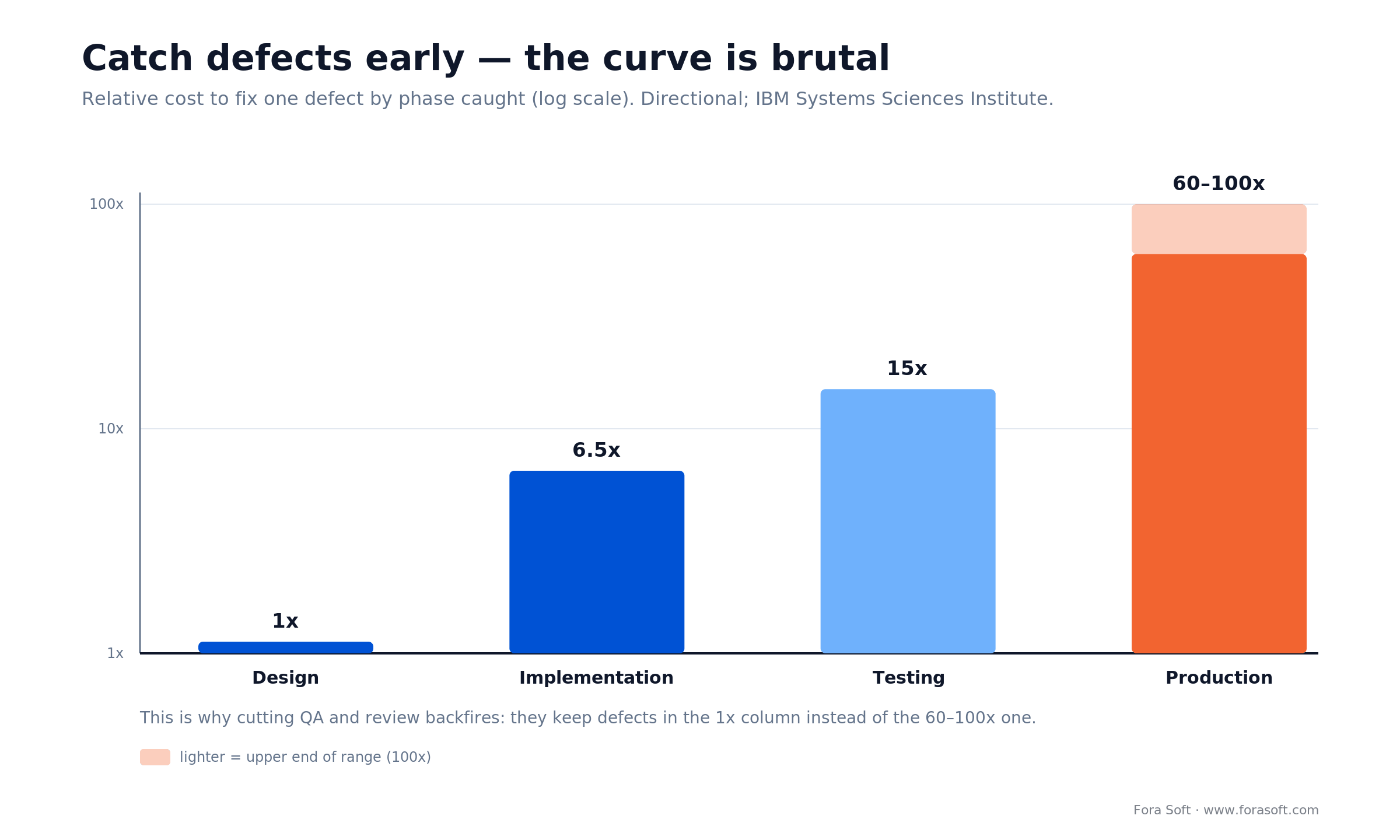
Figure 3. Why automating QA saves money instead of costing it: automated checks catch defects while they’re still in the 1x–15x range, not the 60–100x one.
Three places automation pays for itself fast:
- Regression testing. Playwright, Cypress or Selenium re-run your critical paths on every commit, for free, while the team sleeps. AI-assisted test generation now covers a lot of the tedious cases too.
- CI/CD. Continuous integration and deployment kill the manual build-and-release grind and catch breakages the moment they land, not at the end of a sprint. You pay once to set it up and save on every release after.
- Infrastructure as code. Terraform or Pulumi make environments reproducible, so you stop paying humans to click through cloud consoles and stop paying for the mistakes they make doing it.
Automation is upfront cost that turns into per-release savings. The setup is a one-time bill; the payoff compounds every sprint for the life of the product.
Reach for automation when: a task runs on every commit or every release. One-off scripts and throwaway prototypes don’t need the setup. Anything that repeats does.
Lever 5: Right-size the cloud
This is the purest saving on the list: money with zero quality cost. About 27% of cloud spend is wasted, and 84% of organisations struggle to manage it (Flexera, 2025). That’s not a rounding error; it’s a quarter of the bill, and cutting it removes nothing a user would ever notice.
The usual culprits are boring and everywhere: oversized instances picked “to be safe,” dev and staging environments left running over the weekend, no autoscaling so you pay peak capacity 24/7, storage nobody ever deletes, and egress charges nobody predicted. The fixes are equally boring: right-size instances to actual usage, autoscale so capacity tracks demand, schedule non-production environments to sleep, and put a monthly hour on the cloud bill with someone accountable for it. Reserved or committed-use pricing shaves another 30–50% off predictable baseline load. None of it touches the product.
Reach for cloud right-sizing when: your infra bill is growing faster than your user base. If the two track each other, you’re probably already efficient — look at the other levers first.
Lever 6: Kill rework at the source
Rework is the quietest line item in the budget and one of the biggest: roughly a dollar in seven, spent building something twice. It doesn’t show up as “rework” on any invoice; it hides inside every sprint as re-done work. Two things cause most of it: unclear requirements and unreviewed code. Fix those two upstream and the rework line shrinks on its own.
Discovery is the cheapest insurance you can buy. Spending 10–15% of the timeline on a real spec routinely saves 30–40% downstream, because you build the right thing once instead of the wrong thing, then the right thing. Skipping it to “start coding sooner” just means coding the wrong thing sooner. And a project manager isn’t overhead here — they’re the person who catches scope creep before it’s in the sprint and keeps everyone building the same product. The PM isn’t the cost; the PM is what stops the cost.
Invest in discovery when: you’re building something genuinely new. The newer and fuzzier the idea, the more a week of upfront thinking saves you in months of rebuilding.
Lever 7: Use AI where it actually saves hours
AI is a real lever now, in specific places: code assistants that speed up boilerplate, automated test generation, code review that catches the obvious stuff before a human looks, and documentation drafts. Used well, these trim genuine hours off routine work — and at Fora Soft our own Agent Engineering approach is why our estimates come in faster and leaner than the typical shop.
The catch, and it’s a real one: AI amplifies whatever process it’s dropped into. Point it at a disciplined team with review and tests, and it’s a force multiplier. Point it at a team already cutting corners, and it generates plausible-looking technical debt faster than any human could. AI lowers the cost of writing code; it does nothing for the cost of writing the wrong code. Treat it as a multiplier for good practice, never a substitute for it.
Fixed-price or time-and-materials: which is cheaper?
People reach for fixed-price contracts to control cost, and for small, fully-specified work they do. But a fixed price doesn’t remove risk — it moves it. The vendor prices in a buffer for the unknowns, and once scope shifts (it always shifts), every change becomes a change request negotiated at a premium. The incentive quietly flips: the vendor now makes money by doing less, which is the opposite of what you want.
Time-and-materials, paired with a tight scope and a good PM, tends to cost less in total for anything that will evolve, which is most software. You pay for what’s built, you can re-prioritise every sprint, and the incentive aligns around shipping the right thing. The honest rule: fixed-price for a small, frozen spec; time-and-materials with real scope control for everything else. If a vendor offers a suspiciously low fixed price, the buffer didn’t vanish. It moved into the change-request column.
Cost math: a real reduction, worked out
Let’s put the biggest lever on paper, because the arithmetic is more convincing than any adjective. Take a product with a 40-feature wishlist quoted at $200,000 to build all at once.

Figure 4. MoSCoW the wishlist and the first-release bill drops from $200K to $80K (a 60% cut) while the deferred $120K waits for evidence it’s worth building.
- Start with the wishlist. 40 features, $200,000, everything before launch. This is the number that scares you.
- Apply MoSCoW. Sort ruthlessly. Say 14 features are genuine Must-haves — the core transaction, auth, the one thing users came for. The other 26 are Should/Could/Won’t.
- Ship the Must-haves. Those 14 cost roughly $80,000. You’re live for 60% less, months sooner, with real users generating the evidence for what comes next.
- Add on evidence. The deferred $120,000 doesn’t all get spent — remember, 64% of features go rarely or never used. You build the Should-haves that usage justifies and quietly drop the rest.
Stack the other levers on top and the effect compounds: right-shoring the build with senior oversight trims another 30–40% off the labour, reused components remove whole features from the estimate, and a right-sized cloud shaves the run-rate. The $200,000 all-at-once build becomes an $80,000 first release with a lower monthly bill and a shorter path to revenue. That’s how to reduce software development costs without a single corner cut on quality.
The seven levers, compared
One table to keep. Rough savings are directional — they stack, and they depend on where your waste actually is.
| Lever | Typical saving | Effort to start | Best when |
|---|---|---|---|
| Ship an MVP | Up to 60% to first release | Low | Building something new |
| Buy / reuse, don’t build | Whole features off the estimate | Low | Auth, payments, search, plumbing |
| Right-shore + senior review | 30–40% of labour | Medium | Paying all-onshore rates |
| Automate QA & CI/CD | Compounds every release | Medium | Anything that repeats each sprint |
| Right-size the cloud | ~27% of infra spend | Low | Infra outgrowing your users |
| Kill rework (discovery + PM) | 30–40% downstream | Low | New or fuzzy requirements |
| Use AI on routine work | Real hours on boilerplate | Low | A disciplined team, not a cutting one |
Mini-case: how a lean team out-shipped the VC crowd
Proof that spending on the right things beats spending the least: BrainCert, an e-learning platform we’ve built and scaled for years. When they came to us they were bootstrapped — no VC money, a tight budget, every dollar accountable. The cheap path was right there: minimal testing, no real architecture, the cheapest hands they could find.
They did the opposite, and did it deliberately. They scoped tightly and shipped a focused core first, then invested where it actually mattered — a proper WebRTC-plus-HTML5 architecture, a senior-led team, real QA, and the compliance work their enterprise buyers demand. Lean, not cheap. Every dollar aimed at something that either shipped value or prevented an expensive mistake.
The outcome: BrainCert reached $3M in revenue in 2024 (up 58% year over year), 100K+ customers, and 500M+ real-time classroom minutes delivered, out-competing VC-backed rivals without a dollar of outside funding. That’s what the levers on this page buy when you pull them on purpose. Want the same read on where your budget is working and where it’s leaking? Grab a 30-minute slot and we’ll walk your project.
Which lever first? Five questions
You don’t pull all seven at once. Pull the one that matches your symptom. Walk your project down these five and start where the first “yes” lands.
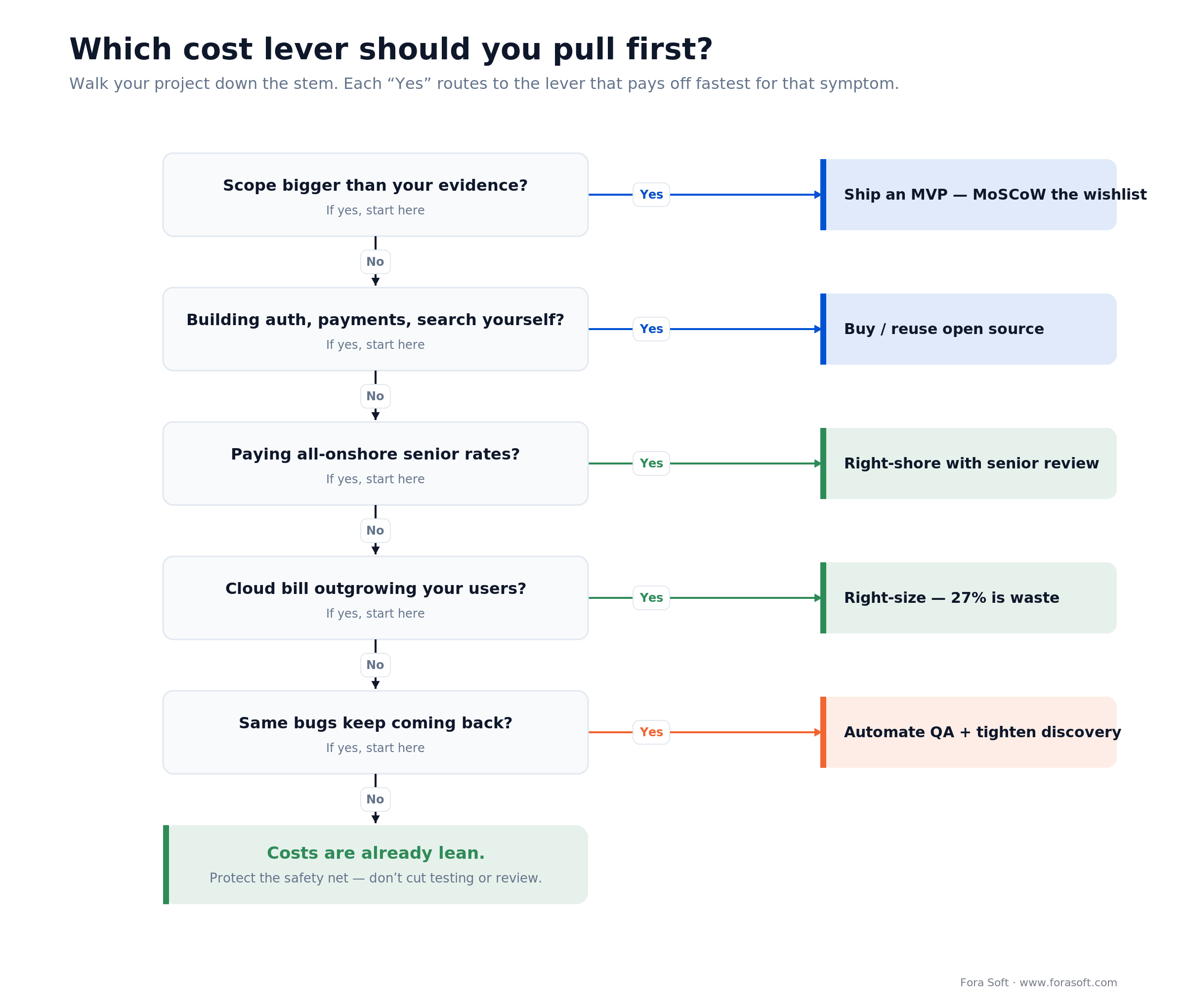
Figure 5. Match the symptom to the lever. Each “yes” routes to the fix that pays off fastest for that particular kind of waste.
1. Is your scope bigger than your evidence? If you’re about to build 40 features on a hunch, stop. Ship an MVP and let usage fund the rest. This is the biggest saving there is, so check it first.
2. Are you building auth, payments, or search yourself? If yes, you’re paying to re-invent solved problems. Buy or reuse, and put the saved months into your actual product.
3. Are you paying all-onshore senior rates? If yes, right-shore the execution with senior oversight for 30–40% less — without the quality drop of hiring the cheapest team outright.
4. Is your cloud bill outgrowing your users? If yes, roughly a quarter of it is waste. Right-size, autoscale, and put a monthly hour on the invoice. Free money, zero product cost.
5. Do the same bugs keep coming back? If yes, the problem is upstream — automate your tests and tighten discovery, so you stop paying to fix the same thing twice. If none of these is a yes, your costs are already lean; protect the safety net and don’t cut testing or review to squeeze the last dollar.
Five cost-cutting mistakes that cost more
1. Cutting the safety net first. Testing, review, discovery and PM don’t ship a visible feature this sprint, so they get cut first — which is backwards, because they’re what keep future sprints cheap. This is the whole subject of our what-not-to-cut companion piece.
2. Optimising the rate instead of the outcome. The hourly number is the most visible cost and the least predictive one. Anchoring on it ignores the loaded cost and rework that actually decide the bill.
3. Confusing “started” with “progress.” Skipping discovery to write code sooner feels like momentum. Building the wrong thing fast isn’t progress; it’s expensive motion you’ll undo.
4. Gold-plating the wrong things. Pouring polish into features nobody uses is waste with a quality halo. Match the effort to what users actually notice; ship the rest plain.
5. Ignoring the compounding. One shortcut is fine. Fifty shortcuts is a codebase nobody can change — the technical-debt interest bill, paid every sprint from then on, and part of that $2.41 trillion national tab.
KPIs: is your cost-cutting actually working?
Quality signals. Track escaped defects (bugs found in production versus pre-release), change-failure rate, and rework percentage. If a cost cut moves these the wrong way, it wasn’t a saving — it was a deferral. Watch them for two or three sprints after any change.
Delivery and cost signals. Cost per shipped feature, cycle time from idea to production, and budget variance against the original estimate. Real savings show up as more shipped per dollar, not just a smaller invoice this month.
Reliability signals. Uptime, mean time to recovery, and how often the team is firefighting instead of building. A team that’s always on fire is the tell that an earlier cut is still charging interest — often a sign the system can’t handle the load it was under-built for.
When not to cut costs at all
Sometimes the right budget move is to not cut. Before product-market fit, the goal is learning speed, not efficiency. Starving the one experiment that tells you whether the business works is the worst false economy there is — spend to learn faster, then optimise once you know what you’re optimising.
In regulated or safety-critical domains (health, finance, anything touching identity or payments), the compliance and security spend isn’t discretionary; cutting it risks the whole company, not just the quarter. And when you’re scaling a system that already works, reliability spend protects the revenue you’ve already earned. Trimming it to save a little is betting the trunk to save a twig. Cost discipline is knowing which is which.
Want a second opinion before you cut?
Tell us where you’re thinking of trimming. We’ll show you which levers apply, roughly what each saves, and the corners that’ll cost you triple — grounded in 250+ projects since 2005.
FAQ
How can I reduce software development costs without sacrificing quality?
Cut waste, not the safety net. The levers that lower the bill and keep it lowered: scope to an MVP, reuse open source and off-the-shelf components instead of building plumbing, right-shore with senior oversight, automate testing and deployment, and right-size your cloud (about 27% of cloud spend is wasted). Cutting testing, discovery, review, or project management does the opposite — it defers cost to production, where a defect costs 60 to 100 times more to fix.
What is the single biggest way to cut software costs?
Scope. Build less, not worse. The Standish Group found 64% of features are rarely or never used (2002), so shipping a Minimum Viable Product of just the must-have features, adding the rest only when usage justifies it, can cut the first-release bill by 60% and get you to revenue months sooner.
Does offshoring reduce software development costs?
It can, but the headline rate oversells it. Onshore US senior developers run about $120/hr in 2026, versus $60 to 65/hr in Eastern Europe and Latin America and $35 to 45/hr in South Asia — but loaded cost adds 1.4 to 1.8x for management, ramp-up and communication. Offshoring saves the most in a hybrid model where seniors review the work, cutting total cost 30 to 40% without the quality tax. Chasing the absolute cheapest rate usually backfires.
How much can an MVP actually save?
On a 40-feature, $200,000 wishlist, sorting with MoSCoW and shipping only the roughly 14 must-have features costs around $80,000 — a 60% cut to first release. The deferred features wait for real usage evidence, and since most features go rarely or never used, a good share of that deferred cost never needs to be spent at all.
Is a fixed-price contract cheaper than time-and-materials?
Not usually. Fixed-price moves risk into change requests and quietly rewards the vendor for doing less. It suits small, fully-specified projects. For anything that will evolve, which is most software, time-and-materials with a good project manager and tight scope control tends to cost less in total and produce better software.
Where is the easiest money to save with zero risk?
The cloud bill. About 27% of cloud spend is wasted (Flexera, 2025) on oversized instances, forgotten environments, and no autoscaling. Right-sizing, autoscaling, sleeping non-production environments, and committed-use pricing can cut infra cost sharply without touching anything a user would notice.
Can AI reduce software development costs?
Yes, in the right places — code assistance, automated test generation, and reviewing boilerplate all cut real hours. But AI amplifies whatever process it is dropped into. Without senior review and testing, it generates plausible-looking technical debt faster than a human could. Treat it as a force multiplier for a disciplined team, not a replacement for one.
What should I never cut to save money?
Testing, discovery and requirements, code review, and project management. These four catch problems while they are still cheap to fix. Cutting them does not remove the cost — it ships the cost to production and multiplies it. Cut feature scope, cloud over-provisioning, and build-it-yourself plumbing instead.
What to read next
Companion
What NOT to Cut
The mirror image of this playbook — the false economies that cost more than they save.
Strategy
Cut Features, Ship an MVP
The single biggest saving on the list, in depth: build less, learn faster.
Budget
Feel Like You’re Overpaying?
How to tell whether your dev spend is fair — and what to do if it isn’t.
Diagnostics
What Is a Code Audit
How to find out whether your codebase is an asset or a liability.
So where do you start?
Reducing software cost is a skill, and it’s the opposite of slashing. The money is in the waste: an oversized scope, plumbing you built instead of bought, an all-onshore team, a cloud bill that’s a quarter air, and rework nobody budgeted for. Pull those levers (MVP first, then buy-vs-build, right-shoring, automation, and cloud right-sizing) and the bill drops while the product stays whole.
Start with the biggest lever that matches your symptom. If your scope is bigger than your evidence, ship an MVP. If your cloud bill is climbing faster than your users, right-size it this week. And whatever you do, leave the safety net alone: the testing, review, discovery and PM that keep your defects in the 1x column instead of the 60–100x one.
If you want a second set of eyes before you decide, that’s exactly what we do: a free audit and optimization pass, a straight answer on where your budget is working and where it’s leaking, and a plan to fix it.
Ready to cut cost without breaking your product?
Book a 30-minute call and we’ll audit your project free — a clear read on which levers apply, what each one saves, and where the real money is hiding.

