

Key takeaways
• A PWA is 30–70% cheaper than native and ships in days. For content-heavy and B2B products discovered through links and search, that math is hard to argue with.
• The same math can quietly break a consumer product. Lean on App Store discovery, push-driven retention, in-app purchases or device APIs and a PWA hands you a weaker version of each. The founder pays for it in month nine, not at launch.
• iOS is the constraint that decides the PWA vs native app question. iOS 26 finally opens home-screen sites as web apps and Safari 18.4 shipped Declarative Web Push, but there’s still no Background Sync, no Web Bluetooth, and no home-screen widgets.
• Hybrid is the underused third answer. Trusted Web Activities list a PWA on Google Play for near-zero extra cost; Capacitor, React Native and Flutter share one codebase across web and store apps.
• We build both, and we’ll tell you which is wrong for you. Some products fit a PWA; most consumer products don’t. You get the recommendation, the cost math, and the trade-offs in one 30-minute call.
Why Fora Soft wrote this PWA playbook
The title is a warning, not a hot take. PWAs are a mature technology that has shipped real businesses like Twitter Lite, Pinterest, Uber and Starbucks. They’re not a scam and they’re not dead. But choosing a PWA for the wrong product is one of the most expensive default decisions we watch founders make. The bill shows up six to nine months after launch, when App Store discovery turns out not to exist, push never lands reliably on iPhones, and the in-app-purchase flow the revenue model assumed simply isn’t there.
We’ve been building software since 2005: 250+ projects, 50 in-house engineers, a 100% job-success score on Upwork, across native iOS, native Android, React Native, Flutter, Capacitor and pure web. We ship PWAs when they fit and native when it fits, so we don’t have a horse in this race beyond your product working. This playbook puts the platform decision in writing so you can make it on purpose.
The proof is in how differently the call lands each time. Across Perspire.tv (live fitness streaming, native plus web), CirrusMED (HIPAA telehealth, native), and BrainCert (WebRTC virtual classroom, web-first), the platform was different every time and the engineering economics followed from that choice, not the other way around.
PWA, native, or hybrid — not sure which call to make?
Thirty minutes with senior engineers who’ve shipped on every stack. Bring your scope, your audience and your monetisation model. We’ll tell you which platform earns back its build cost in twelve months and which one hurts you.
PWA vs native app: the one-paragraph answer
PWA vs native app, in one line: a PWA wins when users arrive from links and search, money moves through the web, and no native-only API sits on the critical path; a native app wins when App Store discovery, push-driven retention, in-app purchases, or device APIs are load-bearing. Hybrid sits between them and is right more often than people expect. Almost every costly mistake here comes from picking PWA vs native on build price alone, then meeting the constraint in month nine.
So this isn’t a religious question, and “which is better” is the wrong frame. The right frame is workload-shaped: where your users come from, how you get paid, which device APIs you touch, and how retention actually works. The rest of this guide walks each of those axes, with the 2026 numbers, a real cost example, four diagrams, and the honest “don’t do this” cases most vendor blogs skip.
What a PWA actually is in 2026
A Progressive Web App is a website that meets three technical requirements: HTTPS, a Web App Manifest (a small JSON file describing the app to the browser), and a Service Worker (a background JavaScript proxy that handles caching, offline behaviour and push). Together they let the site install to the home screen, run in its own window without browser chrome, and behave, for most users, like an installed app. If you want the standards-level detail, Mozilla’s PWA documentation and Google’s web.dev PWA guide are the primary sources.
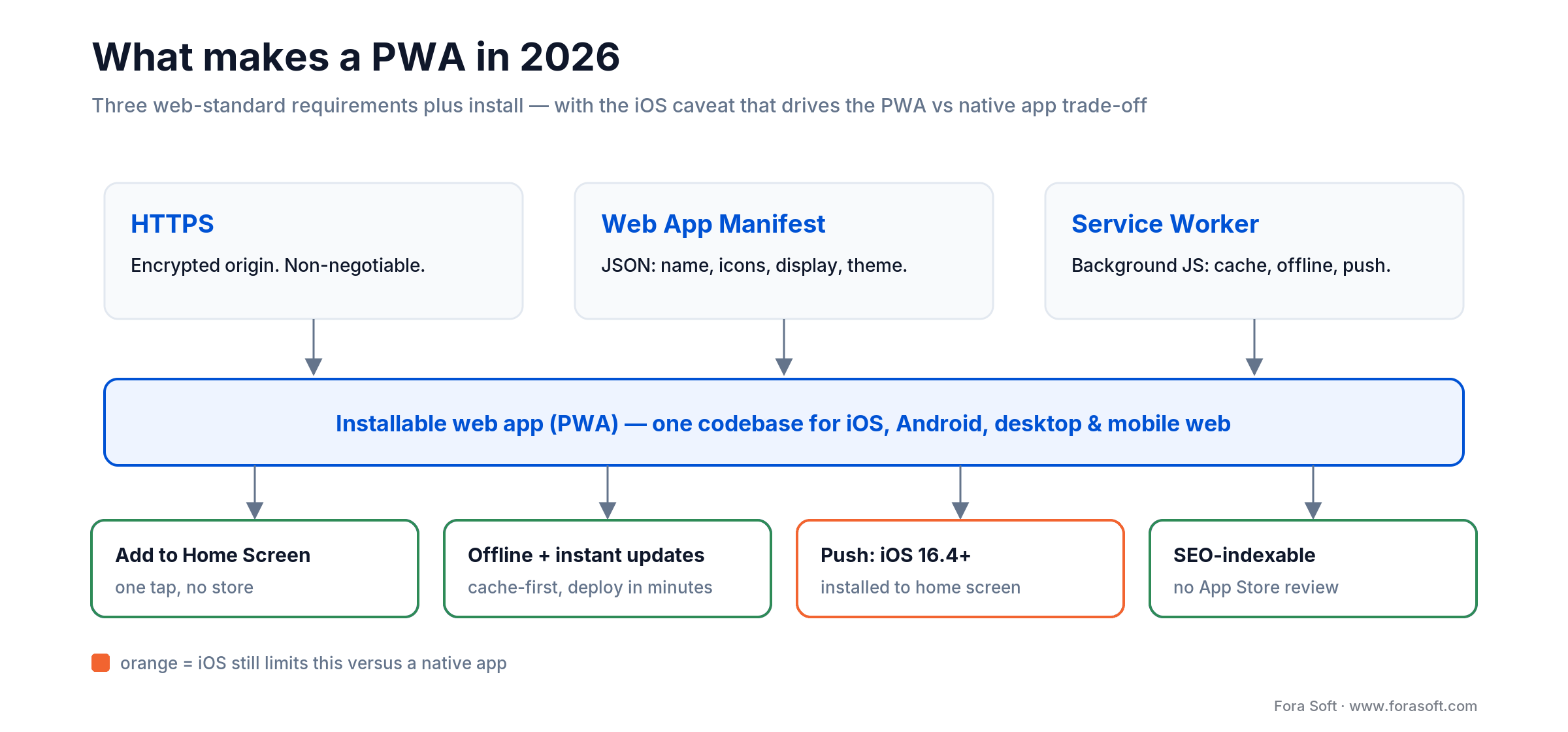
Figure 1. The three parts of any PWA and what each one adds. The single orange box is where iOS still trails a native app.
Every major browser supports the core PWA APIs in 2026, and service workers reach roughly 96% of users worldwide. The catch is the same one it’s always been: iOS Safari is where PWA capability is thinnest, and that gap is what the whole PWA vs native app debate turns on. Read the next section before you commit to anything.
The iOS constraint that defines the PWA vs native app decision
Here’s the honest 2026 status. Web Push for PWAs arrived in iOS 16.4 (March 2023), and it works, but only for a PWA the user has manually added to the home screen, with permission requested from a real tap. Apple has kept improving the surface: Safari 17 firmed up storage, Safari 18.4 (2025) shipped Declarative Web Push and Screen Wake Lock, and in iOS 26 every site added to the home screen now opens as a standalone web app by default. Apple’s own web push documentation is the reference.
Now the gaps that don’t move. iOS still has no Background Sync, no Periodic Background Sync and no Background Fetch, so a PWA can’t reliably refresh data while the user is away from it. Storage quotas are tighter than Chrome and the cache can be evicted after periods of inactivity. There’s no Web Bluetooth, NFC is Android-only, home-screen widgets don’t exist for PWAs, and the contact picker isn’t available. Over 95% of iPhones run iOS 16 or newer (StatCounter, early 2026), so push is broadly reachable, with one regional asterisk.
That asterisk is the browser engine, not the EU push story people still repeat. Apple briefly pulled home-screen web apps for EU users in the iOS 17.4 beta (February 2024) and reversed within weeks, so EU PWAs install and receive push today. The live constraint is that third-party browser engines still haven’t shipped (Apple’s BrowserEngineKit is friction-heavy enough that no browser had adopted it by early 2026), so iOS PWA capability isn’t being pushed forward by competition. The figure below maps the whole surface across iOS PWA, Android PWA and native.
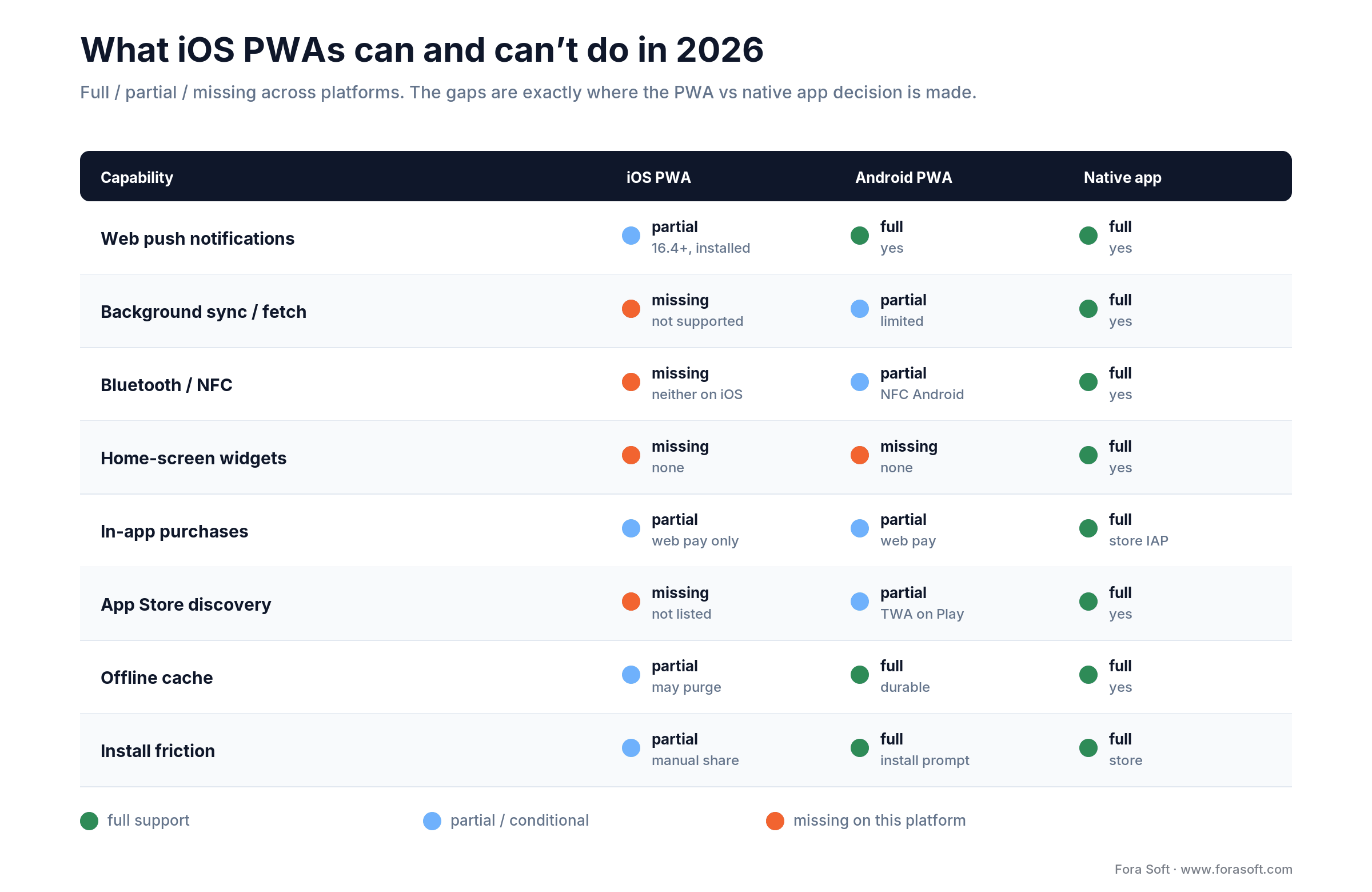
Figure 2. Where iOS PWAs are full, partial, or simply missing versus Android and native. The orange cells are the PWA vs native app decision points.
Reach for native when: even two of those orange cells (background sync, Bluetooth/NFC, widgets, store IAP, App Store discovery) sit on your product’s critical path. On iOS you won’t engineer around them; you’ll ship a weaker product and call it a compromise.
The business case for PWAs in 2026
Cost. A PWA build runs roughly $25k–$80k on 2026 benchmarks. Native iOS plus Android plus web typically runs $80k–$200k+ for the same scope. That’s 30–50% cheaper than a single native platform and 60–70% cheaper than the iOS-plus-Android-plus-web triad.
One codebase, instant updates. A single JavaScript codebase serves iOS, Android, desktop and mobile web. Updates deploy in minutes with no App Store review. For a product still finding its shape, that iteration speed is a real advantage, not a talking point.
Lower acquisition friction. A PWA installs from a URL in one tap. Native makes the user leave your context, find the store listing, download tens of megabytes and come back. The drop-off across that flow is large enough to be a line item in your CAC.
SEO and indexability. Google indexes PWAs and surfaces them in organic search; native apps never appear there. For content-driven products like news, commerce and marketplaces, that search traffic often repays the build on its own.
The market isn’t shrinking. The PWA market is estimated at about $3.14 billion in 2026 and growing near 30% a year (Research Nester; market.us, 2026). Statista logged a 47% year-over-year jump in PWA adoption across commerce and media in 2024. The technology is alive and funded.
The classic proof points (and their dates). The headline wins are real but old, so treat them as history, not current benchmarks: Twitter Lite reported +75% tweets and −20% bounce (2017); Pinterest saw +40% time-spent and +44% ad revenue (2017); Starbucks doubled daily active users with a PWA about 99.8% smaller than its iOS app (2017); Alibaba measured +76% conversions (2016). The pattern holds (PWAs lift reach and conversion), but notice these are reach and conversion metrics, not retention. That distinction is the whole game, and it’s where the next section starts.
The business risks that could ruin your business
1. iOS capability gaps. The orange cells above aren’t edge cases. No Background Sync means no reliable off-app refresh; tighter storage means your cache is best-effort, not durable. Design around it or don’t ship the feature.
2. Lost App Store discovery. People browse stores with intent: they search categories, scan reviews, install. PWAs are absent from that channel. If your growth depends on category ranking or store search, going PWA-only means giving up your acquisition engine.
3. No native APIs. Bluetooth, NFC beyond Android, HealthKit, ARKit, advanced camera control, secure-enclave biometrics. Apple declined to implement roughly a dozen device APIs in Safari years ago and hasn’t reversed course; Mozilla’s Background Sync reference still lists no Safari support. Need any of these on the critical path and the PWA question is already answered.
4. Monetisation friction. No store IAP, no native subscription management. Apple Pay works through the Payment Request API, but the one-tap purchase that converts on native is harder on the web. Yes, you dodge the 15–30% store cut; you may also take a lower conversion rate. Run that math both ways before you celebrate the saved commission.
5. Weak push on iOS. Even on iOS 16.4+, push only reaches users who added the PWA to the home screen and granted permission from a tap. Many never do. On engagement-heavy products, iOS PWA retention trails native by a wide margin.
6. A performance ceiling. Heavy real-time video, AR, on-device inference and multi-stream WebRTC at scale still favour native on latency, codec control and battery. PWAs are quick for content and hit a wall on compute- and media-heavy work.
7. The “not a real app” tax. A measurable slice of users distrust apps that feel like websites. The store badge signals legitimacy a home-screen banner doesn’t. For consumer B2C, that perception has a cost.
8. Apple-dependency risk. In February 2024 Apple announced it would remove home-screen PWA support in the EU under the DMA. The European Commission opened an inquiry and Apple reversed within weeks, reinstating full EU PWA support — but the episode showed PWAs on iOS live on Apple’s commercial calculus, and that calculus can shift. Plan for the constraint; don’t hope it disappears.
PWA vs native vs hybrid: the practical comparison
A condensed view of the trade-offs across cost, capability, distribution and ongoing economics. Read it as three tools for three jobs, not a scoreboard.
| Dimension | Pure PWA | Native iOS+Android | Hybrid (RN/Flutter) |
|---|---|---|---|
| Build cost (2026) | $25k–$80k | $80k–$200k+ | $60k–$150k |
| App Store discovery | No (TWA on Play: yes) | Yes | Yes |
| SEO / indexability | Yes | No | Web layer only |
| Push on iOS | Limited (16.4+, install req.) | Full | Full |
| IAP / subscriptions | Web payments only | Store IAP (15–30% fee) | Store IAP available |
| Native APIs (BT, AR, NFC) | Limited or unavailable | Full | Full |
| Update cycle | Instant | Store review (1–7 days) | Store review + OTA bundles |
| Best fit | Content, B2B, link-driven | Daily-engagement consumer | Cross-platform with one team |
If you want the 50-criteria capability grid, Progressier maintains a good one. What that kind of table can’t give you is the decision itself — which is what the tree below is for.
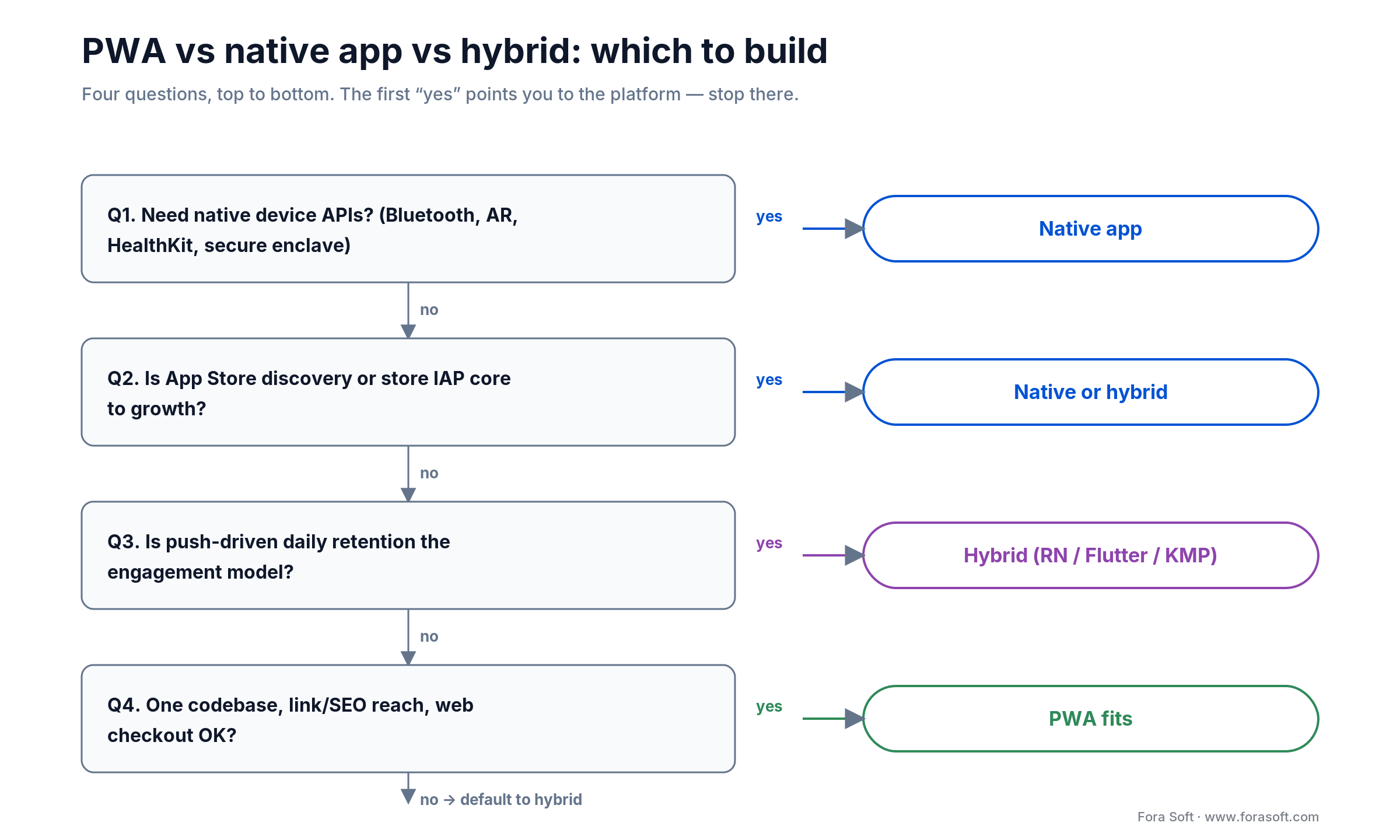
Figure 3. Four questions, top to bottom. The first “yes” points you to the platform — native APIs, store dependence, retention, then budget.
Performance and security: where PWA vs native app really diverges
On raw performance, the honest answer is “it depends on the workload.” For content, forms and CRUD, a well-built PWA is indistinguishable from native. Uber’s core PWA shipped at about 50KB gzipped and loaded in under three seconds on 2G (2017). For sustained compute or media (multi-party WebRTC, AR overlays, on-device ML, 4K playback with DRM), native’s direct access to the GPU, codecs and threading wins on latency and battery, every time.
If real-time video or streaming is your product, this is not a close call. We go deep on why in our video streaming engineering library, but the short version: browser media pipelines abstract away exactly the controls (jitter buffers, hardware codec selection, bandwidth estimation) that decide call quality at scale. That’s why Perspire.tv’s two-way coaching runs native, not as a PWA.
Security and compliance
Security cuts both ways. A PWA inherits the browser’s sandbox and its patch cadence, which is a genuine benefit — no app-store update lag on a security fix. But regulated workloads often need things the web can’t promise: hardware-backed key storage, certificate pinning, jailbreak/root detection, screenshot blocking, and biometric auth wired to the secure enclave. CirrusMED went native precisely because a HIPAA review wanted device-level storage guarantees and reliable biometric gating that an iOS PWA couldn’t satisfy. If you’re under HIPAA, PCI or SOC 2, put the platform question in front of your auditor before you build.
When PWA is the right call
Pick a PWA when most of these hold at the same time.
Reach for PWA when: the product is content-heavy or B2B; users arrive from links (email, Slack, search) rather than store browsing; SEO matters; no native API is on the critical path; daily push retention isn’t the core loop; and the budget only stretches to one codebase. That’s the Twitter Lite, Pinterest and Starbucks pattern.
Content-driven products. News, blogs, commerce browsing. Indexability and link-sharing are the growth channels, and the App Store was never the main acquisition path.
B2B and internal tools. Users come from an email or an intranet. Onboarding by link beats onboarding by store install, and revenue comes from contracts, not in-app currency.
Emerging-market consumer apps. Low-end devices, tight storage, metered data. A 50KB PWA that opens in three seconds on 2G beats a 50MB native install every time.
Low-frequency products. Users return weekly or less. Push retention isn’t the lifeline — a home-screen bookmark is enough.
Products that live on fast iteration. Daily A/B tests, a 2 a.m. hotfix, a marketing change that has to ship now. Store review cycles are the wrong fit for that rhythm.
When PWA is the wrong call
Pick native (or hybrid) when most of these hold at the same time.
Reach for native or hybrid when: the product is consumer-facing with daily engagement; push drives retention; subscription revenue runs through store IAP; native APIs (camera, ML, Bluetooth, ARKit) are required; or App Store discovery is a real acquisition channel.
Daily-engagement consumer apps. Push, retention and IAP are the unit-economics levers, and an iOS PWA hands you a weakened version of all three.
Native-API dependencies. Camera filters, Bluetooth pairing, on-device ML, ARKit, HealthKit. These aren’t on iOS PWAs and won’t be inside your launch window.
Store-based subscriptions. If your revenue leans on App Store IAP and you can’t run a credible web checkout, a PWA constrains monetisation to the point of breaking the model.
Real-time video, audio, AR. Multi-stream WebRTC at scale, AR overlays, on-device inference — native still wins on latency, codec control and battery.
App Store discovery as growth. If category rankings, store search and editorial features are how you acquire users, you can’t hand back the store presence. A PWA isn’t the path.
Stuck between PWA and native?
Tell us your product shape, monetisation model and growth channels. You’ll get a recommendation, a build-cost envelope and a 12-week shipping plan calibrated to your constraints — not a generic “it depends.”
Hybrid approaches: PWA plus native from a shared codebase
The under-used middle path pairs a PWA with a thin native shell, so you keep most of the one-codebase savings and still get store presence and native APIs where they earn their cost.
Trusted Web Activities (TWA). Google Play accepts a PWA wrapped in a Chrome shell; Digital Asset Links verify that the Android app and your domain share an owner. The result is a Play-Store listing that reuses your PWA codebase — the cheapest way to get Android store presence without a second build. Google’s TWA documentation covers the setup.
Capacitor. Wraps a web app in a native iOS or Android shell with a plugin bridge for camera, push and biometrics. It lets one codebase reach both stores with selective native capability — the pragmatic upgrade path from a pure PWA.
React Native and Flutter. Cross-platform frameworks that share one codebase across iOS and Android — React Native maps to native UI components, Flutter renders its own with Impeller. More than a PWA, less than two native teams, typically 30–40% off the effort of separate builds. The 2026 default for cross-platform consumer apps.
Kotlin Multiplatform. Shares Kotlin business logic across iOS and Android while the UI stays native (SwiftUI, Jetpack Compose). Right when the UI has to feel native but the logic is heavy and worth sharing.
Reach for hybrid when: you need store presence and a couple of native APIs but not a fully native experience — wrap the PWA with a TWA or Capacitor first, and go native only on the screens that actually hit the ceiling.
PWA vs native app cost: the twelve-month math
Ranges are easy to wave around, so here’s the arithmetic on a real constraint. Say you have $90k and twelve months to prove a consumer product.
Pure PWA. Build around $55k (mid-range), first-year maintenance at ~15% is about $8k, so year-one cost lands near $63k — leaving roughly $27k of the $90k for iteration and paid acquisition. Hybrid. Build around $95k already overruns the budget before a dollar of marketing. Native triad. At ~$160k build, you’re at nearly twice the budget and shipping in month twelve, not testing in month four.
On cost alone the PWA wins that scenario cleanly. The trap is stopping there. If this product needs store IAP or push retention to work, the $27k you freed up won’t buy back the conversion and retention you gave away — and you’ll re-platform in year two at a higher total cost than building hybrid once. The figure shows the full 12-month envelope across all three.
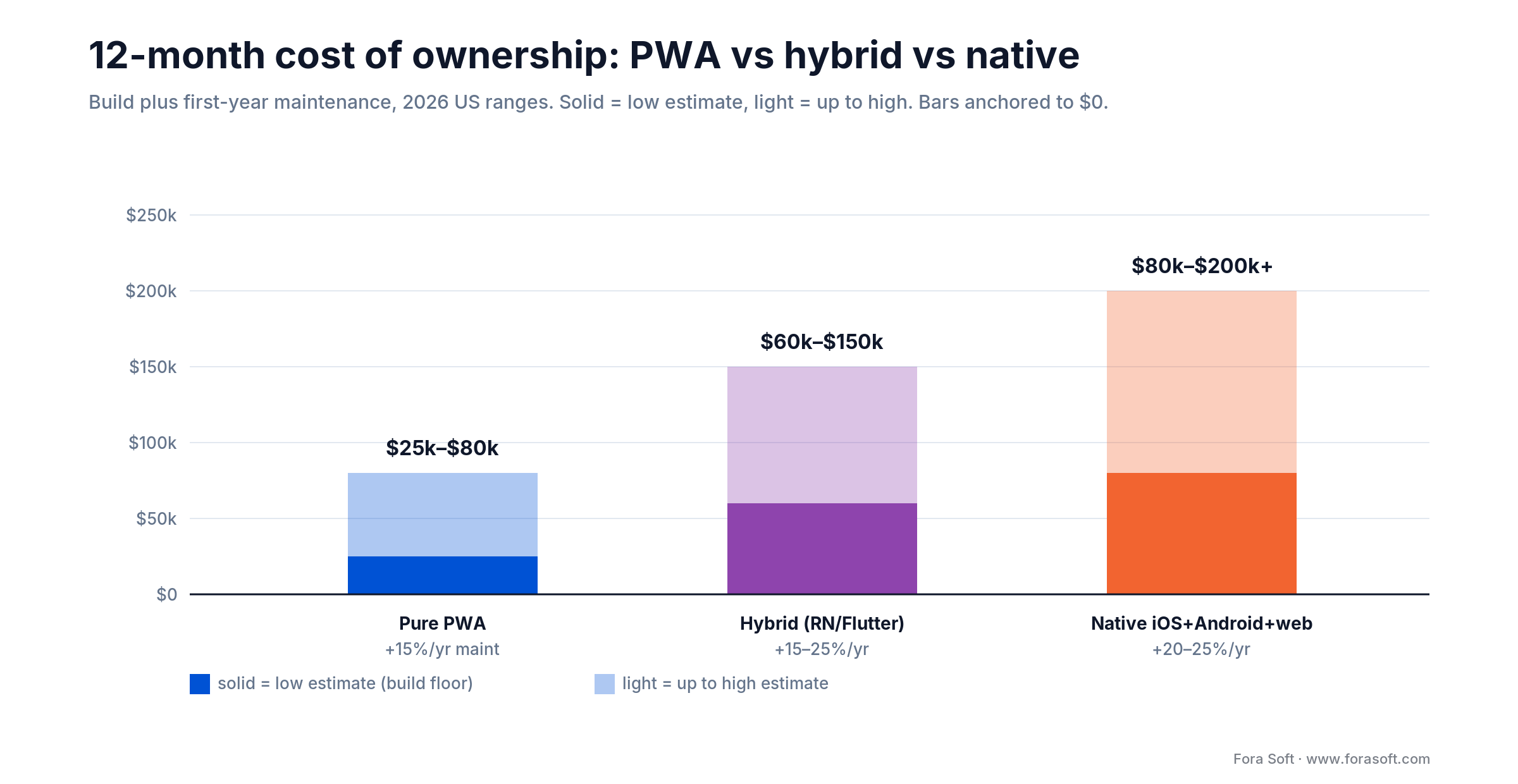
Figure 4. Build plus first-year maintenance, 2026 US ranges. Cheaper is only cheaper if the platform also fits the product.
The honest take. The PWA cost advantage is real but not infinite, hybrid is better value than most teams assume, and native is expensive but sometimes non-negotiable. Run the numbers against your own monetisation model and growth channels — the right answer is rarely “default to whatever’s cheapest.”
Mini case: how we pick the platform
Three real engagements, three different platform calls, same decision logic each time.
Perspire.tv — native plus web. Live fitness streaming with low-latency two-way coaching, push-driven retention and subscription revenue. Every one of those points to native, so we built native iOS and Android with a complementary web experience. A PWA would have compromised the exact things the product sells.
BrainCert — web-first. A virtual classroom reached through email links and LMS embeds, where instructor and student workflows are content- and form-heavy. The web layer is the product, so the call was web-first with native shells only where they earned their keep — a hybrid shape that fit the workload.
CirrusMED — native, with a web companion. HIPAA telehealth needs device-level security, biometric auth, secure local storage and dependable appointment push. Native was the only call that cleared compliance. Want the same platform call for your product?
Five PWA pitfalls we see most often
1. Service-worker bugs and cache invalidation. A bad service worker serves stale content forever. Design the update mechanism on day one — use Workbox, set explicit cache versions, ship a force-update path. Retrofitting this is painful.
2. iOS storage eviction. Service-worker cache can vanish after inactivity on iOS. Don’t assume it’s durable; treat it as best-effort and keep critical state on your backend.
3. Install-prompt friction. On iOS the user has to share-sheet their way to “Add to Home Screen,” and most never do. The install funnel needs deliberate education and timing; the generic prompt doesn’t convert.
4. Push UX built for Android. iOS push only works after install, and permission has to come from a user gesture, not first load. The Android subscribe flow won’t work on iOS without a redesign.
5. The “not a real app” feel. A slice of users distrust web apps. Standalone window, icon, splash screen, app-like navigation — these matter more than they would for native. Underinvest and you bleed users at the install moment.
KPIs to watch after you pick
Whatever you choose, instrument it so the decision is falsifiable within a quarter. Track three buckets.
Adoption KPIs. Home-screen install rate (installs ÷ eligible sessions), share of sessions from the installed app versus the browser tab, and TWA installs on Play. If your PWA install rate on iOS sits in low single digits, your push and retention assumptions are already in trouble.
Engagement and retention KPIs. D1/D7/D30 retention split by installed-PWA, browser and native cohorts, plus push opt-in rate on iOS versus Android. This is where a PWA either holds its own or quietly loses to native — measure it, don’t assume it.
Business KPIs. Web-checkout conversion versus store-IAP conversion, customer-acquisition cost by channel (SEO versus store), and revenue per platform. These three numbers tell you whether the money you saved on build is being handed back at the checkout.
A platform decision framework in five questions
Q1. Where do users come from? Links (email, Slack, search) favour a PWA on friction. App-store search favours native on discovery.
Q2. How does monetisation work? Web subscriptions, contracts or B2B billing → PWA viable. Store IAP, freemium paywalls, in-app currency → native required.
Q3. Are native APIs in scope? Camera control, AR, Bluetooth, HealthKit, advanced ML, secure-enclave biometrics, NFC. If yes, a pure PWA is out.
Q4. How is retention driven? Push-driven daily engagement → native. Weekly-or-less, link-driven engagement → PWA viable.
Q5. What’s the budget reality? If you can fund only one of web, iOS or Android, a PWA gets you all three. If you can fund all three, compare PWA, hybrid and native on the workload — not on price alone.
Already shipped the wrong platform? The migration path
If you launched a PWA and hit the ceiling (iOS retention won’t climb, the store channel you now need isn’t there), you don’t have to rewrite from zero. The cheapest first move is to wrap the existing PWA in a TWA for Play and Capacitor for the App Store; that buys store presence and a native plugin bridge in days, not months, while your web codebase keeps doing the SEO and marketing job it’s good at.
From there you replace screens natively only where the ceiling actually hurts (the call surface, the paywall, the camera flow), and leave the rest on the shared codebase. That’s a staged migration, not a rebuild, and it’s most of what our custom software development team does when a founder’s first platform bet needs to grow up. Going the other way (native to PWA) is rarer, but the same logic holds: keep what earns its cost, move the rest to the cheaper stack.
Frequently asked questions
Is a PWA or a native app better?
Neither is better in the abstract. A PWA is better when users arrive from links and search, monetisation runs through the web, and no native-only API is required. A native app is better when App Store discovery, push-driven retention, in-app purchases or device APIs are core to the product. The right answer is set by your workload, not by the technology.
Are PWAs dead in 2026?
No. The PWA market is estimated near $3.14 billion in 2026, growing about 30% a year (Research Nester, 2026). Pinterest, Starbucks and Uber shipped influential PWAs, and Trusted Web Activities now list PWAs on Google Play. The technology is mature and useful for the right product.
Does iOS 26 change the PWA vs native app calculus?
A little, in the PWA’s favour. iOS 26 opens home-screen sites as standalone web apps by default, and Safari 18.4 added Declarative Web Push. But the load-bearing gaps (no Background Sync, no Web Bluetooth, no home-screen widgets, tighter storage) are unchanged, so the decision axes are the same.
Can a PWA send push notifications on iOS?
Yes, since iOS 16.4 (March 2023) — but only after the user manually adds the PWA to the home screen and grants permission from a tap. Many users never install, so engagement-heavy products see materially worse push retention on iOS PWAs than on native.
How much does a PWA actually save versus native?
Roughly 30–50% of a single native platform and 60–70% of native iOS plus Android plus web on 2026 benchmarks, with lower maintenance too. The savings only count if the cheaper platform also meets the requirements — saving money on the wrong platform is the most expensive choice available.
What is a Trusted Web Activity (TWA)?
A Chrome-based shell that wraps your PWA into an Android app, listed and installable from Google Play. Digital Asset Links verify that the app and your domain share an owner. One codebase then ships to the open web, the iOS home screen and the Play Store.
PWA vs React Native — which ships faster?
A PWA ships the first version faster: one codebase, no store review, instant deploys. React Native is slower than a PWA but faster than two native teams, and it buys store presence, native APIs and full push. A reasonable arc is PWA for the prototype, hybrid for v1, native where the workload demands it — if your product actually moves through those stages.
Is SEO better with a PWA?
Yes for discovery: PWAs are indexed by Google and surface in organic search; native apps are not. For content and commerce, SEO is often the largest acquisition channel and repays the build. For apps acquired through store ranking, SEO is a smaller lever and store presence matters more.
Can I have both a PWA and a native app?
Yes, and it’s more common than people assume. Many products run a PWA for web users and search traffic and a native app (or a Capacitor/TWA wrapper) for the store install path — the PWA as marketing funnel, the native app as the engagement product.
What to Read Next
Scoping
Why Cut Features and Launch Early — the MVP Playbook
Scope and platform are the same decision. Cut the right features before you sign.
Estimation
Why Developers’ Time Estimates Don’t Always Work
Eight red flags in proposals — the platform line item is one of the most padded.
Cost
How to Cut Costs on a Software Project
Cost-cutting moves that keep quality — and the corners that are dangerous to cut.
PM
Why You Need a Project Manager
The discipline that holds the platform decision once it’s made.
Discovery
What Happens in the Analytical Stage
Discovery is where the PWA-vs-native call earns its evidence, before any code.
Ready to make the platform call deliberately?
PWAs aren’t a scam and they aren’t dead — they’re also not the right answer for every product. The call is workload-shaped: where users come from, how you get paid, which device APIs you touch, how retention works, and where the budget lives. The teams that win on PWA chose it on purpose. The teams that lose chose it because it was cheaper and found out, six months in, that cheaper cost them the App Store discovery, the push retention, or the IAP path their model needed.
The useful next step is a 30-minute call with engineers who’ve shipped on every stack. Bring your scope, your monetisation model and your growth channels; we’ll come back with the call — PWA, native or hybrid — and the math behind it, before you sign anything.
Get the platform call right on the first try
Thirty minutes with senior engineers who’ve shipped PWA, native iOS, native Android, React Native, Flutter and Capacitor in production. Tell us your product shape — you’ll leave with a recommendation, a build-cost envelope and a 12-week plan.

