

Key takeaways
• The app store approval process rejects more than one in five submissions on the first pass. In 2025 Apple reviewed 9.1 million submissions and rejected over 2 million (Apple, May 2026). Crashes and privacy cause most of it, and both are avoidable.
• Apple enforces guidelines by rule number. Know 2.1, 2.3, 3.1, 4.8 and 5.1 cold — these cover the top five rejection categories and are the exact references reviewers cite in rejection letters.
• Google Play is strict on two fronts in 2026: the target API level and the Data Safety form. New apps and updates must hit API 36 (Android 16) by August 31, 2026, and a single missing SDK disclosure or an outdated targetSdk blocks the whole release.
• Plan for iteration, not perfection. Budget two submission cycles, a demo account, a privacy manifest, a matching privacy policy URL, and a clear App Review Information note — that pre-empts ~80% of reviewer friction.
• Fora Soft ships through both stores every week. We’ve delivered 250+ products since 2005 — many of them mobile, video and AI apps taken through App Store and Play review. The playbook below is what we actually do the week before we hit “Submit.”
Why Fora Soft wrote this playbook
App review failures almost never come from bad code — they come from avoidable paperwork: a missing privacy manifest, a mismatched description, a demo account that doesn’t log in, an outdated target API. The teams that ship fastest aren’t the best engineers, they’re the best-prepared submitters. This guide is the preparation checklist we use on every mobile release at Fora Soft — tuned to the 2026 reality of EU DMA, privacy manifests, Android 15 target API and Apple’s new AI-consent rules.
Since 2005 we’ve delivered 250+ products across iOS, Android and web, and we hold a 100% Job Success Score on Upwork. Classrooms like BrainCert, telemedicine apps like CirrusMED, and consumer apps like our video editor Super Power FX (500K+ downloads, 4.6/5 on the App Store) have all been through the store-review wringer, so the recommendations below come from real submissions, not the marketing page of a review-checker SaaS. It’s the same discipline we teach in our AI for video engineering course.
Stuck in review — or trying to avoid it?
Book a 30-minute call with our mobile lead. We’ll audit your pending submission, flag the likely rejection reasons, and hand you a fix list you can work through over the weekend.
Market context: why store approval is strategic, not clerical
There are roughly 1.8 million apps on the App Store and 2.5–3 million on Google Play in 2026. In 2025 Apple reviewed 9.1 million submissions and rejected more than 2 million of them, over 443,000 for privacy alone, while terminating 193,000 developer accounts for fraud (Apple, May 2026). Google rejected nearly 2 million policy-violating submissions and blocked 80,000+ developer accounts in 2025. The takeaway: the stores are not rubber-stamping anymore. A careless submission today is likely to stall, which is why the few weeks spent getting the app store approval process right usually pay for themselves in launch velocity — and in the cost of one last-minute scramble.
The 2026 approval bar: what has actually changed
Store policies are a moving target. Five 2025–2026 shifts determine what you must ship today that you could get away with a year ago.
1. Privacy manifests are mandatory on iOS. Since May 2024, any iOS app that uses a “required-reason” API or bundles a listed third-party SDK (in practice, almost all of them) must include a PrivacyInfo.xcprivacy file declaring data types collected, third-party SDKs and their purposes, and approved reasons for each “required-reason” API. Enforcement in 2025–2026 is strict; Xcode will block the upload, and manual reviewers will still reject if the manifest contradicts in-app behavior.
2. AI consent disclosures are live. Apple updated guideline 5.1.2(i) on November 13, 2025: if your app sends personal data to third-party AI providers (OpenAI, Anthropic, Google, ElevenLabs, etc.), you must get explicit permission first, name the provider and the data shared, and let users revoke it later. Miss it and you’re rejected. The clause now covers LLMs, classic ML and any external reasoning service.
3. Google Play moves to target API 36. New apps and updates target Android 15 (API 35) today; from August 31, 2026 they must target Android 16 (API 36), about a month out as we publish. Existing apps still need API 35 to stay visible to new users. You can request an extension to November 1, 2026, but plan as if you can’t: miss the deadline and you can’t push updates until you catch up.
4. DMA compliance reshaped EU distribution. In the EU, apps can distribute through Web Distribution or alternative marketplaces, offer external payments, and link out to non-App-Store offers — capabilities live since 2024, with Apple’s business terms revised again on June 26, 2025. From January 1, 2026 the per-install Core Technology Fee gives way to the Core Technology Commission, which affects pricing design, not review, but changes what your legal review should check.
5. Apple enforces the iOS 26 SDK. Since April 28, 2026, every new submission and update must be built with the iOS 26 SDK (and the matching iPadOS 26, watchOS 26, tvOS 26 and visionOS 26 SDKs). Build against anything older and App Store Connect blocks the upload before a human ever sees it.
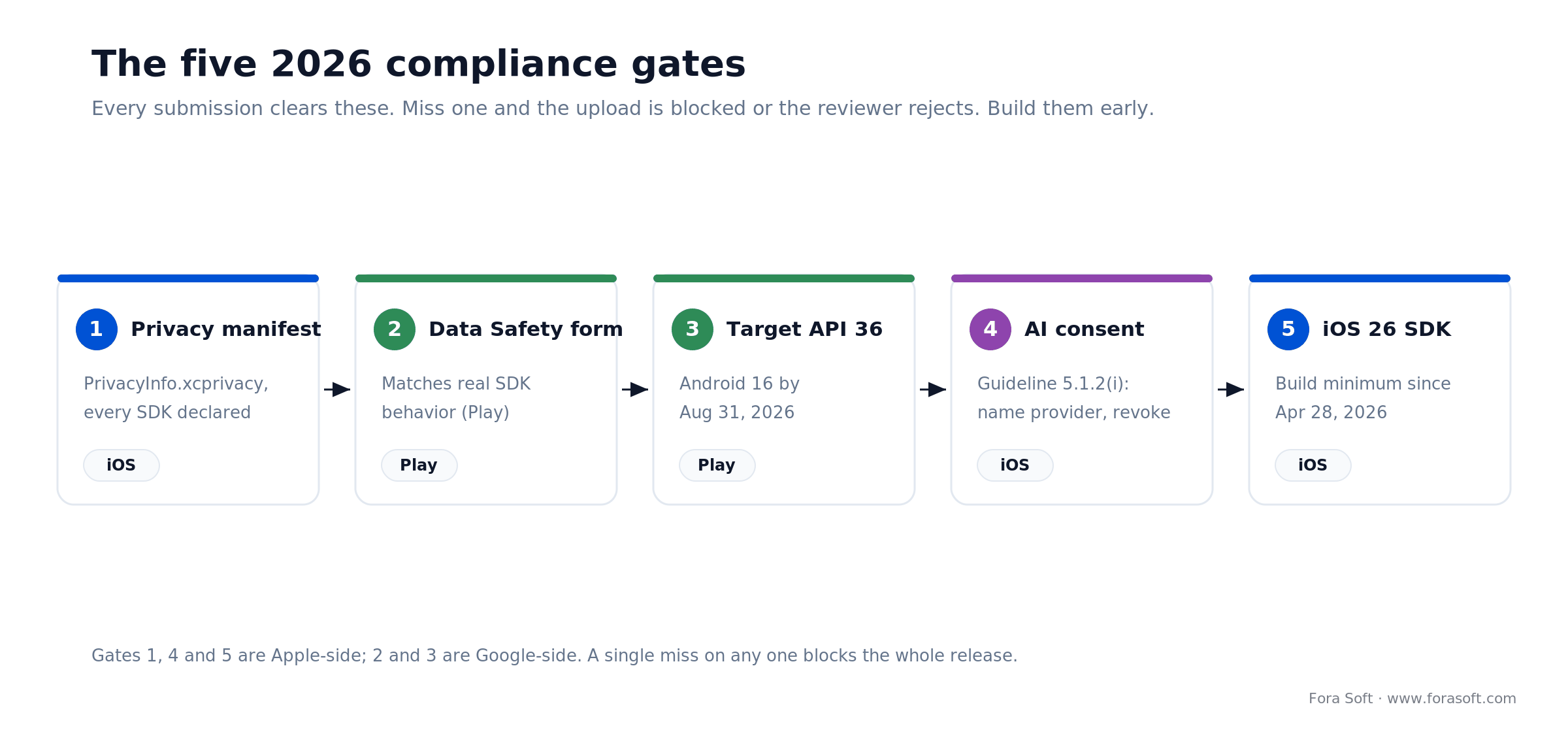
Figure 1. The five compliance gates every 2026 submission clears. Miss one and the upload is blocked or the reviewer rejects.
Top rejection reasons — ranked by 2026 frequency
More than one in five App Store submissions is rejected on first pass; Google Play’s overt rejection rate is lower but enforcement via Data Safety and permissions is aggressive. The ranking below aggregates Apple’s transparency data, Google’s 2025 enforcement reporting (nearly 2 million policy-violating submissions rejected, 80,000+ developer accounts blocked) and our own intake of roughly 60 mobile submissions over the last 12 months.
| Rank | Reason | Share | Apple rule / Google policy | Typical trigger |
|---|---|---|---|---|
| 1 | Crashes & broken functionality | ~18–20% | Apple 2.1 / Play quality | Reviewer hits a hard crash on launch or a core feature |
| 2 | Privacy (manifest, ATT, data disclosure) | ~15–18% | Apple 5.1 / Data Safety | Missing privacy policy, undisclosed SDK, wrong ATT copy |
| 3 | Incomplete app (placeholders, stubs) | ~12–15% | Apple 2.1 | Lorem ipsum, “Coming Soon,” dead buttons |
| 4 | Misleading metadata | ~10–12% | Apple 2.3 / Play metadata | Screenshots don’t match app, competitor mentions, keyword stuffing |
| 5 | Missing / broken demo account | ~6–8% | Apple 2.1 | Reviewer can’t log in, backend offline during review |
| 6 | Sign in with Apple missing | ~4–6% | Apple 4.8 | Third-party login offered without Apple equivalent |
| 7 | Kids category violations | ~3–5% | Apple 1.3 / COPPA | Missing parental gate, third-party analytics in Kids |
| 8 | Permissions misuse (SMS, Call Log, Accessibility) | ~3–4% | Play permissions policy | Accessibility service used for automation, SMS read without default-SMS role |
| 9 | Minimum functionality / spam | ~3–4% | Apple 4.2 / Play spam | Thin wrappers, duplicate submissions, re-skinned templates |
| 10 | Unclear review notes / export compliance | ~2–3% | Apple 2.3.10 / export | Reviewer can’t reproduce the value prop; encryption undeclared |
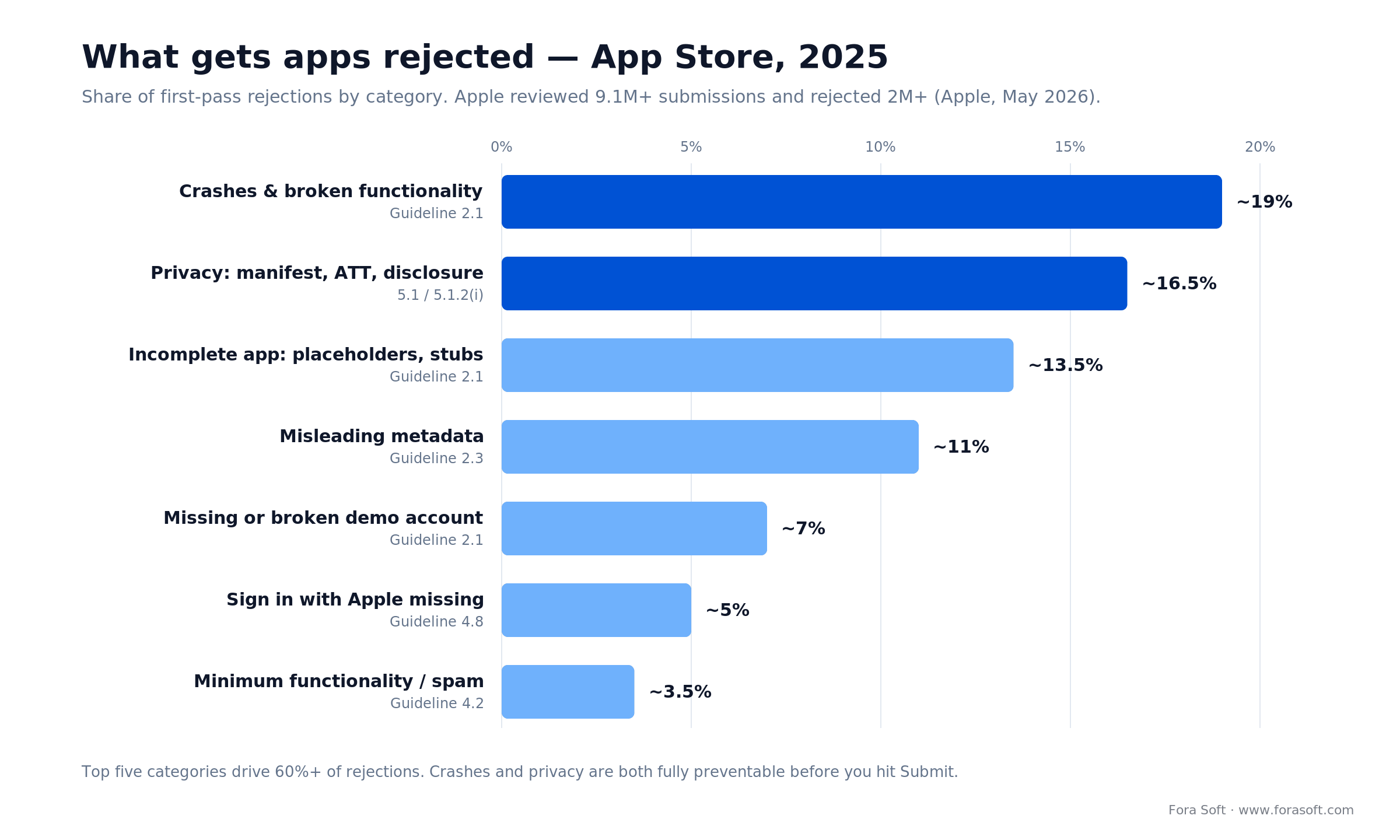
Figure 2. Where first-pass rejections come from. The top five categories drive 60%+ of them — and crashes and privacy are both preventable.
Apple App Review Guidelines — the rules that actually bite
You don’t need to memorize all 300+ paragraphs of the guidelines — you need to know the specific rules Apple cites in real rejection letters. Here’s the short list, with what “compliant” looks like in 2026.
Rule 2.1 — App Completeness
No placeholders, no TODO text, no broken links, no dead paywalls. Every button reachable from the first screen must do something real. Your backend must be up during review — if reviewers submit between 08:00–18:00 Pacific and your staging crashes, you’ll get 2.1.
Rule 2.3 — Accurate Metadata
Screenshots must match the app you submit, not a future version. No competitor names in title, subtitle or description. No ASO keyword stuffing. If your app is in beta, say so on the screenshots — if not, remove any “Beta” banner before submission.
Rule 3.1 — Payments
Digital goods consumed inside the app must use In-App Purchase — unless you qualify as a reader app, or you’re in the EU and have opted into the External Purchase Link entitlement under DMA. Linking to external payment flows without the entitlement is an instant 3.1.1.
Rule 4.8 — Sign in with Apple
If you offer any third-party login (Google, Facebook, X, LinkedIn, etc.), you must also offer Sign in with Apple — visually equivalent, not buried in a submenu. Proprietary enterprise SSO or government e-ID flows are exempt.
Rule 5.1 — Privacy
A working privacy policy URL. A populated App Privacy card in App Store Connect that matches what the app actually collects. A privacy manifest declaring every third-party SDK. An App Tracking Transparency prompt using the approved wording if you use IDFA. An AI consent screen if you share personal data with external models. Miss any one of these and you’re out.
Reach for expedited review when: you have a reproducible critical bug impacting users in production or a time-bound event (conference, launch, regulatory deadline). Submit via App Store Connect → Contact Us → Expedited Review, and expect 4–12 hours if granted.
Google Play compliance: the three gates you must pass
1. Target API 36 (Android 16) by August 31, 2026. Set targetSdkVersion = 36 for new apps and updates (API 35 is the floor that keeps existing apps visible to new users), audit every deprecated API you call, and test on a physical Android 16 device. Extensions run to November 1, 2026 but aren’t automatic — plan as if you won’t get one.
2. Data Safety form matches real behavior. Declare every data type you or any SDK collects, how it’s used, and who you share it with. Google’s April 2025 clarification is strict: if your SDK (ad network, analytics) uses data for its own purposes, that counts as sharing. Audit your build.gradle dependencies line by line.
3. Permissions are justified or removed. SMS and Call Log permissions are effectively restricted to default SMS/Phone apps. Accessibility Service is blocked for any “autonomous action” use case — automation frameworks, clickbots, etc. Foreground services need a declared foregroundServiceType. Strip anything you don’t absolutely need.
The Google Play closed-testing trap for new personal accounts
If your developer account was created after November 13, 2023 as a personal account, you must run a closed test with at least 12 opted-in testers for 14 continuous days before you’re eligible to push to production. Google cut this from 20 testers to 12 on December 11, 2024, but it’s still in force in 2026 and catches most solo founders off guard. “Opted-in” means each tester accepted the invite and installed the build on the matching Google account — emulators, bots and invited-but-not-installed accounts do not count.
Workarounds: set up an organization account (exempt), or start the closed-testing clock the same day you open the developer account, not when the app is finished. Recruit testers from communities (Reddit, Slack groups, Discord) rather than friends-and-family — Google does look at the tester list quality in ambiguous cases.
A 25-line pre-submission checklist we run before every release
This is literally the checklist we paste into our release ticket on each mobile project. Work through it in order — the sequence matters, because later items assume earlier ones are done.
Build & quality
1. Crash-free sessions above 99.5% on Firebase Crashlytics or Sentry across the last 500 sessions. 2. Cold-start under 2 seconds on the slowest supported device. 3. No placeholder text in any screen reachable from a cold install. 4. Every CTA in onboarding leads somewhere real, including the terminal “success” screen.
Privacy & compliance
5. Privacy policy URL live on HTTPS, matches in-app data collection. 6. App Privacy card in App Store Connect populated and matches the policy. 7. PrivacyInfo.xcprivacy checked in and validated by Xcode. 8. Every third-party SDK (Firebase, Adjust, Mixpanel, Crashlytics, etc.) listed with its purposes. 9. ATT prompt wording uses Apple’s recommended phrasing, not your own. 10. AI consent screen displayed before the first LLM call, naming the provider.
Metadata
11. Screenshots match the build you’re uploading. 12. No competitor names in title, subtitle, keywords or description. 13. Age rating questionnaire completed and re-rated against 2025’s new 13+/16+/18+ categories. 14. Support URL & email working and monitored. 15. Localization done for every region you’ve selected in pricing & availability.
Testing & reviewer support
16. Demo account credentials in the App Review Information field, verified working 5 minutes before submission. 17. Review notes explain any non-obvious flow (e.g., “To see the AI tutor, tap Library → Tutor → Start Session”). 18. TestFlight build (iOS) or Closed Testing build (Android) covered at least 7 days with real users. 19. Backend staging matches production, running on the same infrastructure during review.
Platform-specifics
20. Sign in with Apple implemented if third-party login exists. 21. Target API 36 (Android 16) on Android for new apps and updates, with deprecation audit done. 22. Data Safety form populated for every SDK, matches reality. 23. Foreground service types declared in the Android manifest. 24. Kids category rules (parental gate, no behavioral ads, no third-party analytics) enforced if applicable. 25. Export compliance answered honestly in App Store Connect.
Want this checklist as a runnable CI gate?
We wire this into our GitHub Actions pipeline for every mobile client — most of the checks are automated, and the rest become one-click review items. Happy to share the template.
Apple vs Google — a cheat sheet for your release manager
The two stores feel superficially similar and are actually quite different operationally. Keep this mental model:
Apple is human-reviewed, rule-cited, and metadata-strict. Expect a named reviewer, a specific guideline number in every rejection, and a high bar for screenshots, descriptions, and demo accounts. Most of the friction is pre-publish.
Google is automation-first, policy-systemic, and post-publish enforced. You can often ship in hours, but the Play Integrity API, Data Safety audits and policy bots are watching. Bans come days or weeks after approval, without warning. Keep logs.
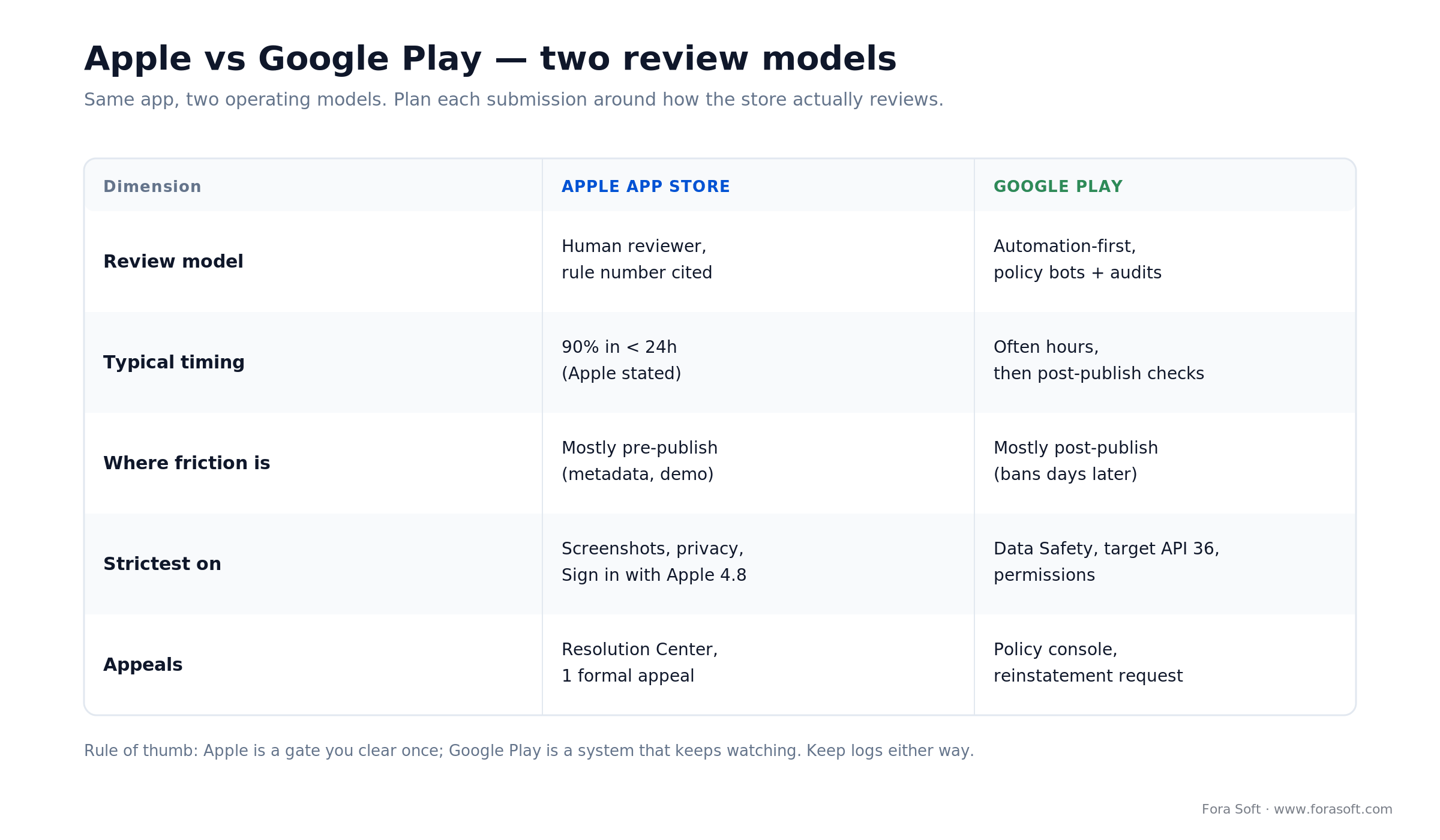
Figure 3. Two stores, two operating models. Apple is a gate you clear once; Google Play is a system that keeps watching.
Reach for organization accounts on both stores when: you’re distributing under a brand, handling IAP revenue, or expecting an enterprise customer to ever see your developer name on the listing. The DUNS lead time is worth it.
Reach for TestFlight external testing (iOS) when: you’re closing in on submission and want an extra 7–14 days of field signal without paying for review. It’s the cheapest and fastest way to catch the crash you’d otherwise see in a rejection letter.
A recent example: shipping a consumer video app cleanly
Situation. Super Power FX is a consumer video editor we build and maintain — 500K+ downloads and a 4.6/5 App Store rating. Editors like it live or die on release cadence: every new effect pack is a new submission, and one privacy or metadata slip stalls the whole update.
Plan. We treat every release as a compliance artifact, not an afterthought. Before each submission we regenerate the privacy manifest from the live SDK list, re-shoot screenshots against the exact build, walk the demo path a reviewer will take, and diff the Data Safety form against the previous release so nothing drifts silently.
Result. The pipeline stays boring — which is the goal. New effect packs go from code-freeze to live in days, not weeks: the reviewer never has to guess and never hits a placeholder. Want the same discipline on your release?
Privacy manifests, ATT and the AI-consent screen
Privacy is the #2 rejection cause and the fastest-growing category. Three pieces of the puzzle trip up most teams.
The privacy manifest. PrivacyInfo.xcprivacy is a plist that lives in your app target and, separately, inside every third-party SDK that ships with your app. You need to declare every data type collected, the purposes (analytics, app functionality, product personalization, advertising), every tracking domain, and for every “required-reason” API (UserDefaults, file timestamps, disk space, system boot time, keyboard access) the approved reason code. Xcode will validate on archive and App Store Connect will validate on upload.
App Tracking Transparency. If you touch IDFA or share identifiers with ad networks, you must call ATTrackingManager.requestTrackingAuthorization with the system prompt. The purpose string in Info.plist must follow Apple’s guidance — no incentivized phrasing, no “get premium by turning on tracking,” no scary warnings. Average opt-in is around 25–30% globally; plan your attribution stack assuming 70% of users decline.
The AI consent screen (new in late 2025). Before the first call to any third-party LLM or speech API, show a clear consent screen that (a) names the provider, (b) lists what personal data is shared, and (c) offers a meaningful decline path. A single “By continuing you accept our terms” line is no longer enough.
The end-to-end submission workflow: week by week
A realistic timeline for a first submission, assuming the app itself is already feature-complete:
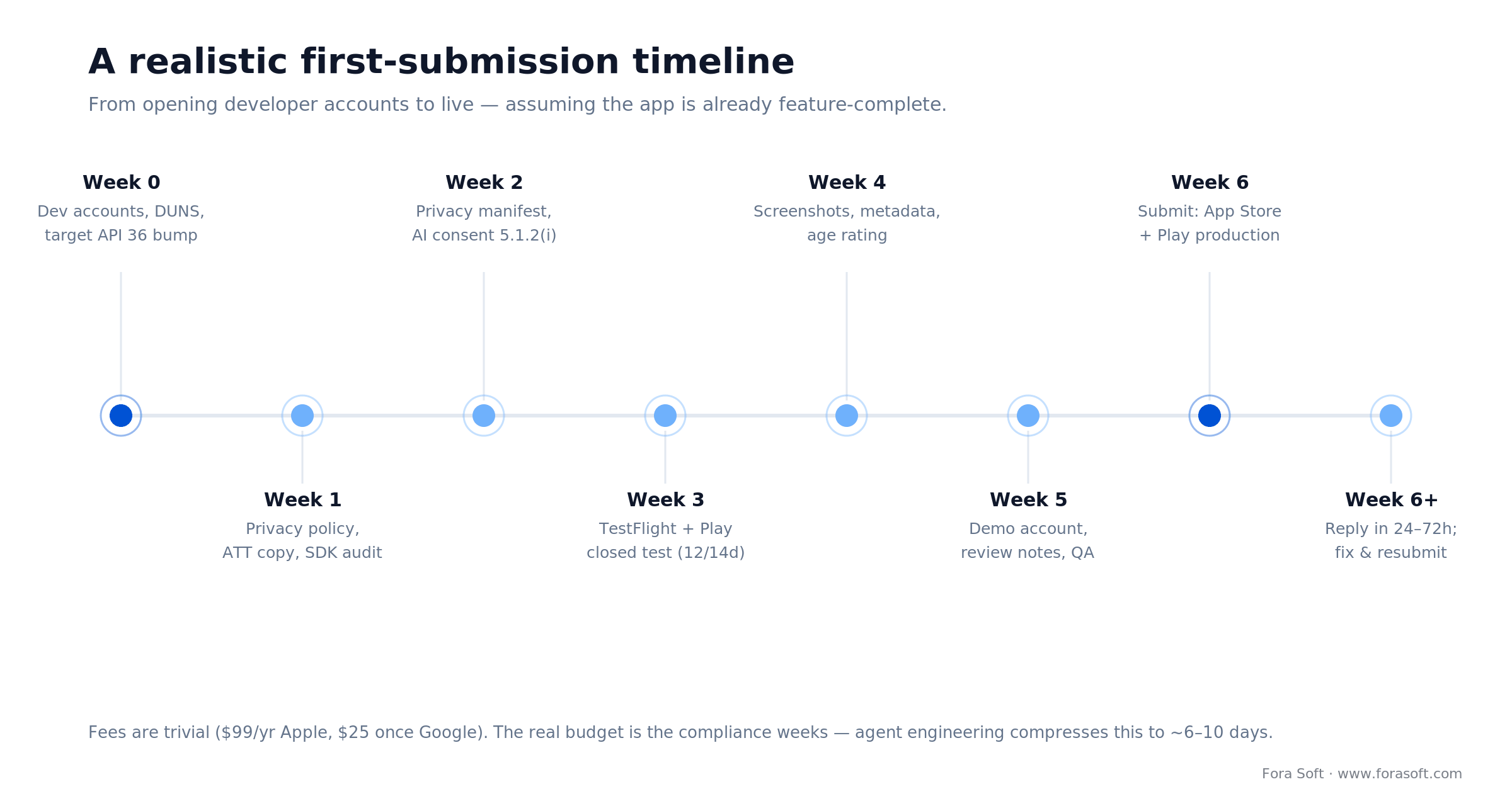
Figure 4. A realistic first-submission timeline. Fees are trivial; the real budget is the compliance weeks up front.
How to handle a rejection letter — and how not to
Every rejection is a specific guideline citation plus a short note from the reviewer. Read it twice, reproduce the issue yourself, and then write a reply that (a) acknowledges the guideline, (b) describes what you changed, (c) gives the reviewer the exact path to verify, and (d) ends with a direct question if anything is still ambiguous. Skip the defensive tone.
Good reply: “Guideline 2.1: We’ve fixed the crash on cold start. It was a race condition on the analytics SDK. Build 1.2.4 now gates analytics behind a dispatch on the main queue. To reproduce: launch, tap ‘Library’ → ‘Lesson 1.’ Demo account test@forasoft.com / password123.”
Bad reply: “We don’t think this applies to our app. Please review again.” — You’ll get the same rejection with less patience.
If you’ve genuinely been rejected under the wrong rule, you have one formal appeal per submission via the App Review Resolution Center. Reserve it for cases where you can demonstrate the reviewer misapplied policy, not for trying to convince them your design is beautiful.
Cost and timeline: what approval actually costs
The raw fees are trivial — Apple Developer Program is $99/year, Google Play is $25 one-time. The real cost is engineering time spent on compliance and iteration.
A realistic budget for a first submission by a small team: about 2–3 weeks of engineering time spread across compliance work (privacy manifest, Data Safety form, AI consent, target-API upgrade) and one or two rejection cycles. Using an agent-engineering workflow we typically compress that to 6–10 days end-to-end, because the checklist above is mostly automatable.
For an organization account, add 5–30 business days to request a DUNS number for free from Dun & Bradstreet; Apple won’t enroll your company without it. For a brand-new Google Play personal account, add the 14-day closed-testing window before you’re eligible for production.
A decision framework — pick your release path in five questions
Q1. Individual or organization account? If the app is tied to a legal entity, contracts, or paid distribution, go organization and budget the DUNS lead time. Individual accounts are faster to open but complicate everything downstream (reviews show your personal name, IAP payouts go to an individual bank, compliance exposure is yours personally).
Q2. What’s your EU exposure? Shipping to EU users post-DMA means deciding whether to offer external payments (lower fees but more engineering), web distribution or alt stores (larger surface area, notarization required), or stick with the App Store and IAP. Each choice changes your submission artifacts.
Q3. Do you integrate any third-party AI? If yes, the AI consent screen is mandatory on iOS. Build it on day one; don’t bolt it on a week before submission.
Q4. Is your app in a sensitive category? Kids, health, finance, gambling, and dating each carry extra review scrutiny, documentation requirements and regional restrictions. Plan review times 2× and involve your legal team before submission, not after.
Q5. Do you need to ship on a specific day? If yes, submit 14 days in advance, have an expedited-review plan documented, and keep a fallback marketing plan if review slips. Don’t pin launch announcements to unreliable approval timelines — it’s the single most common source of launch-day embarrassment.
Five pitfalls we still see every quarter
1. Hardcoded staging URLs in production builds. Reviewer hits a 500 because you forgot to swap the API endpoint. Run a pre-flight script that asserts every URL in the release build points to prod.
2. Privacy policy that doesn’t match the manifest. The App Privacy card, the PrivacyInfo.xcprivacy, and the hosted privacy policy must all agree. Any mismatch is a 5.1.1. Generate them from one source of truth — a single YAML file we keep in the repo and transform into all three.
3. SDKs that silently upgrade and add tracking. A minor version bump of an ad or analytics SDK can quietly add new data collection. Lock SDK versions, and audit the privacy manifest on every release — not just once.
4. Accessibility service abuse on Android. Using Android’s Accessibility Service to automate clicks, reminders or app-control flows will get you banned, not just rejected. If you need this kind of power, use MediaProjection, Notification Listener, or ContentProvider patterns instead.
5. Under-populated review notes. “Video conferencing app” is not review notes. Write a reviewer-facing one-paragraph tour: what the app does, how to log in, which flow demonstrates the core value, and any unusual permission prompts. Saves you one round-trip 80% of the time.
KPIs: how to measure a healthy release pipeline
Quality KPIs. First-pass approval rate (target >70% after the third release), crash-free session rate at submission (>99.5%), and anomaly count in the privacy manifest diff between releases (target: zero unexplained changes).
Business KPIs. Calendar days from code-freeze to live (target <10 days), release cadence per app per quarter (target 6–12), and rejection cost as hours of engineering time per release (target <8 hours).
Reliability KPIs. Rate of post-approval hotfixes (target <1 per release), pop-up rate of “Why does this app need that permission?” user reviews (target <0.5% of all reviews), and expedited-review approval rate when requested (target >50%).
When not to submit yet
It’s tempting to “just try” when you’re close, but a premature rejection costs more than the week it buys you. Wait another cycle if any of these are true: crash-free sessions are still below 99%, you haven’t run 7+ days of TestFlight or Closed Testing with real users, your privacy policy and privacy manifest don’t match line by line, your backend doesn’t yet have a staging “review mode” with deterministic seed data, or your team doesn’t have a clear owner of reviewer communication. Fix these first — a clean submission is cheaper than three dirty ones.
Reach for an outside audit when: you’ve been rejected twice on the same guideline, your team hasn’t shipped to the stores in the last 12 months, or you’re entering a sensitive category (health, kids, finance, gambling) for the first time. A two-hour audit is cheaper than another failed week.
FAQ
How long does Apple App Review take in 2026?
Apple states that, on average, 90% of submissions are reviewed in under 24 hours. Real-world, expect up to a day or two of “Waiting for Review” before a human starts, plus a few hours of active review, so 1–3 days is realistic for a straightforward submission. Flagged or sensitive-category apps can take 2–4 weeks. Expedited review is 4–12 hours when granted, but Apple grants only a small number per week.
How much does it cost to get an app approved?
Direct fees are $99/year for Apple and $25 one-time for Google. The real cost is engineering time: budget 2–3 weeks of a mid-level mobile engineer for compliance prep plus one to two rejection cycles. A DUNS number is free but adds 5–30 business days for organizations.
What are the top rejection reasons right now?
Crashes and performance issues (~18–20% of rejections), privacy violations including missing manifests and ATT misuse (~15–18%), incomplete functionality and placeholders (~12–15%), misleading metadata (~10–12%), and missing or broken demo accounts (~6–8%). Those five cover more than 60% of rejections in our 2026 sample.
Do I need a DUNS number?
Only if you’re enrolling as an organization (company, LLC, nonprofit, or government entity) in the Apple Developer Program. Individuals don’t need one. DUNS is free from Dun & Bradstreet but takes 5–30 business days, so request it at the same time you buy your domain, not the week of submission.
Do I still need 12 testers for 14 days on Google Play?
Yes, if your personal developer account was created after November 13, 2023. Organization accounts are exempt. This rule remains in force in 2026. Recruit testers from communities rather than friends-and-family, and start the clock the day you open the account.
How do I handle an AI consent screen?
Before the first call to any third-party AI or LLM that receives personal data, show a screen that (a) names the provider (OpenAI, Anthropic, Google, etc.), (b) lists the data categories being shared, and (c) offers a meaningful “decline” path that still lets the user use the app, even if in a reduced-functionality mode. A passive terms-of-service link is no longer enough under Apple’s guideline 5.1.2(i), updated November 13, 2025.
What happens if I miss the target API deadline on Android?
You can’t publish new apps or push updates until you catch up. Existing installs keep working, but you can’t ship a security fix or new feature until the targetSdkVersion is raised. The deadline is August 31 each year; for 2026 that means Android 16 (API 36) becomes the floor. Extensions exist but are narrow — plan as if they won’t be granted.
Can I offer external payments now that DMA is in force?
In the EU, yes — with Apple’s External Purchase Link Entitlement. The fee model post-January 1, 2026 centers on a 5% Core Technology Commission on digital-goods sales, plus Store Services fees of 5–13% and a 2% initial-acquisition fee in the first year, depending on the tier you pick. Outside the EU the standard IAP rules still apply. If you operate globally, you’ll need two payment flows and a region-aware paywall — don’t underestimate that engineering effort.
What to read next
Distribution
Distributing Android apps beyond Google Play
Alternative stores, sideloading and enterprise distribution when Play isn’t enough.
Alt-stores
Four ways to ship Android without Play
Specific trade-offs between F-Droid, Amazon, Samsung Galaxy Store and direct APK.
AI apps
How to build apps with AI in 2026
Why AI-powered apps trigger extra review scrutiny — and how to prepare the consent UX.
Process
How software gets built, step by step
Our end-to-end delivery playbook, with the release and review gates called out.
Real-time apps
Building a video call app with Agora SDK
What we learned shipping WebRTC-grade apps through App Review.
Ready to ship a clean first submission?
Store approval is a preparation game. The teams that ship fastest aren’t the most experienced — they’re the ones who treated privacy manifests, demo accounts and reviewer notes as first-class release artifacts rather than last-week panic items. The checklist above is the one we follow for every mobile release at Fora Soft; work through it in order and your first-pass approval rate should clear 70% within three cycles.
If you’re preparing a new app, upgrading an existing one to the 2026 rules, or just stuck in a rejection loop, we’re happy to run an audit and hand you a fix plan. Two hours on our side usually saves weeks on yours.
Let’s audit your next submission
Book a 30-minute scoping call and we’ll walk through your current submission artifacts, flag the likely rejection reasons and hand you a prioritized fix list.

