

Key takeaways
• An Agora video call app rides a global SD-RTN, not just a WebRTC wrapper. You get managed TURN, signaling, cascaded selective forwarding and 200+ edge POPs — the hard infrastructure problem is solved.
• 2026 pricing: $3.99/1,000 min HD (720p), $8.99/1,000 min Full HD (1080p), billed on aggregate resolution. Predictable at demo scale, ruthless once the resolution multiplier bites — budget accordingly.
• Most “Agora problems” are auth, token and channel design. Fix the token server, pick the right channel profile, and 80% of production incidents disappear.
• Alternatives matter. LiveKit (self-hostable), Daily (13ms first-hop), Twilio (safest enterprise), 100ms and ZEGOCLOUD all deserve a look before you commit.
• Fora Soft has shipped 250+ video and real-time products since 2005. We’re in the Agora partner directory and have scaled real-time apps from 10 users to 100K concurrent participants.
Why Fora Soft wrote this playbook
Fora Soft has been building video and real-time apps since 2005 — 250+ projects — and we are listed among Agora software development experts. The work spans telehealth, education, live auctions, trading rooms and the kind of custom video conferencing development this playbook is about. Top-rated on Clutch and 99% job success on Upwork, GoodFirms-listed, Agora ecosystem partner.
This is the playbook we hand junior engineers on day one. It is opinionated, built from incidents, pricing negotiations and comparison bake-offs we have actually run. No marketing copy: the trade-offs are real, the numbers are current for 2026, and the pitfalls are ones that bit us or our clients in production.
Scoping an Agora project?
30-minute call with an Agora-experienced engineer. Walk away with an architecture sketch, a cost envelope and a clear view on whether Agora or a competitor fits better.
What Agora actually is (and isn’t) in 2026
Agora is a real-time engagement platform: SDKs for every major client (iOS, Android, Web, React Native, Flutter, Unity, Unreal, Electron) and a proprietary global backbone called the Software-Defined Real-Time Network (SD-RTN). Under the hood it is WebRTC-compatible where needed but does not rely on it — Agora picks the best transport (UDP/TCP, their own protocol, fallback relays) to hit sub-400ms glass-to-glass latency on bad networks.
What Agora gives you. Managed signaling, TURN, NAT traversal, adaptive bitrate, cascaded selective forwarding, 200+ edge POPs, cloud recording, real-time transcription, noise suppression, virtual backgrounds, and in 2026 a Conversational AI Engine that wires voice to LLMs with low-latency barge-in.
What Agora does not give you. Product UX, session/billing logic, user directories, scheduling, recording storage policy, chat moderation, business rules. That is your code. The “Agora integration” is really a “custom app that uses Agora for media.”
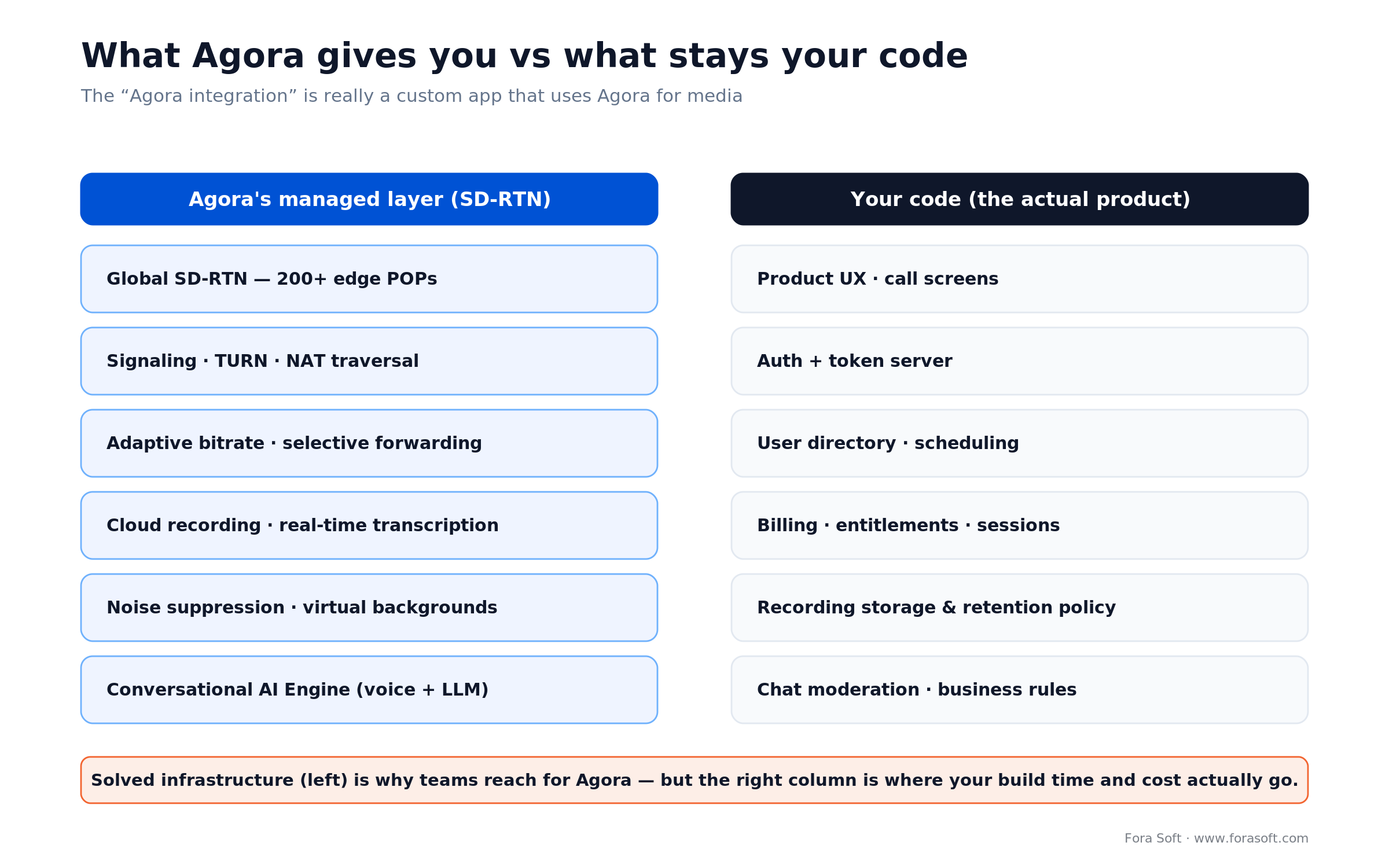
Figure 1. Agora’s managed layer solves the hard infrastructure; the right-hand column is where your build time and cost actually go.
When Agora fits (and when it doesn’t)
Reach for Agora when: global audience on weak networks, sub-400ms latency required, team needs to ship in weeks not months, 100–100K concurrent participants per session, Asia and emerging markets matter.
Reach for LiveKit when: you need self-hosting for data residency, want to own the media plane, AI agent ecosystem matters, and you have SREs who can run an SFU.
Reach for Daily/Twilio when: North American-heavy audience, enterprise procurement (SOC 2, BAA, POs), or a React/Prebuilt UI would save you a quarter.
Reach for 100ms or ZEGOCLOUD when: India- and APAC-first live experiences (interactive events, cricket-scale audiences) or cost-sensitive interactive live streaming where a Prebuilt UI beats raw control.
Reference architecture for an Agora video call app
A production-grade Agora app has seven pieces. Keep them decoupled, version them independently, and the stack scales from 10 users to 100K without rewrites.
- Client SDK layer: Agora RTC and RTM SDKs embedded in iOS, Android, Web, RN, Flutter apps.
- Token server: short-lived RTC/RTM tokens signed server-side, never hardcoded in clients.
- Application API: user directory, scheduling, entitlements, session metadata, billing — your code.
- Agora SD-RTN: managed media plane, signaling, TURN, selective forwarding.
- Cloud recording + storage: Agora Cloud Recording uploading to S3/GCS/Azure Blob with lifecycle policies.
- Transcription + AI layer: Agora Conversational AI Engine, Whisper, or LiveKit-like agent wrappers.
- Observability: Agora Analytics + your own QoS telemetry (Mux Data, Datadog RUM, Grafana).
The usual mistake is to run the token server inside the main API monolith. A minor deploy takes out the media plane. Token service should be its own tiny, hot-pathed process with its own SLO. For the deeper patterns behind this diagram, see our guide to WebRTC architecture for production systems.
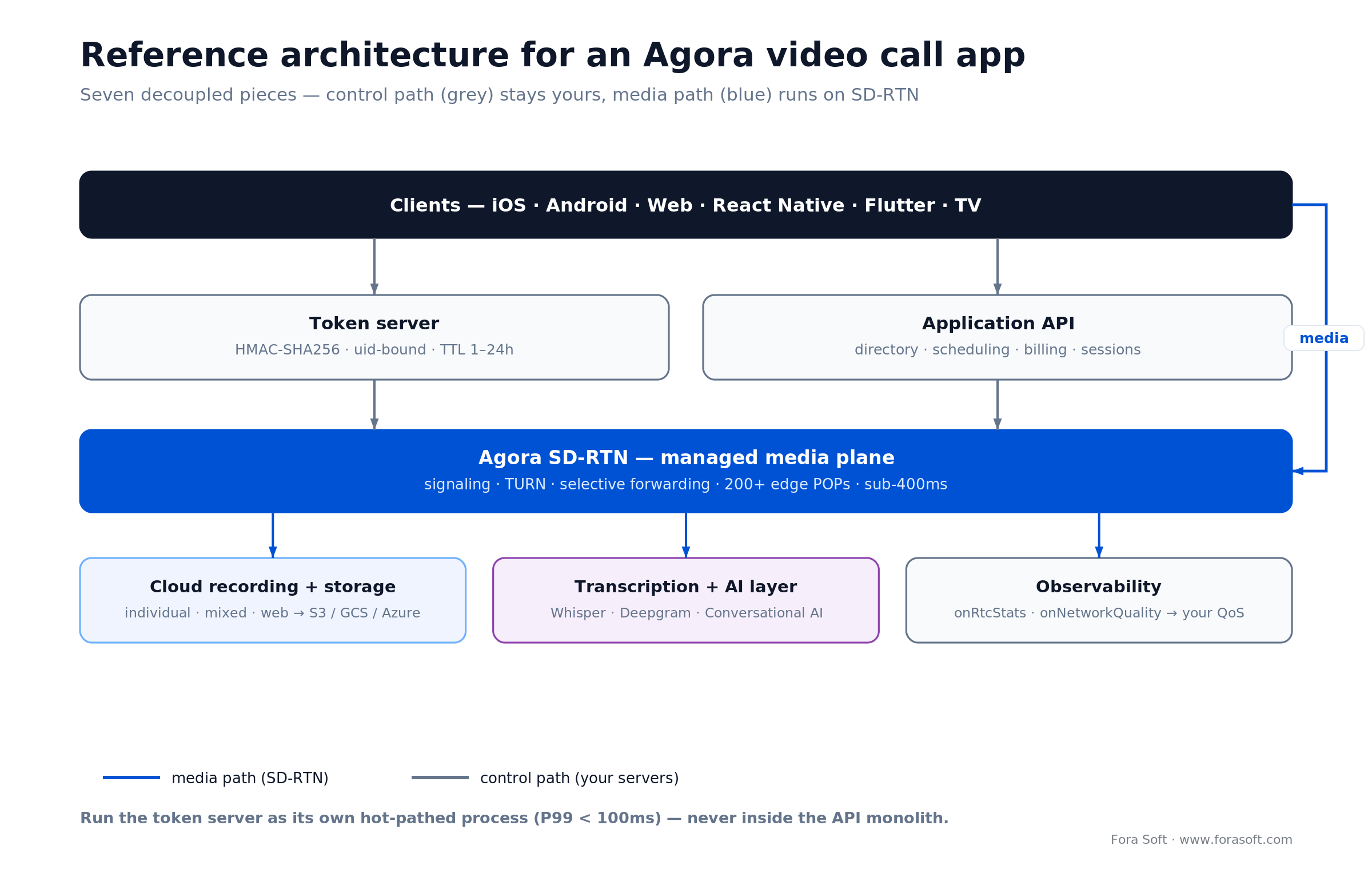
Figure 2. Seven decoupled pieces. The control path (grey) stays yours; the media path (blue) runs on Agora’s SD-RTN.
Step-by-step: build a video call app with Agora SDK
1. Create an Agora project. Register at Agora Console, get an App ID. In production enable “App ID + App Certificate” (token mode). Never ship the App Certificate to a client.
2. Build a token server. Tiny Node.js/Go/Python service that takes an authenticated user + channel name and returns a time-limited token. Signed with HMAC-SHA256. Keep it behind your auth gateway, rate-limited, under 50ms P99.
3. Initialize the SDK per platform. Call createAgoraRtcEngine() once per app lifecycle, set channel profile (communication for 1:1/small group, live_broadcasting for one-to-many) and role (host or audience).
4. Join a channel. Fetch a token from your server, call joinChannel(token, channel, uid). Subscribe to remote streams in the onUserJoined callback. This is where 90% of the product lives.
5. Add device permissions and graceful degradation. iOS/Android permission prompts, auto-downgrade to audio-only if bandwidth collapses, show a proper error state if the camera is denied — not a blank screen.
6. Wire cloud recording. Agora Cloud Recording as a side-channel process, uploading composite or per-user streams to your S3/GCS bucket with a signed webhook-driven status callback.
7. Ship QoS telemetry. Use onNetworkQuality and onRtcStats to stream metrics into your own observability stack. Agora Analytics is good; your own is better for alerting.
The Web SDK path in ~20 lines. This is the minimum that puts two people in an Agora video call — a token from your server, join, publish, and render whoever shows up:
import AgoraRTC from "agora-rtc-sdk-ng";

const client = AgoraRTC.createClient({ mode: "rtc", codec: "vp8" });

// token is minted by YOUR server, never hard-coded in the client
const res = await fetch("/rtc-token", {
  method: "POST",
  headers: { "Content-Type": "application/json" },
  body: JSON.stringify({ channel, uid }),
});
const { token } = await res.json();

await client.join(APP_ID, channel, token, uid);
const [mic, cam] = await AgoraRTC.createMicrophoneAndCameraTracks();
await client.publish([mic, cam]);

// render every remote participant as they join
client.on("user-published", async (user, mediaType) => {
  await client.subscribe(user, mediaType);
  if (mediaType === "video") user.videoTrack.play("remote-" + user.uid);
  if (mediaType === "audio") user.audioTrack.play();
});
Secure token auth and channel design
Token design is the single most common source of production bugs we see on Agora projects. The rules that keep incidents near zero:
- TTL between 1 and 24 hours. Long enough to cover a reasonable session, short enough that a leaked token is not forever.
- Include
uidin the token. Binds the token to a specific user; prevents arbitrary impersonation inside a channel. - Issue on-demand, not at login. A token handed out at login will expire mid-session and break renewal.
- Implement
renewToken. Every app must listen foronTokenPrivilegeWillExpireand call renew — otherwise long calls drop at the TTL boundary. - Channel names are opaque IDs, not human strings. Use UUIDs; do not expose session IDs in the URL.
The token server, in full. A dozen lines with the official agora-token package. Note the uid binding and the short TTL:
import { RtcTokenBuilder, RtcRole } from "agora-token";

app.post("/rtc-token", requireAuth, (req, res) => {
  const { channel, uid } = req.body;
  const ttl = 3600;                                 // 1 hour, in SECONDS-FROM-NOW
  const token = RtcTokenBuilder.buildTokenWithUid(
    APP_ID, APP_CERTIFICATE, channel, Number(uid),
    RtcRole.PUBLISHER, ttl, ttl);                   // agora-token wants a duration, not an absolute ts
  res.json({ token });
});
And the client-side renew — the single line that stops long calls dropping at the TTL boundary:
client.on("token-privilege-will-expire", async () => {
  const res = await fetch("/rtc-token", {
    method: "POST",
    headers: { "Content-Type": "application/json" },
    body: JSON.stringify({ channel, uid }),
  });
  const { token } = await res.json();
  await client.renewToken(token);                   // call BEFORE expiry, not after
});
For recurring meetings, bind the channel to a meeting object in your DB, validate the requester’s entitlement in the token server, and log every token issued (with requester, channel, TTL). This single log is worth a dozen dashboards when you debug a “user can’t join” incident.
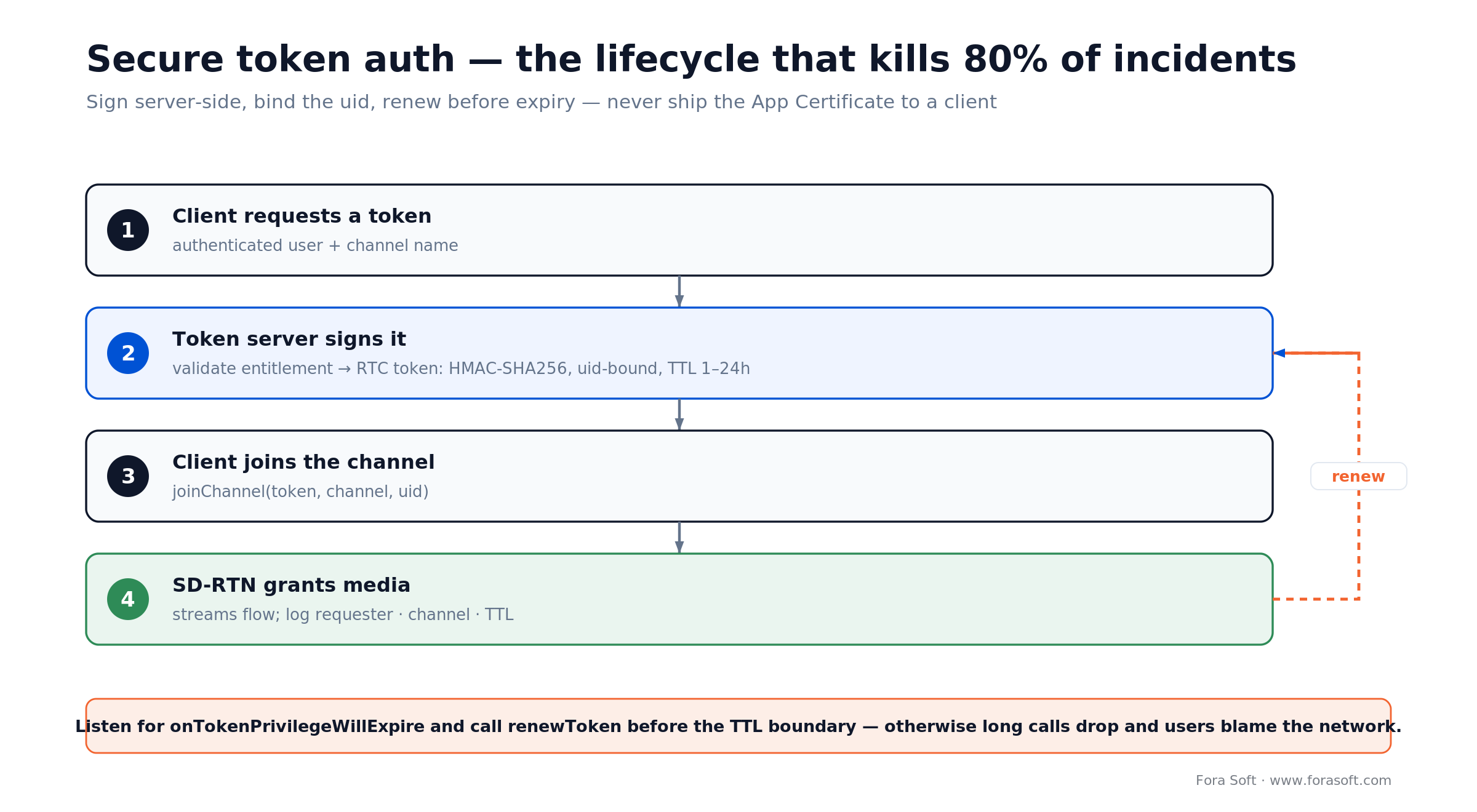
Figure 3. Sign tokens server-side, bind the uid, and renew on onTokenPrivilegeWillExpire — that removes most Agora incidents.
Cloud recording, transcription and storage
Agora Cloud Recording supports three modes: individual (per-user files), mixed (composite MP4), and web (headless Chrome recording the actual UI). Pick mixed for simple replay, individual for ML/analytics, web when the product has custom overlays that must appear in the recording.
For transcription, the 2026 default is pairing Agora’s real-time audio stream with Whisper-class ASR (OpenAI Whisper, Deepgram, AssemblyAI) via Agora’s Media Push or a server-side subscriber. For fully live captions, Agora’s own Real-Time Transcription is fastest to integrate but less flexible.
Storage policy matters as much as the recording itself. Default to 7–30 day retention with a clear delete job, allow user-driven retention extension with a paper trail, and encrypt at rest with KMS-managed keys. For healthcare and enterprise, a BAA with Agora + your storage provider is mandatory.
Clients: iOS, Android, Web, React Native, Flutter, TV
Agora maintains first-party SDKs for every mainstream client. The sensible pattern across our projects:
- iOS: native Swift + Agora-iOS SDK. AVAudioSession configured for
.playAndRecordand.voiceChatmode. - Android: native Kotlin + Agora-Android SDK. Foreground service for long calls so the OS does not kill the process.
- Web: Agora Web SDK, works in Chrome, Safari, Firefox, Edge. Use the 4.x SDK, not the legacy 3.x.
- React Native:
react-native-agorafrom AgoraIO-Extensions — the only maintained wrapper; pin it carefully. - Flutter:
agora_rtc_engineplugin, production-ready. - Electron / TV: supported but niche. Verify CPU/GPU envelope on your target device before committing.
Cross-platform shortcuts (RN, Flutter) save 30–40% of client code but introduce a 1–2 release lag on the newest Agora features — factor that into product roadmaps. See our notes on cross-platform video apps.
Agora vs Twilio vs LiveKit vs Daily vs 100ms
| Platform | Hosting | Global coverage | 2026 price (video) | Strengths | Watch out for |
|---|---|---|---|---|---|
| Agora | Managed | 200+ POPs, strong in Asia | $3.99 HD / $8.99 Full HD per 1K | Latency, global network, mobile SDKs | Bill at scale; data residency |
| Twilio Video | Managed | Strong in US/EU | ~$4.00 per 1K min | Enterprise ready, BAA available | 2026 EOL was reversed; now standalone again |
| LiveKit | Self-host or Cloud | Wherever you deploy | ~$0.50/1K min + bandwidth; or self-host | Open source, rich AI Agents, ownership | You run the SFU |
| Daily | Managed | 75+ POPs, 13ms first-hop | From $0.004/min; volume tiers | Ultra-low latency, React Prebuilt UI | Less Asia reach |
| 100ms | Managed | Good India/Asia coverage | Volume-based | Prebuilt, strong for live events | Smaller partner ecosystem |
We also maintain an explicit Agora alternatives deep-dive that scores LiveKit, Daily, ZEGOCLOUD and Twilio against the same production checklist. For the LiveKit-versus-Agora money question specifically, we ran the full 2026 cost analysis.
Cost model: the 2026 Agora pricing reality
Here’s the shift most 2026 guides miss: since August 29, 2025 new Agora accounts buy prepaid packages, not raw per-minute billing (accounts opened earlier keep the legacy per-minute model). You still think in minutes, but you buy them in blocks. A Free tier with 10,000 Standard minutes a month, then Starter ($45.99 / 50k), Pro ($133.99 / 150k), Business ($339.99 / 400k), Business Advanced ($659.99 / 800k) and Business Plus ($1,217.99 / 1.5M). Overage drops back to $0.99 per 1,000 Standard minutes.
The trap is the word “Standard.” Agora bills on aggregate resolution, the combined resolution of every stream a user subscribes to, then converts it to Standard minutes with a multiplier: audio ×1, HD (720p) ×4, Full HD (1080p) ×9. Walk a real call through it.
Worked example. A 30-minute call, three people, everyone publishing 720p. Each user subscribes to the other two 720p streams, so their aggregate resolution is 2 × 921,600 = 1,843,200 px, which lands in Agora’s Full HD tier ($8.99 / 1,000), not the single-stream HD tier ($3.99). So: 3 users × 30 min = 90 user-minutes × $8.99 / 1,000 = $0.81. Budget for “HD” and you’ll quietly pay the Full HD line.

Figure 4. Agora’s 2026 prepaid packages. Mind the standard-minute multiplier: HD counts 4×, Full HD 9×, so included minutes go fast.
Read the package table the same way. Business ($339.99) includes 400,000 Standard minutes, but that’s only ~100,000 HD or ~44,000 Full HD video user-minutes once the multiplier bites. A busy product burns through a mid-tier package fast, which is exactly when self-hosting or a hybrid starts to pay off.
Our public guidance stays conservative: we do not quote build estimates in a blog post. What we will do on a 30-minute call is walk a spreadsheet of your specific concurrency and session length against Agora’s tiered pricing and show where the break-even against alternatives sits. Because Fora Soft runs Agent Engineering, the build side of the equation is typically 30–40% faster than a comparable traditional team.
How to cut your Agora bill 30–60%
1. Audit channel profile. Use communication for 1:1 calls — live_broadcasting has higher per-user cost multipliers.
2. Mute video aggressively. Auto-disable the publisher when the user is screen-sharing or backgrounded; count SD minutes, not HD, for audience-only viewers.
3. Right-size resolutions. A 320x240 thumbnail tile doesn’t need 720p. Use Agora’s publish-rtc-config to throttle per-user uplink.
4. Leave idle channels. leaveChannel on tab background, foreground activity loss or 30s of silence.
5. Buy the right package, then commit. Step up a prepaid tier before you start paying overage. Each tier bakes in 7–18% off list, and an annual enterprise contract cuts more. Size the package to real usage, not month-to-month peaks.
6. Evaluate a hybrid. For steady-state workloads, run LiveKit on Hetzner for the bulk of traffic and keep Agora as burst/fallback. We have cut total real-time spend by 50% for clients with this pattern.
AI features on top of Agora
Agora’s 2026 Conversational AI Engine is the headline addition: low-latency voice pipeline wired to LLM providers (OpenAI, Anthropic, local), barge-in detection, and a tool-use surface. Useful for voice bots, call-center copilots and multimodal customer support. If you want the agent layer to stay portable, our LiveKit AI-agents guide covers the open-source alternative.
Beyond that, the most common AI integrations we ship on Agora stacks are:
- Real-time transcription + translation (Whisper / Deepgram + NLLB).
- Meeting summarization (Claude/Anthropic with RAG across prior sessions).
- Emotion & engagement analytics (facial and voice classifiers on per-user streams).
- Moderation on video (nudity/violence classifiers, automated kick for UGC rooms).
- Auto-captioning and post-call recap emails.
See AI video conferencing features and AI-driven conferencing solutions for the menu of features and where each earns its keep.
Mini case: ProVideoMeeting — Agora-class real-time stack
Situation. A client needed a WebRTC-based video conferencing platform with HD quality, automatic quality adaptation on weak networks, and cross-platform reach. Off-the-shelf meeting tools were too restrictive for the branded experience they wanted.
12-week plan. HTML5 + WebRTC client on web, native real-time SDKs on iOS and Android, token-based auth, cloud recording, noise suppression, bandwidth probing and auto-downgrade, analytics dashboards for admins.
Outcome. ProVideoMeeting now runs HD meetings with automatic quality adjustment, survives flaky mobile networks, and shipped the full cross-platform experience on schedule. It runs on WebRTC, and we bring the same real-time discipline to Agora builds directly — our HIPAA telehealth deployments on Cloud Doctors and MyOnCallDoc use Agora’s SD-RTN in production. We applied the same discipline on BrainCert (first HTML5+WebRTC virtual classroom worldwide) and InstaClass.
Burning money on Agora?
We run Agora cost audits every month for SaaS clients. Fixed-fee review, specific optimizations, usually 30–50% savings on the next invoice.
Security, privacy and compliance
HIPAA. Agora offers a BAA for US healthcare; pair it with HIPAA-compliant storage for recordings and access controls around transcripts. We have delivered HIPAA workflows on Agora for Cloud Doctors and MyOnCallDoc.
GDPR. Data residency is Agora’s main GDPR concern — request EU-only routing, document the data-processing agreement, and keep recordings in EU-region storage.
E2EE. Agora supports end-to-end encryption via the enableEncryption API; trade-off is cloud recording and server-side transcription become impossible on encrypted streams.
SOC 2. Agora is SOC 2 Type II. Ensure your own app layer is audited too — buyers increasingly ask for combined evidence.
Five questions before you sign the Agora contract
Q1. What is the latency SLA users will feel? Sub-400ms globally is Agora’s sweet spot; anything noticeably looser means you’re overpaying.
Q2. Where do users connect from? Heavy APAC traffic favours Agora; EU/US-only may favour Daily or Twilio on economics.
Q3. What is the 12-month usage forecast? Under 5M minutes: stay on list. 5–20M: negotiate commit. 20M+: model self-host.
Q4. What is the compliance envelope? HIPAA BAA? EU data residency? Enterprise SSO? Sort this before architecture.
Q5. Do you need an AI agent layer? Agora Conversational AI is competitive; LiveKit Agents has a richer open-source ecosystem. Pick by team familiarity.

Figure 5. A three-question path to the right real-time vendor for 2026. The first Yes wins.
Five pitfalls we’ve seen with Agora in production
1. App Certificate in the client. Seen it more than once. Anyone can mint tokens, bill explodes. Always server-side.
2. Forgetting renewToken. Calls drop at the TTL boundary. Users blame the network.
3. Wrong channel profile. live_broadcasting for small group calls bills 3× what you’d pay with communication.
4. Not leaving idle channels. Users background the app, stream keeps flowing, minutes keep billing.
5. Treating QoS as a dashboard item. Ship alerts on jitter, rtt and rebuffer ratio — not a weekly report. You want to know in 3 minutes, not 3 days.
KPIs for a video call product
Quality KPIs. Join success rate > 99%, media stall ratio < 0.5%, P75 end-to-end latency < 400ms, audio MOS > 4.0, video packet loss < 2%.
Business KPIs. Meetings started per DAU, average call duration, paid-seat activation, NPS on the call itself, post-call feedback response rate.
Reliability KPIs. Token server P99 < 100ms, incident MTTR < 20 min, no single point of failure for signaling, 99.99% monthly uptime on the token API.
When NOT to use Agora
Agora is overkill for: a team meeting add-on for a small SaaS (use Daily Prebuilt or Twilio Video rooms), a strictly EU product where data residency is existential (lean LiveKit self-host or Whereby), a one-off webinar (Zoom Webinar), or a product that will never cross 500 concurrent users (self-hosted Jitsi or LiveKit on one Hetzner box is simpler).
Agora earns its premium when latency, scale and global reach are actual product requirements — and you have the engineers to use it well.
FAQ
How long does it take to build a video call app with Agora?
A focused MVP — web + one mobile platform, 1:1 + small group calls, basic recording — is realistic in 6–10 weeks with an Agent-Engineering-equipped team. A production V1 across web, iOS, Android, cloud recording and AI features typically lands in 12–20 weeks.
Is Agora WebRTC?
Not strictly. Agora’s native SDKs use their own transport optimized for SD-RTN, though the Web SDK is WebRTC-compatible for browser interop. You get the benefits of WebRTC (browser support, echo cancellation libraries) without being limited by default WebRTC routing.
How much does Agora cost in 2026?
List pricing is $3.99 per 1,000 HD (720p) user-minutes and $8.99 per 1,000 Full HD (1080p) user-minutes, billed on aggregate resolution. Audio is $0.99; recording, AI calling and real-time transcription are priced separately. Since August 2025 new accounts buy prepaid packages (Free 10k minutes up to Business Plus at $1,217.99 for 1.5M Standard minutes) that bake in 7–18% off list; enterprise contracts cut more.
Agora vs Twilio — which is better?
Agora is stronger on global low-latency (especially Asia) and mobile SDK quality. Twilio announced an end-of-life for Programmable Video, then reversed that plan in late 2024 — Twilio Video stays a standalone product, but it’s a thinner fit for a from-scratch custom build than Agora or LiveKit. For SMS/email/voice workflows Twilio still wins; for a new video app, we’d start with Agora or LiveKit.
Can I self-host instead of using Agora?
Yes — LiveKit, mediasoup, Janus and Pion are mature open-source SFUs. You trade the Agora bill for SRE headcount, global POP operation and the long tail of mobile-network edge cases Agora has already solved. Our clients typically switch only above ~50M monthly minutes or when data residency is non-negotiable.
Does Agora support HIPAA?
Yes, with a signed BAA, their HIPAA-ready configuration, and careful design around recording storage and transcripts. Our telehealth clients (Cloud Doctors, MyOnCallDoc) run on HIPAA-compliant Agora deployments.
What AI features can I layer on top of Agora?
Real-time transcription and translation, meeting summarization, emotion and engagement analytics, moderation classifiers, and voice agents powered by Agora’s Conversational AI Engine or external LLMs. Each is a distinct work stream — budget 2–4 weeks per feature on top of the core build.
Does Fora Soft only build on Agora?
No — we are platform-agnostic. We’ve shipped on Agora, Twilio, LiveKit, Jitsi, Janus, mediasoup, Kurento, Wowza, and Ant Media. We recommend Agora when it is genuinely the best fit, which in 2026 is roughly 40% of the real-time projects we scope.
What to Read Next
Alternatives
Agora.io Alternatives Scored for 2026
LiveKit, Daily, Twilio, ZEGOCLOUD — scored on latency, price and SDK quality.
Conferencing
Video Conference Solution in 2026: Six Engineering Decisions, Vendor Stack & Cost Model
Six engineering decisions, vendor stack and cost model for a video conference solution.
Video SDK
White Label Video SDK in 2026: Vendor Pick, Cost Model, and 12-Week Build Plan
White-label video SDK: vendor pick, cost model and a 12-week build plan.
AI
AI Video Conferencing Features
Captions, summaries, emotion analytics — which AI features actually move retention.
Vendor
Choosing a Video Conferencing Development Company
What to ask a partner who says they build video products.
Ready to ship an Agora-powered video call app?
Agora solves the global low-latency media problem — probably the hardest part of any video app. What it leaves for you is product UX, auth, compliance and the business rules that make the product a product. Get the token server right, choose the channel profile deliberately, cut idle minutes, and negotiate commits once you pass 5M monthly minutes; the rest is a familiar mobile/web/backend discipline.
Fora Soft has shipped video and real-time products since 2005 — dozens of them on Agora, across telehealth, education, trading floors, virtual classrooms and live auctions. We can tell you in 30 minutes whether Agora is the right fit, or whether LiveKit / Daily / 100ms would serve you better, and what it actually costs to build.

The book · Volume 3 of 7
Video Streaming: A Complete Guide to Video Delivery: From ABR and CDNs to Players, WebRTC, DRM, and the Economics of Streaming
Agora runs the media path for you, but the trade-offs underneath still decide your bill and your call quality. Volume 3 of our handbook covers WebRTC and real-time delivery, ABR, CDNs, QoE monitoring and the economics of streaming. It is useful context before you renegotiate Agora pricing or plan a move to a self-hosted stack. Written by Nikolay Sapunov, CEO at Fora Soft.
Read it on Amazon →Kindle & paperback · Fora Soft Video Engineering Handbook
Let’s scope your Agora-based video app
30-minute call with an Agora-experienced engineer. Architecture sketch, cost envelope, clear vendor pick.

