E-learning and virtual classroom software development

Tablet screen shows an online tutoring session with mathematical equations handwritten on a digital whiteboard and a video of a woman tutor in the corner.
project example

Braincert

It's been the 1st in the world WebRTC + HTML5 classroom with a whiteboard. Certified with SOC2 (Type I and II) and ISO 27001. Triple Bronze Winner in Excellence in Technology for Virtual-Classroom, Conferencing Technology and Learning Management Technology. The winner in 6 nominations of Supreme Software Award.They came to us as a startup with an idea. Together we led this eLearning platform to USD 10 million revenue per year, according to zoominfo.com.

Features

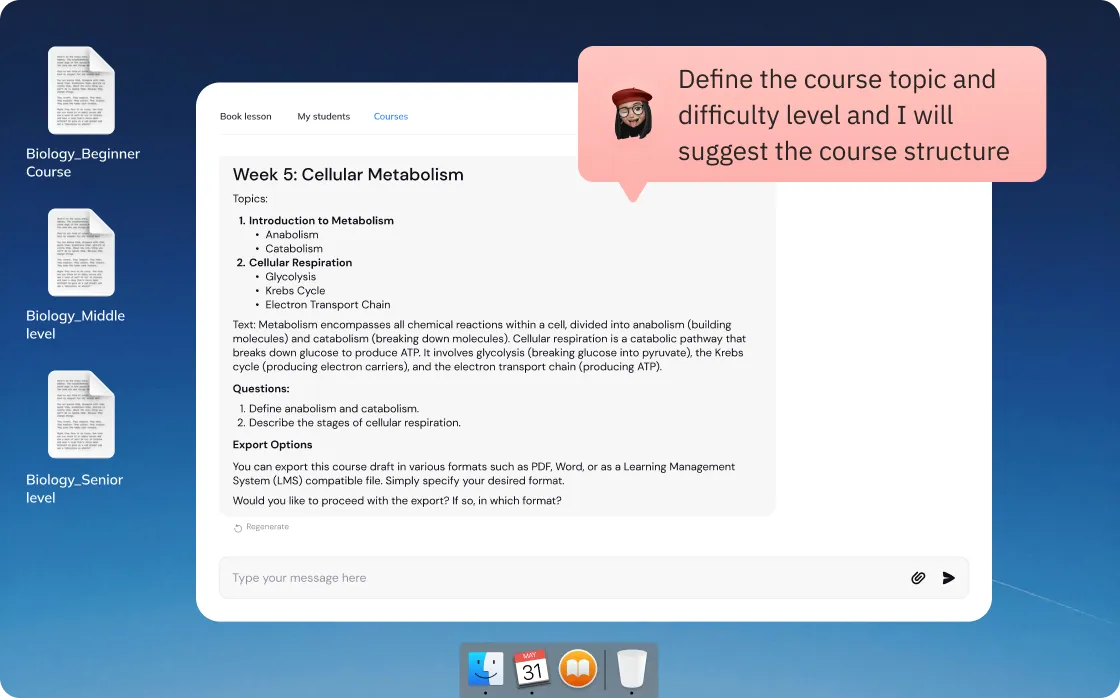
AI-powered Course Generation 📚

Provide effortless educational course generation. Teachers can simply input course focus, goals, objectives, and difficulty level. The AI will create a detailed course plan, elaborate on each topic, and generate full text and questions for assessing students' knowledge. All is left to export the course draft in the desired format with just a few clicks.
Logo for ForaSoft with the letter 'o' in Soft replaced by a blue and purple gradient heart shape on a dark blue background.
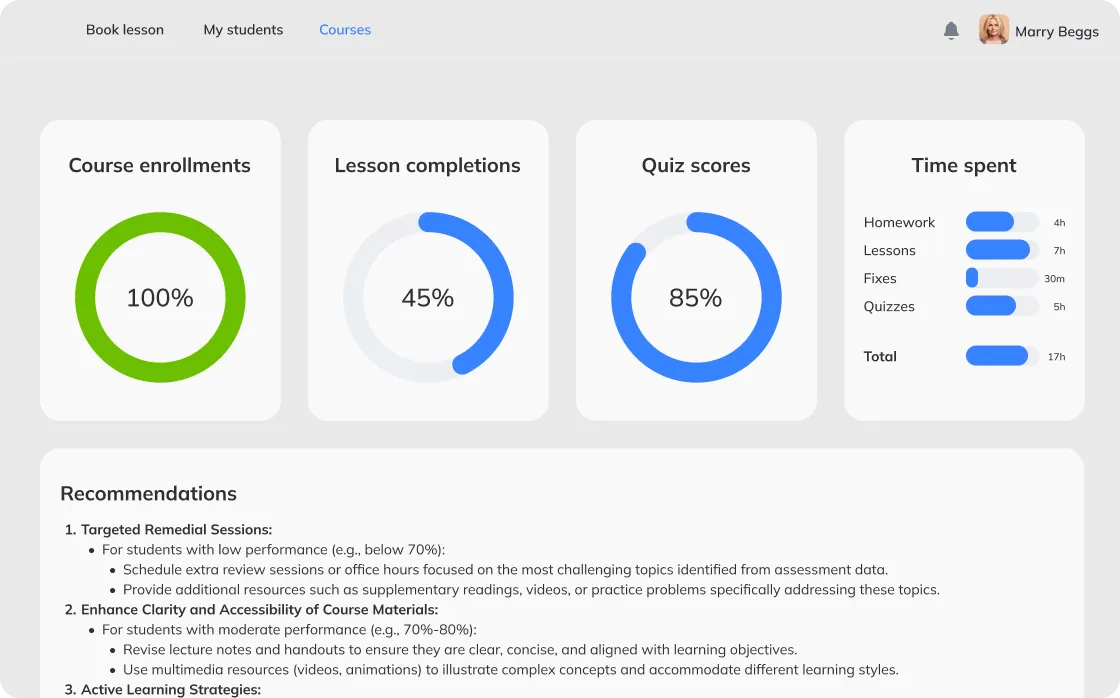
Dashboard showing course statistics with 100% course enrollments, 45% lesson completions, 85% quiz scores, and time spent on homework, lessons, fixes, and quizzes totaling 17 hours, followed by a list of recommendations for improving student performance.

AI-based Progress Tracking and Recommendations 📊

Enable teachers to track students' engagement with the platform, including course enrollments, lesson completions, quiz scores, and time spent on various activities. The system will also provide recommendations for the next courses based on students’ engagement history and course completion results.

Whiteboards ✍️

We tailor each whiteboard functionality stack to a specific case and audience: formula editor is not for language learning. The simpler the better, and the more cost-effective. Sometimes typing and drawing are just enough. We like developing custom whiteboards. Node.js and socket.io power real-time interaction in our products. But to test the concept and save time and money in the short term, we can integrate a 3rd party whiteboard component.
Virtual whiteboard with a text box containing a literary quote, handwritten algebraic equations on the right, user pointers labeled Victor Keller and Lottie Day, and a video call sidebar showing a smiling woman waving and a list of participants.
White digital pad shows handwritten mathematical expression (26-3) cubed plus 1 circled in blue with a stylus nearby.
Drawing
Fast technology socket.io makes it feel like a pen and paper — so rapidly lines follow your mouse or finger. Your handwriting is now recognizable and not ugly.
Resizing of selected text
Typing
With font and size editable.
Color picker interface showing fill color options, border thickness slider, border color options, and a detailed color selection panel with hue slider.
Color and width adjustment
For drawing, typing, shapes.
Diagram showing a triangle and an oval added together to form a black 3D cone.
Shapes — 2D and 3D
Square and cube, triangle and pyramid and cone, circle and sphere, parallelogram, trapeze, line.
Mathematical formula showing f(x) as a sum of A0 over 2 plus an infinite series of An cosine terms with arguments involving 2nπx over ν minus alpha n.
Math formula editor
Makes fractions 2-floor with a horizontal line and gives special symbols.
Handwritten math expression (2c + 1) cubed minus 27, with two colored pointers labeled Lottie Day and Victor Keller.
Access to the whiteboard
Could be a mess if all drew at once. So the teacher gives access individually.
Four white tags labeled Board 1, Board 2, Board 3, and Eric Kelley with close icons on a light dotted background.
Several whiteboards per class
Сreate as many as you need on separate tabs.
Blackboard with mathematical formulas, geometric shapes, and algebraic expressions written in white chalk.
Images
Upload and insert on the whiteboard, move, and reshape.
Smiling woman wearing glasses holding chalk in front of a blackboard with mathematical equations in a paused video player.
YouTube videos
Pin on the board.
Document titled 'Introduction to Molecular Physics' by Pr. Brenton displaying a table of contents with topics on molecular-kinetic theory, equations, temperature, pressure, and Maxwell distribution for ideal gas.
Document sharing
We usually do pdf, Word, Excel, and PowerPoint but can add other. Write on top of the doc and use any other whiteboard tool.
Multiple-choice question asking to choose a right question.
Poll
Open and close questions, multiple-choice with 1 or more right answers.
Text highlighting the word relativity with a dictionary definition showing its phonetic pronunciation and meaning about physical phenomena depending on relative motion.
Dictionary
Type a word, get a definition, examples, pictures. Among options to integrate we like Wolfram Alpha best.
Video call interface showing three women: one with headphones and glasses waving, one smiling with a pen, and one with curly hair using a laptop.

Video chats and webinars on WebRTC 💻

1-on-1 and up to 4 people video chats
1-on-1 and up to 4 people video chats are good p2p, without a media server. You don’t pay for heavy video traffic, as it goes directly from one user’s computer to the other’s.
Video call screen showing a smiling woman wearing headphones and waving, with smaller participant windows on the right and bottom.
5 and more people
Webinars and video chats for 5 or more people require a media server. Good options proven by our experience are Kurento, Janus, MediaSoup, Jitsi, Wowza. 1st four are open-source—no license fees. But Kurento has a big community and detailed documentation. So with Kurento, it is easier and quicker, therefore cheaper—and in most cases we recommend it. All have pros and cons though—when we know your needs, we know which suits you best.
Kurento logo featuring a stylized K symbol above the word 'KURENTO'.Logo of Januce WebRTC GatewayMediasoup logoJitsi.org logo with a stylized abstract emblem to the left of the text.Wowza logo

Text chat ✉️

Raise hand
Webinars would be too noisy if everyone could speak. So all but the teacher are muted. Click ‘raise hand’ to signal for the teacher to unmute.
Send files
You can send files to the class or directly.
Private chat
When you do not want the whole class to read.
Three mobile screens showing a video call participant list with user controls, a chat conversation with file upload options, and a private chat conversation with messages between users.
Computer screen showing a video call with three participants and WhatsApp messages on the desktop background.

Screen sharing 🖥

Share everything you do or just 1 application, a browser for example. Then when mom’s WhatsApp message pops up — nobody will see :)

Booking 📅

Jump on the lesson right away with the online teacher or book. Show free slots based on other bookings and teacher’s preferences.
Online tutoring booking interface showing a lesson with tutor Mark K. for student Kate Beggs in Mathematics at A level, scheduling a one-time lesson on 17 April 2021 with time options, displaying a summary on the right including date, duration of 2 hours, and rate £20/hr, totaling £40.
User interface of a recordings list showing video titles, dates, times, sizes, and remaining availability days.

Lesson recording 🎬

Class is shot as a video file. Download it on your device.

Learning management systems LMS for courses 📚

Create and edit courses. Add materials: videos, presentations, excels, word, and any format you need. Carry out tests with open and closed questions, marks, and certificates. Track attendance. Collect student feedback on discussion boards and forums.
Online course editing page for 'Introduction to molecular physics' showing options for program step, course description, language, grade, subject, and availability settings.
Online booking page showing credit card payment form on the left and lesson details with tutor Mark K. and student Kate Beggs on the right.

Payment system 💰

Escrow
Student pays before the class, the teacher gets the money after the class if all is fine. Student raises a dispute if there’s a problem, then admin judges.
Split payment
% to the platform, the rest to the teacher.
Coupons and discounts like 2nd lesson 10% off

API 🔐

We can develop the API to sell the virtual classroom to others as an integrative component.
Video conference screen with four participants, a digital whiteboard showing mathematical equations, and a chat window on a mobile device.

Devices

We develop eLearning apps for all the modern devices: web, iOS and Android phones and tablets, desktop, smart TVs, and even virtual reality (VR) headsets.
Array of digital devices including a laptop, tablet, smartphone, desktop screen, and VR headset displaying virtual classroom and online lesson booking interfaces.

Costs

We develop custom software. Above is what we can do but you may not need all that. We think about what functions your users need and how to make them convenient. E.g., no need to hide access to the whiteboard and mute mics in 3-5 people webinars. It means there is no way to tell the price before all functions have been planned.
Virtual classroom screen showing a female instructor with headset raising hand and two students in video call, alongside a whiteboard with handwritten math equations.

Component

~ 3 months · $24,800
The simplest virtual classroom we did—video chat + whiteboard—took 3 calendar months and USD 24 800. It was not a fully working website with registration and scheduling, but a classroom component to integrate into an existing website.
E-learning platform interface showing a booking form for lessons, a virtual classroom with video call of tutors and students, and a digital whiteboard with math formulas and geometric shapes.

Website

~ 6 months · $60,000
A simple eLearning website with a virtual classroom takes approximately 6 months and USD 60 000.
We develop products like BrainCert on an ongoing basis
1st version: 6 months
In 2014 we developed the 1st version for 6 months. It was on Flash and Wowza and didn’t have all the current functions.
2nd version: 9 months
The 2nd version took 9 months. We rewrote it with new technologies and added functions. It was the 1st WebRTC and HTML5 virtual classroom platform in the world.
What is now
Now we work with them on an ongoing basis with a dedicated team. We listen to the user feedback: make the functions even more convenient and add new ones.

Have an idea
or need advice?

Contact us, and we'll discuss your project, offer ideas and provide advice. It’s free.
Describe your project and we will get in touch
Enter your message
Enter your email
Enter your name

By submitting data in this form, you agree with the Personal Data Processing Policy.

Thumb up emoji
Your message has been sent successfully
We will contact you soon
Message not sent. Please try again.