

Key takeaways
• White label video conferencing means your brand, your domain, someone else’s media servers. You ship a branded calling product in weeks; the vendor keeps running SFUs, TURN, codecs, recording and global routing.
• There are five levels of “white label,” and vendors sell you Level 1 while you picture Level 4. Config-only branding leaks vendor names into email, app stores, recording metadata and OAuth screens.
• Published rates cluster near $4.00 per 1,000 participant-minutes — but the metering rule matters more than the rate. Daily, 100ms, Twilio and Whereby charge $4.00 flat. Agora bills by aggregate subscribed resolution, so an untuned 4-way 720p call lands two tiers up at $15.99, not $3.99. LiveKit’s $0.40–$0.50 covers connection minutes only — downstream transfer bills $0.10/GB above 3TB, roughly $1.13 more per 1,000 participant-minutes.
• HIPAA and EU residency are paid gates, not checkboxes. Daily and 100ms charge $500/month for a BAA, LiveKit requires the $500/month Scale plan, Whereby charges $16.99/month, Vonage bills $550/month for E2E encryption.
• Fora Soft ships a branded MVP in 4–6 weeks on a managed SDK. 250+ projects since 2005 and Agent Engineering compress what most teams spend a quarter on. Add recording, native mobile and a compliance review and you are back at the twelve weeks in the case below. Real builds: Sprii, BrainCert, ProVideoMeeting.
Why Fora Soft wrote this playbook
We’ve been building video and real-time communication products since 2005 — 250+ projects across e-learning, telemedicine, surveillance, conferencing and live commerce, delivered by 50 in-house engineers. A large share of those products run a white label video conferencing stack underneath a fully custom brand. We’re listed as Agora, LiveKit, Twilio and Wowza development experts, and we’ve shipped both managed-SDK integrations and self-hosted SFU deployments at production scale.
A word on how we deliver, since it shows up in the estimates below. Agent Engineering is our delivery model: engineers drive AI agents across the parts of a video build that are well-trodden — token services, room CRUD, SDK wiring, client scaffolding, test suites, load rigs — while the parts that decide whether a product works (topology choice, network-impairment behaviour, mobile lifecycle, recording and compliance design) stay hand-built and reviewed. It compresses the predictable half of the schedule, not the risky half. That’s why our estimates sit at the bottom of the ranges below, and it’s a fair thing to interrogate on a call.
This is the conversation we have most weeks with founders and CTOs who need branded video inside their product. What the term actually buys you in 2026. Which vendors survive a shortlist. What each one costs once traffic is real — including the compliance add-ons nobody puts on the pricing page. And where teams burn a quarter they didn’t need to spend.
One thing we’ll be blunt about throughout: most of the pain in this market isn’t technical. It’s that “white label” is a marketing word with five different meanings, and buyers sign contracts for one meaning while picturing another. We start there.
Need a second opinion before you sign with a video vendor?
A 30-minute call gets you a vendor recommendation backed by 250+ delivered video projects since 2005. No slide deck, no lock-in.
What is white label video conferencing
White label video conferencing is video calling software you buy from a vendor and ship under your own brand, on your own domain, inside your own product — no vendor logo on screen, no “powered by” string, no co-branded recordings. The vendor runs the hard infrastructure underneath: media servers, TURN relays, codec negotiation, simulcast, recording pipelines and geographic routing. You own everything the user sees.
The market sells it in two shapes. Programmable SDKs (Agora, LiveKit, Daily, 100ms, Twilio, Vonage, Amazon Chime SDK) hand you raw video tracks and expect you to build the interface. Turnkey platforms (Digital Samba, MegaMeeting, Whereby, iotum, TrueConf, Pexip) hand you a finished meeting room with a theming panel. SDKs give you a product nobody else has; turnkey platforms give you a product next month.
White label versus branded SaaS. Zoom or Webex put their brand on every screen and run your tenant inside their domain. A white label stack runs inside your domain, your authentication and your data model. You trade their finished UI for design control.
White label versus a custom WebRTC build. A custom build means standing up your own SFU (LiveKit, Janus, mediasoup or Jitsi), running your own TURN servers, owning the whole media path. If you want the mechanics behind that choice, our breakdown of P2P vs MCU vs SFU architectures covers the topology maths. The trade is the one you face everywhere in infrastructure: speed now against marginal cost and control later.
The five levels of white label
“White label” describes five materially different products. Vendors rarely say which one their tier includes, and the free tier is almost always Level 1. Here’s the ladder, with the engineering time each rung actually costs.
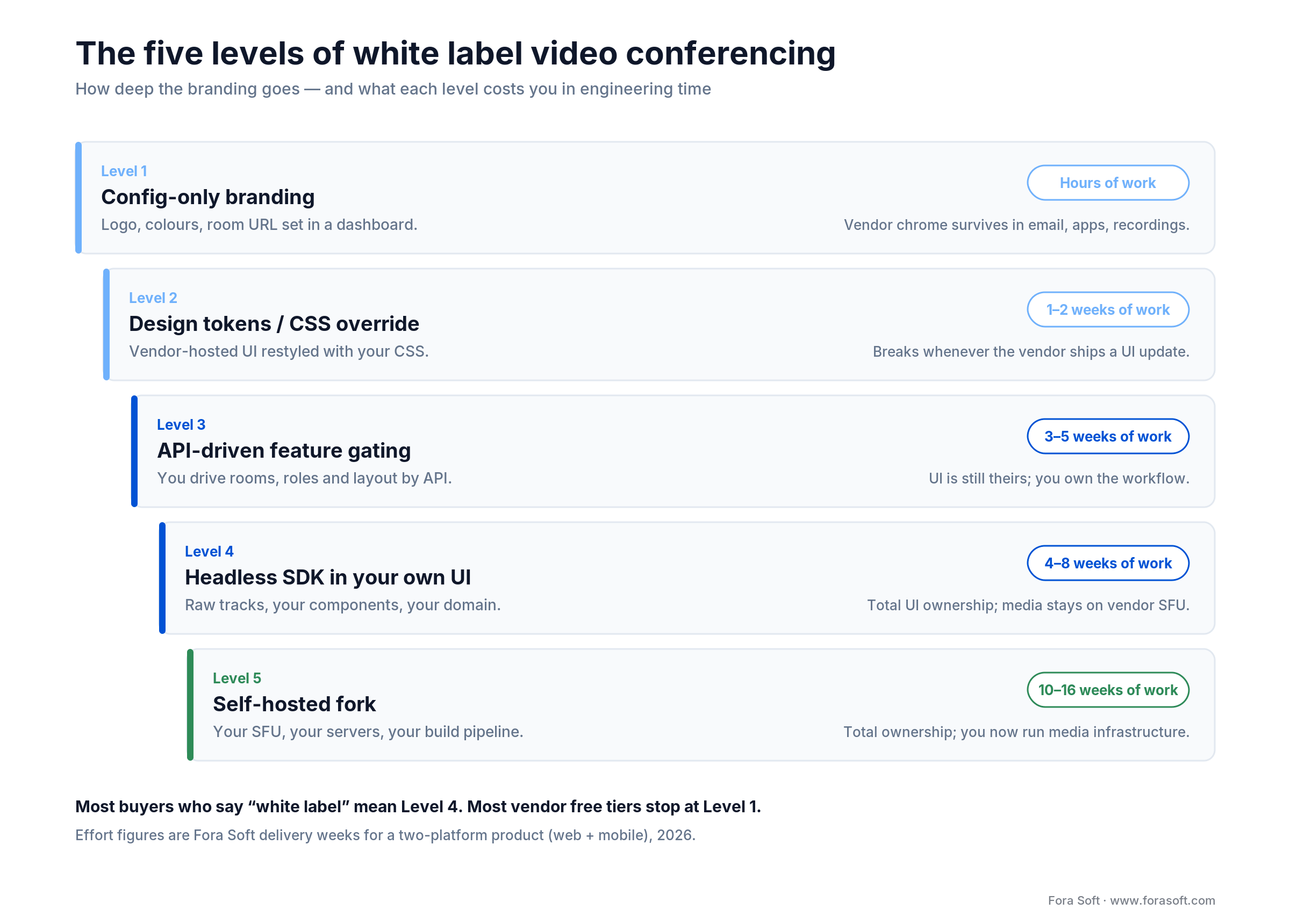
Figure 1. How deep the branding goes at each level, and what it costs in delivery weeks.
Level 1: config-only branding. Upload a logo, set two colours, pick a subdomain. Hours of work. Every vendor offers it, and it stops at the edge of the meeting room: confirmation emails, app store listings and recording metadata still say the vendor’s name.
Level 2: design tokens and CSS override. The vendor hosts the UI; you restyle it. One to two weeks. Here’s the catch nobody mentions at signing: every vendor UI release can overwrite your theme or expose an unstyled surface, so you re-apply and re-test on their release schedule, not yours.
Level 3: API-driven feature gating. You drive rooms, roles, permissions and layout through the API. Three to five weeks. The workflow is yours, the pixels are still theirs.
Level 4: headless SDK inside your own UI. You subscribe to raw tracks and render them in your components, on your domain. Four to eight weeks for web plus mobile. This is what buyers mean when they say white label, and it’s the level we build at most often.
Level 5: self-hosted fork. Your SFU, your servers, your build pipeline. Ten to sixteen weeks, and you now run media infrastructure forever. Right answer for on-prem and for very high volume; expensive answer for everyone else.
Reach for Level 4 when: the call is inside your product rather than beside it, your UX has any custom element (side-by-side layouts, product cards, clinical notes), and you need feature parity on mobile.
Where vendor branding still leaks
Even at Level 4, sixteen surfaces sit outside the SDK and quietly carry the vendor’s name. We audit all sixteen before a client signs, because most of them are contract items rather than settings — you can’t fix them in code after the fact.
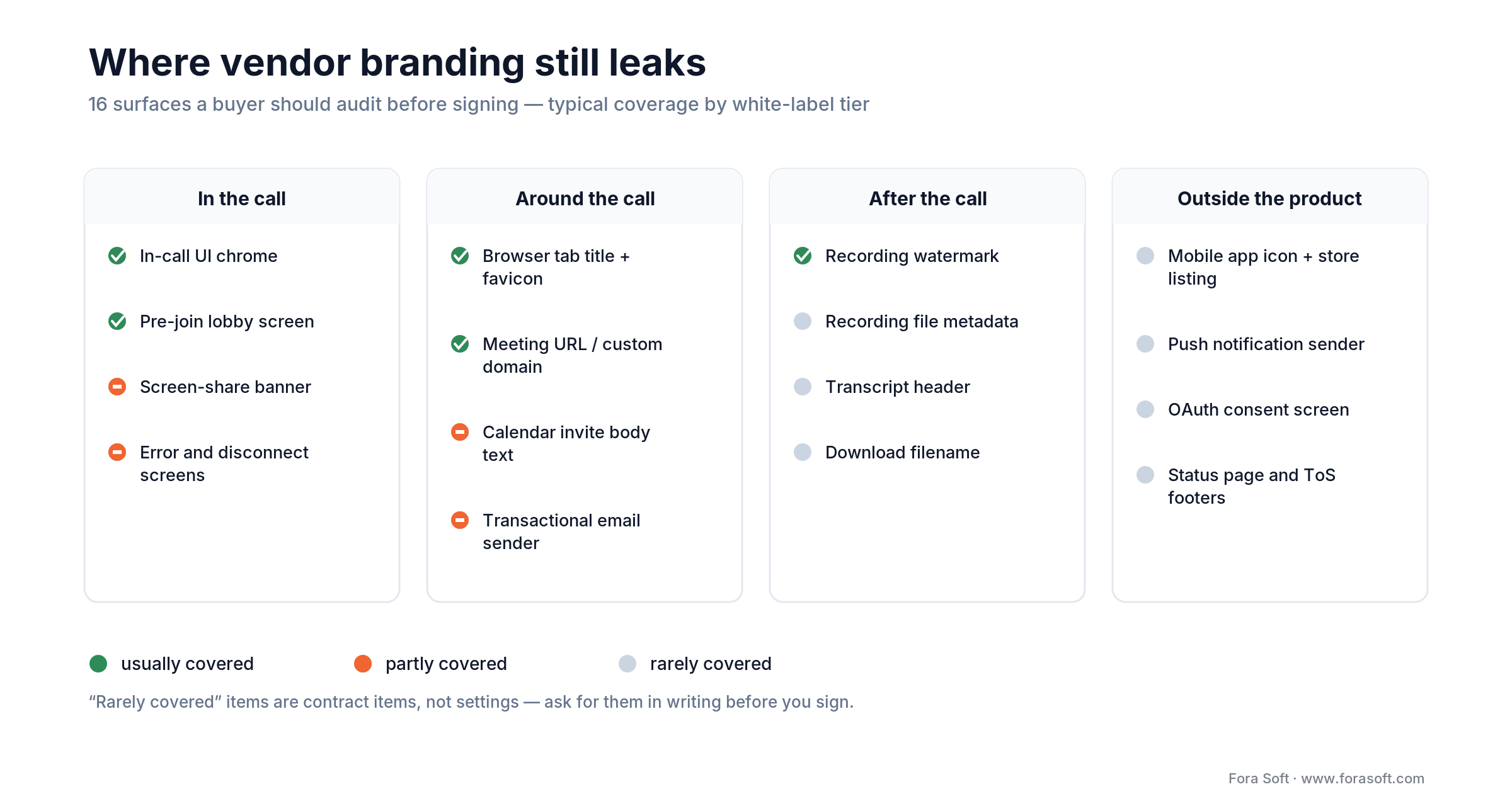
Figure 2. The sixteen-surface branding audit — green is usually covered, orange partly, grey almost never.
Here is the same audit in text, so you can paste it straight into a vendor questionnaire. Ask for a written yes or no on each one, because roughly half are contract items rather than dashboard settings.
| Stage | Surfaces to get in writing |
|---|---|
| In the call | In-call UI chrome; Pre-join lobby screen; Screen-share banner; Error and disconnect screens |
| Around the call | Browser tab title and favicon; Meeting URL / custom domain; Calendar invite body text; Transactional email sender |
| After the call | Recording watermark; Recording file metadata; Transcript header; Download filename |
| Outside the product | Mobile app icon and store listing; Push notification sender; OAuth consent screen; Status page and ToS footers |
The four that catch teams most often, in the order they get discovered:
1. Transactional email. Meeting invites and reminders send from the vendor’s domain unless you configure your own sender, which means SPF, DKIM and DMARC records plus a warm-up period. Budget a week and do it before launch, not after your invites start landing in spam.
2. Mobile app store listings. If your users install an app, the icon, the developer name and the push notification sender come from whoever owns the App Store and Google Play accounts. Insist on publishing under your own developer account and inviting the vendor as a collaborator. Worth knowing: neither Apple nor Google signs a HIPAA business associate agreement, so publishing under your account doesn’t move that liability anywhere.
3. Recording metadata and filenames. The MP4 plays clean, then the file properties say the vendor’s product name and the download is called vendor-room-8213.mp4. In regulated industries this ends up in evidence, disclosure packets and patient records. Ask for it in writing.
4. The OAuth consent screen. If your product connects a calendar, the consent dialog names the OAuth client. Register it yourself or your users read the vendor’s name at the exact moment they’re deciding whether to trust you.
Build vs buy vs fork
The answer turns on three numbers: monthly video minutes at year one, how unusual your call UX needs to be, and how much engineering capacity you can spend on infrastructure that doesn’t differentiate you. Match yourself to one of the three rules below, then price the path in the matrix that follows.
Reach for a managed white label SDK when: you need video live within 8 weeks, expect under 2M participant-minutes/month in year one, have zero or one WebRTC specialist on staff, and your call itself is conventional even if your product isn’t.
Reach for self-hosted (LiveKit, mediasoup, Janus) when: you already run a 24/7 on-call rotation and pass roughly 2–3M minutes/month, need on-prem for a regulated customer, require media-server control such as custom SVC layers or in-pipeline inference, or per-minute economics dominate your margin. Without the on-call rotation the first condition is the only one that matters.
Reach for a turnkey platform when: the meeting room is a supporting feature, not the product; you need it live in days; and a themed vendor UI on your subdomain is genuinely good enough for your buyers.
Once you know which rule you match, the matrix below is the one we put on screen during scoping calls.
| Path | Time to MVP | Year-1 build cost | Marginal cost / 1k min | Control | Best for |
|---|---|---|---|---|---|
| Turnkey platform, themed | Days to 2 weeks | $5k–$25k | $2.91–$4.48 | Low | Resellers, internal tools, MSPs |
| Managed SDK in your own UI | 4–8 weeks | $30k–$120k | $1.50–$4.10 | Medium | MVPs, mid-market SaaS |
| Hybrid: SDK plus custom edge | 8–14 weeks | $60k–$180k | $0.50–$3.00 | Medium-high | Live commerce, telemedicine |
| Self-hosted open source | 10–16 weeks | $80k–$220k | $0.20–$0.80 | High | Scale-stage, regulated industries |
| Custom WebRTC and media stack | 6–12 months | $300k–$700k | $0.10–$0.50 | Full | Telco, surveillance, on-prem |
Build cost assumes one experienced WebRTC engineer on the SDK and self-hosted rows. With a Fora Soft team using Agent Engineering we routinely land at the lower bound on the managed-SDK and hybrid rows. On the custom media-stack row we don’t claim it — that work is research, and research doesn’t compress on schedule. Detailed budget ranges live in our video conferencing app cost breakdown.
The non-negotiable feature checklist
Seven capabilities decide which vendors can serve you at all: routing topology, simulcast or SVC, recording, live streaming output, concurrency ceiling, end-to-end encryption and mobile parity. Write down which of them your product needs in the first twelve months before you look at a single pricing page. Vendors look identical on a feature grid and diverge sharply on the specifics below — and these are where switching costs live.
1. Routing topology. Peer-to-peer holds up to about four participants. An SFU is the modern default from two to a couple hundred. An MCU only earns its server bill when you need one composited output stream for broadcast or for devices that can’t decode multiple streams. Every vendor on our shortlist is SFU-first.
2. Simulcast or SVC. These solve the same problem two ways, and you pick one per track rather than running both. Simulcast publishes two or three separate encodings and lets the SFU choose one per subscriber; it costs the publisher upload bandwidth. SVC (VP9 or AV1) encodes one stream in layers the SFU can strip, which is cheaper to publish and better on weak uplinks, but codec support is narrower. Simulcast is on by default in most SDKs on this shortlist; SVC usually is not. Ask which one a vendor uses for screenshare, where the defaults most often differ.
3. Recording. Composite recording gives you one MP4 in a layout you specify. Track recording uploads each participant’s raw stream for you to composite later — cheaper at scale and the only option if you want per-speaker AI processing. Price recording separately: several vendors bill it as additional participant-minutes on top of the call.
4. Live streaming output. If the call needs to reach an audience over RTMP, HLS or LL-HLS, the platform must offer managed egress. Agora and 100ms ship it natively; with LiveKit you bridge through Egress. Our video streaming knowledge base covers the protocol trade-offs on the distribution side.
5. Concurrency ceiling, not just minutes. Minutes are a billing unit; concurrency is a hard limit. Published caps vary enormously — some turnkey platforms cap at 30 active participants with 250 view-only webinar attendees, while SDK vendors quote hundreds. Test against your peak scenario, not your average load.
6. End-to-end encryption, honestly assessed. WebRTC’s DTLS-SRTP encrypts every leg between client and server, but the SFU terminates a separate DTLS-SRTP session with each peer, so plaintext exists on the server even though routing itself only needs the RTP headers. True E2EE needs insertable streams with customer-managed keys, and it disables server-side recording and transcription unless you move them onto the device. The security and compliance section below has the vendor-by-vendor reality.
7. Mobile parity. Everyone claims iOS, Android, web and React Native. Read the changelogs instead: the gap between the web SDK and the React Native SDK is where teams find bugs in week six, and it costs two to three sprints nobody planned for.
The 2026 SDK comparison matrix
Nine SDK vendors survive most shortlists. Every number below came off the vendor’s own pricing page in July 2026, normalised to US dollars per 1,000 participant-minutes so the comparison is apples to apples. The chart plots those nine plus two turnkey reference points for scale — Digital Samba at about $3.70 at its mid-range euro rate and Whereby at $4.00 — and shows LiveKit on both paid plans, so twelve bars across eleven vendors. One more number worth carrying into a negotiation: published volume discounts run from 10% at Agora to 63% at Daily. Those are marginal-tier discounts, not blended ones — Daily’s 63% band applies only above 50M minutes a month, which is why our worked model below shows a blended 38% off list at exactly that volume. The vendor with the higher list price can still end up cheaper at scale.
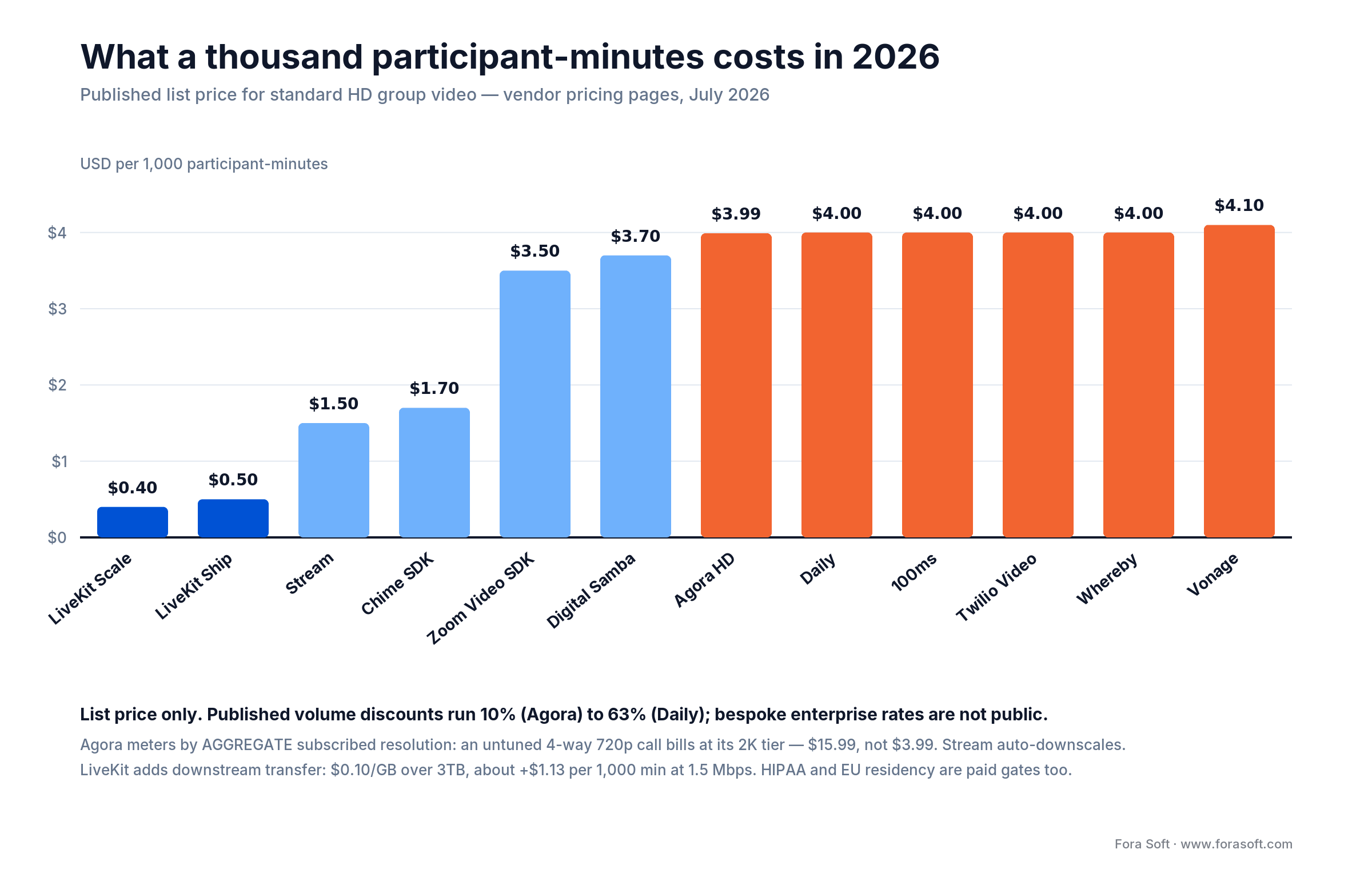
Figure 3. Published 2026 list prices for eleven vendors (LiveKit appears on both paid plans), normalised per 1,000 participant-minutes. Five land within a cent of $4.00; the spread that matters is at the bottom, and the footnotes are where the rest of the money hides.
| Vendor | List / 1k participant-min | Free tier | True E2EE | HIPAA BAA cost | Where it wins / where it breaks |
|---|---|---|---|---|---|
| LiveKit Cloud | $0.40 (Scale) / $0.50 (Ship) source |
5,000 min | Yes, all plans, customer keys | Scale plan, $500/mo | Wins on price, AI agents, Apache-2.0 self-host escape hatch. Breaks if you need HIPAA or EU pinning on a small budget |
| Stream Video | $1.50 HD / $6.00 2K, by aggregate resolution source |
$100/mo usage | No, stated explicitly source |
Contact sales | Wins on the lowest HD headline in this matrix — only LiveKit undercuts it, and only before transfer — and on Dynascale, which downscales received tracks to tile size by default, so a normal grid call stays near the HD tier. Breaks on screenshare, which Dynascale does not cover: one full-resolution stream can push the whole aggregate to 2K or 4K. No E2EE, and BAA pricing is behind a sales call |
| Amazon Chime SDK | $1.70 standard; $3.40 HD tier source |
None published | No — media decrypted server-side | Free via AWS Artifact | Wins if you already live in AWS and want one bill, and the BAA is free. Breaks on E2EE, and the 1080p HD tier doubles the rate to $3.40 |
| Zoom Video SDK | $3.50 via credits source |
20 credits | No — not on any browser | Available, price unpublished | Wins on client-side maturity and familiarity. Breaks on the credit model — “session minutes” bill per participant, so five users in a 10-minute call spend 50 |
| Agora | $3.99 HD / $8.99 Full HD / $15.99 2K, by aggregate resolution source |
10,000 min/mo | Yes, customer-managed keys | BAA programme, no published price | Wins on Asia-Pacific coverage, live commerce, EU geofencing (a client-side SDK flag, no published charge) and true E2EE on native SDKs. Breaks on the aggregate-resolution rule — untuned group calls silently bill two tiers up |
| Daily | $4.00, any resolution source |
10,000 min/mo | P2P only, not in SFU mode | $500/mo Healthcare add-on | Wins on flat resolution-independent pricing with genuinely graduated volume tiers, free EU zones, fastest prototype. Breaks in HIPAA mode, which disables Daily-hosted recording storage and live streaming |
| 100ms | $4.00 source |
10,000 min/mo | Not published | $500/mo add-on | Wins on webinars and large group calls with native streaming egress. Breaks on encryption transparency, and the company’s public focus has shifted to healthcare AI |
| Twilio Programmable Video | $4.00 source |
Trial credit only | Not claimed | HIPAA-eligible, terms on request | Wins if you already run Twilio SMS or voice and want one vendor. Breaks on recording, which adds a second $0.004/participant-min, and on roadmap pace |
| Vonage Video API | $4.10 docs |
100,000 min, one-time trial | Yes, $550/mo add-on | Subscription add-on, contact sales | Wins on enterprise telco relationships and a large trial allowance. Breaks on add-on stacking: E2E media encryption is $550/mo, transport encryption another $550/mo, and a country-specific media zone — including Germany — is $1,100/mo, not the $550 generic EU+US zone. The free 100,000 minutes are a one-time 12-month trial, not a monthly allowance |
The metering rule matters more than the rate
Agora bills on aggregate subscribed resolution, and mispricing that rule is the number-one reason a video bill arrives four times larger than the spreadsheet said. That means the combined pixel count of every stream a user receives, not each stream priced separately. In a four-person 720p call each participant subscribes to three peers: 3 × 921,600 = 2,764,800 pixels. Agora publishes the ceilings that decide the tier in its pricing documentation. That clears the Full HD ceiling of 2,073,600 and puts the call in the 2K tier at $15.99 per 1,000 participant-minutes, not the $3.99 you budgeted. Add two more people and it gets worse, not linearly: a six-way grid subscribes to 5 × 921,600 = 4,608,000 pixels, past the 2K ceiling of 3,686,400 and into Agora’s fifth tier, Video 2K+ at $35.99 — nine times the HD rate. Turn on dual-stream so subscribers pull 360p layers (3 × 230,400 = 691,200 pixels) and you drop back under the HD ceiling at $3.99. Back at the four-person call: same call, same vendor, four times the bill, decided by two API calls: setDualStreamMode on the publisher and setRemoteVideoStreamType on every subscriber. Both sides, or it does nothing. Agora documents this plainly; almost no comparison article mentions it.
Stream meters the same way but defaults the other direction. Its pricing guide defines aggregate resolution identically, then documents Dynascale: each participant “only receives video streams at the optimal resolution their device can handle,” and non-visible tiles stop consuming resources. So a normal four-person grid does not silently jump to the 2K tier. The exception is in the same document and is the one to watch: “Screensharing does not work with Dynascale.” One full-resolution screenshare publishes at its own resolution and lands on top of the aggregate, which is how a support-desk product ends up billing at 2K. Zoom’s $0.0035 “per minute” is a third shape of the trap: Session Minutes multiply by participants, so five people in a ten-minute call spend fifty. Daily, 100ms, Twilio and Whereby are the genuinely flat ones — you pay the same rate whatever resolution arrives. Read the metering rule before you read the rate, every time.
E2EE claims that don’t survive the docs
“End-to-end encrypted” on a feature grid means one of four different things, and only the first two survive a security review: keys you generate and the vendor never sees; keys the vendor’s client generates on the device and never uploads; encryption that holds peer-to-peer and silently stops at the SFU; or plain DTLS-SRTP transport encryption relabelled. Categories three and four are the ones sold as “end-to-end” on feature grids. Read the engineering docs and check which one you are buying. Daily’s security page is the model: it states plainly that on the SFU “media must be decrypted and re-encrypted for each client, so these calls are not end-to-end encrypted.” That is a vendor telling you the truth in writing, and it is worth more than a checkmark. The one to read carefully is Agora, where E2EE with customer keys holds on the native SDKs but not on the Web SDK — its own security documentation says that for web, cloud recording, moderation and transcoding, “it is not end-to-end” because “the Agora service needs to be aware of the key.” Agora does ship a separate Web-only E2EE beta built on WebRTC Encoded Transform, where your application holds the key — but it is VP8 and Opus only, Web-to-Web only, and has to be switched on by Agora support. If your product is browser-first, ask which of the two you are being sold before you write the architecture down.
Two status facts most comparison tables get wrong
Twilio Video is not shutting down. Half the comparison articles still ranking in 2026 still show it with a sunset date attached. The sequence: Twilio announced in March 2024 that Video would reach end of life on 5 December 2026, then reversed that decision entirely on 21 October 2024: “we’ve reversed our earlier decision to retire Twilio Video… New Twilio Video customers can get started.” Read it at the source. Separately, Dolby.io’s Communications APIs genuinely did disappear — the docs now redirect to Dolby OptiView, which sells streaming only. Dolby never published a dated notice, so if a comparison table still lists Dolby for video calling, it hasn’t been checked since 2024.
Want a vendor shortlist for your exact use case?
Send your traffic estimate and feature list. You get back a one-page memo: which two vendors fit, the expected monthly bill, and the integration risks.
Turnkey platforms compared
If you don’t want to build a UI at all, a different set of vendors sells a finished meeting room you rebrand. They price differently, cap differently, and serve a different buyer — usually a reseller, an MSP, or a company adding meetings to an existing platform. Euro prices below are the vendor’s own; where we convert for comparison we use 1.12 USD/EUR, July 2026.
| Platform | Pricing model | White label depth | Data residency | Best fit |
|---|---|---|---|---|
| Digital Samba source |
Participation minutes; €0 for 10,000/mo, then €0.0026–€0.0040 | Level 3–4, embed or self-host | EU-only on every tier, free | European procurement, GDPR-first buyers. Publishes no HIPAA BAA |
| Whereby Embedded source |
$0.004/participant-min, from $9.99/mo | Level 2–3; free tier keeps Whereby branding | Account data in EU (Ireland); usage data IE + US, media routed globally; no configurable region | Fast telehealth embeds. Note: no SOC 2 Type II, and they say it isn’t planned |
| MegaMeeting source |
Wholesale licences: $10 at 100+, $5 at 1,000+, $1 at 10,000+ | Level 1–2, reseller-oriented | US-centric | Resellers who want per-seat margin and vendor-run tier-1 support |
| iotum / Callbridge | Per seat, partner pricing | Level 2–3, plus embeddable API | AWS and DigitalOcean regions | Carriers, PBX vendors and MSPs adding video to voice |
| TrueConf and Pexip (two vendors, similar model) | Per room or per port, perpetual or annual | Level 5, fully on-prem | Your data centre | Government, defence, air-gapped networks, H.323 room-system interop |
The reseller economics matter more than the feature list here. MegaMeeting publishes wholesale tiers down to $1 per licence per month at volume; Digital Samba sells on “you keep 100% of the revenue — no revenue sharing ever.” Before you compare features, work out who owns the end customer, who answers a tier-1 support ticket at 2am, and whether you have the right to set your own prices. Those three answers decide whether this is a product line or a support burden.
Four pricing models compared
Per-minute billing is the loudest model, not the only one. The market also sells per concurrent user, per host seat, and as a one-time perpetual licence. Each is cheapest in a different band of usage, and picking on today’s volume is how teams end up renegotiating in month nine.
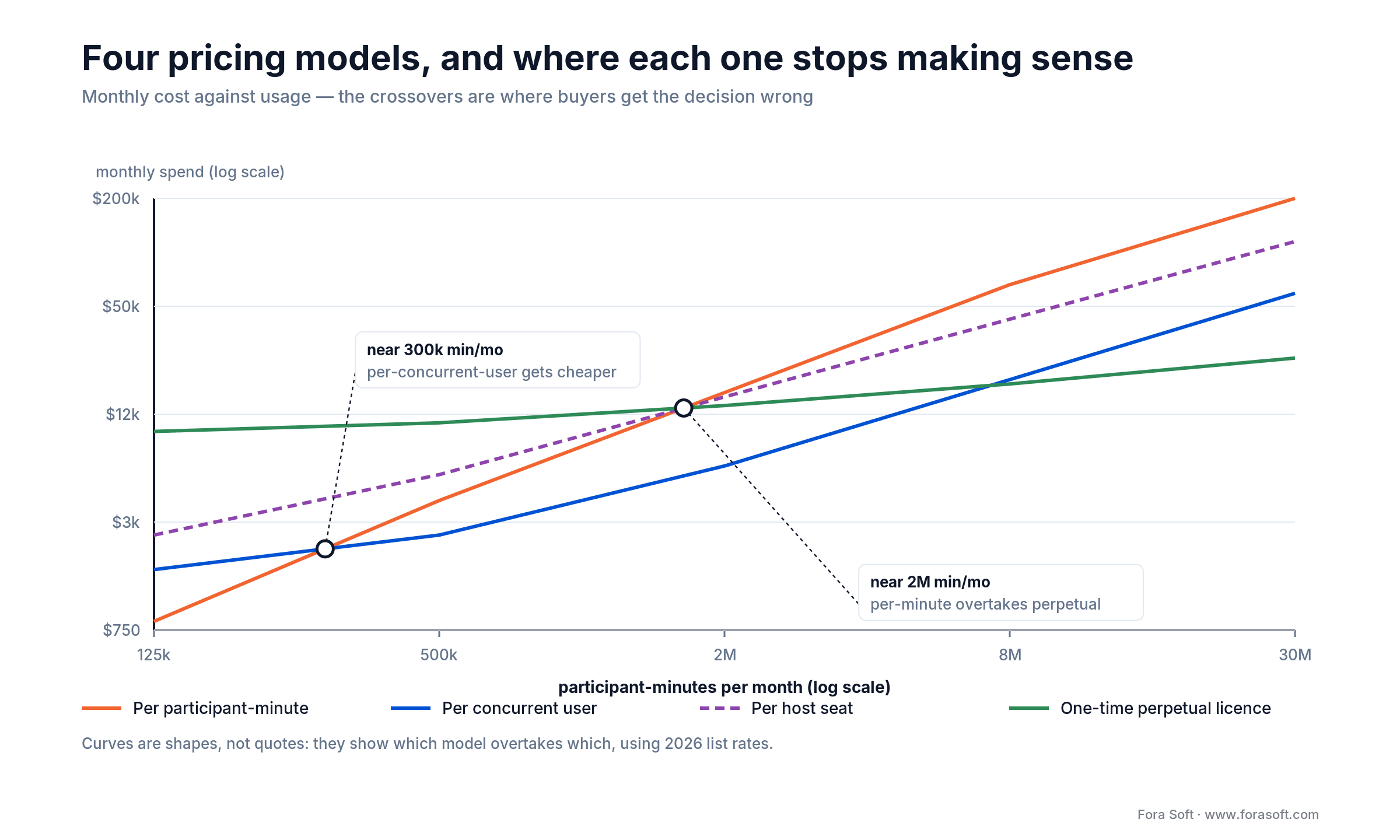
Figure 4. Which pricing model overtakes which as usage grows — shapes from 2026 list rates, not quotes.
Per participant-minute. Free to start, scales linearly forever. Right up to roughly 300,000 participant-minutes a month. Past that it’s the most expensive model in the market, and it’s the one almost everyone signs.
Per concurrent user. You pay for peak simultaneous capacity rather than accumulated time. It wins when sessions are long and predictable — virtual classrooms, all-day support desks, monitoring rooms. It punishes spiky traffic, because you buy for the peak you hit once a quarter.
Per host seat. Familiar to anyone buying SaaS, and it maps cleanly onto reselling. It breaks when a small number of hosts generate enormous minute volume, which is exactly the webinar and live-commerce shape.
One-time perpetual licence. Large upfront, near-flat afterwards, and you usually get source access. It only pays off above roughly 2M participant-minutes a month — but at that volume it pays off decisively.
Reach for a perpetual licence when: you’re confidently above 2M participant-minutes a month, you want source-code access as insurance against vendor failure, and you have someone who can own patching.
Reference architecture
The SDK hides the media path. Everything else is yours to design, and the design decides whether switching vendors later costs two to six weeks or a quarter.
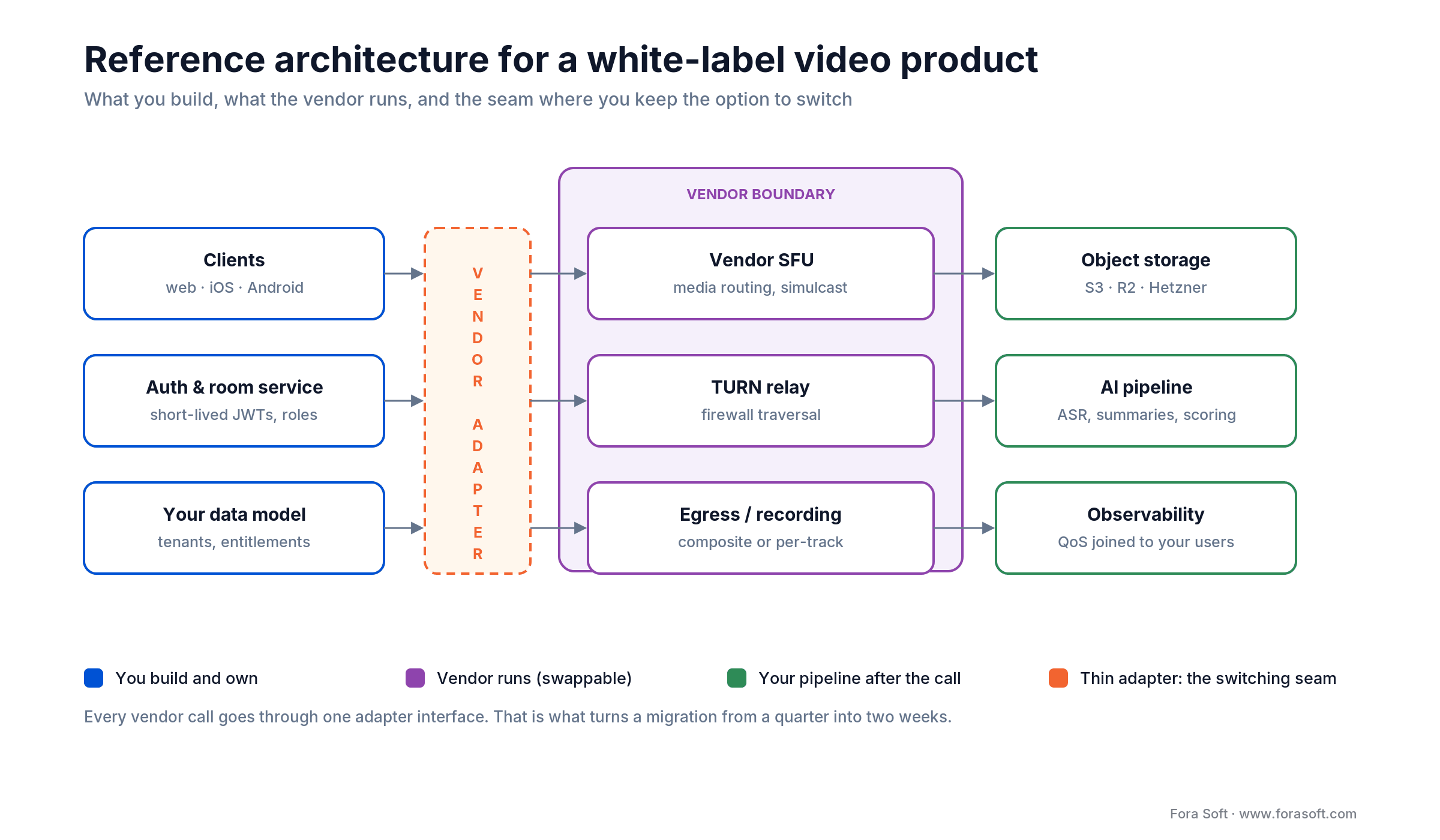
Figure 5. What you own, what the vendor runs, and the adapter layer that keeps migration cheap.
Clients. Your UI calls the SDK to publish camera and mic and subscribe to peers. Your code, their package. We ship these in React, Swift, Kotlin and React Native, increasingly with shared business logic in Kotlin Multiplatform.
Auth and room service. Your backend mints short-lived JWTs that the SDK uses to join rooms. This is where permissions, billing entitlements and tenancy get enforced. Two endpoints (create room, mint token) cover most of the work.
The vendor adapter. One internal interface (joinRoom, publishTrack, subscribeTrack, startRecording, emitEvent) that every vendor call goes through. It costs about three days to build. Teams that skip it lose a quarter the first time they migrate; teams that build it spend two to six weeks.
Egress and storage. The vendor pushes composite or per-track recordings into your bucket via webhook. From there it’s your pipeline — transcoding, transcription, analysis. We pick between AWS S3, Cloudflare R2 and Hetzner object storage on cost; the arithmetic is in our AWS vs DigitalOcean vs Hetzner comparison.
Observability in two layers. Vendor dashboards tell you about packet loss. Your own analytics tells you whether users finished the call. You need both, joined on your user IDs, or you’ll spend support cycles guessing.
AI features and the data boundary
Every vendor markets AI in 2026. The capability gap has narrowed; the compliance gap has not. The question worth asking isn’t whether a platform offers transcription — it’s whether that transcription leaves the vendor’s boundary, and whether your BAA or DPA covers the model provider it lands on.
Noise suppression. Table stakes. Agora ships AI Voice Enhancement, LiveKit and Daily integrate Krisp, 100ms runs its own model. Quality differences are small enough that we’ve never seen one decide a vendor choice.
Virtual backgrounds. Universal. The differences that bite are CPU cost on low-end Android, Web Worker support, and whether you can swap in your own segmentation model. LiveKit lets you; most don’t.
Real-time transcription and the data boundary. Three patterns: vendor-bundled (pairing with Deepgram or AssemblyAI), bring-your-own (pull the audio track through egress into your own ASR), or on-device. If you handle regulated data, the bundled option is where audits fail: audio leaves the video vendor for a third-party model provider under separate terms. Get the sub-processor list in writing and check your BAA covers every name on it. For the multilingual case we go deeper in our guide to live real-time translation in teleconferencing.
AI agents in the call. LiveKit’s Agents framework has become the default for putting an LLM participant in a room, which is where the company has clearly aimed its 2026 roadmap after raising $100M at a $1B valuation in January 2026. Round-trip latency (mic to speech recognition to model to speech synthesis to speaker) lands around 600–900ms on a tuned managed stack. Our Meetric AI sales platform uses this pattern to coach reps mid-call.
Emotion and sentiment analysis. Not native in any SDK. You capture frames or audio chunks, run inference in your own service, surface scores in your UI. We built exactly this into VocalViews for market-research call analysis.
Security and compliance
Compliance is where SDK choice locks you in hardest, and where the pricing page is least honest. Four checks before you sign.
1. The HIPAA BAA is usually a paid gate. Not a checkbox — a line item. Daily charges $500/month for the Healthcare add-on, 100ms $500/month, LiveKit requires the $500/month Scale plan, Whereby $16.99/month on Build. Amazon Chime SDK is the outlier: it’s on the AWS HIPAA-eligible list and the BAA comes free through AWS Artifact. Check the scope too — some BAAs cover transit but not recording storage, and Daily’s HIPAA mode disables its own cloud recording storage (recordings must go to local storage or your own S3 bucket) and turns off live streaming entirely.
2. GDPR and data residency have very different price tags. Agora’s EU media-zone restriction is a client-side SDK flag with no published charge, and Daily’s regional media zones are listed as free on its pricing page. Digital Samba is EU-only on every tier including the free one. LiveKit gates region pinning behind the Scale plan, and Vonage charges $550/month for regional media zones. If you sell into European public sector, this is often the whole procurement conversation.
3. SOC 2 Type II is not universal. The received wisdom that every serious vendor holds one is wrong. Whereby documents that Type II is neither available nor planned, positioning on ISO 27001 instead. That may be fine for your risk committee or it may end the conversation — either way, ask for the report under NDA rather than assuming.
4. Know what E2EE means at each vendor. LiveKit implements real customer-managed-key encryption, and Agora does too on its native SDKs, plus a separate Web-only beta; its security documentation states that on the standard Web SDK, cloud recording, moderation and transcoding, encryption “is not end-to-end” because the service must know the key; LiveKit’s docs state that it “does not (and cannot) store or transport encryption keys for you.” Daily is E2EE only in peer-to-peer mode, and Whereby’s applies to small peer-to-peer rooms rather than routed ones. Digital Samba ships E2EE on every tier, with key material generated in each participant’s browser via the Web Crypto API and private keys never leaving the device — strong, though you as the API customer don’t supply the keys the way you do with LiveKit, and its own docs note the recorder decrypts with the key before storing, so E2EE and cloud recording are mutually exclusive there too. Amazon Chime SDK forwards video through an SFU and mixes audio server-side, so media is encrypted in transit but decrypted at the server either way. Stream states outright that it doesn’t support E2EE, and Zoom’s Video SDK marks it unsupported on every browser. Plenty of regulated buyers accept encryption in transit and at rest without true E2EE — just make that a decision rather than an assumption.
If you’re specifically building for clinical use, the sequencing of these decisions is different enough that we wrote it up separately in our HIPAA build-vs-buy playbook for healthcare video.
A worked cost model at three scales
Here’s the arithmetic we run with founders, shown rather than summarised. Assumptions: 720p at 1.5 Mbps, 30-minute average session, four participants per session, recordings kept 90 days.
Start with participant-minutes, not sessions
A 30-minute call with four people is 120 participant-minutes, not 30. That factor of four is the single most common budgeting error we see. So 1,000 sessions a month is 120,000 participant-minutes, not 30,000. Daily gives the first 10,000 away, bills the next 90,000 at $0.0040 and the last 20,000 at $0.0037: $0 + $360 + $74 = $434/month. Agora also gives 10,000 away, so 110,000 × $0.00399 = $438.90 with dual-stream on, and $1,758.90 with it off — the aggregate-resolution rule again. LiveKit looks free at this size, because 120,000 minutes sit inside the Ship plan’s 150,000 quota. It isn’t.
The LiveKit line nobody puts in the spreadsheet
LiveKit prices connection minutes and downstream data transfer as two separate meters, and the second one is bigger. Ship includes 250 GB then charges $0.12/GB; Scale includes 3 TB then charges $0.10/GB. The number turns on what each subscriber actually receives, so here is the assumption in the open: in a four-tile grid with adaptive layers on, each of the three incoming streams is served at roughly 0.5 Mbps of tile-sized video, so a subscriber pulls about 1.5 Mbps in total — the same figure as one full 720p stream. That gives 1.5 × 60 = 90 megabits = 11.25 MB per participant-minute, so 1,000 participant-minutes move 11.25 GB — about $1.13 of transfer on top of the $0.40 headline. That is why the table below shows $7,225 at five million minutes rather than the $1,900 the minute meter alone produces. LiveKit is still the cheapest managed option here at every scale, but by how much matters. Blended, it lands at $1.45 per 1,000 participant-minutes at five million minutes and $1.52 at fifty million — roughly 2.8× cheaper than $4.00 list, and about 1.6× cheaper than Daily once Daily’s own graduated discounts apply. Not the ten-to-one the headline rates imply. A migration business case built on $0.40 versus $4.00 will miss by roughly four times.
| Scale | Participant-min/mo | Agora, dual-stream on / off | Daily / 100ms flat | LiveKit Cloud | Self-hosted LiveKit |
|---|---|---|---|---|---|
| Early MVP | 120,000 | $438.90 / $1,758.90 | $434 graduated / $440 flat | $182 ($50 plan + $132 transfer) | ~$320 (1 node + ops) |
| Mid-market | 5,000,000 | $19,950 / $79,950 list | $15,540 graduated / $19,960 flat | $7,225 — $500 plan + (3.5M over quota × $0.0004 = $1,400) = $1,900, plus $5,325 transfer | ~$2,400 ($400 nodes + $2,000 part-time SRE) |
| Enterprise | 50,000,000 | $199,500 at list. Agora’s published volume discount stops at 10% and stops at 3M min/mo, so anything better than $179,550 is a negotiation, not a rate card | $124,540 on Daily’s graduated tiers (blended $2.49) | $75,850 — $500 + (48.5M × $0.0004 = $19,400) = $19,900, plus $55,950 transfer | ~$18,000 ($8,000 infra + $10,000 on-call engineer) |
What self-hosting actually costs
Everyone hand-waves this line, so here it is in full. Three Hetzner AX-series nodes run roughly $400/month. Bandwidth on a 5M-minute month at 1.5 Mbps downstream is real but largely included in Hetzner’s allowance. The cost that gets left out is people: a part-time SRE at 20% of a $120k salary is $2,000/month fully loaded, which already exceeds the hardware. At the enterprise row you need on-call coverage, so budget one full-time engineer, about $10,000/month, on top of the $8,000 infrastructure line. Self-hosting is cheaper at scale, and the honest version of that sentence is uncomfortable for a company that sells builds: the money crosses over early. Because most of that $2,400 is the SRE and not the servers, a flat $4.00 vendor reaches it at about 600,000 participant-minutes a month; LiveKit Cloud, once downstream transfer is counted, at roughly 2M. What does not cross over early is the staffing. A media stack you run yourself needs an on-call rotation, a capacity model and someone who can read an SFU’s packet-loss graphs at 2am. Teams that self-host without that lose more in one incident than they saved all year, which is why we still put most clients on a managed SDK well past the point where the spreadsheet says otherwise.
The recording line nobody budgets
Work it out from the bitrate rather than guessing: 1.5 Mbps × 1,800 seconds = 2,700 megabits, so a 30-minute 720p composite is 337.5 MB. At 1,000 sessions a month that’s 337.5 GB of new data monthly, and on a 90-day retention policy you carry roughly 1,012 GB in steady state — about $23/month on AWS S3 Standard at $0.023/GB-month, or $15/month on Cloudflare R2 at $0.015/GB-month. Storage is the small half. The fee for making the recording is the large half, and it is metered differently: Daily charges $0.01349 per recorded minute of wall-clock time, plus $0.003/min storage, and does not multiply by participants. Those same 1,000 sessions are 30,000 recorded minutes, so 30,000 × $0.01349 = $405/month — roughly what the calls themselves cost, and about seventeen times the S3 line. Budget the recording fee, the storage and the lifecycle rules together on day one rather than month nine.
Not sure whether to build, buy or self-host?
Bring your year-three volume forecast. In 30 minutes we’ll walk the crossover maths with you and tell you which of the five paths above actually fits — including when the answer is “stay where you are.”
Mini case: 12 weeks to launch
Situation. Sprii, a live shopping platform, needed a fully branded broadcaster and viewer experience: host plus co-host, audience chat, in-stream product spotlights, real-time purchase events, recording for VOD replay, and stability through 90-minute peak shows with thousands of concurrent viewers. Two senior product engineers, no WebRTC specialist, four months before a retail launch.
The 12-week plan. Weeks 1–2: vendor selection workshop and jobs-to-be-done interviews; we picked Agora for its live-commerce feature set and points of presence. Weeks 3–5: backend room and token service, host/co-host/viewer roles, product-spotlight sync over the signalling channel. Weeks 6–8: React broadcaster UI, Next.js viewer, React Native mobile viewer. Weeks 9–10: composite recording into S3 and an HLS VOD pipeline, plus real-time analytics. Weeks 11–12: load testing to 5,000 concurrent viewers, hardening, launch.
Outcome. Branded launch on schedule, and the numbers we own: steady-state 99.95% session-success rate, sub-400ms host-to-viewer glass-to-glass on best-effort networks, load-tested to 5,000 concurrent viewers, and highlight reels available under 90 seconds after a show ended. The commercial result is Sprii’s, not ours — the platform has since driven €365M+ in sales across 3,000+ brands. We shipped the same pattern for BrainCert’s virtual classroom — multi-camera teacher rooms, breakouts and compliant recording, now past 500M classroom minutes delivered.
Want a similar plan scoped against your traffic and feature list? Book a 30-minute scoping call and you’ll leave with a vendor recommendation and a sprint-by-sprint timeline.
A decision framework in five questions
Answer these five in order. The first one that produces a hard constraint decides your vendor — pick by the gate that stops you, not the feature that impresses you.
1. What is your participant-minute budget at year one and year three? Under 2M/month in year one: pick the simplest cloud SDK and stop thinking about it. Trending past 2–3M within 24 months: choose something with a self-host path (LiveKit is Apache-2.0) so the option stays open, and revisit once you have an on-call rotation rather than once the spreadsheet says to.
2. What compliance do you need on day one? HIPAA: price the BAA as a monthly line item and confirm whether recording storage is in scope. EU residency: confirm which plan tier includes region pinning. If both are mandatory and your budget is small, that single answer eliminates most of the shortlist.
3. Where do your users physically sit? Asia-heavy traffic favours Agora’s point-of-presence density. EU-only favours Digital Samba, Daily or Whereby. AWS-native US traffic favours Chime SDK on cost and billing simplicity.
4. What shape is the call? One-to-one telehealth: any vendor. Ten-person collaboration: any vendor. Live shopping with 5,000+ viewers: Agora, 100ms or LiveKit. An AI agent in the room: LiveKit. A 10,000-attendee webinar: 100ms or LiveKit Egress.
5. How unusual is your UX? Custom grids, side-by-side overlays, dynamic composition or in-stream product cards mean you need raw track APIs — Agora, LiveKit, 100ms or Daily. If a themed finished room genuinely works, a turnkey platform will save you two months. If you’re not sure which side you fall on, that’s exactly the call we take: our dedicated development team scopes this in a week.
Six pitfalls we see every quarter
1. Choosing on price-per-minute alone. Cheap minutes hide expensive recording, expensive transcription, expensive compliance and expensive support. Build a six-line profit-and-loss with every item before signing anything.
2. Skipping the network impairment test. Office wifi is not a commuter’s 4G. Use Network Link Conditioner or a TURN-only path with induced packet loss. If your call dies at 5% loss, so will your users’.
3. Building the recording pipeline last. Recording is the source of truth for compliance, AI features, support tickets and product analytics. Build it in week three, not week ten.
4. Letting mobile parity slip. Most consumer traffic is mobile. iOS background-mode handling, Android battery behaviour and React Native bridge bugs are two to three sprints the SDK docs underplay. Reserve the time upfront.
5. Treating theme work as one-off. At Levels 2 and 3 the vendor’s UI releases can overwrite your styling or expose unbranded surfaces. Put a re-theming check into your release process and budget a day per vendor release. Teams that don’t find out from a customer screenshot.
6. No vendor exit plan. Even a great vendor can break on a pricing change or a scale ceiling. Wrap vendor calls in the adapter from day one. Without it a migration is a quarter-long rewrite; with it, two to six weeks. We’ve run enough of these to say it’s the highest-return three days in the whole project.
KPIs to monitor from week one
Quality KPIs. Glass-to-glass latency under 400ms in-region and under 700ms cross-region. Average packet loss under 1.5%. Audio MOS above 4.0. Video freeze rate under 0.5% of session minutes. Pull these per session from the vendor’s analytics API and join them to your own user IDs — unjoined vendor metrics tell you a network was bad without telling you who suffered.
Business KPIs. Session-completion rate above 90%. Time-to-first-frame under 2 seconds on a cold join. Active minutes per paying customer per month, which is the leading indicator of expansion revenue. Time-to-first-video for a new tenant under 60 seconds is the modern bar.
Reliability KPIs. P99 join time under 5 seconds. Vendor-side incident hours under 0.5 per month. Recording success rate above 99.5%. Mean time to acknowledge under 15 minutes, mean time to resolve under 90. If a vendor won’t share their own reliability data on request, that’s an answer in itself.
When white label is the wrong answer
White label is right most of the time. It’s wrong when any of these is true: your product is the call and per-minute economics will eat your margin at scale; you need on-prem deployment for a customer who won’t accept a public-cloud SFU; your media pipeline must run server-side inference inside the call hot path, such as frame-level redaction or live medical imaging; or you already employ two or more senior WebRTC engineers who’d otherwise be underused.
Our Nucleus on-premise communication platform is the clean example: the customer required full on-prem deployment, mediasoup as the SFU, and zero outbound traffic in steady state. White label was structurally impossible, so we didn’t propose it. Nucleus now serves 5,000+ businesses; the 600M+ minutes a month it handles are AI phone traffic on a separate stack, not the on-prem video deployment described here. Saying no to the easy architecture was the right call.
Contract clauses and migration
Most of what makes a white label deal good or bad is written in the contract, not the docs. Ten clauses we ask for on every engagement:
- No vendor marks in UI, transactional email, recordings, recording metadata or transcripts — named surface by surface, not “branding removed”.
- Right to run on your own domain with your own SSL certificate.
- Right to publish mobile apps under your own developer accounts.
- Trademark and sublicence rights if you intend to resell, with your pricing freedom stated.
- Zero revenue share, confirmed in writing.
- Uptime SLA with service credits, plus access to historical reliability data.
- Source-code escrow, or an open-source licence you could self-host under.
- A DPA that names every AI sub-processor, so a model-provider change doesn’t silently break your compliance posture.
- Data portability: recordings, transcripts and metadata exportable in an open format.
- Notice period and exit assistance, because the day you need this is the day it’s hardest to negotiate.
How a vendor migration actually runs
A vendor migration takes two to six weeks when an adapter layer already exists, and a quarter when it does not. Ours run at the short end because we build that seam on day one. The mechanics are consistent: swap the SDK behind the interface, regenerate tokens, re-point the recording webhook, replay the network impairment suite, then dual-write traffic for a week to confirm parity before cutting over. The common 2026 moves are Twilio to LiveKit on cost, Daily to Agora on Asia performance, and Agora to self-hosted LiveKit on per-minute economics.
If you’re reading this because your current vendor stopped fitting, our Agora custom development guide and the playbook on when to hire a WebRTC development company spell out how we scope a migration. For the wider platform picture, our guide to video conferencing solution features and architecture covers what sits around the call, and our video and audio streaming development service is where these builds actually get delivered.
Migrating off a video vendor that no longer fits?
Tell us your current stack and traffic. You get a one-page migration plan (sequence, risks and timeline) within 48 hours.
FAQ
What is white label video conferencing?
White label video conferencing is video calling software you license from a vendor and ship under your own brand, domain and user interface, with no vendor logos visible to your users. The vendor operates the media servers, TURN relays and recording infrastructure; you own the product experience and the customer relationship.
How much does white label video conferencing cost in 2026?
Published list prices cluster around $4.00 per 1,000 participant-minutes: Agora HD $3.99, Daily $4.00, 100ms $4.00, Twilio $4.00, Whereby $4.00, Vonage $4.10. LiveKit Cloud looks like the outlier at $0.40–$0.50 on paid plans, and Amazon Chime SDK sits at $1.70 per 1,000 attendee-minutes. Three adjustments matter more than the rate. LiveKit bills downstream data transfer on a second meter ($0.10/GB above 3TB on Scale), which adds roughly $1.13 per 1,000 participant-minutes and puts its real blended rate near $1.50. Agora bills by aggregate subscribed resolution, so an untuned four-person 720p call actually meters at its $15.99 2K tier. And a HIPAA BAA costs $500/month at Daily and 100ms, and $16.99/month at Whereby.
How complete is white label branding in practice?
Rarely complete at the default tier. The in-call interface is almost always brandable, but vendor names commonly survive in transactional email, calendar invites, mobile app store listings, push notifications, recording file metadata, transcript headers and OAuth consent screens. Audit all sixteen surfaces and get the ones you need written into the contract.
How long does a white label video conferencing build take?
A themed turnkey platform can be live in days. A branded MVP on a headless SDK takes Fora Soft 4–6 weeks, with full production hardening at 10–14 weeks. In-house teams without prior WebRTC experience typically take about 1.5 times longer. The big variables are how many mobile platforms are in scope, which recording features you need, and how custom the call UI is.
Is Twilio Programmable Video being shut down?
No. Twilio announced an end-of-life in March 2024, then reversed the decision on 21 October 2024, confirming that Twilio Video remains a standalone product open to new customers. It is still sold in 2026 at $0.004 per participant-minute. Any comparison table still showing Twilio Video with an end-of-life date has not been updated since October 2024.
Which white label video vendors support true end-to-end encryption?
LiveKit implements true E2EE with customer-managed keys and its docs state it cannot store or transport your keys at all. Agora does the same on its native SDKs, and ships a separate Web-only E2EE beta (VP8 and Opus, Web-to-Web only, switched on by Agora support). On the standard Web SDK, cloud recording, moderation and transcoding, Agora’s own security doc says the result “is not end-to-end” because the service must know the key. Digital Samba generates key material in each participant’s browser and never lets private keys leave the device, though you as the API customer don’t supply those keys yourself. Daily supports it only in peer-to-peer mode, not through its SFU, and Whereby’s applies to small peer-to-peer rooms. Amazon Chime SDK decrypts media server-side, Stream states it does not support E2EE, and Zoom’s Video SDK does not support it on any browser. True E2EE also disables server-side recording and transcription unless you move those on-device.
Can I resell a white label video conferencing platform under my own pricing?
Yes, with several vendors, but the terms vary sharply. MegaMeeting publishes wholesale licence tiers down to $1 per licence per month at 10,000+ seats. Digital Samba sells OEM access with no revenue sharing. Confirm three things in writing before committing: whether you set your own prices, who owns the end-customer relationship, and who handles tier-1 support.
Will I get locked into a single vendor?
Only if you let the vendor SDK leak into every layer of your code. Build one thin internal adapter over the SDK, about three days of work, and a migration becomes a two-to-six-week swap rather than a quarter-long rewrite. We do this on every delivery, and we have yet to regret the three days it costs.
Can white label video conferencing run fully on-premise?
Yes, but only on the self-hosted half of the market. Cloud-managed SDKs such as Agora, Daily, 100ms and Whereby run on vendor infrastructure by definition. If on-prem is non-negotiable (defence, classified environments, some health systems), you want self-hosted LiveKit, mediasoup or Janus, or a platform such as TrueConf or Pexip. All of those are still white label in the branding sense.
How do I estimate monthly minute usage before launch?
Multiply monthly active users by calls per user per month, by minutes per call, by participants per call. The participant multiplier is the one people forget: a four-person 30-minute call is 120 participant-minutes on most pricing models, not 30. Stress-test the result at twice your expected growth before you commit to a tier.
Is the mobile experience a native app or a web view?
Turnkey platforms usually give you a mobile web view; headless SDKs give you real native clients. The difference matters more than most buyers expect: a web view limits background audio, push notifications and camera permission behaviour, while a native client you publish yourself has none of those constraints. Ask which one you’re getting before you promise an app to your customers.
What does Fora Soft cost compared with an in-house team?
$30k–$120k for a managed-SDK build, delivered in 4–6 weeks. Hiring in-house means two engineers for three to six months before anything ships. At a $120k loaded salary that is $60k–$120k of payroll to reach the same milestone, on a longer calendar, and you keep the salaries afterwards whether or not the roadmap still needs them. The build cost is comparable; the time to a working call is not. We’re faster because Agent Engineering compresses the lower-effort work and because we’ve already made these mistakes on 250+ projects. We’ll narrow that range to a number once we know your platforms, recording needs and compliance scope.
What to Read Next
Architecture
P2P vs MCU vs SFU for Video Conferencing
The topology maths behind every vendor’s pricing model.
Platform
Video Conferencing Solution: Features and Cost
Everything that sits around the call once video works.
Budgeting
Video Conferencing App Development Cost
Line-by-line budget ranges for the full build.
Hiring
When to Hire a WebRTC Development Company
Five signals you should buy a video team, not build one.
Infrastructure
AWS vs DigitalOcean vs Hetzner
The hosting cost maths if you ever self-host the SFU.
Ready to ship a branded video product this quarter?
White label video conferencing is the fastest way to put a branded calling experience inside your product without staffing a WebRTC team. Decide which of the five levels you’re actually buying. Audit the sixteen surfaces where a vendor’s name can still surface. Price the compliance add-ons as monthly line items, because that’s what they are. Pick the pricing model that fits your year-three volume, not your launch-week volume. And wrap whatever you choose behind one thin adapter so switching stays cheap.
We’ve shipped branded video on Agora, LiveKit, Twilio and Wowza, plus self-hosted mediasoup and Janus, across 250+ projects since 2005. With Agent Engineering we scope, design and ship a branded MVP in 4–6 weeks. If you’re weighing build against buy this quarter, let’s run your numbers together — worst case you leave with a spreadsheet you didn’t have.
Let’s scope your white label video conferencing build
A 30-minute call gets you a vendor pick, a delivery timeline and an honest estimate. No slide deck, no obligation, no upsell.

