

Key takeaways
• AI is bundled into every major platform now. Noise suppression, transcription, summaries, captions and, since 2026, live speech translation ship inside Zoom Workplace, Teams with Microsoft 365 Copilot and Google Meet with Gemini. Your real decision is license a platform or build a differentiated one.
• Latency sorts the features. Streaming speech-to-text lands 100–200 ms, live captions under 400 ms, speech translation 2–3 s. Anything that can’t stream under ~300 ms is a near-real-time or post-meeting feature, not a live one.
• Buy for internal calls, build for products and regulated verticals. Telehealth, courtrooms, classrooms and regulated finance need HIPAA / GDPR / EU AI Act footprints the big platforms won’t hand you. We’ve shipped that on V.A.L.T. and BrainCert.
• Budget honestly. A proof of concept runs $15–30k, an MVP with transcription and summaries $50–150k, production HIPAA-grade $200–500k. Recurring AI is small — about $82/month at 100 meetings on October 2026 list prices. Our Agent Engineering keeps timelines and quotes under legacy SI numbers.
• The failure modes are predictable. Hallucinated summaries, PII leaking into transcripts, caption errors, latency creep and speech-to-text rate limits at scale — the same five appear in every project. We design them out from sprint one.
Updated October 2026: EU AI Act Digital Omnibus dates (Annex III high-risk moved to 2 December 2027), 2026 Zoom, Teams and Google Meet AI pricing and built-in speech translation, new Deepgram and LiveKit rates in the cost model.
Why Fora Soft wrote this guide
Fora Soft has shipped real-time video and AI products since 2005 — 21 years, 250+ projects and 50 in-house engineers. Conferencing is one of our oldest lanes, and video conferencing app development is still core to what we build. On BrainCert we scaled WebRTC classrooms to thousands of concurrent rooms; on ProVideoMeeting we shipped business video with document signing; on V.A.L.T. we record and transcribe nine simultaneous IP-camera feeds with full-text search, alerting and audit logs across police, court and medical rooms — 770+ organizations and 50,000+ active users.
The numbers below come from those builds, not a vendor brochure: which AI features move the needle, what they cost in latency and CPU, when off-the-shelf wins, and what an honest custom build runs in 2026. We’ll tell you when not to hire us, too.
Building or extending an AI conferencing product?
Bring your scope, compliance constraints and a rough budget. We’ll spend 30 minutes mapping a stack and giving you an honest estimate — no slide deck, no obligation.
What AI video conferencing means in 2026
AI video conferencing is real-time video calling with machine-learning features layered onto the audio and video streams: noise suppression, speech-to-text, live captions and translation during the call, plus summaries and action items after it. The video transport is still WebRTC; the AI is a set of workers reading the same media tracks.
Those features fall into three homes. Some run on the client (noise suppression, background blur), some run server-side against the live audio (transcription, captions, translation), and some run after the meeting off an async queue (summaries, action items, sentiment). Where a feature runs decides its latency, its cost and its compliance blast radius. If you want the full feature catalogue, our companion piece breaks down the 12 AI video conferencing features and what each one does; this guide is the buy-vs-build and architecture layer on top of it.
Where the category stands in 2026
AI stopped being a premium add-on in 2026. In June 2026 Zoom folded AI Companion into Zoom Workplace and kept meeting summaries and transcription in paid plans at no extra cost (Zoom, June 2026). Microsoft reported 20 million paid Microsoft 365 Copilot seats in April 2026 (Computerworld, July 2026). Google made speech translation in Meet generally available to Workspace business plans on 27 January 2026 (Google Workspace Updates).
So the buyer question changed. It’s no longer “should our platform have AI” — every platform has it. It’s “which features earn their latency and compliance cost, and where do we draw the line on data residency and IP ownership.” The rest of this guide answers exactly that.
The 10 AI features that matter, with real numbers
Here’s the honest latency-and-cost table for the features buyers actually ask about. Numbers are 2026 production figures, not marketing.
| Feature | Latency | Compute | Typical providers |
|---|---|---|---|
| Noise suppression | 20–50 ms | 3–7% CPU (Krisp); GPU optional | Krisp, DeepFilterNet, NVIDIA Maxine, RNNoise |
| Streaming STT (transcription) | 100–200 ms | 5–15% CPU per speaker | Deepgram Nova-3, AssemblyAI, Whisper |
| Live captions | 200–400 ms | 10–20% CPU | Google Meet, Zoom, KUDO |
| Live translation (speech-to-speech) | 2–3 s | GPU recommended | KUDO, Interprefy, DeepL, Meta models |
| Speaker diarization | 100–500 ms | 3–8% CPU | Pyannote, Deepgram, AssemblyAI |
| Background blur / replace | 30–80 ms | GPU 20–40% (mobile 10–15%) | MediaPipe, LiveKit, NVIDIA |
| Meeting summarization | 2–5 s (post-meeting) | $0.001–0.01 / 1k tokens | OpenAI, Anthropic, Cohere |
| Action-item extraction | 5–10 s (post) | ~$0.01–0.02 per meeting (same LLM pass as the summary) | Otter, Fireflies, Fathom, custom |
| Sentiment / tone analysis | 0.5–1 s per utterance | 5–10% CPU | custom NLP (see EU AI Act limits) |
| Gesture / emotion CV | 200–400 ms | GPU 15–25% | MediaPipe, custom CV |

Figure 1. Every feature sorted by its latency budget — the line at ~300 ms separates real-time from post-meeting work.
Real-time vs post-meeting: the split that defines your build
The single most important design decision is which AI runs live and which runs after the call. Real-time features sit on the media path and must answer in under ~300 ms; post-meeting features sit behind a queue and can take seconds. Mix them and you get the classic failure: a summarizer that stalls the call, or captions that arrive two sentences late.
ITU-T G.114 puts comfortable one-way delay at about 150 ms and treats 400 ms as the planning ceiling, so every millisecond an AI step adds to the live path is borrowed from that budget. So streaming speech-to-text, captions, noise suppression and blur go on the live path with hard latency budgets, while summaries, action items and sentiment run off an async worker that never touches the call loop. Get this seam right and everything downstream gets simpler.
Noise suppression: Krisp vs RNNoise vs DeepFilterNet
For a shipping product in 2026, the noise-suppression choice comes down to three options. Krisp is the commercial default: 3–7% CPU, a vendor SLA and mobile SDKs. RNNoise is free and runs on a single core with ~10 ms latency, but its last tagged release (0.2) shipped in April 2024 and it shows its age on modern noise types. DeepFilterNet is the open middle ground — permissively licensed, actively developed, and stronger than RNNoise on today’s noise.

Figure 2. The three real-time noise suppressors on the dimensions that decide a build: CPU, latency, maintenance and license.
We keep the deeper teardown in two Learn pieces: classical NS vs RNNoise vs Krisp vs RTX Voice and a production comparison of Krisp, RNNoise and DeepFilterNet in real-time pipelines.
Reach for Krisp when: you ship mass-market or mobile, want a vendor SLA, and can carry a per-seat SDK fee. Reach for DeepFilterNet when you self-host, need a free license, and want something newer than RNNoise on modern noise.
Transcription and translation you can cite in 2026
For production transcription, Deepgram Nova-3 is the default: a median word error rate of 6.84% on streaming and 5.26% on batch audio across 2,703 production files in nine domains, sub-300 ms time-to-first-token, (see Deepgram’s Nova-3 benchmarks). As of October 2026 it lists at $0.0043/min pre-recorded and $0.0077/min streaming, with streaming on a limited-time promotional $0.0048/min; Deepgram’s newer Flux model, built for conversational turn-taking, streams at $0.0065/min promotional (Deepgram pricing). Whisper is free and self-hostable but sits near 10.6% WER in Deepgram’s benchmark and can hallucinate on long audio — fine for cost-sensitive or on-prem work, not the choice for clinical transcription.
Live translation is the harder problem. Meta’s open multilingual models now stream speech-to-speech at roughly 2 s latency with near-offline accuracy (streaming translation research, 2024). The big three now ship speech-to-speech inside the call. Google Meet speech translation went GA on 27 January 2026 with English paired with five languages, and a June 2026 private preview on Gemini 3.5 Live Translate takes it to 70+ (Google, June 2026). Microsoft’s Interpreter agent in Teams covers nine languages, with 20 hours per user per month on a Copilot license (Microsoft Learn). Zoom’s Voice Translator speaks English, Chinese, Spanish, French and Japanese (Zoom, July 2026). The honest limit: real-time translation is good enough for casual business in major language pairs, and it is not good enough for legal, medical or diplomatic calls. Keep a qualified human in the loop on anything regulated. When interpretation has to live inside your own product rather than Zoom’s, our AI language interpretation development team builds that layer on Whisper, Deepgram and Meta’s open translation models with a human-review path. For the tool-by-tool view, see our 7 tools for real-time multilingual translation.
Reach for Deepgram Nova-3 when: you need production WER under 7% and sub-300 ms captions for telehealth or support. Reach for self-hosted Whisper when cost or data residency outweighs the accuracy gap and you can add a hallucination guard.
Buy vs build: when each path actually wins
Buy when you run internal calls on generic compliance; build when you ship a product to other buyers, sit under HIPAA or GDPR, or differentiate on AI. Here’s the same trade-off laid out across the dimensions that actually decide it.
| Dimension | Off-the-shelf (Zoom, Teams, Meet) | Custom (CPaaS + AI stack) |
|---|---|---|
| Time to market | 4–8 weeks | 3–12 months |
| Per-user cost | $10–30/user/mo (core AI included; premium add-ons +$20–30) | $0.01–0.10 per AI-minute of usage |
| Compliance burden | Vendor BAA + audit trail | Full HIPAA / GDPR / FedRAMP control |
| Customization | None / vendor roadmap | Full model and UI control |
| Data residency | Vendor-locked (US-default) | Self-host or regional cloud |
| Lock-in risk | High | Low (you own the IP) |
| Best fit | < 50-user teams; generic compliance | Telehealth, courts, regulated finance, vertical SaaS |

Figure 3. Three Yes/No questions route most teams to one of three paths — subscribe, a CPaaS hybrid, or a full custom build.
Reach for a custom build when: your vertical needs HIPAA / FedRAMP-grade compliance, you’re shipping a product to other buyers (not just running internal calls), or your AI is part of the value proposition rather than a convenience.
Stuck between subscribing and building?
Send us your seat count, vertical and compliance list. We’ll tell you which of the three paths fits — even when the answer is “just buy Zoom.”
What Zoom, Teams and Meet AI actually cost
Before you build, price the buy option properly — the three big platforms charge for AI very differently, and that alone often decides the call. Prices below are October 2026 list prices from each vendor.
| Platform | AI cost (2026) | What you get |
|---|---|---|
| Zoom Workplace AI (formerly AI Companion) | Core AI included in paid plans (Pro $14.16/user/mo); ZoomMate add-on from $20/user/mo | Summaries, transcription, smart compose; Voice Translator in 5 languages via ZoomMate or a Live Translation add-on |
| Teams + Microsoft 365 Copilot | +$30/user/mo enterprise; Copilot Business $21/user/mo for 10–300 seats | Recap, in-meeting Q&A, follow-ups, Interpreter agent (9 languages) |
| Google Meet (Gemini) | Included from Workspace Business Standard ($14/user/mo annual, $16.80 flexible) | Take Notes for Me, translated captions, speech translation (GA January 2026) |
Reach for the platform when: your AI need is meeting notes and summaries for internal calls. At $0 extra on top of a Zoom or Google Workspace seat, no custom build competes on price for that job.
Reference architecture for a custom build
The architecture we ship has four layers, with real-time and post-meeting AI cleanly separated so a slow LLM never blocks the call.
1. Client (web / mobile). WebRTC capture, audio/video, on-device noise suppression and blur for a low-latency feel. We default to LiveKit or mediasoup-based SDKs.
2. SFU (selective forwarding unit). LiveKit, mediasoup, Jitsi or self-hosted Janus, with ~13–50 ms first-hop latency. We covered the topology trade-offs in P2P vs MCU vs SFU and the vendor-swap math in our Agora alternative guide.
3. Real-time AI workers. Streaming STT (Deepgram or Whisper-on-GPU) and TTS under 300 ms, plus speech translation at 2–3 s. Each worker subscribes to the SFU audio track over RTP and emits events on a Redis or NATS bus.
4. Post-meeting AI + storage. An async queue (Kafka, Redis, SQS) consumes the transcript stream, runs PII redaction, then ships clean text to an LLM for summaries and action items. Results land in PostgreSQL and the recording in S3. The step-by-step version of this blueprint lives in our Learn lesson on building a real-time AI conferencing platform. For the agent layer on top of LiveKit, see our multimodal AI agents guide.
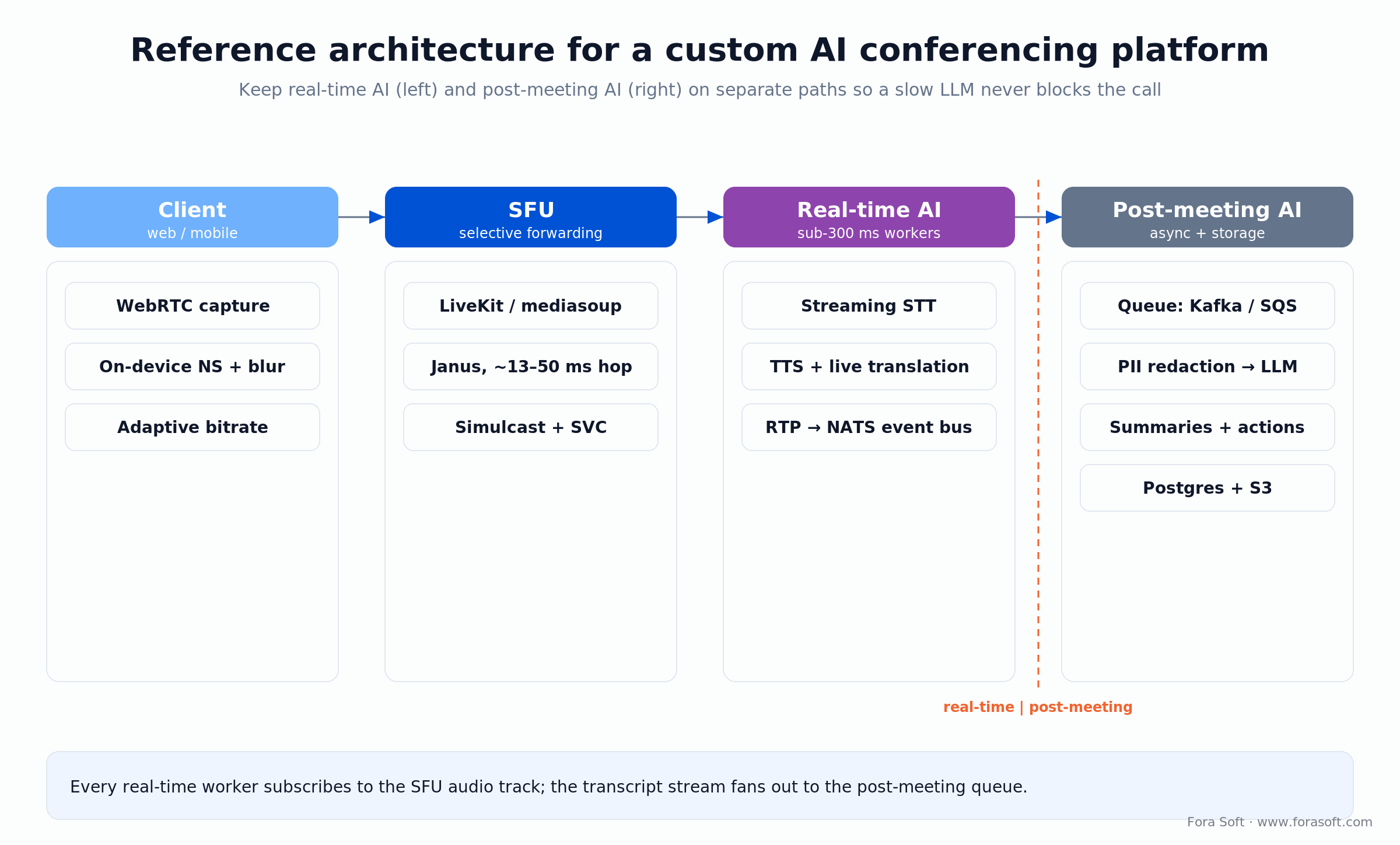
Figure 4. The four layers, with the real-time path kept apart from the post-meeting queue so the LLM never gates the call.
Compliance: HIPAA, GDPR, EU AI Act, BIPA
HIPAA (US telehealth). TLS 1.2+ in transit, AES-256 at rest, signed BAAs with every AI vendor, full audit logs of PHI access, and retention windows. PII redaction runs before any LLM call — no exceptions.
GDPR (EU). EU-region servers, right-to-erasure on transcripts, a signed DPA with each processor (CPaaS, STT, LLM). Where telehealth or court retention windows conflict with erasure, document it in your DPIA rather than hoping it never comes up.
EU AI Act. Three dates matter as of October 2026. Emotion recognition in workplaces and education has been a prohibited practice since 2 February 2025 under Article 5, unless it’s for medical or safety reasons — so if your product infers speaker emotion, it’s already off-limits in those settings. Article 50 transparency duties have applied since 2 August 2026: tell people when they talk to an AI or are exposed to emotion recognition, and mark AI-generated content (generative systems already on the market have until 2 December 2026 for machine-readable marking). The Digital Omnibus, Regulation (EU) 2026/1744 in force since 27 July 2026, moved stand-alone Annex III high-risk obligations — conformity assessment, technical documentation, CE marking — from 2 August 2026 to 2 December 2027, and Annex I systems inside regulated products to 2 August 2028 (Gibson Dunn; official EU AI Act framework). Use the extra time to build the documentation, not to skip it.
FedRAMP / BIPA. FedRAMP authorization rests on NIST SP 800-53 controls, an assessment by an accredited third party (3PAO), monthly continuous monitoring and an annual reassessment. Illinois BIPA treats voiceprints as biometric data: get explicit written consent before you create voiceprints for speaker identification, and no third-party sharing without authorization.
Reach for a compliance sprint first when: you touch PHI, biometric voiceprints, or EU users. Redlining BAAs and DPIAs before a line of code beats retrofitting them after the pilot — we learned that the expensive way on our first telehealth build.
What a custom build costs in 2026
| Stage | Dev cost | Monthly ops | Timeline |
|---|---|---|---|
| PoC (1 use case, demo-grade) | $15–30k | ~$200–500 | 4–6 weeks |
| MVP (10–50 CCU, basic AI) | $50–150k | $2–5k | 3–6 months |
| Production (1k+ CCU, HIPAA) | $200–500k | $10–30k | 6–12 months |
| Annual ops + model refresh | 15–20% of build | Ongoing | Continuous |
The recurring AI bill surprises people because it’s so small. Work it out for a modest product at 100 meetings a month, 45 minutes each: streaming STT at Deepgram’s list price is 100 × 45 × $0.0077 = $34.65 (about $21.60 at the October 2026 promotional rate); LLM summaries at ~$0.02 a meeting add $2; 4,500 LiveKit Cloud agent-session minutes at the $0.01 overage rate add $45 (the $50/month Ship plan includes 5,000; LiveKit pricing). That’s roughly $82/month in AI spend. The hybrid path (a CPaaS for transport plus a custom AI layer) usually lands between PoC and MVP: 8–12 weeks and $40–80k. The line item that actually hurts is compliance — budget 10–20% of dev cost for HIPAA or EU AI Act documentation if you’re regulated.

Figure 5. One-time build stages on the left; the recurring AI bill worked out line by line on the right.
Mini case: V.A.L.T. and the courtroom audio pipeline
Situation. A court system needed nine simultaneous IP-camera feeds per interrogation room with synchronized transcription, speaker diarization, audit logs and a six-year retention window. Off-the-shelf platforms either failed compliance or couldn’t meet the data-residency rules.
What we shipped. A custom WebRTC SFU with on-edge audio capture, streaming per-speaker STT, Pyannote diarization, PII-redacted post-meeting summaries through an on-prem LLM, and on-prem storage for the full chain — behind an audit-trail UI for prosecutors and defenders.
Outcome. Glass-to-glass latency stayed under 800 ms and transcription WER landed under 9% on courtroom audio. The architecture now powers V.A.L.T. across police interrogation rooms and medical-training centers. Want a similar assessment?
A decision framework in five questions
1. Who consumes this? Internal-only calls point to a subscription; a product sold to other buyers points to a build.
2. What’s your compliance floor? HIPAA, FedRAMP, BIPA or EU data residency usually rules out the vendor default and pushes you to a controllable stack.
3. Is the AI your differentiator? If the AI is the product, you can’t rent it from Zoom’s roadmap. If it’s just meeting notes, you can.
4. What’s your latency floor? Sub-300 ms captions and translation on a branded UI need a stack you control; near-real-time notes don’t.
5. Build, buy, or hybrid? Most teams land on hybrid — a CPaaS for transport plus a thin custom AI layer. It’s the fastest way to own the AI without owning the SFU. If you want a second opinion on where you fall, that’s the call we like to take.
KPIs to track from day one
Quality KPIs. P95 streaming-STT latency < 300 ms; transcript WER < 8% on clean audio, < 15% on noisy; summary ROUGE-L above 0.5 against a human gold set; PII leakage in summaries at 0%.
Business KPIs. Time-to-summary < 10 s after the meeting ends; action-item capture above 85%; subscriber retention past 6 months; vendor-API spend under 15% of MRR.
Reliability KPIs. Uptime above 99.9% per service; SFU pod failover under 2 s; full audit-log replay possible for any meeting inside the retention window.
Five pitfalls that wreck AI conferencing launches
1. Latency creep. STT → LLM → database → UI can grow to 5–10 s of perceived lag. Decouple with async queues and show a spinner during summary generation; never block the call.
2. Hallucinated summaries. Cheap models invent action items nobody said. Add domain fine-tuning, confidence thresholds and human review for clinical or legal calls.
3. PII leaking into summaries. Patient names or card numbers landing in cloud LLM logs is a regulated-data incident. Run regex plus NER redaction before any LLM call, and encrypt at rest.
4. Caption errors. Misheard words and word-salad captions destroy trust instantly. Test against diverse accents, background noise and your domain vocabulary; domain tuning on Deepgram typically cuts WER by around 30%.
5. Scale bottleneck on the STT API. A 10-user pilot won’t reveal the rate limits you hit at 1,000 concurrent calls. Plan connection pooling and a self-hosted Whisper-on-GPU fallback before launch, not after.
When you should NOT build a custom platform
If you’re a team under 50 people running internal calls with no special compliance need, the math doesn’t work. Subscribe to Zoom AI Companion or Teams Copilot, add Otter or Fireflies for the bot layer, and move on. A custom build only pays back when you ship a product to other buyers, sit under HIPAA / FedRAMP / GDPR, or differentiate on AI the platforms don’t expose.
The common middle path is to start on a CPaaS (LiveKit, Daily, Agora) and add a custom AI layer over its event stream. Cheaper than from-scratch, faster than waiting on a vendor roadmap, and easier to migrate later. We run that pattern often, and we’ll tell you when it’s the right one.
Need an AI-conferencing build that ships HIPAA-grade?
We’ve done courtrooms, telehealth and online learning at scale. Bring your vertical and your compliance must-haves; we’ll come back with an architecture and a price we can defend.
FAQ
Should you build or buy an AI conferencing solution?
Buy if you run internal calls on generic compliance: Zoom, Teams and Google Meet bundle summaries and transcription for $0–30 per seat in 2026. Build, or go hybrid on a CPaaS such as LiveKit, if you sell the product to other buyers, sit under HIPAA, GDPR or the EU AI Act, or differentiate on AI the platforms don’t expose.
How do you add AI to a Zoom-like product in three months?
Use LiveKit or Agora for the SFU, Deepgram or Whisper for streaming STT, and queue summaries through an LLM. Skip custom ML. Typical scope: 8–12 weeks of dev, $40–80k in build, $200–500/mo in API and hosting costs at PoC scale.
What does a custom AI conferencing platform cost?
PoC $15–30k (4–6 weeks). MVP $50–150k (3–6 months). Production HIPAA-grade $200–500k (6–12 months). Annual ops run 15–20% of build. Recurring AI is small — about $82/month at 100 meetings on October 2026 list prices. Budget a further 10–20% of build for compliance documentation if you are regulated.
Is Zoom’s AI free, and how do Teams Copilot and Google Meet compare?
Zoom keeps core AI — summaries and transcription — free in paid Workplace plans (Pro $14.16/user/mo), with the ZoomMate add-on from $20/user/mo (October 2026). Microsoft 365 Copilot costs an extra $30/user/mo, or $21 on Copilot Business for 10–300 seats. Google Meet’s Gemini features come with Workspace Business Standard ($14/user/mo annual) and up. For internal meeting notes, the seat you already pay for on Zoom or Google is the cheapest path.
Deepgram or Whisper for production transcription?
Deepgram Nova-3 lands about 5.26% WER on batch and 6.84% streaming, sub-300 ms latency, $0.0043/min batch and $0.0077/min streaming list ($0.0048 promotional, October 2026) — the production default for telehealth and support. Whisper is free and ~10.6% WER but slower and prone to hallucination on long audio. Whisper for cost-sensitive or self-hosted; Deepgram or AssemblyAI for production SaaS.
Is real-time translation reliable enough for clinical or legal calls?
Not for decisions. Built-in speech translation now covers five languages in Zoom, nine in Teams and is scaling to 70+ in Google Meet (2026), but it is tuned for business speech, and Meta’s open streaming models still add roughly 2 s of latency. Use real-time translation for accessibility and equity, not for clinical or legal decisions. Always keep a qualified human in the loop on regulated content.
How does the EU AI Act affect meeting emotion analysis?
The EU AI Act has banned emotion recognition in workplaces and education since 2 February 2025 (a prohibited practice under Article 5), unless it’s for medical or safety reasons. Article 50 transparency duties, including telling people an emotion-recognition system is in use, apply from 2 August 2026, while the Digital Omnibus moved Annex III high-risk conformity assessment to 2 December 2027. If your product infers speaker emotion, disable it in those contexts or be ready to justify it.
How do you prevent PII leaks in summaries?
Run regex plus NER redaction on the transcript before any LLM call, encrypt at rest, audit summaries monthly for entity leakage, and sign BAAs with every AI vendor. Never send raw PHI to a public LLM endpoint without a vetted enterprise tier.
What latency is realistic for live captions and translation?
Live captions under 400 ms are achievable with streaming STT and a tight render loop. Speech-to-speech translation lands 2–3 s for natural output; tighter needs GPU acceleration and compressed pipelines. That is why translation feels like an interpreter channel, not a live conversation: past roughly 400 ms one-way (ITU-T G.114), natural turn-taking breaks down.
What to read next
Features
AI Video Conferencing Features: the 12 That Matter
The full catalogue of AI features and what each one is for.
LiveKit
Building Multimodal AI Agents with LiveKit
Voice, vision and production patterns for real-time agents.
Translation
7 Tools for Real-Time Multilingual Translation
DeepL, KUDO, Interprefy, Teams, Zoom and Meet compared.
Stack
The Agora.io Alternative Guide for 2026
Custom WebRTC with LiveKit, mediasoup, Jitsi and Janus.
Services
Video Conferencing Development at Fora Soft
How we scope and ship WebRTC + AI conferencing builds.
Ready to ship AI video conferencing that moves the needle?
Pick the AI features that fit your latency budget and compliance footprint, keep real-time and post-meeting AI on separate paths, redact PII before any LLM call, and instrument WER, latency and PII leakage from sprint one. The hard part was never the models — it’s the seams between them.
If you’d rather not work that out alone, that’s the call we like to take. Bring your scope, your vertical and your KPIs; we’ll bring 21 years of real-time video and AI delivery and an honest answer about whether to buy, build or hybridize. If you build, our speech-to-text development team owns the transcription, caption and translation layers end to end.

The book · Volume 7 of 7
AI for Video: A Complete Guide to Intelligence in Video Products: From Real-Time Pipelines and Agents to Serving, Cost, Compliance, and Verticals
This guide splits AI conferencing into real-time and post-meeting paths; the real-time path is where builds get hard. Volume 7 shows where AI plugs into a WebRTC pipeline under call latency, how live captions, translation and on-the-fly moderation are built, what serving costs per stream-hour, and how the EU AI Act applies. It turns the buy-versus-build call into numbers your team can defend. Written by Nikolay Sapunov, CEO at Fora Soft.
Read it on Amazon →Kindle & paperback · Fora Soft Video Engineering Handbook
Let’s scope your AI conferencing build
Bring requirements, compliance constraints and rough numbers. We’ll bring 21 years of real-time video and AI delivery and a quote we can stand behind.

