

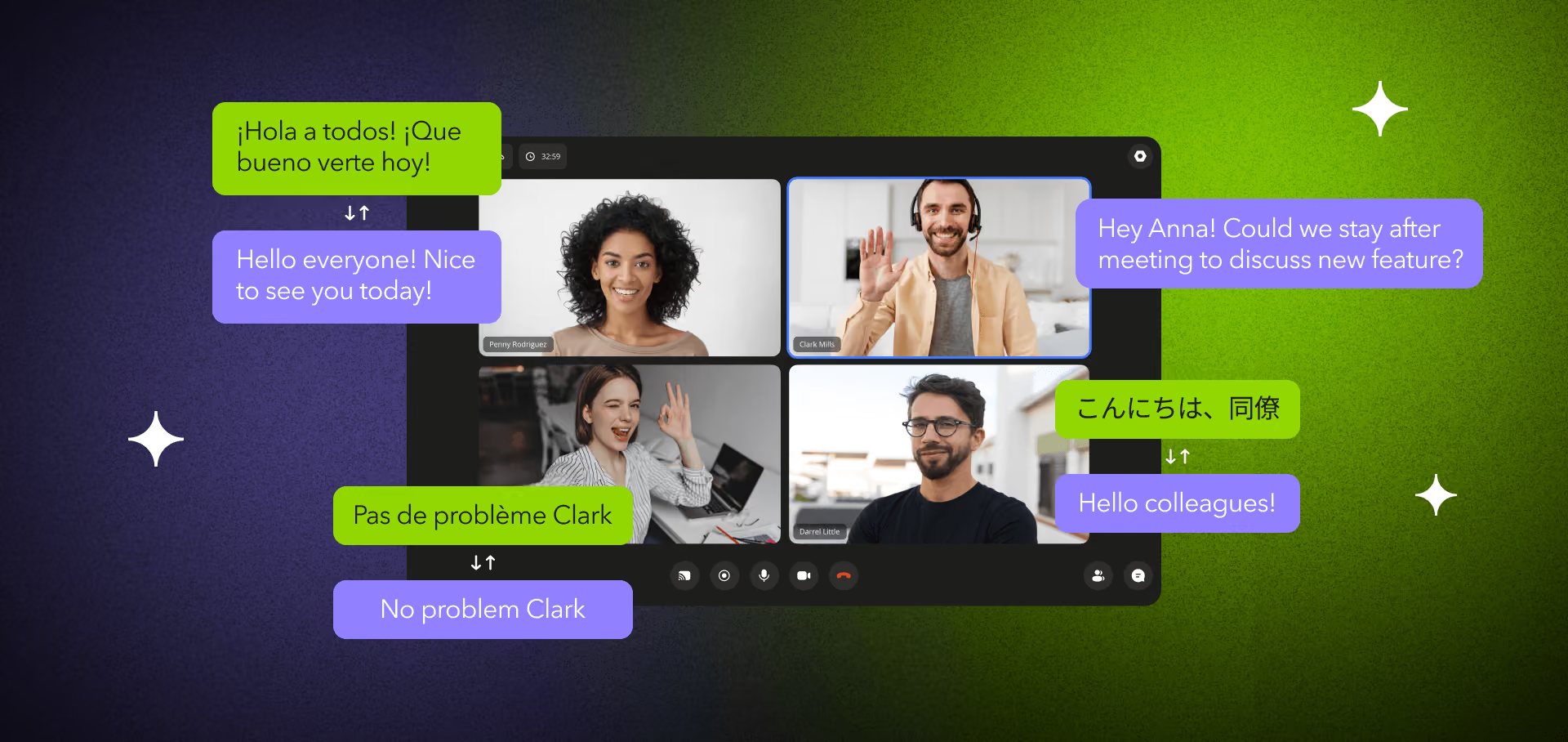
Real-time meeting translation in 2026 comes down to three platforms for most buyers: TransLinguist for branded, product-embedded multilingual meetings; Interprefy when a certified human interpreter is non-negotiable; and Wordly for AI captions at conference scale. Everything else is either a built-in feature (Zoom, Teams, Google Meet) or a custom build. We know the trade-offs because we built the real-time translation engine behind one of the three.
Over 21 years and 250+ shipped products, Fora Soft has integrated interpreter software, streamed caption overlays into WebRTC calls, and rebuilt translation UX for clients who outgrew native Zoom or Teams. This is the honest comparison we wish our own clients had when they were choosing: what the top three do in 2026, where each one breaks, how the built-ins now compete, when a custom build pays off, and the latency and accuracy numbers nobody likes to publish.
Key takeaways
• Three platforms, three jobs. TransLinguist owns branded/embedded meetings, Interprefy owns human-plus-AI high-stakes events, Wordly owns AI captions at scale. Match the job, not the logo.
• Built-ins cover captions, not spoken audio. Zoom’s spoken Voice Translator is a 5-language beta (April 2026); Google Meet’s Gemini voice is GA for five European pairs; Teams’ Interpreter needs a Copilot licence.
• Speed has a floor. Spoken translation runs 0.8–2.0s end to end; captions 0.4–0.8s. Past ~1.5s a conversation starts to feel laggy.
• Accuracy is honest, not magic. Speech recognition runs about 8% word error on clean audio and ~14% in a real meeting; hard language pairs like Chinese or Japanese trail the strong ones.
• The EU AI Act rule that bites is Article 50. Transparency duties apply 2 August 2026. The old “high-risk from August 2026” line is wrong — the Digital Omnibus pushed high-risk to December 2027 and August 2028.
What Changed in Meeting Translation by 2026
Two years ago this topic read like frontier tech. It is not anymore. Three shifts settled the market.
Streaming speech-to-text got cheap and fast. Deepgram, OpenAI, and Google all run streaming transcription with sub-300ms first-token latency at roughly half a cent per minute in 2026. You can transcribe every speaker in parallel without watching the bill, which is what makes multi-language meetings practical instead of aspirational.
Speech-to-speech went production-ready. Unified voice models translate speech to speech while preserving prosody, so you no longer have to chain transcription, translation, and synthesis for every use case. The engineering trade-off is still latency versus naturalness, but the ceiling moved up.
The built-ins caught up on captions. Zoom, Teams, and Google Meet now translate captions across dozens of languages. For an internal stand-up where captions are enough, the “build a translation app” conversation is mostly over — you flip a toggle. What is left for dedicated platforms is the hard part: spoken output that sounds human, brand-owned UX, certified-interpreter workflows, 50-plus-language parity in one session, and compliance logging. That is where TransLinguist, Interprefy, and Wordly still earn their fee.
Why We Can Judge These Three Platforms
We built the real-time translation infrastructure behind TransLinguist, the flagship translation platform in our public portfolio — a multilingual meeting system that doubled its client’s ROI in the two years after we shipped AI translation overlays into it. That is a disclosure, not a hidden thumb on the scale: we tell you exactly where each platform, including that one, is the wrong choice.
Beyond TransLinguist, our team has wired interpreter software and caption pipelines into telehealth, e-learning, and live-commerce products — including BrainCert, an e-learning platform serving 1M+ learners with captioning and translation. We have integrated Deepgram, Whisper, DeepL, gpt-realtime, ElevenLabs, and all three reviewed platforms into client stacks in the last 24 months through our AI integration services. The recommendations below come from production behaviour, not vendor decks.
Choosing a meeting translation platform this quarter?
Tell us your languages, meeting volume, and compliance surface. We’ll map TransLinguist, Interprefy, Wordly, and build-vs-buy to your exact case in 30 minutes.
How Real-Time Meeting Translation Works in Under a Second
Every platform here, native or dedicated, runs some version of the same six-stage pipeline. Understanding it tells you where latency and errors come from — and which corners a vendor is cutting.
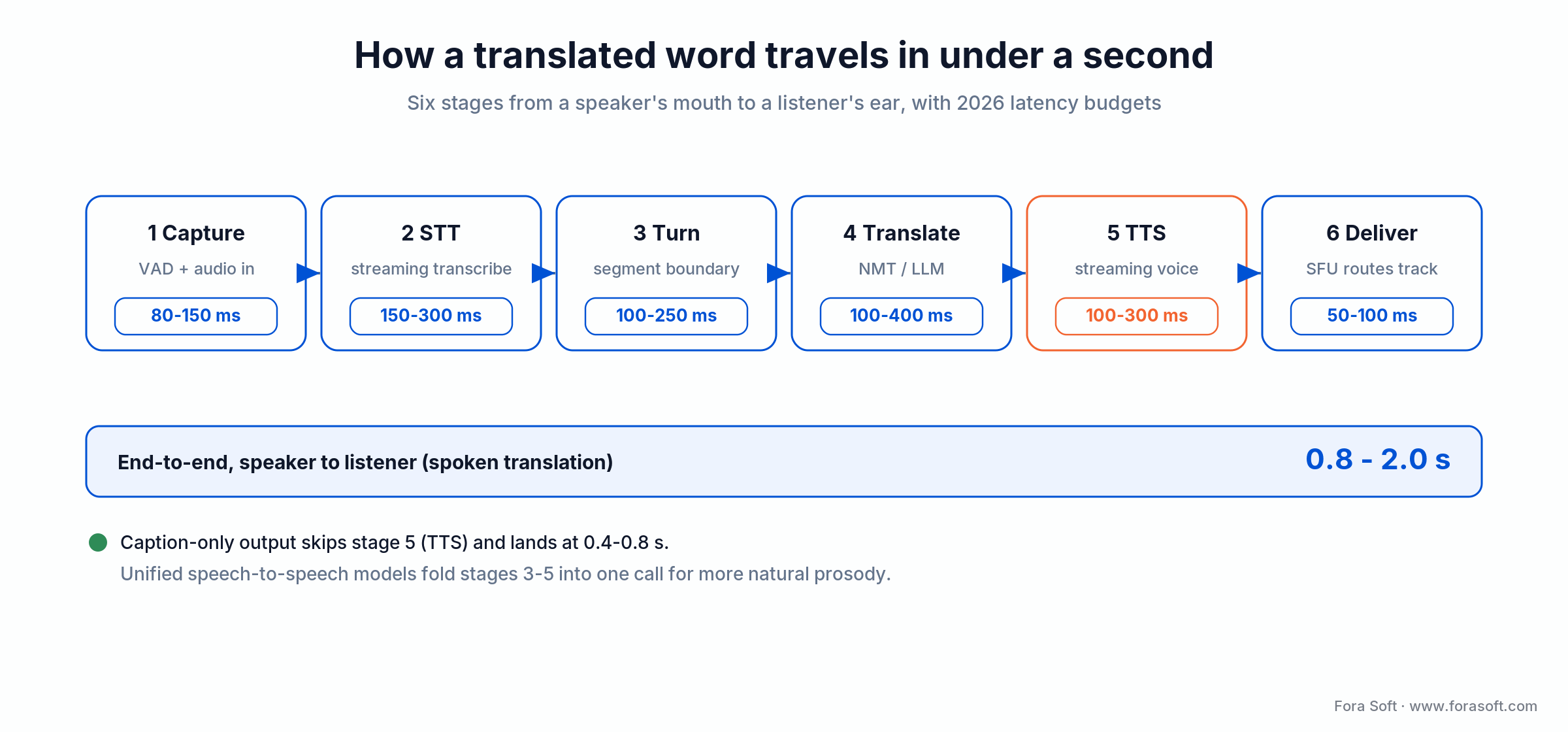
Figure 1. The path from a speaker’s mouth to a listener’s ear. Spoken translation lands at 0.8–2.0s; caption-only skips synthesis and lands at 0.4–0.8s.
The expensive stage is the last one before delivery: streaming text-to-speech adds 100–300ms, and a naive cascade that waits for whole sentences can blow past three seconds to first audio. Switching to streaming synthesis has cut one benchmarked pipeline from 4,200ms to 475ms. Unified speech-to-speech models fold the middle stages into a single call, which is why they sound more natural — they carry prosody and emotion across the language switch instead of rebuilding it. For the transport layer underneath, see our real-time communication apps guide and the LiveKit multimodal agents guide.
How Accurate Is AI Meeting Translation, Really?
Accurate enough to be useful, not accurate enough to fire your interpreters for a courtroom. Two numbers decide the outcome, and they compound.
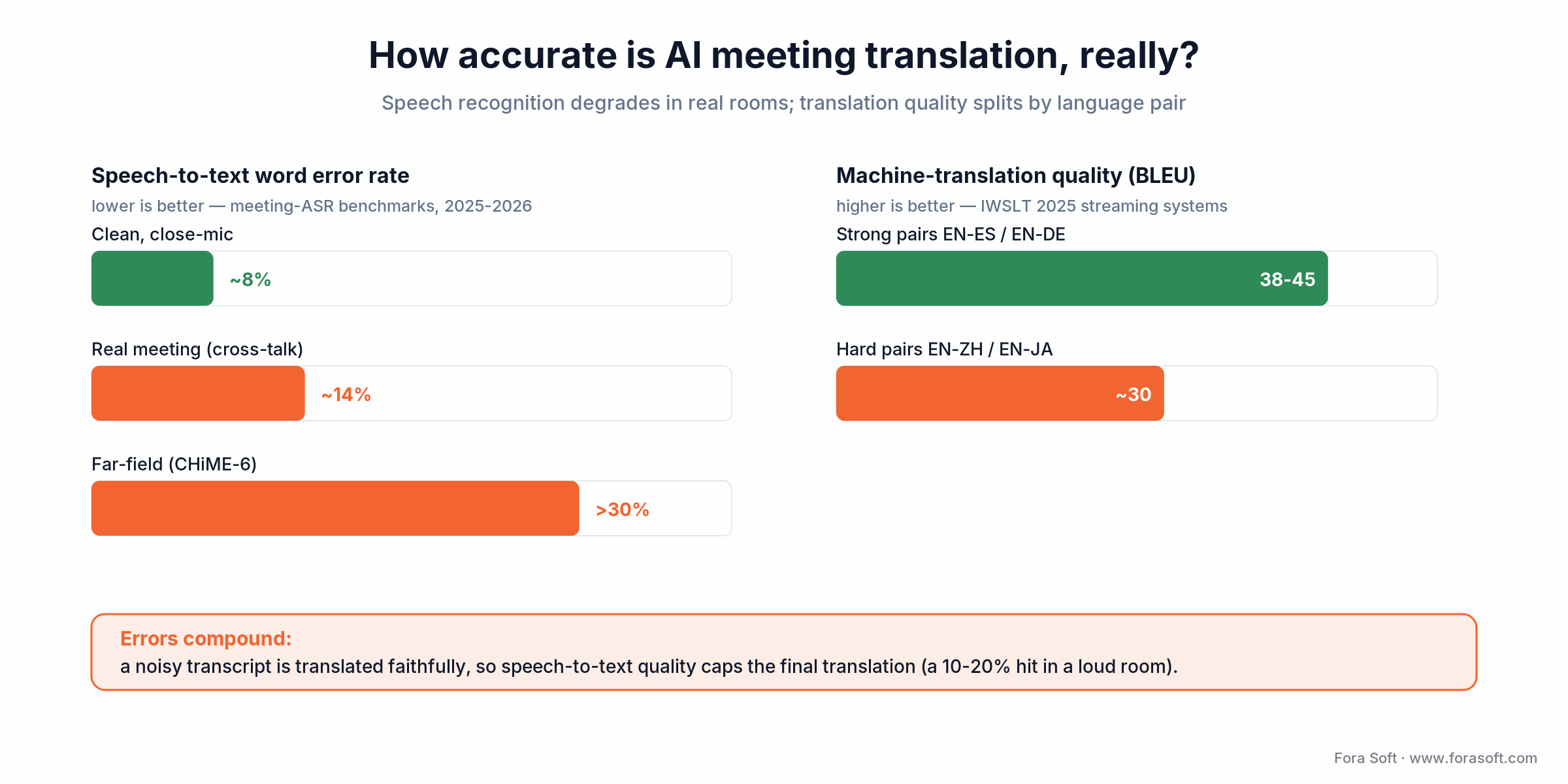
Figure 2. Speech recognition degrades sharply in real rooms, and translation quality splits by language pair. A noisy transcript caps the final translation quality.
Speech recognition sits near 8% word error on clean, close-mic audio and climbs to roughly 14% in a real meeting with cross-talk and laptop mics; far-field, dinner-party conditions like the CHiME-6 benchmark run past 30%. Machine translation then splits by language family: top streaming systems reach the high-30s to mid-40s in BLEU on strong pairs such as English to Spanish or German (IWSLT 2025), and trail on Chinese or Japanese.
Here is the part vendors skip: the errors compound. A noisy transcript is translated faithfully into a noisy result, so speech-to-text quality caps translation quality — expect the final output to slip 10–20% once the room gets loud. For numbers with a real methodology instead of a marketing figure, Meta’s open multilingual speech-translation research (the 2023 streaming speech-translation paper) is the most reproducibly benchmarked reference. A custom glossary and speaker training buy back several points, and for anything high-stakes you keep a human in the loop. These figures line up with our own vendor benchmarks.
TransLinguist: The Platform We Helped Build
TransLinguist wins when translation is a feature your customers see, not a convenience for your team. It is a 62-language AI-plus-human platform whose in-house Speech AI covers 15 languages with a sub-second “VoiceSync” claim, and it runs inside a brand-owned meeting experience rather than “powered by Zoom.”
Where it wins: real-time voice and caption translation, speaker-identified transcripts, on-demand human-interpreter escalation, white-label UI, and API hooks into meeting platforms and LMS systems. Its reference deployment at a 2025 security conference ran 22,000 participants across six languages at sub-three-second latency.
Where it breaks: internal team meetings where everyone already has Zoom licences. Paying for a branded platform to translate a weekly stand-up is spend with no payoff — turn on native captions instead.
Reach for TransLinguist when: translation is embedded in a product your customers use (telehealth, LMS, sales) and the meeting experience has to carry your brand, not a vendor’s.
Interprefy: Human-AI Hybrid for High-Stakes Events
Interprefy is the Swiss-built choice when the translation has to be right, not just fast. It pairs remote simultaneous interpreters, certified professionals in their own booths, with an AI captioning layer that its 2026 platform now runs across 80+ languages and 6,000+ combinations.
Where it wins: broadcast-grade delivery of human interpreters into Zoom, Teams, Webex, or its own client; floor-language and relay routing; AI captions as fallback; deep integrations with event-management stacks. This is the platform for shareholder meetings, diplomatic events, medical conferences, and legal proceedings where a mistranslation is a material risk.
Where it breaks: casual internal meetings. Interprefy is priced and provisioned for events; pricing is fully custom and quoted per engagement, with no published rate card and no hour rollover. Hiring it for a Tuesday all-hands is flying a chef in to make weeknight pasta.
Reach for Interprefy when: a certified human interpreter is legally or politically required and AI is the backup — regulated, high-visibility events where being wrong is expensive.
Wordly: Pure-AI Captions at Conference Scale
Wordly took a clear position early and stuck to it: no human interpreters, no voice synthesis, just AI captions in 60+ languages delivered to attendees’ phones via a QR code. By 2026 that focus pays off — it is the default for conference organisers who want translation without a six-figure interpreter budget. Its pricing runs as 12-month hour packages with volume discounts.
Where it wins: attendee-side caption delivery on mobile web, venue-agnostic setup, glossary and speaker training for branded terms, and honest per-hour economics. For a 100-to-10,000-person event where people watch a stage and read captions on their own device, nothing is simpler.
Where it breaks: two-way conversation. Wordly is built for one-to-many stage audio; there is no spoken output and no interpreter. If your use case is an interactive meeting, TransLinguist or a custom build serves you better.
Reach for Wordly when: you run large one-to-many events, captions are enough, and you want predictable per-hour pricing instead of an interpreter contract.
Not sure which of the three fits your meetings?
We’ve integrated all three into client products. Book a call and we’ll tell you which one to buy, or whether to build, based on your volume and compliance profile.
What About Zoom, Teams, and Google Meet?
Good enough for most internal meetings in 2026 — and still short of dedicated platforms for anything customer-facing or regulated. Here is exactly where each one stands.
Zoom. AI Companion delivers translated captions in 46 languages on Business Plus and Enterprise tiers. Its spoken Voice Translator launched as a beta in April 2026 — five languages only (English, Chinese, French, Japanese, Spanish), paid US accounts, with a capped trial. Captions are solid; spoken translation is early.
Microsoft Teams. Live captions cover dozens of spoken languages, but translated captions and transcription require Teams Premium or an M365 Copilot licence. The real-time Interpreter agent also needs Copilot and includes 20 hours of interpretation per person per month.
Google Meet. Gemini speech translation has been generally available to Workspace businesses since February 2026, speaking back in a voice like yours — but the launch set is five language pairs (English paired with Spanish, French, German, Portuguese, or Italian), one active pair per meeting. The wider “70+ languages” number is private preview, not GA.
Use native when: the meeting is internal, captions are enough, and compliance is not a blocker. Go dedicated when: you need spoken output, certified interpreters, branded UX, data residency, or 50-plus-language parity in one room.
Side-by-Side Comparison Matrix
Read the matrix at a glance first, then the table for the detail and the limitations column that vendors bury.
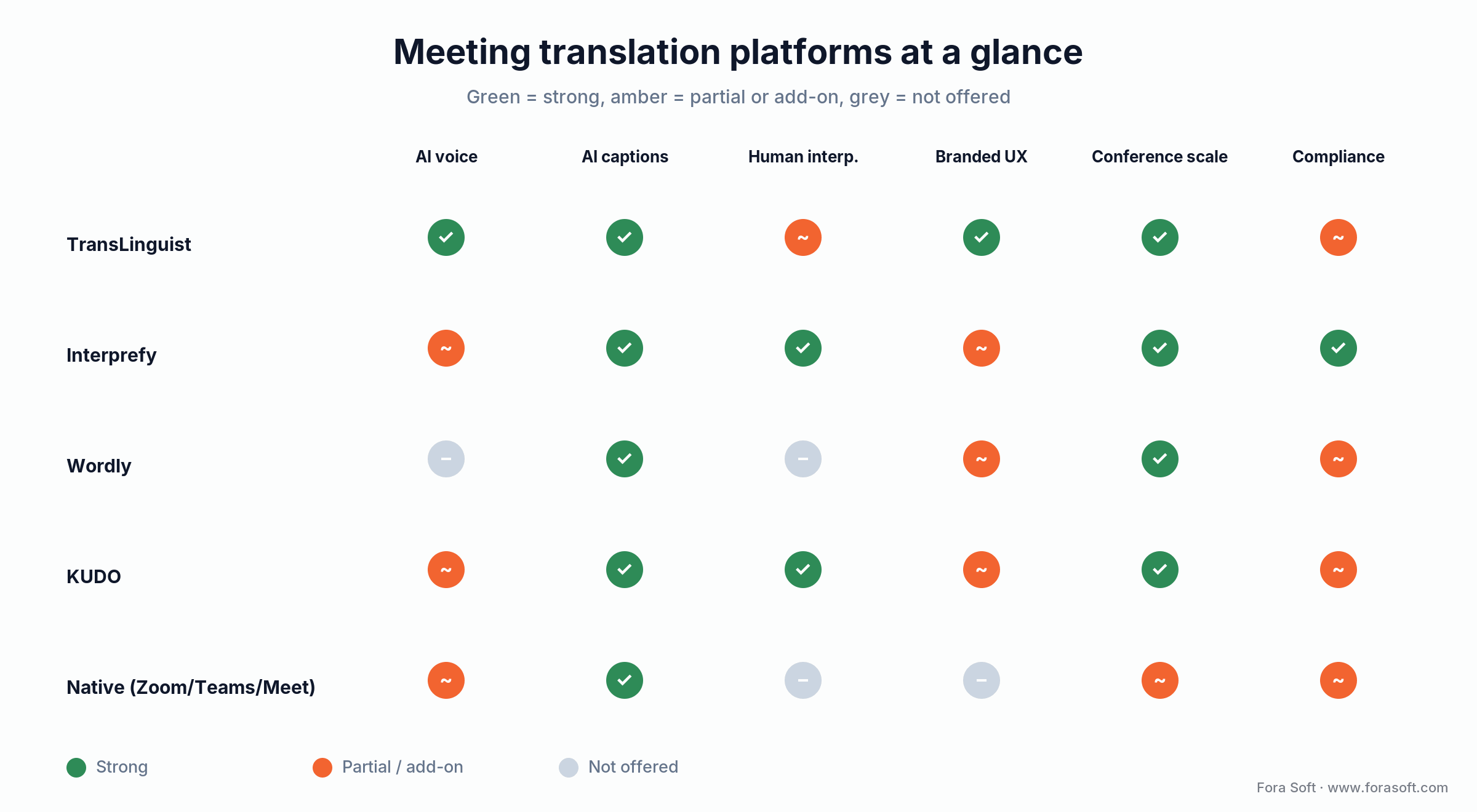
Figure 3. At-a-glance capability map. Green is strong, amber is partial or add-on, grey is not offered. The detail and prices are in the table below.
| Platform | AI voice | Human interpreters | Languages (AI) | Typical 2026 cost | Watch out |
|---|---|---|---|---|---|
| TransLinguist | Yes | On-demand | 62 (Speech AI 15) | Custom quote | Overkill for internal-only meetings |
| Interprefy | Backup | Core offering | 80+ | Custom, no rollover | Priced for events, not stand-ups |
| Wordly | No (captions) | No | 60+ | Hour packages | One-to-many only; no spoken output |
| KUDO | Yes (~4.1s) | 200 languages | 77 | PAYG or annual | S2S audio latency ~4s; not conversational |
| Native (Zoom/Teams/Meet) | Limited/beta | No | 46–50 captions | Bundled/add-on | Spoken voice tiny or gated behind premium |
KUDO deserves a mention as the fourth option: it fields 200 human languages through roughly 12,000 interpreters plus 77 AI languages, but its own engineers put patented speech-to-speech at an average ~4.1 seconds — fine for captions, too slow for back-and-forth conversation. For a vendor-by-vendor engineering benchmark of the underlying models, see our real-time speech translation vendor benchmarks.
How to Choose in Five Questions
Answer these five and the shortlist writes itself.
1. Captions, or spoken output?
Captions are cheaper, lower latency, and cover most cases. Spoken output matters when people cannot read the screen, will not read for hours, or need natural conversation flow. Captions point you at Wordly or the built-ins; spoken output points you at TransLinguist, KUDO, or a build.
2. Employees, customers, or a mix?
Employees tolerate generic UX. Customers do not. The moment your buyer sees the translation, branding and UX quality stop being optional — and native captions stop being acceptable.
3. Is the meeting regulated?
Healthcare, legal, financial, and public-service meetings need logging, disclosure, and human oversight. That rules out consumer-grade pipelines and pushes you toward Interprefy or a compliant custom build.
4. How many languages in one session?
Two or three is easy. Ten or more needs parallel pipelines, language-aware routing, and per-pair glossaries — architecture, not a toggle.
5. In your product, or beside it?
“Beside it” is a separate app or tab showing translations — Wordly or a built-in. “In it” means embedded in your telehealth app, LMS, or sales platform, which means TransLinguist or custom. If translation is a feature you sell, you are buying TransLinguist or building.
Build vs. Buy: When a Custom Platform Wins
Five conditions tip the economics toward building. Any one is a reason to spec the option; two or more and it is usually the call.
1. You ship a product, not just meetings. Telehealth, LMS, customer-success, and sales-intelligence products rarely match their own UX with a third-party iframe bolted on the side.
2. Your usage clears roughly 500 hours a month. At $100/hour SaaS pricing that is about $600K a year; a custom build plus ops typically lands lower over two years, with better margins after.
3. You need specific data residency or compliance. EU-only processing, BAA-covered inference, and zero third-party data sharing are hard to buy at list price and sometimes impossible.
4. Your terminology is non-negotiable. Medical, legal, and niche-technical vocabularies need glossary control that vendor platforms often will not expose deeply enough.
5. Translation is part of your moat. If you differentiate on multilingual reach, owning the stack means you are not hostage to a supplier’s pricing or roadmap.
If none of those hold, buy. The fastest path to value for most teams is a vendor plus native captions, not a build. Our software estimating guide shows how we keep custom-build budgets honest.
Reference Architecture for a Custom Platform
If you are building in 2026, the stack that actually ships is assembled from mature, production-tested parts. We have deployed versions of this for healthcare, education, and enterprise clients.
| Layer | 2026 default | Why |
|---|---|---|
| Transport / SFU | LiveKit Agents or Janus | Agent joins translation as a room participant; sub-100ms room-to-edge. |
| Streaming STT | Deepgram or self-hosted Whisper | Sub-300ms first token, 90%+ on clean audio across 50+ languages. |
| Turn detection | VAD + semantic turn detector | Avoids mid-sentence commits that wreck translation coherence. |
| Translation | DeepL, or fine-tuned LLM for terminology | LLM route when glossary enforcement is the priority. |
| Speech-to-speech | gpt-realtime or Gemini Live (select pairs) | Better prosody; bypasses the cascade for supported languages. |
| TTS | ElevenLabs or Cartesia streaming | Sub-150ms first chunk; optional voice cloning with consent. |
| Logging / observability | S3 + Postgres + OpenTelemetry | EU AI Act logging, replay for QA, per-stage latency histograms. |
The single most-skipped layer is observability. Translation quality drifts silently (a model update, an accent, a noisy room), and without per-stage latency and confidence logging you find out from an angry customer, not a dashboard.
The Real 2026 Cost Math
Published vendor prices move monthly; the underlying cost structure does not. Here is the per-hour compute for an AI-only pipeline — one speaker, one target language, spoken output on.
| Component | Typical 2026 rate | Cost / hour |
|---|---|---|
| Streaming STT | $0.005–0.02 / min | $0.30–1.20 |
| Translation (LLM route) | $5–15 / M tokens | $0.05–0.15 |
| Streaming TTS | $0.15–0.30 / 1k chars | $2–4 |
| Transport / SFU | ~$0.004 / participant-min | $0.25–0.50 |
| Total, pipelined | — | $3–6 / hour |
So the raw compute is a few dollars an hour. Vendors mark AI caption delivery to roughly $70–180/hour once you add support, UI, integrations, and reliability; human interpreters through an RSI platform run $300–800/hour all-in. Native captions are effectively free because they are bundled with a licence you already pay for.
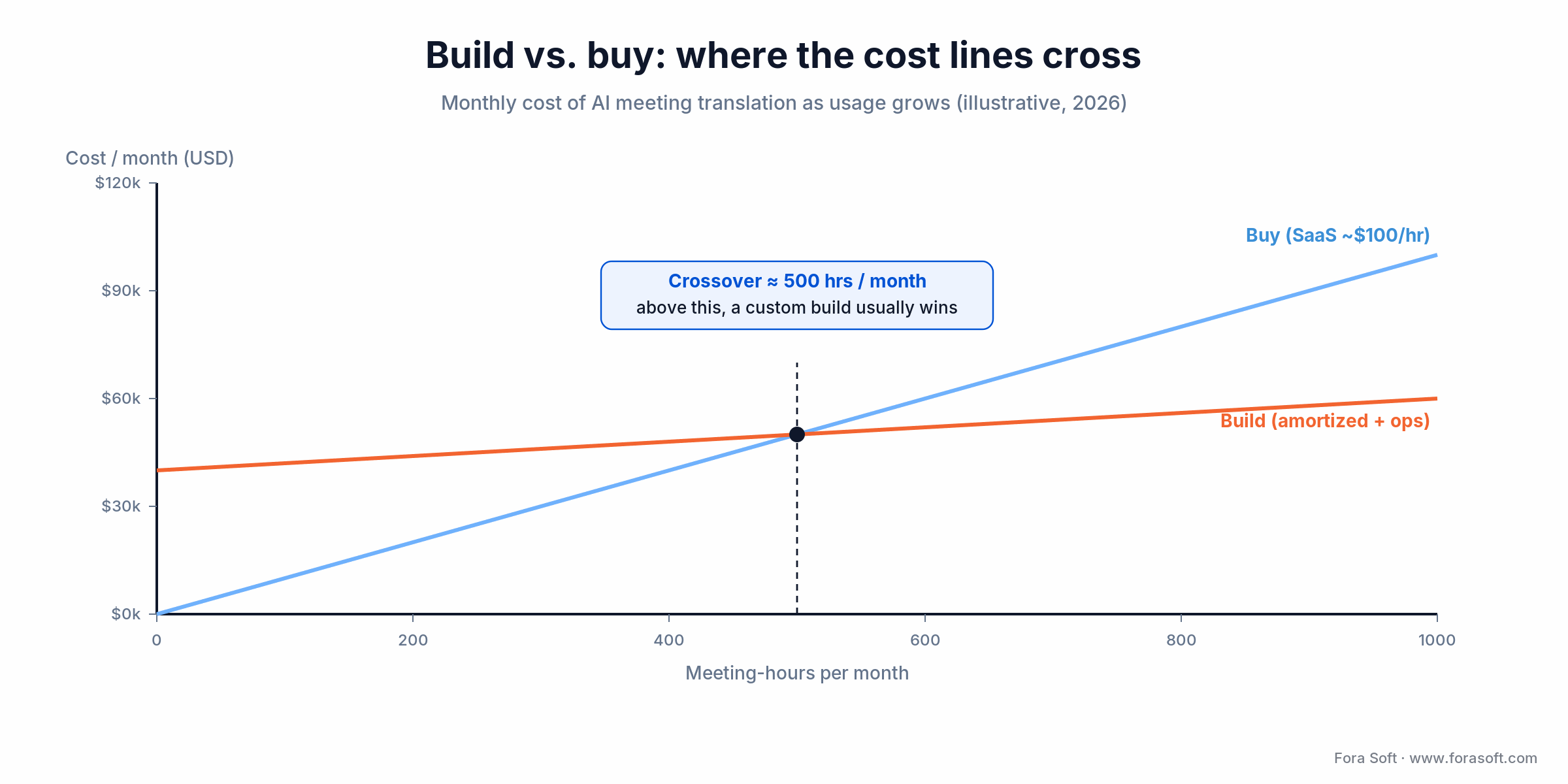
Figure 4. Illustrative monthly cost as usage grows. The buy line (SaaS) overtakes a custom build’s amortized cost at roughly 500 meeting-hours a month.
Read the crossover carefully: below ~500 meeting-hours a month, buying wins on every axis — speed, risk, and cost. Above it, a custom build’s low marginal cost starts to pull ahead, and the other four build conditions usually apply too by then.
Want the build-vs-buy math for your numbers?
Send us your monthly meeting-hours, languages, and compliance needs. We’ll run the crossover and tell you honestly whether to buy or build.
Compliance and the EU AI Act in 2026
Get the date right, because a lot of published advice has it wrong. The obligation that governs AI meeting translation is Article 50 transparency, which applies from 2 August 2026: you must tell people they are interacting with AI, and AI-generated content — including translations and summaries — must be machine-readable and marked as such. Breaches carry fines up to €15,000,000 or 3% of global annual turnover.
The “high-risk from August 2026” claim, which the previous version of this very article repeated, is now out of date. The Digital Omnibus of 19 November 2025 deferred the high-risk obligations to 2 December 2027 for standalone Annex III systems and 2 August 2028 for product-embedded Annex I systems. Real-time translation in a legal or medical decision can still fall in high-risk scope; you just have more runway than the old date implied.
In practice, for any platform, vendor or custom: log each translation with its source, model version, timestamp, and confidence; disclose that AI is translating; keep a human able to override; and respect data residency for EU-originating audio. HIPAA layers on top when translation touches protected health information — that means BAA-covered inference and no third-party model calls outside the covered boundary. Interprefy leads on EU residency; TransLinguist is configurable per client; Wordly is SOC 2 but not positioned for high-risk regulated use.
Five Pitfalls That Wreck Meeting Translation
1. Optimising accuracy and ignoring latency. A perfect translation that arrives four seconds late kills the conversation. Budget both, and measure the p95, not the average.
2. Testing on clean audio only. Demos use a good mic in a quiet room. Your users are on laptop speakers in an open office. Test with real meeting audio, or the jump to roughly 14% word error (worse in far-field rooms) will ambush you in production.
3. Skipping the glossary. Product names, drug names, and legal terms are exactly what generic models get wrong. A custom glossary buys back several accuracy points for a day of setup.
4. Treating all language pairs as equal. English–Spanish is a solved problem; English–Japanese is not. Set expectations and pricing per pair, and keep humans on the hard ones.
5. Forgetting the disclosure and logging. Article 50 is not optional in the EU from August 2026. Build the AI disclosure and the provenance log into the spec now, not after a compliance review flags it.
When Native Captions Are the Right Call
The honest counter-position: most companies do not need any of the three platforms above. If your meetings are internal, captions are enough, your users already sit in Zoom or Teams, and no regulator is watching, the built-in feature is the correct answer — cheaper, zero integration, and good enough in 2026.
You have outgrown native captions when translation becomes visible to a customer, when a meeting carries legal weight, when you need spoken output rather than text, or when one session mixes more than a handful of languages. Until one of those is true, spending on a dedicated platform is spending for a problem you do not have. That honesty is the point: we would rather you turn on a toggle than buy a build you will not use.
Reach for native captions when: the meeting is internal, captions are enough, and no regulator is watching. The built-in feature is cheaper, needs zero integration, and is good enough in 2026.
Our Track Record Shipping Real-Time Translation
We do not recommend platforms we have not built next to in production. Three examples, with numbers.
TransLinguist. We built the real-time translation infrastructure and integrated AI translation overlays; the client doubled ROI over the following two years, and the platform now scales to thousands of participants per session across dozens of languages.
Global telehealth. We shipped multilingual consultation flows with HIPAA-covered transcription and clinician-facing caption overlays, deployed across 40+ US states and several EU countries — the compliance chain designed in from the spec, not retrofitted.
Enterprise e-learning. On BrainCert we delivered captioning and translation across training and compliance courses for 1M+ learners. Third-party validation: a 100% Success Score across 250+ projects and a Clutch Top B2B designation. Want a similar assessment? Book a 30-minute scoping call and we’ll map it to your stack.
FAQ
What is the lowest latency for spoken meeting translation in 2026?
Unified speech-to-speech models hit 0.8–1.2s for supported language pairs. Pipelined transcribe-translate-synthesise stacks land at 1.2–2.0s end to end. Caption-only output is 0.4–0.8s because it skips voice synthesis.
Which platform handles the most languages at once?
Interprefy for human-interpreted events (80+ languages, 6,000+ combinations) and KUDO for sheer human coverage (200 languages). For AI-only, Wordly runs 60+ target languages in a single session; TransLinguist and custom builds match that when provisioned for it.
Can you use Zoom or Teams captions for customer-facing meetings?
For non-regulated, non-branded use, yes — they improved sharply by 2026. For anything customer-facing where you own the UX, or any regulated context, a dedicated platform or custom build is still the right choice.
Is AI translation HIPAA-compliant for telehealth?
It can be, but every model and transport leg needs a Business Associate Agreement. Consumer-plan Wordly or Zoom captions are not HIPAA-eligible; enterprise configurations with signed BAAs and regional inference are, and a custom build gives you full control of the BAA chain.
How accurate is real-time meeting translation?
On clean audio and strong pairs (English to Spanish, German, French), expect roughly 92–95% semantic accuracy on conversational content. A real meeting pushes speech recognition to about 14% word error (far-field rooms do worse), and hard pairs like Chinese or Japanese trail the strong ones. A glossary and speaker training add several points.
How long does it take to build a custom meeting translation platform?
A captions-only pilot with two language pairs on LiveKit plus Deepgram plus DeepL runs 6–10 weeks. Production-grade with spoken output, 10+ languages, compliance, custom UI, and observability is 4–7 months. We have shipped both.
Does the EU AI Act apply to AI meeting translation?
Yes. Article 50 transparency duties apply from 2 August 2026: disclose that AI is translating and mark AI-generated content as machine-readable. High-risk obligations were deferred to December 2027 (Annex III) and August 2028 (Annex I), so most meeting-translation use falls under transparency, not high-risk, in 2026.
Does spoken translation keep the speaker's voice?
Unified models such as gpt-realtime preserve prosody and tone well. Voice cloning through ElevenLabs or Cartesia, with consent, lets a pipelined stack match the original speaker’s voice across languages — useful for multi-hour events where voice variety matters.
What to Read Next
Engineering
Real-Time Speech Translation Vendors Benchmarked
Model-by-model latency and accuracy numbers behind the platforms above.
Comparison
7 Best Video Call Translation Tools (2026)
The video-call sibling to this guide, focused on multilingual calls.
Architecture
Building Multimodal AI Agents with LiveKit
The voice-AI stack that powers a custom translation platform.
Process
A Practical Guide to Software Estimating
How we keep custom real-time platform budgets honest.
Ready to Break the Language Barrier?
Real-time meeting translation in 2026 is a match, not a ranking. If captions are enough and your users live in Zoom or Teams, use the native feature and move on. If the translation is customer-facing, regulated, or part of your product, TransLinguist is where we start — we built its core. For high-stakes events that need a certified interpreter, Interprefy is the honest answer. For large conferences that want AI captions without an interpreter budget, Wordly is best in class.
And if the right answer is “build it” because you clear 500 hours a month, because compliance blocks the vendors, or because translation is your moat, that is what we do. Explore our custom language interpretation work, skim the audio-for-video fundamentals in our Learn hub, and let’s scope your version.
Building or buying meeting translation? Let’s pick the right path.
Thirty minutes, no deck. We’ll map TransLinguist, Interprefy, Wordly, and a custom build to your languages, volume, and compliance surface — and tell you which one to pick.

