

To build a video streaming app in 2026, decide first which of three modes you’re shipping: video on demand, live streaming, or conferencing. Each needs a different protocol, codec, and budget, so the mode you pick sets 80% of the architecture and the bill. This playbook walks the full stack, the 2026 cost math, and when to build vs buy. Fora Soft has shipped 250+ video products since 2005, so this is the engineer’s version, not the brochure.
Key takeaways
• Pick the mode first, the stack second. VOD, live streaming, and video conferencing require fundamentally different protocols, codecs, and budgets — mixing them without a plan burns cash.
• Latency drives 80% of the architecture. Under 500 ms means WebRTC SFU. 2–5 s means LL-HLS. 10–30 s means standard HLS or DASH with a CDN. Match the protocol to the tolerance, not the hype.
• CDN egress is usually 50–70% of your bill. Cloudflare Stream, Bunny, and Hetzner can cut egress 5–10× versus CloudFront at scale — but only if your cache-hit ratio stays above 90%.
• SaaS wins under 50 TB/month, self-host wins above it. LiveKit Cloud, Mux, and Cloudflare Stream are cheaper than a DIY build until your egress or minute volume crosses the break-even line.
• A real MVP is 4–12 weeks, not 12 months. With Agent Engineering, Fora Soft typically ships a working VOD or live MVP in weeks, not quarters — so you validate product-market fit before the infra bill balloons.
Why Fora Soft wrote this playbook
Fora Soft has been building real-time video, streaming, and conferencing products since 2005. Over 250+ shipped products, our team has delivered HD live classrooms for BrainCert (500M+ minutes of video across 10 data centers, 100K+ customers, 4× Brandon Hall Award winner), surveillance video SaaS for VALT (770+ organizations, 50K+ active users on full-HD RTMPS streams), a 1080p/8 Mbps remote production platform for Speed.Space (clients include Netflix, HBO, and EA), and a live trading platform for TradeCaster (46K+ traders broadcasting desktop streams with real-time chat).
We wrote this playbook because most streaming projects fail in the same three spots: the team picks the wrong protocol for their latency target, underestimates CDN egress by an order of magnitude, or reinvents an SFU when an existing open-source stack would have shipped in weeks. This guide compresses what we learned shipping those products into one decision framework you can apply before writing a single line of code.
Our point of view is explicit: we are a custom video streaming development house that uses Agent Engineering to ship faster than conventional agencies. That means our estimates usually land below the ranges you see in other 2026 guides — we compress research, scaffolding, and test cycles with AI coding agents while keeping senior engineers in the loop.
Need a second opinion on your streaming architecture?
30 minutes with a senior engineer who has shipped VOD, live, and conferencing in production. No slides, just whiteboard.
The three modes of video: pick one before you pick a stack
Every video streaming app falls into one of three modes: Video on Demand (VOD), live streaming, or video conferencing. They share almost nothing at the infrastructure level. A VOD platform caches encoded files at the edge and serves them over HTTP. A live broadcast ingests a single source and fans it out to thousands of viewers with 2–30 seconds of latency. A conferencing product carries multiple bidirectional streams through an SFU or MCU with under 500 ms delay.
Teams that try to be “all three from day one” overspend on every dimension. Ship the mode that drives your core revenue first, then add the others only when customer interviews show they matter.
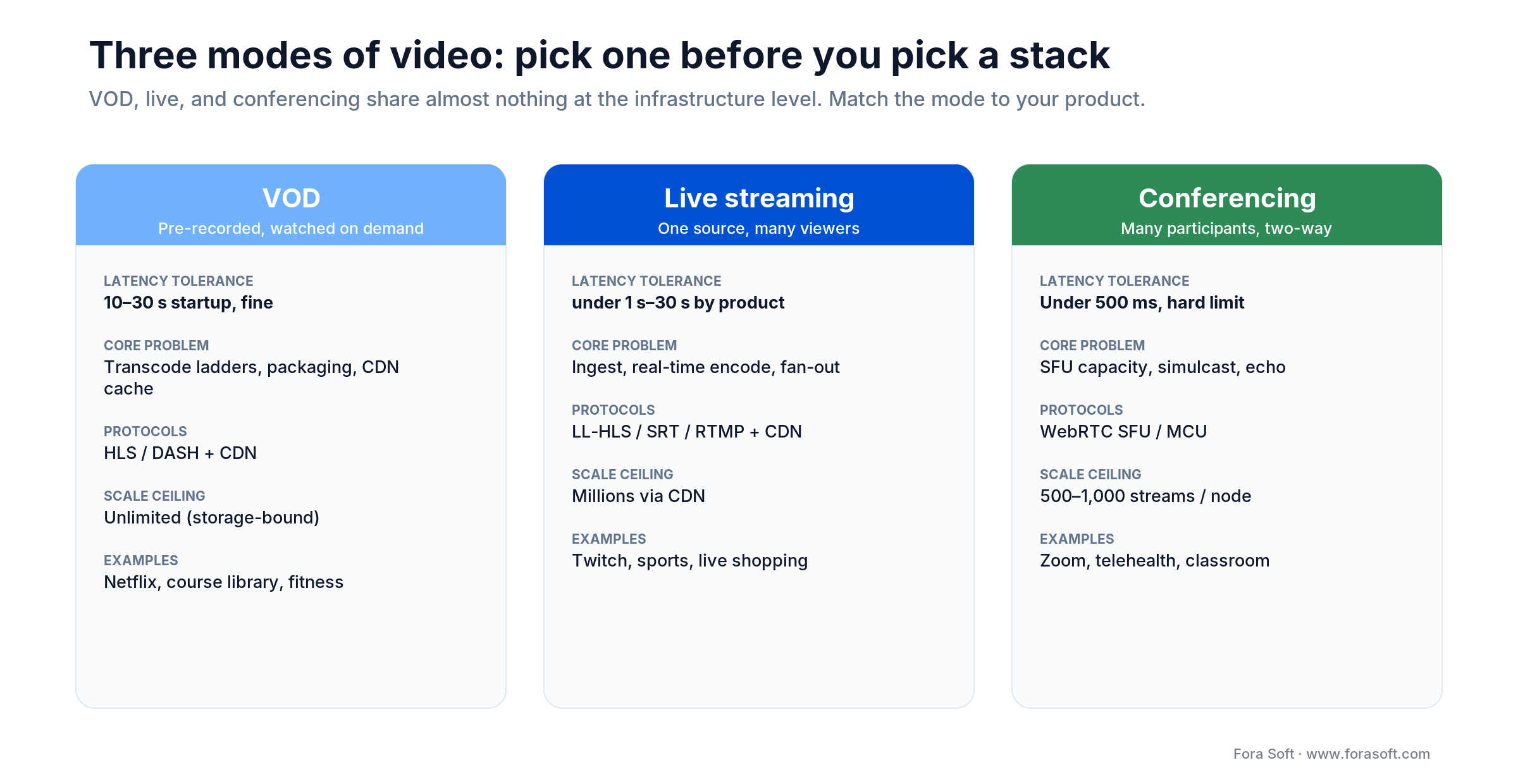
Figure 1. The three modes of video and how their latency, core problem, protocols and scale ceiling differ.
Video on Demand (VOD)
Users watch pre-recorded content on their schedule: Netflix, YouTube, a course platform, a fitness library. The engineering problem is storage, transcoding ladders, packaging (HLS/DASH), and CDN caching. Latency tolerance is effectively infinite — a 30-second startup delay is fine as long as playback is smooth.
Live streaming
One creator or camera, many viewers, real-time or near-real-time. Twitch, YouTube Live, a sports broadcast, an iGaming feed, a live shopping stream. The problem is ingest reliability, real-time encoding, chunked packaging, and CDN fan-out. Latency tolerance varies by product: under 1 s for iGaming, 3 s for a webinar, 30 s for a concert.
Video conferencing
Many participants, bidirectional, fully interactive. Zoom, Teams, a telemedicine room, a virtual classroom. The problem is SFU capacity, simulcast, bandwidth adaptation, and echo cancellation. Latency must stay under 500 ms or conversation breaks down. Our ProVideoMeeting and BrainCert builds both live in this mode.
Reach for VOD when: the product is asynchronous consumption — on-demand courses, archived events, premium libraries, short-form content — and you can tolerate 10–30 s of startup delay.
Reach for live streaming when: one source must reach many viewers in near-real-time — sports, events, trading streams, live shopping — and latency between 1 and 30 s is acceptable.
Reach for video conferencing when: participants talk back — telehealth, virtual classroom, hiring interview, support call — and latency above 500 ms would break the conversation.
The latency ladder: match protocol to use case
Latency is the single most consequential number in a streaming build. It determines the protocol, which determines the infrastructure, which determines the cost. Pick your latency target before you pick WebRTC vs HLS vs DASH.
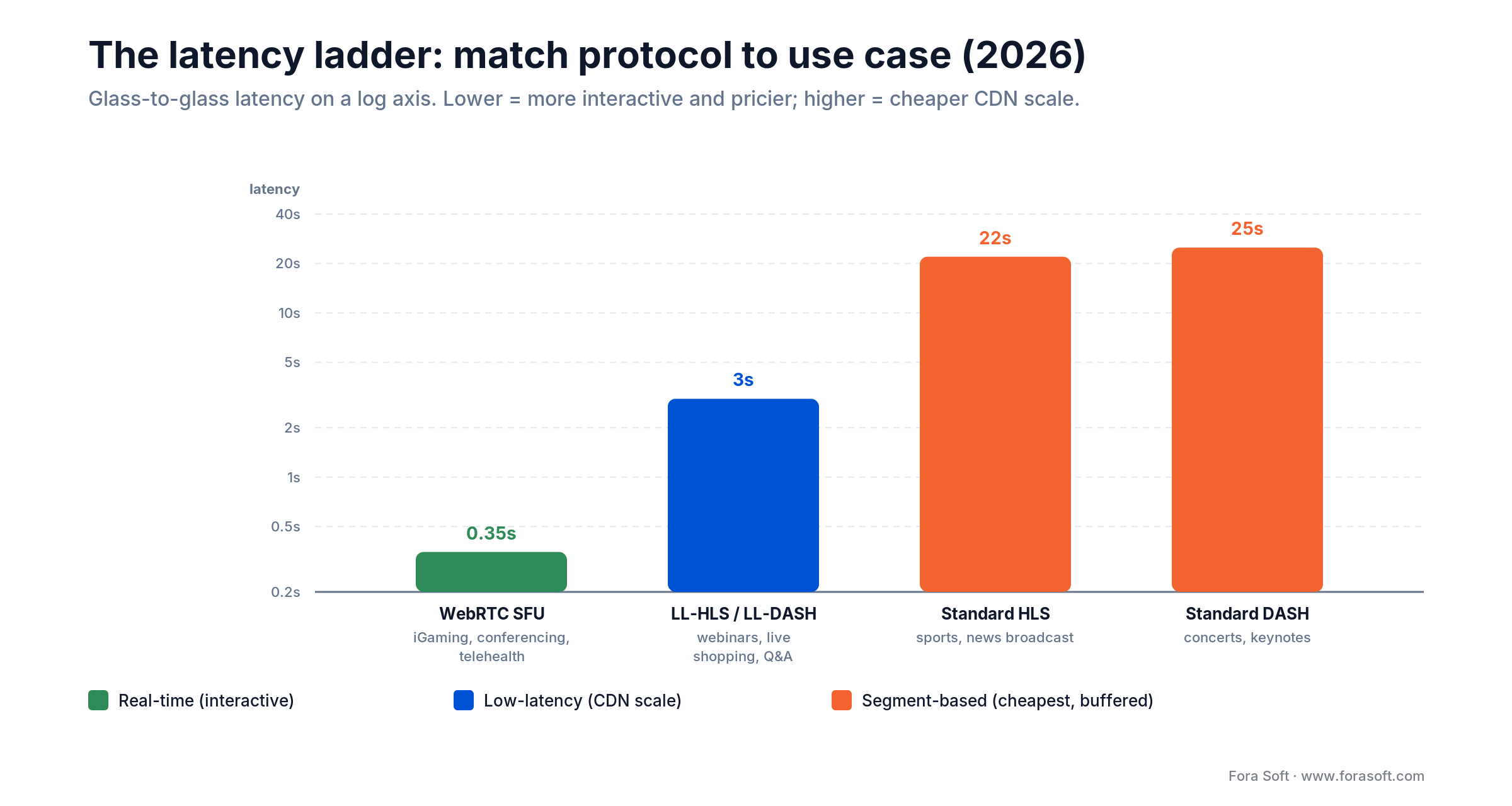
Figure 2. Glass-to-glass latency by protocol. WebRTC for conversations; LL-HLS for scale; standard HLS/DASH when buffering is fine.
| Use case | Max latency | Protocol | Scale ceiling |
|---|---|---|---|
| iGaming, sports betting | < 500 ms | WebRTC SFU | ~5,000 viewers/node; cluster for more |
| Video conferencing, telehealth | < 500 ms | WebRTC SFU / MCU | 500–1,000 active participants/node |
| Live auctions, eSports coaching | < 1 s | WebRTC or SRT | Thousands with clustering |
| Webinars, Q&A, live shopping | 2–5 s | LL-HLS / LL-DASH | Millions via CDN |
| Sports broadcast, news | 5–10 s | LL-HLS | Millions via CDN |
| Concerts, keynotes, entertainment | 15–30 s | Standard HLS / DASH | Millions via CDN |
| VOD library | Any (startup 1–3 s) | HLS / DASH + CDN | Unlimited, limited only by storage |
Two common mistakes: picking WebRTC for a 100,000-viewer passive broadcast (you will spend 10× what LL-HLS costs), and picking HLS for a two-person interview (a 20-second delay makes live chat useless). The WebRTC vs HLS comparison goes deeper.
VOD stack: codecs, packaging, storage, CDN
A modern VOD pipeline has five stages: upload, transcode, package, store, deliver. Every stage has a cost curve and a quality curve. The goal is the smallest file that still hits perceptual quality on every target device.
Transcoding ladder
Generate 4–6 renditions per master file: 360p at 500 kbps, 480p at 1 Mbps, 720p at 2.5 Mbps, 1080p at 5 Mbps, 1440p at 8 Mbps, 2160p (4K) at 15 Mbps. H.264 for universal compatibility; H.265/HEVC cuts bytes by 40–50% at equal quality. AV1 cuts another 30–50% but encodes 5–10× slower — use it for your long-tail catalog, not your new uploads.
Packaging and adaptive bitrate
HLS (Apple ecosystem, universal support) and MPEG-DASH (flexible, non-Apple browsers) are the two formats that matter. CMAF unified chunking lets you serve both from the same file set — our Learn: Video Streaming section breaks down how each protocol works end to end. Always generate a master playlist that lists every rendition so the player can adapt bitrate to network conditions.
Storage
S3-compatible object storage is the default. Hetzner Object Storage includes 20 TB of egress free per bucket and charges roughly a tenth of AWS S3 at scale — we cover the tradeoffs in our hosting provider comparison. Cloudflare R2 has no egress fees at all but ties you to Cloudflare’s ecosystem.
CDN delivery
A CDN caches your chunks at the edge so a viewer in Singapore doesn’t pull from your origin in Frankfurt. For VOD with long-tail content, cache-hit ratio above 92% is achievable. Bunny, Cloudflare, and Fastly all work well; AWS CloudFront is the default if you’re already deep in AWS. We break down server and egress math in our server cost estimation guide.
Reach for a managed VOD platform (Cloudflare Stream, Mux, api.video) when: your catalog is under 10 TB, you stream fewer than 100M minutes/month, and you don’t want to staff a dedicated video ops engineer.
Live streaming stack: ingest, transcoding, fan-out
A live pipeline looks like: encoder (OBS, hardware, or browser) → ingest server (RTMP or SRT) → transcoder → packager (LL-HLS or LL-DASH) → CDN → player. Each hop adds latency. Each hop can fail independently.
Ingest protocols
RTMP is the 20-year legacy standard — every encoder supports it, but it’s TCP-based and suffers on lossy networks. SRT (Secure Reliable Transport) is the modern replacement: UDP with FEC and encryption, designed for broadcast-grade ingest over the public internet. WebRTC ingest is the bleeding edge — sub-second end-to-end latency, but still not universally supported in encoder hardware.
Real-time transcoding
Live transcoding runs the stream through an ABR ladder in real time. Hardware encoders (NVIDIA NVENC, Intel Quick Sync, AMD VCE) cut CPU by 10× versus software x264/x265 and cut latency by hundreds of milliseconds per pass. If you’re running more than 10 concurrent streams, GPU-backed servers pay for themselves in 3–6 months.
LL-HLS fan-out
Low-Latency HLS uses 200–500 ms chunks and partial segment delivery to hit 2–5 s glass-to-glass latency while still riding standard HTTP CDNs. This is the sweet spot for 80% of commercial live streaming — more scalable than WebRTC, lower latency than standard HLS. Apple’s LL-HLS spec and CMAF-CTE together are now broadly supported.
Restreaming and multi-platform
Tools like Restream, Castr, or self-hosted FFmpeg pipelines let one source fan out to YouTube, Twitch, Facebook, LinkedIn, and your own origin. For creators this triples reach. For engineering, it means your ingest layer must survive the weakest downstream platform — monitor each output independently.
Building a live streaming product?
Get a concrete architecture: ingest protocol, transcoding layer, CDN, and estimated monthly burn for your viewer count.
Video conferencing stack: SFU, MCU, P2P
Video conferencing routes bidirectional media between N participants. Three classic topologies, each with a clear operating range.
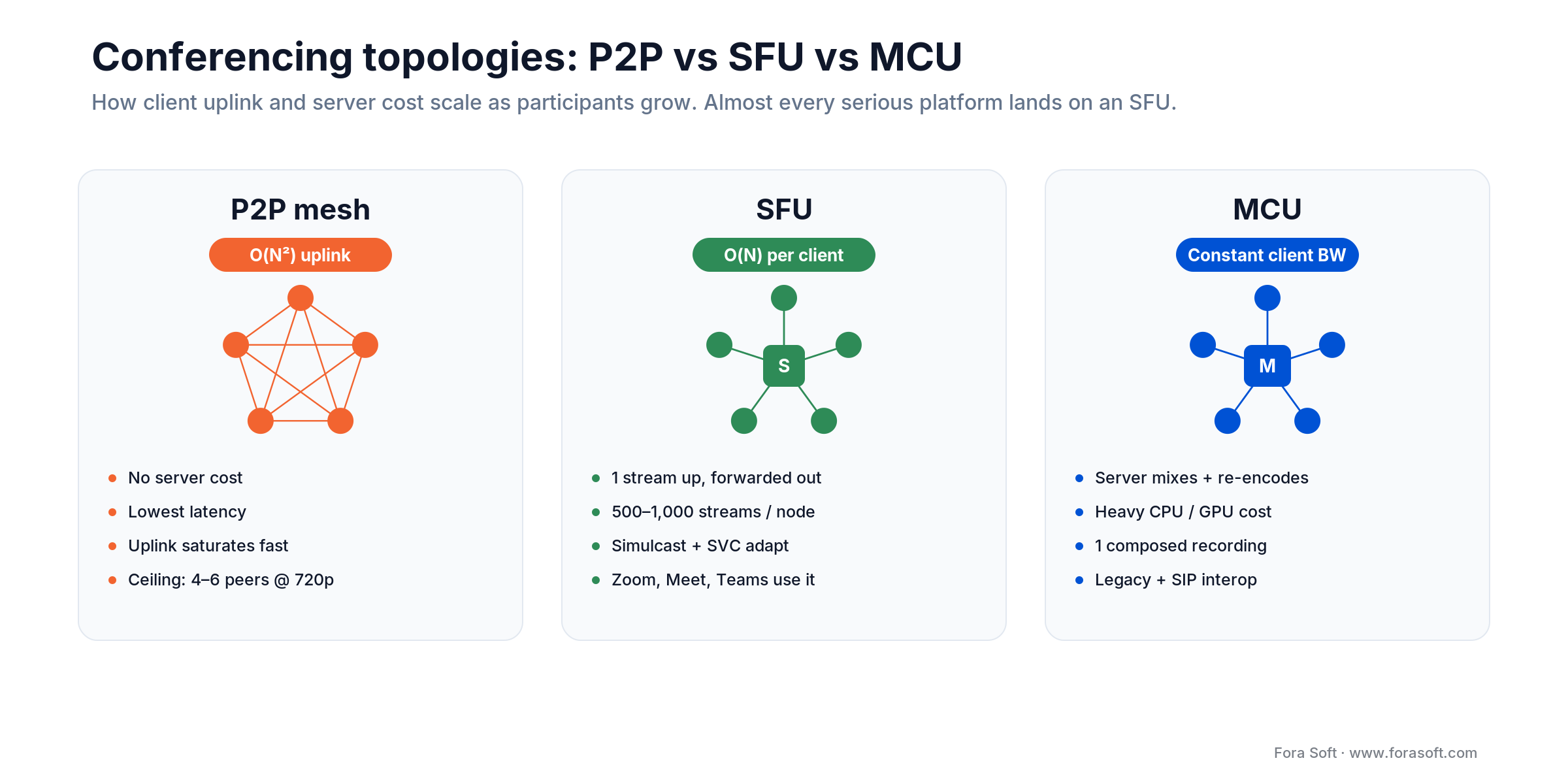
Figure 3. P2P mesh vs SFU vs MCU: how client uplink and server cost scale as a room grows.
P2P mesh
Every participant sends directly to every other participant. No server cost, lowest latency, but bandwidth scales as O(N²). Practical ceiling: 4–6 participants at 720p. Above that, uplink saturates.
SFU (Selective Forwarding Unit)
Each participant sends one stream to the SFU, which forwards it to everyone else. Bandwidth scales as O(N) per client. A well-tuned SFU node handles 500–1,000 active streams; mediasoup, Janus, and LiveKit all hit that range. Cluster across regions to scale to hundreds of thousands. This is the default for modern conferencing — Zoom, Teams, Meet all run SFU topologies internally.
MCU (Multipoint Control Unit)
The server decodes every inbound stream, composes them into a single output video, and re-encodes. Client-side bandwidth stays constant regardless of participant count. The cost is massive server CPU — a 50-participant MCU call can saturate a beefy GPU box. MCU makes sense when you need one composed recording, SIP gateway interop, or clients that can’t run an SFU client (old legacy endpoints). Our deep dive on P2P vs MCU vs SFU walks through each tradeoff.
Simulcast and SVC
Every SFU in 2026 supports simulcast: each sender publishes 2–3 streams at different bitrates, and the SFU forwards the best layer each receiver can handle. SVC (scalable video coding) goes further — one encoded stream with multiple temporal and spatial layers — and is now mature in VP9 and AV1. Both dramatically improve bandwidth adaptation in mixed-network meetings.
Reach for an SFU when: you need interactive video with 4–500 simultaneous active participants and you control the client — the browser, a mobile app, or a desktop client with WebRTC support.
Protocols compared: WebRTC vs LL-HLS vs HLS vs DASH
The protocol decides your latency, your infrastructure, and your bill. Here is the head-to-head we use internally when a client says “just use WebRTC” or “just use HLS.”
| Protocol | Latency | Scale via CDN | Device support | Infra cost |
|---|---|---|---|---|
| WebRTC (SFU) | 150–500 ms | Hard; needs SFU clusters | All modern browsers + mobile | High (compute-heavy) |
| LL-HLS | 2–5 s | Native HTTP CDN | Apple native, broad via hls.js | Low (CDN-heavy) |
| Standard HLS | 15–30 s | Native HTTP CDN | Universal | Lowest |
| MPEG-DASH | 6–30 s | Native HTTP CDN | Non-Apple, via dash.js | Lowest |
| RTMP (ingest) | 1–5 s ingest | Not for playback | All encoders | Medium |
| SRT (ingest) | < 1 s ingest | Not for playback | Growing (pro encoders) | Medium |
Rule of thumb: if more than 5,000 passive viewers watch the same stream, you need CDN-delivered HLS or LL-HLS. WebRTC SFU does not fan out cheaply — every viewer consumes a server connection. If you need both interactivity (a small speaker group) and scale (many viewers), run WebRTC for the speakers and LL-HLS for the crowd.
Codec choice: H.264 vs H.265 vs AV1 vs VP9
Codec choice is a three-way balance: compression efficiency, device support, and encoding cost. A wrong default costs you 30–50% on egress or locks you out of legacy devices.
| Codec | Compression vs H.264 | Encoding speed | Device support 2026 | Royalties |
|---|---|---|---|---|
| H.264 / AVC | Baseline | Fastest | Universal | Mature royalty pool |
| H.265 / HEVC | −40 to −50% bytes | 3–5× slower | Broad; weaker in old browsers | Complex (multiple pools) |
| AV1 | −50 to −60% bytes | 5–10× slower | Growing; recent chipsets only | Royalty-free |
| VP9 | −35 to −45% bytes | 5× slower | Chrome/Android; no Apple live | Royalty-free |
| VP8 | ≈ H.264 | 2× slower | Declining; WebRTC fallback only | Royalty-free |
Our 2026 defaults: H.264 as the universal fallback rendition, H.265 as the primary for modern devices and live broadcasts, and AV1 only for long-tail VOD where the storage-and-egress savings over 3+ years clearly beat the encoding spend. For WebRTC conferencing, VP8 or H.264 remain the safest interop choice; VP9 and AV1 are gaining ground but still fragment client support.
Managed SaaS vs custom build: cost math
The cheapest line-per-minute in 2026 is almost always a managed platform. The cheapest total cost over 3 years is often not. Here is the rough decision line we use with clients.
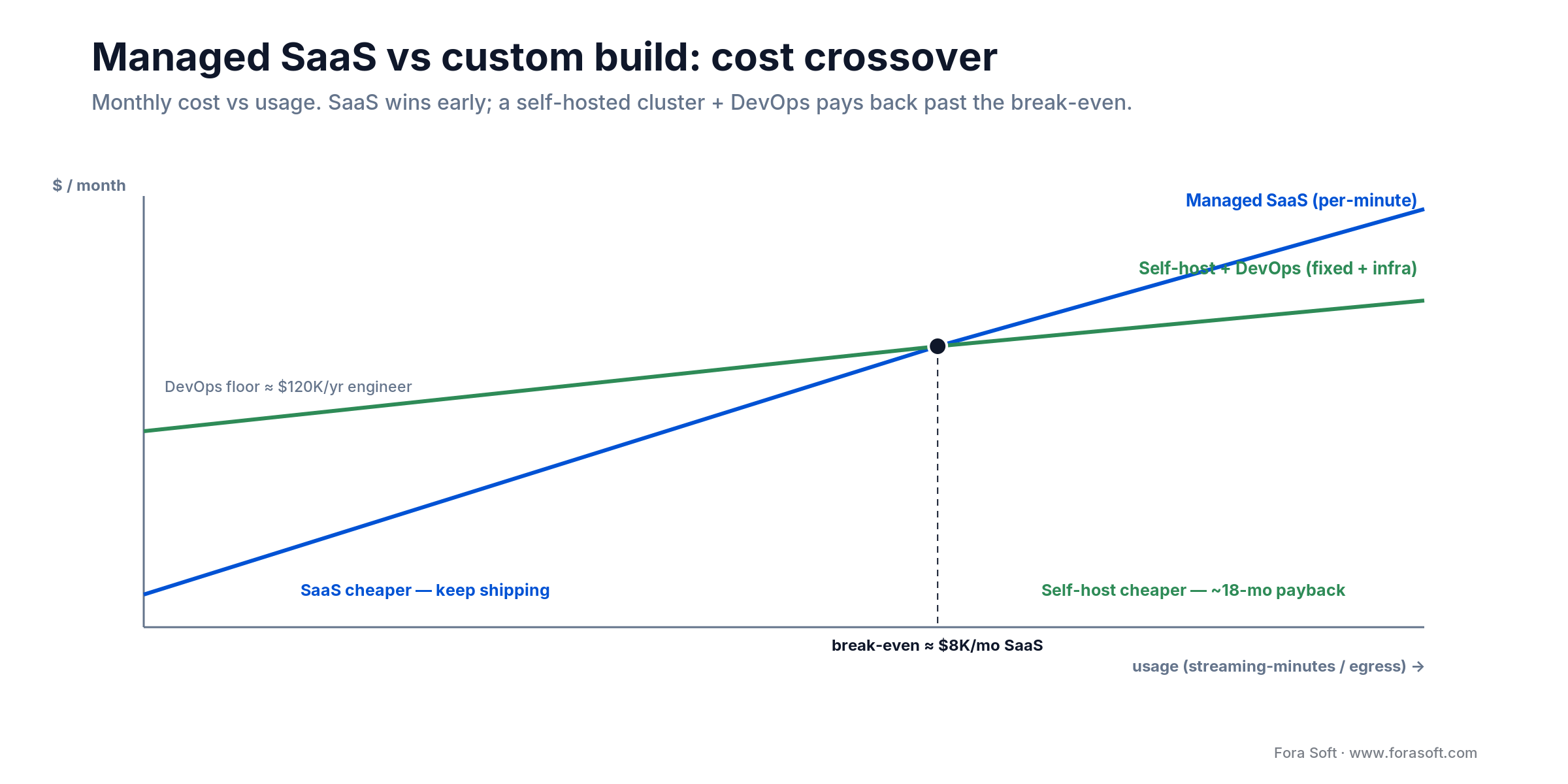
Figure 4. Where managed SaaS stops being cheaper than a self-hosted cluster plus a DevOps engineer.
| Approach | Typical cost | Time to ship | Best for |
|---|---|---|---|
| Agora SDK | Tiered by audio/video units | Days | Fast MVPs, global voice-first apps |
| Twilio Video | ~$0.004/participant-min | Days | Teams already on Twilio SMS/voice |
| LiveKit Cloud | ~$0.0004–0.0005/min WebRTC | 1–2 weeks | WebRTC-first SaaS; connection-min only, bandwidth $0.10–0.12/GB extra |
| Mux (live + VOD) | ~$0.07/min encoding + $0.025/min delivery | Days | Full-stack managed, small/medium catalogs |
| Cloudflare Stream | ~$5/1,000 min stored + $1/1,000 min delivered | Days | Most cost-efficient for small VOD and short live |
| Self-host LiveKit + Hetzner | Infra only; no per-min fees | 2–6 weeks setup | > 50 TB/month egress, mature DevOps team |
| Custom mediasoup/Janus | Dev + infra; no per-min fees | 2–4 months | Product differentiation in media path |
The break-even logic is straightforward. If you burn $20K/month on Twilio, a self-hosted LiveKit cluster on Hetzner can cost 70% less — but you need a DevOps engineer paid $120K/year. Above ~$8K/month in SaaS fees, self-hosting pays for itself in about 18 months. Below, keep shipping features. Our Agora alternative guide and LiveKit playbook walk through the migration shape.
The CDN and egress trap
Every streaming team underestimates egress. They budget $4–8K/month for hosting and forget that one million viewer-minutes of 1080p at 5 Mbps is roughly 37.5 TB of outbound bandwidth. At CloudFront list prices that’s ~$3,200. Multiply by a serious viewer base and you’re at six figures a month before anyone approves the budget.
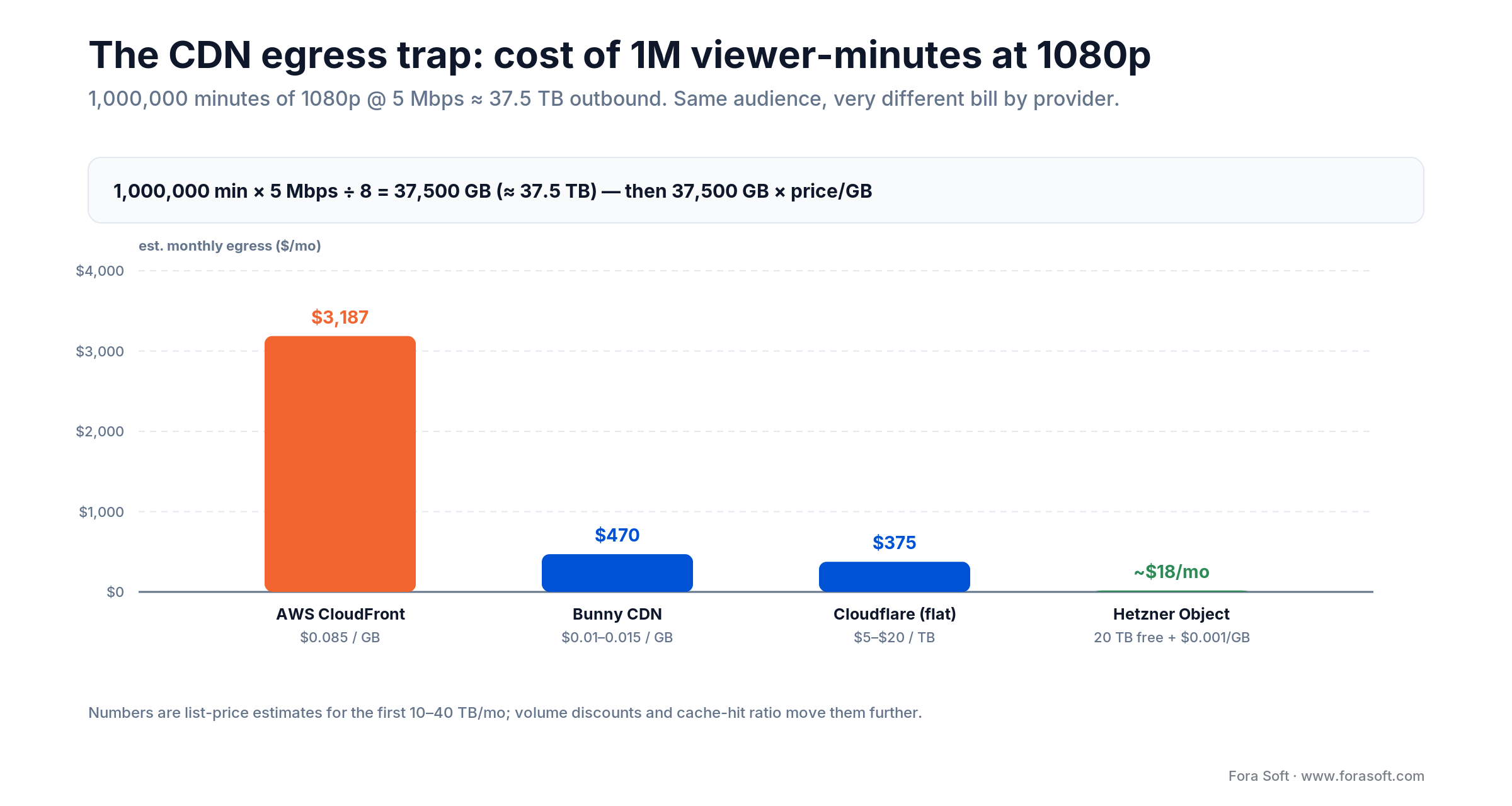
Figure 5. The same 37.5 TB of egress billed by four providers. Provider choice swings the number by two orders of magnitude.
Egress pricing cheat sheet (first 10 TB/month)
Bunny CDN: ~$0.01–0.015/GB in NA/EU. Cloudflare: flat $5–$20/TB via Stream or R2 pricing. AWS CloudFront: ~$0.085/GB in NA, higher in EU and APAC. Hetzner: 20 TB included per bucket on Object Storage, overages at ~$0.001/GB.
Cache-hit ratio is the lever
A 95% cache hit ratio means the CDN serves 95 out of every 100 requests without touching your origin. A 60% ratio means you’re paying double — origin egress plus CDN egress. Tune TTL to match content type (VOD: 24h+, live: chunk duration + 1s), use signed URLs with shared cache keys, and run a long-tail prefetch from your top-10 pages.
Adaptive bitrate as a cost lever
ABR isn’t just about viewer quality — it’s about your wallet. Serving 720p when a viewer is on 3G instead of forcing 1080p cuts their egress by 50%. On a million-minute month that’s real money. Always ship an ABR ladder, even on your MVP.
DRM, encryption, and compliance
Security in streaming is four layers deep: transport encryption, token-based access, content encryption, and digital rights management. Skip the wrong layer and you either leak content or burn budget on protection you don’t need.
Transport and access
HTTPS everywhere, RTMPS for live ingest, SRT with encryption for professional contribution. Signed URLs (CloudFront, S3 presigned, Cloudflare signed) keep anonymous viewers off your origin. JWT tokens carry viewer identity and entitlement, and should expire in minutes, not hours.
Content encryption
AES-128 for HLS, CENC for DASH. Encryption alone stops casual scraping but not a determined user with a debugger. For that you need DRM.
Digital Rights Management
Widevine (Google, free license) covers Android, Chrome, Edge. FairPlay (Apple, free with a developer account) covers iOS, Safari, tvOS. PlayReady (Microsoft, paid) covers Windows and Xbox. A full multi-DRM deployment typically uses a managed service like EZDRM (~$200/month), BuyDRM (from ~$99/month), or Drmtoday to handle the license servers, which is much cheaper than self-hosting the key infrastructure. Skip DRM for user-generated content, indie catalogs, and internal platforms. Add it only when studios or rights-holders require it, or when the content’s street value clearly justifies the spend.
Compliance — GDPR, HIPAA, SOC 2
If the product touches European viewers you need a GDPR data map, retention policy, and data-export flow. Telehealth in the US means HIPAA-grade BAAs with any infrastructure provider, end-to-end encryption, and signed access logs. SOC 2 is table stakes for enterprise SaaS buyers. Our streaming security features guide details the full checklist.
Scale milestones: when to switch architectures
Architectures don’t scale linearly. There are sharp cliffs where the right choice becomes the wrong one.
1. 6 participants → swap P2P for SFU. Beyond six, mesh uplink saturates on consumer broadband. Introduce a LiveKit, mediasoup, or Janus SFU.
2. 500 concurrent streams per SFU → cluster. A single SFU node tops out around 500–1,000 active streams. Beyond that, add regional SFU clusters with cascading and a signaling load balancer.
3. 5,000 passive viewers → move to LL-HLS. WebRTC fan-out is compute-intensive and expensive. Hybrid architectures run WebRTC for the speakers and push an LL-HLS copy to the long tail of viewers through a CDN.
4. 50 TB/month egress → re-negotiate CDN. Volume discounts on CloudFront kick in; Bunny, Cloudflare, and Hetzner become materially cheaper. Dual-CDN is worth the extra engineering.
5. 100K concurrent viewers → multi-region origin. One origin in Frankfurt serving a live stream to 100K viewers globally will buckle under TLS handshake load. Replicate origin, use Anycast DNS, and have a failover runbook.
Burning cash on CloudFront or Twilio?
We audit streaming bills routinely — most clients save 30–70% after a protocol or CDN change. Book a review.
Mini-case: what shipping real platforms taught us
BrainCert came to Fora Soft with a virtual-classroom LMS that needed HD video and audio to scale across global schools and test centers. We built a WebRTC-first conferencing stack on 40-core media servers distributed across 10 data centers. The platform now delivers 500M+ minutes of live video, serves 100K+ customers worldwide, and has won four Brandon Hall Awards. Read the full OTT platform case.
VALT is the surveillance SaaS we built for 770+ organizations across the U.S. It streams full-HD feeds from Axis IP cameras over RTMPS, supports instant playback, role-based access, multi-camera live monitoring, and evidence export. Today 50K+ active users rely on it daily for law-enforcement, medical, and child-advocacy workflows.
Speed.Space is a remote video production platform Fora Soft built for distributed film crews. It captures at 1080p/8 Mbps — roughly three to four times the bitrate of a standard conferencing capture — with up to 25 participants and zero downtime. Clients include Netflix, HBO, EA, and productions shown at Paris Fashion Week. The build-versus-buy math behind it, including the double-ender capture that keeps packet loss out of the final masters, is in our custom remote video production platform case study. Want a similar assessment for your stack? Book a 30-min migration review.
Cost model: what a real estimate looks like
Here is how we scope streaming projects at Fora Soft. These are real ranges we honour in proposals, reduced by our Agent Engineering workflow — most agencies quote 1.5–2× these numbers for the same scope.
| Scope | Timeline | What ships |
|---|---|---|
| VOD MVP | 4–6 weeks | Web + iOS/Android player, HLS + ABR, Mux or Cloudflare Stream, basic search + auth |
| Live streaming MVP | 8–12 weeks | RTMP/SRT ingest, LL-HLS playout, CDN, chat, recording to VOD |
| Conferencing MVP | 6–10 weeks | LiveKit or mediasoup SFU, rooms, simulcast, recording, screen share |
| Premium streaming platform | 4–6 months | VOD + live + subscription + DRM + analytics + SSO + admin back-office |
| Enterprise multi-tenant | 6–12 months | Multi-region, multi-language, white-label, SSO, HIPAA/SOC 2, AI features |
Infrastructure typically adds $500–5,000/month for a small product, $5,000–50,000/month once you pass a few thousand concurrent streams. Our cost breakdown breaks this out by module, and the server estimation guide shows the math for common infrastructure choices.
A decision framework — pick your stack in five questions
Before you buy an SDK or commit to a CDN, answer these five in writing. The answers cascade into the architecture.
Q1. What is the maximum acceptable latency? Under 500 ms forces WebRTC. 2–5 s allows LL-HLS. 10–30 s is the broadest, cheapest option with HLS/DASH.
Q2. What is peak concurrent viewership? Under 5,000 concurrent you can stay on WebRTC. Above 5,000, you must involve a CDN and HTTP-based chunking.
Q3. Is the viewer paying, and for what? Ad-supported free tier tolerates lower quality; paid subscribers expect 1080p minimum and instant start. Enterprise buyers expect SSO, DRM, and audit logs.
Q4. What is the monthly egress you can afford? Back-of-envelope: 1 M minutes of 1080p ≈ 37.5 TB. Multiply by price per GB to get a floor.
Q5. Do you have a DevOps engineer on staff? No → stay on managed (Mux, Cloudflare Stream, LiveKit Cloud). Yes → self-hosting opens up once you cross ~$8K/month in SaaS fees.
Five pitfalls that sink streaming builds
1. Picking WebRTC for passive mass viewing. WebRTC is magical for sub-second interactive use, but the per-viewer server cost wrecks economics at scale. If you’re running 10K viewers watching one creator, LL-HLS is the right answer even if latency is 3 s higher.
2. Shipping a single-bitrate stream. A single 5 Mbps 1080p rendition means anyone on mobile or a weak Wi-Fi connection rebuffers. Always ship an ABR ladder — 4 renditions minimum — or accept 25% viewer drop-off from rebuffering.
3. Ignoring cache-hit ratio. A 60% cache-hit ratio on your CDN means you’re paying twice — origin egress plus CDN egress. Long TTLs, signed URLs with shared keys, and origin shield are the fix. We’ve seen teams save 50% on their CDN bill with two days of configuration work.
4. Rolling your own SFU from scratch. mediasoup, LiveKit, Janus, and Jitsi are mature, battle-tested, open-source. A from-scratch SFU is 6–12 months of elite engineering before it handles its first production call. Fork or build on top; do not reinvent.
5. No QoS monitoring. You cannot optimise what you cannot see. Instrument bitrate delivery, join success rate, freeze rate, TTFF (time to first frame), and rebuffer ratio from day one. Prometheus + Grafana for server metrics, a QoS beacon from the player for client metrics. Without these you are debugging blind.
KPIs: what to measure
Quality KPIs. Target time-to-first-frame (TTFF) under 2 s, rebuffer ratio under 0.5%, average bitrate above 70% of the top rendition across a session. For conferencing, jitter under 30 ms and round-trip time under 150 ms in-region.
Business KPIs. Watch time per active user, completion rate, funnel from trial to paid, and churn at 30/60/90 days. For live: peak concurrent viewers, average view duration, social-share count. If you’re monetising through subscriptions, track LTV / CAC and cost per watched hour — the latter is the number your CFO cares about.
Reliability KPIs. Join success rate above 99%, uptime above 99.9%, mean time to detect (MTTD) under 5 minutes for ingest failures, cache-hit ratio above 92% for VOD and 85% for live. Set alerting thresholds below these targets, not at them.
When NOT to build a custom streaming app
Not every streaming idea needs custom software. If all you’re doing is broadcasting to Facebook, Instagram, and YouTube, use their native stack. If you’re running internal webinars for fewer than 500 people a few times a quarter, Zoom or Google Meet is cheaper than anything you could build.
Build custom when one of four conditions applies: (1) your product integrates video into a differentiated workflow (telehealth, live shopping, a domain-specific collaboration tool); (2) compliance or branding requires full control of the media path; (3) your unit economics only work at a scale no SaaS offers; or (4) the video experience itself is the feature, not the wrapper. If none of those apply, an off-the-shelf SaaS plus your own application logic is almost always the right call.
FAQ
How long does it take to build a video streaming app MVP?
A focused VOD MVP ships in 4–6 weeks. A live streaming MVP takes 8–12 weeks because you add ingest, real-time transcoding, and fan-out. A conferencing MVP with a WebRTC SFU lands in 6–10 weeks. With Agent Engineering, Fora Soft typically delivers toward the low end of these ranges.
Is WebRTC always the right choice for low-latency streaming?
Only for bidirectional or sub-second interactive use cases. For one-to-many broadcasts where you just need under 5 s latency, LL-HLS is cheaper, scales through any HTTP CDN, and works on more devices. A good heuristic: WebRTC for conversations, LL-HLS for broadcasts.
Which codec should you use in 2026: H.264, H.265, or AV1?
H.264 as your universal fallback rendition. H.265 (HEVC) as the default primary for modern devices — it cuts bytes 40–50%. AV1 only for long-tail VOD catalogs where 3+ years of egress savings justify its 5–10× slower encoding. For conferencing, VP8 or H.264 remain the safest WebRTC choices.
How much does a video streaming app really cost?
Development scales with scope: a VOD MVP lands in the low five figures, a premium multi-module platform in the mid six figures. Monthly infrastructure ranges from a few hundred dollars for early-stage products to tens of thousands for apps at scale. Our cost breakdown article shows the full ranges.
Do I need DRM for my streaming platform?
Only if you distribute studio-licensed content, your contracts require it, or the street value of your content clearly justifies the $100–500+/month cost of a managed DRM service. For most indie creators, user-generated content, and internal enterprise video, signed URLs plus AES encryption give you enough protection at a fraction of the price.
Can I migrate from Agora or Twilio to save money?
Yes — once your bill crosses roughly $5–8K/month, migrating to LiveKit Cloud or self-hosted LiveKit/mediasoup typically saves 60–90% of the per-minute cost. Our Agora alternative guide walks through the migration pattern and trade-offs.
What’s the right CDN for a streaming app?
For most new products under 10 TB/month, Cloudflare Stream or Bunny CDN give the best price-performance. Above 50 TB/month, a multi-CDN strategy with CloudFront + Bunny (or Hetzner origin behind Bunny) cuts egress dramatically. Always track cache-hit ratio — a 90%+ ratio matters more than which provider you pick.
What’s the maximum meeting size on an SFU?
A single well-tuned SFU node handles 500–1,000 active streams — roughly 50 participants each publishing two simulcast layers, each subscribing to 10 visible tiles. For bigger events, cluster SFUs across regions with cascading. Our P2P vs MCU vs SFU deep-dive walks through the scaling math.
What to read next
Cost
Video Streaming App Cost Breakdown
Module-by-module pricing for VOD, live, and conferencing builds.
Architecture
P2P vs MCU vs SFU
When each topology wins, and why hybrid is usually right.
Protocol
WebRTC vs HLS for Streaming
Latency, scale, and cost trade-offs in plain English.
Scale
Scaling a Streaming App
How to take a streaming product from thousand to million viewers.
Migration
Agora.io Alternatives in 2026
LiveKit, mediasoup, Jitsi, and Janus compared with cost math.
Ready to ship your video streaming app?
The pattern that separates streaming winners from stalled projects is not the fanciest codec or the most bleeding-edge protocol — it is an honest answer to five questions: what latency do you need, how many viewers at peak, what can you afford in egress, who pays for the content, and who runs the infrastructure. Once those are locked, the stack follows.
Fora Soft has shipped 250+ products in this space since 2005 — telemedicine, virtual classrooms, remote film production, trader streaming, surveillance SaaS. If you are starting a streaming build or need a second opinion on one already in flight, a 30-minute call is usually enough to save weeks of wrong turns.
Starting or rebuilding a streaming product?
Bring us your use case; we’ll sketch the architecture, cost model, and timeline in 30 minutes. No pitch deck, just the whiteboard.

