

Key takeaways
• WebRTC wins sub-second, interactive streams. It hits 0.2–0.5s glass-to-glass, but a single media-server node tops out around 500–800 viewers before you cascade.
• HLS and LL-HLS win scale and reach. Classic HLS runs 15–30s to unlimited CDN viewers; LL-HLS trims that to 2–5s on the same commodity CDN, no SFU fleet required.
• The hybrid pattern is the 2026 default. WebRTC for a small speaker group, LL-HLS for the mass audience: sub-second among speakers, 2–5s to everyone else.
• Cost is driven by your CDN choice, not the acronym. The same 1080p stream costs ~$6–11 per 1,000 viewer-hours on a budget CDN versus ~$110–190 on AWS CloudFront.
• Match latency to the job. Auctions and gameplay need <1s; live shopping and events tolerate 2–5s; recorded playback accepts 15–30s.
Why Fora Soft wrote this guide
We build video and real-time platforms for a living (250+ projects since 2005), and the WebRTC vs HLS question comes up in almost every scoping call. Worldcast Live, an HD concert platform we built, reaches 10,000 concurrent viewers at 0.4–0.5s glass-to-glass on a custom WebRTC + Kurento stack. Sprii, a Danish live-shopping app we engineered, has moved €365M+ in sales over an RTMP + WebRTC multistreaming pipeline. Ariuum runs WebRTC for real-time debate interactivity. Different answers, same three questions underneath.
This guide reframes the choice. The real answer is rarely “pick one.” It is “know your latency target, your concurrent-viewer ceiling, and your cost tolerance,” then build a hybrid or pick the single protocol that fits. We’ll walk through the benchmarks, the corrected 2026 cost math, the architecture pitfalls, and the decision framework we actually use, the same one we bring to a streaming build.
Building a multi-thousand-viewer live platform?
We’ll architect the mix for you — WebRTC where you need interactivity, LL-HLS where you need scale.
WebRTC vs HLS in 2026 — the short answer
Choose WebRTC (with a media server like Kurento, mediasoup, or Janus) when you need sub-second latency and a small audience — think interactive gaming, live auctions, real-time trading, or panel debates where speaker-to-speaker latency is the product.
Choose HLS or LL-HLS when you need scale and can tolerate 2–30 seconds of latency: broadcasting to 10K+ concurrent viewers on a budget. Live sports, product launches, education, live-shopping feeds.
Choose the hybrid (WebRTC for speakers + LL-HLS for viewers) when you need both. Speakers get sub-second RTT among themselves; viewers get a stable 2–5s stream with no SFU memory overhead. Most modern live platforms ship this way in 2026. The map below shows where each option actually lives.
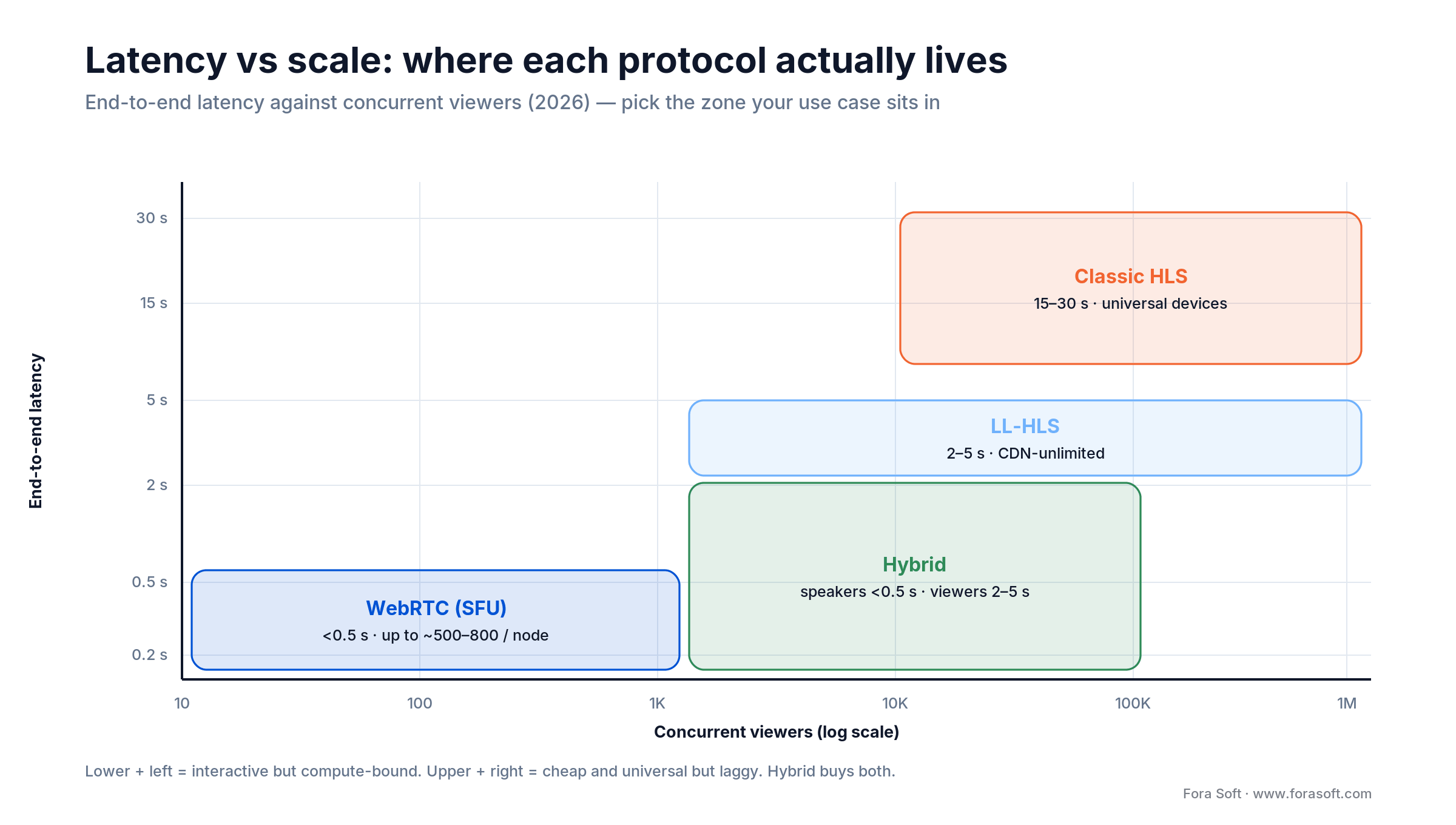
Figure 1. Latency against concurrent viewers. Interactive protocols sit bottom-left; cheap, universal protocols sit upper-right; the hybrid buys both.
Reach for pure WebRTC when: your audience is under ~500 concurrent viewers, latency under 500ms is a hard requirement, and your budget can absorb SFU compute (a mid-scale self-hosted SFU cluster runs roughly $50–500/hour on Hetzner or AWS).
What latency really means — glass-to-glass vs RTT
You’ll hear “WebRTC is faster” and “HLS has 6-second latency.” Those statements mix three different latency types, and confusing them breaks decisions.
Glass-to-glass (G2G)
The time from a camera capturing something to a viewer seeing it on their screen: capture, encode, ship over the network, decode, render. Measured end-to-end. This is what matters for interactive experiences.
Round-trip time (RTT)
One user sends, the other receives and replies, the first gets the reply. This is latency between users, not source-to-viewer. WebRTC shines here: two speakers on the same SFU hit 50–200ms RTT. An HLS viewer can’t send anything back in-band — HLS is one-way.
End-to-end (E2E) / streaming latency
How long from a broadcaster speaking to a viewer hearing it. This is what vendors advertise as “LL-HLS has 2-second latency.” Also called perceived or streaming latency. Critical for live events, less so for one-way broadcasts.
| Use case | Target E2E latency | Why it matters | Protocol(s) |
|---|---|---|---|
| Interactive gaming | <250ms | Player input must register instantly or the game feels broken | WebRTC SFU with custom network code |
| Live auctions / bidding | 250–800ms | Bid acceptance must sync across viewers; lag breeds disputes | WebRTC SFU or LL-HLS + messaging |
| Live sports commentary | 1–3s | Viewers hear the goal call within seconds; chat stays in sync | LL-HLS |
| Live shopping | 2–5s | Host announces a deal; viewers tap “buy” within seconds | LL-HLS or HLS + messaging |
| Webinar / education | 4–10s | Q&A chat drifts slightly; viewers watch at their pace | HLS |
| Recorded / on-demand | 15–30s+ | No sync required; the user controls playback | HLS |
Inside WebRTC — how it hits sub-second latency
WebRTC ships raw media packets peer-to-peer or through a Selective Forwarding Unit (SFU, a media relay). No HLS segments, no chunking, no waiting for a segment boundary. Frames arrive, decode, and render immediately. Media is encrypted by default with DTLS-SRTP, which is why WebRTC is the go-to for privacy-critical streams.
The SFU architecture (the standard for live multi-user)
Each speaker uploads a stream (usually 720p or 1080p at 30fps, 2–5 Mbps). The SFU — mediasoup, Janus, Kurento, or Pion — receives it and forwards the right bitrate to each viewer (simulcast: 720p, 360p, 144p). Each viewer holds one WebRTC connection to the SFU.
Why it’s fast: packets stream continuously. Codec latency dominates (VP8/H.264 encoding adds ~30–50ms); datacenter-to-client network latency is typically 20–100ms. ICE negotiation (finding the network path) adds 1–3 seconds upfront, but RTT is stable after that.
Why it strains at scale: an SFU node has a CPU ceiling. A single well-tuned node forwards roughly 500–800 concurrent subscribers (up to ~5,000 for 720p H.264 forwarding on a high-end box), but higher bitrates push the practical limit closer to a few hundred. Past that you cascade: a master SFU feeds edge SFUs that re-fan-out. Cascading adds latency (packet hops) and operational complexity (ICE between SFUs). See the mediasoup scalability notes for the gory details.
Reach for WebRTC when: you have <500 concurrent viewers, users are on broadband (not flaky cellular), you control network quality, and speaker-to-speaker RTT under 200ms is a hard requirement.
Inside HLS — how it scales with segment buffering
HTTP Live Streaming (HLS), defined in IETF RFC 8216, chunks a live feed into 2–10 second segments (MPEG-TS or fMP4) and serves them as a playlist. A player reads the playlist, downloads segments in order, buffers 2–3 of them, and plays sequentially. Simple, cacheable, and scalable to millions of viewers on any commodity CDN.
Classic HLS (15–30s latency)
A 10-second segment takes 10 seconds to produce, then the server publishes it plus the playlist. The client buffers 2–3 segments (20–30 seconds) before playing. End-to-end latency lands around 15–30 seconds — fine for recorded content or slow-paced broadcasts.
LL-HLS (Low-Latency HLS, 2–5s) — the 2026 standard
LL-HLS is defined by Apple’s Low-Latency HLS spec (the mechanisms landed in the HLS Authoring Specification in 2020 and are refined yearly, current revision 2025-09) and the RFC 8216bis drafts, not the original RFC 8216. Instead of waiting for a full segment, the encoder emits partial segments (the EXT-X-PART tag) of roughly 100–400ms, and the player preloads them via blocking playlist reload and EXT-X-PRELOAD-HINT. Paired with the CMAF container, LL-HLS reaches 2–5 second latency on standard CDNs.
Why LL-HLS wins in 2026: it works on any HTTP/2 CDN (Cloudflare, Akamai, CloudFront, Fastly), needs no SFU fleet, scales to 100K+ viewers, and falls back to classic HLS automatically when a player can’t do partial segments.
Where it stops: it’s still one-way. Viewers can’t send data back in the same stream, so you add a WebSocket or messaging channel for chat and reactions. Smaller partial segments cut latency but raise request overhead.
Reach for LL-HLS when: you need 1K–100K concurrent viewers, 2–5s latency is acceptable, and you want to skip SFU compute entirely. It is the safe default for most live one-to-many apps.
Latency benchmarks — what you actually get
These numbers combine our production runs (Worldcast Live, Sprii) with vendor documentation. They assume decent conditions — no Wi-Fi dropout, >5 Mbps available bandwidth.
| Protocol | E2E latency | Startup time | RTT (speaker-to-speaker) | Ceiling (1 node) |
|---|---|---|---|---|
| WebRTC SFU | 0.2–0.5s | 2–4s (ICE) | 50–200ms | ~500–800 viewers |
| LL-HLS (CMAF, HTTP/2) | 2–5s | 0.5–2s | N/A (one-way) | 100K+ (CDN) |
| Classic HLS (MPEG-TS, 10s segments) | 15–30s | 1–3s | N/A (one-way) | 1M+ (CDN) |
| MPEG-DASH (6s segments) | 6–20s | 1–2s | N/A (one-way) | 100K+ (CDN) |
| LL-DASH / CMAF low-latency | 1–3s | 0.5–2s | N/A (one-way) | 100K+ (CDN) |
From our runs: Worldcast Live holds 0.4–0.5s glass-to-glass on a custom WebRTC + Kurento stack (encoder buffer ~100ms + network 150–200ms + player buffer 100–150ms). For Sprii, LL-HLS-class delivery lands around 3s perceived latency with segment sizing tuned to ~1 second — the balance between startup time and throughput. LL-HLS is what you actually get on iOS and Safari; CMAF low-latency is the broader spec.
Cost per viewer at scale — where the math lives
Your cost per viewer is dominated by bandwidth (CDN egress for HLS/LL-HLS) or compute (WebRTC SFU hours plus that SFU’s own egress). The single biggest lever is which CDN you pick, and this is where most comparison articles quietly run numbers that are years out of date.
HLS/LL-HLS: you pay for egress, and the CDN choice swings it 15×+
A 1080p stream at 5 Mbps moves 2.25 GB per viewer-hour (5 Mbit/s × 3600s ÷ 8 ÷ 1000). In 2026, AWS CloudFront egress starts at $0.085/GB for the first 10 TB/month in the US and Europe, tiering down to $0.020/GB only above 5 PB. A budget CDN such as Bunny runs about $0.005/GB, and Hetzner traffic is roughly $0.0013/GB. Cloudflare doesn’t bill per-GB egress the same way at all. For 10,000 viewers watching one hour:
- Total bandwidth: 10,000 × 2.25 GB = 22,500 GB (22.5 TB)
- Budget CDN at $0.005/GB: ~$112/hour — about $0.011 per viewer-hour
- AWS CloudFront (blended ~$0.075/GB at this volume): ~$1,690/hour — about $0.169 per viewer-hour
- Same protocol, same bitrate: the CDN choice alone is a ~15× swing
WebRTC: you pay for SFU compute (and it doesn’t cache)
A self-hosted SFU on a dedicated box (~$100–200/month, Hetzner class) serves a few hundred viewers before you add another node, and unlike HLS you can’t offload fan-out to a commodity CDN. Managed WebRTC (Agora, LiveKit Cloud) removes the ops but bills roughly $0.003–0.004 per participant-minute — about $0.18–0.24 per viewer-hour, which overtakes CDN egress well before 10K viewers.
The crossover: for a one-hour, 10,000-viewer event, LL-HLS on a budget CDN is ~$112, LL-HLS on CloudFront is ~$1,690, and pure managed WebRTC is thousands. HLS wins on cost by a wide margin — unless you genuinely need sub-1s latency or two-way interaction, in which case WebRTC (or the hybrid) earns its keep.
Reach for HLS/LL-HLS when: your audience is over ~1,000 concurrent and 2–30s latency is acceptable. Egress on a budget CDN scales far more predictably than SFU compute — and it’s where we park most viewers even on interactive builds.
Reach and device support — browser, TV, low-end Android
WebRTC. Needs a WebRTC-capable browser: Chrome, Firefox, Safari 11+, Edge. Not Opera Mini, not old Android browsers, and not most smart TVs. If you must support Roku, Apple TV, or Xbox, you need HLS as a fallback. Adaptive bitrate lives in your application code, not the protocol.
HLS. Plays everywhere: Safari (iOS/macOS native), Chrome/Firefox via hls.js or Shaka, Android native, Roku, Apple TV, even feature phones. It ships a built-in adaptive bitrate ladder (1080p / 720p / 360p / 144p) and the client picks the best fit.
LL-HLS. Native on Safari 14+ (iOS 14+, shipped at WWDC 2020), needs hls.js or Shaka elsewhere. Smart-TV support is still uneven in 2026: Apple TV yes, Roku catching up. For 100% device coverage, keep a classic-HLS fallback.
Reach for HLS when: you need smart TVs, gaming consoles, or low-end Android. WebRTC requires opt-in browser support; HLS is effectively universal.
Comparison matrix — every dimension at a glance
| Dimension | WebRTC SFU | LL-HLS | Classic HLS | LL-DASH / CMAF-LL |
|---|---|---|---|---|
| Latency | 0.2–0.5s | 2–5s | 15–30s | 1–3s |
| Concurrent viewers (1 node) | ~500–800 | Unlimited (CDN) | Unlimited (CDN) | Unlimited (CDN) |
| Cost / 1,000 viewer-hours | ~$60 self-hosted | $6–190 (CDN) | $6–190 (CDN) | $6–190 (CDN) |
| Encryption | DTLS-SRTP (native) | TLS + optional DRM | TLS + optional DRM | TLS + optional DRM |
| Recording | Tap/re-encode at SFU | Tap HLS segments | Tap HLS segments | Tap CMAF segments |
| Device support | Modern browsers only | Safari + hls.js | Universal | DASH-capable players |
| Engineering effort | High (SFU, ICE) | Medium (segment lifecycle) | Low (plain HTTP) | Medium (DASH players) |
| When to pick it | <500 viewers, sub-1s, two-way | 1K–100K, 2–5s OK | Universal reach, 15s+ OK | 1K–100K, strict latency |
The hybrid pattern — WebRTC speakers plus LL-HLS viewers
This is the architecture that won in 2026. You run a WebRTC SFU for a small speaker group (5–50 people). The SFU produces one high-quality master feed, an encoder packages it as LL-HLS, and viewers pull that stream from a CDN. Speakers get sub-second RTT among themselves; viewers get a stable, buffered stream without touching the SFU.
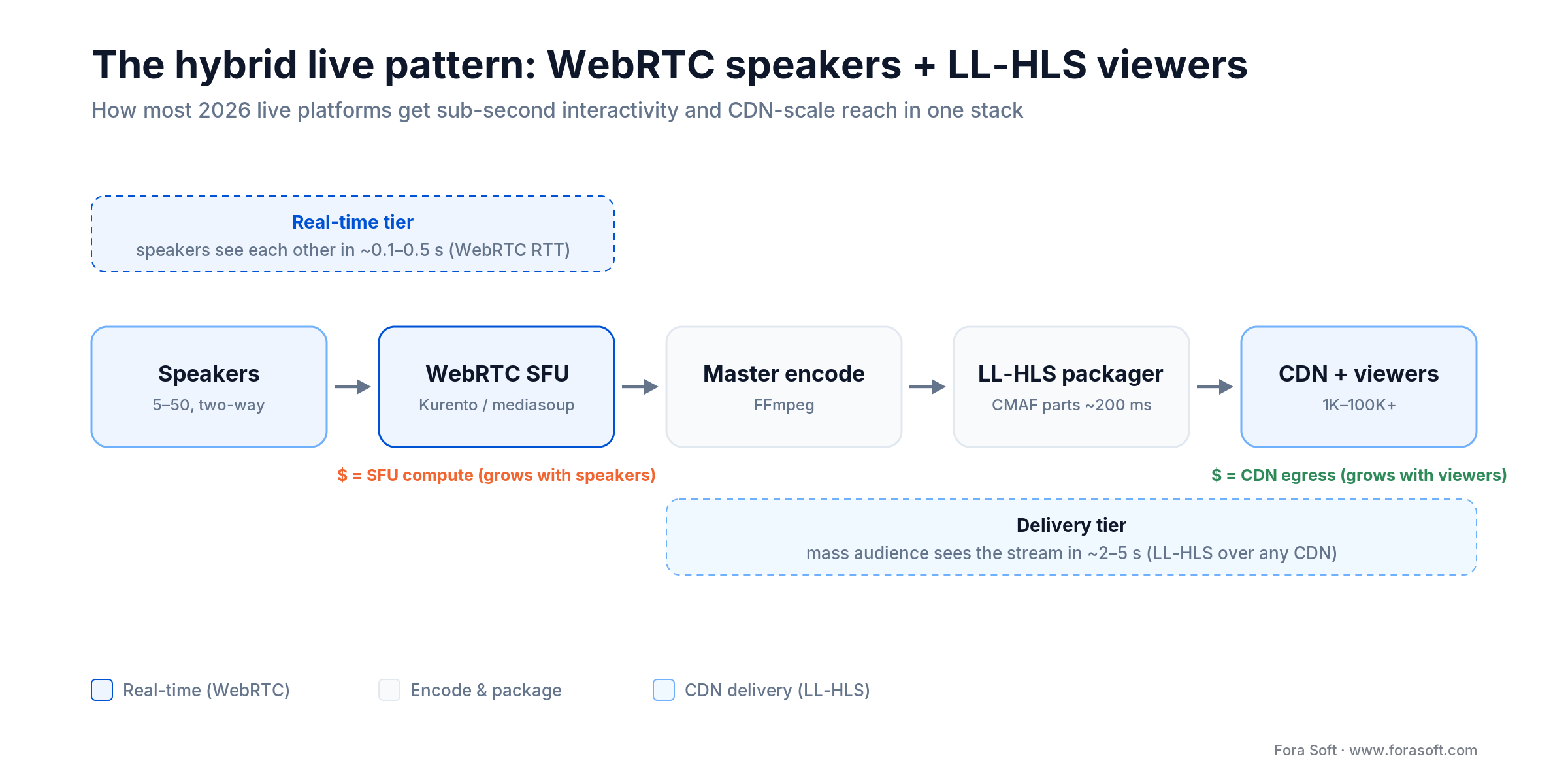
Figure 2. The hybrid live pattern: a WebRTC SFU handles speakers in real time, then one master feed is encoded to LL-HLS and fanned out over a CDN to the mass audience.
Why it works
Speakers enjoy sub-1s RTT (WebRTC). Viewers get stable, buffered video (LL-HLS) without overwhelming the SFU. The SFU runs on a single node or a small cluster, and the encode-to-segment pipeline is independent of viewer count, so scaling the audience never touches the real-time tier.
Implementation checklist
- Encoder (FFmpeg or similar) pulls the SFU master output via
rtmp://or a custom socket. - Encoder re-muxes (or re-encodes if codecs differ) and segments into LL-HLS with ~1–2s segments and ~200ms parts.
- Segments land in object storage or a local origin; a CDN (Cloudflare, Fastly, CloudFront, Bunny) fans them out.
- The playlist updates on every part (~200–500ms) via blocking reload.
- Fall back to classic HLS automatically when a player can’t do partial segments.
Reach for the hybrid when: you have 5–100 speakers and 1K–100K viewers — sub-second interactivity where it counts, CDN economics for everyone else. It’s the default for modern live platforms.
Hybrid architecture is the way — but how do you build it?
Fora Soft ships hybrid platforms (WebRTC speakers + LL-HLS viewers) at scale. Let’s scope your architecture.
WebRTC architecture pitfalls at scale
1. The SFU CPU wall. A single node saturates once you push past a few hundred concurrent forwards at higher bitrates. Beyond that you cascade SFUs, and each hop adds 20–50ms plus ICE re-negotiation of 2–4 seconds. Simulcast helps: each speaker sends multiple bitrate variants, the SFU forwards only what each viewer needs, and you push the practical ceiling up toward 500–800.
2. ICE failures at 10–15%. In production, 10–15% of ICE negotiations fail or degrade (firewalls, STUN timeouts, TURN congestion). You must fall back to TURN relay (adds 50–200ms) or reconnect. Even with tuning, a 3–5% mid-call drop rate is normal on consumer networks.
3. Bandwidth swings on cellular. A speaker on LTE can drop from 5 Mbps to 1 Mbps mid-sentence; the encoder can’t keep up and viewers see stutter. Encode simulcast at 2–3 tiers (5 / 2 / 0.5 Mbps) upfront so viewers can drop down cleanly.
4. SFU memory adds up. A forwarding SFU is far lighter than a transcoding MCU (roughly 5–20 MB per connection for jitter buffers and ICE state, not the hundreds an MCU needs), but a few hundred connections across nodes is still several GB of RAM to plan for. Cascade in a tree and accept the latency cost, or offload viewers to LL-HLS entirely (the hybrid).
5. Codec mismatches. Chrome prefers VP8, Safari prefers H.264. A pure SFU forwards rather than transcodes, so the clean fix is to pin codecs per client and run separate paths. If you instead bridge them with a transcoding gateway in front of the SFU, budget the extra CPU and the 20–50ms it adds per hop. A little planning, no surprises.
HLS architecture pitfalls — segment sizing and CDN cache
1. Segment size is a latency/throughput trade. Smaller segments cut latency but multiply HTTP requests; larger ones lock latency to 15–30s. LL-HLS uses ~1–2s segments with ~200ms parts. On congested cellular, a 1s segment can arrive late and cause rebuffering — measure before you commit.
2. Cold CDN cache at stream start. A brand-new stream has nothing at the edge, so the first requests hit the origin and add 200–500ms each. Pre-warm the CDN ~30 seconds before going live by pushing the first segments to edge nodes.
3. ABR ladder tuning is empirical. A 5–8 tier ladder (1080p@5 Mbps down to 240p@300 kbps) only works if it matches your audience’s real bandwidth distribution. Run a week of analytics, measure bitrate versus rebuffer rate, and trim tiers that don’t earn their place.
4. Playlist staleness in live. The playlist updates every segment; update it too aggressively without caching headers and you hammer the origin. Set a short Cache-Control on the playlist so edges serve it briefly and re-fetch at the live edge.
5. Recording means tapping the origin, not the CDN. You can’t reliably pull segments back from the CDN — the origin may garbage-collect them first. Archive segments at the origin/encoder as they’re created, or record the source feed directly for VOD.
Code and config — LL-HLS output and a WebRTC join
LL-HLS segment generation (FFmpeg)
This takes an RTMP input (from your SFU or encoder) and writes LL-HLS-ready fMP4 segments:
ffmpeg -i rtmp://localhost/live/main \
  -c:v libx264 -preset veryfast -b:v 5M -maxrate 5.5M -bufsize 11M \
  -c:a aac -b:a 128k \
  -f hls \
  -hls_time 1 \
  -hls_list_size 6 \
  -hls_flags delete_segments+independent_segments \
  -hls_segment_type fmp4 \
  /var/www/html/live/stream.m3u8
Key flags: -hls_time 1 gives 1-second segments; -hls_segment_type fmp4 is required for LL-HLS on iOS; independent_segments keeps each segment random-access and CDN-friendly. For true ~200ms parts you add the LL-HLS part directives per Apple’s HLS Authoring Specification.
WebRTC join flow (mediasoup / Node.js)
// Client joins a mediasoup room
const device = new mediasoupClient.Device();
await device.load({ routerRtpCapabilities });

const transportParams = await fetch('/api/transport', {
  method: 'POST',
  body: JSON.stringify({ rtpCapabilities: device.rtpCapabilities })
}).then(r => r.json());

const transport = device.createSendTransport(transportParams);

const producer = await transport.produce({
  track: videoTrack,
  codecOptions: { videoGoogleStartBitrate: 1000, videoGoogleMaxBitrate: 5000 }
});
The client requests a send transport (connects to the SFU), adds a camera or screen track, and becomes a producer. The SFU then forwards simulcast layers to each subscriber.
Production config tip: mediasoup defaults to VP8. For broad iOS reach, pair VP8 with H.264 and pin the codec per client — re-encoding a mismatched codec at the SFU adds 20–50ms per hop.
Mini case: Worldcast Live — 10,000 HD viewers at 0.4s
Situation. A concert platform wanted to stream live HD to 10,000 concurrent viewers worldwide, with the audience seeing a performer react within half a second. Textbook wisdom says “WebRTC can’t scale past a few hundred” — but classic HLS at 15–30s would have killed the interactivity.
The architecture. We built a custom WebRTC stack on the Kurento media server, hosted on AWS, with multichannel audio (five channels), production-grade HD bitrates, and dynamic quality adjustment for poor connections. Full-duplex two-way streaming lets performers in different cities play together in real time, and a white-label Multiple Venue Streaming plugin syncs the feed across multiple sites at once.
Outcome. 0.4–0.5s glass-to-glass at 10,000 concurrent viewers, scaled across media-server nodes — among the first platforms to hit sub-second at that scale. The lesson is the honest one: the “500-viewer wall” is an engineering budget, not a hard protocol law. With the right media server, encoders, and adaptive logic, pure WebRTC scales further than the rule of thumb suggests. It just costs more than letting a CDN carry passive viewers.
Want to push WebRTC further than the textbook? Read our WebRTC production-architecture guide, then let’s scope your latency target and viewer ceiling.
Mini case: Sprii — live shopping at €365M+ scale
Situation. A Danish live-shopping platform needed to run flash-sale broadcasts where viewers tap “buy” within seconds of a host announcing a deal. Latency of 2–5 seconds was fine; reliability, reach, and product-sync were not negotiable.
The architecture. We built Sprii on an RTMP + WebRTC multistreaming pipeline with FFmpeg, fanning the same broadcast out to Cloudflare, Mux, and custom web stores plus Facebook and Instagram — each with independent overlay configs. Product events (IDs, quantities, discount codes) ride a separate Socket.io channel, decoupled from the video so overlays and gamification stay in sync without touching the stream. Origin runs on Hetzner.
Outcome. The platform has moved €365M+ in cumulative sales across 72,000+ live events for 3,000+ brands. Live-shopping viewers watch for ~20 minutes versus 54 seconds on static pages, driving up to 20× higher conversion. The pattern — CDN-delivered video plus a real-time data channel for commerce events, became a template we reused for other live-commerce builds.
Live commerce or events on your roadmap?
We’ve shipped multistreaming pipelines that move nine figures in sales. Let’s pressure-test your architecture.
Cost model — three tiers, real 2026 numbers
Here is what delivery actually costs for a live event in 2026, per 1,000 viewer-hours, at 1080p/5 Mbps (2.25 GB per viewer-hour). The chart makes the punchline obvious: your CDN choice moves the bill more than your protocol does.
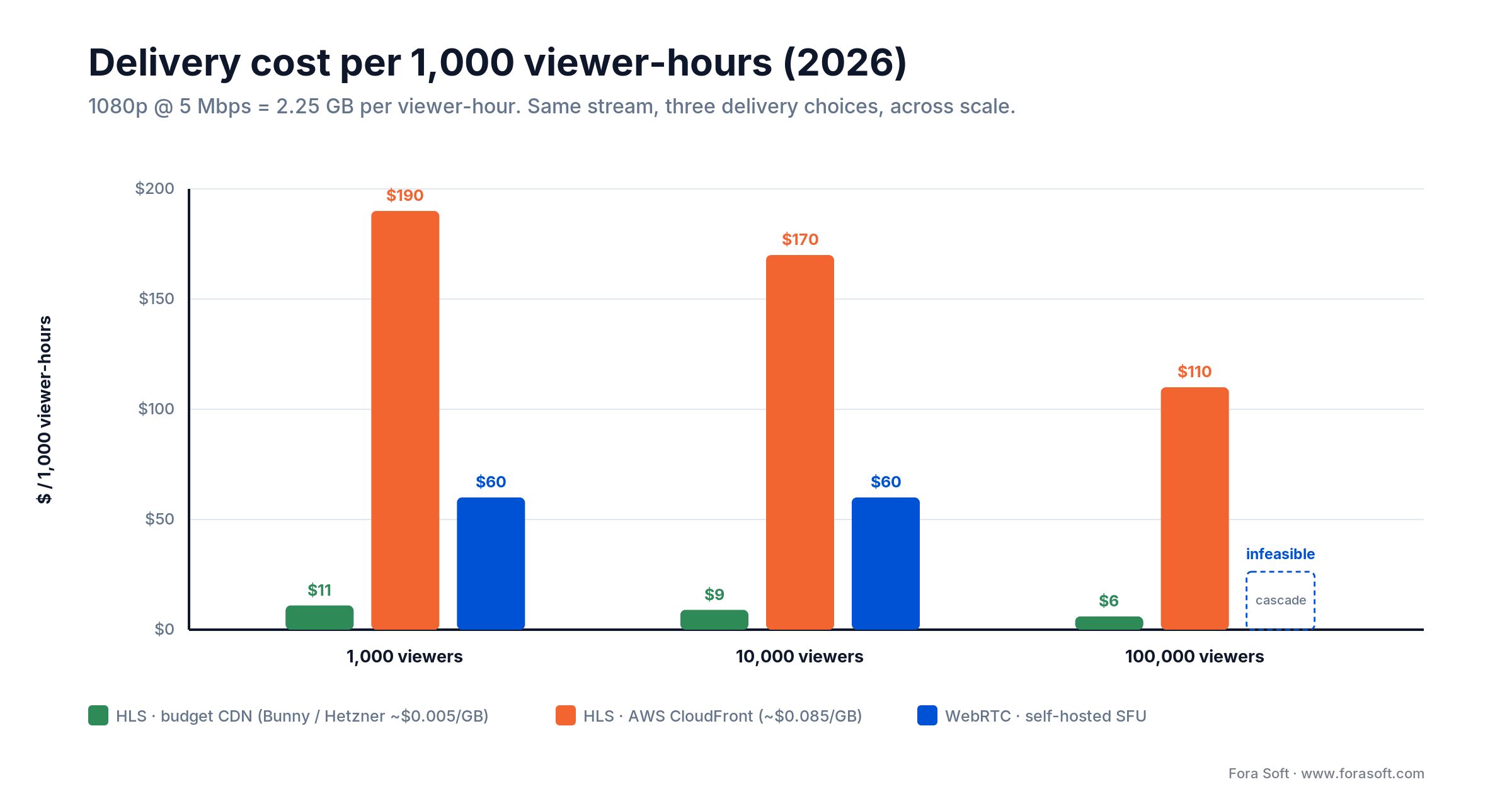
Figure 3. Delivery cost per 1,000 viewer-hours (1080p @ 5 Mbps, 2026). Budget CDN is cheapest; AWS CloudFront is 15–30× more; self-hosted WebRTC sits in between and can’t reach 100K without cascading.
Tier 1: ~1,000 concurrent
- LL-HLS, budget CDN: ~$11 per 1,000 viewer-hours. Cheapest and simplest.
- LL-HLS, AWS CloudFront: ~$190 — same protocol, premium egress.
- WebRTC, self-hosted: ~$60, and viable here if you need sub-1s or two-way.
Tier 2: ~10,000 concurrent
- LL-HLS, budget CDN: ~$9 per 1,000 viewer-hours (volume pricing helps).
- LL-HLS, AWS CloudFront: ~$170.
- Hybrid (WebRTC speakers + LL-HLS viewers): the sweet spot — interactive stage, CDN economics for the crowd.
Tier 3: ~100,000 concurrent
- Pure WebRTC: not practical — 200+ SFU nodes cascaded. This is the “infeasible” bar in the chart.
- LL-HLS, budget CDN: ~$6 per 1,000 viewer-hours. The only sane option, optionally with a small WebRTC speaker group.
Rough heuristic: under 500 viewers, WebRTC. 500–10K, hybrid. 10K+, LL-HLS with an optional WebRTC speaker group. The deciding number is cost-per-viewer at your scale, on your CDN.
A decision framework — five questions
Answer these top to bottom; the first “yes” usually points at your build. The tree below is the same logic in one glance.
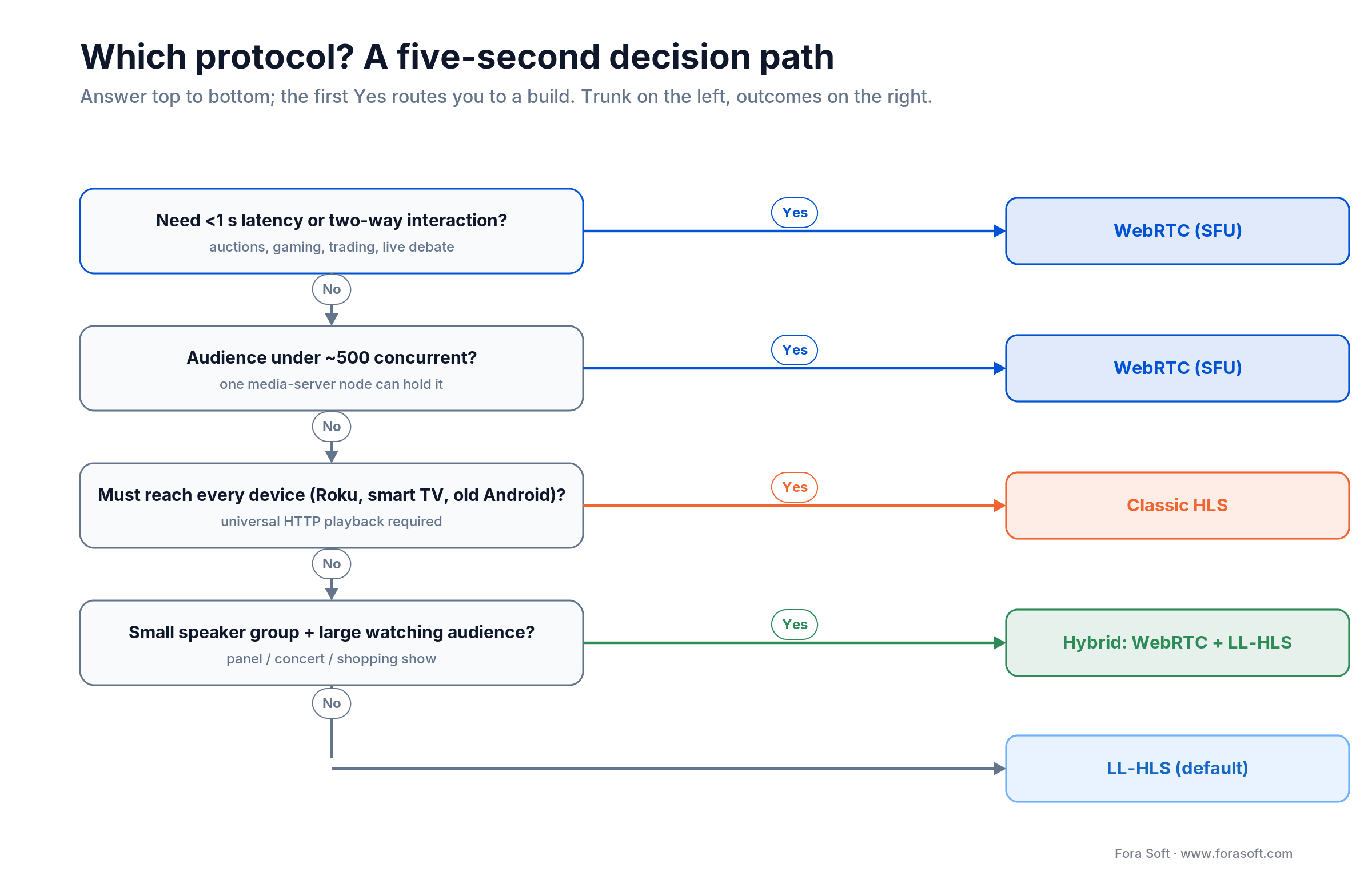
Figure 4. A five-step decision path: latency and device needs route you to WebRTC, classic HLS, the hybrid, or LL-HLS as the default.
1. What’s your concurrent-viewer ceiling? Under ~500, WebRTC is viable. 500–10K, the hybrid wins. 10K+, LL-HLS is required; past 100K you’re on a managed CDN.
2. What’s your latency target? Under 1s, WebRTC only. 1–5s, LL-HLS. 5s+, classic HLS. Unsure? Default to 2–5s (LL-HLS is the safe bet).
3. Do viewers send data back in the same stream? Yes (auction bids, game controls) → WebRTC, or WebRTC plus a messaging channel. No (watch-only, chat is separate) → LL-HLS is fine.
4. What device coverage do you need? Smart TVs, Roku, old Android → HLS is the only universal option. Web plus mobile → LL-HLS works.
5. What’s your monthly budget? Under $500 → LL-HLS or hybrid. $500–$5,000 → hybrid. $5,000+ → WebRTC scales but demands ongoing SFU ops. Managed WebRTC bills per participant-minute and overtakes CDN cost fast.
Unsure which tier fits? Book a 30-minute scoping call and walk through your latency target, viewer ceiling, and budget with a streaming architect.
Five pitfalls — what breaks in production
1. Underestimating ICE failure. Plan for 10–15% of WebRTC connections to fail or fall back to TURN relay (+50–200ms). Budget ~1 Mbps of TURN bandwidth per 20–30 users, and test on real cellular, not just Wi-Fi.
2. Choosing segment size without testing. A 1s LL-HLS segment is the default, but on congested cellular it can arrive late and rebuffer. Measure rebuffer rate against 1s, 2s, and 3s before you commit.
3. Codec mismatch in hybrid setups. If the SFU emits H.264 but the encoder expects VP8, you re-encode — CPU and latency you didn’t budget for. Align codecs end to end.
4. Not instrumenting rebuffer rate and RTT. Target rebuffer rate under 1% and median segment fetch under 200ms. If you don’t measure them, you learn about breakage from angry users.
5. Insufficient TURN capacity. If TURN runs out, new ICE negotiations fail and you lose viewers. Load-test at 2× expected concurrency and confirm ICE success stays above 90% before launch.
KPIs — what to measure in production
Quality KPIs. Rebuffer ratio (sessions with a stall) — target <1%. Startup latency (play() to first frame) — target <3s LL-HLS, <5s HLS. Weighted average bitrate — target >70% of viewers at 720p+.
Business KPIs. Concurrent peak viewers, engagement (session duration ÷ broadcast duration), mid-stream churn (target <5% for live events), and revenue per viewer where it applies.
Reliability KPIs (WebRTC). ICE success rate (target >85%), mid-call drop rate (target <5%), SFU CPU (target <70% for headroom), and TURN relay share (target <15%).
When NOT to use WebRTC or HLS
If your content is pre-recorded with random-access scrubbing (rewind, fast-forward), neither WebRTC nor live HLS is the right first choice. Use a progressive MP4 or a VOD platform tuned for seeking.
If you need viewer-level end-to-end encryption for compliance (HIPAA medical consults, say), reach for HLS with DRM (Widevine, FairPlay, PlayReady) or WebRTC with DTLS-SRTP. A bare CDN won’t satisfy the audit.
And if you have fewer than 50 viewers and can tolerate 15–30s latency, a simple RTMP server (Nginx-RTMP, or a managed one) feeding a basic CDN is cheaper and simpler than either. You don’t need the sophistication; you need the invoice to stay small.
Not sure your use case fits? Read our streaming cost guide, then reach out to scope your exact scenario.
FAQ
Is WebRTC faster than HLS?
For latency, yes: WebRTC delivers 0.2–0.5s glass-to-glass; HLS is 2–30s depending on the variant. But faster isn’t automatically better. HLS is cheaper per viewer, scales further, and reaches more devices. If you don’t need sub-second latency, LL-HLS usually wins on simplicity.
Can WebRTC and HLS run in the same app?
Yes, and that’s the hybrid pattern: WebRTC for speakers or interactive users, LL-HLS for the watching audience. Speakers get sub-1s RTT; viewers get a stable, buffered stream. Most modern live platforms run this as their default architecture.
What is LL-HLS, and how is it different from classic HLS?
Low-Latency HLS, defined in Apple’s HLS Authoring Specification and the RFC 8216bis drafts, adds partial segments (~200ms parts) and blocking playlist reload to cut latency from 15–30s to 2–5s. It runs on standard CDNs and falls back to classic HLS automatically. It is the live protocol of choice in 2026.
Does WebRTC or HLS use more client CPU?
WebRTC generally costs the client more CPU: it decodes a live real-time stream, runs jitter buffers, echo cancellation, and congestion control continuously. HLS players decode pre-segmented media with more buffering slack, so they’re lighter, especially on low-end mobile browsers and smart TVs where hardware HLS decoding is common. On battery-constrained devices, HLS is the gentler option.
Does HLS work everywhere?
Classic HLS plays on essentially every device: iOS, Android, web, smart TV, Roku. LL-HLS is native on iOS 14+ and Safari 14+ (shipped at WWDC 2020), needs hls.js on other browsers, and is still uneven on smart TVs in 2026. For 100% coverage, keep a classic-HLS fallback and test against your real audience.
What about WebTransport and Media over QUIC for streaming?
QUIC beats TCP for unreliable low-latency transport, and Media over QUIC (MoQ) plus WebTransport is the most interesting thing on the horizon. As of 2026 both are still stabilizing in browsers and CDNs. For production today, stick with WebRTC (UDP under the hood) or LL-HLS; expect MoQ to matter in 2027–2028.
Is WebRTC suitable for 100,000 concurrent viewers?
Not as the primary transport. A single SFU node tops out around 500–800 subscribers, so 100K would mean hundreds of cascaded nodes and heavy ops overhead. Use WebRTC for a small speaker group and LL-HLS for the mass audience instead.
Is HLS encrypted end-to-end?
HLS segments are encrypted in transit (TLS to the CDN) but not end-to-end by default. For true broadcaster-to-viewer protection you add DRM (Widevine, FairPlay, PlayReady) or AES-128 segment encryption. WebRTC has DTLS-SRTP built in, which is why it’s the default for privacy-critical medical and legal streams.
What about latency-sensitive sports betting?
Most jurisdictions require the live stream and betting feed to stay within ~500ms–1s of each other, which rules out classic HLS. You need WebRTC (<500ms) or LL-HLS (<5s) paired with a low-latency event feed over WebSocket or gRPC — and legal review, because latency alone won’t satisfy compliance.
What to read next
Deep dive
What is WebRTC? A complete guide
Peer-to-peer media, STUN/TURN, and codec selection, explained.
Architecture
P2P vs MCU vs SFU
When each topology wins — SFU is the default for live.
Latency
Sub-1s latency for mass streams
WebRTC, MoQ, and LL-HLS tactics to get under one second at scale.
Infrastructure
Edge computing for live streaming
Encode and relay at the edge to cut backbone hops and latency.
Scale
Scale streaming to 1M viewers
CDN strategy, origin bandwidth, and geographic distribution.
Ready to choose your protocol and scale it?
WebRTC and HLS aren’t rivals in 2026; they’re complements. WebRTC owns interactive, sub-second latency for small groups; HLS and LL-HLS own scale and device reach. The hybrid (WebRTC speakers, LL-HLS viewers) is the default for modern live platforms because it balances latency, cost, and operational sanity. Worldcast Live proved WebRTC can scale to 10K when engineered well; Sprii proved multistreaming HLS moves nine figures in live commerce.
The path is simple: under 500 viewers with sub-1s latency, WebRTC. 500–100K with 2–5s acceptable, hybrid or pure LL-HLS. 100K+ or every-device coverage, pure LL-HLS. Most platforms land on the hybrid because they want both interactivity and scale.
The engineering (SFU ops, segment lifecycle, CDN cache, codec tuning, ICE fallback) is real but well-trodden. We’ve shipped this stack for concert streaming, live shopping, debate platforms, and trading. The cost model is predictable once you use real CDN numbers. The latency targets are achievable.
Let’s scope your streaming platform this week
We’ll walk your latency targets, viewer scale, device mix, and cost ceiling — then architect the right protocol mix (WebRTC, LL-HLS, or hybrid) and a timeline for your team.

