

A voice AI agent is software that holds a spoken conversation in real time: it listens with speech-to-text, reasons with a large language model, and replies with text-to-speech, fast enough to feel like a phone call. Building one that actually sounds human is a latency problem first and a model problem second. Get the full round trip, microphone to speaker, under 800 ms on a pipeline stack, or trim the model latency to ~200–300 ms with a speech-to-speech model, and the conversation feels natural. Miss that budget and every caller notices: they talk over the agent, repeat themselves, or press zero for a human. LiveKit Agents is the open-source framework most serious teams reach for to hit those numbers without locking into one vendor.
This playbook is the condensed version of what our engineers learn on day one of a voice-AI project. Fora Soft, a software development company that has shipped 250+ projects since 2005, builds LiveKit voice AI agents for support desks, sales dialers, clinical intake, and in-app assistants, and we have watched every latency trap, cost blowout, and compliance surprise at least twice. If you are a founder, CTO, or senior engineer who needs a real answer to “should we build this, and on what?” by Friday, start here.
Key takeaways
• Latency is the product. A pipeline (STT → LLM → TTS) gives control at $0.05–$0.22/min all-in; speech-to-speech trims model latency to ~200 ms but locks you to one vendor.
• Build on LiveKit past ~10,000 min/month. Below that, Retell or Vapi ship a demo in hours; above it, owning the stack repays the engineering in months.
• The 2026 sweet spot: Deepgram Nova-3 for STT, Claude Haiku 4.5 for the LLM, Cartesia Sonic-3.5 or Deepgram Aura-2 for TTS — 550–700 ms end to end.
• New line items in 2026. Krisp noise cancellation is metered from 1 May 2026 ($0.002–$0.004/min); OpenAI shipped gpt-realtime-2.1 in July, cutting speech-to-speech p95 by ~25%.
• Compliance is on you, not the platform. TCPA written consent, HIPAA BAAs, two-party recording consent, and GDPR all apply the moment you dial out.
Why teams pick LiveKit for voice AI agents in 2026
Every voice AI agent team hits the same fork. Either you bolt your agent onto someone else’s managed platform (Vapi, Retell, Bland, Synthflow) and accept their latency, their prompt templates, and their margin, or you build on a realtime transport you control. LiveKit is the second path: an Apache-2.0 realtime media stack with a production-grade Agents framework on top. Weighing the open-source options first? We put Pipecat, LiveKit Agents, and the OpenAI Agents SDK side by side.
What you get out of the box: WebRTC between your users and the agent, plug-in STT/LLM/TTS providers, a trained turn-detection model, licensed Krisp noise cancellation, per-turn latency metrics, call recording, and PSTN bridging through Telnyx or Twilio. Open source, no lock-in, community plug-ins for every major provider.
What you trade: you write Python or Node, you own the ops if you self-host, and you budget one to three engineering weeks for a production agent instead of the three hours Retell advertises. Past a proof of concept, that trade is the right one — the cost breakdown below shows why. For the platform reference and SDK internals, see our LiveKit AI Agents engineer’s guide.
Want a voice AI agent shipped, not a research project?
Fora Soft has built LiveKit agents for EdTech, healthcare intake, outbound sales, and B2B support. We hit sub-700 ms latency and production compliance in 3–6 weeks, not 3–6 months.
What “human-sounding” actually means
Humans expect a response gap of 200–300 ms in natural conversation. Cross 500 ms and callers consciously notice the delay. Cross a second and they start interrupting, hanging up, or reverting to touch-tone. That is the real performance envelope for a voice AI agent. Not model quality, not voice realism, not tool coverage.
“Human-sounding” is four things stacked together, and most teams obsess over the wrong one:
1. Fast first response. 300–800 ms from end-of-user-speech to start-of-agent-audio, depending on architecture. This is the one that breaks demos.
2. Graceful interruption. The agent stops speaking within 120–200 ms when the caller talks over it, then resumes the right context.
3. Prosody that matches intent. Emphasis on the right words, breath groups that track meaning, expressive voices for empathy-heavy moments.
4. Factual grounding. The agent knows when to say “let me check” and actually checks — through function calling, not a confident guess.
Miss any of the four and the illusion breaks. Most teams pour money into item three (“we need a better voice”) when their real gap is item one. ElevenLabs is not your bottleneck at 75 ms first-byte; your LLM at 1.2 s is.
The 800 ms latency budget and where it leaks
The classic pipeline runs five stages. Here is a realistic best-case budget with 2026 providers, measured end to end on a US-region deployment. The chart makes the point faster than the numbers: the LLM is where the budget goes.
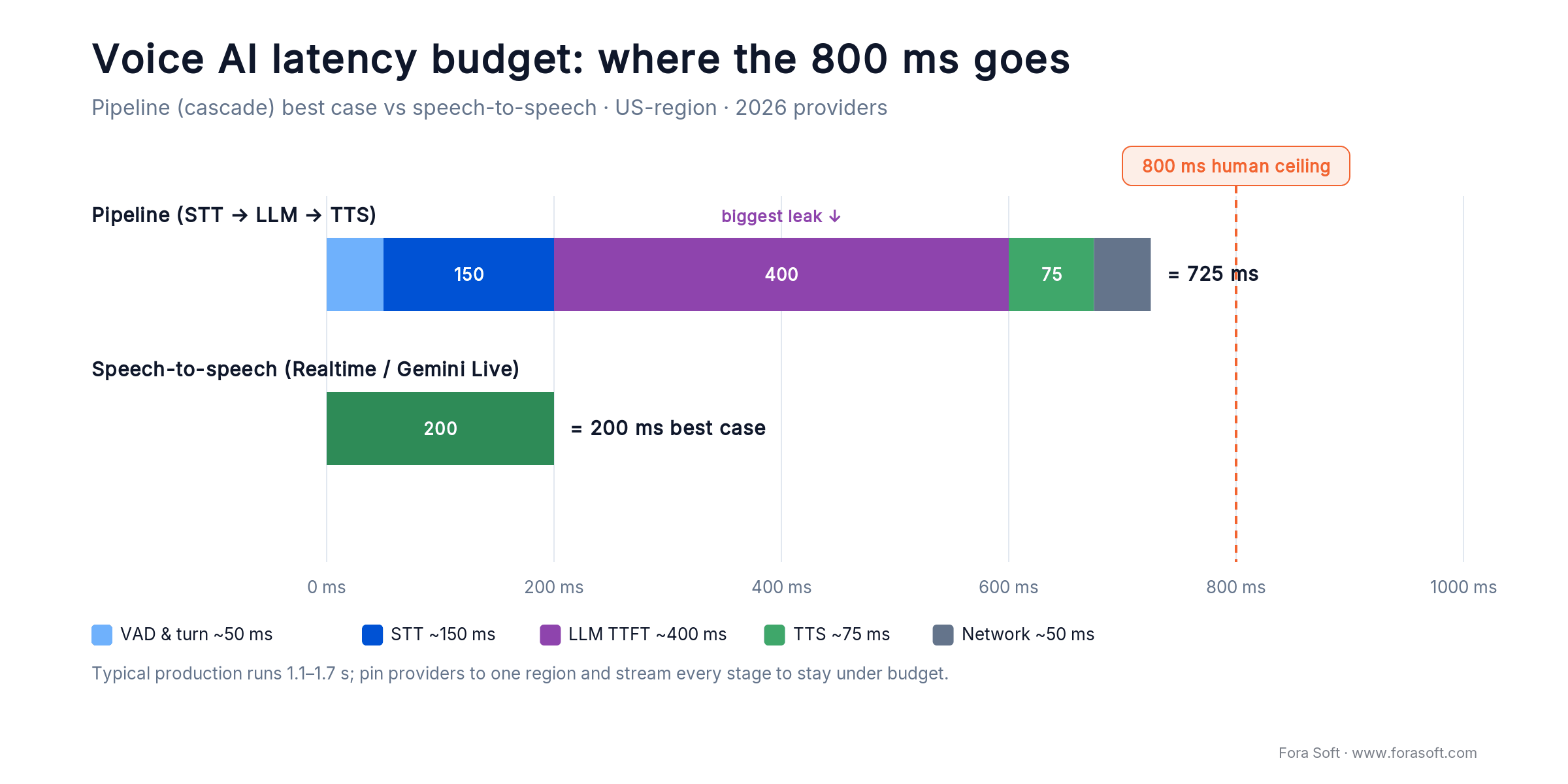
Figure 1. Where the 800 ms goes. The LLM first-token wait is the biggest slice of a pipeline turn; the speech-to-speech bar is model latency, before network.
| Stage | Best case | Typical | Where it leaks |
|---|---|---|---|
| VAD & end-of-turn | 50 ms | 80–150 ms | Slow or noisy speech, accents, VAD tuning |
| STT (streaming) | 150 ms | 200–300 ms | Non-streaming, cross-region, batch models |
| LLM first token | 400 ms | 600–1,200 ms | Long prompts, large context, cold provider, no streaming |
| TTS first byte | 75 ms | 150–250 ms | No streaming TTS, expressive voices, low-traffic regions |
| Network & playback | 50 ms | 80–200 ms | Mobile radio, PSTN hop, distant TURN server |
| Total (pipeline) | ~725 ms | 1.1–2.1 s | — |
| Speech-to-speech (model) | 200 ms | 300–500 ms | Network + PSTN push real voice-to-voice toward 800 ms |
The two fastest leaks in every production deploy we audit are LLM first-token latency and cross-region hops. Both are fixable. Pick a low-latency model, pin STT, LLM, and TTS to the same cloud region, and stream every stage so audio starts playing before the model finishes thinking. Still missing 800 ms after that? The problem is prompt length, not infrastructure.
Reach for the pipeline when: you need custom tool calling, best-in-class STT accuracy, cost control at scale, swappable components per feature, or compliance that forbids sending raw audio to a single third-party model.
Pipeline vs speech-to-speech: which fits your product
Speech-to-speech models skip transcription entirely: audio goes in, audio comes out. In 2026 the two to know are OpenAI’s gpt-realtime-2.1 (shipped 6 July 2026, ~25% lower p95 voice latency and ~800 ms voice-to-voice wired right) and Google’s Gemini 3.1 Flash Live (26 March 2026, 90+ languages). Model latency can hit 200–300 ms, though real voice-to-voice lands closer to the ~800 ms above once network and PSTN are counted, and barge-in comes for free. The catch: you buy reasoning, voice, interruption, and tool calling as one bundle from one vendor.
The pipeline is the opposite trade. You stitch three or four providers, eat 500–700 ms of overhead, and in exchange you can swap the LLM the week Anthropic ships a faster Haiku, point STT at a vertical-specific provider, use a cloned brand voice, and log every stage for audit. Our rule of thumb is below; the decision tree makes it a 30-second call.
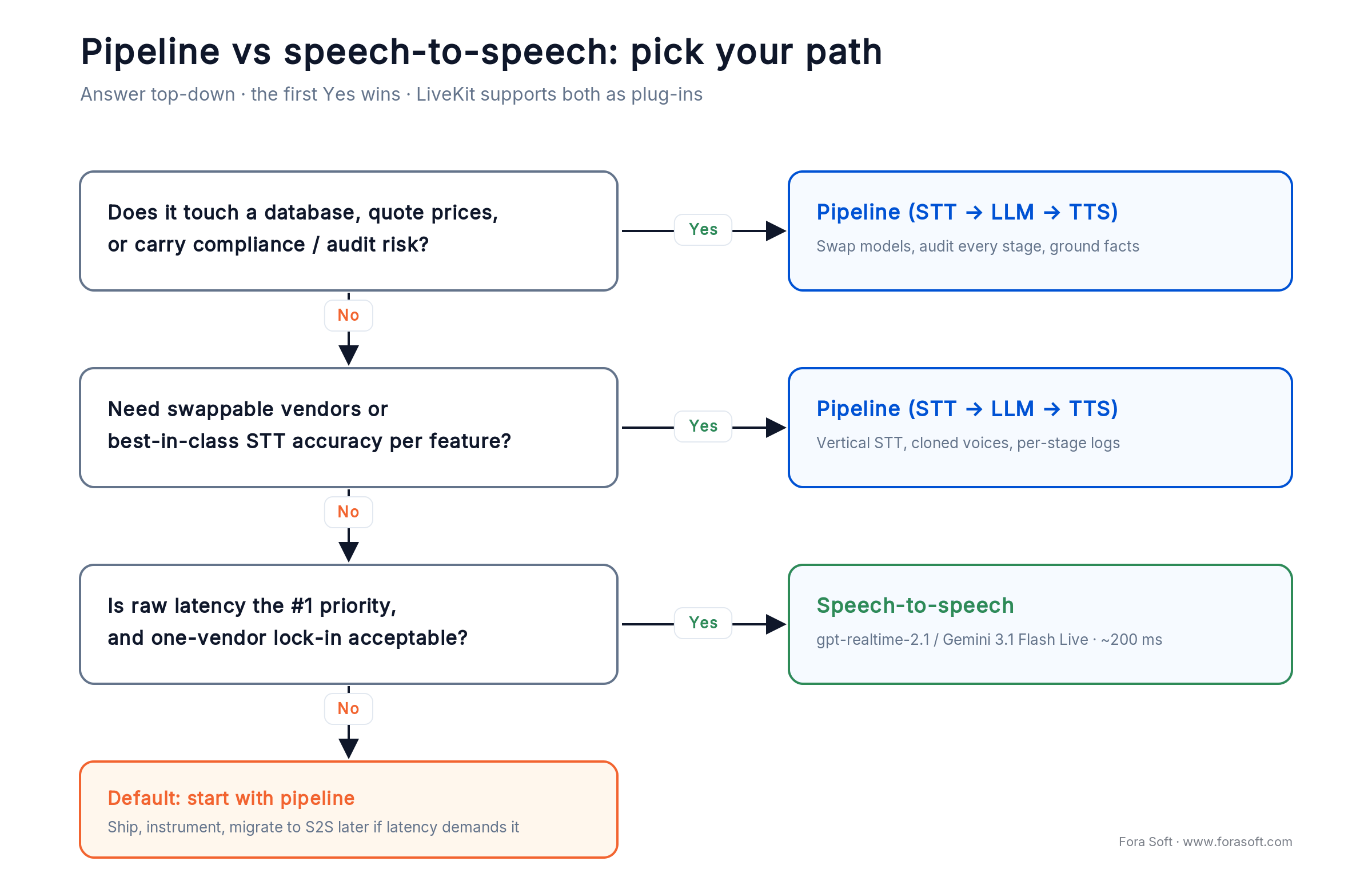
Figure 2. The first Yes wins. LiveKit runs both, so you can prototype speech-to-speech and keep the pipeline as your fallback.
Our practical rule: go speech-to-speech for consumer-facing assistants where personality beats precision. Go pipeline for anything that talks to a database, quotes a price, or could land you in court if it hallucinates. LiveKit supports both, and the pipeline path is the one it was designed for. We keep a deeper teardown in our OpenAI Realtime API production guide.
Reach for speech-to-speech when: latency is the single most important thing, the agent mostly chats rather than transacts, and locking to one vendor’s model, voice, and tool schema is an acceptable price for ~200 ms.
Reference architecture on LiveKit Agents
A production LiveKit voice AI agent has five moving parts and one traffic pattern. The user joins a LiveKit room. An agent worker picks up the job, subscribes to the user’s audio, streams it through STT, passes partial transcripts to the LLM, streams LLM tokens into TTS, and publishes the audio back, all while a turn-detection model decides when the user has actually finished talking.
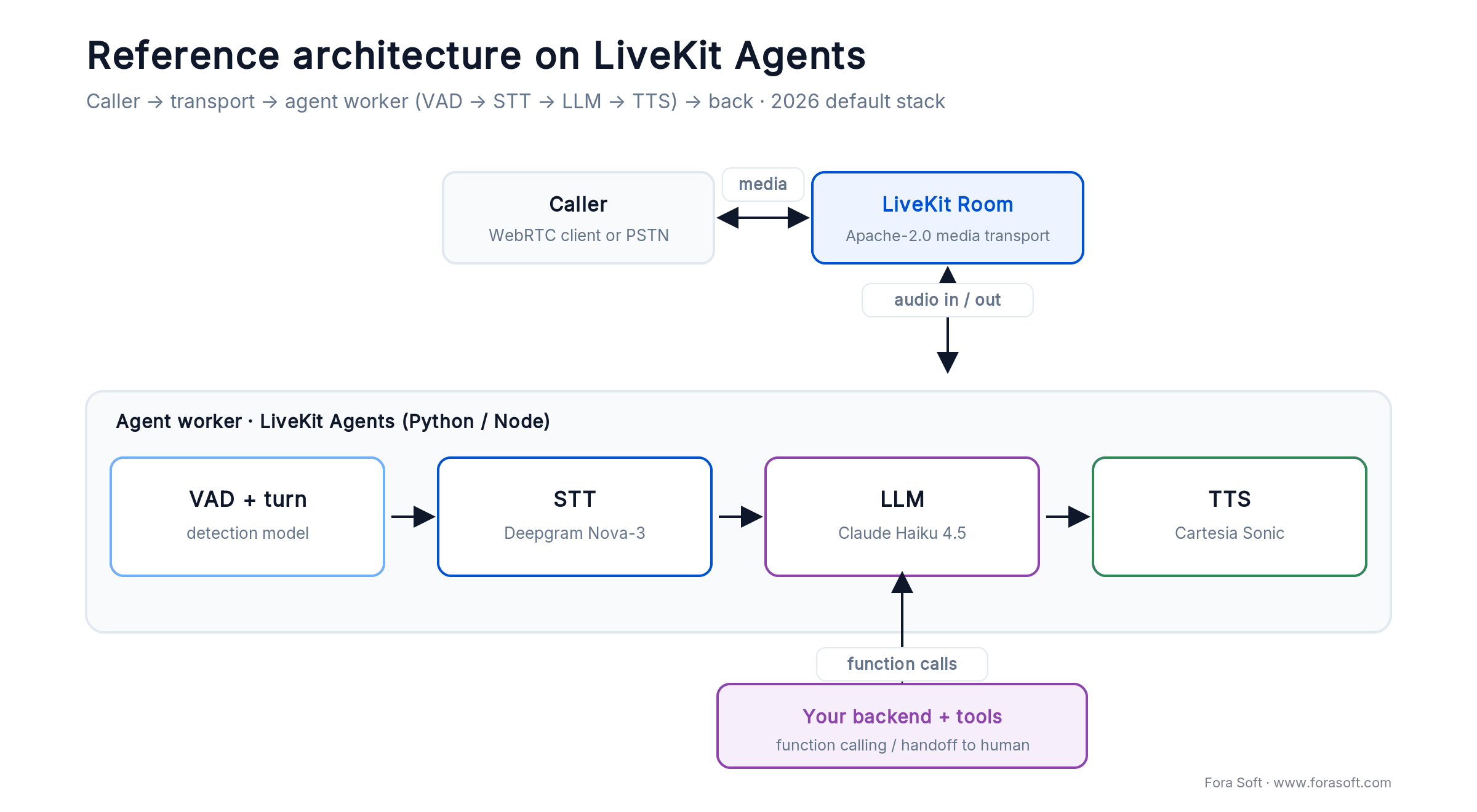
Figure 3. The whole shape. Everything past the four plug-ins is your business logic: tools, prompts, state, and human handoff.
from livekit.agents import Agent, AgentSession, JobContext, WorkerOptions, cli
from livekit.plugins import deepgram, anthropic, cartesia, silero
from livekit.plugins.turn_detector.multilingual import MultilingualModel

async def entrypoint(ctx: JobContext):
    await ctx.connect()

    session = AgentSession(
        vad=silero.VAD.load(),
        stt=deepgram.STT(model="nova-3", language="en-US"),
        llm=anthropic.LLM(model="claude-haiku-4-5"),
        tts=cartesia.TTS(model="sonic-3", voice="professional-warm"),
        turn_detection=MultilingualModel(),   # trained turn model, not fixed VAD
    )

    agent = Agent(
        instructions="You are a scheduling assistant. "
                     "Always call check_availability before offering a time.",
        tools=[check_availability, book_meeting],
    )

    await session.start(agent=agent, room=ctx.room)

if __name__ == "__main__":
    cli.run_app(WorkerOptions(entrypoint_fnc=entrypoint))
That is the full worker. LiveKit’s dispatcher hands the job to an idle worker, the AgentSession wires the plug-ins together, and the trained turn model decides when the caller is done. Everything else, from tools and prompts to state machines and human handoff, is code you already know how to write.
Need a second opinion on your voice stack?
Send us your latency target and call volume. A senior engineer who has shipped LiveKit agents will tell you the fastest production path and the honest number — no sales pitch.
STT: Deepgram vs AssemblyAI vs Gladia vs Soniox
Speech-to-text is the one stage where latency is cheap and accuracy is everything. A 150 ms versus 300 ms STT barely changes perceived conversation; a 5% versus 12% word-error rate is the difference between “it worked” and “it dialed the wrong customer.” One honesty note: vendor WER figures are best-case. Deepgram’s ~5.3% Nova-3 number is its own benchmark; third-party tests like Artificial Analysis put it near 18% on hard audio. Test on your own audio, not the datasheet.
| Provider | Latency | Accuracy (en) | Price | Best for |
|---|---|---|---|---|
| Deepgram Nova-3 | <300 ms | ~5.3% WER (vendor) | $0.0077/min | General purpose, English-first default |
| AssemblyAI Universal-3 Pro | P50 150 ms | ~5.7% WER | ~$0.37/hr | Entity capture: emails, IDs, numbers |
| Gladia Solaria-1 | 103 ms partial | Strong on conv. | Custom | Accented, noisy, code-switched |
| Soniox | Streaming | Best multilingual | Custom | Legal, medical, 30+ languages |
| OpenAI Whisper | ~500 ms chunked | Good | $0.006/min (API) | Offline / batch / low budget |
Our default is Deepgram Nova-3 for English-first US traffic, AssemblyAI Universal-3 Pro when the agent reads back account numbers or emails, and Gladia for call centers with heavy accents or code-switching. Whisper belongs in batch jobs and transcript exports, not live calls.
LLM: Claude Haiku, Gemini Flash, or GPT-5
The LLM is where most voice budgets break. Time-to-first-token matters far more than total throughput — the agent must start speaking quickly, not finish quickly. A 600 ms first token that then streams at 80 tokens/sec feels faster than a 300 ms first token that stalls after one sentence.
| Model | First token | Tokens/sec | Price (in) | Best for |
|---|---|---|---|---|
| Claude Haiku 4.5 | ~600 ms | ~79 | $1.00 / 1M | Default — fastest first token at voice quality |
| Gemini 2.5 Flash | ~800 ms | ~146 | $0.30 / 1M | Cheap value pick; Gemini 3 Flash is newer |
| GPT-5 | 0.9–1.2 s | ~60 | Premium | Complex reasoning, multi-hop tool calling |
| Groq (Llama 3.3 70B) | ~250 ms | ~300 | $0.59 / 1M | Lowest latency on a budget, OSS models |
Haiku 4.5 is our default for voice. Groq sits on the shortlist for anything latency-obsessed — sales dialers, game NPCs — where Llama-grade reasoning is enough. Reach for GPT-5 only when the agent does genuine reasoning: multi-step tool chains, constrained policy, high-value outcomes. It is too slow for casual back-and-forth.
TTS: ElevenLabs, Cartesia, Aura, or Rime
TTS is the part users actually judge, and the stage where prices vary 10x for quality differences most callers never hear. The fast tier stayed fast in 2026: Cartesia’s current flagship, Sonic-3.5, holds sub-90 ms time-to-first-audio while sharpening naturalness over Sonic-3.
| Provider | First byte | Price | Strength |
|---|---|---|---|
| ElevenLabs Flash v2.5 | ~75 ms | $0.050 / 1k chars | Naturalness, voice cloning, 4,000+ voices |
| Cartesia Sonic-3.5 | ~90 ms | $0.006 / min | Cheapest, fastest, SSM-based |
| Deepgram Aura-2 | ~90 ms | $0.030 / 1k chars | Best value, healthcare/IVR tuned |
| Rime Mist | <200 ms | $0.005 / min | Conversational emotion, US accents |
We reach for Cartesia Sonic when latency and cost matter and brand voice does not, Deepgram Aura-2 for the best naturalness-per-dollar, and ElevenLabs Flash when the client licenses a cloned or talent voice. Spend the extra only where it changes the business case — nobody books a meeting because the scheduling bot has better vibrato.
Reach for a cloned ElevenLabs voice when: the brand or a named talent is part of the experience (celebrity line, signature IVR). Otherwise Cartesia or Aura-2 sound plenty human at a fraction of the cost.
Turn detection, VAD, and graceful interruption
Voice activity detection answers “is someone speaking right now?” Turn detection answers the harder question: “did they finish, or just pause?” That gap is the difference between a conversation that breathes and one that steps on every other word.
LiveKit ships a trained turn-detection model that beats fixed-threshold VAD by a wide margin on natural speech. It reads the transcript’s filler words and lexical cues — not just audio volume — and tunes the wait window from 0 to 2 seconds dynamically. Paired with Krisp background-voice cancellation, it also survives the “coworker talking across the office” case that breaks every naive VAD.
Interruption is the other half. When the caller cuts in, the agent has to stop within ~150 ms, flush its TTS buffer, and hand the new utterance back to STT. LiveKit does this automatically. The one common bug is the agent interrupting itself, usually because a noisy TTS signal bleeds back through the user’s mic — fix it with echo cancellation on the client or background-voice cancellation on the agent.
Noise cancellation and Krisp: now a line item
LiveKit Cloud ships licensed Krisp models for two jobs: removing ambient noise (fans, traffic, keyboards) and cancelling background voices (a spouse on the phone, an open-plan office). Both lift STT accuracy 10–20% on noisy channels and cut false interruptions sharply.
The 2026 change: starting 1 May 2026, Krisp is metered on top of the base agent minute. Budget $0.002–$0.004 per minute if you leave it on. Turn it off for clean-room audio — in-app desktop assistants, studio mics — to save the line item; leave it on for PSTN and mobile traffic where it pays for itself in accuracy.
Turn Krisp off when: your users wear headsets in controlled environments (call-center desks, studio mics, in-app WebRTC from laptops), or a separate noise-suppression stage already runs client-side.
Function calling that actually ships
A voice agent that cannot do anything is a chatbot that happens to talk. Function calling is the line between “thanks for calling” and “you’re booked for Tuesday at 2.” Three rules keep it honest in production:
1. Echo back anything the agent captured. “I heard four-one-five, two-two-five… is that right?” STT mishears numbers; AssemblyAI Universal-3 Pro is meaningfully better on entities, but nothing is perfect.
2. Call synchronously, narrate asynchronously. Say “let me pull that up” while the tool runs. A two-second silence reads as a dropped line, and callers hang up.
3. Cap retries and budget. One hallucinating model with one broken tool can redial the same API 40 times in 10 seconds. Hard-cap tool calls per turn and dollars per session.
Claude and GPT-5 both support parallel tool calls, so a well-designed schema lets the agent fire “check calendar,” “look up customer,” and “pull policy” at once and answer in a single turn. That is the biggest hidden latency win we see teams miss.
True cost per minute, all in, no surprises
Every managed platform advertises a headline rate — Vapi at $0.05, Retell at $0.07, Bland at $0.09 — and every one is the platform fee only. On those managed platforms, the real all-in cost once you add STT, LLM, TTS, and telephony lands between $0.11 and $0.25 a minute. A LiveKit stack you assemble yourself runs lower, roughly $0.05 to $0.22 depending on the tier. Here is what three representative LiveKit stacks cost in 2026.
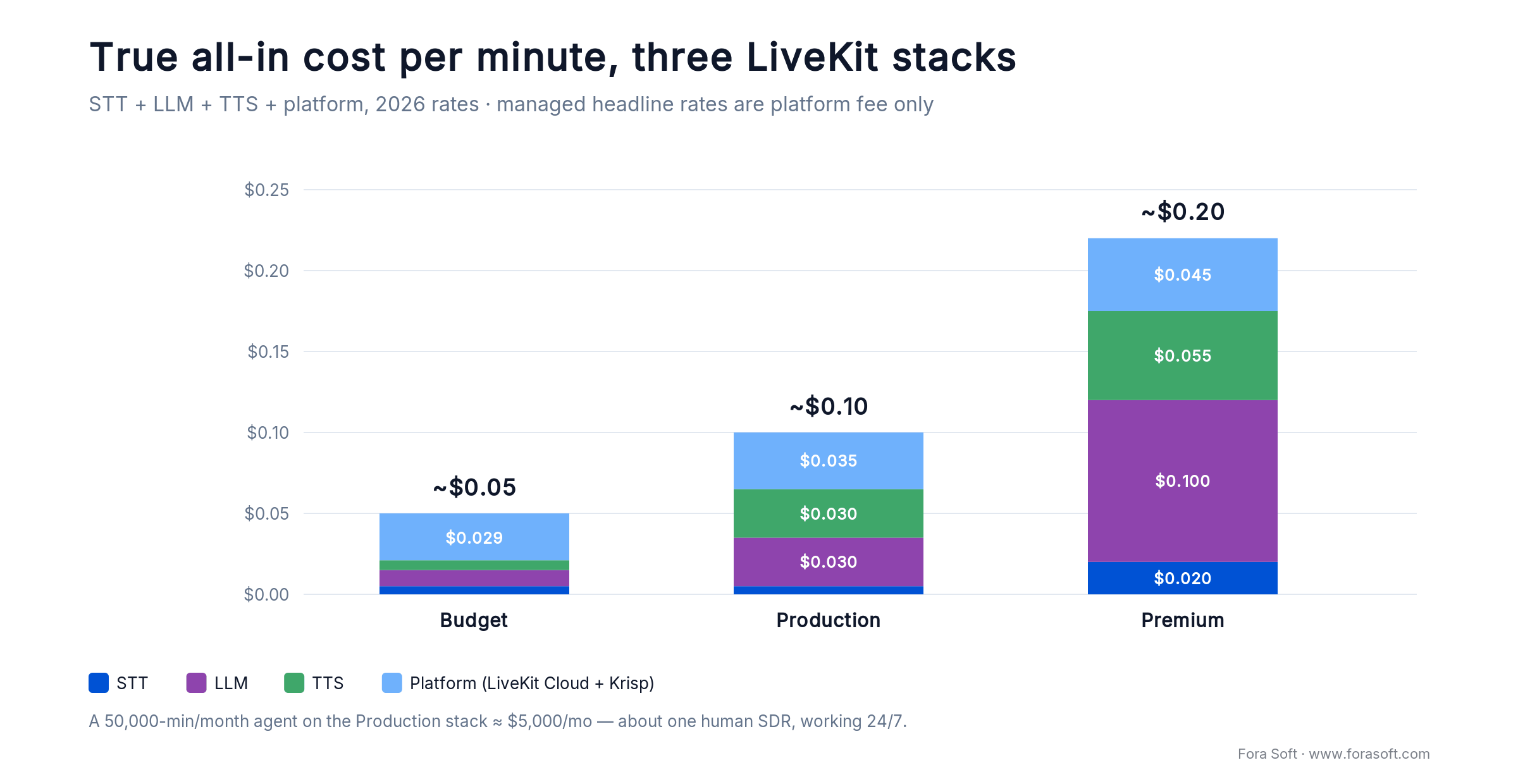
Figure 4. All-in cost by stack. The LLM and TTS choices, not the platform fee, decide which tier you land in.
| Stack | STT | LLM | TTS | Platform | Total/min |
|---|---|---|---|---|---|
| Budget | Deepgram Nova-3 | Groq Llama 3.3 | Cartesia Sonic | LiveKit Cloud | ~$0.05 |
| Production | Deepgram Nova-3 | Claude Haiku 4.5 | Deepgram Aura-2 | LiveKit Cloud | ~$0.10 |
| Premium | AssemblyAI Pro | GPT-5 / Claude 4.5 | ElevenLabs Flash | LiveKit Cloud | ~$0.18–0.22 |
Multiply by your volume. A sales dialer running 50,000 minutes a month on the Production stack costs about $5,000 in infrastructure — roughly one human SDR’s fully loaded cost, except the agent works 24/7 in fifteen languages.
LiveKit vs Vapi, Retell, Bland, Synthflow
At 10,000 minutes a month — a busy mid-market use case — the platforms sort cleanly by total cost of ownership. The managed tools win on time-to-first-call; LiveKit wins on everything past the first month.
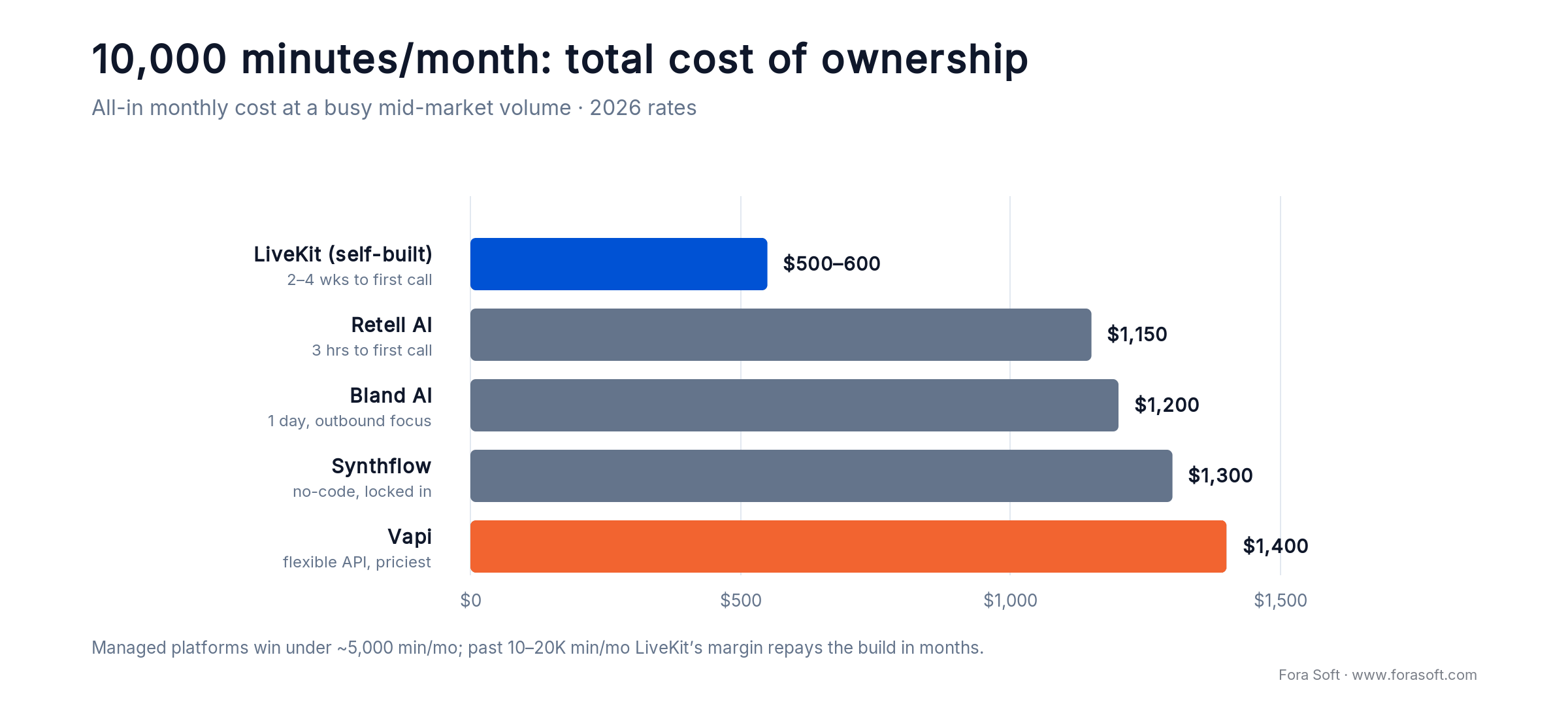
Figure 5. Monthly cost at 10,000 minutes. LiveKit is the cheapest to run and the slowest to stand up — the classic build trade.
| Platform | All-in / month | Time to first call | Ceiling |
|---|---|---|---|
| LiveKit (self-built) | $500–600 | 2–4 weeks | None, open source |
| Retell AI | ~$1,150 | 3 hours | Custom tools limited |
| Bland AI | ~$1,200 | 1 day | Outbound dialer focus |
| Synthflow | ~$1,300 | 1–2 days | No-code, platform lock-in |
| Vapi | ~$1,400 | 1 day | Flexible API, highest cost |
All four managed platforms are well-reviewed and genuinely good at what they do; independent roundups rank Retell and Vapi at the top of the developer tier. This table is about total cost and control, not quality. The numbers say the obvious thing: Retell or Vapi for validation and sub-5K-minute prototypes, LiveKit the moment the use case is real. The break-even sits between 10,000 and 20,000 minutes a month — past that, LiveKit’s margin repays the engineering within six months. If you are also weighing WebRTC vendors, our Agora alternatives teardown covers the transport layer under all of this.
Reach for a managed platform when: you need a demo this week, you will stay under ~5,000 minutes a month, or nobody on the team owns DevOps. Below the break-even, the managed fee is cheap insurance.
Past 10,000 minutes and still on a managed platform?
That is where owning the stack starts paying for itself. We will model your real per-minute cost on LiveKit against your current bill and show you the break-even.
LiveKit Cloud vs self-hosted vs Telnyx
Three ways to run LiveKit Agents in production, each a different trade:
LiveKit Cloud. ~$0.005/min audio-only, ~$0.01/min with an agent. Managed dispatch, observability, regional edges, SOC 2, BAA. Zero ops. The default.
Self-hosted. No platform fee; you pay STT/LLM/TTS directly. Break-even above ~50,000 min/month if your DevOps is already in place. Pick it for regulated workloads where the platform must never touch the audio.
LiveKit on Telnyx (April 2026). Telnyx hosts LiveKit infrastructure and bundles telephony, advertising ~50% lower STT/TTS costs than LiveKit Cloud for the same stack. Worth pricing if you need PSTN at scale.
One gotcha since February 2026: LiveKit observability data is processed in the US regardless of your media region. If GDPR residency forbids US processing of any call metadata, disable project-level observability and log to your own stack. The media itself stays in the region you pick.
Compliance: HIPAA, SOC 2, TCPA, GDPR
Voice touches three compliance surfaces at once — PHI if users discuss health, PII on every customer record, and recording consent in every state, many with teeth. Platforms help; they do not save you.
HIPAA. LiveKit signs BAAs, as do OpenAI, Deepgram, and ElevenLabs at the enterprise tier. Verify every vendor in your stack and keep a countersigned PDF per review cycle.
SOC 2 Type II. LiveKit, OpenAI, Deepgram, AssemblyAI, ElevenLabs, and Cartesia are all certified. Pull their reports for your own audit.
TCPA. Since the FCC declaratory ruling of 8 February 2024, AI-generated voices count as “artificial” under the TCPA: marketing calls need prior express written consent, non-marketing calls need prior express consent, plus caller identification and opt-out. Store consent alongside the phone number and surface it on every dial.
Two-party recording consent. California, Florida, Pennsylvania, Illinois and several other states require all-party consent. Play a disclosure at the start of every recorded call — and record the disclosure itself.
GDPR. Recording consent under Article 6 must be explicit, not “legitimate interest.” Sign data-processing agreements with every provider and pin media to an EU region.
Our production defaults: real-time PII redaction on all logs (scrub emails, phone numbers, card numbers before they hit observability), per-call consent metadata, audit trails with 90-day minimum retention, and an annual red-team pass on the agent’s prompt boundaries. Cutting corners here is what ends careers; our teardown of AI agents on WebRTC covers the same compliance surface at the transport layer.
HIPAA or GDPR in scope?
We have shipped voice agents with full BAA stacks for clinical intake and telehealth. If your call has PHI in it, you need the pipeline, the logs, the retention, and the red-team — not a provider checkbox.
Mini-case: a voice-first coaching agent on LiveKit
One of our EdTech clients, Career Point, wanted a voice-first coaching agent that runs in the browser: a learner speaks, the agent listens, reasons over lesson state, and answers out loud. The hard constraint was the same one this whole playbook is about — if the reply lags, the coaching illusion collapses and learners drift off.
The plan was the reference stack, tuned. LiveKit client SDK in the browser for transport, an agent worker on a Deepgram Nova-3 plus Claude Haiku plus Cartesia pipeline, custom tools for lesson state, region-pinned providers, and the trained turn-detection model instead of a fixed VAD. A vanilla AgentSession starts around 1.2–1.4 s p95; the work is closing that gap without giving up accuracy.
We shipped it at 550–700 ms P50 turn latency on browser WebRTC clients, comfortably under the 800 ms mark, in weeks rather than months, with a recording loop that lets the pedagogy team review real interactions. The full story is in our Career Point coaching case study. Want a similar assessment of your own voice stack? Book a 30-minute scoping call and we will map the latency budget with you.
Use cases that pay for themselves
Four patterns return investment in under six months. Everything else is experimentation worth running small.
Tier-1 support deflection
Password resets, order status, balance checks, policy FAQs. A voice agent deflects 40–60% of call volume at $0.08–$0.15 per call versus $2–$5 with a human. For a 100,000-call/month line, that is roughly $75,000–$300,000 a month back in the P&L.
Outbound sales and lead qualification
Inbound-lead callbacks drop from a four-hour average to 30 seconds. Meeting yield typically doubles or triples, and qualification cost per booked meeting falls into single digits once the agent handles the first pass.
Clinical intake and appointment confirmation
Large clinic networks use voice agents for pre-visit history and 24-hour confirmation calls; 70–80% of confirmations complete fully automated, freeing front-desk staff for walk-ins. HIPAA stack required — see above.
In-app voice tutors and assistants
This one sits closest to our portfolio: voice-first learning platforms, real-time coaching, and in-browser WebRTC agents. The playbook is the same — LiveKit client SDK in the browser, a Haiku plus Cartesia worker, custom tools for app state, and a feedback loop that records interactions for review.
Seven failure modes we see in production
In rough order of how often they ruin a demo:
1. Cold-start latency. The first call after deploy hits 3–5 seconds. Fix with idle warm-up calls and connection-pool preload on boot.
2. Interruption misfires. The agent talks over the user or cuts them off mid-word. Tune the turn model, enable background-voice cancellation, and test with 20 real users before launch.
3. Hallucinated facts. The agent invents a confirmation number. Force function-call grounding for anything quotable; ban free-text answers to factual queries.
4. Entity-capture errors. “My email is john.doe” becomes “johndough.” Switch to AssemblyAI Universal-3 Pro for entity-heavy flows and echo back.
5. Cascading region latency. STT in us-east, LLM in us-west, TTS in Frankfurt. Pin every provider to one region; pay the egress if you must.
6. Cost runaways. A retry loop fires 40 LLM calls in ten seconds after a failed tool. Hard-cap tool calls per turn and dollars per session.
7. PII in logs. Full transcripts with card numbers land in CloudWatch. Scrub at the edge before anything touches observability.
KPIs to measure from day one
A voice agent without instrumentation is a demo. Track these from the first production call:
Turn latency P50 / P90 / P99. Averages lie; the P99 tail is what makes users hang up.
Task completion rate. Did the agent finish what the caller wanted without escalation? 50–70% is realistic for a well-tuned support bot.
Handoff rate. Escalations to humans per call. If it climbs, a tool is broken or the prompt is drifting.
Cost per successful outcome. Not cost per minute — cost per meeting booked, per reset, per appointment confirmed.
Interruption and WER drift. Rising interruptions mean the voice is too long-winded; sample 100 calls a week and hand-score transcription as the canary for everything else.
A decision framework in five questions
Before you write a line of code, answer these five. They decide build-vs-buy faster than any feature grid.
| Your situation | Pick |
|---|---|
| Under 5,000 min/month, need a demo this week | Retell or Vapi — buy, do not build |
| 10,000+ min/month, voice is core to the product | LiveKit self-built or Cloud |
| Regulated audio that cannot touch a third party | LiveKit self-hosted, single region |
| Consumer chat where personality beats precision | Speech-to-speech (gpt-realtime-2.1 / Gemini Live) |
| Deterministic phone menu, no real conversation | Twilio Studio IVR — skip AI entirely |
If two rows describe you, the lower-latency and higher-volume one wins — it is the constraint you cannot engineer around later. Still torn between two rows? That is exactly the 30-minute call we are happy to take.
When NOT to build on LiveKit
Four cases where a managed platform beats LiveKit honestly:
1. Deterministic IVR. “Press 1 for sales, 2 for support.” Use Twilio Studio and move on.
2. A demo due tomorrow. Retell ships in three hours, Vapi in a day. If you need something to show, buy it.
3. Sub-5K minutes a month, forever. The engineering payback stretches past a year; the managed fee is cheaper.
4. No DevOps on the team. Synthflow’s no-code builder beats a broken Python agent nobody can maintain.
The honest question is “will this matter enough to justify owning it?” If the voice AI agent is core to the product, or the savings are real past ten thousand minutes a month, the answer is yes — and LiveKit is the right bet. Otherwise start managed and migrate later.
FAQ
What is a voice AI agent?
A voice AI agent is software that carries a spoken conversation in real time. It transcribes the caller with speech-to-text (STT), decides what to say with a large language model (LLM), and answers with text-to-speech (TTS), either as a chained pipeline you assemble or as a single speech-to-speech model. On LiveKit, those pieces run as swappable plug-ins inside an agent worker.
How do you build a voice AI agent on LiveKit?
Run a LiveKit agent worker that wires four plug-ins into an AgentSession: a VAD/turn-detection model, streaming STT (Deepgram Nova-3), a low-latency LLM (Claude Haiku 4.5), and streaming TTS (Cartesia). The worker subscribes to the caller’s audio, streams partial transcripts to the LLM, and streams tokens into TTS. A scoped agent is roughly 100 lines of Python plus your tools.
How much does a voice AI agent cost per minute?
All-in, expect $0.05/min on a budget stack (Groq + Cartesia), ~$0.10/min on a production stack (Claude Haiku + Deepgram Aura-2), and $0.18–$0.22/min on a premium stack (GPT-5 + ElevenLabs). Managed headline rates ($0.05–$0.09) are platform fees only; add STT, LLM, TTS, and telephony to get the real number.
What is the realistic latency for a sub-700 ms agent?
With Deepgram Nova-3 streaming STT, Claude Haiku 4.5, and Cartesia streaming TTS pinned to one region and short prompts, we routinely measure 550–700 ms P50 end to end on WebRTC clients. PSTN hops add 80–150 ms. A vanilla, untuned AgentSession starts around 1.2–1.4 s p95.
Should you use the OpenAI Realtime API instead of a pipeline?
If latency is the single most important thing and you are fine locking to OpenAI as your model, yes: gpt-realtime-2.1 (July 2026) hits ~800 ms voice-to-voice and cut p95 ~25% over the prior version. LiveKit supports it as a plug-in, so you can try both. For compliance, tool-calling reliability, or custom voices, the pipeline still wins.
Can LiveKit handle PSTN phone calls or only WebRTC?
Both. LiveKit bridges to PSTN via Twilio or Telnyx SIP. Since April 2026, “LiveKit on Telnyx” bundles the two and advertises ~50% lower STT/TTS costs than LiveKit Cloud alone.
Is a voice AI agent legal for outbound calls?
Yes, with consent. Since the FCC ruling of 8 February 2024, AI-generated voices are “artificial” under the TCPA: marketing calls need prior express written consent and non-marketing calls need prior express consent, plus caller ID and opt-out. Store consent with the phone number and disclose recording where two-party consent applies.
Is LiveKit a good fit for multilingual voice agents?
Very. Gladia Solaria-1 handles code-switching in a single stream, Soniox leads on 30+ languages, and Gemini 3.1 Flash Live covers 90+ languages for speech-to-speech. The pipeline stays the same; only the STT/TTS plug-ins change.
Can the agent hand off to a human mid-call?
Yes. A transfer-to-agent tool is the standard pattern: the LLM (or the caller) requests handoff, the LiveKit room adds a human participant, and the AI steps out. Transcript and context follow, so the human picks up the thread instead of starting over.
What to read next
Framework deep-dive
LiveKit AI Agents: The Engineer’s Guide
SDK internals, worker patterns, and deployment — the bolts-and-wires companion to this playbook.
Speech-to-speech
OpenAI Realtime API: Production Voice Agents
When gpt-realtime-2.1 beats a pipeline, and how to ship it without the cost traps.
Cost analysis
LiveKit vs Agora: 2026 Cost Analysis
The transport-layer pricing teardown behind every voice-agent build decision.
Applied build
How to Build an AI Receptionist
A production voice agent answering inbound phone calls end to end.
Case study
Career Point: AI Coaching on LiveKit
How we shipped a voice-first coaching platform at sub-800 ms latency.
Ready to ship a voice AI agent that sounds human?
The order of operations does not change: win the latency budget first, pick the pipeline unless raw speed and vendor lock-in are both acceptable, and instrument from the first call. Deepgram Nova-3, Claude Haiku 4.5, and Cartesia get most teams to 550–700 ms; region pinning and streaming close the rest.
Build on LiveKit when the agent is core to the product or the volume clears ten thousand minutes a month. Below that, start on a managed platform and migrate when the math flips. Either way, the compliance work — TCPA consent, HIPAA BAAs, PII redaction — is yours to own from day one, and it is what separates a demo from something you can put on a real phone line. Our AI integration team can take it from architecture to a compliant production line.
Tell us your use case and volume.
We will map the latency budget, name the stack, and give you the honest per-minute number and delivery timeline — a 30-minute call with a senior engineer who has shipped LiveKit agents, no NDA required.

