

Key takeaways
• Edge fixes network time, not buffer time. Live streaming latency is bounded by your encoder GOP and your player buffer. Moving delivery to a point of presence near the viewer saves tens of milliseconds of round trip — real, but not the seconds you are chasing.
• Build the budget before you buy anything. Capture, encode, ingest, package, deliver, buffer, render — put a millisecond number on each line, then attack the biggest one. Most teams buy edge capacity to fix a player-buffer problem.
• LL-HLS is cheap to reach and expensive to run. Cutting six-second segments into 200 ms parts — the trick behind LL-HLS, or Low-Latency HTTP Live Streaming — multiplies HTTP requests roughly 30×. On a per-request CDN that line item shows up in the invoice before the latency win shows up in the player.
• WebRTC wins below a few thousand concurrent viewers. Past that, forwarding CPU on your own SFU — the selective forwarding unit that relays WebRTC streams — costs more than CDN bytes, and the hybrid SFU-to-CDN topology wins on both price and reach.
• Sub-second at scale is a solved problem. On Worldcast Live we shipped 0.4–0.5 s glass-to-glass for 10,000 simultaneous concert viewers. The architecture is in this playbook.
Updated October 2026: Cloudflare Stream WebRTC went GA on 15 October, CloudFront flat-rate plans added to the cost math, Media over QUIC now at draft-22, and a new section on edge AI inference for live streams.
Why Fora Soft wrote this playbook
Every low latency live streaming project we inherit has the same shape: someone bought an edge CDN, the sales deck promised sub-three-second delivery, and the stopwatch says nine. The money is spent, the launch date is fixed, and nobody in the room can say which component ate the six seconds. That gap between the invoice and the stopwatch is what this playbook is for.
Fora Soft is a software development company that has been building video and real-time communication software since 2005 — 250+ projects, 50+ in-house specialists, more than 1,000 person-years of engineering, and a 99% job success score on Upwork. Latency is the thread running through most of it. On Worldcast Live we held 0.4–0.5 s glass-to-glass while 10,000 people watched the same concert. On Tyxit, a Swiss startup for remote musical collaboration, we worked under 30 ms of audio latency — musicians played synchronously between the Montreux Jazz Festival and Jazz à Vienne stages in 2022. On TradeCaster, 46,000+ traders watch live desktop streams where a two-second delay is a losing position.
Most guides on this topic are published by companies that sell edge capacity, so they end with the same conclusion. We sell engineering time, which means our incentive is the opposite: if edge is the wrong answer for your workload, we would rather say so on page four than discover it in week nine. Everything below is written the way we brief a new streaming client — budgets first, physics second, vendors last. When the budget says sub-second is the real requirement, our WebRTC development team designs the SFU and edge layer around that number rather than around a vendor price list.
Not sure which component owns your six seconds?
Send us your pipeline. We will map the latency budget line by line and tell you which fix is worth paying for — free, 30 minutes, no deck.
What is edge computing in live streaming?
Edge computing in live streaming means running parts of the video pipeline — caching, packaging, request logic, WebRTC forwarding and, increasingly, AI inference — on servers in the viewer’s metro instead of in one central origin. It cuts network round trip for a distant viewer from roughly 100 ms to 5–15 ms, absorbs the request fan-out of thousands of simultaneous viewers, and stops a traffic spike from stalling the origin. It does not shorten encoder or player buffers, which is where most of the seconds live. The rest of this playbook is about telling those two apart.
Three terms get used interchangeably and should not be. A standard HTTP CDN caches files — segments, parts, manifests — near the viewer. An edge computing platform also runs your code at the same point of presence: token checks, manifest rewrites, ad decisions, inference. A real-time edge delivery network — a mesh of WebRTC SFUs or Media over QUIC relays — forwards live packets instead of files. For sub-second streaming only the third one gets you there; an HTTP CDN, however close, still waits for a part or a segment to exist before it can serve it.
What low latency actually means in 2026
Low latency live streaming means glass-to-glass delivery under about five seconds, and the industry now treats anything under one second as a separate tier called real time. Glass-to-glass is the interval between light hitting the camera sensor and the same frame lighting up a viewer’s screen. It is the only number worth arguing about, because it is the one your audience experiences.
Two measurements get mixed up constantly. Glass-to-glass covers the whole chain. Wall-clock offset measures how far the live edge of your stream trails real time, which excludes the camera and the display. Vendors quote whichever is smaller. Ask which one you are being sold, in writing, before you sign.
| Tier | Glass-to-glass | What it buys you | Typical stack |
|---|---|---|---|
| Real time | Under 500 ms | Two-way conversation, remote instrument control, live auction bidding | WebRTC, MoQ |
| Ultra low latency | 0.5–2 s | Sports betting, live shopping with a chat that still feels connected | WebRTC over edge, SRT contribution |
| Low latency | 2–5 s | Sport ahead of the neighbour’s TV, live classes, town halls | LL-HLS, LL-DASH over CMAF |
| Reduced latency | 5–12 s | Most consumer OTT, concerts, keynotes | Tuned HLS with 2 s segments |
| Standard | 15–30 s | VOD-style events where nobody is comparing notes | HLS or DASH with 6–10 s segments |
The tiers are not a quality ladder. They are a cost ladder. Every step down multiplies request volume, shrinks your encoder’s look-ahead window, and narrows the set of devices that can play your stream at all. Picking a tier tighter than your product needs is the most common way to burn a streaming budget.
This playbook stays on the edge question: which part of that ladder edge infrastructure can move. If you are still choosing the protocol and the streaming API for the product itself, our guide to low latency video streaming compares the lanes and the vendors one by one.
Reach for the real-time tier when: the viewer sends something back that has to land inside the same breath — a bid, a note, a camera pan, a “wait, say that again”. ITU-T Recommendation G.114 calls anything under 150 ms one way transparent to a listener and treats 400 ms as the outer edge of what is acceptable for network planning at all. If nobody talks back, you are paying for latency you cannot use.
The latency budget: where the milliseconds go
A latency budget is a line-item allocation of milliseconds across the seven stages between camera and eyeball, and it is the single most useful artefact in a streaming project. Build it before the architecture discussion, not after. Ninety percent of the arguments about edge, protocol and vendor evaporate once the numbers are on one page.
Here is the budget for a 1080p30 event stream in three configurations we have shipped. Numbers are field ranges from our own instrumentation, not vendor claims.
| Stage | Standard HLS | LL-HLS (200 ms parts) | WebRTC | What controls it |
|---|---|---|---|---|
| Capture and camera pipeline | 30–60 ms | 30–60 ms | 20–40 ms | Sensor readout, capture card, OS buffer |
| Encode | 300–600 ms | 150–400 ms | 20–50 ms | GOP (group of pictures) length, look-ahead, B-frames, preset |
| Contribution to origin | 150–400 ms | 150–400 ms | n/a | SRT or RIST ARQ buffer, usually 2× RTT |
| Packaging | 6,000–10,000 ms | 200–400 ms | 0 ms | Segment duration versus CMAF chunk duration |
| Origin to edge to player | 40–120 ms | 20–120 ms | 20–80 ms | Physical distance, peering, TLS handshakes |
| Player buffer | 12,000–18,000 ms | 600–900 ms | 60–200 ms | Segments or parts held before playback starts |
| Decode and render | 50–100 ms | 50–100 ms | 30–60 ms | Device class, hardware decode path |
| Total glass-to-glass | 18.6–29.3 s | 1.2–2.4 s | 0.15–0.43 s |
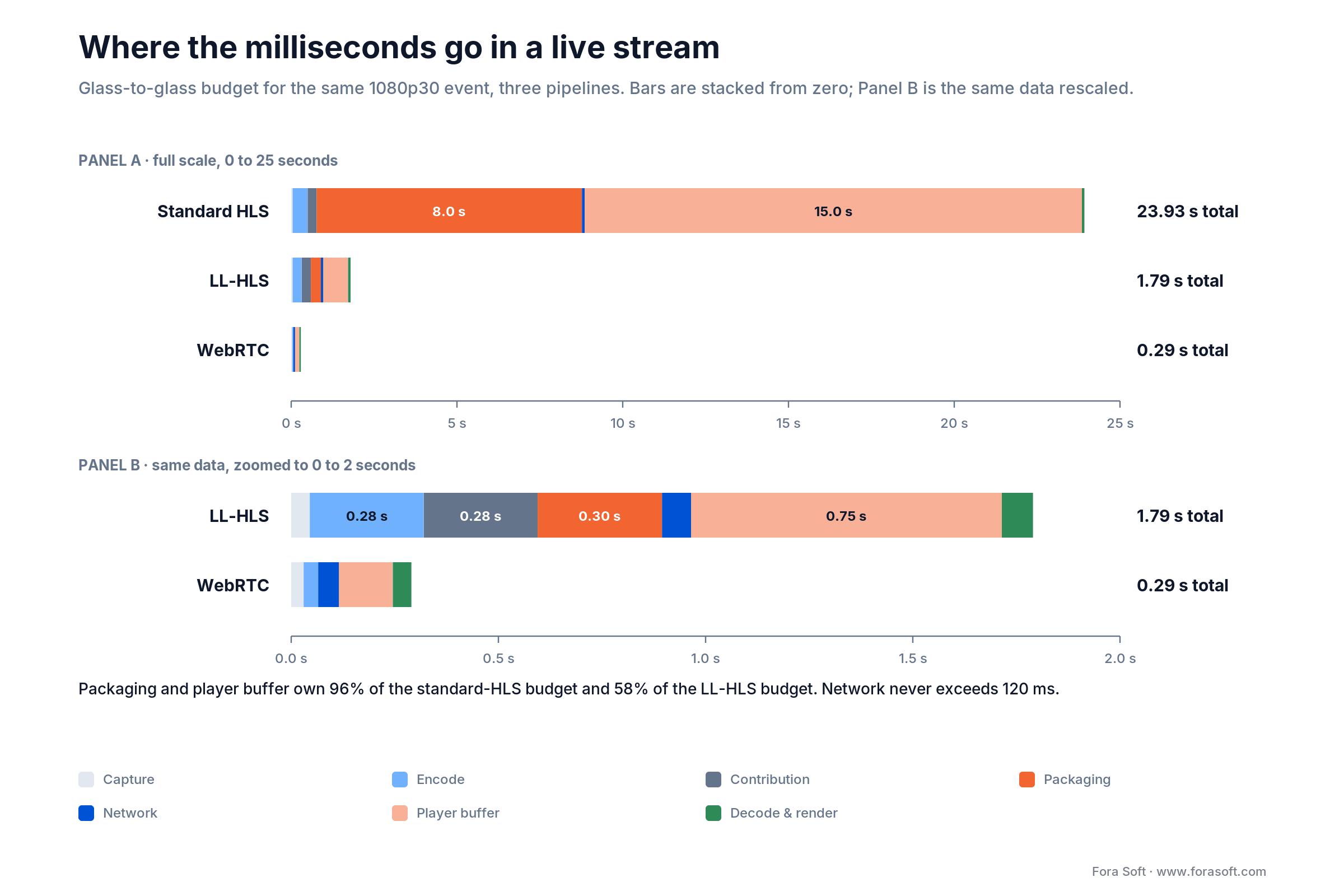
Figure 1. The same event, three pipelines. Packaging and player buffer own the seconds; everything else is rounding error.
Read the table column by column and the whole topic collapses into one observation. In the standard HLS column, packaging plus player buffer is 18–28 of the 29 seconds. In the LL-HLS column the same two lines are 0.8–1.3 of the 2.4 seconds. Network time never exceeds 120 ms in any column. That is the number an edge CDN can move.
Do the arithmetic on your own stream before anyone quotes you a price. Take the segment duration your packager emits, multiply by the number of segments your player buffers (three is the Apple-recommended default for standard HLS), and you have the floor of your current latency. A 6-second segment with a three-segment buffer floors you at 18 seconds no matter which CDN carries the bytes.
Reach for a latency budget when: your measured glass-to-glass is more than 1.5× your target and you cannot name the stage responsible. Thirty minutes with a spreadsheet beats three weeks of vendor demos.
What edge computing fixes, and what it cannot
Edge computing removes network round trip and origin load. It does not remove encoder time, packaging time or player buffer time, which is where 55% to 97% of live streaming latency actually sits, depending on the pipeline. That sentence is the whole section, and it contradicts roughly every edge marketing page on the internet.
Work the numbers. A viewer in Chicago pulling from a single origin in Frankfurt sees around 100–110 ms of round trip; the same viewer hitting a Chicago point of presence sees 5–15 ms. Real saving: roughly 95 ms. Against an 1,800 ms LL-HLS budget that is 5%. Against a 300 ms WebRTC budget it is 30% — which is why edge matters enormously for real-time workloads and only modestly for segmented ones.
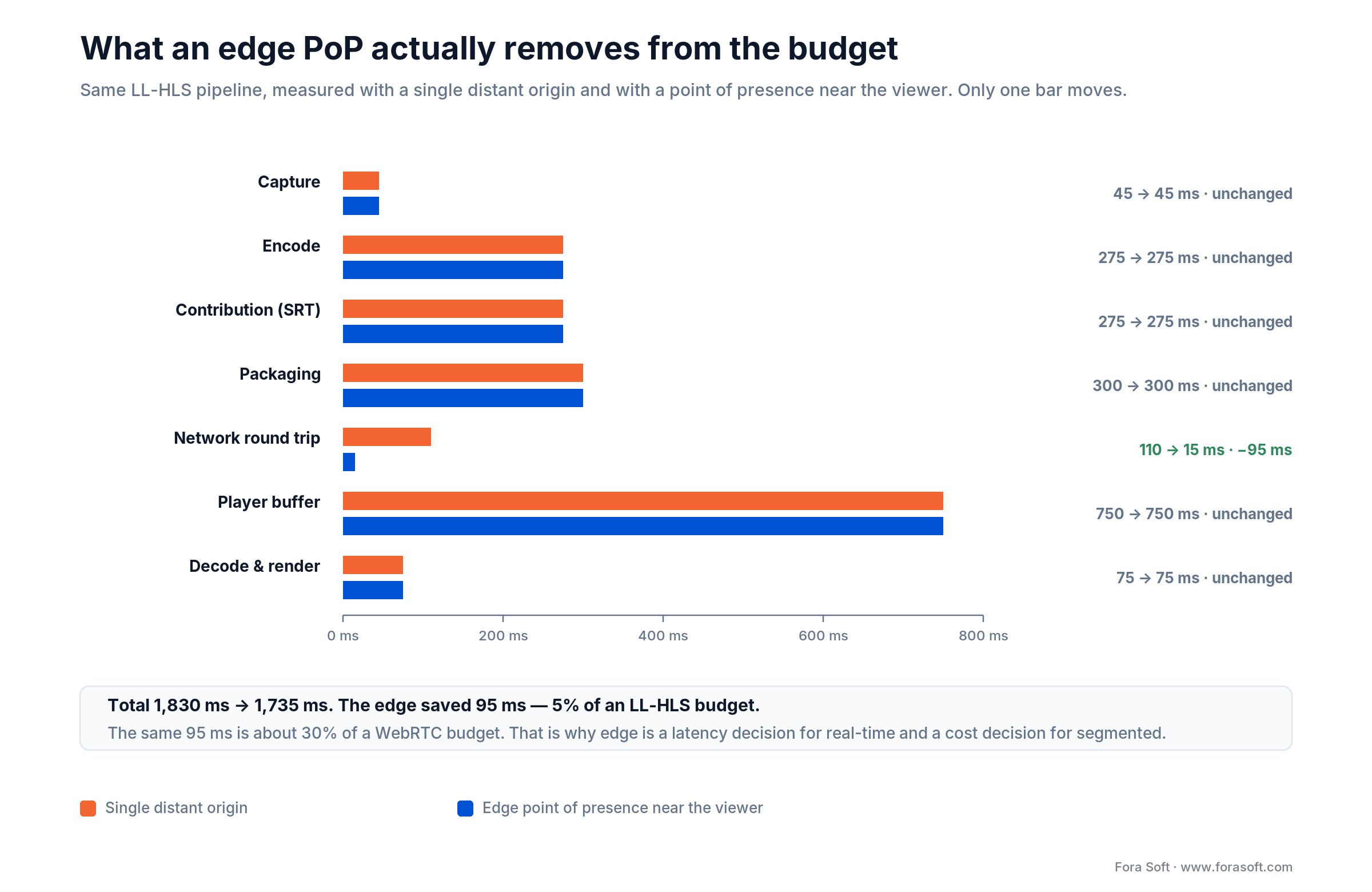
Figure 2. Edge collapses the network bar and offloads the origin. The packaging and buffer bars do not move unless you change the packaging and the buffer.
So why does edge still matter for segmented delivery? Three reasons that have nothing to do with the latency number. First, cache offload: one origin cannot serve 100,000 simultaneous part requests, and the failure mode is not slowness, it is a stalled stream for everyone. Second, TLS termination: a new viewer pays a full handshake before the first byte, and at the edge that round trip is 15 ms instead of 110 ms. Third — the one that moves latency — packaging at the edge, which we get to next.
The honest framing to take into a vendor call: edge is an availability and cost decision that pays a small latency dividend, except for WebRTC and MoQ where it is a latency decision outright.
Three edge layers: cache, package, compute
“Edge” means three different things — an edge cache that stores segments near the viewer, edge packaging that cuts CMAF chunks at the point of presence, and edge compute that runs your code there — and only the second one reliably moves the latency number. Naming them separately is the fastest way to make a vendor conversation productive.
Layer 1 — edge cache
The classic CDN point of presence. It stores segments, parts and manifests and serves them from a location near the viewer. It cuts round trip, absorbs origin fan-out, and does nothing at all to your buffer. Cheapest to adopt: usually a DNS change and a cache-key policy. Watch the manifest TTL — a low-latency manifest cached for two seconds quietly adds two seconds.
For a 4K live sports peak, the cache architecture that prevents congestion is tiered: an origin shield (a mid-tier cache) in each region in front of the packager, request collapsing so a thousand simultaneous misses for the same part become one origin fetch, and a second CDN on standby behind health-checked steering. When one region rebuffers — the classic case is East Coast viewers on a West Coast origin — it is usually placement, not capacity: check that a shield sits in that region, that the part cache-hit ratio there is high, and that DNS or anycast is not sending viewers to a distant point of presence.
Layer 2 — edge packaging
The packager runs at the point of presence. You push one mezzanine feed per region; the edge cuts CMAF (Common Media Application Format) chunks, writes the parts and rewrites the playlist locally. This removes a full origin round trip from the path of every part and eliminates the origin as a throughput bottleneck. It is the only edge layer that reliably moves the latency number for segmented streaming. The two mechanisms are not the same: LL-HLS ships each part as its own addressable resource and leans on blocking playlist reloads, while LL-DASH streams a still-open segment with HTTP chunked transfer encoding. Either way the packager has to sit near the viewer for the trick to pay off.
Layer 3 — edge compute
Serverless functions at the point of presence: token validation, manifest personalisation, geo steering, server-side ad insertion, A/B routing. This moves decision logic off the origin round trip. The trap is cold starts — a 200–900 ms cold start on the manifest path costs more than the origin hop you removed. Keep edge functions off the critical playback path unless they are warm and measured.
| Layer | Latency effect | Cost shape | Adopt when |
|---|---|---|---|
| Edge cache | −20 to −90 ms network | Per GB and per request | Always, once you have viewers outside one metro |
| Edge packaging | −1 segment or −1 part round trip; removes origin ceiling | Per region compute, roughly $200–900/mo per PoP | You are chasing sub-3 s and already run LL-HLS |
| Edge compute | Neutral at best; negative if cold | Per million invocations | Auth, personalisation or ad logic, kept off the playback path |
Reach for edge packaging when: you already emit CMAF chunks, your measured latency is 3–5 s, and the residual is origin round trip rather than player buffer. If your buffer is still holding three segments, fix that first — it is free.
Want the edge layer that actually moves your number?
We will look at your manifest, your cache keys and your player config and tell you which of the three layers is worth buying for your workload.
Protocol picker: WebRTC, LL-HLS, LL-DASH and MoQ
WebRTC (Web Real-Time Communication) is the fastest and the hardest to scale; LL-HLS is the slowest of the low-latency options and the easiest to run at millions of viewers; Media over QUIC (MoQ) is the interesting third path that is still a draft. Everything else is a variation on those three trade-offs.
| Protocol | Glass-to-glass | Scale ceiling | DRM | Connected TV | Where it breaks |
|---|---|---|---|---|---|
| WebRTC | 0.2–0.8 s | Thousands per SFU cluster; CPU-bound | No standard DRM path | Patchy; needs a native shim | Cost per viewer stays flat — no cache amortisation |
| LL-HLS | 2–4 s | Effectively unlimited via CDN | Widevine, FairPlay, PlayReady | Good on recent firmware | Request volume and per-request billing |
| LL-DASH / LL-CMAF | 2–5 s | Effectively unlimited via CDN | Widevine, PlayReady | Good on Android TV, weak on Apple | No native Safari path without a fallback |
| SRT (contribution) | 1–2 s first mile | Point to point | n/a | n/a | Not a delivery protocol — ingest only |
| RTMP (contribution) | 3–5 s | Point to point | n/a | n/a | Flash-era codec constraints; still the default in OBS |
| Media over QUIC | ≈0.4 s reported | Relay fan-out, CDN-like | Early | Not yet | Still a draft; production use is early-adopter territory |
| Standard HLS / DASH | 15–30 s | Unlimited | Full | Universal | Latency, obviously — but it never breaks |
One 2026 detail worth knowing: Media over QUIC is real enough to demo and not yet real enough to bet a launch on. The transport document sits at draft-ietf-moq-transport-22, revised on 1 October 2026 — three revisions since July, and still a working-group draft. Multiple vendors ran an interoperability demo at NAB 2026 and Cloudflare operates relays, with production reports clustering around 400 ms. It is not an RFC. Anyone telling you MoQ is production-ready in 2026 is selling something. If MoQ is on your roadmap anyway, our Media over QUIC development team builds relay and WebTransport prototypes against the current draft, so you can measure it on your own audience before committing; we track where it stands in our MoQ production status report.
The other detail that changes architectures: WHIP, standardised as RFC 9725 in 2025, gives WebRTC an HTTP-shaped ingest, and its counterpart WHEP does the same for egress. WHEP itself is not an RFC yet: draft-ietf-wish-whep-05 was submitted to the IESG for publication in October 2026. That pair is what lets WebRTC ride edge infrastructure that was built for HTTP, which used to be the reason you could not put WebRTC behind a CDN. We wrote up the ingest side separately in our WHIP and WHEP versus RTMP guide.
Reach for LL-HLS when: you need DRM, connected-TV reach and a viewer count you cannot predict, and 2–4 seconds is inside your product’s tolerance. That describes most sports, most education and most events.
Reach for WebRTC when: the viewer talks back, or the stream is worthless past one second — auctions, trading, remote production, telehealth, esports coaching. Accept that per-viewer cost will not amortise the way CDN bytes do.
Four edge streaming architectures worth knowing
Four topologies cover almost everything shipped in production: central origin plus CDN, edge CDN with LL-HLS, edge SFU for WebRTC, and hybrid SFU-to-CDN. Each has a distinct cost shape and a distinct failure mode.

Figure 3. Four topologies with the measurement points named. Instrument the marked hops or you will be guessing when latency drifts.
1. Central origin plus CDN
One origin packages, a CDN distributes. Simple, cheap, 15–30 s of latency, and it never surprises you. Still the right answer for keynote replays, church services and anything where nobody is comparing notes on a second screen. Failure mode: origin saturation during a spike, which stalls everyone at once.
2. Edge CDN with LL-HLS or LL-CMAF
The packager emits 200–500 ms CMAF chunks; the edge serves each part as its own addressable resource and honours blocking playlist reloads. Lands at 2–4 s with full DRM and connected-TV support. Failure mode: an edge that caches the media playlist or ignores blocking reloads, which silently returns you to standard HLS latency while the invoice still says low latency.
3. Edge SFU for WebRTC
Selective forwarding units in several regions, viewers connect to the nearest one, streams are forwarded rather than transcoded. Sub-second, two-way capable, and CPU-bound: a forwarding core handles a fixed number of outbound streams regardless of how many people want the same content. Failure mode: cost that scales linearly with audience, forever.
4. Hybrid SFU to CDN
The interactive core (presenters, callers, bidders) rides an SFU; the passive audience gets a WHEP or LL-HLS feed off a CDN. Presenters see each other in 200 ms, the crowd sees the show in 2 s, and the bill scales with bytes instead of cores. This is the topology we reach for most often. Sprii, a Danish live-commerce platform that has moved €365M+ in sales across 72,000+ live events, runs exactly this split.
Reach for hybrid SFU to CDN when: fewer than 50 people need to be heard and more than 5,000 need to watch. That ratio describes live shopping, town halls, auctions, and every classroom bigger than a seminar.
Edge AI inference for live streams: moderation, captions and AR
Put AI inference at the edge only when its output has to land inside the stream’s latency budget — live moderation that must act before a frame goes out, captions on a sub-second stream, AR overlays at a live event. Anything that can arrive a second late runs cheaper in a regional GPU pool. Most teams get this backwards and pay for GPUs in fifty cities to run a model that only ever looks at one contribution feed.
The pattern that holds up in production: run moderation, detection and the first ASR pass once per stream, on a GPU in the same metro as the ingest, not the viewer. Send only the decisions — a blur box, a caption line, a block flag — downstream as timed metadata alongside the media, so every edge cache can serve them like any other part (on a WebRTC path they ride a data channel or SEI messages instead). Escalate low-confidence cases asynchronously to a larger central model. Per-viewer inference (personalised AR, per-seat camera choice) is the one case where the GPU has to sit near the viewer, and it is priced accordingly.
In 2026 the GPU edge is real enough to plan against. Akamai launched AI Grid on 16 March 2026, orchestrating inference across its more than 4,400 edge locations while rolling out thousands of NVIDIA RTX PRO 6000 Blackwell GPUs, and lists AI transcoding and real-time dubbing for broadcasters among its uses (Akamai, March 2026). It is sold to qualified enterprise customers, so per-metro GPU pricing is still a quote, not a list price.
The operating rules we set before any edge model goes live:
| SLO | Target we start from | Why |
|---|---|---|
| Inference latency p95 | Under one frame interval for per-frame models (33 ms at 30 fps); under 300 ms for a per-segment ASR pass | If throughput falls below the frame rate, frames queue and latency grows every second the model runs |
| Throughput | Streams per GPU measured at peak, provisioned with 30% headroom | Live events do not degrade gracefully — a saturated GPU drops whole streams |
| Failure mode | Decided per feature: moderation fails closed into a short delay buffer, captions fail open | An outage should cost you a feature, not the broadcast |
| Rollout | New model versions canaried per region, with the previous version kept warm | A bad model pushed to every region at once is a bad day in every region |
Our scalable AI video streaming work is built around this split: the media path on SFUs and multi-CDN delivery, the models placed where their output deadline says they must run.
Reach for edge inference when: the model’s output is useless after the frame it describes has reached the viewer. If a one-second delay is acceptable, run the model centrally and send the result as metadata.
Vendor and pricing reality in 2026
Published list prices, checked 19 October 2026. Treat them as the ceiling: committed-volume contracts routinely land 40–80% below list, and the spread between the cheapest and most expensive credible option is roughly 8×.
| Vendor | Model | List price (2026) | Latency you can expect | Fit |
|---|---|---|---|---|
| Cloudflare Stream | All-in per minute | $1 per 1,000 min delivered (WebRTC playback billed the same way since 15 October 2026), $5 per 1,000 min stored; ingress and encoding free | HLS/DASH on the default path; sub-second over WebRTC (WHIP in, WHEP out), generally available since 15 October 2026 | Fastest path to a working live stream with no infrastructure |
| AWS CloudFront + MediaLive | Per GB plus per request | Pay-as-you-go from ~$0.085/GB first 10 TB, ~$0.01 per 10,000 HTTPS requests; or flat-rate plans per distribution from $15/month | 2–4 s tuned | Already on AWS, need fine control |
| Bunny CDN | Per GB | From $0.01/GB in Europe and North America on the standard network; $0.005/GB on the 10-PoP volume network (first 500 TB) | 2–5 s, depends on your packager | Cost-driven, willing to run your own origin |
| Self-hosted SFU (LiveKit, mediasoup, Janus) | Per server | Bare metal from ~$150–250/mo per forwarding node | 0.2–0.8 s | Interactive workloads, predictable concurrency |
| Managed WebRTC platforms | Per participant minute | Typically $0.001–0.004 per participant minute | 0.2–0.5 s | Small interactive audiences, no infra team |
Two traps in that table. The per-minute models look expensive next to $0.01/GB until you add up packaging, storage, player licensing and the engineer who keeps it alive — then they usually win below a few hundred thousand viewer-minutes a month. And the per-request line on hyperscaler CDNs is the one that ambushes LL-HLS deployments, which is the next section.
One change since our July check matters for sub-second delivery: Cloudflare took WebRTC in Stream to general availability on 15 October 2026 and started billing WebRTC playback at the standard per-minute delivery rate the same day (Cloudflare changelog). That makes a managed WHIP-to-WHEP path a real option for one-to-many sub-second streams, not only a beta experiment.
Prices above come from the vendors’ own pages: Cloudflare Stream pricing, Amazon CloudFront pricing and Bunny CDN pricing. Check them before you quote anyone — CDN price lists move two or three times a year.
Cost math at one million viewer-minutes
At one million viewer-minutes of 1080p at 5 Mbps, you are moving 37.5 TB, and the delivery bill runs from about $375 to about $3,790 depending on which CDN carries it and how low your latency goes. Here is the arithmetic in full, because every vendor comparison you will read hides it.
Start with bytes per viewer-minute. A 5 Mbps stream is 5 ÷ 8 = 0.625 MB per second, and 0.625 × 60 = 37.5 MB per viewer-minute. One million viewer-minutes is therefore 37,500,000 MB, or 37,500 GB.
| Line item | Standard HLS (6 s segments) | LL-HLS (200 ms parts) | WebRTC via SFU |
|---|---|---|---|
| Bytes delivered | 37,500 GB | 37,500 GB | 37,500 GB |
| Byte charge, CloudFront first-tier list ($0.085/GB) | $3,187 | $3,187 | n/a |
| Byte charge, Bunny list ($0.01/GB) | $375 | $375 | n/a |
| Media requests | 10M segments + 10M manifest reloads | 300M parts + 300M blocking reloads | 0 (peer connections) |
| Request charge, CloudFront ($0.01 / 10,000) | $20 | $600 | $0 |
| Request charge, per-GB-only CDN | $0 | $0 | $0 |
| Forwarding compute | $0 | $0 | ≈250 cores for a 60-min event |
| Total on CloudFront list | $3,207 | $3,787 | see breakeven below |
| Total on Bunny list | $375 | $375 | see breakeven below |
One caveat on that table: we apply CloudFront’s first-tier rate across all 37.5 TB. Their published volume tiers bring the real list figure closer to $3,050 (about $2,965 once the always-free first terabyte is applied), and a committed contract lands lower again. We use the first tier because it is the number you can verify in five seconds, and because nobody negotiates their first invoice.
CloudFront flat-rate plans change the per-request math
CloudFront now also sells flat-rate plans per distribution — one monthly price with no overage charges — and AWS added API management for them on 3 September 2026 (AWS, September 2026). Measured against the published allowances, the same million viewer-minutes — assumed here to be one month of traffic — look very different:
| Column | Bytes and requests | Pay-as-you-go list | Flat-rate plan that covers it |
|---|---|---|---|
| Standard HLS | 37.5 TB, 20M requests | $3,207 | Business, $200/month (50 TB, 125M requests) |
| LL-HLS, 200 ms parts | 37.5 TB, 600M requests | $3,787 | Premium at the 75 TB / 750M-request level, $1,450/month (checked October 2026) |
Three caveats before you rebuild a budget on it. The allowances are not hard limits, but AWS says sustained usage above them can mean traffic served from fewer or more distant edge locations — a latency penalty, which is exactly what you are paying to avoid. Plans are per distribution, so a multi-distribution setup multiplies the fee. And real-time access logs are not supported on flat-rate plans, so per-request latency telemetry has to come from the player or from standard logs (CloudFront pricing, checked October 2026). The direction is still clear: the request premium that used to punish LL-HLS on a hyperscaler CDN is now something you can buy out.
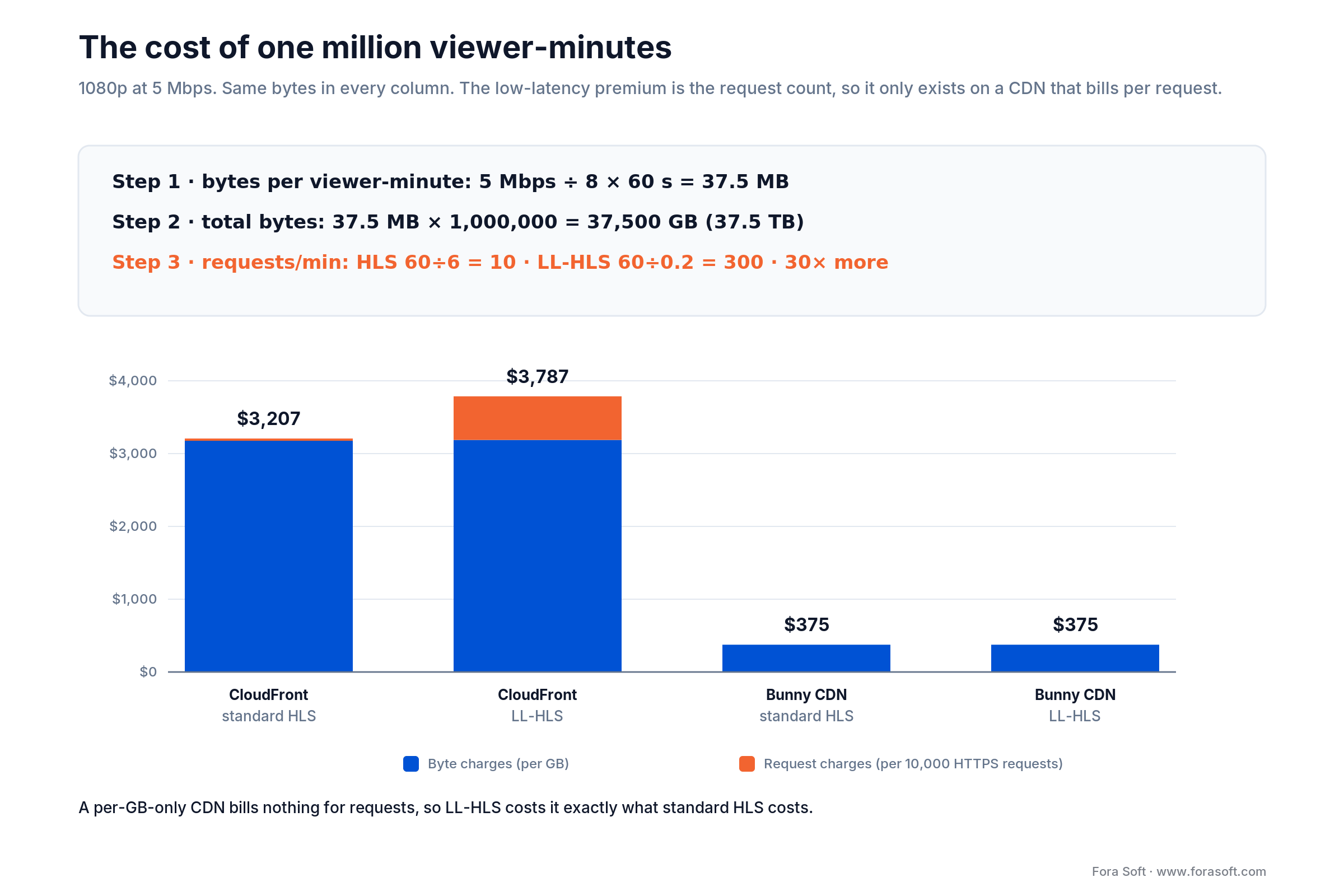
Figure 4. Same bytes, different request counts. The low-latency premium is the request column, not the byte column.
The request line is the one nobody publishes. Standard HLS at 6-second segments needs 60 ÷ 6 = 10 media requests per viewer-minute. LL-HLS at 200 ms parts needs 60 ÷ 0.2 = 300, plus a blocking playlist reload for each. That is a 30× jump in request volume for the same bytes, and on a CDN that bills per request it adds roughly 18% to a CloudFront-list delivery bill. On a per-GB-only CDN it costs nothing, which is why the cheap CDN gets cheaper the lower your latency goes.
We deliberately do not publish a build price for a streaming platform here. Scope swings the number by an order of magnitude, and a wrong figure in a blog post costs more trust than it earns clicks. If you want a real estimate, book 30 minutes and we will scope it against your actual requirements.
WebRTC versus CDN: where the breakeven sits
Below roughly 2,000–5,000 concurrent viewers a self-run SFU is cheaper and simpler than a CDN; above that, forwarding CPU overtakes CDN bytes and the crossover is decisive. The number moves with your bitrate and your utilisation, so here is how to compute your own.
A WebRTC SFU forwards, it does not transcode, so its limit is network and packet-handling CPU rather than encoding. In our deployments a well-tuned 16-core bare-metal forwarding node sustains roughly 4–6 Gbps of outbound media before jitter starts climbing. At 5 Mbps per viewer that is 800–1,200 concurrent viewers per node. A node of that class costs about $150–250 a month.
So 10,000 concurrent viewers needs 9 to 13 nodes: roughly $1,350–3,250 a month in fixed cost, plus egress if your host meters it. A CDN charges nothing when idle and about $375 (Bunny list) to $3,187 (CloudFront list) for 37.5 TB — which is only 100 minutes of that audience, so compare a full month of viewing against a full month of nodes. The deciding variable is not audience size on its own — it is utilisation.
- Always-on, moderate concurrency (a 24/7 trading floor feed, a monitoring wall): the SFU box runs hot all month and the fixed cost amortises. SFU wins.
- Spiky and event-driven (a weekly two-hour show, a product launch): the same box idles 95% of the month. CDN usually wins once you price the SFU side honestly: metered egress, a standby fleet sized for the peak, and the engineer on call for it.
- Interactive at any size: you need an SFU regardless, because a CDN cannot carry the return path. Bridge the passive tail to a CDN and stop worrying about the crossover.
Worked example. A live-shopping brand runs 60 events a month, two hours each, peaking at 8,000 concurrent. Total viewer-minutes: 8,000 × 120 × 60 = 57.6M, so 2,160 TB at 5 Mbps — but peak concurrency needs 7 to 10 forwarding nodes standing by for 120 hours out of 720. The SFU sits idle 83% of the time while still costing full price. On paper the nodes still look cheap — 7–10 nodes at $150–250 is $1,050–2,500 a month against about $21,600 for 2,160 TB at Bunny list — but only if those nodes come with unmetered ports that really sustain 40 Gbps of peak egress, which is the first thing to check with your host. Where egress is metered, the audience belongs on a CDN and the hosts on a two-node SFU, which is precisely the hybrid topology from the previous section.
Reach for a self-run SFU when: concurrency is predictable, the stream runs most of the day, and viewers need a return path. Otherwise you are renting idle cores.
Is your streaming bill scaling faster than your audience?
We will run the breakeven against your real concurrency curve and show you the topology that fits — including the case where the answer is “change nothing”.
Device and browser reality in 2026
Your low latency live streaming target is set by your worst device, not your best one. A pipeline that hits 2.5 s in desktop Chrome routinely lands at 6–9 s on a living-room screen, and the gap is where most launch-week firefighting happens.
| Platform | LL-HLS | LL-DASH | WebRTC | The catch in 2026 |
|---|---|---|---|---|
| Chrome / Edge desktop | Via hls.js | Via dash.js | Native | Best case; do not calibrate targets here |
| Safari macOS | Native and via hls.js | No native path | Native | Two code paths behave differently on the same content |
| Safari iOS / iPhone | AVPlayer or hls.js via ManagedMediaSource | dash.js on ManagedMediaSource | Native | ManagedMediaSource landed in iOS 17.1; AVPlayer is still the default path |
| Android Chrome | Via hls.js | Via dash.js / ExoPlayer | Native | Wide device spread in decode latency |
| Roku | Firmware player | Limited | No | Low-latency support lags; the usual reason a 3 s target fails |
| Samsung Tizen / LG webOS | Recent firmware only | Yes | Shim required | Fleet spans five years of firmware; test the oldest you support |
| Fire TV | Via ExoPlayer | Yes | No | ExoPlayer buffer defaults are conservative — override them |
Two hls.js reports from 2025 are worth reading before you promise a number. In issue 7452 LL-HLS video runs roughly three seconds behind the audio and the gap widens as the session goes on; in issue 7165 quality-level switching misbehaves specifically in Safari. Both are closed now — one of them as not reproducible — and that is the point: these symptoms are hard to pin down and easy to ship. They will find you in week two if your QA plan only covers desktop Chrome for ten minutes.
Apple’s own LL-HLS guidance is the authority for the iOS path: part duration around 200–300 ms, target latency roughly three parts plus a round trip. If your manifest disagrees with that document, AVPlayer will quietly do its own thing.
Your LL-HLS sits at nine seconds: seven causes
When a configured LL-HLS stream measures 8–10 s instead of 3, the cause is almost always one of seven things: a GOP not aligned to your segment duration, an edge that does not stream parts as they are written, a cached media playlist, a wrong player buffer target, low-latency mode silently deactivating in the player, an ABR switch re-priming the buffer, or a slow last mile — checked in that order. This list is ranked by how often we find each one first.
1. Your GOP is not aligned to your segment duration. Every segment has to start on a keyframe, so an encoder emitting a 2-second GOP against a packager that wants 1-second segments forces the packager to wait. Set the GOP to the segment duration and make it closed. Parts do not need a keyframe of their own — only segments do, which is exactly why this one gets mis-tuned.
2. The edge is not serving parts as they are written. A part is supposed to become available before its segment closes: the player asks for it through a preload hint and the edge answers while the part is still being produced. LL-DASH does the same job with HTTP chunked transfer encoding. An edge that waits for the finished part hands you standard HLS behaviour on a low-latency invoice. Verify with a streaming curl against an edge node, not against origin.
3. The playlist is cached. A media playlist with a 2-second TTL adds up to 2 seconds of staleness on every reload. Low-latency playlists want a TTL of zero and blocking reload support at the edge, which several CDNs still require you to enable per property.
4. The player buffer target is wrong. Players default to safety. hls.js needs lowLatencyMode plus a target latency you set explicitly; ExoPlayer needs its buffer parameters overridden. Defaults will cost you 3–6 seconds and never tell you.
5. Low-latency mode silently deactivated. hls.js drops out of low-latency mode under conditions the app never sees, and the stream settles near 10 s. Log the player’s reported latency mode per session; do not trust the config you shipped.
6. An ABR switch reset the buffer. Every adaptive-bitrate rendition change re-primes the buffer. On a noisy mobile connection with a wide ladder, the player spends its life switching. Narrow the ladder for live, and cap the number of switches per minute.
7. The last mile is simply slow. A mobile viewer on a congested cell sees 80–200 ms of RTT with jitter to match. No packaging change fixes that. Measure latency segmented by network type before you rebuild your pipeline for the p50.
Reach for the failure catalogue when: the pipeline is configured for low latency and the stopwatch disagrees. Six of the seven causes are configuration, not architecture, and cost nothing to fix.
Mini case: sub-second concerts for 10,000 viewers
Worldcast Live streams HD concerts where performers in different cities play together. The product only works if the delay between two musicians is short enough to keep a beat, and the audience has to see the same show without a perceptible lag — at ten thousand people simultaneously. Standard HLS was never a candidate. A plain SFU could not carry the audio quality the artists needed.
We built a custom WebRTC and Kurento pipeline: five-channel audio, peaks at 1.5 Gb/s for true HD, full-duplex paths so remote performers hear each other, and dynamic quality adjustment so a viewer on a weak connection degrades video instead of dropping out. Forwarding nodes sat close to the audience; the interactive performer core stayed on a dedicated low-jitter path. A white-label multi-venue plugin syncs the same live stream across several websites at once.
For reference, an HLS build of the same show would have landed between 15 and 30 seconds, and the best low-latency CDN option of the day sat at 2–4. The brief was under one second. The result held at 0.4–0.5 s glass-to-glass with 10,000 simultaneous viewers — one of the first platforms to run sub-second at that scale. Two things carried it, and neither was the CDN: the encoder ran with a near-zero look-ahead window, and the player buffer was pinned rather than left adaptive. Want the same audit on your stack? Book a 30-minute call and bring your current glass-to-glass number. The full build is written up on the Worldcast Live project page.
A decision framework in five questions
Answer these in order. The first “yes” usually decides the architecture.
Q1. Does the viewer send anything back inside the same second? Bids, answers, camera control, a voice line. If yes, you need WebRTC for those participants, whatever else you build. Skip to the hybrid topology.
Q2. Do you need DRM or connected-TV reach? If yes, LL-HLS or LL-DASH is effectively mandatory — WebRTC has no standard DRM path and no reliable TV story.
Q3. Is your peak concurrency predictable within 2×? If yes, fixed-cost SFU capacity is affordable. If no, variable-cost CDN delivery protects you from both the spike and the idle month.
Q4. Is your measured latency dominated by network rather than buffer? Pull the numbers from your own budget table. Packaging and buffer are configuration problems. Only a network-dominated budget justifies buying edge capacity to fix latency.
Q5. Can the product live with 4 s instead of 1 s? Ask what actually breaks at four. If the honest answer is “nothing measurable”, take the 4 s architecture, spend the difference on reliability, and revisit in a year.
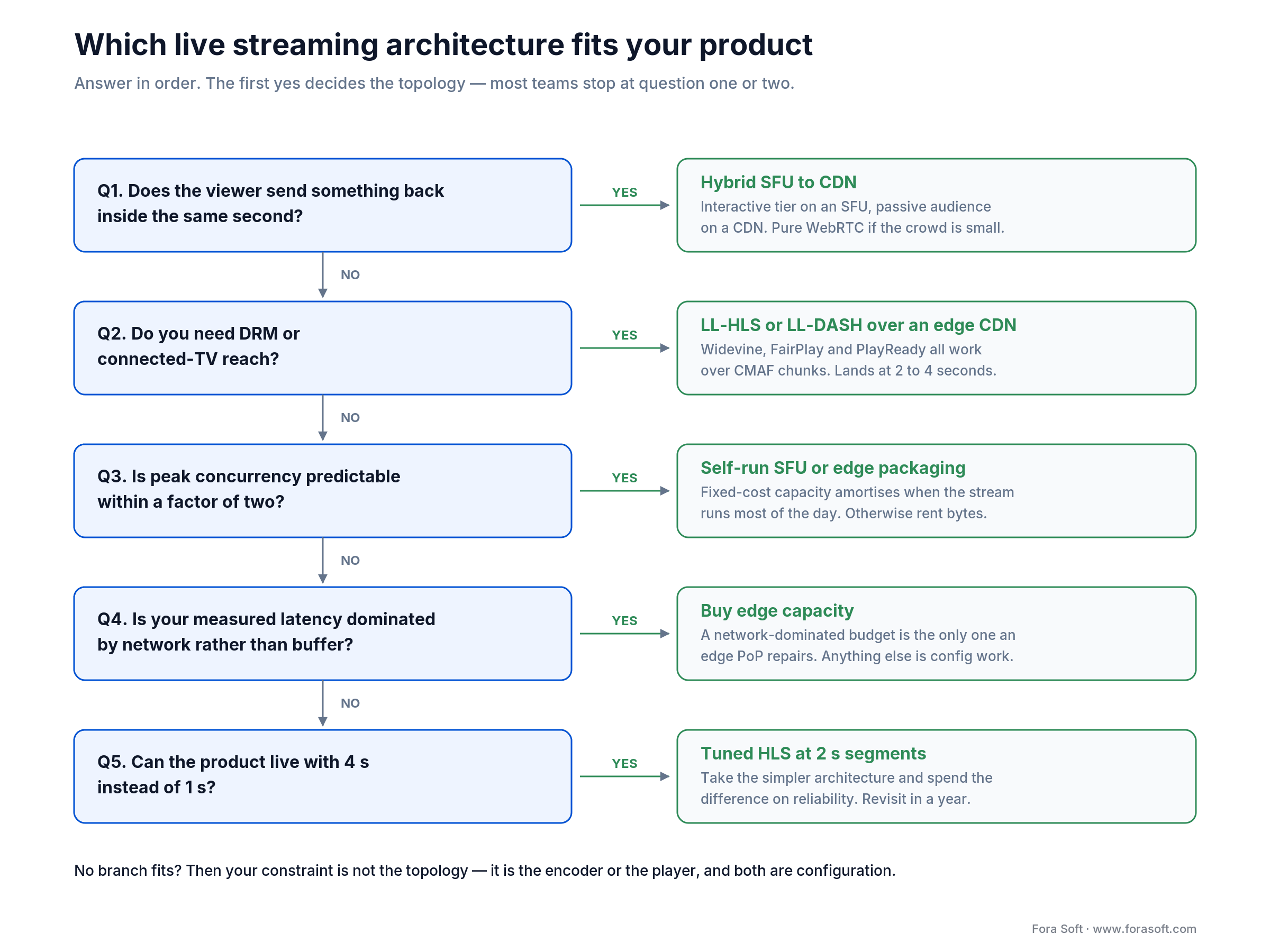
Figure 5. Five questions, four outcomes. Most teams land in hybrid and are surprised by it.
If your answers point at a hybrid build and you would like a second opinion before committing, that is the conversation we have most weeks. Our video and audio streaming development team has run this exact decision with clients in sports, education, live commerce and telehealth.
When edge streaming does not pay off
Edge is the wrong purchase when your latency lives in configuration, your audience lives in one metro, or your product does not care about the last four seconds. Four cases where we tell clients to keep their money.
Your buffer is the problem. If the player still holds three six-second segments, no point of presence on earth will help. Fix the packager and the player config first — that work is free and typically removes 12–15 seconds.
Your audience is regional. A single well-placed origin serving one country already delivers 20–40 ms of round trip. Edge adds operational surface for a saving you cannot measure in the player.
Your content is not live. VOD is a caching problem that CDNs solved twenty years ago. You want a CDN. You do not want edge packaging, edge compute or an SFU.
Nobody is comparing notes. If your viewers are not on a second screen watching the same event, the delta between 4 s and 12 s is invisible. Spend the budget on reliability and on the parts of the product people actually notice.
Skip edge entirely when: you are pre-launch with fewer than 500 concurrent viewers. Ship on a managed platform, measure real behaviour for a quarter, and buy infrastructure against evidence instead of against a projection.
Implementation checklist for the first 90 days
The order matters more than the tooling. Every step below is cheap; every step skipped gets expensive in week ten.
| Phase | What you do | Done when |
|---|---|---|
| Weeks 1–2 — measure | Instrument glass-to-glass end to end. Timestamp at capture, log at render, segment by device and network. | You have a p50 and a p95 per platform, not a single number |
| Weeks 3–4 — budget | Fill in the seven-line budget table for your own pipeline. Name the two largest stages. | Two stages account for more than 70% of the total |
| Weeks 5–6 — free wins | GOP alignment, closed GOPs, playlist TTL to zero, player buffer targets, narrow the live ABR ladder. | Latency drops without any new invoice |
| Weeks 7–10 — topology | Only now pick edge packaging, an SFU, or hybrid. Run one region first. | One region meets target on your worst supported device |
| Weeks 11–12 — failover | Second CDN or second region, health-checked steering, and a rehearsed rollback. | You have failed over on purpose, during a real stream |
Two things teams skip and regret. Test from three continents, not from the office: your office is 5 ms from your origin and every number you measure there is a lie. And plan ICE and TURN properly if WebRTC is anywhere in the design — corporate networks force TURN relay for a meaningful share of viewers, and a relay on the wrong continent adds more latency than everything else you fixed.
Observability, SLOs and the KPIs that matter
Define latency SLOs the same way you define uptime SLOs, or latency will drift back within a quarter. A stream that launched at 2.4 s and nobody watched will be at 6 s by the next release.
| SLO | Target we recommend | Measured how |
|---|---|---|
| Glass-to-glass p95 | Under 1.6× your tier target | Timestamp injected at capture, read at render |
| Live-edge drift p95 | Under 1.5 s of growth per hour of session | Player-reported latency sampled every 30 s |
| Rebuffer ratio | Under 0.5% of playback time | Player events aggregated per session |
| Startup time p95 | Under 2 s to first frame | Click-to-first-frame timer in the player |
| Failover time | Under 30 s to a healthy CDN | Synthetic probes plus a quarterly drill |
Quality KPIs. Glass-to-glass p50 and p95 segmented by platform, rebuffer ratio under 0.5%, startup time under 2 s, and the share of sessions that actually ran in low-latency mode. That last one catches silent player downgrades before your users tweet about them.
Business KPIs. Cost per 1,000 viewer-minutes broken into bytes, requests and compute; concurrent-viewer peak versus provisioned capacity; and watch time by latency bucket, which is the only honest way to find out whether the latency work paid for itself.
Reliability KPIs. Stream availability during live windows (target four nines inside the window, not across the month), failover time under 30 s, and the count of sessions that fell back to a higher-latency path. Keep edge log volume capped — unbounded edge logging is a real budget line, not a rounding error.
Five pitfalls that blow up edge budgets
1. Treating edge as a latency purchase. It is an availability and cost purchase that pays a small latency dividend for segmented streaming. Buy it for the right reason and it will not disappoint you.
2. Locking into one CDN. Single-CDN deployments get exactly one bad regional day before someone asks why there was no plan B. Keep manifests portable and cache keys vendor-neutral from day one; retrofitting multi-CDN after launch costs weeks.
3. Putting cold-start functions on the playback path. An edge function that cold-starts in 400 ms on the manifest request has just cancelled the origin hop you removed. Keep auth and personalisation off the critical path, or keep them warm and measured.
4. Unbounded edge logging. Per-request logging at 300 media requests per viewer-minute generates volume that costs real money and that nobody ever queries. Sample aggressively, keep full fidelity only for errors.
5. Shipping DRM keys to edge workers. Keys belong in a license server behind an authenticated boundary, not in a worker environment variable replicated to hundreds of points of presence. Short-lived signed URLs with per-session entropy at the edge; keys stay central.
Planning a low latency streaming build this quarter?
Bring your budget table, your device list and your concurrency curve. We will tell you what to build, what to buy, and what to skip.
FAQ
What is edge computing in live streaming?
Edge computing in live streaming means running caching, packaging, request logic, WebRTC forwarding or AI inference on servers in the viewer’s metro instead of one central origin. It cuts network round trip to 5–15 ms and protects the origin during spikes, but it does not shorten encoder or player buffers, where most streaming latency sits.
What is the lowest latency streaming protocol in 2026?
WebRTC is the lowest-latency streaming protocol in 2026, at 0.2–0.8 s glass-to-glass in production. Media over QUIC reports around 0.4 s but is still a draft specification (draft-ietf-moq-transport-22, October 2026). Among protocols that scale to unlimited audiences with DRM, LL-HLS is the fastest at 2–4 s.
Does an edge CDN reduce live streaming latency?
An edge CDN reduces only the network portion of live streaming latency — typically 40–120 ms of a multi-second budget, of which edge proximity saves roughly 20–90 ms. An edge CDN cuts round trip and offloads your origin, but it cannot shorten encoder GOPs, packaging time or player buffers. For WebRTC, where the whole budget is a few hundred milliseconds, edge proximity matters far more.
How do edge delivery networks compare to standard HTTP CDNs for sub-second streaming?
A standard HTTP CDN serves segments or parts only after they exist, so even a well-tuned LL-HLS edge rarely gets below about 1.2 s and usually lands at 2–4 s. A real-time edge delivery network — WebRTC SFUs or Media over QUIC relays — forwards packets as they arrive and reaches 0.2–0.8 s, at a per-viewer cost that does not amortise like cached bytes.
How do I distribute AI inference to the edge for a live stream?
Run moderation, detection and captioning once per stream on a GPU near the ingest, and send the results downstream as timed metadata that edge caches serve with the media. Keep per-viewer inference, such as personalised AR, as the only workload that needs GPUs near the viewer, and escalate low-confidence cases to a central model.
Do CloudFront flat-rate plans make LL-HLS cheaper?
Often, yes. On October 2026 list prices one million viewer-minutes of 5 Mbps LL-HLS (37.5 TB, 600M requests) costs about $3,787 pay-as-you-go, while the Premium flat-rate level with 75 TB and 750M requests is $1,450 a month. Allowances are soft limits, plans are per distribution, and real-time logs are not supported.
What is the difference between a CDN and edge computing?
A CDN caches and serves content from locations near viewers. Edge computing runs your code at those same locations — token checks, manifest rewriting, ad insertion, geo steering. Most edge computing platforms include a CDN; not every CDN lets you run code.
How does edge computing improve video streaming?
Edge computing improves video streaming in three ways, in order of impact: it removes the origin as a throughput bottleneck during spikes, it terminates TLS near the viewer so first-frame time drops, and — when you move the packager to the edge — it removes a full origin round trip from every segment or part. The third is the only one that reliably changes the latency number.
Is ultra low latency live streaming worth the cost?
Ultra low latency live streaming is worth the cost when a viewer acts on what they see: bidding, trading, betting, coaching, controlling a camera. It is not worth it for one-way viewing where nobody is comparing notes on a second screen. Moving from standard HLS to LL-HLS multiplies HTTP request volume by about 30, and going below one second means switching to WebRTC, where per-viewer forwarding cost replaces cached bytes and encoding efficiency drops by 5–20%.
Can you run low latency live streaming with DRM?
Yes, with LL-HLS or LL-DASH — Widevine, FairPlay and PlayReady all work over CMAF chunks. WebRTC has no standard DRM path, which is why premium sports and studio content land on LL-HLS even when the rights holder wants sub-second.
What low latency live streaming solution should a startup pick first?
A startup should start with a managed platform, and pick one whose low-latency path is documented rather than assumed — check whether LL-HLS or a WebRTC path is actually on before you commit. That lets you measure real viewer behaviour before buying infrastructure. Move to your own packager or SFU when either your bill or your latency target stops fitting the managed product — usually somewhere past a few hundred thousand viewer-minutes a month.
What to read next
Protocols
WHIP and WHEP versus RTMP
The ingest half of the low-latency stack, and why RTMP is finally losing its grip.
Implementation
How to implement video streaming
The step-by-step build playbook we hand every new streaming client.
Technology
Best technologies for a video streaming app
Vendor and protocol overview, one level above this architecture deep dive.
Budgeting
What a video conferencing app costs
The cost model for the interactive side of the hybrid topology.
Ready to cut your glass-to-glass latency?
Live streaming latency is an arithmetic problem before it is a shopping problem. Build the seven-line budget, find the two stages holding 70% of your milliseconds, and fix those — usually GOP alignment, playlist TTL and player buffer targets, none of which cost anything. Edge capacity is the right purchase when your budget is network-dominated or when you are running WebRTC, where 90 ms is a third of everything.
After that the choices are narrow. LL-HLS if you need DRM and connected TVs. WebRTC if the viewer talks back. Hybrid SFU-to-CDN if some do and most do not, which is most products. Price the request volume before you price the bytes, calibrate against your worst device rather than your best, and set a latency SLO so the number you launched with is still true next quarter. If you want the deeper protocol material, our Learn section covers CDN and edge delivery and distribution protocols in depth.
The book · Volume 2 of 7
Video Streaming: A Complete Guide to Video Delivery: From Network Protocols and Transport to Ingest, HLS, and MPEG-DASH
This playbook stops at the edge decision: which milliseconds you can buy back and which live in the encoder and the player. Volume 2 of our handbook works through the full glass-to-glass latency budget, TCP versus UDP and congestion control, QUIC and HTTP/3, SRT and RTMP ingest, and how HLS, DASH and CMAF segments set the floor. Read it before you sign the next CDN contract. Written by Nikolay Sapunov, CEO at Fora Soft.
Read it on Amazon →Kindle & paperback · Fora Soft Video Engineering Handbook
Want a second opinion before you commit the budget?
Thirty minutes with engineers who have shipped sub-second streaming to 10,000 concurrent viewers. Bring your numbers; we will bring ours.

