Internet TV, VOD, and Netflix like streaming services development

Two smartphones displaying a streaming app with movie and series thumbnails on a blue background, one showing a group of characters from a show with a 'Resume' button.
project example

Vodeo

100,000 people who use Janson Media Inc. can now watch movies and series from their iPhone in the iOS app. In this internet TV app, you can rent a movie or series. The quality will adjust to the internet connection speed.
Developing Internet TV, OTT, IPTV: differences
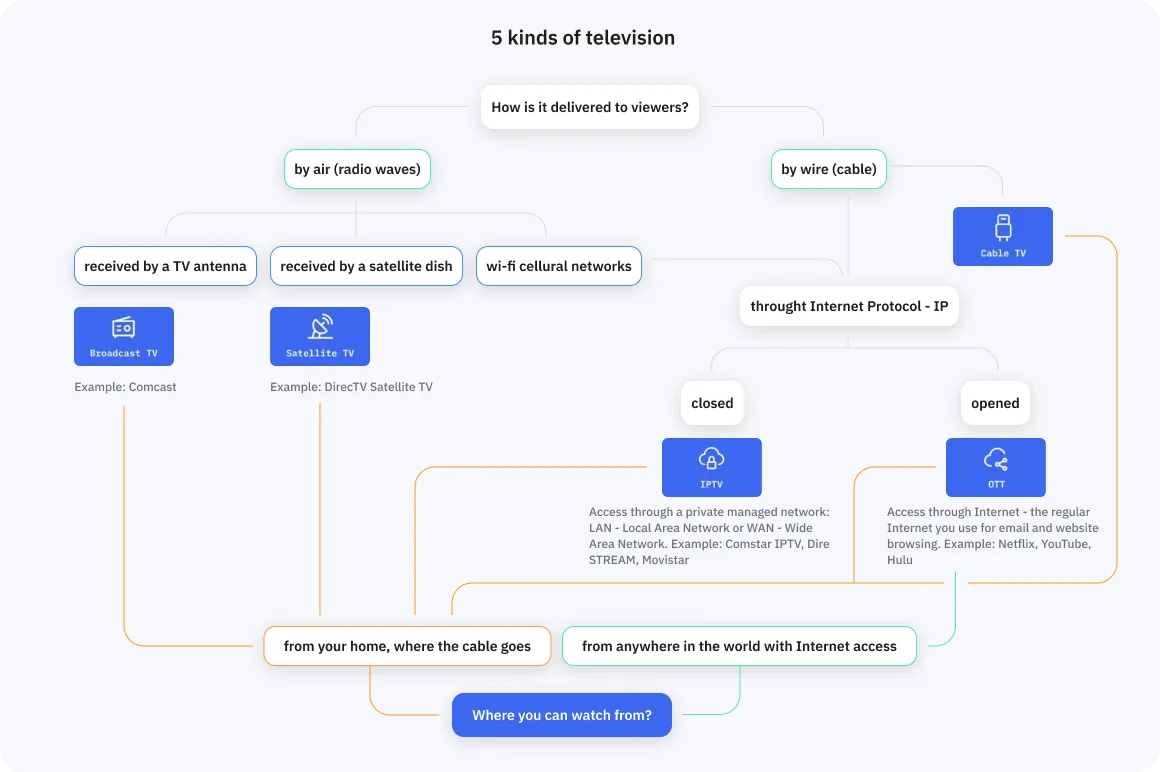
OTT and IPTV are 2 kinds of Internet TV – television delivered to viewers by the Internet Protocol – IP:
YouTube homepage showing recommended videos including design tutorials, movie trailers, and relaxing piano music.
OTT
Over-The-Top or Television over the Internet, uses an open network. It’s the regular Internet you use for emails or website browsing. Examples: Netflix, YouTube, Hulu. Use it on the phone, tablet, smart TV, laptop, or desktop computer – at home or outside, even in another country. When you have the Internet, log in to your account and watch.
TV interface screen showing a channel list for Switzerland including BBC, VH1, CNN, and Eurosport, with 'Our Earth' documentary playing and mountain landscape in the preview.
IPTV
Internet Protocol Television, uses a closed network and not the public Internet – you access the TV through a private managed Local Area Network – LAN, or Wide Area Network – WAN. E.g., if an Internet provider makes a net of his own cable – this is the provider’s own private LAN, not accessible from the Internet. Examples: Comstar IPTV, DIRECTV STREAM, Movistar+. Works at your home only, where the cable is.
Check our infographic below to see more on the difference between OTT and IPTV as well as Cable and Satellite TV, or read more in
Flowchart showing 5 kinds of television delivery: by air via antenna (Broadcast TV), satellite dish (Satellite TV), or cellular networks; by wire (Cable TV); or through Internet Protocol paths as closed IPTV or open OTT streaming, with examples like Comcast, DirecTV, Netflix, and YouTube.

Features

Split-screen image of a woman wearing cat-ear headphones and holding a game controller showing improved streaming quality with left side pixelated and right side clear.

AI-powered video quality improvements ✨

We can improve streaming quality by adding AI tools that adjust resolution and bandwidth in real-time.

Content recommendations 🎞

We develop AI-powered content recommendation systems that analyze user behavior and suggest tailored content.
Streaming service personalized offers display featuring posters of Gilmore Girls, Gossip Girl, Westworld, Doctor Who, and Black Mirror with a speech bubble saying 'Jessica, these are personalized offers for you!'
Two smartphone screens showing navigation directions: left screen with desert road and 'Turn left' instruction, right screen with Tower Bridge and 'Tower Bridge is in front of you' message.

Content moderation 🔒

AI content moderation can check user-generated content, such as uploaded videos or comments, for compliance and safety.

4 types of content: live, pseudo-live, on schedule, on-demand 📺

How to create a streaming service? Start with the decision of what type of content you’ll have.
Table comparing four types of TV content: Live streaming, Pseudo-live streaming, Streaming on schedule, and Video-on-demand (VOD), with details on when the audience watches, simultaneous viewing, content quantity, and examples.
Live streaming
It’s a live TV broadcast. You stream on the air – the audience watches right when everything happens.

How to create a live streaming service: the choice of technology is a balance between latency, scalability, and cost.
Two male soccer players competing for the ball on green grass, one in black and the other in white and red sportswear.
Technologies in use
WebRTC
for sub-second latency but the audience of fewer than 500 viewers
HLS
for a big audience of 500 to millions of viewers but with a latency of 2-60 seconds
WebRTC with Kurento and adjustments
for sub-second latency and a big audience but for a higher cost: read more in our article
Pseudo-live streaming
Sure thing, you have watched a pseudo-live broadcast at least once. For example, news or TV shows without audience interaction (for instance, pseudo-live "backup" performances of Eurovision contestants). The stream is recorded in advance, then processed on the server, and only then viewers can see it. In traditional television, this is called "live-to-tape."
You get better video quality for less money when you do not compress in real-time:
  • Less money:
The stream has a smaller size because there’s time to compress more effectively. Each of the video resolutions has a higher degree of compression. The smaller size goes through the servers the fewer you pay for that.
  • Better picture quality:
What video resolution to show depends on the user’s Internet speed. The same video size has a lower resolution (worse quality) in real-time and higher resolution (better quality) when compressed before sending to users. The same user has the same video size limitation due to his Internet speed. Therefore the user gets a better quality video – with a higher resolution – with pseudo-live streaming.
Two people conversing on a quiz show set with geometric blue background, displaying TV guide overlay for 'New Game' on MRT Channel.
Streaming on schedule
Organizing pre-recorded streams into a grid gives a totally TV-like experience: a set of parallel channels with a set of shows going one after another on each channel.

We program the ability for the admin to create the channels and build their schedule with videos. Different versions for different countries and timezones.
TV channel menu showing Swiss channels list including BBC, VH1, CNN, Eurosport, and Discovery with a mountain landscape preview for the program 'Our Earth' on RTS Un channel 003.
Video-on-demand (VOD)
A collection of movies, series, and other content that you can buy and watch at any moment – even radio.
Some of the VOD features:
  • Free and paid videos
  • Favorite videos
  • Recommended videos – set by admins or picked based on the user’s taste
  • Filter and sort by genre, popular, newest, highest rating
  • Direct search for videos – with a virtual keyboard for Smart TVs to type from a remote
  • Rate videos
  • Pin code before opening adult videos
  • Schedule video release and expiration date – when the video stops being available
Grid of ten TV show posters including House of Cards, Sherlock, The Sons, The Walking Dead, Game of Thrones, Grey's Anatomy, Gilmore Girls, Westworld, Lost In Space, Doctor Who, Black Mirror, and Gossip Girl with labels indicating free, buy for X USD, or by subscription.
World map showing an original server connected to multiple CDN servers which then deliver content to end users in different global regions.

Content Delivery Network (CDN)

You can’t beat physics: the longer the distance between your server and your audience, the bigger the delay. Taking this problem on in a straightforward way, by buying or renting hardware all around the world, will cost you a fortune.

CDN solves this problem. CDN is that network of servers in almost every country that someone has already bought and is ready to rent you. Each piece of your content is downloaded on each server – but only when the 1st user requests it. So the very 1st user still has the delay, but all the following do not.

Amazon’s CloudFront and Cloudflare are CDNs that we use most frequently at Fora Soft. Read more on CloudFront and Cloudflare differences in the article.

Video player for video streaming services ⏩

Video player paused at 9 seconds of a 19-second video with a cursor on the progress slider.
Video controls
Play, pause, stop, rewind, fast-forward buttons.
Scene from The Hollow Crown featuring a man with curly hair and fur cloak asking, 'Hello, guys! How about a party?'
Subtitles
Upload a subtitles file to videos in formats like SRT, SUB, SSA, AQT, ASS, JSON. These are the most popular ones. If yours is not on the list, we can program support for other formats.
TV guide interface showing channel 405 RTS UN FHD airing The Hollow Crown from 09:30 to 11:30 with a scene image.
Picture-in-Picture
The video you watch now shrinks into a small one in the corner while you look through a TV guide or pick another show. Works in browser: check a PiP demo at the end of our article. Works on mobile devices as well: read more about PiP on Android in this our article.

Video recording 🎬

Video player showing an aerial view of ocean waves crashing on a shore with a menu displaying options 'Start record', 'Record on schedule', and 'Language'.
Recording in real-time
Click record while watching online to record a show for your home collection. Download the recording to a user device, store it in the application, or in some third-party storage service. Or all of the above.
Video player paused at 9 seconds showing two soccer players on green field, with menu options for recording visible.
Recording on schedule
Set a time, and the recording will switch on. For STB-based solutions you need to leave the STB switched on.
Video player paused at 9 seconds showing a turquoise lake surrounded by rocky mountains under a cloudy sky with the text 'Lago di braies'.
Time shifting
Some channels support timeshift – rewind the allowed hours back and watch what you’ve missed.

Payment and monetization in a streaming platform 💰

Streaming app interface showing a cola commercial video overlaid on a paused scene from the film Killer's Party with three men, alongside a sidebar menu and an advertisement for the Vodeo mobile app.
Monetization by ads
Advertising-based Video-on-Demand – AVOD: viewers watch movies and series interrupted by ads. Example: YouTube free version.

Advertisements on a website page or app page but not in the video: advertising networks like Google Ads integrate and show relevant ads to visitors. Website or app owner gets income from ads views.
Subscription options screen with pricing for 1 month at $9.23, 3 months at $12.30, and 1 year at $20.40, and a payment card section showing a Mastercard debit card.
Paid subscription
Content unlocks for watching when the user subscribes. Subscription payments are automatically charged from his card. Monthly or annual.
Movie purchase screen showing The Dark Tower poster with pricing options for Full HD $14 and SD $12, alongside other fantasy movie thumbnails.
Buy a movie
Transactional Video-on-Demand – TVOD: pay for each piece of content: for one movie or one season of a show.
TV shows thumbnails including House of Cards, Sherlock, Suits, The Walking Dead, Game of Thrones, Grey's Anatomy, Gilmore Girls, Westworld, Lost in Space, Doctor Who, Black Mirror, and Gossip Girl with labels indicating free, buy for X USD, or by subscription.
Hybrid model
A mix of the models above. For example, a free plan with ads, a subscription to unlock some part of content, and some movies and series are paid for.
Screen displaying a numeric keypad and symbols with a prompt to enter the access code.
Access code
Enter the code on the TV to unlock access. Convenient for IPTV apps, e.g. for hotels.

Adaptive video quality 👓

Users should watch videos in the best quality possible. The limitation is their Internet speed. The program keeps an eye on it and automatically adjusts the video resolution to keep the video from stuttering even on a volatile network.
Three side-by-side images of green leaves with water droplets showing decreasing image clarity from sharp to pixelated.
Video player interface showing a scene from 'The Hollow Crown' with playback and quality options visible.

Video processing ✏️

Hybrid model
Converts videos into different formats to deliver to different end-users’ devices.
Different resolutions
Converts videos in different resolutions to deliver to users with different Internet speeds.
Compression
Decreases video size without a loss in quality by removing doubling data.
Split into chunks
When the videos are delivered chunked, the user never needs to stand by until a full movie is downloaded. The playback starts almost immediately, and keeps on, while the remaining parts are being downloaded in the background. Scrobble through a movie seamlessly – once you move the playhead to the desired location, the stream will resume in a moment, no matter how long was the skipped part.

Digital Right Management (DRM) 📋

Encryption to protect videos from stealing and unauthorized watching. The major studios will only let you sell their content if your platform is well-protected against copyright infringement.

When a user clicks play, the program checks the license server if he has the key. The server gives the decryption key if all is fine, and the player decrypts the video file with it and plays it.
Technologies:
TV screen showing 'Permission denied' message with a lock icon, channel details for Balley from 09:30 to 11:30, and navigation options for TV Guide, Favorite, and Menu.

Devices

  • Web browsers – use without download
  • Smartphones and tablets – iOS and Android
  • Desktop PCs and laptops
  • Smart TVs – Samsung, LG, Android-based STBs, Apple TV
  • Virtual reality (VR) headsets
Array of digital entertainment devices including a VR headset, two tablets, a smartphone, a set-top box, and an Apple TV against a turquoise background.
Laptop screen showing a movies.com webpage with a selection of TV films and serials, including House of Cards, Sherlock, Suits, Soul, Game of Thrones, and others, with labels indicating free, buy, or subscription access.

Website

Website is the simplest form of OTT online cinema.
  • It opens on laptops and desktop computers.
  • If optimized for mobile devices – it looks and works well on smartphones and tablets in a browser. Optimization requires extra time and cost because the UI for each page should be re-thought over for smaller screens.
  • Modern Smart TVs open websites as well – so you can watch such OTT on a Smart TV. iPhone users share screens to modern smart TVs with 3 taps too – so for them, it’s even easier, and the full-screen view looks exactly like any other movie on TV.
So if you want the most cost-effective option, a web Internet TV application is the best.
How to make a streaming website? We use JavaScript, framework React for web development, mainly WebRTC, HLS, and Kurento technologies for video streaming, and FFMPEG and GStreamer for video processing.
Two smartphones displaying movie rental apps: one lists comedies including Star Wars 8, Sonic The Hedgehog, Doctor Dolittle, and Jumanji II; the other shows rental details for Dark Phoenix with a red 'Resume' button.

IOS and Android native apps

iOS and Android native apps offer a better user experience. They are one tap away from the users, they don’t have to search for them in a browser. So for established media companies, we develop mobile apps.

How to make a mobile streaming platform? We use native programming languages: Swift for iOS, Kotlin for Android, mainly WebRTC, HLS, and Kurento technologies for video streaming, and FFMPEG and GStreamer for video processing.
Television screen showing the program 'The Hollow Crown' on channel 405, with an overlay of a man in a car and a small inset video of a person walking up stairs, accompanied by a black remote control in front of the screen.

Smart TV

Smart TVs have application stores too. It’s easier to launch a TV application like Netflix than search the site and share the phone’s screen. So for better user experience, we develop applications for Smart TVs. And yes, we can build a Netflix clone for your streaming TV service.
How to create such an OTT platform or make an IPTV server?
We use JavaScript for Samsung and LG Smart TVs, Swift for AppleTV, Kotlin for AndroidTV.

Examples of OTT services worldwide

When planning your Internet TV app, it’s wise to check the best examples in the industry. The ones with the biggest worldwide user base:
  • Netflix – 214 million subscribers in 2021
  • Amazon Video – 120 million
  • Disney+ – 118 million
  • HBO Max
  • Apple TV Plus
Check more indicators in this research from Statista.

Costs

We develop custom applications tailored to your needs. Therefore, our process begins with drawing up a plan, designing a clickable prototype, and then providing you with an estimate. Only after this can we give you rough numbers for development — we don't know exact pricing and timelines in advance. However, here are some approximate guidelines:
Mobile app interface showing popular movies like Aladdin, Bohemian Rhapsody, and The Matrix on the left, and account settings with options for credit balance, changing login, profile settings, changing password, help & support, and logout on the right.

The simplest VOD OTT app for 1 platform

~ 3–5 months · $36,000
A fully functioning system with VOD movies, login, simplest payment, rating, search. 1 platform means an iOS app or a web app for example.
TV interface showing Switzerland channel list including BBC, VH1 Music, RTS Un, with a mountain landscape preview for the program Our Earth on RTS Un.

The simplest IPTV app for 1 platform

~ 4-6 months · $49,000
A fully functioning system with channels like at hotels.
Movie streaming interface showing fantasy genre selected with posters of Maze Runner, Annihilation, The Mummy, Beauty and the Beast, Black Panther, Blade Runner 2049, War for the Planet of the Apes, and Avatar; feature for purchasing The Dark Tower movie in Full HD or SD.

OTT solution similar to Netflix for 1 platform

from 12 months · $150,000
A fully functioning system with different types of VOD content, live shows, login, a hybrid payment system, search, ratings, recommendations, special offers.

Have an idea
or need advice?

Contact us, and we'll discuss your project, offer ideas and provide advice. It’s free.
Describe your project and we will get in touch
Enter your message
Enter your email
Enter your name

By submitting data in this form, you agree with the Personal Data Processing Policy.

Thumb up emoji
Your message has been sent successfully
We will contact you soon
Message not sent. Please try again.