

Ship a video streaming app without AV1 and a 4K catalog quietly doubles the CDN bill. Skip DRM and the studio licensing call ends in ten seconds. Building a video streaming app in 2026 is no longer wiring a media player onto a CDN: the codec ladder, the latency budget, the recommender, the moderation layer, and a stack of EU rules (GDPR, the DMA, the AI Act) all pull on the same rope, and users now cancel at roughly 44% a year. Fora Soft has built video software since 2005, 250+ projects with real-time streaming at the core, so this is the feature checklist we wish every founder had before the first architecture call: what to build, what to buy, and where the money leaks.
Key takeaways
• The 2024 winning features are now table stakes. Adaptive bitrate, multi-quality playback and basic recommendations no longer differentiate. The 2026 bar is AV1, sub-3-second live, on-device personalization, and hybrid monetization.
• Ship a multi-codec ladder, never a single codec. AV1 saves 25–35% bandwidth but needs hardware decode to play efficiently on mobile (software decode exists on Chrome, Firefox and Android at a CPU cost; Apple has no system-wide software decoder). Keep H.264 as the universal floor and H.265 in the middle.
• Pick latency by protocol, not marketing. HLS runs 6–30 s, LL-HLS lands 2–4 s, WebRTC and WHIP go sub-second. The wrong pick adds a zero to infrastructure cost.
• Retention is a feature set, not a slogan. Continue-watching, download, captions and a working recommender move week-two retention more than any redesign.
• Buy the pipeline until it is the product. Managed streaming (Mux, Cloudflare Stream, AWS IVS) ships months faster; go custom when egress, residency, or your AI layer forces it.
What changed between 2024 and 2026
Two years is a long time in video. The video streaming app features that won in 2024 — adaptive bitrate, multi-quality playback, basic collaborative-filtering recommendations — are now the price of entry. Three shifts moved the goalposts, and each one changes what belongs in your build.
Codecs matured. AV1 support is now broad, split between hardware and software. Apple added hardware decode from the iPhone 15 Pro (A17 Pro) forward and across M3/M4 chips; Android 14 mandates AV1 decode (hardware or software via dav1d), with recent flagship SoCs adding hardware paths; and recent living-room devices like the Fire TV 4K Max, Google TV Streamer and Roku Ultra decode it in hardware (older sticks may not). YouTube encodes 75%+ of its catalog in AV1 and Netflix now delivers around 30% of streaming hours in AV1. See our state of AV1 in 2026 for the decode-coverage detail.
Low latency got standardized. WHIP, the WebRTC-over-HTTP ingest protocol, became RFC 9725 in March 2025. Low-Latency HLS is specified in the HLS 2nd Edition IETF draft (rfc8216bis) and is widely deployed even while the draft finalizes. Sub-3-second live is now a checkbox buyers expect, not a moonshot.
Privacy reshaped personalization. GDPR and the EU Digital Markets Act pushed recommenders toward first-party, on-device signals instead of cross-site cookies. Semantic search over vector embeddings has largely replaced pure collaborative filtering as the default discovery engine.
The 2026 streaming market in three numbers
Worldwide subscription video-on-demand revenue is projected near US$98 billion in 2026 (Statista Market Forecast), yet the average US household pays for only about four services at roughly $69 a month — and cancels at scale. Antenna’s subscription data puts annual US streaming churn near 44%, with premium SVOD weighted-average monthly churn around 4.6% in 2025. The lesson for a build: acquisition is cheap talk; the features that survive contact with users are the ones that keep them past week two.
Read the market as a brief, not a headline: a fragmented, high-churn market rewards apps that nail retention mechanics (download, continue-watching, working recommendations) and a monetization mix that does not depend on a single subscription tier.
The must-have feature checklist
The video streaming app features that matter cluster into seven layers, and every app — whatever the niche — composes the same stack. The implementation of each layer changes per project; the shape does not. Figure 1 shows the seven layers and where AI and compliance cut across all of them.
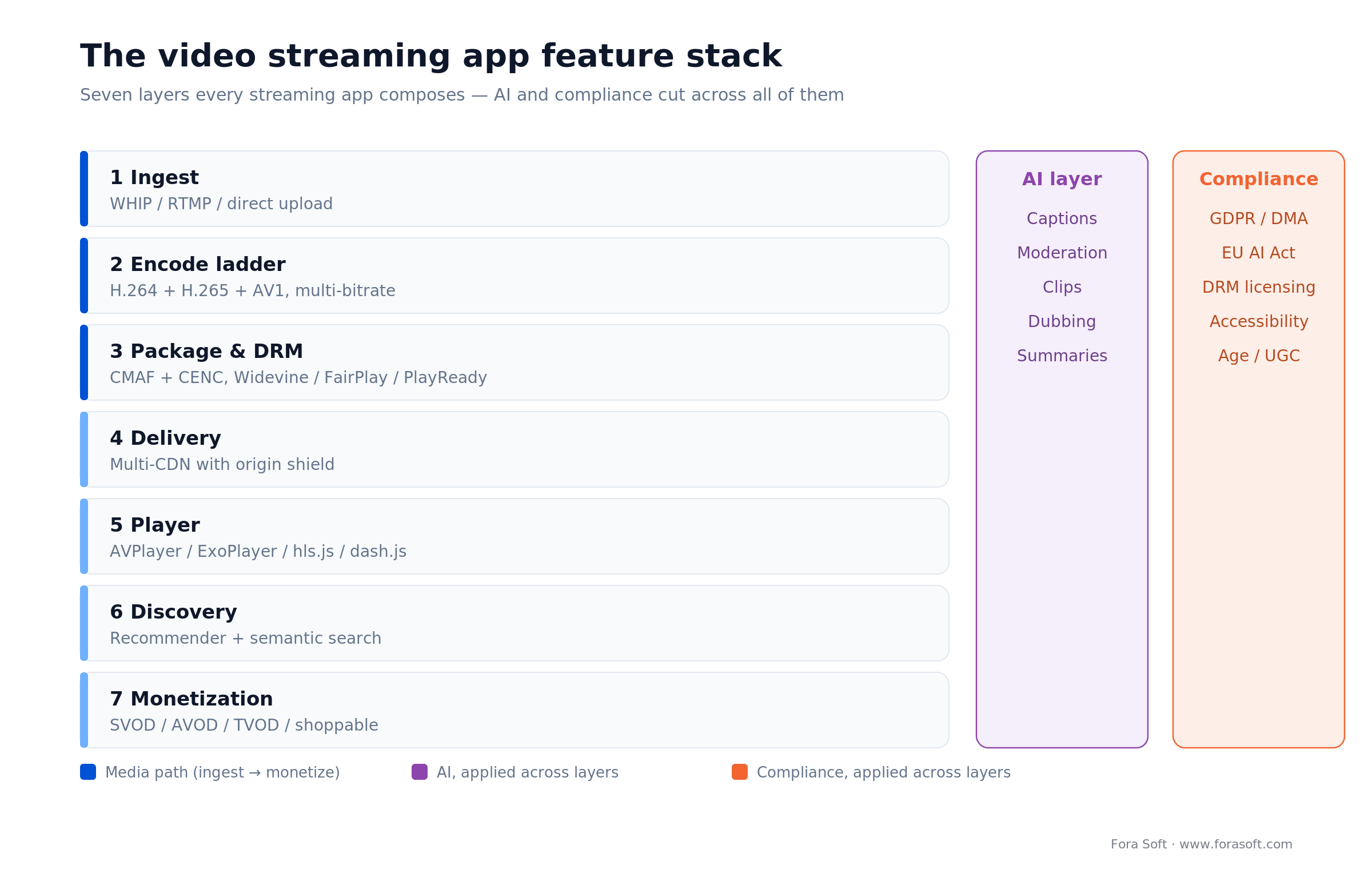
Figure 1. The seven-layer feature stack of a 2026 video streaming app. AI and compliance are horizontal layers, not a final module.
The rest of this guide walks each layer with the numbers that decide it: codec bitrates, latency budgets, DRM levels, the recommender, monetization models, and the honest trade-offs on build versus buy.
Playback quality: codecs and adaptive bitrate
Playback is the one feature users judge in the first three seconds. Two things decide it: how fast your adaptive bitrate (ABR) logic reacts to a changing network, and which codecs you encode.
Adaptive bitrate that reacts in time
ABR swaps quality up or down as bandwidth changes. The rule that matters: your ladder must react well before the buffer drains, or the viewer sees a stall. A quick worked check: encode a 2 Mbps rung and each 8-second segment is 2 MB (8 s × 2 Mbps = 16 Mb = 2 MB). On a 4 Mbps link that segment downloads in 4 seconds while it plays for 8, so the buffer gains about 4 seconds of headroom per segment. Let the link fall to 2 Mbps and download time equals playback time — the buffer stops filling, so the player must step down a rung before it gets there. Use a proven algorithm before writing your own: dash.js heuristics, ExoPlayer’s (Media3) default, or a bandwidth-plus-buffer model tuned on your own playback logs.
Codec strategy: H.264, H.265, AV1
Encode a ladder, not a codec. Each codec buys bandwidth savings at the cost of device coverage:
• H.264 (AVC): universal on every device made in the last decade. The floor you always ship. Typical ladder: 0.6–1.2 Mbps at 720p, 1.5–2.5 Mbps at 1080p.
• H.265 (HEVC): about 30–40% less bandwidth than H.264 at equal quality; strong hardware support on mobile, licensing cost on the encode side.
• AV1: a further 25–35% saving versus H.265, royalty-free, but it needs hardware decode to play efficiently on mobile. Software decoders (dav1d) run it on Chrome, Firefox and Android at a CPU and battery cost; Apple ships no system-wide AV1 software decoder, so an older iPhone with no hardware path falls back entirely — keep H.265/H.264 rungs. Best used for premium tiers and offline downloads where the saving compounds.
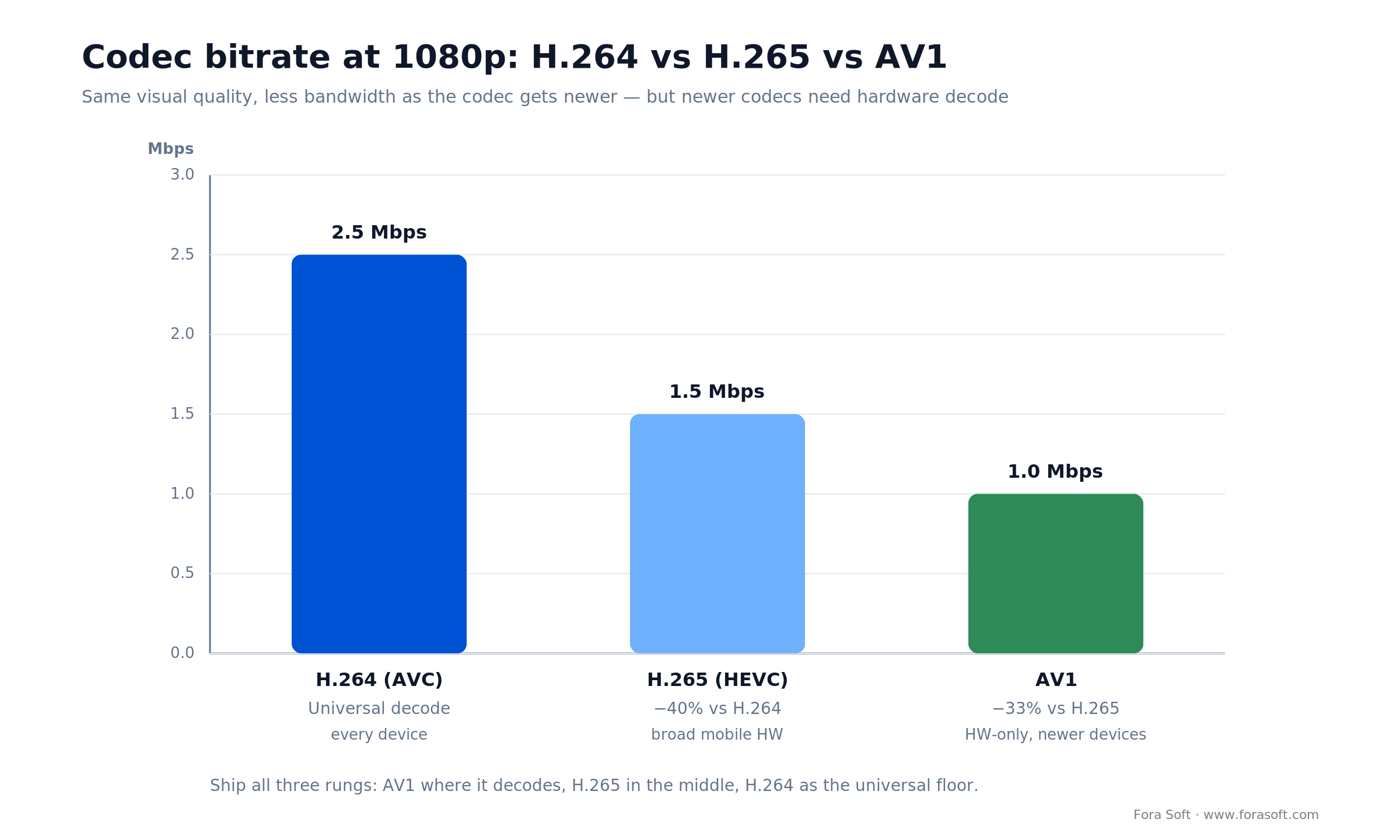
Figure 2. The same 1080p quality across three codecs. AV1 is cheapest to deliver but needs hardware decode, so ship all three rungs.
A concrete multi-codec ladder for one title at three qualities: H.264 at 1.2 / 2.5 / 5.0 Mbps, H.265 at 0.8 / 1.5 / 3.0, AV1 at 0.5 / 1.0 / 2.0. Package once with CMAF so a single set of segments carries every DRM, and let the player pick the best codec the device can decode.
Reach for AV1 when: bandwidth is your dominant cost (large 4K catalog, mobile-heavy audience) and your analytics show most sessions on AV1-capable hardware. If your audience skews to older devices, the savings never land and the extra encode cost is wasted.
Low-latency live: LL-HLS, WHIP and WebRTC
How low can live latency actually go? Traditional HLS runs 6–30 seconds behind live because it ships whole segments; Low-Latency HLS lands about 2–4 seconds using partial segments, blocking playlist reload and preload hints; WebRTC (and WHIP for ingest) reaches sub-second. Pick the protocol by the latency the feature actually needs.
Chat that reacts to the stream, live auctions, sports betting and interactive shopping need sub-3-second glass-to-glass, so LL-HLS or WebRTC earns its complexity. A film catalog does not: plain HLS or DASH is cheaper and simpler, and no viewer notices a 15-second VOD start offset. For the ingest side, WHIP (now RFC 9725) is replacing RTMP; our WHIP and WHEP guide covers the migration, and the WHEP egress deep-dive covers playback.
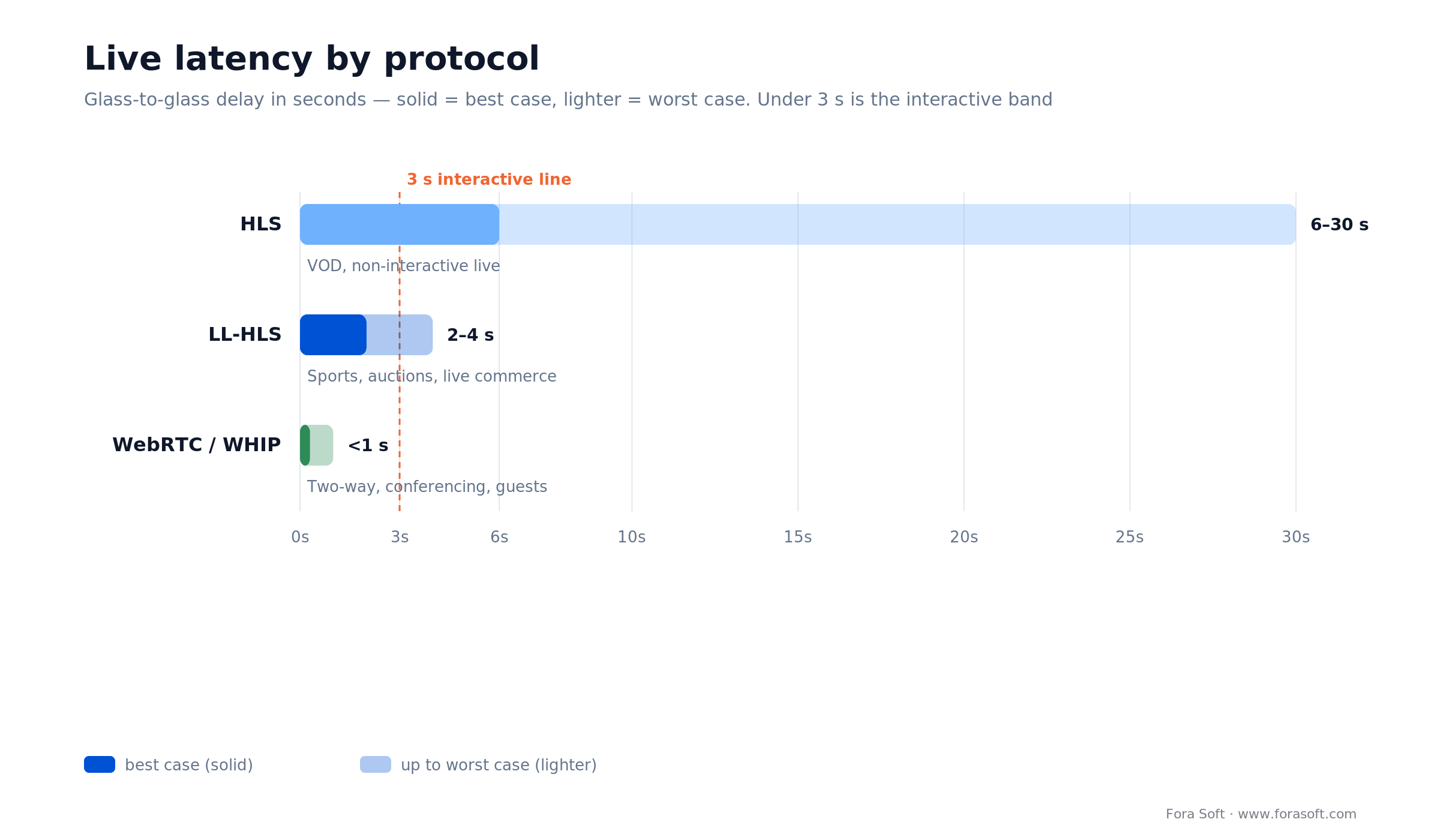
Figure 3. Live latency by protocol, in seconds. The interactive band under 3 seconds is where LL-HLS and WebRTC earn their cost.
Reach for LL-HLS when: you need 2–4 s at large concurrency (sports, auctions, live commerce) and full WebRTC interactivity would be overkill. Pair it with a WebRTC side-channel only for the genuinely two-way bits, like a guest joining the stream.
Stuck on the protocol-and-codec decision?
Tell us the use case and audience; we will hand back a codec ladder and a latency budget you can hold a vendor to.
Discovery and personalization engines
What replaced collaborative filtering? Semantic search over vector embeddings plus on-device signals. It survives cookie deprecation, works on day one for new titles (content-based, not just behavior-based), and keeps personalization local enough to satisfy GDPR and the DMA. A working recommender is the single biggest retention lever a catalog app has.
Ship three things in order: continue-watching and cross-device resume first (the highest-return feature in any catalog), then content-based clustering so new and long-tail titles surface without watch history, then a hybrid recommender that blends embeddings with behavior. Semantic search over transcripts and metadata lets users find a scene, not just a title.
Social and interactive features
Social features turn a viewing pipe into a place people come back to, but only for the right content. Live chat with reactions (WebSocket-based, targeting ~100 ms delivery) fits live events; watch parties and co-watching fit both live and VOD; clip creation and sharing turns viewers into a distribution channel. User-generated content adds a hard requirement: moderation. Plan an automated moderation layer (nudity, violence, and increasingly AI-generated abuse) plus a human review queue before you open uploads, not after.
When social features backfire: bolting chat onto a solo VOD app adds moderation cost and empty rooms with no retention upside. Add social where the content is genuinely communal — live, sports, education, fandom — and skip it elsewhere.
Monetization: SVOD, AVOD, TVOD and shoppable
Which monetization model should a 2026 app pick? Usually more than one. Hybrid stacks now out-earn pure subscription because they capture users at different willingness-to-pay. Match the model to the content and the audience:
| Model | How it earns | Best for | Where it breaks |
|---|---|---|---|
| SVOD (subscription) | Recurring monthly/annual fee | Deep catalogs, habitual viewing | High churn if the catalog stalls |
| AVOD / FAST | Ads, server-side inserted | Broad free reach, casual viewers | Needs scale and ad demand to pay off |
| TVOD / PPV | One-off rental or purchase | Events, premieres, live sport | Spiky revenue, no recurring base |
| Shoppable video | Commerce inside the player | Retail, creators, live selling | Weak without inventory and checkout |
| Tipping / creator support | Viewer-to-creator payments | Creator platforms, live | Only meaningful with an engaged base |
Two implementation notes that save money later. Use server-side ad insertion (SSAI) for AVOD: it splices ads into the manifest, so they survive ad-blockers and match stream quality, which lifts completion versus client-side ads. And build billing on a provider (Stripe, RevenueCat, the app stores) rather than hand-rolling subscription state — proration, grace periods and tax are where custom billing quietly bleeds.
Not sure which features your app actually needs?
Bring the use case; leave with a codec ladder, a latency budget, a monetization mix and a build-vs-buy call you can put in a budget.
Offline download and cross-device sync
Download is a retention feature disguised as a convenience: commuters and travelers who can watch offline churn less. It has three hard parts. Wrap downloads in DRM-backed local storage (Widevine offline on Android, FairPlay on iOS) so content cannot be lifted off the device. Manage storage and expiry honestly with visible timers and license renewal. And sync playback position across devices so a user resumes on the TV where they paused on the phone. Cross-device resume is cheap to build and disproportionately loved.
Accessibility and internationalization
Accessibility is both a legal floor and a growth lever. Ship closed captions and audio descriptions, multi-language audio and subtitle tracks, right-to-left layout support, and full screen-reader plus keyboard navigation for the player controls. Beyond compliance, captions measurably lift watch time for sound-off viewing, and localized audio opens markets a subtitle track alone will not. AI auto-captioning and dubbing (covered below) make this affordable at catalog scale.
Security and DRM: Widevine, FairPlay, PlayReady
Do you need all three DRM systems, or just one? To reach every platform, you ship all three — they do not overlap. Widevine covers Android, Chrome and most smart TVs; FairPlay is mandatory on Apple platforms; PlayReady covers Windows, Xbox and many TVs. CMAF with common encryption (CENC) lets one packaged asset carry all three, so this is a packaging cost, not three separate pipelines.
One detail studios check: Widevine security levels. L1 means hardware-backed decode inside a trusted execution environment and is required for HD and UHD on most premium content; L3 is software-only and is limited to SD by major studios. If you plan to license studio content, design for L1 from the start. Add token-based authentication (short-lived JWTs in manifest requests) and forensic watermarking for high-value live, and you have covered the questions a content partner will ask in due diligence.
Analytics and quality of experience (QoE)
You cannot fix what you do not measure, and playback problems are invisible without instrumentation. Track four numbers as first-class metrics: time-to-first-frame (startup), rebuffer ratio (stall time over watch time), average bitrate served, and playback failure rate. Roll them into a QoE score (VMAF for visual quality, plus the delivery metrics) so product and engineering argue over one number, not five dashboards. Log the full path from tap to render — DNS, TLS, manifest, segment fetch, decode — so a regression points to a layer, not a guess.
AI features that drive engagement
AI is the moat, not the garnish. Four features have moved from research to production-safe and now separate a modern app from a 2024 one: auto-captions and live translation, automatic highlight clips, voice dubbing and multi-language generation, and personalized trailers or AI summaries. Each one either lowers a cost (captioning at catalog scale) or lifts engagement (clips as a distribution channel). Our AI-native streaming playbook maps where each model sits in the pipeline and what it costs to run.
The honest limit on AI features: auto-dubbing and AI moderation are good, not perfect. Keep a human review path for high-stakes content and disclose AI-generated audio where the EU AI Act transparency rules apply. Ship the lift, own the caveat.
Build vs. buy: your stack options
Should you build the pipeline or buy it? Buy until one of three things is true: monthly egress passes roughly $15–25k, buyers demand on-prem or region-locked data residency, or your recommender, captions or moderation is the actual product. Until then a managed stack ships faster and cheaper than rebuilding encoders and CDNs.
| Approach | Best for | Time to MVP | Where it breaks |
|---|---|---|---|
| Managed platform (Mux, Cloudflare Stream, AWS IVS) | MVPs, validating a market, small teams | Weeks | Per-minute cost climbs with scale; less control |
| Managed + thin custom layer | Most funded products | 1–3 months | You still inherit vendor limits at the edges |
| Fully custom pipeline | Scale, residency, AI-as-product | 4–9 months | Highest cost and ops burden; only pays off at scale |
For a realistic budget by scope and team, our streaming app time-and-cost estimate breaks down the hours behind each layer.
Reference architecture
A dependable 2026 stack looks like this. Ingest accepts WHIP or RTMP for live and direct upload for VOD. A transcoding pipeline (FFmpeg plus a managed encoder such as AWS Elemental) produces H.264, H.265 and AV1 at five bitrates each, packaged once as CMAF with CENC for multi-DRM. A multi-CDN layer with origin shielding handles delivery. Clients use platform-native players — AVPlayer on iOS, ExoPlayer/Media3 on Android, dash.js or hls.js on web. Discovery, moderation and analytics run as services alongside, not inside, the delivery path so they scale independently.
The 3-year cost model
Feature lists hide the real question: what does this cost to run once users arrive? The three-year picture is dominated by delivery, not development. Encoding is a one-time-per-title cost; CDN egress scales with every hour watched; managed-platform per-minute fees look cheap at launch and become the largest line as you grow. Figure 4 shows the typical shape.
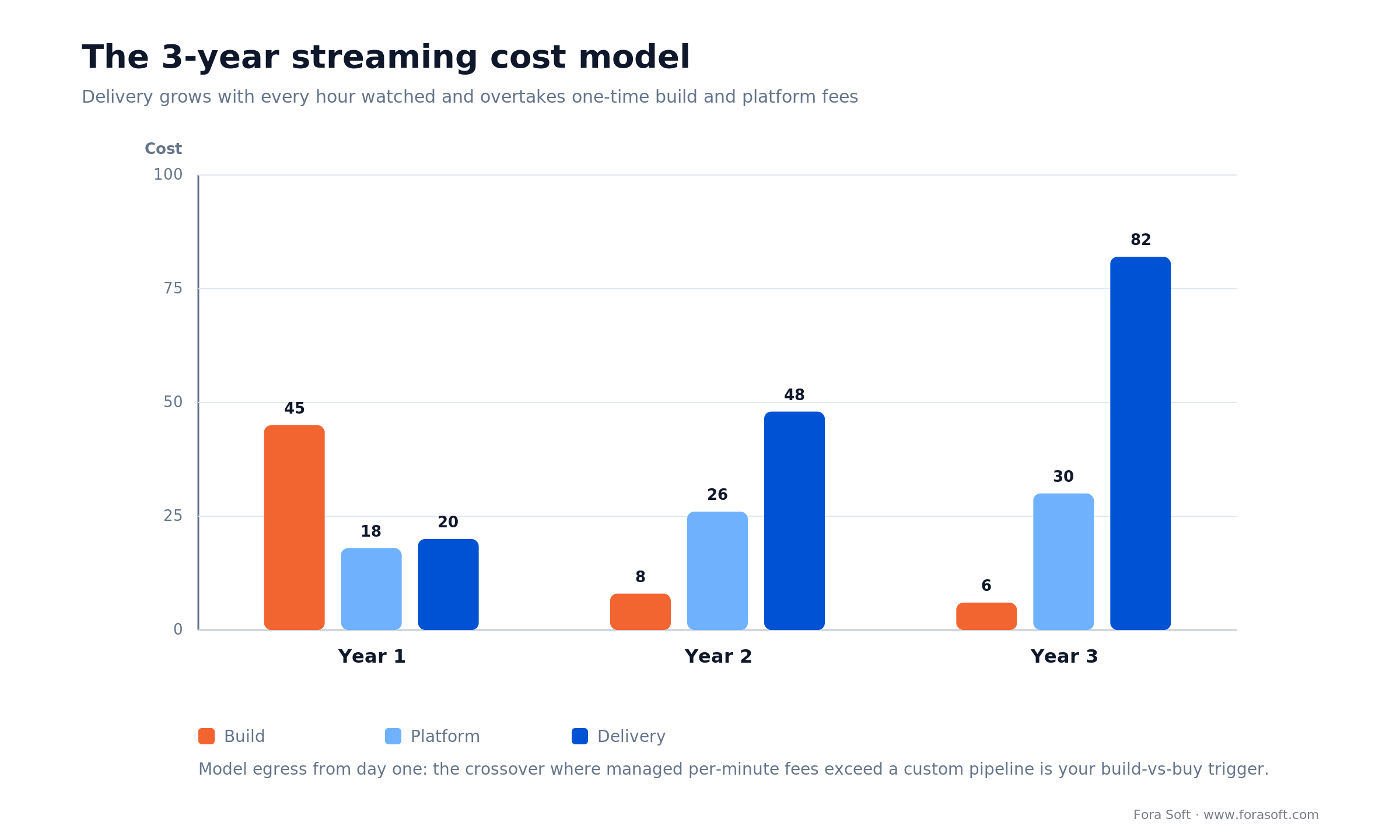
Figure 4. A typical three-year cost curve. Delivery/egress grows with watch hours and overtakes build and platform fees.
The practical takeaway: model egress from day one at your target concurrency, and treat the crossover point — where managed per-minute fees exceed a custom pipeline plus ops — as the trigger to reconsider build versus buy, not a decision you make once at kickoff.
Mini case study: Vodeo
Vodeo needed a streaming platform that felt instant and scaled without a media team babysitting encoders. The situation: a growing catalog, a small team, and rising delivery cost as viewership climbed.
The plan we shipped: a multi-codec ABR ladder (H.264/H.265, with AV1 added for the heaviest titles), CMAF packaging for single-package multi-DRM, continue-watching and cross-device resume as first retention features, and a QoE dashboard so the team could see startup time and rebuffering per cohort. Delivery ran on a multi-CDN layer to keep egress competitive.
The result: a stable, low-startup-time experience the team could operate without a dedicated video engineer, with the codec ladder cutting delivery cost on the heaviest content. We have built the same spine for BrainCert and Tradecaster. Want this architecture costed for your catalog? Book a 30-minute call and we will size it.
Want this spine costed for your catalog?
We will size the ABR ladder, DRM, delivery and retention features against your traffic and give you a real budget.
Pick your stack in five questions
Answer these five before writing a line of code. Each answer collapses a whole branch of the feature tree.
| Question | If yes | Feature/stack implication |
|---|---|---|
| Is any content live and interactive? | Yes | LL-HLS or WebRTC/WHIP; chat and moderation layer |
| Will you license studio content? | Yes | Widevine L1 + FairPlay + PlayReady from day one |
| Is your audience mobile- and bandwidth-heavy? | Yes | AV1 in the ladder; download for offline |
| Is your recommender or AI the product? | Yes | Custom pipeline; own the discovery/AI layer |
| Do buyers require EU data residency? | Yes | Region-locked delivery; likely self-hosted origin |
If most answers are “no,” a managed platform plus a thin custom layer is almost always the right first build. If several are “yes,” you are in custom-pipeline territory, and the earlier you design for it the cheaper it is.
Five pitfalls to avoid
• Shipping one codec. A single-codec app either wastes bandwidth (H.264 only) or fails to play (AV1 only). Always ship a ladder.
• Chasing sub-second latency for VOD. WebRTC everywhere multiplies infra cost for a delay no viewer notices on recorded content.
• Opening uploads without moderation. UGC without an automated plus human review queue is a trust-and-safety incident waiting to happen.
• Hand-rolling billing. Proration, tax and grace periods bleed engineering time; use a billing provider.
• Treating DRM levels as an afterthought. Retrofitting Widevine L1 after launch means re-architecting the secure path. Design for it up front if you will license premium content.
KPIs to track
Instrument these from launch: time-to-first-frame (target under ~2 s), rebuffer ratio (target under ~1% of watch time), playback failure rate (target under 0.5%), week-two retention, and delivery cost per hour watched. On the reliability side, watch uptime (99.95% for live, 99.99% for VOD is a sane target) and p99 API latency under 200 ms. These few numbers tell you whether the features above are actually working.
When NOT to build your own streaming app
Honesty sells better than a pitch. Do not build a custom streaming app if your video need is a handful of marketing clips — a hosted player (YouTube, Vimeo, a managed embed) is cheaper and better. Do not build if you have no plan for content moderation and you intend to allow uploads. And do not build a custom pipeline to save money at small scale: below a few thousand concurrent viewers, a managed platform is almost always cheaper than the engineering to replace it. Build custom when streaming is the product, scale or residency forces your hand, or your AI layer is the differentiator — not before.
FAQ
Should you use HLS or DASH for streaming?
Use both where you can. HLS is Apple’s standard with the best iOS and AirPlay integration; DASH is the MPEG standard with strong native Widevine support. Ship HLS for Apple-heavy audiences and add DASH for broad Android and web reach; CMAF lets one set of segments serve both.
What live latency can I actually hit?
Traditional HLS runs 6–30 seconds behind live, Low-Latency HLS lands about 2–4 seconds, and WebRTC or WHIP reaches sub-second. Pick the lowest latency your feature genuinely needs — interactivity justifies WebRTC, a film catalog does not.
Is AV1 safe to ship in 2026?
Yes, as one rung in a ladder. AV1 hardware decode is broad on new Apple and Android devices and living-room hardware, and software decoders (dav1d) cover Chrome, Firefox and Android at a CPU cost. It saves 25–35% bandwidth versus H.265. But Apple ships no system-wide AV1 software decoder, so keep H.265 and H.264 rungs for older devices.
Do I need Widevine, FairPlay, and PlayReady, or just one?
All three to cover every platform: Widevine for Android/Chrome/most TVs, FairPlay for Apple, PlayReady for Windows/Xbox/many TVs. CMAF with common encryption carries all three from a single packaged asset, so it is a packaging step, not three pipelines.
How much does it cost to build a video streaming app?
It depends on scope, but the honest driver is delivery, not development. A managed-platform MVP can launch in weeks; a custom pipeline runs months. Model CDN egress at your target concurrency early — over three years it usually dwarfs the build cost. Our streaming time-and-cost estimate breaks down the hours by layer.
Build vs. buy: when does a custom pipeline pay off?
Buy until monthly egress passes roughly $15–25k, buyers demand on-prem or EU-only residency, or your recommender, captions or moderation is the product. Below that, a managed stack plus a thin custom layer ships faster and costs less.
What features matter most for user retention?
Continue-watching and cross-device resume, offline download, reliable captions, and a working recommender. These move week-two retention more than any visual redesign, because they remove friction from the next session.
Can I add shoppable video or live commerce later?
Yes, but design the player and event layer to allow overlays and timed metadata from the start. Retrofitting interactive overlays and a checkout path onto a closed player is far more work than reserving the hooks early.
Build your streaming app in 2026 with speed and confidence
The market has matured, and so has the bar. The video streaming app features that win in 2026 are no mystery: users expect AV1, low-latency live, on-device recommendations, hybrid monetization and cross-device sync — and they leave fast when any of it is missing. The teams that win pick the right codec ladder and latency budget early, buy the pipeline until it becomes the product, and instrument retention from day one. That is exactly the work we do. Explore our video streaming development service, or talk to the engineers who have shipped it since 2005.
Building a streaming app in 2026?
We will audit your feature plan, size the delivery cost, and give you a build-vs-buy call you can act on — in one 30-minute call.
What to read next
Service
Video streaming development
Custom streaming platforms from MVP to multi-million MAU.
Deep dive
AI-native video streaming
Where each AI model sits in the pipeline, and what it costs to run.
Estimate
Streaming app cost and timeline
The hours behind each layer, from ingest to player.
Real-time
Build your own low-latency stack
Self-hosted WebRTC alternatives you can own end to end.
Enterprise
Enterprise video platform
Scaling streaming for security, residency and large audiences.

