

Key takeaways
• A LiveKit voice agent is a worker-based pipeline that glues WebRTC to STT, an LLM and TTS. It is the most provider-flexible way to ship real-time voice AI in 2026. Mix Deepgram, Claude or GPT, ElevenLabs or Cartesia, and swap any provider in one config line.
• Realistic all-in cost is $0.06–$0.15 per agent-minute when you assemble the stack yourself. At 100k minutes a month, TTS and LLM tokens dominate the bill; LiveKit Cloud itself is roughly 10–20% of the total.
• Latency budget: under 800ms time-to-first-audio on a cascading stack. VAD 50ms + STT 150ms + LLM TTFT 400ms + TTS 150ms + network 50ms. Blow any single stage and the agent feels sluggish. Speech-to-speech models get you under 300ms if you can accept one vendor.
• Realtime APIs (OpenAI Realtime, Gemini Live, Amazon Nova Sonic) beat cascading stacks on latency but lock you to one provider. Use them when speed matters more than swap-ability; use LiveKit Agents when cost control and provider choice matter.
• Compliance is architecture, not paperwork. TCPA consent capture, HIPAA BAAs with every provider, PCI DTMF masking and STIR/SHAKEN on US outbound all have to be baked in from day one.
Why Fora Soft wrote this playbook
Fora Soft has shipped WebRTC voice and video products since 2005 and LiveKit-based products since the framework matured — 250+ projects, 50+ in-house specialists, one narrow specialty. Our LiveKit development team and our AI integration service list the full scope; this guide is the condensed version of the opinion we share on a 30-minute scoping call.
We ship with Agent Engineering — senior engineers driving AI coding agents across design, dispatch, prompt work and QA. On voice-agent projects that compresses a classical 12–16 week MVP to 6–8 weeks at a smaller headcount. The pattern has been tested on products that carry real concurrency, including our work on Scholarly, where LiveKit backs live classes of up to 2,000 concurrent students.
The article answers the four questions teams ask us, in order: what is a LiveKit voice agent today, how do you architect one, what does it cost, and when should you pick something else. Read it end to end and you'll stop arguing about framework brand names and start arguing about the things that decide the project: latency, cost and compliance.
Planning a LiveKit voice agent?
Book a 30-minute scoping call. We'll map your call pattern to the right STT, LLM, TTS and telephony stack, no upsell.
What a LiveKit voice agent actually is
A LiveKit voice agent is a real-time AI program that joins a WebRTC room, listens to a caller, and talks back — built with LiveKit Agents, an open-source Python and Node.js framework for voice, video and multimodal agents. It is Apache-2.0 licensed and runs on the LiveKit media server, the same SFU you might already use for video calls. The framework went 1.0 in April 2025 and the Python SDK sits on the 1.x line through 2026, with adaptive interruption handling and native Model Context Protocol (MCP) tool support.
The job is simple to describe and hard to execute: take a WebRTC audio stream, pass it through a pluggable pipeline of VAD → STT → LLM (with tools) → TTS → playback, and handle the ugly edge cases (interruptions, turn detection, dropouts, phone handoff) so you don't have to. LiveKit provides the WebRTC transport, the worker runtime and the plugin interfaces; you bring the business logic.
Here's why it matters. Every other voice-agent platform either forces you into one LLM/TTS vendor (OpenAI Realtime, Gemini Live) or stacks a proprietary platform fee on top of provider cost (Vapi, Bland, Retell to a lesser degree). LiveKit Agents keeps the provider stack open and the infrastructure layer thin. If you want the platform reference behind this article, our LiveKit for AI agents guide in Learn goes deeper on the SDK surface.
Reference architecture: worker, dispatch, pipeline
Every production LiveKit voice agent has four moving parts:
- LiveKit Server or LiveKit Cloud. The WebRTC SFU. Handles signaling, ICE/DTLS/SRTP, track routing and room lifecycle.
- Agent worker. A long-running process (Python or Node) that registers with the server and waits to be dispatched into rooms. One worker can run many agents in parallel.
- Agent pipeline. A state machine inside the worker: VAD watches for speech, STT transcribes, the LLM reasons with optional tool calls, TTS synthesizes, and the framework publishes audio back into the room.
- Providers. STT (Deepgram, Whisper, Azure, Google), LLM (OpenAI, Anthropic, Google, open-source via Fireworks or Together), TTS (ElevenLabs, Cartesia, Google, Azure, Deepgram).
Dispatch comes in three flavours. Automatic dispatch spins up an agent for every new room — good for “agent is always present” products. Explicit dispatch (via token metadata or the AgentDispatchService API) lets you choose which agent joins which room and pass user context in with it. Entrypoint jobs run agent logic outside a room — batch transcription, scheduled outbound calls, cleanup tasks.
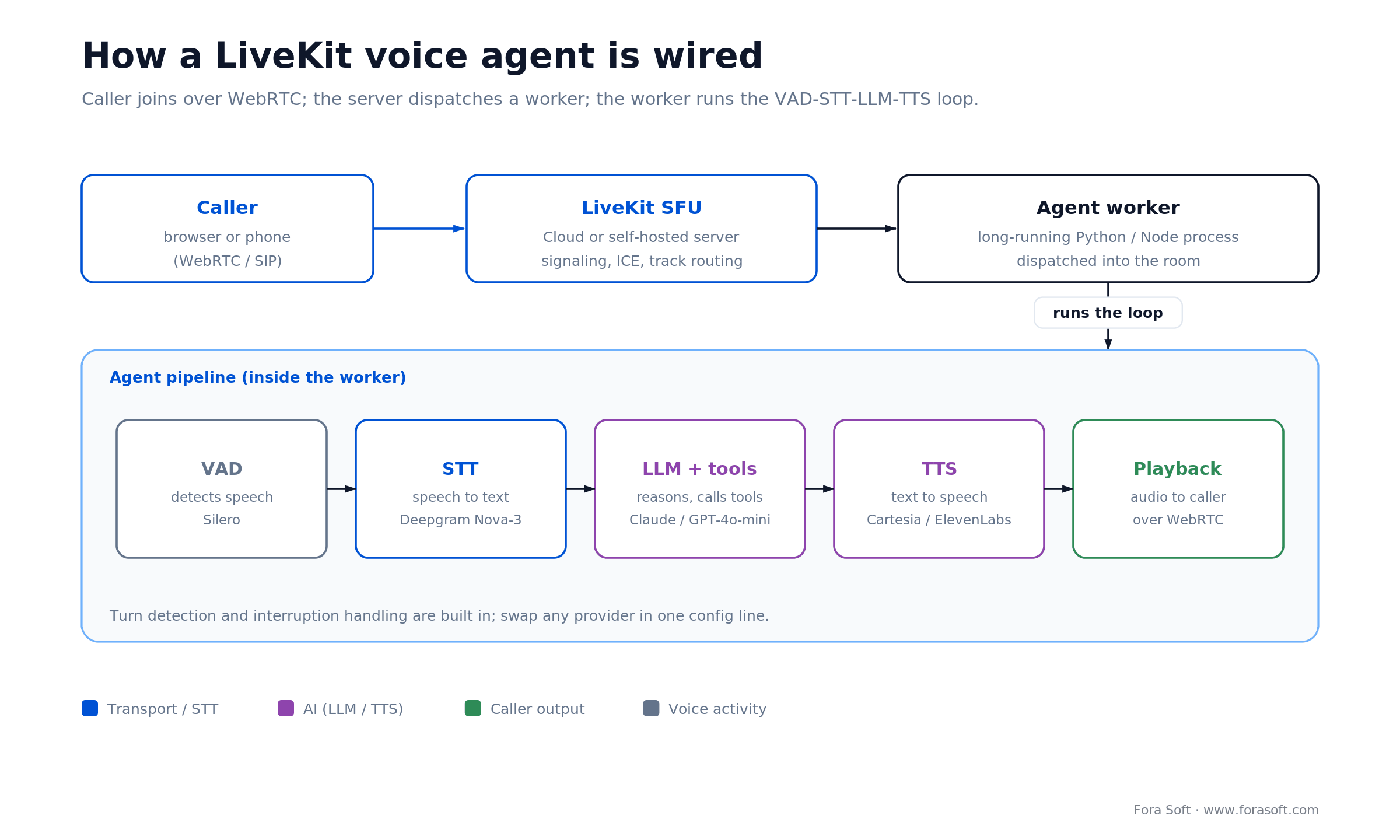
Figure 1. How a LiveKit voice agent is wired: the caller joins over WebRTC, the server dispatches a worker, and the worker runs the VAD → STT → LLM → TTS loop.
How to build a LiveKit voice agent: the AgentSession loop
The whole build starts from one primitive: AgentSession. In the 1.0 release it replaced the older VoicePipelineAgent and MultimodalAgent classes with a single orchestrator. You declare STT, LLM, TTS and VAD as pluggable components, register your tool functions, and the SDK wires up streaming, turn detection and interruption handling. A working cascading agent is about a dozen lines:
from livekit import agents
from livekit.agents import AgentSession, Agent
from livekit.plugins import deepgram, openai, cartesia, silero

class Assistant(Agent):
    def __init__(self):
        super().__init__(instructions="You are a phone assistant. Keep replies short.")

async def entrypoint(ctx: agents.JobContext):
    await ctx.connect()
    session = AgentSession(
        vad=silero.VAD.load(),
        stt=deepgram.STT(model="nova-3"),        # swap provider in one line
        llm=openai.LLM(model="gpt-4o-mini"),
        tts=cartesia.TTS(),
    )
    await session.start(agent=Assistant(), room=ctx.room)

if __name__ == "__main__":
    agents.cli.run_app(agents.WorkerOptions(entrypoint_fnc=entrypoint))
Swapping Cartesia for ElevenLabs, or GPT for Claude, is a one-line change — that single property is the reason teams reach for the framework instead of a locked platform. Turn detection is on by default: LiveKit's Turn Detector v1 fuses semantic and acoustic signals into one end-of-turn prediction and runs free on LiveKit Cloud inference. To go multimodal, you pass a speech-to-speech model (OpenAI Realtime, Gemini Live) into the same AgentSession instead of the STT/LLM/TTS trio. For a full build-and-deploy walkthrough (workers, deployment, scaling), see our LiveKit AI voice agents playbook; this guide stays focused on architecture, cost and choosing between LiveKit and the alternatives.
LiveKit Cloud vs self-hosted LiveKit Server
Both run the same open-source server. The difference is where the operations team sits. Under roughly 500k monthly agent-minutes, LiveKit Cloud is cheaper once you price in the DevOps you'd otherwise hire; past that, self-hosting on Kubernetes starts to win.
| Dimension | LiveKit Cloud | Self-hosted |
|---|---|---|
| Unit economics | ~$0.01/agent-min above quota, $0.10–0.12/GB egress | Infra cost only; no per-min fee |
| Latency | Global edge, in-region routing | Depends on your region strategy |
| Ops burden | Zero — managed | K8s, monitoring, failover, scaling |
| Recording & composition | Built in (Egress) | Deploy Egress service yourself |
| Turn detector inference | Free on Cloud inference | You host the model |
| Break-even | Up to ~500k monthly agent-min | Cheaper past that — if you have DevOps |
Reach for LiveKit Cloud when: you are under 500,000 monthly agent-minutes, have no dedicated WebRTC DevOps, or want to ship a pilot in weeks. Self-host only past that volume, or when regulatory data residency forces on-prem.
Realtime APIs vs cascading STT→LLM→TTS
Two architectural camps now split the voice-agent world, and the choice sets your latency floor and your vendor lock-in. Pick knowingly.
Native realtime (OpenAI Realtime, Gemini Live, Amazon Nova Sonic). One model takes audio in and emits audio out. Time-to-first-audio can drop below 300ms and voice quality is excellent. The downside: you're locked to one vendor, one voice family, and per-second token billing that is hard to predict at scale.
Cascading pipelines (LiveKit Agents, Pipecat). You wire VAD, STT, LLM and TTS yourself from best-of-breed providers. Time-to-first-audio typically lands in the 500–800ms band after tuning, sometimes lower with streaming TTS. The upside: provider swap in a single config change, fine-grained cost control, and richer tool-calling and retrieval.
LiveKit Agents supports both — the same AgentSession works with cascading providers and with OpenAI Realtime or Gemini Live as drop-in alternatives. That flexibility is the single biggest reason we default to LiveKit on multi-tenant products.
Reach for a speech-to-speech model when: sub-300ms feel is a hard product requirement, you're happy on one vendor, and your dialog is conversational rather than tool-heavy. Stay cascading when you need to swap providers, run retrieval, or keep a tight lid on per-minute cost.
Cost model: $/minute for a real voice agent
A cascading LiveKit voice agent costs $0.06–$0.15 per agent-minute all-in once you add up every provider. TTS is almost always the biggest line, then LLM tokens; LiveKit Cloud is the smallest. Prices below are pay-as-you-go rates verified for 2026.
| Component | Provider (example) | Typical $/min | Notes |
|---|---|---|---|
| STT | Deepgram Nova-3 | ~$0.008 | Streaming Nova-3, pay-as-you-go |
| LLM | Claude / GPT-4o-mini | $0.005–$0.015 | Assumes ~200 in / 100 out per turn |
| TTS | Cartesia / ElevenLabs | $0.03–$0.08 | Dominant cost line — tune here first |
| LiveKit Cloud | Agent session minute | ~$0.010 | Above quota; plus egress on recording |
| SIP / telephony | Twilio, Telnyx | $0.005–$0.020 | Heavy volume discounts past 100k min |
| Total, typical | Mixed best-of-breed | $0.06–$0.15 | All-in per agent-minute |
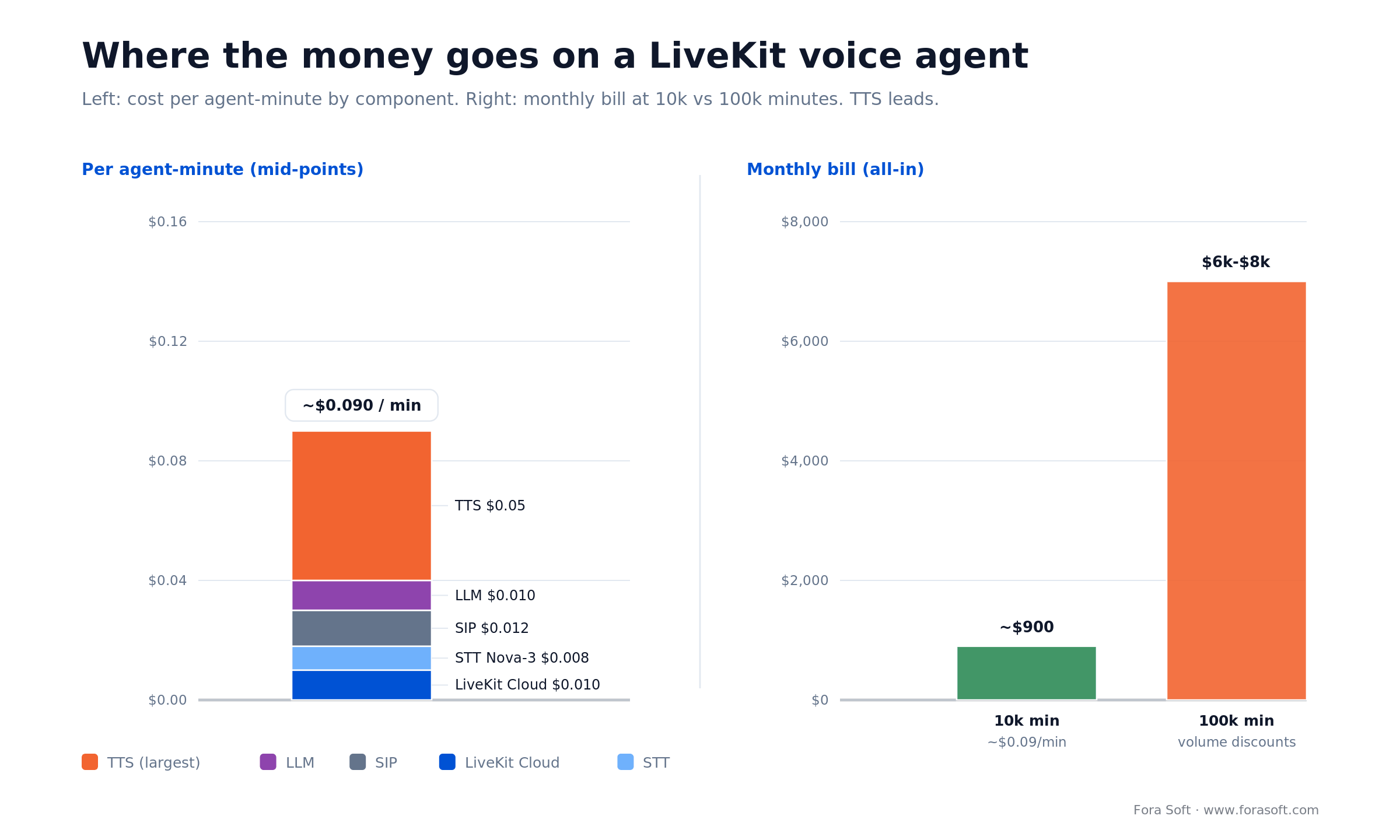
Figure 2. Where the money goes per agent-minute, and how a monthly bill scales from 10k to 100k minutes. TTS is the line to tune first.
Worked example — 10,000 agent-minutes/month. Take the mid-point of each line: STT $0.008 (streaming Nova-3) + LLM $0.010 + TTS $0.05 + LiveKit $0.010 + SIP $0.012 ≈ $0.090/min. Times 10,000 = about $900, call it $800–$1,000 with rounding and a little idle time. That's typical for a seed-stage support bot or an outbound pilot.
100,000 agent-minutes/month. The same stack with volume discounts lands around $6,000–$8,000. TTS and LLM tokens dominate; LiveKit is 10–20% of the bill. For per-minute economics on the underlying media platform, see our LiveKit vs Agora cost analysis.
LiveKit alternatives: Vapi, Retell, Bland, Pipecat, Nova Sonic
The honest answer to “which platform” is: it depends on whether you're buying speed-to-pilot or cost-and-control. Advertised per-minute rates are the platform fee only — the real bill adds LLM tokens, premium voices and telephony. Rates below are 2026.
| Platform | Model | $/min (2026) | Best for | Watch out for |
|---|---|---|---|---|
| LiveKit Agents | Framework, BYO providers | $0.06–$0.15 all-in | Custom pipelines, multi-vendor | Requires engineering |
| Vapi | Platform + BYO providers | $0.05 fee, $0.10–0.30 loaded | Fast no-code pilots | Real cost 2–5× the sticker |
| Retell AI | Platform, transparent | $0.07–$0.31 | Clean SaaS voice bot | Smaller provider ecosystem |
| Bland AI | Platform, outbound-first | $0.11–$0.14 | High-volume outbound calls | Priced up Dec 2025; less flexible LLM wiring |
| Pipecat | Open-source framework | OSS free; Cloud $0.01/min | Self-hosted, full control | You own all the ops |
| Twilio ConversationRelay | Telecom platform, BYO LLM | $0.07 + LLM | Deep Twilio ecosystem | Twilio does STT/TTS, you own LLM |
| Amazon Nova Sonic | AWS speech-to-speech | ~$0.015 ($3/$12 per 1M tok) | AWS-native stacks | One vendor, limited third-party |
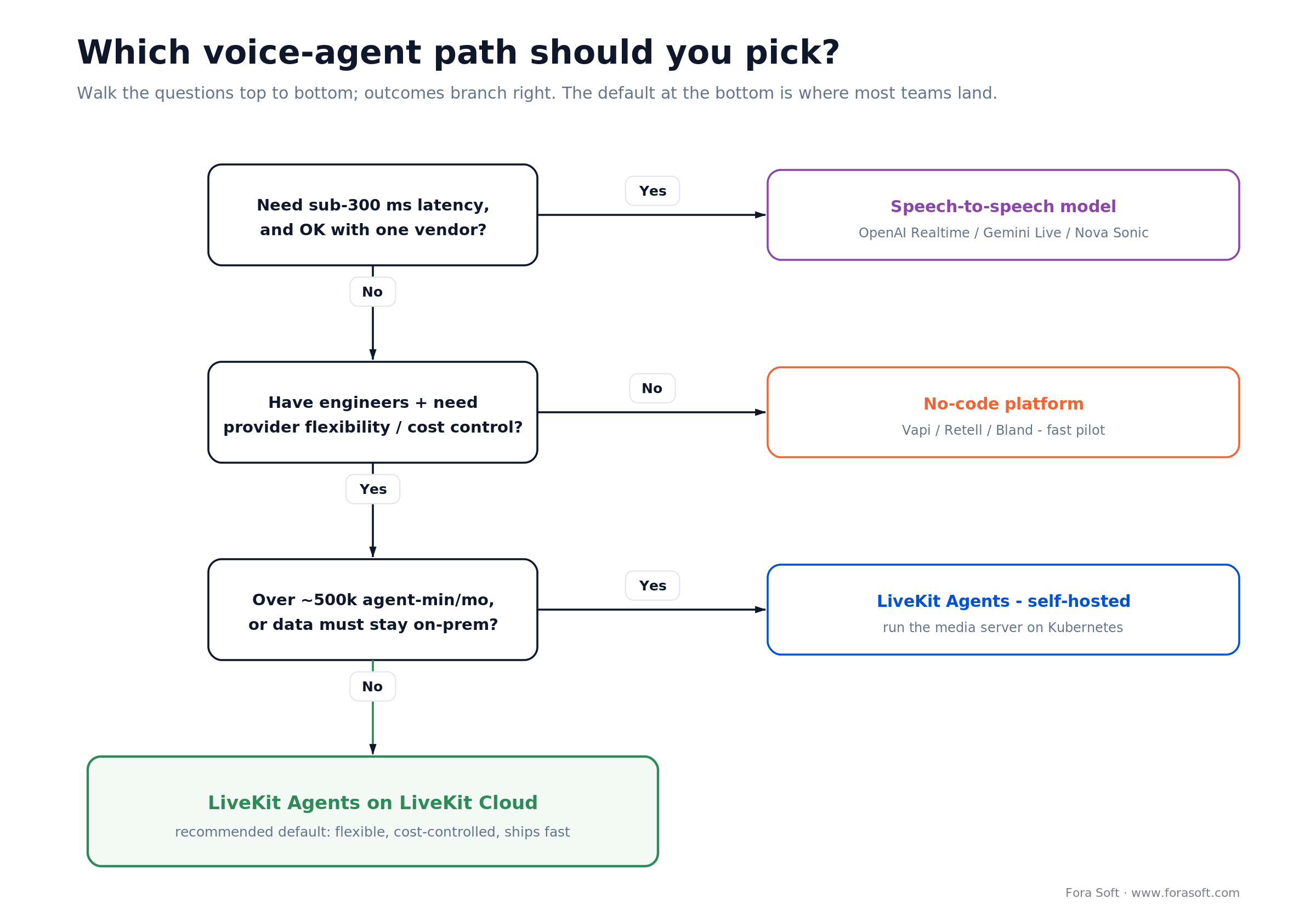
Figure 3. A one-glance decision guide: latency need, provider control and in-house engineering decide between a realtime model, LiveKit Agents, and a no-code platform.
For broader context on the WebRTC topology behind all of these, see our WebRTC architecture guide and the P2P vs MCU vs SFU explainer. The reference SDK details live in the LiveKit Agents docs.
Need a second opinion on LiveKit vs Vapi or Retell?
30 minutes with senior engineers who have shipped all three in production. Bring the use case, we bring the numbers.
Use cases where a LiveKit voice agent earns its seat
- Inbound support triage. Answer, collect intent, hand to a human with full context.
- Outbound calling campaigns. Appointment reminders, surveys, collections — always with TCPA consent and STIR/SHAKEN on US calls.
- AI interviewer. First-round recruiting screens, structured prompts, consistent scoring.
- Voice assistant inside SaaS. A voice control surface in your web product — helpdesk, analytics, search.
- Live translation and captioning. Cascade STT + NMT + TTS for bilingual calls; we cover similar architecture in our video translation guide.
- Tutoring voice companion. Pair with RAG on course content; see our smart tutoring systems guide.
- Healthcare intake and scheduling. HIPAA-compliant, with BAA coverage on every provider.
Latency budget and turn detection
Target time-to-first-audio is under 800ms on a cascading stack. Break that into a budget and hold every stage to its share — callers notice slippage above ~600ms and start reverting to touch-tone, and above 1.5s they hang up.
- VAD — ~50ms. Silero or WebRTC VAD.
- STT — ~150ms with streaming partials.
- LLM time-to-first-token — ~400ms. The hardest to shrink; trim system prompts ruthlessly and use smaller models for simple tasks.
- TTS — ~150ms with first-chunk streaming (Cartesia, ElevenLabs).
- Network — ~50ms on good networks.
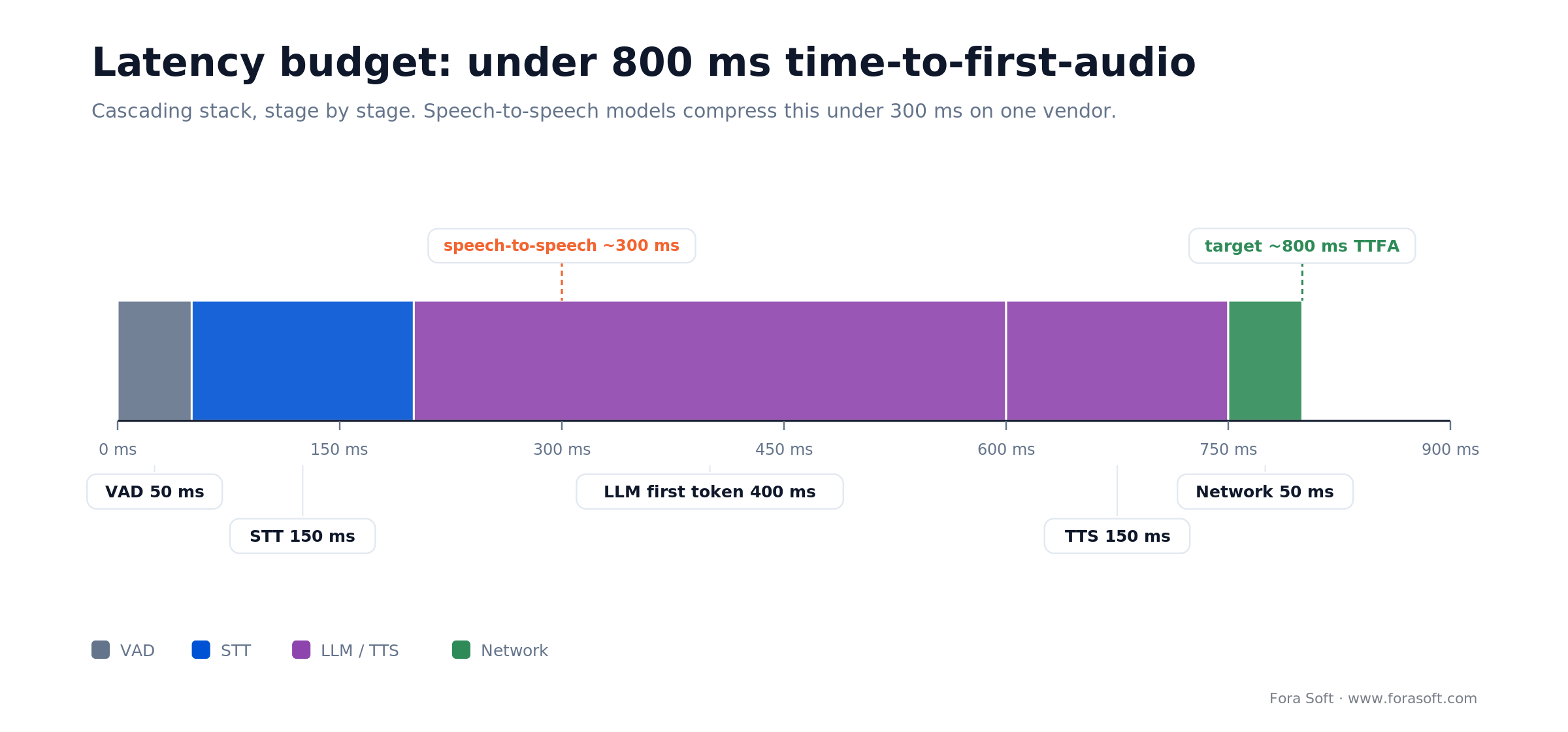
Figure 4. The 800ms time-to-first-audio budget, stage by stage. The LLM's first token is the stage that eats the budget.
Turn detection is where voice bots feel robotic. Default VAD-only endpointing carries a 200–500ms silence tail. LiveKit's Turn Detector v1 (a model that fuses semantic and acoustic cues across English and 13 other languages, and runs free on Cloud inference) cuts that tail and is now the default. Keep it on for high-interaction products; VAD-only is fine on one-shot IVRs.
Interruptions need special handling. Plain VAD cuts the bot off mid-word too often. LiveKit's adaptive interruption handling tells “user wants to interrupt” from “user coughed”. Turn it on; it's a measurable UX win.
Reach for model-based turn detection when: your agent is conversational and users interrupt, back-channel (“mm-hmm”) or pause mid-sentence. Stick with VAD-only for rigid, one-question-at-a-time IVR flows where the extra inference isn't worth it.
Telephony and SIP integration
Most voice-agent products ship on WebRTC first and the PSTN second. LiveKit offers a first-class SIP bridge — your agent runs on WebRTC internally while one side of the room is a SIP participant from Twilio, Telnyx or a similar trunk.
Three tactical points matter. First, SIP trunk latency can add 100–300ms — pick a carrier with well-peered points in your target regions. Second, DTMF handling needs to be explicit (RFC 2833 vs SIP INFO) and tested with every carrier. Third, STIR/SHAKEN attestation is required for US outbound — make sure your trunk signs your calls at Level A (full attestation), or far-end carriers will label them “Spam Likely” and drop them.
Reach for a dedicated SIP carrier evaluation when: you run US outbound at any real volume. Test Level-A attestation, DTMF and regional peering with two trunks before launch — discovering a carrier can't sign your calls in launch week is the classic avoidable failure.
Compliance: TCPA, HIPAA, PCI, GDPR, STIR/SHAKEN
Voice-AI regulation moved ahead of the rest of AI. Architect these in from day one, not after procurement asks.
- Recording consent. Two-party-consent states (CA, FL, IL and others) require disclosure before recording. Log the consent event in your audit trail per call.
- TCPA. Outbound marketing needs prior express written consent. Statutory damages run $500–$1,500 per violation with no cap. Note the 2025 shift: the FCC's one-to-one consent rule was vacated in Insurance Marketing Coalition v. FCC (Jan 2025), so the standard reverted to prior express written consent without the one-to-one constraint — still consent, just not the stricter 2023 version.
- HIPAA. A BAA with every provider that touches PHI — LLM, STT, TTS, LiveKit Cloud, telephony. Encrypt recordings AES-256, RBAC on playback.
- PCI DSS. DTMF masking during card entry. Card digits must never reach STT, the LLM prompt context, or recordings.
- GDPR. Consent, residency, deletion. Keep transcripts inside the same data-residency boundary as the rest of the user's account.
- STIR/SHAKEN. Level-A attestation on US outbound; unsigned calls get labeled or dropped.
Mini case: AI phone agents at telco scale (Nucleus)
The clearest proof in our portfolio that we operate voice AI at scale is Nucleus, the on-prem communication platform we build with Fibernetics — a Canadian telecom that serves 300,000+ customers and carries 2 billion+ calls a year on its national network. Nucleus layers AI phone agents, workspace chat, SIP calling and chat-to-SMS on top of that network.
The hard parts were exactly the ones this guide is about: SIP into cellular and landline, real-time voice-to-voice AI translation, CRM/ERP tool calls to automate sales and support, and a compliance surface that had to satisfy SOC II, GDPR and HIPAA before a single enterprise would sign. We built the telephony bridge, the AI-agent orchestration and the audit trail; the platform onboarded 2,000+ businesses during beta.
Where it stands: Nucleus now serves 5,000+ businesses, with AI phone agents handling 600M+ call-minutes a month. The media layer predates LiveKit Agents, so a greenfield 2026 build is precisely where we'd reach for the framework in this article — but the lessons that made Nucleus work (Level-A SIP, per-call consent logging, provider BAAs, cost guardrails) are the ones we bring to every LiveKit voice agent. Book a 30-minute call to scope a similar build.
A decision framework — pick LiveKit in five questions
1. Do you need provider flexibility? If you want to mix Claude for reasoning with Cartesia for voice and swap each independently, a LiveKit voice agent wins. Fixed-provider stacks (OpenAI Realtime, Gemini Live) do not.
2. Is sub-300ms latency a hard requirement? If yes, pair LiveKit Agents with a native realtime model. Cascading lands at 500–800ms even well tuned.
3. Will you run past 500k agent-min/month? LiveKit Cloud is fine up to that range. Past it, self-host the media server on Kubernetes and keep the Cloud price off the bill.
4. How compliance-heavy is your vertical? Healthcare, finance, public sector — always custom, always BAAs, always granular audit. A no-code platform rarely survives procurement.
5. Do you have engineering? LiveKit is a framework, not a SaaS. Without a competent backend team, a platform (Retell, Vapi) or a development partner is the honest answer.
Five pitfalls we see on LiveKit voice agent projects
1. Shipping VAD-only interruptions. The bot keeps talking over coughs and sneezes. Turn on model-based turn detection and interruption handling before your first external demo.
2. Huge system prompts. 4,000-token prompts add 200–400ms to time-to-first-token. Move the fat into retrieval, keep the system prompt tight.
3. No cost guardrails. A stuck session can burn hundreds of minutes of audio in an hour. Enforce max session duration and alert on per-minute spend anomalies.
4. Ignoring STIR/SHAKEN and TCPA early. Launch week is the wrong time to discover your trunk doesn't sign calls. Validate at kickoff.
5. Skipping observability. Record every VAD trigger, STT partial, LLM latency, TTS first-chunk and tool call. Without that, tuning is guesswork.
KPIs to watch on a voice-agent backend
Quality KPIs. TTFA P95 < 800ms, turn-detection accuracy ≥ 95%, task-completion rate ≥ 70%, hallucination rate < 1% on sampled transcripts, caller-abandonment rate < 10%.
Business KPIs. Cost per minute within plan (≤ $0.10 typical), containment / deflection rate (share of calls resolved without a human), CSAT on AI calls, conversion on outbound.
Reliability KPIs. Agent session failure rate < 0.1%, LLM provider P95 latency < 600ms, STT stream drops < 0.5%, SIP call-setup success ≥ 99%.
When not to pick a LiveKit voice agent
- You need a no-code pilot in 72 hours. Vapi or Retell will get you there faster.
- You have zero WebRTC experience and no budget for a partner. The operational surface is real.
- Your product lives fully inside AWS and Amazon Nova Sonic is good enough. A native AWS stack is simpler to operate than a third-party framework.
- Your use case is purely async transcription or summarization. You don't need an agent; you need Deepgram plus a batch job.
FAQ
Is a LiveKit voice agent production-ready in 2026?
Yes. LiveKit Agents went 1.0 in April 2025 and the Python SDK is on the 1.x line through 2026, under Apache-2.0, running in production across customer-support, recruiting and healthcare products. Our own team ships it as the default for voice-agent builds.
How much does a LiveKit voice agent cost per minute?
$0.06–$0.15 all-in with a mainstream stack (Deepgram Nova-3 + Claude or GPT-4o-mini + Cartesia + LiveKit Cloud + SIP) in 2026. TTS and LLM dominate; LiveKit Cloud itself is 10–20% of the bill at ~$0.01 per agent-minute above quota.
Can a LiveKit voice agent handle outbound phone calls?
Yes, via SIP trunks from Twilio, Telnyx or similar. Make sure your carrier signs calls at STIR/SHAKEN Level A for US outbound, and log explicit TCPA consent per campaign — damages are $500–$1,500 per violation.
What is the difference between LiveKit Agents and OpenAI Realtime?
OpenAI Realtime is a native audio-in, audio-out model — lowest latency (under 300ms), locked to OpenAI. LiveKit Agents is a framework that orchestrates pluggable STT/LLM/TTS providers — slightly higher latency, total provider flexibility. You can run OpenAI Realtime inside LiveKit Agents as one of several backends.
LiveKit Agents vs Pipecat — which should you pick?
Both are open-source cascading frameworks. LiveKit couples tightly to its own WebRTC media server and Cloud, with a built-in turn detector and managed inference. Pipecat is transport-agnostic and leans on Daily for its media layer. Pick LiveKit if you want the media server and agent framework from one vendor; pick Pipecat if you want to bring your own transport.
Do we need LiveKit Cloud, or can we self-host?
Self-hosting the open-source LiveKit Server is supported and pays off past ~500k monthly agent-minutes, or when regulatory data residency demands on-prem. Under that volume, LiveKit Cloud is cheaper once you price in operations, and the turn-detector inference runs free on Cloud.
What is a realistic latency target?
P95 time-to-first-audio under 800ms is achievable on a cascading LiveKit stack. With OpenAI Realtime, Gemini Live or Amazon Nova Sonic you can get below 300ms. Above 1s feels laggy to callers and drops task-completion visibly.
How long does it take to build a production voice agent?
With our Agent Engineering approach, 6–8 weeks for a scoped MVP (inbound triage, appointment reminder, AI interviewer). Classical delivery is 12–16 weeks for the same scope. Compliance-heavy verticals (healthcare, finance) add 2–4 weeks for audits and BAAs.
Can a LiveKit agent handle multiple languages?
Yes, by pairing multilingual STT (Deepgram, Whisper) with multilingual TTS (Cartesia, ElevenLabs, Azure) and instructing the LLM to reply in the detected language. The Turn Detector v1 model is multilingual too. Live translation bridges are routine.
What to Read Next
Cost
LiveKit vs Agora Cost Analysis
Per-minute economics on the underlying media platform.
Platform
LiveKit for AI Agents Guide
The platform reference: SDK, agents framework, architecture.
WebRTC 2026
WebRTC Architecture Guide for Business
How SFU/MCU choices ripple into voice-agent design.
Architecture
P2P vs MCU vs SFU for Video Apps
Why most voice agents ship on an SFU, not peer-to-peer.
AI Tutors
Smart Tutoring Systems for Educators
RAG-grounded voice tutors that wrap your content.
Ready to ship a LiveKit voice agent that earns its stack
A LiveKit voice agent gives you the provider flexibility and cost control that native realtime APIs cannot, and the engineering ergonomics that no-code platforms will never match. Pair it with the right STT, LLM and TTS for your latency budget, respect the compliance surface, and instrument everything — the rest is taste.
If you're sizing a voice-agent build or untangling a stalled one, the next step is a 30-minute scoping call. We'll map your call pattern, regulatory footprint and latency target to a concrete stack, timeline and budget — and leave you with a plan you can ship.

The book · Volume 7 of 7
AI for Video: A Complete Guide to Intelligence in Video Products: From Real-Time Pipelines and Agents to Serving, Cost, Compliance, and Verticals
This playbook prices a LiveKit voice agent per minute and maps its worker, dispatch and pipeline. Volume 7 takes the same agent into production: turn-taking under a real-time latency budget, agent loops with memory and tools, serving on vLLM, Triton and TensorRT, and cost per stream-hour, plus the TCPA, HIPAA and EU AI Act questions that come with it. Written by Nikolay Sapunov, CEO at Fora Soft.
Read it on Amazon →Kindle & paperback · Fora Soft Video Engineering Handbook
Let's build your LiveKit voice agent
Fora Soft ships voice and real-time AI products with Agent Engineering: faster, cheaper, production-ready. 250+ projects since 2005 back it.

