

Key takeaways
• Scholarly is a real, production learning platform built by Fora Soft: 15,000 users, up to 2,000 students per lecture. We use it as a reference for teams evaluating how an AI-powered LMS actually ships.
• Build vs buy: most teams should buy a core LMS and bolt on AI. Custom builds pay off when your pedagogy, scale or compliance is unique — otherwise start with Canvas, Moodle, Open edX or 360Learning and integrate AI modules.
• The AI-in-education market is growing ~34% CAGR. Platforms that personalize, tutor, auto-grade and caption now beat static LMSs on retention and completion by 15–20 percentage points in published studies.
• Budget realistically. An AI-enabled MVP is typically 4–6 months with Agent Engineering, a mid-scale build is 9–15 months, enterprise is 18–24 months. Infra runs $150–$5,000/month depending on concurrency.
• Compliance is non-optional. GDPR, FERPA, COPPA (tightened April 2026), WCAG 2.2 and SOC 2 shape architecture from day one, not something you bolt on at launch.
Why Fora Soft wrote this playbook
We have built edtech products since 2005. That’s 250+ shipped across virtual classrooms, live lecture rooms, AI tutors, proctoring systems, corporate L&D portals. Scholarly, a learning platform we shipped for an Australian client, now serves 15,000 active learners and runs live lectures with up to 2,000 students per session on WebRTC and LiveKit. The numbers, architecture choices and compliance decisions in this guide come straight from that project and a dozen like it.
We ship with Agent Engineering — our senior engineers drive AI agents across design, code generation, test creation and review. That lets us compress a classical AI-LMS MVP from 7–9 months to 4–6 months at the same quality bar, with a smaller team. See the full approach on our eLearning and virtual classroom development page and in our AI integration service.
This article tells you what an AI-powered learning platform like Scholarly actually includes under the hood, how to decide between build and buy, where AI adds measurable value, and what it realistically costs, so you stop arguing about features and start shipping the right thing.
Planning a Scholarly-style AI learning platform?
Book a 30-minute call and we’ll map your pedagogy and scale to the right stack — Canvas, Open edX, or custom, with AI where it actually helps.
What Scholarly is, in one look
Scholarly is an all-in-one online learning platform we designed for an Australian education provider that had outgrown a stack of Zoom, Discord and ad-hoc collaboration tools. It unifies live lectures, recorded content, course management, assignments, testing and parental access into one product and today serves 15,000 users.
Four roles, one platform:
- Teachers run live lectures up to 2,000 students per session with screen sharing, virtual whiteboard, text chat and lecture recording. Every recording is automatically attached to the course.
- Students join live streams, watch recordings, work through materials, take tests, submit homework and receive feedback in one place.
- Parents see their children’s courses, schedules, progress and study materials — a detail K-12 buyers always ask for.
- Admins and super-admins create courses, schedule events, upload materials, manage users and run the directory.
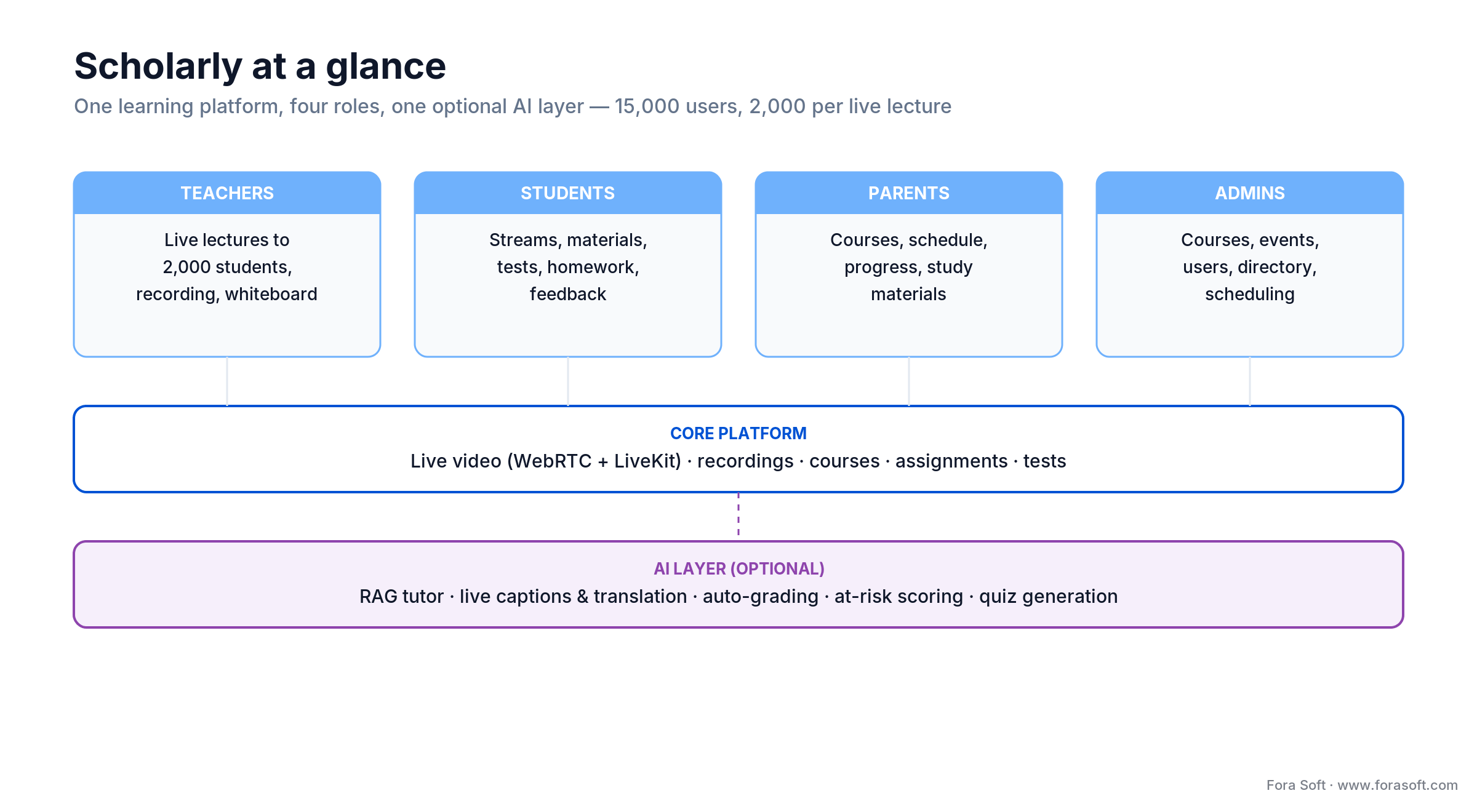
Figure 1. Scholarly unifies four roles on one platform; the AI layer is optional and bolts onto the core.
The rest of this guide generalizes from Scholarly and the broader 2026 edtech market to answer the question most founders actually ask us: how do I build something like this, and where does AI belong in it?
The AI-in-education market in 2026, briefly
Global edtech sits around $215 billion in 2026 and grows at roughly 13% CAGR. The AI slice grows much faster. Published forecasts put AI-in-education at ~$9–10 billion in 2026 expanding at 34–42% CAGR through 2030. Adoption has flipped from experiment to default: 92% of students report using AI for learning, 60% of teachers use AI at least weekly, and 83% of institutions plan to deploy AI teaching assistants by end of 2026.
Three segments dominate:
- K-12 — highest compliance friction (FERPA, COPPA, parental consent). Parents as a first-class user role is a hard requirement, not a nice-to-have.
- Higher education — research and teaching assistants, plagiarism / AI-written work detection, integrity auditing.
- Corporate L&D — time-to-competency, compliance training, skill-path recommendations. This is the fastest-growing slice.
Practical take: the edtech that wins in 2026 combines a solid LMS core with three or four well-integrated AI capabilities, not a dozen half-baked features.
Build vs buy: how to decide before you write a line of code
Buying an LMS and layering AI on top is the default answer for ~80% of teams. Build custom when one of four things is true: your pedagogy is non-standard, your scale is extreme, your compliance profile is unusual, or your product needs a media / AI pipeline that off-the-shelf LMSs cannot host. Scholarly falls into all four — 2,000-seat live classes, custom course model, Asia-Pacific data residency, WebRTC-first lecture UX.
| Platform | Best for | Strengths | Gaps |
|---|---|---|---|
| Canvas | Higher ed, large K-12 | Modern UX, rich integrations | Limited native AI; add via LTI |
| Moodle | Cost-sensitive, on-prem | Free, open-source, huge plugin base | Dated UX, heavy admin overhead |
| Open edX | Enterprise with a DevOps team | SCORM, xAPI, very extensible | Steep ops learning curve |
| 360Learning | Corporate L&D, skills | Strong AI features, 60+ languages | Higher TCO at scale |
| Docebo | Compliance-heavy enterprise | AI tagging, analytics, social learning | Less customizable than custom |
| Thought Industries | Customer education | Monetization, role-based paths | Pricier than 360Learning |
| Custom (Scholarly-style) | Unique pedagogy / scale / compliance | Full control, native AI, ideal UX | Higher upfront time and cost |
Reach for custom when: your product needs 1,000+ concurrent live-video participants per session, a pedagogy no off-the-shelf LMS supports, or non-trivial AI features baked into the core learning loop (not an LTI plugin).
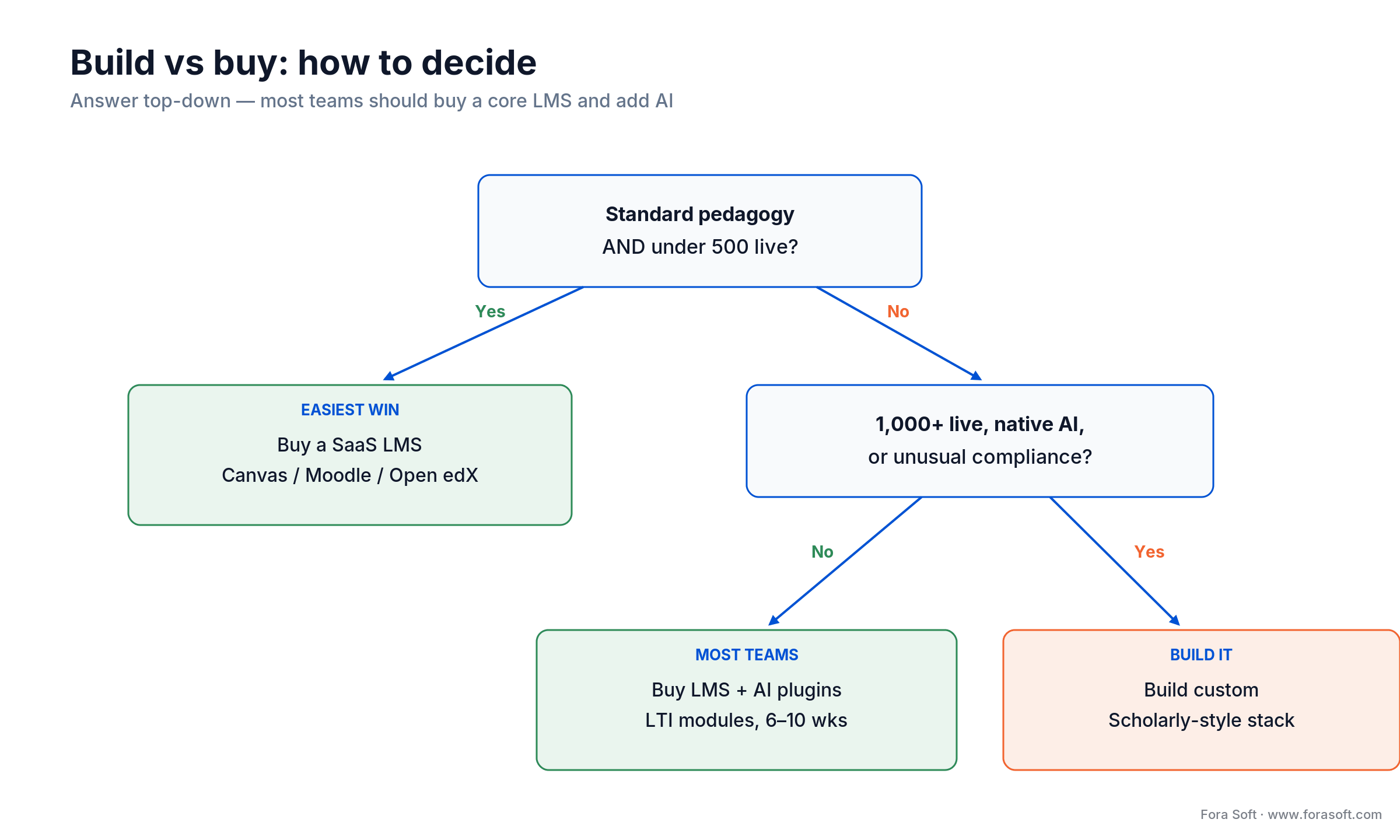
Figure 2. Most teams should buy a core LMS; build custom only when scale, native AI, or compliance forces it.
For a broader discussion of the build-vs-buy tradeoff in video-heavy products see our Vonage Video API alternatives post.
AI capabilities that actually move the needle
Seven capabilities account for almost all the ROI we see on AI-LMS projects in 2026. Pick the three or four that fit your learners, skip the rest. For the engineering behind captions, transcription and video analytics, see our AI for video engineering track.
Adaptive learning paths
Behavior DB plus a decision model that sequences content, drops prerequisites when mastered and surfaces remediation when a learner stalls — the three-layer pattern our personalized learning platform build guide breaks down in full. Published case studies (Squirrel AI, Carnegie MATHia, Duolingo) show 10–34% faster time-to-proficiency versus non-adaptive cohorts. Biggest pitfall: the cold-start problem — adaptive logic only kicks in after ~10 learner interactions, so design a strong default path first.
Reach for adaptive learning paths when: you already have >10 interactions per learner to feed the model and a strong default curriculum to fall back on during cold start — not on day one with an empty behavior DB.
AI tutors and assistants (RAG-based)
LLM-powered chat grounded in your course content via Retrieval-Augmented Generation (RAG). The tutor sees the lesson, the textbook chapter and the learner’s recent answers, then responds. Khanmigo and LearnLM set the bar: Socratic style, no spoon-feeding of answers. Stack: vector DB (Qdrant, Weaviate, Pinecone) + LLM (Claude, GPT-4, Llama 3) + guardrails + citation anchors.
Automated grading and plagiarism / AI-write detection
Rubric-based grading for essays, code and math. Detection for copy-paste and AI-generated submissions (Turnitin Clarity, HackerRank). Honest caveat: AI-write detection is still imperfect — up to 94% of AI text slips through some tools, and false positives disproportionately hit non-native English writers. Use detection as a signal for a human-in-the-loop review, not a verdict.
AI content and quiz generation
Drop-in quiz item banks generated from lecture transcripts or uploaded PDFs. Cost is negligible ($0.01–$0.05 per question at scale). Risk is copyright bleed — if you train on unlicensed content you inherit the liability. Generate from licensed or user-owned content only.
Speech-to-text, translation, live captions
Whisper-class models for transcription, Verbit-class providers for live captions, and translation layers that bring a lecture to non-native speakers. This also wins you WCAG 2.2 compliance almost for free. For video translation architecture we keep a separate playbook.
Predictive at-risk scoring
Event-stream analytics that flag learners likely to drop out 2–4 weeks before they do, so advisors can intervene early. In corporate L&D this is the single capability buyers pay the most for. It converts learners to completions.
Video analytics and engagement signals
Track who actually watched, when they rewound, where they skipped. We covered the implementation in detail in our AI video analytics for online learning guide.
Reference architecture: the Scholarly stack
Scholarly’s actual tech stack, unchanged:
- Frontend — JavaScript, React, Next.js. Server-side rendering for marketing and course-listing pages, client-side for the live lecture room.
- Backend — Go and Node.js microservices. Go handles the performance-sensitive paths (auth, live session routing, media metadata); Node.js handles content, notifications and integrations.
- Live video — WebRTC + LiveKit, with DASH/HLS fallback for playback. LiveKit scales cleanly to 2,000 participants per room. See our LiveKit expertise page for the wider pattern.
- API layer — GraphQL. Lets the client ask for exactly the fields it needs and reduces round trips in the complex course-details screens.
- Infrastructure — Kubernetes for microservice orchestration, plus a managed Postgres cluster, object storage for recordings and a CDN for static assets.
- AI layer (optional extensions) — LLM provider (Claude / GPT / Llama), vector DB (Qdrant or Weaviate) for RAG, Whisper for transcription, and a feature store for adaptive personalization.
The pattern scales. Swap LiveKit for mediasoup or Kurento if you need server-side media processing (see our Kurento Media Server guide). Swap Postgres for a managed cloud equivalent. Swap GraphQL for REST if your team prefers. The core decomposition — separate live-video plane from content plane — is what matters.
Live lectures at 2,000 students per session
Running a 2,000-seat live lecture on WebRTC is not “just use Zoom in an iframe”. It demands three architectural calls that trip up 90% of teams on their first try:
1. Broadcaster model, not mesh. Teachers broadcast; students subscribe. A single teacher sends one (or a handful of simulcast) tracks to an SFU; the SFU fans out to students. Students do not send video unless called on, which keeps the total stream count linear, not quadratic.
2. Publish-subscribe for interactions. Chat, raise-hand, polls and reactions ride a dedicated pub/sub channel (Redis, NATS or a managed equivalent), not the video plane. Congestion on chat must never degrade video quality.
3. HLS fallback for the long tail. Tablets, old Android devices and restrictive networks sometimes cannot hold a WebRTC session for 90 minutes. Give them a live HLS or DASH stream with 5–10 seconds of added latency; bad video is better than no video.
Reach for an HLS/DASH fallback when: learners join from tablets, older Android devices or restrictive networks that cannot hold a 90-minute WebRTC session — accept the extra latency to keep them in the lecture.
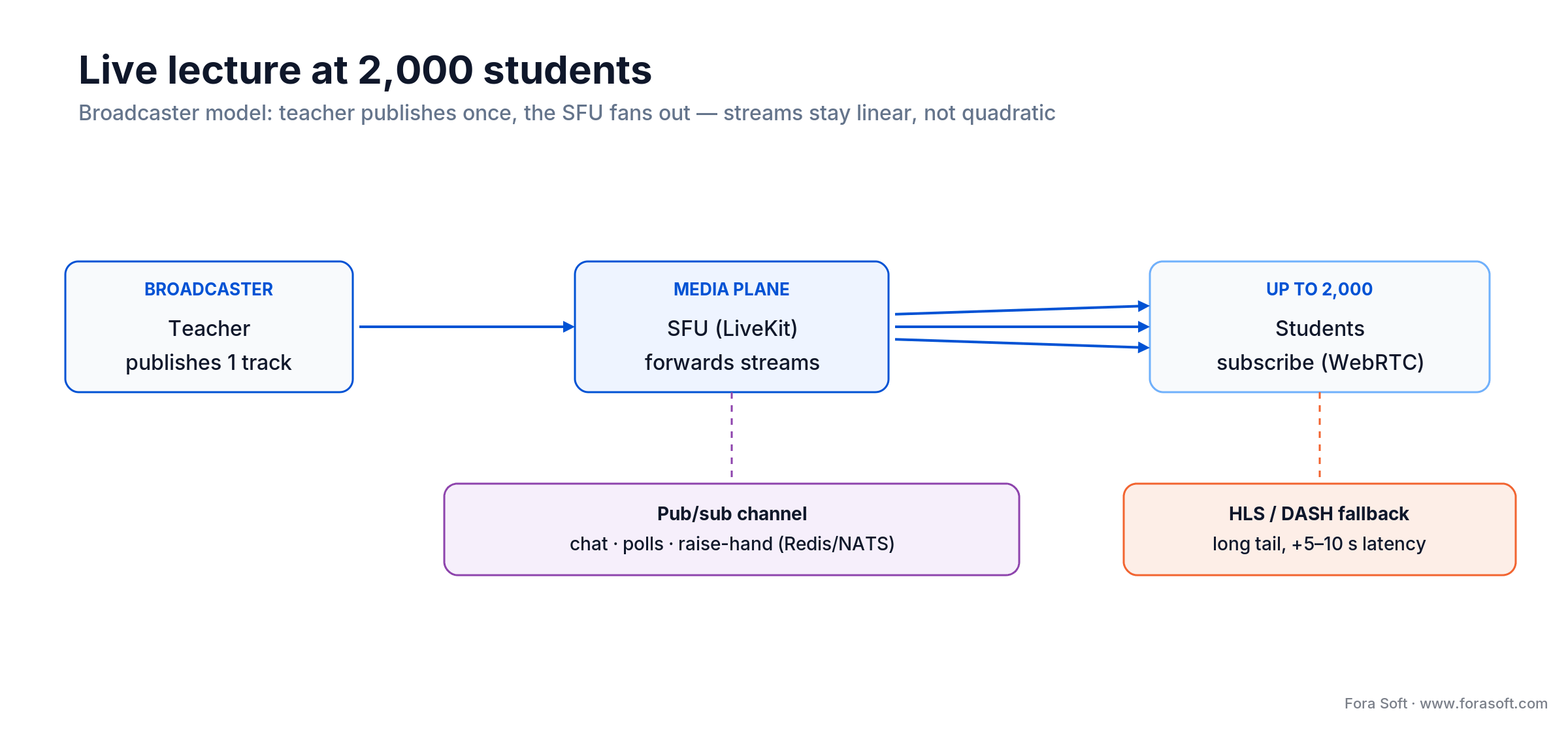
Figure 3. The broadcaster model keeps stream count linear; chat rides a separate pub/sub plane, HLS covers the long tail.
For the detailed media-server trade-offs see our P2P vs MCU vs SFU explainer and the 2026 WebRTC architecture guide.
Compliance: GDPR, FERPA, COPPA, WCAG 2.2, SOC 2
Compliance is architectural. Bolting it on at launch is the single most expensive mistake we see. We build to the current WCAG 2.2 AA bar and FERPA record-access rules from day one.
| Regulation | Who must comply | Key requirement | Architectural impact |
|---|---|---|---|
| GDPR | EU learners, EU vendors | Explicit consent, right to erasure | EU data residency, soft-delete pipeline |
| FERPA | US K-12 / higher ed | Parental access, 45-day response | Parent role, audit log of record access |
| COPPA (2026 update) | US learners under 13 | Verifiable parental consent, no behavioral targeting | Age gate, consent flow, data minimization |
| WCAG 2.2 / Section 508 | Public institutions, gov contractors | Captions, keyboard nav, contrast | AA-level audits in CI, live-caption pipeline |
| SOC 2 / ISO 27001 | Enterprise buyers | Access control, logging, DR | Central IdP, immutable logs, drill cadence |
The FTC’s amended COPPA Rule (published April 2025, full compliance date April 22, 2026) is the big one — if your product serves any US learner under 13, it tightens verifiable parental consent and limits behavioral targeting and data retention by default.
Cost model for a custom AI learning platform
Numbers below are ranges we use on scoping calls. With Agent Engineering we routinely ship at the lower end of each band, sometimes below. Every project is different, so use these as planning anchors.
| Phase | Scope | Team | Timeline | Monthly infra |
|---|---|---|---|---|
| MVP | Core LMS, one AI module, up to 1,000 learners | 2–3 engineers + PM/designer | 4–6 months | $150–$500 |
| Mid-scale | Live video, 3–4 AI modules, 10–50k learners | 4–6 engineers + QA | 9–15 months | $2,000–$5,000 |
| Enterprise | Multi-tenant, 100k+ learners, full compliance | 8–12 engineers + SecOps + data | 15–24 months | $5,000–$20,000 |
| Post-launch | Maintenance, iteration | 1–3 engineers | Ongoing | 15–20% of build/year |
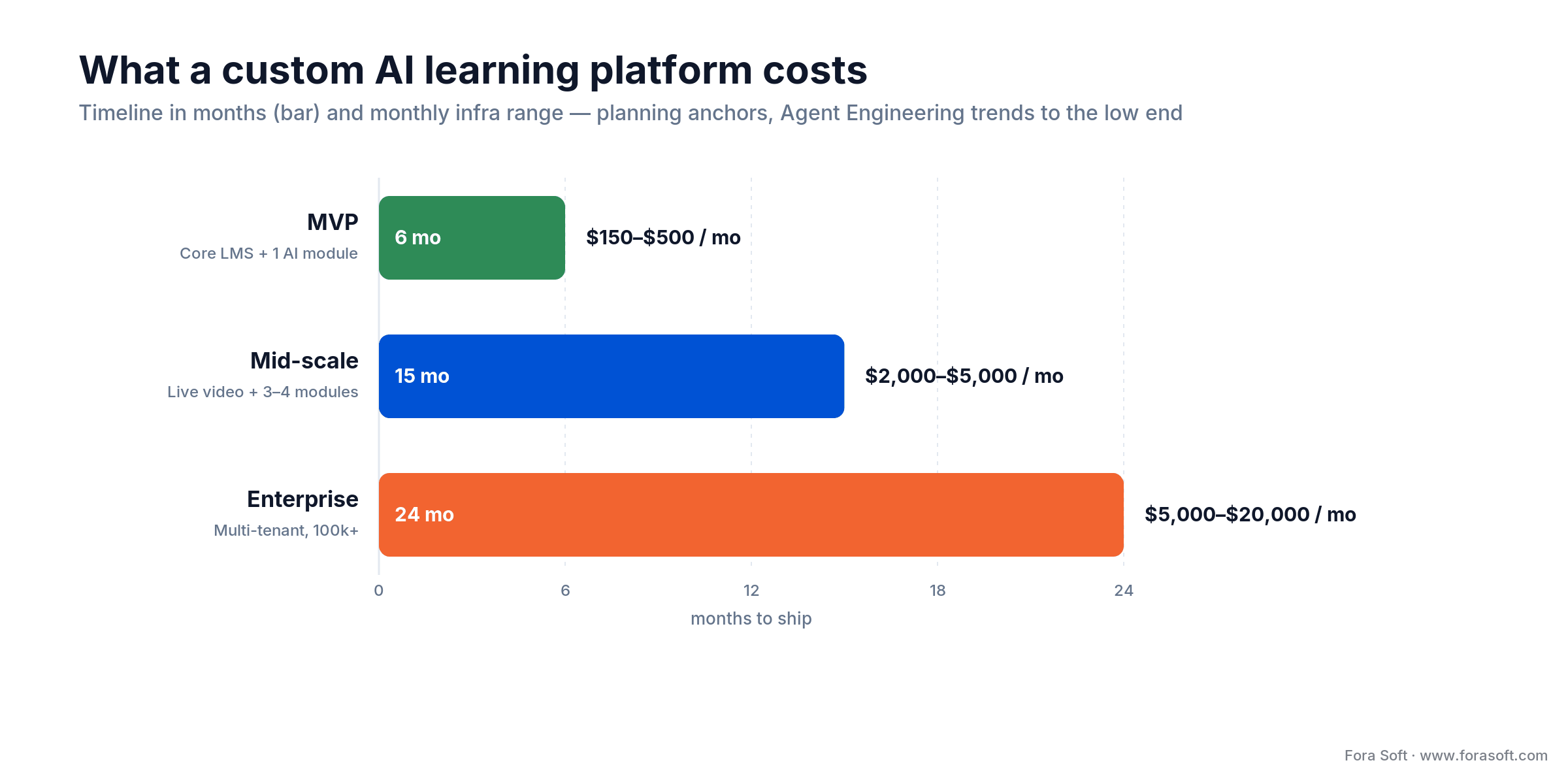
Figure 4. Timeline and monthly infra by tier. With Agent Engineering we trend to the low end of each band.
Plus 10–20% for third-party line items we always itemize: content and assessment authoring, security audits, WCAG review, SSO integration, SCORM/xAPI conformance testing. For a per-minute vs self-hosted trade-off on the media side see our LiveKit vs Agora cost analysis.
Want a realistic estimate for your AI learning platform?
Give us your audience, scale and compliance scope — we’ll come back with a one-page scope, timeline and budget in 48 hours, free.
Mini case: Scholarly’s 12-month build
An Australian education business approached us running its operations on Zoom for lectures, Discord for chat, a SaaS LMS for assignments and Google Drive for materials. They had ~3,000 users and were bleeding 20+ hours a week in admin overhead syncing across tools. They wanted one platform, their pedagogy, and room to grow to 15,000+ users.
Our 12-month plan delivered a custom LMS on Go/Node microservices behind a React/Next.js frontend, WebRTC plus LiveKit for live lectures scaling to 2,000 students per room, GraphQL for the complex course views, and Kubernetes for the runtime. AI agents in our delivery pipeline generated roughly 70% of the service scaffolding, OpenAPI specs and tests in parallel with senior engineer review, which is how we held the timeline.
Outcome: 15,000 active users today, up to 2,000 students in a single live lecture, admin hours cut from 20+ per week to under 4, lecture recording pipeline fully automated. Book a 30-minute call and we will sketch a similar path for your audience.
A decision framework — ship in five questions
Run these before you commit to build or buy. “No” to Q1 and Q2 means a SaaS LMS is almost certainly the right call.
1. Is your pedagogy standard or proprietary? If your learning design maps onto “courses with videos and quizzes”, any major LMS handles it. If your curriculum needs branching logic, unusual assessment types or a product-level UX, custom becomes attractive.
2. What’s your concurrency ceiling per live session? Under 500 is easy on most platforms. 500–2,000 pushes you to a WebRTC-first design like Scholarly. Above 10,000 you are in hybrid WebRTC + HLS territory.
3. Which compliance regimes apply? GDPR, FERPA, COPPA, accessibility, SOC 2 — each adds 4–12 weeks to the build. The union of your regimes tells you your minimum realistic timeline.
4. Where does AI sit in the learning loop? If AI is the product (autonomous tutor, fully adaptive), it has to be native. If AI just augments existing content, you can start with an LMS plus an LTI plugin.
5. Do you have a DevOps / SRE on the team? Custom infrastructure wants someone who owns Kubernetes, CI/CD, DR drills and log aggregation. No one in that role? Stick with a managed LMS until you hire.
Five pitfalls we see on AI learning platform projects
1. Shipping an AI tutor with no RAG. Plain LLM in a chat window hallucinates course content within the first hour. Always ground the tutor in your materials via RAG, always include citation anchors, always have a human review path for disputed answers.
2. Treating detection as a verdict. AI-write and plagiarism detectors have high false-positive rates — especially on non-native English. Use them as triage signals that open a human review, never as grounds for automatic sanctions.
3. Ignoring the cold-start problem. Adaptive paths need ~10 learner interactions before they personalize well. Design a strong default curriculum and a warm-up phase; do not launch with “100% adaptive” copy.
4. Bolting compliance on at the end. GDPR right-to-erasure requires a soft-delete pipeline across every service. FERPA needs auditable record access. WCAG demands captions in your live pipeline. Retrofitting each of these doubles the work.
5. Confusing personalization with engagement. Adaptive content alone plateaus completion rates at 60–70%. Gamification, social proof, cohort pressure and deadlines move the number further. Plan for both.
KPIs: what to measure on an AI learning platform
Quality KPIs. Course completion rate ≥ 70%, 30-day knowledge retention ≥ 65%, AI-tutor answer-accuracy (spot-audited) ≥ 85%, caption accuracy ≥ 93%. Below these, you are adding noise, not value.
Business KPIs. Time-to-competency for role-based tracks (baseline: cut by 20% vs non-adaptive), NPS ≥ 45, cost per completed learner (target: ≤ $5 for corporate L&D, course-dependent for paid edtech), monthly active learners, paid-to-trial conversion.
Reliability KPIs. Live-lecture join success rate ≥ 98%, lecture recording success rate ≥ 99.5%, P95 content-page TTFB < 800ms, uptime ≥ 99.9%. Alert on any of these and you catch bad deploys before users do.
How we integrate AI into an existing LMS
Most clients do not need a full Scholarly rebuild — they need AI capabilities on top of the platform they already run. Our default engagement for that is 6–10 weeks:
- Week 1–2 — audit existing content, pick two or three AI capabilities with the highest measurable ROI for your learners.
- Week 3–6 — stand up the RAG index, wire up the LLM provider, ship an MVP tutor or auto-grader as an LTI plugin or native module.
- Week 7–10 — evaluate on real learner data, tune prompts, close the loop with human-in-loop review, harden for compliance, roll to production.
For a deeper look at smart-tutor design see our AI tutoring systems for educators guide.
Security patterns that pass procurement
Every edtech procurement deck in 2026 asks the same eight questions: where does data live, who has access, how is it encrypted, how do you handle an incident, what happens if a learner opts out, how is the LLM provider reviewed, where is the audit log, and how often do you pen-test. Have an answer ready before the call and your deal closes weeks earlier.
Baseline patterns we put into every Scholarly-class build: central identity provider with SSO (SAML, OIDC, LTI 1.3 as needed), encryption at rest and in transit with rotation, per-tenant data partitioning, immutable audit logs, a dedicated “AI-review” role that sees tutor transcripts, automated data-retention policies aligned with GDPR/FERPA/COPPA, and a written incident-response runbook rehearsed quarterly.
For LLM-specific risks, maintain a prompt-injection test suite in CI, keep a “system prompt” allow-list, redact PII before it hits the LLM provider, and log every AI interaction with retention that matches your FERPA/GDPR timelines. Our WebRTC security primer covers the media plane in parallel.
Which LLM should power your tutor?
No universally right answer. We pick based on three axes: reasoning quality for your curriculum, data-residency and privacy, and cost at your expected query volume.
- Claude (Anthropic) — excellent Socratic tuning, strong at long-context reasoning on course materials, solid safety profile. Our default for student-facing tutors.
- GPT-4 / GPT-4o (OpenAI) — broad capability, best-in-class multimodal. Good for content generation and speech-first tutors.
- Gemini (Google) — strong on factuality and integration with Google Workspace if your institution runs it.
- Llama 3 / Mistral (self-hosted) — when data must stay in your VPC and you have the GPU budget. Good for RAG-heavy tutors where reasoning needs are modest.
- Specialised education models (LearnLM etc.) — worth evaluating as they mature; today still narrower than the general-purpose frontier models.
Reach for a self-hosted model (Llama/Mistral) when: data must stay in your VPC for compliance and you have the GPU budget — otherwise a hosted frontier model ships faster and reasons better per dollar at low volume.
Build the tutor so you can switch providers in a single config change. Lock-in to one vendor’s API surface is the most common architectural mistake we fix on rescue projects.
When not to build an AI learning platform
Sometimes the right answer is simpler. We push teams off a custom build when:
- Your catalogue is under 20 courses and under 1,000 learners. Teachable, Thinkific or Kajabi will ship in a week.
- You have no pedagogy team. Without instructional designers, AI features will amplify weak content rather than fix it.
- You need it live in under 90 days. Pick a SaaS LMS and invest engineering on the AI modules, not on rebuilding the LMS.
- Your differentiator is content, not software. A great course on a basic LMS beats a basic course on a perfect LMS every time.
FAQ
How much does it cost to build a Scholarly-style AI learning platform?
An MVP with live video, course management, one AI module and up to 1,000 learners is 4–6 months of work with our Agent Engineering approach, plus $150–$500/month infra. A mid-scale product with 3–4 AI modules and 10–50k learners is 9–15 months. Enterprise is 18–24 months. Ranges only — actual numbers depend heavily on compliance scope.
Should we build custom or buy an off-the-shelf LMS?
Buy a core LMS (Canvas, Moodle, Open edX, 360Learning, Docebo) and add AI via plugins or services for ~80% of teams. Build custom when your pedagogy is unique, you need 1,000+ concurrent live participants, your compliance profile is non-standard, or AI has to be deeply native rather than an LTI add-on.
Which AI features give the best ROI?
Adaptive learning paths, RAG-grounded AI tutors, automated grading with human review, live captions and translation, and predictive at-risk scoring. Pick three or four that match your learners, ignore the rest.
How do we prevent AI tutors from hallucinating?
Always use Retrieval-Augmented Generation (RAG) grounded in your own course materials. Add explicit citation anchors to answers, keep a conservative system prompt, run evals on a sampled set of answers weekly, and give learners a “report this answer” path that feeds a human review queue.
How many concurrent students can one live lecture support?
Scholarly supports up to 2,000 students per lecture on WebRTC with LiveKit. Above that, hybrid WebRTC + HLS becomes the right design — keep the interactive front rows on WebRTC, broadcast the long tail over HLS with 5–10 seconds of added latency.
Do AI learning platforms actually improve outcomes?
Published studies (Squirrel AI, Carnegie MATHia, Duolingo, Saini et al. 2024) show 10–34% faster time-to-proficiency and ~15–20% gains on assessment scores versus non-adaptive baselines. Your mileage depends strongly on content quality and learner motivation design, not on the AI alone.
What compliance regimes does a US K-12 platform need?
FERPA, the April 2026 COPPA amendment for learners under 13, Section 508 and WCAG 2.2 for accessibility, and usually SOC 2 Type II for district procurement. Add state privacy laws (California, Illinois, New York, Texas have stricter regimes) on top of the federal baseline.
Can we ship AI features without rebuilding our LMS?
Yes — our default AI-integration engagement is 6–10 weeks, ships the AI layer as an LTI plugin or native module alongside your existing LMS, and leaves the LMS untouched. Full rebuilds are only worth it when the existing platform itself is the bottleneck.
What to Read Next
Case Study
Scholarly: The All-in-One Learning Platform for 15,000 Users
Features, architecture and stack behind the reference build.
AI Tutors
AI Tools for Educators: Smart Tutoring Systems
How to design a RAG-grounded tutor that does not hallucinate.
Analytics
AI Video Analytics for Online Learning
Engagement signals that actually predict learner outcomes.
Multimedia
AI-Powered Multimedia Solutions for E-Learning
Captions, translations, transcription and video workflows.
WebRTC 2026
WebRTC Architecture Guide for Business
Choose the right live-video topology for your learning platform.
Ready to ship your own Scholarly-class platform
Scholarly shows what a modern AI-powered learning platform actually looks like in production: a crisp LMS core, live video that scales to 2,000 students, AI wherever it demonstrably lifts outcomes, and compliance baked into the foundation. The playbook we follow is simple — buy what is commodity, build what is unique, ship AI only where it earns its keep.
If you are sizing a similar build or sketching an AI retrofit onto your existing LMS, the next step is a 30-minute scoping call. We will map your pedagogy, scale and compliance to the right stack, estimate the timeline and budget, and leave you with a clearer picture than a week of internal debate.
Let’s build your AI learning platform
Fora Soft ships edtech and AI products with Agent Engineering — faster, cheaper, production-ready. 15,000 Scholarly users agree.

