

Key takeaways
• This is a real online learning platform development case study. Scholarly is a 15,000-user, all-in-one LMS we built for an Australian training business, replacing a stack of Zoom, Discord and spreadsheets with one React + Go + Node.js system on Kubernetes, with live rooms that seat up to 2,000 students each.
• The real problem was never “we need video”. It was fragmented data: attendance in one tool, homework in another, billing in a third. Pulling those workflows into one product is what drove retention and cut admin time.
• Four roles, one platform. Teachers, students, parents and admins each got a tailored surface: live lectures with whiteboard for teachers, self-paced playback and tests for students, read-only visibility for parents, full control for admins.
• WebRTC + LiveKit for real time, HLS for the long tail. Active speakers run on a WebRTC SFU under 300 ms; up to 2,000 passive students ride low-latency HLS (LL-HLS) over a CDN at 2–5 s. The SFU never sees the crowd, so cost tracks speakers, not audience.
• Honest budget. A Scholarly-equivalent build runs roughly USD 180–350k over 4–7 months with us. Content-only platforms cost far less; live video at scale is what moves the number.
• The playbook below is the one we reuse for every EdTech client. Role-first architecture, a purpose-built video plane, async assessments, parent transparency, admin reach, observability early.
What is an online learning platform?
An online learning platform is a single piece of software that delivers courses, live or recorded classes, assessments, and progress tracking to different kinds of users at once. A learning management system (LMS) is the structured, school-or-training flavour of that idea: enrolments, roles, grades and reporting built in. Scholarly is an LMS with a live-video core.
Online learning platform development is the work of designing and building that software: the role model, the video pipeline, the content and assessment tools, the admin console, and the data and infrastructure that hold it together. The global e-learning market sat around USD 275.86 billion in 2026 and is forecast to grow at about 10.9% a year through 2031 (Mordor Intelligence, 2026), which is why so many training businesses eventually ask whether to build their own.
What online learning platform development actually involves
Six things, roughly in this order. First, a role model: who sees and does what. Second, the live-video plane, because interactive lectures at scale are the hardest part to retrofit. Third, content and recordings, so classes have an async life after they end. Fourth, assessments and homework. Fifth, the admin and billing workflows that run the business. Sixth, the data, security and infrastructure underneath.
The rest of this case study walks through each of those on a platform that actually shipped and holds 15,000 users. Where a number came from the build, we give it; where it is a planning estimate, we say so.
Why Fora Soft is publishing this case study
We have built video-first products since 2005: 250+ projects, 50 in-house engineers. Scholarly is one of the clearest examples of a pattern we see across our EdTech work: a training business outgrows a patchwork of third-party tools, moves to one purpose-built platform, and reaches five-figure concurrent usage without the roof caving in.
We publish it because the question we hear most from education founders is “do we really need a custom LMS?”. Often the answer is no: Thinkific, Moodle, TalentLMS or Teachable will cover you. Sometimes it is yes, and when live lectures at real scale, parent visibility and tight admin workflows are the core product, off-the-shelf hits a wall inside a year. Scholarly was a yes, and the architecture and cost math below explain why.
The same team ships live classrooms for BrainCert (USD 3M ARR, 100K+ customers, 500M+ classroom minutes), voice and video agents on LiveKit, and custom software platforms across the rest of our client base. So the trade-offs here come from shipping, not theory.
Building an online learning platform that has to scale?
Thirty minutes with a Fora Soft engineer is usually enough to name the three decisions — video stack, role model, data boundary — that decide whether your platform survives 10× growth.
Scholarly at a glance
| Attribute | Value |
|---|---|
| Client | Australian education & training business (Scholarly Training) |
| Active users | 15,000+ |
| Max students per live lecture | 2,000 |
| User roles | Teacher, Student, Parent, Admin, Superadmin |
| Stack | React + Next.js · Go + Node.js microservices · GraphQL · WebRTC + LiveKit · HLS / DASH · Kubernetes |
| Before | Zoom + Discord + Google Drive + spreadsheets + separate billing |
| After | One LMS: live lectures, homework, progress, parent views, admin |
| What we own | Design, frontend, backend, DevOps, QA, observability |
The problem: Zoom + Discord is not an LMS
Before Scholarly, the client ran classes on Zoom, community on Discord, materials in Google Drive, schedules in spreadsheets and billing in a separate SaaS. Every new cohort doubled the coordination cost. Four pain points drove the decision to build.
1. Fragmented student data. Attendance in Zoom logs, homework in Drive, grades in a spreadsheet. Nobody had one dashboard to answer “how is this student doing?”. Churn signals stayed invisible until the invoice bounced.
2. No parent visibility. Parents in the K–12 and post-secondary segment routinely ask what their child is studying this week. Handing them Zoom links and a PDF schedule is not a product; it is a support-ticket factory.
3. Capacity ceilings. A standard Zoom meeting tops out around 1,000 interactive participants even with the Large Meeting add-on; past that you are pushed into view-only Webinars, which drop the whiteboard-and-breakout classroom model (Zoom, 2026). A 2,000-seat interactive lecture is outside that envelope.
4. Admin burn. Creating one course across five tools was a two-hour ritual. At 15,000 users with dozens of courses a week, admin hours alone justified the build in year one.
The architecture we shipped
Scholarly is a Kubernetes-hosted microservices system. The live-class plane, the content plane and the identity plane are separate services talking over GraphQL and gRPC, so a big lecture never takes down the admin console, and vice versa. One React + Next.js web app serves all four roles from a single design system.
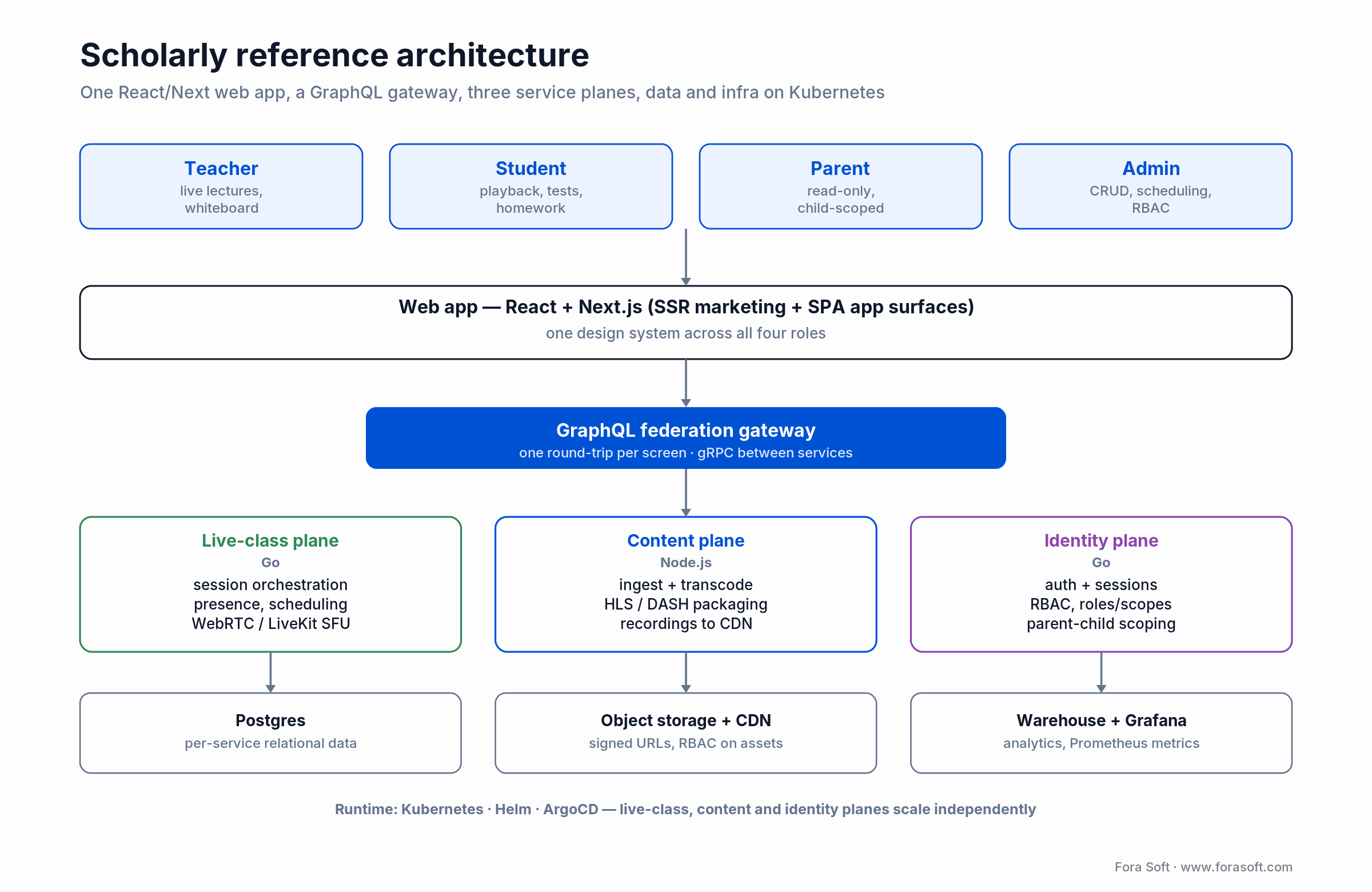
Figure 1. Separate real-time, content and identity planes behind one GraphQL API, all on Kubernetes.
Services: Go where latency bites, Node.js where iteration wins
Go handles the latency-sensitive work: live-session orchestration, presence, scheduling. Node.js handles the IO-heavy, fast-moving layers: notifications, content ingest, integrations. A GraphQL federation layer sits on top so the web app asks for exactly what a screen needs in one round-trip.
Data and observability
Postgres backs each service; a warehouse feeds analytics; Prometheus and Grafana watch the pipes. The admin dashboard answers “who attended”, “who submitted” and “who is at risk” in one query because that data finally lives in one system.
The hybrid video plane: WebRTC SFU and HLS at 2,000 seats
You do not serve a 2,000-seat lecture with one protocol. Scholarly splits the room. Active speakers — the teacher and a handful of students at a time — run on a WebRTC SFU powered by LiveKit, with glass-to-glass latency under 300 ms. Everyone else watches over low-latency HLS (LL-HLS) on a CDN at 2–5 seconds (standard HLS runs higher, 6–30 s), which is fine for viewing and cheap to fan out. When a passive student raises a hand, we promote them into the SFU on demand.
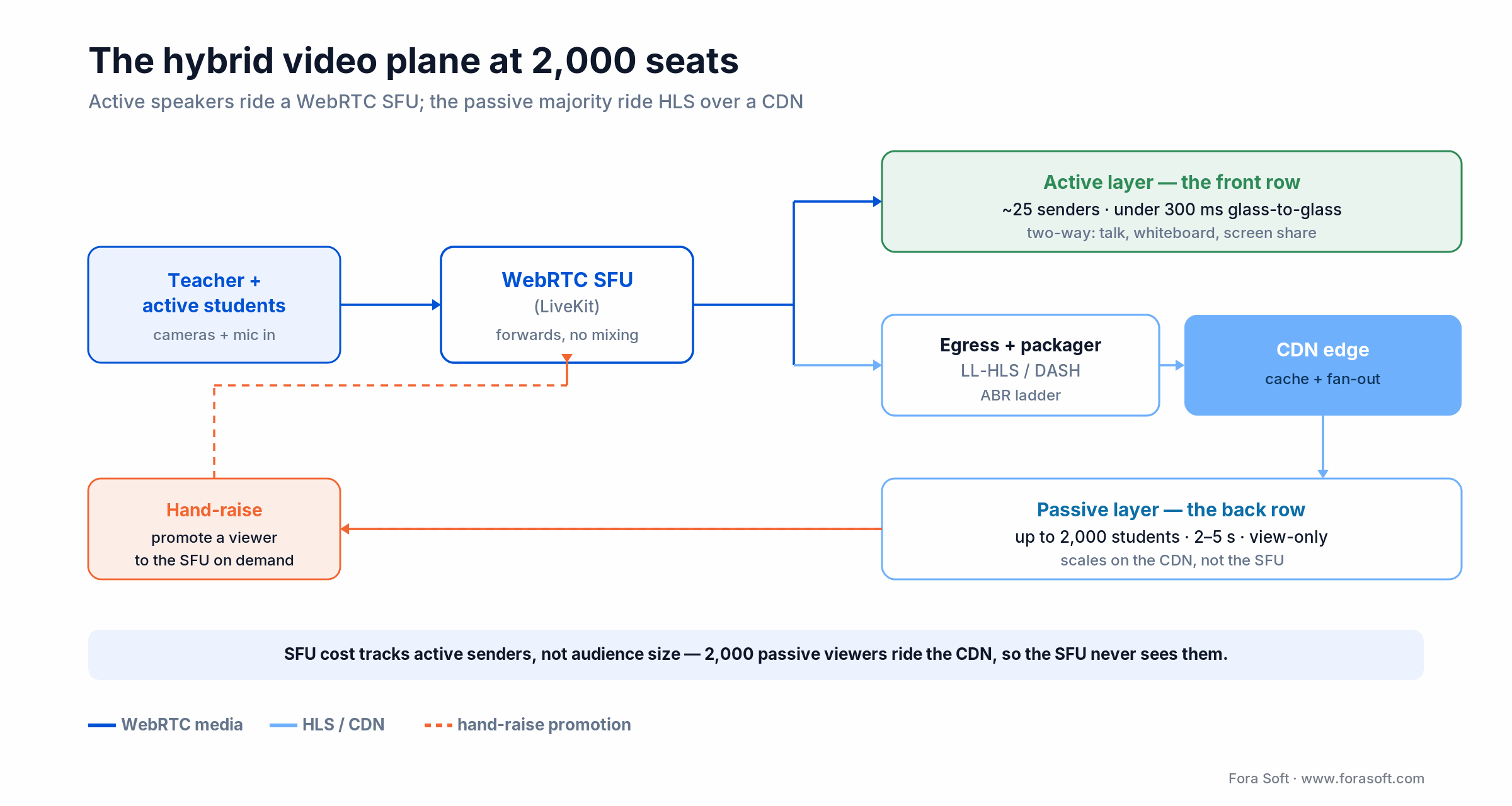
Figure 2. The front row rides WebRTC; the back row rides the CDN. The SFU never sees the 2,000.
Why not put everyone on WebRTC? Because a WebRTC SFU forwards a copy of each sender to each viewer, so its cost climbs with audience size. LiveKit scales horizontally, but a single room lives on a single node unless you shard participants across nodes and relay between them (LiveKit, 2026). HLS has no persistent server-to-viewer connection at all — the CDN caches segments at the edge, which is exactly why it scales to thousands for pennies (Mux, 2026). The hybrid split is the recognised pattern for large classes, and it is the one we deep-dive in our scalable video streaming and conferencing guide.
Reach for the hybrid split when a session has a few speakers and a large, mostly-passive audience: webinars, lectures, town halls, fitness classes. Put speakers on the SFU for interactivity and the crowd on HLS for reach. New to the protocols? Start with our video streaming fundamentals; comparing managed SFUs first? See our Agora alternatives breakdown.
Four roles, one platform
Teachers
Live lectures with screen share, a virtual whiteboard, shared materials and chat. Each lecture holds up to 2,000 students, records automatically, and lands back in the course library with no manual upload. Prep time per session dropped from roughly 20 minutes across Zoom, Drive and spreadsheets to under five in one place.
Students
Join live streams, watch recordings, take tests, submit homework and get feedback on one surface. Attendance, grades and progress show up in a personal dashboard. No more hunting across Zoom links, Docs and email threads for last week’s assignment.
Parents
Parents log in to see their child’s courses, schedule, submitted homework and progress notes, read-only and scoped to the right child. That one feature turned a large share of “what is happening with my kid’s course” tickets into self-service.
Admins and superadmins
Admins get a view-only console over courses, schedules and enrolments. Superadmins get full control: creating courses, scheduling events, uploading materials, managing users and groups, and auditing the catalogue. Multi-level permissions were non-negotiable for a client running several programs and external instructors.
Need 2,000 students in one live lecture?
We have shipped WebRTC + HLS rooms on LiveKit and mediasoup for classrooms, webinars and fitness products. Thirty minutes and we will tell you your real concurrency ceiling and how to raise it.
Security and compliance for student data
Education data lives under three overlapping rules. FERPA governs US education records and lets a provider act as a “school official” with a legitimate educational interest (US Dept. of Education). COPPA adds verifiable parental consent for children under 13. GDPR applies to any EU learners, with a digital-consent age set between 13 and 16 by member state.
The part teams miss: FERPA and GDPR both expect demonstrable technical controls, not a policy PDF. That shaped Scholarly’s design directly. The parent role is read-only and scoped to a single child at the query layer, not the UI. Course materials sit in object storage behind signed URLs with role-based access. Every service checks permissions through the identity plane, so “can this person see this record” is one answer, enforced in one place.
Reach for architecture-level privacy when minors are involved. Scope data at the API, minimise what you collect, and log access. Retrofitting parent-child scoping onto a permissions model that assumed two roles is far more expensive than designing it in from day one.
Custom platform vs off-the-shelf LMS
Scholarly’s owners first looked at Thinkific, Teachable, LearnWorlds, Moodle and Open edX. The shortlist collapsed to custom for three reasons those tools could not address: interactive 2,000-seat lectures in one flow, parent access scoped to a child, and a specific weekly cadence of course creation and cross-course pricing. The table and decision tree below show where each option fits.
| Option | Best for | Live video at scale | Role flexibility | Typical cost |
|---|---|---|---|---|
| Teachable / Thinkific | Solo creators, small cohorts | Embed only | Fixed roles | USD 40–400/mo |
| Moodle / Open edX | Large universities | Plugin-based | Extensible, complex | Self-host + integrator fees |
| Canvas / Blackboard | K–12 and higher-ed | BigBlueButton / Zoom | Curriculum-centric | USD 10k–250k/yr |
| LearnWorlds / TalentLMS | Corporate training | Limited | Decent | USD 3k–25k/yr |
| Custom (Scholarly shape) | Live-first, multi-role, 10k+ users | Native (WebRTC + HLS) | Fully flexible | USD 180–350k build + ops |
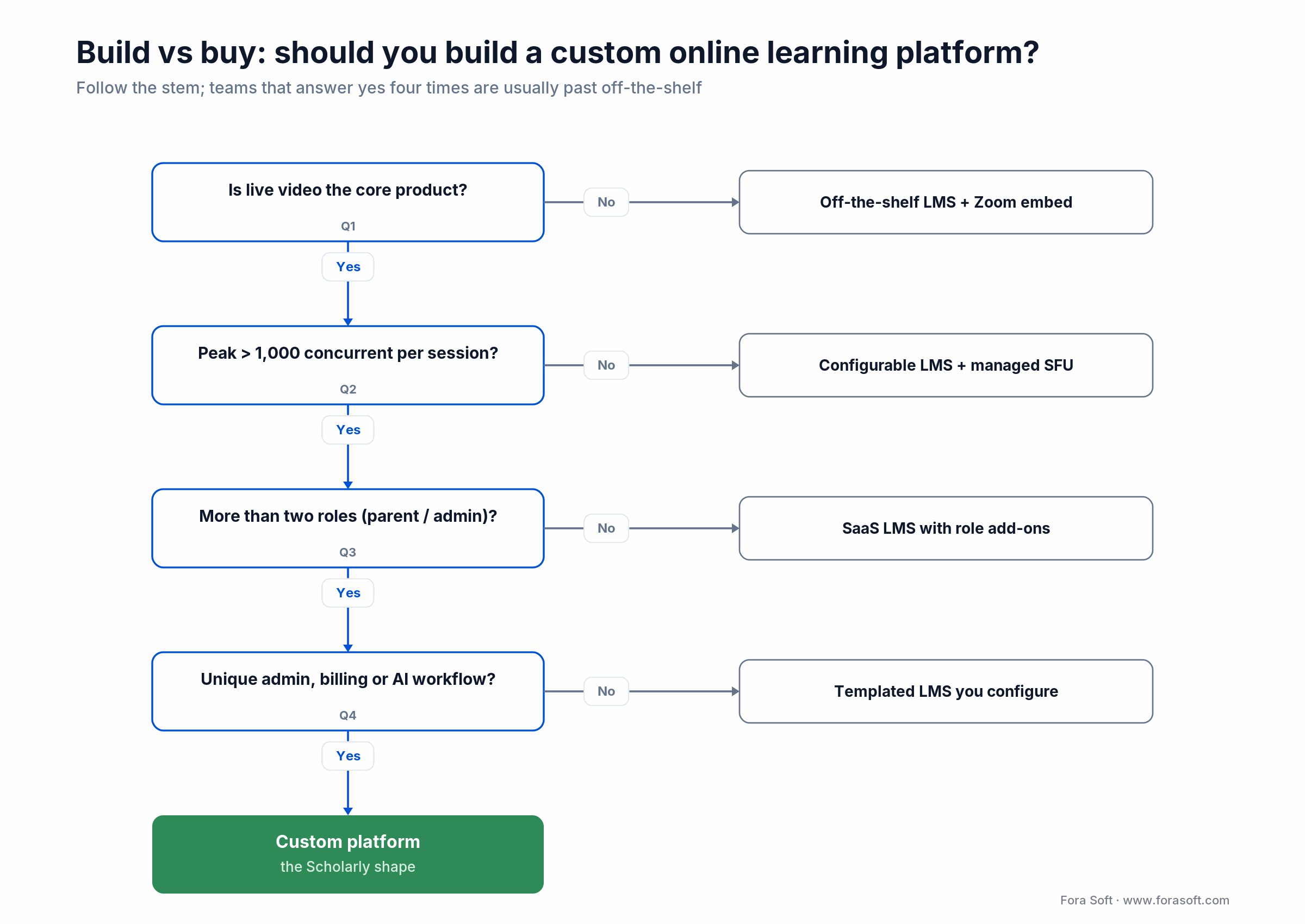
Figure 3. Four yes answers usually mean you are past off-the-shelf.
What an online learning platform costs to build
Direct answer: a Scholarly-equivalent platform runs roughly USD 180–350k over 4–7 months in our 2026 quotes, which use Agent Engineering on design and code. Market surveys put custom LMS work around USD 120–300k and up, so we sit in a defensible band; content-only builds are cheaper, and live video at scale is what pushes the number up. The ranges below are what we actually quote.
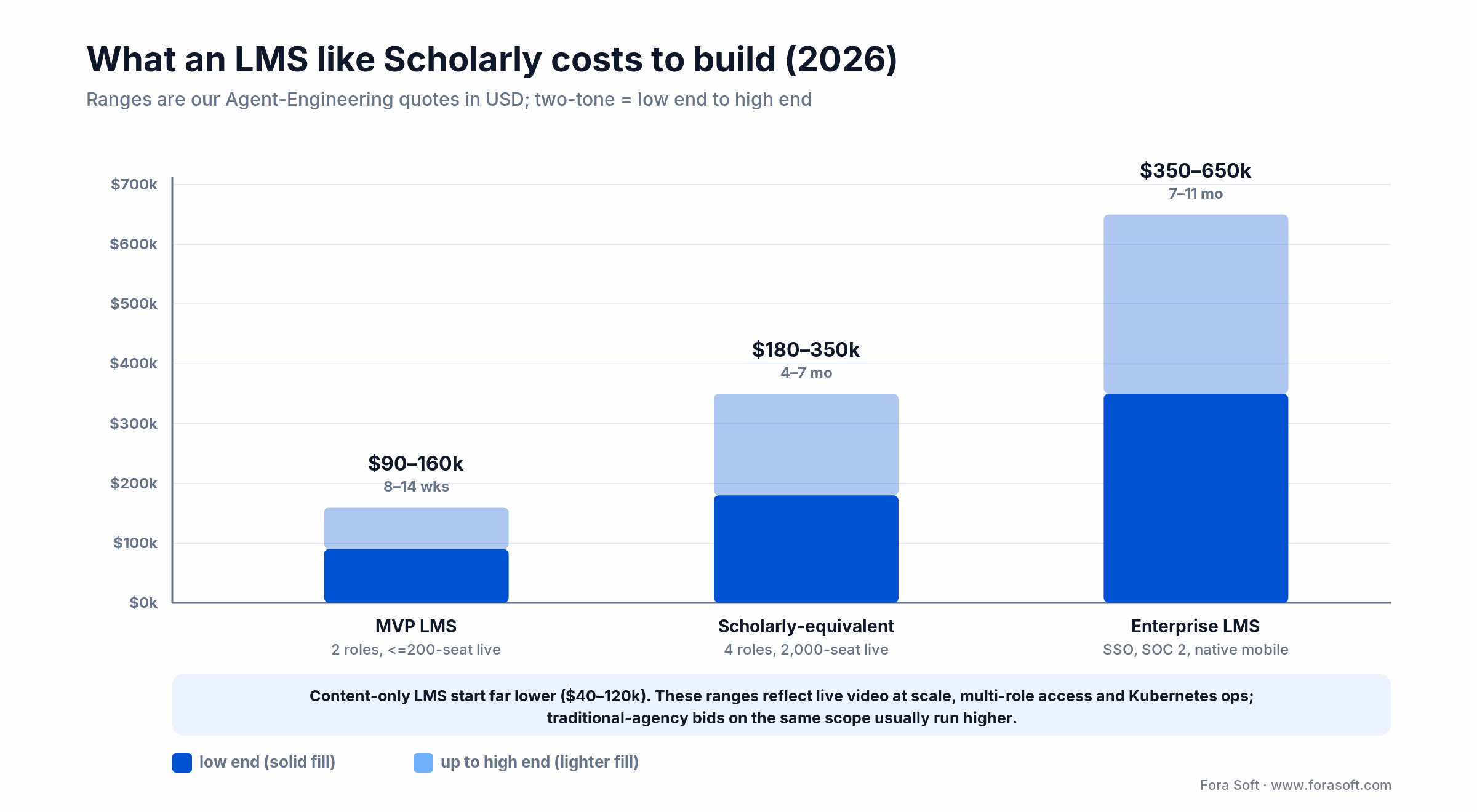
Figure 4. Build ranges by scope; two-tone bars show low end to high end.
| Scope | What it covers | Estimate | Timeline |
|---|---|---|---|
| MVP LMS | Student + teacher roles, course authoring, live classes up to 200, HLS recordings | USD 90–160k | 8–14 weeks |
| Scholarly-equivalent | Four roles incl. parent, 2,000-seat live, whiteboard, assessments, admin console, mobile web | USD 180–350k | 4–7 months |
| Enterprise LMS | Multi-tenant, SSO, SCIM, SOC 2, offline content, native mobile | USD 350–650k | 7–11 months |
| Ongoing | Ops, support, feature velocity after launch | ~15% of build/yr | Continuous |
Infrastructure sits on top: budget roughly USD 3–8k/month at the 15,000-user mark for a platform of this shape, driven mostly by recording egress and SFU hosting during live peaks. If a quote you are comparing looks very different in either direction, it usually means a different video architecture underneath. Want us to sanity-check yours? Grab a 30-minute call.
Results: what changed after launch
The headline is not the tech; it is what the tech removed. One platform replaced five tools. The interactive lecture ceiling went from about 1,000 to 2,000 students. Per-lecture admin fell from roughly 20 minutes to under five. Parent-status questions, once a steady stream of tickets, became a read-only dashboard the parents run themselves.
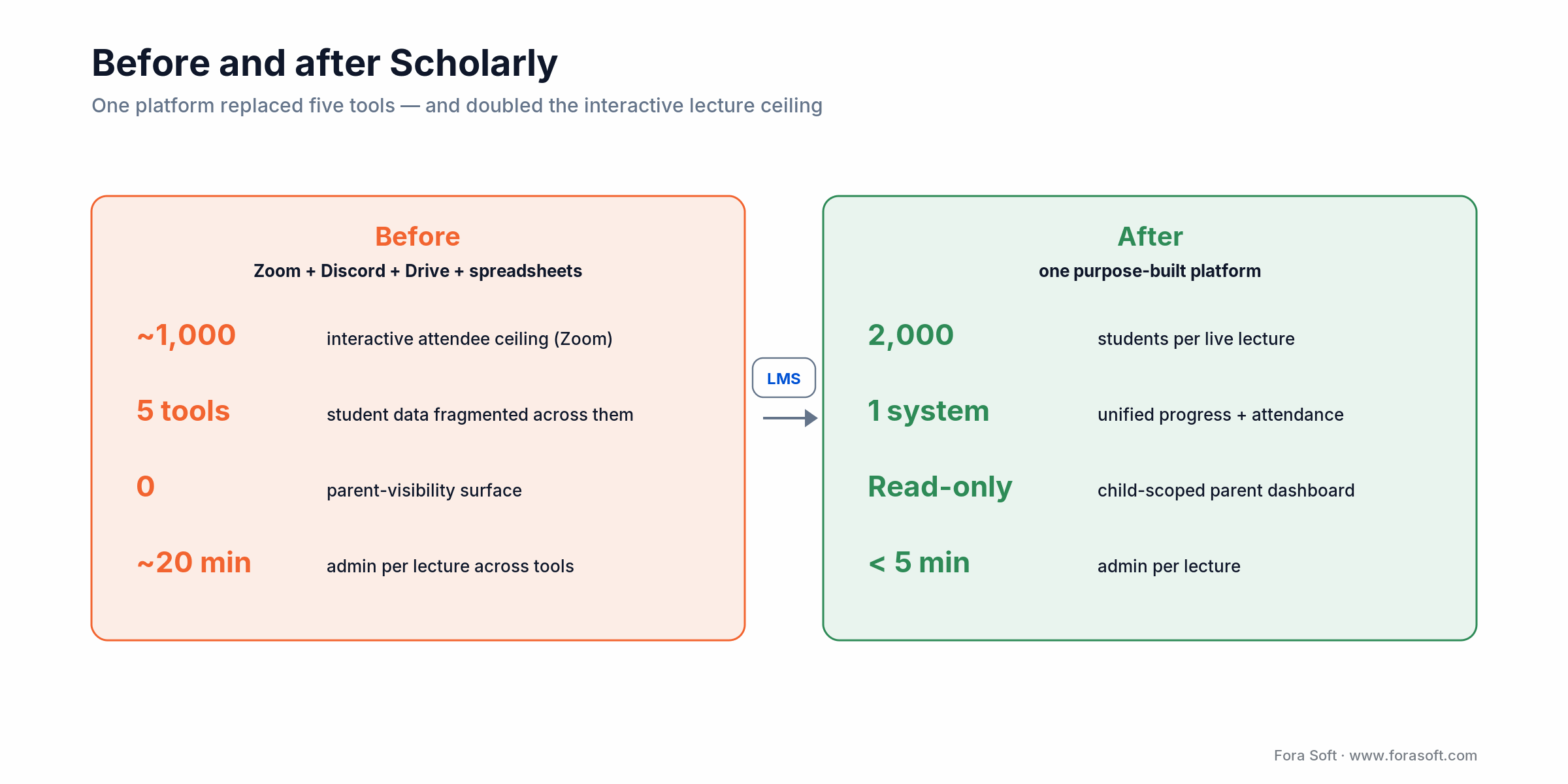
Figure 5. The before/after that mattered to the business, not just the stack.
Reach for consolidation when your support load is dominated by “where do I find X” and your team spends more time moving data between tools than teaching. The retention win came from one source of truth, not from any single feature.
The build playbook we reuse for every EdTech client
Step 1 — Role-first information architecture. Map every action to a role before opening Figma. Scholarly would have been unusable if we had started from “the course page” instead of what the teacher does, what the student does, what the parent sees, what the admin can change.
Step 2 — Pick the video plane early. WebRTC SFU for interactivity, HLS/DASH for the passive majority, recordings to CDN. This choice ripples through cost, latency and scaling, so make it before the UI hardens.
Step 3 — A GraphQL contract between web and services. One round-trip per screen, federation so each team owns its slice. It pays back the moment you have three surfaces: web, mobile and admin.
Step 4 — Kubernetes from day one. Not because you need it at launch, but because the first big cohort surfaces pod, resource and scaling questions you do not want to retrofit. Helm and ArgoCD for deploys.
Step 5 — Observability before analytics. Prometheus, Grafana, structured logs, alerts at 70% of capacity. Analytics can wait; uptime on the live-class path cannot.
Should you build a custom LMS? A five-question test
Short version: build custom when live video is the product, you clear roughly 1,000 concurrent students, and you need three or more roles. Otherwise off-the-shelf wins. The five questions below make that concrete.
Q1. Is live the product, or a feature? Live-first usually means custom wins. Feature-only means Thinkific plus Zoom is cheaper.
Q2. How many concurrent students per session? Under 200, a Zoom embed is fine. 200–1,000 is serious SFU territory. Over 1,000, a custom WebRTC + HLS hybrid is the only sustainable answer.
Q3. How many distinct roles do you need? Two (teacher + student) is trivial. Four or more, once you add parent, admin and external instructor, is where off-the-shelf starts forcing ugly workarounds.
Q4. How unique is your admin workflow? A plain list of courses fits every SaaS. Pricing that depends on seat type, season, cohort and promo does not.
Q5. Are AI features on the roadmap? Auto-grading, AI tutoring, transcription, personalised paths. Off-the-shelf ships these slowly; custom lets you pick the models, host them where you need, and control the cost curve. Our AI e-learning video tools and personalised learning materials guides cover the patterns.
Reach for custom when you answer yes to three or more of these, and stay on SaaS when you do not. The honest failure mode is building a platform to solve a problem a USD 200/month tool already solves.
Five pitfalls in almost every EdTech build
1. Building the course page before the role model. You get a good-looking demo and a product nobody can administer at scale.
2. One video service for everything. An SFU for a 2,000-seat lecture is wasteful; HLS for an interactive seminar is too laggy. Use both, split by who is speaking.
3. Ignoring recordings. Learners need async access. An LMS without searchable, indexed recordings loses half its value.
4. Weak parent or admin surfaces. K–12 and training programs live and die by parent visibility; corporate clients live and die by admin reporting. Shipping without these is a false economy.
5. Under-budgeting observability. Live classes do not get a second take. Alerts at 70% capacity on the SFU, transcoder and origin are the gap between a hiccup and an angry customer thread.
KPIs a modern online learning platform must dashboard
Quality. Live-class join success (≥ 99%), P95 active-speaker latency (< 300 ms), HLS rebuffer ratio (< 1%), end-of-session drop rate (< 2%). If any slide, pause feature work and fix the pipe.
Business. Course completion, assignment submission, weekly active learners, churn by cohort, parent login rate. These decide which features get priority.
Reliability. Uptime 99.95%+ on the live-class path, deploy failure rate < 2%, MTTR < 30 minutes during class hours, backup success 100%.
When not to build a custom LMS
Under ~500 active users with occasional live classes. Teachable or Thinkific plus Zoom is a fine stack; custom would not pay back in your first two years.
A pure content library, no live. Podia, Kajabi, Thinkific. Do not over-engineer a video plane you will never use.
No product owner you can protect. A custom LMS is a product, not a project. If nobody inside your org will own roadmap, adoption and metrics, off-the-shelf is kinder.
A hard launch under six weeks. Ship on a SaaS, migrate when the economics flip. We will happily tell you when that day has not arrived yet.
FAQ
What is online learning platform development?
It is designing and building software that delivers courses, live or recorded classes, assessments and progress tracking to several roles at once. In practice that means a role model, a video pipeline, content and assessment tools, an admin console, and the data and infrastructure underneath. Scholarly is a worked example holding 15,000 users.
How many users does Scholarly serve?
Around 15,000 active users across all roles, with live lectures supporting up to 2,000 students each. Usage has grown steadily as the client rolls out new programs inside the same platform.
What technology stack is Scholarly built on?
React + Next.js on the frontend; Go and Node.js microservices on the backend; GraphQL as the unified API; WebRTC through LiveKit for live interactivity with HLS/DASH for passive viewers and recordings; Kubernetes for orchestration; Postgres for relational data; object storage plus CDN for content.
How much does an online learning platform cost to build?
A four-role, live-first platform like Scholarly runs about USD 180–350k over 4–7 months with us. A smaller MVP (two roles, up to 200-seat live classes) is USD 90–160k in 8–14 weeks. Content-only platforms are cheaper; live video at scale is the main cost driver. Infrastructure adds roughly USD 3–8k/month at 15,000 users.
How long does it take to build a platform like Scholarly?
A first usable version with two roles, small live classes and basic recordings lands in 8–14 weeks. A full Scholarly-equivalent with four roles, 2,000-seat lectures, whiteboard, assessments and an admin console takes 4–7 months. After launch we typically spend about 15% of the build budget per year on iteration and new features.
Why WebRTC + HLS instead of a pure Zoom embed?
Zoom is a meeting, not a platform. You cannot customise the whiteboard, fold recordings into your library, scale one lecture past Zoom’s interactive limit, or shape the latency-versus-cost curve. A hybrid runs the front row (teacher plus active students) on a WebRTC SFU under 300 ms and the back row (thousands of viewers) on HLS over a CDN for far less money.
Is a platform like this FERPA and GDPR compliant?
It can be, if privacy is built into the architecture. FERPA and GDPR both expect demonstrable technical controls. Scholarly scopes the parent role to a single child at the query layer, keeps materials behind signed URLs with role-based access, and enforces permissions through one identity plane. Specific certification (for example SOC 2) is scoped per client.
Can parents really see their child’s progress?
Yes. The parent role is read-only and scoped: a parent sees only their own child’s courses, schedule, submitted homework and feedback. That single feature removed a meaningful share of inbound support tickets for the client.
Can AI features be added on top?
Yes, the architecture is built for it. We already add transcription, AI-assisted grading and personalised paths for several clients. The guides on AI video analytics for online learning and automated lesson-plan generation cover the patterns we reuse.
What to Read Next
Scaling
Scalable Video Streaming and Conferencing (2026)
The full playbook behind Scholarly’s live-class architecture, generalised for any video product.
WebRTC
Agora.io Alternatives: LiveKit, mediasoup, Jitsi & Janus
TCO and migration math if you are comparing managed conferencing vendors for your EdTech stack.
LiveKit
2026 LiveKit Multimodal Agents Guide
The same real-time stack Scholarly uses, plus how to add AI agents on top of it.
AI in EdTech
AI for E-Learning Video Tools
Where AI actually cuts cost and improves outcomes on top of an LMS like Scholarly.
Personalisation
AI-Crafted Personalised Learning Materials (2026)
The three-layer stack we use to personalise content on top of an LMS spine.
Turn your Zoom-plus-spreadsheets setup into a platform
Scholarly started where most EdTech businesses stall: third-party tools duct-taped around a good product idea. What moved it to the next order of magnitude was one platform with clear roles, a purpose-built live-video plane, a real admin console, and a parent view that removed half the support load. The technology is ordinary on its own; the decisions about where to apply it are the whole game.
If your business runs on live classes, parent visibility or tight admin workflows and you are outgrowing off-the-shelf, the Scholarly playbook — role-first, hybrid video, microservices, observability early — is the one we would apply to yours. Conservative budget, honest timeline, no vendor theatre.
Let’s scope your online learning platform
Thirty minutes, a real engineer, a written one-page plan: role model, video stack, platform shape, realistic budget and timeline. Free.

