

Key takeaways
• The buyer’s question is “which job, which tool”. AI video for e-learning splits into eight concrete jobs: captions, dubbing, avatars, summarization, quiz generation, semantic search, interactive tutors, and text-to-video. No single platform wins all eight.
• The cost cut is real on scripted content. A 10-minute narrated module drops from roughly $2,000–$5,000 to $200–$500 with a Synthesia-plus-ElevenLabs workflow. Live-action and lab footage barely move.
• Dubbing and captions are the biggest lever. Deepgram Nova-3 runs a 5.26% batch word error rate at $0.0043/min; ElevenLabs dubs at $0.33–$0.50/min on Dubbing v1 and $2.20/min on the newer v2 (2026 API pricing). That is where a global course library pays for itself.
• Compliance now drives tool choice, and the dates changed. The EU AI Omnibus (Regulation (EU) 2026/1744, in force since 27 July 2026) moved high-risk education rules to 2 December 2027; the Article 50 transparency duty has applied since 2 August 2026. COPPA’s amended Rule has required full compliance since 22 April 2026.
• LMS tracking is part of the tool choice. A SCORM export reports one completed status per learner; proof of what each learner actually watched needs the xAPI Video Profile or cmi5.
• Hybrid beats pure SaaS past ~50k learners by roughly a third on annual spend while keeping student data in your control. Below that, buy managed and ship this quarter.
Updated October 2026: new section on per-learner completion tracking in an LMS (SCORM, xAPI, cmi5); EU AI Omnibus now in force, DOJ Title II deadlines moved to 2027–2028, and 2026 pricing for ElevenLabs Dubbing v2, Tavus, Colossyan and Guidde.
Pick the wrong AI video platform for a course library and the bill shows up twice: once when you re-shoot content the avatar rendered off-brand, and again when a district lawyer asks which vendor is holding student video under FERPA. Fora Soft has shipped e-learning video since 2005, and this is the buyer’s guide to AI video platforms for e-learning we wish existed — the 2026 vendor shortlist, the cost math with the arithmetic shown, the compliance dates most articles still get wrong, and the decision framework that tells you which of the eight jobs to automate first.
This is written for the person choosing the stack: an L&D director, an EdTech founder, or the engineer they asked to sanity-check the plan. We name prices, we flag where each tool breaks, and we say plainly when AI video is the wrong call. If you want the analytics companion to this guide, read our deep dive on AI video analytics for online learning.
Why Fora Soft wrote this buyer’s guide
Fora Soft is a software development company that has built video-learning products since 2005. We’ve shipped 250+ projects with a 50-person team, and a large slice of them are e-learning: WebRTC live classrooms, asynchronous course platforms, and the AI overlays layered on top. We’ve plumbed Whisper into low-bandwidth markets where 4G is the ceiling, wired HeyGen and Tavus avatars into tutoring apps, and rebuilt SaaS course platforms as bespoke stacks for clients who outgrew the per-seat tier. That work is the day job of our e-learning software development team, which builds the live classrooms, players and LMS integrations these AI tools plug into.
One of those builds, BrainCert, is the world’s first WebRTC-plus-HTML5 virtual-classroom LMS — a platform we architected from the ground up that now carries 500M+ real-time classroom minutes with AI-assisted course creation and SCORM/xAPI tracking baked in. That kind of production experience, not spec-reading, is where the opinions in this guide come from. Every recommendation below is one we’d defend on a call with your engineering lead.
Mapping your video stack against 2026 tools?
Book a 30-minute call and we’ll map your current course library against the 2026 AI toolset. No slides, just a shared doc with specific picks for your content, budget, and compliance surface.
What “AI video for e-learning” actually means in 2026
The phrase is a catch-all, and that’s the trap. Before you compare any two platforms, separate the eight concrete jobs underneath the label. Most buyers only need three or four of them, and the tool that’s best at one is often mediocre at the next.
1. Captions and subtitles. Speech-to-text over lecture audio, in one language or many. Deepgram Nova-3 and OpenAI’s Whisper large-v3 sit at the top; both land in the 5–8% word-error range on typical lecture audio. Captions stopped being optional — the EU Accessibility Act and US ADA rules treat them as a baseline for educational video.
2. Dubbing and voice cloning. Re-voicing a course into another language. ElevenLabs and Papercup, plus open-source speech-translation models, deliver near-broadcast output at $0.33–$2.20 per minute (ElevenLabs 2026 API pricing) depending on the language pair and how much human polish you buy. This is the single biggest cost lever in the modern stack.
3. Avatar generation. Turning a script into a talking-head presenter. Synthesia (240+ avatars, 140+ languages), HeyGen, and Colossyan lead here; SaaS pricing runs $29–$89/month, and per-minute cost at volume sits near $1–$3. Best for scripted, evergreen training.
4. Interactive tutor avatars. A learner holds a real back-and-forth with an on-screen tutor. Tavus (Phoenix-4.5 renderer) and HeyGen’s LiveAvatar stream a two-way conversation over WebRTC. Usable in 2026 for drill-and-practice and conversation coaching; still latency-sensitive for seminar-style teaching.
5. Lecture summarization and study aids. Turning a recording into notes, chapters, and flashcards. Otter, Fireflies, and Google NotebookLM cover this; NotebookLM’s audio overviews have quietly become a student self-study default.
6. Quiz and assessment generation. LLMs draft questions from a transcript. A 2025 study across 71 college courses found AI-generated exam items can match human-authored items on psychometric quality — but only under review. Ship nothing student-facing without an educator in the loop.
7. Semantic video search. Indexing lectures by concept so a learner jumps to “the part about eigenvectors” instead of scrubbing. Twelve Labs (Marengo 3.5) and Google Vertex AI Search do this; pricing is per minute indexed plus per query.
8. Text-to-video generation. Prompting short illustrative clips for trailers and concept animations. Google Veo 3.1 (native audio) and Runway Gen-4.5 are the durable choices in 2026. OpenAI shut the Sora app on 26 April 2026 and scheduled the Sora API to shut on 24 September 2026, so don’t anchor a pipeline to it. Quality is good enough for B-roll, still weak for instructional close-ups.

Figure 1. The eight AI video jobs map onto seven pipeline layers. Most buyers automate three or four; the tool that wins one layer rarely wins the next.
Market snapshot — size, growth, and where AI is landing
The base market is large and growing steadily. Grand View Research puts global e-learning services at $417 billion in 2026, compounding near 20% a year through 2033; Fortune Business Insights lands close, at $426 billion. Numbers diverge by definition, so treat any single figure as directional, not gospel.
The AI slice is where the growth concentrates. Estimates of the AI-in-education market for 2026 run from roughly $9.6 billion (Precedence Research, ~34% CAGR) to $11.4 billion (Grand View, ~26% CAGR). Whichever you believe, AI is compounding at 26–34% a year against the base market’s ~20% — roughly 1.3 to 1.7 times the rate. It’s absorbing the category’s growth, not adding a rounding error to it.
Adoption tells the clearer story. Training Industry data (2026) shows 88% of companies now use video or virtual broadcasting as a training medium, and the AI layer is the differentiator on top of that video. Duolingo reported 12.7 million paying subscribers and 58.7 million daily active users for Q2 2026, up 17% and 23% year on year (company filing, August 2026) — its AI features are now a headline product, not an experiment. When Duolingo, Khan Academy, and Coursera all lead with AI, the platforms without an AI video roadmap are the ones quietly losing share.
The 2026 vendor shortlist
These are the AI video platforms for e-learning we actually reach for, grouped by the job they win. Prices are 2026 list prices from each vendor’s own pricing page; enterprise quotes scale from there.
Synthesia is the category leader for scripted training avatars — 240+ stock avatars on Enterprise (125+ on Starter), 140+ languages, personal avatars on every paid tier. Starter is $29/month and Pro $89/month on monthly billing (yearly billing saves up to four months), Enterprise on quote; SCORM export with a completion-percentage setting is Enterprise-only. In January 2026 Synthesia raised a $200M Series E at a $4B valuation and named conversational AI agents for role-play training its next focus. The verifiable proof point is Berlitz: a published Synthesia case study reports a 66% cut in production cost and 70% less production time, with 1,700+ videos made in six weeks.
HeyGen competes head-on: Free tier, Creator $29/month, Pro $49/month, Business $149/month plus $20/seat, with 175+ languages. Its edge is the API and the real-time product, now branded LiveAvatar, which streams a two-way avatar over WebRTC. HeyGen is the avatar API we see integrated into custom edtech most often. On latency it publishes only qualitative claims, so treat any specific millisecond figure with suspicion until you benchmark it yourself.
Colossyan targets corporate L&D directly: 300+ avatars, 700+ voices, 120+ languages, built-in branching for compliance scenarios, and SCORM export straight into your LMS. Professional is $59/month on yearly billing and includes 5 SCORM exports a month; Enterprise makes them unlimited and adds EU or US data residency. That SCORM path is why L&D teams pick it over flashier avatar tools.
Tavus is the interactive-tutor option when conversation latency matters. Its Phoenix-4.5 renderer plus the Raven perception and Sparrow turn-taking models target sub-1-second round trips. Developer plans run from $22/month (60 minutes) to $975/month (4,000 minutes), with overage at $0.26–$0.35 per conversation-minute (2026 pricing page). It fits drill-and-practice, language partners, and customer-service simulations.
ElevenLabs is the text-to-speech and dubbing default. Its Eleven v3 model covers 70+ languages; Flash v2.5 runs at roughly 75ms for real-time use. Plans start free and step through $22 (Creator), $99 (Pro), and up. Dubbing v1 is billed at $0.33/min with a watermark or $0.50/min without, the newer Dubbing v2 at $2.20/min; API text-to-speech runs $0.04 (Flash) to $0.08 (v3) per thousand characters (2026 API pricing). Watch for sync drift on long-form auto-dub — it wants a human pass before a flagship course ships. For a deeper look at the voice layer, see our guide to synthetic voice libraries for app development.
Deepgram Nova-3 and OpenAI Whisper large-v3 are the transcription pair. Deepgram reports a 5.26% median batch word error rate (6.84% streaming) at $0.0043/min batch and $0.0077/min streaming at list price (a limited-time 2026 promotion cuts streaming to $0.0048/min); its separate Flux model handles real-time turn-taking. Whisper large-v3 is Apache-2.0 open weights, around 7.4% mean WER on the Open ASR Leaderboard, free to run if you own the GPU. For a 500-hour library, that’s the difference between a ~$130 Deepgram bill and the cost of an A10 instance. Our speech-to-text guide goes deeper on the trade-off.
Panopto and Kaltura are the enterprise video platforms with AI built in — smart in-video search, auto-captions, AI chapters, and quiz or clip generation. Both are quote-based in 2026, so budget a real procurement cycle. The lock-in is real; the time-to-value is short, which is the honest trade.
Descript and Twelve Labs round out the edges: Descript ($16–$50/month) is the transcript-based editor most edtech production teams now run on, with its Underlord AI editing layer; Twelve Labs (Marengo 3.5 + Pegasus 1.6) handles semantic search at $0.042/min to index and $4 per 1,000 queries.
Guidde covers a job the avatar tools skip: step-by-step software and process training generated from a screen capture, with AI voiceover. Pro is $29 per creator a month ($19 billed annually) and Business $59 ($39 annual). Pick it for SaaS onboarding and internal how-tos; it is not built for presenter-led or conceptual courses.
Reach for Synthesia when: your content is scripted, evergreen, and multilingual (compliance, onboarding, product training), you want a governed avatar library, and enterprise controls matter more than a public API. Reach for HeyGen instead when you need the API or a real-time interactive avatar.
Comparison matrix — what you pay and what you ship
Read this by the job you’re hiring for, not top to bottom. The “where it breaks” column is the one buyers skip and regret.
| Tool | Job it wins | Entry price (2026) | Cost at scale | Where it breaks |
|---|---|---|---|---|
| Synthesia | Scripted avatars | $29/mo | ~$1–3/min | SCORM export Enterprise-only; unscripted teaching |
| HeyGen | Avatar API, live avatars | Free / $29/mo | ~$1–3/min | Latency unpublished; verify yourself |
| Colossyan | L&D + SCORM export | $59/mo | Per-seat | Smaller avatar-realism edge |
| Tavus | Live tutor (sub-1s) | Free 20 min | $0.26–0.35/min | Cost climbs with concurrency |
| ElevenLabs | TTS + dubbing | $22/mo | $0.33–0.50/min | Sync drift on long-form |
| Deepgram Nova-3 | Captions (managed) | Pay-as-you-go | $0.0043/min | Cloud-only; data leaves your VPC |
| Whisper large-v3 | Captions (self-host) | Free + GPU | ~$0.001/min | You own the GPU ops |
| Panopto / Kaltura | All-in-one enterprise | Quote | Included | High lock-in; opaque pricing |
| Guidde | Software how-to videos | Free / $29/mo | Per creator | Procedural only; no presenter content |
| Twelve Labs | Semantic search | Free 600 min | $0.042/min index | Niche; needs your player wired in |

Figure 2. Capability heat-map: rows are tools, columns are jobs. Green is “lead here”, amber is “usable with caveats”. No row is green across the board.
How do AI video platforms track per-learner completion in an LMS?
Short answer: the AI video tool rarely tracks learners itself — the export or the player does. A SCORM package from Synthesia (Enterprise) or Colossyan (Professional and up) reports one completed status per learner once a watch threshold is met. Proof of what each learner actually watched needs a player that sends xAPI Video Profile statements to a learning record store, or cmi5 when the video must also be an assignable LMS unit. If completion evidence matters, as it does for compliance training, pick the tool by its export path, not by its avatars.
| Route to the LMS | Who offers it (2026) | What the LMS sees per learner | Pick it when |
|---|---|---|---|
| SCORM 1.2 / 2004 package | Synthesia (Enterprise), Colossyan (5/mo on Professional, unlimited on Enterprise) | One status: completed or incomplete, plus a score if there is a quiz | Your LMS speaks only SCORM and “did they finish” is enough |
| LTI 1.3 + video-platform analytics | Panopto, Kaltura | Views and completion inside the video platform; grades passed back to the LMS | Higher-ed and lecture capture with many instructors uploading |
| xAPI Video Profile → LRS | A player that emits xAPI (custom or LRS-aware) | Progress as unique footage seen (0–1), played segments, seeks, completion against a threshold | You need drop-off heatmaps or an audit trail of what was watched |
| cmi5 (xAPI + LMS launch) | LMSs with cmi5 support | The same xAPI detail, inside an assignable course unit | A compliance course that must be assigned, launched and evidenced |
| Embed or API only | HeyGen, Tavus | Nothing by default; you emit the events | You own the player inside a custom platform |
The detail that matters is how “complete” is counted. The xAPI Video Profile (ADL, v1.0.3) defines seven player statements — initialized, played, paused, seeked, interacted, completed and terminated — and its progress extension measures unique footage seen, not where the playhead stopped. A learner who drags the slider to the last second still shows low progress, so a completion threshold of, say, 0.9 means 90% of the video was actually played. Our Learn chapter on tracking video with the xAPI Video Profile shows which statements to capture.
When avatar videos, dubbed language versions and live classes all need to land in one per-learner record, that is a build rather than a setting. Our custom LMS development team wires SCORM 2004, xAPI and LTI 1.3 into a single gradebook, so the AI tools you buy stay swappable.
Captions, dubbing, and translation — the biggest cost lever
If you only automate one thing this year, automate the language layer. It carries the largest, most defensible ROI, and it’s the job where AI quality is genuinely production-ready. The highest-return move is usually updating what you already have: re-dubbing and re-captioning an existing library, or turning current slide decks into narrated video (doc-to-video), beats filming new footage from scratch.
Start with captions because everything downstream depends on a clean transcript. Deepgram Nova-3 gives you a managed 5.26% batch WER with word-level timestamps and speaker separation; Whisper large-v3 gives you comparable accuracy on your own hardware if data residency rules the cloud out (Deepgram’s 5.26% is a vendor median, Whisper’s 7.4% a leaderboard mean, so benchmark both on your own lecture audio). Bad audio is the real enemy — every downstream number, from dub sync to quiz quality, degrades faster than the audio does. Spend on capture first.
Dubbing is where the money moves. Traditional localisation of a one-hour course into a new language runs into the thousands once you add voice talent, studio, and QA. ElevenLabs dubs the same hour for $0.33–$0.50 per minute of output (call it $20–$30 of machine cost per finished hour), then you buy a human review pass only on the files that matter. The catch: in our builds, auto-dub drifts 200–500ms against the original on long segments. The fix is boring and it works: dub per scene, re-align against the source timestamps, and spot-check roughly one file in twenty. Humans notice a 50ms audio-visual offset, so alignment, not raw voice quality, is what makes a dub feel native.
Reach for Deepgram Nova-3 when: you want managed captions with no GPU ops, your data can live in the cloud, and you value a low error rate on noisy tutorial audio. Reach for self-hosted Whisper large-v3 instead when data residency is a hard requirement or your volume makes per-minute pricing hurt.
Reference architecture — the seven layers of an AI edtech video stack
Every production stack we’ve shipped resolves into the same seven layers. Name them explicitly and the build-vs-buy decision gets much easier, because you can buy some layers and build others.
Layer 1 — Capture. Native LMS upload, a live WebRTC class, or remote recording. Highest-quality audio you can afford; it sets the ceiling for everything after it.
Layer 2 — Transcription. Deepgram Nova-3 (managed) or Whisper large-v3 (self-host). Word-level timestamps, diarisation on.
Layer 3 — Enrichment. LLM-generated chapters, summaries, objectives, keywords — gated by an educator-approval queue for anything a student will see.
Layer 4 — Localisation. ElevenLabs or Papercup for dubbing; a Whisper-translate plus ElevenLabs path when you want it cheaper and own the glue. Measure sync drift before shipping.
Layer 5 — Generation. Synthesia or HeyGen for scripted segments; Veo 3.1 or Runway for concept B-roll. Avatars go through brand-guideline review, not straight to publish.
Layer 6 — Interaction. Retrieval-augmented Q&A over the transcripts for in-video answers; Tavus or HeyGen LiveAvatar for synchronous tutoring; quiz generation with the educator gate from Layer 3.
Layer 7 — Analytics. Engagement, drop-off, and completion, designed privacy-first. Any biometric or attention tracking trips a GDPR DPIA and, on minors, COPPA; keep it aggregate. For the full treatment, see our AI video analytics guide and the deeper engineering notes in Learn: AI for video engineering.
Cost model — 50k learners, 500 hours of video
Here’s the arithmetic for a typical mid-size edtech in 2026, running three realistic stacks against the same 500-hour library.
| Component | Managed SaaS | Hybrid | Self-hosted |
|---|---|---|---|
| Platform | Kaltura / Panopto | Mux + custom | Custom + Bunny CDN |
| Transcription | Built-in | Deepgram Nova-3 | Whisper on A10 |
| TTS / dub | ElevenLabs SaaS | ElevenLabs API | XTTS self-host |
| Avatars | Synthesia Enterprise | HeyGen API | Open-source lip-sync |
| LLM Q&A | GPT-5 API | Claude API | Mistral self-host |
| Monthly cost | ~$1,720 | ~$1,150 | ~$3,350 + 1 FTE |
| Annual | ~$20.6k | ~$13.8k | ~$40.2k + salary |
Where the cost cut is real — shown, not asserted. Traditional production of one 10-minute narrated module runs $2,000–$5,000 with voice talent, editing, and localisation. A Synthesia-plus-ElevenLabs workflow produces the equivalent for $200–$500. Do the arithmetic from those stated ranges: ($2,000 − $500) ÷ $2,000 = 75% at the conservative end; ($5,000 − $200) ÷ $5,000 = 96% at the best end. Call it a 75–96% cut on the module math, and note that Synthesia’s own Berlitz case reports 66% across a full training library. It holds for scripted, narration-heavy modules. It does not hold for documentary or lab footage, where the cost sits in camera time and editorial, which AI doesn’t touch.
Reach for the self-hosted stack when: data residency is non-negotiable, your volume makes per-minute SaaS pricing sting, or you need deep customisation — and you have at least one engineer who owns the GPU ops. Below that bar, the FTE cost erases the savings.
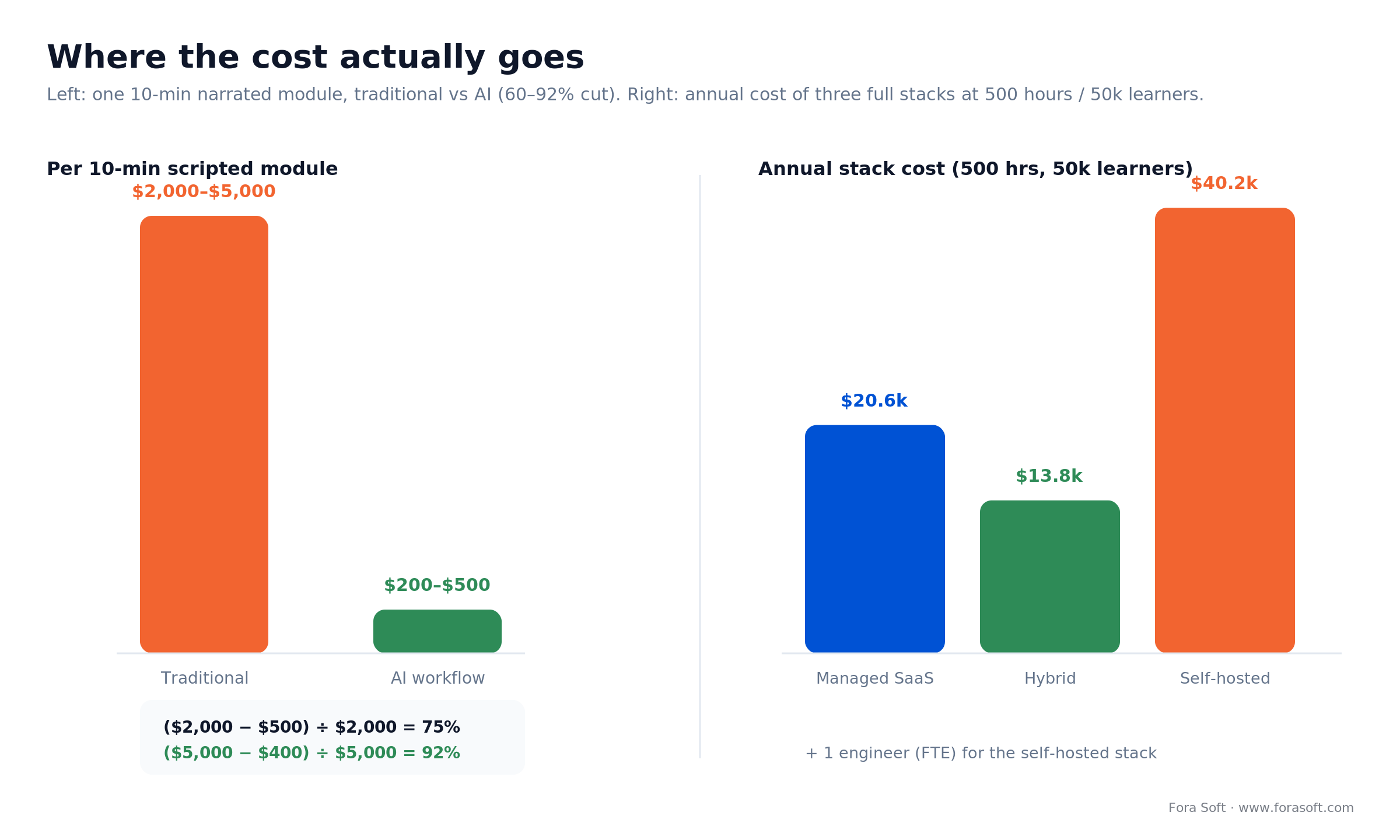
Figure 3. Per-module production cost (traditional vs AI) and the three annual stack budgets. Hybrid is cheapest at this scale; self-host only wins once volume or residency forces it.
Want this cost model for your actual library?
We’ll build a side-by-side TCO for your real hours of video across SaaS, hybrid, and self-hosted stacks — with the arithmetic shown, free on a 30-minute call.
Mini case — building BrainCert’s AI-ready virtual classroom
The situation. BrainCert came to us to build what became the world’s first WebRTC-plus-HTML5 virtual-classroom LMS — a bootstrapped product taking on VC-backed incumbents with a small team. They needed native HD live classrooms, an interactive whiteboard, proctored exams, and, later, an AI layer for course creation, all portable across SCORM and xAPI.
The plan. We architected the platform from the ground up: WebRTC media infrastructure for the live classes, an HTML5 player and whiteboard, DRM content protection, and the LMS around it. As AI matured, we layered in AI-assisted course creation and kept the tracking standards-clean, so enterprise buyers could plug it into their own systems without a rewrite.
The result. BrainCert grew revenue from $1.5M in 2021 to $3M in 2024, up 58% in its latest year, with 100K+ customers, and has now delivered 500M+ real-time classroom minutes across ten datacenters at a stated 99.995% uptime. This is a 12-person business outcompeting far larger names, with SOC 2, ISO 27001, HIPAA, and GDPR compliance shipped. As their CEO, Yasin Rahim, put it: “From designing the technical architecture to programming, they do it all for us and I would never even consider using another company.” Want a similar assessment of your stack? Book a 30-minute call. We also run video-first learning at consumer scale — our work on Scholarly handles live classes for up to 2,000 concurrent students and 15,000+ active users; the full build story is in our online learning platform development case study.
Compliance — FERPA, COPPA, GDPR, and the EU AI Act dates that changed
This is the section most guides get wrong, because the EU dates moved in 2026. Here is the current picture, with sources.
EU AI Act — the corrected timeline. Under Annex III, education AI is high-risk when it decides admission, evaluates learning outcomes, assesses the level of education a person gets, or monitors behaviour during tests (proctoring). The AI Omnibus — Regulation (EU) 2026/1744, published in the Official Journal on 24 July 2026 and in force since 27 July 2026 — pushed those high-risk obligations from 2 August 2026 to 2 December 2027 (Annex I product rules move to 2 August 2028). What did not move is Article 50: from 2 August 2026 you must disclose AI-generated content to learners, with machine-readable marking of synthetic media required for new systems (a grace period to 2 December 2026 covers systems already live). Breaching Article 50 can cost up to €15M or 3% of global turnover. Most video-production AI (captions, dubbing, avatars) is minimal-risk, but the transparency duty still applies.
COPPA (US). The FTC’s amended COPPA Rule was published on 22 April 2025, and full compliance has been required since 22 April 2026. It now treats biometric identifiers as personal information, requires separate parental consent before sharing a child’s data with third parties, and mandates a written data-security program. For under-13 products this rules out biometric or attention analytics by default — keep the AI to captions, summaries, and quizzes.
FERPA (US) and GDPR (EU). FERPA protects personally identifiable information in student education records; an AI vendor touching that data must operate under the “school official” exception with a written contract and real institutional control — get the addendum in writing. Under GDPR, any large-scale processing of biometric or attention data triggers a mandatory Data Protection Impact Assessment (Article 35). Dubbing public-domain content is low-risk; cloning a real instructor’s voice without consent is a textbook violation.
US state rules. As of October 2026 there is no blanket state ban on generative AI in education. The FutureEd legislative tracker counts 87 bills on AI in classroom instruction across 28 states in the 2026 session, 13 of them enacted. The pattern is human-in-the-loop, no AI as the sole basis for grading or discipline, and parental opt-out. Ohio required every district to adopt an AI policy by 1 July 2026; Oklahoma’s SB 1734 requires district policies by the 2027–28 school year and lets parents opt students out of student-facing AI tools. Watch district policies, which change every quarter.

Figure 4. The compliance calendar buyers actually need: Article 5 prohibitions (Feb 2025), COPPA full compliance (Apr 2026), EU AI Act Article 50 transparency (Aug 2026), education high-risk (Dec 2027), Annex I (Aug 2028).
Accessibility — why captions are a legal line, not a nicety
Education is a high-litigation accessibility target, and video is where products fail audits. WCAG 2.1 AA is the working standard, and it asks for accurate captions, a transcript, and audio description where visuals carry meaning the narration doesn’t. In the US, the 2024 DOJ rule ties Title II to WCAG 2.1 AA, and an interim final rule effective 20 April 2026 pushed its deadlines back a year: 26 April 2027 for public entities serving 50,000+ people and 26 April 2028 for smaller ones and special districts. Public universities and school districts should treat 2027 as the line; in the EU, the Accessibility Act pushes the same expectation onto private providers.
The good news: this is exactly the job AI does well and cheaply. Auto-captions at a 5–8% word error rate, corrected by a human on the terms that matter, clear the bar for a fraction of manual captioning cost. The trap is treating machine output as final — a caption that mangles a key term fails the learner and the audit at once. Budget a light human correction pass and keep your transcripts in a portable format (WebVTT or SRT) so a platform switch never strands them.
A decision framework — pick the stack in five questions
Answer these five in order and the shortlist narrows itself.
1. Who is the learner? Under-13 consumer means COPPA-compliant vendors only, analytics off. Enterprise L&D points to Synthesia or Colossyan on managed SaaS. Higher-ed points to Panopto or Kaltura with custom overlays.
2. What’s the content type? Scripted talking-head goes to Synthesia or HeyGen for the biggest savings. Documentary or lab footage gets captions and dubbing only. Live tutoring goes to Tavus or a WebRTC-plus-Whisper build.
3. How many languages? One or two: SaaS ElevenLabs. Five or more: a hybrid path with a professional post-pass on the flagship courses.
4. Any data-residency constraint? None: SaaS. EU-only: Deepgram EU region, ElevenLabs EU, or self-hosted Whisper. On-premise hard requirement: Whisper plus local LLMs.
5. How much in-house engineering? Thin: managed SaaS. A real platform team: hybrid, which saves roughly a third on annual spend. Very strong and in a regulated vertical: self-host, which saves nothing short-term but owns the data. If none of these fit cleanly, that’s the signal to talk to a partner about a custom build — which is where we come in.
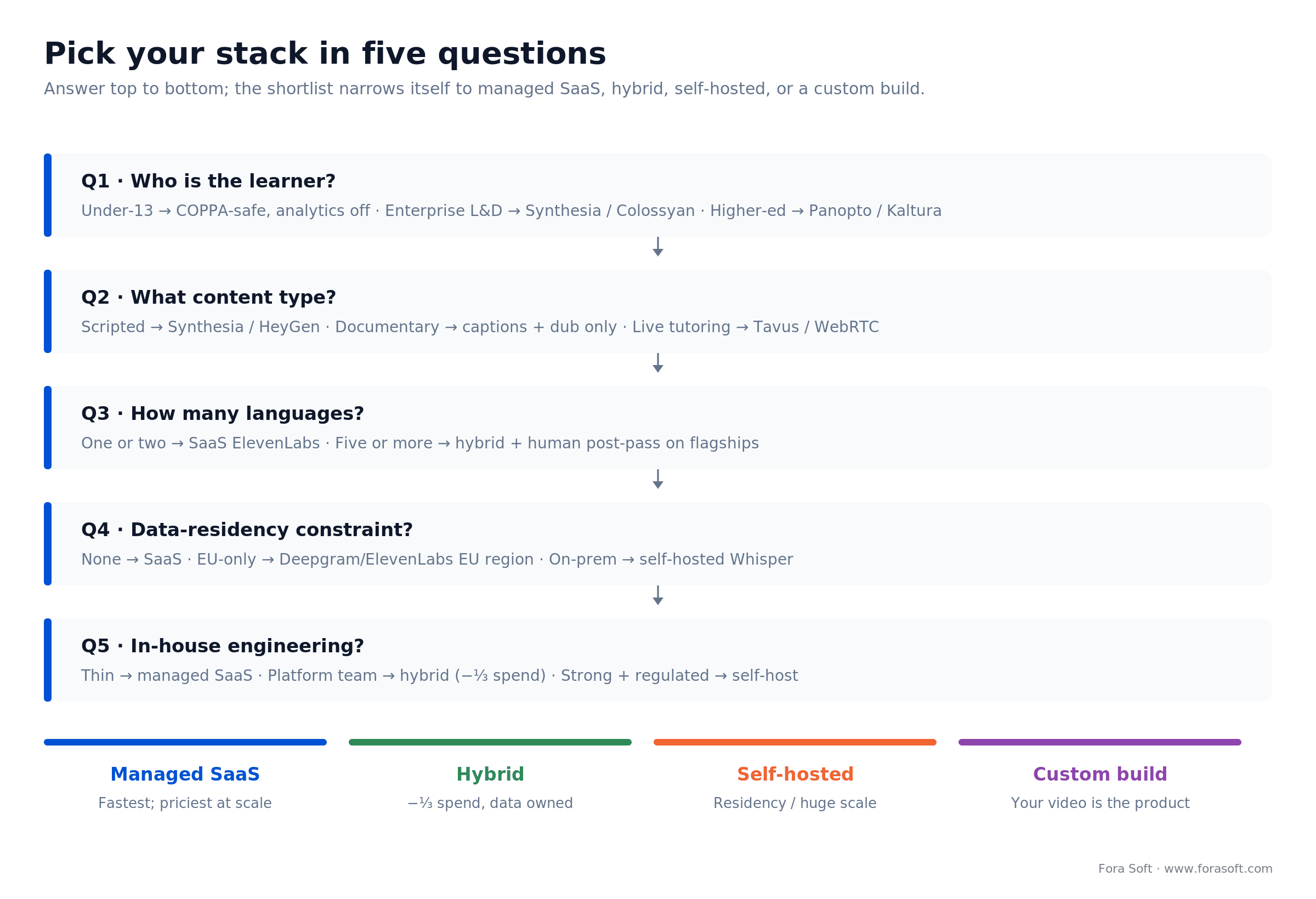
Figure 5. Five questions, one stack. Follow the branches from learner type through engineering capacity to a managed, hybrid, self-hosted, or custom recommendation.
Five pitfalls that sink edtech video rollouts
1. Shipping unreviewed quizzes. LLM-drafted questions can match human quality on paper, but factual errors climb with domain complexity, and a wrong answer key erodes trust instantly. Mitigation: a mandatory educator-review queue, plus a flagged-question-rate metric your SME team watches.
2. The avatar that feels off. When lip-sync or expression lands in the uncanny zone, learners read the content as unofficial. Mitigation: A/B an avatar segment against a live-instructor segment with your actual audience before you commit a library to it. Trust your learners’ reaction, not the vendor’s demo reel.
3. Dub drift. Auto-dub slips 200–500ms on long-form, and the ear catches it. Mitigation: segment per scene, re-align to source timestamps, spot-check one file in twenty.
4. Privacy-tripping analytics. Attention tracking on student faces trips a GDPR DPIA and COPPA’s biometric rules. Mitigation: aggregate-only analytics, no per-student biometrics, opt-in by default.
5. Caption lock-in. Some platforms store captions in a proprietary format you can’t export. Mitigation: insist on WebVTT or SRT export at contract signing, and keep your transcripts as the source of truth.
KPIs — what to measure from day one
Production economics. Cost per finished minute, cost per localised language-minute, and time from script to publish. These are the numbers that justify the whole program to a CFO.
Learner engagement. Completion rate by cohort, 7- and 30-day retention, average watch time as a share of runtime, and the drop-off points on the timeline. If completion doesn’t move, the AI is decoration.
AI quality and compliance. Transcript WER per language, educator-sampled quiz accuracy, dub drift in milliseconds — and, alongside them, FERPA/COPPA addendum coverage and DPIA sign-off status. Quality and compliance fail together, so track them together.
Build vs buy vs hybrid
Buy managed SaaS (Panopto or Kaltura, plus Synthesia and ElevenLabs) under ~50k learners with a small product team. Fastest time-to-value, highest per-minute cost at scale.
Go hybrid (Mux plus Deepgram plus a HeyGen or ElevenLabs API plus an LLM API) at 50k–500k learners with a real platform team. Saves 30–40% against pure SaaS, keeps data ownership, stays composable.
Self-host (Whisper plus open TTS plus open lip-sync plus a local LLM) when residency, very-large-scale cost, or deep customisation is the driver. Needs a dedicated engineer and a GPU budget.
Commission a custom build when the SaaS options don’t fit — live WebRTC with AI overlays, a bespoke LMS with specific workflows, or on-device AI for low-bandwidth markets. That’s the work we do; our AI integration and e-learning and virtual-classroom development teams have shipped it for platforms at five-to-eight-figure scale.
Reach for a custom build when: your differentiator lives in the video experience itself — real-time tutoring, interactive players, on-device inference for weak networks — and off-the-shelf SaaS would force your product to look like everyone else’s.
When not to adopt AI video (yet)
Honesty sells better than hype, so here’s where we’d tell you to wait. Skip AI avatars for high-stakes assessment content, where any uncanny signal reads as “unofficial.” Skip AI dubbing for languages with thin training data — output in Hindi, Swahili, or Basque still trails English, Spanish, and French noticeably. Skip in-video Q&A on anything safety-critical until you have a human-reviewed answer base behind it. And if your whole library is under 20 hours, the ROI on a full stack isn’t there yet, so use one SaaS tool and stop.
A 12-week deployment playbook
Weeks 1–2 — audit. Catalogue every hour of video, every language, every compliance surface. Interview learners about what they want the AI to do and what they’ll reject.
Weeks 3–4 — pilot. Run ten hours through the chosen stack. Measure WER, engagement, sync, and dub drift against your KPI targets before you scale a dollar further.
Weeks 5–7 — localisation. Scale dubbing and captions to the next tier of hours or languages, and stand up the educator-approval queue.
Weeks 8–9 — interactivity. Add in-video Q&A, quizzes, and chapter navigation. A/B test with one cohort.
Weeks 10–11 — compliance. FERPA, COPPA, and GDPR sign-off; a DPIA for any analytics; vendor addenda in the contracts.
Week 12 — launch and measure. Full library live, a weekly KPI dashboard, and a quarterly model refresh on the calendar.
Ready to run week 1?
Fora Soft runs this 12-week playbook for edtech platforms of every size. Book a 30-minute scoping call and we’ll come back with a concrete plan, budget, and vendor picks for your library.
FAQ
Which AI video platforms are best for e-learning in 2026?
The best AI video platforms for e-learning depend on the job. For scripted training avatars, Synthesia and HeyGen lead; for interactive tutors, Tavus and HeyGen LiveAvatar; for captions, Deepgram Nova-3 or self-hosted Whisper; for dubbing, ElevenLabs; and for all-in-one enterprise video, Panopto or Kaltura. No single platform wins every job, which is why the shortlist above is organised by task.
Which AI video platform tracks per-learner completion in an LMS?
None of the avatar tools tracks learners on its own; the export does. Synthesia (Enterprise) and Colossyan (Professional and up) export SCORM packages that report completed once a watch threshold is met, and Panopto and Kaltura report views and completion through LTI 1.3. For per-learner evidence of what was watched, use a player that sends xAPI Video Profile statements to an LRS, or cmi5 when the video must be an assignable LMS unit.
Which AI training video tools export SCORM to an LMS?
Colossyan exports SCORM on Professional (5 packages a month) and without limits on Enterprise; Synthesia exports SCORM 1.2 or 2004 packages with a completion-percentage setting on Enterprise plans only. HeyGen and Tavus integrate through embeds and APIs rather than SCORM, and Panopto and Kaltura connect to LMSs through LTI 1.3.
How much does AI cut e-learning video production cost?
Yes, for scripted, narration-heavy content: a Synthesia-plus-ElevenLabs workflow produces a 10-minute module for $200–$500 versus $2,000–$5,000 traditionally, a 75–96% cut on the module math. Synthesia’s Berlitz case study reports a 66% production-cost reduction across a full library. Documentary and lab footage benefit far less, because their cost is camera and editorial.
Synthesia vs HeyGen — which do I pick?
Synthesia for governed, scripted training in enterprise L&D, where a stock-avatar library and controls matter. HeyGen for API-first integration into a custom platform and for real-time interactive avatars via LiveAvatar. Both price entry around $29/month; the deciding factor is whether you need a real-time avatar and a public API (HeyGen) or governed SCORM exports for your LMS (Synthesia Enterprise).
How do I dub a course into other languages cheaply?
Transcribe with Deepgram Nova-3 or Whisper, translate, then voice with ElevenLabs at $0.33–$0.50 per minute of output. Dub per scene, re-align against the source timestamps to kill the 200–500ms drift, and buy a human review pass only on flagship courses. That path is what makes a global library affordable.
Can I self-host the whole stack?
Yes: Whisper large-v3 for transcription, an open TTS such as XTTS (check its Coqui model licence, which restricts commercial use), open lip-sync models for avatars, and Mistral or Llama for the LLM. Quality trails the managed leaders by roughly 10–20% and you need at least one dedicated engineer. It makes sense for regulated verticals and very-large-scale deployments where residency or per-minute cost forces it.
What’s my EU AI Act exposure for AI video?
Captions, dubbing, and avatars are minimal-risk. Adaptive assessment and admission AI are high-risk under Annex III, with obligations now applying from 2 December 2027 (deferred by the AI Omnibus, Regulation (EU) 2026/1744). The Article 50 transparency duty — disclosing AI-generated content to learners — applies from 2 August 2026 regardless of risk tier.
How do I handle COPPA with under-13 learners?
Get verifiable parental consent before any AI processes a child’s data, run no biometric or attention analytics, and secure written FERPA/COPPA addenda from every vendor. Under the amended Rule (full compliance required since 22 April 2026), biometric identifiers are personal information, so keep the AI layer to captions, summaries, and quizzes.
How reliable is AI quiz generation?
A 2025 study across 71 college courses found LLM-generated exam items can match human-authored items on psychometric quality — but accuracy drops as domain complexity rises, and hallucinated distractors do appear. Always route generated questions through an educator-review queue and publish a flagged-question-rate metric.
How long does a full rollout take?
Plan on about twelve weeks for a mid-size library: two weeks to audit, two to pilot, then localisation, interactivity, and compliance in sequence before launch. Phased rollouts beat big-bang ones — pilot on ten hours, prove the KPIs, then scale.
What to read next
Analytics
AI Video Analytics for Online Learning in 2026
Engagement, completion, and compliance — the measurement companion to this guide.
Case study
Building Scholarly: an AI Learning Platform for 15,000 Users
How a video-first learning platform scales to 2,000 concurrent students.
AI tools
10 Best AI Tools for Educational Content Creation
The full 2026 stack — text, image, video, voice, and assessment.
Avatars
AI Chatbot Video Integration: 2026 Build Guide
Wiring interactive avatar tutors into a product, end to end.
Learn
E-Learning & Corporate Training Video
The full architecture, standards, and how-to library for learning video.
Ready to ship an AI video stack learners actually use?
The buyer’s job in 2026 is to match eight distinct video jobs to the tools that win each one, cost it honestly, and stay ahead of a compliance calendar that just shifted. Captions and dubbing pay for themselves; avatars save real money on scripted content; interactive tutors are usable but latency-bound; and the EU high-risk clock now runs to December 2027, with the Article 50 transparency duty biting sooner.
Get the stack right and the savings are real and the learners notice. We’ve built video for e-learning since 2005, from BrainCert’s virtual classrooms to Scholarly’s live cohorts, and we’d be glad to run the 12-week playbook with your team, or just pressure-test the plan you already have.


The handbook · 7 volumes
Fora Soft Video Engineering Handbook
Captions, dubbing and avatars are where most edtech teams spend their first AI budget. We wrote a seven-volume handbook that covers the whole video stack, from encoding and delivery to sound and AI. Start with Volume 6 on speech recognition, TTS, lecture search and generative video, then Volume 4 on loudness, captions and accessibility, and Volume 7 on AI cost per stream-hour and EU AI Act obligations. Written by Nikolay Sapunov, CEO at Fora Soft.
Browse the handbook on Amazon →7 volumes · 9,000+ pages · Kindle & paperback
Let’s build your AI video stack
Book a 30-minute call. Free, no slides — a shared doc with specific vendor picks, a cost model, and a compliance checklist for your course library and deadline.

