

Building lessons in 2026 is no longer a six-week production. With the right AI stack, a single instructional designer drafts a standards-aligned module in a day, exports it to the LMS, and ships it to 5,000 students before lunch. The shortlist matters: 60% of US K–12 teachers used an AI tool in 2024–2025 and weekly users save 5.9 hours per week (Gallup & Walton Family Foundation, 2025) — yet Gartner forecast in July 2024 that 30% of generative AI projects would be abandoned after proof-of-concept. The teams that win pick a small, opinionated stack of AI tools for teachers and content designers — not the longest list of subscriptions.
Key takeaways
• Pick one tool per content surface, not ten. Text + image + video + voice + assessment, with one anchor LLM. Five SaaS bills, not twenty-five.
• K–12-safe wrappers beat raw ChatGPT for classrooms. MagicSchool, Diffit, Brisk and Khanmigo carry the FERPA/COPPA controls a generic chat product does not.
• Hallucination is now small but deadly in assessments. Leaderboard-best models score under 1.5% on grounded summarization (Vectara HHEM, 2026), but AI-drafted test items still fail expert review often enough that every assessment needs a human pass.
• COPPA 2026 tightens vendor duties on under-13 data. The FTC’s amended rule (full compliance 22 April 2026) keeps school-authorized consent for educational-only use, but adds mandatory security programs, retention limits, and opt-in for third-party ad disclosure.
• Custom builds win at scale. Above ~10,000 active learners or ~100k content generations a month, off-the-shelf seat costs and integration debt break the model and a custom pipeline pays back in 12–24 months.

Figure 1. One anchor LLM plus one strong tool per surface. Five SaaS bills, not twenty-five.
Why Fora Soft wrote this playbook
Fora Soft is a software development company founded in 2005; in 21 years we have shipped 250+ projects, and EdTech has been a core vertical for more than a decade. We have built award-winning learning platforms, AI course generators, virtual classrooms, tutoring marketplaces, and adaptive language apps — and we have integrated almost every AI tool listed in this guide into client products. So this is not a roundup written from press releases. It is what we have seen work, fail, and scale at Scholarly (an AWS-recognized e-learning platform handling 2,000+ concurrent students per class), BrainCert (a $3M ARR virtual classroom LMS with 4× Brandon Hall awards and 1M+ learners), and ALDA (an AI course generator that has cut faculty prep time by 60%+).
We use AI agents internally as well — our own AI integration practice ships features 30–50% faster than traditional teams, measured across our 2024–2026 deliveries. So when we recommend a tool, we have either built around it, replaced it with something better, or watched a client outgrow it. Use this guide as a buyer’s shortlist: it ranks the 10 AI tools for educational content creation that earn a place on a 2026 stack, then tells you when to stop renting and start building. When you reach that point, our build playbook for edtech teams walks the reference architecture, RAG and compliance end to end.
Need a sanity check on your AI EdTech stack?
A 30-minute call with our EdTech team. We will map your current tools to what your roadmap actually needs — and tell you where you are overspending.
The 2026 state of AI educational content, in numbers
If you are the buyer signing the renewal, the numbers below are what you are buying into. AI tools for teachers went from "early adopter curiosity" in 2023 to "mainstream classroom workflow" in 2026 — with the audit and compliance burden that entails.
| Metric | 2024 baseline | 2025–2026 | Source |
|---|---|---|---|
| US K–12 teachers using AI | ~30% | 60% | Gallup & Walton, 2025 |
| Hours saved per week, weekly users | 2.4 h | 5.9 h (~6 weeks/year) | Gallup, 2025 |
| Districts offering AI training | 26% | 74% planning by fall 2025 | RAND Corporation, 2025 |
| Hallucination, grounded summarization (best models) | ~1.5–4% | 0.6–1.5% for leaders; harder 2025 sets run >5% | Vectara HHEM leaderboard, 2026 |
| AI-drafted assessment items | every item needs review | error rate down — sampled review still mandatory | Fora Soft client QA, 2024–2026 |
| GenAI pilots abandoned after PoC | ~20% | 30% | Gartner forecast, July 2024 |
| Inference cost YoY drop | – | ~−60% | OpenAI / Anthropic / Google API price lists, 2025 vs 2026 |
Three signals stand out. First, adoption doubled in a single year. Second, hallucination on grounded tasks fell by an order of magnitude in two years, but assessment items still bite — that is the gap teachers underestimate. Third, the cost of generation is falling fast enough that the build-vs-buy line is shifting toward "build sooner" if you have meaningful scale.
The five content surfaces an AI stack must cover
A finished learning unit — say, a 20-minute module on cellular respiration for 10th grade — runs through five surfaces. Pick one strong tool per surface, then unify branding, analytics, and the LMS export path. The losing pattern is letting every teacher pick their own; brand chaos and duplicate spend follow.
1. Text. Lesson plans, scripts, reading passages, rubrics, discussion prompts, IEP drafts, parent comms. Powered by general LLMs (ChatGPT, Claude, Gemini) or K–12-safe wrappers (MagicSchool, Eduaide, Diffit, Brisk).
2. Image. Diagrams, infographics, slide backgrounds, scene illustrations. DALL·E 3, Midjourney, Adobe Firefly, Ideogram, and the integrations baked into Canva and Adobe Express.
3. Video. Avatar-led explainers, screencast narration, animated b-roll, multilingual versions of the same module. Synthesia, HeyGen, Colossyan, Runway, Pika, plus Canva’s in-platform AI video tools.
4. Voice. Narration, podcast cuts, multilingual dubbing, accessibility audio. ElevenLabs, Murf, Play.ht, Descript Overdub, OpenAI TTS, plus open models such as XTTS for self-hosting.
5. Assessment. Quizzes, formative checks, rubric grading, adaptive item pools. Quizgecko, Twee, Conker, Formative, plus the assessment AI now native to most major LMSs (Canvas, Blackboard, Schoology, D2L, Open edX).
Reach for one anchor LLM when: you have heavy text generation, deep editing, and reasoning workloads. Add specialist tools for the other four surfaces — do not try to do everything in ChatGPT.
Tool 1 — ChatGPT (OpenAI)
ChatGPT remains the default text and reasoning engine for instructional design. Its mix of long context, image input, code generation, and voice mode makes it the most flexible single tool on a 2026 stack. ChatGPT for Teachers — OpenAI’s 2026 K–12 product — locks down training-data use and adds an admin console.
Pricing & plans
Free (limited), Plus $20/mo, Pro $200/mo, Team $25–30/user/mo, Enterprise on request. ChatGPT for Teachers is free for verified US K–12 educators through the 2026–2027 school year.
Where it shines
Bulk lesson drafting, complex rubric design, multi-language adaptation, deep "explain like the student is in 7th grade" passes. The Code Interpreter sandbox handles data-literacy lessons no other tool touches.
Where it breaks
No K–12-native templates. Standards citations are a known fabrication point: unless you paste the actual framework text into the prompt, the model will invent plausible-looking standard codes — feed it the source document, then verify. Free and Plus plans still ship with consumer-grade memory that schools should disable.
Reach for ChatGPT when: you need an anchor LLM with the deepest tooling and ecosystem. Pair it with a K–12-safe wrapper for student-facing flows.
Tool 2 — Claude (Anthropic)
Claude is the LLM curriculum writers reach for when documents get long. Claude 4.6 ships with a 200,000-token context window — enough to load a full textbook chapter, the corresponding standards, and a class’s assessment history into a single prompt. The constitutional-AI training also keeps its outputs safer for younger learners than raw GPT. Once the workflow outgrows a per-teacher seat, the work becomes custom generative AI development: retrieval over your own standards, plus a review step before anything reaches a class.
Pricing & plans
Free (limited), Pro $20/mo, Max $100–200/mo, Team $25–30/user/mo, Enterprise on request. SOC 2 Type II and BAA available for districts.
Where it shines
Long-form curriculum review, scaffolded reading passages, rubric building, multi-document synthesis (lesson plan + standards + IEP + sample student work in one pass). Lower hallucination on long contexts than GPT-class peers.
Where it breaks
No native K–12 templates, no image generation in-app, fewer plugins. Less consumer brand awareness, so teachers often need a quick onboarding session.
Reach for Claude when: your unit of work is a long document — a curriculum map, a 30-page accreditation packet, or a comparative reading set.
Tool 3 — MagicSchool AI
MagicSchool is the most-adopted teacher-facing wrapper in the US: 6M+ educators signed up across 13,000+ schools in 160 countries (2026). Eighty-plus templates cover lesson planning, IEP drafts, differentiated worksheets, parent emails, and assessment generation. The K–12 compliance posture (FERPA-ready, BAA available, no third-party sharing without consent) is what makes it adoptable across a district, not just an individual classroom.
Pricing & plans
Free for individual teachers, Plus $11.99/mo ($99.96/year), Enterprise on request for districts. The free tier is unusually generous — 60+ tools available to anyone with a teacher email.
Where it shines
Speed-of-onboarding for non-technical teachers, FERPA/COPPA hygiene, and breadth of templates. The "Raina" co-pilot makes lesson iteration feel like a chat with an instructional coach.
Where it breaks
Text-only surface — you still need a video and image tool. Standards-alignment claims should be spot-checked against your state’s actual frameworks — LLM-generated standards citations remain a fabrication point across every tool in this list, wrappers included.
Reach for MagicSchool when: you are rolling AI to non-technical classroom teachers and need DPAs, audit logs, and templates on day one.
Tool 4 — Diffit
Diffit is the literacy-differentiation specialist. Paste a passage or upload a PDF and it produces leveled versions for every grade band, plus comprehension questions, vocabulary lists, and graphic organizers in one click. For ELA and reading-intervention teams, this saves hours per week per teacher.
Pricing & plans
Free for individuals, Premium $14.99/mo, school and district licenses on request. Google Classroom integration ships in all tiers.
Where it shines
Reading-level adjustment from any source — a Wikipedia article, a news story, a PDF chapter, even an image of a worksheet via OCR. Output formats land cleanly in Google Docs and Schoology.
Where it breaks
Single-purpose tool. Outside literacy and ELA, you will need other tools for math, science, and assessment generation.
Reach for Diffit when: reading differentiation is the bottleneck and you want one cheap tool that turns any text into a tier set.
Tool 5 — Brisk Teaching
Brisk is the Chrome-extension AI that lives where teachers already work: Google Docs, Slides, Classroom, YouTube. It does not ask anyone to switch context. Highlight a paragraph, click a button, and Brisk drafts a quiz, leaves comments on student work, or rewrites a passage to a target reading level — all without leaving the document.
Pricing & plans
Free with 20+ tools, Premium $99.99/year, school and district pricing negotiated. Onboarding is one Chrome install — no SSO project, no rollout meeting.
Where it shines
Adoption velocity. Teachers who would never log into a new SaaS will install a Chrome extension. Brisk inherits Google Workspace’s FERPA posture, which simplifies the privacy review.
Where it breaks
Browser-only. Outside the Google ecosystem (think Microsoft 365, Schoology, Canvas) the friction is back. The premium tier is comparatively shallow next to MagicSchool’s 80+ templates.
Reach for Brisk when: your school runs Google Workspace and you want zero-friction AI without any new logins or admin work.
Tool 6 — Khanmigo (Khan Academy)
Khanmigo is the only major AI in this list with a non-profit pedigree and a Socratic-method core. Built on Khan Academy’s standards-aligned content library, it is built to tutor rather than to answer — it asks questions instead of handing out solutions. For schools that worry about students "shortcutting" with AI, this is the safest student-facing option.
Pricing & plans
Free for verified teachers, learner accounts $4/mo or $44/year, Khanmigo district licensing $15/student/year (250-seat minimum, 2026); note the $10/student Khan Academy Districts tier does not include Khanmigo. Khan Academy manages the data; PII never leaves their environment in school deployments.
Where it shines
Student-facing tutoring with audit-trail confidence. Best-in-class for math K–12. Free for teachers makes the case to your finance office trivial.
Where it breaks
Tutoring-first. Content creation features are basic; if you need to author original material at scale Khanmigo is not the right anchor.
Reach for Khanmigo when: the deliverable is student-facing tutoring (especially math) and your stakeholders want a recognized brand and pedagogy story.
Tool 7 — Synthesia
Synthesia turns a script into a polished avatar-led video in minutes. With 140+ languages and 230+ stock avatars, it is the workhorse for L&D departments and EdTech publishers that need to ship the same module in five regions without flying in voice talent. Output exports cleanly to SCORM, xAPI, and most LMSs.
Pricing & plans
Starter $18/mo (120 min/year), Creator $64/mo (360 min/year), Enterprise on request. Custom-cloned avatars are gated to the higher tiers and require talent consent.
Where it shines
Multilingual video at scale, brand consistency, fast iteration on scripts. The avatar quality crossed the uncanny-valley threshold in the late 2024 rebuild and now reads as professionally produced.
Where it breaks
Per-minute consumption. A district running a 4-hour onboarding pathway will burn the Creator quota in a quarter; budget accordingly. Avatars still feel "presenter" rather than "peer," which can flatten engagement for younger audiences.
Reach for Synthesia when: your roadmap demands the same training video in 8–30 languages and you cannot afford a voice studio per locale.
Tool 8 — HeyGen
HeyGen is the closest direct competitor to Synthesia, with a stronger emphasis on custom-avatar realism and live-style video translation. Avatar IV (2026) lifts lip-sync quality enough that side-by-side blind tests put HeyGen ahead on naturalism for many script types. The platform is the favored choice when your training videos rely on a recognizable face — an actual SME or executive.
Pricing & plans
Free (3 videos/month, watermarked), Creator $29/mo, Pro $99/mo, Business $149/mo, Enterprise custom. Credits, not minutes, are the consumption unit; Avatar IV burns 20 credits per minute.
Where it shines
Custom-avatar quality, real-time translation with mouth re-sync, and 4K output. The free tier is the easiest way to prototype a video lesson before any procurement conversation.
Where it breaks
Credit math is opaque; teams over-spend in the first month until they tune script length. Education-specific compliance (FERPA, district DPAs) lags Synthesia — verify before purchasing for K–12.
Reach for HeyGen when: the brand asset is a real spokesperson and you want their cloned avatar narrating in 30 languages without re-recording.
Tool 9 — ElevenLabs
ElevenLabs sets the bar on synthetic voice. 70+ languages (Eleven v3, 2025), controllable emotion, voice cloning with consent, and an API teams actually like working with. For accessibility audio, multilingual narration, and podcast-style learning, no competitor is close on naturalism. Our team uses it constantly — see our voice library comparison for the side-by-side.
Pricing & plans
Free (10k credits/mo), Starter $5/mo, Creator $22/mo ($18/mo billed annually; the advertised $11 is a first-month promo), Pro and Scale $99–330/mo, Enterprise on request. Voice cloning starts at the Creator tier.
Where it shines
Naturalness, language coverage, and a clean SDK for embedding into custom EdTech products. We routinely use it via our custom text-to-speech practice on production builds.
Where it breaks
Audio-only — pair it with a video tool for full lessons. Voice-cloning consent is your responsibility; do not feed in a teacher’s recordings without written agreement.
Reach for ElevenLabs when: narration quality is on the critical path — accessibility audio, premium podcast formats, multilingual voiceover.
Tool 10 — Canva AI (Magic Studio)
Canva is where most teachers already make slides — and the Magic Studio AI suite is now baked into every workflow. Magic Write drafts copy, Magic Design builds whole decks from a prompt, Magic Edit and Magic Eraser handle image clean-up, and Magic Switch translates a deck into a one-pager, an Instagram Reel, or a multilingual export in seconds.
Pricing & plans
Free (limited Magic features), Pro $14.99/mo, Teams $13.50/user/mo (3-seat min), Canva for Education free for verified K–12 teachers and students.
Where it shines
Brand kits, templates, and "non-designer" friendliness. Education tier is generous — most schools can run premium for free. Magic Switch is the single best feature on this list for repurposing a single asset across formats.
Where it breaks
Outputs read as Canva-templated when you do not customize. Free-tier AI quotas reset slowly. For deeply original visual systems, an art director with Adobe Express and Firefly will outperform Canva.
Reach for Canva when: your team includes non-designers and you want a single tool that handles slides, infographics, social, and short video.
The 10 tools side by side — comparison matrix
A scannable comparison of the 10 best AI tools for educational content creation, built for procurement reviews. Pricing is the published 2026 rate; verify before purchase as model providers move fast.

Figure 2. Surface coverage across the 10 tools. A blank cell means another tool — and another bill — on that surface.
| Tool | Surface | Free tier | Paid entry | K–12 ready | Best for |
|---|---|---|---|---|---|
| ChatGPT | Text + image + voice | Yes (limited) | $20/mo Plus | With Teachers plan | Anchor LLM |
| Claude | Text + analysis | Yes (limited) | $20/mo Pro | SOC 2, BAA | Long documents |
| MagicSchool | Text templates | Yes (60+ tools) | $11.99/mo | Native | District rollouts |
| Diffit | Text leveling | Yes | $14.99/mo | Yes | Reading differentiation |
| Brisk Teaching | Text in-browser | Yes (20+ tools) | $99.99/yr | Via Google Workspace | Frictionless adoption |
| Khanmigo | Tutoring | Free for teachers | $4/mo learner | Native | Student-facing math |
| Synthesia | Avatar video | No | $18/mo Starter | BAA available | Multilingual training video |
| HeyGen | Avatar video | Yes (3/mo) | $29/mo Creator | Verify per district | Custom-avatar realism |
| ElevenLabs | Voice / audio | Yes (10k credits) | $5/mo Starter | Yes (school controls) | Narration, accessibility audio |
| Canva (Magic Studio) | Image + slides + video | Yes (full for educators) | $14.99/mo Pro | Education tier | All-in-one design |
Want a one-page recommendation for your stack?
Send us your scale, audience, and compliance constraints. We will return a tool-by-tool shortlist and a build-vs-buy verdict in 48 hours — free.
Which AI tools fit which teachers — grade band and subject map
Start from the classroom, not the tool list: pick the tool that removes your grade band’s biggest time sink first, then add one specialist. The map below is how we translate the 10 tools above into a first purchase for each teacher profile.
| Teacher profile | Biggest time sink | Pick first | Add next |
|---|---|---|---|
| K–5 classroom | Differentiated reading sets, parent comms | MagicSchool (free tier) | Diffit for leveled texts |
| 6–8 ELA / humanities | Leveling one source for five reading bands | Diffit | Brisk for in-Doc feedback |
| 9–12 STEM | Problem sets, worked examples, data-literacy labs | ChatGPT or Claude (school workspace) | Khanmigo for student tutoring |
| Special education | IEP drafts and accommodation variants | MagicSchool (IEP tools + DPA) | Diffit for accessible texts |
| Google Workspace school | Context-switching between tools | Brisk (Chrome extension) | Canva for Education for visuals |
| Higher-ed / corporate L&D | Course production and localization | Synthesia or HeyGen | ElevenLabs for narration |
Notable alternatives beyond the top 10. Eduaide builds lesson resources from your standards with real learning-science grounding; Curipod turns a topic into an interactive slide lesson; NotebookLM grounds AI answers in your own vetted sources and generates podcast-style summaries; Snorkl grades spoken and hand-drawn responses; TeacherServer (University of South Florida) offers 1,000+ free generators with no subscription; Quizlet, Twee, and Formative cover the assessment long tail. None of them replaces an anchor LLM — they earn a slot when one specific workflow dominates your week.
Reach for this map when: a teacher or department asks “what should I actually buy first?” — one primary tool per profile, one specialist, nothing else until both are used weekly.
Three reference stacks that actually ship
Most buyers do not need ten tools. They need three to five that combine into a coherent pipeline. Below are three stacks we have seen work in production — one for individual teachers, one for districts, one for higher-ed and corporate L&D.
Stack A — Classroom teacher (cost-conscious)
Brisk + Canva for Education + Khanmigo + ChatGPT free. Total cost: $0–$15/month. Brisk drafts and grades inside Google Docs, Canva handles slides and visuals, Khanmigo runs student-facing tutoring, ChatGPT covers the long-tail rewrites. Time saved: 4–6 hours per week per teacher.
Stack B — District / curriculum publisher
MagicSchool Enterprise + Claude Team + Synthesia + Diffit + Canva Teams. $50–$100 per teacher per year for district seats, plus ~$300–$400/year per curriculum editor for the Claude Team seats — most teachers do not need one. MagicSchool generates standards-aligned drafts at volume, Claude does the deep editorial pass, Synthesia ships multilingual video, Diffit handles literacy differentiation, Canva covers the rest. Adds a dedicated instructional designer for QA.
Stack C — Higher-ed / corporate L&D
ChatGPT Pro + HeyGen Pro + ElevenLabs Creator + Canva Pro + Adobe Express. ~$350/month per producer. ChatGPT writes the script, HeyGen renders an avatar narrating in 30 languages, ElevenLabs adds custom voice tracks, Canva and Adobe handle the supporting deck and certificates. Time-to-first-course drops from 12 weeks to 4–6.
Reach for Stack A when: you are a single teacher or a 30-person school. Stack B when you are licensing across 200+ teachers. Stack C when polish, brand, and global reach matter more than per-seat cost.
The compliance layer — FERPA, COPPA 2026, GDPR
The single biggest 2026 change is the COPPA refresh (FTC, 16 CFR Part 312) — effective 23 June 2025 with full vendor compliance required by 22 April 2026. The amendments kept school-authorized consent: schools may still authorize collection in lieu of parents when data is used solely for educational purposes. What changed is what vendors must do with that data. Here are the rules that drive procurement decisions.
1. FERPA. Governs education records held by federally-funded institutions. The school owns the responsibility — vendors do not get FERPA coverage automatically. Confirm a signed Data Processing Agreement (DPA) and explicit purpose limitation in the vendor contract.
2. COPPA (compliance since 22 April 2026). The amended rule keeps school authorization for education-only use and adds: a written children’s data security program, hard retention limits (no indefinite holding of student data), biometric identifiers in the PII definition, and separate verifiable opt-in before children’s data is disclosed to third parties for targeted advertising. Contracts signed before 2025 need re-papering against the new duties.
3. State student privacy laws. 20+ US states now have student privacy statutes — California (SOPIPA, AB 1584), Virginia, Colorado, Connecticut. Vendors must comply with the broadest standard you operate under, not the narrowest.
4. GDPR & UK DPA. EU and UK schools demand data residency in-region, data subject access rights, and the right to erasure. Verify the vendor’s sub-processors and where they store and train.
5. Training-data leakage. If a vendor uses customer prompts to train future models, student essays and IEP fragments enter the training set. Once there, "unlearning" is effectively impossible. Default-disable training-data sharing in every account before rollout.
Reach for an external compliance review when: you serve under-13s, store data in more than one jurisdiction, or have not refreshed your DPAs since the 2025 COPPA changes.
A decision framework — pick your stack in five questions
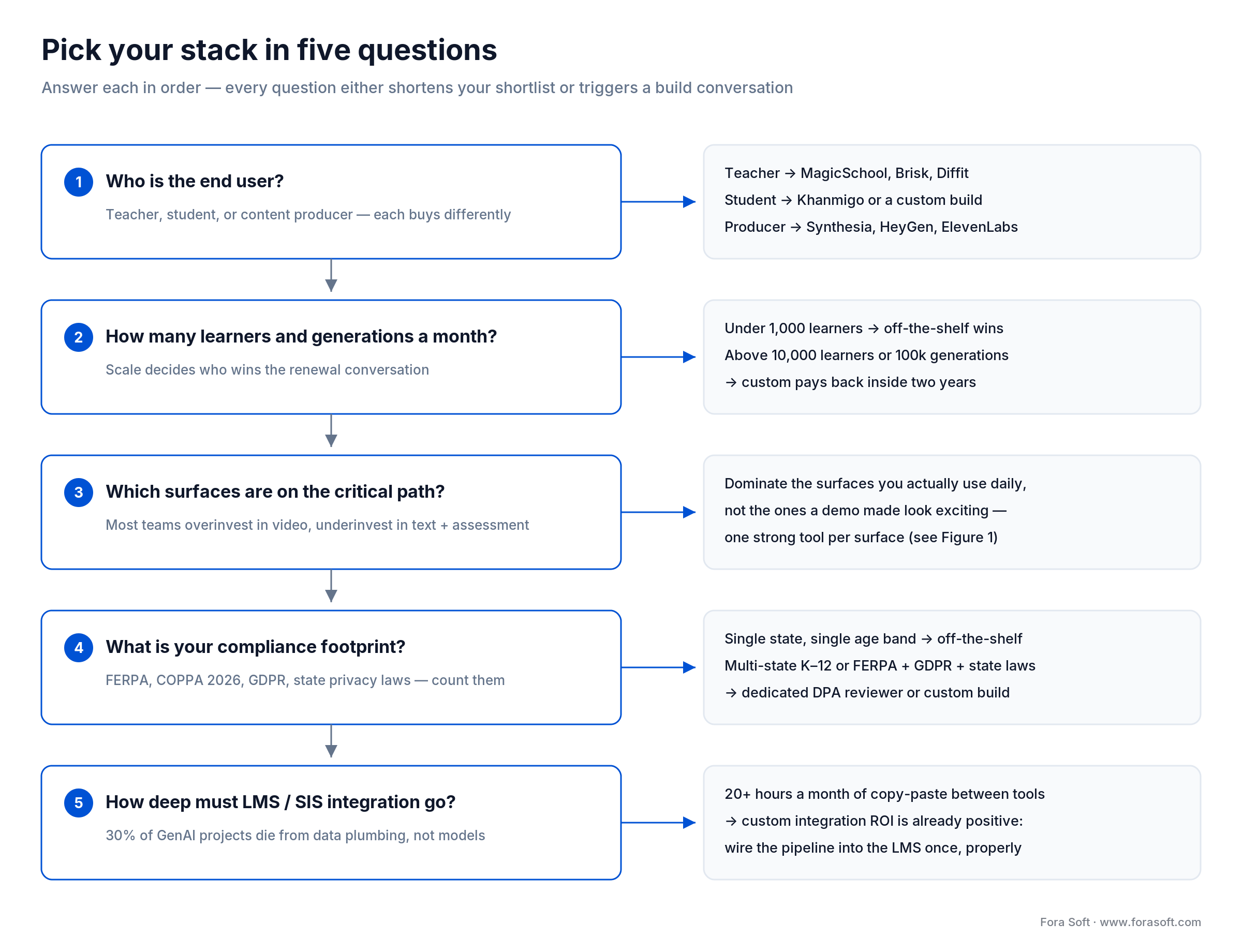
Figure 3. The five-question ladder. Every answer shortens the shortlist or triggers a build conversation.
Q1. Who is the end user — teacher, student, or producer? Teacher-facing buys (MagicSchool, Brisk, Diffit) optimize for non-technical onboarding. Student-facing buys (Khanmigo, custom builds) optimize for safety and tutoring affordances. Producer-facing buys (Synthesia, HeyGen, ElevenLabs) optimize for output polish.
Q2. How many learners and content units per month? Below 1,000 learners or 5,000 generations a month, off-the-shelf wins. Above 10,000 learners or 100,000 generations a month, custom pays back inside two years.
Q3. Which content surfaces are on the critical path? Be honest. Most teams overinvest in video and underinvest in text + assessment. The right answer is to dominate the surfaces you actually use, not collect tools you might.
Q4. What is your compliance footprint? Single state, single age band? Off-the-shelf works. Multi-state K–12, multi-jurisdiction, FERPA + GDPR + state laws? Add a dedicated DPA reviewer or a custom build.
Q5. What is your integration depth into LMS, SIS, and assessment? If your team wastes 20+ hours a month copy-pasting between tools, the ROI on a custom integration is already there. 30% of GenAI projects die from poor data plumbing — not poor models.
Five pitfalls that derail AI content rollouts
1. Output drift and model collapse. Teams ship 100+ AI-generated items per day with no editorial sampling. Six months in, content quality declines visibly, support tickets climb, and trust erodes. Fix: human editorial pass on a stratified random sample, weekly.
2. Workflow integration debt. A district buys Synthesia for video; teachers still upload to YouTube manually, caption in Amara, link in Blackboard. The "AI tool" actually slows them down. Fix: map every content surface to its destination LMS field before procurement.
3. Hallucinations in high-stakes content. A science teacher generates an MCQ on photosynthesis; one option states "chlorophyll absorbs yellow light." Wrong. Students learn the wrong fact. Fix: subject-matter-expert review on every assessment, every standards-aligned plan, every IEP draft.
4. Equity and access gaps. Well-funded school adopts the premium stack, neighbouring under-resourced school cannot afford a single seat. Outcome divergence widens. Fix: choose vendors with generous free K–12 tiers (MagicSchool, Khanmigo, Canva for Education) and prioritize them in district rollouts.
5. Consent and data creep. A vendor updates ToS mid-year to allow research access to user prompts; the district has not re-papered consent. A parent files a COPPA complaint. Fix: annual DPA review, opt-in re-confirmation each school year, vendor change-of-terms alerts.
KPIs to measure before and after rollout
Quality KPIs. Editorial-pass error rate (target < 5% on text, < 2% on assessments), standards-alignment fidelity (target > 95% verified against actual frameworks), reading-level accuracy (target ± 0.5 grade levels on Flesch–Kincaid).
Business KPIs. Time saved per teacher per week (target > 4 hours), content units generated per producer per week (target 3× pre-rollout), tool cost per learner per year (target < $30 across the full stack).
Reliability KPIs. Uptime of student-facing AI components (target > 99.5%), DPA-violation incidents per year (target zero), vendor change-of-terms alerts triaged within 5 business days (target 100%).
Build vs. buy — when off-the-shelf breaks
Off-the-shelf wins until it doesn’t. The seven trigger conditions below are the ones we see drive the build conversation in 2026 client calls. Hit two of these and you should be evaluating a custom e-learning build; hit four and you are already losing money to SaaS. For the platform-side fundamentals behind that decision, our free e-learning platform development course walks through architecture, LMS integration, and cost models in depth.

Figure 4. The crossover: per-seat SaaS grows with every seat forever; a custom pipeline scales with usage.
1. Scale economics. 10,000+ active learners or 100,000+ generations per month. Per-seat or per-credit pricing crosses 40% of gross margin. Custom inference (a fine-tuned open-weights model on your own infra) pays back in 12–24 months.
2. Proprietary IP and brand. Your curriculum is a competitive moat (test prep, certification, proprietary pedagogy). Generic AI outputs dilute the brand and leak IP into another vendor’s training data.
3. LMS / SIS / assessment integration depth. You are spending 20+ labor hours a month copy-pasting between tools. 30% of GenAI projects fail on data plumbing, not modeling. Custom integration ROI is already positive.
4. Multi-jurisdiction compliance. Multiple US states + GDPR + state-of-the-art DPA review. Off-the-shelf vendors will not redline contracts; custom lets you author the terms.
5. Custom pedagogy and adaptive logic. Mastery progression, competency-based pathways, your own rubric. Off-the-shelf assessment tools cannot enforce non-standard logic without ugly workarounds.
6. Real-time content iteration. 50+ content variants per week, A/B testing, branching learning paths. Off-the-shelf versioning is clunky; you cannot trace which variant drove engagement.
7. Data sovereignty. EU schools, government clients, defense or healthcare contracts. Vendor hosts data outside your jurisdiction, full stop. Custom builds let you self-host or use sovereign-cloud.
Reach for a custom build when: two or more triggers above are already true and the SaaS bill is climbing faster than user growth.
Mini case — what we shipped on Scholarly, BrainCert, and ALDA
Scholarly needed an LMS that scaled to 2,000+ concurrent students per virtual classroom with adaptive content routing. Off-the-shelf LMSs maxed out at 200 streams per room. We built a WebRTC-based platform from scratch with an AI-powered content recommendation layer; the project later won AWS recognition as one of APAC’s most innovative EdTech startups.
BrainCert grew from a single virtual classroom into a $3M ARR LMS handling 500M+ classroom minutes and 1M+ learners across enterprise customers. Each module is now 4× Brandon Hall award-winning. The AI-content backbone — quiz generation, transcripts, multilingual subtitles — is custom-built on top of foundation models from OpenAI and Anthropic, integrated with the proprietary virtual-classroom layer.
ALDA is the closest analogue to "what would a custom MagicSchool look like." We built an AI course-generator for 500K+ students that has reduced faculty prep time by 60%+, with rubrics aligned to each university’s competency framework rather than a single national standard. ALDA proves the build-vs-buy point in production: you can match an off-the-shelf tool’s breadth and beat it on alignment fidelity once you control the pipeline.
The module flow we ship on ALDA — a worked example
Here is the exact production flow behind ALDA’s 60%+ prep-time reduction, for one 20-minute module. Step 1: the instructor uploads a syllabus section and 1–3 source PDFs. Step 2: the pipeline drafts an outline mapped to the university’s own competency framework — the instructor approves or reorders it in about two minutes. Step 3: the system generates the lesson text, a quiz draft, and per-item source references from the uploaded documents only, so every claim is traceable. Step 4: the instructor reviews flagged low-confidence items — the review pass, not the generation, is where the remaining minutes go.
The arithmetic that sells it internally: a module that took a faculty member ~3 hours to draft by hand comes back for review in minutes, and the human pass takes 45–60 minutes. That is 3 hours → ~1 hour per module — the 60%+ figure is not a slogan, it is the ratio of those two numbers.
Want a similar before/after assessment for your own platform? Book a 30-minute call — we will benchmark your current tools and tell you where the savings live.
When NOT to add another AI tool
There are three situations where adding another AI tool is the wrong move. Naming them is part of the trust we owe you.
1. The bottleneck is editorial, not generation. If your team already drafts faster than reviewers can approve, more AI generation makes the queue worse. Invest in editorial workflow first.
2. The compliance review is unfinished. Adding a tool whose DPA is still under negotiation is how districts end up in the local newspaper. Finish the paperwork, then roll out.
3. Three or more existing tools have low adoption. If teachers are already ignoring half your stack, the answer is not a tenth tool. Audit, consolidate, train.
FAQ
What is the single best AI tool for educational content creation in 2026?
There is no single best AI tool for educational content creation — the right answer depends on the surface. For text and reasoning, ChatGPT or Claude. For K–12-safe templates, MagicSchool. For multilingual video, Synthesia. The strongest 2026 stacks combine three to five tools, not one.
Is ChatGPT safe for K–12 use?
The standard ChatGPT consumer tier is not designed for K–12. ChatGPT for Teachers (free for verified US K–12 educators) and ChatGPT Edu (paid, district-licensed) ship with admin controls, training-data opt-out, and audit logs. Use those, not the consumer product.
How accurate are AI-generated quizzes and assessments?
Leaderboard-best models hallucinate 0.6–1.5% on grounded summarization (Vectara HHEM, 2026), but generated assessment items fail expert review more often, with errors clustered on subtle distractor design. Treat every AI-generated assessment as a draft — subject-matter-expert review is non-negotiable.
What changes does the 2026 COPPA refresh introduce?
The amended COPPA rule took effect 23 June 2025, with full compliance required by 22 April 2026. Schools may still authorize data collection in lieu of parental consent when a service is used solely for educational purposes. What changed for vendors: a mandatory written security program for children’s data, data-retention limits, biometrics added to personal information, and separate verifiable opt-in before third-party disclosure for advertising. Re-check vendor DPAs against these duties.
When does it make sense to build a custom AI EdTech tool instead of buying?
When two or more of these are true: 10,000+ active learners, 100,000+ monthly generations, proprietary curriculum or pedagogy, multi-jurisdiction compliance, deep LMS/SIS integration debt, or a need to host data in a specific region. With our agent-engineering practice, custom builds typically pay back inside 12–24 months at this scale.
How much does a 2026 AI EdTech stack cost in practice?
Per-teacher annual cost ranges from $0 (free K–12 tiers stitched together) to roughly $300–$500 for a fully premium stack with video and voice. District deals usually land at $50–$100 per teacher per year. Custom builds shift the cost line to engineering plus inference, which becomes cheaper than per-seat fees above ~10,000 learners.
Which AI video tool is better for education — Synthesia or HeyGen?
Synthesia leads on K–12 compliance posture (BAAs, education-specific terms, mature DPA language). HeyGen leads on custom-avatar realism and live translation. For institutional rollouts, Synthesia. For brand-led L&D where a real spokesperson narrates in many languages, HeyGen.
Can AI tools replace teachers or instructional designers?
No, and the data confirms it. The teams that succeed treat AI as a force-multiplier — teachers save 5–6 hours a week on routine drafting and spend that time on coaching, intervention, and edge cases AI is not equipped for. Districts that try to fully automate content creation hit the 30% post-pilot abandonment rate.
What to read next
EdTech
AI Lesson Plan Generator: A District Buyer’s Guide
The full 2026 buyer’s guide for procurement teams comparing district-grade lesson plan generators.
E-Learning Video
AI for E-Learning Video Tools: Cut Costs 60%
Where AI compresses video production cost without breaking pedagogy — with real numbers from shipped projects.
Personalization
AI-Crafted Personalized Learning Materials — The 3-Layer Stack
How to build adaptive content that actually responds to each learner without doubling SaaS spend.
Tutoring
Intelligent Tutoring Systems for Educators
Behind the smartest student-facing AI in 2026 — what works, what fails, and what to ship next.
Voice AI
6 Best Synthetic Voice Libraries for App Development
Side-by-side ElevenLabs, OpenAI, Google, Polly, Azure, and Cartesia — the 2026 voice-AI tool deep-dive.
Ready to ship a 2026-ready AI EdTech stack?
The 10 tools above are the strongest off-the-shelf AI tools for teachers, instructional designers, and EdTech teams on a 2026 stack — one anchor LLM, one K–12-safe wrapper, one video tool, one voice tool, one design tool, plus the literacy and tutoring specialists you need. Most teams should not own more than five at once.
Custom builds become the right call once scale, IP, integration depth, or compliance pull two or more of the trigger conditions above. With AI agents speeding our delivery, those custom pipelines pay back faster than the SaaS bill they replace — that is what we shipped on Scholarly, BrainCert, and ALDA, and what we can scope for you in a 30-minute call.
Let’s scope your AI EdTech build — or your stack rationalization
A 30-minute call with our EdTech team. Bring your scale numbers, current tools, and biggest content bottleneck — we will leave you with a clear next step, on us.

