

An AI lesson plan generator can hand a teacher back nearly six hours a week. It can also quietly fail a privacy audit at month nine and take the whole rollout down with it. Between 2023 and 2026 these tools went from ChatGPT wrappers to district platforms, and the gap between the districts that got real value and the ones that burned budget comes down to a few decisions made before signing. Fora Soft has shipped education software since 2005. This buyer’s guide is the short version of what we tell districts in the first two hours of a scoping call: the 2026 vendor tiers, a worked cost model, a compliance map, and a five-question framework you can use on Monday.
Key takeaways
• The market split into four tiers. Teacher count and LMS lock-in pick the tier — free tools, LMS-embedded platforms, governance layers, or custom RAG.
• The value lives in Layer 4 and Layer 5. Personalization on SIS data plus real LMS delivery. Weak Layer 4 is why most SaaS adoption stalls around 45% weekly active teachers.
• Custom RAG breaks even near 2,500 teachers. Below that, SaaS wins on total cost of ownership. A 1,200-teacher district spends roughly $176k–$491k year one depending on the stack.
• Coaching is 10% of the budget and most of the outcome. Tools without job-embedded coaching move teacher-time numbers but not much else.
• FERPA, state privacy law, and the EU AI Act are the hard constraints. Education AI is high-risk under the EU AI Act, with the compliance deadline now 2 December 2027.
Why Fora Soft wrote this playbook
We have built education software since 2005 — synchronous classroom video, adaptive assessment engines, speech-to-text tutoring, and curriculum-aware recommendation systems for K–12 and higher-ed clients across North America, Europe, and the Gulf. Across 250+ shipped projects we have integrated with Google Classroom, Canvas, Schoology, Moodle, and half a dozen proprietary SIS and LMS stacks. One of them, Scholarly, is an AI learning platform we took to 15,000 users; we wrote up the build in our AI learning platform playbook.
We also run the procurement side: we evaluate vendors, pressure-test their privacy claims, negotiate, and ship the glue code that makes a commercial lesson-plan generator usable inside a district’s security perimeter. This guide is opinionated where the evidence allows and neutral where it doesn’t. If you want a bespoke evaluation, book a call — we usually save districts six to nine months of rollout time.
Choosing between four vendor tiers?
We’ll map your teacher count, LMS, and privacy posture to a two-vendor shortlist and a rough budget — in one call.
What an AI lesson plan generator actually is in 2026
An AI lesson plan generator is software that turns a teacher’s intent (grade, subject, standard, class profile) into a standards-aligned plan with activities, materials, and assessments, ready to push into the LMS. That’s the 2026 definition. In 2023 the phrase meant a prompt template that pasted Common Core standards into ChatGPT. The bar has moved. A serious tool now has to do five things, and every vendor question should come back to them.
1. Standards alignment. The tool maps every objective, activity, and assessment item to a specific standard — CCSS, NGSS, TEKS, IB, Cambridge, national curricula — and shows the mapping as evidence the teacher can inspect and override. Keyword pattern-matching is not alignment; alignment needs a structured taxonomy.
2. Differentiation. One plan, three or four versions: scaffolded, on-level, extension, and EL- or IEP-adapted. The differentiation has to respect IEP and 504 accommodations already on file, not ask the teacher to re-enter them every time.
3. Resource grounding. The plan cites real readings, videos, problem sets, and assessments — from the district’s licensed catalog (Savvas, McGraw Hill, HMH, Pearson, OER Commons) or trusted open sources. Hallucinated URLs, fabricated worksheets, and made-up quotes are an immediate disqualification.
4. LMS and SIS integration. Generated plans push into Google Classroom, Canvas, or Schoology with assignments pre-built and synced to the gradebook — not copy-pasted by hand.
5. Privacy and governance. Student data stays inside the district’s FERPA and state perimeter. That means SOC 2 Type II, a signed DPA, no training on student or teacher prompts, and regional data residency when the district operates in California, Illinois, New York, or the EU.
Our rule of thumb: if a vendor can’t answer all five questions in a single sales call, cut it from the shortlist. A tool that scores four out of five but fails on privacy will quietly fail audit and cost more to rip out than it ever saved.
Market snapshot — adoption and time saved
Teacher adoption is now mainstream, and the time-savings are real and measured. The 2025 Gallup and Walton Family Foundation survey, fielded through the RAND American Teacher Panel with 2,232 U.S. public-school teachers, found that 60% used an AI tool during the 2024–25 school year and 32% use one weekly. Teachers who use AI weekly report saving an average of 5.9 hours per week — about six weeks over a school year. Across nine common tasks, 60–84% of teachers said AI saved them time; 7% or fewer said it cost them time.
Lesson planning is the top time-saving use, alongside grading support, generating materials, and parent communication. So the demand signal is settled. The open question for a district isn’t whether teachers will use AI — a third already do, weekly, on their own accounts — it’s whether the district will channel that use into approved, private, standards-aligned tools or leave it on consumer ChatGPT accounts that break FERPA.
Here’s the catch that survey numbers hide: the tool matters less than the implementation around it. Districts that pair AI generation with job-embedded coaching move student-outcome numbers. Districts that drop in a tool and walk away move only the time-saved number. We see that pattern in every engagement. For a listicle-style tour of the individual tools rather than the district lens, our seven best AI lesson-planning tools comparison goes tool by tool.
Free vs paid — when a district should actually pay
A district should pay the moment it needs SSO, a signed DPA, admin visibility, or SIS integration — which is almost always above 100 teachers. Below that, the free tiers of MagicSchool, Diffit, and Khanmigo genuinely cover individual teachers, and paying buys little. The free-vs-paid line is not about generation quality; the free tools generate fine. It’s about governance.
Free consumer accounts create three problems at district scale: no single sign-on (teachers manage their own logins), no data-processing agreement (so FERPA exposure lands on the district), and no admin dashboard (so nobody can prove to the board what students are exposed to). Paid district SKUs exist to solve exactly those three, not to make the lesson plans any better. That’s why the honest advice for a 60-teacher charter is “stay free,” and for a 1,200-teacher district is “pay, and consolidate.”
Stay on free tiers when: you’re under ~100 teachers, teachers use their own accounts, and no student PII touches the tool. Pay the moment you need SSO, a DPA, or IEP-aware differentiation.
The 2026 vendor market — four tiers
We group the 2026 market into four tiers, ordered roughly by price and by how much district IT has to get involved. Figure 1 is the map we sketch on the whiteboard in the first call.
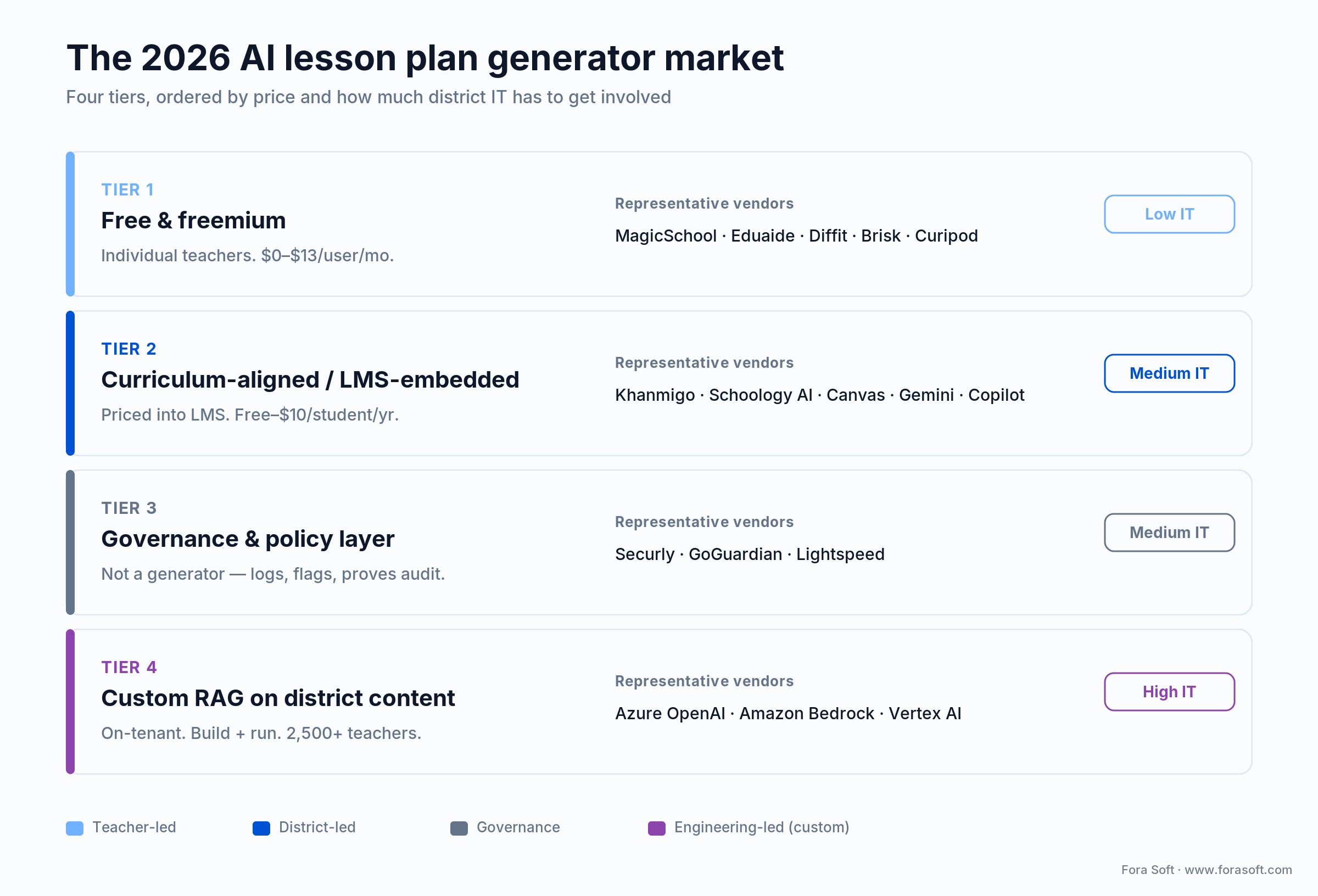
Figure 1. The four tiers, from teacher-led free tools to engineering-led custom builds. Teacher count and LMS lock-in decide which row you live in.
Tier 1 — Free and freemium consumer tools
MagicSchool AI. The market leader by teacher count — over 6 million educators signed up across 13,000+ schools and 160 countries as of 2026. Sixty-plus tools spanning lesson plans, rubrics, IEP drafting, and parent-email translation. Free for individual teachers; the Plus tier runs $8.33 per user per month billed annually ($12.99 monthly). The Enterprise (district) SKU is custom-priced and adds SSO through Google, Microsoft, Clever, and ClassLink, LMS integration with Canvas, Schoology, and Google Classroom, an admin dashboard, and content moderation. MagicSchool raised a $45M Series B led by Valor Equity Partners in February 2025. Where it wins: breadth and district-readiness. Where it breaks: deep SIS personalization still needs glue code.
Eduaide.ai. MagicSchool’s closest competitor — over a hundred generators, content-first, strong on assessment-item generation. Cheaper per seat; weaker on SIS integration. Ranks near the top of the “ai lesson plan generator” SERP on its own domain authority.
Diffit. A specialized differentiation engine: take any text, generate Lexile-adjusted versions, comprehension questions, and vocabulary pre-teach. Free for teachers, paid for schools. Best-in-class for ELA and social studies.
Brisk Teaching. A Chrome extension that turns Google Docs, YouTube, and Google Classroom into planning surfaces. Free core, paid Boost tier. Well suited to Google-native districts.
Curipod. Norwegian, strong in Europe, focused on interactive lessons — polls, word clouds, drawings — rather than plan documents. Priced per teacher at school level.
Reach for a Tier 1 tool when: you’re a single school or a district under ~250 teachers on Google Workspace, you want breadth over depth, and you can accept LMS push over deep SIS personalization.
Tier 2 — Curriculum-aligned and LMS-embedded platforms
Khanmigo for Teachers. Khan Academy’s teacher assistant is 100% free for teachers, funded through a Microsoft partnership; learners and parents pay $4 per month. For districts, Khan Academy Districts adds automated rostering and admin reports at $10 per student per year (Enterprise Starter), with custom pricing above 1,000 licenses. It ties directly to Khan’s content library — the strongest free, standards-aligned catalog in the market — and produces objectives, rubrics, and exit tickets. Note: this corrects a common miscount; teacher access is free, not a per-teacher annual fee.
PowerSchool Schoology AI. Embedded inside the Schoology LMS, pulling from the district’s existing curriculum maps, pacing guides, and gradebook. No separate app; priced into Schoology contracts. The best option if Schoology is already the LMS.
Canvas / Instructure AI. Instructure’s LMS-embedded equivalent, pulling from Canvas Commons and district course templates, priced as a per-student add-on. The natural pick for Canvas districts.
Google Gemini for Education and Microsoft Copilot for Education. Both now integrate AI planning into their productivity stacks — Gemini into Classroom for Education Plus, Copilot into Teams for Education. Competitive on price for districts already all-in on Google or Microsoft; weaker on curriculum-specific alignment out of the box.
Reach for a Tier 2 platform when: your LMS is locked in (Canvas, Schoology, Google, or Microsoft) and you have 250–2,500 teachers. The first-party AI layer is typically 20–40% cheaper than stitching in a third party.
Tier 3 — Governance and policy layers
Securly, GoGuardian, and Lightspeed sit on top of whichever generator the district uses. They aren’t generators themselves — they log prompts, flag sensitive content, enforce approved-tool allowlists, and prove compliance to the board. In 1:1 Chromebook districts, one of these is effectively mandatory.
Tier 4 — Custom RAG on district content
Above 2,500 teachers, or with heavy proprietary curriculum, the economics flip. A private model with retrieval over the district’s own scope and sequence, HMH or Savvas content, and pacing guides can cost less than per-teacher SaaS at scale, and keeps all data on-tenant. The usual platforms: Azure OpenAI Service with Azure AI Search and Entra ID SSO; Amazon Bedrock with Kendra (Claude, Llama, or Titan); or Google Vertex AI with Gemini. We build this tier on all three clouds. The delta between “works” and “teachers use it every week” is almost entirely retrieval quality (chunking, reranking, and prompt orchestration), which is where our AI integration work usually lands.
Comparison matrix — three realistic stacks
Three stacks we have shipped or evaluated in the last 12 months, with real numbers. The year-one totals below are the full comparison worked out in the cost model section.
| Stack | Best for | Year-one total | Standards | LMS | Governance |
|---|---|---|---|---|---|
| Canvas AI + Khanmigo + Diffit | 120–2,000 teachers on Canvas | $176,000 | CCSS, NGSS, TEKS | Native Canvas | Securly |
| MagicSchool + Brisk + Securly | 120–500 teachers, Google Workspace | $354,000 | CCSS, NGSS, TEKS | Google Classroom | Securly + DPA |
| Azure OpenAI custom RAG | 2,500+ teachers, proprietary curriculum | $491,000 yr 1 / $251,000 yr 2 | District-specific + national | Canvas / Schoology via LTI | On-tenant, SOC 2 + FERPA |
The break-even for custom RAG versus paid SaaS sits around 2,500 teachers and roughly 40,000 students. Below that, SaaS wins on total cost of ownership because district engineering time is scarce and per-token cost dominates.
Reference architecture — the five-layer stack
Whether a district buys SaaS or builds custom, the underlying architecture has the same five layers. Knowing them lets you spot where a vendor is strong and where it has a gap.
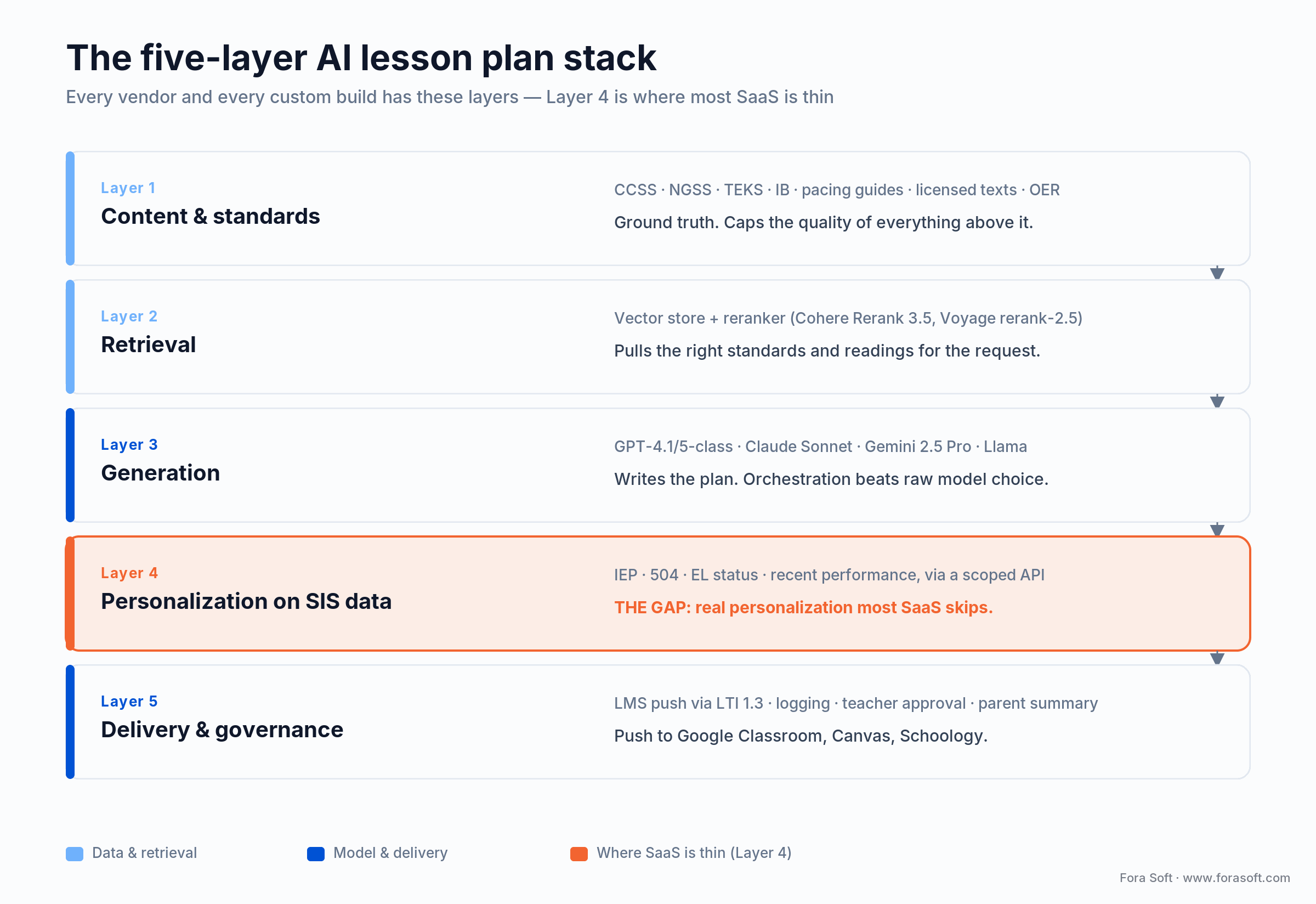
Figure 2. The five layers. Layer 4 — real personalization on SIS data — is where most SaaS is thin, and the reason districts end up building custom at scale.
Layer 1 — Content and standards. A curated index of standards (CCSS, NGSS, TEKS, IB), pacing guides, scope and sequence documents, licensed textbooks, and OER. This is ground truth; the quality of the index caps the quality of every downstream output.
Layer 2 — Retrieval. A vector store (Azure AI Search, Pinecone, Weaviate, Vertex Vector Search) plus a reranker that pulls the right standards, readings, and prior assessments for a given request. In 2026 the best reranking comes from Cohere Rerank 3.5, Voyage rerank-2.5, or a fine-tuned cross-encoder.
Layer 3 — Generation. The model that writes the plan: GPT-4.1 or GPT-5-class, Claude Sonnet, Gemini 2.5 Pro, or a Llama model for sovereign deployments. Prompt orchestration matters more than raw model choice.
Layer 4 — Personalization and differentiation. Student-profile data from the SIS (IEP, 504, EL status, recent performance), pulled through a narrow, permission-checked API. This turns a generic plan into one that fits a specific class. The pattern behind it is the same one we cover in our personalized learning materials guide.
Layer 5 — Delivery and governance. Push to the LMS via LTI 1.3 or native APIs, plus logging, prompt inspection, a teacher approval workflow, and a parent-facing summary. The Tier 3 governance tools live here.
Where SaaS vendors skip: almost every Tier 1 and Tier 2 vendor does Layers 1–3 well and Layer 5 passably. The weak spot is Layer 4 — real personalization that reads the SIS. That single gap is the biggest reason districts build custom at scale.
Cost model — what a 1,200-teacher district spends
Take a realistic mid-size district: 1,200 teachers, 18,000 students, Canvas LMS, mixed Chromebook and iPad, in California (so CCPA and SOPIPA apply on top of FERPA). Here is the arithmetic, worked out three ways.
Option A — MagicSchool + Brisk + Securly. MagicSchool Enterprise at roughly $12 per teacher per month with district SSO = $172,800. Brisk Boost for the 400 English and social-studies teachers at $9 per teacher per month = $43,200. Securly at $2.50 per student per year = $45,000. Professional development (two district-wide sessions plus coaching for 24 teacher-leaders) = $38,000. Integration work (Canvas LTI glue, SIS connector for IEP data) = $55,000. Year-one total: $354,000.
Option B — Canvas AI + Khanmigo + Diffit. Canvas AI at $1.50 per student per year = $27,000. Khan Academy Districts at $10 per student for the 4,200 students in scope = $42,000. Diffit schools at $4 per student for the 6,000 ELA and social-studies students = $24,000. Securly = $45,000. PD and coaching = $38,000. Canvas integration is native, so $0 extra. Year-one total: $176,000.
Option C — custom RAG on Azure. Build (retrieval pipeline, standards ingestion, Canvas LTI, SIS connector, prompt orchestration, admin dashboard) = $240,000 one-time. Azure OpenAI + Azure AI Search + storage = $14,000 per month = $168,000 per year. Securly = $45,000. PD and coaching = $38,000. Year-one total: $491,000; year two drops to $251,000 once the build is amortized.
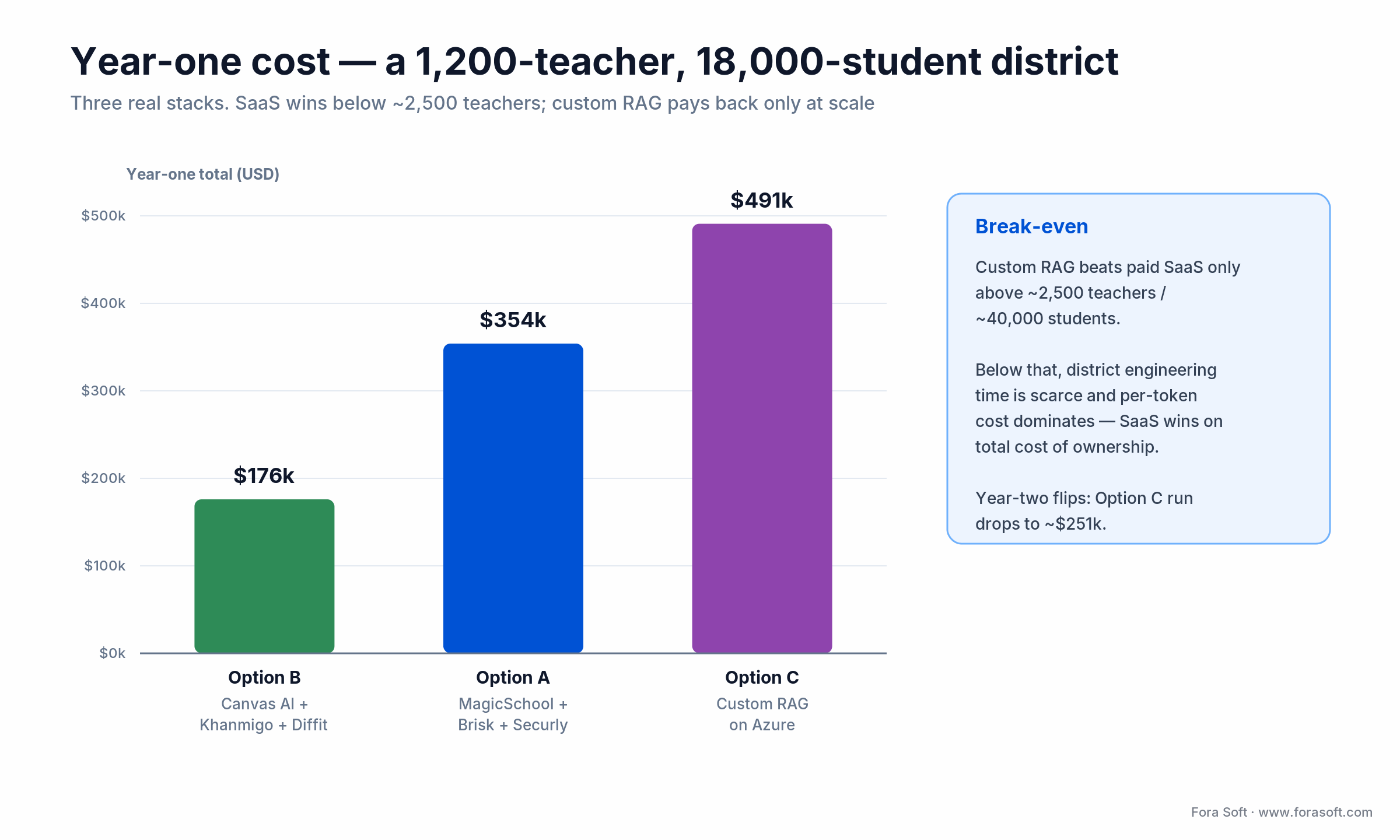
Figure 3. Year-one totals for the same district under three stacks. Below ~2,500 teachers, the SaaS option (B) wins; custom RAG only pays back at scale.
For 1,200 teachers, Option B wins on year-one cost and is perfectly adequate if Canvas is already the LMS and the district doesn’t need deep IEP personalization. Option C wins only if the district is growing past 2,500 teachers within three years and wants data sovereignty. These are deliberately conservative estimates — we use Agent Engineering to build the custom tier faster and cheaper than typical, so treat the Option C build figure as an upper bound, not a floor.
Want these numbers for your district?
We’ll build the three-option cost model against your real teacher count, LMS, and student total — not a generic range.
Mini case — cutting teacher overtime by 37%
A district we worked with — 1,450 teachers, K–12, U.S. Midwest — had a chronic overtime problem. Survey data showed teachers averaging 9.4 hours of unpaid weekly overtime, most of it on lesson planning, assessment design, and differentiation paperwork for 504 and IEP students.
The rollout took fourteen weeks. Weeks 1–3: standards and curriculum ingestion, an IEP data pipeline from PowerSchool, and privacy review. Weeks 4–6: Canvas integration, teacher approval workflow, and a board-facing governance dashboard. Weeks 7–8: a pilot with 60 teachers across three schools. Weeks 9–14: phased rollout and coaching.
Three months after full rollout, the survey was repeated. Unpaid overtime dropped from 9.4 to 5.9 hours per week, a 37% reduction. The board was persuaded by one metric: teacher retention rose from 84% to 91% year over year, saving an estimated $2.1 million in hiring and onboarding that paid for the platform several times over. The stack was MagicSchool (primary generator), Diffit (ELA differentiation), Securly (governance), and a Fora Soft–built IEP pipeline and Canvas LTI. Want a similar assessment? Book 30 minutes.
Compliance — FERPA, COPPA, state law, EU AI Act
AI in K–12 touches more regulatory surfaces than almost any other AI use case. The 2026 checklist:
FERPA. Student education records can’t leave the district perimeter without a signed data privacy agreement. Every vendor signs a district-specific DPA — the Student Data Privacy Consortium National DPA is the standard template. No DPA, no deployment.
COPPA. Students under 13 need verifiable parental consent for account creation. The FTC’s amended COPPA Rule was published in April 2025 with full compliance required by 22 April 2026; most serious vendors provide “school-consent” workflows where the district consents in loco parentis.
State-specific laws. California (CCPA, SOPIPA, AB 1584), Illinois (SOPPA), New York (Ed Law 2-d), Texas (SB 820), Colorado (HB 22-1186), and more than a dozen other states have education-specific data-privacy laws. Vendors certify per state; the SDPC maintains a state-by-state resource worth checking before any purchase.
EU AI Act. For international schools and EU branches, AI used in education is classed as high-risk under Annex III. After the Digital Omnibus agreement reached on 7 May 2026, the compliance deadline for stand-alone Annex III systems moved to 2 December 2027 (AI embedded in regulated products under Annex I follows on 2 August 2028). The Article 50 transparency duty and the Article 4 AI-literacy duty were left unchanged. Requirements when they bite: a risk-management system, data-governance documentation, transparency to teachers and students, human oversight, and post-market monitoring.
SOC 2 Type II. The baseline security audit. Ask for the report, not just the badge. A vendor that can’t produce a current SOC 2 Type II report under NDA is not enterprise-ready.
Prompt and training-data policy. The make-or-break question: does the vendor train on teacher prompts or student responses? In 2026 the only acceptable answer is “no, ever.” Microsoft, Google, OpenAI (Enterprise and Education tiers), and Anthropic all contractually guarantee no training on customer data. Many smaller vendors still don’t. Get it in writing.
A decision framework — pick the stack in five questions
Answer these five and the shortlist collapses to one or two vendors. Figure 4 is the same logic as a tree.
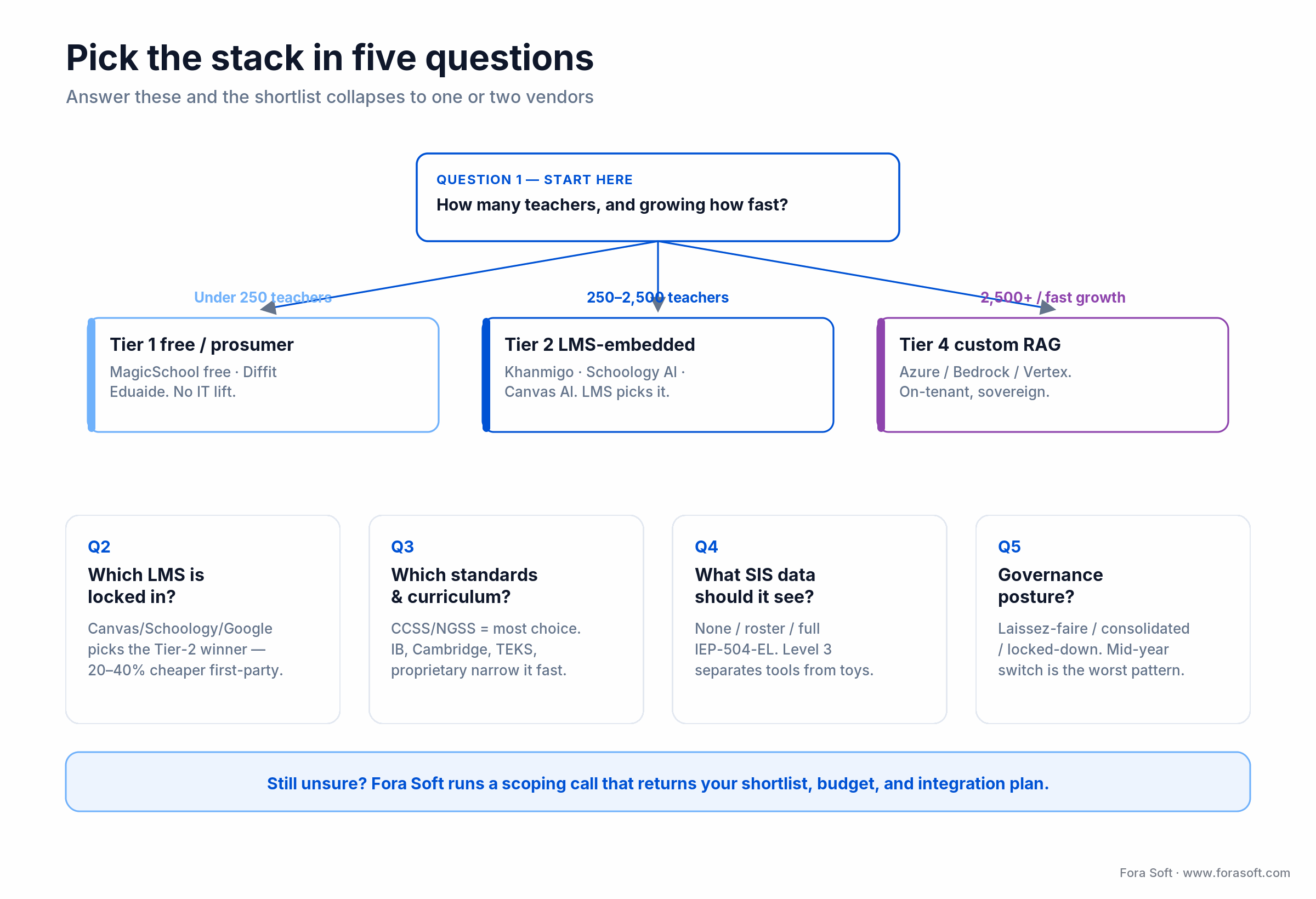
Figure 4. Teacher count sets the tier; the remaining four questions narrow it to a specific vendor.
Question 1 — teacher count and growth? Under 250 teachers, Tier 1 free or prosumer is fine. 250–2,500, go Tier 2 LMS-embedded. Above 2,500, or growing past it within three years, start scoping Tier 4 custom.
Question 2 — which LMS is locked in? Canvas, Schoology, PowerSchool, Google Classroom, or custom? The answer nearly picks the winning Tier 2 platform for you; each LMS has a preferred first-party AI layer 20–40% cheaper than a third-party bolt-on.
Question 3 — which standards and curriculum? Districts on mainstream CCSS/NGSS have the most vendor choice. IB, AP, Cambridge, A-levels, TEKS, or proprietary district curricula narrow the list fast. Ask for alignment examples before signing.
Question 4 — what SIS data should the generator see? None (generic plans), roster only, or the full IEP/504/EL profile? The third level separates serious platforms from toys and forces a deeper integration.
Question 5 — what governance posture? Laissez-faire (teachers pick, district blesses a few), consolidated (one primary, one backup), or locked-down (single approved tool, policy-enforced)? Moving from laissez-faire to locked-down mid-year is the single most destructive rollout pattern we see.
Five pitfalls that kill rollouts
1. Buying before piloting. Districts that sign three-year contracts after a demo but before a 60-teacher pilot almost always renegotiate in year two. Run a real pilot, and require a vendor discount for unconverted pilots.
2. Skipping the coaching budget. Tools without coaching move the time-saved number but little else. Budget at least 10% of the vendor contract for PD and instructional coaching.
3. Letting every school pick its own tool. Nine tools in a district means nine DPAs, nine SSO integrations, nine training tracks, nine audit trails. Consolidate to two primary tools plus one governance layer.
4. Treating privacy as an afterthought. FERPA and state-law compliance isn’t a line item you add at the end. A tool that fails legal review at month nine has already burned nine months of PD investment.
5. Measuring “plans generated” as success. Output volume means nothing if plans aren’t used or adapted. Measure teacher time saved, retention, and student growth on standards-aligned assessments — the only three numbers the board cares about.
KPIs — what to measure from day one
Instrument before you deploy. Three buckets predict renewal and board approval.
Quality KPIs. Weekly active teachers — target 60% by week eight, 80% by month four. Plans generated per active teacher per week — target 3+ by month three; below 1.5 means teachers are trying it, not using it. Differentiation coverage — share of plans with at least two differentiated versions, target 60% once the feature is trained.
Business KPIs. Teacher time saved on a quarterly self-report (a healthy district lands 2.5–4 hours per week), and teacher retention in AI-cohort schools — the cost-savings number that pays for everything else. Our Midwest client saw retention rise seven points.
Reliability KPIs. LMS push-through rate — share of generated plans that actually become assignments; below 40% means integration friction, above 70% means the tool is in the workflow. And standards-alignment accuracy, verified by a deterministic check rather than the model’s own say-so.
Build vs buy vs adapt
Buy (Tier 1/2 SaaS) if you’re under 2,500 teachers on a mainstream LMS. Payback in year one, no engineering headcount, vendor handles standards updates.
Adapt (Tier 2 SaaS plus integration work) if you need deep SIS and IEP integration the vendor doesn’t provide natively. We typically ship this as a $40k–$100k integration project on top of the vendor contract — it keeps the SaaS economics and adds the Layer 4 personalization that drives adoption.
Build (Tier 4 custom) if you’re above 2,500 teachers, have proprietary curriculum, or face sovereignty requirements (international, DoD schools, sensitive populations). Roughly a six-month build; year-over-year infrastructure cost drops below paid SaaS at scale.
Adapt rather than build when: the vendor covers Layers 1–3 and 5 but not Layer 4. A scoped integration is a fraction of a full build and keeps the vendor on the hook for standards updates.
Segments shipping real value in 2026
U.S. public K–12. The largest, most fragmented segment. CCSS/NGSS alignment, deep LMS integration, and state-law compliance are table stakes. MagicSchool and Khanmigo dominate at the classroom level; Schoology and Canvas own the LMS-embedded layer.
Charter networks. Faster procurement, more willing to commit to single vendors, often first to deploy custom RAG at network scale.
International schools (IB and Cambridge). Need multi-framework support and EU AI Act compliance in European branches. Custom RAG or Tier 2 with strong international standards coverage.
Higher ed and adjacent video-heavy programs. Lesson planning matters less than assignment design, rubric generation, and feedback at scale. When courses lean on recorded lectures and captioning, the AI stack overlaps with the tools in our AI e-learning video tools guide, and the engineering patterns are the same ones in our AI for video engineering track.
When not to adopt AI lesson planning yet
Three situations where we tell districts to hold off six to twelve months.
No LMS, or a fragmented one. If half the district is on Google Classroom and half on paper, standardize the LMS first. Plans that can’t be delivered through an LMS evaporate.
No curriculum map. Without a district-wide scope and sequence, generators produce generic plans disconnected from pacing. Fix the curriculum first.
No privacy governance. If there’s no data-privacy officer or DPA process, an AI rollout will catalyze a privacy crisis. Stand up governance first, AI second.
A 10-week deployment playbook
Weeks 1–2 — scope and privacy. Final teacher count, LMS, standards frameworks, SIS fields needed. DPA signed. Board-facing governance document approved.
Weeks 3–4 — integrations. SSO (SAML or OIDC). LMS connector. SIS connector for roster and, if in scope, IEP data. Governance layer.
Week 5 — content ingestion. Standards index, pacing guides, licensed textbook catalog, OER links. For custom RAG, the chunking and embedding pipeline.
Week 6 — pilot with 30–60 teachers. Three schools, mixed grade levels and subjects, weekly structured feedback.
Weeks 7–8 — PD and coaching. Two district-wide sessions and one per-school coaching cycle.
Weeks 9–10 — phased rollout and baseline. A quarter of schools in week nine, the rest in week ten, with helpdesk scripts and office hours. Snapshot the KPI baseline for the month-three comparison.
Ready to run this playbook?
Vendor selection, integration, PD design, KPI instrumentation — one engagement, typically ten to fourteen weeks.
FAQ
What is the best AI lesson plan generator in 2026?
For most U.S. districts it’s MagicSchool for breadth and district-readiness, paired with Khanmigo for standards-aligned content and Diffit for differentiation. If your LMS is Canvas or Schoology, the first-party AI layer is usually the cheaper starting point. There is no single winner — teacher count and LMS lock-in decide it.
Is there a genuinely free AI lesson plan generator?
Yes. MagicSchool and Diffit are free for individual teachers, and Khanmigo for Teachers is 100% free via Khan Academy’s Microsoft partnership. Free tiers cover a single teacher well. What they don’t include is SSO, a signed DPA, an admin dashboard, or SIS integration — which is why districts above ~100 teachers pay.
MagicSchool or Khanmigo — which one?
Different jobs. MagicSchool has the broadest toolkit and the strongest SSO/DPA story for districts. Khanmigo is tighter, tied to Khan Academy’s content library, and free for teachers. Many districts run both — MagicSchool for teacher productivity, Khanmigo for student-facing tutoring and practice. They overlap less than the category name implies.
Can we just use ChatGPT?
Individually, yes — ChatGPT Edu exists. At district scale, no. ChatGPT has no native standards alignment, no SIS integration, and no LMS push, and the free tier’s training-on-prompts policy breaks FERPA. ChatGPT Edu is better on privacy but is still a general assistant, not a lesson-plan platform.
How long does a district rollout take?
Ten weeks for a SaaS rollout with good privacy and LMS readiness; fourteen to sixteen weeks for a custom RAG build. Districts that shortcut the integration-and-pilot phase almost always redo the rollout in year two.
What about hallucinations in generated plans?
A real category risk. The mitigation is retrieval-grounded generation, a deterministic standards-alignment check (not the model’s self-report), and a teacher approval step before any plan pushes to the LMS. Grounding a generator in the district’s own licensed content is the single biggest reliability lever.
How does this work for special education?
It’s the highest-value use case and the hardest. The generator must read the IEP or 504 plan, respect accommodations, and produce fitting materials without exposing PII to the model provider. Our usual pattern: redact IEPs to a narrow accommodation vocabulary before they reach the model, then re-attach names and specifics on the district side. Districts that skip this can’t use AI for IEP planning.
Is education AI regulated as high-risk in Europe?
Yes. AI used in education is listed in Annex III of the EU AI Act as high-risk. After the Digital Omnibus agreement of 7 May 2026, the compliance deadline for stand-alone Annex III systems is 2 December 2027, with Annex I embedded systems following on 2 August 2028. The Article 50 transparency and Article 4 AI-literacy duties still apply now.
What to read next
Tool comparison
Best AI Tools for Lesson Planning: 7 Compared
The tool-by-tool listicle to this guide’s district lens.
Personalization
Personalized Learning Materials With AI
The Layer 4 patterns that turn generic plans into fitted ones.
Adaptive learning
AI Tutors and Adaptive Learning in 2026
Building a system students actually use, not just open once.
E-learning
AI Video for E-Learning: A Buyer’s Guide
The adjacent stack for AI-generated video lessons and captions.
Ready to scope your district rollout?
The 2026 AI lesson plan generator category is past the novelty phase. Serious districts have stopped asking “should we?” and started asking “which tier, which vendor, and how do we measure it?” The short answer runs through this guide: teacher count and LMS pick the tier, Layer 4 personalization is where the value hides, custom RAG pays back only above ~2,500 teachers, coaching is 10% of the budget and most of the outcome, and privacy is a hard constraint you handle first, not last.
The failure modes are predictable and avoidable: too many tools, too little coaching, shallow SIS integration, and privacy as an afterthought. Skip those four and you land in the majority of districts getting real value from this technology — three-plus hours of teacher time back per week, five to seven points of retention, and positive student-growth deltas within two years.
Let’s pick your stack together
Fifteen minutes on the five questions, fifteen on a rough budget and timeline. No sales pitch — just the work.

