

Key takeaways
• Smart TV app development in 2026 means shipping to four operating systems. Android TV/Google TV (300M+ devices), Samsung Tizen (~17%), LG webOS (~12%, 52% of OLED), and Apple tvOS round out the must-ship matrix, plus Roku and Fire TV if North America is the goal.
• Cross-platform is the default, not the exception. A single React Native, Lightning.js, or Enact codebase now ships to three or four TV OSes at 60fps — native SDKs only earn their keep when you need deep hardware features or App Store exclusivity.
• Certification is the silent killer of your launch date. LG webOS review runs 2–3 months, Tizen and Apple reject on focus, DRM, and low-memory bugs — bake the test matrix into week one, not week twelve.
• An agent-accelerated MVP now ships in 10–14 weeks. With Agent Engineering we compress the traditional 4–6 month timeline for a cross-platform Smart TV MVP into roughly a quarter, at a fraction of legacy agency budgets.
• Hybrid monetization wins in 2026. 70% of net new US streaming subscriptions come from ad-supported tiers — plan SVOD, AVOD, and FAST side by side from day one, not as a future pivot.
Smart TV app development in 2026 is less about writing code and more about choosing which fragmentation fights are worth having. Four TV operating systems — Samsung Tizen, LG webOS, Android TV/Google TV, and Apple tvOS — split the living room, and Roku and Fire TV add two more must-ship flavors in North America. Each has its own SDK, its own certification maze, its own review cycle, and its own remote-control quirks. This playbook distills what Fora Soft has learned shipping Smart TV and OTT apps — including end-to-end Internet TV / IPTV app development — for operators, studios, and enterprise video platforms: how to pick the platform mix, how much a real 2026 build costs, and which pitfalls quietly push launches from Q2 to Q4.
Why Fora Soft wrote this playbook
Fora Soft has built video and streaming software since 2005 — 250+ projects across two decades — and shipped apps to every major TV platform currently in production. Smart IPTV is a Fora Soft project that delivers live TV, EPG, VOD, and cloud DVR through a dedicated Android STB and Smart TV client — the kind of work that forces you to confront every Tizen WebKit quirk and every Android TV memory constraint firsthand.
Beyond TV, our streaming portfolio includes BrainCert (500M+ minutes of live classroom video delivered), Speed.Space (a remote production platform used by Netflix, HBO, and Live Nation), and V.A.L.T (an enterprise video surveillance suite running in 770+ organizations and serving 50,000+ active users). What you read below is the shortest version of the answers we give clients when they are trying to decide which TV platforms to ship on and what it will actually take.
Weighing a Smart TV launch and not sure where to start?
Book a 30-minute scoping call with our video-platform leads — we will pressure-test your platform mix, monetization model, and timeline before you commit a budget.
Market snapshot: where Smart TV apps actually live in 2026
About 82% of US TV households own a smart TV as of 2025, and it is now the primary streaming device in 61% of US internet homes. Streaming set a record 47.5% of all US TV viewing time in December 2025 (Nielsen’s The Gauge), and most of those minutes land on a connected-TV screen, not a phone. Analysts size the global smart TV market near $247B in 2025, growing at a low-teens CAGR toward the mid-$400Bs by the early 2030s. The living room is the primary OTT screen now, not a secondary one.
The operating-system split tells you where your build budget goes. Android TV and Google TV together crossed 300 million monthly active devices in 2026 — the largest Android-based TV footprint. Samsung Tizen sits around 17% of TVs shipped and anchors premium Samsung sets worldwide. LG webOS controls roughly 12% overall and dominates the OLED premium tier at 52%. Roku passed 100 million streaming households in 2026. No single OS owns a majority — ignore any one of these platforms and you leave a real slice of the audience on the table.
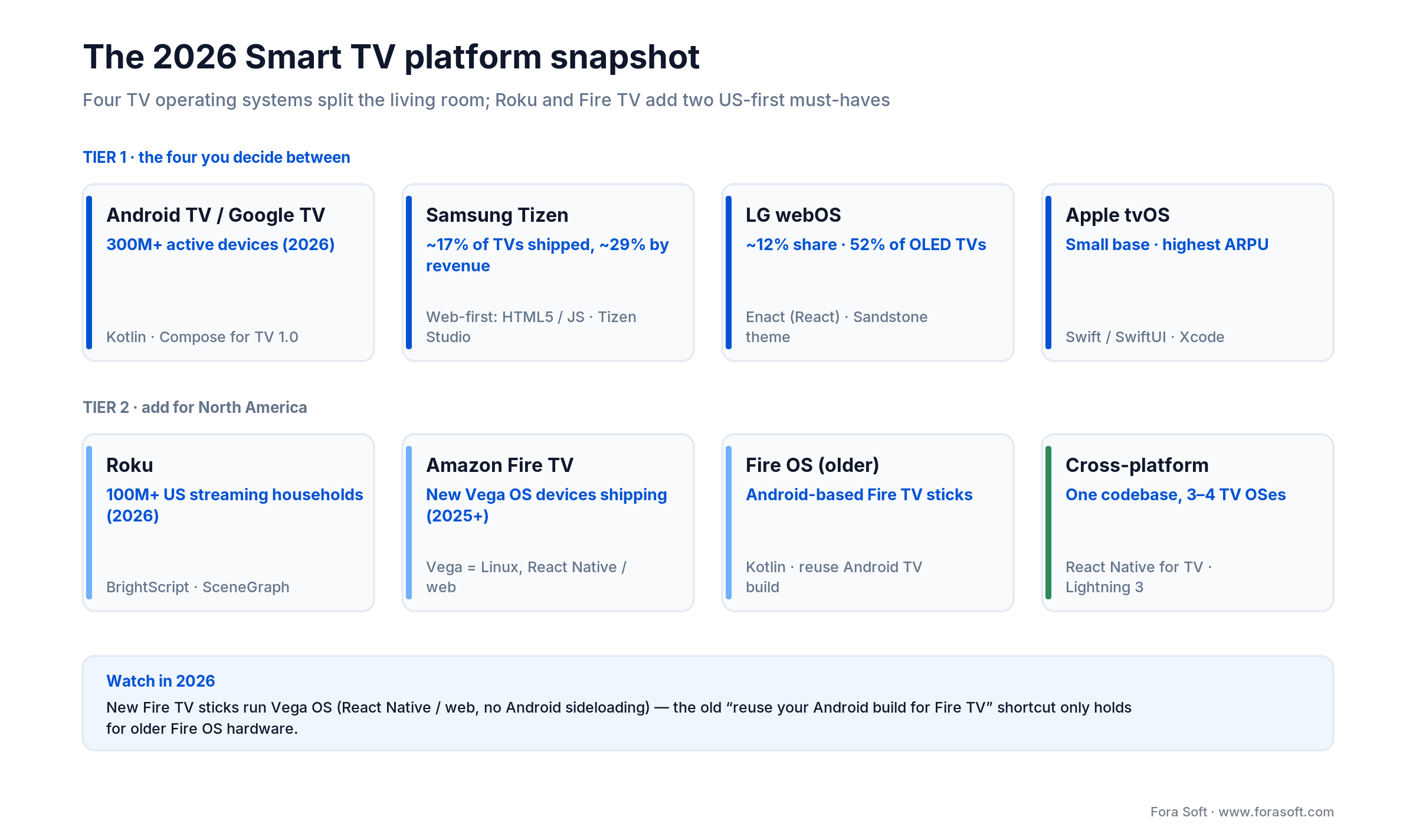
Figure 1. The four TV platforms plus Roku and Fire TV, with 2026 reach and stacks.
The four platforms you must decide between
Before picking a framework, pick your target set. A Smart TV app strategy in 2026 is almost never “build for one OS.” It is a ranked list: day-one platforms, fast-follow platforms, and the platforms you will skip unless the business case changes. The sections below give you the trade-offs for each major OS, the SDKs and languages, and the blocker constraints teams repeatedly underestimate.
Samsung Tizen — scale, web-first, cheapest to ship
Samsung ships roughly 17% of the world’s TVs by units — about 29% of TV revenue — and nearly every set runs Tizen. The platform is web-first: HTML5, JavaScript, CSS3, plus Tizen Studio or the VS Code extension for packaging and emulation. If your app is already a web client, a Tizen build is usually the fastest win of the first launch — we have seen simple OTT viewers land in Tizen Seller Office in under four weeks when the web app is already accessible.
Why pick it
Largest premium TV footprint, web-stack friendly, no developer-account fee, and a free emulator that runs on Raspberry Pi 4. Revenue share for subscriptions on the Samsung Galaxy Store moved to 85/15 in May 2025, friendlier than Apple’s 70/30 default.
Limits
WebKit versions on 2019–2021 Tizen TVs lag modern browsers by several releases. Automated testing is not supported on Samsung TVs, so device-farm coverage depends on physical hardware or third-party cloud testing (Suitest and similar). DRM playback is not testable in the emulator.
Reach for Tizen when: you need global reach on premium Samsung TVs and your UI already runs as a responsive web app.
LG webOS — Enact, OLED reach, longest review
webOS is the quieter giant. LG owns 52% of the global OLED market, which means a disproportionate share of the TVs your premium users actually care about. The official framework is Enact, a React-based toolkit whose current TV theme is Sandstone (the older Moonstone theme is legacy), with strict focus-management primitives. Submission runs through LG Seller Lounge with free registration.
Why pick it
High-end LG OLED users over-index on streaming spend. Enact gives you React ergonomics on top of webOS primitives, and the webOS CLI (ares-*) lets a developer scaffold, run, and package without leaving the terminal. No submission fee.
Limits
Certification is the longest in the industry: 2–3 months through pretest, function test, and content test. Older webOS versions still run relatively old WebKit branches — polyfills and manual codec detection are still routine. The share of premium inventory means low-end fallbacks still matter.
Reach for webOS when: your audience includes premium OLED buyers and you can absorb a 10–12 week certification runway.
Android TV / Google TV — the volume leader
Android TV and Google TV together are now the single largest Smart TV platform by far — 300M+ monthly active devices as of 2026, powering TCL, Hisense, Sony, Philips, Xiaomi, plus set-top boxes like the Google TV Streamer and Nvidia Shield. The SDK is the standard Android toolchain with Jetpack Compose for TV 1.0 (stable) as the modern UI layer and Leanback still supported for legacy apps.
Why pick it
Biggest installed base, cheapest developer account ($25 one-time), the same Android Studio + ADB toolchain your mobile team already knows. Play Store revenue share is 15% on the first $1M/year and 30% beyond — most apps never pay the 30% tier. Jetpack Compose for TV cuts UI code by roughly 40–50% versus Leanback in our experience.
Limits
Hardware fragmentation. Low-end TCL and Hisense sets can ship with 1–1.5 GB RAM and weak GPUs, which raises ANR risk. Google Play flags apps whose user-perceived ANR rate climbs above 0.47% of daily active users — a number that looks small until you have 100K daily installs.
Reach for Android TV when: you want the largest single installed base and you can invest in profiling on low-RAM reference devices.
tvOS on Apple TV — smallest install base, highest ARPU
Apple TV’s global share is small compared with Samsung or Android TV, but Apple TV+ is projected near 48M US viewers by 2026, and tvOS app revenue was estimated above $5B back in 2023 (Apple doesn’t break it out today). Build in Swift or SwiftUI with Xcode; the latest release is tvOS 26. The tvOS Focus Engine does most of the directional-navigation heavy lifting, but diagonal layouts still require manual hints.
Why pick it
Affluent audience, disciplined hardware (uniform GPU, known RAM tiers), strong DRM (FairPlay), and the cleanest review process of the big four. If you already ship an iOS OTT app, a tvOS build can be 30–40% cheaper than starting from scratch because you reuse networking and data layers.
Limits
Apple Developer Program enrollment is required for real-device testing, the default App Store revenue share is 70/30, and Apple rejects binaries that violate focus, UX, or ATV HIG rules — rework cycles are short but sharp.
Reach for tvOS when: ARPU matters more than scale, and you have (or plan) an iOS companion app.
Roku and Fire TV — the US-only must-haves
If North America is your primary market, Roku and Fire TV are not optional. Roku passed 100M streaming households in 2026 (it retired the older “active accounts” metric), and new apps land in the Roku Channel Store daily. Roku uses BrightScript with SceneGraph — a proprietary language with a steep but shallow learning curve; once you learn focus and scene routing, development is quick. Amazon Fire TV is mid-transition: older sticks run Fire OS (an Android fork), but new hardware — the Fire TV Stick 4K Select (2025) and 2026 Fire TV Stick HD — runs the new Linux-based Vega OS, where apps are React Native/web and Android sideloading is gone. Amazon has said all future sticks move to Vega, so the “reuse the Android TV build for Fire TV” shortcut only holds for older Fire OS devices.
Outside the US both platforms drop dramatically in share, which is why Roku is rarely worth a day-one slot for European or Asian launches. Fire TV makes more sense as a near-free addition once the Android TV build is working, because most of the code carries over with tweaks for Amazon’s navigation and store metadata.
Platform comparison matrix
| Platform | Share | Stack | Dev fee | Rev share | Review |
|---|---|---|---|---|---|
| Samsung Tizen | ~17% | HTML5, JS, Tizen Studio | Free | 85/15 subs (Galaxy Store) | 2–4 wks |
| LG webOS | ~12% (52% OLED) | Enact (React), webOS CLI | Free | Varies by channel | 2–3 months |
| Android TV / Google TV | Largest (300M+ MAU) | Kotlin, Compose for TV | $25 one-time | 85/15 up to $1M, then 70/30 | 1–2 wks |
| Apple tvOS | ~2–3%, high ARPU | Swift, SwiftUI, Xcode | $99 / year | 70/30 default | 1–2 wks |
| Roku | 100M+ US households | BrightScript, SceneGraph | Free | 80/20 (Roku Pay) | 2–4 wks |
| Amazon Fire TV | Strong US, growing EU | Fire OS (Android) + Vega OS (RN/web) | Free | 70/30 default | 1–2 wks |
How to choose a framework: native, React Native, Lightning, Enact, Flutter
The framework question used to be “native or hybrid?” In 2026 it is four-dimensional. Below is the short version of how we pick on paid projects, with the shortcuts that actually hold up in production.
1. Native per platform (Kotlin + Compose for TV, Swift + SwiftUI, Tizen .NET or web, webOS Enact). Highest performance ceiling, deepest access to platform features like Picture-in-Picture, hardware codec calls, and tuner APIs. Worth it when you are building a flagship OTT app on one or two OSes and need pixel-perfect native UX — and when your team has native specialists.
2. React Native for TV (react-native-tvos fork). Ships to Apple TV, Android TV, and Fire TV from a single codebase with the react-tv-space-navigation library. The fastest path when you already have a React Native mobile app — you typically reuse 70–80% of business logic. Amazon’s sample app now covers tvOS, Fire OS, Fire TV (Vega), Android TV, and web through Expo.
3. Lightning (now Lightning 3 + Blits). Open-source WebGL renderer originally built by Metrological. Renders 60fps UI without DOM and runs on Tizen, webOS, Fire TV, and Android TV. Best pick when you need the same binary on all web-capable TVs and are willing to trade native UX fidelity for a very small memory footprint.
4. Enact (React-based, LG-endorsed). The default for webOS, but it is also a solid cross-platform web choice for Tizen and other WebKit-based TVs. Sandstone (Enact’s current TV theme) gives you TV-ready components (focus ring, marquee text, pickers) out of the box.
5. Flutter for TV. LG officially announced webOS support in 2024 and ran a TV-game hackathon. Promising if your brand is mobile-Flutter-first, but focus management and remote input are still less mature than React Native TV — we only recommend it when Flutter reuse is the strategic priority.
Default in 2026: React Native TV for cross-platform OTT apps, Lightning.js when you need the lightest footprint on weak hardware, native only when platform exclusives or tuner APIs force your hand.
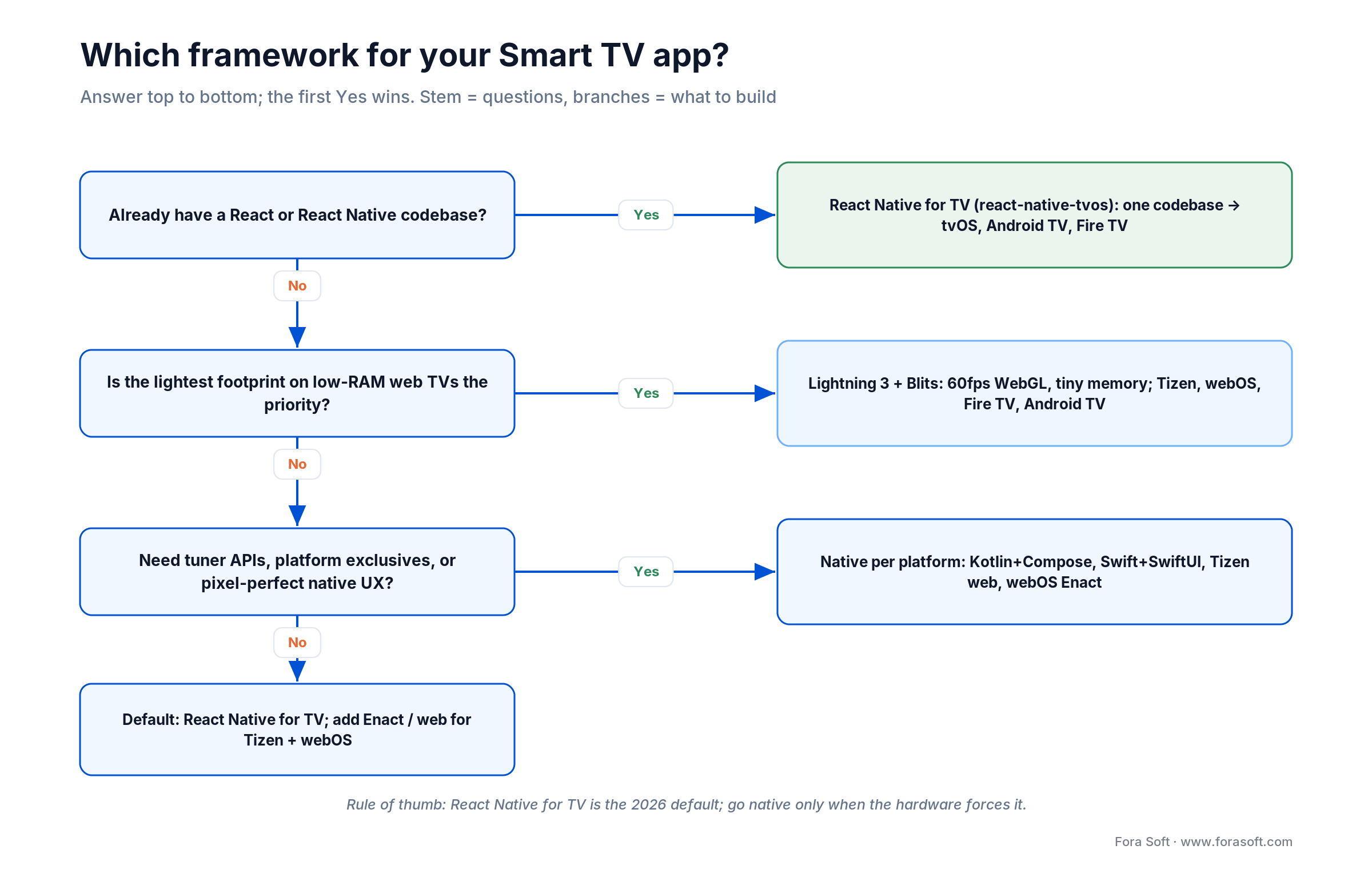
Figure 2. Pick a framework top-down — the first Yes wins.
Reference architecture for a cross-platform Smart TV app
A well-structured Smart TV app in 2026 separates three layers cleanly: the per-platform shell, the shared UI kit, and the streaming backend. The diagram below is the minimum viable architecture — everything more elaborate is a superset of this.
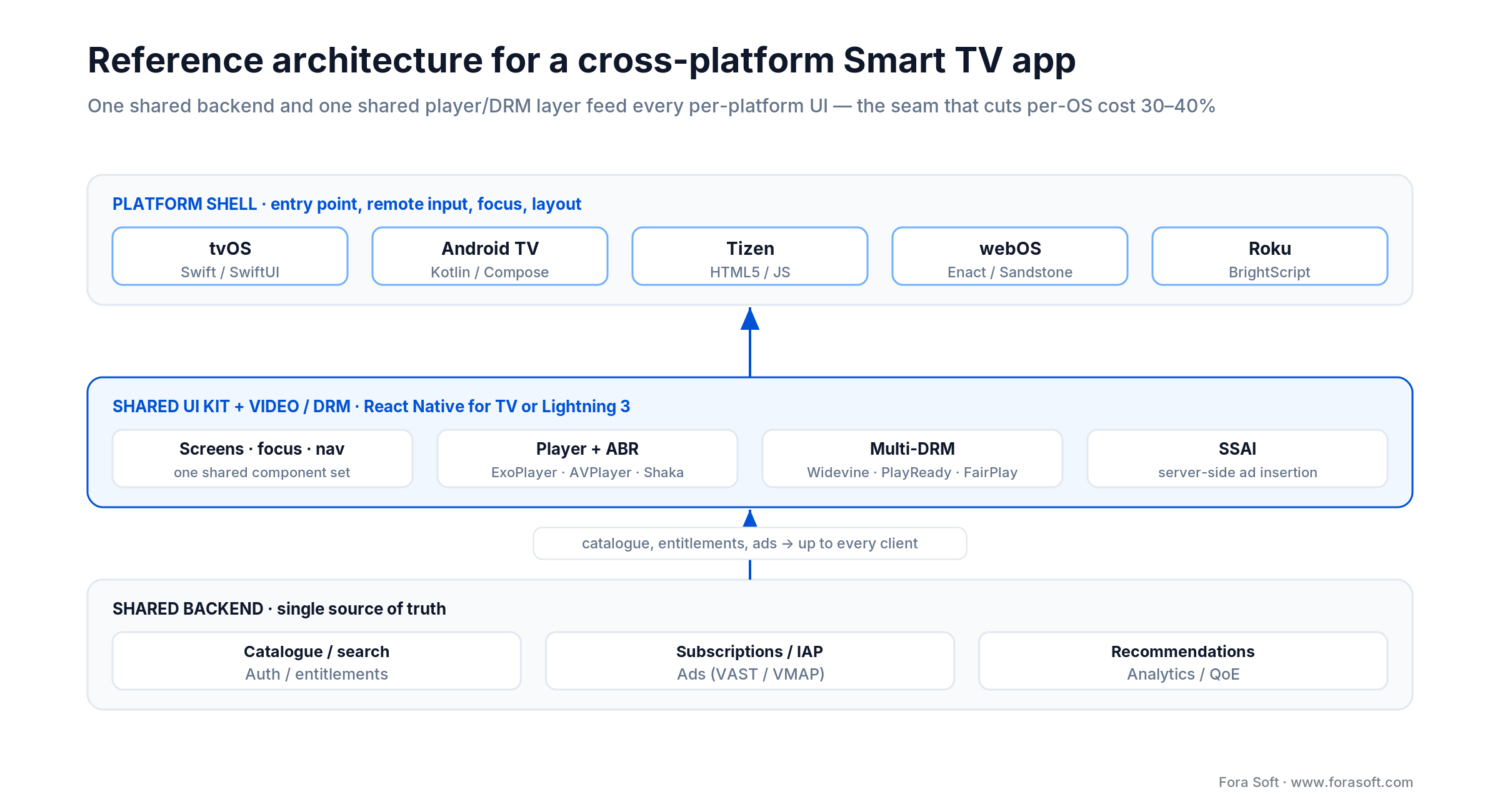
Figure 3. One shared backend and shared UI/DRM layer feed every per-platform shell.
The platform shell is the thinnest possible per-OS wrapper: entry points, lifecycle hooks, remote-control bindings, and the platform’s video player (AVPlayer on tvOS, ExoPlayer on Android TV, Shaka / hls.js on Tizen and webOS). The shared UI kit — built in React Native TV or Lightning — owns screens, navigation, focus, and components. The backend services handle content catalog (GraphQL or REST), auth, subscriptions, DRM license (Widevine, PlayReady, FairPlay), and analytics. Our AI scalable video streaming stack wires these layers together with edge ingest, adaptive bitrate packaging, and AI-driven recommendation so the same playbook works for 5,000 viewers and 5 million. New to the space? Our OTT video platform primer walks through the moving parts.
Mini case study: shipping Smart IPTV on Android STB and Smart TV
A regional operator came to us needing a single client that could run on their rented Android set-top boxes and on end-user Smart TVs without the team maintaining two code lines. Their backlog included live TV, EPG, VOD, cloud DVR, multi-profile accounts, and a playout UX good enough to compete with national players.
We shipped Smart IPTV as a shared codebase: a Kotlin core for the STB, a React-based client for Smart TV browsers, and a common service layer exposing channels, programs, recordings, and entitlements. The EPG runs on a virtualized grid so it stays 60fps on a 1.5 GB set-top box. Cloud DVR windows are reconciled server-side so a single recording shows up across devices without sync code on the client. The team landed the first release inside a quarter and iterated monthly — each release going through the operator’s internal QA plus the TV OEM’s certification where applicable.
Three lessons transferred directly to later TV projects: keep the EPG virtualization in the shared layer (never per-platform), lock the remote-control focus contract before any UI work starts, and run the DRM license flow on low-RAM devices from week one — not the week before cert. Want a similar read on your own TV stack? Book a 30-min call.
Cost model: what a Smart TV app really costs in 2026
Legacy agencies still quote $150K–$250K for a cross-platform OTT app with live streaming, recommendations, and four OS targets. With Agent Engineering compressing the build loop, we routinely deliver a comparable scope faster and for materially less. The table below is our honest range for 2026 engagements. Actual numbers still depend on content catalog size, DRM complexity, number of backend integrations, and how many TV OEMs you need for cert.
| Scope | Platforms | Timeline | Indicative range |
|---|---|---|---|
| VOD viewer MVP | 1 platform (Tizen or Android TV) | 8–10 wks | from ~$20K |
| Cross-platform OTT MVP | 3 platforms, single codebase | 10–14 wks | from ~$40K |
| Full OTT product | 4 TV OSes + backend + recs | 5–7 months | typically ~$90K–$150K |
| Operator-grade IPTV (EPG + DVR + live) | STB + Smart TV + mobile | 6–9 months | project-specific |
Budget lines we always make explicit upfront: 10–15% for certification cycles (LG in particular), 5–10% for device-farm or physical-device QA, and an ongoing monthly retainer for OS updates — Tizen, webOS, and Android TV all ship breaking changes at least once a year.
Need a real 2026 estimate for your TV app?
Send us your feature list and target platforms — we will come back in 48 hours with a scoped plan, a timeline, and a realistic budget based on our Agent-Engineered delivery.
10-foot UX rules the design review will reject you for missing
Smart TV UX is driven by three constants: the viewer sits three meters away, holds a remote with four directional keys, and is relaxing, not working. Every best practice below follows from that reality.
Typography
Body text at 22–24 pt minimum. Titles at 32–48 pt. Use sans-serif faces that hold up at distance — Roboto, Inter, SF Pro, Proxima Nova. Anything under 22 px becomes illegible at 10 feet, which is the number the LG and Apple design reviewers measure against.
Focus
A single focusable element is always visible, always high-contrast, and always reachable from the current item using four D-pad presses or fewer. The Apple Focus Engine and the Android TV focus system both do most of the work only if your layout stays on a grid; diagonal layouts require explicit focus hints.
Layout and safe areas
Keep 5% safe margins top and bottom, 10% left and right to dodge overscan on older sets. Content density is low by design — 4–6 tiles across for poster rails, not 10. Contrast ratios well above WCAG AA help because TV panels vary more than monitors.
Monetization in 2026: SVOD, AVOD, FAST, and hybrid done right
The 2026 winning model is hybrid. Roughly 70% of net-new US streaming subscriptions come from ad-supported tiers, Netflix’s ad tier reached 250M+ monthly active viewers by 2026 (up from 94M in May 2025, after it switched from counting “users” to “viewers”), and about 48% of US streaming subscribers are already on an ad-supported plan. Planning SVOD without an AVOD or FAST contingency is a 2022 strategy.
| Model | Revenue source | Who uses it | Key unit economics |
|---|---|---|---|
| SVOD | Monthly subscription | Netflix, Disney+, premium OTT | ARPU driven; high churn sensitivity |
| AVOD | Ads between and during content | YouTube, Hulu ad tier | CPM $15–$35, higher with targeting |
| FAST | Ad-supported linear channels | Pluto TV, Tubi, Samsung TV Plus | CPM $15–$25, very low barrier to watch |
| TVOD | Pay per title / rental | Apple TV, Prime Video store | Lumpy revenue; high per-view margin |
| Hybrid | SVOD + AVOD tier + FAST channel | HBO Max, Peacock, Netflix | Industry default in 2026 |
For CTV ads specifically, expect CPMs in the $20–$35 range for programmatic, rising to $45–$65 for direct buys on premium inventory like Netflix or Amazon Prime Video. Budget for an SSAI (server-side ad insertion) stack if you want smooth playback on low-end hardware — client-side ad stitching on a 1.5 GB set-top box almost always shows seams.
Certification and store submission — the hidden timeline
Nothing ships faster than your slowest cert. The LG webOS content test alone typically adds 8–12 weeks to a launch schedule. Apple App Review is the fastest, Google Play sits in the middle, Samsung is generally 2–4 weeks once the binary is clean, and Roku is similar. Build your plan around the long pole.
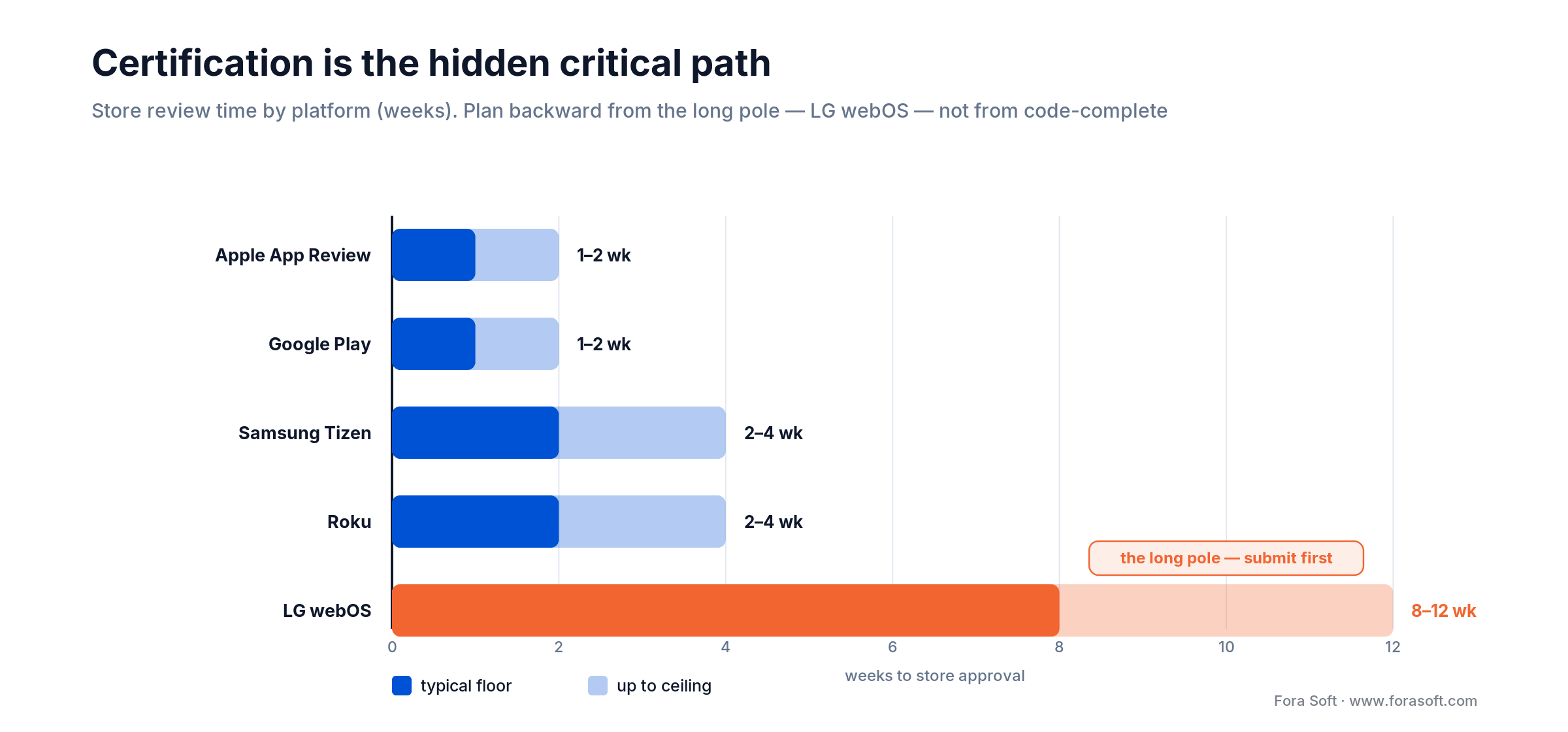
Figure 4. Store review time by platform — plan backward from LG webOS.
1. Submit on the real target SKUs. Every OEM asks for logs from physical devices, not emulators. DRM playback in particular cannot be tested on an emulator — the secure path starts in silicon.
2. Treat focus traversal like a unit test. Record the focus path on every screen and verify it with automation where possible. Focus-trap bugs are the #1 rejection cause we see across Tizen, webOS, and tvOS.
3. Measure ANR and crash-free rate from the first internal build. The 0.47% user-perceived ANR threshold on Google Play is hit silently — the Play Console quietly demotes your app and you only notice when installs stall.
Staring down an LG cert runway or a Vega OS surprise?
We have shipped through Samsung, LG, Google, Apple, and Roku review queues. Bring us your platform mix and launch date and we’ll map the critical path.
A decision framework — pick your stack in five questions
Q1. Which market does your content monetize in first? If North America → you cannot skip Roku and Fire TV. If Europe or Asia → Android TV, Tizen, webOS are the day-one three.
Q2. Do you already have a React or React Native codebase? Yes → React Native TV first. No → Lightning.js if footprint dominates, native if UX fidelity or tuner APIs dominate.
Q3. How premium is your audience? Premium → tvOS and webOS early. Mass → Android TV and Tizen.
Q4. How strict is your launch date? Tight → skip webOS at launch and fast-follow after cert. Flexible → plan webOS on the critical path.
Q5. Will you monetize with ads on day one? Yes → select an SSAI vendor before you write a UI component. No → you can defer the ad plumbing but still keep the architectural seam.
If you answered “I don’t know” to more than two of these: the scoping workshop is worth more than any code you might start today.
Five pitfalls we see kill Smart TV projects
1. Treating emulators as a QA strategy. Emulators are fine for iteration but lie about DRM, memory pressure, and remote latency. Physical-device testing on at least one low-end and one mid-tier TV per OS is non-negotiable.
2. Building the desktop UI first and “adapting” it for TV. The remote control is nothing like a mouse. Designing for D-pad from the first wireframe is 10× cheaper than retrofitting focus later.
3. Ignoring older WebKit. Tizen 2020 and webOS 2019 TVs are still in the field. Polyfills, codec detection, and graceful degradation are routine work, not edge cases.
4. Skipping analytics until after launch. Without buffer-ratio, startup-time, and ANR dashboards from day one, you cannot close the loop on the cert failures you will hit — and you cannot sell your next content deal to a distributor who expects these numbers.
5. Underestimating cert. The LG webOS review queue alone can consume a quarter. Do not publish a marketing launch date before you have submitted.
KPIs to instrument from day one
Quality KPIs. Video Startup Time under 3 seconds (TTFF), buffer ratio under 1% for premium tiers, crash-free session rate above 99.8%, ANR rate well under the 0.47% Play Console threshold.
Business KPIs. Monthly active devices per platform, paid-trial conversion, day-7 and day-30 retention, average watch time per session, ad fill rate and completion rate (AVOD/FAST), ARPU (SVOD/TVOD).
Reliability KPIs. Successful DRM license acquisitions over total attempts, HLS/DASH manifest fetch p95, time-to-first-recovery on network hiccups, percentage of sessions completing without a mid-stream drop to a lower ABR ladder.
When NOT to build a Smart TV app
Some Smart TV projects should not ship on TV at all. If your catalog is smaller than ~50 hours and you do not have a release cadence — the TV store is a bad fit; users uninstall empty apps fast. If your audience is B2B SaaS or productivity — a Smart TV client is vanity; build a good Chromecast or AirPlay path instead. If you cannot afford certified physical devices for each platform, start with one OS and expand once the first launch proves viable. If you would rather hand the whole build to a specialized Smart TV app development company, that is a valid path too — just vet their platform range and certification track record first. Discipline about saying “not now” to a platform is a sign of seniority, not weakness.
FAQ
Which Smart TV platforms should I launch on first?
Start with Android TV/Google TV and Samsung Tizen for the widest global reach, then add LG webOS and tvOS. In the US, add Roku and Fire TV day-one. That mix covers roughly 95% of the addressable audience.
Can I build a Smart TV app with web technologies?
Yes. Tizen, webOS, and most of Fire TV and Android TV can run HTML5/JavaScript apps, and frameworks like Lightning.js and Enact are designed for TV browsers specifically. tvOS and native Roku are the exceptions — they need Swift and BrightScript respectively.
How long does a Smart TV app take to build?
With Agent Engineering a single-platform VOD MVP ships in 8–10 weeks and a cross-platform OTT MVP in 10–14 weeks. A full OTT product with recommendations and DRM across four OSes runs 5–7 months. Operator-grade IPTV with EPG and cloud DVR is 6–9 months.
Do I need a separate design for each TV platform?
No — a shared design system that respects 10-foot UX principles travels well across Tizen, webOS, Android TV, and tvOS. Each platform has small HIG differences (Apple’s focus ring, Android’s side-panel card style), but 90% of components are reused.
How do I test my Smart TV app on every platform?
Combine emulator runs for iteration with physical-device coverage on at least one low-end and one mid-tier TV per OS. DRM, focus behavior, and memory pressure can only be trusted on silicon. Cloud device farms like Suitest help when you cannot maintain your own lab.
What monetization model works best for Smart TV apps in 2026?
Hybrid. 70% of net new US subscribers come in on ad-supported tiers, so plan an AVOD tier next to your SVOD offer from day one, and add a FAST channel if your catalog supports linear scheduling. Premium-only SVOD still works but locks out a large share of growth.
Do I need a license to distribute a Smart TV app?
You need a developer account with each store, not a license. Google Play Console is a one-time $25, Apple Developer Program is $99/year, Samsung, LG, and Roku accounts are free. DRM agreements (Widevine, PlayReady, FairPlay) are separate and depend on your content partners.
Is React Native good enough for a Smart TV app?
For most OTT and IPTV apps, yes. The react-native-tvos fork supports Apple TV, Android TV, and Fire TV from one codebase, and libraries like react-tv-space-navigation handle focus cleanly. Go native only when you need platform exclusives like tuner APIs or specific hardware codec calls.
What to Read Next
IPTV
Smart IPTV Guide: Transform Corporate Training
How Smart IPTV powers live TV, VOD, and enterprise video at scale — the companion piece to this guide.
Cross-platform
Cross-Platform Video App Development
Framework-by-framework comparison when your app needs to hit mobile plus TV from one codebase.
Scale
Scalability in Video Streaming and Conferencing
The backend patterns that let your TV app survive 10× traffic without rewriting the player.
Enterprise
Smart TV Enterprise Video Platform Development
When a Smart TV rollout is the front end of an enterprise video platform, not a consumer OTT play.
AI
AI-Based Video Streaming App Development
Where AI-driven search, personalization, and captioning fit into a modern Smart TV experience.
Ready to ship on every living-room screen?
The hard part of Smart TV app development is not the code — it is deciding which platforms deserve a day-one slot, picking a framework that will not stall at the first low-RAM TCL TV, and planning backward from a 2–3 month LG cert without missing your launch quarter. Get those three decisions right and a cross-platform MVP now ships inside a quarter.
Fora Soft has spent two decades shipping streaming, IPTV, and Smart TV software for operators, studios, and enterprise video platforms. If you are at the scoping stage or mid-build and want a second opinion from people who have made — and survived — the same decisions before, we would be glad to weigh in.
Want us to stress-test your Smart TV roadmap?
30 minutes with our video-platform leads, zero slides, straight-talk feedback on your stack, platforms, monetization, and timeline.

