


Key takeaways
• The first session decides everything. Median mobile app retention in 2026 is about 25% on Day 1, 8% on Day 7 and 4% on Day 30 (UXCam, April 2026, on AppsFlyer full-year 2025 data). That means roughly 96% of installers are gone within a month, so the value has to land in the first 60 seconds.
• Most abandonment starts as a technical problem, not an emotional one. Crashes, freezes and slow response are the biggest reported drivers. Hold the engineering floor (99.95% crash-free, cold start under 2 s) before you spend a cent on growth.
• Habit beats discount. Apps built around Fogg’s B=MAP and Nir Eyal’s Hooked loop (trigger, action, variable reward, investment) pull Day 30 retention into double digits. Duolingo reported 58.7M daily and 140.6M monthly actives in Q2 2026, a ~42% DAU/MAU ratio, and an 84% next-day return rate among current users.
• Push is a scalpel, not a hammer. 1–3 personalised pushes a week retain users; at 6–10 a week about 32% of users stop using the app (2018 survey). Median opt-in in Airship’s 2026 benchmarks is 48.85% on iOS and 53.3% on Android, so half your audience never sees a push.
• Retention pays better than acquisition. Keeping a user is roughly 5× cheaper than winning one, and a 5% lift in retention can raise profits 25–95% (Bain/Reichheld). Budget for it like infrastructure, not marketing.
Updated October 2026: re-sourced 2026 retention benchmarks (UXCam on AppsFlyer data), RevenueCat’s 2026 data on AI-app churn, Airship opt-in rates, Google Play’s wake-lock enforcement, and a new section on AI tools that reduce app abandonment.
Why Fora Soft wrote this playbook
Fora Soft has shipped 250+ projects since 2005, and most of them live or die on mobile app retention: live-streaming platforms, video classrooms, dating and social apps, telemedicine, fitness booking. We’ve watched the same abandonment patterns repeat across iOS, Android, web and smart TV. The fixes aren’t mysterious, but they’re unforgiving. You have minutes to deliver value, days to build a habit, and weeks to prove it sticks.
This playbook compiles what actually moves the number, drawn from production work on apps like AppyBee (800+ gyms, +20% member retention), BrainCert (100K+ customers, 500M+ classroom minutes), and Scholarly (15,000+ active users, live classes to 2,000 concurrent). Read it as a checklist a product owner can hand to engineering on Monday. When the fix needs new code, our AI mobile app development team builds the churn scoring and on-device personalisation described below straight into iOS and Android apps.

Figure 1. The same install, two futures: a baseline cohort collapses to ~5% by Day 30, while an app that fixes onboarding and one habit loop holds ~13%.
Losing users in the first week?
Book a 30-minute retention review. We’ll pull your funnel apart and tell you which of the five abandonment causes is hurting you most.
The 2026 app abandonment numbers
Mobile app retention is the share of users who install an app and are still active a set number of days later, usually measured on Day 1, Day 7 and Day 30. App abandonment is the other side of the same curve: the users who stop opening the app without cancelling anything. In 2026 abandonment is the default outcome, and the cohort math is remarkably consistent across categories. Here’s what “normal” looks like, and what a well-built app hits.
| Cohort milestone | 2026 baseline | Top-quartile | What good looks like |
|---|---|---|---|
| Day 1 | ~25% median | 30–40% overall; 40%+ in gaming and fintech | Onboarding under 2 minutes, value visible |
| Day 7 | ~8% median | 10–15% overall; 18–25% in fintech | First habit loop closed at least twice |
| Day 30 | ~4% median | 5–8% overall; 10–15% in fintech | Internal triggers replacing push |
| Day 30, by category | Median: fintech ~7%, health/fitness ~5%, gaming ~3% | Strong: fintech 10–15%, health/fitness 8–12% | Know your vertical’s bar before you panic |
| Platform split | iOS usually retains better: News D30 is 15.3% on iOS vs 9.9% on Android | Instrument iOS and Android separately | One blended number hides the leak |
Sources: UXCam 2026 retention benchmarks (updated April 2026; AppsFlyer full-year 2025 data, cross-checked against Adjust Mobile App Trends 2026). Strong = roughly the 75th percentile. iOS/Android split: AppsFlyer data as compiled by Braze, June 2026.
One number should haunt every product owner: at a ~4% median Day 30 retention, about 96% of the people who install an app have stopped using it within a month (UXCam, 2026). The bar keeps rising and the user has less patience than ever.
There’s a 2026 twist worth flagging. RevenueCat’s State of Subscription Apps 2026 (March 2026) found that annual subscriptions in AI apps churn about 30% faster than in non-AI apps at the median: 21.1% annual retention versus 30.7%, even though AI apps earn more per user early on. Novelty pulls people in, but novelty alone doesn’t retain. The habit loop still has to land.
How to calculate mobile app retention rate
Day-N retention rate = users from an install cohort who are active on Day N ÷ users in that cohort × 100. If 1,000 people install in the first week of March and 40 of them open the app on Day 30, your Day 30 retention is 4%, right at the 2026 median. Churn for the same window is 100% minus retention.
Three details decide whether the number means anything:
Classic vs rolling retention. Classic (“N-day”) retention counts users active on Day N; rolling (“unbounded”) retention counts users active on Day N or any later day, so it always reads higher. Benchmarks such as the table above use classic retention; compare like with like.
Cohort by install date and source. A blended retention number mixes paid and organic, iOS and Android, old and new onboarding. Track each install cohort separately or a fix in one segment hides a leak in another.
Stickiness alongside retention. DAU/MAU shows how often retained users come back. Habit products run far above the typical consumer app, which is why Duolingo’s ~42% (Q2 2026) gets quoted so often.
Why apps lose users after launch: the real causes
Why is a mobile app losing users after launch? In most cases it’s one of five things, in this order of impact: the app crashes or feels slow, onboarding is heavy, the core value doesn’t show in the first session, permissions are requested before any value, or notifications overwhelm the user.
Most teams blame “product–market fit” and rewrite the homepage. The data points elsewhere. The largest single bucket is technical, then UX friction, then a mix of unclear value, early trust demands, and notification fatigue. In rough order of impact:
1. Performance failure. Freezes, crashes and slow response are the most-cited reasons users walk. Google Play now treats a user-perceived crash rate at or above 1.09% as “bad behaviour” and will reduce your store visibility for it, so technical debt turns into a growth tax.
2. Confusing or heavy UX. If users can’t understand the interface, or the signup wall lands before any value, they bail. Every extra onboarding screen compounds. Past two minutes, you’ve usually lost the cohort.
3. Value not clear in the first 60 seconds. If the user can’t see the core value (a match, a lesson completed, a track played, a meeting joined) in their first session, the second session probably isn’t happening.
4. Permission and privacy demands too early. Asking for location, contacts, payment or push before showing value is a measurable abandonment trigger. Airship’s 2026 benchmarks put median push opt-in at 48.85% on iOS and 53.3% on Android, so a cold prompt wastes the one chance you get with about half your users.
5. Notification spam. In a 2018 survey reported by MarketingProfs, 6–10 pushes a week from one brand made about 32% of users stop using the app. Frequency, not just relevance, matters.
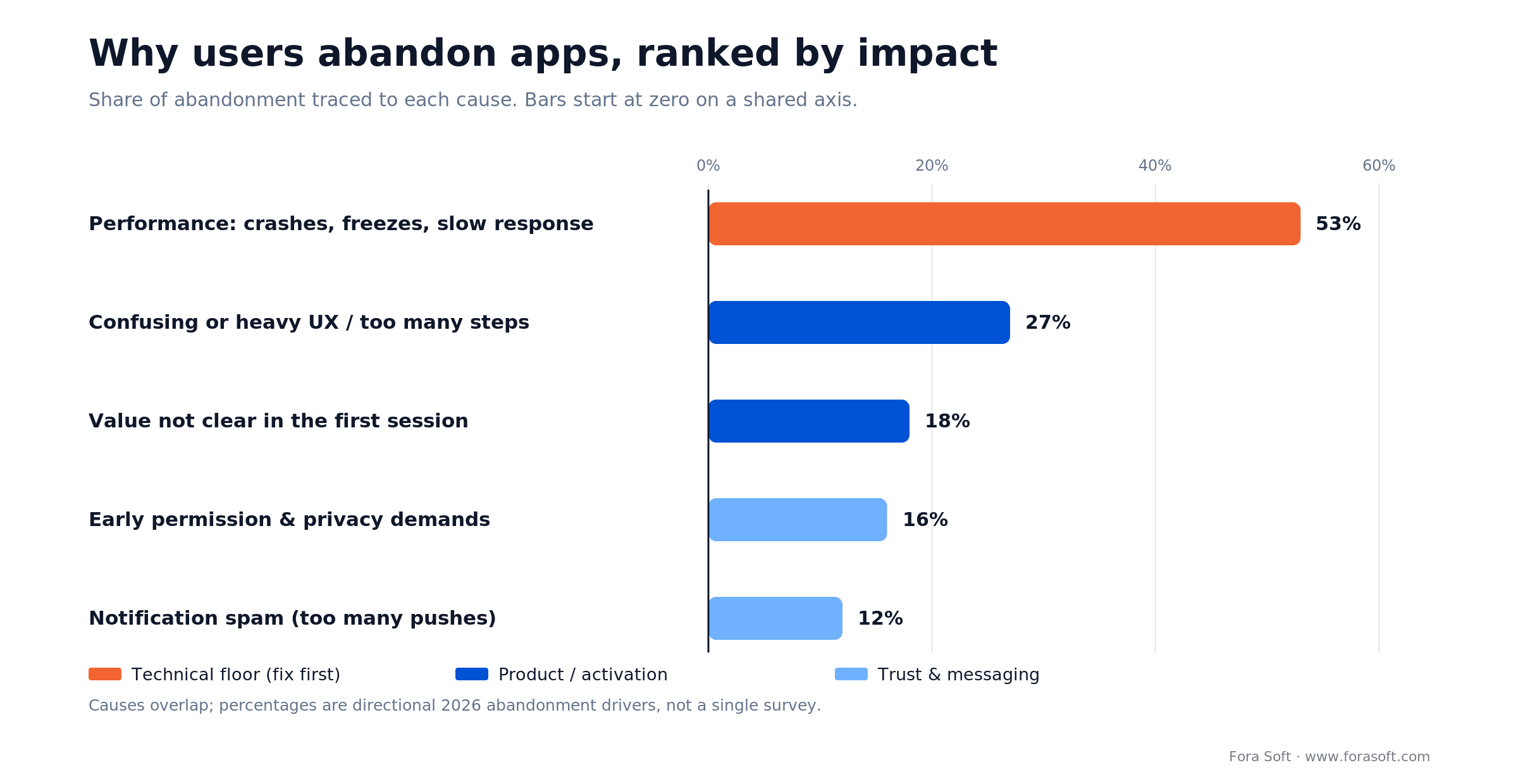
Figure 2. Abandonment drivers ranked by impact. The technical floor is the biggest lever and the cheapest to ignore until it’s too late.
Reach for a performance audit when: your crash-free rate is below 99.9%, your Android cold start exceeds 3 seconds, or your store rating has slid below 4.4. Fix the floor before you touch features.
The two behavior frameworks that actually work
Retention is a behaviour problem before it’s a marketing problem. Two frameworks have survived a decade of product testing and still sit behind every habit-forming app you open daily.
BJ Fogg’s B=MAP
Stanford behaviour scientist BJ Fogg formalised it as Behaviour = Motivation × Ability × Prompt (behaviormodel.org), all three present at the same moment. If motivation is low, make the action easier; if ability is low, reduce friction or raise motivation. The prompt, the trigger, only fires a behaviour when both sit above the action line.
In practice: don’t push a user to upgrade before they’ve felt the value (low motivation), and don’t demand a 14-step form when motivation is already fragile (low ability).
Nir Eyal’s Hooked loop
The Hooked model turns repeated use into reflex through four stages: Trigger → Action → Variable Reward → Investment. The engine is the variability of the reward (TikTok’s next video, Spotify’s Discover Weekly) plus the investment step, where the user adds something of their own (a profile, a streak, a board, a playlist) that they won’t abandon casually.
The two frameworks stack: the trigger is Fogg’s prompt; the action must be easy (high ability); the variable reward keeps motivation high; the investment compounds ability over time, because a curated library is faster to use than an empty one.
Reach for B=MAP when: diagnosing why one specific behaviour (subscribing, finishing onboarding, sharing) isn’t happening. It isolates the failing variable.
Reach for the Hooked loop when: designing core flows that need to recur daily or weekly. It’s a generative design tool, not a diagnostic.
The seven-day window that decides retention
Users effectively decide whether your app stays on the home screen inside the first seven days, and the drop is steepest at the start: the average app historically lost about 77% of its daily actives within three days of install (Quettra data, 2015), and the 2026 Day 1 and Day 7 medians above show the curve hasn’t flattened. The window has three explicit jobs.
1. Aha moment in 60 seconds. The single piece of value that justifies the install has to arrive in the first session. For dating, a meaningful match. For fitness, a personalised first workout. For an LMS, a question answered. BrainCert’s first session deliberately surfaces a live whiteboard with a working equation inside a minute.
2. First habit loop closed. Between Day 1 and Day 3, the user should complete one full Hooked cycle: trigger, action, reward, and a small investment (a preference saved, a profile created, content uploaded). Without an investment, the second visit is purely emotional and statistically doesn’t happen.
3. First re-engagement that feels useful. By Day 4 to Day 7, your first push or email needs to be context-aware (“your streak is 2 days, today’s lesson is short”), not promotional. Personalised re-engagement holds far more of a cohort than a broadcast blast.

Figure 3. The three jobs of week one. Miss any box and the cohort quietly exits at that stage.
Rewrite onboarding for time-to-value under 60 seconds
Onboarding is the highest-impact screen in the whole product. Optimised flows move Day 1 retention from ~25% to 40%+, and they all share the same shape.
Cap the flow at 3–7 screens
Anything past seven steps drops conversion measurably. Each screen should either personalise the experience or open a feature, not just “explain.” Carousels of marketing copy on first launch are dead weight.
Defer account creation
Guest mode, letting the user touch the product before signing up, is the single biggest activation win for most categories. Save preferences locally, then prompt for an account once the value is visible. The same pattern works for permissions: ask for push, location or contacts only when the feature that needs them is on screen.
Progressive disclosure of features
Reveal advanced settings, social features and monetisation hooks gradually (Nielsen Norman Group has documented why for two decades). Apps that try to teach everything in the first session usually teach nothing. Tooltips on second use, tabs that open after the first action, and contextual nudges (“you’ve completed three lessons, here’s the leaderboard”) beat front-loaded tours.
Personalise the first session
Two or three quick preference questions during onboarding (skill level, interests, goals) measurably improve activation, because the very next screen can be tailored. Duolingo asks placement questions, then drops you straight into a first lesson at the right level, with no marketing slides in between. For the UX patterns behind this, see our guide to mobile app UX design best practices.
Onboarding still over two minutes?
We’ll run a heuristic teardown of your first-session flow and send back the three highest-impact changes, usually inside one working week.
Push notifications: the right number, the right copy
Push is the highest-ROI channel in the retention stack, and the easiest to ruin. The numbers cluster around four facts.
1. Cadence beats creativity. Users who get a few relevant, personalised pushes retain better than users who get none. Push past ~6 a week and the curve flips: at 6–10 messages a week about 32% of users stop using the app (2018 survey). The sweet spot for most consumer apps is 1–3 per week, hyper-personalised.
2. Short copy wins. Five to seven words beats a 15-word headline. Subject lines that read like a friend, not a marketer, engage better across categories.
3. Personalised gets opened. Behaviour-triggered pushes (a streak about to break, a class starting in ten minutes) beat generic broadcasts on open rate because the timing is the relevance. The trigger is the message.
4. Opt-in is your real ceiling. Median opt-in is 48.85% on iOS and 53.3% on Android (Airship 2026 benchmarks, 2025 data); the two platforms are now close to parity, since Android 13 made push opt-in explicit. Ask for the permission only after the user has clearly received value; the gap between a cold prompt at first launch and a warm prompt after the first useful event can be 2–3×.

Figure 4. Retention lift climbs with cadence, then reverses as uninstalls spike. The sweet spot is 1–3 personalised pushes a week.
Reach for an in-app message instead of push when: the user is already inside your app and you want to upsell, educate, or recover an abandoned flow. It skips opt-in entirely and converts much higher.
Five retention loops you can build into any app
A retention loop is anything that gives the user a reason to come back without a push. Five show up again and again in apps with double-digit Day 30 retention.
1. Streaks and daily progress
The Duolingo streak is the canonical example: users with an active streak return far more often. Streaks work because they turn intrinsic motivation into a tangible asset the user doesn’t want to lose. Always show the streak, and let users repair a broken one once a month; loss aversion is too punishing without a relief valve.
2. User-generated investment
Pinterest boards, Spotify playlists, Strava routes, Notion docs. Anything the user creates and edits inside your app raises the cost of switching. Prompt for the first piece of content during onboarding (“pick three artists you like”) and surface what they’ve built every session.
3. Social and community
Leaderboards, follower graphs, group challenges, shared recordings. Strava’s clubs and segments do this; BrainCert’s live polls and breakout rooms do it for classrooms. One well-placed social hook can lift weekly active rates measurably.
4. Personalised content feed
A feed that gets better the more the user interacts with it (TikTok, Spotify Discover) is a self-reinforcing loop. The variable reward is built into the feed, and the investment is implicit, since every swipe is a signal.
5. Recurring scheduled events
A weekly live class on Perspire, a daily lesson drop on Duolingo, a Sunday playlist refresh on Spotify, a Monday market report. A calendared expectation removes the cognitive cost of remembering to open the app.
AI personalisation done right (and the churn trap)
AI personalisation is the most over-hyped and most under-used lever of 2026. The upside is real: McKinsey’s personalisation research (2020–2021) ties it to acquisition costs cut by up to ~50%, revenue up 5–15%, and marketing ROI up 10–30%.
The trap: AI-first apps often see users cancel faster than non-AI competitors. If the AI doesn’t produce a recurring outcome the user values, the cancel button comes sooner. The fix is to put AI inside an existing habit loop, not to make it the loop.
1. Predict churn before it happens. Train a simple gradient-boosted model on event streams (frequency, depth, last-active) to score each user’s churn risk daily, then trigger a different intervention per risk band (in-app message, email, surprise reward).
2. Personalise the next action, not the homepage. The highest-impact personalisation is the next best lesson, workout or match, not a re-shuffled landing page.
3. Run agentic re-engagement. The current frontier is agentic loops that detect risk, draft a personalised message in the user’s tone, send it through the best channel, and learn from the response. We use agent engineering across delivery, which is why we ship retention features in weeks rather than months, without the enterprise platform tax. If you’re weighing what to build, our AI for video engineering course covers the model side in depth.
4. Keep an explainable fallback. When personalisation cold-starts (new user, no signal), you need a rule-based default that doesn’t embarrass the brand. “You don’t know me” is the fastest churn message in the book.
Which AI tools reduce app abandonment?
The AI tools that reduce app abandonment in 2026 fall into three groups: analytics agents that spot churn early, decisioning engines that pick the right message per user, and churn models you train on your own events. You need one from the first two groups at most, and the third is where your edge lives.
| Tool type | 2026 example | What it does for retention | Use it when |
|---|---|---|---|
| Analytics agent | Amplitude Custom Agents (generally available 23 June 2026) | Runs on a schedule over your product data; ships a churn-monitoring template and posts findings to Slack or Jira | You already use Amplitude and nobody watches the retention charts weekly |
| AI decisioning | BrazeAI Decisioning Studio (ex-OfferFit, acquired by Braze 2 June 2025) | Reinforcement learning (contextual bandits) picks message, channel, timing and offer per user instead of one A/B winner | You send at scale through Braze and have enough volume for the model to learn |
| Own churn model | Gradient-boosted or logistic model on your event stream | Scores each user’s churn risk daily and routes them to a different intervention per risk band | Always; five behavioural features already beat untargeted re-engagement |
Two cautions from our projects. First, these tools only act on events you send them, so a messy event schema makes the AI confidently wrong. Second, none of them fixes a crash or a five-second cold start; they re-engage users the product has already disappointed. Sources: Amplitude release notes, Braze on OfferFit.
The tooling stack that pays for itself
A modern retention stack has four moving parts: an event pipeline, a product-analytics layer, an engagement layer, and (optionally) an experimentation or personalisation layer. You don’t need everything on day one, but you do need a clean event schema before anything else.
Event pipeline. Segment, RudderStack, or a self-hosted variant. This is the single source of truth that fans the same events out to analytics, engagement and the warehouse. Cleaning it up later is painful, so do it now.
Product analytics. Mixpanel for funnels and cohorts; Amplitude for advanced segmentation, retention reports and built-in experimentation. Either is enough on its own; pick the one you have an internal champion for.
Engagement. OneSignal at the SMB end, Braze or CleverTap as you scale. CleverTap folds analytics and engagement into one cloud, handy when the team is small and context-switching is expensive. Iterable and Customer.io are strong for lifecycle email plus push.
Subscription analytics (consumer apps). RevenueCat or Adapty if you charge through the App Store or Play. Without one, you won’t see which subscription cohorts convert and which churn within 14 days.
Retention platforms compared
A side-by-side of the tools we reach for most, with the honest watch-out on each.
| Platform | Where it wins | Best for | Where it breaks | Pricing shape |
|---|---|---|---|---|
| Mixpanel | Funnel and cohort retention reports | Product teams that want fast hypothesis testing | Event-based pricing escalates with scale | Free tier; usage-based |
| Amplitude | Advanced segmentation + experimentation | Mid-market orgs running A/B tests at scale | Steeper learning curve than Mixpanel | Free starter; enterprise on quote |
| Braze | Enterprise omnichannel orchestration | Brands sending push, email, SMS, in-app together | High floor, contract minimums | Enterprise quote |
| CleverTap | Analytics + engagement in one cloud | Small orgs avoiding tool sprawl | Less depth than dedicated analytics tools | Tiered SaaS |
| OneSignal | Push, email, SMS, in-app at low cost | Indie devs, SMB teams shipping fast | Lighter automation than Braze | Generous free tier |
| RevenueCat | Subscription analytics + paywall A/B | Any iOS/Android app charging via stores | Charges a % of tracked revenue above a free tier | Free up to a monthly revenue cap; usage-based |
The performance floor: crash-free, cold start, ANR
Before any retention feature is worth building, the engineering floor has to hold. These are the 2026 production benchmarks a product owner can hand engineering, sourced from Google’s Android vitals crash and ANR guidance.
| Metric | Floor | Target | Why it matters |
|---|---|---|---|
| Crash-free sessions | 99.95% | 99.99% | Google Play flags a 1.09% user-perceived crash rate as bad behaviour |
| User-perceived ANR rate | <0.47% | <0.20% | 0.47% is Google’s bad-behaviour threshold; ANRs hurt retention more than crashes |
| Cold start (Android) | <5 s | <2 s | Vitals flags >5 s; competitive apps target <2 s |
| Cold start (iOS) | <2 s | ~400 ms | iOS kills the process around 20 s at launch |
| Wake locks / battery | Under 5% of sessions | Minimal background wake | Since 1 Mar 2026 Play can show a listing warning and drop apps from recommendations if a screen-off partial wake lock runs 2+ hours in over 5% of sessions (28 days) |
| App size (install) | <150 MB | <80 MB | Larger installs see higher abandonment on cellular |
The hard rule: a feature that ships at the cost of crash-free rate or cold start is a feature that loses money. Our troubleshooting and optimisation work routinely starts here, with an engineering audit before a product audit.
Mini case: how AppyBee lifted retention 20%
AppyBee is a booking and management platform used by 800+ gyms, martial-arts schools and personal trainers across the Netherlands and Germany since 2017. It solves a high-stakes retention problem: studios lose members the moment booking, billing or check-in stops feeling effortless.
Situation. Owners were spending 10–15 hours a week on admin: chasing payments, juggling class capacities, reissuing physical membership cards. Members churned whenever a booking failed or a renewal went silent.
Plan. A React Native cross-platform app with a React web admin and a PHP + REST API backend on AWS. Subscription pause/resume automation removed the most common churn trigger; QR-based check-in replaced physical cards; and iDEAL, Bancontact, Pay.nl and Pay.pro gave members a payment path that always worked locally.
Outcome. Member retention up 20%, owners saving 10–15 hours a week, 800+ businesses live, and a 4.6 rating across 57 reviews on Trustindex. Want a similar assessment for your stack? Book a 30-minute retention review and we’ll sketch the equivalent plan for your product.
Why retention beats acquisition by 5x
The economics aren’t subtle. Winning a new mobile user is roughly 5× more expensive than keeping one, and Bain/Reichheld’s long-cited rule still holds: a 5% lift in retention can raise profits 25–95%. Here’s the back-of-envelope we use with clients.
Worked example. Say you spend $8 to acquire a user and each retained user is worth $40 in lifetime value, so your LTV:CAC is 5:1. If a retention sprint lifts Day 30 retention from 5% to 8% on a 20,000-install month, that’s 600 extra retained users (20,000 × 3%). At $40 each, that’s $24,000 in recovered LTV every month, from a cohort you already paid to acquire. The same 3 points bought through paid growth would cost about 600 × $8 = $4,800 a month in fresh CAC, and you’d still have to retain them.
Healthy LTV:CAC. 3:1 is the floor. Below 1:1 you’re paying to lose users; above 5:1 you’re usually under-investing in growth.
Retention engineering payback. A four-week, two-engineer engagement to fix onboarding plus the push pipeline routinely pays back in the first month for any app above ~5K monthly installs. You’re not buying a new feature; you’re saving the cohort you already bought. We use agent engineering across delivery, which compresses these projects further, and we only quote what we can ship. For a full breakdown, see our 2026 mobile app development costs guide.
Curious what a retention sprint would look like?
We’ll scope a 2–4 week engagement against your funnel and show the conservative payback math before you commit a dollar.
A decision framework: pick your retention focus in five questions
Q1. Is your Day 1 retention below 25%? Then onboarding is your single biggest lever. Ship a 60-second time-to-value experience first. Don’t touch push, don’t touch personalisation.
Q2. Is your crash-free rate below 99.9%, or your cold start above 3 seconds? Pause growth spend and fix the floor. Every other lever just amplifies the leak.
Q3. Do users complete a habit loop in week one? If not, name the single recurring action that defines value and re-architect the home tab around it.
Q4. Are you sending more than three pushes per week per user? Halve it and watch uninstalls drop. Reinvest the saved frequency into in-app messages.
Q5. Do you score churn risk daily? If not, this is the highest-impact AI feature for the year. Even a logistic-regression model on five behavioural features beats untargeted re-engagement.
Five pitfalls that quietly kill retention
1. Cold permission prompts. Asking for push, location or contacts on first launch, before any value, routinely halves opt-in. Always pair the prompt with the feature about to use it.
2. Treating analytics as nice-to-have. If your event schema can’t cohort by install date, install source and onboarding completion, you can’t make a retention decision. Fix the data plane before the dashboard.
3. Notification spam. The uninstall spike past ~6 pushes a week is one of the most consistent findings in the engagement data. Fewer, better, personalised.
4. Hiding the value behind a paywall. Trial flows that block the aha moment tank both activation and conversion. The paywall belongs after the user has felt the value, not before.
5. Shipping AI as the product, not the loop. Faster cancellations on AI-first apps are what happens when novelty is the whole feature. Use AI to accelerate an existing habit loop; don’t bet retention on it standalone.
The KPIs to instrument first
Quality KPIs. Crash-free sessions (99.95%+), p95 cold start (Android <2 s, iOS <1 s), user-perceived ANR rate (<0.47%), p95 API response (<500 ms). These move retention before any product change does.
Business KPIs. Day 1, Day 7 and Day 30 retention by install cohort and source. Time-to-value (median seconds from open to first valuable event). LTV:CAC (target 3:1+). Subscription day-14 churn for paid apps, the early-cancel signal.
Reliability KPIs. Push delivery rate (95%+), opt-in rate by platform (iOS and Android separately), in-app message engagement, and churn-risk model precision on the top decile, refreshed monthly.
When NOT to chase app retention
Retention isn’t always the right battlefield. Skip or de-prioritise it when:
The job is genuinely transactional. A tax-filing app, a flight check-in, a wedding-planning app: the user doesn’t want to come back daily. Chase session quality and NPS, not Day 30 retention.
You haven’t validated demand. If you’re still discovering the core value with under 1K weekly actives, a retention sprint is premature. Ship more variants, not more notifications.
The app is essentially a marketing surface. A B2B companion app with monthly content drops needs lifecycle email and content quality, not gamification.
FAQ on app abandonment and retention
What counts as “app abandonment” vs “churn”?
Abandonment usually means users who install but stop using the app without explicitly cancelling, the silent drop-off. Churn is the explicit version: cancelling a subscription, deleting an account, uninstalling. Day 30 retention is the standard benchmark for abandonment; subscription day-14 churn is the standard benchmark for paid product churn.
What is a good mobile app retention rate in 2026?
The 2026 median is about 25% on Day 1, 8% on Day 7 and 4% on Day 30 (UXCam, on AppsFlyer data). A good Day 30 rate is 5–8% overall and 10–15% in fintech, roughly the 75th percentile. For a new product, getting Day 30 from ~4% to 8–10% inside six months is aggressive but achievable if onboarding and push are tightened together.
How many push notifications per week is too many?
Once you pass ~6 per user per week, about 32% of users stop using the app (2018 survey). The pragmatic ceiling for most consumer apps is 1–3 highly personalised pushes a week, backed by in-app messages while the user is already inside the product.
Is the Hooked Model still relevant in 2026 with AI everywhere?
Yes, arguably more so. AI changes how you generate the variable reward and personalise the trigger, but the four-stage loop (trigger, action, variable reward, investment) is still the structure of every habit-forming product. The AI-only apps that fail at retention skip the investment stage entirely.
How long does a meaningful retention engagement take?
A focused sprint (analytics audit, onboarding rewrite, push pipeline overhaul) runs 4–8 weeks for a typical app. Habit-loop redesigns take longer, 12–16 weeks, because they involve content and personalisation work. We compress timelines with agent engineering across delivery.
Why is my mobile app losing users after launch?
Usually because of one of five causes, in order of impact: crashes or slow response, heavy onboarding, value that doesn’t show in the first session, permission requests before any value, or too many notifications. Check crash-free rate and cold start first, then Day 1 retention by install cohort.
What tools reduce app abandonment with AI?
In 2026 the practical options are analytics agents such as Amplitude Custom Agents for churn monitoring, AI decisioning such as BrazeAI Decisioning Studio for per-user message and timing, and a churn-risk model you train on your own events. Buy one platform; build the churn model yourself.
How do you calculate mobile app retention rate?
Divide the users from an install cohort who are active on Day N by the total users in that cohort and multiply by 100. For example, 40 of 1,000 installers active on Day 30 is 4% Day 30 retention.
Should we build retention tooling in-house or buy?
Buy the analytics and engagement layers (Mixpanel or Amplitude, plus OneSignal, Braze or CleverTap); build the churn-risk scoring and personalisation logic in-house. The platforms are cheap relative to engineering time; the model is your moat.
What is the single highest-impact retention change?
Optimised onboarding. Done well it moves Day 1 retention from ~25% to 40%+, and that compounds through every later week. Nothing else moves the cohort math as cleanly.
Does retention mean we should stop paid acquisition?
No, it means paid acquisition only pays back if the product retains. The two are interlocked. The discipline is to throttle acquisition spend until Day 30 retention crosses ~10–15%, then scale.
What to read next
UX
Best Practices for Mobile App UX Design
The UX patterns that fix the activation half of the retention equation.
Engagement
Why Active App Users Matter
The economics of MAU and DAU, in the language a CFO will accept.
Cost
2026 Mobile App Development Costs
Real estimates, not agency-website ranges. Budget retention as part of the build.
Revenue
How Much Money Can You Make from an App?
Where retention turns into actual revenue.
Ready to stop losing 90% of your users?
App abandonment is a default outcome; the question is whether your product fights it on purpose. The shape of the fight is consistent across categories: hold the engineering floor, deliver value in 60 seconds, close one habit loop in week one, send fewer and smarter pushes, and treat retention as a profit lever, not a marketing chore.
If your Day 30 retention is below 10%, the playbook above is sequenced: fix the floor, rewrite onboarding, install one habit loop, then layer personalisation and AI. We’ve walked dozens of products through that exact order, and the surprising part is how often the biggest gain sits upstream of any product change, in the data plane and the crash-free rate. If you want a hand, our custom software development team does this weekly.



The handbook · 7 volumes
Fora Soft Video Engineering Handbook
In video apps, much of the abandonment this playbook tracks starts as a stalled player or a slow first frame. Our seven-volume handbook covers the full video stack; start with Volume 3 for ABR, players, recovery from stalls and QoE monitoring, then Volume 1 for encoding and Volume 7 for AI serving and cost per stream-hour. Written by Nikolay Sapunov, CEO at Fora Soft.
Browse the handbook on Amazon →7 volumes · 9,000+ pages · Kindle & paperback
Want a retention plan tailored to your funnel?
30 minutes, no slides. We’ll look at your numbers and name the two changes most likely to lift Day 30 retention this quarter.

