Key takeaways
• Edge AI vs cloud AI is decided by the action, not the model. Edge reaches a local relay in about 46 ms on the camera, 76 ms on a rack box. Push the same alert to a phone and both architectures land near a second, because APNs and FCM dominate everything upstream of them.
• At 50 cameras the per-camera bill is $7.49 on edge, $27.21 on cloud-only AWS, and $28–33 on a subscription. Every column includes the camera, every figure is 2026 list price, and the arithmetic is printed.
• Custom pays back above roughly 110 cameras on a three-year horizon. A $100,000 build divided by $25.74 saved per camera per month over 36 months needs 108 cameras, or 65 over five years. Under about 65, buy the subscription.
• Edge does not make you compliant. The EU deferred Annex III high-risk duties to 2 December 2027 (Regulation (EU) 2026/1744), but GDPR Article 9 and Illinois BIPA apply wherever the inference runs. Edge shrinks the transfer question, not the consent question.
• False alarms cost about what the whole argument does. Cutting eight nuisance alerts per camera per week saves $8.66 a month; the entire edge-versus-cloud compute gap is $9.51. Fix precision before you fix placement.
Why Fora Soft wrote this comparison
Most edge AI vs cloud AI articles are written by someone selling one of the two. They compare adjectives (faster, safer, more scalable) and stop before the arithmetic. We have shipped both, on the same client's cameras, and watched the bill arrive. Most of that work runs through our computer vision for video surveillance team.
Fora Soft is a software development company that has built video products since 2005: 250+ projects, 50+ in-house specialists, and a surveillance portfolio that includes VALT, the evidence-recording platform used by 770+ US organizations and 50,000+ users, and Mindbox, an intelligent VMS whose ANPR module reads 500,000+ vehicles a day across India. With Live Eye Surveillance, a US retail remote-monitoring provider, we work on cloud-side analytics that added 10,000+ locations since January 2025; and for EyeBuild, a US solar construction-site monitoring provider, we built the platform behind cameras that run with no fixed line at all for 14 days at a stretch. Those two products sit at opposite ends of this argument, which is a good way to learn where the line actually falls.
This piece is the version we give clients scoping a custom surveillance product. Every price has a source and a date, every calculation is printed longhand so you can substitute your own numbers, and the sections that make edge look bad are in here too.
Arguing about edge vs cloud with no numbers in the room?
Bring your camera count, latency target and compliance constraints. We will sketch the split and a budget on a 30-minute call — no deck, just the arithmetic.
Edge AI vs cloud AI: the short answer
Edge AI runs the model on the device that captured the data; cloud AI ships the data to a remote GPU and sends the verdict back. Edge wins latency, bandwidth and data residency. Cloud wins model size, reasoning across many devices, and the ease of updating one deployment instead of a whole fleet. That is the trade-off, and it holds in every industry that runs inference on sensor data.
Run detection where the response happens. If something local has to act — a relay, a siren, a turnstile, a line-stop, a nurse-call — the model belongs on site. If the answer needs more than one camera, more than one site, or a model too heavy for a 25 W budget, it belongs in the cloud. Almost every serious 2026 surveillance product ends up hybrid, and the interesting question is not which but where exactly the line sits.
Two definitions, because the terms get used loosely. Edge AI means the model runs on the device that produced the data or on a box beside it — a camera, a robot arm, a phone, a wearable — so the raw data is analysed locally and only results leave. Cloud AI means the data is shipped to a remote GPU, analysed there, and the verdict comes back. The physical difference is one network round trip. The commercial differences are bandwidth, storage, licences and who holds the data.
The trade-off is the same whether the sensor is a camera, a vibration probe or a hearing aid, so here it is in general form before we make it specific. Cameras are the hardest case, because video is the largest and most regulated data type on that list.
| Attribute | Edge AI | Cloud AI | Who wins |
|---|---|---|---|
| Response time | tens of milliseconds, no round trip | hundreds of milliseconds to seconds | edge, when something local acts |
| Bandwidth | results only, kilobits per device | raw data, megabits per device | edge, by 15–40× |
| Model size | capped by power and memory on the device | any model you can pay for | cloud |
| Cost shape | capital up front, low running cost | no capital, running cost scales with devices | depends on fleet size and horizon |
| Data residency | raw data never leaves the site | raw data crosses a boundary you must justify | edge |
| Offline behaviour | keeps inferring, buffers results | stops | edge |
| Cross-device reasoning | one device sees one view | the whole fleet in one place | cloud |
| Updating the model | an OTA rollout across every device | redeploy once | cloud |
The same table explains why a smartwatch scores heart-rate variability on the wrist and syncs summaries, why a car runs perception on-board and trains in a data centre, why a factory inspects parts at the line and reports yield centrally, and why a checkout camera counts items locally but reconciles baskets in the cloud. Different industries, one rule: inference goes where the response is, aggregation goes where the fleet is.
Everything below applies that table to cameras, where the volumes are big enough that the trade-offs stop being theoretical and start showing up on an invoice.
The rest of this article is the evidence: a latency budget that counts every stage rather than just the model, per-camera economics at three deployment sizes, an honest accuracy delta, the compliance picture after the July 2026 rule change, and a section on where edge quietly fails.
Latency: edge AI vs cloud AI
Every edge AI vs cloud AI comparison we could find quotes inference time and calls it latency. Inference is the smallest term in the budget. What matters is glass-to-alert: the interval between the photon hitting the sensor and something being able to act on it.

Figure 1. Edge wins by an order of magnitude only when the response is local. Route the same alert through a phone and the push notification swamps the difference.
| Stage | Inference on the camera | Cloud, RTSP/WebRTC push | Cloud, 2-second segments |
|---|---|---|---|
| Capture + ISP | 33 ms | 33 ms | 33 ms |
| Encode for transport | not needed | 20 ms | 20 ms |
| Buffer before send | 0 ms | 0 ms | 2,000 ms |
| Uplink | 0 ms | 120 ms | 250 ms |
| Decode | 0 ms | 10 ms | 10 ms |
| Inference | 5 ms (YOLO26s INT8, Orin Nano Super) | 2.5 ms (YOLO26s, T4 TensorRT) | 2.5 ms |
| Track + rule evaluation | 3 ms | included | included |
| Return hop | 5 ms (LAN relay) | 120 ms | 120 ms |
| Total to a local actuator | 46 ms | 306 ms | 2,436 ms |
| Add a phone push (APNs/FCM) | +0.3–3 s | +0.3–3 s | +0.3–3 s |
Two honest caveats before you quote those totals. The edge column assumes inference on the camera, where the pipeline taps the frame before encode. Put the model on a separate box in the rack and you pay encode, a LAN hop and decode again: about 30 ms more, so roughly 76 ms rather than 46. And nobody publishes push-delivery latency. Apple and Google give no figure and no SLA; the field range is 0.3 to 3 seconds, and the diagram uses 800 ms as a stated assumption, not a measurement.
The inference figures in that table are vendor-published; the two-second segment buffer is arithmetic on a standard; every other leg is a stated engineering assumption. Where we have our own measurements they sit under client NDAs, so ask on a call rather than taking a blog’s word for it. Three things fall out of the table, and only one of them is the usual talking point.
1. The container sets cloud latency, not the GPU. A cloud model inferences in about 2.5 ms. If the camera ships two-second HLS or DASH segments, which is still the default path on segment-based cloud VMS, you have spent 2,000 ms before the first byte moves. Rhombus is the useful counter-example here: it rebuilt its pipeline specifically to escape two-second containerisation and now advertises 100–400 ms live latency. Switching from segmented upload to an RTSP or WebRTC push cuts more latency than any accelerator purchase.
2. The notification leg is usually the slowest thing you own. Push delivery through APNs or FCM runs in the hundreds of milliseconds to several seconds and neither architecture controls it. If the alert's only destination is a guard's phone, edge buys you very little. It buys everything when the destination is a relay contact, a door strike, a PA zone or a PLC.
3. A person takes a step in about 500 ms. That is the honest threshold for catching someone on a perimeter or at a checkout lane. Only the edge-to-local-actuator path clears it with room to spare.
Reach for edge inference when: an actuator, relay or on-site operator must respond inside one second — intrusion, fall detection (we cover the pattern in our fall-detection camera guide), line-stop, tailgating at a turnstile.
How many cameras fit on one edge box
Vendors sell TOPS. You buy streams. The conversion runs through two ceilings that are easy to miss: how many frames per second you actually need to infer, and how many streams the host can decode before the accelerator sees a single pixel.
Start with the detection rate. Surveillance analytics rarely needs 30 fps — most detection and tracking pipelines run at 4–6 fps and interpolate between. At 5 fps a camera asks for five inferences a second, so a 190-inference-per-second box has 38 cameras of theoretical headroom. Then decode reality bites.
| Box (2026 price) | Measured detection latency | Inference headroom at 5 fps | Practical cameras | Power |
|---|---|---|---|---|
| Jetson Orin Nano Super, $399 | YOLO26s INT8 5.25 ms | 190/s → 38 cameras | 8–12 at 1080p30, NVDEC-bound | 7–25 W |
| Hailo-8 (Pi AI HAT+ or M.2), $110–240 | YOLO26s 10.2 ms (97.8 FPS) | 97/s → 19 cameras | 6–8, host decode is the ceiling | 2.5 W typ, 8.25 W max |
| Hailo-8L on a Pi AI HAT+, $70 | YOLO26n 9.0 ms (111 FPS) | 111/s → 22 cameras | 4–6 on a Pi 5 | 1.5 W typ |
| On-camera SoC (Hailo-15H, ARTPEC-9) | Hailo publishes 127 FPS; Axis publishes none | its own stream only | 1 | inside the PoE budget |
| Cloud g6.xlarge (L4), $0.80/hr | 2.5 ms on a T4, so an L4 is faster | 400/s → 80 cameras | 40–60, decode and batching bound | someone else’s problem |
Sources for that table: the latency figures come from Ultralytics’ Jetson benchmarks and the Hailo model zoo, both first-party. On the prices: NVIDIA quietly repriced the whole Jetson line in July 2026 and the Orin Nano Super devkit went from $249 to $399 on its own price table, so a budget written in the spring is already wrong. Hailo publishes no list price for the bare Hailo-8 module and distributors ask $180–240 for one; the cheapest honest way to buy the same 26 TOPS silicon is the $110 Raspberry Pi AI HAT+.
Two traps in that table. The Raspberry Pi 5 dropped the hardware H.264 decoder (H.265 is decoded in hardware, H.264 in software on the A76 cores), so a $110 AI HAT+ can be starved by four 1080p H.264 streams while its NPU idles. And on the camera side, an on-camera NPU shares the 802.3af budget of roughly 12.95 W with the sensor, ISP, encoder, PHY and the IR illuminators. That is why on-camera analytics is one model, one stream, one job — never the whole pipeline.
Reach for an edge box rather than smart cameras when: you want to change models without changing hardware, you already own ONVIF cameras worth keeping, or you need more than one analytic per stream.
What actually leaves the building
Bandwidth is where cloud AI quietly stops being a preference and starts being a physics problem. The number that matters is sustained upload, not peak.
Take a 5 MP camera with adaptive-quality encoding. Verkada's own SKU capacities imply about 8.5 GB per camera per day (a 256 GB camera rated for 30 days), which averages 0.79 Mbps. A 4K camera lands near 17.1 GB a day, or 1.6 Mbps. Third-party cameras without adaptive encoding run 30–60% higher. Axis, for its part, states plainly that a 1080p30 H.264 stream sits anywhere between 1 and 10 Mbps depending on scene and lighting. The range is real, and it is why you size the uplink for the worst hour, not the average one.
| Deployment | Sustained uplink | Monthly volume | What that costs to move |
|---|---|---|---|
| 10 × 5 MP, full upload | 8 Mbps | 2.55 TB | transfer in is free; KVS ingest and retrieval are not |
| 50 × 5 MP, full upload | 40 Mbps | 12.75 TB | beyond most retail and clinic uplinks |
| 50 × 4K, full upload | 80 Mbps | 25.65 TB | needs a symmetric business circuit |
| 50 cameras, edge filtering | ≈2 Mbps | 0.6 TB | metadata, thumbnails and alert clips only |
| 50 cameras on 4G, full upload | 40 Mbps | 12.75 TB | $382,500/month at Hologram list ($0.03/MB) |
That last row is not a typo. Cellular data at $0.03/MB on Hologram’s list turns one continuously uploading megabit into roughly $9,720 a month, so a fifty-camera site moving 12.75 TB runs $382,500. Edge inference on a cellular camera is not an optimisation, it is the only way the product exists. That is exactly why EyeBuild's solar construction cameras detect on the device and send events, and why the turn-key price starts at $199 a month per camera instead of a five-figure data bill.
The second constraint has nothing to do with money. A 40 Mbps sustained upload from one retail site needs a symmetric business circuit; a typical store has 10–50 Mbps up, shared with the point-of-sale system. Edge filtering drops the same site to about 2 Mbps, which any circuit can carry.
Reach for cloud-only ingest when: you have fewer than about ten cameras, the site has fibre, and nobody needs an alert faster than a few seconds. Below that scale the engineering to avoid the cloud costs more than the cloud does.
Retention: the cost axis nobody compares
Inference is the cheap part of cloud AI. Keeping the footage is the expensive part, and it is missing from every edge AI vs cloud AI comparison we could find.
Run the arithmetic for 50 5 MP cameras at 30 days. Each camera writes 8.5 GB a day, so the rolling archive is 50 × 8.5 × 30 = 12.75 TB. On S3 Standard at $0.023 per GB-month that is $293 a month, or $5.87 per camera. On local NVMe inside the edge boxes it is a one-off ~$1,200 of drives that amortises to pennies. Push retention to 90 days for an evidentiary use case and the cloud line triples while the local line means buying one more drive.
Then there is the asymmetry that catches people. Ingest into Kinesis Video Streams costs $0.0085 per GB. Pulling that same footage back out to the internet costs $0.09 per GB after the first 100 GB a month. Egress is 10.6× ingest. The cloud is happy to accept your video; it charges you to look at it. A single 30-day export for a legal request on one camera, 255 GB, is $23 at the headline rate and about $14 once the free 100 GB is applied, and no dashboard warns you before you click.
One caveat on the 8.5 GB figure, because everything downstream inherits it: it comes from a camera that records locally with motion-adaptive encoding. A camera uploading continuously with fixed-rate encoding will run higher, and Axis’s 1–10 Mbps range for plain 1080p30 H.264 is the reason we size uplinks for the worst hour. Substitute your own measured bitrate before you sign anything.
Tiering helps if you plan it: Glacier Instant Retrieval at $0.004 per GB-month is 5.75× cheaper than Standard, and Deep Archive at $0.00099 is another 4× below that. The catch is retrieval cost and latency, which is fine for “we might need this in court” and useless for “show me yesterday's lobby”. We usually land on 7 days hot on the edge, 30 days warm in the cloud, 12 months cold, with a documented deletion job that doubles as the retention schedule your privacy counsel is going to ask for.
Cost: edge AI vs cloud AI per camera
Here is the model, with every assumption on the table so you can argue with it: 50 cameras, 5 MP, 30-day retention, detection at 5 fps, US list prices as of July 2026, five-year hardware amortisation, and a camera in every column so the comparison is like-for-like.
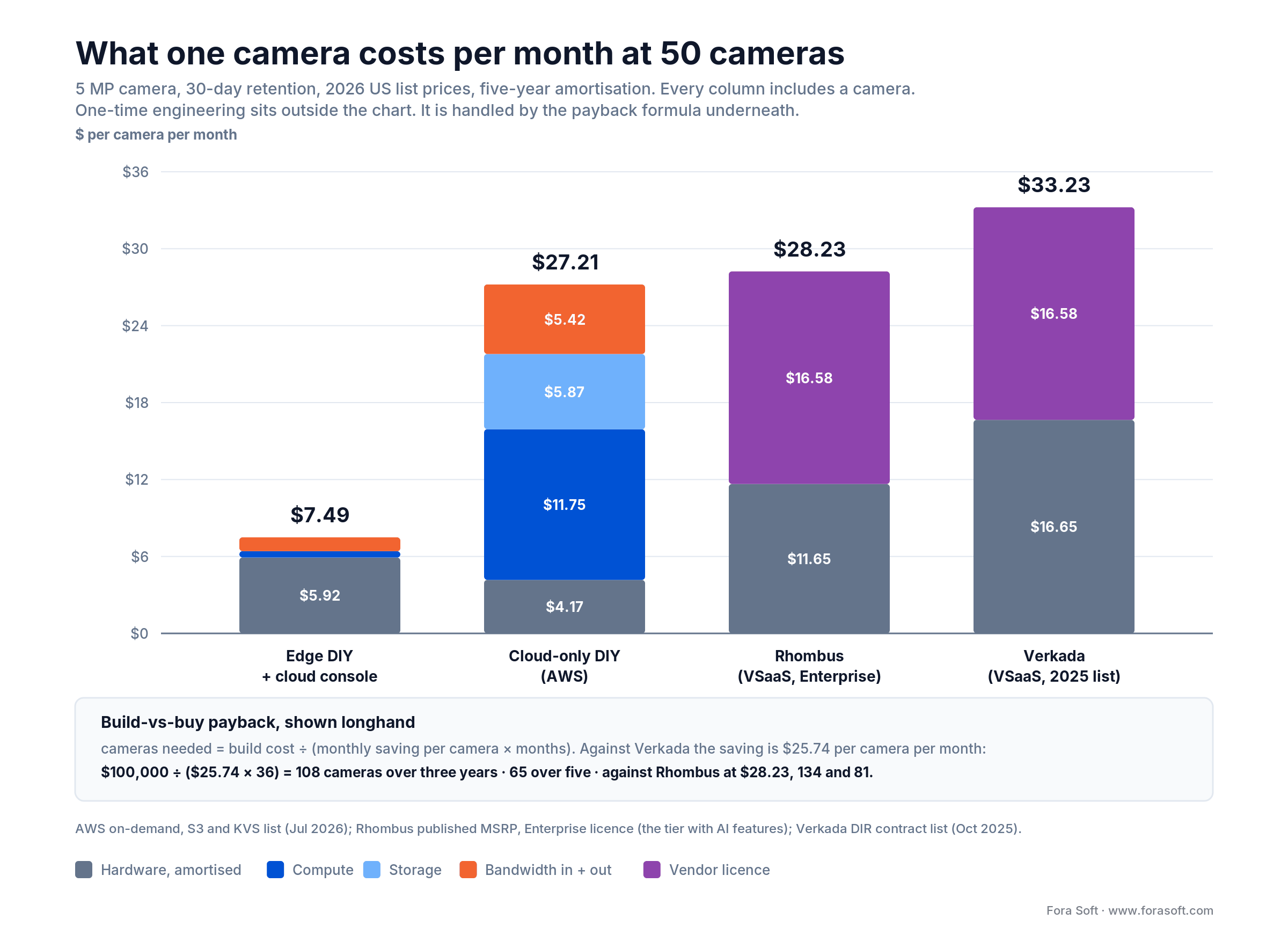
Figure 2. The same 50 cameras under four architectures. Hardware is amortised over five years; one-time engineering sits outside the chart and is handled by the payback formula.
| Line item | Edge DIY + cloud console | Cloud-only DIY (AWS) | Rhombus VSaaS | Verkada VSaaS |
|---|---|---|---|---|
| Camera, amortised | $4.17 ($250 ONVIF 5 MP) | $4.17 (same camera) | $11.65 (R200 40-day at $699) | $16.65 (CD42 5 MP at $999) |
| Edge box, amortised | $1.75 ($749 per 8 cameras, 7 boxes) | — | in the camera | in the camera |
| Compute | $0.49 (fleet console) | $11.75 (one g6.xlarge at $0.80/hr) | included | included |
| Storage, 30 days | on the box | $5.87 (S3 Standard, 255 GB) | included | included |
| Bandwidth in + out | $1.08 | $5.42 (KVS in $2.17 + read $2.17 + egress $1.08) | included | included |
| Vendor licence | — | — | $16.58 ($199/yr Enterprise) | $16.58 ($199/yr) |
| Total per camera per month | $7.49 | $27.21 | $28.23 | $33.23 |
Four notes so nobody has to reverse-engineer the cells. The edge box is a $399 Jetson Orin Nano Super plus a 4 TB NVMe and an enclosure, about $749 for every eight cameras, so 50 cameras need seven of them. The $0.49 console line is one small always-on instance, roughly $25 a month, spread across the fleet. The $1.08 bandwidth line is what comes back out for dashboards, thumbnails and clip review: 12 GB per camera per month at $0.09 a GB. Pushing data into AWS is free, so the cloud column’s $5.42 is Kinesis charging on the way through — 255 GB in at $0.0085 ($2.17), the same 255 GB read back out to the inference service ($2.17), and $1.08 of internet egress for the dashboards. And the Rhombus figures use the Enterprise licence at $199 a year and the 40-day R200 at $699, because the cheaper Professional tier excludes the AI features this article is about and Rhombus has no 30-day R200, so a 30-day requirement forces the 40-day, 256 GB unit at $699; the $599 unit holds only 20 days.
Cloud-only and VSaaS land within a few dollars of each other, which surprises people. They get there differently: one pays AWS for GPU hours and storage, the other pays a vendor for a licence. But $27 to $33 per camera per month is what the market charges when somebody else runs the analytics.
The number the chart cannot show: engineering
Edge DIY looks three to four times cheaper because the chart excludes the one thing it costs and the others do not: somebody has to build it, and somebody has to keep it running. So run the payback longhand.
cameras needed = build cost ÷ (monthly saving per camera × months). Against Verkada at $33.23 the edge build saves $25.74 per camera per month. A $100,000 build across 36 months: 100,000 / (25.74 x 36) = 108 cameras. Across 60 months, 65 cameras. Measured against Rhombus at $28.23 the same build needs 134 and 81. Halve the build cost and halve the camera count.
That formula is deliberately generous to the build, so discount it accordingly. It counts no cost of capital, no hardware refresh at month 60, and none of the ongoing work this article insists on elsewhere: the retraining loop, staged model rollouts, spares, enclosures and the occasional truck roll. Budget 10–20% of the build per year for that and the thresholds move up by anything from a third to double, depending on the rate and the horizon you pick.
We publish that formula rather than a price because your build cost is the variable that actually moves. Ours are lower than they were three years ago — we run spec-driven agent engineering, which compresses the plumbing work that used to dominate these projects. The honest answer is that we quote after seeing the camera inventory, not before.
Reach for a VSaaS subscription when: you are under roughly 65 cameras on a five-year view, you have no engineering team to maintain firmware, and no data-residency, BIPA or NDAA constraint disqualifies the cloud.
Want this model run against your camera inventory?
Send the camera count, resolution, retention requirement and uplink speed. You get the same table with your numbers in it and a straight build-or-buy recommendation.
What INT8 quantization actually costs you
The fair objection to edge AI is that you are running a smaller model at lower precision than cloud AI would. The fair answer is a number, not a shrug.
Ultralytics publishes TensorRT benchmarks for YOLOv8n on COCO at 640 px. On a Jetson Orin NX, FP32 scores 0.37 mAP50-95 and INT8 scores 0.32, a 13.5% relative drop, while inference goes from 6.17 ms to 2.32 ms, a 2.66× speed-up. FP16 is effectively lossless in the same table. On an A100 and an RTX 3080 the same export lands at 0.33.
Read the conditions before you quote the number. Those benchmarks calibrate on COCO, a general-purpose dataset that looks nothing like your camera angles. Calibrate instead on a thousand frames sampled from the actual cameras across day, night, rain and crowd conditions and the gap narrows, because the calibration set is what decides where the INT8 ranges land. The other half of that page is the part people skip: INT8 shifts confidence values, so you have to pick the operating threshold from the INT8 model’s own F1 curve, not the FP32 one. Teams that forget this blame quantization for what is actually a stale threshold.
The industry has settled on roughly the same tolerance. MLPerf Inference v6.0 defines two edge object-detection tiers against a YOLO11l reference of 53.4 mAP: a 99% tier and a 95% tier, and MLCommons says outright that the 95% tier, its default mode, exists so vendors can show the speed of aggressive quantization. Five percent is the accepted price of edge inference. Whether that matters depends entirely on your class list: for person, vehicle, package and forklift it is invisible; for reading a licence plate at 40 metres in rain it is not.
The accuracy that actually costs you money is precision, not mAP

Figure 3. Operator time spent dismissing nuisance alerts is roughly the size of the entire compute argument.
Take 50 cameras, one operator at $30 an hour, and 30 seconds to dismiss a nuisance alert. An untuned model firing 10 false alarms per camera per week burns 21.7 operator-minutes per camera per month — $10.83. Tune it and re-score borderline detections in the cloud to get down to 2 per week and the same line is $2.17. The saving, $8.66, is 91% of the $9.51 a month that separates cloud GPU compute ($11.75) from edge compute ($1.75 box plus $0.49 console) in the cost model above.
This is why we push clients to instrument false positives per camera per week before arguing about placement. On Live Eye's retail deployments the operating discipline is what produced the outcomes worth quoting. The customer-reported figures: alerts delivered inside 30 seconds, national grocery chains reporting shrink down by up to 30% in the first quarter, quick-service restaurants cutting drive-offs by 40%. None of that came from moving inference across a network boundary.
Reach for cloud re-scoring when: the edge model is confident enough to catch everything but not precise enough to stay quiet — send the borderline band to a heavier model and let it veto.
Compliance by architecture, after the July 2026 rule change
Edge AI does not exempt you from anything. That sentence is the opposite of what most vendor pages imply, and it is the one your counsel will confirm. Data-protection law follows the processing, not the postcode of the GPU. What edge genuinely changes is narrower and still worth a lot: fewer processors in the chain, a smaller cross-border question, and a much smaller blast radius when something goes wrong.
The regulatory picture moved in July 2026, so anything you read written before then is out of date. The Digital Omnibus on AI cleared its final Council vote on 29 June 2026 and carries the date 8 July 2026, as Regulation (EU) 2026/1744. That regulation defers the Annex III high-risk obligations — the ones covering biometric systems — from 2 August 2026 to 2 December 2027, and Annex I embedded systems to 2 August 2028. The Article 50 transparency duties still start on 2 August 2026. Separately and unchanged: real-time remote biometric identification in publicly accessible spaces for law enforcement has been prohibited since 2 February 2025, as has untargeted scraping of faces from the internet or CCTV to build a recognition database. Prohibition and high-risk classification are different regimes; conflating them is the most common error in surveillance content right now.
| Obligation | What triggers it | Edge-only | Hybrid | Cloud-only |
|---|---|---|---|---|
| EU AI Act Art. 5 prohibition | real-time remote biometric ID in public, for law enforcement | applies | applies | applies |
| EU AI Act Annex III high-risk (from 2 Dec 2027) | biometric identification or categorisation | applies | applies | applies |
| GDPR Art. 9 special category | a face embedding used to identify someone | applies | applies | applies |
| GDPR Chapter V transfer rules | personal data leaving the EEA | avoided if frames never leave | scoped to metadata and clips | full analysis needed |
| Illinois BIPA consent + retention schedule | collecting a biometric identifier | applies | applies | applies |
| Processor chain to paper (DPAs) | every vendor that touches the data | shortest | medium | longest |
| NDAA §889 / FAR 52.204-25 | covered equipment in a federal contract | depends on the camera, not the compute | same | same |
Read the table as a shape, not a scorecard. Four rows say “applies” everywhere: those are the obligations edge marketing quietly implies you escape. The rows where edge genuinely wins are the transfer analysis under Chapter V and the length of the processor chain, and on a real project those two are worth weeks of legal review. On healthcare deployments the same logic decides itself: keeping patient-area footage on the hospital VLAN is far easier to defend than routing it to a third-party cloud, which is one reason evidence-grade systems like VALT keep the recording and the chain of custody local and sync the index rather than the video.
One more architectural note that survives every jurisdiction: anonymise at capture, not on retrieval. Blurring faces and masking plates before anything is written means the sensitive version never existed, which is a much stronger position than a redaction pipeline that runs on export. Our companion piece on AI surveillance trends and ethics covers the consent and notice side in more depth.
Reach for edge anonymisation when: the deployment touches EU residents, hospitals, schools, Illinois, or any population where per-subject consent is impractical at scale.
What actually breaks when the WAN drops
“Edge AI keeps working offline” is true about inference and misleading about products. Inference survives. Plenty of other things do not, and they are the ones that generate the support ticket.
- Licence heartbeats. Plenty of commercial analytics SDKs phone home on a schedule and degrade or stop after a grace period. Ask the vendor for the number in writing before you deploy anywhere remote.
- Time sync. An NVR that loses NTP drifts. On evidentiary footage, a timestamp you cannot defend is as good as no footage. A local GPS or RTC-backed time source is a $50 fix that saves a case.
- Identity. If your console authenticates through cloud SSO, nobody can log in to the local system during the outage. Keep a break-glass local account and test it quarterly.
- Buffer depth. Store-and-forward is only as good as the disk behind it. At 8.5 GB per camera per day, an 8-camera box with 4 TB of free space holds about 59 days of ring buffer — but the event queue that has to drain afterwards is the part that usually overflows.
- Reconnect behaviour. When the link returns, 50 cameras all try to flush at once and saturate the uplink you just got back. Rate-limit the drain and de-duplicate on the server side, or the recovery is worse than the outage.
The systems we trust are the ones that were designed to be disconnected rather than tolerant of it. EyeBuild's construction cameras run entirely offline on cellular with 14 days of solar battery and a 3-day reserve; detection, storage and alerting all work with no backhaul at all, and the cloud is a convenience layer. That is a different engineering posture from “we buffer for 30 minutes”.
The hybrid split, specified
Everyone concludes “hybrid wins” and then declines to say what that means. Here is the split we actually deploy, job by job, with the wire budget attached.
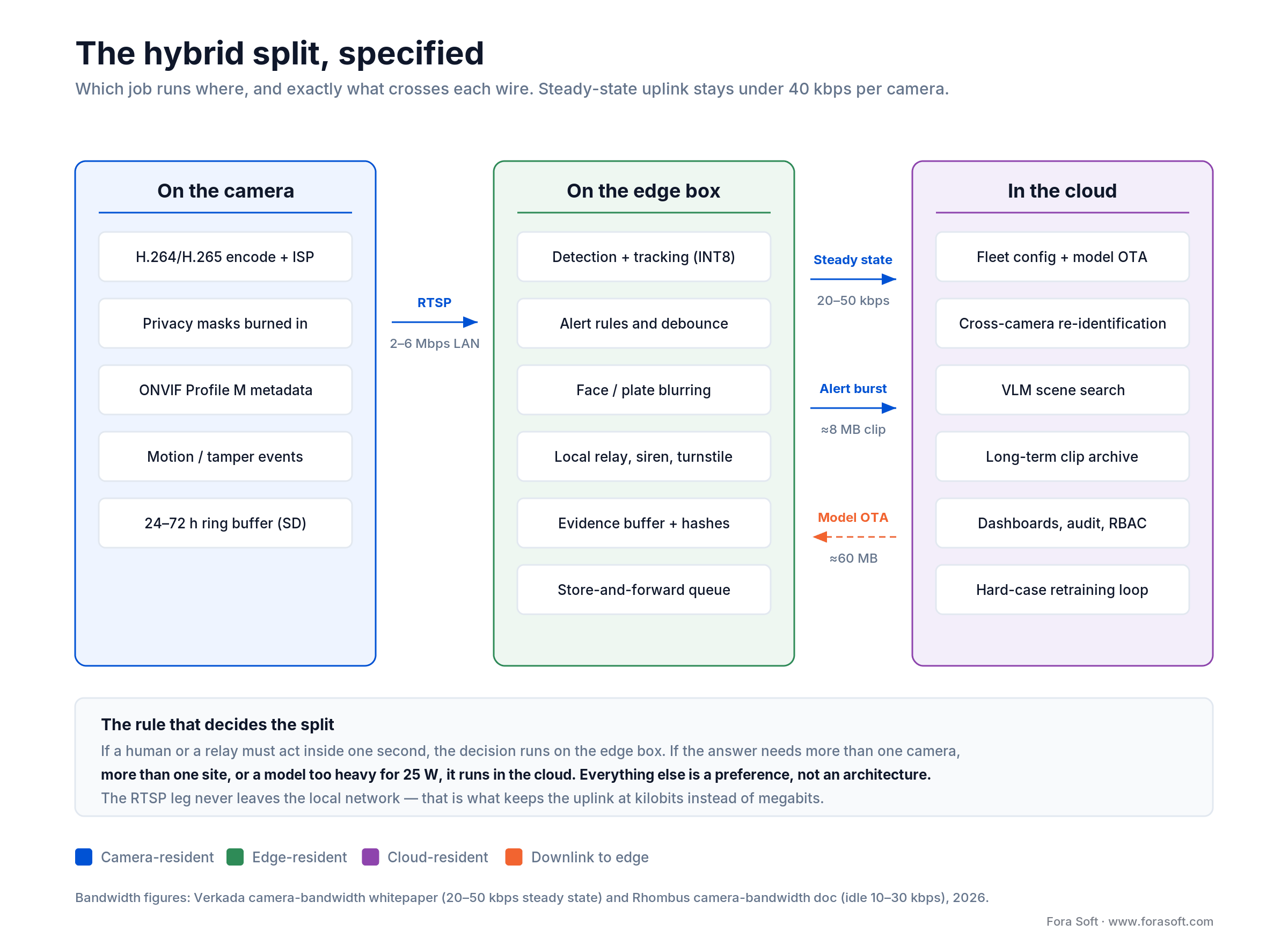
Figure 4. The steady-state uplink per camera is 20–50 kbps of metadata and thumbnails. Video only crosses the WAN when something happened.
What crosses the wire, and how much of it
| Flow | Direction | Typical volume | Why it exists |
|---|---|---|---|
| Metadata + thumbnails | edge → cloud | 20–50 kbps per camera | search index, dashboards, health |
| Alert clip | edge → cloud | ≈8 MB per event | review, evidence, customer notification |
| Detection embeddings | edge → cloud | 2–4 KB per detection | cross-camera re-identification |
| Hard cases | edge → cloud | a few frames per camera per day | the retraining set |
| Model update | cloud → edge | ≈60 MB per release | OTA, staged and reversible |
| Config + policy | cloud → edge | kilobytes | rules, schedules, retention policy |
The discipline that makes this work is treating model rollout like firmware, not like a deploy. Stage to 5% of the fleet, hold for a week against a held-out set from those exact cameras, then widen — and keep the previous version on the box so a rollback is a reboot rather than a truck roll. We learned that operating an Android device fleet of 10,000 units at 99.99% uptime since 2015; cameras are less forgiving than phones because nobody notices a broken one until they need the footage.
Where vision-language search runs in 2026
The genuinely new question this year is natural-language search: “show me anyone carrying a ladder near the east gate after dark”. Small VLMs do run on high-end edge silicon, but on the 8–25 W boxes that fit a camera closet they do not run continuously across 12 streams. The pattern that works is embeddings at the edge, index and query in the cloud: the box emits a few kilobytes per detection, the cloud holds the vector index and runs the language model when a human asks a question. ONVIF has started standardising the retrieval half of this — specification set 26.06 (June 2026) adds natural-language and image-based recording search.
Reach for cloud-side reasoning when: the question spans cameras, sites or weeks — re-identification, natural-language search, behaviour models that need more context than one 25 W box can hold.
Lock-in: what you keep when you stop paying
The architecture decision and the procurement decision get made by different people, usually in the wrong order. Buy the cameras first and you have already chosen the compute placement.
The test that matters: if you cancel the subscription tomorrow, what still works? With a proprietary cloud VSaaS the honest answer is usually “the cameras stop being useful”. Verkada and Rhombus both require an ongoing licence per camera — that is stated on Rhombus’s own pricing page — and the hardware is not designed to talk to anyone else’s VMS. With ONVIF cameras and your own edge software, cancelling a vendor is a migration rather than a replacement.
Three specifics worth writing into a procurement checklist:
- ONVIF profile, not just “ONVIF compatible”. Profile S covers streaming, Profile T adds H.265 and standardised events, and Profile M — the one that matters for analytics — covers metadata and object classification over the metadata stream, the event service or MQTT. Several Profile M elements are conditional rather than mandatory, so ask which ones the camera implements; the Profile M page lists them.
- Watch Profile V. ONVIF published the release candidate on 9 July 2026: a cloud profile where the device makes a secure outbound connection to a cloud VMS with WebRTC media and mandatory OAuth 2.0. Finalisation is targeted for the end of 2026. It is the first standards-based answer to proprietary cloud onboarding, and it is worth a clause in any 2027 procurement.
- Model portability and licence. If your detector is YOLOv8, YOLO11 or YOLO26 you are on AGPL-3.0, which needs a paid Ultralytics Enterprise licence for a closed-source product. D-FINE, RF-DETR and the original Baidu RT-DETR are Apache-2.0, but the RT-DETR wrapper inside the Ultralytics package is itself AGPL, so how you import a model matters as much as which model you picked. We have watched this surface during due diligence, which is a painful time to find it. Export to ONNX and keep the training data yours.
Platform risk is not hypothetical either. AWS ended support for Panorama on 31 May 2026 and the purchased appliances stopped functioning; Rekognition Streaming Video closed to new customers on 30 April 2026; Google's Coral is still purchasable but its software has been abandoned in stages, with the kernel gasket driver archived in April 2026 and Frigate no longer recommending it for new installations. A five-year camera deployment outlives a lot of product roadmaps — on both sides of the argument.
Mini case: keeping evidence local, keeping search central
Situation. VALT is a video recording and observation platform used by US police departments, child-advocacy centres and medical organizations — 770+ organizations and 50,000+ active users. Interview rooms sit on wildly uneven networks: a rural advocacy centre and a metropolitan hospital wing have nothing in common except that both need a recording that will survive a defence attorney.
What we built. We have been the sole development team for over ten years. Recording, PTZ control with position presets, push-to-talk and scheduled or triggered capture all run locally at each site, with encrypted RTMPS streaming and hashes written as the recording happens. The central layer carries scheduling, permissions, the audit trail, and search — including spoken-word search across recordings via Amazon Transcribe, exportable as a PDF report. The video does not need to move for the search to work; the index does.
Outcome. The chain of custody holds through network outages because the artefact and its hash are created at the edge, and a site keeps recording whether or not the WAN is up. That split — evidence local, index central — is the same shape as the analytics split in this article, and it is the one we reach for on regulated deployments. If you are designing something similar, book a 30-minute review and we will walk through the failure modes we hit first.
Pick edge, cloud or hybrid in four gates
Three of these are disqualifiers — one “yes” and cloud-only is off the table no matter what the spreadsheet says. The fourth is the only one about money.
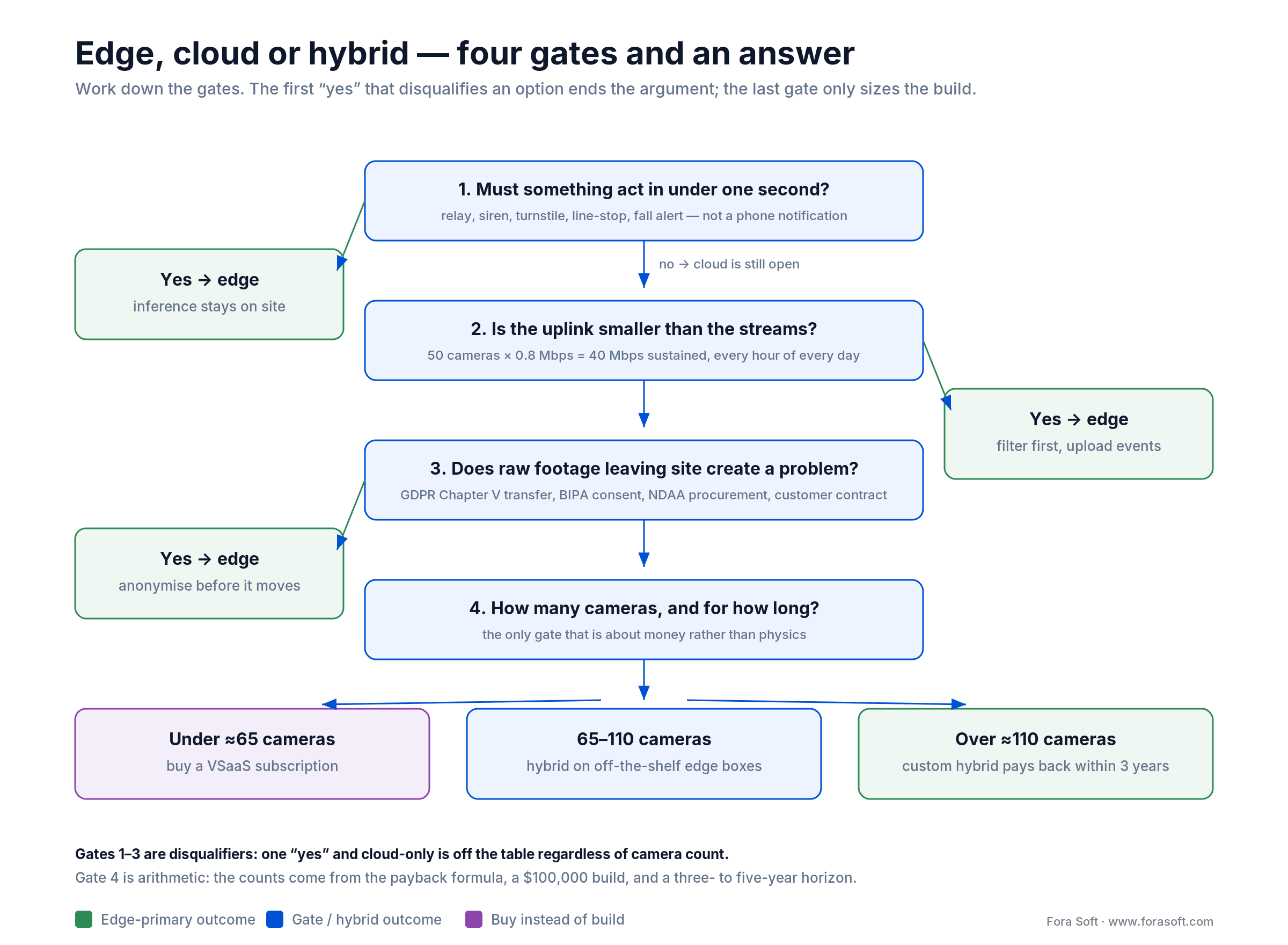
Figure 5. Work down the gates in order. The camera thresholds in the last row come from the payback formula, not from a vendor.
Gate 1. Must something act in under one second? A relay, siren, turnstile, line-stop or fall alert — not a phone notification. Yes means inference runs on site, full stop.
Gate 2. Is the uplink smaller than the streams? Multiply cameras by 0.8 Mbps for 5 MP or 1.6 Mbps for 4K and compare with the sustained upload you can actually buy at that address. If the streams win, edge filtering is not a preference.
Gate 3. Does raw footage leaving the site create a problem? GDPR Chapter V transfers, BIPA consent, NDAA procurement rules, or a customer contract that says the video stays on their premises. Any one of them and you anonymise at capture.
Gate 4. How many cameras, and over how long? Under roughly 65 on a five-year view, buy a subscription. Between 65 and 110, hybrid on off-the-shelf edge boxes. Above 110, a custom hybrid pays for itself inside the three-year horizon at a saving of $25.74 per camera per month.
If you answered yes to any of gates 1–3, you are building hybrid with edge-primary inference. If you answered no to all three and you are under 65 cameras, buy a subscription and spend the engineering budget on something that differentiates your product. Pure-cloud and pure-edge are both corner cases, and anyone who tells you otherwise is selling one of them.
Five pitfalls we see teams hit
1. Sizing the box in a lab. An Orin Nano Super benchmarks beautifully on a desk at 22 °C. In a sealed electrical cupboard behind a shop floor in August it throttles, and throttled inference silently drops frames rather than raising an alarm. Spec one size up, or commit to active cooling and a proper enclosure on day one, and alert on sustained clock throttling.
2. Counting TOPS instead of decodes. The accelerator is rarely the bottleneck. Host decode capacity, memory bandwidth and disk write throughput usually run out first, and on some popular hosts the H.264 decoder you assumed was in silicon is running on the CPU.
3. Shipping without a retraining loop. A model deployed once and never updated drifts as seasons, uniforms, lighting and camera angles change. Build the hard-case collection path before launch, not after the first complaint. Without it, expect visible false-positive growth inside 12–18 months.
4. Letting procurement choose the architecture. Buying proprietary cloud-managed cameras before the compute decision means the decision is made. If the architecture is still open, buy ONVIF and keep it open.
5. Assuming the platform outlives the deployment. Panorama is gone, Rekognition Streaming Video is closed to new customers, Coral's driver stack is archived. Ask of every dependency: if this is discontinued in year three of a five-year deployment, what do we do on the Monday after the announcement?
KPIs worth putting on the dashboard
Quality KPIs. mAP per class against your own held-out set, sampled from your own cameras , not COCO. False positives per camera per week, with a target under 5. Tracker identity-switch rate. Detection recall on a monthly re-labelled sample, which is how you catch drift before a customer does.
Business KPIs. All-in cost per camera per month, hardware amortised and bandwidth included. Median time from alert to operator acknowledgement, target under 30 seconds. Incidents the system missed, trended quarter over quarter: the only metric a customer actually remembers.
Reliability KPIs. Edge uptime, 99.9% on industrial sites. Mean time to recover after a network outage, target under 30 seconds thanks to buffering. Percentage of alert clips synced to the cloud within 60 minutes. Model rollout success rate and rollback count per release.
When NOT to choose edge AI
Edge AI is the wrong answer more often than the marketing admits, and saying so is how you tell whether an article is trying to help you or sell you a box.
Small deployments. Under about ten cameras, the engineering, enclosures, spares and firmware maintenance cost more than the subscription you were avoiding. Buy the VSaaS.
Questions that span cameras. Tracking one person across a 50-camera campus in real time needs a view no single box has. You can federate, but you are rebuilding a cloud with worse tooling.
Heavy models. Vision-language reasoning, high-accuracy face matching against a large gallery, anything that wants tens of gigabytes of memory. Physics and the PoE budget both say no.
No hands on site. Edge hardware fails, SD cards wear out, enclosures leak. If nobody can visit the site within a day, every box is a future truck roll.
And the mirror image, because it cuts both ways. Cloud AI alone is wrong wherever the response is physical, the uplink is thin, the network is unreliable, or the footage is legally awkward to move. That is most of industrial, most of healthcare, most of critical infrastructure and a good share of retail. The middle ground covers the rest, which is why we keep landing there.
Not sure which side of the line you are on?
Thirty minutes, your camera inventory and your latency target. You leave with an architecture sketch and a build-or-buy number, whichever way it points.
FAQ
What is the difference between edge AI and cloud AI in video surveillance?
Edge AI runs the detection model on the camera or on a box beside it, so only results leave the local network. Cloud AI sends the video to a remote GPU and returns the verdict. The physical difference is one network round trip, about 46 ms glass-to-relay on the edge versus 306 ms or more via cloud, and the commercial differences are bandwidth, storage, licensing and who holds the footage.
Is edge AI cheaper than cloud AI for video surveillance?
At 50 cameras, yes: our July 2026 model puts edge DIY at $7.49 per camera per month against $27.21 for cloud-only AWS and $28–33 for a subscription, with the camera counted in every column. But that excludes the build. A $100,000 build needs 108 cameras to pay back over three years, or 65 over five. Below about 65 cameras the subscription wins.
How many cameras can one edge box handle?
A Jetson Orin Nano Super (now $399, up from $249 before NVIDIA’s July 2026 reprice) running YOLO26s at INT8 measures 5.25 ms per inference, which is 190 per second, or 38 cameras at 5 fps of detection. In practice decode capacity caps it at 8–12 cameras at 1080p30. A Hailo-8 handles roughly 6–8, depending entirely on the host’s decoder.
How much accuracy do you lose running INT8 on the edge?
Ultralytics’ published TensorRT benchmark shows YOLOv8n dropping from 0.37 to 0.32 mAP50-95 on a Jetson Orin NX, 13.5% relative, calibrated on COCO. Calibrate instead on ~1,000 frames from your own cameras and the gap narrows, because the calibration set decides where the INT8 ranges land. MLPerf treats 95% of reference accuracy as the accepted edge tier.
Does edge processing make you GDPR or BIPA compliant?
No. GDPR Article 9 and Illinois BIPA follow the processing, not the location of the GPU. Edge changes two things: it can remove the Chapter V cross-border transfer question entirely if frames never leave, and it shortens the chain of processors you have to paper. Consent, retention schedules and DPIAs still apply.
Did the EU AI Act make cloud facial recognition on CCTV illegal in August 2026?
No. Real-time remote biometric identification in public spaces for law enforcement has been prohibited since 2 February 2025, with narrow exceptions. The broader Annex III high-risk regime that covers other biometric systems was deferred from 2 August 2026 to 2 December 2027 by Regulation (EU) 2026/1744, which cleared its final Council vote on 29 June 2026.
What happens to an edge surveillance system when the internet goes down?
Detection, recording and local alerting keep running. What breaks is everything cloud-coupled: licence heartbeats, NTP time sync (which can invalidate evidentiary timestamps), cloud SSO logins, mobile app access, and the event queue if the buffer fills. Test the reconnect flush too: 50 cameras draining at once will saturate the uplink you just recovered.
Can you run a vision-language model on the edge in 2026?
Small quantized VLMs run on high-end edge hardware, but not continuously across a dozen streams on the 8–25 W boxes that fit a camera closet. The working pattern is embeddings at the edge and the index plus language model in the cloud, triggered when a human asks a question rather than on every frame.
What replaced AWS Panorama after the May 2026 shutdown?
Nothing drop-in. AWS ended support on 31 May 2026 and the appliances stopped working; the documented migration path is SageMaker for models plus IoT Greengrass, EKS or ECS Anywhere for device management. In practice teams move to their own edge inference on Jetson or Hailo hardware with a cloud orchestration layer.
When is cloud AI the better choice for surveillance?
When the deployment is small (under ~10 cameras), the site has fibre, alerts can tolerate a few seconds, the question spans many cameras or sites, or the model is too heavy for on-site hardware. Trend analytics, cross-site re-identification and natural-language search all belong in the cloud.
What to Read Next
Edge architecture
Edge AI Camera: 2026 Build Guide, Silicon & Cost Math
The silicon-level companion: accelerators, frame budgets, licences and what to buy.
Detection stack
YOLO + ByteTrack + BoT-SORT + DeepSORT 2026 Guide
The detection and tracking pipeline that runs under every edge deployment above.
Privacy & trust
2026 AI Surveillance Trends: Data Quality & Ethics
Consent, notice and the trust playbook for biometric surveillance products.
VMS engineering
Intelligent Video Management System: A 2026 Build Guide
The platform layer around the analytics: ingest, storage tiers and ONVIF.
Retail
AI Retail Loss Prevention in 2026
Where these numbers land in the vertical that buys the most cameras.
So where should your models run?
Edge AI for the action, cloud AI for the answer, and a thin metadata pipe between them. Edge wins glass-to-alert latency by an order of magnitude when the response is local, removes the uplink as a constraint, and takes the cross-border transfer question off the table. Cloud wins anything that spans cameras, sites or weeks, and it wins outright below about ten cameras where the engineering is not worth it.
The parts people get wrong are the ones we spent this article on: the notification leg that erases edge's advantage when the alert goes to a phone, retention as the dominant cloud cost, the compliance duties edge does not remove, and false-alarm rates that cost as much as the entire compute argument. Get those four right and the placement decision mostly makes itself.
If you are scoping a surveillance product, the technology is not the hard part. Fitting it to your camera count, uplink, regulators and retraining cadence is. That is the conversation we have with clients, and we build the result too, through video surveillance development and AI integration. For the camera-side view of the same problem, our Learn section covers on-camera edge AI in depth, and the blog covers integrating video analytics into an existing surveillance stack and real-time video processing practices.

The book · Volume 7 of 7
AI for Video: A Complete Guide to Intelligence in Video Products: From Real-Time Pipelines and Agents to Serving, Cost, Compliance, and Verticals
The edge-or-cloud answer comes down to latency, cost per camera and what the law lets leave the building. Our volume on production AI works through the same trade-offs at full depth: real-time pipeline budgets, serving on Triton and TensorRT, cost per stream-hour, and the biometrics and EU AI Act rules that shape a hybrid split. Written by Nikolay Sapunov, CEO at Fora Soft.
Read it on Amazon →Kindle & paperback · Fora Soft Video Engineering Handbook
Ready to put numbers on your edge-vs-cloud decision?
Send the camera inventory, the latency target and the regulators in play. You get the cost table with your numbers, an architecture sketch and a delivery estimate.