Key takeaways
• YOLO is the detector. The tracker is what makes the product. ByteTrack, BoT-SORT, and DeepSORT each fit different production realities. Pick the wrong one and your false-ID rate doubles.
• BoT-SORT + YOLO26 is the 2026 default. Higher MOTA than ByteTrack on crowded scenes, and faster than DeepSORT’s appearance-embedding inference. YOLO26 (Ultralytics, January 2026) is NMS-free by default and small-target-aware, the right detector for distant objects in surveillance frames.
• Edge wins on cost and privacy. A Jetson Orin Nano Super ($249, up to 67 TOPS) runs YOLO26 + BoT-SORT at 30 fps on 1080p. Cloud GPU costs 5–10× more per camera per year and creates GDPR exposure.
• Multi-camera re-identification is where systems fail. Cross-camera ID hand-off needs an appearance-embedding step (DeepSORT-style features) plus a hash strategy that doesn’t leak PII across stores.
• Compliance is part of the architecture, not a phase 2. EU AI Act high-risk obligations for biometric/surveillance systems were deferred to 2 December 2027 (Digital Omnibus, June 2026), but GDPR and BIPA apply today. Build edge blurring, audit logs, and DPIA-ready telemetry from day one.
Why Fora Soft wrote this YOLO + tracker build guide
We’ve been shipping AI-integrated video products since 2005, with a 99% Upwork success rating. Our practice spans video streaming, surveillance, telehealth, courtroom, and live shopping — production environments where a sloppy tracker turns into a customer-facing or legal incident in days, not weeks.
Concrete proof: VALT, an AI video surveillance platform we’ve been sole dev team on for 10+ years, runs 24/7 across 770+ US organizations and 50,000+ users, plus production multimedia work for Sprii (Europe’s leading live-shopping platform, €365M+ in sales), TransLinguist (the NHS-UK contract), and BrainCert (a WebRTC LMS at scale).
This guide is the build sheet we hand to product teams when we deliver a custom AI surveillance system. It covers the detector, the tracker, the edge hardware, the multi-camera re-identification, the operator dashboard, and the compliance instrumentation — in roughly the order you build them.
Building a custom AI surveillance product?
Tell us your camera count, latency budget, and compliance scope. We’ll sketch the YOLO + tracker pipeline, and the bill, in 30 minutes.
The pipeline at a glance
A modern AI surveillance pipeline has six stages. Most production failures we’ve seen come from skimping on stage 4 (re-ID) or stage 6 (compliance instrumentation). Build all six from day one.

Figure 1. The six-stage surveillance pipeline. Stages 4 (re-ID) and 6 (compliance) are the usual failure points.
1. Capture. IP cameras streaming H.264 or H.265 over RTSP. ONVIF for vendor neutrality. Frame rate tuned to your detection cadence (10–30 fps for most surveillance use cases).
2. Detection. YOLO26 or YOLOv11 running on the edge GPU. One detection pass per frame, returning bounding boxes + class labels + confidence.
3. Tracking. ByteTrack, BoT-SORT, or DeepSORT linking detections across frames into stable track IDs. The tracker is what gives you “person 47 entered at 14:32 and left at 14:47.”
4. Re-identification. Appearance embeddings (DeepSORT-style or VLM-based) that hand off track IDs across cameras and survive brief occlusions.
5. Behavior / event detection. Rule-based + anomaly-baseline + (optionally) VLM enrichment. This is where alerts come from.
6. Compliance instrumentation. Edge face/plate blurring, append-only audit logs, DPIA-ready telemetry, operator dashboard with explainability. Built into the pipeline, not bolted on.
Picking your YOLO version in 2026
YOLO has fragmented since 2024. Different teams ship compatible-but-distinct branches under different licenses, and the newest release isn’t automatically the right one. We walk the full family — v8 through v12 and the new YOLO26 — in our YOLO production lineage guide. For production surveillance in 2026 the realistic shortlist is four.
| Version | Author | Best for | Throughput (Jetson Orin Nano, 1080p) |
|---|---|---|---|
| YOLOv8 | Ultralytics | Mature, easy ONNX export, large ecosystem | 35–45 fps |
| YOLOv9 | WongKinYiu et al. | Better small-object accuracy, GELAN backbone | 25–35 fps |
| YOLOv10 | Tsinghua | NMS-free, lower latency, strong on dense scenes | 40–50 fps |
| YOLOv11 | Ultralytics | Mature, ~22% fewer params than v8; safe production choice | 30–40 fps |
| YOLO26 | Ultralytics (Jan 2026) | NMS-free by default, small-target-aware; the 2026 default | 40–55 fps |
Our default for new edge builds in 2026 is YOLO26 small or medium. Its native NMS-free head shaves the post-processing step that cost YOLOv8 a few milliseconds per frame, and its small-target-aware label assignment helps on the distant, small objects that fill most surveillance frames. YOLOv11 stays a safe pick where you need a battle-tested stack and don’t want to be first on a new release. Larger variants (l, x) come out only when accuracy is non-negotiable and the GPU budget allows.
License check first. Ultralytics YOLO ships under AGPL-3.0. If you can’t open-source your application and don’t hold a commercial license, that’s a procurement decision to settle before a line of training code — not a surprise at legal review.
Pro tip: always export to ONNX and run via TensorRT or ONNX Runtime on the edge. Native PyTorch is 2–3× slower at inference and ties you to the training stack.
Reach for YOLO26 when: you’re building a new pipeline in 2026 and want NMS-free inference plus the best small-object accuracy on Jetson-class hardware. Fall back to YOLOv11 when you need a stack your team already knows cold.
ByteTrack — the simple, fast tracker
ByteTrack’s key idea is using both high-confidence and low-confidence detections to keep tracks alive through occlusions. It’s a simple Kalman filter + Hungarian-assignment tracker with a clever two-pass association — high-confidence detections first, then low-confidence ones to recover partially occluded objects. No appearance model, no embeddings.
Why pick it
Speed and simplicity. ByteTrack adds < 5 ms per frame on top of the detector and has no model dependencies of its own. For straightforward single-camera scenarios with moderate crowd density, it’s hard to beat.
Limits
No appearance memory means it cannot re-acquire an object after long occlusions or across cameras. ID switches climb in dense crowds. If your scene has > 20 simultaneous objects in close proximity, ByteTrack alone will drift.
Reach for ByteTrack when: single-camera, low-to-moderate crowd density, and you need every millisecond. Common in industrial-safety and traffic deployments.
BoT-SORT — the 2026 default tracker
BoT-SORT (“Better-on-Top SORT”) extends ByteTrack with three ideas: camera motion compensation, a richer appearance feature, and a smarter Kalman filter state. The result is consistently higher MOTA scores on MOT17/MOT20 benchmarks than ByteTrack on crowded scenes, with manageable latency cost.
Why pick it
Best off-the-shelf accuracy. Camera motion compensation (CMC) is the killer feature for moving cameras (PTZ, drones, dashcams, body cams), and it also helps on static cameras with vibration. Lightweight ReID embeddings re-acquire objects through short occlusions.
Limits
CMC adds 8–15 ms per frame on a Jetson. For very high-frame-rate use cases, that’s a real budget item. The ReID embedding adds another 5–10 ms but is optional — you can run BoT-SORT without ReID for a leaner pipeline.
Reach for BoT-SORT when: you’re building a new system in 2026 and want a single tracker that handles single-camera, multi-camera (with re-ID added), and moving cameras. Default for most deployments.
DeepSORT — the appearance-first classic
DeepSORT is the OG. It pairs a Kalman filter with a deep appearance descriptor (originally the WideResNet feature) to associate detections across frames primarily by visual similarity. It’s heavier than ByteTrack and BoT-SORT but produces strong cross-camera and long-occlusion results.
Why pick it
Strong appearance modeling. For multi-camera systems where you need to recognize the same person crossing between non-overlapping camera views (entrance, aisle, exit), a DeepSORT-style appearance head is essential. Modern variants use OSNet or TransReID embeddings instead of the original feature, lifting accuracy further.
Limits
Compute cost. Each detection runs through an embedding network — another 10–30 ms per frame depending on the network. The vanilla DeepSORT codebase is also research-grade; productionizing requires real engineering work.
Reach for DeepSORT (or BoT-SORT + DeepSORT-style ReID) when: multi-camera re-identification is part of the product and you can afford the GPU budget for embedding inference.
Tracker comparison: which fits your scene
| Tracker | Per-frame cost | Crowded scene | Cross-camera ReID | Best fit |
|---|---|---|---|---|
| ByteTrack | < 5 ms | Moderate | No | Industrial safety, traffic |
| BoT-SORT | 15–25 ms | Strong | With ReID add-on | Most retail, smart-city |
| DeepSORT (modern) | 25–40 ms | Strong | Yes — native | Multi-store retail, campuses |
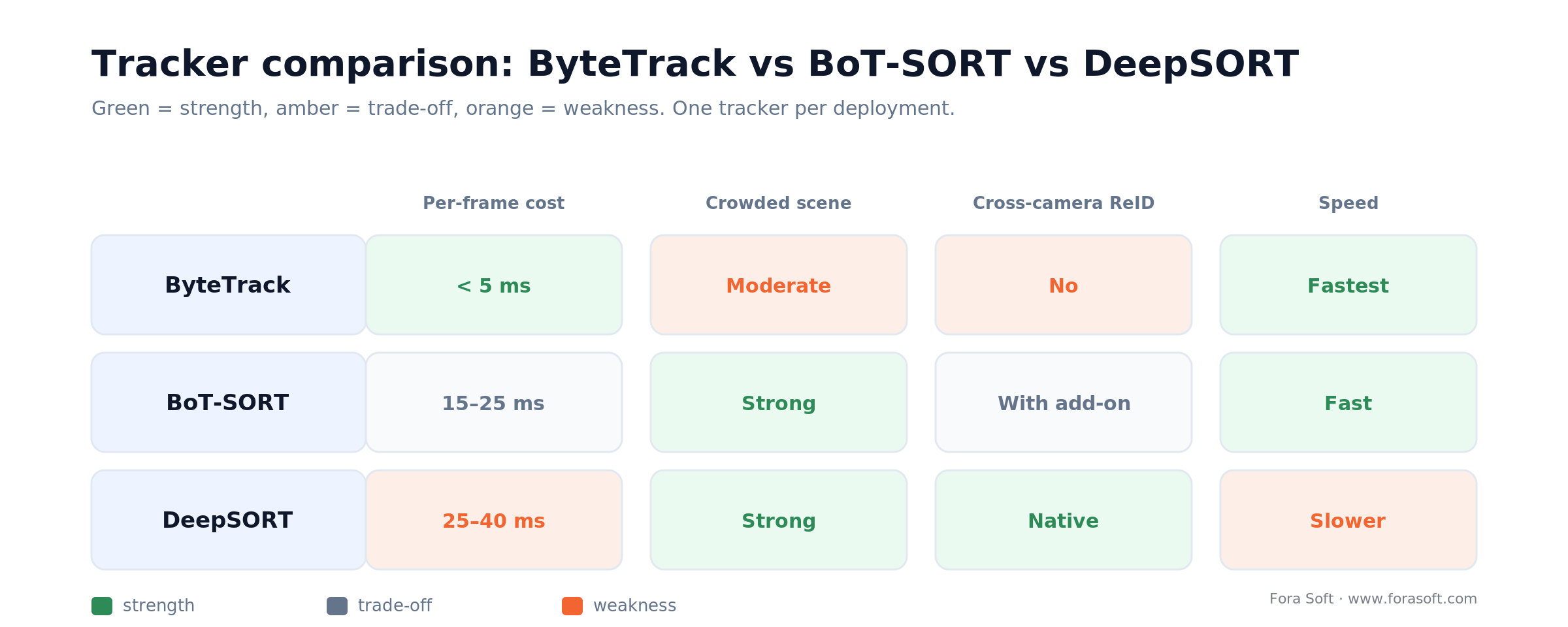
Figure 2. How the three trackers score across the axes that decide a deployment.
Pro tip: don’t mix and match across cameras. Pick one tracker per deployment so your operator dashboard, metrics, and incident reports stay consistent. For the deeper algorithm walk-through — including OC-SORT and how association actually works — see our multi-object tracking deep-dive.
Edge hardware: where YOLO + tracker actually run
Edge inference is the default architecture for biometric or privacy-sensitive surveillance in 2026. Three platforms cover 95% of deployments.
NVIDIA Jetson Orin Nano Super (up to 67 TOPS, $249, 7–25 W). The default for serious deployments. The December 2024 “Super” software update lifted the original Orin Nano from 40 to 67 TOPS and 68 to 102 GB/s of memory bandwidth — free, on the same board. Runs YOLO26 + BoT-SORT at 30 fps on 1080p with TensorRT. Mature CUDA stack, easy DeepStream SDK integration. We wire up the full detector-plus-tracker-plus-segmenter stack on this board in our Jetson Orin capstone.
Hailo-8 (26 TOPS, ≈3 W). Battery-powered or thermal-constrained scenarios. Lower throughput than the Jetson but excellent performance-per-watt. Tooling keeps improving through 2025–2026 yet still trails NVIDIA’s ecosystem.
Ambarella / Hikvision / Dahua appliances. Common in legacy CCTV upgrades. Pros: pre-integrated. Cons: vendor lock-in, proprietary model formats. Stick to ONVIF + ONNX-exportable models so you can swap silicon later.
Stuck on edge vs cloud or which tracker?
We’ve made these calls on production deployments. A 30-minute call usually settles them.
Multi-camera re-identification: the hard part
Single-camera tracking is solved. Multi-camera re-identification is where systems break. The job: when person 47 disappears from camera A and someone visually similar appears at camera B 30 seconds later, decide whether to assign the same ID.
Architecture pattern. Edge tracker emits track + appearance embedding. A central re-ID service holds a short-window store of recent embeddings (per location). On a new track from any camera, query the store for the nearest neighbor within a temporal window; if cosine similarity > threshold, assign the existing global ID.
Embedding choice. OSNet or TransReID for production-grade person re-ID. Both are 1–2 MB ONNX exports running 5–15 ms per detection on edge GPU.
PII pitfall. Embeddings are biometrics. Hash global IDs per site or per region; don’t expose raw embeddings to the operator dashboard; never share embeddings across organizational boundaries without an explicit lawful basis under GDPR Article 9.
Threshold tuning. Cosine similarity threshold around 0.65–0.75 is the typical operating point. Run a held-out validation pass on real footage from your cameras — clothing distributions in shopping malls differ from those in airports, and so do optimal thresholds.
Behavior and event detection: rules + anomaly + VLM
Once you have stable tracks, the question becomes: what counts as an event? Three paradigms, used together in production.
1. Rules. Crossing a virtual line, dwell time exceeded, person count thresholds, restricted-zone entry. Fast, explainable, and good for known threats. Easy to communicate to compliance teams. A specialized high-stakes detector like an AI gun detection system runs on the same pipeline, adding a human-in-the-loop verification step before any alert.
2. Anomaly baseline. Train an autoencoder or one-class model on 30 days of normal behavior per site. Flag deviations. Catches unknown unknowns; cuts false-positive volume by 30–40% vs pure rules.
3. VLM enrichment (optional). Send a 5-second clip of high-confidence anomaly events to a VLM (Qwen-VL, fine-tuned Florence-2, or cloud GPT-4o) for natural-language description. Useful for the operator dashboard and incident reporting. Never let a VLM trigger enforcement; they hallucinate.
Compliance instrumentation, built into the pipeline
The regulatory clock moved in 2026. The EU AI Act’s high-risk obligations for biometric and surveillance systems (Annex III) were originally set for 2 August 2026, but the Digital Omnibus (agreed in principle in May, then given the Council’s final green light on 29 June 2026) deferred them to 2 December 2027. Don’t read that as breathing room: prohibited-practice bans still bite, GDPR has applied since 2018, and BIPA governs biometrics in Illinois today. ISO/IEC 42001 is turning into a procurement checkbox. Build compliance in from day one or pay 5–10× later in retrofits. Face and plate handling has its own rulebook — see our note on face detection under the EU AI Act.
Edge face / plate blurring. Detect, blur irreversibly, transmit. 5–10 ms on a Jetson. Reduces re-identification risk to near-zero.
Append-only audit logs. Every data access, model decision, and operator override gets a signed entry. 3–7-year retention.
Data minimization. Raw video 7–14 days; metadata 90 days; longer only with documented purpose.
Disaggregated bias monitoring. Weekly automated reports on detector and tracker performance per demographic stratum. Trip wires when worst-cohort error rate exceeds 1.5× the best cohort.
DPIA-ready telemetry. One-click export of model card, training-data demographics, retention policy, and recent bias audit. Auditors stop being scary when you have these.
Our companion piece on the regulatory side, 2026 AI Surveillance Trends: Building Trust with Data Quality & Ethics, covers the EU AI Act and ISO 42001 scope in more depth. When you want this instrumented for you, that’s our video surveillance software development practice, backed by the patterns in our computer vision for surveillance overview.
Cost model: edge vs cloud at 200 cameras
A worked example. 200 cameras, YOLOv11 + BoT-SORT, behavior rules + anomaly baseline, edge blurring, full audit logging.
| Approach | Up-front | Annual ops | Compliance fit |
|---|---|---|---|
| Edge-first hybrid | $40K–300K (Jetsons + install) | $72K–360K (ops + cloud index) | Strong — biometrics never leave site |
| Cloud-only | $5K–15K (NVR upload) | $200K–500K (GPU + storage) | Weak — raw video off-site by default |

Figure 3. Annual ops cost at 200 cameras: edge-first hybrid vs cloud-only, ranges anchored to zero.
Edge wins on TCO above ~50 cameras and on compliance basically always. Cloud wins on time-to-pilot and where compliance is genuinely a non-issue (which is rare in 2026).
A decision framework: pick your stack in five questions
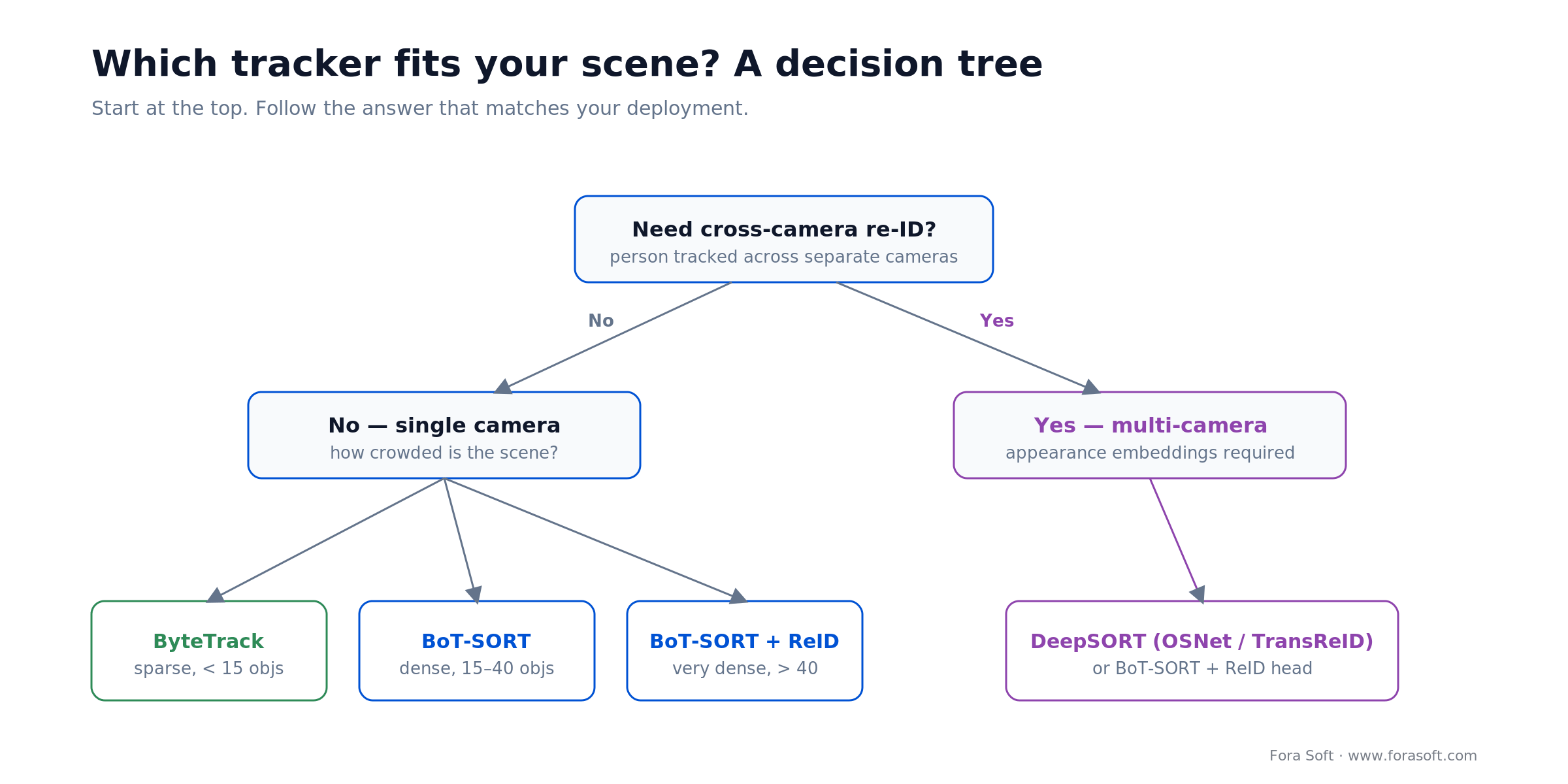
Figure 4. A quick decision tree for tracker choice, driven by re-ID need and crowd density.
Q1. What’s your jurisdictional surface? EU / UK / Illinois / California: edge-first hybrid is the only safe default. US-only non-California: cloud is acceptable but trending out of fashion.
Q2. How many simultaneous objects per camera at peak? < 15: ByteTrack works. 15–40: BoT-SORT. > 40 (sports, transport hubs): BoT-SORT + DeepSORT-style ReID.
Q3. Multi-camera re-ID needed? No: BoT-SORT or ByteTrack. Yes: add OSNet/TransReID embeddings to BoT-SORT, or run modern DeepSORT.
Q4. What’s your latency budget? < 100 ms end-to-end: edge with ByteTrack. 100–300 ms: edge with BoT-SORT. > 500 ms: hybrid OK.
Q5. Build or buy? Standard use case (perimeter, retail loss prevention): COTS may be enough. Custom industry context, ethics-sensitive deployment, multi-site re-ID: build with a partner.
Mini case: 200-camera retail rollout, < 100 ms end-to-end
Situation. A multi-store retailer needed real-time loss-prevention alerts across 18 stores, 200 cameras total. Cloud-only proposals from competitors quoted $480K/year in ops — with raw video streamed to US-East-1, which their EU operations couldn’t accept under GDPR.
12-week plan. We deployed a Jetson Orin Nano Super per camera (200 units, $249 each — roughly $50K in silicon), running YOLO26-medium + BoT-SORT with OSNet embeddings for cross-camera re-ID. Edge face/plate blurring before any data left the camera. Per-store anomaly baseline trained on 30 days of normal traffic. Central cloud holding metadata index + clip enrichment via a fine-tuned Qwen-VL for behavior descriptions. DPIA, ISO/IEC 42001 alignment, and disaggregated bias monitoring built in from week one.
Outcome. End-to-end alert latency 70–90 ms (camera to operator dashboard). Cross-camera re-ID accuracy 87% on a held-out test set. False-positive rate 12 alerts/cam/day — 8× better than the off-the-shelf system the client was previously running. Annual ops cost landed at $180K, roughly 38% of the cloud-only quote, while keeping all biometrics on-site. Want a similar assessment?
Five pitfalls we keep seeing in production
1. Letting the detector limit you. Teams over-tune YOLO for a specific dataset and ignore the tracker. The tracker matters more than incremental detector accuracy in most surveillance use cases.
2. Skipping ONNX export. Native PyTorch inference on the edge is 2–3× slower and ties you to the training stack. Always export to ONNX and run via TensorRT or ONNX Runtime.
3. Mismatched frame rates. Detection at 30 fps + tracker at 30 fps + behavior detection at 1 fps creates timing bugs. Pick a single inference cadence and stick to it across the pipeline.
4. PII leakage through embeddings. Appearance embeddings are biometrics. Don’t expose them to operator dashboards; don’t share across sites without a documented lawful basis.
5. Compliance as a phase 2. Audit logs, DPIAs, bias monitoring, edge blurring — if you defer them, retrofitting costs 5–10× what designing them in costs.
KPIs to track once the system is live
Quality KPIs. Detector mAP per cohort (target gap < 1.5×), tracker MOTA (> 65 on representative scenes), ID switches per minute (< 2 per camera at peak), cross-camera re-ID accuracy (> 80%).
Business KPIs. False positives per camera per day (target < 25), real-incident detection rate vs prior baseline, mean-time-to-response (target < 5 min), shrink reduction in retail (5–15% typical).
Reliability KPIs. Edge uptime per camera (> 99%), inference latency P99 (under your budget), audit-log integrity (100%), time to produce DPIA-ready report (< 1 hour).
When NOT to build a custom YOLO + tracker pipeline
Three scenarios where we tell clients to wait or buy off-the-shelf instead.
Camera count below 30. Engineering cost dominates. A COTS appliance from Hikvision/Dahua + a thin custom dashboard usually wins.
Standard use case with no industry-specific behavior. Generic perimeter detection, basic loss prevention, simple traffic counting — the off-the-shelf market is mature.
No ML engineering bandwidth on the team. A custom pipeline you can’t maintain becomes shelfware. Buy first, build later when you have the team to own it.
How to benchmark your YOLO + tracker pipeline before launch
Build a held-out evaluation set on real footage from your cameras, with diverse demographics, lighting, weather, and crowd density. Don’t use MOT17 numbers from a paper as your bar — they don’t generalize.
Detection. mAP@0.5 aggregate AND disaggregated by cohort. Worst-cohort gap target < 1.5×.
Tracking. MOTA, IDF1, ID switches per minute. MOTA > 65 is healthy on most surveillance scenes.
End-to-end. Operator-facing false-positive rate at the production threshold; mean-time-to-detect on a known-event subset; latency P50/P95/P99 across the full pipeline.
FAQ
Which YOLO version is best for surveillance in 2026?
YOLO26 (Ultralytics, January 2026) is our default for new edge builds — NMS-free by default and small-target-aware, which matters for distant objects in surveillance frames. YOLOv11 remains a safe, mature fallback when your team wants a battle-tested stack. Check the AGPL-3.0 license before you commit, and always export to ONNX and run via TensorRT for production.
ByteTrack vs BoT-SORT vs DeepSORT — which one should you pick?
ByteTrack: simple, fast, single-camera, low-to-moderate density. BoT-SORT: 2026 default for most retail and smart-city deployments — handles motion compensation and lightweight ReID. DeepSORT (modern with OSNet/TransReID): when multi-camera re-identification is the product. Pick one tracker per deployment for consistency.
Can you run YOLO + a tracker on a Jetson Orin Nano?
Yes. On the Jetson Orin Nano Super (up to 67 TOPS, $249), YOLO26 small/medium + BoT-SORT runs at 30 fps on 1080p with TensorRT. Add OSNet embeddings for cross-camera re-ID and expect 20–25 fps. Budget 7–25 W per camera and plan thermal management at the install site.
How do you handle cross-camera re-identification without leaking PII?
Treat appearance embeddings as biometrics. Hash global IDs per location; never expose raw embeddings to the operator dashboard; never share embeddings across organizational boundaries without a documented lawful basis under GDPR Article 9 or BIPA. Match within a short temporal window (5–30 minutes) and a per-site re-ID store.
How does this pipeline comply with the EU AI Act?
The EU AI Act’s high-risk obligations for surveillance/biometric systems (Annex III) were deferred from 2 August 2026 to 2 December 2027 by the Digital Omnibus finalized in June 2026 — but GDPR and BIPA apply now, so don’t wait. The architecture above — edge-first inference, irreversible blurring before transmission, append-only audit logs, disaggregated bias monitoring, DPIA-ready telemetry — is designed to satisfy the high-risk regime whenever it lands. ISO/IEC 42001 alignment is the cleanest way to demonstrate compliance during procurement reviews.
Should you use a cloud VLM (GPT-4o, Claude, Gemini) for behavior detection?
For natural-language enrichment of high-confidence anomaly events: yes, with care. For triggering enforcement: no — VLMs hallucinate descriptions in surveillance contexts. The hybrid pattern is rules + anomaly baseline at the edge for first-pass, optional VLM enrichment on a sampled subset for the operator dashboard, with confidence thresholds and human-in-the-loop gates.
How long does it take to build a 200-camera custom AI surveillance system?
A pilot (10–30 cameras, single site) is 3 months. A regional deployment (50–100 cameras, 5–10 sites) is 6 months. A full 200-camera production system with EU AI Act alignment runs 9–12 months with Agent Engineering, 12–18 months with traditional agency timelines.
What’s the typical cost of a custom AI surveillance product at 200 cameras?
Up-front edge-first build: $40K–300K hardware + install, plus the engineering cost of the build (typically a substantial part of a $500K–1.5M custom-software engagement). Annual ops $72K–360K depending on cloud-side enrichment and storage policy. With Agent Engineering we’re comfortable at the tighter end of those ranges.
What to read next
Compliance
Trustworthy AI surveillance: data, bias & EU AI Act
Regulatory landscape, bias controls, and privacy-by-design patterns.
Edge AI
Edge AI vs Cloud AI for video surveillance
Latency and cost trade-offs that drive the architecture above.
Hiring
When to hire computer vision developers
Build vs hire framework for the engineers behind your CV product.
Video AI
How video AI agents work in 2026
Architecture, latency budgets, and per-minute economics of video AI.
Architecture
Scale video streaming to 1 million viewers
The streaming layer behind any large-scale surveillance deployment.
Ready to ship a custom YOLO + tracker pipeline?
YOLO26 + BoT-SORT on Jetson Orin Nano Super edge hardware, with appearance embeddings for cross-camera re-ID and full compliance instrumentation, is the production recipe in 2026. The detector is the easy part. Tracker choice, edge-vs-cloud architecture, multi-camera re-ID, and compliance from day one are where the actual product lives.
If you want a sanity check on your current pipeline, or a 9–12 month plan for a 200-camera production deployment, we’ll do the work with you. Twenty years of multimedia and AI engineering, 99% Upwork success rating, Agent Engineering for faster delivery. Bring your camera count and your compliance scope; we’ll bring the architecture.

The book · Volume 6 of 7
AI for Video: A Complete Guide to Intelligence in Video Products: From Models and Inference to Computer Vision, Speech, Search, and Generative Video
A YOLO-plus-tracker pipeline is one part of a surveillance product; the rest is how models are packaged, deployed and searched. Volume 6 goes deeper into detection, tracking, segmentation, pose and OCR, along with deployment topologies, model artifacts and RAG search over the video archive. Written by Nikolay Sapunov, CEO at Fora Soft.
Read it on Amazon →Kindle & paperback · Fora Soft Video Engineering Handbook
Want a custom YOLO + tracker AI surveillance pipeline?
We’ll scope it, price it, and ship it — with the privacy, bias, and compliance instrumentation that keeps you safe under EU AI Act, GDPR, BIPA, and HIPAA.