

Key takeaways
• Hire a computer vision developer when accuracy, latency, or edge deployment moves your unit economics. If a model choice changes your go-to-market timeline or your retention rate, you need a specialist, not a general ML engineer.
• The six signals you’re ready: >50K labeled frames in your domain, a sub-100ms latency SLA, a regulated vertical (GDPR/BIPA/HIPAA), >$1M/year of revenue tied to the model, custom edge hardware, or a model zoo past three frameworks. Below those, one senior platform engineer plus YOLO11 usually ships faster.
• Cloud video management (VMS) is the single biggest production computer vision workload in 2026. Surveillance, retail analytics, and construction monitoring drive most enterprise CV hiring we see.
• A specialist studio compresses 6–12 months of hiring into a 4–8 week sprint. You skip the headcount tax and the ramp curve; you pay a per-project multiple on the hourly rate.
• Data and labeling, not model architecture, is 80% of the work. A developer who can’t run your CVAT/Label Studio pipeline and version your datasets will ship a pretty model that doesn’t generalize.
Why we wrote this hiring playbook
We’re Fora Soft. We’ve built video and real-time software since 2005 — 250+ projects, 50+ in-house specialists — and computer vision development for live video is one of the things we do most. Our longest-running CV product is VALT, a video surveillance platform we’ve been the sole dev team on for over a decade; it now runs across 770+ US organizations and 50,000+ users under HIPAA. So the hiring question in this article isn’t theory for us. It’s the decision we help clients make on nearly every discovery call.
The same question comes up every time: do we hire a CV engineer full-time, go offshore, partner with a studio for a sprint, or lean on open-source models a while longer? There’s a lot of thin content on this — mostly “hire our vetted developers” landing pages that skip the part where you decide whether you need one at all.
This is the guide we wish we’d had. It covers the six signals that tell you it’s time, the staffing models and what they really cost, the engineer profiles that matter in 2026, a reference architecture, the model zoo we actually run, and the pitfalls that stall CV projects before they ship. Short on time? Jump to the five-question decision framework.
Not sure you even need a computer vision hire?
Bring your architecture, your labeling backlog, and your latency target. In 30 minutes we’ll tell you whether you need headcount, a focused sprint, or just a platform engineer and a pre-trained model. No deck, no obligation.
When should you hire a computer vision developer?
Hire a computer vision developer when accuracy, latency, or edge deployment decisions materially affect your revenue, retention, or time-to-market. In practice that threshold looks like: you have >50K labeled frames in your domain, you face a sub-100ms inference constraint, you operate in a regulated vertical (GDPR, BIPA, HIPAA, CCPA), you estimate >$1M/year of revenue riding on model quality, you need custom edge hardware (NVIDIA Jetson, edge TPUs), or you’re running more than three CV frameworks in production. Below those signals, a senior platform engineer plus YOLO11 usually ships faster and cheaper. Above them, you’re paying the specialist tax — and buying speed, compliance cover, and architecture that survives contact with real data.
The flip side is just as important. If your pipeline is 80% data labeling and dataset versioning and 20% architecture, you don’t need a CV PhD. You need someone who can scale your CVAT or Prodigy pipeline and teach your labelers what a “good frame” looks like in your domain. The decision tree below is how we triage it.
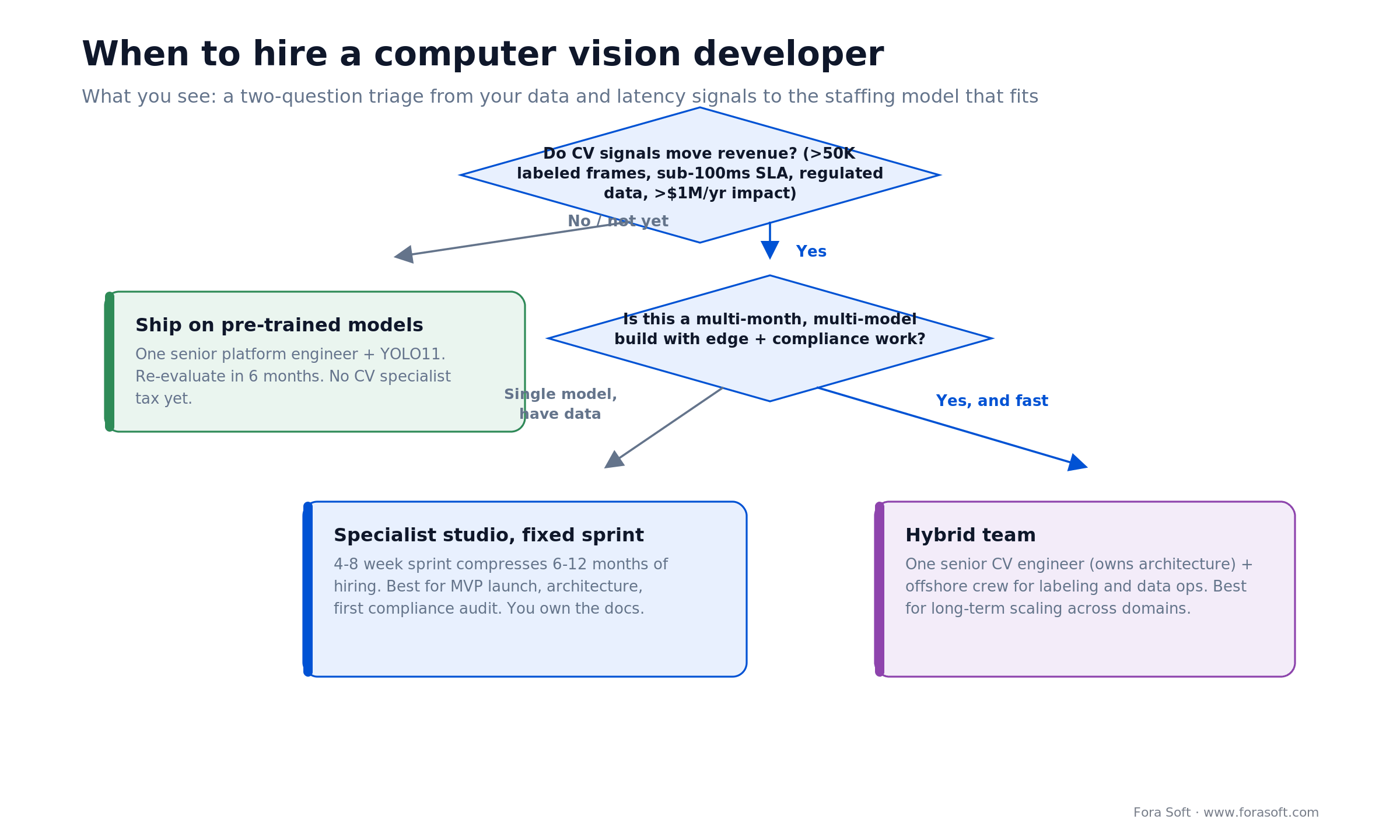
Figure 1. A two-question triage from your data and latency signals to the staffing model that fits.
Why cloud VMS is the biggest computer vision workload in 2026
Cloud video management systems are the single largest application of production computer vision in 2026, ahead of autonomous vehicles, medical imaging, and retail customer analytics. The reason is plain economics: cameras are everywhere (retail, construction, cities, transport, healthcare), storage and bandwidth are cheap, and the payoff of real-time intrusion, anomaly, and occupancy detection is proven. Almost every large retailer, contractor, airport, and city is either running a legacy NVR system or migrating to a cloud VMS with AI baked in.
The VMS-plus-CV stack usually looks the same: multi-camera feeds → cloud ingestion (RTMP/WebRTC) → storage (S3/GCS) → an inference pipeline (YOLO or RT-DETR on GPU/TPU) → alerts and dashboards. The CV pieces that earn their keep are object detection (people, vehicles, intrusions), anomaly detection (idle equipment, blocked exits), person re-identification across cameras, activity recognition (loitering, falls), and license-plate or face recognition. If you want the platform side in depth, see our cloud video platform development guide.
This is where most of our CV hiring requests land. Not because surveillance is glamorous, but because that’s where the labor economics and the regulatory pressure are strongest.
Reach for a dedicated CV hire when: your video product’s value depends on detection quality — catching the shoplifter, the fall, the intrusion — and a few accuracy points change what customers pay you. If detection is a “nice to have” on top of streaming, a platform engineer with an off-the-shelf model is the cheaper first move.
Six signals you’re ready to hire a computer vision developer
1. You have >50K labeled frames in your domain. This is the inflection point where a custom model beats a pre-trained one. Below 50K frames you’re in transfer-learning territory, where a platform engineer and AutoML ship faster. Above it you need someone who understands augmentation, class imbalance, and per-domain fine-tuning.
2. You have a sub-100ms latency SLA. Hitting end-to-end inference under 100ms takes quantization, ONNX Runtime tuning, TensorRT, and edge deployment know-how. A generalist can ship a model; a CV engineer can ship one that runs on a Jetson at 25fps in 85ms.
3. You operate in a regulated vertical. Biometric rules (Illinois BIPA, NY SHIELD, GDPR Article 9) and health-data rules mean model auditing, fairness testing, retention policies, and consent flows. A developer who has shipped in healthcare or fintech knows traps a platform engineer won’t.
4. Your CV choice moves >$1M/year of revenue or retention. If the gap between 85% and 92% accuracy shifts go-to-market by a quarter, or moves churn two points on a $10M ARR business, a CV specialist isn’t overhead — the specialist is the product.
5. You need custom edge hardware. Deploying to Jetson Orin, Qualcomm SoCs, or Coral is a different skill than training a cloud model. It needs TensorRT vs ONNX Runtime judgment, quantization strategy (INT8, mixed precision), and testing on the actual target board.
6. Your model zoo is past three frameworks. Once you’re stitching detection plus segmentation plus visual search plus pose, you need someone who knows the trade-offs and can tune the whole pipeline. A single-model setup lives in the platform-engineer lane.
What a computer vision developer actually delivers
A good CV developer doesn’t just tune hyperparameters. They own the pipeline end to end:
- Model selection. YOLO11 for general detection, RT-DETR for high-accuracy small objects, SAM for segmentation, CLIP for semantic search, MediaPipe for pose. Knowing when to swap models and why.
- Dataset labeling and versioning. Building CVAT/Prodigy pipelines, writing labeling guides, catching systematic bias, and versioning datasets alongside code.
- Augmentation and balancing. Mixup, Mosaic, class-weighted sampling — handling the case where your positive class is 2% of frames.
- Quantization and compilation. TensorRT for NVIDIA, ONNX Runtime for portability. Getting a 500MB FP32 model down to a 50MB INT8 one without wrecking accuracy.
- Edge deployment. Profiling on target hardware (Jetson Orin, Coral, mobile SoCs), batching frames, managing memory and thermal throttling.
- Camera calibration and multi-view fusion. Calibrating intrinsics, handling mixed resolutions, and fusing detections across cameras without double-counting.
- Streaming integration. Wiring into the VMS, handling RTMP/WebRTC ingestion, and scheduling recording against real-time inference.
- QA and drift monitoring. A/B-testing new models against the production baseline, tracking false-positive and false-negative rates by scene, and alerting on drift.
- Compliance auditing. Fairness testing, bias detection by protected attribute, consent flows, and retention/deletion pipelines.
Reach for full-pipeline ownership when: you want one person accountable from labeling strategy through production drift monitoring. A researcher who trains a model and hands it off leaves the hard 80% — data and deployment — on your plate.
In-house vs offshore vs specialist studio
Here’s how we weigh the staffing decision, for our own projects and for clients. There’s no single winner — the right pick depends on your constraint.
| Option | Time to MVP | Annual cost | Knowledge kept | Best for |
|---|---|---|---|---|
| Full-time senior CV engineer | 6–12 months | $180K–$280K + ~30% benefits | 100% (yours) | High-volume production VMS, long runway |
| Specialist studio sprint | 4–10 weeks (fixed) | $80K–$200K per sprint | Documented, then your team owns it | MVP launch, architecture, compliance audit |
| Offshore team | 4–8 months (with ramp) | $40K–$100K/year | Good with documentation | Labeling, data ops, annotation QA |
| Hybrid (senior + offshore) | 4–6 months | $230K–$350K/year | Senior owns architecture | Long-term scaling, multi-domain models |
| Platform engineer + pre-trained | 2–4 months | $150K–$220K (1 engineer) | All yours | Simple detectors, no custom domain |
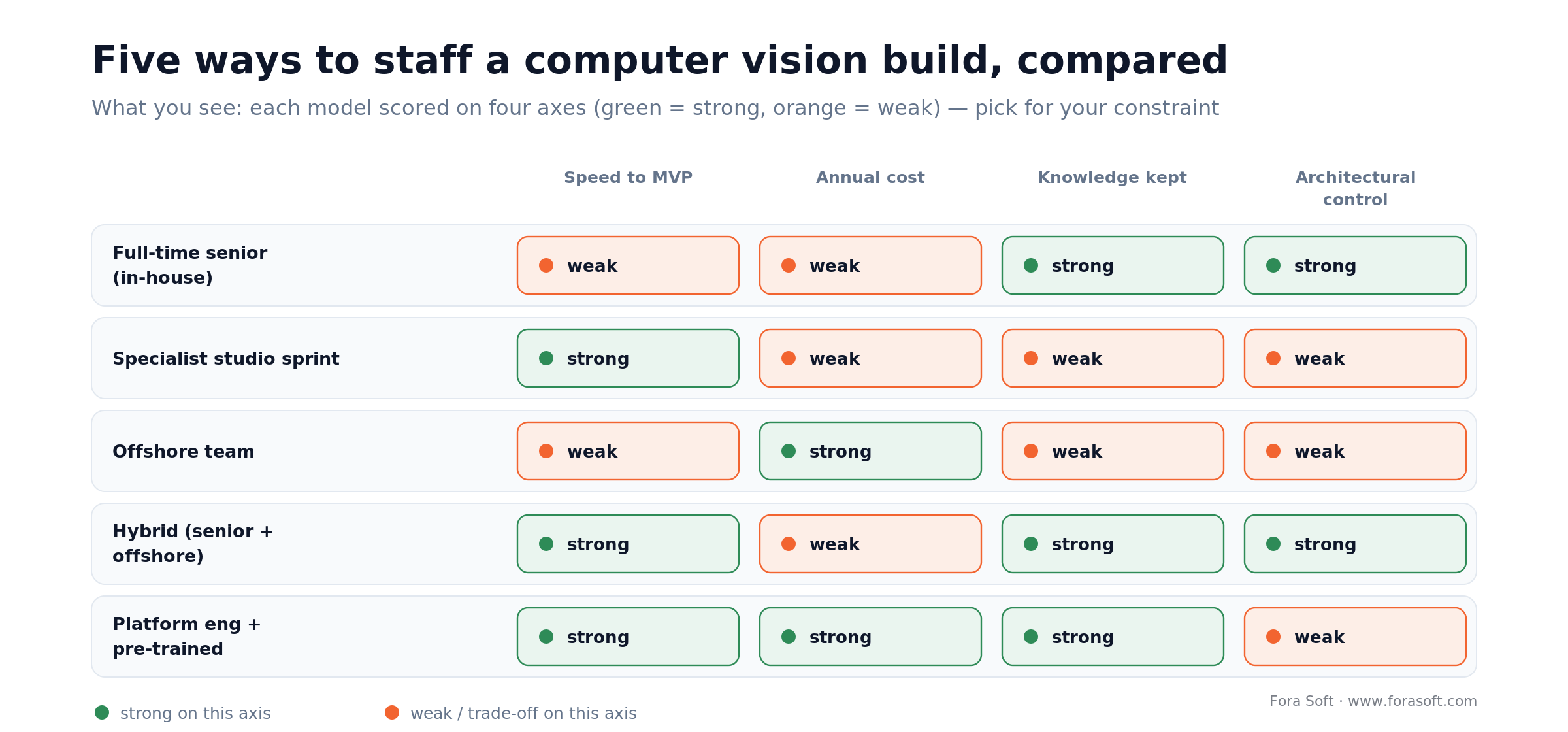
Figure 2. Five staffing models scored on speed, cost, knowledge retention, and architectural control.
The senior computer vision engineer profile in 2026
When we hire or partner with senior CV engineers, this is the stack we look for.
Core computer vision (non-negotiable). Solid grasp of convolutions, attention, multi-scale detection, and segmentation. Can explain why RT-DETR beats YOLO on small objects without pulling up a paper. Has shipped at least one custom model to production.
Production systems thinking. Understands inference batching, memory, and thermal profiles on target hardware. Has debugged why a model that works in a notebook falls over on a Jetson. Knows training latency from inference latency.
Dataset engineering. Can stand up a labeling pipeline in CVAT or Prodigy, handle class imbalance, and catch systematic bias (say, every hard example is one camera angle). Versions datasets like code.
Framework fluency. Moves between PyTorch, ONNX, and TensorRT without pausing. Knows when to compile to ONNX and when to stay in PyTorch. Has squeezed a model under 50MB for mobile.
Video systems experience. Understands RTMP, WebRTC, frame rates, codecs, and multi-camera orchestration. Has shipped on real security-camera footage, not just lab datasets.
Ownership. Explains model choices to non-technical stakeholders and carries a project from spec to production monitoring — without vanishing into research rabbit holes when the MVP needs to ship. Senior CV engineers run $180K–$280K plus benefits in the US (the Bay Area tops $220K), and they’re scarce. But one senior can unblock four to six platform and data engineers for a year.
Junior and mid-level CV engineers: where they fit
Junior (0–2 years). Strong at hyperparameter tuning on supervised datasets, turning papers into prototypes, and writing clean training loops. Weak at dataset strategy, production optimization, and calls under uncertainty. Best under a senior, not solo. Cost: $90K–$140K.
Mid-level (2–5 years). Ships models to production, spots architecture bottlenecks, designs multi-camera systems, and handles domain adaptation. Can carry 80% of projects solo. Weaker on novel research and first-of-a-kind compliance work. Cost: $140K–$200K.
Most teams that need a CV hire should start with a mid-level engineer. Juniors are expensive to mentor and save little time; seniors are the market bottleneck, and you probably don’t need one until your model zoo passes three frameworks or your latency SLA drops under 50ms.
Domain-specific hiring: retail, construction, healthcare, cities
Video surveillance and retail. The largest category. Models: pedestrian detection (YOLO11), person re-ID, pose (MediaPipe), activity recognition. Hard parts: night footage, occlusion, variable lighting, dozens of feeds. Hire someone comfortable with low-light video and alerting. See our retail video analytics playbook.
Construction. Models: equipment detection, PPE checks (hard-hat, vest), zone intrusion. Hard parts: outdoor light, weather, dust, clutter, and irregular camera angles — you need reliability in the field and edge deployment on-site. See our construction site monitoring guide.
Smart cities and transport. Models: license-plate recognition, traffic flow, crowd density, vehicle classification. Hard parts: hundreds of cameras, real-time processing, and integration with municipal systems. Hire for large-scale deployment and regulatory experience. Anomaly detection for surveillance is the core skill.
Healthcare. Models: lesion/organ segmentation, surgical-tool detection, patient fall detection. Hard parts: FDA pathways for some use cases, HIPAA/GDPR privacy, and specialized datasets. Compliance overhead runs three to four times other domains — hire someone who has navigated it before.
Autonomous systems. Models: 3D detection, panoptic segmentation, scene understanding. Hard parts: it’s safety-critical, accuracy targets are brutal, and compute is expensive. Expect ISO 26262 familiarity and simulation experience; senior pay here starts north of $250K.
Reach for domain experience when: your vertical has its own failure modes — night shifts in retail, dust on a construction site, HIPAA in a clinic. A developer who has shipped in your domain skips the expensive lessons you’d otherwise pay for in re-labeling and re-audits.
What a computer vision developer costs
Let’s put real 2026 numbers on a mid-scale VMS-plus-CV project (multi-tenant SaaS, real-time object plus anomaly detection). We build faster and leaner than the market because we use Agent Engineering internally, so treat these as conservative planning figures — your scope drives the real number.
Option 1 — one senior CV engineer + two platform engineers. Senior $220K + $66K benefits = $286K. Two platform engineers at $180K + benefits = $432K. Total ~$720K/year. MVP in 5–6 months, plus a 2–3 month ramp. You own all the IP and maintain it forever.
Option 2 — one mid-level engineer + one offshore junior + a 6-week studio sprint. Mid-level $160K + benefits = $208K. Offshore junior $45K + overhead = $60K. Sprint ~$120K. Year-one total ~$388K. MVP in 8–10 weeks if you overlap the sprint with hiring. Faster to market, lower headcount risk.
Option 3 — studio only, three sprints across six months. Discovery, MVP, and hardening at roughly $150K + $150K + $100K = $400K. First MVP in 6 weeks, hardened by 12. Low ongoing headcount, higher per-project cost. Best for an MVP launch or an architecture redesign.
At $10M ARR, Option 1 is 7.2% of revenue — normal for a core tech team. At $50M it’s 1.4%. The call is about runway and speed, not which path is “better.”
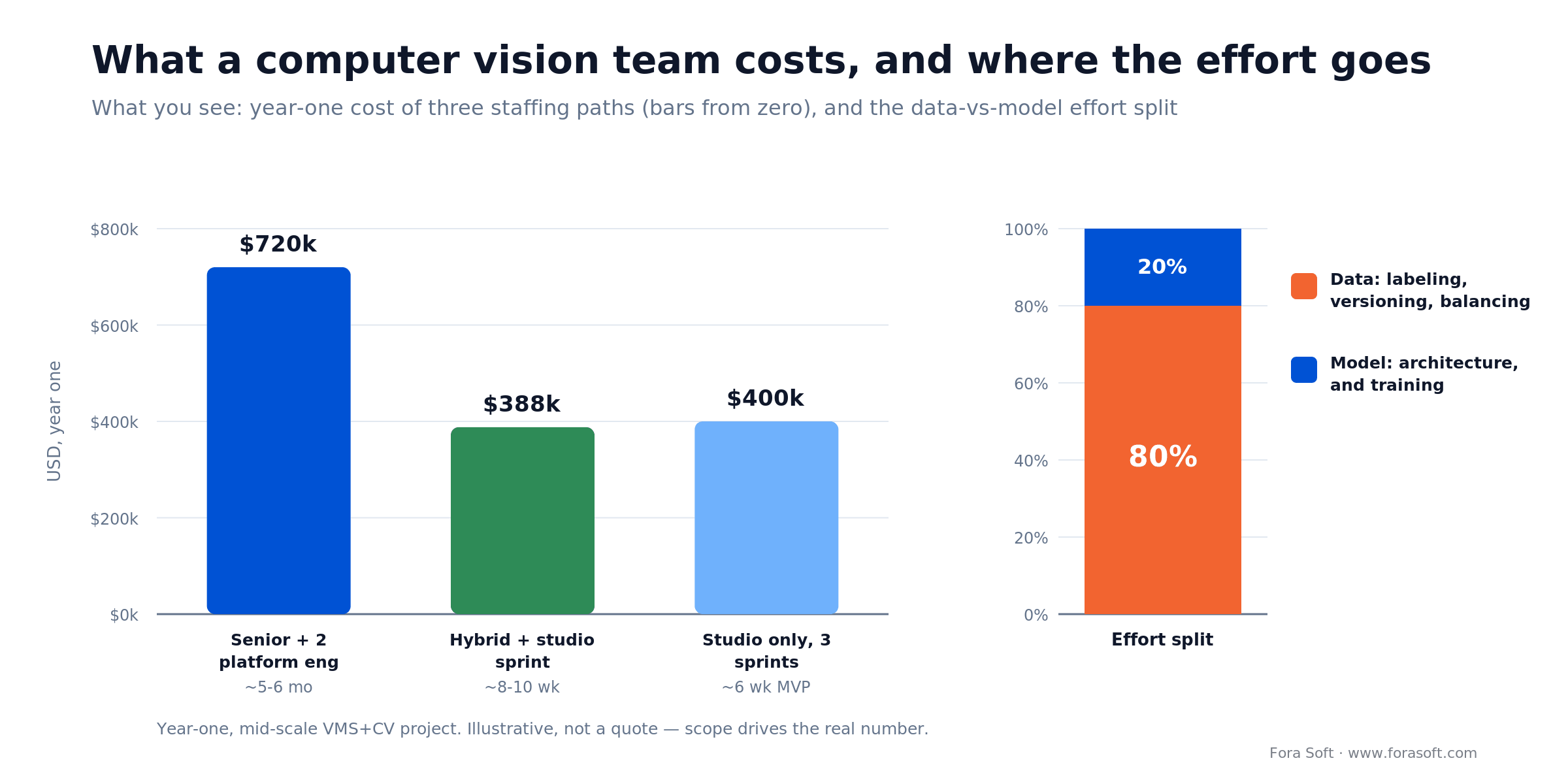
Figure 3. Year-one cost of three staffing paths, and where the engineering effort actually goes.
Want your cost model pressure-tested?
Send us your architecture, target team size, and compliance requirements. We’ll model the three staffing paths against your numbers and tell you which one minimizes risk — in writing.
Reference architecture: cloud VMS plus a CV pipeline
This is the production shape we use on nearly every cloud VMS-plus-CV project. The point of showing it is the ownership split: the CV developer decides model serving, inference optimization, and edge deployment; the platform engineer owns ingestion, storage, and event streaming.
| Layer | Tech stack | Owner | Key decision |
|---|---|---|---|
| Ingestion | RTMP / WebRTC (HLS fallback) | Platform engineer | RTMP for reliability, WebRTC for low latency |
| Storage | S3/GCS segments, Postgres metadata | Platform engineer | S3 for cost, GCS if already on GCP |
| Real-time inference | NVIDIA GPU (A10, H100) + TensorRT | CV engineer | A10 under ~200K frames/day, H100 above 1M |
| Model serving | Triton or ONNX Runtime + FastAPI | CV + platform | Triton if multi-model, FastAPI if single |
| Event stream | Kafka / Redis Streams | Platform engineer | Kafka for durability, Redis for latency |
| Edge deployment | NVIDIA DeepStream / Jetson / TensorRT | CV engineer | DeepStream for multi-stream, Jetson for single |
| Compliance / PII | Face blur (OpenCV), PII redaction | CV + security | Blur on capture or on playback |

Figure 4. Six layers left to right, who owns each, and where the CV developer’s work concentrates.
The 2026 production model zoo
YOLO11. The default for real-time detection. Ultralytics reports YOLO11m matching or beating YOLOv8m accuracy with about 22% fewer parameters, and it quantizes cleanly to ONNX. Use for people, vehicles, intrusions, equipment. Details in the Ultralytics YOLO11 docs.
RT-DETR. A real-time transformer detector; stronger than YOLO on small, dense objects (faces, plates), slightly slower. Use for crowded scenes and small-object detection.
Segment Anything (SAM 2). Promptable segmentation with no per-class training. Use for arbitrary object segmentation. Inference is heavy, so it’s not real-time on the edge, but it needs zero fine-tuning.
CLIP. Zero-shot visual search and tagging. Use for “find every frame with a person in a red shirt” across archived video.
MediaPipe. Lightweight pose, hand, and face detection, pre-quantized for mobile. Use for activity and safety recognition (falls, climbing).
OpenCV. Classic vision — background subtraction, optical flow, motion detection. Use for lightweight preprocessing when deep learning is overkill.
TensorRT and ONNX Runtime. The deployment layer. TensorRT quantizes and fuses layers to cut inference latency 2–4x on NVIDIA hardware; ONNX Runtime gives you portability across CPU, GPU, mobile, and edge. Pair NVIDIA DeepStream on top for multi-stream edge VMS.
How to evaluate a computer vision partner in four calls
Call 1 — architecture deep-dive (45 min). Walk through your ingestion, storage, and inference pipeline. Ask: which layer owns the latency today? If we halve it, what changes? What’s our biggest risk going in-house? Good partners ask about your compliance, hardware, and team capacity. Red flag: they pitch a proprietary model before understanding your problem.
Call 2 — references (30 min). Ask for two or three case studies in your vertical. What accuracy did they start at versus land on? How long did labeling take? What was the compliance story? Red flag: vague case studies with no numbers, or ones in unrelated domains.
Call 3 — technical assessment (60 min). Put your senior engineer in the room with theirs. Ask about the hardest deployment they’ve done and how they handle class imbalance. Walk a real optimization problem. Red flag: no senior available, or every answer deferred to a “research team.”
Call 4 — engagement and handoff (30 min). Clarify the deliverable (code or just a model?), documentation, edge-deployment ownership, and what happens when the engagement ends. Red flag: fuzzy timelines, no documentation commitment, or pressure to extend before you’ve started.
Data and labeling: the 80% problem
This kills more CV projects than bad architecture, so it gets its own section. Building a strong detector is roughly 20% of the effort. Getting clean, balanced, domain-representative labeled data is the other 80%.
The labeling math, out loud. A production detector needs 50K–200K labeled frames. At ~2 minutes per frame for a careful bounding box plus class, that’s 1,700–6,700 hours. At $5/hour crowdsourced, $8,500–$33,500; at $15/hour for a US contractor, $25,500–$100,500. Most teams under-budget this by three to four times. A good developer plans for it up front.
The approach that works. Use a labeling platform (CVAT, Label Studio, Prodigy). Start with a small, hand-curated seed set (2,000–5,000 frames) that represents your domain. Train on it. Then use active learning to surface the frames the model is least sure about, and label those next. That roughly halves labeling cost because you spend it on the frames that move accuracy.
Your CV developer should be opinionated about this. If they say “you label the frames, I’ll train the model,” that’s a warning sign.
Reach for offshore or a labeling vendor when: the bottleneck is annotation volume, not model design. Pair a senior who owns labeling strategy and QA with a larger, cheaper team executing it — that’s the hybrid model, and for data-heavy projects it’s usually the best value.
Compliance and bias: GDPR, BIPA, CCPA, fairness
GDPR (EU). Article 9 treats biometric data processed to uniquely identify a person as a special category, with heightened conditions; Article 4(14) defines it. Face recognition is squarely in scope. Expect explicit consent, limited retention, and data-subject rights (deletion, portability). Doing face recognition in the EU without a lawful basis puts you out of compliance.
BIPA (Illinois). Applies to anyone handling Illinois residents’ biometrics. It requires written notice and informed written consent before collection, plus secure storage. Statutory damages run $1,000 for negligent and $5,000 for intentional or reckless violations, per violation. If your VMS identifies faces in Illinois, you need a compliant consent flow.
NY SHIELD and CCPA/CPRA. New York’s SHIELD Act extends reasonable-security duties and breach notice to private data including biometrics. California’s CPRA treats biometric information as “sensitive personal information” with disclosure and limit-use rights.
Fairness and bias. Models trained on unbalanced data perform worse on underrepresented groups. NIST’s Face Recognition Vendor Test is the standard benchmark, and its demographic work shows false-match rates vary widely by algorithm — the best systems show far smaller differentials than the worst, which is exactly why you test yours instead of trusting a vendor claim. Audit accuracy by age, gender, ethnicity, and lighting; hold out demographic test sets. If you’re adding face or voice biometrics, our AI integration service covers the fairness and consent plumbing.
Budget four to six weeks for compliance work on any regulated vertical. It’s not optional; it’s the price of operating legally.
When NOT to hire a computer vision developer
Honesty sells, so here’s the counter-case. Don’t hire a dedicated CV developer when:
- A pre-trained model already clears your bar. If YOLO11 out of the box hits your accuracy target on your footage, ship it with a platform engineer and revisit in six months.
- You have fewer than a few thousand labeled frames. Below that, you can’t train a custom model worth having. Spend the money on labeling first; the hire can wait.
- Detection is a side feature. If CV is a small add-on to a streaming or workflow product, a specialist will be under-used and expensive. Contract a short sprint instead.
- You need it live in three weeks. A full-time hire won’t ramp that fast. A studio sprint or a managed API is the realistic path.
- Your real gap is MLOps, not modeling. If models are fine but deployment and monitoring are the pain, hire a platform/MLOps engineer, not a CV researcher.
A decision framework in five questions
Run these five questions in order. The first “heavy” answer points you to your staffing model.
| Your situation | Pick this |
|---|---|
| Pre-trained model already hits your accuracy target | Platform engineer + YOLO11 |
| You need an MVP or architecture fast, once | Specialist studio sprint |
| Huge labeling backlog, model design is settled | Offshore team + senior lead |
| Multi-domain models, long runway | Hybrid: senior in-house + offshore |
| High-volume production VMS, CV is the product | Full-time senior CV engineer(s) |
If two rows fit, start with the faster, lower-commitment option and scale up — it’s cheaper to add headcount after a studio sprint than to unwind a mis-hire. If you want a second opinion on which row you’re in, that’s exactly what a 30-minute call with our team is for — and our video surveillance development service can run any of these models for you.
What Fora Soft has shipped in computer vision
We’ve been building production computer vision for video since 2005, most of it in surveillance and analytics. A few reference points:
VALT. We’re the sole development team behind VALT, a cloud video surveillance and review platform now running across 770+ US organizations and 50,000+ users under HIPAA. It handles object and activity detection, secure recording, and role-based review at scale — the kind of long-lived production system a CV hire has to keep accurate for years, not weeks.
Construction and retail monitoring. On the same VALT-derived stack we’ve built PPE and zone-intrusion detection for construction sites and loss-prevention plus foot-traffic analytics for retail, deploying detection to edge devices on-site and streaming alerts to the cloud. The write-ups: construction site monitoring and retail video analytics.
Anomaly detection. We’ve shipped unsupervised anomaly detection (object left behind, crowd gathering, unusual motion) combined with supervised classifiers for known events, on streaming pipelines. The engineering detail lives in our anomaly detection models guide, and the broader AI methods in our AI for video engineering course.
Six pitfalls we see in computer vision hiring
1. Hiring for the model, not the pipeline. You find a brilliant researcher who can fine-tune ResNet but can’t export to ONNX, optimize for Jetson, or build a labeling pipeline. Result: a lovely model that never ships. Hire for end-to-end ownership.
2. Under-estimating labeling by 10x. You plan 50K frames at 30 seconds each (400 hours). Reality is 2 minutes each (1,700 hours), plus a re-label pass after you find systematic errors in the first batch. Budget six to twelve months and $30K–$100K for a serious dataset.
3. Training on unrepresentative data. You label daytime frames; production is 80% night footage. You get 95% accuracy by day and 45% at night. Stratify labeling by time of day, lighting, angle, and scene.
4. Deploying to hardware without testing. A model that runs at 8fps on your laptop GPU drops to 2fps on a Jetson Orin because nobody quantized or batched it. Profile on the target board early — a CV engineer should have a dev kit on the desk.
5. Compliance as an afterthought. You ship EU face recognition without consent flows; six months later your DPO finds it and you’re retrofitting under pressure. Bring compliance in on day one and give it ~10% of the timeline.
6. No drift monitoring. A model shipped at 94% drifts to 78% nine months later because the lighting or camera changed, and nobody notices for weeks. Instrument inference for accuracy, alert on drift, and re-sample production frames on a schedule.
FAQ
Do I need a computer vision developer, or can I just use YOLO?
You can ship a pre-trained YOLO11 model in four to six weeks with a platform engineer. You need a CV specialist when you require >90% accuracy in a specific domain, sub-100ms latency on edge hardware, or regulatory compliance — a specialist compresses nine to twelve months of that work into three to four. The real question is how much a six-month delay costs you.
What’s the difference between a computer vision engineer and an ML engineer?
An ML engineer knows the math and can tune hyperparameters. A computer vision engineer also knows convolutional and transformer detectors, deployment optimization, dataset engineering, and how to ship a model that works on real camera footage rather than curated datasets. CV is the more specialized role.
How much does it cost to hire a computer vision developer in 2026?
In the US, senior CV engineers run $180K–$280K plus benefits, mid-level $140K–$200K, and junior $90K–$140K. Offshore teams run $40K–$100K/year. A specialist studio sprint is typically $80K–$200K for a fixed 4–10 week engagement. Add labeling: $30K–$100K for a production dataset.
Should I hire locally or offshore?
Hire locally for the senior architect who owns decisions; go offshore for the junior and mid-level engineers who handle labeling QA, data ops, and routine optimization. The ratio we recommend is one senior lead plus two or three offshore engineers — that keeps knowledge retention and architectural control while cutting cost.
How long does it take to ship a computer vision MVP?
With a specialist and existing labeled data, six to ten weeks. Without a specialist, four to six months, most of it labeling. With a hybrid team, four to five. All of these assume your data is available and you’re not waiting on hardware.
Can I hire a computer vision developer on Upwork or a freelance platform?
For a one-off model or annotation QA, yes. For a production system, no — freelancers rarely own a multi-month architecture, compliance work, or edge deployment. Use freelancers for experiments and labeling; use a studio or a full-time hire for anything shipping to customers.
What’s the biggest mistake companies make hiring for computer vision?
Treating it like a normal software hire. They post a job, hire for “deep learning” on a resume, and six months later the person is blocked on labeled data or edge deployment and the model won’t generalize. The fix is treating data and deployment as first-class problems — a CV hire is roughly 40% technical, 40% product, 20% operations.
What to read next
Models
Anomaly detection models for video surveillance
How unsupervised and supervised methods catch the events that matter.
Algorithms
Top algorithms for surveillance anomaly detection
Statistical, ML, and deep-learning approaches, compared.
Platform
Cloud video platform development guide
The ingestion, storage, and streaming layers your CV pipeline sits on.
Security
Secure cloud video management systems
Compliance, encryption, and data residency for video systems.
Ready to hire your computer vision team?
If you have >50K labeled frames, a sub-100ms latency SLA, or >$1M/year riding on model quality, hire a senior CV engineer or contract a studio sprint. Below those thresholds, ship on YOLO11 with a platform engineer and re-evaluate in six months. Use the six signals to diagnose where you are, the five-question framework to pick your path, and the four-call process to vet whoever you bring in. Everything after that is execution — which is where the real value lives.


The handbook · 7 volumes
Fora Soft Video Engineering Handbook
Whoever you hire, you will judge their work faster if you know the CV pipeline yourself. Our seven-volume handbook covers video from encoding to AI; for computer vision start with Volume 6 on detection, tracking, segmentation and model deployment, then Volume 7 on edge serving and cost, and Volume 1 on the codecs your cameras send. Written by Nikolay Sapunov, CEO at Fora Soft.
Browse the handbook on Amazon →7 volumes · 9,000+ pages · Kindle & paperback
Let’s audit your computer vision plan
Bring your data pipeline, hardware constraints, and compliance requirements. We’ll send back a written recommendation on whether to hire in-house, go offshore, or run a sprint — and what it should cost.

