

Key takeaways
• A video AI agent is a real-time pipeline, not one model. It captures audio and video, runs speech recognition, vision and LLM reasoning, then acts — replies, summarises, escalates, drives the UI. Production systems run 6–10 components on a sub-second loop.
• There are two architectures in 2026, and the choice sets your bill. The cascaded pipeline (STT → LLM → TTS) is cheaper and controllable; speech-to-speech (OpenAI gpt-realtime-2.1, Google gemini-3.1-flash-live) is ~150 ms faster but can cost 10× more per call.
• Latency is the product. Under ~800 ms the agent feels human; past 1,500 ms callers talk over it. A tuned cascaded loop lands at 680 ms p50 / 1,180 ms p95 in production.
• Vision is the silent cost multiplier. One minute of 30 fps video is ~352K image tokens before you compress it. Gate the frames or the video half of your video AI agent quietly outspends everything else.
• Fora Soft has shipped real-time video and AI products since 2005. Today that means video AI agents: sales copilots, telehealth triage, real-time interpretation, live-commerce hosts. Book a 30-min call and we’ll size yours.
Why Fora Soft wrote this video AI agents guide
Fora Soft has built real-time video and AI products since 2005, with 250+ shipped projects and 50 in-house engineers. We have built sales-call copilots on Meetric, real-time interpretation on TransLinguist and VOLO, and we run stacks that combine LiveKit, Whisper, the current GPT and Llama models, ElevenLabs and custom vision pipelines. Today that work runs through our AI video agent development practice.
This guide is the conversation we have when a product lead asks “what does a video AI agent actually look like inside?” It’s opinionated, vendor-neutral, and grounded in client work that has to hit sub-second latency and a per-minute cost the business can defend. Our AI integration practice ships exactly this loop end to end.
One thing up front: every model name and price here is checked against vendor docs as of August 2026. Half the guides ranking for this topic still cite GPT-4o-mini and Cartesia Sonic. Those numbers are a year stale, and in this field a year is three model generations.
Want to ship a video AI agent in your product?
We’ll turn the architecture below into a working prototype on your traffic in 4–6 weeks — with an eval set, a latency budget and unit economics you can take to a board.
A video AI agent, defined
A video AI agent is software that joins a live audio-and-video session, perceives what is happening, reasons about it with an LLM, and acts — speaking, summarising, triggering UI, escalating to a human, or all four at once. It is the streaming-media version of an LLM agent: the same perceive-think-act loop, under much harder real-time constraints.
The minimum viable agent has four stages: perceive (audio in, optional vision in), understand (speech recognition plus vision parsing), think (LLM reasoning, tool calls, retrieval), and act (speech out, function calls, UI events). Every commercial product — LiveKit Agents, Pipecat, Daily Bots, Vapi, Retell — implements this shape with different defaults.
Two words worth pinning down. “Real-time” here means the loop closes in under a second most of the time. “Multimodal” means more than one input stream — usually audio plus video, sometimes audio plus screen-share, sometimes audio plus UI events. Our LiveKit multimodal agents guide goes deep on the stack itself.
The reference architecture — nine components on a sub-second loop
Here is the picture every team ends up drawing on the whiteboard. It describes the cascaded architecture — the more common of the two 2026 patterns. The speech-to-speech alternative collapses a few of these boxes into one model, and we cover that trade next.
1. Real-time transport. LiveKit, Daily, Twilio or a self-hosted SFU. Carries audio and video both ways, sub-40 ms one-way inside a region. 2. Streaming speech recognition. Deepgram Nova-3 or its new Flux model, AssemblyAI Universal-Streaming, or Whisper Large v3 self-hosted. Returns partial transcripts in 60–100 ms. 3. Vision frame ingestion. Optional. Periodic frame capture (every 1–5 s) sent to a vision-capable LLM. 4. Turn detection. Decides when the user has stopped talking so the LLM can start. Acoustic VAD, a learned semantic model, or, new in 2026, built into the ASR (Deepgram Flux detects end-of-turn in ~260 ms).
5. LLM core. GPT-5.6, Claude Sonnet 5, Llama 5 or DeepSeek V4. Streaming completion, tool calling, optional vision. 6. Retrieval / RAG. A vector store plus embeddings that pulls product, customer and knowledge-base context into the prompt. 7. Tool calls. A function-call schema for everything the agent can do: look up an order, book an appointment, send an email, escalate.
8. TTS. ElevenLabs Flash, Cartesia Sonic 3, Deepgram Aura-2 or OpenAI TTS. Streams audio keyed on sentence boundaries so the agent starts speaking before the LLM finishes writing. 9. Orchestration and state. A small service that holds session state, conversation memory, and retry / fallback policy. LiveKit Agents and Pipecat both ship this out of the box.
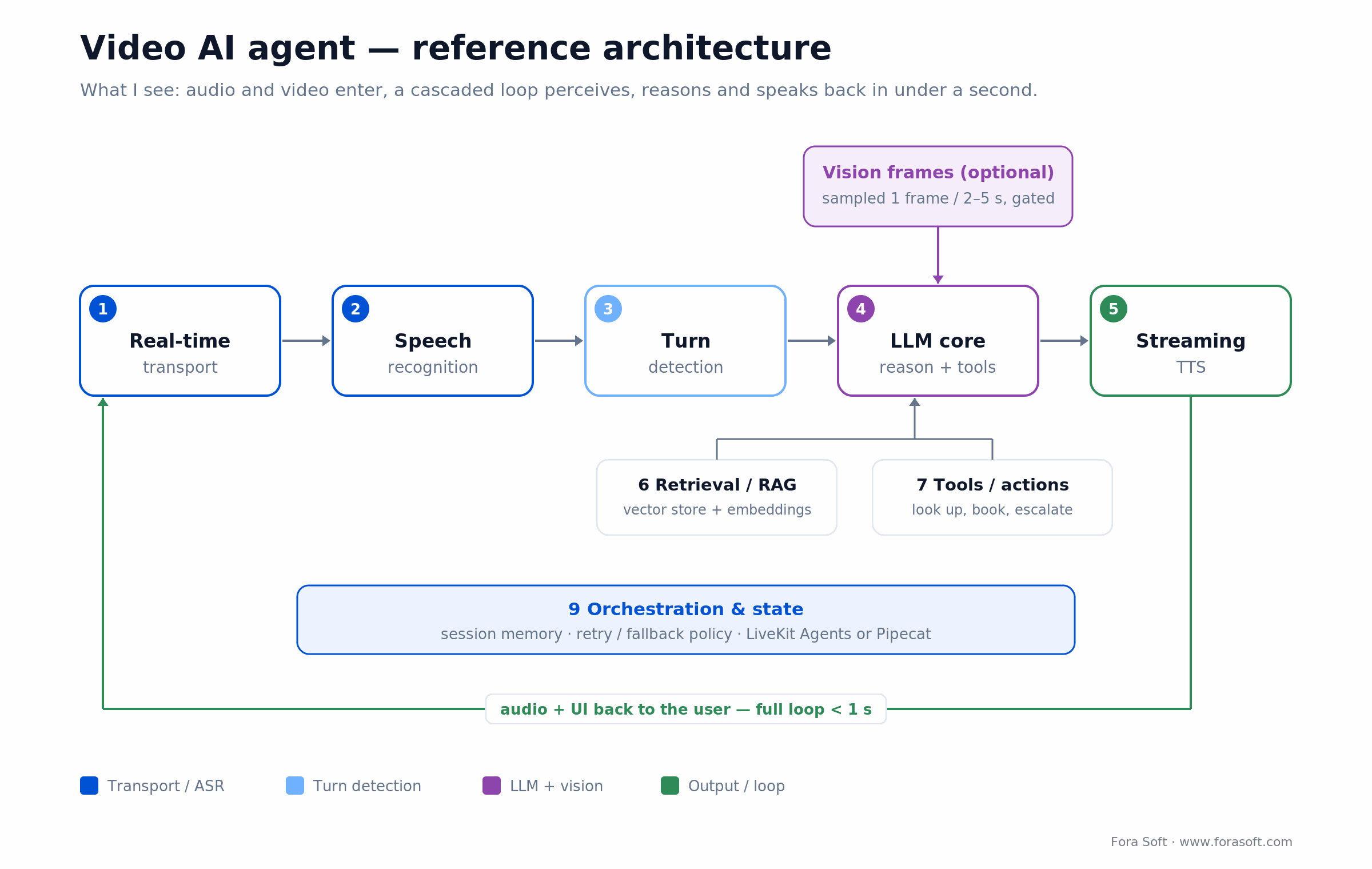
Figure 1. The cascaded reference architecture — nine components closing a perceive-understand-think-act loop in under a second.
Cascaded vs speech-to-speech — the 2026 architecture fork
This is the decision that shapes your latency and your bill more than any other, so answer it before you pick a single vendor. There are two ways to build the audio loop, and in 2026 both are production-ready.
Cascaded chains three specialised models: speech-to-text, then the LLM, then text-to-speech. You see every intermediate transcript, you can swap any stage, and you pay each model’s cheap per-minute rate. The cost is latency. Three hand-offs stack up to a 600–1,200 ms glass-to-glass loop, and the fact that you own the plumbing between the boxes.
Speech-to-speech (S2S) hands raw audio to a single model that listens and talks back: OpenAI’s gpt-realtime-2.1 or Google’s gemini-3.1-flash-live. It preserves tone and interruptions, and a warm S2S loop answers in 300–500 ms, roughly 150 ms quicker than cascaded. The catch is money and control: the whole conversation is billed as audio tokens on every turn, so a long call on OpenAI’s realtime API runs about 10× a cascaded equivalent unless you lean hard on prompt caching (OpenAI’s own cost guide spells out the token math).
Here’s the catch most teams miss: S2S also makes tool calls and compliance logging harder, because there is no clean text transcript sitting between perception and action. That’s a big reason under 15% of production agents ran fully speech-to-speech in the first half of 2026. Cascaded is still the default for anything tool-heavy or regulated (per Coval’s 2026 architecture analysis).
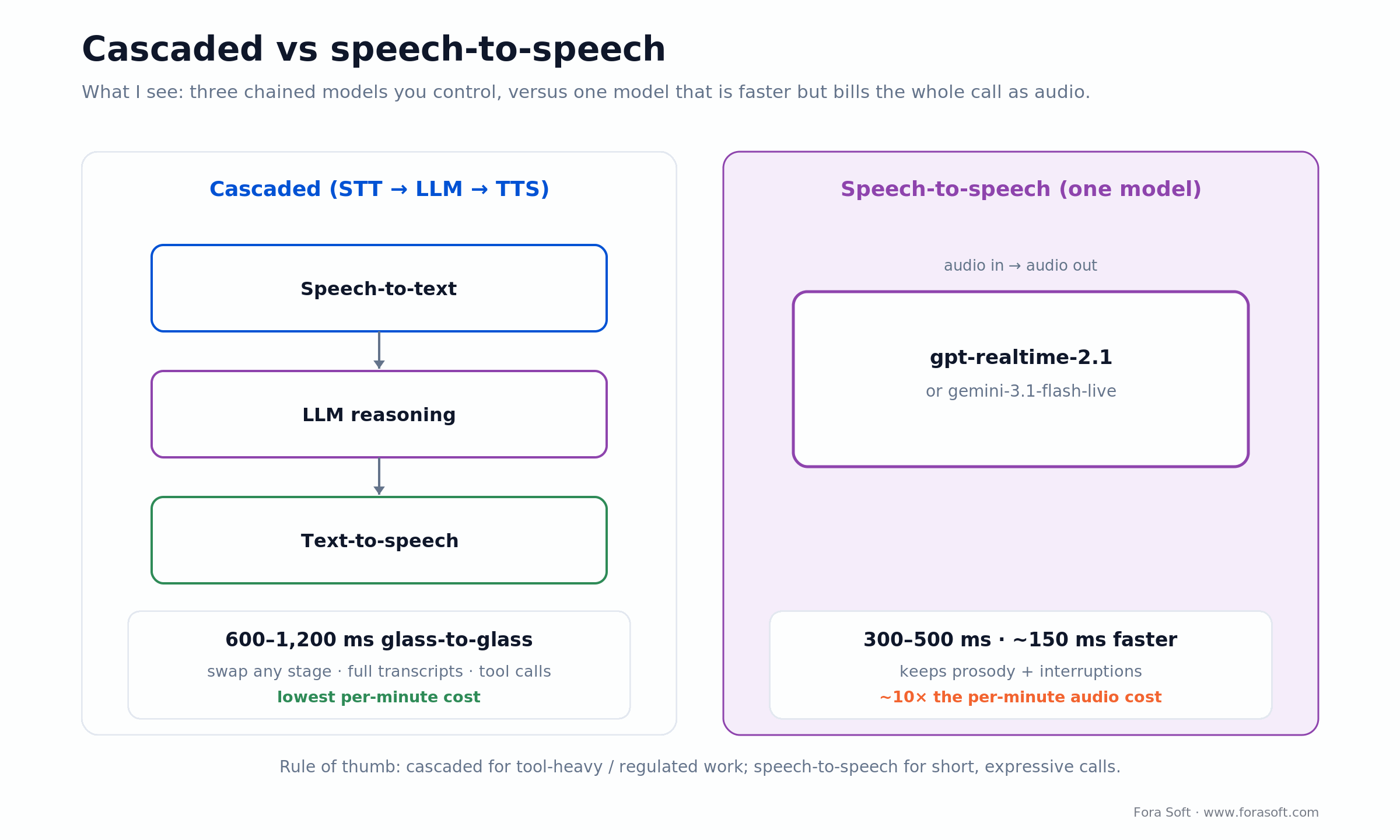
Figure 2. Cascaded trades ~150 ms of latency for lower cost and full control; speech-to-speech buys speed and prosody at roughly 10× the per-minute audio bill.
Reach for speech-to-speech when prosody and barge-in are the product (companions, language tutors, avatars) and calls are short. Reach for cascaded when you need tool calls, transcripts, compliance logs or a tight per-minute cost — which is most business video AI agents.
The latency budget — where every millisecond goes
Humans leave about a 200 ms gap between turns in natural conversation, and tolerate up to roughly 500 ms before it feels off. That is the target your whole pipeline is chasing. Here is where a tuned cascaded loop spends its budget in 2026.
| Stage | Tuned 2026 budget | Lever to pull |
|---|---|---|
| Transport (one-way) | 20–40 ms | Closer SFU region, WebRTC tuning |
| Streaming speech recognition | 60–100 ms | Smaller chunks, real-time model |
| Turn detection | 150–300 ms | Model-native EoT (Deepgram Flux ~260 ms) |
| LLM time-to-first-token | 100–400 ms | Smaller model, prompt cache, vLLM |
| TTS time-to-first-audio | 40–200 ms | Streaming TTS, sentence-boundary commit |
| Return transport + jitter buffer | 100–200 ms | Adaptive jitter, DTLS-SRTP fast-path |

Figure 3. Turn detection, not the LLM, is usually the biggest single slice of the budget. Profile end-to-end before you optimise any one stage.
Aim for a sub-800 ms loop. Benchmarks of production voice agents in 2026 land around 680 ms p50 and 1,180 ms p95. Past 1,500 ms, users start interrupting the agent and trust falls off a cliff.
The 2026 reference stack — vendor cheat sheet
Every layer has a managed option that ships fast and an open option you self-host for control and unit cost. Names move quarterly; this is the shortlist as of August 2026.
| Layer | Closed / managed | Open / self-host |
|---|---|---|
| Real-time transport | LiveKit Cloud, Daily, Twilio | LiveKit OSS, mediasoup, Janus |
| Speech recognition | Deepgram Nova-3 / Flux, AssemblyAI | Whisper Large v3, faster-whisper |
| LLM | GPT-5.6, Claude Sonnet 5, Gemini 3 | Llama 5, Qwen 3.7, DeepSeek V4 |
| Vision | GPT-5.6 vision, Gemini 3 multimodal | Llama 5 Vision, Qwen-VL, MiniCPM-V |
| TTS | ElevenLabs Flash, Cartesia Sonic 3 | Coqui XTTS v2, OpenVoice, F5-TTS |
| Speech-to-speech | OpenAI gpt-realtime-2.1, Gemini Live |
Moshi, Ultravox (early) |
| Vector / RAG | Pinecone, Turbopuffer | Qdrant, Weaviate, pgvector |
| Orchestration | LiveKit Agents, Vapi, Retell, Daily Bots | Pipecat, custom |
| Observability | LangSmith, Helicone | Langfuse, OpenTelemetry, Grafana |
Choosing between LiveKit Agents and Pipecat for orchestration? Pipecat’s v1.0 (Daily, April 2026) is a transport-agnostic frame-processor pipeline; LiveKit Agents is a full WebRTC media server that wins on native SIP/telephony and scale. Our Pipecat vs LiveKit Agents breakdown has the side-by-side.
How a video AI agent differs from a voice bot
Voice agents and video AI agents share most of their stack but split in three places. Knowing where to invest stops you over-engineering one and starving the other.
Vision adds a whole cost and latency dimension. Frames are tokens, and multimodal LLMs charge per frame. A naive “one frame per second” setup can outspend the entire audio loop before anyone notices. Plan frame gating from day one — the next section does the arithmetic.
Turn detection gets easier, not harder. Video hands you visual cues — gaze, mouth movement, a raised hand — that voice-only VAD never sees. Fused with audio, that’s a real end-of-turn accuracy win, worth 100–200 ms of awkward pauses removed.
UX expectations jump. Users can see the agent’s avatar or video output, so uncanny-valley issues, lip-sync and visual fillers (typing indicators, “thinking” animations) become product requirements, not engineering footnotes. If your agent needs a face, see our guide to building an interactive AI avatar.
When to send video frames into the agent — and the token bill
Send frames only when the picture changes, because the video half of the bill scales with pixels, not with how interesting the frame is. This is the single biggest cost trap in a video AI agent, so let’s put real numbers on it.
A vision model turns each frame into image tokens based on its resolution. One minute of 30 fps video at 224 px is roughly 352,000 tokens (1,800 frames × ~196 patches each); a full hour is about 21 million tokens before any compression, per our video-VLM frame-sampling research. Feed that raw to a frontier vision model and one 30-minute call can cost more in vision tokens than a month of the audio loop.
Three rules from production keep it sane. 1. Sample sparsely. Most use cases need one frame every 2–5 s, not 30 per second. Tie capture to change — a gesture, a document held up, a screen-share switch — rather than wall-clock time. Even a flat 1 fps already drops ~97% of frames. 2. Gate before the expensive model. Run a cheap vision model (CLIP, MiniCPM-V) to decide which frames reach the frontier multimodal LLM. Adaptive keyframe selection buys most of the accuracy at ~1% of the frames. 3. Keep vision off the audio critical path. Run it on a separate worker queue and feed the result into the next turn as context, never blocking the current reasoning loop.
Eval and continuous improvement — how to keep the agent getting better
A video AI agent is only as good as the eval set you run it against. The process most successful teams settle on in 2026:
1. Hand-grade 50–200 conversations. Real production transcripts, scored by a domain expert on a 1–5 scale across the dimensions that matter: accuracy, tone, action correctness, safety.
2. Automate with an LLM judge. A second model grades the agent’s responses against the same rubric, calibrated against the human scores. Now you can regression-test hundreds of conversations per change instead of a handful.
3. Trace everything. Langfuse or LangSmith captures the full conversation, prompt, model output, tool calls and timing. A hallucination becomes a specific line in a trace, not a vague ticket.
4. Loop failures back into the eval set. Every escalation, thumbs-down and complaint becomes a new graded example. The set grows; quality compounds.
5. Gate model swaps on the eval. When Sonnet 5 becomes Opus 5, or Llama 5 ships a point release, run the eval before you flip. The wrong swap can quietly drop quality 10% while every dashboard stays green.
Five use cases that pay back fastest
1. Sales-call copilots and summaries. Real-time transcription, action-item extraction, CRM auto-update, post-call summary. The pattern Meetric ships in production, automating most of the CRM data entry reps used to do by hand. Payback under six months for any sales team above 20 reps.
2. Telehealth triage. Symptom intake, visual checks over video, a pre-visit summary for the clinician, automatic note generation. Keeps the clinician’s attention on the patient; runs HIPAA-safe on self-hosted models.
3. Real-time interpretation and translation. Two-way voice translation inside a video call at sub-second latency. TransLinguist (75+ languages, an NHS UK framework supplier) and VOLO (live captioning at Black Hat 2025, 22K+ attendees) show the architecture at scale.
4. Live-commerce hosts. An always-on presenter that answers product questions in chat or by voice during a live shopping stream, with real-time inventory lookup as a tool call.
5. Customer-support escalation. The agent triages, resolves common cases, and hands complex ones to a human with full context attached. Average handling time drops sharply once the routine third of tickets never reaches a person.
Reach for sales summaries or telehealth triage first. Both have clear ROI, low regulatory friction, and produce labelled data that improves the agent quickly — the fastest way to a working eval set.
Cost model — per-minute economics on four 2026 stacks
These are component costs (transport, ASR, LLM, TTS) for an audio-first agent; add vision tokens, orchestration, observability and margin on top. Managed platforms bundle all of that and charge more per minute for the convenience.
| Stack | Per-minute cost | Notes |
|---|---|---|
Speech-to-speech (OpenAI gpt-realtime-2.1), uncached |
~$0.18–$0.46 | Fastest, best prosody; whole call re-billed each turn |
| Managed cascaded (Vapi / Retell all-in) | ~$0.07–$0.31 | Compliance and ops bundled; least to build |
| Hybrid cascaded (LiveKit Cloud + Deepgram + GPT-5.6 Luna + Cartesia) | ~$0.06–$0.15 | Production sweet spot for most teams |
| Self-hosted open (LiveKit OSS + Whisper + Llama 5 vLLM + XTTS) | ~$0.02–$0.08 | Cheapest per minute; ops cost dominates below ~100K min/mo |

Figure 4. The same conversation can cost 10× more per minute depending on architecture. Pick the deployment pattern before you pick vendors.
Two non-obvious facts. Caching is the single biggest lever on speech-to-speech. OpenAI prices cached audio input at $0.40 per million tokens versus $32 uncached, an 80× gap, so the same S2S agent lands at $0.05–$0.10/min once you cache and trim tool outputs. Gemini Live undercuts OpenAI on audio by roughly 10× (Gemini’s published rates, $3 vs $32 per million input audio tokens), which is why price-sensitive S2S builds default to it.
Already running a video AI agent and the per-minute cost feels wrong?
We’ll model the speech-to-speech, hybrid and self-hosted variants on your real traffic and tell you which one moves margin — in five working days.
A worked example — the bill for a 10-minute call
Ranges are easy to wave at, so here is the arithmetic on one concrete call: a 10-minute audio agent where the human talks half the time and the agent talks the other half. We’ll price it three ways with August-2026 numbers.
Cascaded (Deepgram Nova-3 + GPT-5.6 Luna + Cartesia Sonic 3):
Speech recognition: 10 min × $0.0077/min = $0.077. LLM: a chatty agent with growing context runs ~40K input + ~4K output tokens over the call, so 40K × $0.20/1M + 4K × $1.20/1M = $0.013. TTS: the agent speaks ~5 min ≈ 3,750 characters × ~$25/1M = $0.094. Transport: ~$0.02. Total ≈ $0.20 for the call, about $0.02/min in raw component cost.
Speech-to-speech, OpenAI gpt-realtime-2.1:
Measured across thousands of real sessions, an uncached realtime agent runs $0.18–$0.46/min — call it $1.80–$4.60 for the same 10 minutes, roughly 10–20× the cascaded bill, because the full conversation is re-sent as audio tokens on every turn. Turn on prompt caching and trim tool outputs and it drops to $0.05–$0.10/min, or $0.50–$1.00.
Speech-to-speech, Gemini Live:
At $3/1M input and $12/1M output audio tokens, the same call is roughly $0.23 — about a tenth of OpenAI’s realtime price and within range of cascaded, which is exactly why cost-sensitive S2S builds pick it.
Now add vision. At one frame per second, that 10-minute call is 600 frames ≈ 118K image tokens; on a frontier vision model at $5/1M that is ~$0.59 of vision alone. That is three times the entire cascaded audio bill. Gate down to the ~1% of frames that matter and it falls under a cent. That one decision is the difference between a video AI agent that pays back and one that bleeds.
Compliance, recording and consent
Video AI agents touch every sensitive-data law there is. Four boxes to tick before launch:
Consent. Explicit, recorded, language-appropriate consent before the AI listens, records or speaks. EU GDPR and US two-party-consent states each have their own rules; bake the consent step into the join flow, not a buried checkbox.
Data residency. If your buyers are in regulated industries, the LLM and speech endpoints must run in a region they accept. That is the strongest argument for self-hosted Llama 5 or Whisper — often more decisive than cost.
Recording and retention. Decide what you record (audio, video, transcripts, agent reasoning), where it lives, for how long, and who can read it. Default conservative and expand only for use cases that demand it.
HIPAA, SOC 2, GDPR. Closed APIs offer BAAs and DPAs, but coverage varies by endpoint. Self-hosting gives you full control at the cost of carrying the certification yourself. Decide compliance before architecture, because it can veto both.
Five pitfalls that derail video AI agent projects
1. Optimising the wrong latency. Teams obsess over LLM time-to-first-token; in practice the biggest swing is turn detection plus the jitter buffer. Profile end-to-end before you touch any single stage.
2. No real eval set. “It feels good” is not a metric. Build a 50–200 graded-conversation eval before you ship, and gate every model swap on it.
3. Forgetting the human handoff. Every agent eventually passes to a person. The handoff — who, when, with what context attached — matters more to satisfaction than the agent’s raw quality.
4. Vision frames flooding the LLM. Frames per second times vision tokens per frame is a number that belongs on every dashboard. Treat it like CDN egress: cheap per unit, ruinous at volume.
5. Hallucinated tool calls. The model invents a function, an order ID, a calendar slot. Use strict JSON schemas, parse every call, and refuse anything that doesn’t match. Never let a raw model output reach a real system of record.
A decision framework — pick your stack in five questions
Walk these top to bottom; the first “yes” usually settles the architecture.
Q1. Is prosody or barge-in the product (a companion, tutor or avatar) and are calls short? Speech-to-speech: Gemini Live if cost matters, gpt-realtime-2.1 if quality does. Q2. Do you need tool calls, transcripts or compliance logs? Cascaded: you need the text between perception and action.
Q3. HIPAA or sovereign cloud? Self-hosted Llama 5 on vLLM in your VPC, Whisper Large v3 in the same cluster. Q4. Above ~100K minutes a month and tolerant of an open model? Hybrid cascaded: LiveKit Cloud, Deepgram, Llama 5 on vLLM, Cartesia or ElevenLabs.
Q5. Do you need vision (gestures, documents, screen-share)? Add a frame-gating step (CLIP or MiniCPM-V) in front of the multimodal LLM, on its own worker queue, before anything else.
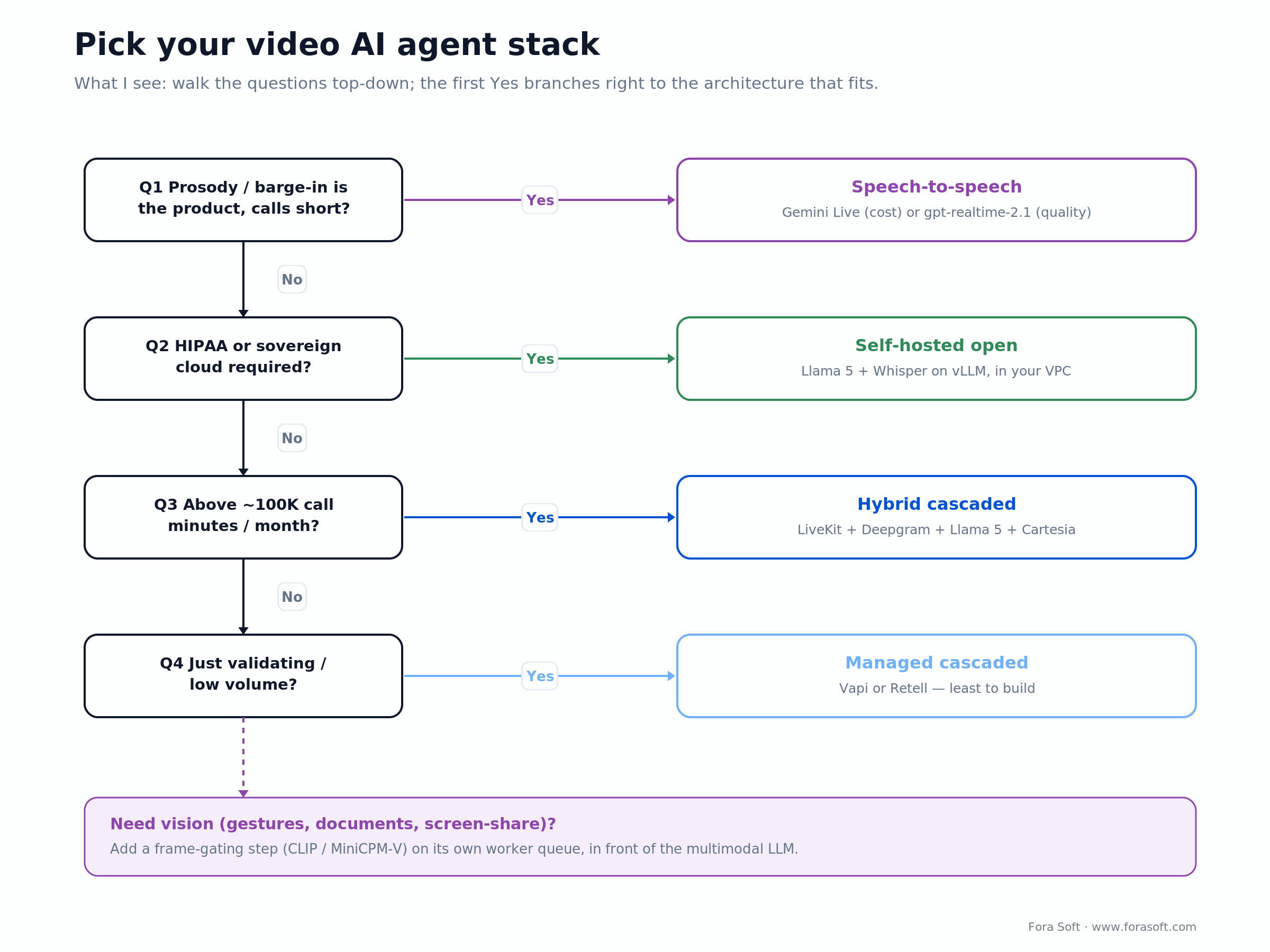
Figure 5. The stack picker as a decision tree — the first “yes” down the trunk sets your architecture.
KPIs to track once you ship
Quality. Eval-set pass rate, hallucination rate (sampled human review), tool-call success rate, escalation precision, transcript word-error rate.
Business. Cost per call-minute, cost per resolved ticket or generated summary, conversion lift versus a non-AI baseline, retention of users who interact with the agent.
Reliability. P50 / P95 / P99 loop latency, agent join success, mid-call reconnect success, vendor-fallback hit rate, vision frame-queue depth.
If you remember nothing else: latency is the product, the eval set is the spec, vision is a cost trap, and caching is what makes speech-to-speech affordable. Get those four right and the rest of the stack falls into place.
Mini case — sales-call copilot on Meetric
Situation. Meetric, a sales-meeting platform, needed a real-time copilot that produces post-call summaries, surfaces action items live on the rep’s screen, and writes back to the CRM, without customer conversation data leaving a region the buyer controls.
Plan. A cascaded stack: LiveKit Cloud for transport, Whisper Large v3 for transcription, an open-weight LLM (Llama-class) on vLLM inside the customer’s own EU cloud account, and BGE embeddings with Qdrant for retrieval over the sales knowledge base. We built the eval set first — a couple of hundred graded summaries with the customer’s sales lead — so quality had a definition before we tuned prompts.
Outcome. Most summaries came out publish-ready with light edits, at roughly $0.06 per summary against about $0.40 on a closed API at comparable quality, and no call data left the buyer’s cloud. Want a similar build? Book a scoping call.
When you should not build a video AI agent
Skip the build if any of these hold: your call volume is under ~5,000 minutes a month and the marginal value per call is below a dollar; the consent or regulatory friction outweighs the productivity win (some legal and judicial workflows sit here); or you can’t define an eval set the agent has to clear. That last one is the real gate. If you can’t grade it, you can’t ship it.
Flip every one of those and the case is strong: a measurable cost-of-call (reps, clinicians, support agents), clean consent, and a gradeable output. That’s some of the cleanest payback math in 2026 software.
Frequently asked questions
What is a video AI agent?
A video AI agent is software that joins a real-time video session, perceives audio and optionally video, reasons with an LLM, and acts — speaking, summarising, calling tools or escalating to a human. Real-time means the loop closes in under a second.
How do video AI agents work?
They run a loop: real-time transport carries the call, streaming speech recognition turns audio into text, turn detection decides when the user stopped, an LLM reasons and calls tools, and streaming TTS speaks the reply, all in 600–1,200 ms. A speech-to-speech model can replace the middle three stages with one.
What latency should a video AI agent achieve?
Under ~800 ms loop latency is where the agent feels human. Tuned production stacks land at 680 ms p50 and 1,180 ms p95; past 1,500 ms users start talking over the agent.
How much does a video AI agent cost per minute in 2026?
Roughly $0.02–$0.08/min self-hosted, $0.06–$0.15 hybrid cascaded, $0.07–$0.31 on managed platforms (Vapi, Retell), and $0.18–$0.46 on uncached OpenAI speech-to-speech, which caching cuts to $0.05–$0.10. Vision frames are extra and can dwarf all of it.
Cascaded or speech-to-speech — which one should you use?
Cascaded (STT → LLM → TTS) for anything needing tool calls, transcripts, compliance logs or tight cost: most business agents. Speech-to-speech when prosody and interruptions are the product and calls are short. Speech-to-speech is ~150 ms faster but can cost 10× more per call unless cached.
Do you need vision, or is voice enough?
Voice is enough for sales summaries, support and most contact-centre work. Vision earns its cost when the user shares a document, makes a gesture, shows a problem in their environment (telehealth, field support) or screen-shares. Add it deliberately, with frame gating, because one minute of raw 30 fps video is ~352K tokens.
Can a video AI agent be HIPAA compliant?
Yes — via a self-hosted LLM (Llama 5 or Qwen on vLLM) in your VPC, Whisper on the same cluster, and HIPAA-eligible transport (self-hosted LiveKit, or Daily/Vonage with a BAA). Some closed APIs also work where the BAA is explicit for that endpoint.
How long does a production build take?
A useful prototype takes 2–4 weeks. A production build with an eval set, observability, fallback paths and a compliance review is 8–14 weeks. Fora Soft ships faster on the boilerplate-heavy parts using Agent Engineering.
Does Fora Soft build video AI agents?
Yes. We have shipped video AI features on Meetric, TransLinguist, VOLO and other live products. We usually scope one in 30 minutes and deliver a fixed-scope prototype in 4–6 weeks. Book a call.
Ready to scope a video AI agent for your product?
A 30-minute call, a written architecture and unit-economics plan within five working days, and a fixed-scope prototype quote.
Treat the eval set as the product spec. Anything you can’t grade, you can’t ship. Anything you can grade, you can iterate against in days.
The 2026 tooling ecosystem at a glance
A lot of names move fast here. The shortlist worth tracking as of August 2026:
Agent frameworks. LiveKit Agents, Pipecat v1.0, Daily Bots, Vapi, Retell, plus OpenAI’s realtime API for the speech-to-speech route.
Inference servers. vLLM (production default), SGLang (RAG-heavy), TensorRT-LLM (peak NVIDIA throughput), llama.cpp (CPU / edge).
Speech recognition. Deepgram Nova-3 and Flux, AssemblyAI Universal-Streaming, Whisper Large v3, NVIDIA Parakeet.
TTS. ElevenLabs Flash, Cartesia Sonic 3, Deepgram Aura-2, OpenAI TTS, Coqui XTTS v2.
Observability. LangSmith, Langfuse, Helicone, OpenTelemetry traces, Grafana Loki for logs.
What to read next
Voice AI
LiveKit voice AI agents in 2026: the engineer’s playbook
The voice-only sibling of this guide — same loop, simpler stack.
Multimodal
2026 LiveKit multimodal agents guide: voice, vision & production
A deeper architectural reference for production multimodal agents.
Pricing
OpenAI Realtime API pricing, decoded
The audio-token math behind that 10× speech-to-speech bill.
Frameworks
Pipecat vs LiveKit Agents: which orchestrator
The two open orchestration frameworks, compared head to head.
AI APIs
AI call assistants — a practical guide to third-party APIs
When a turnkey API beats building the stack yourself.
Ready to ship a video AI agent?
A video AI agent in 2026 is no longer a research project. The architecture has settled into two clear patterns, the sub-800 ms latency budget is achievable in production, and the unit economics work, from $0.02/min self-hosted to a caching-tamed speech-to-speech loop. The open question is never “can it be built,” it’s “which pattern fits your volume, compliance and quality bar.”
Validate on a managed stack, scale on hybrid cascaded, and self-host when volume or compliance demands it. Our AI integration practice ships exactly this loop end to end: eval set, latency budget and per-minute cost included.

The book · Volume 7 of 7
AI for Video: A Complete Guide to Intelligence in Video Products: From Real-Time Pipelines and Agents to Serving, Cost, Compliance, and Verticals
You now have the perceive-reason-speak loop and a sub-second budget for it. Volume 7 of our handbook takes that loop into production: where AI plugs into a WebRTC pipeline, agent primitives, memory and tools, serving on vLLM and Triton, cost per stream-hour, and EU AI Act obligations. It is written for teams that ship agents into live calls. Written by Nikolay Sapunov, CEO at Fora Soft.
Read it on Amazon →Kindle & paperback · Fora Soft Video Engineering Handbook
Get a video AI agent roadmap tailored to your product
A 30-minute call, an architecture and unit-economics plan within five working days, and a fixed-scope prototype quote.

