

Key takeaways
• Real-time video processing with AI is a systems problem, not a model problem. Inference eats the 8–10 ms of a 60 fps budget; capture, decode, pre-process, post-process, and encode have to share the remaining 5–8 ms or the pipeline drops frames.
• The production model stack has stabilised. YOLO26 (NMS-free, Jan 2026) or RF-DETR for detection, ByteTrack for tracking, SAM 3 for prompt-based segmentation, Deepgram Nova-3 or AssemblyAI for live ASR (Whisper stays batch), Nvidia Maxine for enhancement. The novelty hunt is over; the integration work is not.
• Hybrid is the shipping architecture in 2026. Fast, cheap models on the edge for per-frame work; heavyweight models in the cloud for expensive tasks (SAM 3, LLM annotation, content moderation). Pure edge is privacy-first; pure cloud is cost-explosive above 100 streams.
• Streaming and AI have to be co-designed. WebRTC (H.264/AV1) for interactive, HLS + H.265 for broadcast, SRT/WHIP for ingestion. A pipeline that ignores the codec path is a pipeline that lies about latency.
• Most AI video budgets blow up on the same five things: backpressure, GPU memory, codec mismatches, single-frame over-reliance, and model drift. Planning for all five in week one is the difference between a 10-week MVP and a 10-month project.
Every product with a live video surface now wants AI inside the pipeline — telemedicine platforms want live transcription and safety signals, streaming apps want moderation and background removal, surveillance platforms want per-frame detection, contact centers want sentiment analysis on the call. The technology works, and the market is pricing it in: the video-analytics market is set to reach roughly $14.7–15 billion in 2026 and grow 20–23% a year (MarketsandMarkets, Mordor Intelligence, 2026). The reason 9 in 10 builds still miss their ship date is not the models; it is the system around them.
This guide is written for CTOs, ML engineers, and product heads who are scoping or shipping a real-time AI video pipeline in 2026. It covers the pipeline stages and their latency budget, where AI actually earns its keep, which frameworks and architectures ship, and the five pitfalls that burn quarters. The benchmarks are current for 2026 hardware and models; the patterns are ones our teams have shipped in production.
Why Fora Soft wrote this playbook
Fora Soft has been building video-heavy software since 2005 — 250+ projects, with real-time video and AI integration as core competencies. We built Speed.Space, a remote video production platform for Netflix-, HBO-, and EA-grade productions running at 1080p/8 Mbps — roughly 5× a standard video-call bitrate. We shipped V.A.L.T, a surveillance and review platform trusted by 770+ US organizations (police, medical, child-advocacy) and 50,000+ users, with evidentiary AI analytics on every stream.
The reason we focus so hard on the “real-time” part is simple: the glass-to-glass latency budget is fixed at 16.7 milliseconds for 60 fps and 33 milliseconds for 30 fps, and every team that ignores that budget builds something that ships as a 2 fps demo. Making AI feel instant in video is what we sell.
We run Agent Engineering on every build — AI agents working alongside our senior engineers on spec, scaffolding, and tests. That is why our MVPs land in weeks rather than quarters and why the estimates you will see further down in this article tend to come in below industry numbers you will see quoted elsewhere.
Scoping a real-time AI video build?
Bring your streams, your AI use-case, and your latency target. We will map it to an edge / hybrid / cloud architecture with a week-level estimate in 30 minutes.
The pipeline and its latency budget
A real-time AI video pipeline has six stages. Each stage has a budget; miss one and the whole stream drops frames. These are the numbers we target on a Jetson Orin NX or an RTX 4090 in production:
| Stage | 60 fps budget (16.7 ms) | 30 fps budget (33.3 ms) | Failure mode |
|---|---|---|---|
| Capture | 1–2 ms | 2–3 ms | Camera buffer stall |
| Decode (H.264 / H.265) | 2–3 ms | 3–5 ms | CPU decode instead of NVDEC |
| Pre-process | 1–2 ms | 2–3 ms | Host <-> device copies |
| Inference | 8–10 ms | 15–20 ms | Oversized model, wrong precision |
| Post-process (NMS, tracking) | 1–2 ms | 2–3 ms | Python loop GC spike |
| Encode / stream | 2–3 ms | 3–5 ms | CPU encode instead of NVENC |
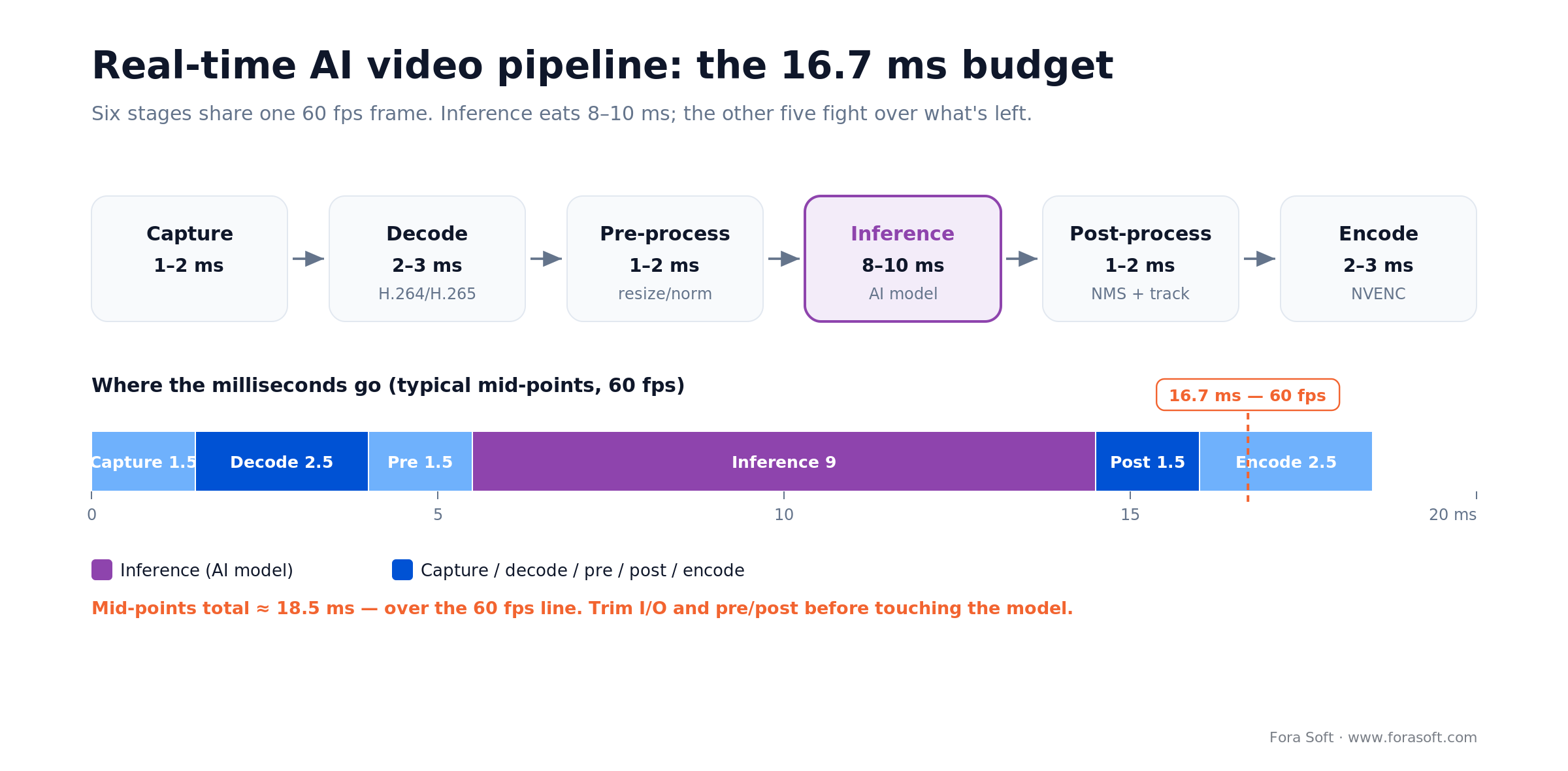
Figure 1. The 60 fps frame budget. Inference dominates, so the other five stages must be trimmed first.
Inference dominates, so optimising the other five stages first is how fast pipelines ship. If hardware decoders, zero-copy buffers, and the encoder are not all in the GPU path, the stream will never hit 60 fps regardless of the model.
Where AI earns its keep in a video pipeline
Seven model families cover 95% of shipped video AI in 2026. Picking the right one — and picking not to run one at all when the use-case does not warrant it — is the single biggest architectural lever. If your team is still ramping on the fundamentals, our AI for video engineering track covers the primitives.
1. Detection and classification. YOLO26 (January 2026, end-to-end NMS-free) is the current Ultralytics workhorse, running roughly 2–8 ms on an RTX 4090 and real-time on a Jetson Orin Nano Super. RF-DETR (2025) is the strongest real-time transformer detector for small-object scenes; older YOLOv11 and RT-DETR still ship fine. This family is in almost every production pipeline.
2. Tracking. ByteTrack adds 2–4 ms for persistent object IDs; BotSORT slightly more accurate, slightly slower; DeepSORT for stubborn occlusion. ByteTrack is the 2026 default.
3. Segmentation. YOLO-seg at ~12 ms on a 4090 covers the real-time need; SAM 3 (Meta, November 2025) adds prompt- and text-driven masks, with SAM 3.1 finally fitting the ~33 ms live-video budget. Use it when you need region-of-interest isolation or open-vocabulary masks.
4. Speech (ASR). Whisper large-v3-turbo is fast but batch-oriented: a 30 second window, not true streaming. For live captions, Deepgram Nova-3 and AssemblyAI Universal-Streaming both land around 300 ms. Pick Whisper for cheap on-prem batch; pick a streaming API when latency is the product.
5. Background and enhancement. MediaPipe selfie segmentation at ~10 ms on GPU; Nvidia Maxine (Video Effects SDK) for background and enhancement at a few milliseconds. Real-ESRGAN and Restormer for upscaling and denoise, but rarely worth running at 60 fps — batch offline for VOD.
6. Content moderation. Hive AI for broad real-time moderation at 50–100 ms; a custom YOLO head for speed when semantic nuance is not required. One 2026 gotcha: AWS stopped offering Rekognition Streaming Video Analysis to new customers on 30 April 2026, so don't design a fresh build around it. Treat moderation as a sampled-frame problem to save GPU cycles.
7. VLM and LLM annotation. Gemini 3 or GPT-5 over sampled frames for content understanding and search indexing; Qwen3-VL or Llama 4 when you need open weights on-prem (GPT-4V is retired). Budget ~150 ms or more per sampled frame. Never put a VLM in the per-frame path; use sampled frames plus a small latency queue.
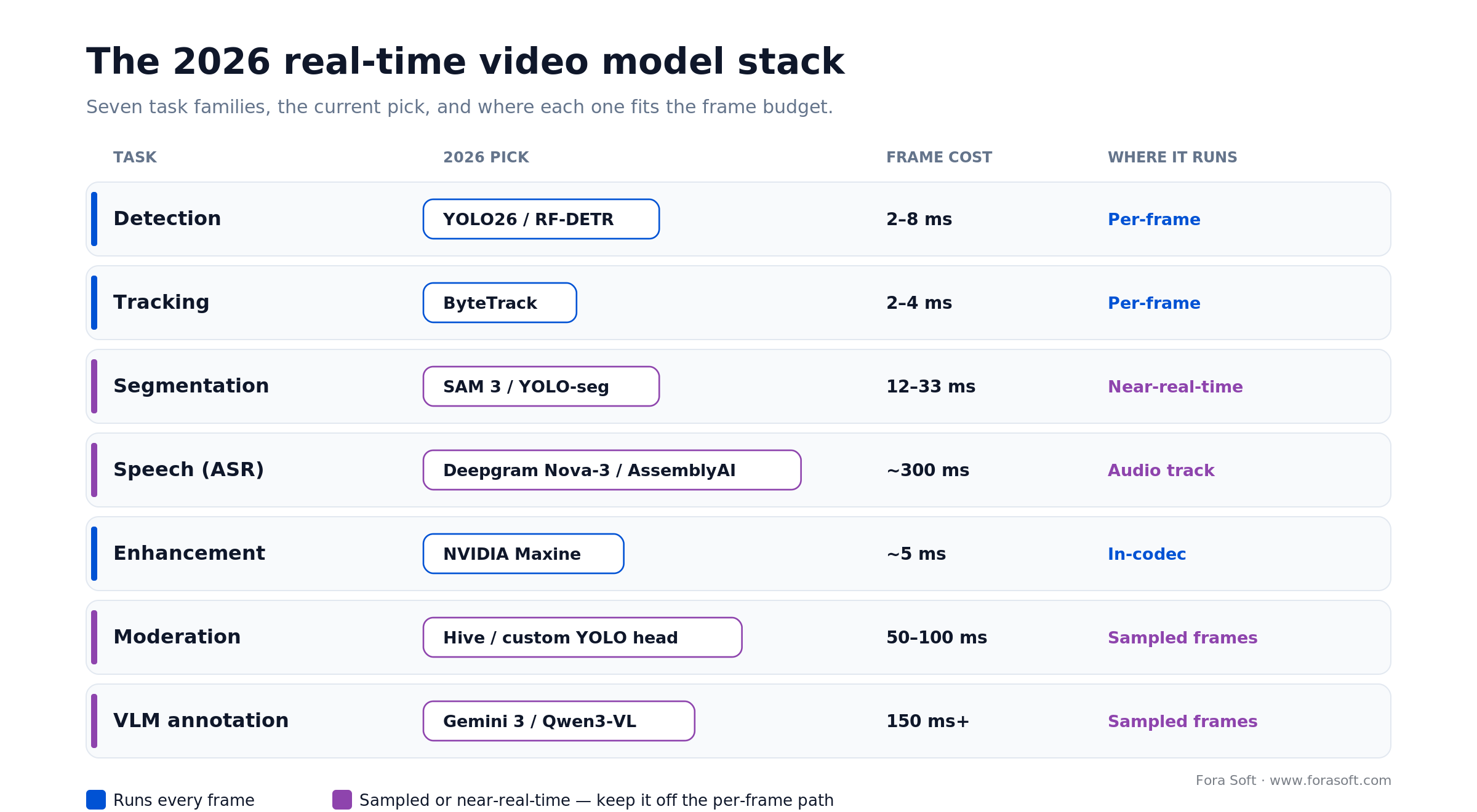
Figure 2. The 2026 model stack by task — blue runs every frame, purple stays sampled or near-real-time.
Reach for VLM / LLM annotation when: you need semantic search (“find every time someone left a door open”) or content-aware moderation. Keep it on sampled frames, not every frame; fleet-wide per-frame VLM is unaffordable.
Hardware and precision: where the ms come from
Four target classes cover almost every deployment. The right class is decided by your cost ceiling, your privacy posture, and how many streams you need to serve from one node.
| Target | YOLOv11m @ 640 | Streams / node | Cost range |
|---|---|---|---|
| RTX 4090 / L40S | ~8 ms | 8–16 @ 30 fps | $1.5–10K hw / $1.5–3/hr cloud |
| Jetson Orin (Nano Super / NX) | ~40 ms | 1–2 @ 30 fps | $249–1,500 per node |
| Apple M4 / M5 | ~45 ms | 1 on-device | Device-owned |
| Intel Xeon + OpenVINO | ~80 ms CPU | 1 @ 15 fps | Commodity server |
Three precision tips save more latency than picking a “better” model. Quantise to FP16 (free) or INT8 (careful calibration), use TensorRT / DeepStream rather than raw PyTorch, and keep all buffers on the GPU from decode through encode. Doing those three things on the same model usually cuts inference latency in half.
Reach for a Jetson when: your streams are distributed, privacy-sensitive, and under 2 concurrent feeds per node. The 2026 entry point is the Orin Nano Super ($249, 67 INT8 TOPS); AGX Thor ($3,499, 2,070 FP4 TOPS) is the high end. For centralised 8–16-stream density, an RTX 4090 or L40S is cheaper per stream-hour.
Frameworks: DeepStream, TensorRT, Triton, ONNX Runtime
The framework layer is where the 8–10 ms inference budget is actually made or lost.
DeepStream 8 / 9 (Nvidia). GStreamer-based, CUDA-native, optimised for multi-stream CCTV-style pipelines; the 2026 releases add Blackwell and Jetson Thor support and move ASR/TTS out to NVIDIA Riva. The right default if you have Nvidia hardware and more than one stream per node.
TensorRT. Nvidia’s inference compiler — quantisation, pruning, layer fusion. Shaves 30–50% off raw PyTorch latency for most YOLO-class models. Non-negotiable in production on Nvidia.
Triton Inference Server. Multi-model serving with ensemble pipelines, A/B testing, and autoscaling. Ship it when you have more than a handful of models or need model-level canary deploys.
ONNX Runtime. Cross-platform, the portable default when you are deploying to mixed hardware (ARM edge boxes, Intel servers, Nvidia GPUs) or when teams want a single export path from PyTorch.
MediaPipe. Google’s on-device toolkit — the right choice for mobile, web, and browser-side real-time AI (background, face mesh, hand tracking).
OpenVINO (Intel). CPU-optimised inference on x86. Cheaper per stream than GPU when latency is not the primary metric; the right default for compliance-sensitive environments that refuse GPUs.
GStreamer + FFmpeg. Non-negotiable for capture, decode, and encode. The video input/output path is where 3–5 ms of the 16.7 ms budget lives; PyAV is fine for prototyping but a liability in production.
Architecture patterns: on-device, edge, cloud, hybrid
The first architectural decision on a real-time AI video product is where inference runs. Get it wrong and everything else costs more than it should.
On-device / edge. Jetson Orin NX, Apple M-series, or a Qualcomm AI SoC. 12–50 ms end-to-end. Sends only metadata, not raw frames. Win-case: privacy-critical (medical, schools), low-bandwidth (rural), offline-capable. Hard limit: 8–16 GB GPU memory, so no heavy ensembles.
Edge compute cluster. A local rack of RTX or L40S nodes in the same LAN. 5–8 ms inference plus 5–10 ms LAN. Roughly $12–25 per stream per month amortised. Right for office buildings, small stadiums, regional deployments. Needs Kubernetes-flavoured ops.
Cloud. AWS g4dn / a100, GCP A100, Azure equivalents, or managed video services. 8–15 ms inference plus 100–150 ms network round-trip. $40–100 per stream per month. Scales to 100+ streams but costs explode with resolution (4K is ~5× 1080p).
Hybrid. Small detectors on the edge, heavy models (SAM 3, Whisper, VLMs, content moderation) in the cloud on selected frames or crops. $10–20 per stream per month. The shipping pattern for 2026 production systems — telemedicine, livestream moderation, surveillance — because it trades a little complexity for big cost and privacy wins.
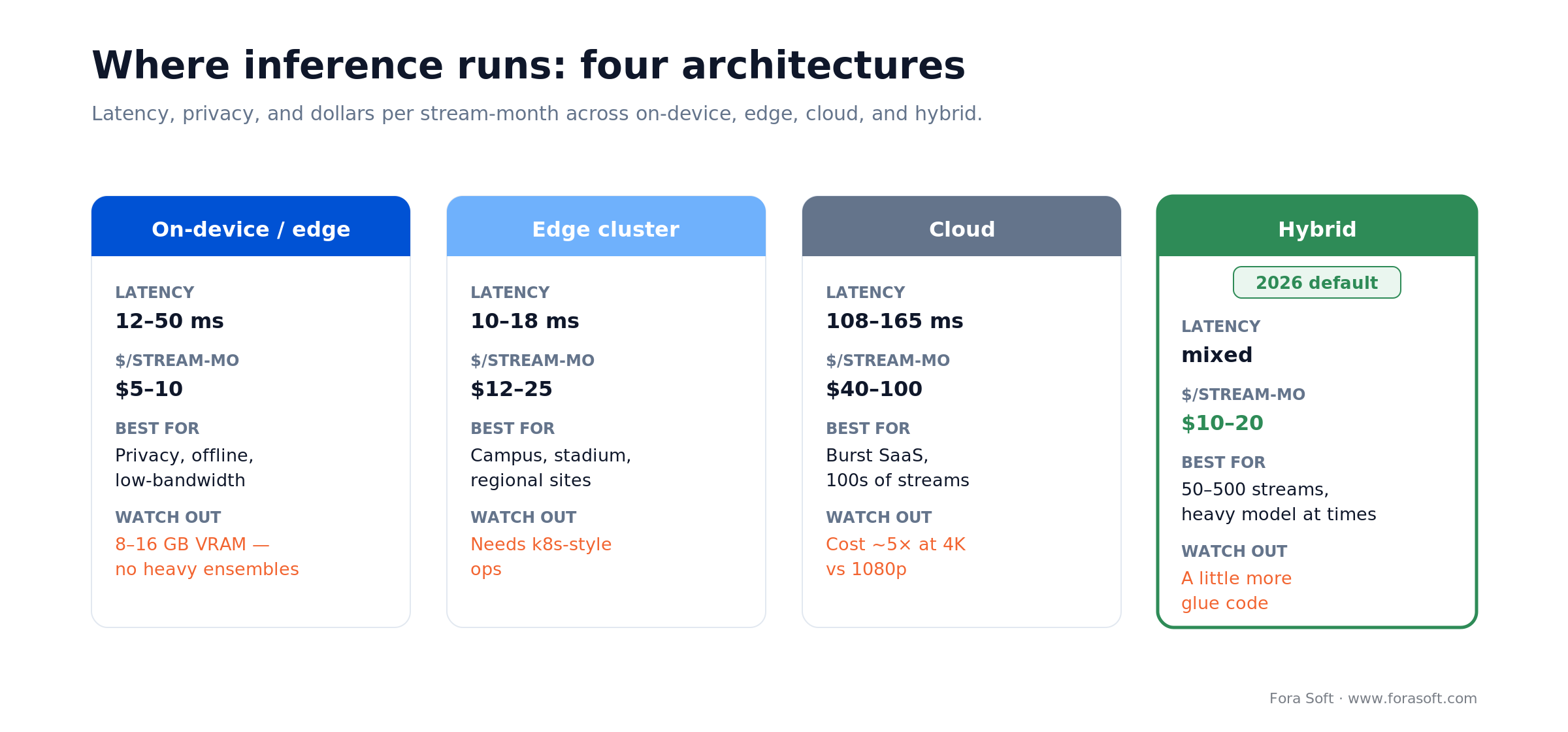
Figure 3. On-device, edge, cloud, and hybrid by latency and dollars per stream-month. Hybrid is the 2026 default.
Reach for hybrid architecture when: your stream count is 50–500, you need a heavy model some of the time, and per-frame cloud inference would be 3× your budget. Detect on the edge; enrich selectively.
Streaming protocols for AI-enriched video
AI changes the signal; the transport still has to deliver it. Pick the wrong protocol and your 16.7 ms pipeline is moot and the viewer is watching the stream six seconds late. Transport sits at the core of our video & audio streaming work, so this section is opinionated.
- WebRTC (with WHIP/WHEP). 50–200 ms end-to-end peer-to-peer. The right default for live interactive (telemedicine, conferencing, live agent-assisted video). H.264, VP8, VP9, and AV1 supported; WHIP — now a published IETF RFC — standardises sub-500 ms WebRTC ingest, WHEP handles playback.
- HLS. 6–30 s with traditional segments; low-latency HLS brings it to 2–5 s. Right for broadcast, replay, large-audience distribution.
- SRT. 100–300 ms. The de-facto contribution protocol — broadcaster to cloud — with encryption and retransmission.
- RTMP. 2–5 s, H.264 only, legacy. End-of-life for new builds; still the only option for some ingest platforms.
- DASH. 4–10 s adaptive bitrate, better codec coverage than HLS. Common in large-scale broadcast.
For the architecture side of WebRTC specifically, our WebRTC architecture guide for 2026 covers P2P, SFU, MCU, and hybrid topologies and when each wins.
Live ASR, translation, and captioning
Three players dominate the live speech side in 2026: Deepgram and AssemblyAI (managed, true streaming) and Whisper (OpenAI, self-hostable, but batch-oriented). Pick on three axes: latency, data-residency, and cost.
Whisper large-v3-turbo. About 5% WER on clean English, but built for batch: a 30 second window and autoregressive decode, not sub-second streaming. Runs on a modest GPU (2 GB+). Pick when you self-host for compliance or cost and can live with chunked, near-real-time captions.
Deepgram Nova-3 / Flux. Sub-300 ms streaming at about $0.0077/min pay-as-you-go, with Flux adding built-in end-of-turn detection for voice agents. Managed API that scales to thousands of concurrent streams. Pick when latency is the product and you can accept the data-processing location.
AssemblyAI Universal-Streaming. Immutable transcripts in ~300 ms at $0.15/hour with unlimited concurrency, strong PII redaction and speaker diarisation. Pick for call-centre and compliance-heavy use-cases.
For live translation, pair the ASR with a low-latency MT engine and keep the whole loop under ~800 ms for conversational feel. We covered a similar pattern specifically for OTT platform development when the captions and translations need to ride inside an HLS ladder.
Mini case: real-time analytics at evidentiary scale
Situation. V.A.L.T, our surveillance and review platform, runs AI analytics over live feeds for 770+ US organizations and 50,000+ users — police departments, medical institutions, child-advocacy centers — where every detection has an audit trail. Out-of-the-box detection at 82% precision would have drowned operators in false positives.
12-week plan. We split the pipeline into capture, TensorRT-optimised YOLO inference, ByteTrack tracking, and an evidentiary event log. Most of the bug-fix load landed on false-positive suppression: we layered a motion-context model on top of the primary detector and curated a negative-examples set from actual site footage. Precision climbed from 82% to a sustained 96%+ across mixed lighting.
Outcome. Operator workload on the review queue dropped meaningfully, evidentiary chain of custody held through audits, and the pipeline ran at sub-200 ms glass-to-event on a modest GPU fleet. The lesson: precision is a systems problem. Models buy the first 80%; pipeline and data work buy the last 15%. Want a similar precision assessment on your feed?
Pipeline overrunning its latency budget?
We will instrument your pipeline, find the stage eating the budget, and quote a focused fix — not a rewrite.
A decision framework — pick your AI video path in five questions
1. What is the glass-to-glass latency target? Under 300 ms pushes you onto WebRTC and on-device / edge inference. Above 1 s opens up HLS plus cloud inference, which is cheaper per stream.
2. How many concurrent streams? Under 20: a single GPU box or an edge cluster is fine. 20–500: hybrid pays for itself. 500+: cloud with smart sampling and tiered inference wins.
3. What are the compliance and data-residency rules? HIPAA, GDPR, and BIPA sometimes make on-prem / on-device mandatory; EU AI Act classifications affect which models you can run for which purposes.
4. Per-frame or sampled inference? Detection and tracking usually need per-frame. Moderation, VLM annotation, and enhancement can sample at 1–5 fps and still hit product goals at a fraction of the cost.
5. Where does the output go? Operator UI, VMS, API, search index, or all four. Each output implies a different storage pattern and retraining loop.
Five pitfalls that burn AI video quarters
1. Backpressure. The pipeline runs fine on the first stream and collapses on the tenth when the encoder can’t keep up with the decoder. Design each stage as a bounded queue and drop frames explicitly; silent buffering kills latency.
2. GPU memory blow-ups. Two models that fit individually can OOM together. Pre-commit memory to named pools in TensorRT or Triton, and alarm on 80% utilisation, not 99%.
3. Codec mismatch. An H.265 source into a pipeline that only has H.264 NVDEC support silently falls to CPU decode and chokes the GPU (our video encoding primer covers why). Lock codecs and decoders on contract at ingest time.
4. Single-frame over-reliance. Detection on every frame is not tracking, and tracking on every frame is not event logic. Keep the temporal layer separate from the per-frame one, or false positives eat the operator.
5. Model drift. Lighting, camera angle, and seasonal changes degrade a model 3–10% per quarter. A retraining loop with drift scores is not optional; without it, precision quietly degrades and operator trust evaporates in a year.
Cost model: what AI video pipelines actually cost
Three order-of-magnitude examples for a 100-stream deployment. Real numbers depend on codec mix, AI model mix, and retention requirements.
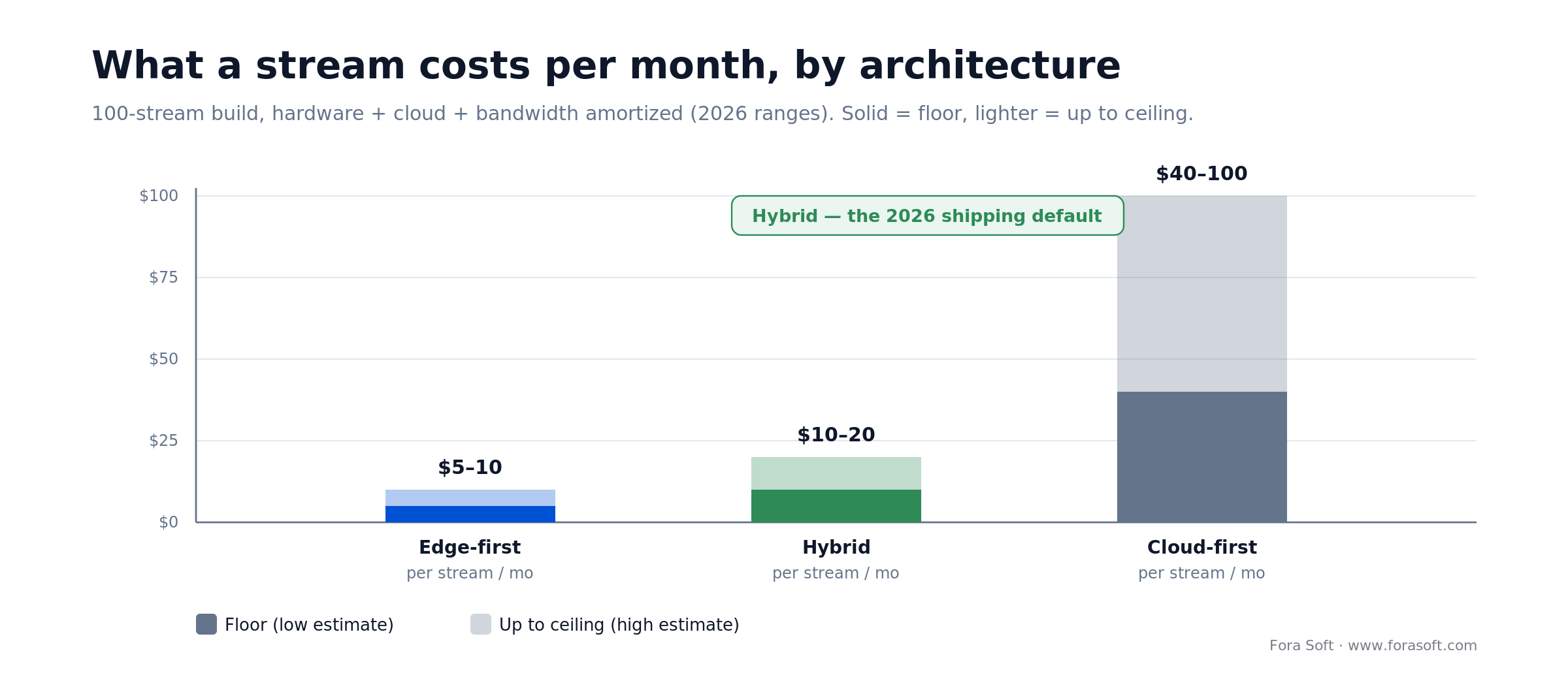
Figure 4. Per-stream monthly cost for a 100-stream build. Solid = floor, lighter = up to ceiling.
Edge-first. 100 Jetson Orin Nano Super nodes at ~$250 each amortised over 3 years (~$7 per node-month) plus a modest software licence lands around $5–10 per stream per month at 1–2 streams per node. Privacy-strong, bandwidth-light.
Cloud-first. $40–100 per stream per month across GPU, bandwidth, storage. Scales cleanly. Pick for SaaS with burst traffic.
Hybrid. Edge inference plus selective cloud enrichment lands at $10–20 per stream per month all-in. The shipping default for production RTVA and live AI products in 2026.
A custom build on top of these numbers earns its keep when the models are proprietary, the integrations go beyond standard SaaS surfaces, or IP ownership is material — which is exactly the gap our AI integration service fills. With Agent Engineering, the engineering line-item on custom work typically comes in below comparable traditional staffing quotes, ranges, not promises.
Compliance: GDPR, HIPAA, BIPA, and the EU AI Act
GDPR. Face blurring when processing biometrics without consent; DPIA for systematic monitoring; keep footage no longer than necessary (GDPR sets no fixed statutory period, though a 30-day default is common practice).
HIPAA. Encrypted video at rest and in transit; audit trails on analytics events. Most real-time AI video deployed in clinical settings stays on-prem or on-edge for this reason.
BIPA (Illinois). Biometric consent, written policy, strict civil penalties. The August 2024 SB 2979 amendment caps repeat collection of the same biometric at a single recovery, trimming the old per-scan damages math but not the consent duty. Treat Illinois deployments as their own review.
EU AI Act. Real-time remote biometric identification in public spaces for law enforcement is a prohibited practice (Article 5, in force since 2 February 2025), with fines up to €35M or 7% of global turnover. High-risk obligations were pushed from August 2026 to 2 December 2027 by the 2026 Digital Omnibus, but Article 50 transparency (labelling AI-generated content) still lands 2 August 2026. Crowd density and retail behaviour analytics sit in the limited-risk tier. Classify the use-case before scoping.
KPIs: what to measure after you ship
Quality KPIs. Model precision ≥ 95% for high-stakes events; mAP tracked per camera, not per site. Glass-to-glass latency p95 < 200 ms for interactive products, < 500 ms for broadcast analytics. False-alarm rate < 1%, or operators switch off the feed.
Business KPIs. Cost per stream-hour (target < $0.10 cloud, < $0.01 edge), alert resolution time, and a use-case-specific business outcome (shrinkage, conversion, defects-per-million). Tie the dashboard to the business metric on day one.
Reliability KPIs. Uptime > 99.5% for mission-critical deployments, fps drop events tracked, GPU utilisation p95 below 80%, and a weekly retraining cycle with drift scores. Without these, the system silently decays in 12–18 months.
When real-time AI video is not worth it
Four patterns where a batch or managed approach beats a bespoke real-time build:
1. The product tolerates 10+ second latency. Use HLS plus cloud inference; the cost collapses, the complexity drops.
2. The outcome is served off recorded video. Batch inference on S3 with a cheap GPU fleet is 10× cheaper than per-frame live inference for the same output.
3. You have no retraining plan. Real-time AI video without a data loop quietly dies. If no one owns retraining, buy a managed service instead.
4. The use-case is solved by an off-the-shelf API. Hive, Rekognition, Deepgram, Maxine cover a lot of ground at a fraction of bespoke cost. Custom wins when integrations, IP, or niche models matter — not otherwise.
Reach for a managed API when: the outcome is generic (captions, moderation, face blur) and your volume is under ~1 M minutes a month. Custom pays off above that, or when integrations demand on-prem.
Second opinion on your AI video architecture?
We have shipped this stack — detection, tracking, live ASR, WebRTC delivery — at evidentiary scale and Netflix-grade production. Tell us your bottleneck.
Integration checklist: data, serving, observability
Five decisions to lock before engineering begins — otherwise each one will cost weeks mid-build.
- Data schema. Events emitted as a versioned JSON schema from day one. Avro is the right long-term choice for high-volume event streams.
- Event bus. Kafka for scale, RabbitMQ for smaller systems, managed queues for startup-velocity cases.
- Model serving. Triton for multi-model / canary; DeepStream for multi-stream CCTV-style. Pick early because it sets the deployment story.
- Observability. Per-stream latency, per-stage fps, model precision sampled against ground truth. Prometheus + Grafana is the common stack.
- Retraining loop. A weekly or monthly cadence with a labelled dataset growing over time. Without this the pipeline decays silently.
Emerging trends that will reshape AI video through 2027
On-device VLMs. Vision-language models small enough to run on edge NPUs at 1–5 fps (open-weight Qwen3-VL and Llama 4 lead here) enable free-text queries over camera feeds without cloud calls. 2026 is the inflection point.
Federated learning. Model updates aggregated across edge nodes without raw video leaving site — a requirement in healthcare, schools, and an emerging default in multi-tenant retail.
Synthetic data. Generative models that produce thousands of labelled edge cases for rare defects and uncommon scenes, cutting bespoke-dataset collection time meaningfully — a recurring need in machine vision inspection, where samples of the defect you most need to catch are scarce.
Multimodal pipelines. Audio + video + optional sensor data. A glass-breaking sound plus motion is a stronger event than either alone; rules engines increasingly accept both.
Agentic video workflows. LLM-driven agents that watch feeds, trigger actions, and escalate to humans — the piece that turns AI video from a detection system into an operations system. Early in 2026; material by 2027.
FAQ
What is real-time video processing with AI in practice?
A pipeline where each frame (or a sampled subset) is captured, decoded, pre-processed, run through one or more AI models, post-processed, and re-encoded fast enough to preserve interactivity. The glass-to-glass budget is 16.7 ms for 60 fps and 33 ms for 30 fps — everything else downstream has to live inside that window.
Which detection model should we use in 2026?
YOLO26 (January 2026, end-to-end NMS-free) is the production default — roughly 2–8 ms on an RTX 4090, strong accuracy, mature tooling through Ultralytics and clean exports to TensorRT / DeepStream / OpenVINO. RF-DETR is the best second choice for small-object-heavy scenes; YOLOv11 is fine as previous-gen. Skip anything still labelled “research.”
Edge, cloud, or hybrid — which is right?
Edge wins on latency and privacy but caps per-node capacity. Cloud scales but costs explode above a few hundred streams. Hybrid — small detectors on the edge plus selective heavy inference in the cloud — is the shipping default for 2026 production builds. Pick pure edge or pure cloud only when privacy or volume forces it.
How long does it take to ship a production AI video pipeline?
A focused MVP — ingest, detection, tracking, one output — lands in 8–12 weeks with a team that has shipped real-time video before. Enterprise builds with ASR, moderation, multi-model serving, and a retraining loop run 4–8 months. Agent Engineering compresses both ends meaningfully.
Whisper, Deepgram, or AssemblyAI for live ASR?
Whisper (large-v3-turbo) when you need self-hosted or cost-controlled transcription and can accept batch, near-real-time captions. Deepgram Nova-3 or AssemblyAI Universal-Streaming (~300 ms) when latency is the product. AssemblyAI when PII redaction and speaker diarisation matter. Pair any of them with a small MT engine for sub-second translation.
How do we keep inference inside the 8–10 ms budget?
Quantise to FP16 or INT8 (careful calibration for INT8); run through TensorRT or DeepStream, not raw PyTorch; keep every buffer on the GPU from NVDEC through NVENC; and drop to a smaller YOLO variant if the accuracy gap is under 1–2 mAP. These three moves usually halve inference latency on the same model.
Do we need a retraining loop?
Yes, on anything shipped for more than a quarter. Lighting, camera angle, seasonal changes, and new edge cases push model accuracy down 3–10% per quarter in production. A weekly or monthly retraining cadence with drift scoring is a must-have; without it, precision decays and operator trust evaporates in 12–18 months.
How much does a 100-stream real-time AI video pipeline cost?
Order-of-magnitude: edge-first at $5–10 per stream per month amortised, hybrid at $10–20, cloud-first at $40–100 depending on model mix and resolution. Custom engineering is additional but earns its keep when models or integrations are bespoke. Agent Engineering compresses the engineering bill meaningfully vs traditional staffing.
What to Read Next
Analytics
Real-Time Video Analytics: 4 High-ROI Applications
The vertical-specific playbook for retail, security, manufacturing, and smart-city RTVA.
WebRTC
WebRTC Architecture Guide for Business 2026
P2P, SFU, MCU, and hybrid — the transport choices that sit under every live AI video product.
Infrastructure
Edge Computing for Live Streaming
Where to place encoders and inference to keep AI-enriched streams under 400 ms glass-to-glass.
Streaming
AI-Powered Video Streaming Apps
The sibling piece on how AI reshapes streaming delivery and viewer experience.
Trends
AI Video Processing Trends 2026: 9 Shifts That Matter
The nine trends ranked by P&L impact, with the three that pay back inside a quarter.
Ready to ship AI video that stays inside the latency budget?
Real-time AI video in 2026 is a systems-engineering problem built on a stable model stack — YOLO26 or RF-DETR, ByteTrack, SAM 3, Deepgram or AssemblyAI, Maxine — deployed through DeepStream, TensorRT, Triton, or MediaPipe on a hybrid architecture that matches latency, privacy, and stream count. The hard work is not choosing a model; it is keeping the pipeline honest inside its 16.7 ms budget across thousands of streams.
If you are scoping a real-time AI video build, the fastest move is a 30-minute call with a team that has shipped this exact stack at evidentiary scale and Netflix-grade production. We will look at your streams, latency target, compliance profile, and cost ceiling and tell you where to build, where to buy, and where the hidden weeks of engineering time are hiding.
Talk to engineers who have shipped real-time AI video
30 minutes, no slides. Bring your streams and your latency target; we will map it to a week-level plan.

