.avif)
Key takeaways
• Real-time video upscaling is still the hard case in 2026. WebRTC tolerates 100–500 ms, and only NVIDIA Maxine VSR (15–30 ms/frame on an RTX 2060+) fits that budget. Everything else runs near-live or offline.
• Five tools cover almost every streaming case. Topaz Video AI, NVIDIA Maxine, Real-ESRGAN, BasicVSR++ and AWS Elemental MediaConvert + Bedrock. Pick by latency budget and monthly volume, not by brand.
• Cost swings ~30× across the shortlist. Self-hosted Real-ESRGAN runs ≈$0.002/min; AWS MediaConvert + Bedrock ≈$0.016/min; Topaz Cloud $0.03–0.05/min. At 10,000 hours/month that’s $1,200 vs $24,000.
• Never block the live path. Deliver the source 1080p in under a second, run AI in a parallel branch, and re-encode to a 4K rendition 3–5 s behind. A 4× upscale without re-encoding balloons bitrate ~16×.
• Measure with VMAF, not your eyes. Target VMAF ≥ 80 for streaming, ≥ 90 for broadcast. Real-ESRGAN alone lands 70–80; multi-frame BasicVSR++ pushes 85–92.
Why Fora Soft wrote this streaming upscaling playbook
A bad AI-upscaling decision on a streaming product doesn’t fail quietly. It ships a “4K” tier that shimmers on motion, quadruples your CDN bill, and misses the latency window on live. We’ve been building video and audio streaming platforms since 2005 (21 years, 250+ shipped products), and multimedia plus AI is the whole practice, not a side bet.
We shipped Sprii, a live shopping platform that has moved €365M+ in sales for 3,000+ brands; Vodeo, an iOS streaming app that has handled 100K+ concurrent viewers; TransLinguist, which serves 30,000+ interpreters on an NHS-UK contract; and Meetric, an AI sales-video platform. The five-tool shortlist below is what we keep recommending after running these head-to-head on real streams.
Our bias is simple: we don’t care which logo wins. We care about cost-per-minute, integration effort, and what actually holds up after re-encoding into your CDN bitrate ladder. Agent Engineering lets us ship these pipelines faster and cheaper than a typical agency, so the estimates here stay conservative. If you want the general side-by-side across desktop editors and cloud tools, read the companion piece on the best AI video enhancement software; this guide is the streaming and real-time build.
Adding real-time upscaling to a live product?
Tell us your latency target and content type. We’ll sketch a pipeline and the monthly bill on a 30-minute call.
What AI video enhancement means for streaming
The label hides four different operations, each with its own latency, GPU cost, and quality trade-off. Mixing them up is the most common reason a tool that looked great in a demo falls apart in a live pipeline.
1. Super-resolution (upscaling). Predicts the missing pixels going from 720p → 1080p or 1080p → 4K. Single-frame methods (Real-ESRGAN) are fast but flicker on motion; multi-frame methods (BasicVSR++, EDVR) are slower but temporally stable.
2. Denoising. Strips sensor noise, compression blocks, and banding. Run it before super-resolution, or the upscaler amplifies the noise it should have removed.
3. Frame interpolation. Generates synthetic frames between real ones (30 fps → 60 fps). RIFE and Google’s FILM lead here; useful for sports replay and archival, risky on fast, unpredictable motion.
4. Face and region restoration. Models like GFPGAN and CodeFormer rebuild faces that came out smeared. They hallucinate detail by design, so use them with care on anything that has to stay truthful (see pitfalls).
For streaming, the operation you can afford is decided by one thing first: your delivery mode and its latency budget. Here’s how the two line up.
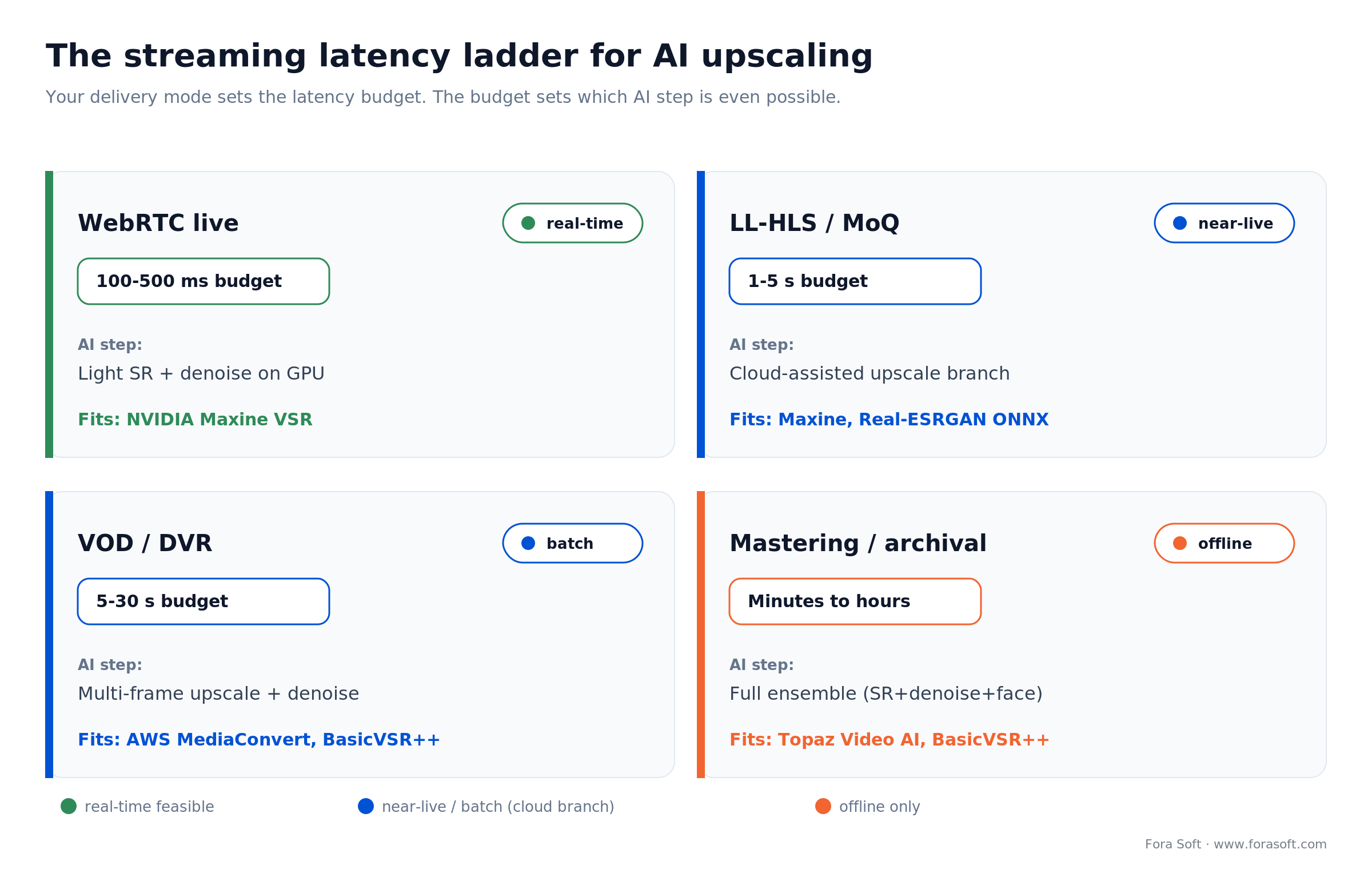
Figure 1. The streaming latency ladder: your delivery mode sets the budget, and the budget decides which AI step is even possible.
The 5-tool shortlist for streaming products
Out of dozens of consumer apps, cloud APIs, and open-source repos we tested, five earn a place in production streaming pipelines in 2026. They cover the four operations across the whole latency spectrum: live, near-live, VOD, and offline restoration.
| Tool | Best for | Real-time? | API / SDK | Cost / min | Quality (VMAF) |
|---|---|---|---|---|---|
| Topaz Video AI | Mastering, archival, broadcast QC | No (offline) | Cloud REST (enterprise) | $0.03–0.05 | 88–94 |
| NVIDIA Maxine + VSR | Real-time upscale, denoise, relight | Yes (sub-100 ms) | CUDA SDK | GPU-bound ≈$0.005 | 82–90 |
| Real-ESRGAN (open-source) | UGC, low-cost batch upscaling | Near real-time on RTX 4060+ | PyTorch / ONNX | $0.001–0.003 | 70–80 |
| BasicVSR++ (open-source) | Multi-frame quality, sports, film | No (5–10× slower) | PyTorch / ONNX | $0.01–0.03 | 85–92 |
| AWS MediaConvert + Bedrock | Managed VOD pipeline, OTT scale | Near-live (5–15 s) | REST + boto3 | $0.015 + $0.001 inference | 80–88 |
Pricing is 2026 list-rate, normalized to one minute of 1080p input upscaled once. Real workloads vary ±30%; budget for re-encoding on top. The traffic-light view below is the fastest way to scan it.
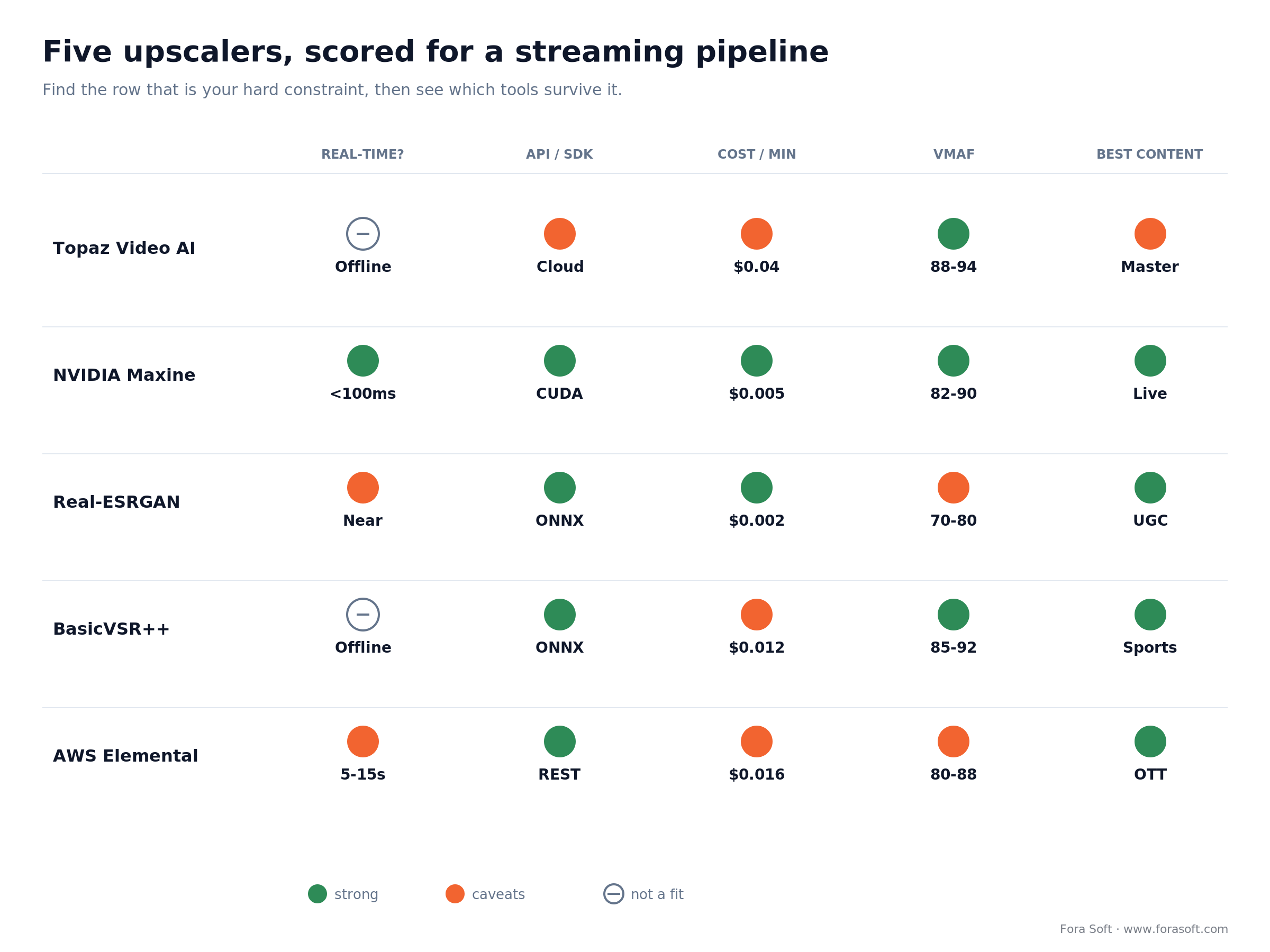
Figure 2. The five upscalers scored on the axes that decide a streaming build. Find your hard constraint’s row first, then see which tools survive it.
Topaz Video AI: the broadcast-grade workhorse
Topaz is the commercial tool we recommend without caveats for mastering. The 2026 model line (Proteus, Rhea, Iris, Iris MQ, Apollo, Starlight) handles 4K–8K upscaling, frame interpolation, deinterlacing, and denoising in one GUI. Iris MQ was added specifically for the blocky artifacts you get from heavily compressed streaming sources.
One 2026 change matters for budgeting: Topaz moved to subscription-only in October 2025. The perpetual license is gone. Plans are Personal at $299/year and Pro at $699/year, plus an enterprise Cloud API that bills per minute. Verify current terms on the Topaz product page before you plan around it.
Why pick it
Output quality. VMAF 88–94 is broadcast territory, and a colorist can drive it without writing a line of Python. Studios re-mastering a back catalog or shipping a pristine archive episode pay for Topaz because the operator productivity is real.
Limits and gotchas
No real-time story. Even on an RTX 4090, expect 0.3–1× real-time for 4K, so a one-hour show takes one to three hours to render. Cloud API pricing ($0.03–0.05/min) gets expensive for user-generated content at scale, and the subscription lock-out means you lose access to the latest models the moment you stop paying.
Reach for Topaz when: you have a finite catalog (< 500 hours) and need broadcast-grade VMAF ≥ 88 in a manual or semi-automated workflow.
NVIDIA Maxine + Video Super Resolution: the real-time option
Maxine is NVIDIA’s SDK for AI video and audio effects, built to run inside live pipelines on T4, L4, A10G, or L40S GPUs. Video Super Resolution (VSR) is its upscaling component, exposed as a CUDA library you can wire into a WebRTC SFU or an SRT relay. Per the NVIDIA VFX SDK docs, it does up to 4× scaling while reducing blocky, noisy artifacts and preserving texture.
Why pick it
It’s the only realistic path to sub-100 ms AI upscaling in 2026, running 15–30 ms/frame on an RTX 2060 or better and roughly 4× at 24–30 fps on a 4090. Maxine pairs upscaling with noise removal, relight, and background effects on the same GPU, which is the combination live conferencing, telehealth, and live shopping actually need.
Limits
NVIDIA hardware only. No AMD or Apple Silicon path. Quality (VMAF 82–90) trails Topaz for offline work because the real-time budget forces a smaller model. The SDK is C++/Python with a non-trivial integration cost: budget 4–8 weeks for a production-ready Maxine pipeline if you’re starting from a vanilla SFU.
Reach for Maxine when: your latency budget is < 500 ms (live conferencing, telehealth, live shopping) and you can commit to NVIDIA hardware on your media servers.
Real-ESRGAN: the cost-effective open-source default
Real-ESRGAN, from Tencent ARC Lab, is the workhorse of open-source upscaling. It’s a single-frame super-resolution network that does 2×, 3×, and 4× scaling, runs on any modern GPU, exports cleanly to ONNX, and drops into a Python or Node service in an afternoon.
Why pick it
Cost. On a self-hosted T4 ($0.35/hour spot on AWS, ≈$1.20/hour on Hetzner), one minute of 1080p → 4K runs $0.001–0.003, roughly 30× cheaper than Topaz Cloud at the same scale. For UGC platforms, creator products, and anything upscaling thousands of hours a month, Real-ESRGAN is the default.
Limits
Single-frame, so it can flicker on motion. VMAF tops out around 80. It hallucinates on faces and text, so pair it with GFPGAN or CodeFormer when faces matter. There’s no vendor support: when it breaks at 3 a.m., you own the debugging.
Reach for Real-ESRGAN when: volume is high (> 500 hours/month), latency tolerance is > 5 s, and you have a team comfortable owning a Python ML service.
Stuck between managed and self-hosted?
We’ve shipped both at production scale. Thirty minutes usually settles which one fits your volume and team.
BasicVSR++: multi-frame quality for sports and film
BasicVSR++ is the open-source benchmark for video super-resolution. It’s a recurrent network with bidirectional propagation that uses 5–7 neighbor frames per output, which buys dramatically better temporal stability than Real-ESRGAN at 5–10× the compute.
Why pick it
When motion matters (sports, dance, action), single-frame methods strobe and shimmer. BasicVSR++ keeps the output stable, and both PSNR and VMAF are higher: 32–34 dB and 85–92, beating Real-ESRGAN by 2–3 dB.
Limits
Slow. On an A10G ($1.00/hour), one hour of 720p → 1080p takes 8–10 minutes: workable, not real-time. It’s memory-hungry (4–6 GB VRAM minimum) and the codebase is research-grade, so productionizing means ONNX export and real engineering work.
Reach for BasicVSR++ when: content is motion-heavy and you’ll pay 5–10× the Real-ESRGAN cost for a noticeably cleaner, flicker-free result.
AWS Elemental MediaConvert + Bedrock: the managed pipeline
If you’d rather not run GPUs, AWS Elemental MediaConvert (broadcast-grade transcoding) plus Bedrock (managed inference for SR and denoise models) is the path of least resistance. MediaConvert handles ingest, transcode, and packaging; Bedrock runs the AI step on demand. It scales horizontally, bills per minute, and plugs into S3, CloudFront, and IAM out of the box.
Why pick it
Zero infrastructure. No GPU cluster to maintain, no model deployment, and the SLAs are real. For OTT and broadcast customers already on AWS, especially with DRM and compliance requirements, this collapses 3–6 months of engineering into a two-week integration.
Limits
Cost. $0.015/min transcode + $0.001/min inference adds up fast (≈$1,000 per 60,000 minutes). Quality (VMAF 80–88) is excellent for managed but trails Topaz on mastering. Lock-in is real: getting off AWS later is a project of its own.
Reach for AWS MediaConvert when: you’re already on AWS, the team is small, and you’d pay a premium to skip running your own GPU fleet.
Real-time vs offline: what’s actually possible
Real-time video upscaling and offline restoration are different engineering problems, and the biggest mistake we see founders make is assuming a tool that produced a stunning 4K demo on a static MP4 will do the same on a live stream. It won’t. The latency budget is unforgiving, and it decides the tool before quality does.
| Delivery mode | Latency budget | Realistic AI step | Tool fit |
|---|---|---|---|
| WebRTC live | 100–500 ms | Light upscale + denoise on GPU | NVIDIA Maxine |
| LL-HLS / MoQ | 1–5 s | Cloud-assisted upscale before delivery | Maxine, Real-ESRGAN ONNX |
| VOD / DVR | 5–30 s | Multi-frame upscale + denoise | AWS MediaConvert, BasicVSR++ |
| Mastering / archival | Minutes to hours | Full ensemble (SR + denoise + face + interp) | Topaz Video AI, BasicVSR++ + GFPGAN |
If you need the live transport layer underneath this, we go deep on it in scaling real-time video to a million viewers and in our Media over QUIC architecture guide.
A reference pipeline for cloud-assisted upscaling
This is the shape we deploy most often for streaming products that want “ingest 1080p, deliver 4K” with a 3–5 s latency target. The rule that holds it together: AI never blocks the live path.
1. Ingest. The source pushes 1080p H.264 over RTMP or WHIP into your origin (Janus, mediasoup, or LiveKit). No AI here, just clean ingest.
2. Real-time branch. The original 1080p is muxed into LL-HLS or WebRTC and reaches viewers in under a second. Nothing on this path waits for a GPU.
3. AI branch. A parallel pipeline pulls segments off the origin, runs them through Real-ESRGAN (or a lightweight Maxine VSR job) on a T4/L4 GPU, and re-encodes to 4K H.265 or AV1 at a controlled bitrate (~25 Mbps target).
4. Delivery. The CDN serves both renditions; players auto-pick by bandwidth. The only added latency is 3–5 s on the 4K rendition.
5. Re-encoding is non-negotiable. A 4× upscale without re-encoding inflates bitrate ~16×. Re-encode with H.265 or AV1 to a controlled rate, or you’ve blown up your CDN bill for no gain over a good 1080p encode. Our AV1 in production guide covers the encoder settings.
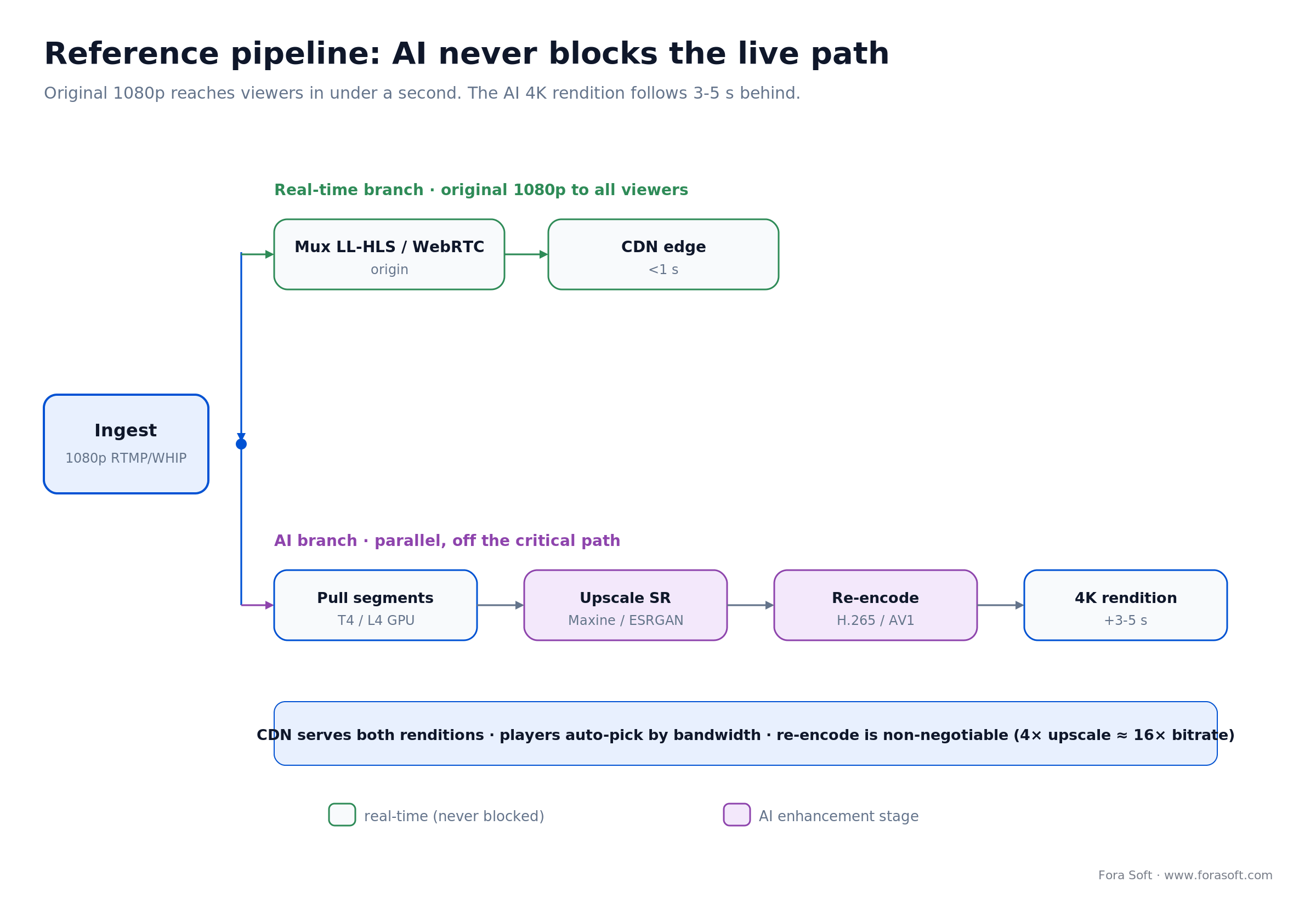
Figure 3. The parallel-branch pattern: the source rendition is never gated on the GPU, and the AI 4K rendition follows a few seconds behind.
Cost model: what upscaling actually costs at scale
A worked example. Take a UGC streaming product processing 10,000 hours of newly-uploaded 1080p video per month, upscaling each hour to 4K for premium viewers. That’s 600,000 minutes/month. Here’s the bill four ways.
| Stack | GPU / Service | Per minute | 10,000 h / month | Engineering effort |
|---|---|---|---|---|
| Real-ESRGAN on Hetzner | RTX 4000 Ada | $0.0015 | $900 | High (4–6 weeks) |
| Real-ESRGAN self-hosted | T4 spot on AWS | $0.002 | $1,200 | High (4–6 weeks) |
| BasicVSR++ self-hosted | A10G on Hetzner | $0.012 | $7,200 | Very high (8–12 weeks) |
| AWS MediaConvert + Bedrock | Managed | $0.016 | $9,600 | Low (1–2 weeks) |
| Topaz Cloud API | Managed | $0.04 | $24,000 | Very low |
The break-even between self-hosted Real-ESRGAN and AWS MediaConvert is roughly 200 hours/month. Below that, managed wins on total cost once you price in the engineering. Above 2,000 hours/month, self-hosted pulls 8–10× ahead. Re-encoding with H.265 or AV1 adds $0.005–0.01/min regardless of upscaler, so don’t leave it out of the model.
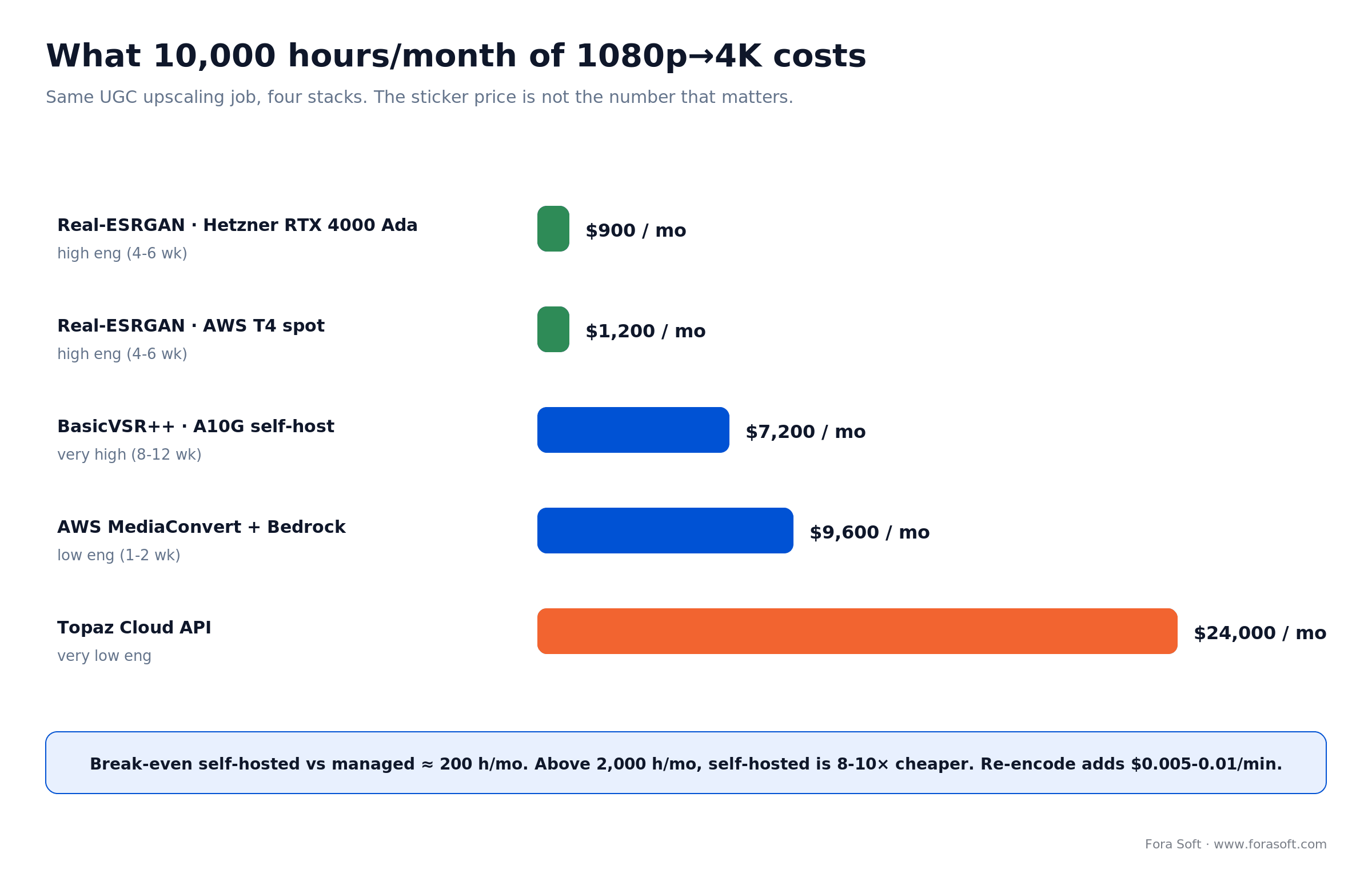
Figure 4. The same 10,000-hour job costs $900 to $24,000/month depending on the stack. Engineering effort moves in the opposite direction.
A decision framework: pick your tool in five questions
Q1. What’s your latency target? Under 500 ms, only NVIDIA Maxine (or a custom Maxine + Real-ESRGAN ONNX hybrid) will work. Over 5 s, the whole menu is open.
Q2. What’s the content type? Talking heads (telehealth, conferencing) suit Maxine. UGC and creator content suit Real-ESRGAN. Sports and motion-heavy content need BasicVSR++. Premium archival wants Topaz.
Q3. What’s your monthly volume? Under 200 hours/month, AWS MediaConvert wins on total cost. 200–2,000 is a toss-up. Over 2,000 hours/month, self-hosted Real-ESRGAN or BasicVSR++ pays back in under six months.
Q4. What’s your engineering bandwidth? With an ML team, go open-source. With one part-time backend dev, go managed (AWS or Topaz). The trap is the middle: one ML-curious dev is where these projects stall.
Q5. Do faces matter? If yes, layer GFPGAN or CodeFormer on top of whatever upscaler you pick. Single-step upscaling on faces is the fastest way to make your stream look uncanny.
Mini case: how we cut a client’s upscaling bill 8×
Situation. A live shopping platform (similar profile to Sprii) ran 600–1,000 hours of UGC streamer content per month through a SaaS upscaling API at $0.04/min. The monthly bill sat at $14,400–$24,000. Premium viewers expected an HD tier, but at that volume the unit economics didn’t work.
12-week plan. We replaced the SaaS step with a self-hosted Real-ESRGAN service (ONNX runtime, T4 spot fleet on AWS), kept their existing AWS MediaConvert step for the encode, and added a thin orchestrator that routed 5% of jobs through GFPGAN for sessions where the streamer’s face was the focus. We tuned batch size for the T4’s memory budget and wrote a failover back to MediaConvert for when the spot fleet got evicted.
Outcome. Cost per minute dropped from $0.04 to $0.005, and the monthly bill landed at $1,800–$3,000, an 8× reduction. VMAF on test clips dropped 4 points (88 → 84), but premium churn didn’t move: a blind A/B showed viewers couldn’t reliably tell at 1080p → 1440p ratios. Want the same assessment on your numbers? Book a 30-minute call.
Paying SaaS rates for upscaling at volume?
A self-hosted Real-ESRGAN or BasicVSR++ pipeline often pays back inside two quarters. Let’s do the math on yours.
Five pitfalls we keep seeing in production
1. Ignoring temporal flicker. Single-frame upscalers (Real-ESRGAN, most consumer apps) shimmer at motion edges. You can’t catch it on a static frame, so test on motion content. If shimmer is unacceptable, switch to BasicVSR++ or add optical-flow smoothing as a post-step.
2. Skipping re-encoding. A 4× upscale balloons bitrate ~16× without re-encoding. Always re-encode with H.265 or AV1 to a controlled bitrate. This is the single most common reason a CDN bill explodes after an “AI 4K” launch.
3. Hallucinated faces. Real-ESRGAN, and especially GFPGAN, can invent facial features that weren’t in the source. For broadcast, courtroom, telehealth, or surveillance that’s a trust and compliance problem. Test on real content and consider not running face restoration on news, legal, or medical streams at all.
4. GPU saturation under burst load. Live-shopping drops and livestream events spike load 10× in five minutes. A queue that runs fine at average load falls over at peak. Autoscale (Kubernetes + spot, or SageMaker async endpoints) and stress-test at 5× expected peak.
5. Judging quality with PSNR alone. PSNR rewards smoothness and correlates poorly with what viewers see. Benchmark with VMAF (Netflix’s perceptual metric) and a blind viewer A/B on a representative sample. A model that wins on PSNR can lose on VMAF and on preference.
KPIs to track once you ship
Quality KPIs. VMAF on a held-out test set (target ≥ 80 streaming, ≥ 90 broadcast). PSNR for regression detection (don’t let it drop > 1 dB after a model upgrade). Blind viewer A/B preference (≥ 55% wins on the upscaled rendition).
Business KPIs. Premium-tier conversion lift, premium churn, average watch time on the upscaled rendition vs source, and CDN egress cost per premium viewer-hour. If the lift doesn’t cover the AI compute and CDN delta inside two quarters, kill the feature.
Reliability KPIs. P99 enhancement latency (target < 30 s for VOD, < 500 ms for live). Job success rate (target > 99.5%). Cost per minute tracked weekly: if it drifts > 20% above plan, your autoscaling is mis-tuned or a model regressed.
When NOT to add AI video enhancement
AI upscaling isn’t a free quality lift. There are three cases where we tell clients to skip it.
Source is already high quality. If your ingest is already 1080p30 from a modern phone or webcam, the gain from upscaling to 4K is marginal on a phone screen. Spend the GPU budget on better encoding instead.
Compliance forbids it. Courtroom, surveillance, news, and medical streams often have to deliver bit-exact source. AI hallucination is a legal liability there, and we’ve watched it cost contracts.
Volume is too low. Below 100 hours/month, the engineering and maintenance burden doesn’t pay back. Use a one-off pass through Topaz or a consumer tool instead of building a pipeline.
How to benchmark upscaling objectively
Marketing demos cherry-pick easy footage. To compare tools fairly, build a small held-out test set (15–30 clips, 10–30 s each) that covers what you actually serve: talking heads, motion-heavy action, low light, screen recordings, and your UGC edge cases. Run the same set through every candidate and score on three dimensions.
Objective metrics. VMAF (Netflix’s perceptual model, the 2026 industry default) and PSNR for regression detection. Real-ESRGAN typically hits PSNR 28–32 dB; BasicVSR++ pushes 32–34 dB; Topaz in mastering mode reaches 34–36 dB. VMAF is the one that tracks viewer preference: aim ≥ 80 streaming, ≥ 90 broadcast.
Subjective viewer A/B. Show 20–50 internal viewers paired clips (source vs upscaled) without labels and ask which they prefer. Under 55% picking the upscaled version means the AI step isn’t earning its keep, whatever VMAF says.
Operational metrics. Per-minute cost, P99 latency, GPU usage at peak, and re-encoded bitrate after the upscale. A pipeline that scores well on quality but hits 95% GPU at 2× expected load will fall over on launch day.
FAQ
Can I run video upscaling in real time on a live stream?
For sub-500 ms WebRTC, only NVIDIA Maxine VSR is realistic in 2026, and it needs NVIDIA GPUs on your media servers (15–30 ms/frame on an RTX 2060+). For LL-HLS or MoQ at 1–5 s latency, run Real-ESRGAN ONNX in a parallel cloud branch and deliver an upscaled rendition alongside the source.
What are the best AI video upscaling tools for streaming in 2026?
The five that earn a place in production streaming pipelines are Topaz Video AI (mastering), NVIDIA Maxine + VSR (real-time), Real-ESRGAN (cost-effective open-source), BasicVSR++ (multi-frame quality), and AWS Elemental MediaConvert + Bedrock (managed). The right pick depends on your latency budget and monthly volume.
How much does AI video upscaling cost per minute?
2026 list rates: self-hosted Real-ESRGAN runs $0.001–0.003/min on a T4 spot instance; AWS MediaConvert + Bedrock is around $0.016/min (transcode + inference); Topaz Cloud is $0.03–0.05/min; BasicVSR++ self-hosted is $0.01–0.03/min on an A10G. Add $0.005–0.01/min for the required re-encode.
Is Topaz Video AI better than Real-ESRGAN?
For mastering where a colorist drives the tool by hand, Topaz wins on quality (VMAF 88–94 vs 70–80) and operator productivity. For high-volume automated streaming pipelines, Real-ESRGAN wins on cost (10–30× cheaper) and integration flexibility (open-source, ONNX-exportable). They’re built for different jobs.
Does AI upscaling work on user-generated content?
Yes, UGC is one of the strongest cases. Real-ESRGAN handles the wide input-quality range of phone-shot UGC well, and at volume the economics work ($0.001–0.003/min). Add GFPGAN for a face-restoration step if your platform centers on talking-head content, and budget for the re-encode.
What GPU do I need to run upscaling in production?
For Real-ESRGAN, an NVIDIA T4 or L4 (or RTX 3070+ on-prem) is the sweet spot, about $0.35–0.50/hour spot on AWS. For BasicVSR++ or RIFE, step up to A10G or L40S ($1–2/hour). For NVIDIA Maxine real-time pipelines, L4 or L40S are typical. Match VRAM to the model: BasicVSR++ needs 4–6 GB minimum.
Do I need to disclose AI-enhanced video to viewers?
Increasingly, yes. The FTC expects disclosure for AI-modified advertising content, and provenance standards like C2PA / Content Credentials are gaining adoption in 2026. For courtroom, news, surveillance, and medical use, treat AI enhancement as a serious compliance question: bit-exact source delivery is often mandatory.
How long does it take to integrate upscaling into an existing product?
A managed integration (AWS MediaConvert + Bedrock or Topaz Cloud API) is typically 1–2 weeks. A self-hosted Real-ESRGAN ONNX service with monitoring, autoscaling, and failover runs 4–6 weeks. A full Maxine real-time integration into an existing SFU runs 6–10 weeks. With Agent Engineering, our timelines run meaningfully shorter than a typical agency.
What to read next
Comparison
AI video enhancement software compared
The general five-tool side-by-side, including desktop editors and cloud APIs.
Architecture
Scale video streaming to 1 million viewers
WebRTC, CDN and MoQ layers your AI branch plugs into.
Streaming
Building applications with Media over QUIC
The transport replacing HLS for sub-second live, and where AI fits.
Codecs
AV1 in production streaming
The re-encode step that keeps your upscaled 4K rendition affordable.
AI streaming
AI in video streaming: the engineering playbook
Where upscaling sits among the other AI features on a streaming roadmap.
Ready to add real-time upscaling to your stream?
The five tools here (Topaz, NVIDIA Maxine, Real-ESRGAN, BasicVSR++, and AWS MediaConvert + Bedrock) cover almost every realistic streaming scenario in 2026. Pick by latency target and monthly volume, not by brand. Treat AI as a parallel branch, never a blocker on the live path. Re-encode the upscaled output every time. Benchmark with VMAF and a blind viewer A/B, never PSNR alone.
If you want a sanity check on whether real-time video upscaling pays back for your product, we’ll do the math with you on a 30-minute call. No slides, no hard sell. We’ve shipped managed and self-hosted patterns at production scale, and the answer usually becomes obvious in the first ten minutes.

The book · Volume 6 of 7
AI for Video: A Complete Guide to Intelligence in Video Products: From Models and Inference to Computer Vision, Speech, Search, and Generative Video
Choosing an upscaler comes down to latency, GPU cost and measured quality on your own content. Volume 6 goes deeper into the AI side of that decision: the life cycle of an AI video feature, deployment topologies from edge to cloud, model artifacts, and the ML basics you need to judge enhancement and generative video tools on evidence rather than demos. Written by Nikolay Sapunov, CEO at Fora Soft.
Read it on Amazon →Kindle & paperback · Fora Soft Video Engineering Handbook
Want a custom streaming upscaling pipeline?
We’ll scope it, price it, and ship it. Since 2005, 250+ products, and Agent Engineering for faster delivery. Start with our video & audio processing service or the AI for Video Engineering track.