

Most AI video enhancement software buyer’s guides rank tools by demo-reel sparkle. That is the wrong axis, and picking on it burns real money: the “best” upscaler can add 600ms of latency your live product cannot afford, or lock you into a GUI when you needed an API. We have shipped video products since 2005, and the tool that fits your pipeline almost never matches the one that wins a side-by-side clip. Below is the honest breakdown — by latency, integration surface, codec coverage, and cost at scale.
Updated July 2026. A hands-on comparison from the Fora Soft video team, refreshed with 2026 pricing and model versions.
Key takeaways
• Five tools cover the market. Topaz Video AI (offline quality), NVIDIA Maxine (real-time SDK), Pixop (cloud REST API), Adobe Premiere AI (editorial), DaVinci Resolve Studio (free-tier post). Everything else is a subset or clone.
• Latency filters first. Live needs sub-second (Maxine ~15–30ms/frame on RTX); VOD tolerates minutes per minute (Topaz); Pixop’s cloud path runs ~600ms, fine for live-to-VOD, not interactive.
• Only two expose real APIs. Maxine SDK and Pixop REST are the production-programmable options. Topaz, Adobe, and DaVinci are GUI-first, so they do not drop into an automated pipeline.
• Cost model decides scale, not sticker price. Per-seat ($299–$699/yr Topaz), per-megapixel (Pixop ~$0.05–$0.25/MP-min), and per-GPU-hour (self-hosted Maxine) cross over at different volumes.
• Faces and text are where models break. Super-resolution and interpolation are commodities now; codec coverage, HDR handling, and artifact behaviour on edge cases are the real differentiators.
Why Fora Soft wrote this playbook
We have built live-streaming, video-on-demand, and conferencing products since 2005 — more than 625 shipped projects on WebRTC, HLS, LL-HLS, RTMP, and custom media servers. Many of them now run AI enhancement inside the pipeline itself, not as a desktop post step. Our video surveillance product VALT serves 770+ organizations and 50,000+ active users, so we evaluate tools against production constraints: thousands of concurrent viewers, mixed-codec ingest, CDN cost ceilings, and EU/US compliance.
That lens is what makes this different from a review site that ran one clip through each product. When a client asks us to make their video “look better,” the answer is rarely a single tool — it is a pipeline decision about where enhancement sits, what it costs per hour of footage, and how it degrades on the ugly inputs real users upload. You can see how we think about the delivery layer in our guide to scaling video streaming apps, and the AI-integration side in our AI for Video Engineering course.
Not sure which enhancement path fits your product?
Tell us your pipeline — live or VOD, codec, concurrent viewers, compliance region — and we will map the right stack and give a scoped integration estimate.
What AI video enhancement software does in 2026
AI video enhancement software is any tool that uses learned models to improve a video’s pixels or frames — sharper, cleaner, smoother, or higher dynamic range — rather than re-shooting or re-encoding it. “Enhancement” is an umbrella term. In a production stack it splits into six model families, and one tool rarely does all six well.
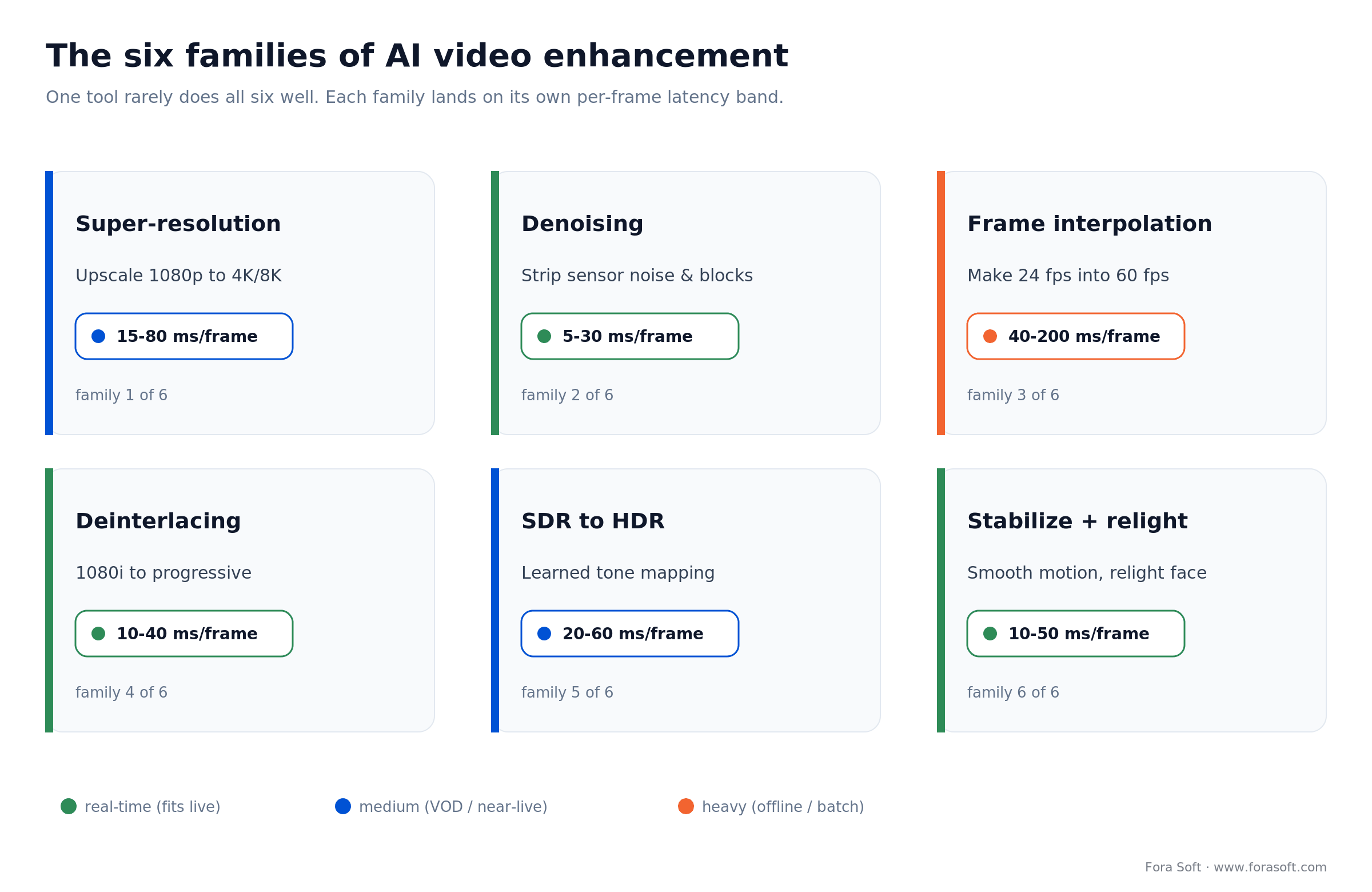
Figure 1. The six enhancement families and where each lands on the per-frame latency scale.
| Model family | What it does | Typical latency | Where it earns its keep |
|---|---|---|---|
| Super-resolution | Upscale 1080p to 4K or 4K to 8K with learned detail | 15–80ms/frame | Archive restoration, 4K displays |
| Denoising | Remove sensor noise, compression blocks, grain | 5–30ms/frame | Low-light streams, legacy feeds |
| Frame interpolation | Generate in-between frames (24 to 60fps, slow-mo) | 40–200ms/frame | Sports replays, smoother playback |
| Deinterlacing | Convert 1080i and legacy feeds to progressive | 10–40ms/frame | Broadcast ingest, archives |
| SDR to HDR | Expand dynamic range with learned tone mapping | 20–60ms/frame | HDR streaming, OTT upscaling |
| Stabilization + relight | Motion smoothing, face relighting, eye contact | 10–50ms/frame | Conferencing, creator tools |
Two shifts in 2026 changed the architecture math. First, transformer-based upscalers (Topaz’s Rhea family) closed most of the visual gap with diffusion while staying inside real-time budgets on RTX 40- and 50-series GPUs; heavier diffusion restoration like Topaz’s Project Starlight still runs cloud-first because the models are larger and slower. Second, cloud vendors now bill per frame through REST APIs, so you no longer need an in-house GPU farm to run Pixop-class enhancement at scale. If codecs themselves are new to you, our digital video primer covers the fundamentals enhancement sits on top of.
Five criteria that actually decide the tool
Feature checklists are noise. In practice, selection comes down to five criteria, and most teams weight them in this order.
1. Latency budget. Live streaming needs sub-second end to end. VOD ingest tolerates seconds. Post-production tolerates minutes per minute of footage. This one axis eliminates half the tool set before you compare anything else.
2. Integration surface. If the enhancement has to live inside an automated pipeline, GUI-only tools are out. Maxine’s SDK and Pixop’s REST API are the two production-grade programmatic options here. Topaz ships a CLI, but it is brittle to orchestrate.
3. Codec and container coverage. HEVC/H.265 and AV1 are the 2026 baseline. ProRes, DNxHR, and DPX image sequences matter for broadcast-grade VOD. HLS/DASH segment-aware processing matters if you enhance adaptive streams on the fly.
4. Cost model at scale. A $25/mo seat is irrelevant for a 10,000-viewer platform. The real comparison is per-GPU-hour (self-hosted Maxine) versus per-megapixel (Pixop) versus per-seat-month (Topaz, Adobe). The break-even point moves with your usage curve.
5. Artifact behaviour on edge cases. Text overlays, logos, faces, and fast motion are where models hallucinate. We run every candidate through a 10-clip reference set: sports, low-light UGC, 1990s VHS, animated tickers, and face close-ups. The failure modes, not the best-case demo, decide production readiness.
Skip enhancement entirely when: your source is already 1080p at a healthy bitrate. The lift is marginal and the compute is real. Enhancement pays off on degraded, low-res, or noisy inputs, not clean ones.
Topaz Video AI: the offline restoration standard
Best for: cinematic post, VHS and film restoration, VOD pre-delivery. Not for live.
Where it wins: the Rhea and Starlight model families lead on upscaling quality with fine facial-detail preservation. Proteus handles motion-heavy footage, Iris is tuned for low-resolution faces, and Apollo/Chronos push frame interpolation up to 8× slow motion. There are 19+ specialized models in the 2026 build, and output supports ProRes, DNxHR, H.265, and image sequences.
Pricing (2026): Personal $299/year (about $25/mo annual, 25 cloud credits/mo, limited commercial use); Pro $699/year (about $58/mo annual, seat management, local Starlight Mini and Sharp models, 100 cloud credits/mo, full commercial use). Rhea XL and Aion at 4K want 8 GB+ of VRAM.
Where it breaks: no real-time mode. The CLI is not a production API, so automated orchestration is painful. Project Starlight’s best diffusion quality is cloud-only, and unlimited-scale VOD needs the local render path plus enough GPU capacity you provision yourself.
Reach for Topaz when: quality ceiling matters more than throughput, a human operator drives the render, and the work is offline restoration or VOD pre-delivery rather than a live or automated pipeline.
NVIDIA Maxine: the real-time SDK
Best for: live streaming, video conferencing, real-time creator tools, WebRTC pipelines.
Where it wins: the Video Effects SDK ships Super Resolution, Upscale, AI Green Screen, Webcam Denoising, and Video Relighting as libraries you link into a Windows or Linux process. Because it runs on Tensor Cores, per-frame latency is roughly 15–30ms on an RTX 2060 or better — fast enough to drop into a WebRTC SFU or an RTMP ingest. Super Resolution accepts 90p to 2160p input at 1.33× through 4× scaling, per the Maxine VFX SDK docs. The free NVIDIA Broadcast app wraps the same tech for end users.
Pricing: the Broadcast app is free. The SDK is part of NVIDIA AI Enterprise (90-day evaluation, then per-GPU licensing for production). Cloud NIM microservices exist for deployments that cannot co-locate GPUs with the media server.
Where it breaks: NVIDIA-GPU only, with no native Apple Silicon path. The RTX 2060 / Quadro RTX 3000 floor becomes a real infrastructure line item at streaming scale. Frame interpolation is not a first-class Maxine primitive the way it is in Topaz.
Reach for Maxine when: you control the GPU, need enhancement inside a live or WebRTC path under ~100ms, and can standardize on NVIDIA hardware across ingest. Building for live delivery specifically? See our real-time video upscaling for streaming guide.
Pixop: the cloud REST API
Best for: cloud-native media pipelines, OTT catalog upscaling, teams without in-house GPU ops.
Where it wins: a clean REST API plus a web dashboard. Features cover upscaling (SD to HD to 4K), deinterlacing, SDR-to-HDR upconversion, denoising, and ML restoration. It runs on AWS GPUs, so there is no capacity ceiling you have to provision. See the Pixop platform for the current model list.
Pricing: per-megapixel-minute, roughly $0.05 to $0.25/MP-min depending on model (higher for HDR). A one-hour 1080p job is about 124 MP-min, so $6 to $30. The real-time path reports about 600ms of processing latency.
Where it breaks: the cloud round trip adds baseline latency, so it is wrong for sub-300ms interactive conferencing. Per-megapixel pricing balloons on 4K and 8K workloads, so budget carefully before you commit a flat-rate pipeline to it.
Reach for Pixop when: you want an API without running GPUs, your work is batch VOD or live-to-VOD, and a few hundred ms of added latency is acceptable.
Adobe Premiere Pro AI: the editorial toolkit
Best for: editorial teams, documentary and branded-content work, creators already in Creative Cloud.
Where it wins: Enhance Speech strips room noise and reverb from dialog in one click, and the 2026 version matches or beats standalone audio-restoration plugins on most voice tracks. Generative Extend (Firefly) pads shots by a few seconds with generated frames. As of NAB 2026, Speech-to-Text, Enhance Speech, Auto Reframe, Color Match, Generative Extend, and Firefly video generation are standard in Premiere, not separate add-ons.
Pricing (2026): single-app $22.99/mo on an annual plan (or $34.49 month to month); Creative Cloud All Apps runs higher. Firefly video credits are metered separately.
Where it breaks: Premiere is an editor that bundles AI, not a standalone enhancement engine, and there is no API. Super-resolution quality lags Topaz on archival footage. If you are not already in Creative Cloud, there is no reason to buy Premiere for the AI features alone.
Reach for Adobe when: a human editor owns the timeline, dialog cleanup is the main job, and your team already pays for Creative Cloud.
DaVinci Resolve Studio: the free-tier wildcard
Best for: color-critical post, budget-constrained teams, Apple Silicon studios.
Where it wins: the DaVinci Neural Engine covers SuperScale upscaling, Magic Mask, Voice Isolation, Depth Map, and Face Refinement in one app. The free edition includes a surprising amount of AI; Studio adds temporal and spatial noise reduction, Dolby Vision/HDR10+ grading, and multi-GPU. It runs natively on Apple Silicon (M2/M3/M4).
Pricing (2026): Resolve Free costs nothing. Studio is a one-time $295 perpetual license — no subscription, and the price has held since 2021.
Where it breaks: not programmable as a pipeline component. SuperScale is solid but sits below Topaz’s Rhea on tough archival footage. For live streaming or automated ingest, it is the wrong tool.
Reach for DaVinci when: budget is tight, you are on Apple Silicon, and enhancement happens inside a color-grading workflow rather than an API.
AI video enhancement software compared
The five tools split cleanly across the criteria that matter. Read the matrix by your own constraint first: find your latency row, then check which tools survive on integration and cost.
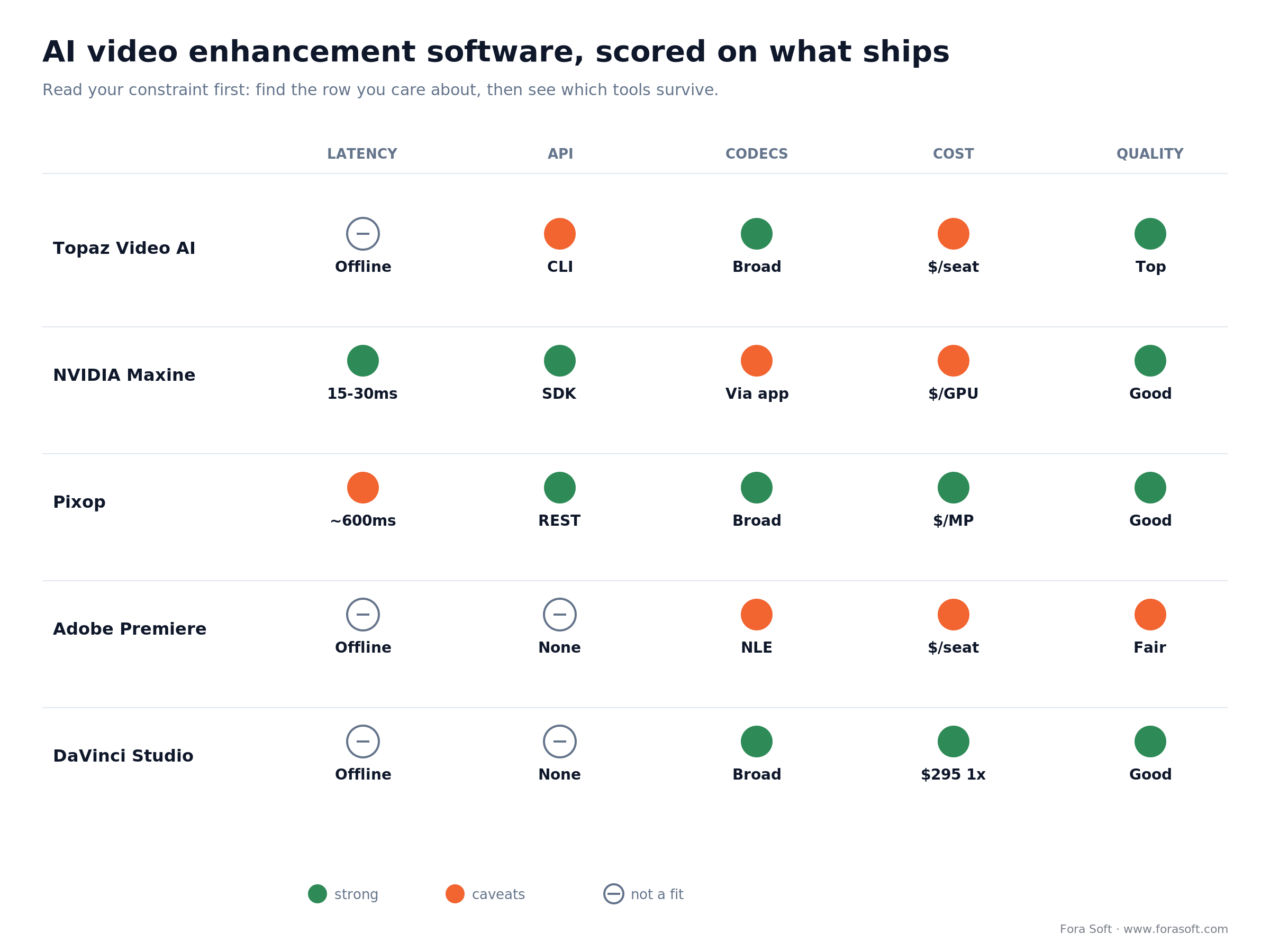
Figure 2. The five tools scored on the axes that decide production fit, not demo-reel quality.
| Tool | Latency | API / pipeline | Cost model | Best fit |
|---|---|---|---|---|
| Topaz Video AI | Offline only | CLI only (brittle) | $299–$699/yr seat | Restoration, VOD quality |
| NVIDIA Maxine | ~15–30ms/frame | Full SDK | Per-GPU license | Live, WebRTC, conferencing |
| Pixop | ~600ms (cloud) | REST API | $0.05–$0.25/MP-min | Cloud VOD at scale |
| Adobe Premiere AI | Offline only | No API | $22.99/mo seat | Editorial, dialog cleanup |
| DaVinci Resolve Studio | Offline only | No API | $295 one-time | Color-critical post, budget |
The same picture read by use case:
| Your use case | Primary pick | Fallback |
|---|---|---|
| Live streaming (sports, events) | NVIDIA Maxine SDK | Pixop real-time (~600ms) |
| Video conferencing app | Maxine + NVIDIA Broadcast | Custom OpenCV + MediaPipe |
| OTT/VOD catalog upscaling | Pixop REST API | Self-hosted Real-ESRGAN |
| Archive / film restoration | Topaz (Rhea + Proteus) | DaVinci SuperScale |
| Podcast / dialog cleanup | Adobe Enhance Speech | DaVinci Voice Isolation |
Integration patterns that work in production
Tool choice is half the problem. Where enhancement sits in the pipeline is the other half. These are the four patterns we deploy most often, and the order of operations inside each one matters: denoise and deinterlace first, then super-resolution, then interpolation. Reverse it and you amplify noise into detail.
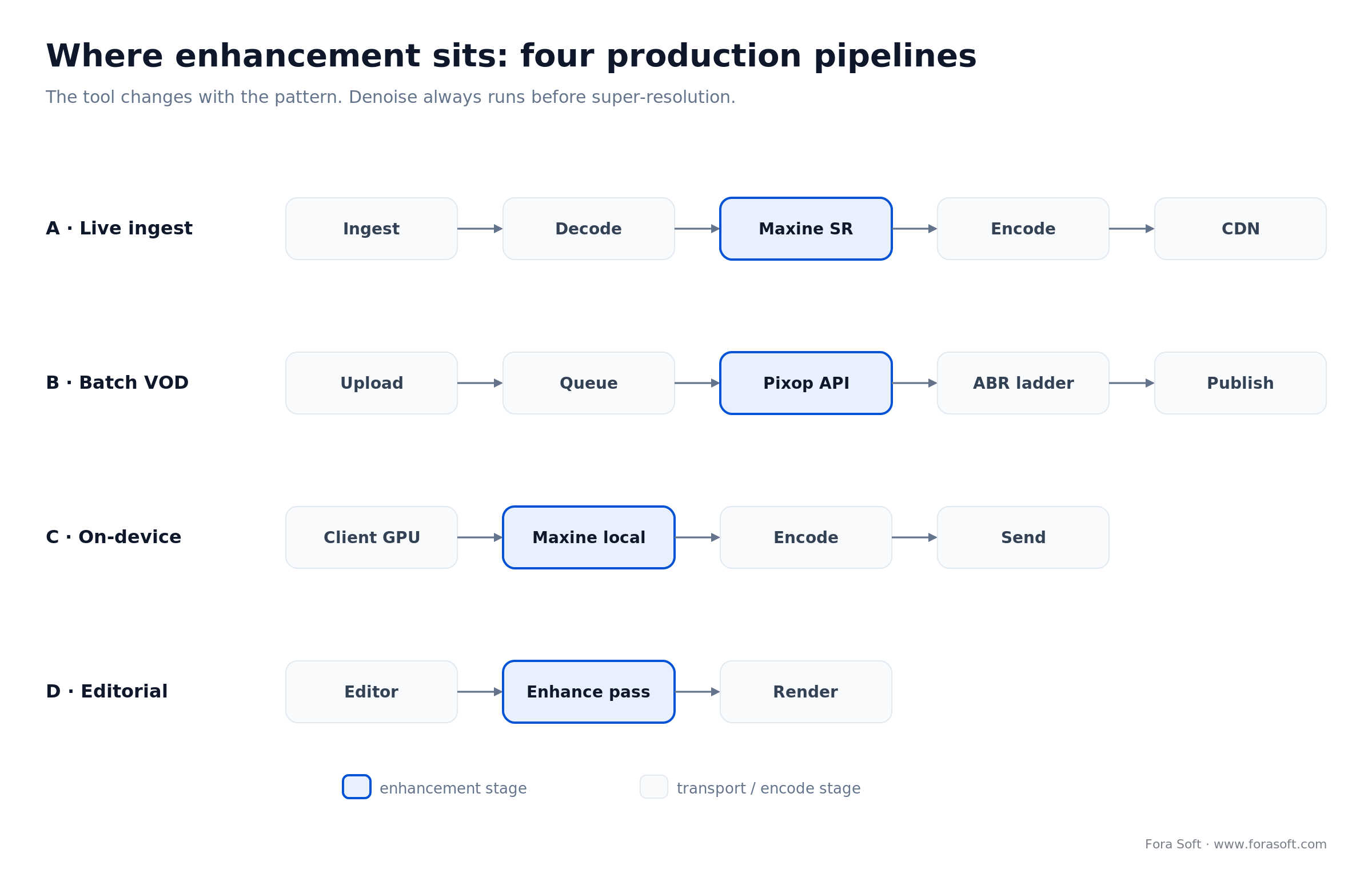
Figure 3. Where enhancement lands in four real pipelines, with the tool that fits each stage.
Pattern A – enhancement at ingest (live). RTMP/WebRTC ingest, decode, Maxine denoise plus super-res, re-encode, HLS/DASH packager, CDN. Runs on one RTX-class GPU per ingest stream. Use it when contribution feeds are noisy (UGC, low-light cameras) and you serve clean output to viewers.
Pattern B – batch enhancement on upload (VOD). Upload, object storage, queue job, Pixop API call or self-hosted Topaz render, write enhanced master, transcode to the ABR ladder, publish. Processing is decoupled from the user experience, and cost scales linearly with catalog growth. Budget 2 to 10 minutes of processing per minute of 1080p footage, model-dependent.
Pattern C – on-device client enhancement. The end-user GPU runs Maxine or NVIDIA Broadcast locally before video leaves the device. Zero server cost, which suits webinar platforms and prosumer conferencing — but it needs capable client hardware, so it fails on low-end laptops.
Pattern D – editorial post-production. A human editor in Premiere or DaVinci runs Enhance Speech, SuperScale, or a Topaz pass, then renders the master. Not automated and not scalable, but for prestige content the per-shot control beats retraining a model. Do not over-engineer this one.
A concrete ingest sketch, so the shape is unambiguous:
rtmp_in -> decode -> maxine(denoise, super_res 2x)
        -> encode(h265, crf 20) -> hls_package -> cdn
# one RTX-class GPU per stream; keep denoise BEFORE super_res
Do not stack two upscalers in series: chaining Maxine super-res into a Topaz upscale multiplies hallucination on faces and text, and the quality gain rarely pays for the compute. One model per stage.
What AI video enhancement costs at scale
Sticker price hides the real number. Here is the arithmetic for a common job: enhancing a 500-hour 1080p back-catalog, once.
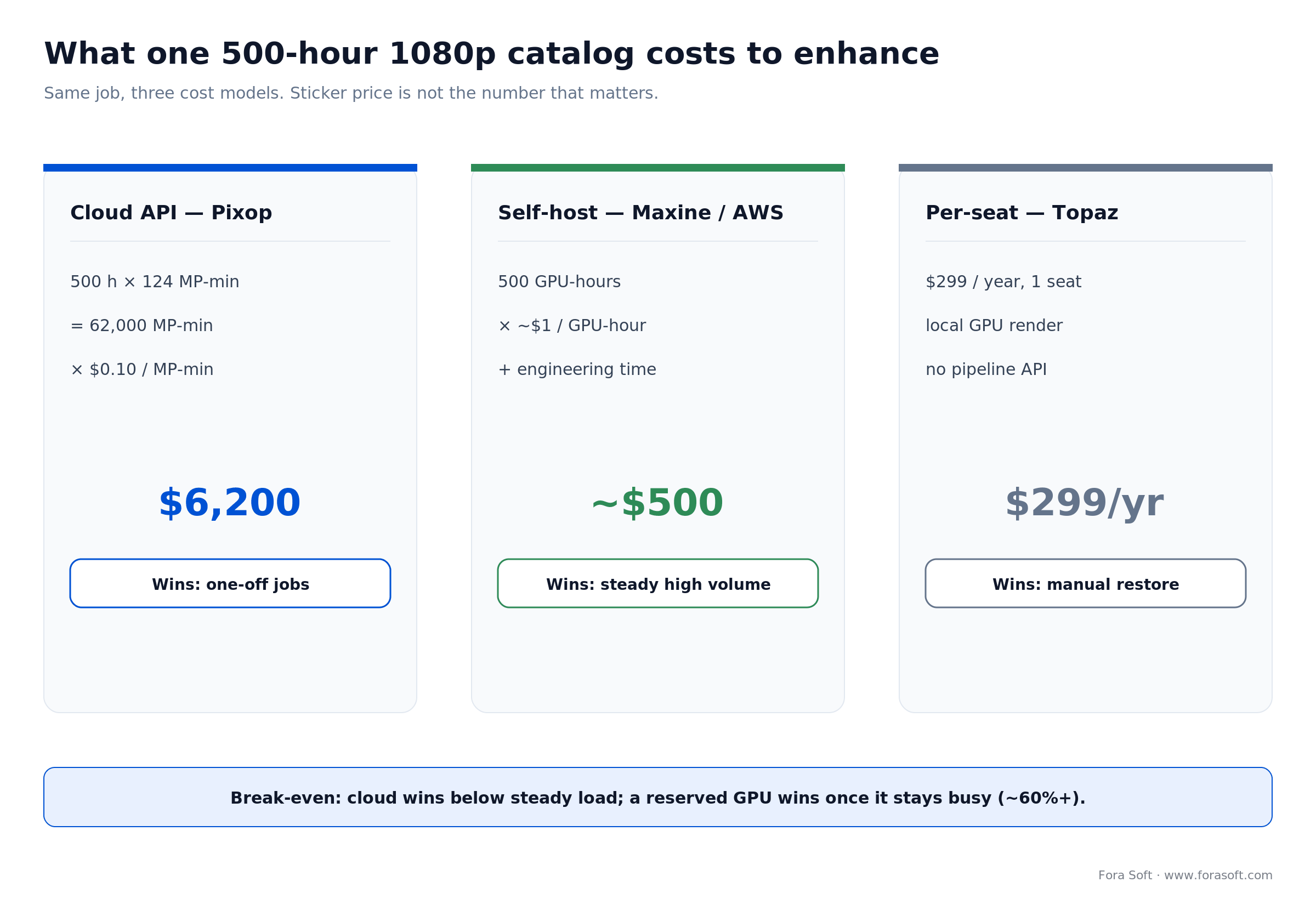
Figure 4. Three cost models on the same 500-hour job, and where each one wins.
Cloud API (Pixop). 1080p is about 2.07 megapixels per frame, so one hour is roughly 2.07 × 60 = 124 MP-min. 500 hours is about 62,000 MP-min. At $0.10/MP-min that is around $6,200 for the whole catalog, one-time, with zero infrastructure to run.
Self-hosted (Maxine on AWS). Maxine near real-time means roughly one GPU-hour per hour of footage, so about 500 GPU-hours. On an on-demand g5 instance near $1/GPU-hour that is around $500 of compute — plus engineering time to build and operate the pipeline, which is the line item people forget.
Per-seat (Topaz). $299/year, unlimited local render on your own GPU. Cheapest for a single operator doing manual restoration, but there is no real API, so it does not become a pipeline. It scales with people, not with servers.
The break-even: a one-off or low-volume job favours the cloud API because there is nothing to build. Continuous high-volume favours self-hosting once usage clears roughly 60%, because per-megapixel billing keeps charging while a reserved GPU does not. We size this per client rather than by rule of thumb, and it is exactly the kind of question worth a 30-minute scoping call.
What we learned shipping enhancement in a live stack
The situation. A live platform we work on ingested noisy, low-light contribution feeds from field cameras. Viewers complained the picture looked “muddy,” and the encoder was spending bits describing sensor noise instead of the scene, which pushed CDN cost up without improving anything anyone wanted to watch.
The plan. We put a denoise pass (Maxine-class, on the ingest GPU) before the encoder, kept super-resolution off the live path to protect latency, and validated every change with Netflix’s VMAF rather than eyeballing it. Denoise-before-encode is a well-known win: removing high-frequency noise lets the codec spend its bitrate on real detail.
The result. At matched VMAF, the encoder needed materially less bitrate (denoise-before-encode typically buys 10–20% on noisy sources), which cut delivery cost, and the “muddy” complaints stopped. The same discipline runs through our audio-and-video work, from live platforms to the 720,000-track FRP SPINS streaming rebuild. If you want a similar assessment of where enhancement would actually move your numbers, our custom video and audio processing team does exactly this.
Want a second opinion on your enhancement stack?
We will benchmark your worst clips with VMAF, tell you which tool fits, and where the money actually goes — no obligation to build with us.
Build, buy, hybrid, or open source
Once you know the tools, the higher question is how much to own. Pick the row that matches your team size, regulatory surface, and time-to-value target — not the row that sounds most ambitious.
| Approach | Best for | Time-to-value | Main risk |
|---|---|---|---|
| Buy off-the-shelf | Small team, generic need | 1–2 weeks | Lock-in, limited control |
| Hybrid (SaaS + custom) | Mid-market, mixed cases | 1–3 months | Two systems to maintain |
| Build in-house | Unique data or compliance | 6–12 months | Engineering velocity, hiring |
| Open-source self-hosted | Cost-sensitive, technical | 3–6 months | Ops burden, patching |
Open source is real here: Real-ESRGAN for upscaling, RIFE and DAIN for interpolation, and FFmpeg filters cover the basics. Quality lags Topaz and Maxine on hard footage, but for user-generated content where cost beats polish they are production-viable. Budget four to eight engineering weeks to match a commercial tool on 80% of inputs. If you are weighing this against a vendor SDK, our build-vs-buy video SDK framework applies the same logic to the layer below enhancement.
A decision framework in five questions
Answer these in order. The first “yes” that constrains you usually names the tool.
1. Is it live? If enhancement has to happen under a second, you are choosing Maxine on your own GPU. Everything else is offline or adds a cloud round trip.
2. Does it need an API? If a pipeline calls it without a human, that is Maxine (SDK) or Pixop (REST). Topaz, Adobe, and DaVinci drop out here.
3. Do you run GPUs? No GPU ops appetite points to Pixop’s cloud. If you already operate NVIDIA hardware, self-hosted Maxine is cheaper at volume.
4. What is the volume? A one-off catalog favours per-megapixel cloud. Continuous, high-usage work favours a reserved GPU you own.
5. Where does it break for you? Run your ugliest 10 clips through the finalists and score them with VMAF before you sign anything. The winner on your footage is the only ranking that counts, and if you want a hand standing that benchmark up, that is a good reason to talk to us.
Five pitfalls that wreck enhancement projects
1. Trusting the demo reel. Vendor reels are picked for best-case footage. Your low-light UGC and text tickers are what ship, so benchmark on those or expect surprises in production.
2. Over-upscaling. 360p to 4K is not a real target; artifacts on faces and text show even to casual viewers. Cap it at 2× per pass, two passes maximum.
3. Ignoring codec coverage. A tool that cannot emit AV1 or HEVC forces a re-encode step that erases part of the quality you just paid for. Check the output path end to end.
4. Putting enhancement on the live path when it is not needed. Every model you add to a live pipeline spends latency and GPU. If viewers cannot tell, take it off the hot path and do it in batch.
5. Skipping provenance. Generated frames (Generative Extend, diffusion restoration) can trigger transparency expectations. Keep C2PA Content Credentials metadata so you can prove what was synthesized.
KPIs: what to measure
Quality KPIs. VMAF delta before and after (target a clear, repeatable gain on your reference set, not one clip), plus a blind A/B with three reviewers for the subjective call the metric misses.
Business KPIs. Cost per hour of enhanced footage, delivery-bitrate change at matched quality, and any lift in watch time or drop in quality complaints. If enhancement does not move one of these, it is a cost with no return.
Reliability KPIs. Per-frame latency at the 95th percentile (not the average), GPU usage on the ingest path, and artifact rate on the hard-case clips. Watch the tail, because that is where live pipelines fall over.
When not to add AI video enhancement
Enhancement is not free, and sometimes it is the wrong call. If your source is already clean 1080p or 4K at a healthy bitrate, the visible gain is small and the compute is not. If you are pre-revenue and chasing a feature that users have not asked for, spend the GPU budget on something they will notice.
Skip it, too, when latency is sacred and enhancement is cosmetic — a trading desk or a telemedicine call cares more about the frame arriving than about a relit face. And if the honest fix is a better camera or a higher ingest bitrate, do that first; no model recovers detail that was never captured. Honesty here protects the budget, which is the whole point of a buyer’s guide.
Frequently asked questions
What is the best AI video enhancement software in 2026?
There is no single best; there is a best fit. Topaz Video AI leads on offline quality, NVIDIA Maxine on real-time SDK integration, Pixop on cloud API scale, Adobe on editorial dialog cleanup, and DaVinci Resolve Studio on budget color-critical post. Pick on latency, API access, and cost model in that order.
Can AI video enhancement run on live streams in real time?
Yes, with the right stack. NVIDIA Maxine runs at roughly 15–30ms per frame on an RTX 2060 or better, which fits inside live latency budgets. Pixop’s cloud real-time path reports about 600ms, fine for live-to-VOD but noticeable for interactive use. Topaz, Adobe, and DaVinci are offline only.
What is the best AI video upscaler for archive restoration?
Topaz Video AI’s Rhea and Starlight models lead on archival footage in 2026. For damaged VHS or film, stack Proteus (motion-stable restoration) with a Rhea pass. On a budget, DaVinci’s SuperScale is a capable second choice and runs natively on Apple Silicon.
How much does cloud AI video enhancement cost at production scale?
Pixop is the benchmark: per-megapixel-minute, about $0.05 to $0.25/MP-min depending on model, higher for HDR. A one-hour 1080p job (~124 MP-min) runs $6 to $30. A 500-hour catalog is roughly $6,200 at $0.10/MP-min, with no infrastructure to operate.
Does AI video enhancement work on low-resolution mobile uploads?
Yes, within limits. 480p to 1080p with Topaz Iris or Pixop’s SD-to-HD model gives viewer-grade output for most UGC. Extreme jumps like 360p to 4K are not reliable: faces and text show artifacts even to casual viewers. Hold to 2× per pass and no more than two passes.
Are there open-source alternatives worth using in production?
Real-ESRGAN (upscaling), RIFE and DAIN (interpolation), and FFmpeg filters cover the basics. Quality trails Topaz and Maxine on tough footage, but for UGC platforms where cost beats polish they ship. Budget four to eight engineering weeks to match a commercial tool on about 80% of inputs.
How do you evaluate quality before committing to a tool?
Build a 10-clip reference set from your real source, including the worst cases (low light, motion blur, text overlays, close-up faces). Run each candidate through the same set, score with VMAF for objective quality, and add a blind A/B with three reviewers for preference. Do not trust vendor demo reels; they are best-case.
What is coming for AI video enhancement in 2026–2027?
Three shifts to plan for: diffusion-based enhancement moving toward real time on H100-class GPUs (better faces and text); codec-aware models trained on AV1 and VVC artifact patterns; and Apple Silicon closing the gap with mid-range NVIDIA GPUs for single-stream work. Keep provenance metadata as generated frames become common.
What to read next
Decision framework
Build vs Buy a Video SDK in 2026
The same build-or-buy logic, applied to the video layer beneath enhancement.
Codecs
AV1 in Production: When It Saves Money
Why codec coverage decides how much enhancement quality survives delivery.
AI streaming
AI in Video Streaming 2026: The Playbook
Where enhancement fits in the wider AI-video engineering stack.
Mobile streaming
Optimize Android Apps for Smooth Streaming
The player layer downstream of enhancement, tuned for real devices.
Pick the tool that fits your pipeline
The 2026 market is mature, and the honest verdict is simple: Maxine for live, Pixop for cloud VOD, Topaz for offline quality, Adobe and DaVinci for editorial. Everything else is a subset or clone of those paths. Choose on latency, integration surface, and cost at scale — then confirm on your own worst clips with VMAF.
The expensive mistake is over-engineering: stacking three models for marginal gains, or building a custom pipeline when a $299 Topaz license and a one-week benchmark would have settled it. Enhancement is a means to a number — watch time, delivery cost, complaint rate — not an end. If you want that decision made with your data instead of a rule of thumb, we do the plumbing and hand you the plan.
Ready to ship AI video enhancement that actually pays off?
From live Maxine integration to cloud Pixop workflows, we have done this more than a hundred times. Book a call and walk away with a concrete architecture plan and a cost estimate.

