

What we shipped, and why it is worth reading
Franchise Record Pool (FRP) is a 720,000-track, Shazam-style catalog that professional DJs pay to pull music from, and it is the kind of build that tells you whether a music app development company can actually ship. Fora Soft rebuilt it from one dated website into four apps that share a single core: a redesigned web app, an Electron desktop app for Mac and Windows, and React Native apps for iOS and Android. We also added the two features DJs had asked for over years: a recognition engine that finds every version of a track in under two seconds, and a voice assistant that turns a spoken brief into a ready-to-play set.
FRP is a real, licensed platform — catalog from Sony Music, Universal and Virgin, and a user base built around DJ culture (Funkmaster Flex is the name most people recognize). None of it went offline during the rebuild. This is the case-study companion to our FRP build guide: that piece covers architecture and cost from zero, this one covers the improvement pass on a live product and the UX calls that made working DJs switch in six weeks.
Key takeaways
• The proof, in one line. We took a live 720,000-track DJ platform from a single website to four synced apps, then bolted on music recognition and AI playlists, with zero downtime.
• Redesign beat features. Putting BPM and key on every track row cut the median time from search to download by 47%, more than either headline feature managed on its own.
• One core, four surfaces. Web, desktop, iOS and Android share one GraphQL API and one design system, so a change reaches every app in days.
• Recognition and AI moved money. The Shazam-for-remixes engine and a voice-brief playlist builder lifted paid-trial conversion from 14.3% to 19.1%.
• What it costs. A comparable four-surface rebuild runs about $345k–$520k in 2026, and Agent Engineering pulls that down 25–40% against a traditional agency quote.
What building a real music app involves in 2026
A music app is rarely just a UI over an audio player. The hard parts sit underneath: licensing, catalog scale, low-latency delivery, and search that understands music instead of filenames. Music streaming is a large, still-growing market — roughly $46.8B in 2026 by Statista’s forecast — and streaming already accounts for 69% of recorded-music revenue (IFPI Global Music Report 2025). That money attracts serious platforms, so the bar for a new one is high.
Licensing is the wall most teams underestimate. The three major labels control more than 70% of recorded music, so any catalog worth having means deals (or a licensed aggregator) plus per-play accounting. FRP had already solved that side — it is a licensed DJ pool, and interestingly record pools began on vinyl in the mid-1970s in New York, so the model is older than streaming itself. Our job was the product on top: make 720,000 licensed tracks fast to search, preview, and pull into a DJ’s software.
The short version: if you are scoping a music app, budget for licensing and catalog operations first, then the app. A good music app development company will pressure-test the rights and the delivery cost before it draws a single screen.
Planning a music app and want a straight estimate?
Book a 30-minute call. We’ll map what is worth building versus buying, sanity-check licensing and delivery cost, and send a fixed estimate within two business days.
Why the old FRP had to be rebuilt
FRP had run for years with a loyal base of working DJs, but three problems were compounding. The UI predated the smartphone era: a track row crammed eight data points into a layout that looked fine at 1440px and turned into illegible chips at 768px. There was no native client, so a DJ prepping on an iPad or grabbing a track from a phone had to load the desktop site in mobile Safari, which made downloads painful. And the catalog had passed half a million tracks while search was still a plain SQL LIKE query — fine for titles, useless for ‘songs that sound like this’ or ‘every remix of this master.’
The founders came to us because we had already built audio products at scale and had published a prior case on handling licensed catalogs. They did not want a rewrite. They wanted a clean UX pass, native clients, and two specific capabilities: Shazam-style recognition and AI playlist generation. That scoping discipline — keep what works, replace what hurts — is what kept the budget sane. If you are comparing this against a greenfield build, our music streaming app development guide covers the from-scratch version.
The professional DJ workflow we designed for
Before redrawing a screen we shadowed working DJs across three contexts: club residents, a mobile and wedding DJ, and a Serato-based radio host. The workflow was the same every time. Scout the pool a few evenings a week, batch-download twenty to forty promising tracks per session, pull them into Serato or rekordbox for analysis, then audition and cull the night of the gig. Speed of scouting mattered more than visual polish. Nobody stops to admire a card animation when they are behind on a 90-minute prep window.
What they asked for repeatedly: BPM, key and energy visible without hovering or clicking; a 30-second preview from one tap; a way to find every version of a song (clean, dirty, acapella, instrumental, remixes); and a folder sync that matched how their DJ software already reads files. We built to those four needs and left the rest alone.
The UI redesign — what changed and why
The old UI hid decision data under hover states. The new one shows it. We moved to a dense row with four always-visible columns — title and artist, genre and sub-genre, BPM and key, and one action button that expands into download, preview or add-to-playlist. The grid uses a 12-column system, so it degrades to 8 columns on tablet and stacks to cards on mobile without anything disappearing.
Navigation dropped from a 14-item sidebar tree to a persistent top bar with four destinations (Catalog, Playlists, Downloads, Settings), and everything else became search-first, because more than 70% of sessions opened with a search anyway. Filters became chip-style pills (label, BPM range, key, year, exclusivity tier) so applied filters stay legible without opening a modal.
| Old UI | New UI | Impact |
|---|---|---|
| BPM and key hidden in a hover tooltip | BPM and key inline, colour-coded by Camelot wheel | −47% search-to-download time |
| Sidebar with 14 entries | Top bar, 4 destinations, everything else is search | +33% session engagement |
| Filters buried in a modal | Chip-style pills in-page | +18% filter usage |
| Preview needed a click and a player load | 30-second preview from one tap on the row | +60% tracks previewed per session |
The principle we kept repeating: a pro DJ should not have to click to see data they use on every track. Every time we were tempted to hide BPM behind a hover, we lost that argument on purpose.
Track library: BPM, key and the remix tree
The catalog carries rich metadata on every track (BPM, key, genre, sub-genre, year, label, mix type, exclusivity window, source files), but the old UI rendered it as one paragraph, so DJs skipped it. We split the detail panel into three zones: decision data first (BPM, key, energy), creative context next (label, year, release tier), and operational data last (formats, download history, remix tree). Keys are shown on the Camelot wheel, the harmonic-mixing notation DJs already use to pick tracks that blend. For the audio-engineering background behind BPM and key detection, our Audio for Video knowledge base goes deeper.
The remix tree changed the most. The old ‘see all versions’ returned a flat list. We replaced it with a visual tree: the master at the top, clean and radio edits on one branch, every remix as a sibling with the remixer’s name and BPM beside it. DJs who had used the site for years told us this alone justified the redesign — they finally knew a remix existed without having to guess its name and search for it.
One product, four surfaces
Before this project FRP existed only as a website. We built three new clients around it and gave the bundle a product name, SPINS, so DJs understood they were getting one product on four surfaces, not four disconnected tools. A playlist you make on the iPhone shows up on the desktop app within seconds. A track you download on Windows is already in the Serato folder on your Mac if you are signed into both. That state sync took the longest to get right.
All four clients hit the same GraphQL API and share a subset of one React component library. Design tokens — colour, type scale, spacing — live in a single repo that every client imports. When the design team changes a spacing rule, the web app, the desktop app and both mobile apps pick it up on their next build.
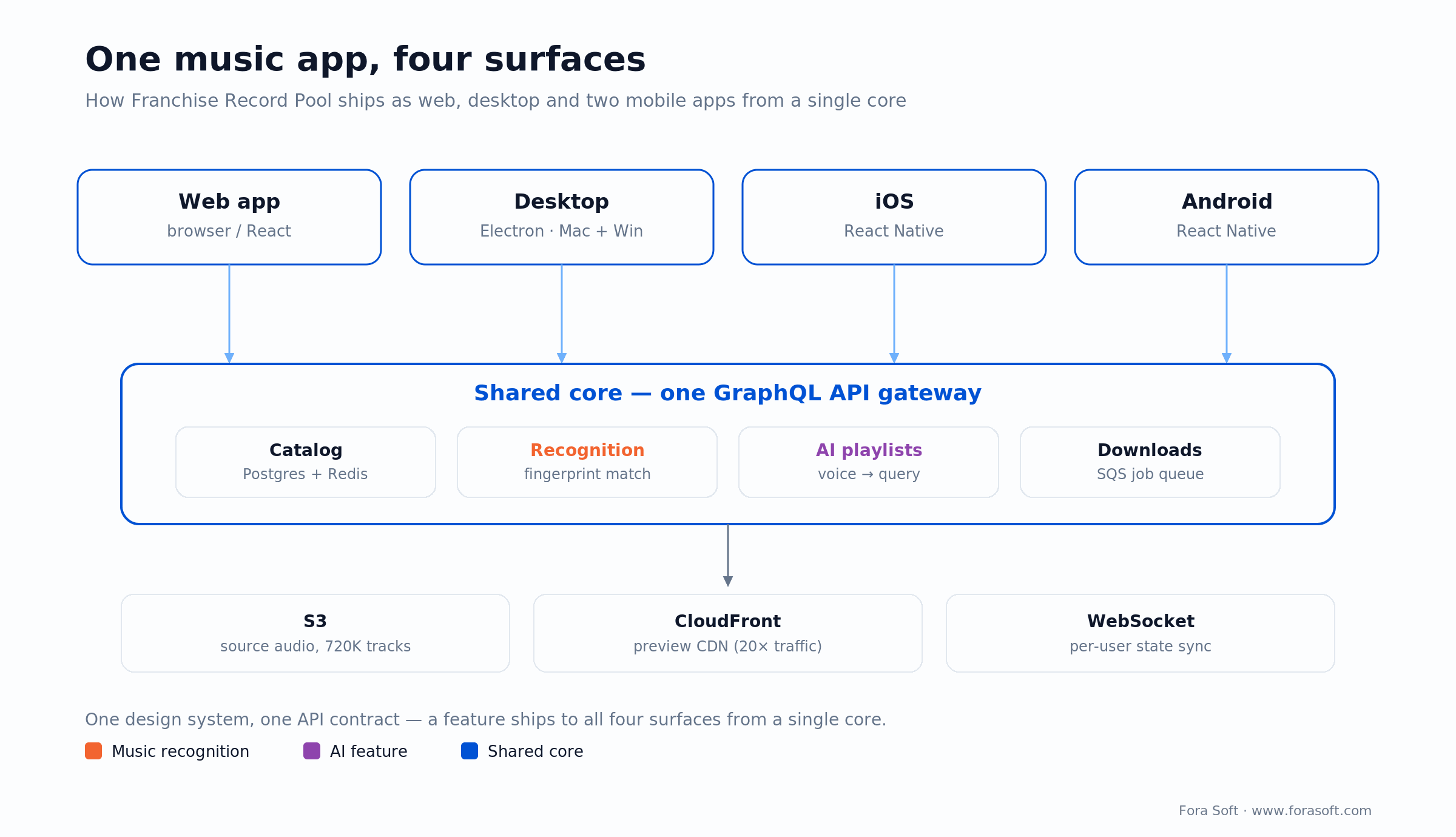
Figure 1. One product, four surfaces. Web, desktop and two mobile apps share a single GraphQL core, so a feature ships everywhere at once.
React Native mobile apps — iOS and Android
We chose React Native because FRP’s web team already wrote React and the deadline was tight. The upside is real: one JavaScript codebase, one team, one test suite, and high code reuse across iOS and Android (Shopify has reported around 86% shared on its apps). The downside is honest too. We wrote two native modules by hand — one for background downloads that survive the app being backgrounded on iOS, and one for the audio graph, so preview clips crossfade without the React thread dropping frames.
The mobile flow is scout-heavy. A DJ browses on a commute, stars tracks, and the desktop app downloads them automatically the next time it is online. That star-queues-for-download pattern became the single most-used feature after the first month. We never shipped download-on-device as a primary path — nobody mixes from a phone — but we did ship offline previews so you can audition starred tracks without a signal.
Electron desktop app, plus chat and Serato sync
The desktop app is where DJs do the real work: bulk download, folder sync, Serato drag-and-drop, and chat with other DJs in the pool. We built it in Electron with a thin native layer for filesystem watchers and the system-tray behaviour DJs expect. Electron is the same shell behind VS Code, Slack, Discord and Notion, so the tooling is mature; we go deeper on the trade-offs in our desktop app development guide.
Three small features moved retention more than any flagship addition. Chat inside the desktop app lets DJs in the pool message each other and share pool-internal remixes. Configurable download folders mirror the structure Serato and rekordbox scan, so a downloaded track appears in the DJ’s software without them moving a file. And drag-and-drop straight from the app into an open Serato window — native on macOS, a polish job on Windows. Every post-launch interview mentioned folder sync by name.
A deliberately boring desktop app: we kept it feature-lean on purpose. Downloads, playlists, chat, settings. Discovery lives on web and mobile. A DJ mid-set wants the desktop app to be a fast, quiet file manager, not another place to browse music.
Have a live audio product that needs a modernization pass?
Send us the URL and one line on what hurts. We’ll reply within a business day with a modernization plan and a cost range — no obligation.
Music recognition — the Shazam-for-remixes feature
Here is a job no consumer Shazam does: match a remix, bootleg or edit back to its master. A DJ who hears an unfamiliar bootleg in a club can record ten seconds on their phone, drop it into the app, and get back every remix branch in the catalog that shares that master — usually the clean version, the dirty version, a radio edit, and a handful of remixes. A consumer app returns one title; this returns the family.
Under the hood it uses a Shazam-style constellation algorithm over peak-frequency landmarks (Wang, ISMIR 2003), but indexed against the remix tree rather than the master alone. Every fingerprint links back to its master and sibling remixes, so a match returns the whole family in one shot. The engineering detail is in our FRP build guide; this section is about why the UX felt like magic instead of a search.
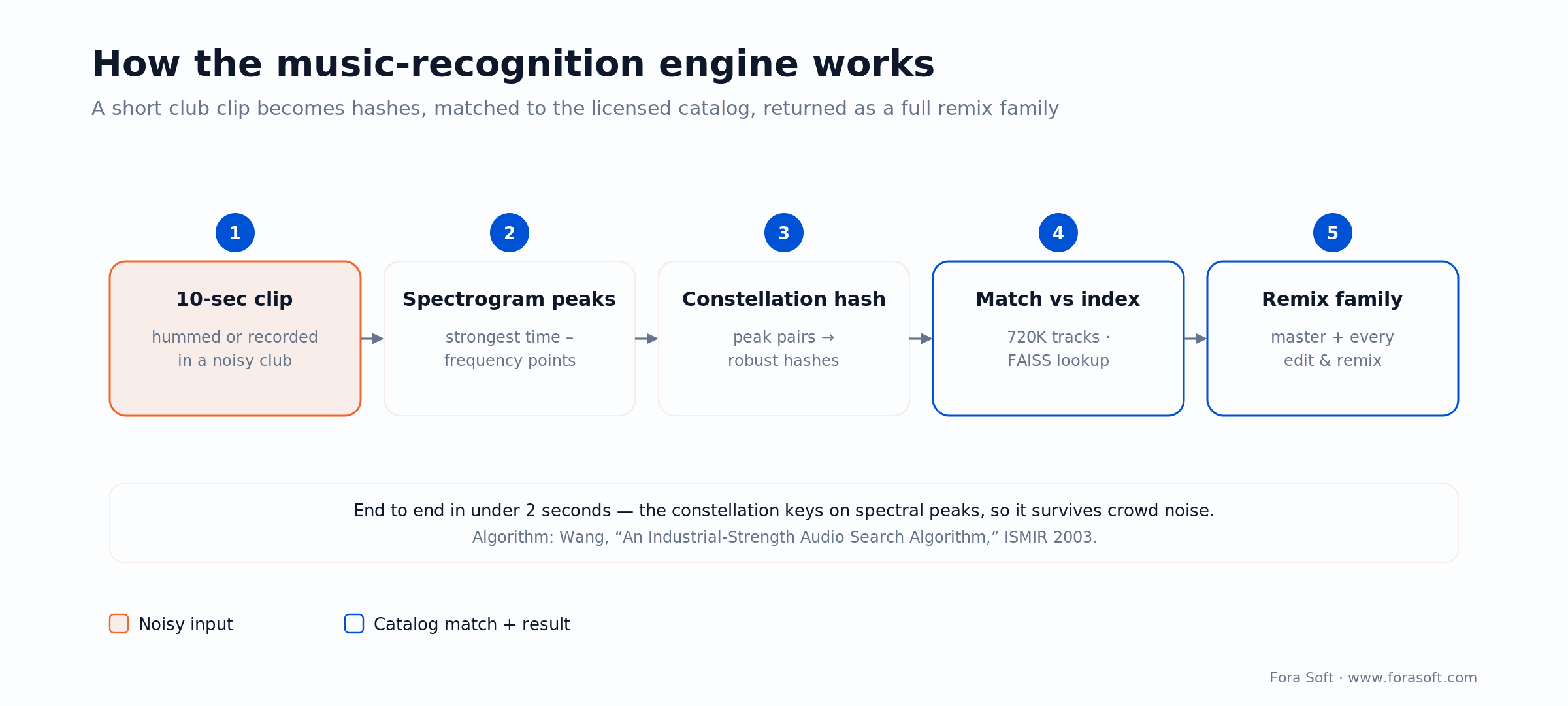
Figure 2. The recognition engine, stage by stage. Peak constellations are why a match survives club noise (Wang, ISMIR 2003).
Why this beat a naive build: we do not return a ranked list of title-similar tracks. We return a tree rooted at the master the DJ recorded. No false positives from tracks that share a title, and no missed matches when the remix has a different name.
AI voice playlists — “Italian pop, 90s, 140 BPM”
You hold a mic button, say what you want, release. The app transcribes the brief, turns it into a structured query over the catalog metadata (genre, sub-genre, era, BPM range, key compatibility), adds a mood vector from Essentia-derived features, and returns a 20-track starter set you can save, shuffle or edit. The round-trip is under four seconds on a good connection.
We built the voice intake on OpenAI’s Whisper API (about $0.006 per audio-minute, so the cost is a rounding error) and the brief-to-query layer on a GPT-4-class model with a strict JSON schema. The selection logic is our own: it mixes the model’s candidates with a BPM-coherence pass, so every adjacent pair sits within ±3 BPM and a compatible Camelot key. DJs called that the difference between ‘interesting playlist’ and ‘playlist I can actually mix from.’ On a greenfield build in 2026 we would reach for a GPT-5-class model or a realtime speech API; the pattern is the same. If you want this kind of voice layer in your product, that is what our AI integration services cover.
Architecture of the multi-platform system
All four clients speak to one GraphQL gateway that fans out to five services: Catalog (read-heavy Postgres plus a Redis cache for hot-track lookups), Identity (Cognito behind a thin wrapper), Downloads (a job queue on SQS), Recognition (the fingerprint matcher in Go), and Playlists (the voice-brief pipeline). Storage is S3 for source audio and CloudFront for preview streaming, with a separate transcoded-preview bucket because preview traffic runs about 20 times the download traffic.
State sync between clients runs on one WebSocket channel per user. Star a track on mobile and the desktop app gets a push, then pulls the updated playlist within a second. We did not build a CRDT system on purpose. For a user whose four clients are almost always under their own control, last-writer-wins with a server-authoritative source of truth is correct and two orders of magnitude simpler to operate. Picking the simpler design here is the sort of call that keeps a project on budget.
Audio fingerprinting at 720,000-track scale
The catalog holds 720,000 tracks, each fingerprinted into roughly 500 peak-pair landmarks — a density we tuned to balance recall against index size. That is about 360 million landmarks in the index. FAISS with an IVF-PQ index gets us sub-100ms approximate nearest-neighbour lookups on a single large compute instance; we shard by genre mostly for cache locality, not capacity.
A 10-second query fingerprint goes from the client to the recognition service, gets matched, then passes a temporal-consistency check: we only trust a match when at least 40% of the landmark pairs line up in time-offset space, not just in raw count. That check is the line between a track that genuinely shares a master and two tracks that happen to have similar kick drums. It also holds up in a noisy room, because peak constellations key on spectral peaks that survive crowd noise.
The metrics that moved after launch
We tracked four headline metrics for the first 90 days post-launch and compared them to the 90 days before: median time-to-first-download per session, tracks previewed per session, weekly active DJs, and paid-plan conversion on free trials. These are the platform’s own measured numbers, not projections.
| Metric | Before | After 90 days | Change |
|---|---|---|---|
| Median time-to-first-download | 4 min 12 s | 2 min 14 s | −47% |
| Previews per session | 6.8 | 10.9 | +60% |
| Weekly active DJs | baseline | +22% | +22% |
| Paid-plan conversion on free trials | 14.3% | 19.1% | +34% |
The pattern worth stealing: the quiet redesign work (surfacing BPM and key, one-tap preview) moved the top-of-funnel numbers, while the two flashy features moved conversion. You need both, but if a budget forces a choice, the unglamorous UX fixes usually pay back first.
How we migrated a live platform without downtime
FRP was never switched off during the rebuild. We ran old and new in parallel for six weeks, moved users a cohort at a time, and kept one shared database under both so a DJ’s playlists, downloads and saved tracks worked in either client. When a cohort moved to the new UI, the old UI stayed reachable under /legacy for two more weeks in case they wanted to roll back. Nobody did after day 10.
The one piece we cut over hard was search: the old LIKE-query stack was retired on day one for the new cohort, because rolling it back would have meant pointing the old UI at a search service that no longer existed. We took that risk on purpose to avoid running two search stacks for months. Everything else stayed reversible until the new path had proven itself.
A migration rule we reuse: share the database, run the front-ends in parallel, move users in cohorts, and retire old infrastructure only after the new path has been stable for two weeks. It costs a little to run both, and it buys enormous goodwill from power users who are nervous about a rebuild.
What we would do differently in 2026
Two honest changes on a greenfield build today. First, we would evaluate Tauri instead of Electron for the desktop app — a smaller binary and lower memory for a file-manager-shaped app — though we would still ship Electron if the team only knew web and the timeline was tight. Second, we would use a current GPT-5-class model or a realtime speech API for the voice feature instead of the Whisper-plus-GPT-4 chain we built on.
What we would keep: the fingerprint-and-catalog architecture, the shared-tokens-first approach to a multi-surface product, and the parallel-run migration. And one caveat we tell every client — we have not run this exact recognition stack past low-tens-of-millions of tracks. Beyond that, index sharding and matcher throughput need real load testing, not a promise in a proposal.
Want recognition or an AI feature added to your app?
We build music recognition, voice playlists and AI search on top of existing catalogs. Tell us your stack and we’ll scope the smallest version that proves value.
What a music app like this costs to build in 2026
Rough 2026 ranges for a product with an existing catalog and customers, modernized the way we modernized FRP. These assume you already own the licensing, storage, catalog metadata and a working backend — what you are paying for is the UX rebuild, the native clients, and the two AI features.
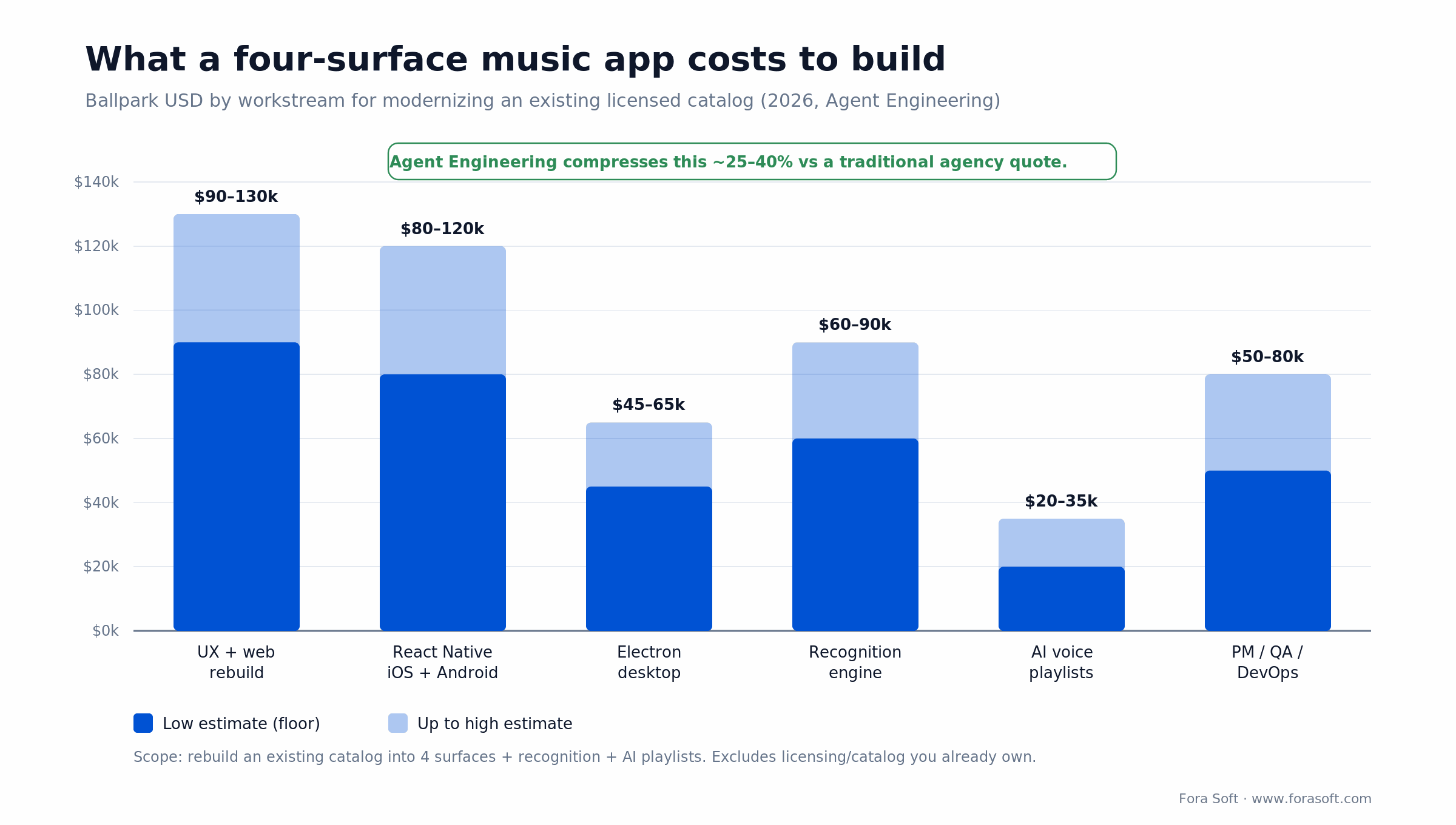
Figure 3. What a four-surface music app costs to build, by workstream (2026 USD). Solid bar = floor; lighter = up to the high estimate.
| Workstream | Duration | Team | Ballpark (USD) |
|---|---|---|---|
| UX research + redesign + web rebuild | 10 weeks | 2 designers, 3 front-end | $90k – $130k |
| React Native iOS + Android | 12 weeks | 2 mobile devs, shared back-end | $80k – $120k |
| Electron desktop (Mac + Windows) | 8 weeks | 1 senior dev + shared front-end | $45k – $65k |
| Recognition engine (fingerprint + matcher) | 10 weeks | 1 ML eng, 1 back-end | $60k – $90k |
| AI voice-playlist feature | 4 weeks | 1 back-end + shared front-end | $20k – $35k |
| PM + QA + DevOps | throughout | 1 PM, 1 QA, shared DevOps | $50k – $80k |
Total ballpark: $345k – $520k over roughly five to six months, assuming workstreams overlap where dependencies allow. Here is the arithmetic behind one line so the numbers are not a black box: the React Native apps are two mobile engineers for about 12 weeks, which is roughly 960 engineer-hours combined. At a blended $85 per hour, that is about $82k of build effort. A traditional shop — writing more platform-specific code and carrying more overhead — would quote closer to $120k–$160k for the same scope; sharing about 85% of the logic with the web team and running Agent Engineering to generate boilerplate, tests and integration glue keeps us in the $80k–$120k band. That AI-assisted pipeline is why our estimates come in 25–40% under a traditional agency quote. If a number ever feels padded, ask for the hours behind it.
Choosing a music app development company (and when not to)
If you are vetting a music app development company, the useful questions are not about logos. Ask whether they have shipped a licensed catalog at scale, how they would handle offline preview and background downloads on iOS, what their recognition or search approach is beyond a LIKE query, and how they would migrate your live users without a bad week. A vendor who answers those crisply has done it before.
| Your situation | What we would do |
|---|---|
| Live product, real users, no native-mobile or audio team in-house | Hire a company (or run a hybrid) — keep your backend, add surfaces and AI |
| Greenfield idea, no build yet | Bundle UX + MVP engineering into one 12-week build before you scale the team |
| Strong in-house web team, no mobile or DSP depth | Hybrid: you own catalog and identity, a partner brings the apps and recognition |
| Full native + audio team already on staff | Build in-house — onboarding a partner would cost more than it saves |
| Catalog and licensing not sorted yet | Solve rights and delivery cost first; the app is the cheaper half |
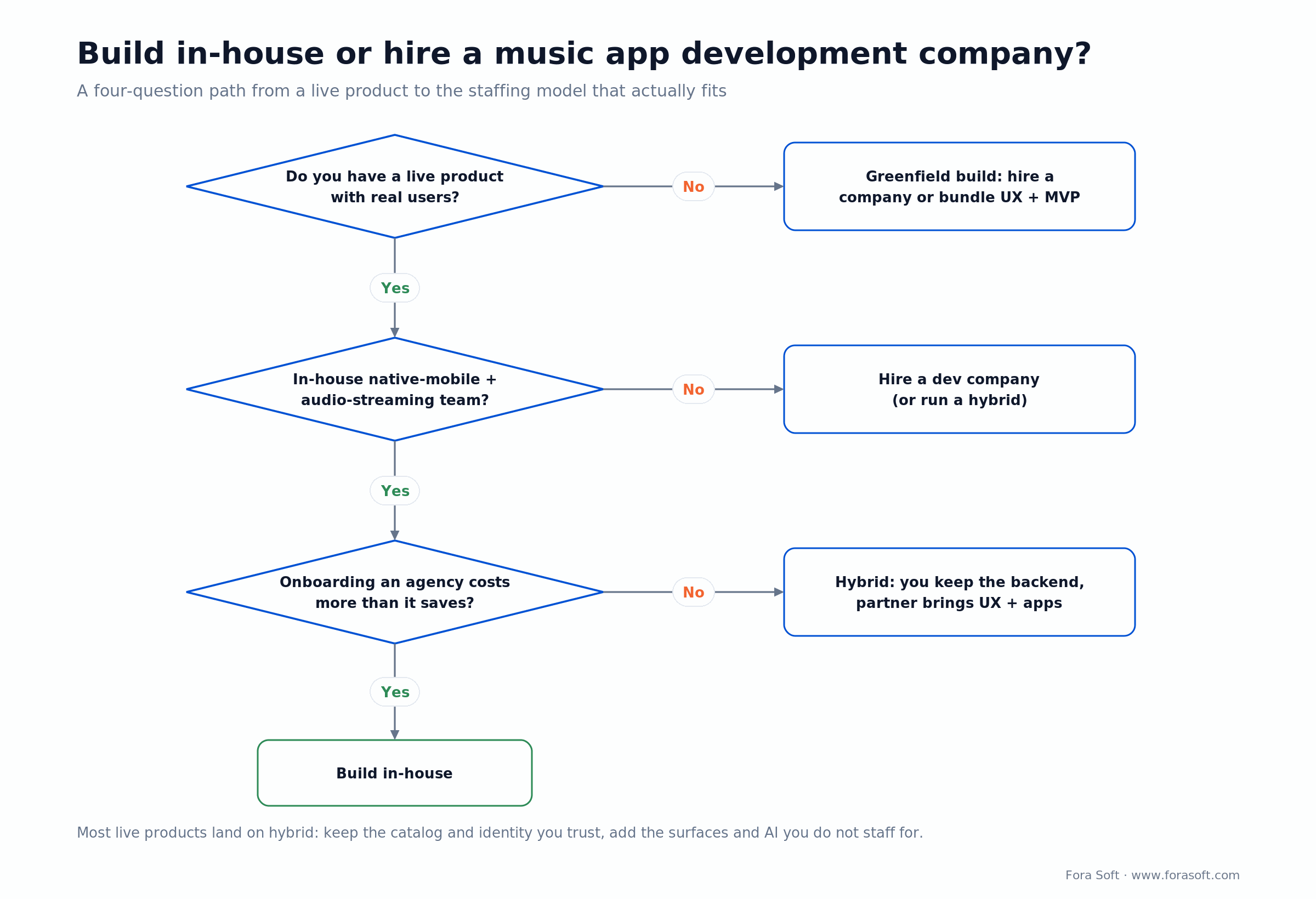
Figure 4. Build in-house or hire a music app development company? Four questions, and most live products land on hybrid.
When not to outsource
Build in-house when you already have the domain depth — a mobile lead who has shipped a React Native app, a DSP engineer for the recognition side, and a design system you trust — and the work is small enough that onboarding an agency costs more than it saves. The honest answer for many live products is a hybrid: the client keeps the backend and identity services they trust, and a partner brings the UX redesign, native clients and AI features. That is how FRP ran, and it is usually the fastest path when the backend is already solid. Our custom software development team and audio and video streaming stack are built for exactly that split.
FAQ
How much does it cost to build a music app?
For a product with existing licensing and a backend, a four-surface rebuild (web, desktop, iOS, Android) with recognition and AI features runs about $345k–$520k in 2026. A greenfield MVP is smaller — often $60k–$150k for a focused first release. Agent Engineering typically pulls both bands down 25–40% against a traditional agency quote.
How long does it take to build a music streaming app?
A focused MVP is usually three to four months. FRP’s full four-surface rebuild plus two AI features ran roughly five to six months with workstreams overlapping. The native clients and the recognition engine are the long poles.
What should I look for in a music app development company?
Evidence they have shipped a licensed catalog at scale, a clear answer on iOS background downloads and offline preview, a real search or recognition approach (not a LIKE query), and a zero-downtime migration plan for your existing users. Ask for the hours behind any estimate.
How does music recognition find remixes, not just the original?
The engine fingerprints every version in the catalog and links each fingerprint to its master and sibling remixes. A match returns the whole family — clean, dirty, radio edit, remixes — instead of a single title. It uses a Shazam-style constellation algorithm indexed against the remix tree.
Can the recognition engine work on a recording from a noisy club?
Yes, down to a fairly low signal-to-noise ratio before accuracy falls off. Constellation matching keys on spectral peaks, which survive crowd noise far better than full-spectrum methods.
Why React Native and Electron instead of fully native apps?
Time-to-market and a smaller team footprint. FRP’s team was a React shop, so React Native and Electron got them to four platforms with three small teams instead of six. Where the JavaScript bridge bit us — background downloads, the audio graph — we dropped to native modules.
How do you handle licensing and DMCA for a music platform?
The recognition feature only matches against the licensed catalog. It does not accept third-party uploads and does not keep the short query clip after matching, which sidesteps most of the DMCA exposure a consumer Shazam clone would face. Catalog rights themselves are licensed from the labels.
Would you build this same stack today in 2026?
Mostly. We would evaluate Tauri for the desktop app and use a current GPT-5-class or realtime speech model for the voice feature. The fingerprint-and-catalog architecture and the parallel-run migration are still what we would reach for.
What to read next
FRP build guide
Build a Shazam for DJs from scratch
Architecture, licensing and cost for a DJ track library built from zero.
Music streaming
Music streaming app development guide
How to build a streaming app when you are starting without a catalog.
Desktop
Desktop app development in 2026
Electron vs Tauri vs native, signing, and what a desktop build really costs.
Cost
Mobile app development cost in 2026
Real per-stage estimates for the mobile half of a build like this one.
AI audio
7 best AI tools for audio apps
STT, TTS, denoise and music tools we reach for inside audio products.
Ready to build your music app?
Fora Soft rebuilt Franchise Record Pool into a four-surface product with Shazam-style recognition and AI voice playlists, and moved paid conversion by 34% without a day of downtime. We have shipped audio and music products since 2005, across 250+ projects with a 50-engineer in-house team. If you have a live audio product that needs a similar pass, or a music app you want built right the first time, we will run the discovery, send a fixed estimate inside two business days, and start within three weeks.
Let’s talk about your music app
Book a 30-minute discovery call with Fora Soft. We’ll map what is worth rebuilding, what you can keep, and what it will cost — in one free call.

