


AI in software architecture in 2026 is a stack of eight tool categories, not one clever model that draws boxes. Diagrams generate from a requirements doc, ADRs draft themselves, threat models run against your design before a line ships, and fitness functions block architectural drift at pull-request time. Yet MIT’s 2025 research found roughly 95% of enterprise GenAI pilots deliver no measurable P&L impact, and the ones that die usually die at the architecture layer, not the model. This is the buyer’s guide we at Fora Soft use with CTOs and principal engineers assembling their 2026 AI software architecture stack.
Key takeaways
• Eight categories, one budget. A full AI software architecture stack for 50 engineers runs about $273,760/year in tooling — roughly $456 per engineer per month.
• The failure is architectural, not magical. MIT NANDA (2025) put GenAI pilot failure near 95%; buying from specialized vendors succeeded about 67% of the time versus internal builds at a third of that.
• AI writes code faster than it writes safe code. Endor Labs (2025) found 80% of AI-suggested dependencies carry risk. Supply-chain tooling is not optional.
• Compliance moved, it didn’t vanish. The EU AI Act’s high-risk obligations were deferred to 2 December 2027 (Annex III) and 2 August 2028 (Annex I) — the evidence you need is ADR + logging + drift artifacts.
• Start where the risk is. Regulated? Buy threat modeling and drift detection first. Everything else can wait a quarter.
Why Fora Soft wrote this playbook
We’ve designed and shipped architectures for WebRTC video platforms, real-time ML pipelines, and multi-tenant SaaS since 2005, with 250+ products across the portfolio. Our own VALT platform runs video evidence workflows for 770+ organizations and 50,000+ active users, so we feel bad architecture the way you feel a pebble in a shoe: incident MTTR balloons, cloud bills drift 30–50% over plan, and the first compliance audit turns into a six-figure scramble.
Here’s the shift worth naming. Done well with AI tooling, one principal engineer now covers what took a team of four in 2022. Done badly, the same tooling ships plausible-looking designs that quietly contradict your SLOs. Every vendor named below, we’ve either deployed on a client engagement or bake-offed in the last 18 months. We’ll tell you where each one wins and where it breaks.
Staring at eight vendor categories and one budget?
We run a 60-minute architecture-stack review of your CI/CD topology, cloud spend, and compliance exposure, then hand you a sequenced vendor plan the same day.
What does AI in software architecture actually mean in 2026?
It means AI-assisted automation across the architecture lifecycle, split into eight distinct vendor categories. Each one automates a different job an architect used to do by hand, and each has its own tooling market with its own leaders and its own price.
- Diagram generation — text-to-C4, text-to-sequence, and reverse-engineering diagrams from code or infrastructure.
- ADR authoring — capturing architecture decision records with LLM assistance, stored git-native next to the code.
- Threat modeling — STRIDE, PASTA, or LINDDUN run by AI against your architecture diagrams.
- Cost / FinOps forecasting — predicting the cloud bill from an infrastructure-as-code plan before you merge it.
- Dependency & supply-chain analysis — behavioral scanning of packages, not just matching known CVEs.
- Architecture fitness functions — automated tests that enforce architectural invariants in CI.
- AI code architecture review — flagging structural drift and hotspots at pull-request time.
- Load & scalability simulation — chaos and load experiments that validate a design under stress.

Figure 1. The stack maps to when each tool runs — design-time, CI/CD gate-time, or run-time. Purple marks the AI-native categories.
What AI still can’t do in architecture
AI can’t hold your constraints in its head. It doesn’t know your SLOs, your cost ceiling, your data-residency rules, or which regulator will read the audit, not unless you feed all of that in as machine-readable context every single time. Skip that and it will draft something that reads beautifully and violates a decision three ADRs back.
It also isn’t reliably faster. A 2025 METR randomized trial found experienced open-source developers were about 19% slower with AI tools on tasks in code they knew well, even though they felt faster. The lesson we take from that on client work: use AI to draft and to check, keep a senior engineer on the judgment, and measure the outcome instead of trusting the vibe. AI is a strong junior architect with perfect recall and no accountability. You still own the decision.
Market snapshot — size, growth, adoption
The money is real and moving fast. Gartner (January 2026) projects worldwide AI spending will reach about $2.5 trillion in 2026, with the AI-software slice specifically forecast to grow roughly 41% to around $638 billion in 2027. Generative AI keeps taking a bigger share of that software line each year.
Adoption among the people doing the work is already near-universal. The JetBrains State of Developer Ecosystem 2025 survey (24,534 developers, 194 countries) found 85% use AI tools regularly and 62% rely on at least one AI coding assistant or agent — but only 44% have integrated them deeply into a workflow. That gap, between “using” and “integrated,” is exactly where architecture tooling earns its keep.
Two numbers frame every budget conversation we have. First, roughly a quarter of new production code is now AI-generated in many teams. Second, Endor Labs’ State of Dependency Management 2025 found 80% of AI-suggested dependencies carry risk — only one in five was clean of both hallucinations and known vulnerabilities. You get faster code and more attack surface at the same time. Architecture tooling is how you keep the first without paying for the second.
Reach for supply-chain tooling first when: more than 20% of your new dependencies arrive via an AI assistant, or you ship to a regulated market — that’s where the 80%-risk number turns into a real incident.
The 2026 vendor lineup — eight categories
Diagram generation. Eraser (about $15/member/month) is the price-performance pick for diagram-as-code plus text-to-diagram. Structurizr is the C4-native choice with AI summaries and drift detection. Icepanel ($20+/month) does C4 with fork/merge review and a REST + LLM integration. Where they break: generated diagrams go stale in weeks unless you wire in continuous reverse-engineering from live infrastructure. Skip that and the picture lies to you within a month.
Reach for diagram generation first when: your team’s AI maturity is low — it has the smallest cognitive switching cost and the fastest “oh, this helps” moment.
ADR / decision records. Backstage plus the Spotify ADR plugin is git-native and free. GitHub Copilot ($10/mo Pro, $19/user/mo Business, $39/mo Pro+) drafts ADRs and ties them to the commit graph. Confluence AI (Atlassian Intelligence) folds into Confluence Cloud with template-driven Rovo agents. The catch: an AI-drafted ADR can silently contradict an earlier one, so pair every ADR with a fitness function that trips CI on conflict.
Threat modeling. ThreatModeler acquired IriusRisk on 8 January 2026 for over $100 million (combined annual recurring revenue around $50 million), making the merged platform the enterprise default at roughly $80k–$150k/year. The vendor claims 90% faster modeling and about $5M average remediation savings per serious finding caught pre-deploy. Treat those as vendor figures, not benchmarks, but the pre-deploy catch really is cheaper than a post-incident fix.
Reach for threat modeling first when: you’re in fintech, health, or any EU AI Act high-risk category — auditors want a threat model on every new service, and manual STRIDE doesn’t scale.
Cost / FinOps forecasting. CloudZero leads on GenAI-native cost tracking across OpenAI, Anthropic, and the clouds. Vantage is the engineering-led option with the only Terraform provider in the category. Infracost (about $1k/month) is the developer-centric infrastructure-as-code estimator that comments on your PRs. Where they break: they add cost without value if you can’t tag workloads per team or product first.
Reach for FinOps forecasting first when: your cloud spend clears $100k/month — below $20k/month, Infracost in CI is enough and the enterprise platforms don’t pay back.
Dependency & supply chain. Snyk ($40–$60/dev/month) is the volume leader. Socket.dev uses behavioral analysis and catches malicious package behavior that CVE scanners miss. Endor Labs (custom pricing; the company raised $93M in 2025) claims heavy noise reduction with AI-native SAST plus secrets, container, and malware detection. Chainguard ships verified minimal images. Given the 80% AI-dependency-risk figure, this category went from “nice to have” to baseline in 2026.
Fitness functions. ArchUnit (Java, Apache-2.0) and NetArchTest (.NET) are free and, in our view, non-negotiable in modern CI. Structurizr DSL ships declarative fitness rules. SonarQube added Architecture-as-Code in 2026 for language-independent drift detection at roughly $30k/year for a mid-market team. This is where architectural rules go to live instead of dying in a wiki.
Reach for fitness functions first when: your architecture rules already exist as prose nobody enforces — turning three of them into ArchUnit checks takes an afternoon and stops the bleeding.
AI code architecture review. CodeScene surfaces architectural health trends, knowledge silos, and refactoring targets from your git history. Codacy covers many languages with pattern detection. SonarQube’s architecture module rounds out the category. Where it breaks: on a monolith with no service boundaries, there’s little structure to measure yet.
Load & scalability simulation. AWS Fault Injection Service charges per experiment and is bundled with AWS support. Azure Chaos Studio pairs chaos with load testing and root-cause analysis. Gatling Cloud runs $500–$2k/month for a mid-size team. These validate that your design survives a regional failure before your customers discover it doesn’t.
Comparison matrix — pick, price, and where it breaks
| Category | Top pick | 2026 list price | 50-eng/yr | Where it breaks |
|---|---|---|---|---|
| Diagram generation | Eraser + Icepanel | $15–$30/seat/mo | ~$12,600 | Diagrams drift without live sync |
| ADR & docs | Copilot + Confluence AI | $10–$39/user/mo | ~$10,680 | Drafts can contradict prior ADRs |
| Threat modeling | ThreatModeler (IriusRisk) | $80k–$150k/yr | ~$100,000 | Overkill under 25 engineers |
| Cost forecasting | CloudZero + Infracost | Spend-based + $1k/mo | ~$57,600 | Useless without workload tagging |
| Supply chain | Snyk + Chainguard | $40–$60/dev/mo | ~$30,000 | Alert noise without tuning |
| Fitness functions | SonarQube + ArchUnit | OSS + ~$30k/yr | ~$30,000 | Needs a healthy CI first |
| Code arch review | CodeScene + Codacy | $15–$20/author/mo | ~$20,880 | Little signal on a monolith |
| Load simulation | Gatling + AWS FIS | $500–$2k/mo + usage | ~$12,000 | Realistic scenarios take effort |
Prices are 2026 list figures; confirm current tiers with each vendor, because seat definitions shift quarterly. Add the right-hand column and you get roughly $273,760/year. We walk that arithmetic below.
Reference architecture — seven AI-assisted stages
Every mature AI architecture workflow runs the same seven stages in a feedback loop. Skip one and you rejoin the pilots that stall. The point isn’t to buy all seven on day one. It’s to know which stage you’re missing.
1. Requirements capture. An LLM extracts structured functional and non-functional requirements from stakeholder transcripts, with SLOs and compliance constraints attached. 2. C4 diagrams. Eraser or Icepanel produce Level 1–3 C4 from that doc; architects edit rather than draw. 3. ADRs. Copilot drafts a decision record per decision, tied to the commit graph. 4. Threat model. ThreatModeler runs STRIDE against the diagrams and names the top risks with owners.
5. Fitness functions. ArchUnit or NetArchTest translate invariants into CI gates; SonarQube flags drift on every PR. 6. Cost forecast. CloudZero and Infracost project the first month’s cloud bill from the IaC plan and attach it to the ADR. 7. Drift detection. A continuous diff of the deployed topology against the sanctioned diagram catches the hotspots that pile up between reviews — then it loops back to stage one.
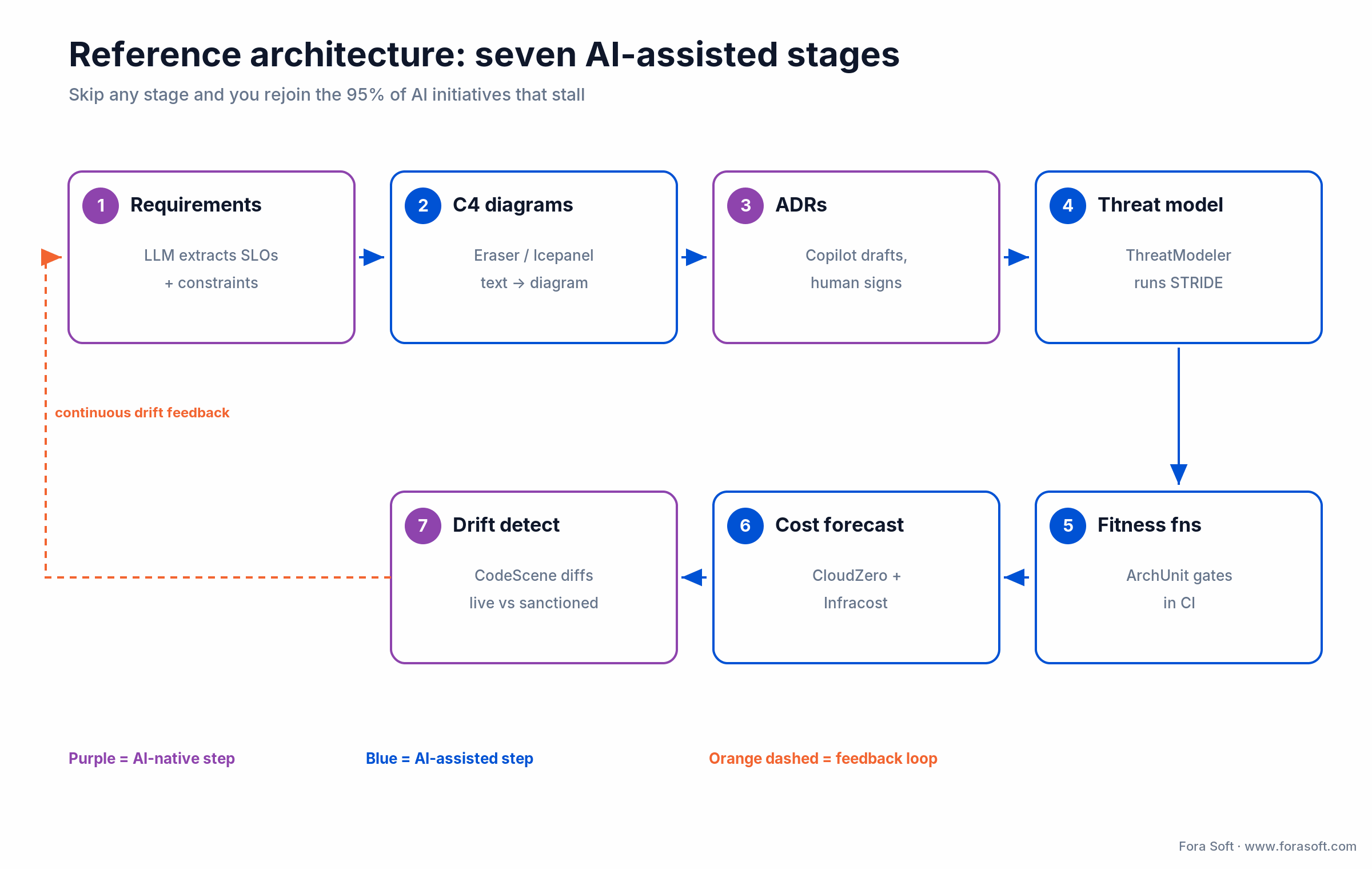
Figure 2. The seven stages form a loop — drift detection feeds the next round of requirements, so the diagram stays the code instead of a quarterly slide.
If you want the deeper real-time version of this discipline, our WebRTC production-architecture guide shows how the same loop applies to latency-budget enforcement at scale.
Cost model — the arithmetic behind $274k/year
Here’s the mid-market stack summed for 50 engineers, category by category: threat modeling $100,000 + FinOps forecasting $57,600 + supply chain $30,000 + fitness functions $30,000 + code review $20,880 + diagram generation $12,600 + load simulation $12,000 + ADR tooling $10,680. That totals $273,760/year. Divide by 50 engineers and 12 months and you land at about $456 per engineer per month — less than a single mid-level engineer’s fully loaded weekly cost, spread across the whole team.

Figure 3. Threat modeling dominates the budget; the four CI-gate categories together cost less than it. Lean, mid-market, and premium tiers sit below.
Lean stack, $200k–$250k/year. ArchUnit + NetArchTest + SonarQube Community + Copilot Pro + CloudZero + Snyk free tier + Eraser starter. Fine for 20–75 engineers in non-regulated domains. Mid-market, ~$274k/year. The matrix above — commercial tier on the high-impact tools, open source on the CI gates. Premium, $500k+/year. Full commercial across ThreatModeler, Endor Labs, and Structurizr Cloud, required for EU AI Act high-risk systems, PCI-level fintech, or IEC 62304 healthtech.
One prevented six-figure incident pays for the whole year. That’s the sentence that gets the budget approved, and it’s true more often than procurement expects. For a broader look at estimating this kind of spend, see our software cost estimation methods guide.
Not sure which tier your team actually needs?
Tell us your engineer count, cloud spend, and compliance exposure and we’ll map you to a lean, mid, or premium stack with real numbers — no upsell.
Mini case — a 12-week rollout after a $1M overrun
A streaming client we can’t name under NDA (about 45 engineers, several million monthly users) brought us in after a cloud-cost overrun north of $1M and a near-miss on EU data residency. Their architecture existed only as tribal knowledge and a year-old slide.
Over 12 weeks we stood up the mid-market stack: Eraser for C4, Backstage plus Copilot for ADRs, ThreatModeler for STRIDE, CloudZero and Infracost in CI, Snyk and Chainguard for supply chain, ArchUnit as gates, CodeScene for drift. Nothing exotic: the same categories in this guide, sequenced by risk.
By the end, cost-forecast accuracy on the month-one cloud bill went from roughly 60% to around 90%, ADR coverage on major decisions climbed from about a fifth to most of them, and the SonarQube drift score fell by more than half over six months. The honest caveat: those are one engagement’s numbers, not a guarantee — a healthy CI made the fitness-function work fast, and a broken pipeline would have doubled the timeline. Want a similar read on your stack? Book a 30-minute review.
Compliance — EU AI Act, NIST AI RMF, ISO/IEC 42001, SOC 2
EU AI Act. The timeline moved in 2026 and it’s worth getting right. Prohibited-practice rules (Article 5) have applied since 2 February 2025, and general-purpose model obligations since 2 August 2025. Under the Digital Omnibus agreed 7 May 2026, the heavy high-risk obligations were deferred: standalone Annex III systems now apply from 2 December 2027 and AI embedded in regulated products (Annex I) from 2 August 2028. That’s breathing room, not a reprieve. Traceability evidence comes from automatic logging (Article 12) and technical documentation (Article 11 / Annex IV): in practice, your ADRs, fitness-function logs, threat models, and deploy metadata. Fines still reach €35M or 7% of turnover for prohibited practices and €15M or 3% for other provider non-compliance. See the European Commission’s AI framework page for the primary text.
NIST AI RMF. The four-function framework — Govern, Map, Measure, Manage — maps cleanly to this stack: Govern is ADR plus policy-as-code, Map is C4 plus threat model, Measure is fitness functions plus CloudZero unit economics, Manage is drift detection plus runbooks.
ISO/IEC 42001. The 2023 AI-management-system standard; auditors accept ADR, Confluence, and SonarQube artifacts as evidence of control effectiveness.
SOC 2. 2026 auditors scrutinize ADR freshness and diagram-to-deployment drift under the change-management controls. Automated drift detection produces the continuous evidence a Type II report needs, instead of a screenshot taken the night before.
A decision framework — pick your first category in five questions
Answer these top-down. The first strong “yes” tells you where to spend first, so you don’t buy all eight categories in a panic.
1. Are you regulated? EU AI Act high-risk, IEC 62304, or SOC 2 Type II — start with threat modeling, ADRs, and drift detection, the compliance-visible categories. 2. Is cloud spend over $100k/month? CloudZero or Vantage pays back in the first quarter; under $20k/month, Infracost in CI is enough. 3. Is Copilot adoption above 70%? You’re ready for AI ADR authoring; under 30%, start with diagram generation instead.
4. Does IaC cover more than 80% of infra? Infracost and the Vantage Terraform provider are cheap wins. 5. Is the codebase polyglot? ArchUnit for JVM, NetArchTest for .NET, or SonarQube Architecture-as-Code as the only cross-language option.

Figure 4. Walk the questions top-down; the first “yes” names the category to buy first and the tool to buy in it.
Five pitfalls that kill AI architecture rollouts
1. Trusting the LLM’s draft. Copilot writes a plausible ADR that quietly contradicts a constraint from three decisions ago. Fix: attach every ADR to a fitness function that trips CI when a decision breaks a prior commitment.
2. Stale diagrams. C4 generated on day one is fiction by week six. Fix: continuous reverse-engineering from live infra, so the diagram is the code, not a quarterly slide.
3. Hallucinated patterns. LLMs invent designs that sound right for your stack and fall over at scale. Fix: keep a curated library of approved patterns and block novel suggestions at PR time unless an ADR approves them.
4. Missing constraints. The model doesn’t know your SLOs, cost ceiling, or residency rules unless you tell it. Fix: a machine-readable constraints file (YAML or JSON) that always rides in the LLM context.
5. Rules with no enforcement. An architecture rule that lives only in a wiki is a suggestion. Fix: every rule ships as an ArchUnit, NetArchTest, or SonarQube check that blocks merge on violation.
KPIs — what to measure from day one
Quality KPIs. Architecture drift score under 5% divergence from the sanctioned C4 (SonarQube or CodeScene, weekly); ADR coverage above 85% of major decisions within five business days; threat-model coverage at 100% of new services before launch.
Business KPIs. Cost-forecast accuracy within ±10% of the Infracost projection on the month-one bill; time-to-first-diagram from requirements to C4 Level 2 under two hours; supply-chain risk score trending down on a 30-day rolling window.
Reliability KPIs. Fitness-function violations blocking under 2% of PRs per week — higher means the rules are too tight, near zero means they’re meaningless; chaos-experiment recovery inside your stated regional-failover SLO.
Which industries ship real value in 2026
Fintech carries the heaviest triple-bind — PCI, SOC 2, and EU AI Act — so ThreatModeler, CloudZero, and Endor Labs are baseline, and annual architecture tooling often lands at $400k–$700k. HealthTech adds IEC 62304 and HIPAA, pushing teams toward supply-chain and threat-modeling stacks with data-masking on top.
Gaming, media, and video streaming — our home turf — get the most from cost forecasting, latency-budget fitness functions, and regional-failure chaos experiments. Automotive and ADAS lean on deterministic fitness functions for ISO 26262 regression. SaaS adopts FinOps first, because per-tenant profitability is the metric the board asks about.
Build, buy, or adapt?
MIT’s 2025 data settles most of this argument: buying from specialized vendors succeeded about 67% of the time, while internal builds succeeded roughly a third as often. So buy the compliance-heavy categories — threat modeling, supply-chain analysis, FinOps — where vendors have 5–10 years of domain content you won’t catch in 18 months.
Build only the domain-specific fitness functions and the constraints file, because only you know your SLOs and residency rules. Adapt the rest: Eraser plus your pattern library, Copilot plus your constraints file, Confluence AI plus your ADR templates. We usually help clients wire this together through AI integration and custom development rather than a rip-and-replace.
When not to adopt AI architecture tools yet
Honesty sells better than a pitch, so here’s when to wait. Under 10 engineers: tooling overhead beats the benefit — stay on the free tier (Copilot Pro, ArchUnit, Infracost free) until you feel the pain. No CI/CD: fitness functions without automated gates are just wiki entries; fix the pipeline first.
No cloud-spend visibility: CloudZero and Vantage add cost without value if you can’t tag workloads per team. A monolith with no service boundaries: C4 generation and drift detection only pay back once you’ve made decomposition decisions worth tracking. Get those foundations right, then come back.
A 12-week deployment playbook
Weeks 1–3, foundation. Stand up Copilot Pro+ for architects, Confluence AI for ADRs, and Eraser for diagrams. Write the constraints file. Baseline the drift score so you have a before-number.
Weeks 4–6, fitness plus cost. Wire ArchUnit, NetArchTest, or SonarQube into CI, and plug Infracost into PR comments. Your first automated rule violations get caught here — expect a few surprises.
Weeks 7–9, threat model plus supply chain. Run ThreatModeler on one new service, deploy Snyk and Chainguard across your top five repos, remediate the first STRIDE findings.
Weeks 10–12, drift plus scale. CodeScene hotspot analysis on the full codebase, the first AWS FIS chaos experiment, and a live CloudZero unit-economics model. Exit targets: drift under 5%, ADR coverage above 85%, forecast accuracy within ±10%. If your CI wasn’t healthy going in, double the calendar — that’s the honest number.
Want the 12-week plan scoped to your codebase?
We deliver fixed-scope rollouts: vendor picks, CI integration order, KPI targets, weekly checkpoints. You keep the plan whether or not we run it.
FAQ
Do I still need human architects if I have Copilot and Eraser?
Yes. AI is strong at drafting plausible designs and weak at knowing your SLOs, cost ceiling, and regulatory constraints unless you feed them in explicitly. One principal engineer with AI tools now covers what four did in 2022, but the senior judgment layer stays human.
What’s the minimum viable AI architecture stack?
GitHub Copilot Pro, ArchUnit or NetArchTest, SonarQube Community, Infracost, and Snyk. Under $50k/year for 50 engineers, and it covers roughly 70% of the value of the full $274k stack.
How does the EU AI Act affect architecture documentation?
High-risk obligations now apply from 2 December 2027 (Annex III) and 2 August 2028 (Annex I) after the 2026 Digital Omnibus deferral. The evidence you keep is unchanged: ADRs, automatic logs (Article 12), and technical documentation (Article 11 / Annex IV). Backstage ADRs plus SonarQube change history is the package auditors accept.
Can AI-generated ADRs pass an audit?
Yes, with review. Auditors care that a decision is traceable to a person and a date, not that a human typed the prose. Copilot drafts, a human signs, git commits — the audit trail stays intact.
How accurate are cost forecasts from Infracost and CloudZero?
Infracost IaC forecasts land around ±15% on a first pass and tune to ±5% within two quarters. CloudZero unit-economics models reach about ±3% once workloads are tagged consistently. Both depend entirely on clean tagging.
Is AI-generated architecture code actually safe to ship?
Not by default. Endor Labs (2025) found 80% of AI-suggested dependencies carry risk, and studies put the vulnerability rate of AI-generated code at roughly 25–33% depending on language. Ship it only behind supply-chain scanning and fitness-function gates.
Which fitness-function tool should I start with?
JVM shop: ArchUnit. .NET shop: NetArchTest. Polyglot: SonarQube Architecture-as-Code. All three ship working examples, and you can have your first three rules in CI within a couple of days.
How does Fora Soft price architecture engagements?
Fixed-scope 12-week engagements, with license fees passed through at cost. We scope to your vendor count and compliance exposure rather than a headcount rate. Book a scoping call and we’ll size it.
What to read next
AI QA
AI in Quality Assurance: the 9-layer buyer’s guide
The sibling stack for testing — nine categories, cost model, DORA benchmarks.
AI TESTING
AI-Driven Testing in 2026: tools, costs, rollout
mabl, Testim, Diffblue, Applitools compared with real cost math.
ESTIMATION
Software Cost Estimation: 5 methods with spreadsheets
How to price the build behind the architecture you just designed.
SERVICES
AI Integration Services
How we wire this stack into production without technical debt.
Ready to build an AI-native architecture discipline?
AI in software architecture isn’t one tool. It’s eight categories that turn the “95% of pilots fail” number into a rounding error at your company. Diagram generation, ADR authoring, threat modeling, FinOps forecasting, supply-chain analysis, fitness functions, code review, and load simulation each have a clear 2026 leader, a price, and a payback horizon. Buy the compliance-heavy ones, build your constraints file, adapt the rest.
We’ve shipped architecture programs for video platforms, ML pipelines, and SaaS since 2005. We know which vendors integrate cleanly, which overlap wastefully, and which artifacts auditors actually read. If you’re deciding where to start, book a 30-minute review and we’ll leave you with a sequenced plan the same day.
Get a same-day architecture-stack plan
We audit your CI/CD, cloud spend, and compliance exposure, then hand you a vendor-by-vendor recommendation you can act on immediately.

