


Key takeaways
• Prompt engineering writes the instruction. Context engineering decides what the model can see when it reads it. One is a sentence you author; the other is a system that assembles a context window before every call.
• Effective context is much smaller than the advertised window. On the NoLiMa benchmark (LMU Munich and Adobe Research, ICML 2025), 11 of 13 models that claim 128K tokens or more fall below half their short-context score by 32K.
• The money is in ordering and pruning, and we show the arithmetic. One 10-turn agent session drops from $0.678 to $0.232 — 66%, or 57–63% once you charge for the compaction call itself — with no model change, at July 2026 Claude Sonnet 5 list prices.
• Half the statistics quoted in this field do not survive a check. The famous “19% slower” study has been superseded by its own authors, and the “quality dies past 50K tokens” rule of thumb appears nowhere in the report it is credited to.
• For a single-call feature, this is over-engineering. We give you the five-question test that says when to skip it — and we would rather tell you that on a call than sell you a project you do not need.
Written by the Fora Soft engineering team. Every price, benchmark and study in this article was checked against its primary source on 18 July 2026. Where a figure is vendor-reported rather than independently replicated, we say so.
Why Fora Soft wrote this playbook
Fora Soft has shipped 250+ software products since 2005 with 50+ in-house specialists, and we have been putting AI features into client products since 2018 as part of our generative AI development work. Since 2024 every delivery runs through our Agent Engineering practice: project memory files, scoped permissions, model routing, and MCP servers wired into the tools a team already uses. That practice is where the numbers in this article come from, alongside published research we cite in full.
We wrote this because the context engineering vs prompt engineering conversation online is almost entirely qualitative. We read the ten pages ranking for that phrase before writing this one. Not one of them does arithmetic. Nobody shows what a session costs, what caching actually saves, or what happens to your latency budget when retrieval runs before every call. Those are the first three questions a CTO asks, so they are the ones we answer here.
One more thing worth saying up front: we sell engineering time, not a vector database. Most of the articles on this topic are published by companies whose answer to “what is context engineering” happens to be the product they sell. We have no index to defend. When plain files beat a knowledge graph, we say so. You can see the same bias-free posture in our AI software development case study and in the BrainCert platform we build and run, which handles 500M+ classroom minutes.
Your first AI rollout underdelivered?
Thirty minutes, one engineer, your actual stack. You leave with a context audit and the two changes with the best payback — whether or not you hire us.
Context engineering vs prompt engineering
Prompt engineering is the craft of writing the instruction. Context engineering is the discipline of deciding what information reaches the model, in what order, and at what cost, on every single call. A prompt is a string you author once. A context window is a payload your system assembles at runtime out of system instructions, tool schemas, retrieved documents, stored memory, conversation history, and the user’s request. Prompt engineering answers “how should the model behave?” Context engineering answers “what is the model allowed to know when it behaves?”
The relationship is containment, not succession. Prompt engineering sits inside context engineering. Anyone telling you prompting is dead is selling something. What changed is that in a multi-step agent, the prompt is maybe 5% of the tokens the model reads, so tuning it in isolation moves almost nothing.
Andrej Karpathy popularised the term in June 2025, and Drew Breunig published the sharpest version of the distinction the same week: when prompts become part of software rather than something a human types, they are context. He also refuses the hierarchy, and he is right to — neither one is the upgrade of the other. Anthropic’s engineering write-up on context gives the mechanical reason the distinction matters — attention is a finite budget, and every token you add competes with every other token for it.
Reach for prompt engineering when: your feature is one model call, the inputs are bounded, and you can enumerate the failure modes on a whiteboard. Classification, extraction, rewriting, a fixed-format summariser. Adding a retrieval layer here buys you latency and a new failure surface, and nothing else.
Side by side: what actually changes
The two practices differ on more than scope. They fail differently, they are debugged differently, and they have opposite cost curves. This is the table we wish someone had handed us in 2024.
| Dimension | Prompt engineering | Context engineering |
|---|---|---|
| The question it answers | How should the model behave for this task? | What may the model see, in what order, at what price? |
| Where it lives | A string, a template, a prompt file | An assembly pipeline that runs before every call |
| When it is decided | Write time, by a human | Run time, by code |
| Typical failure | Ambiguous instruction, wrong format | Right instruction, wrong or missing evidence; stale memory; tool flood |
| How you debug it | Read the prompt, reword, re-run | Log the assembled window, diff it against a passing run |
| Cost curve | Flat — a prompt costs the same on turn 1 and turn 50 | Quadratic if untouched: history re-sent every turn compounds |
| What good looks like | One clear instruction, one worked example | Small stable prefix, ranked retrieval, compaction trigger, permission scopes |
| Who owns it | Whoever writes the feature | Platform or backend, with one named owner |
The row that surprises people is the cost curve. A prompt is a fixed cost per call. Conversation history is not: turn 10 re-sends everything from turns 1 through 9. That is why an agent that felt cheap in a demo produces an invoice nobody predicted.
Why good prompts break in agents
A prompt that works perfectly at 2,000 tokens can fail at 40,000 tokens without a single word changing, because model accuracy degrades as input grows. This is the finding that makes context engineering an engineering problem rather than a style preference, and it is measurable.
The cleanest peer-reviewed evidence is NoLiMa (LMU Munich and Adobe Research, ICML 2025). It tested 13 models that all advertise 128K tokens or more. At 32K tokens, 11 of the 13 scored below half their own sub-1K baseline. On NoLiMa, GPT-4o fell from 99.3% accuracy at under 1,000 tokens to 69.7% at 32,000 tokens. The window is real; the comprehension across it is not uniform.
This is not a 2025 artifact that newer models fixed. OpenAI publishes the same shape about its own current models. In the GPT-5.6 launch post (July 2026) it reports that on the MRCR v2 8-needle retrieval test the flagship drops from 91.5% in the 256K–512K band to 73.8% in the 512K–1M band. Vendors are not hiding this. Buyers just do not read the benchmark tables.
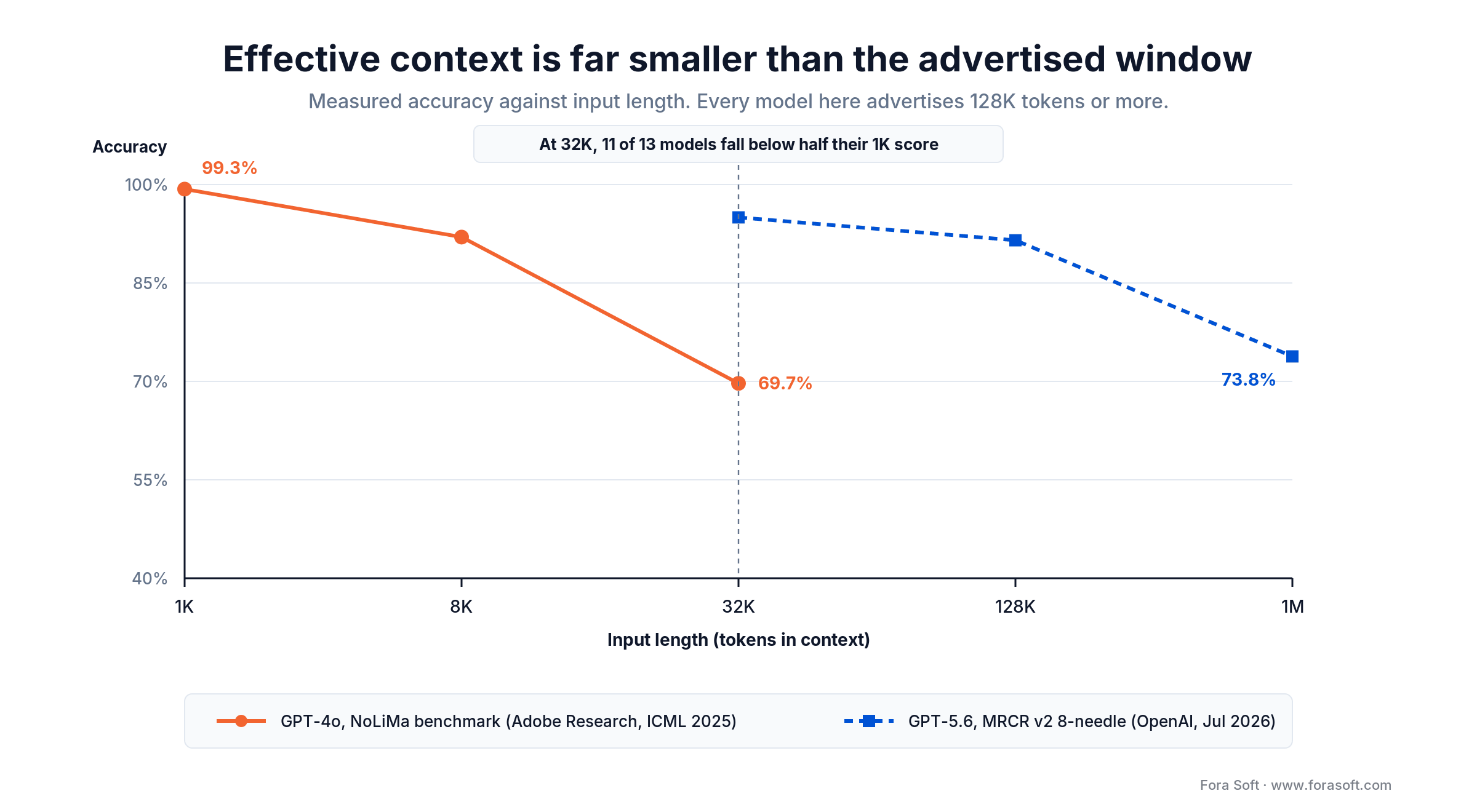
Figure 1. Two independent measurements, a year apart, showing the same curve. Advertised window size is a capacity number, not an accuracy guarantee.
Chroma’s context rot report (July 2025) ran six experiments across 18 models and found degradation is non-uniform and task-specific rather than a cliff. Its most useful result is counterintuitive: shuffling the haystack into incoherence improved performance across all 18 models. Coherent-but-irrelevant surrounding text is worse than noise, because it competes for attention. A separate study by Laban and colleagues (arXiv 2505.06120) found that sharding a single request across turns costs about 39% of performance on average. The picture is consistent: how you package context matters as much as what is in it.
Reach for context engineering when: a single user task triggers more than one model call, the model reads your data or calls your tools, and sessions run long enough that history stops being a rounding error. Below that bar, you are buying complexity you cannot yet use.
The four moves that do the work
Every technique in this field reduces to four operations on the context window. The taxonomy comes from LangChain and it has held up better than anything published since: write, select, compress, isolate.
1. Write. Put information somewhere other than the context window — a scratchpad file, a memory store, a database row — so it survives the session without occupying tokens in it. The test of a good write is that you can restart the process and lose nothing that mattered.
2. Select. Retrieve only what this turn needs. Ranking is the whole game. Ten strong documents beat a hundred plausible ones, and a hundred plausible ones are actively worse than ten, per the degradation curve above. The same applies to tools: model tool-selection accuracy falls as the tool count climbs, so expose the subset that this agent actually uses.
3. Compress. Summarise the conversation when it crosses a threshold, keeping the decisions and discarding the transcript. Anthropic calls this compaction. In Claude Code it keeps architectural decisions, unresolved bugs and implementation details while discarding redundant tool outputs and messages, then restarts the session with that summary plus the five most recently accessed files. Pick a trigger (token count or turn count), not a vibe.
4. Isolate. Give a sub-task its own clean window and return only the conclusion. Anthropic reports that a sub-agent burns tens of thousands of tokens and hands back 1,000–2,000. Their multi-agent research system beat a single-agent Opus 4 baseline by 90.2% and used roughly 15× the tokens of ordinary chat — though that was an internal research eval with an Opus lead and Sonnet sub-agents, so read it as a direction rather than a number. Isolation buys accuracy with money. Know which one you are short of.
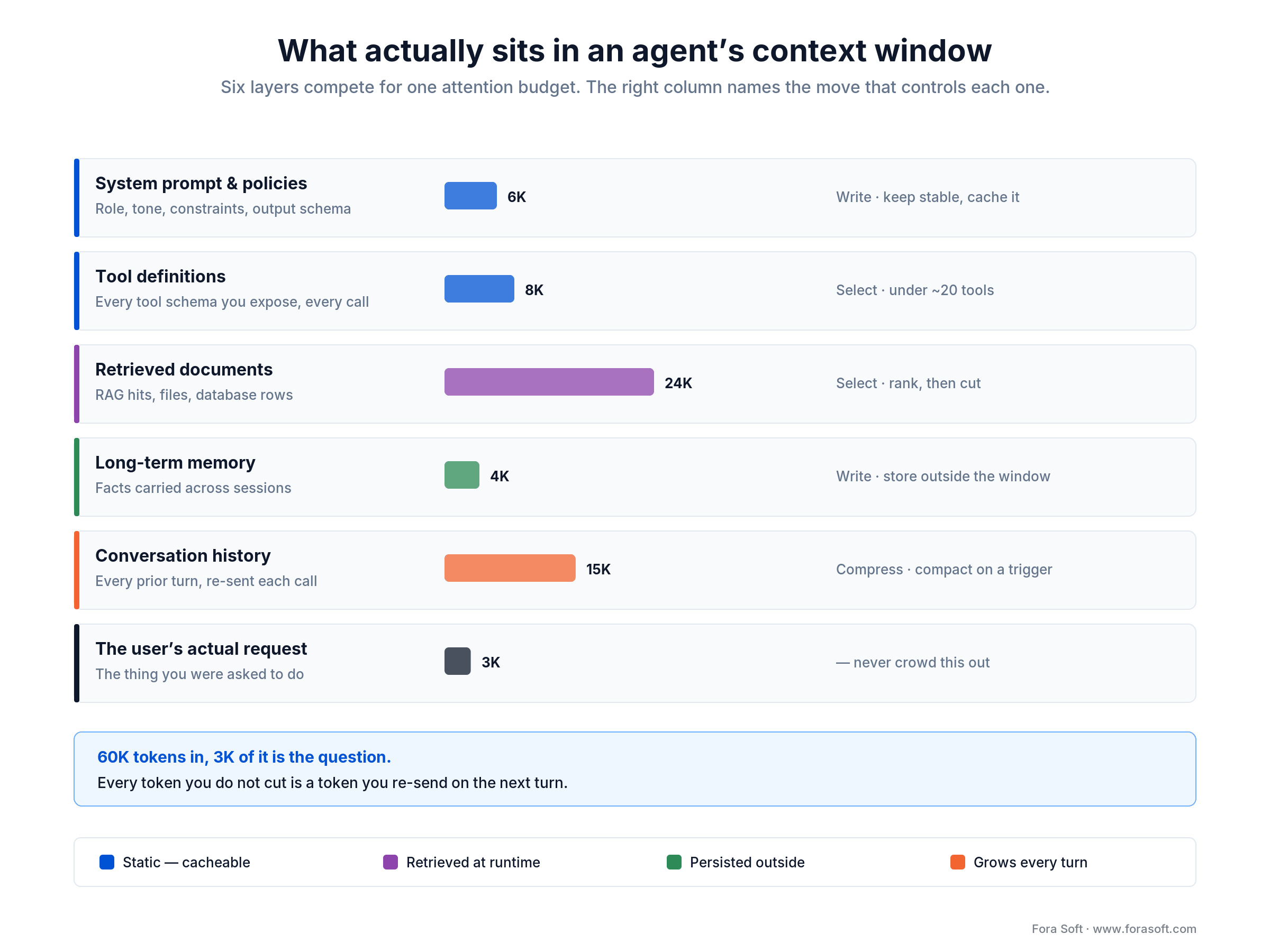
Figure 2. A 60K-token window where the actual question is 3K of it. The right column names which of the four moves controls each layer.
The figure above is the version of this we sketch on a whiteboard in week one of an engagement. The point it makes fastest: retrieval and history together are usually two thirds of the bill, and both are controllable. The system prompt everyone spends their afternoon tuning is 10%.
Reach for isolation when: a sub-task is verifiable on its own (a search, a lint pass, a test run) and its intermediate reasoning has no value to the parent. Do not isolate work whose partial state the main agent needs — you will pay twice and lose the thread.
The cost math nobody publishes
Ordering and pruning a context window cuts the cost of a typical 10-turn agent session by roughly 57–66% at July 2026 prices, with no change of model and no loss of answer quality. Here is the complete arithmetic, because we could not find it published anywhere else on this topic. Take a support-triage agent: a 10-turn session, a 20,000-token static block (system prompt, policies, tool schemas), 6,000 tokens of retrieval per turn, history growing about 1,200 tokens per turn, and 500 tokens of output per turn.
Prices are Claude Sonnet 5 as listed on Anthropic’s pricing page on 18 July 2026: $2.00 per million input tokens, $10.00 output, cache write $2.50, cache read $0.20. Two caveats before the numbers. That $2/$10 is introductory and rises to $3/$15 on 1 September 2026. And Sonnet 5, Opus 4.8 and Fable 5 use a newer tokenizer that produces roughly 30% more tokens for the same text than earlier Claude models — Haiku 4.5 still uses the old one. Compare cost per completed task, never price per token.
Configuration A: re-send everything
Input tokens = (10 × 20,000 static) + (10 × 6,000 retrieval) + (1,200 × 45 history) = 200,000 + 60,000 + 54,000 = 314,000 tokens. The 45 is the sum of turns 0 through 9: turn 10 carries nine turns of history behind it.
Cost = 314,000 ÷ 1,000,000 × $2.00 = $0.628 input, plus 5,000 ÷ 1,000,000 × $10.00 = $0.05 output. $0.678 per session.
Configuration B: cache the static block
Write the 20,000-token prefix once at 1.25× ($0.05), read it nine times at 0.1× (180,000 ÷ 1,000,000 × $0.20 = $0.036). The remaining 114,000 dynamic tokens stay at full price ($0.228). Output unchanged. $0.364 per session, 46% off, one afternoon of work.
Configuration C: also select and compact
Rank retrieval down from 6,000 to 2,000 tokens per turn, and compact history at turn 6 so it restarts near 800 tokens. Dynamic input falls to 20,000 + 28,000 = 48,000 tokens ($0.096). $0.232 per session — 66% below where we started, same model, same answers.
Two honest deductions from that headline. The compaction step is itself a model call: summarising the accumulated history costs roughly $0.02 to $0.06 depending on whether the static prefix is cached for it, which moves configuration C to about $0.25–$0.29 and the saving to 57–63%. Re-ranking retrieval down to 2,000 tokens costs something too, usually a small model call or an embedding lookup. The conclusion holds; the round number does not. If an article shows you a cost model without its own overheads in it, that is the first thing to ask about.
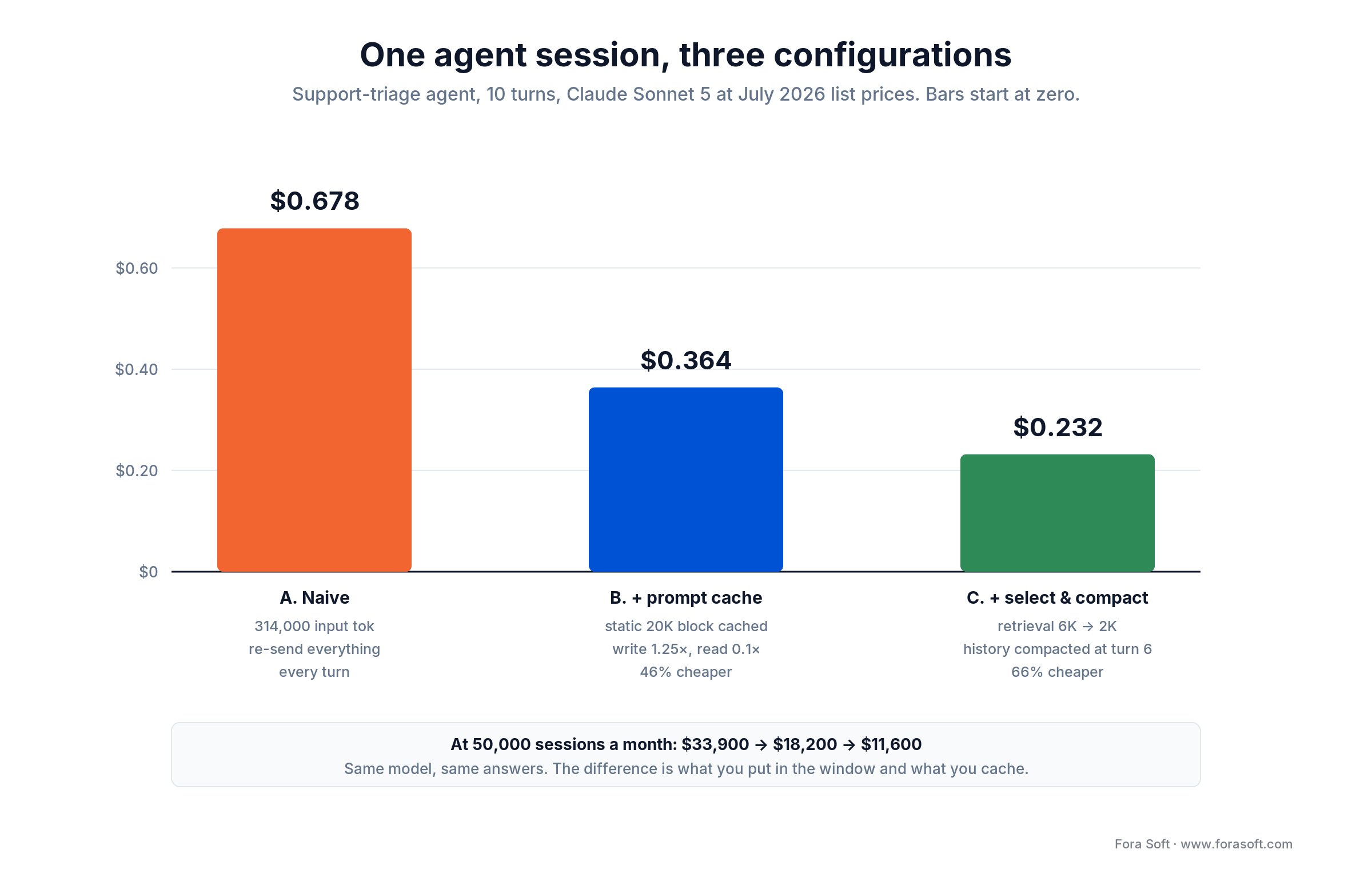
Figure 3. The same session under three configurations, before charging for the compaction call. At 50,000 sessions a month that is $33,900 versus $11,600, or roughly $268,000 a year.
At 50,000 sessions a month the spread is $33,900 against $11,600. Over a year, about $268,000. That is a platform engineer and change, recovered by ordering the payload correctly and throwing away tokens nobody reads. We are not aware of another article on this topic that shows this calculation, which says more about the genre than about the difficulty of the math.
Want this arithmetic run on your workload?
Send your turn count, retrieval size, and monthly volume. We send back a one-page cost model with the before and after, and the three changes ranked by payback.
The two costs nobody budgets
Context engineering has a bill of its own, and it lands in two places: cache hit rate and latency. Both get skipped in every write-up we read, and both have bitten us on real projects.
The cache tension
Cached reads cost 10% of standard input at Anthropic, OpenAI and Google alike. That discount is the single largest lever available to you, and it depends on something fragile: caching works on a stable prefix. Change one token near the front and everything behind it is invalidated.
Which puts just-in-time retrieval in direct conflict with caching. If your assembly pipeline puts fresh retrieval or a timestamp at the top of the window, your cache hit rate is zero and you are paying full price for a system prompt that never changed. Order matters more than most teams believe.
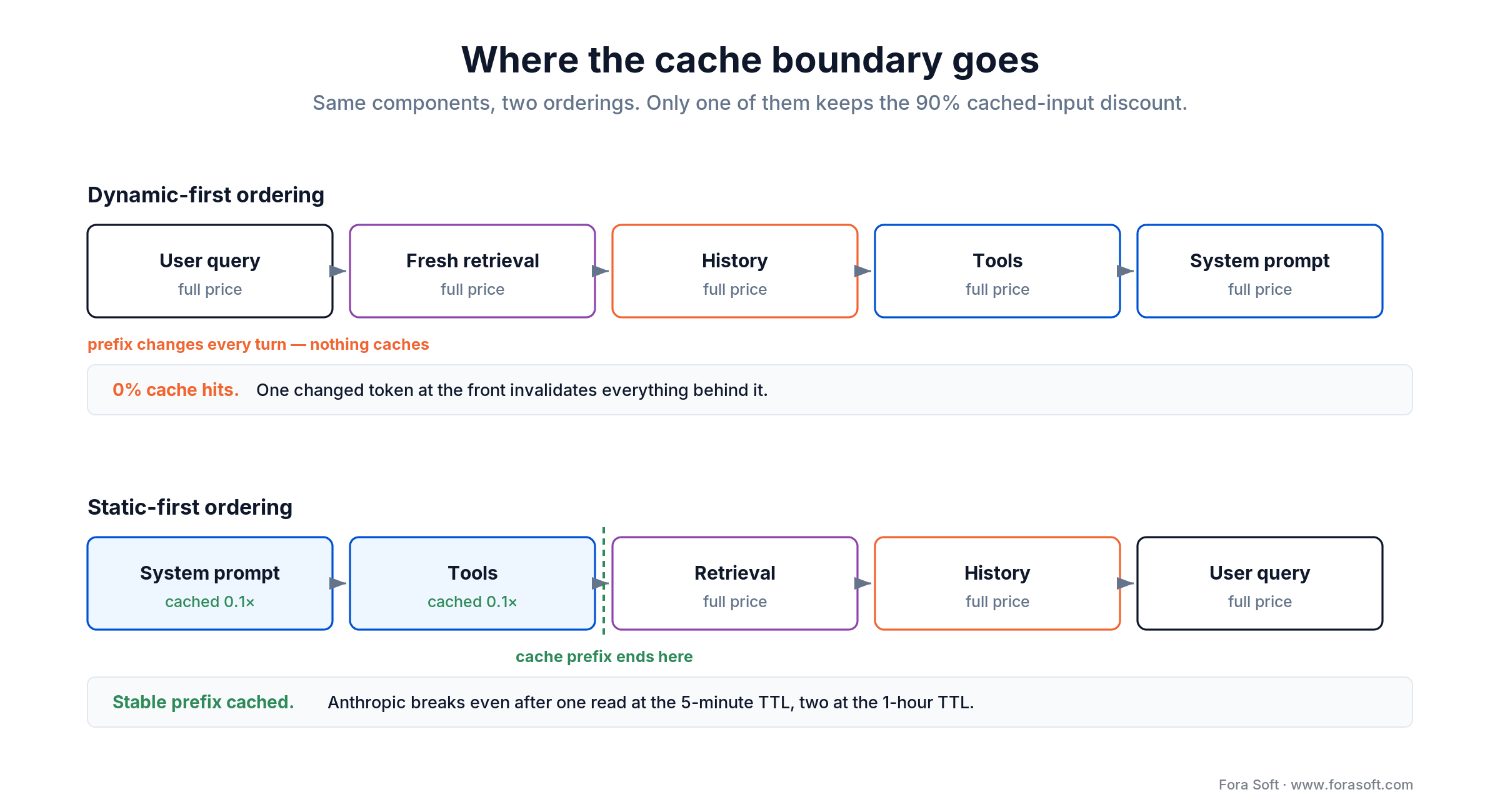
Figure 4. Same six components, two orderings. Static first, dynamic last — the cache prefix has to end somewhere, and you choose where.
The read discount is not the whole bill, and this differs by vendor. Anthropic charges 1.25× base input to write a 5-minute cache entry and 2× for a 1-hour one. OpenAI documents a 1.25× write multiplier on its pricing page. Google charges no write fee but bills cache storage per token-hour, so a large cache held overnight costs money whether or not anyone reads it. Budget the write and the storage, not just the read.
Anthropic’s own break-even is worth memorising: the 5-minute cache pays for itself after one read, the 1-hour cache after two. If your sessions are bursty, the short TTL wins; if a user comes back after lunch, it does not. This is a real decision with a real number attached, and it takes ten minutes to get right.
The latency you added
Context assembly runs before every model call, on the critical path. A vector search, a permissions check, and a re-rank is three network hops before a single token is generated. We budget it explicitly: retrieval p95 under 150 ms for anything a human is waiting on, and no more than two sequential retrieval hops in an interactive path. Push past that and you have traded a cost problem for a UX problem, which is a worse trade than it sounds.
Reach for a longer cache TTL when: the same user returns within the hour and your prefix is genuinely stable — support conversations, coding sessions, research tasks. Bursty one-shot traffic should stay on the 5-minute TTL and pay 1.25× instead of 2× on writes.
Context engineering for coding agents
The highest-value place to start is your repository, because the context is already written down — it is just scattered across tribal knowledge and stale wikis. Coding agents read project memory from files: CLAUDE.md, AGENTS.md, .cursorrules, per-folder rule files. Same discipline in every tool, different filename.
A good project memory file is short. Ours run 60 to 120 lines and cover six things: the stack with versions, the build and test commands, directory conventions, the two or three architectural decisions that constrain everything else, what the agent must never touch, and how to verify a change worked. That last one earns its place twice over — an agent that can run your tests self-corrects, and one that cannot will hand you plausible garbage.
Things we have learned to leave out: anything the agent can read from the code, anything that changes weekly, and long prose explaining why a decision was made. Stale memory is worse than no memory, because the agent trusts it and makes confident wrong moves. We review project memory on every architecture change, and delete twice as often as we add.
Per-folder rules are where the payoff is. Frontend rules load for .tsx files, infrastructure rules for Terraform, and nothing loads for files it does not apply to. Conditional activation is the difference between a rules file that helps and a rules file that becomes noise the model learns to skim.
The measurable payoff shows up first in test generation and bug investigation, which is where we point teams starting out. Our write-ups on AI for QA pain points and AI testing optimization go deeper on both.
Reach for per-folder rules when: your repo has more than one runtime or framework and the conventions genuinely differ between them. A single-stack service with 40 files does not need this — one project memory file covers the whole surface.
Mini case: a Fora Soft delivery
Situation. A mid-sized product build: NestJS microservices on MongoDB, a React Native client, four engineers of whom two were senior. The team had Claude access and used it as a chat window. Their own estimate of the benefit was “maybe 10%”, and sprint velocity showed nothing you could distinguish from noise.
What we changed, week one. A 60-line CLAUDE.md with stack, build commands, conventions, and the three architectural constraints that mattered. Per-folder rules for backend, mobile, and shared types. A Linear MCP server so the agent could read tickets and open draft PRs. Permissions locked to read-everywhere, write-only-inside /src, and never /infra or .env. Two days of work, one engineer.
What we measured, weeks two through six. PR throughput rose about 35%. Median bug-investigation time on production issues went from 3.5 hours to 1.4 hours. The agent found a session-data leak on logout, fixed an OAuth flow in the desktop wrapper, and moved filtering from client to server, one ticket each.
What that measurement is not. There was no control group, the team also adopted a faster CI test suite that quarter, and six weeks is short enough that novelty effects are real. We believe the direction and we are not going to pretend the 35% is a clean causal estimate. If someone quotes you a precise productivity multiplier from an uncontrolled six-week window, including us, treat it as a direction and not a number. Want the same audit run on your repo? Book 30 minutes and bring the codebase.
Failure triage: symptom to fix
Taxonomies of context failure are everywhere. Runbooks are not. This is the table we actually use when an agent starts behaving badly, ordered by how often each cause turns out to be the real one.
| Symptom you observe | Likely cause | Diagnostic you can run today | Fix |
|---|---|---|---|
| Confident answer, wrong facts | Retrieval missed; model filled the gap | Log the assembled window; is the source document in it? | Fix ranking before you touch the prompt |
| Was right at turn 3, wrong at turn 15 | History crowding out the instruction | Re-run turn 15’s question in a fresh session | Add a compaction trigger |
| Ignores a rule it followed yesterday | Stale or contradictory memory | Diff the memory file against current architecture | Delete the contradiction; memory is code |
| Picks the wrong tool | Too many tools exposed | Count tool schemas in the window | Cut to the subset this agent uses |
| Repeats a failed action in a loop | Long-horizon attention drift | Check token count at the turn it started looping | Isolate the sub-task into its own window |
| Cost per session climbing week over week | Prefix instability killing cache hits | Pull cache-read vs input token ratio from billing | Move dynamic content behind the static block |
| Slow before the first token appears | Sequential retrieval on the critical path | Trace time from request to first model call | Parallelise hops or pre-retrieve |
One habit is worth more than the whole table: log the fully assembled context window for every call in staging. Most teams log the prompt and the response and wonder why they cannot reproduce failures. The window is the input. If you are not storing it, you are debugging blind.
The security hole in retrieval
Every retrieval source, memory store, and tool output is untrusted input that lands in the same window as your instructions, and the model cannot reliably tell them apart. This is the part of context engineering that nine out of ten articles skip entirely, and it is the first thing a security reviewer will ask about.
Simon Willison’s lethal trifecta is the clearest framing: risk becomes acute when a system has access to private data, exposure to untrusted content, and a way to communicate externally. An agent that reads your database, ingests a support ticket a stranger wrote, and can call an HTTP tool has all three. The ticket text is now instructions.
What we do about it, in order of how much it buys you:
- Break the trifecta. If untrusted content is in the window, remove the external communication channel for that call. An agent that can read the internet should not also hold write credentials.
- Mark provenance in the window. Retrieved content goes inside explicit delimiters that say where it came from and that it is data, not instruction. Not a guarantee, but it measurably reduces naive injection.
- Scope tools, not just files. Read permissions everywhere is fine. Write, deploy, migrate, and anything touching billing require a human in the loop, per call.
- Keep secrets out of the window entirely. A secrets manager with token-scoped reads. Never in project memory, never in an MCP response.
- Log every tool call with its arguments. You will need it the first time something goes sideways, and you will not be able to reconstruct it after the fact.
Reach for a full permission review when: your agent can both read data a customer would sue you over and take an action that reaches the outside world. That combination is where an ordinary prompt-injection experiment becomes an incident report.
How to prove it actually worked
To prove a context change worked, build a golden set of 50–100 real tasks, freeze everything except one pipeline component, score both the outcome and the trajectory, and record cost and latency next to accuracy. If you cannot show the before and after, you did not do engineering — you did redecorating. Every article in this field says measure; none say how. The method below takes about a day to set up.
Build a golden set of 50 to 100 real tasks. Pull them from production logs, not from imagination. Include the ones that currently fail; a benchmark of tasks you already pass measures nothing. Each task needs a task input and a checkable outcome.
Freeze everything, change one thing. Same model, same temperature, same golden set. Vary exactly one component of the context pipeline — retrieval depth, compaction threshold, tool count. Changing two at once is how teams end up with a result they cannot explain or defend.
Score two layers. Outcome (did it produce the right answer) and trajectory (did it take a sane path). An agent that reaches the right answer after eleven tool calls and two loops is a cost problem waiting to happen, and outcome-only scoring will not show it.
Record cost and latency alongside accuracy, always. A change that lifts accuracy two points and triples cost is usually a bad trade, and you will only know if the three numbers sit in the same table. Run each config three times — model output varies, and a two-point difference on a single run is noise.
Reach for an evaluation baseline before you start when: the agent is going in front of customers or into a regulated workflow. Retrofitting a baseline after you have already changed the pipeline is guesswork, and you only get one chance at the “before” measurement.
Five numbers you will see quoted
While researching this article we checked every statistic the ranking pages cite. Most trace back to a secondary source, and several say something different from what they are quoted as saying. Here they are, with what the primary source actually reports.
1. “AI makes experienced developers 19% slower.” Real study — METR’s July 2025 randomised trial, 16 developers, 246 tasks on mature repos. But METR published a follow-up in February 2026 and put an out-of-date banner on the original. Re-testing part of the original cohort found an 18% speedup, and newly recruited developers came in at 4%. Both estimates carry intervals that cross zero — METR reports them as −18% and −4% in its own convention, where a negative number means faster, with ranges of −38% to +9% and −15% to +9% respectively — and METR itself calls the new data an unreliable signal, partly because 30–50% of developers now decline tasks they would have to do without AI. The right reading is not “AI is 18% faster.” It is that the famous 19% has been superseded by its own authors and nothing precise has replaced it.
2. “Quality degrades past about 50K tokens.” Usually credited to Chroma’s context rot report. That report contains no token threshold at all. Its entire argument is that degradation is non-uniform, model-specific and task-specific rather than a single cliff edge. The 50K number appears to be folklore that acquired a citation.
3. “Correctness collapses at 32K tokens.” The study is real, the word “collapses” is not. Databricks (2024) wrote that performance starts to decrease after 32K, and its own numbers show a slide rather than a cliff: Llama 3.1 405B peaks around 16K, sits a few points lower at 32K, holds roughly flat to 64K, then falls hard from there. It also tested 13 models, not one. Quote it as a slow slide that turns steep past 64K on 2024 models, or use NoLiMa and current vendor numbers instead.
4. “Copilot makes developers 55% faster.” From GitHub’s own controlled experiment, and the point estimate is accurate. The context is that it was a single synthetic task — build an HTTP server in JavaScript — with a 95% confidence interval spanning 21% to 89%. A real result about one artificial task, quoted as a general productivity multiplier.
5. “95% of generative AI pilots fail.” From a preliminary MIT NANDA report built on 52 interviews, 153 surveys and 300 deployments. Its bar for success is a marked and sustained productivity or P&L impact, and individually adopted chatbots are explicitly counted out because they lift personal productivity without showing up in the P&L. That is a defensible definition, but it is a much narrower claim than “95% of AI fails”, and the report was never peer reviewed. Thin denominator, loud headline. We would not build a business case on it in either direction.
The four findings we do lean on, because they survive checking: DORA 2025 (90% of ~5,000 practitioners use AI at work, 30% report little or no trust in its code, throughput now correlates positively while delivery stability still does not), Stack Overflow 2025 (84% using or planning to use AI, and 66% naming “almost right, but not quite” as their top frustration), GitClear’s 2026 analysis of 623 million changes (copy-paste up from 9.4% to 15.7% of edits since 2022 while refactoring fell), and the long-context degradation curve. Notice they do not all point the same way. That is what real evidence looks like.
Picking models in July 2026
There is no best model, only a best model for a workload at a price. Prices below are list, taken from vendor documentation on 18 July 2026, per million tokens.
| Model | Input / output per 1M (18 Jul 2026) | Cached read | Where it earns its price |
|---|---|---|---|
| Claude Fable 5 | $10 / $50 | $1.00 | Hardest agentic coding; the frontier scores |
| Claude Opus 4.8 | $5 / $25 | $0.50 | Long-horizon agents where a retry costs more than the token |
| Claude Sonnet 5 | $2 / $10 * | $0.20 * | The default for production agents; * intro rates to 31 Aug 2026, then $3 / $15 |
| Claude Haiku 4.5 | $1 / $5 | $0.10 | Classification, routing, extraction at volume |
| GPT-5.6 Sol | $5 / $30 | $0.50 | OpenAI flagship for mixed reasoning and tool use; 272K premium applies |
| GPT-5.6 Terra | $2.50 / $15 | $0.25 | Mid tier; 272K premium applies |
| GPT-5.6 Luna | $1 / $6 | $0.10 | Cheapest GPT-5.6; routing and extraction; 272K premium applies |
| Gemini 3.5 Flash | $1.50 / $9 | $0.15 | Multimodal and very long single-pass summarisation |
| Open weights (Llama, Qwen, DeepSeek) | Your hardware | n/a | Data residency, on-prem, regulated workloads |
Three things that are easy to get wrong right now. Anthropic charges the same rate across the full 1M window on current models, so the long-context premium many teams still budget for is gone there, while OpenAI still applies one. OpenAI says Terra and Luna roughly correspond to the old mini and nano tiers, but they are not renames — Terra is over 3× the price of gpt-5.4-mini and Luna 5× nano, so a budget built on the old tier prices will be wrong. On all three GPT-5.6 models, crossing 272K tokens reprices the whole request at 2× input and 1.5× output, not just the overage. And batch processing is 50% off at all three vendors, which matters more than model choice for anything that does not need an answer this second.
On benchmarks: SWE-bench Verified crossed 80% in November 2025 and current vendor-reported scores run from the high 80s to 95%. Treat that top figure as vendor-reported rather than independently replicated. The more telling signal is that OpenAI’s July 2026 GPT-5.6 launch post does not report SWE-bench Verified in its benchmark table at all, reporting SWE-Bench Pro and Terminal-Bench instead. When a benchmark saturates, the frontier stops citing it. Pick models on your own golden set, not on a leaderboard.
Not sure which model your workload should be on?
Send us the task profile, latency budget and volume. You get back a one-page recommendation with cost per task, in plain English, from engineers who run these in production.
A three-week rollout plan
This is the sequence we run on client projects. It is deliberately front-loaded with measurement, because the most common failure is finishing the work with no way to prove it mattered.
| Phase | Days | What comes out of it |
|---|---|---|
| Baseline first | 1–2 | Golden set of 50–100 real tasks, current accuracy, cost and latency recorded |
| Project memory | 1 | One memory file under 120 lines: stack, commands, conventions, constraints, verification |
| Ordering and caching | 1 | Static prefix first, dynamic last; cache TTL chosen; cache-hit ratio in the dashboard |
| Retrieval and ranking | 2–3 | Retrieval depth tuned against the golden set, not against intuition |
| Tools and permissions | 1–2 | Tool count cut to what is used; write scopes locked; secrets manager wired |
| Compaction | 1 | A trigger with a number on it, plus what compaction must never discard |
| Pilot on real tickets | 3–5 | 5–10 live tasks with before and after on the same metrics |
| Rollout and ownership | 2–3 | Team onboarding, one named context owner, review on every architecture change |
About twelve to eighteen working days end to end, and the caching step alone usually pays for the engagement. If you only ever do two rows of this table, do the baseline and the ordering.
Five questions before you invest
1. Does one user task trigger more than one model call? If no, you have a prompt problem, and a retrieval layer will make it slower without making it better. This single question disqualifies more projects than the other four combined.
2. Does the model read your data or call your tools? If it works purely from what the user typed, a prompt library and a few golden examples cover you. Context engineering starts where external information starts.
3. Do sessions run long enough for history to matter? Under roughly ten turns, compaction is premature. Past twenty, it is the difference between a working agent and one that forgets its instructions in the middle.
4. What is the blast radius of a wrong answer? A drafting assistant and a system that moves money need different permission designs, different logging, and different amounts of your attention. Answer this before you write a line of retrieval code.
5. Who owns the context files after we all move on? One named engineer, reviewing on every architecture change. Context with no owner goes stale in about a quarter, and stale context is worse than none because the agent believes it.
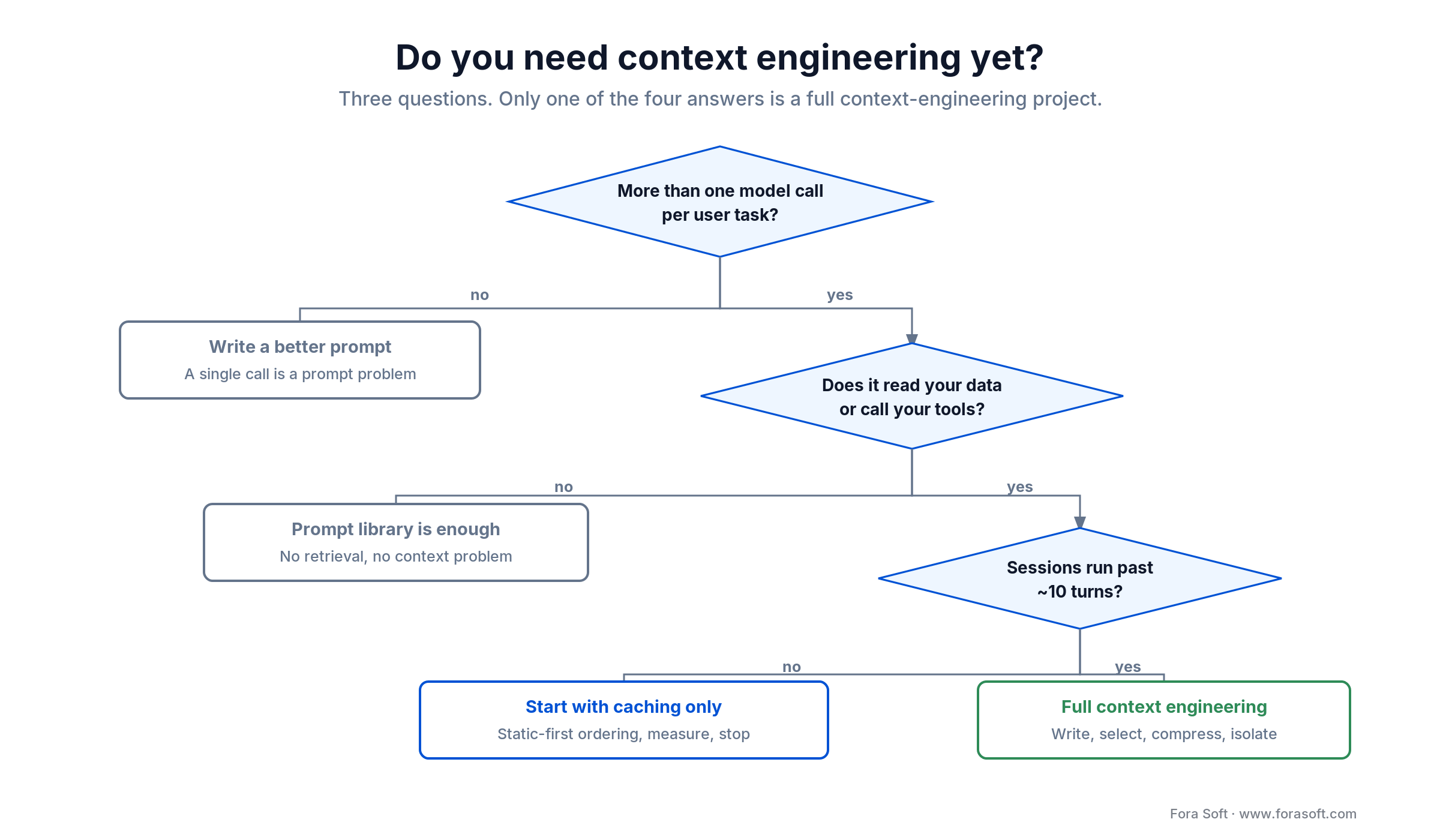
Figure 5. The fast triage version of the five questions. Only one of the four answers is a full context-engineering project, and we would rather tell you that before an invoice than after one.
Five pitfalls we see every quarter
1. Tuning the prompt when the evidence is missing. The single most common wasted week. The instruction was fine; the document the model needed was never in the window. Log the window first, reword second.
2. Stuffing the window because the window is big. A 1M-token context is a capacity number, not a recommendation. Everything measured about long context says the same thing: adding plausible-but-irrelevant material actively hurts.
3. Letting the prefix drift. A timestamp, a session ID or a freshly retrieved document at the top of the window silently zeroes your cache-hit rate. Teams discover this on an invoice rather than in a dashboard.
4. Treating memory files as documentation. They are code. They go stale, they contradict each other, and nobody notices because there is no test. Review them on every architecture change and delete more than you add.
5. Shipping with no baseline. Without accuracy, cost and latency captured before the work started, you cannot tell improvement from novelty. Half a day up front, and it settles arguments for the next year.
KPIs that prove it is working
Quality KPIs. Golden-set outcome accuracy, tracked per release, with the target set from your baseline rather than a blog post. Trajectory sanity: median tool calls per completed task, and it should fall as context improves. Human-correction rate on agent output below 20% before you let it near customers.
Cost KPIs. Cost per completed task, which is the only cost number that means anything. Cache-read tokens as a share of total input, and above 50% is a healthy prefix on a long-session agent. Tokens per turn, trended weekly — a rising line means history or retrieval is quietly growing.
Reliability KPIs. Retrieval p95 under 150 ms on interactive paths. Time to first token under two seconds end to end. Agent-caused incidents at zero, and if that number is not zero, your permission scopes are the thing to fix, not your prompt.
When this is the wrong investment
Skip context engineering in four cases: when a user task is a single model call, when your conventions are still unstable, when your corpus is small and stable enough to fit in the window, and when compliance rules out cloud inference and you have no budget to self-host. Each of those is expanded below.
One model call. Classification, extraction, translation, a fixed-format rewrite. Write a good prompt, add two examples, ship it. Retrieval adds a network hop, a failure mode and an ops burden in exchange for nothing you need.
Unstable conventions. If your team is mid-rewrite or still arguing about folder structure, rules encode an argument rather than a standard, and they will be wrong in three weeks. Fix the conventions first; the memory file will take an afternoon afterwards.
A small, stable corpus. If everything the model needs fits comfortably in the window and rarely changes, retrieval is machinery you run forever to solve a problem you do not have. Thirty stable documents belong in the prompt, not behind an index.
Compliance with no budget. If your data cannot leave your network and there is no budget for self-hosted inference, the context pipeline is not your blocker. That is a procurement conversation, and no amount of clever assembly will substitute for it.
We turn work down on these grounds a few times a year. It costs us a project and earns a phone call eighteen months later when the second question changes from no to yes, which is a trade we are happy with. If you want a second opinion on which side of the line you are on, that is exactly what our AI integration team does on a first call.
FAQ
What is the difference between context engineering and prompt engineering?
Prompt engineering is writing the instruction the model follows. Context engineering is designing the system that decides what information reaches the model on every call — system instructions, tool schemas, retrieved documents, memory and conversation history — along with their order and cost. Prompt engineering is a component of context engineering, not a predecessor to it.
Is prompt engineering dead?
No. In a single-call feature a good prompt is still most of the quality. What changed is that in a multi-step agent the instruction is roughly 5% of the tokens the model reads, so tuning it in isolation has little effect. You still write good prompts; they now live inside a context layer that was designed rather than improvised.
What is context engineering vs RAG?
RAG (retrieval-augmented generation) is one technique inside context engineering — specifically the select move: fetching relevant documents at query time. Context engineering also covers what you persist outside the window, how you compress conversation history, how you isolate sub-tasks, the order components appear in, and permission scoping. RAG is a tool; context engineering is the discipline that decides when to use it.
How much does bad context engineering actually cost?
On our worked example — a 10-turn support-triage agent on Claude Sonnet 5 at July 2026 prices — a naive implementation costs $0.678 per session versus $0.232 with caching, ranked retrieval and compaction, or about $0.25–$0.29 once the compaction call is charged for. That is a 57–66% reduction. At 50,000 sessions a month the uncharged figures work out to roughly $268,000 a year, and somewhat less once compaction is paid for. No change of model, no change in answer quality.
Does a 1M-token context window mean I can stop pruning?
No. On the NoLiMa benchmark (LMU Munich and Adobe Research, ICML 2025), 11 of 13 models advertising 128K or more scored below half their short-context baseline by 32K tokens. OpenAI's own published GPT-5.6 results show retrieval accuracy falling from 91.5% to 73.8% between the 256K–512K and 512K–1M bands. Window size is capacity, not comprehension.
Where should a team start?
Two places, in this order. First, record a baseline: 50 to 100 real tasks with current accuracy, cost and latency. Second, put your static content at the front of the window and turn on prompt caching. That second step is typically an afternoon of work and cut cost by 46% in the worked example, before any retrieval tuning at all.
Do I need a vector database for context engineering?
Often not. If your corpus is a few hundred stable documents, file references and plain keyword search will beat a vector index on both accuracy and operational cost. Vector search earns its keep when the corpus is large, changes frequently, or requires semantic matching that keyword search misses. Most articles recommending one are published by companies that sell one.
What is MCP and do I need it?
The Model Context Protocol is an open standard for exposing external systems — databases, ticketing, observability, source control — to a model under explicit permission scopes. You need it when your agent should act on systems rather than only read documents. It replaces a pile of one-off integrations with one interface, and its permission model is the part that matters most.
How do we keep an agent from acting on a prompt injection?
Break the lethal trifecta: private data access, untrusted content, and an external communication channel. If untrusted content is in the window, remove the outbound capability for that call. Then mark retrieved content with explicit provenance delimiters, scope write and deploy permissions behind human approval, keep secrets out of the window entirely, and log every tool call with its arguments.
What to Read Next
Case study
AI in Software Development — A Real Case
What an AI-assisted delivery looked like end to end, with the measurements and the caveats.
QA
AI for QA Pain Points
Where configured agents reliably cut QA toil, and the places they still do not.
Testing
AI Testing Optimization
Using repo-aware context to compress test cycles without losing coverage.
Voice agents
LiveKit AI Agent Development
Context engineering when the latency budget is measured in hundreds of milliseconds.
Architecture
Multimodal Agentic AI in Real-Time Systems
How context assembly changes when vision and audio share the window with text.
Ready to treat context as infrastructure?
The context engineering vs prompt engineering question resolves simply once you stop treating it as a rivalry. Prompts are how you tell a model what to do. Context is everything the model can see while it does it, and in any system with more than one model call, the second one dominates the first. That is not a philosophy; it is what the token counts and the accuracy curves show.
The practical version fits in a paragraph. Measure a baseline before you change anything. Put static content at the front and cache it. Rank retrieval hard and cut the tail. Compact history on a trigger with a number attached. Scope permissions before an agent gets near production. And run the five-question test honestly, because for a single-call feature all of this is expensive decoration.
We would rather help you skip the project you do not need and get right the one you do. Bring us your stack and your actual traffic, and thirty minutes will tell you which of those you are looking at.

The book · Volume 7 of 7
AI for Video: A Complete Guide to Intelligence in Video Products: From Real-Time Pipelines and Agents to Serving, Cost, Compliance, and Verticals
Context engineering pays off most when the agent works under a real-time budget and every token shows up on the bill. Volume 7 covers agents as engineering: loop primitives, frameworks, memory and tools, plus serving on vLLM, Triton and TensorRT, cost per stream-hour, and where AI fits into a live WebRTC pipeline. Written by Nikolay Sapunov, CEO at Fora Soft.
Read it on Amazon →Kindle & paperback · Fora Soft Video Engineering Handbook
Let’s scope your context pipeline
Thirty minutes with an engineer who runs these in production. You leave with a cost model, a prioritised fix list, and an honest read on whether it is worth doing at all.

