

Key takeaways
• The headline number for AI in software development is real but conditional: ~30–40%. On VALT, a 12-year-old video platform with ~200K lines of custom code, 50,000+ users and 770+ US organizations, we measured a ~30–40% team velocity gain, and ~70% on isolated context-bound tasks.
• The gain lives in orientation, not typing. In a mature system, code is the cheap part. Finding the right seam, tracing permission flows and predicting side effects eat ~68% of task time. That is the slice AI compresses.
• This is why the public numbers look contradictory. A 2025 study found experienced developers 19% slower with AI on repos they already knew cold. A 2023 study found developers 55% faster on a from-scratch toy, with juniors gaining most. Both are true. The work mixes differ.
• AI amplifies your codebase; it does not fix it. Clean module boundaries, enforced review and tests on critical paths are preconditions. Drop AI into a tangle with no tests and you ship fluent regressions faster.
• Every generated line still gets read. Architecture, security boundaries and performance trade-offs stay human calls. The rule that held across two quarters: AI generates options, engineers make decisions.
Why Fora Soft wrote this case study
Most writing about AI in software development is either vendor marketing or a thread about a 200-line weekend project. Neither survives contact with a real production system. We wanted the honest version: what AI actually does to velocity on software that has paying customers, regulators in the room, and twelve years of decisions baked into it.
Fora Soft has shipped real-time video and AI products since 2005: 250+ projects across 20+ years, with 50 in-house engineers. We have run AI inside long-lived engineering teams since 2023. So instead of quoting someone else’s benchmark, we picked one platform we have maintained for over a decade, VALT, and measured the same team with and without AI across comparable sprints.
The numbers below (~30–40% overall, ~70% on context-bound tasks) come from that measurement. Just as important is where AI did nothing, and where it quietly made things worse. If you lead a mature product and you are deciding whether to invest, this is the version we wish we had had in 2023, when every “AI cuts development time in half” claim arrived with no system description and no baseline.
Wondering if AI would move the needle on your codebase?
Bring your repo’s rough shape, team size and current sprint pain. In 30 minutes we’ll tell you where AI engineering will compress your sprint, and where it won’t.
The system: 12 years and a million lines
VALT is a browser-based video observation and recording platform used by training labs, universities, behavioral-health programs, simulation centers and law-enforcement agencies. Operators run live sessions with up to 50 HD IP cameras per site, review clips with annotations, share recordings, and manage retention and access policies in the same browser. It serves 50,000+ users across 770+ US organizations, and it handles regulated data, so HIPAA is a constant, not an afterthought. We build platforms like this under our video surveillance practice.
The repository is over a million lines. About 200,000 of those are custom code; the rest is vendor SDKs, libraries and generated code. The stack: TypeScript and Vue.js on the frontend, PHP with Symfony on the backend, Wowza Streaming Engine (Java) for the video pipeline, RabbitMQ for events, PostgreSQL for application data, and S3-compatible storage for recordings. A change rarely touches one layer.
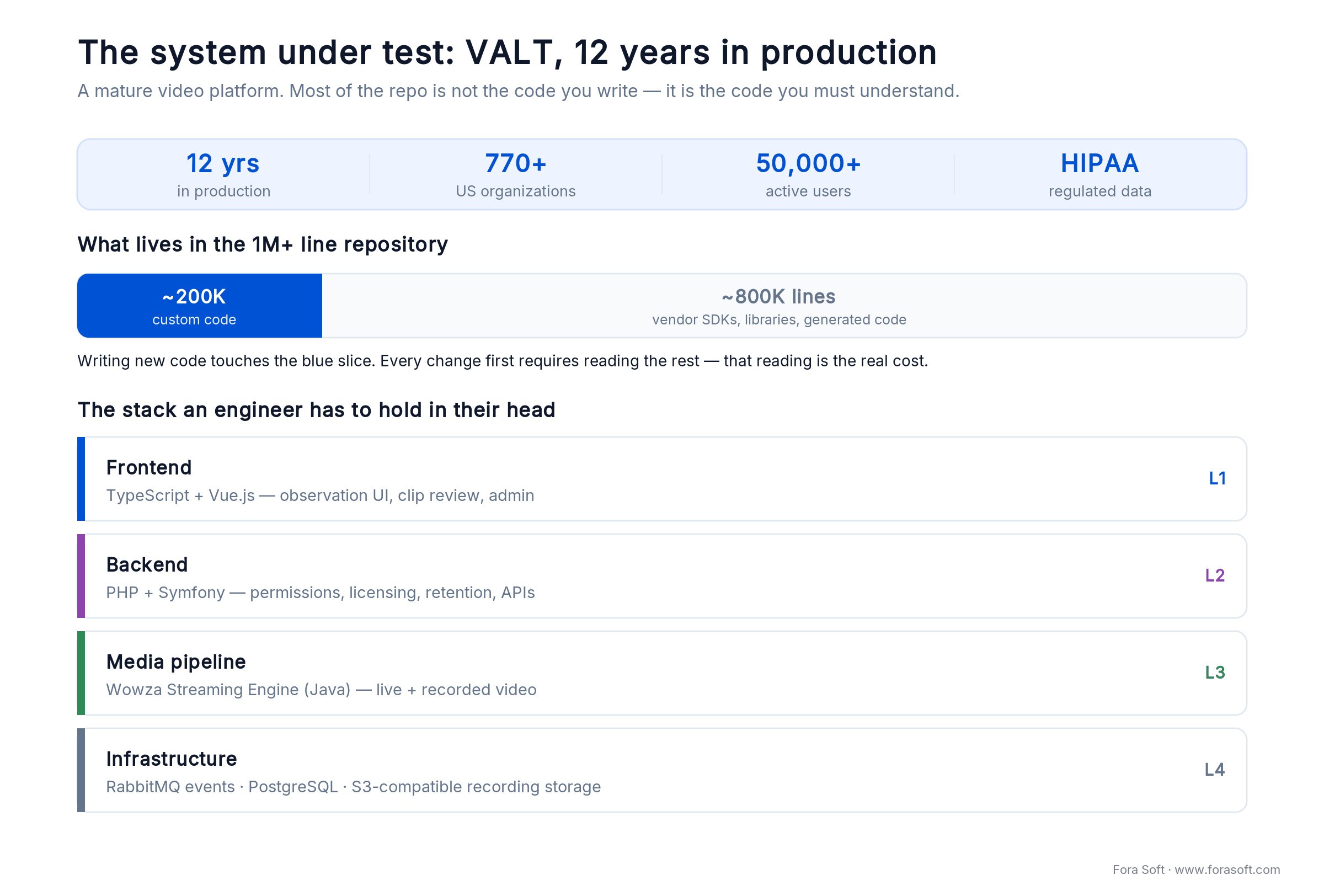
Figure 1. The system under test. Writing new code touches the blue slice; every change first requires understanding the rest.
This is not an early-stage product. It has scheduled maintenance windows, an audit trail, and the kind of context that lives in senior engineers’ heads more than in documentation. It also has something most legacy systems lack: a culture of clean architecture, mandatory code review and routine refactoring that predates AI by years.
That cultural baseline is the precondition for everything below. AI did not clean up VALT. The team had already done that. AI compressed the time it takes to do clean engineering on a complex system.
Reach for AI engineering when: your codebase has consistent module boundaries, review is enforced, critical paths have tests, and a senior can review a generated diff in minutes. Without those, AI just accelerates the wrong things.
What the evidence on AI in software development actually says
Here is the short answer the research supports: AI speeds up software development when a task is heavy on unfamiliar orientation, and it does little (or backfires) when the engineer already holds the context. Two variables sort the famous studies out. First, how much unfamiliar orientation the task carries. Second, at the low-orientation end, whether the leftover work is trivial enough that plain autocomplete wins (juniors on a blank file) or the engineer already knows everything, so the AI is pure overhead (experts on their own repo). Get both right and the contradiction dissolves.
The slowdown study. In a 2025 randomized controlled trial, METR had 16 experienced open-source developers do 246 real tasks on repositories they averaged five years of history with. With early-2025 tools allowed (Cursor Pro, Claude 3.5/3.7 Sonnet), they were 19% slower. They had predicted 24% faster, and even afterward believed they’d been ~20% faster. On code you know cold, the prompting and review overhead outweighs the search you didn’t need to do. It is a snapshot of early-2025 tooling, not a verdict on the category, but the mechanism it exposes is the point.
The speedup study. The much-quoted “55% faster” comes from a 2023 GitHub Copilot trial where developers wrote an HTTP server in JavaScript from scratch. That is autocomplete winning on a small, well-specified, greenfield task, and less-experienced developers gained the most. It says almost nothing about a million-line system.
The enterprise reality. A 2024 Accenture rollout measured +8.7% pull requests per developer and a +15% merge rate: a real, modest gain at scale. Google’s 2024 DORA report is the cautionary half: a 25% rise in AI adoption came with an estimated 1.5% drop in delivery throughput and a 7.2% drop in delivery stability, even as individuals felt more productive. Speed without test and review discipline leaks out as instability.
And developers know the catch. In Stack Overflow’s 2025 survey of 49,000+ developers, 84% use or plan to use AI, but trust in its accuracy fell to 33%; 66% say the output is “almost right, but not quite,” and 45% lose significant time debugging AI-generated code. Our VALT numbers sit exactly where this evidence predicts: high gains on context-heavy work, near-zero on greenfield, and only safe because the review layer held.
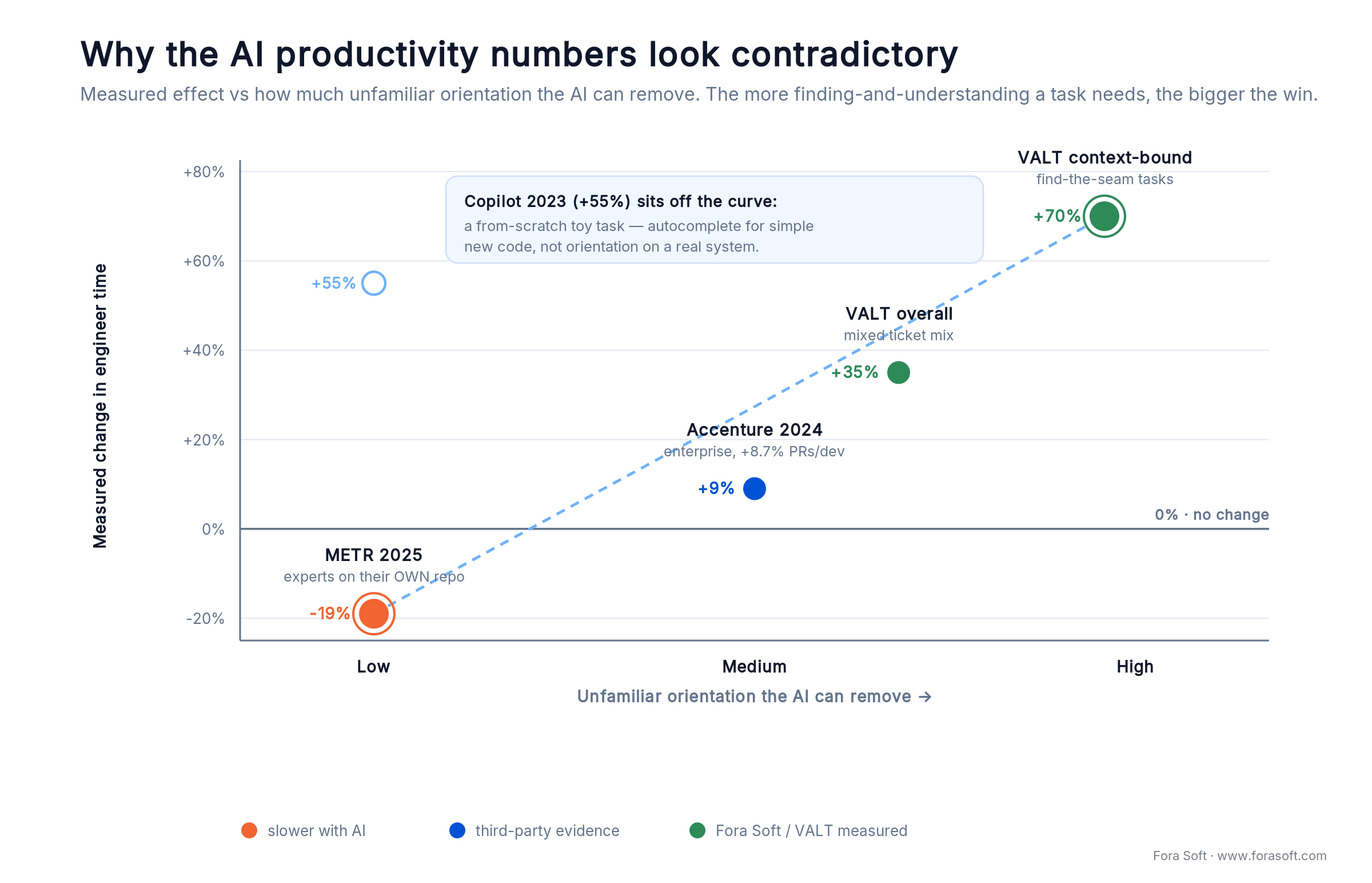
Figure 2. Sort the studies by how much unfamiliar orientation a task carries and the pattern resolves; the greenfield toy is the labeled outlier, a different mechanism.
Where development time was actually going
Before rolling out AI, we instrumented sprint time on VALT across feature, bug and refactor work. The split was consistent: writing code is the smallest pure-craft slice. Everything above it is cognitive load, and cognitive load is what AI compresses.
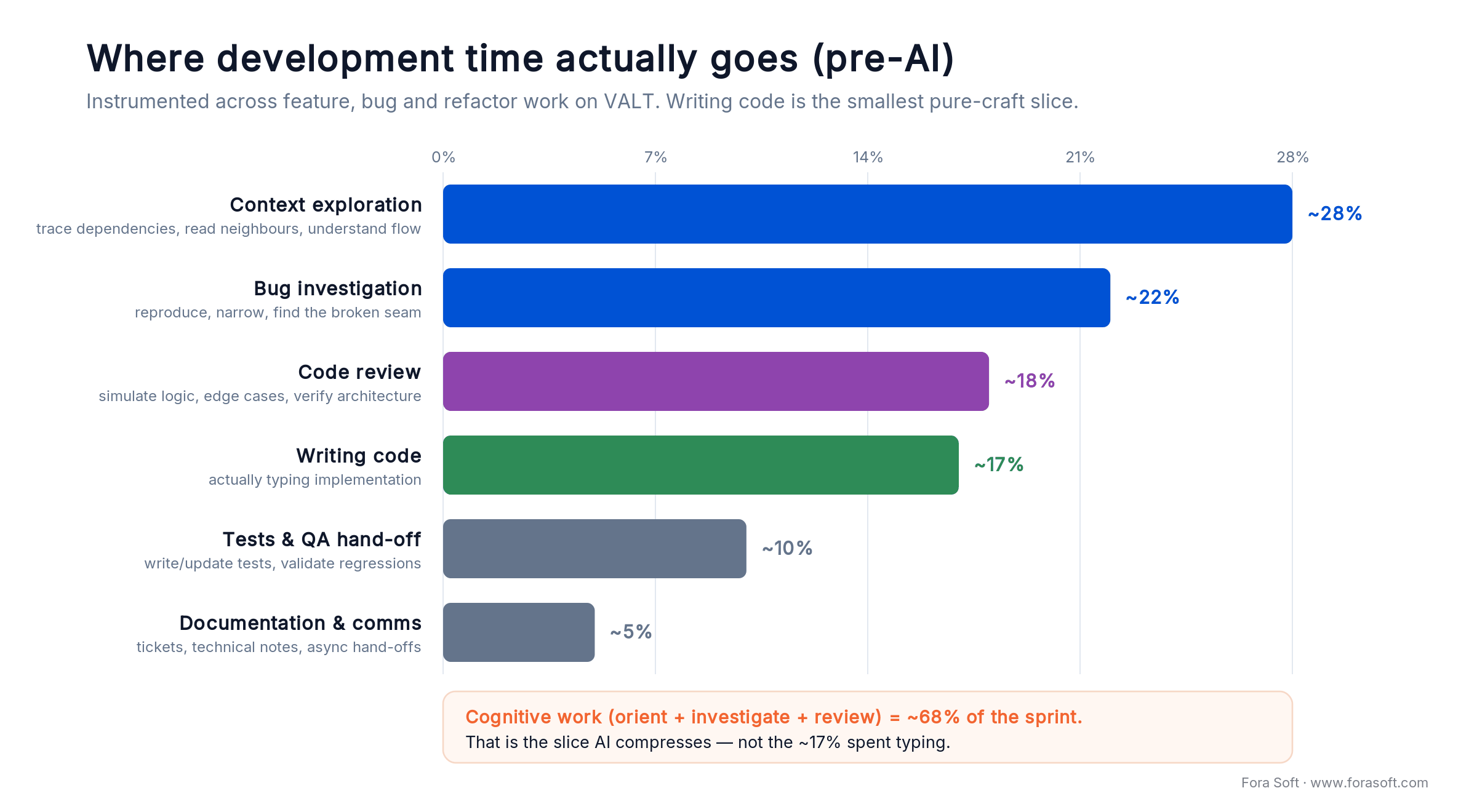
Figure 3. Cognitive work (orient, investigate, review) is ~68% of the sprint. Typing is ~17%.
| Activity | % of sprint (pre-AI) | What it actually meant |
|---|---|---|
| Context exploration | ~28% | Tracing dependencies, reading neighboring modules, understanding flow before changing anything |
| Bug investigation | ~22% | Reproducing, narrowing, finding the broken seam, not writing the fix |
| Code review | ~18% | Mentally simulating logic, edge-case checks, architecture verification |
| Writing code | ~17% | Actually typing the implementation |
| Tests & QA hand-off | ~10% | Writing or updating tests, validating regressions |
| Documentation & comms | ~5% | Tickets, technical notes, async hand-offs |
Read that top-down. The bottleneck on a mature system is not keyboard speed. It is loading the system into your head, finding the right seam, and predicting the blast radius. That is exactly where AI pays off: the cognitive layers compress, and the typing layer stays roughly constant.
How we put AI into the workflow
AI was not a one-off pilot. It became a daily tool through editor-side coding agents and CI-side review bots. Five habits did most of the work, roughly in order of payoff.
1. Bug investigation as the entry point. A clear ticket plus repo access is enough. The agent traces the suspected flow, narrows the broken seam and proposes a fix to verify. Nobody accepts blindly; the engineer reads the diff and the surrounding path. The win is the search time, not the typing.
2. Implementation against well-defined tickets. “Add device type X with permissions Y, register it in module Z, expose it in the admin UI.” The agent drafts the change set across files and surfaces refactoring opportunities along the way. The engineer’s job shifts from search-and-orient to review-and-prune.
3. Code review augmentation. AI gives a first analytical pass on every PR before a human looks: surface edge cases, flag architectural mismatches, suggest missing tests. Reviewers still own the merge; they just walk in with more signal. This is our first line of defense against AI-written bugs, and it pairs naturally with a shift-left security habit.
4. Documentation on demand. Generate or refresh module docs and onboarding notes from the current code, then have a human commit only after reading it. Continuous, not a quarterly chore.
5. Refactoring exploration. Before a structural change, ask the agent to map the blast radius. The answer is never complete, but it surfaces enough non-obvious dependencies to make the “is this worth it” call faster and cheaper.
A concrete example: the Quick Clip permission bug
A real ticket from VALT: “Duration Markers show the Quick Clip button to users without Clip Right. Expected: no button. Actual: the button shows, and clicking returns 403.” VALT resolves visibility across four layers: role, license, feature flag and per-recording ACL. Historically this was an hour-plus of tracing: open the Vue component, follow the prop chain, jump to the permission resolver, find the missing condition, write the fix.
With the agent in the IDE, the loop changed. The ticket text plus “find where Quick Clip visibility is decided and tell me which permission check is missing” returned a focused short-list of three files in under a minute. The real culprit was a single missing conditional in the visibility predicate, two files deep. End-to-end, including manual verification and a regression test, the fix took under 25 minutes.
This is the unglamorous shape of the gain. No model wrote thousands of lines. A model collapsed the “where do I even look” phase from 30–40 minutes to about one. Repeat that across every bug ticket in a quarter and you get the headline number.
Measured improvements, by activity
We compared per-activity speed across two comparable quarters: same team, similar ticket mix, only the AI tooling different. The pattern held across multiple engineers and categories.
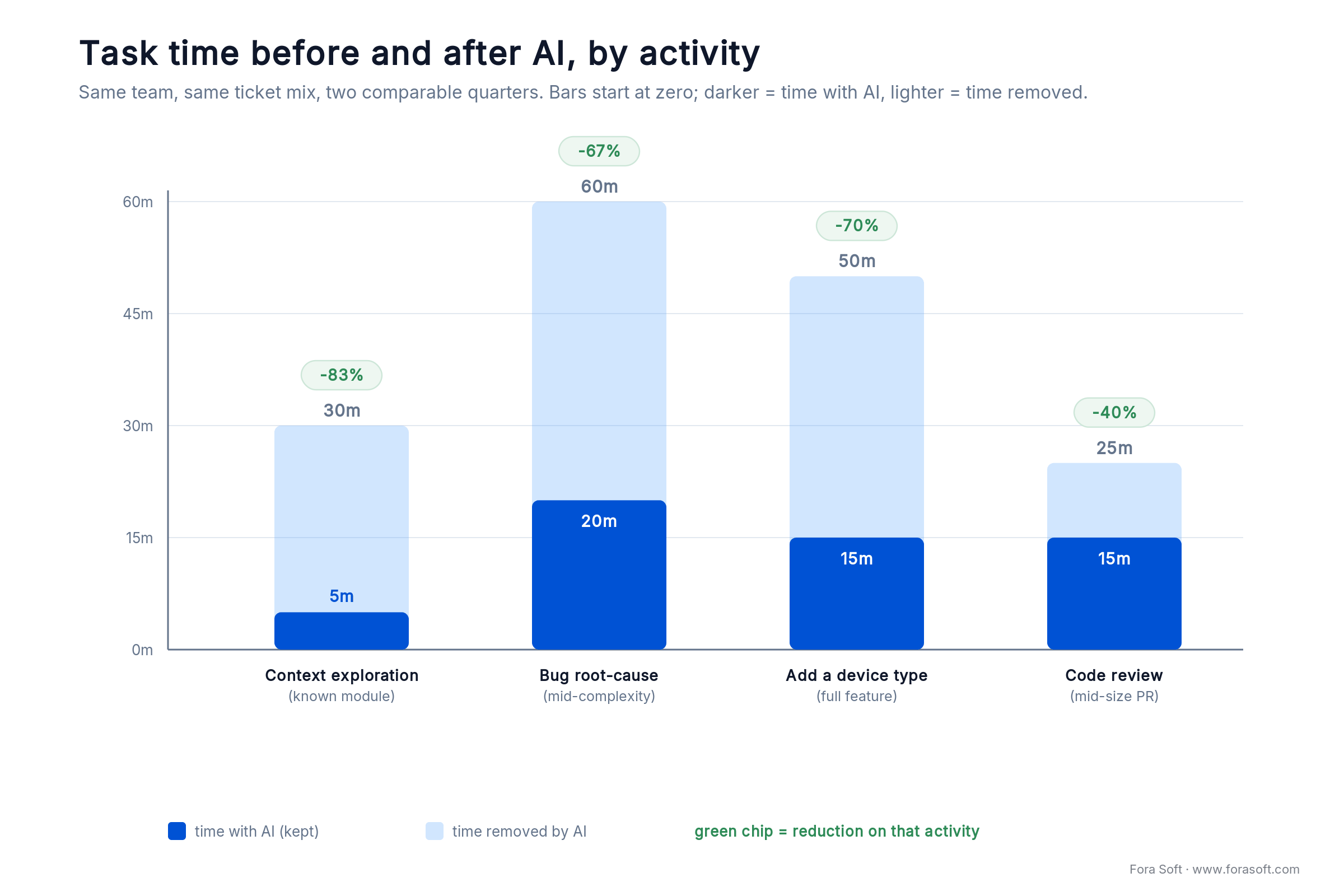
Figure 4. The biggest cuts land on context-bound work; pure typing barely moves.
| Activity | Pre-AI baseline | With AI | Reduction |
|---|---|---|---|
| Context exploration on a known module | ~30 min | ~5 min | ~83% |
| Bug root-cause analysis (mid-complexity) | ~60 min | ~20 min | ~67% |
| Adding a new device type (full feature) | ~50 min | ~15 min | ~70% |
| Code review (mid-size PR) | ~25 min | ~15 min | ~40% |
| Cross-layer feature (Vue + Symfony + Wowza) | ~3–5 days | ~2–3 days | ~30–40% |
| Pure greenfield typing | baseline | ~10–15% faster | marginal |
The shape matters more than any single row. AI helps least where engineers type new code on a clean canvas, because the bottleneck there really is the keyboard. It helps most on context-bound work in mature systems, which is where most professional engineering time lives.
Reach for AI hardest when: the codebase is >100K lines with 5+ years of history, critical paths have at least adequate tests, and your bottleneck is “where do I look and what does this affect,” not “what should I type.”
Orientation vs typing: where the 70% comes from
Split every coding task into orientation (what do you need to know) and execution (write the code). On a mature system, orientation usually dominates, and AI compresses it an order of magnitude more than it compresses execution. That distinction, plus how much context the engineer already carries, explains both our numbers and the studies above.
Take the device-type task: “add device type X with permissions Y, register it in module Z, expose it in the admin UI.” Pre-AI we measured ~30 minutes of orientation and ~20 minutes of execution. With AI, orientation dropped to ~3 minutes and execution to ~12. That is 50 minutes down to 15, a 70% cut, and the orientation slice is what bent.
Now flip it. Bootstrapping a new microservice on a known stack was ~4 hours pre-AI and ~3.5 hours after: orientation was already near zero, so the gain is marginal. This is why greenfield teams report “AI didn’t do much” while mature-system teams report “AI changed our quarter.” Both are right. Their work mixes differ. It is also why METR’s experts, working on repos they already knew by heart, got slower: there was little orientation left for AI to remove, and the overhead it added was pure cost.
What did not change
A short, important section. AI did not remove engineering responsibility on VALT, and pretending otherwise is the fastest way to ship a regression to 50,000 users.
Architectural decisions. AI happily proposes solutions that fit syntactically but conflict with our conventions, deployment topology or multi-tenant boundaries. Seniors still own the design.
Security and authorization. Permission flows touch role, license, feature-flag and per-recording ACL layers. AI is useful for finding existing checks and dangerous when asked to invent new ones. Every authorization-touching diff is read line by line.
Performance work. Noticing a query is slow is easy. Choosing between an index, a denormalization, a cache layer, a different engine or a workflow change needs context the model does not have. AI surfaces options; engineers measure and pick.
Cross-layer business rules. The deepest features, like recording lifecycles tied to retention policy or license-aware streaming, still take iterative prompting and heavy human shaping. AI gives direction; humans deliver production code.
Legacy code: AI as cheap onboarding
One quieter gain compounds over time. AI cuts the psychological friction of touching old, unfamiliar code. Instead of reading a 1,200-line PHP class to build a mental model, an engineer asks the agent to map its interactions and call sites, then verifies against the source.
Senior engineers always built mental models first; the difference is cost. When orientation was expensive, teams avoided unfamiliar code when they could. That avoidance is a tax: it routes work to whoever already knows the area, creates single points of knowledge, and makes refactoring scarier than it should be. AI for legacy-code modernization lowers that tax.
On VALT, refactoring was already routine before AI. What changed is the speed of the exploration phase. Risk gets assessed faster, dead ends surface earlier, and the “is this refactor worth it” threshold tilted favorably, so the team takes on more housekeeping than it used to. We see the same effect on other long-lived platforms we maintain, like the EdTech system behind BrainCert.
Reach for AI on legacy code when: the engineer touching the module is not its author, the file is >500 lines, and you need a mental model in minutes, not days. Verify against the source. AI is the index, not the truth.
Sitting on a 200K+ line codebase that’s slowing you down?
We’ll spend 30 minutes mapping where AI engineering would compress your sprint and where it would not. No slides, no pitch.
The 2026 tooling stack we settled on
There is no magic tool. We run a small, opinionated set of software development AI tools and re-evaluate it every quarter. Here is what is actually in production engineering use on VALT and adjacent projects.
1. Editor-side coding agents. Cursor and Claude Code, by engineer preference, each with a project rules file describing conventions, naming, no-go modules and review expectations. The rules file is the most underrated artifact in the stack; it captures team taste and kills dozens of mediocre suggestions a week.
2. CI-side review bot. A first-pass diff reviewer that flags edge cases, missing tests and style drift before a human looks. Tuned to be quiet on nits and loud on possible regressions.
3. Long-context analysis for ad-hoc questions. When a senior needs to understand how X interacts with Y across the whole codebase, we load the relevant directories into a long-context model. Not constant; a tool we reach for once or twice a week per engineer.
4. Privacy boundary. All AI tools touching production code run on enterprise plans with no data retention and clear data-handling agreements. For client work, BAA and NDA constraints narrow the eligible vendors further. Customer code never goes into a free-tier model.
A word on benchmarks. Ignore the leaderboard arms race. Popular coding benchmarks like SWE-bench have been undercut by evidence that some of their tasks and gold-patch fixes leaked into model training data, inflating scores; contamination-resistant successors put the same models far lower. The lesson is the whole point of this article: trust your own measured velocity on your own codebase over any headline number, ours included.
The new failure modes AI introduces
Acceleration brings its own risks. Three failure modes showed up on AI-augmented teams that did not exist before. Each is fixable, but you have to know to look.
1. Plausible-but-subtly-wrong code. Suggestions are fluent in your conventions, which makes them easier to merge than they should be. The 2022 reviewer signal (“this looks weird”) is muted. Stack Overflow’s 2025 finding that 66% of developers hit output that is “almost right, but not quite” is this failure mode at scale. The control: mandatory, slow, line-by-line review for anything touching security, billing or authorization, even short diffs.
2. Knowledge erosion in juniors. If a junior leans on AI to skip orientation, they ramp faster but build shallower mental models. Twelve months in, they hit a problem AI can’t solve and find they never internalized the fundamentals. Pair AI-assisted work with deliberate “explain this without the AI” sessions.
3. Documentation drift, faster. Auto-generated docs are easy to ship and easy to ignore. We force every doc PR through a human edit before merge; otherwise the team produces extensive, persuasive, slightly-wrong documentation that fools the next reader.
Five pitfalls we kept stepping on
1. Treating suggestions as defaults instead of options. The first suggestion is usually plausible and locally fine. Treat it as the start of a discussion, not the answer. Teams that auto-merge AI diffs ship subtle regressions.
2. Skipping tests because “the diff looks right.” AI-generated code makes a change look smaller than it is. Hold the same test bar you would for human code; better still, have the AI write the test too.
3. Generating docs nobody verifies. Persuasive and sometimes wrong is worse than missing. A human commits only after reading the code. Anything else is technical debt with extra steps.
4. Putting customer code in the wrong vendor. Free-tier models with retention defaults are not where production code goes. Settle the privacy and BAA story before any agent touches a repo. This is where AI in software development quietly becomes a compliance problem.
5. Underweighting the rules file. A bad rules file produces fluent slop. A good one encodes naming, module boundaries, banned patterns and review expectations. Time spent here compounds for the whole team.
Pause the rollout when: review depth drops below roughly one substantive comment per 50 changed lines. The acceleration is only safe while the review layer keeps up. If reviews thin out, slow down.
A decision framework: should you invest now
Five questions, in order. The answers tell you whether to invest in AI engineering this quarter, next quarter, or not yet. The first “no” is your first fix.
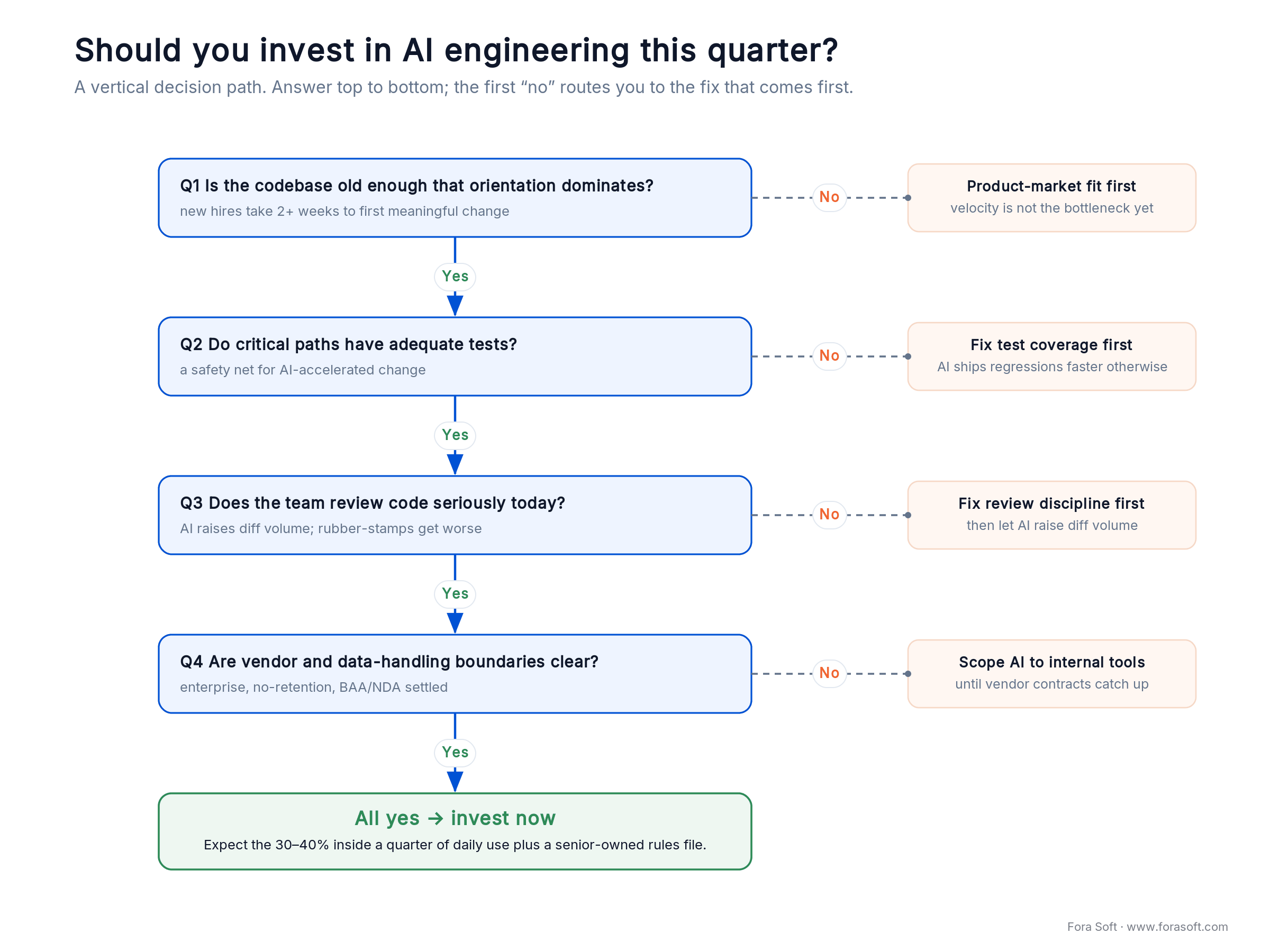
Figure 5. Answer top to bottom. The first “no” routes you to the fix that has to come first.
Q1. Is your codebase old enough that orientation dominates? If new engineers take more than two weeks to ship a first meaningful change, yes, and AI will compress that hard.
Q2. Do critical paths have at least adequate tests? AI accelerates change. Without a test net, that acceleration produces regressions faster than you can ship. Poor coverage? Fix it before a broad rollout.
Q3. Does your team review code seriously today? AI raises the volume of diffs to review. Rubber-stamp cultures get worse outcomes with AI, not better.
Q4. Are your vendor and data-handling boundaries clear? Customer code, regulated data and NDA-bound projects need clean enterprise contracts and no-retention guarantees. Until they exist, scope AI to internal tools.
Q5. Can a senior own the rules file? Without one that captures team taste, suggestions drift. If no senior will own it, that is your first hire.
KPIs to put on the dashboard
Quality KPIs. Defect-escape rate (bugs found in prod / total bugs found) should be flat or improving after rollout, never worse. Keep critical-path coverage above ~75%, and hold AI-generated diffs to at least the coverage of the surrounding module.
Business KPIs. Cycle time per ticket, tickets per engineer per sprint, and time-to-first-meaningful-change for new joiners. The 30–40% shows up here, not in lines of code per day. Fold the same assumption into your software estimates.
Reliability KPIs. Production incident rate, mean time to detect, mean time to recover. DORA’s stability warning is real: if incidents per release rise, treat it as a review-discipline failure and fix that before doubling down. AI-augmented teams should not ship more incidents.
When AI in software development is the wrong bet
A counter-position, because honesty sells better than hype. Investing in AI engineering is not always this quarter’s right move.
If your codebase is young (under ~25K lines), your bottleneck is product-market fit and customer interviews, not velocity. Invest there. If tests are thin and review is weak, AI accelerates the wrong things, so spend a quarter on quality first. If you operate under data-handling rules your current vendors can’t satisfy, defer until the contracts catch up.
And if you are buying AI engineering as a line for investors, you will get the line and not the velocity. The 30–40% requires daily integration into real workflows, not a press release.
What this means for hiring
The engineer who shipped well in 2022 still ships well in 2026, but the bar moved. The differentiator is no longer typing speed or library recall. It is the ability to direct an agent, read its diffs critically, and refuse the wrong suggestions.
Our strongest hiring signal is a candidate who can explain when they overrode an AI suggestion on their last project, and why. That one answer separates engineers who use the tools from engineers being used by them. More on how we select developers.
One practical effect: juniors ramp faster on a mature codebase because AI carries the orientation that used to take them weeks. Junior throughput is up. The bar for “senior” is also up, because the work only seniors can do, architecture, security, performance and judgment, becomes a larger share of what remains.
Why this matters for your project
When we estimate a project, the productivity baseline we quote against is the AI-augmented one, not the 2022 one. That is why our timelines and budgets often land 20–30% below incumbent agencies for comparable scope. We are not cutting corners; we are pricing the actual work.
Here is the arithmetic on a 6-engineer team. A quarter is roughly 6 × 40h × 12 weeks = 2,880 engineer-hours. A 30% velocity lift reclaims about 860 hours, close to the output of ~1.8 extra engineers, for tooling that runs perhaps $40–200 per engineer per month. You do not hire 1.8 people; you free them from orientation you were already paying for. That is the case for building your next product with an AI-integrated team, and it’s baked into our custom software development.
So when you pick a development partner in 2026, “do you use AI?” is the wrong question. Everyone does. Ask the two that matter: can you show me the velocity delta on a real codebase you maintain, and what is your review discipline on AI-generated diffs? A vendor who can’t answer both is guessing. If you want to go deeper on the engineering craft behind these gains, our AI for video engineering track walks through how we build AI features in production.
Want this playbook applied to your codebase?
We’ll assess where AI engineering compresses your sprint and ship a 12-week plan to get there, with honest numbers on both sides.
FAQ
What are the real benefits of AI in software development?
On a mature system, the benefit is compressed orientation: faster bug root-cause, quicker context exploration, cheaper onboarding to unfamiliar code, and a stronger first pass on code review. On VALT that netted a ~30–40% team velocity gain and ~70% on context-bound tasks. The benefit is smallest on greenfield typing, where the keyboard, not orientation, is the bottleneck.
What are the risks of using AI in software development?
Three main risks: plausible-but-subtly-wrong code that is easy to merge, knowledge erosion in juniors who skip the fundamentals, and documentation that is persuasive but wrong. Google’s 2024 DORA data also links rising AI adoption to lower delivery stability. All three are controlled by mandatory review, tests on critical paths, and no-retention enterprise vendors.
Does AI actually make experienced developers faster?
It depends on the task. METR’s 2025 trial found experienced developers 19% slower on repositories they already knew deeply, because there was little orientation left to remove. The same engineers get large gains on unfamiliar modules or complex cross-layer bugs. Speed tracks how much unfamiliar context the AI can take off your plate.
Does AI replace senior developers?
No. It raises their impact. AI generates options and narrows the search space; seniors make architectural calls, own security boundaries and judge fit. Teams that try to replace seniors with AI alone ship fluent regressions at speed.
How do you use AI safely on a production, regulated system?
Review every suggestion with the same rigor as human code, keep security- and authorization-touching diffs on slow line-by-line review, and route all production code through enterprise plans with no data retention and BAA/NDA coverage. AI shifts the engineer’s role from typing to reviewing; it does not remove accountability.
What is agentic AI in the software development lifecycle?
Agentic AI means an assistant that can act across your repo, not just autocomplete a line: it reads multiple files, traces a flow, proposes a multi-file change set, and drafts tests. Across the lifecycle we use it for investigation, implementation against tickets, review augmentation and documentation, with a human owning every merge.
How long does it take a team to capture the 30–40%?
In our experience, 6–10 weeks of daily use plus a written rules file owned by a senior. Teams that pilot for two weeks and quit usually quit before the curve bends. Teams that make it a daily habit see the velocity shift inside a quarter.
Should we use Cursor, Claude Code, or both?
Both are credible in 2026, and the differences are workflow-shaped rather than capability-shaped. We let engineers pick within an approved set on the same enterprise contracts. Standardizing the rules file matters more than standardizing the editor.
Does this apply to mobile, embedded, or game engineering?
Mobile: yes, same shape of gains. Embedded: partly, because tight memory and timing constraints shrink the safety margin and make review even more important. Game engineering: yes for tooling and content pipelines, less for the highly creative core gameplay loops.
What to Read Next
Engineering
Code Refactoring in Plain Words
The discipline AI accelerates, and how to time a refactor on a mature system.
Security
How AI Improves Code Security
The shift-left playbook that keeps AI-accelerated diffs from leaking vulnerabilities.
Estimating
Software Estimating: A Practical Guide
How we fold AI-augmented velocity into fixed-scope contracts without lying about it.
Hiring
How Fora Soft Selects Top Developers
The filters that produce engineers who can lead an AI agent, not tolerate one.
AI
How AI Can Transform Your Mobile App
The same productivity story, applied to shipping AI features in a mobile product.
Ready to capture the 30–40% on your platform?
AI does not transform engineering overnight; it removes friction. On a 12-year-old, million-line system serving 50,000+ users, that friction lives in context exploration, bug investigation and review, and removing it gave the team a ~30–40% velocity lift. The gain is real, repeatable and measurable, and it is conditional on engineering culture you may already have or may need to build first. That is why the studies disagree and why your mileage will track your own work mix.
If you maintain or are scaling a complex platform, the question is no longer whether AI can write code. It is whether your architecture, tests and review discipline let you cash the acceleration. We have priced and shipped against the AI-augmented baseline since 2023, and we can usually tell you in 30 minutes whether your codebase will produce the same gain, what the preconditions look like, and what a 12-week rollout would cost.
Bring us your codebase, we’ll bring the playbook
Thirty minutes, no slides: a candid read on where AI engineering compresses your sprint and where it won’t.

