

Key takeaways
• The UX design process is a loop, not a line. Research, wireframes, a design system, then in-sprint ownership, with testing feeding every stage. Skip the loop and design debt piles up by sprint three.
• Research comes before pixels. On products with expert or regulated users (finance, telemedicine), we walk the real workflow first. The screens come last, and they are better for it.
• A design system is infrastructure. Tokens at the base, components on top, WCAG 2.2 accessibility baked in. Change one token and the whole product updates.
• AI compresses the routine, not the judgment. Figma AI and LLM research synthesis save days per project. Deciding what the user actually needs is still the work you pay a designer for.
• Want a design partner who earns the seat? book a scoping call. You meet the lead designer before you sign, and leave with a design plan, not a pitch.
What is the UX design process?
The UX design process is the repeatable sequence a team follows to turn a user problem into a working product: research the users and the domain, sketch and test low-fidelity flows, build a design system and high-fidelity screens, then own the design through engineering. Done well it is iterative, with testing at each step feeding back into the last. We have run this loop across 250+ products since 2005, and this piece is how we run it in 2026, not a textbook version of it.
This is written for founders, CTOs, and product leaders evaluating a development partner who want to know whether a team can actually design, not just push pixels. Some people call it the product design process; the mechanics are the same. Below you get the phases, the tools, what it costs, where AI helps, and when a dedicated team is worth it versus staffing internally. For the shape of work our designers carry, see cases like BrainCert and TradeCaster, or our custom software development service.
Design is translation, not decoration
The most useful mental model we have built over two decades is that product design is a translation job. The raw material is a complex domain, a trading platform, a telemedicine intake flow, a live classroom, and the output is a screen a stressed human can use in six seconds without reading documentation.
That translation needs two things in equal measure: empathy for the user and fluency in the domain. Empathy without domain fluency gives you pretty interfaces that miss the workflow. Domain fluency without empathy gives you dashboards only power users tolerate. We hire and train designers to hold both.
Here is what it looks like in practice. Before designers open Figma, they walk the workflow. On a streaming app that means shadowing a streamer and a viewer. On a trading platform it means learning how a trader scans depth-of-market. On a telemedicine product it means sitting with the clinician through a 90-second triage. The screens come last. That single ordering decision is what separates the McKinsey Business Value of Design top quartile, whose top design performers posted 32% higher revenue growth over five years (2018), from the teams that decorate.
Reach for this design approach when: your product lives in a domain with expert users, unforgiving feedback loops, or regulated workflows. Surface-level design does not survive first contact with real users in these contexts.
The UX design process, step by step
Short version: four phases, each with a deliverable it owes you. Research produces a problem brief. Wireframes produce a validated skeleton. Visual design produces a system and high-fidelity flows. In-sprint ownership keeps all of it from drifting once engineering starts. The British Design Council named the shared shape of this in 2005, the Double Diamond, but the value is in how tightly the phases feed each other.
Phase 1, Research and discovery (1–2 weeks). User interviews, competitor teardowns, domain shadowing, and an accessibility audit of any existing product. You get a problem brief, personas that are not fabrications, and the list of constraints designers will respect.
Phase 2, Wireframes and prototypes (1–3 weeks). Low-fidelity flows in Figma or Visily, then a clickable prototype for validation. We usability-test the skeleton before any visual design, because moving a box in a wireframe costs minutes and moving it in code costs days. A small round goes a long way here: five users surface about 85% of usability problems, per Nielsen Norman (2000), so we test early and often instead of once at the end.
Phase 3, Visual design and system (2–5 weeks). Design tokens, a component library, and primary flows in high fidelity. We build from tokens outward so the system stays maintainable, and WCAG 2.2 AA lives in the tokens rather than getting bolted on in a later sprint.
Phase 4, In-sprint ownership (continuous). Designers sit in sprint reviews, approve pull requests against the design system, catch UX regressions, and maintain the component library as engineering evolves. This is where 80% of design debt accumulates if you skip it.
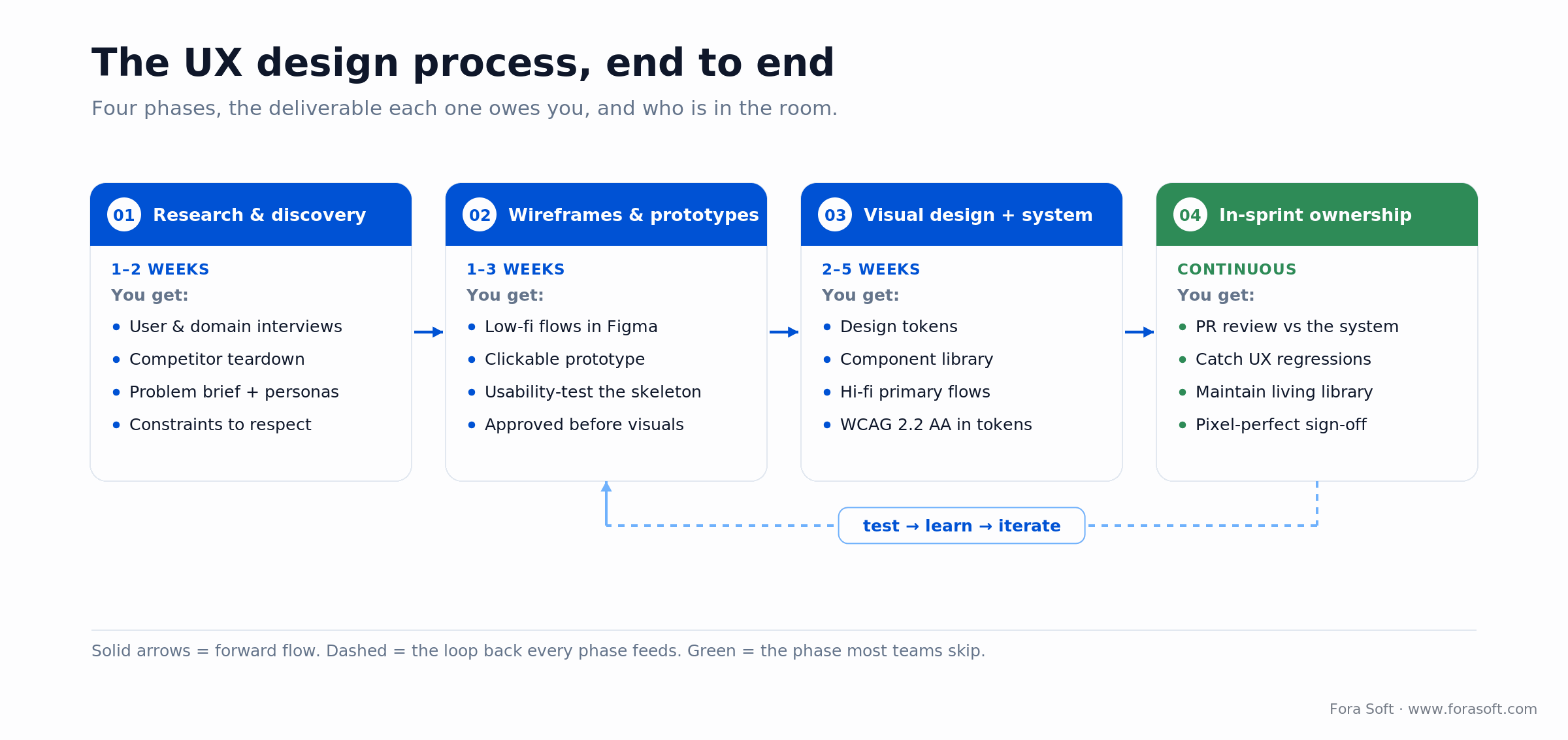
Figure 1. The UX design process end to end, with the deliverable each phase owes you and the loop back that keeps it honest.
The tools we run at each step
Tools change fast. Figma went public in July 2025 near a $50B valuation and shipped natural-language design-to-code and its Weave generative features that same year, so any tool table has a shelf life. What does not change is the rule: pick the tool that shortens the loop between a question and a validated answer. Here is the current kit.
| Step | Tool | Why we pick it |
|---|---|---|
| Low-fi wireframes | Visily (AI) / Figma | 2× faster first pass; quick iteration with stakeholders |
| Interactive prototypes | Figma / Axure RP | Real-click flows for validation and usability testing |
| Visual design | Figma + tokens plugin | Single source of truth; design-to-code handoff |
| Component library | Figma Libraries + Storybook | Parity between design and the live component |
| Motion / micro-interactions | After Effects / LottieFiles / Rive | Production animations without JavaScript overhead |
| User research | Maze / UserTesting | Remote, fast, statistically sane |
| AI-assisted ideation | Claude / GPT + Midjourney | Explore concepts and stress-test variations |
For how we choose AI design tools without the hype, see our deep-dive on AI tools for UI/UX design.
How much does the UX design process cost?
A design-only engagement, research through visual design and a system, typically runs 4 to 10 designer-weeks, which lands most first versions between $12,000 and $30,000 before engineering. Here is the arithmetic, not a vibe: a 40-hour week at a blended design rate around $75/hour is about $3,000, so 4 weeks is roughly $12,000 and 10 weeks is roughly $30,000.
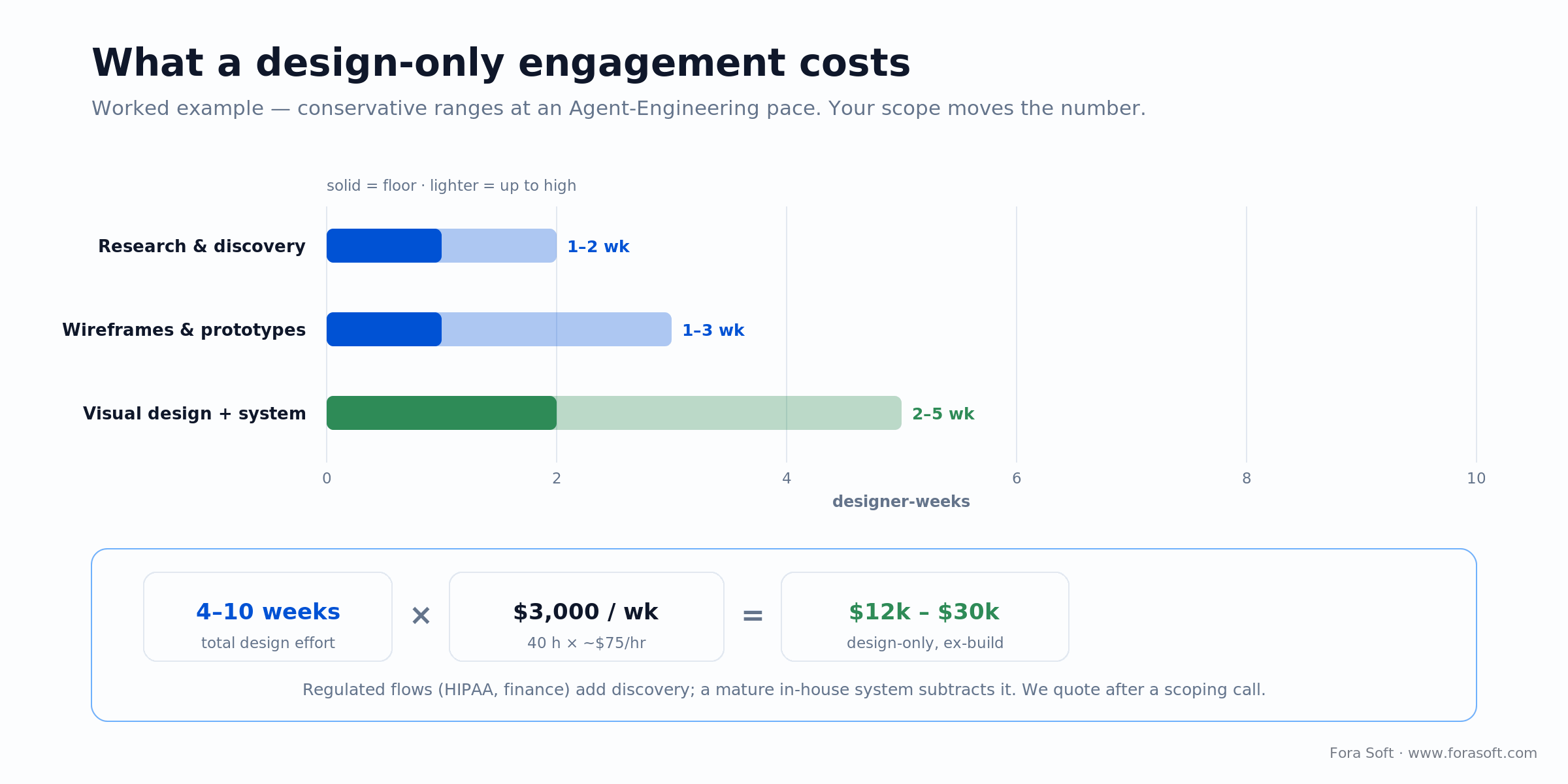
Figure 2. The cost math for a design-only engagement, with the week ranges anchored to the phases above. Your scope moves the number.
Two honest adjustments. Regulated flows (HIPAA, finance, government) add discovery time, so budget toward the top of that range. A mature in-house design system subtracts the system-building phase and pulls you toward the bottom. We use Agent Engineering to compress the visual and system work, which is why our estimates come in faster and cheaper than a typical studio quote. When a number is not defensible, we do not publish it: the real figure comes after a scoping call, where we size your scope out loud.
Reach for a fixed-scope design engagement when: you want a design plan and a system before committing to a build. Four to eight weeks, you keep the Figma files, and you can take them to any engineering team, including your own.
Want a defensible number for your product?
Book a 30-minute scoping call. We size the design work out loud, phase by phase, and you leave with a realistic range instead of a placeholder.
How AI reshaped our UX workflow
We have not replaced a single designer with a model. What AI does is flatten the tedious parts so judgment work expands to fill the day.
1. First-pass wireframes in minutes. Visily and Figma AI turn a prompt into a starting layout. Designers edit for fit and fidelity instead of staring at a blank canvas.
2. Research synthesis. Ten interview transcripts summarized and themed by an LLM in 15 minutes instead of two days. Designers verify and sharpen rather than transcribe.
3. Accessibility passes. Vision models flag contrast, hit-target, and ARIA gaps on a design before it reaches code. See AI accessibility in UI/UX design for how we apply it.
4. Predictive UX. We embed predictive UX patterns that anticipate the next action into SaaS products where dwell-time and task completion are business KPIs.
5. Variation generation. When a team is torn between two directions, we generate ten concept variants overnight and narrow down with stakeholders the next morning. The model widens the funnel; the designer still picks.
What makes a great product designer
Research-first instincts. Starts with users, not with Dribbble.
Opinionated but evidence-driven. Defends choices with research and metrics, not taste.
Domain-agnostic curiosity. Can move from finance to telemedicine to surveillance in a year without surface-level treatment.
Systems thinking. Designs components, not screens, and maintains the system as the product grows.
Accessibility as baseline. WCAG 2.2 AA is a token decision, not a sprint-5 ticket.
Engineering literacy. Understands state, API shapes, and performance budgets well enough to avoid expensive designs.
Clear writing. If a designer cannot explain the logic of a flow in a paragraph, they cannot defend it in a sprint.
Caring. Actually caring about the product and the people using it. Hard to teach, easy to spot.
Mini case: designing TradeCaster’s trading UI
Situation. TradeCaster is a live-streaming platform where stock traders broadcast their desktops in real time and viewers watch the trades, charts, and positions, then decide whom to follow. The design problem: financial density. A viewer has to judge a streamer’s track record, profit-and-loss, and live charts fast enough to trust them with money.
Plan. We led with research on what a viewer actually looks at in the first seconds: the streamer’s recent P&L, their trade history, and whether the chart is live. We built the streamer profile around those three signals, pushed everything else behind progressive disclosure, and kept the live TradingView chart as the anchor of the screen rather than one panel among many.
Result. The platform runs at 46,000+ users, with streamers who clear 100+ daily viewers monetizing their broadcasts, and it auto-scales through the load spike at market open. The win was not the screens. It was deciding which three data points earned the first two seconds of attention. Ship the wrong three and a trading product loses the viewer before the first trade.
The design system, where teams under-invest
We treat the design system as infrastructure. Without it, every screen is a one-off and inconsistency creeps in within the first three sprints. With it, new features ship in days instead of weeks and the product feels coherent to users.
Tokens first. Color, spacing, typography, radii, and motion are expressed as tokens. Every component consumes tokens. Tokens change; components do not.
Components in Figma mirror Storybook. A designer adds a variant, an engineer syncs it in code. Either direction works, neither drifts.
Accessibility baked into tokens. Contrast ratios, focus rings, and 24px hit targets are encoded once, so the most common contrast and target-size regressions stop reaching production. Keyboard order, labels, and ARIA still need a human; tokens cover the mechanical part, not all of WCAG.
Versioned like a product. The system gets a version number, a changelog, and one owner (usually the head of design) who approves breaking changes.
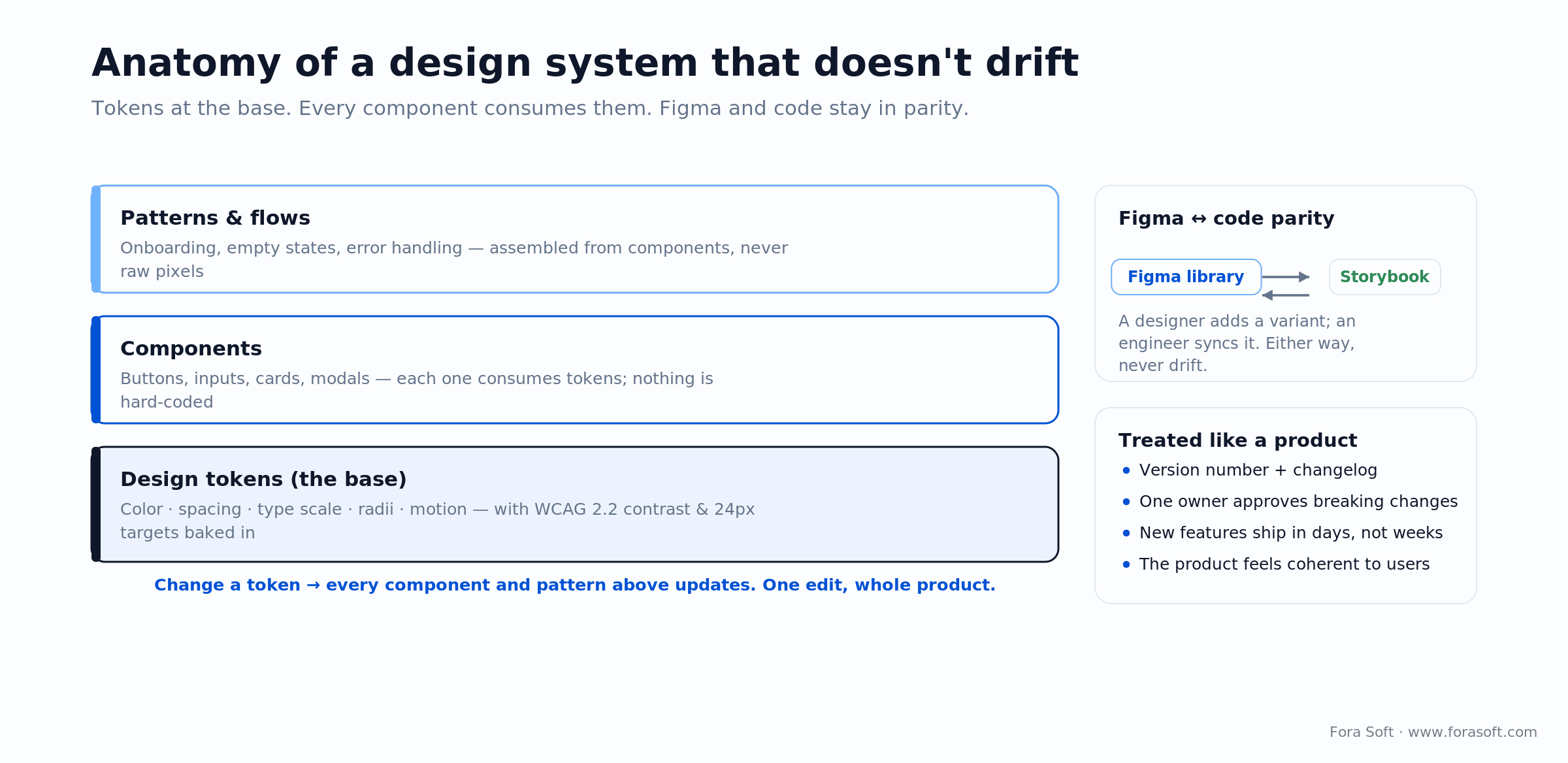
Figure 3. A design system that does not drift: tokens at the base, everything above consumes them, and Figma stays in parity with code.
Reach for a proper design system when: your product has more than about 30 unique screens, a roadmap longer than six months, or more than one engineer implementing UI. Below that, a lightweight component library is enough.
Accessibility: WCAG 2.2 as a baseline
Accessibility is not a compliance sprint you run before launch. It is a set of token decisions you make on day one. WCAG 2.2 became a W3C Recommendation in October 2023 and an ISO standard (ISO/IEC 40500:2025) in October 2025, and it added criteria that touch every screen: a minimum target size of 24 by 24 CSS pixels, focus that is never fully hidden, and authentication that does not depend on memory.
The stakes went up in 2025. The European Accessibility Act began enforcement on 28 June 2025, so any product sold into the EU, from banking apps to e-commerce, now carries a legal accessibility duty. Retrofitting a live product to meet it means re-touching every component. Baking contrast, focus states, target size, and spacing into your tokens covers the criteria a token can carry, so those failures stop recurring across the library. The rest of WCAG 2.2 AA, keyboard operability, semantics and ARIA, form labels, accessible authentication, and reflow, still needs deliberate design and engineering. Tokens shrink the accessibility backlog; they do not erase it.
This is why we treat it as design, not QA. For the AI side of the same discipline, see AI accessibility in UI/UX design.
Emotional design and the details that decide retention
Mobile app UX research keeps finding the same thing: the products people stay with are not the ones with the most features. They are the ones that feel right to use. We put specific attention into four places that shape that feeling.
1. Motion. Google’s Material Design 3 motion guidance is a good default: short durations for small changes, longer only for emphasis, and any transition beyond ~200ms should respect a reduced-motion setting. We use ease or spring curves, never linear.
2. Typography. A type scale of four to six steps, not twelve. Weight variance instead of size-and-weight chaos. Line-height around 1.5 for body copy. These choices read as care.
3. Copy. Button labels that describe the outcome (“Save draft” over “Submit”). Empty states that help instead of scold. Error messages that restore confidence.
4. Moments of delight, budgeted. One or two unexpected moments per session. More than that reads as self-indulgent.
Reach for a motion-design budget when: the primary interaction is tactile (touch, drag, swipe) or the product sells an impression of speed. Everywhere else, default to subtle.
Avoiding app abandonment, the design angle
The numbers are brutal and stable. Roughly 25% of apps are used once and never opened again, and across categories in 2025 day-1 retention sits near 24 to 26%, day-7 around half of that, and day-30 near 5% (Statista, Adjust, AppsFlyer). Most of that loss is a design problem, and each window points at a different fix.
Day-1 abandonment is usually an onboarding design problem. Day-7 abandonment is usually a first-value design problem. Day-30 abandonment is usually a habit-loop design problem. A team that can tell them apart ships much stickier products. We cover the playbook in avoiding app abandonment, but the design-level short version is: instrument the funnel, find the drop-off screens, and redesign those specifically instead of the whole product.
Losing users between onboarding and day 7?
We will audit your funnel on a 30-minute call, abandonment drivers, UX debt, and accessibility regressions, then sketch the redesign that moves the numbers.
Do you need a dedicated UX team?
Short answer: if your core value is a workflow users repeat, and they have alternatives, and the product will evolve past v1, yes. If none of those hold, a senior engineer with a good template often beats hiring a team. Walk the four questions below.
Q1. Is the core value a workflow users repeat? If yes, design is a competitive moat, not a skin.
Q2. Do users have real alternatives? Consumer and SaaS users leave the moment friction appears, so design-led retention is a survival condition. Captive users (internal, compliance) raise the stakes on onboarding but lower them on retention.
Q3. Is the product regulated or accessibility-sensitive? If yes, you need a designer who treats WCAG 2.2 as a token decision, not a sprint-12 ticket.
Q4. Will the product evolve past v1? If yes, you need a design system and a team that can maintain it. A short-lived v1 does not.
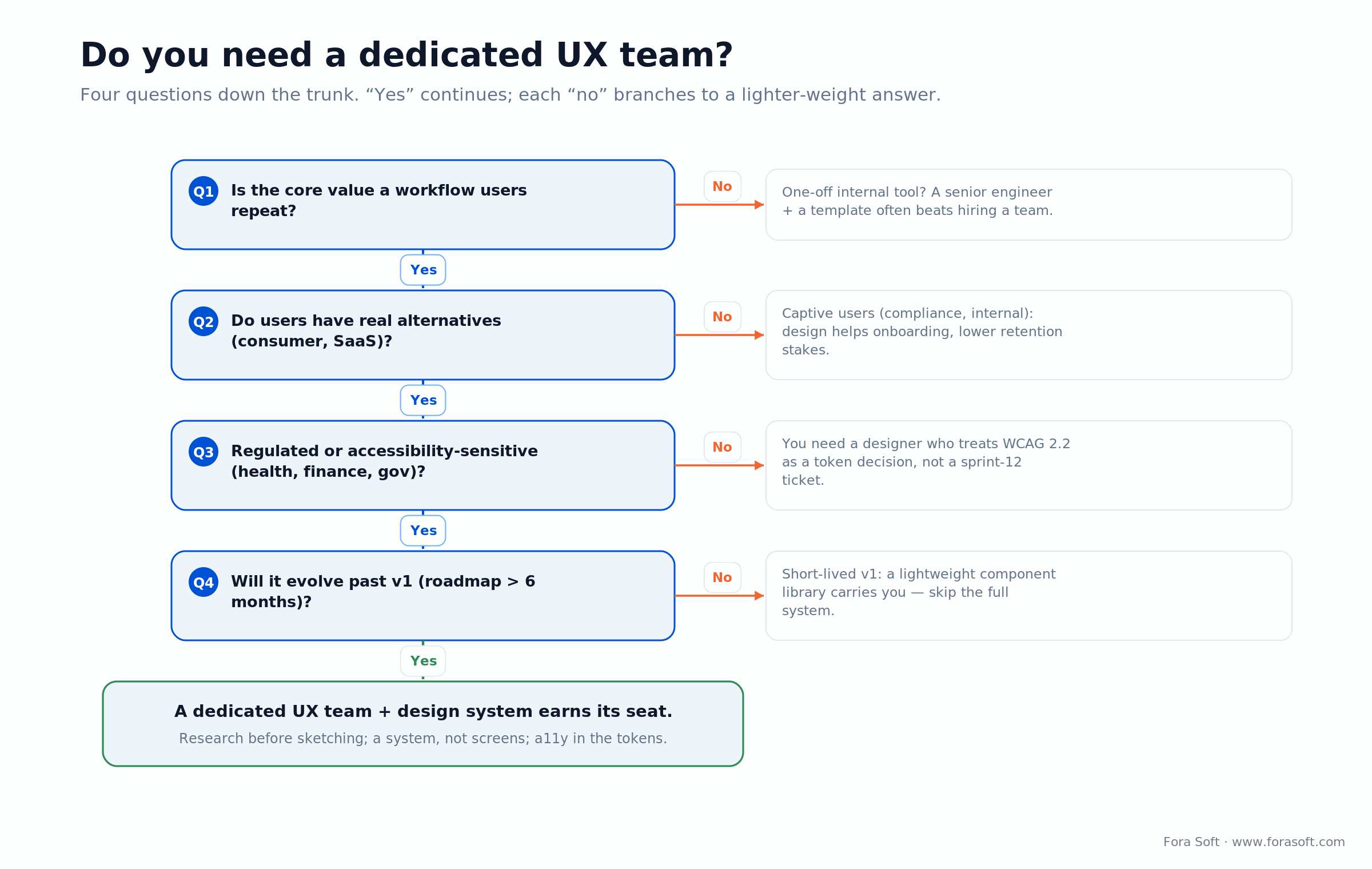
Figure 4. Four questions down the trunk. Every “yes” continues; each “no” branches to a lighter-weight answer.
Five UX design pitfalls we see on rescue projects
1. Design as a hand-off phase. The designer delivers Figma and disappears; engineering improvises; consistency dies by sprint three.
2. No design system, just screens. Every screen is a one-off. Changing one button touches 40 files.
3. Accessibility added in sprint 12. Retrofitting a live product is far more expensive than encoding contrast and targets in tokens up front.
4. Beautiful but slow. Heavy animations, huge images, blocking fonts. Design that wrecks Core Web Vitals wrecks conversions.
5. No one defending the user. Product wins every debate, and the design ends up a feature landfill.
KPIs we hold the design team to
Quality. Usability-test success rate on primary tasks (target above 85%). WCAG 2.2 AA on new components (100%). Design-debt ratio on the backlog (target under 10%).
Business. Activation lift after a redesign, day-7 retention lift, and time-to-first-value for new users. We tie design work to these, not to how the mockups look in a review.
System. Design-system coverage on new screens (target above 90%), Figma-to-code parity (target above 95%), and component reuse rate.
How our design team is structured
A typical project has a lead designer (senior, owns the vision and the system), one supporting designer (mid-level, carries daily execution), and periodic specialists (motion, accessibility, illustration). Above them, a head of design coaches craft and coordinates across projects.
On smaller projects a lead designer carries everything. On larger ones we add a dedicated researcher and a motion specialist. We do not staff roles no one needs. You pay for the work, not the org chart.
When you don’t need a Fora Soft designer
If you already have a strong in-house design team with a mature system, you probably do not need us for design. You may still want us for engineering, and our designers and engineers plug into your Figma and ship against your system.
If your product is a short-lived internal tool with a single persona and no evolution plan, a template plus a senior engineer usually beats bringing in a design team. Honesty here is part of the pitch: we would rather tell you that now than bill for it later.
Agent engineering plus design ships faster
Our design outputs feed straight into our spec-driven agent-engineering practice. Design tokens compile to code, component contracts become tests, and clickable prototypes seed acceptance criteria. The design-to-engineering loop is one of the biggest gains the agent practice delivers: implementation drift drops and first-pass pixel fidelity climbs.
The practical effect is that a design review after engineering becomes a 20-minute confirmation instead of a two-hour rework. That is how we quote design-heavy projects on tight timelines without cutting quality.
FAQ
What are the steps in the UX design process?
Five, in a loop: discover (research the users and domain), define (frame the problem and constraints), design (wireframes, then a system and high-fidelity screens), test (usability-test and iterate), and deliver (own the design in-sprint through launch). In a delivery engagement we group these into four phases: research, wireframes and prototypes, visual design and a system, then in-sprint ownership. Testing feeds back into earlier steps rather than ending the process.
How long does the UX design process take?
A focused design-only engagement runs 4 to 10 weeks: roughly 1–2 for research, 1–3 for wireframes and prototypes, and 2–5 for visual design and a system. Regulated products add discovery time.
How much does UX design cost?
Most first versions land between $12,000 and $30,000 for design only, before engineering: about 4 to 10 designer-weeks at a blended rate near $75/hour. Scope moves the number, so we quote after a scoping call.
Can we start with just design and pick engineering later?
Yes. We run standalone design engagements (research, wireframes, visual design and a system) in 4 to 8 weeks. You keep the Figma files and can take them to any engineering partner. Many clients return for the build; the work stands on its own either way.
Do you work with our existing design system?
Yes. Our designers plug into your Figma libraries and extend the system where your team needs help. We do not impose our own system; we respect yours and improve it if asked.
Can you deliver WCAG 2.2 accessibility audits on existing products?
Yes. A typical audit is 1 to 2 weeks and returns a prioritized list of violations with design-level remedies and engineering-level fixes. For regulated markets we can target WCAG 2.2 AAA on critical flows.
How do you handle disagreement between stakeholders on design direction?
Usability testing and outcome metrics settle most of it. The lead designer runs short quantitative tests on the two directions and brings data back. When data is inconclusive, we default to the direction with lower implementation risk.
Can we meet the designer before we sign?
Always. Your first or second call includes the lead designer who would own the project. We would rather you meet them than read a CV.
What to Read Next
AI Tools
AI Tools for UI/UX Design Software
Which AI design tools save time today, and which are still marketing.
Accessibility
AI Accessibility in UI/UX Design
Baking accessibility in from the first wireframe, not the final sprint.
Streaming
Streaming App UX Best Practices
Lessons from designing high-stakes streaming experiences that keep viewers engaged.
Predictive UX
Predictive UX for AI-native SaaS
Design patterns for SaaS products that anticipate user intent and shorten the path to value.
Ready to design with intent, not impulse?
Design at Fora Soft is translation, from complex domains to products that feel right. We research before we sketch, build systems instead of screens, bake WCAG 2.2 accessibility into tokens, and stay with the project through launch. AI compresses the routine so craft and judgment take up more of the day. That is how we have shipped 250+ products since 2005, and what we bring to your next one.
If you are evaluating design partners, the fastest path to a useful answer is a 30-minute call with the lead designer who would own your project.
Want our design team on your next product?
Thirty minutes, no slides. You meet the lead designer, we sketch a design plan, and you leave with a realistic budget range.

