

Updated August 2026 · mapped to WCAG 2.2 AA · checked against the WebAIM Million 2026 data.
Accessible design is a design-system decision, not a plugin you bolt on the week before launch. The stakes moved in 2026: the European Accessibility Act has been enforceable since June 28, 2025, US courts saw 5,114 digital-accessibility lawsuits in 2025, and the WebAIM Million found the web actually got less accessible this year, not more. This is the working playbook our design and engineering teams use on every build: seven pillars mapped to WCAG 2.2 AA, honest cost math, the overlay trap, and a retrofit-vs-redesign call you can defend to a CFO.
Key takeaways
• Accessible design lives in the design system. Tokenize contrast, focus, type, and spacing once and every new screen inherits them. Retrofit after launch and you pay 15–30% of design time instead of under 5%.
• The web is regressing. WebAIM’s 2026 audit found 95.9% of the top million home pages fail WCAG (up from 94.8%), and low-contrast text now hits 83.9% of pages, a slide WebAIM ties partly to AI-assisted “vibe coding.”
• Overlays are a liability, not a fix. Roughly 1 in 4 sites sued in 2025 already ran an accessibility widget, and the FTC settled with an overlay vendor for $1M over deceptive compliance claims.
• Seven pillars cover most real issues: contrast, typography, focus and keyboard, motion, input flexibility, content clarity, and forms. Design them in and 95% of an audit disappears.
• Automation is a first draft. Tools catch roughly 30–40% of issues (Deque puts axe as high as ~57%). The rest needs keyboard, screen-reader, and cognitive testing with real users.
Why Fora Soft wrote this accessible design playbook
Fora Soft has shipped software since 2005 — 250+ projects across health-tech, e-learning, video streaming, fintech, and e-commerce for customers in the US, EU, UK, and the Middle East, built by 50 in-house engineers and designers. Accessibility is a design-review gate on every product we ship, not a post-launch cleanup. Our BrainCert learning platform has carried 500M+ classroom minutes, so we have production data on how caption styling, contrast, and focus states hold up in the hands of real users on real assistive tech, not just in a Figma preview.
We are rated 5.0/5.0 across 30 Clutch reviews and picked up 2026 Clutch Global Awards for our work. The playbook below is what our design leads actually run in 2026: the seven pillars, the tooling, the cost math, and the honest edges: where accessibility is non-negotiable and where over-investing is a mistake. It is not a summary of the WCAG spec. You can read the WCAG 2.2 Recommendation for that.
Shipping into the EU or US public sector and not sure you’re covered?
Our design leads audit your Figma library and top user flows against WCAG 2.2 AA and hand back a prioritized backlog in five working days.
What is accessible design
Accessible design is the practice of building interfaces that people with disabilities can perceive, operate, understand, and rely on, the four POUR principles behind WCAG. In product terms, it means someone using a screen reader, keyboard, switch, magnifier, or voice control can complete every core task without hitting a wall you never noticed because you use a mouse and 20/20 vision. It targets the same conformance bar regulators cite: WCAG 2.2 Level AA.
It is not the same as inclusive design or universal design, and the difference matters when someone asks you to scope the work. Accessible design has a measurable target (WCAG conformance, disability access). Inclusive design is the broader practice of designing for the full range of human diversity: language, device, context, temporary impairments. Universal design aims for one solution that works for everyone without adaptation. In day-to-day product work you ship accessible design to a standard and borrow inclusive-design methods to get there.
The audience is bigger than most teams assume. The WHO puts the number of people living with a significant disability at 1.3 billion, about 16% of the world. Design them out and you have a revenue problem as well as an ethics and a legal one. The rest of this guide is the how: seven pillars, the tools, the money, and the law.
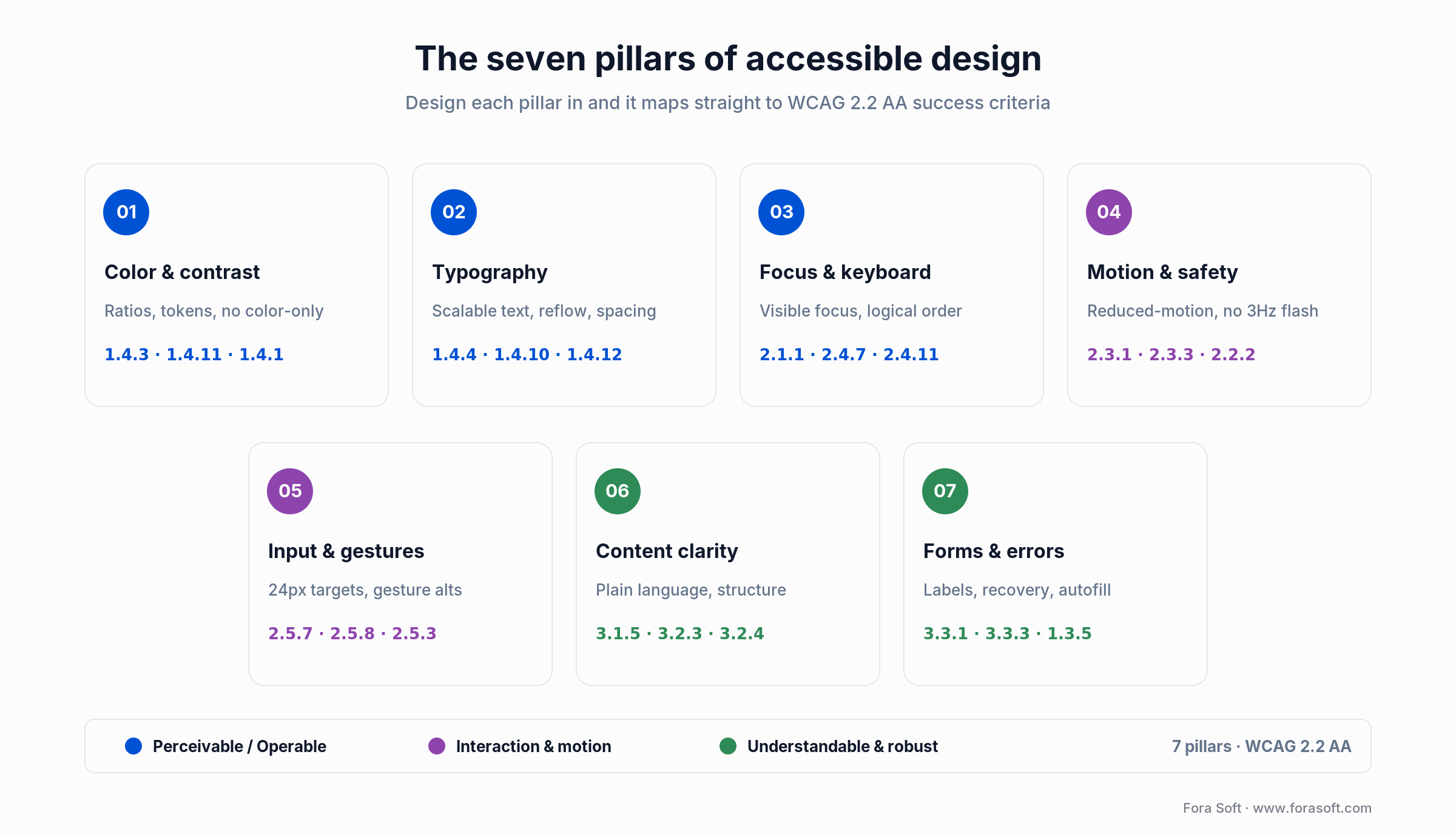
Figure 1. The seven pillars, each wired to the WCAG 2.2 AA criteria it satisfies.
The 2026 state of accessible design
Here is the uncomfortable 2026 headline: the web is getting less accessible, not more. WebAIM’s February 2026 audit of the top one million home pages found 95.9% had detectable WCAG failures, up from 94.8% a year earlier, the first regression after six years of slow gains. The average page carried 56 distinct errors, and low-contrast text alone appeared on 83.9% of pages (up from 79.1%), averaging 34 instances each.
Three forces explain the slide. First, complexity: the average home page now ships 1,437 elements, up 22.5% in a single year, and 1 in 26 of those elements carries an error. Second, ARIA misuse. Pages that used ARIA averaged 59 errors versus 42 on pages without it, about 17 extra barriers, because hand-rolled ARIA collides with native semantics. Third, the one WebAIM names directly: AI-assisted “vibe coding” and heavy third-party frameworks that generate markup no human audited. Six issue types — low contrast, missing alt text, unlabeled form fields, empty links, empty buttons, and missing page language — still account for 96% of all errors, the same six for seven years running.
Two things did catch up, and they change how the work gets done. Design tools now ship contrast checking, color-blindness simulation, auto-layout that respects text scaling, and design tokens, so you can encode a contrast rule once and flag violations before an engineer writes code. And AI produces useful first-draft audits, alt text, and remediated snippets. The 2026 rule that separates teams who ship from teams who get sued: use AI as an assistant, never as a shield.
Reach for a design-token audit first when: your product is more than about 20 screens or ships more than 10 reusable colors. Contrast is the single most common failure on the web, and it is the cheapest to kill at the token layer before it multiplies across every new screen.
Pillar 1: Color, contrast, and design tokens
Contrast is the most common accessibility failure there is, so it is the best place to start. WCAG 2.2 AA requires 4.5:1 for body text, 3:1 for large text (18pt or 14pt bold and up), and 3:1 for UI components and graphical objects (1.4.11 Non-text Contrast). Design tokens are the fix: every color ships with a contrast-audited role (body-on-surface, body-on-primary, accent-on-surface), and a linter fails the build if any token pair drops below AA.
The 2026 traps are the ones tokens alone miss. Semi-transparent overlays on modals, tooltips, and hero captions compute contrast against the backdrop image, not your swatch, so audit against a worst-case photo. Text over a gradient has to clear 4.5:1 at the darkest point of the gradient, not the average. And never signal state with color alone. Pair every error, required field, and status dot with an icon or label (1.4.1 Use of Color). Roughly 1 in 12 men has some form of color-vision deficiency; a red border they cannot see is not a signal.
What to integrate: contrast-validated tokens, a Figma contrast lint wired into CI, icon-or-label pairing on every color-coded state, and explicit dark-mode and high-contrast variants. Budget about a week on a retrofit if tokens already exist, three to four weeks if the palette grew ad hoc.
Reach for token-driven contrast when: your system already lives in Figma Variables or Style Dictionary. Codifying the 4.5:1 and 3:1 rules at the token layer catches most contrast regressions before they ever reach QA.
Pillar 2: Typography, reading order, and scalable text
A large share of users bump their system text size up, and people with low vision routinely run 200%. WCAG 1.4.4 (Resize Text), 1.4.10 (Reflow to a 320px viewport), and 1.4.12 (Text Spacing) require content to stay usable through all of it. The design implication is concrete: no fixed-pixel font sizes. Use rem and em on the web, Dynamic Type on iOS, and sp units on Android, and stop pinning user content into short fixed-height containers.
Reading order is the quiet failure. Screen readers and the VoiceOver rotor follow DOM or layer order unless you tell them otherwise, so a visually tidy screen can read as nonsense. Annotate reading order in the Figma handoff, keep a clean heading hierarchy with no skipped levels (WebAIM found skipped levels on 41.8% of pages in 2026), and cap line length around 45–75 characters for readers with cognitive and low-vision needs.
What to integrate: a scalable type scale, text-spacing tokens (line-height ≥1.5, letter-spacing ≥0.12em, word-spacing ≥0.16em), responsive line-length caps, and explicit reading-order notes in handoff. Budget one to two weeks.
Reach for typography-first work when: your product is reading-heavy (news, docs, e-learning, legal), skews to an older audience, or ships in several languages that stress the type scale differently.
Pillar 3: Focus order, focus visibility, and keyboard flows
Every interactive element must be reachable by keyboard (2.1.1), carry a visible focus indicator (2.4.7 Focus Visible, AA), stay unobscured by sticky headers (2.4.11 Focus Not Obscured, new and AA in WCAG 2.2), and follow a logical order (2.4.3). The design consequence teams resist most: focus styles cannot be deleted for looking “clean.” Every button, link, field, and custom widget ships a focus ring. If you want the stronger target, 2.4.13 Focus Appearance specifies a 3:1 ring against the background and a minimum area, though note that one is Level AAA, so treat it as a goal, not the AA floor.
Skip links, landmark regions, and a clean heading hierarchy are still the fastest wins on the web, and still missing, since only 17% of pages had a skip link in 2026 and 1 in 10 of those were broken. Modal focus management is where most teams fail: trap focus inside the dialog, restore it to the trigger on close, wire an Escape key, and name an initial-focus target in the spec. Do not leave it to chance in code.
What to integrate: a visible focus ring on every interactive token, a skip-to-content link, consistent landmarks, a focus-trap spec on all modals and sheets, and keyboard-only testing on every prototype. Budget one to two weeks.
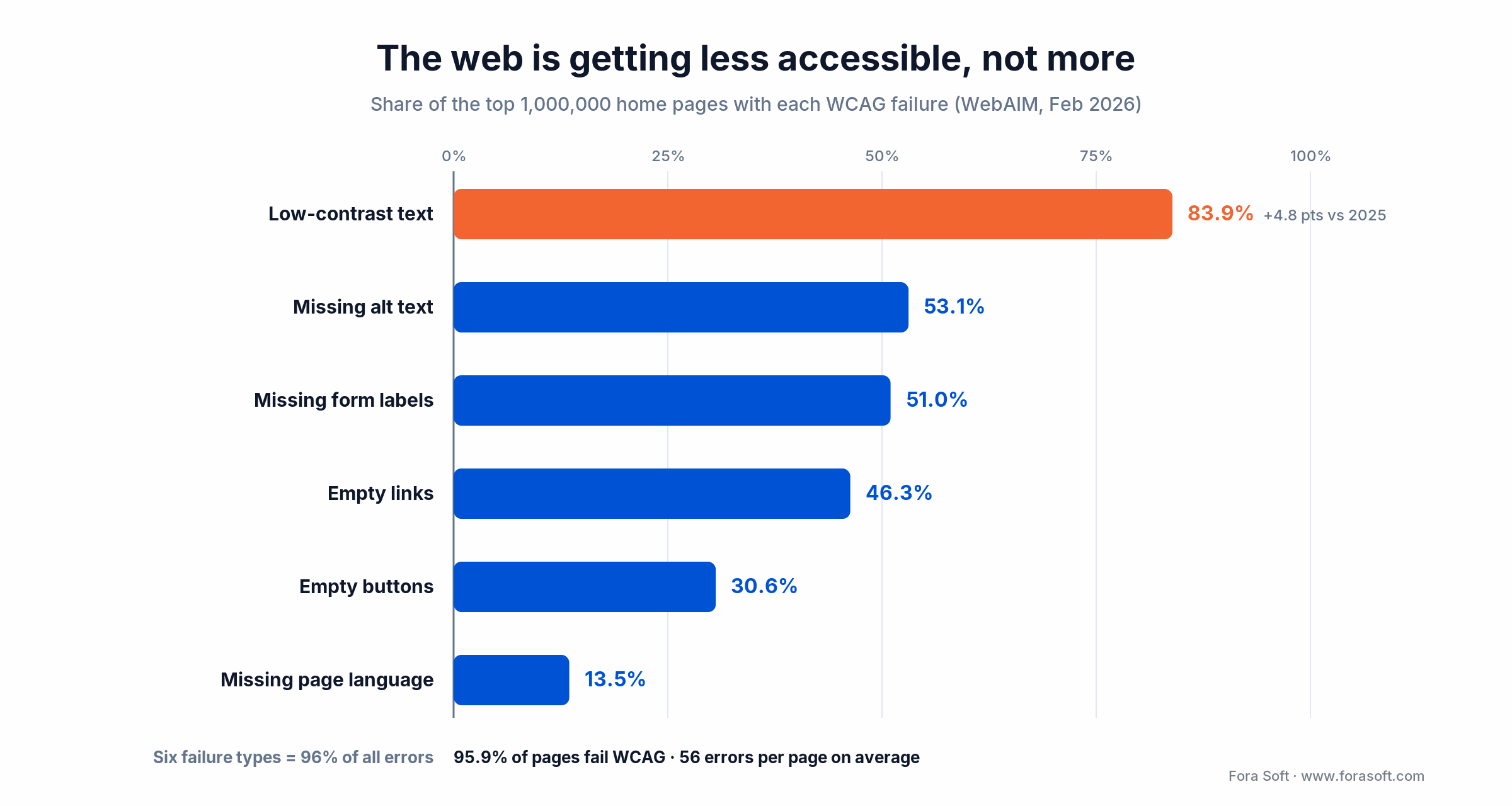
Figure 2. Six failure types account for 96% of all errors; contrast leads and is rising.
Reach for keyboard-and-focus-first design when: your product is productivity or enterprise software with sticky headers, modal stacks, or drag-and-drop. Those three patterns cause most of the focus-order failures that reach production.
Pillar 4: Motion, animation, and vestibular safety
WCAG 2.3.3 and the CSS prefers-reduced-motion query exist because full-screen transitions, parallax, and autoplay can trigger nausea, dizziness, and migraines for people with vestibular disorders, about 1 in 20 adults in a given year, per the Vestibular Disorders Association. In prototypes and handoff, design a reduced-motion variant next to every animation, not as an afterthought.
The 2026 rules are simple to hold to. Any animation over about 300ms gets a reduced-motion fallback (a cross-fade or an instant cut). Autoplay video defaults to off or exposes a pause control within two tabs (2.2.2 Pause, Stop, Hide). Looping animation gets a stop control. Parallax switches off under reduced motion. And nothing flashes more than three times a second (2.3.1), because that is a seizure risk, not a style choice.
What to integrate: a reduced-motion fallback token for every animation, autoplay suppression under reduced motion or low-power mode, pause controls on carousels and looping video, and a hard 3Hz flash ceiling. Budget about a week.
Reach for motion-safe design when: your product leans on animation (games, social, AR/VR, rich onboarding) or when any user feedback mentions dizziness, nausea, or “too much movement.”
Pillar 5: Input flexibility, gestures, and hit targets
Touch targets must be at least 24×24 CSS pixels (2.5.8 Target Size Minimum, AA) and ideally 44×44 pt on mobile per Apple’s guidance; WCAG’s own Enhanced target (2.5.5) is 44×44 CSS px, both Level AAA. Every custom gesture (swipe-to-delete, long-press, drag-to-reorder, pinch-to-zoom) needs a plain alternative (2.5.7 Dragging Movements, new in 2.2). Voice Control and Switch Control users cannot perform gestures at all, so a reachable button or menu is the difference between a usable product and a locked door.
The design move is to pair every gesture in the spec with a visible-at-rest or visible-on-focus control that does the same job. Overflow menus on list rows are the standard 2026 pattern for this. And hover cannot be the only way to reveal or commit an action: hover reveals, click commits, because touch and keyboard users have no hover.
What to integrate: a 24×24 CSS-px hit-target minimum (44×44 pt on native), a button alternative for every gesture, no hover-only state changes, and a consistent long-press-to-overflow mapping. Budget about a week.
Reach for input-flexible design when: your product has complex interactions: drag-and-drop editors, gesture-based creative tools, map UIs, video editors. It is non-negotiable if you ship to any EU consumer market.
Pillar 6: Content clarity, plain language, and cognitive load
Cognitive accessibility is where most products are weakest, because it does not show up in an automated scan. WCAG 3.1.5 points at a lower-secondary reading level, and plain-language guidance from the EU and plainlanguage.gov backs it up. The 2026 target our editors hold: a 9th-grade reading level for body copy, sentences under 20 words, active voice, concrete nouns, and no idioms that a non-native speaker or a translation tool will trip on.
The design moves are cheap and high-impact: labels above fields instead of placeholders that vanish on tap, specific button verbs (“Create account,” not “Continue”), error messages that say what to do (“Password needs 8+ characters,” not “Invalid input”), a progress indicator on any flow over two steps, and the same navigation in the same place on every screen (3.2.3 Consistent Navigation). AI readability tools can draft plainer copy; a human editor signs off.
What to integrate: plain-language content guidelines, reading-level checks on UI copy, labels over placeholders across every form, progress indicators on multi-step flows, and consistent navigation patterns. Budget one to two weeks to align a design system.
Reach for cognitive-accessibility-first design when: your product serves a general audience, targets health-tech, finance, government, or education, or reaches people using it in a second language.
Pillar 7: Forms, errors, and recovery
Forms are where accessibility breaks hardest and where the break maps straight to revenue. WebAIM found a third of form inputs on the top million pages had no proper label at all in 2026. Every input needs a visible, persistent label (not placeholder-only), a programmatically linked hint, an autocomplete or textContentType so the browser or OS can pre-fill, and an error state that screen readers announce and that is tied to the field (3.3.1, 1.3.5).
The 2026 rules are about timing and recovery. Validate on blur, when the user leaves a field, not on every keystroke — keystroke validation is noise for a screen-reader user. Put the error below the field with a red border, an icon, and text that explains the fix. Announce async status (saving, saved) through an aria-live region on the web or the platform equivalent on native. And a CAPTCHA with no accessible alternative violates 1.1.1 outright; use an invisible challenge or Private Access Tokens instead (2.2 also added 3.3.8 Accessible Authentication to push exactly this).
What to integrate: a labels-above-field pattern, programmatic error-to-field linking, validate-on-blur, async status announcements, an accessible CAPTCHA alternative, and save-draft on multi-step flows. Budget about a week per major form.
Reach for a forms-first review when: your product runs signup, onboarding, checkout, or booking. Accessible form patterns — real labels, error recovery, autocomplete — track tightly with completion rate, so this pillar pays for itself first.
The seven accessible design pillars compared
One view of all seven pillars: the primary design tools, the WCAG 2.2 AA criteria each maps to, and a rough retrofit budget so you can sequence the work by cost and risk.
| Pillar | Primary design tools | Key WCAG 2.2 refs | Retrofit budget |
|---|---|---|---|
| 1. Color & contrast | Stark, Able, Contrast, design tokens | 1.4.3, 1.4.11, 1.4.1 | 1–4 wk |
| 2. Typography & reading | Type-scale tokens, Reading Order plugin | 1.4.4, 1.4.10, 1.4.12 | 1–2 wk |
| 3. Focus & keyboard | Focus-ring tokens, interactive prototype | 2.1.1, 2.4.7, 2.4.11 | 1–2 wk |
| 4. Motion & animation | Reduced-motion prototype variants | 2.3.1, 2.3.3, 2.2.2 | ~1 wk |
| 5. Input & gesture | Target-size audit, gesture-alt specs | 2.5.3, 2.5.7, 2.5.8 | ~1 wk |
| 6. Content clarity | Readability tooling, plain-language CMS | 3.1.5, 3.2.3, 3.2.4 | 1–2 wk |
| 7. Forms & errors | Form spec with aria-live, autocomplete | 3.3.1, 3.3.3, 1.3.5 | ~1 wk / form |
Not sure which pillar is bleeding you the most?
We’ll run your product against all seven and rank the fixes by user impact and legal exposure, so the first sprint clears the most risk.
The 2026 accessible design tooling stack
In Figma: Stark is the workhorse for contrast, color-blindness simulation, focus, and annotation; Able and Contrast handle quick checks; the A11y Annotation Kit carries accessibility intent into handoff; the Reading Order plugin fixes the silent failure. Drive color, type, and spacing through Figma Variables with light, dark, and high-contrast modes so the rules live in one place.
For audits and monitoring: Deque axe DevTools for browser and mobile (its AI drafts remediated snippets), Microsoft Accessibility Insights, Siteimprove for continuous monitoring, WAVE for a fast free check, and a Lighthouse accessibility score wired into CI so regressions fail the build.
For real-user testing: Assistiv Labs for remote screen-reader sessions and Fable for paid testers with disabilities. Budget two to four sessions per major release with people who use assistive tech every day — this is the part automation cannot do, and it is the part that catches the issues that actually block users. The same caption, contrast, and control work applies when you build accessible video players and streaming UIs, where a missing pause control or an unreadable caption fails the same criteria.
AI assistants: readability scorers, image-description helpers, and axe DevTools AI produce useful first drafts of alt text, plain-language copy, and fixes. Treat every AI output as a draft a human reviews. WebAIM tied part of 2026’s regression to unreviewed AI-generated markup, so this is the line that keeps you out of court.
Why accessibility overlays are the wrong answer in 2026
Do accessibility overlays make you compliant? No — and in 2026 they raise your legal risk rather than lower it. A one-line-of-JavaScript widget injects ARIA, toggles contrast, and shows a customization panel, but it runs against semantics it cannot see. Automated tooling catches only part of WCAG in the first place (roughly 30–40% by independent counts, up to ~57% by Deque’s own testing of axe), and an overlay usually does less because it is guessing at structure at runtime.
The legal picture is now concrete, not theoretical. Of the sites named in 2025 US digital-accessibility suits, about 1 in 4 (24.9%) were already running an overlay or widget when they got sued. In January 2025 the FTC reached a $1 million settlement with a major overlay vendor over deceptive compliance claims. Deploying an overlay is increasingly read as evidence you knew and papered over the problem, not as a defense.
Overlays also break the assistive tech they claim to serve. Screen-reader users report overlay-injected ARIA colliding with native ARIA to produce duplicated, out-of-order, or silent content. The Overlay Factsheet, signed by more than 700 accessibility practitioners, remains the plain statement of it: overlays are not compliance, not remediation, not a substitute for design. The honest 2026 math is to spend the four to sixteen weeks on real remediation instead of the yearly overlay subscription that buys you a lawsuit.
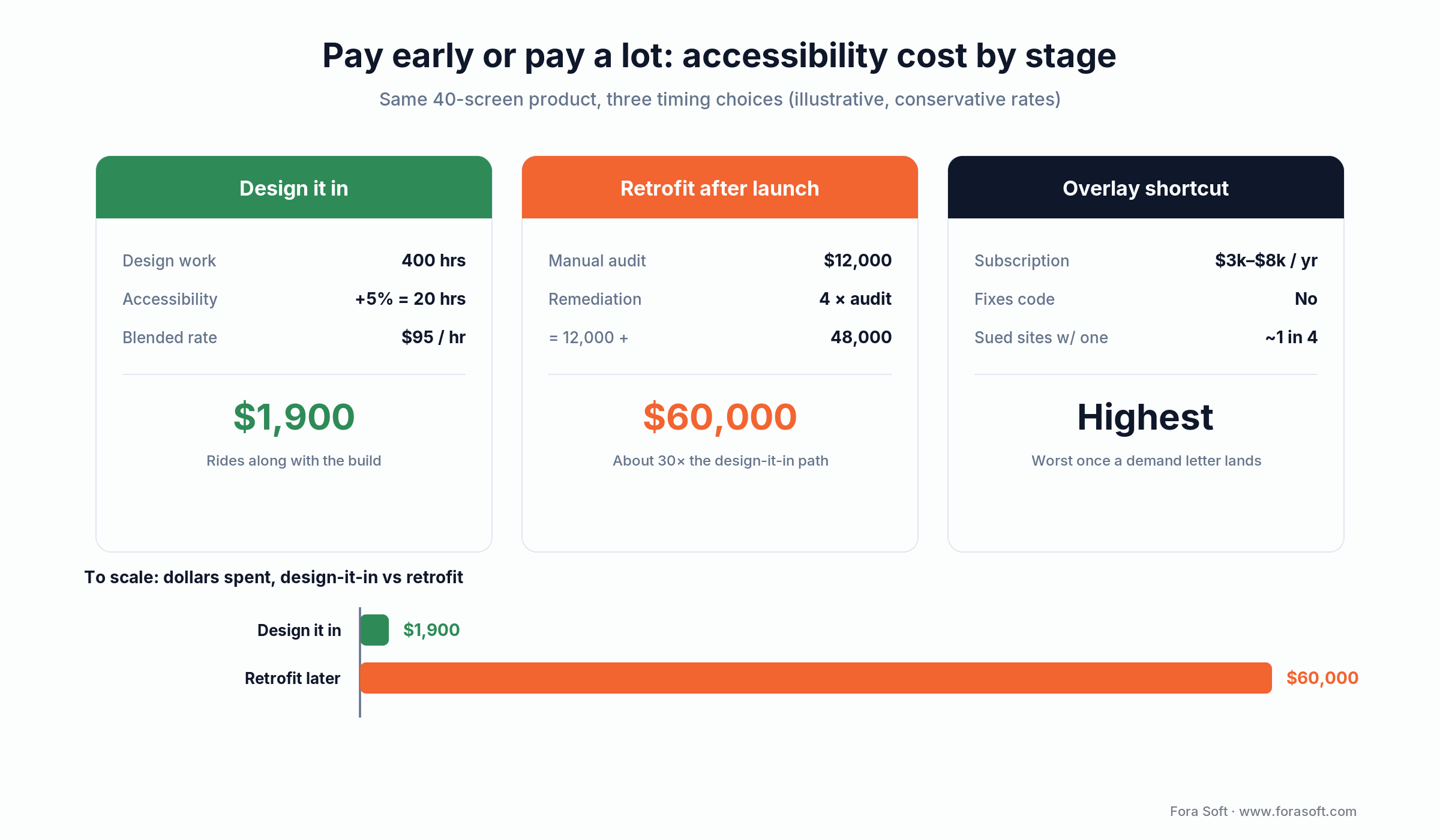
Figure 3. Spend it early, or pay roughly 30× more to bolt it on after launch.
What accessible design actually costs
How much does accessible design cost? Built into the design system, it runs under 5% of design time; retrofitted after launch, 15–30%. The number that decides your budget is not the percentage — it is when you spend it. Here is the arithmetic on a mid-size product, with conservative rates.
Design it in. Say a 40-screen product carries roughly 400 hours of design work. Accessibility baked into the tokens and components adds about 5%: 400 × 0.05 = 20 hours, or about $1,900 at a $95/hr blended design rate. It rides along with the work you are already doing.
Bolt it on later. The same 40 screens after launch means a manual audit ($10,000–$30,000; call it $12,000) plus remediation that typically runs three to five times the audit because tokens and components have to be rebuilt and every screen re-touched: $12,000 × 4 ≈ $48,000. Total is around $60,000 — roughly 30 times the design-it-in path — before you count the delayed release and the legal exposure.
The overlay “shortcut.” A widget subscription runs about $3,000–$8,000 a year, does not fix the underlying code, and puts you in the roughly 1-in-4 cohort of sued sites that were running one. It is the most expensive option once a demand letter arrives. The pattern is the same every time: the earlier the spend, the smaller it is.
Want the design-it-in number for your product, not a generic range?
Send us your screen count and stack. We’ll come back with a scoped accessibility estimate and where it fits your roadmap — using Agent Engineering, our numbers tend to come in faster and lower than a typical agency quote.
Decision framework: retrofit, redesign, or defer
Not every product needs a full design-system rebuild for accessibility. Run the audit first, count the issues and where they cluster, then use this ladder.
Retrofit in place when your system is component-based, uses tokens, and the audit returns fewer than about 60 issues. Most teams with a mature Figma library land here. Expect four to eight weeks of design plus about two weeks of engineering per surface.
Redesign the system when the palette is ad hoc, spacing is eyeballed, components are copy-pasted, or the audit returns 100+ issues concentrated in the core primitives. Rebuild tokens and primitives first, then migrate screens. Expect eight to sixteen weeks.
Defer, carefully, when you are pre-product-market-fit, single-market B2B outside EU reach, with a clear accessibility milestone on the roadmap. Every month you wait adds roughly a week of future retrofit and 10–20% to the eventual bill. Never defer when you sell to EU consumers, the US public sector, healthcare, finance, or into any enterprise deal whose procurement runs an accessibility questionnaire.
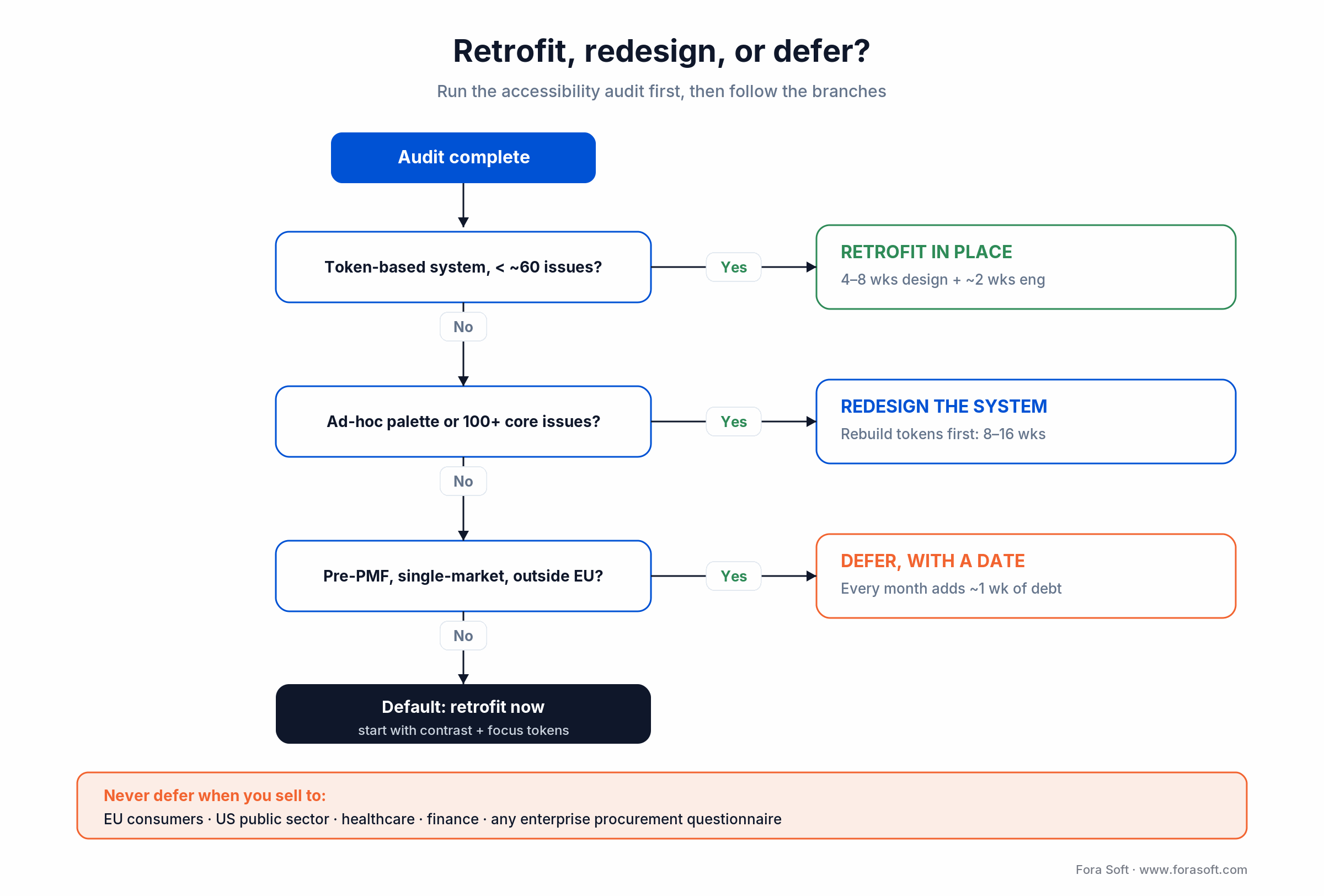
Figure 4. Run the audit, then branch: retrofit, redesign, or defer with a date.
Mini case: an accessible UX retrofit in practice
A B2B analytics client came to us with a dashboard that had grown from 4 to 40 screens over three years. The audit flagged 118 WCAG 2.2 AA issues: 42 contrast, 27 focus, 18 form, 13 motion, 10 hit-target, 8 content-clarity. The root cause was familiar — a palette that had drifted, ad-hoc focus styling, and placeholder-as-label patterns copied from screen to screen.
We ran a 10-week fix. Weeks 1–3 rebuilt the tokens (color, type, spacing, focus rings) and pushed them to Tailwind and Figma. Weeks 4–6 moved the top 12 screens onto the new tokens. Weeks 7–8 fixed forms and async status announcements. Weeks 9–10 cleared motion, hit targets, and copy. The post-fix audit came back with 7 residual issues, all cosmetic.
The measured result: task completion on the primary “create report” flow went from 71% to 89% for keyboard-only users, NPS in the audit cohort moved from 32 to 51 over 90 days, and support tickets mentioning “can’t see,” “can’t read,” or “can’t tab” dropped 78%. Want a similar read on your product? Book a 30-minute assessment and we’ll size it against your actual Figma library.
EAA, ADA, and global accessibility law in 2026
Which laws actually apply? If you sell digital products to consumers in the EU or serve the US public, several do, and WCAG 2.2 AA is the practical target for all of them.
European Accessibility Act (Directive 2019/882): enforceable since June 28, 2025. It covers most consumer digital products sold in the EU — e-commerce, banking, transport, ticketing, e-books. EN 301 549, which points at WCAG, is the compliance yardstick, and penalties vary by member state, some including withdrawal from the market.
US ADA: the DOJ’s April 2024 Title II rule applies WCAG 2.1 AA to state and local government sites and apps, with deadlines in April 2026 and April 2027 by population. Title III case law extends to private-sector sites and apps, and 2025 set a record with 5,114 digital-accessibility suits filed. Most settle in the low five figures — still more than designing it in.
Everywhere else: Section 508 (WCAG 2.0 AA for US federal procurement), the UK Equality Act plus the 2018 public-sector regulations, Canada’s ACA and Ontario’s AODA, Australia’s DDA, and Israel’s equal-rights regulations all reference WCAG 2.x AA. Design to WCAG 2.2 AA once and you clear the practical bar in every one of these markets.
Five pitfalls that derail accessible design projects
1. Designing without tokens. If palette, type scale, and spacing are not tokenized, every new screen is a fresh accessibility risk. Tokenize first, then redesign screens.
2. Treating accessibility as a QA step. Caught in QA, an accessibility bug costs multiples of what it costs designed-in. Put accessibility acceptance criteria on every design ticket instead.
3. Trusting the overlay. A widget is a lawsuit magnet and a broken experience for the users it claims to help. The subscription money buys a real retrofit instead.
4. Skipping real-user testing. Automation misses most of the interesting failures: awkward VoiceOver wording, confusing focus order, cognitive dead-ends. Only paid testers on real assistive tech surface them. Budget for it every release.
5. One-and-done audits. Accessibility regresses with every sprint — that is literally what the 2026 WebAIM numbers show at web scale. Put a WCAG check in PR review, run axe or Lighthouse on every build, and schedule a full audit each quarter.
When not to over-invest in accessibility
Honesty sells better than a checklist, so here is the counter-position: chasing WCAG AAA across an entire product is usually the wrong call. AAA raises contrast to 7:1, caps reading level hard, and adds criteria that fight your brand and your content on most screens. Ship AA everywhere and reserve AAA for the specific flows where users with more significant disabilities concentrate — a benefits portal, a health intake, an accessibility-statement page.
Do not pour weeks into a throwaway prototype or an internal admin tool used by five colleagues on identical hardware, when a public consumer flow in the same company is failing contrast. Sequence by exposure: regulated surfaces and high-traffic consumer journeys first, low-traffic internal tools last. And do not gold-plate one pillar while another is on fire — a beautiful reduced-motion system means little if a third of your form fields are still unlabeled. Accessible design is triage before it is polish.
KPIs: what to measure once accessibility ships
Accessibility needs the same sprint-over-sprint tracking as performance or uptime, because it decays the same way. Once the seven pillars are in place, three buckets tell you whether it is holding.
Design-system KPIs. Token contrast compliance across every palette pair (target 100% at AA); component coverage in the Figma library (target 100% of components carry focus, hover, disabled, error, and dark-mode variants); and share of screens passing automated axe or Lighthouse checks (target a Lighthouse accessibility score of 95+ on 95% of screens).
Product KPIs. Task-completion parity between keyboard-only and mouse users on the top three journeys (target within 10%); completion for screen-reader users (target within 15%); accessibility support tickets per 10K monthly active users (trend to near zero); and the NPS gap between assistive-tech users and everyone else (target parity).
Compliance KPIs. Quarterly external WCAG 2.2 AA audit pass rate (target 100% of must-fix items closed per release); accessibility-statement freshness (updated every user-facing release); and time-to-remediation for user-reported issues (target under 30 days).
Frequently asked questions
What is the difference between accessible design and inclusive design?
Accessible design has a measurable target: it makes a product usable by people with disabilities, benchmarked against WCAG conformance. Inclusive design is the broader practice of designing for the full range of human diversity, including language, device, and situational limits. Universal design aims for one solution that works for everyone without adaptation. In practice you ship accessible design to a standard and use inclusive-design methods to get there.
Is WCAG 2.2 AA the right target in 2026, or should I aim for AAA?
AA is the target every regulation cites: EN 301 549, Section 508, the DOJ 2024 Title II rule, the UK Equality Act, and nearly all enterprise procurement. AAA is aspirational for specific content types (7:1 contrast, reading level) and unrealistic as a blanket goal. Ship AA everywhere and measure AAA only on the critical flows where users with more significant disabilities concentrate.
How much does accessible design cost?
Designed into the system it runs under 5% of design time; on a 40-screen product that is roughly 20 hours, about $1,900 at a $95/hr rate. Retrofitted after launch it runs 15 to 30%: a manual audit ($10K to $30K) plus remediation of three to five times the audit, so around $60,000 total for the same 40 screens. The percentage matters less than the timing.
Can AI replace human accessibility auditing?
No. Automated tools catch roughly 30 to 40% of WCAG issues (Deque puts its axe engine as high as ~57% in testing). The rest — focus-order quality, screen-reader wording, cognitive clarity, real workflow blockers — needs manual testing and people with lived experience of assistive tech. AI drafts; humans ship. WebAIM tied part of 2026’s accessibility regression to unreviewed AI-generated markup.
Are accessibility overlays ever acceptable?
Only as short-term triage while real remediation is underway, and even then with an honest accessibility statement about the gaps. Do not market an overlay as compliance: the FTC settled with a major overlay vendor for $1M over deceptive claims in 2025, and about 1 in 4 sites sued that year were already running one. Real design-system fixes are cheaper over any horizon longer than a few months.
What is the quickest accessibility win I can ship this sprint?
Audit your color tokens against AA and fix the worst offending pair. Low-contrast text is the single most common WCAG failure — 83.9% of home pages in WebAIM’s 2026 audit — and the easiest to fix once tokens are the source of truth. A contrast-validated palette shipped this sprint typically clears a large slice of a real audit’s findings.
Do design systems actually help with accessibility?
Yes, it is the highest-return accessibility investment you can make. Fix contrast, focus, typography, and error patterns once in tokens and primitives and every new screen inherits them. Across the products our team has shipped, tokenized systems keep accessibility under 5% of design time; systems without tokens pay 15 to 30% in rework.
How do I handle accessibility for dark mode and theming?
Dark mode is not automatic accessibility — contrast still has to clear AA in every theme. Give each semantic color token light, dark, and high-contrast variants (Figma Variables, CSS custom properties, SwiftUI, and Tailwind all support this cleanly) and run contrast linting on every pair. Ship all three variants together so a theme switch never drops a token below 4.5:1.
What to read next
iOS
The iOS Accessibility Playbook for 2026
The engineering counterpart to this design guide: seven iOS pillars, Swift APIs, WCAG mapping.
Design
AI Tools for UI/UX Design in 2026
The broader AI-in-design toolkit that pairs with this accessibility guide.
Mobile UX
Mobile App UX Design Best Practices
Mobile UX fundamentals that sit underneath this accessibility playbook.
Process
Wireframing in Software Development
Where accessible structure starts — planning reading order and flows before pixels.
Build
Mobile App Development Services in 2026
Native, Flutter, RN and PWA — and how accessibility fits each path.
Ready to ship accessible design that holds up?
Accessible design in 2026 is a design-system problem solved with tokens, a tooling stack anchored on Figma, and a test cycle that includes real people on real assistive tech. Design the seven pillars — contrast, typography, focus, motion, input, content, forms — into every component and 95% of an audit never happens. The web is regressing because complexity and unreviewed AI markup outran the fundamentals; the teams that ship inclusive products just kept doing the fundamentals.
Automation gets you a first draft. Overlays get you a lawsuit. Real remediation, four to sixteen weeks of it, gets you a product that works for every user, holds up in regulated markets, and stops the slow drip of accessibility complaints. If you want a partner who treats accessibility as a design gate rather than a launch-week scramble, that is how we build software.
Build accessibility in from the first sprint, not the last
Book a 30-minute call and we’ll map your remediation path against your Figma library, your stack, and your regulatory exposure — and hand you a prioritized backlog.

