


Mobile app UX design in 2026 is not a hunt for a clever new idea. It is a disciplined checklist a few teams run on every build and most teams skip. The gap between the two shows up in one number: whether a new user reaches real value inside the first minute. Get that right and retention, ratings, and revenue tend to follow. Get it wrong and no marketing budget rescues the app. We have shipped 250+ products since 2005, so this is the playbook we actually run, not a mood board.
Key takeaways
- The biggest retention lever is time-to-first-value. Reaching a real action inside 60 seconds roughly doubles D7 retention versus a 3-minute onboarding.
- First-run performance decides survival: cold start under 2.5 s (p90), tap response under 100 ms, crash-free sessions above 99.5%.
- Accessibility is now a buying criterion. WCAG 2.2 AA, 44×44 pt / 48×48 dp touch targets, and dynamic type are contract clauses in enterprise deals, not extras.
- AI features win when they are inline, opt-in, and reversible. Forced or opaque AI kills trust faster than any legacy anti-pattern.
- One regulatory correction for 2026: the FTC’s “click-to-cancel” rule was vacated in July 2025. Dark patterns are still risky — the EU DSA and state laws did not go anywhere.
This guide is written for founders, product leaders, and CTOs who are either hiring a mobile team or auditing the one they have. It skips the gallery of pretty screens and gives you the rules, the numbers, and the trade-offs — including where each rule breaks. At Fora Soft we are a 50-engineer team that has built video, real-time, and AI products for two decades, from consumer apps like the BlaBlaPlay anonymous voice-chat app to the V.A.L.T. surveillance platform running across 770+ US organizations. The patterns below are the ones our design, iOS, and Android teams apply on every engagement.
If your app is underperforming against the benchmarks here, book a 30-minute call and we will audit the gap against this playbook, candidly and free of charge.
Why mobile UX is a business metric, not a design preference
Mobile UX is the shortest path between product spend and revenue. The case for investing is boring precisely because it is consistent: small percentage gains at each funnel step compound into the difference between a product that survives and one that quietly dies. Treat the numbers below as directional, not promises — the exact lift depends on your baseline — but the direction never reverses.
| Lever | Observed effect | Source / context |
|---|---|---|
| Autofill + native checkout | Fewer form errors, less abandonment | Baymard tracks ~70% average cart abandonment |
| Page/app load 1 s → 3 s | Bounce probability +32% | Google / SOASTA mobile speed study |
| Load 1 s → 5 s | Bounce probability +90% | Google / SOASTA mobile speed study |
| Reaching first value in < 60 s | Roughly 2× D7 retention | Consistent across our own builds |
| $1 invested in UX | Often-quoted ~$100 return | Forrester estimate (dated 2008; treat as a ceiling, not a rule) |
Table 1. The UX levers with the most defensible business impact. The famous “$1 returns $100” figure is old and industry-cited; we lead with the numbers you can reproduce.
Here’s the honest version: the gap between average and great is usually two or three points at each step of the funnel. Nobody wins a single dramatic screen. You win by shaving friction everywhere, then compounding it.
Ten core principles behind every good mobile app
These are not trends. They are constraints of the hand, the eye, and the two platforms, and they have barely moved in a decade.
- Design for the thumb. Primary actions belong in the lower two-thirds of the screen. Top navbars are for labels and status, not tap targets.
- Respect the platform. iOS 26 uses Liquid Glass, gesture-based back, and the Dynamic Island; Android uses Material 3 Expressive, Predictive Back, and edge-to-edge layouts. Fighting these conventions burns a month of testing you will not get back.
- One screen, one job. If a screen has two primary actions of equal weight, you have two screens.
- Three taps to anywhere. Any primary feature should be reachable in three taps. Deeper than that is a hidden feature.
- Five bottom tabs, max. Six or more wrecks tap accuracy and recognition.
- Content first, chrome second. Hide toolbars on scroll; restore them on scroll-up.
- Ask for permissions in context. Grant rates jump when the ask is tied to the feature the user just tapped, not fired at launch.
- Make state obvious. Loaded, loading, empty, and error are four different screens, not one spinner.
- Recover from every failure. Offline mode, retry affordances, graceful degradation. Real-world networks are mid-quality, not fast.
- Respect the body. 44×44 pt / 48×48 dp minimum targets, 8 px gaps, dynamic type honored, reduced motion honored, VoiceOver and TalkBack labels set.
Reach for platform-native components when…
…you are building anything a user touches daily. Custom tab bars and bespoke modals look distinctive in Figma and cost you in muscle memory, accessibility, and every OS update. Save the custom UI budget for the one screen that is genuinely your product, and let the platform handle the rest.
What changed between 2022 and 2026
Older mobile guides still assume 2020 hardware and 2020 rules. Five things shifted, and each one shows up in your next build.
iOS 26 and Liquid Glass
Apple moved to year-based versioning and introduced Liquid Glass at WWDC 2025. The Dynamic Island and Live Activities pulled live status out of the main UI: timers, delivery progress, rideshare state, and scores now live there instead of a notification banner. If your app has an ongoing task, that is where it belongs.
Material 3 Expressive and Predictive Back
Google’s Material 3 Expressive update (announced May 2025) leans into depth, dynamic color, and bolder type. Predictive Back, standard on Android 14+, shows a peek of the destination before the user commits — it kills the “wait, where am I going” hesitation that used to break micro-task completion.
Gesture-first navigation
Home indicators replaced the home button on both platforms years ago; swipe-back, swipe-up, and edge gestures are now the default. Apps that place “Back” buttons where they collide with system gestures generate constant mis-taps.
Passkeys replaced passwords as the default
Apple, Google, and Microsoft all ship passkey infrastructure now. Passkeys are phishing-resistant and store no shared secret. A 2026 app should offer passkey sign-in by default and keep password sign-in only as a legacy fallback.
System AI sits next to your app
Apple Intelligence and Gemini on Android mean users arrive pre-educated on summarize, “help me write,” and contextual recall. If your app has text fields, it should either cooperate with system AI or make a deliberate choice not to. Ignoring it is the one option that reads as dated.
The thumb zone, the safe area, and one-handed use
Most phone use is one-handed and on the move. The simplest working model splits the screen into three zones: the bottom third is easy for the thumb, the middle is neutral, and the top is a stretch on a 6-inch phone. Put critical interactions in the bottom, secondary in the middle, and purely informational content up top.
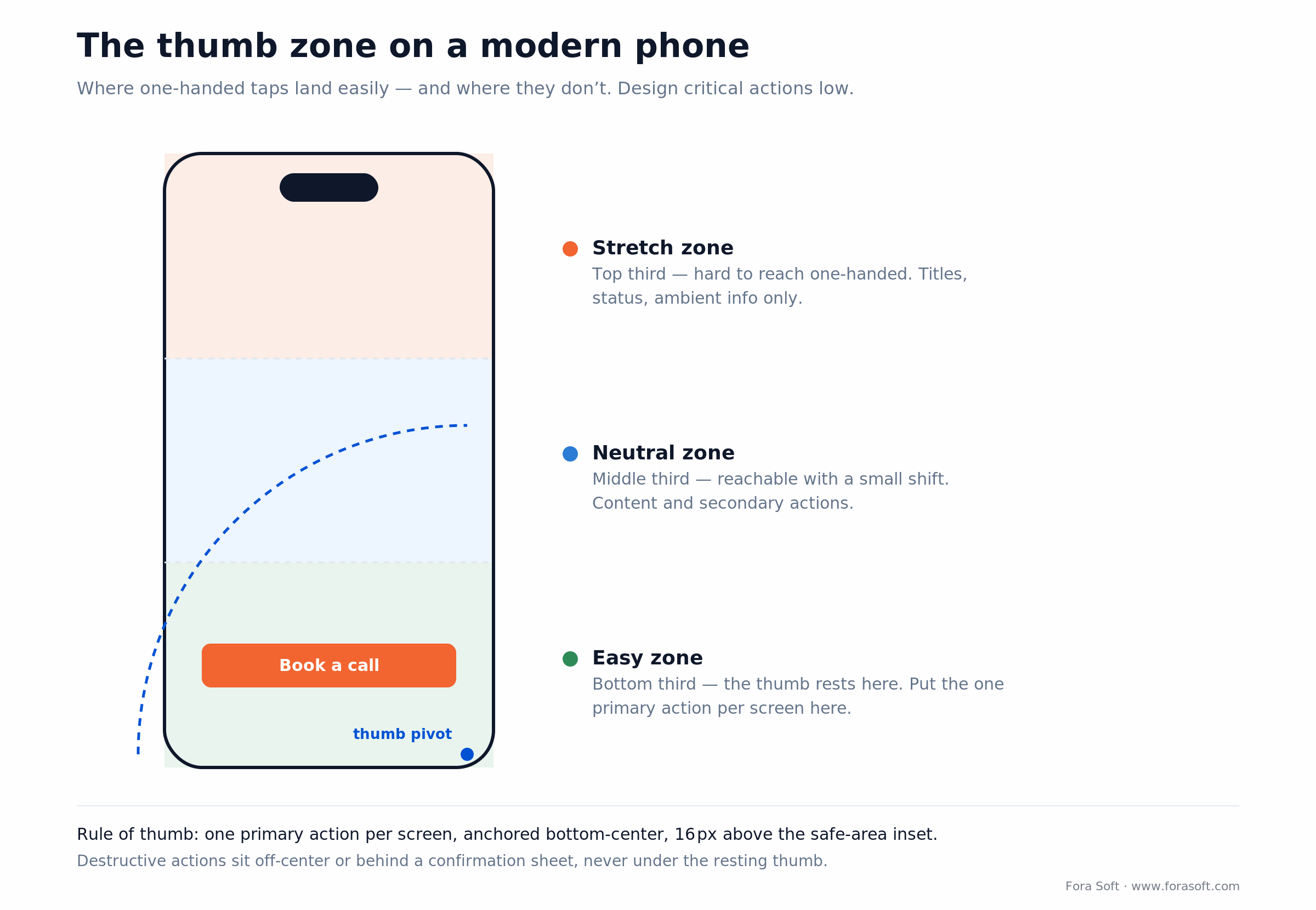
Figure 1. The one-handed reach map. The single primary action per screen belongs in the green easy zone, anchored bottom-center.
Concrete rules we apply on every project:
- Primary CTA bottom-center, 16 px above the safe-area inset.
- Destructive actions off-center or behind a confirmation sheet, never under the resting thumb.
- Top navbar carries the screen title and one lightweight action at most.
- On large phones (Pro Max, Ultra) keep the CTA anchored to the bottom even when content scrolls.
- Tablets get a separate layout, not a stretched phone. Use SplitView and list-detail patterns.
Onboarding that hits time-to-value in 60 seconds
The single biggest retention lever is whether a user feels real value inside the first minute. Everything before that moment has to compress into a 60-second window. Reaching first value that fast is worth roughly 2× the D7 retention of a slow 3-minute onboarding, across almost every vertical we have measured.
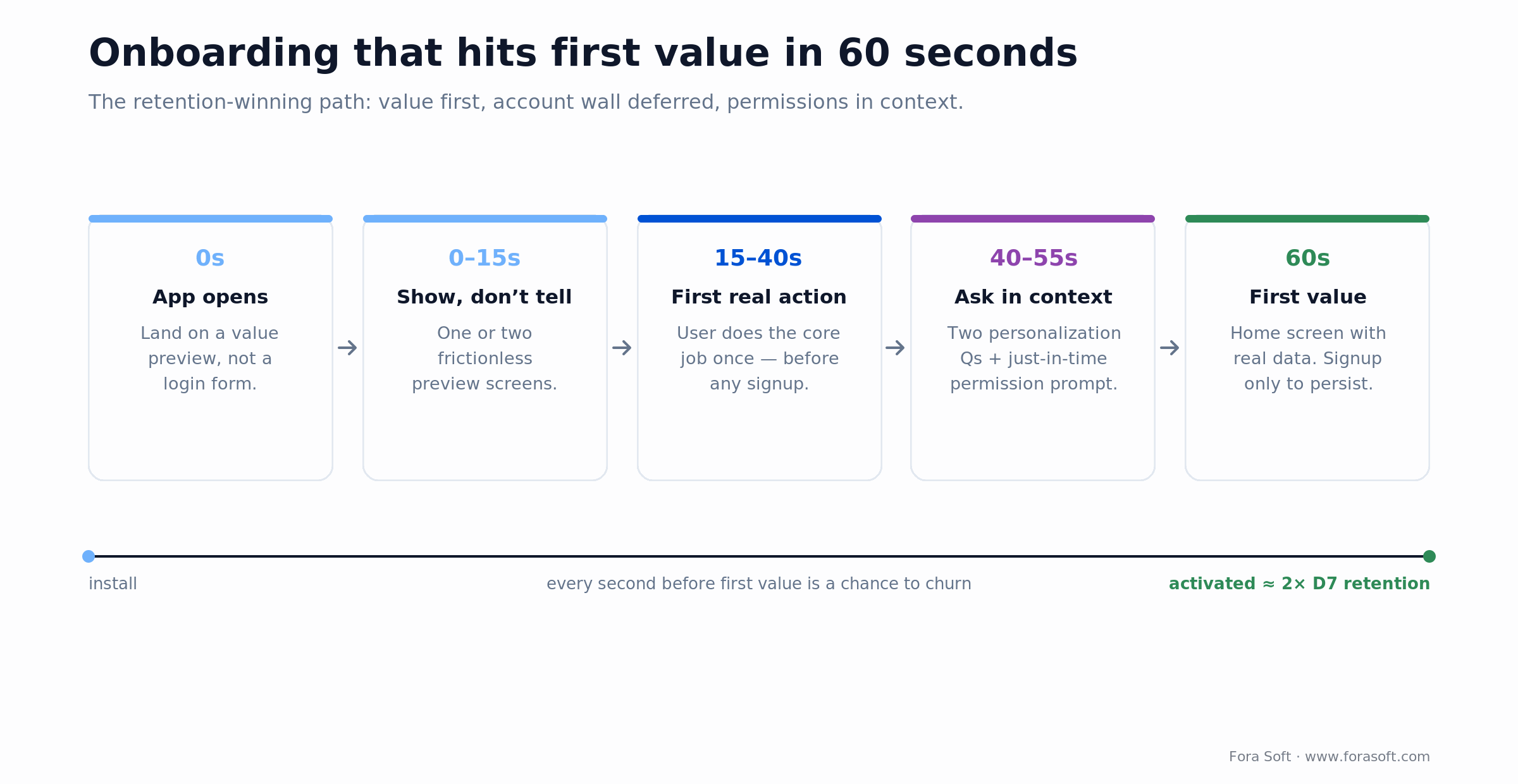
Figure 2. The onboarding path that keeps users. Signup is deferred until persistence is actually needed.
The pattern that wins:
- Show, don’t tell. One or two frictionless screens of value preview, not a five-slide carousel.
- Defer the account wall. Let the user take a meaningful action before signup. Force it only when persistence is needed: save this, share this, sync this.
- Prime permissions just in time. Camera when they tap “take photo.” Push after the first useful alert has been demonstrated.
- Two personalization questions, max. Enough to tailor the feed, not enough to feel like a form.
- End on the home screen with real data. Never drop the user into an empty state after onboarding.
Reach for deferred signup when…
…your app can demonstrate value without an account. A recipe app, a fitness tracker, a note-taker — all can show the core loop first. Keep the wall only for products where the very first action is inherently personal (banking, health records), and even then, make the reason obvious on the same screen.
Is your onboarding leaking users?
Send us your D7 number and a screen recording of your first-run flow. In 30 minutes we will map where users drop and name the two changes we would ship first.
Performance UX: the perception layer that saves retention
Users judge an app by how fast it feels, not how fast it is. That distinction is the whole game: a skeleton screen that paints structure in 200 ms beats a spinner sitting on a 400 ms fetch, even though the spinner finishes sooner. Here are the budgets we hold teams to.
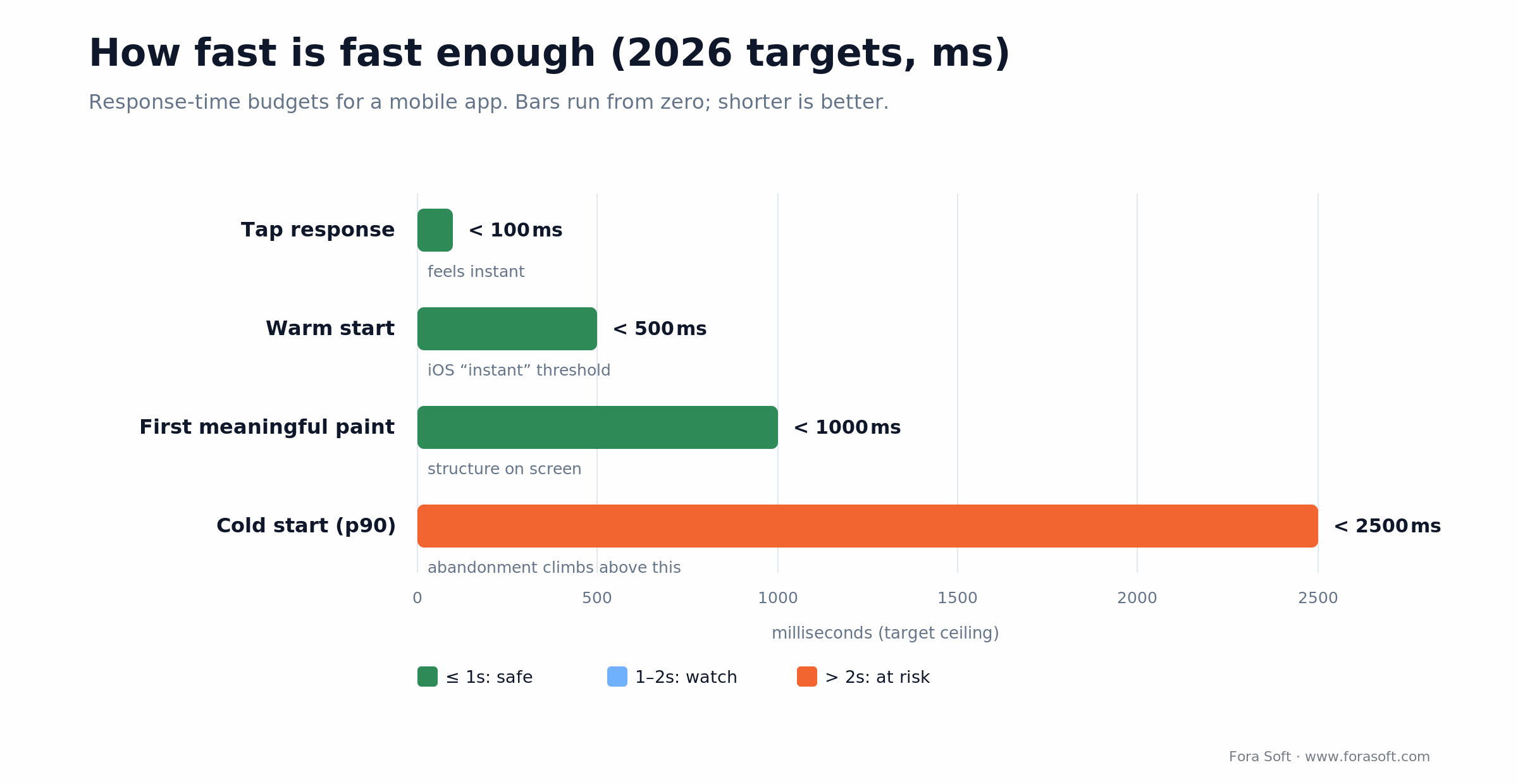
Figure 3. The four response-time budgets that matter most. Cold start is the one that decides whether a first session even happens.
| Metric | 2026 target | Why it matters |
|---|---|---|
| Cold start (p90) | < 2.5 s | Above this, early-session abandonment climbs. |
| Warm start | < 500 ms | Matches the iOS “instant” perception threshold. |
| First meaningful paint | < 1 s | User sees structure immediately. |
| Tap response | < 100 ms | Anything slower feels broken. |
| Crash-free sessions | > 99.5% | Practical floor for 4-star+ store ratings. |
| Android ANR rate | < 0.47% | Google Play’s “bad behavior” threshold; above it, Play visibility drops. |
Table 2. Hard performance targets for a 2026 mobile app. The ANR and crash figures are Google Play’s own published thresholds.
To hit these:
- Skeleton screens, not spinners. Perceived speed jumps even when actual speed does not.
- Lazy-load non-critical modules. On-demand feature modules cut cold start meaningfully in our builds; instrument before and after so you know the real delta.
- Design offline-first. Buffer writes, show cached reads, reconcile on reconnect.
- Pre-warm the home feed and cache the hero image aggressively on cold start.
- Instrument everything. If you are not watching p50 / p90 / p99 weekly, you are guessing. Our engineering write-up on optimizing Android apps for video streaming goes deeper on the measurement side.
Accessibility as a 2026 buying criterion
Accessibility stopped being a values pitch and became a line item in enterprise procurement. Buyers now ask for WCAG 2.2 AA conformance in the contract, and ADA-style complaints over inaccessible apps keep rising. The market reason is bigger still: the WHO puts the number of people living with a significant disability at about 1.3 billion, before you count temporary and situational impairments.
The non-negotiables:
- 4.5:1 text contrast (AA); 3:1 for 18 pt+ or 14 pt bold.
- Touch targets 44×44 pt (Apple HIG) / 48×48 dp (Android), spaced ≥ 8 px apart.
- Dynamic Type / font scaling to 200% without layout break.
- A semantic label on every interactive element for VoiceOver and TalkBack.
- Motion honors the system “reduce motion” setting — disable, do not just slow.
- Captions and transcripts for audio and video.
- A tap or long-press alternative for every swipe gesture.
A dedicated accessibility audit usually adds a few percent to project cost and pays back many times over in expanded market, retained customers, and avoided litigation. We fold it into the design track rather than bolting it on at the end — retrofitting labels and contrast after launch is where the real cost hides.
More on this topic: if your product involves video or real-time media, accessibility and performance share the same root causes. Our video encoding fundamentals track in Learn covers the streaming stack that most consumer apps quietly depend on.
Forms, auth, and payments: your highest-impact screens
Form screens are where monetization funnels leak. These are the cheapest conversion win you will ever ship, because the fixes are mechanical, not creative.
- Autofill everything. Use
autocomplete="email",one-time-code, andcc-number. iOS and Android pull from Messages, Wallet, and the password manager. - Split long forms. A three-step wizard beats a 12-field wall. Each screen should feel almost too small.
- Validate inline, on blur, not on submit. Tell the user the moment they leave the field.
- Right keyboard, right input. Number pad for phone, email keyboard for email, correct
inputmodefor any web view. - Passkeys first, password fallback. Passkey sign-in takes under five seconds including biometrics.
- Biometric is added post-first-login, never forced as the primary sign-up mechanism.
- Payment sheets, not custom card forms. Apple Pay and Google Pay are the fastest, lowest-abandonment path to checkout. A hand-rolled card form is the slowest.
Navigation and information architecture
Rules of thumb that survive almost every A/B test:
- Bottom-tab navigation for 3–5 primary sections. More than five collapses into a “More” tab or splits into role-based tabs.
- Hamburger menus are fine for secondary destinations, not primary ones. Moving a primary destination into a drawer typically costs a chunk of its engagement.
- Universal Links (iOS) and App Links (Android) are mandatory. Content must be URL-addressable and open on the right screen.
- Every screen reachable in ≤ 3 taps from home.
- Search is a navigation shortcut; past ~30 destinations it stops being optional.
- Breadcrumbs on deep flows are a crutch for a bad hierarchy. Fix the hierarchy first.
Motion, haptics, and microinteractions
Animation in 2026 is functional, not decorative. Every transition should say what just happened, what is coming, or that the system heard the tap.
- Durations of 150–300 ms for most transitions; past 500 ms it feels sluggish.
- Hold 60 fps. Use
CADisplayLinkon iOS andChoreographeron Android so animations are device-paced. - Haptics on destructive, celebratory, and error events — not on every tap.
- Lottie or Rive for loading and lightweight celebrations. Both keep the animation in the designer’s hands without a code rebuild.
- “Reduce motion” must disable parallax and auto-playing transitions, not just slow them.
Designing AI features without annoying your users
Good AI UX follows the same rules as good API design: predictable, opt-in, reversible, and honest about failure. The apps that get this wrong bolt a chatbot onto every empty state and call it a strategy. The ones that get it right treat AI like a power-user shortcut — invisible to people who do not need it, instant for people who do.
| Do | Don’t |
|---|---|
| Offer AI inline and contextual (“Summarize this thread”) | Push AI suggestions into every empty state |
| Label AI-generated output explicitly | Present AI output as fact without sourcing |
| Let users edit, reject, or regenerate | Auto-commit AI edits to their content |
| Degrade gracefully when the model is slow or offline | Block the task on model latency |
| Expose a clear off switch | Force AI into every workflow |
Table 3. AI UX patterns that build trust versus the ones that burn it.
Our AI mobile app team ships these patterns most weeks. The honest caveat: on-device inference is still power- and thermal-limited, so heavy models belong in the cloud with a fast local fallback. We would not promise real-time on-device generation past a small quantized model — beyond that, measure on the actual target hardware before you commit a spec.
Reach for an off switch when…
…your AI touches user content, money, or anything irreversible. A summarizer can be always-on; an auto-editor that rewrites a user’s draft cannot. The rule: the more consequential the action, the more explicit the consent and the easier the undo.
Planning AI features for your app?
We have shipped inline AI, voice, and vision across consumer and regulated products. Bring your idea and we will walk the on-device-versus-cloud trade-offs and the honest cost band with you.
Dark patterns and the 2026 regulatory picture
Regulators have been circling manipulative UX for years, and the picture in 2026 is more nuanced than the headlines suggest — so get the facts right before you build a compliance story on them. The EU Digital Services Act bans dark patterns on online interfaces, with fines up to 6% of global annual turnover. That 6% figure belongs to the DSA; it is not a US number.
In the US, the FTC’s “click-to-cancel” rule (the Negative Option Rule) was vacated by the Eighth Circuit on July 8, 2025 on procedural grounds, so it is not currently in force. Do not cite it as active law. What still applies: the Restore Online Shoppers’ Confidence Act (ROSCA), state auto-renewal laws such as California’s, and Apple and Google store policies — and the FTC filed a fresh rulemaking notice in early 2026, so easy cancellation is coming back in some form. The safe engineering call is to build symmetric opt-in and opt-out now and skip the legal guessing.
Retire these patterns if you still have them:
- Roach motels. One-tap signup, eight-tap cancel.
- Confirmshaming. “No, I hate saving money.”
- False urgency. Fake countdown timers.
- Drip pricing. Fees revealed only at checkout.
- Forced continuity. A trial that silently converts to paid with no reminder.
- Manipulated hierarchy. “Accept” styled as a primary button, “Decline” as ghost text.
The metrics that tell you if UX is working
Four tiers, ordered by how quickly they tell you the truth:
Behavioral (daily)
Time-to-first-key-action, onboarding completion, step-level drop-off. If these regress, something you shipped last week broke.
Retention (weekly / monthly)
D1, D7, D30 — read cohort curves, not averages. The DAU/MAU ratio around 20% is healthy; 25%+ is sticky. Consumer-app D7 sits near 10–13% at the median, so 25%+ already puts you in the top quartile.
Quality (release-cycle)
Crash-free sessions above 99.5%, Android ANR under 0.47% (Google’s published threshold), store rating target 4.5+.
Attitudinal (quarterly)
NPS (target above 40), SUS (target above 68), task-success on moderated tests. These lag, but they explain why the behavioral numbers moved.
What a good mobile UX engagement looks like
The shape of a 2026 mobile design-and-build project when it is done well:
| Phase | Duration | Output |
|---|---|---|
| Discovery & research | 1–2 weeks | Personas, jobs-to-be-done, metric tree |
| Information architecture + wireframes | 1–2 weeks | Screen graph, wireframe flows |
| Prototyping + usability testing | 2–3 weeks | Figma prototype + 5–8 user sessions |
| Visual design + design system | 3–4 weeks | Tokens, components, icon set, motion spec |
| Handoff + implementation support | ongoing | Engineering pair work, QA review |
Table 4. A typical design track on a medium-complexity mobile app.
Agent-assisted engineering changes the math on the build side. In our own benchmarks a medium-complexity app that used to need 16–20 weeks of build now lands closer to 10–13 weeks. Design shrinks less — usability testing is still a human activity — but handoff is faster because component libraries and generated boilerplate arrive engineering-ready. We estimate conservatively, so treat those ranges as the honest middle, not a floor.
For a deeper pricing breakdown, see our guide to mobile app development costs in 2026, and our custom software development services for how the design and build tracks connect.
Mini case: a telehealth video app rebuild in 10 weeks
Telemedicine is one of our deeper domains — we built AirDoctor (travel telemedicine, 20K+ doctors, 80K+ patients) and CirrusMED (HIPAA-compliant direct-primary-care), so the friction points in a consultation flow are familiar territory. One client came to us with a working video-consultation app stuck at 9% D7 retention and a 3.4-star average. The core flow was fine; friction was hiding at every edge.
In a 10-week rebuild we:
- Collapsed a five-step onboarding into two contextual screens plus deferred signup.
- Moved primary CTAs out of the top navbar and into the thumb zone.
- Replaced a custom payment form with native Apple Pay and Google Pay sheets.
- Added skeleton screens, cold-start optimization, and a pre-warmed feed cache.
- Hit WCAG 2.2 AA across the app: contrast, targets, VoiceOver labels, dynamic type.
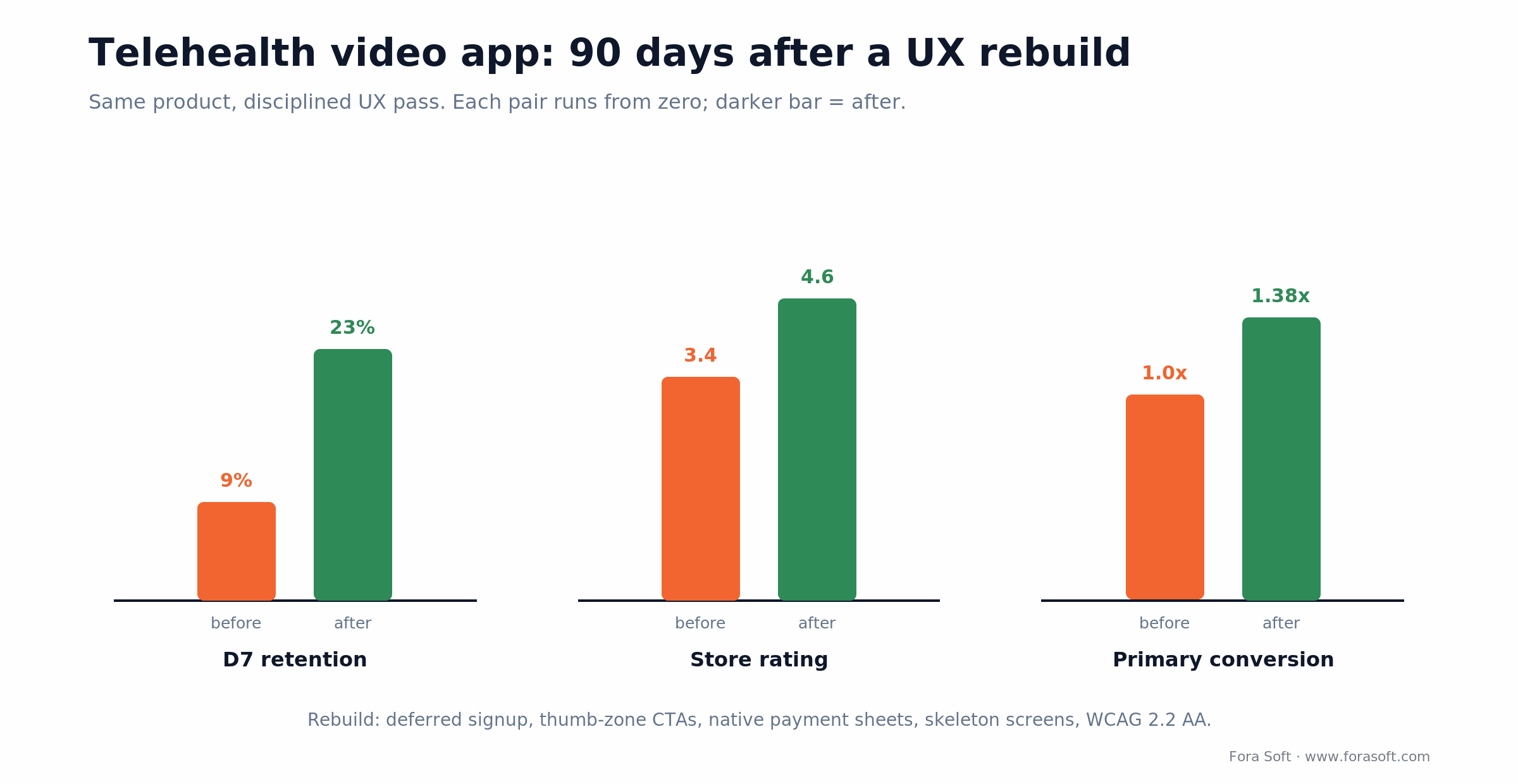
Figure 4. Ninety days after the rebuild. The conversion lift alone pushed unit economics above the threshold that had been blocking a marketing spend-up.
Results after 90 days: D7 retention climbed from 9% to 23%, store rating from 3.4 to 4.6, and the primary conversion step converted 38% better. None of it came from a redesign of the “look” — it came from removing friction the team had stopped seeing. If your numbers look like the “before” column, book a call and we will tell you which fix moves the needle first.
Five UX pitfalls that cost mobile teams months
- Designing for the designer, not the device. Pixel-perfect on a 27-inch monitor, unreadable on a 6-inch phone with Dynamic Type at 150%. QA on real devices, always at the maximum text scale.
- Shipping without an analytics backbone. If you cannot see step-level funnel drop-off on day one, you cannot fix it. Instrument before you polish.
- Ignoring the empty state. A new user spends more time in empty screens than full ones. A good empty state onboards; a blank one churns.
- Platform-inconsistent custom UI. Custom tab bars, custom nav stacks, custom modals — each one taxes the user’s muscle memory.
- Treating design QA as optional. A design QA pass is cheap; shipping “it compiles” UI across a 20-screen app costs ten times that in support and churn.
The 15-point UX audit you can run today
- Time-to-first-value under 60 seconds on a fresh install.
- Cold start p90 under 2.5 seconds on a mid-range Android.
- Primary CTA reachable with the thumb, one-handed.
- Bottom-tab bar has 3–5 destinations, not more.
- Every permission prompt is contextual, never fired at launch.
- Autofill works on every field (email, one-time-code, card number).
- Passkey or Sign-in-with-Apple / Google supported.
- Skeleton screens replace spinners on every load.
- Offline mode for reads, buffered writes for failures.
- VoiceOver / TalkBack labels on every interactive element.
- Text contrast ≥ 4.5:1; Dynamic Type to 200% without break.
- Every touch target ≥ 44×44 pt / 48×48 dp with 8 px spacing.
- Deep links open from email, SMS, and web.
- No dark patterns: symmetric opt-in/opt-out, transparent pricing, reversible choices.
- Crash-free sessions above 99.5%, Android ANR under 0.47%.
When to hire a partner vs. keep it in-house
Most early-stage teams can ship a v1 in-house with one strong designer and one senior mobile engineer per platform. Bring in a partner when:
- You are rebuilding a product whose v1 shipped at 2–3 stars and cannot climb.
- Your product has real-time video, audio, or on-device AI — a specialty layer where a generalist team leaks a fifth of the timeline.
- Your design system is the product (multi-tenant SaaS, white-label, franchise).
- Your team is strong on one platform and needs parity on the other in under three months.
- You have a hard regulatory deadline (accessibility, HIPAA, CJIS) and limited audit experience.
When not to hire out: if your app is a three-month pilot, your v1 is scoring well, and you have no specialty layer, an outside team adds coordination cost you do not need yet. Ship it in-house, measure, and revisit when you hit one of the triggers above. Honesty here is the point — we say no to engagements that do not need us.
If one of those triggers fits, see our services or reach out directly.
Frequently asked questions
What are the most important mobile app UX design best practices in 2026?
The highest-impact ones: reach first value in under 60 seconds, put the primary action in the thumb zone, defer signup until persistence is needed, keep cold start under 2.5 s, meet WCAG 2.2 AA, and make any AI feature opt-in and reversible. Everything else is refinement on top of those.
How long does great mobile UX design take?
For a medium-complexity app, a disciplined design track runs 7–11 weeks from discovery to production-ready screens and a design system. Simpler apps compress to 4–6 weeks; complex marketplaces or multi-role products take 12–16 weeks.
What does mobile UX design cost in 2026?
A simple app lands around $15–25k in pure design time. Medium-complexity apps with a design system and usability testing run $30–60k. Enterprise multi-platform design systems reach $80–150k. Agent-assisted workflows compress the build side, not the research or testing side.
Do I need a design system on day one?
If you plan to ship for more than 12 months, yes. A design system costs 20–30% more upfront and saves 30–40% on every feature after the fifth. For a three-month pilot, a shared Figma file with named tokens is enough.
Should iOS and Android look identical?
No. They should share brand and hierarchy but honor each platform’s navigation, typography, and motion. We keep a single design system with platform-aware tokens: same component, different idiom. Cross-platform frameworks like React Native and Flutter make that easier, not optional.
How many usability test participants are enough?
Five participants per user type surface roughly 85% of qualitative UX issues (Nielsen Norman’s discount usability principle). Go to 15–20 when one test must cover several personas or you need quantitative confidence.
Is accessibility compliance really a revenue issue?
Yes. Beyond legal exposure, the WHO estimates about 1.3 billion people live with a significant disability, before temporary and situational impairments. WCAG AA conformance widens your market and tends to improve usability for everyone. Enterprise procurement also requires it in writing.
What is the single biggest retention lever?
Time-to-first-value in onboarding. Getting the user to a meaningful action inside 60 seconds roughly doubles D7 retention versus a 3-minute onboarding, across almost every vertical we have measured.
Is the FTC “click-to-cancel” rule still in effect?
No. The Eighth Circuit vacated it on July 8, 2025, on procedural grounds. But ROSCA, state auto-renewal laws, and store policies still apply, and the FTC opened new rulemaking in early 2026 — so build easy, symmetric cancellation regardless.
What to read next
Pricing
2026 mobile app development costs
What a realistic estimate looks like once the design phase meets engineering.
Privacy
Why app permissions matter: a privacy-first design playbook
How to ask for permissions in context without spooking new users.
Design
UI/UX: the good, the bad, and the AI-driven
A candid look at where AI helps design and where it quietly hurts.
Performance
10 ways to optimize Android apps for smooth video streaming
The engineering side of the UX performance targets above.
Product case
BlaBlaPlay: our anonymous voice-chat app with AI
Onboarding, performance, and AI-UX patterns applied in a live product.
The short answer
Mobile app UX design in 2026 is a question of discipline, not imagination. Ship in the thumb zone. Land first value in under a minute. Make forms autofill and payments one-tap. Honor both platforms. Ship accessibility as the default. Instrument every screen. Stay honest with users about AI, and honest with yourself about the regulations. Do those and retention and revenue tend to look after themselves; skip any of them and no marketing budget saves the app.
Let’s audit your mobile UX in 30 minutes
Bring your app, your metric goals, and your roadmap. You will leave with the top three UX fixes we would ship first and an honest ballpark for each.

