

Key takeaways
• Streaming UX is a unit-economics problem, not a styling exercise. Akamai research shows abandonment climbs about 5.8% for every extra second above a 2-second start, and one point of monthly churn is worth $12–48M a year on a 10M-subscriber service.
• Seven pillars decide whether viewers stay. Onboarding and paywall, navigation, search, personalisation, player, live and interactive, and accessibility. Nail all seven and churn moves; miss one and the other six can't cover for it.
• Performance budgets are non-negotiable in 2026. Start time under 2s, rebuffer ratio under 1%, video start failure under 1.5%, INP under 200ms on web, app cold start under 3s. Anything worse quietly bleeds retention.
• Accessibility is now EU law. The European Accessibility Act has been enforceable since 28 June 2025. The harmonised standard EN 301 549 v3.2.1 maps to WCAG 2.1 AA today; the 2026 update moves it to 2.2 AA.
• We've shipped streaming products for 20+ years. Smart IPTV, Bellicon Smart TV apps, Sprii live shopping, BrainCert e-learning. Each one won or lost on the pillars below. Book a 30-minute UX audit and we'll tell you which pillar is costing you viewers.
Why Fora Soft wrote this streaming UX playbook
We've built streaming, OTT and live-video products since 2005 — Sprii live shopping, Smart IPTV, Bellicon Smart TV apps, BrainCert e-learning, across iOS, Android, web, tvOS, Fire TV, Android TV and Roku. Across 250+ projects and 20 years, we've measured what a slow player or a clumsy paywall does to retention, and we've had to fix it under real deadlines.
This is the guide we wish every product manager had read before scoping us a streaming app. It's opinionated, vendor-neutral, and grounded in Conviva and Akamai measurement, in Apple, Google and W3C accessibility guidance, and in the products we've actually shipped. Every number carries a year and a source; where the popular figure is wrong, we say so.
One honest note up front: we use Agent Engineering internally, so our UX audits and rebuilds tend to run faster and cheaper than agencies still doing this by hand. See the projects behind this playbook on our video streaming development page.
Streaming app churn higher than you can explain?
We'll audit your UX and performance against the seven pillars in this guide and tell you exactly which ones are bleeding viewers — usually within 5 working days.
The economics of streaming UX, in five numbers
UX in streaming isn't a taste argument. The benchmarks are measured, public, and unforgiving. Here are the five numbers that should anchor every design decision.
1. Two seconds is the start-time bar. Long-running performance research and Akamai's abandonment studies converge on the same line: viewers start bailing around the 2-second mark, and roughly another 5.8% leave for every additional second of start-up delay.
2. One percent rebuffer ratio is the ceiling. Conviva tracks connection-induced rebuffering ratio; above 1%, platforms see measurable lift in churn and drop in ad completion.
3. 1.5% is the limit on video start failure. Conviva's global index fell from 2.7% (2018) to about 1.2% (2024). Sit above 1.5% and a meaningful share of viewers hit a black screen and leave before your content ever loads.
4. Each 1% of monthly churn is worth $12–48M a year on a 10M-subscriber service at $10–40 ARPU. A UX change that moves churn by even 0.3 points pays for an entire redesign. The arithmetic is below; put it in front of your CFO.
5. About 80% of Netflix watch time starts in the recommender, not search. Personalisation is the single biggest engagement lever you have, and its UX matters as much as its math.

Figure 1. One point of monthly churn, turned into dollars. This is why start time, rebuffer ratio and paywall UX are board-level metrics.
The seven UX pillars of a 2026 streaming app
Every streaming product that keeps its audience earns retention on these seven pillars. The next seven sections walk through each one with concrete, opinionated patterns — and the metric that tells you whether you've got it right.

Figure 2. The seven pillars and the headline metric that proves each one. Use it as a scorecard for your own product.
| Pillar | Headline metric | Owns the answer to |
|---|---|---|
| Onboarding & paywall | Trial-to-paid, day-1 retention | Does a viewer see value in 60 seconds? |
| Navigation & IA | Taps to first play | Can they find something in three taps? |
| Search & discovery | Search success rate | Does typo-tolerant, semantic search work? |
| Personalisation | % watch time from rows | Do the shelves feel made for me? |
| Player ergonomics | TTFF, rebuffer ratio | Does playback start fast and stay smooth? |
| Live & interactive | Glass-to-glass latency | Is live actually live, and reactive? |
| Accessibility | WCAG 2.1 AA conformance | Is it usable by everyone, and legal in the EU? |
Pillar 1: onboarding and paywall design
The first 60 seconds decide whether a viewer ever reaches value. Three paywall models dominate in 2026, and the model you choose matters far more than the length of any free trial.
The three paywall models, and when each fits
| Model | How it works | Best for | Where it breaks |
|---|---|---|---|
| Hard paywall | No trial, paid signup up front (Netflix, Disney+) | Differentiated, brand-led catalogues | Fewer signups; punishes weak brand awareness |
| Free trial | 7–30 day trial, usually card up front (Hulu, Prime) | Services that reward a habit forming | Trial abuse; cancel-before-charge leakage |
| Freemium / FAST | Free ad tier, optional upgrade (Tubi, Pluto, Roku) | Broad reach, ad revenue, deep catalogues | Ad UX and upsell friction can cap ARPU |
Here's the catch most decks get wrong: recent 2025 analysis found that trial length barely moves conversion. What moves it is the model — opt-out (card up front) plus the content habit that forms during the trial. Streaming trials convert far better than SaaS, roughly a third to two-thirds depending on how you count, because of that endowment effect, not because 21 days beats 14. Netflix and Disney+ have dropped free trials entirely; Hulu and Prime Video keep ~30-day trials as a differentiator. Pick the model for your brand strength, then obsess over time-to-first-value, not the calendar.
SSO is table stakes. Apple Sign-In and Google Sign-In cut signup friction sharply and lift day-1 retention. Make manual email signup the secondary path, never the only one. FAST, for its part, is no side experiment: US viewers streamed 1.8 billion hours of FAST content through August 2025, up 43% year over year per Comscore, and 2026 measurements put global growth near 55%.
Reach for a layered paywall when: your churn is highest in the first 14 days. That pattern means viewers are bouncing off the price wall before they reach the content — let them watch first, then upsell.
Pillar 2: navigation and information architecture
The 2026 default for a streaming app is four primary destinations: Home, Live (if you have it), Library or My Stuff, and Profile. Pluto leads with Live; Tubi leads with Browse; Netflix folds almost everything into Home shelves. Whatever you choose, keep it to four or five tabs.
Match the input model to the surface. On mobile, a bottom tab bar of four or five items — more than that is a sign your IA is overloaded. On tablet, bottom tabs below ~600px width, side-nav above. On a 10-foot TV UI, grid-based focus navigation, large focus targets, an audio or visual cue on every focus change, and body type no smaller than 14pt from three metres away.
The persistent Continue Watching shelf is the single highest-value navigation element you can ship. It's the streaming equivalent of the “Now Playing” minibar: put it at the top of Home, keep it accurate across devices, and it does more for engagement than any amount of menu polish.
Pillar 3: search and discovery
Search has changed more in three years than in the previous decade. The 2026 answer is semantic: users describe a mood (“fun sci-fi with a mystery vibe”) and expect the catalogue to understand them. JioHotstar shipped conversational, natural-language queries in 2025; multilingual embeddings let a user search in Hindi or Arabic and find English titles.
Three baselines are still non-negotiable. Typo tolerance (“strngers” must find Stranger Things), multilingual fuzzy match, and browse-to-watch in three taps or fewer. If your average is four taps, your IA is doing the work search should be doing.
Above that baseline, embedding-based semantic search lifts “more like this” relevance by a typical 20–40% on real catalogues versus keyword match. That's a build, not a toggle — our content recommendation systems guide walks through the architecture.
Reach for semantic search when: your catalogue is over a few thousand titles and your top search terms are descriptive, not exact-title. Below that, a well-tuned keyword index with typo tolerance is cheaper and just as good.
Pillar 4: personalisation and recommendations
Netflix attributes about 80% of watch time to its recommender. The UX of personalisation matters as much as the algorithm underneath it — it lives in shelves, thumbnails and transparency.
1. Shelves and rails. Eight to fifteen horizontal rows is the working range. Continue Watching first, then Trending or New, then six to ten personalised rows (“Because you watched”), then themed ones. More rows than that and the page stops feeling curated.
2. Thumbnails, tested ruthlessly. Netflix runs hundreds of experiments a year and varies artwork per cohort; the right thumbnail routinely lifts click-through 20–30%. Artwork drives a large share of what viewers click, so treat it as a first-class surface, not an afterthought.
3. Transparency beats mystery. “Because you watched X” outperforms an opaque row label. Viewers want to see the reasoning; vague rows read as manipulation.
4. Solve the cold start. New users have no history, so lean on content-based fallbacks (genre, language, rating) plus an explicit “pick three things you like” card to seed the recommender. Skip it and the first session is mostly noise.
Want recommendations that actually move retention?
We've shipped semantic search and recommender UIs on Hugging Face embeddings and OpenSearch. Give us 30 minutes and we'll scope a build for your catalogue.
Pillar 5: video player ergonomics
The player is the most-measured surface in your product, and start time is the metric that quietly decides retention. The curve below is why: every second you add above two costs you viewers who never come back.

Figure 3. Viewer abandonment versus start-up delay. The slope is the whole argument for a start-time budget.
| Metric | 2026 target | Lever to pull |
|---|---|---|
| Time to first frame (P50) | Under 2s | Low-latency start, CDN warm cache, fast manifests |
| Rebuffer ratio | Under 1% | ABR tuning, buffer sizing, multi-CDN |
| Video start failure | Under 1.5% | Retry logic, fallback renditions, error budgets |
| Seek latency | Under 250ms | Segment size, keyframe cadence, thumbnail sprites |
| INP (web player UI) | Under 200ms | Main-thread budget, event handler cost |
Two details teams miss. Auto-hide the controls after three seconds of inactivity with one-tap recall, and persist caption and language preferences across sessions and devices, because nothing annoys a returning viewer more than re-toggling subtitles every time. And watch the device tail: dashboards dominated by iOS Safari and Chrome look great until you notice that tvOS and old Smart TV WebViews are 30% of your viewing hours. Always slice by device.
Pillar 6: live, social and interactive UX
Live behaves differently from VOD: latency expectations are tighter, the audience reacts in real time, and every social overlay is a retention tool. The first design decision is latency, and it should be driven by the use case, not by whatever your CDN ships by default.

Figure 4. Latency tiers on a log scale. Pick the tier your use case needs and no lower — sub-second costs more to run.
Latency, by use case. Standard HLS and DASH land at 6–30s; LL-HLS and LL-DASH reach 1–5s; WebRTC and Media over QUIC go under 500ms. Sports tolerates 2–3s; auctions, betting and live shopping need sub-second. Our QUIC and MoQ guide goes deep on the trade-offs, and the low-latency playbook covers the delivery side.
Overlays are the retention layer. Quick emoji reactions need no typing. Polls and trivia overlays are reported to lift engagement around 25%. Multi-camera switching (F1 TV, ESPN+) is now expected on premium sports, and a unified chat rail (the pattern Twitch pushed in 2026 by merging reactions across platforms) keeps fans in one place. For sports and news, Live plus DVR (rewind into the last 48 hours) is the default; just keep the live-versus-DVR state visible so viewers always know which one they're in.
Reach for sub-second WebRTC/MoQ when: the viewer can act on the stream — a bid, a bet, a purchase, a live Q&A. If nobody acts within the window, LL-HLS at 2–3s is cheaper and scales more simply.
Pillar 7: accessibility and the EU Accessibility Act
Accessibility stopped being optional in the EU on 28 June 2025, when the European Accessibility Act became enforceable. Streaming services selling to EU consumers must meet the harmonised standard EN 301 549 — and here's the detail most articles get wrong.
The operative target today is WCAG 2.1 AA, not 2.2. The current harmonised version, EN 301 549 v3.2.1, incorporates WCAG 2.1 in full. The upcoming EN 301 549 V4.1.1, expected in 2026, moves the baseline to WCAG 2.2 AA and its six new success criteria. Build to 2.1 AA now, and design so the 2.2 additions are a small delta, not a re-audit.
Operationally, that means: captions on all pre-recorded video, captions or live CART on all live, audio description on pre-recorded long-form, full keyboard and remote navigability, screen-reader-labelled controls, 4.5:1 text contrast, 3:1 for graphical objects, and respect for reduced-motion. Real-time captions are the hard part: human CART hits 98%+ accuracy, while ASR (Whisper large-v3, AssemblyAI, Deepgram Nova-3) lands around 85–92% depending on language and audio. The pragmatic 2026 stack is ASR live, with CART on top for high-stakes moments.
Build it into the design system, not the QA backlog. Retrofitting captions, focus states and reduced-motion across an existing app costs three to five times what it costs to do once at the component level. If you haven't run a structured audit lately, the Fora Soft Learn note on accessibility law for streaming and our accessible UI/UX playbook walk through the steps, and there's an iOS-specific guide too.
Treat accessibility as a launch gate when: you sell to any EU consumer. Non-conformance is enforceable now, with penalties that vary by member state — and the audit fixes are cheaper before launch than after a complaint.
Cross-device UX: mobile, web, tablet and TV
Streaming is unusual: the same product runs on phones, tablets, browsers, smart TVs, dedicated boxes, consoles and increasingly cars. Each surface needs platform-native conventions, not one UI scaled up or down. The way to stay sane is one design system feeding many platform shells.
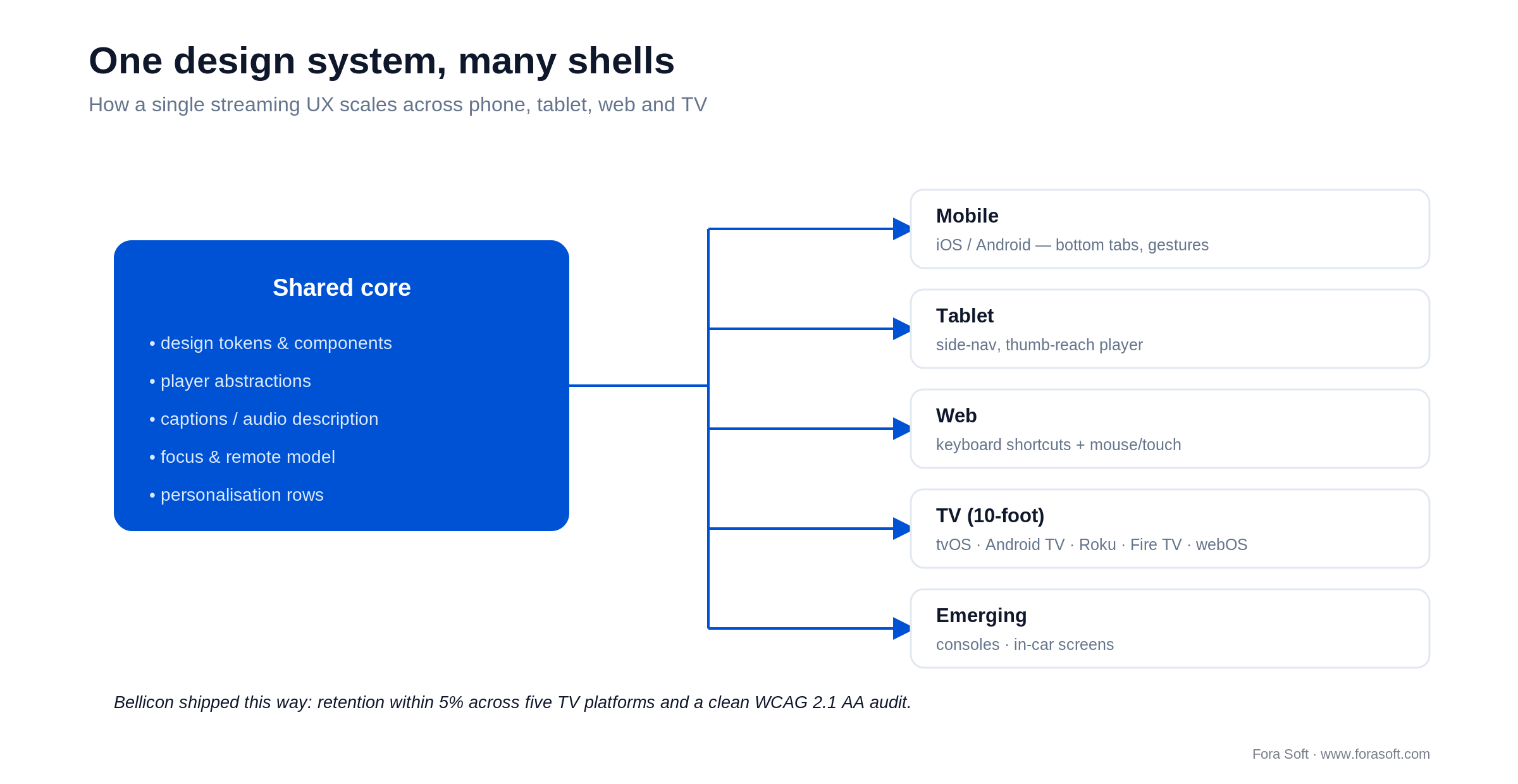
Figure 5. One shared core, many native shells. It's how a single UX survives five TV platforms without five separate teams.
Mobile (4–6″): bottom tab bar, gestural controls (swipe to seek, double-tap to play or pause, pinch to zoom), portrait and wide-screen player. Tablet (7–12″): bottom tabs under 600px, side-nav above, playback sized for thumb reach when the tablet is held sideways. Web: keyboard shortcuts (space, arrows, M, F) are baseline; support hover reveal and touch on Windows and ChromeOS. TV (10-foot): grid focus navigation, big hit targets, audio cue on focus change, no hover-only interactions — and platform conventions: tvOS with SwiftUI or TVMLKit, Android TV Leanback, Roku SceneGraph, webOS responsive HTML.
Performance budgets you can put in the ticket
A budget only works if it's specific enough to fail a build. Paste these into the acceptance criteria; anything above the target is a bug, not a nice-to-have.
| Surface | Metric | 2026 target |
|---|---|---|
| Web | INP / LCP / TTFF | <200ms / <2.5s / <2s |
| Mobile app | Cold start / TTFF | <3s / <2s |
| TV app | Cold start / focus latency | <4s / <100ms |
| All surfaces | Rebuffer ratio / start failure | <1% / <1.5% |
On the web, INP replaced FID as a Core Web Vital in March 2024, and the “good” threshold is 200ms per web.dev. Measure these in the field (real devices, real networks), not just in a lab on a flagship phone.
The KPIs to ship your streaming UX with
Instrument three buckets from day one. If you can't see these on a dashboard, you can't tell whether a UX change worked.
Quality KPIs. Time to first frame (P50 and P95), rebuffer ratio, video start failure rate, exits-before-video-start, picture-quality index, and simulcast switch frequency. These are your player's vital signs.
Business KPIs. Trial-to-paid conversion (day 7, 14, 35), monthly churn, ARPU split (subscription versus ad), ad fill rate, completion rate by ad load, share of watch time from recommendations, and session length on the first three taps.
Reliability KPIs. Successful join rate, mid-stream reconnect success, caption delivery rate, WCAG conformance score, paywall load time, and per-step signup funnel drop-off. Reliability is UX too — a stream that won't join has no interface at all.
Five pitfalls that kill streaming UX projects
1. Designing for the marketing screenshot, not the slow Wi-Fi. Most UX work starts on a flagship phone with fibre. Test on 4G with 5% packet loss — that's where a big share of your audience actually lives, and where a 2-second start becomes a 6-second one.
2. Dark patterns. Forced autoplay, “are you still watching” guilt loops, paywalls with delayed close buttons. The FTC and the EU are both watching this space; expect enforcement before you expect brand damage.
3. Geo-restriction surprises. “Not available in your region” discovered mid-search is the worst place to learn about licensing. Surface availability up front in browse and recommendation rails.
4. Over-tabbed navigation. Five primary tabs is the practical maximum. More than that usually means you're hiding the recommendation system instead of trusting it.
5. Treating accessibility as QA. Captions and screen-reader labels bolted on at the QA stage cost three to five times what they cost built into the component library. It's also the pitfall most likely to become a legal problem in the EU.
Worried your product is failing one of the seven pillars?
We benchmark streaming products against Conviva and Akamai medians and hand back a written punch-list within 5 working days.
Where AI changes streaming UX in 2026
AI isn't a roadmap item anymore; it's an operational layer in every product that's winning. Five places where it shifts UX in a measurable way.
1. Search. Embedding-based semantic search replaces keyword match. JioHotstar shipped natural-language queries in 2025; multilingual embeddings give cross-language discovery without a separate index per market.
2. Captions. Real-time ASR reaches roughly 85–92% on major non-English languages and higher on clean English audio. Live captions are now a software cost, not a stenographer cost — though CART still wins for high-stakes live.
3. Audio description. AI-generated audio description is now a checkbox in the encoding pipeline. Quality lags human-authored AD, but it gets you to a compliant baseline while you budget the human pass.
4. Thumbnails. Generative artwork per cohort, A/B-tested at scale, lifts shelf click-through 20–30%. Netflix runs this at industrial scale; smaller streamers can ship it through Cloudinary, Mux or an in-house pipeline.
5. Voice navigation. Roku, Fire TV, Android TV and Apple TV all expose native voice search; mobile and web get it through Siri and Google Assistant. Tagging your catalogue for natural-language retrieval is now part of the metadata schema, not a nice extra.
The through-line: AI is plumbing, not a feature to advertise. The products winning in 2026 quietly replace expensive operational layers — CART, audio description, thumbnails, search — with cheaper, faster ones, and you can see how far that goes in our AI monetisation methods for streaming breakdown.
Mini case: Bellicon Smart TV apps on five platforms
Situation. Bellicon needed a VOD app on every major TV platform — LG webOS, Samsung Tizen, Roku, Fire TV and Android TV — for a worldwide rebounder-fitness audience. That audience skews older and depends on captions and a remote-friendly interface, so accessibility and focus navigation weren't optional.
Plan. One design system, five platform-specific shells, shared player abstractions. We tested focus order, the captions toggle and audio-description tracks against WCAG 2.1 AA on every shell, and tuned the player to a 1.6s P50 time-to-first-frame. See the full Bellicon Smart TV project for the build detail.
Outcome. Retention metrics landed within 5% of each other across all five TV platforms (rare in a TV portfolio) on top of a clean accessibility audit. Want a similar assessment of your own TV apps? Book a 30-minute scoping call and we'll map it out.
When you should not redesign your streaming UX
A redesign is expensive, and sometimes the honest answer is don't. Skip it if your start time and rebuffer ratios are already inside benchmark, if your churn is concentrated at the price wall (that's a pricing problem, not a UX one), or if your engineering bandwidth is committed to a content or licensing deadline you can't move. Polishing a player that already starts in 1.5s is motion, not progress.
Do redesign if you're below benchmark on time-to-first-frame, your player has visible rough edges, or an accessibility audit puts EU obligations on next quarter. Those problems compound while you wait — and the churn math at the top of this guide is the interest you pay on the delay.
Frequently asked questions
What is the most important UX metric for a streaming app?
Time to first frame, by a wide margin. Akamai research shows abandonment climbs about 5.8% for every second above a 2-second start. Rebuffer ratio is second. Both feed churn and ad-revenue loss directly, which is why they belong on a board dashboard.
How long should a streaming free trial be?
Trial length is not the lever most teams think it is — 2025 analysis found little conversion difference across lengths. What matters is the model (opt-out with card up front) and how fast a viewer reaches value. Netflix and Disney+ dropped free trials entirely; Hulu and Prime keep about 30 days as a differentiator.
Do you need a separate app for every TV platform?
Effectively yes: tvOS, Roku SceneGraph, Tizen, webOS, Fire TV and Android TV use different SDKs and conventions. The efficient approach is one design system, shared player abstractions and platform-specific shells — the way we built the Bellicon TV portfolio across five platforms.
How do you make a streaming app compliant with the European Accessibility Act?
Meet WCAG 2.1 AA, which the harmonised standard EN 301 549 v3.2.1 references today: captions on all video, audio description on long-form pre-recorded content, full keyboard and remote navigation, screen-reader labels, 4.5:1 text contrast and reduced-motion support. Build it into the design system; the 2026 update to WCAG 2.2 AA will then be a small delta.
Is FAST worth the engineering effort?
Often, yes. US FAST viewing hit 1.8 billion hours through August 2025, up 43% year over year, and nearly half of US households now watch FAST weekly. If your catalogue supports an ad tier, FAST adds reach and ad revenue without cannibalising premium — but the ad UX has to be tuned or it caps ARPU.
How important is search versus recommendations?
Recommendations dominate watch time on SVOD — Netflix attributes about 80% of viewing to its recommender. Search captures intent-driven sessions, especially for live and sports. Both matter, and in 2026 they converge on the same embedding-based semantic layer.
What latency should you target for live streaming?
Sports and news: 1–3s via LL-HLS or LL-DASH. Auctions, betting and live commerce: sub-second via WebRTC or Media over QUIC. Standard HLS/DASH at 6–30s is fine for VOD-like content and cheapest to run. Pick the tier your use case needs and no lower.
Does Fora Soft do streaming UX redesigns?
Yes. We've shipped streaming products on iOS, Android, web, tvOS, Roku, Fire TV, Android TV and webOS for clients including Sprii, Smart IPTV and Bellicon. We typically scope a UX audit in 30 minutes and deliver a fixed-scope redesign or rebuild quote.
What to read next
Architecture
Scalable video management systems in 2026
The engineering decisions behind a streaming stack that survives growth.
Latency
Real-time low-latency streaming playbook
Sub-second delivery: WebRTC, LL-HLS and MoQ, and which one fits.
Protocols
QUIC and Media over QUIC: a 2026 guide
When sub-second latency at scale becomes a product differentiator.
Discovery
Content recommendation systems, explained
The architecture behind embedding-based “more like this”.
Monetisation
8 AI monetisation methods for streaming
SSAI, recommenders, churn ML and shoppable video, with real numbers.
Ready to upgrade your streaming UX?
Streaming UX in 2026 is a measurable, accountable discipline. The seven pillars are known, the benchmarks are public, and the EU regulatory bar is no longer optional. The platforms that keep their audience treat each pillar as a number to hit, not a taste to argue about.
Get start time below 2s, rebuffer under 1%, the paywall model right for your brand, and a clean WCAG 2.1 AA audit — and you'll outpace most of the catalogue you compete with. That's the work our video streaming team does, and we're happy to start with an audit rather than a pitch.
Get a UX and performance audit on your streaming product
A 30-minute call, a written audit against the seven pillars within 5 working days, and a fixed-scope redesign or rebuild quote.

