


Key takeaways
• Video surveillance software (a VMS) is the control layer, not a recorder. It ingests cameras, sensors, access control and AI analytics from any vendor and turns them into searchable, auditable, integration-ready evidence.
• The market split four ways. Enterprise on-prem (Genetec, Milestone, Bosch, Avigilon Unity), cloud VSaaS (Verkada, Eagle Eye Networks, Rhombus), open hybrid (Network Optix, Hanwha WAVE) and custom-built. Pick the family first, then the vendor inside it.
• Compliance is an architecture decision. NDAA Section 889 bans Hikvision/Dahua on federal work; GDPR forces a DPIA on face recognition; Illinois BIPA carries $1,000-$5,000 per-scan damages. These rewrite your hardware and data pipeline before a line of code.
• Storage is where budgets quietly die. Switching H.264 to H.265 halves the array; recording on motion for low-traffic zones cuts it further. Fifty 4K cameras can need about 97 TB a month at full rate.
• The 2026 cost reality. On-prem licences land at $50-$300 per channel plus storage; cloud VSaaS at $10-$50 per camera per month; a focused custom MVP scopes from $80K-$200K.
More on this cluster: pair this buyer & builder guide with our Video Surveillance & VMS learning hub and our deeper reads on VMS architecture, ONVIF and the vendor matrix, the features a modern VMS needs, and anomaly-detection models for surveillance.
Why Fora Soft wrote this playbook
Fora Soft is a software development company that has built video software since 2005: two decades and 250+ shipped products across streaming, real-time communication and computer vision. A big slice of that is surveillance-adjacent: courtroom recording for law enforcement, child-advocacy interview rooms, surgical capture for medical education, and multi-camera evidence systems where the footage is the artefact and the case is the unit of work.
Our own surveillance product, V.A.L.T. (Video Audio Learning Tool), now runs in 770+ US organizations with 50,000+ users across courts, child advocacy centers, hospitals and universities. We have been its sole development team for over a decade. So this guide is not spec-reading; it is what we tell founders and security integrators when they ask whether to buy a VMS off the shelf, subscribe to cloud, or build their own.
One honest caveat up front. If you only need a 30-camera retail or office system, you do not need a playbook — buy a well-supported off-the-shelf VMS such as Hanwha WAVE and stop reading. This guide earns its length when the deployment is large, multi-site, regulated, or a product you intend to sell. That is where the wrong call gets expensive.
Choosing between off-the-shelf and custom video surveillance software?
Book a 30-minute call and we will map your camera count, compliance perimeter and integrations to a short, honest VMS shortlist — no sales theatre.
What video surveillance software actually does in 2026
Video surveillance software — a video management system, or VMS — is the software layer that ingests already-digital video from many cameras and turns it into searchable, auditable, integration-ready evidence. A recorder keeps footage; a VMS decides what the footage means, who can see it, and what happens when something moves.
The quickest way to place a VMS is against the two boxes it replaced. A DVR digitises analog cameras inside the recorder over coax. An NVR records IP cameras that digitise on-board, but stays a fixed appliance tied to one site. A VMS is software on standard servers that ingests streams from any source (IP cameras, encoders, body-worn cameras, increasingly WebRTC) and scales across sites without caring who made the camera.
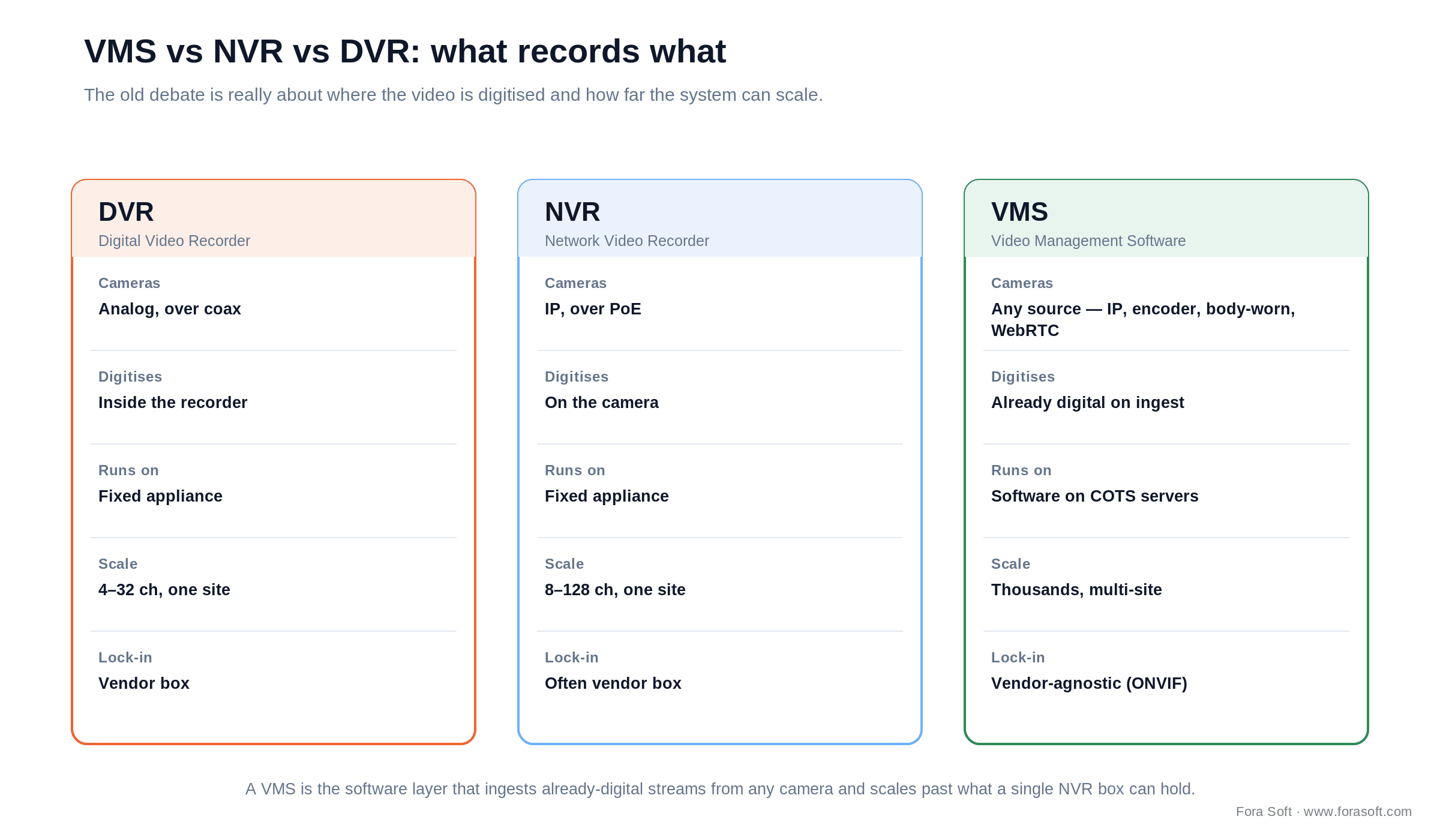
Figure 1. VMS vs NVR vs DVR. The real difference is where the video is digitised and how far the system scales.
A modern VMS carries seven jobs. Weaken any one and operators quietly abandon the system:
- Ingest and record. Pull RTSP / ONVIF / native-SDK streams from IP cameras, encoders, body-worn cameras and drones, with continuous plus event-triggered recording.
- Live monitoring. Multi-camera video walls, joystick PTZ control, two-way audio, maps and bookmarks.
- Search and forensics. Motion-region search, AI search-by-attribute (“red car”, “person with a backpack”) and time-synced multi-camera review.
- Evidence management. Chain-of-custody logs, hash-stamped exports, and redacted or blurred clips for lawful release.
- Analytics. Object and intrusion detection, loitering, line-crossing, license-plate recognition (LPR), face matching against a watchlist, people counting.
- Integrations. Access control, intrusion alarm, intercom, building management, and evidence platforms such as Axon and NICE.
- Operations. Certificate and password rotation, immutable audit trails, multi-site federation and role-based access.
How big is this? The analyst picture is honestly a range, so treat single numbers with suspicion. Business Research Insights sizes the VMS-software segment near $6.9B in 2026 with a high-teens CAGR; whole-market surveillance estimates from Grand View, Mordor and Fortune scatter from roughly $64B to $95B in 2026 depending on scope. What everyone agrees on is direction: the fastest-growing slice is cloud-delivered VSaaS, and Omdia ranked Genetec the #1 VMS vendor worldwide in its 2025 report. (Note for anyone citing older sources: IHS Markit no longer exists as an analyst brand — its surveillance research moved under Omdia after the S&P Global merger.)
The four families of VMS — and where each one fits
The first decision is not which vendor. It is which deployment family, because that choice sets your cost shape, your lock-in and your compliance exposure for years. There are four: enterprise on-prem, cloud VSaaS, open hybrid and custom-built.
| Family | Representative products | Where it wins | Where it breaks | Cost shape |
|---|---|---|---|---|
| Enterprise on-prem | Genetec Security Center, Milestone XProtect, Bosch BVMS, Avigilon Unity, ExacqVision | Scale, deep integrations, mature analytics SDKs | Heavy licence + hardware, slow updates, integrator-led rollout | $50-$300/channel one-time + support + servers + storage |
| Cloud-native VSaaS | Verkada, Eagle Eye Networks (now Brivo), Rhombus, Spot AI, Solink | Zero-server install, auto-update, mobile-first, fastest AI | Vendor lock, recurring per-camera fees, bandwidth bill, data residency | $10-$50/camera/month all-in |
| Open hybrid | Network Optix Nx Witness, Digifort, Hanwha WAVE, Luxriot EVO, OpenEye | Affordable, ONVIF-friendly, good SDKs, mid-market fit | Less mature analytics, smaller integration ecosystems | $50-$150/channel one-time |
| Custom-built | V.A.L.T. by Fora Soft and bespoke vertical platforms | Exact workflow fit, you own the AI, no per-channel tax, your IP | Upfront build cost and ownership of maintenance | $80K-$200K MVP + maintenance |
Reach for enterprise on-prem when: 500+ cameras, multiple sites, and strict integration requirements (access control + intrusion + intercom + dispatch) that a lightweight cloud tool cannot satisfy.
Reach for cloud VSaaS when: 5-200 cameras across many small locations, no on-prem IT team, and you want AI features working on day one.
Reach for open hybrid when: a mid-market budget, a mixed fleet of ONVIF cameras, and developers who want an SDK without an enterprise contract.
Reach for custom when: you sell the VMS as a product, you serve a regulated vertical (courts, child advocacy, telemedicine), or off-the-shelf leaks more than 30% of your real requirements.
Top video surveillance software vendors, compared
Prices below are indicative — enterprise VMS pricing is quote- and channel-based, and channel partners discount hard above a hundred channels. Read the table for fit, not for a quote.
| Product | Family | Where it wins | Best fit |
|---|---|---|---|
| Genetec Security Center | On-prem / hybrid | Unified video + access + LPR (AutoVu); #1 VMS by Omdia 2025; strong cybersecurity posture | Airports, transit, smart cities |
| Milestone XProtect | On-prem (Canon-owned) | Largest open marketplace (500+ integrations), deep SDK; 2026 R1 adds NVIDIA-based video summarization | Custom integrators, large enterprise |
| Avigilon Unity / Alta | On-prem / cloud (Motorola) | Native AI search, strong cameras; Unity = on-prem, Alta = cloud after the 2023 rebrand | Motorola-aligned shops, schools |
| Bosch BVMS | On-prem | Edge analytics on-camera, fire and intrusion integrated | Critical infrastructure |
| Verkada | Cloud VSaaS | Single-pane cloud, fast AI rollout, strong UX | Multi-site retail, education, SMB |
| Eagle Eye Networks (Brivo) | Cloud VSaaS | Camera-agnostic cloud, broad ONVIF; merged with Brivo in Dec 2025 | Distributed retail, hospitality |
| Network Optix Nx Witness | Open hybrid | Best-in-class developer SDK, cloud relay built in | Mid-market, ISVs, integrators |
| Hanwha WAVE | Open hybrid | Hanwha cameras + edge-AI bundle, NDAA-compliant | Federal / state, K-12 |
| V.A.L.T. by Fora Soft | Custom vertical | Workflow-aware (cases, sessions, redaction), no per-camera tax, owns its AI | Courts, child advocacy, medical training |
One thing the table cannot show is interoperability, which is where ONVIF profiles earn their keep. ONVIF is the standard that lets a camera from one vendor talk to a VMS from another. Profile S covers basic H.264 streaming and PTZ; Profile T adds H.265 and is the 2026 baseline for new cameras; Profile G handles on-device recording; Profile M carries analytics metadata. In July 2026 ONVIF released the Profile V release candidate — its first cloud standard, letting a conformant camera stream to a cloud VMS over WebRTC and push encrypted recordings up. If a vendor cannot name the ONVIF profiles it conforms to, treat the “open” claim as marketing and check the conformance list yourself.
Architecture: edge, server and cloud — where intelligence lives
A VMS is a pipeline: cameras feed a recording and analytics tier, which feeds an operator UI and an integration plane. The one decision that quietly drives cost is where the intelligence runs — on the camera, on a server, or in the cloud.
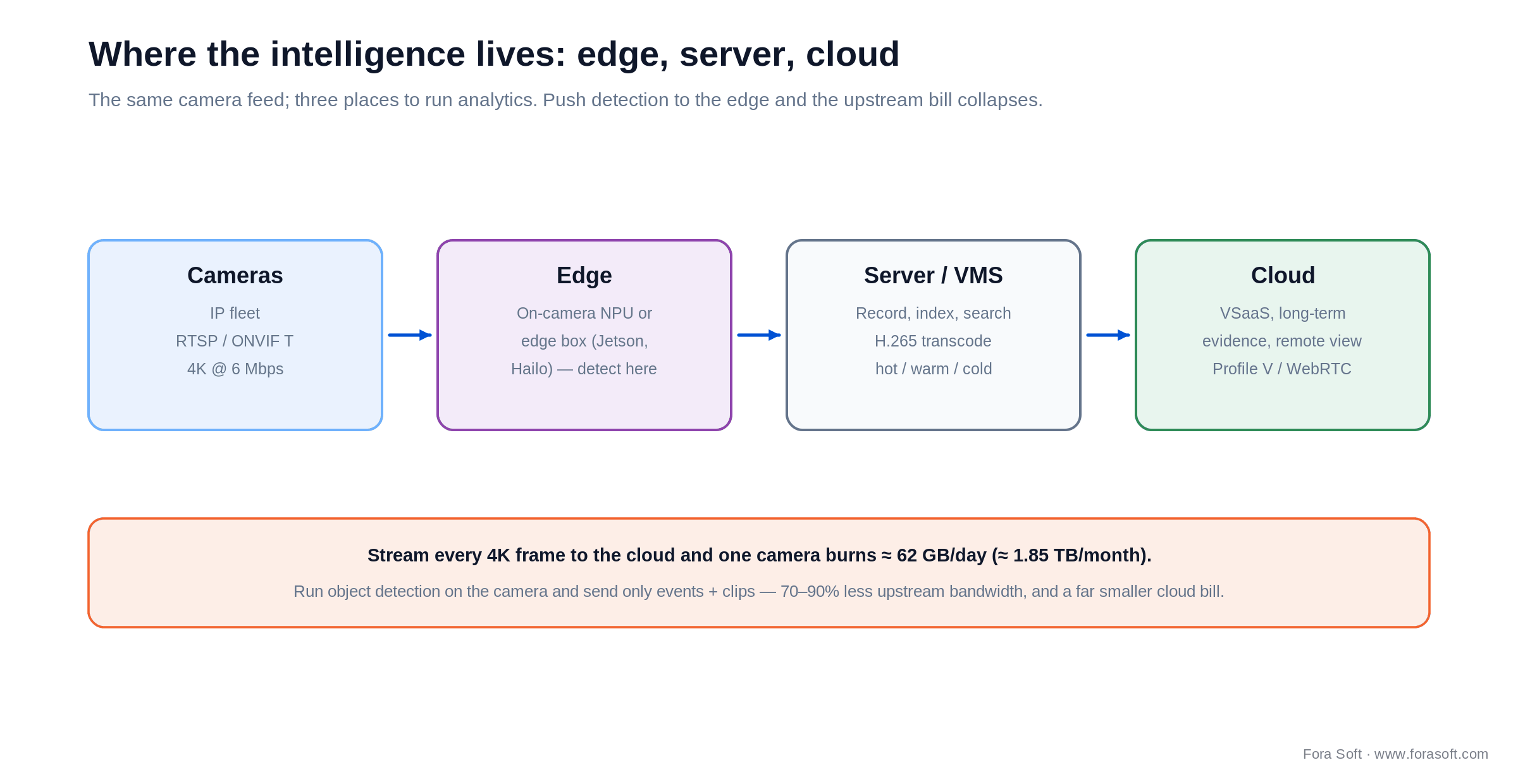
Figure 2. The same camera feed, three places to run analytics. Push detection to the edge and the upstream bill collapses.
Edge. Modern cameras carry real NPUs (Axis ARTPEC-9, Hanwha Wisenet AI, Ambarella and Hailo silicon) that run object detection on the camera itself. Do that and you send only events and clips instead of every frame, cutting 70-90% of upstream bandwidth.
Server. A recording server (an NVR role, or a VMS node) handles continuous recording, H.265 transcoding and indexed search. Heavier custom analytics run here on NVIDIA Jetson or DeepStream, close to the cameras but with more compute than a camera can hold.
Cloud. The cloud is for long-term evidence, remote viewing and cross-site federation. It is also the budget trap: a single 4K camera at 6 Mbps streamed continuously to the cloud burns about 65 GB per day, roughly 1.9 TB per month, per camera (6 Mbps × 10.8). With ONVIF Profile V now standardising camera-to-cloud over WebRTC, expect more cloud-native ingestion, but the bandwidth arithmetic does not change. Filter at the edge or pay for every frame twice.
Storage math: what 50 cameras really cost
Storage is the line item that sinks first-time surveillance budgets, and the math is not hard once you write it down. The constant to memorise: 1 Mbps of continuous video is about 10.8 GB per day (1 Mbps × 0.125 to get MB/s, × 86,400 seconds, ÷ 1000). Everything else is multiplication.
Worked example. Twenty 4MP cameras at 4 Mbps (H.265), recording 24/7 for 30 days: 20 × 4 × 10.8 × 30 = 25,920 GB, or about 25.9 TB before RAID and filesystem overhead. Add 20-30% headroom and you are provisioning ~33 TB. Scale that to a thousand cameras and you are staring at petabytes.
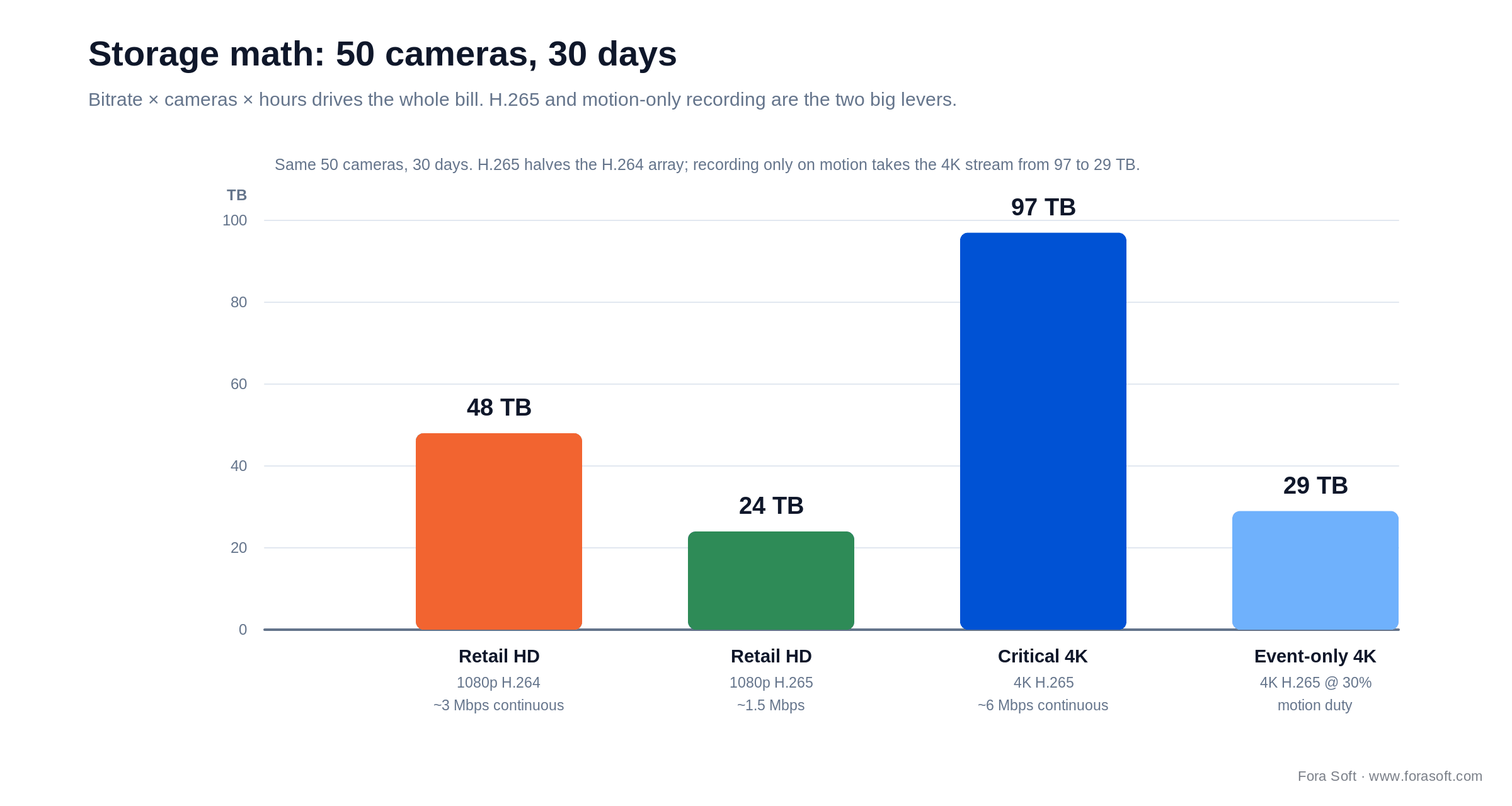
Figure 3. Fifty cameras, thirty days. H.265 halves the array versus H.264; recording only on motion takes the 4K array from 97 TB to 29 TB.
The chart shows the same fifty cameras across four realistic scenarios. Three levers move that bill more than any vendor discount:
- Codec. Moving from H.264 to H.265 (HEVC) cuts bitrate 45-50% for equivalent quality — an instant near-halving of the array.
- Recording strategy. Record on motion or event for low-traffic zones; keep continuous recording for cash desks, vault doors and entrances where a gap is unacceptable.
- Tiering. Keep 7 days on hot SSD, 30-90 days on warm spinning disk, and push evidence to cold storage such as S3 Glacier or LTO tape.
AI analytics: what is real, what is marketing, what to own
Every VMS vendor now sells “AI.” Some of it is production-grade; some works only in narrow conditions; some is a slide. Sort any analytics pitch into three tiers before you believe a demo, and never accept a “100% accuracy” claim, because NIST’s FRVT testing shows even the best face-recognition engines report error rates at a fixed false-match rate, and accuracy degrades with pose, lighting and occlusion.
Tier 1 — production-grade
Object, person and vehicle detection, intrusion and line-crossing, loitering, people counting, and license-plate recognition (Genetec AutoVu, Rekor). These run reliably at the edge or on a modest server with NVIDIA Jetson/DeepStream or a Hailo NPU. Modern detectors are the YOLO family: YOLO11 (Ultralytics, 2024) and the NMS-free YOLO26 (January 2026) are the current edge-friendly baselines, alongside MMDetection for custom pipelines.
Tier 2 — narrow context
Face recognition (Paravision, NEC, Corsight) works well against a known watchlist in controlled lighting, and much less well in a crowd at dusk. Weapon detection (ZeroEyes, Actuate) has real deployments in schools and public safety but needs tuning against false alarms. Search-by-attribute (Avigilon Unity, Verkada, Veritone) is genuinely useful for forensics. Ask for a precision/recall number on your footage, not the vendor’s.
Tier 3 — treat as decoration
“AI behaviour analysis” with no published precision/recall, “predictive policing,” and emotion or intent estimation from facial micro-expressions. If there is no benchmark and no way to pilot it on your data, it is a slide, not a feature. When the analytics are your differentiator — a proprietary detector, a domain-specific search — that is the case for owning the model rather than renting it, which is exactly the kind of work our AI integration team does. See our write-up on anomaly-detection models for surveillance for the model side.
VMS cybersecurity: what the Verkada breach taught the industry
In March 2021 a hacker group reached roughly 150,000 live Verkada cameras — inside hospitals, jails, schools and Tesla — after finding super-admin credentials sitting in a publicly exposed Jenkins server. The root cause was not a clever exploit; it was over-privileged accounts, where most staff held super-admin. In August 2024 the FTC settled with Verkada for a $2.95M penalty and a roughly 20-year mandated information-security program. A camera network is an attack surface, and it is usually the softest one on the site.
Seven controls separate a defensible VMS from a liability:
1. No shared admin accounts. Single sign-on with role-based access, and dual control for any super-admin action. This is the exact lesson of the Verkada breach.
2. Mandatory MFA. Passkeys or WebAuthn on every operator account, not just the admin.
3. Automated credential rotation. Default and factory passwords are still the number-one root cause of camera compromise — most exposed RTSP feeds on Shodan are unchanged factory logins.
4. Signed, verified firmware. Hikvision and Dahua have shipped CVEs allowing remote unauthenticated takeover; only install firmware you can verify.
5. Network segmentation. Put cameras on their own VLAN, never the office LAN, and block outbound traffic they do not need.
6. Immutable, off-system audit logs. If an attacker can edit the logs, you have no chain of custody.
7. Threat detection. Endpoint tooling (CrowdStrike, Microsoft Defender) on the servers, and network monitoring (Zeek, Suricata) watching the camera VLAN for the traffic a camera should never send.
Not sure your camera network would survive an audit?
We review VMS architectures for exactly the gaps that caused the Verkada breach — privilege sprawl, default credentials, flat networks. Book a 30-minute security review.
Compliance is now an architecture decision
Five regulatory regimes now shape surveillance hardware, topology and data handling before you write code. Get them wrong and the fix is a rebuild, not a patch.
NDAA Section 889 (US federal). Bars federally funded use of Hikvision, Dahua, Hytera, ZTE and Huawei equipment; the procurement ban took effect in August 2020, and the FCC tightened equipment-authorization rules further through 2025. If you touch federal customers, grants or supply chains, your camera list is decided for you — vendors leading with NDAA messaging include Hanwha, Axis, Avigilon, Bosch and Verkada.
GDPR (EU/UK). Regulation (EU) 2016/679, read alongside EDPB Guidelines 3/2019 on video devices, requires a specific documented purpose (“safety” alone is not enough), a Data Protection Impact Assessment for large-scale or systematic monitoring, data minimisation and retention limits, and privacy masking. Face recognition all but always triggers a DPIA.
US biometric law. Illinois BIPA is the sharp one: $1,000 per negligent and $5,000 per intentional violation, and consent is required before you capture a faceprint. SB 2979 (signed August 2024) limited accrual to one violation per person, and the Seventh Circuit held in April 2026 that the change applies retroactively — but the exposure is still real, and Texas CUBI plus other state statutes add to it.
HIPAA (US healthcare). Cameras in clinical settings mean encryption, business associate agreements with any cloud vendor, audit logs and role-based access. This is well-trodden ground for us on the telemedicine side.
CJIS (US law enforcement). The FBI Criminal Justice Information Services Security Policy governs how criminal-justice footage is stored, accessed and audited — and it is unforgiving about who can see what. Historically, biometric missteps have been expensive: Facebook settled a BIPA class action for $650M and TikTok for $92M.
Build vs buy: when a custom VMS earns its keep
For roughly 80% of deployments, off-the-shelf video surveillance software is the right call — it is faster, cheaper and battle-tested. The other 20% is where a custom build pays for itself. The decision tree below is the same one we walk clients through.
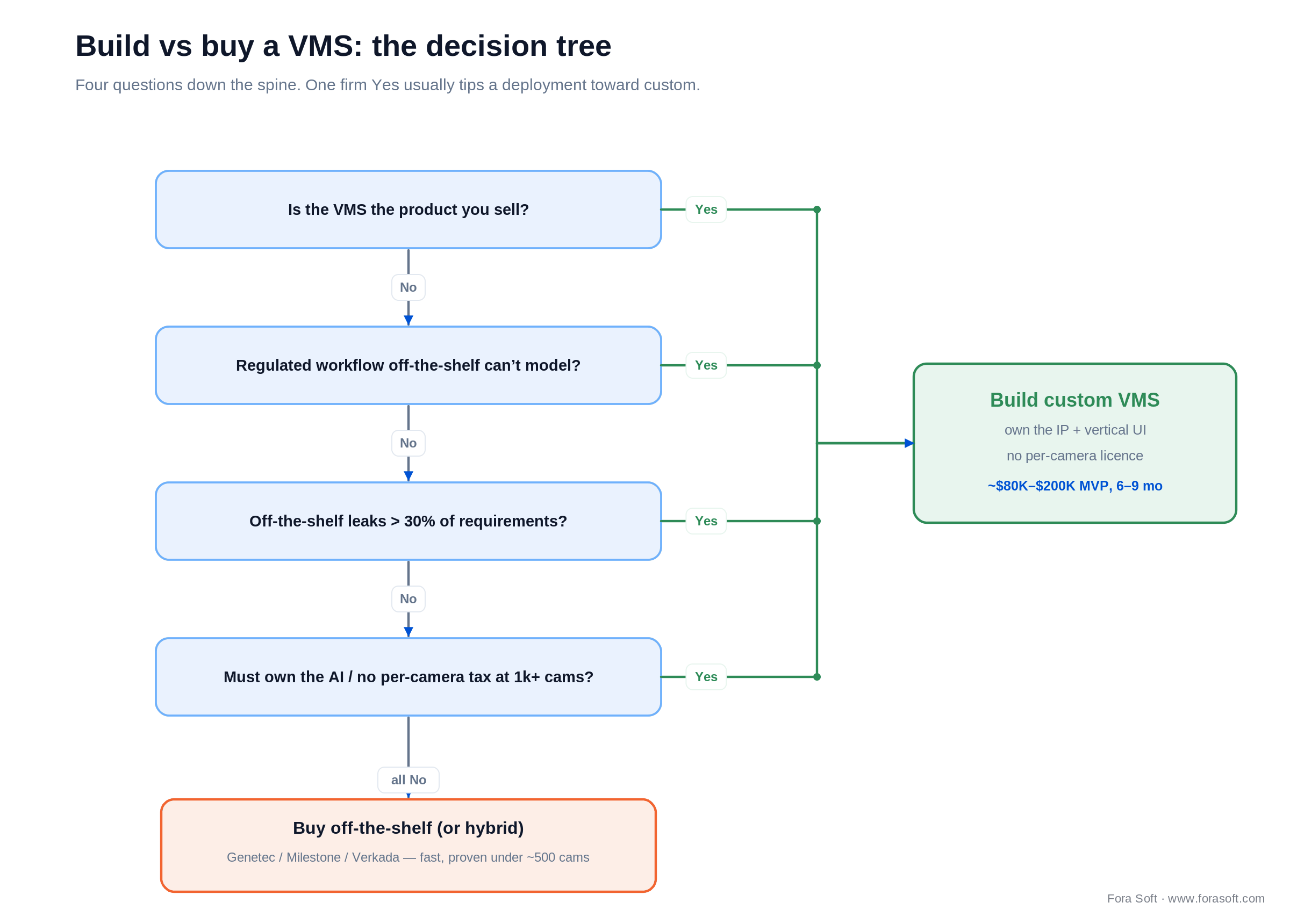
Figure 4. Build vs buy a VMS. Four questions down the spine; one firm Yes usually tips a deployment toward custom.
Five symptoms point to custom: the VMS is a product you sell; a regulated vertical workflow (courts, child advocacy, clinical assessment) that off-the-shelf cannot model; a fleet heading past a thousand cameras where per-camera licensing becomes a tax; proprietary AI you need to own; or an on-prem-only mandate that cloud vendors will not meet.
What a custom build does not reinvent is as important as what it does. Under the hood, a good custom VMS still uses GStreamer or FFmpeg pipelines, MediaMTX or Ant Media for stream relay, ONVIF for discovery, proven recording engines, and NVIDIA Triton or Hailo for inference. You are buying workflow fit, IP ownership and no per-camera tax, not a from-scratch reinvention of video plumbing. That is precisely how our custom development team keeps a bespoke build to a 6-9 month MVP rather than a multi-year research project.
Mini case: V.A.L.T. for courts, child advocacy and medical training
Situation. Off-the-shelf VMS products record cameras well. They model courtroom hearings, forensic interviews, surgeries and clinical-skills assessments badly — because those workflows are session-based (a case, a session, a participant), evidence-bound (CJIS, HIPAA, chain-of-custody), and need redaction, role-based clip release and deep tagging that a generic VMS simply does not have.
Plan. We built V.A.L.T. as a vertical VMS: multi-camera plus audio capture into case folders, role-based access for child-advocacy interviewers, prosecutors and clinical educators, tagging during recording, automated transcription, redaction tooling, hash-stamped exports, and offline-resilient deployments for facilities without dependable cloud.
Outcome. V.A.L.T. now runs in 770+ US organizations with 50,000+ users across courts, child advocacy centers, hospitals and universities, and we have been its sole development team for over a decade. The pattern, a vertical VMS that beats generic vendors because it knows the workflow, carries to industrial inspection, surgical training and broadcast continuity. Want a similar assessment of your workflow? Book a 30-minute scoping call and we will tell you honestly whether to build or buy.
Cost model: licence, cloud and custom MVP
Here is a realistic Year-1 picture for a 50-camera deployment across the four families. Enterprise pricing is quote-based, so these are grounded in authorised-partner list prices, not a single vendor sheet.
| Track | Year-1 cost (50 cams) | Ongoing | Notes |
|---|---|---|---|
| Off-the-shelf on-prem (Milestone / Genetec) | $15K-$40K licence + $10K-$25K servers/storage + integrator fees | ~20% support/yr; hardware refresh ~5 yr | Milestone Professional+ lists near $177/channel; sweet spot is 100+ cameras |
| Cloud VSaaS (Verkada / Eagle Eye) | $15K-$30K cameras + appliance, then $6K-$30K/yr cloud | $10-$50/camera/month, ongoing | No on-prem IT; a hard cap on customisation |
| Open hybrid (Nx Witness / WAVE) | $5K-$15K licence + $8K-$20K servers | Modest support fees; Blue Iris-class tools from ~$100 perpetual | Mid-market, ONVIF, developer-friendly |
| Custom MVP (Fora Soft) | $80K-$200K, single vertical, 6-9 months | Maintenance retainer + cloud hosting | Worth it when off-the-shelf misses >30% of the workflow |
The number that decides build-vs-buy is total cost over time, not Year 1. A 200-camera VSaaS deployment at $25 per camera per month is $60K a year — forever. A single-vertical custom build lands around $120K up front plus roughly $20K a year to run. Plot both and the lines cross near year three.
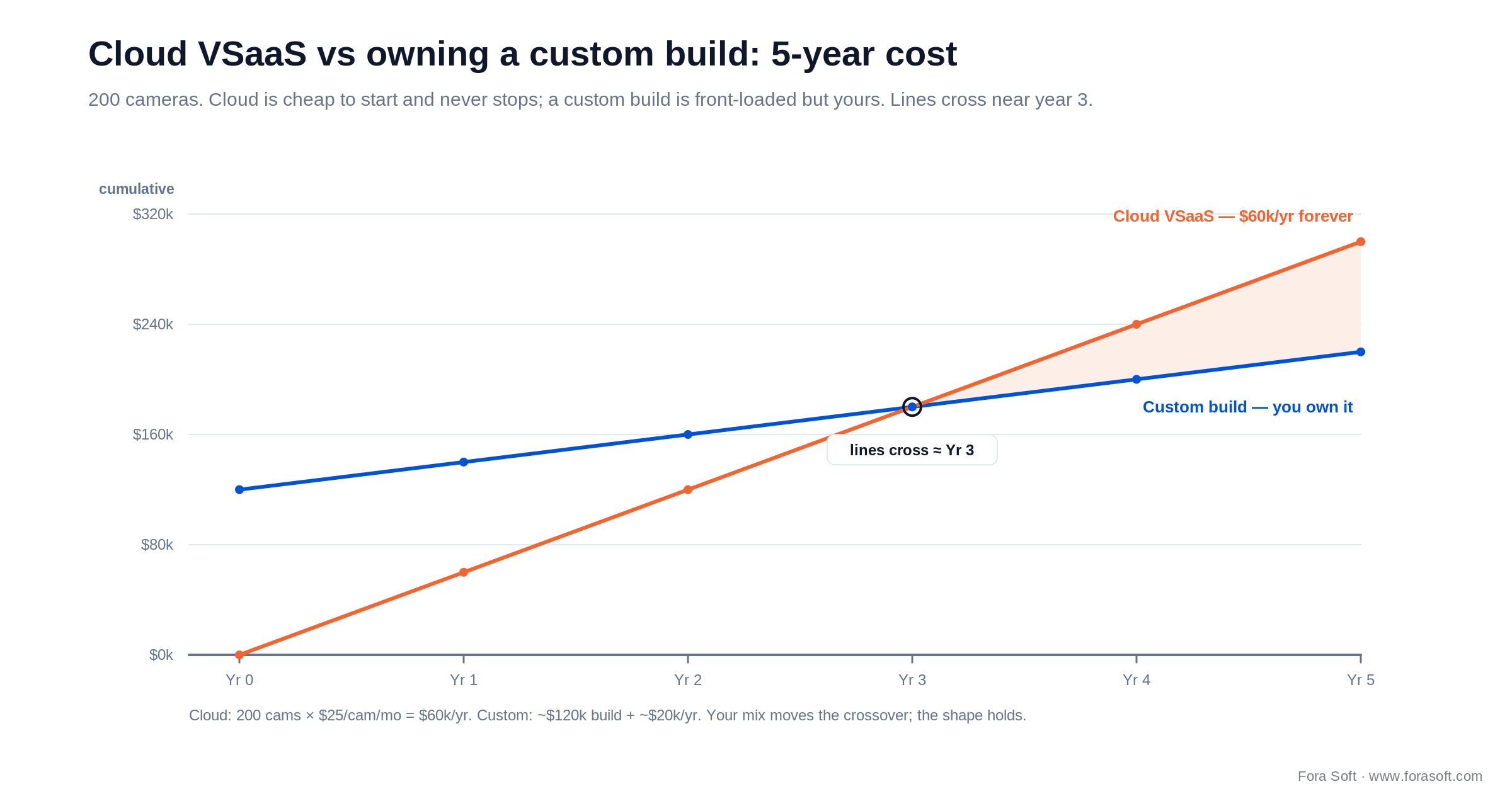
Figure 5. Cloud is cheap to start and never stops; a custom build is front-loaded but yours. The crossover sits near year three.
That does not make custom the default — under about 500 cameras and outside regulated verticals, off-the-shelf almost always wins on speed and risk. It means that past a few years, at scale, the recurring subscription quietly becomes the more expensive option, and owning the software starts to look like the cheaper one. Our agent-engineering approach, which pairs AI-assisted development with senior engineers reviewing every change, is what keeps that custom number honest and the timeline to 6-9 months.
Want the real total cost of ownership for your fleet?
Send us your camera count, retention needs and sites. We will model off-the-shelf, cloud and custom side by side — and tell you which one we would pick, and why.
Verticals where a VMS pays back fastest
Surveillance ROI is uneven. These seven verticals return the investment quickest, each with a typical hardware and AI pairing:
1. Retail loss prevention. LPR plus people-counting plus AI search; payback is typically under 18 months on a $100K rollout as shrink and staffing tighten.
2. Education. Weapon detection (Avigilon, ZeroEyes) on NDAA-compliant cameras, often funded by federal safety grants that mandate compliant hardware.
3. Healthcare and telemedicine. Dementia-ward fall detection and clinical recording, HIPAA-bound with BAA-covered cloud — an area we work in directly on the telemedicine side.
4. Law enforcement and courts. Body-worn camera ingest, CJIS audit trails and chain-of-custody. This is exactly where V.A.L.T. ships.
5. Transit and smart city. Genetec or Milestone with LPR and crowd analytics across many sites and agencies.
6. Industrial and energy. PPE-compliance detection and perimeter monitoring in harsh environments; Bosch and Avigilon are the usual hardware. See our take on industrial video surveillance with AI.
7. Banking and finance. PCI-DSS-aligned VMS with strict retention and access control around cash-handling and ATM estates.
A decision framework: pick the right VMS in five questions
Before you shortlist a single product, answer these five. They map almost directly onto a family.
1. How many cameras, across how many sites? Under 30 at one site favours cloud VSaaS. 30-200 fits open hybrid or VSaaS. 200+ across sites points to enterprise on-prem or hybrid. A thousand-plus in a custom workflow is a reason to consider building.
2. What is your regulatory perimeter? Federal or NDAA work means certified vendors only. EU consumer footage means GDPR and a DPIA. Healthcare means HIPAA. This question can eliminate half the market on its own.
3. Where does the AI run? On-camera edge detection to save bandwidth, server-side for heavier custom models, or cloud for managed convenience. Your answer sets your hardware.
4. Which integrations are non-negotiable? Access control + intrusion + intercom + dispatch favours Genetec or Milestone. Lightweight retail favours Verkada or Eagle Eye. Safety automation usually needs custom or Nx Witness with extensions.
5. What is your time horizon? Stand up in four weeks means cloud VSaaS. Multiple sites over 6-12 months means enterprise on-prem. A new vertical product is realistic in 6-9 months with a focused team.
Five pitfalls that quietly wreck VMS deployments
1. Buying cameras before software. Choose ONVIF-certified, NDAA-compliant cameras with H.265 and edge-AI support first, then the VMS, not the other way round, or you inherit a fleet the software cannot fully use.
2. Sizing storage on continuous full-resolution recording. Model H.265 and motion-based recording from the start: H.265 roughly halves the array, and recording on motion cuts low-traffic streams much further, without losing forensic value on the zones that matter.
3. Treating the camera network like the office LAN. The Verkada breach is the consumer-grade version of this mistake; the Hikvision and Dahua CVE catalogue is the enterprise one. Segment, rotate credentials, sign firmware.
4. Locking into a cloud-only roadmap. It feels simple until, 18 months in, an enterprise prospect mandates on-prem and your vendor cannot deliver it.
5. Skipping immutable audit logs. Without chain-of-custody and tamper-proof logs, footage that could have been evidence becomes a liability instead.
KPIs: what to measure once you go live
A VMS that is never measured degrades silently. Track three buckets:
Quality KPIs. Camera uptime (target 99.5%+ per device), recording loss (under 0.1% of expected frames), and live latency (sub-second on the wall).
Business KPIs. Mean time to find a clip (under 2 minutes), false-alarm rate (target under one per site per day), and analytics precision on your own footage, measured not quoted.
Reliability KPIs. Server/NVR uptime (99.99%), failover time on storage failure (under 30 seconds), retention compliance (100%), audit-log completeness (zero gaps over 90 days), and credential-rotation compliance (100%).
When NOT to over-invest in a VMS
Honesty sells better than up-selling, so here is when a full VMS is the wrong answer. A three-camera home office or a single coffee shop needs a Synology or UniFi Protect appliance, not enterprise software and an integrator. A construction site with three cameras for a six-month project wants a cellular cloud bundle, not a platform.
And do not custom-build what already exists. A generic retail or office deployment has no vertical quirks worth $120K of engineering; Genetec and Milestone have decades of integrator ecosystem behind them, and you should use it. Reserve custom for the workflows off-the-shelf genuinely cannot model, and reserve enterprise on-prem for the scale that justifies it. The fastest way to waste money on surveillance is to buy for a threat model you do not have.
FAQ
What is the difference between a VMS and an NVR?
An NVR is a hardware appliance that records IP cameras to local disk, usually tied to one vendor and one site. A VMS is software on standard servers that ingests streams from any source, adds search, analytics, evidence management, integrations and multi-site federation, and scales far past a single box. In 2026 an NVR is one option inside a VMS strategy, not a competitor to it.
Do we have to replace our Hikvision and Dahua cameras?
If you touch US federal customers, grants or supply chains, yes — NDAA Section 889 bars Hikvision, Dahua and Hytera, and the FCC tightened equipment rules further through 2025. Outside federal work it is a risk decision, but given the documented unauthenticated-takeover CVEs and the fact that most enterprise procurement now requires NDAA compliance anyway, most buyers are migrating regardless.
Cloud VSaaS or on-prem — how do you choose?
Choose cloud if you have under ~200 cameras spread across many small sites with no on-prem IT and want AI on day one. Choose on-prem if you have 200+ concentrated cameras, heavy integrations, or a mandate that footage stay on site. Hybrid records locally and syncs events and clips to cloud, which is often the honest answer for regulated multi-site estates.
How realistic is AI search in a VMS today?
Object detection, attribute search, LPR, line-crossing, loitering and people-counting are reliable in 2026 on edge NPUs or a modest server. Face recognition works against a watchlist in controlled lighting and degrades sharply otherwise — NIST FRVT results show accuracy is never 100%. Anything sold as 'AI behaviour analysis' without a published precision/recall number should be piloted on your footage before you pay for it.
How long should you retain footage?
Retail is typically 30-90 days; banking and cash-handling 60-180 days or more; healthcare often per-incident or per-case for years; law enforcement per case, sometimes indefinitely with chain-of-custody. GDPR pushes you toward the shortest defensible window, so set retention by policy and tier hot/warm/cold to control cost.
Is ONVIF support enough to guarantee camera interoperability?
ONVIF Profiles S, T, G and M cover the basics, and the new Profile V adds cloud-over-WebRTC, but edge-AI events, advanced PTZ tours and proprietary codecs still often need the vendor SDK. Always run an interoperability test on a small sample of the exact camera models before you commit the fleet.
What is the smallest custom VMS MVP worth building?
A focused single-vertical MVP — say child-advocacy interview recording with multi-camera capture, role-based case folders, redaction and audit logs — lands in 6-9 months at $80K-$200K. That includes capture, storage, a web client, mobile playback, RBAC, basic analytics integration and SOC 2-aligned controls. Below that scope, buy off-the-shelf.
How does Fora Soft secure VMS data in transit and at rest?
TLS 1.3 for transport, SRT-AES or RTMPS for ingest, AES-256 at rest with KMS-managed keys, role-based access with mandatory MFA, immutable audit logs, signed-firmware checks and VLAN segmentation. Security is layered by design, not bolted on as a single feature — it is the first thing we review on any surveillance build.
What to read next
Architecture
VMS Architecture, ONVIF & the Vendor Matrix (2026)
The six-layer VMS anatomy, ONVIF profiles and a custom-vs-off-the-shelf deep dive.
Features
Video Management Software: Key Features for 2026
The feature checklist a modern VMS has to hit before it is worth buying.
Case study
V.A.L.T.: Intelligent Video Surveillance in Action
How our vertical VMS serves 770+ organizations across courts, care and campuses.
Computer vision
Video Recognition Software Development
What it takes to build custom detection and recognition into a surveillance product.
Security
Video Streaming App Security Features
The 2026 security stack — encryption, access control and hardening — that actually works.
Ready to choose — or build — the right VMS?
Video surveillance software is the control layer for cameras, sensors, access control and AI: ingest, live view, search, evidence, analytics, integrations and operations. Pick the deployment family first — enterprise on-prem, cloud VSaaS, open hybrid or custom — then the vendor inside it. Let compliance set your hardware, let storage math size your array, and let honest AI tiering keep you from paying for slides.
For most teams under 500 cameras, off-the-shelf wins on speed and risk. When you sell the VMS, serve a regulated vertical, or watch off-the-shelf leak a third of your requirements, custom starts to pay — and that is the work we have shipped since 2005, most visibly in the 770+ organizations that run V.A.L.T. every day.
Let's pick, or build, the right VMS together
Tell us your camera count, sites, compliance perimeter and the workflow off-the-shelf keeps missing. In 30 minutes we will give you a straight recommendation — buy, subscribe, or build.

