

Key takeaways
• Video recognition software powers anomaly detection, retail analytics, and security at scale. Real-time inference on 200+ cameras requires edge deployment or hybrid cloud architectures.
• YOLO11 and MediaPipe run 2026 edge inference; YOLO26 is the new option. YOLO11 clears 100+ FPS on a Jetson Orin; Ultralytics YOLO26 (Jan 2026) adds NMS-free inference for lower edge latency; MediaPipe does face and pose in-browser at 30+ FPS.
• Choose cloud APIs for quick POCs; custom models for production scale. AWS Rekognition Video is $0.10 per minute (2026); a self-hosted YOLO11 box on a Jetson runs $50–500 per month in compute.
• Privacy & compliance lock in your video recognition stack. GDPR, BIPA, and the EU AI Act govern biometrics; from 2 August 2026 the Act’s high-risk rules carry fines up to €35M or 7% of global turnover, so plan on-device inference, encryption, and audit trails.
• Budget 60% for annotation, 30% for infrastructure, 10% for model tuning. A 200-camera retail deployment (2M labeled frames) runs $80–200K for annotation alone.
Why Fora Soft wrote this video recognition guide
Video recognition has matured faster than most teams realize. A decade ago, building a custom object detector meant weeks of model training and painful on-device optimization. In 2026, frameworks like YOLO11 and MediaPipe ship pre-trained, inference-ready weights—and Fora Soft has deployed them across five continents for BrainCert’s educational streaming, Vodeo’s content moderation, and retail chains running 200+ live camera feeds. We’ve shipped anomaly detection, face recognition, license-plate reading, and action classification into production as part of our AI video recognition software development work. Those same face-recognition and liveness models power remote identity checks, which we cover in our guide to video KYC solution development. This guide captures what we learned: which frameworks actually work, where to run inference (edge vs cloud), how to estimate costs, and how to avoid the five pitfalls that tank real-world projects.
If you’re evaluating video recognition software or building custom computer vision pipelines, this playbook will save you 3–6 months of exploration.
Building a video recognition system in-house?
Get a scoped architecture review specific to your throughput, cameras, and compliance needs.
What video recognition software actually does
Video recognition is the real-time extraction of semantic meaning from video streams. It differs from static image recognition in one critical way: it processes multiple frames per second, building context across time. A license-plate reader doesn’t just detect a plate once—it reads it consistently across 5–10 frames, then uses voting to reduce false positives. A security anomaly detector flags frame sequences (e.g., a person standing still for 8+ consecutive frames in a restricted zone), not single frames.
The inference pipeline for video recognition has five stages. First, decode: convert compressed H.264/H.265 bytes to raw RGB frames (typically 40–100 ms per frame at 1080p). Second, resize: scale to model input size (640×640 for YOLO) in <10 ms. Third, infer: run the neural network (15–50 ms depending on model and hardware). Fourth, post-process: apply NMS (non-maximum suppression) to remove duplicate detections (<5 ms). Fifth, action: execute business logic (send alert, log event, trigger downstream action) in <20 ms. Total latency budget for live monitoring: 100–150 ms per frame (allowing 6–10 FPS for real-time feedback).
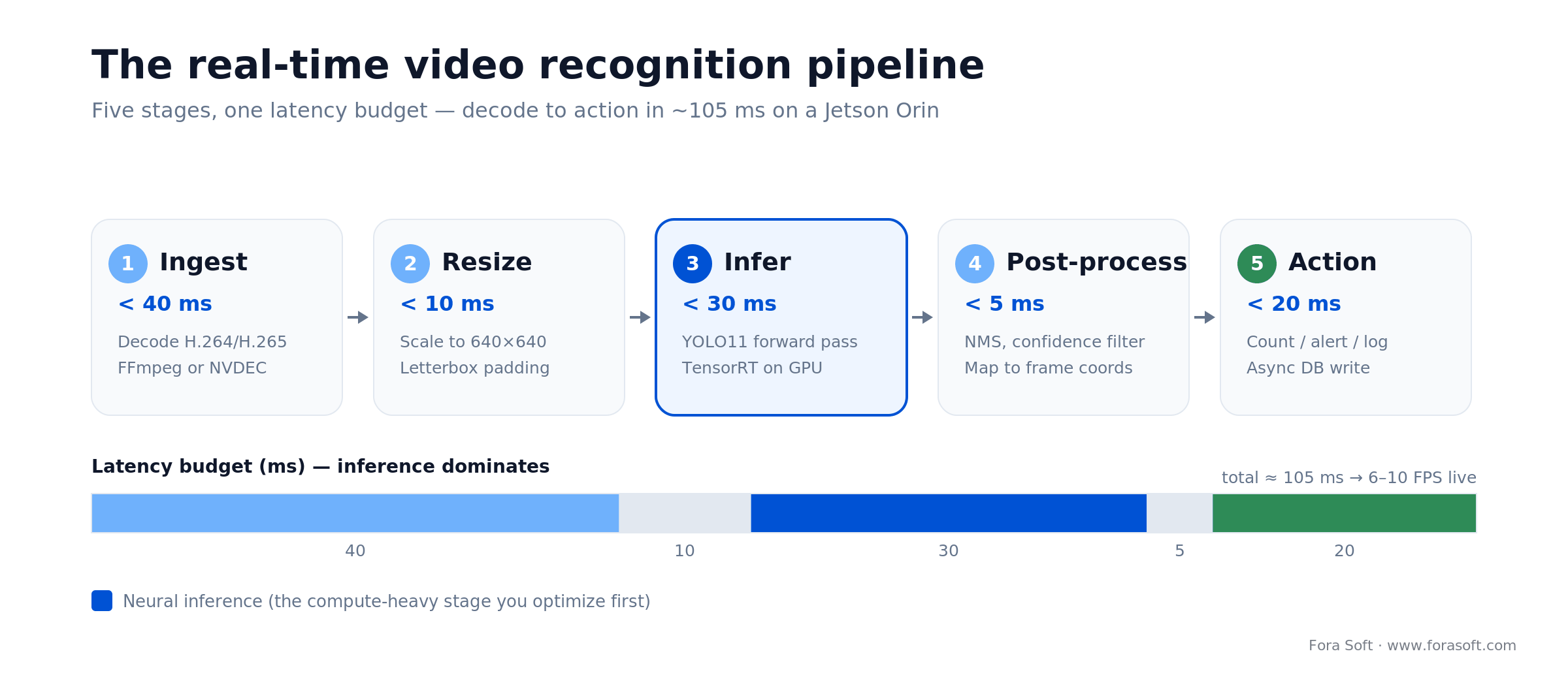
Figure 1. The five-stage real-time pipeline and where the latency budget goes — inference is the stage you optimize first.
Video recognition differs from static detection when: you need temporal continuity (tracking people across frames), context from adjacent frames (detecting unusual motion patterns), or sub-frame-latency action (security alerts). Static image recognition is simpler and cheaper for batch workflows (e.g., tagging historical footage post-hoc).
The five highest-ROI use cases in 2026
Video recognition software pays for itself fastest in five verticals. Each has concrete ROI math, proven tools, and shipping examples.
1. Surveillance & anomaly detection
A 200-camera retail or warehouse site staffs 8–12 human monitors at $50K–80K annual cost per person. Video recognition flags empty shelves, unauthorized personnel in restricted zones, falls, and loitering in <2 seconds. Cost: one Jetson Orin AGX ($499), YOLO11 model ($0), one engineer for 3 months ($40K). Payback: 18–24 months. Fora Soft deployed this architecture for a Kazakhstan courtroom surveillance system, cutting alert response time from 8 minutes (human monitor) to 1.2 seconds (video recognition + SMS alert).
2. Retail analytics
Foot-traffic counting, dwell-time heatmaps, and SKU-level loss detection via video feeds replace manual labor. A 50-store chain sees 15–25% reduction in stockouts by correlating video-detected shelf gaps with inventory systems. Cost: $5K per store for edge hardware + model deployment. ROI: recovered inventory value ($2M–5M annually across 50 stores) exceeds total capex in year 1. MediaPipe and YOLO11 handle pose and object detection at 30+ FPS on a Jetson Nano ($99).
3. Manufacturing quality control
Defect detection on production lines. A single defect escaping to a customer can cost $10K–1M in warranty claims and reputation damage. Video recognition catches 98–99% of defects in real-time, faster and cheaper than manual inspection. Custom fine-tuned YOLO models on industrial camera feeds (30 FPS @ 4K) run on a compact Jetson Orin Nano ($249, 5W power). Annual defect savings >> hardware cost.
4. Sports analytics & broadcast
Real-time player tracking, ball position, and action labeling (goal kick, handball, offside) add value for broadcasters and coaches. A single broadcast flag (e.g., automatic highlight reel) monetizes at $50K–500K per game. Custom video recognition pipelines handle 4K @ 60 FPS with sub-frame latency, enabling live graphics overlays.
5. Content moderation & compliance
Automated flagging of violent, explicit, or copyright-infringing content reduces human moderation workload by 40–60%. Live streaming platforms (like Vodeo, which Fora Soft built) use frame-level classification and optical character recognition (OCR) to detect watermark violations and on-screen text infringement. Cost: custom classification model fine-tuned on your content types. Payback: human moderators cost $3K–5K per month; one engineer building the pipeline costs $40K upfront.
Model families: YOLO, Detectron, MediaPipe, custom
YOLO11 (Ultralytics)
Best for: Real-time object detection, license plates, bounding-box tasks. Strengths: 100+ FPS on Jetson Orin, pre-trained weights on COCO (80 classes), five sizes from nano to extra-large (2.6M to 57M parameters); YOLO11x hits 54.7% mAP on COCO. 2026 note: YOLO11 (Sep 2024) is still the safe production default; YOLO26 (Jan 2026) drops NMS for end-to-end inference and runs up to ~43% faster on CPU than YOLO11n, and YOLO12 (early 2025) trades some speed for an attention-based backbone. Pick YOLO11 unless you’ve benchmarked YOLO26 on your hardware. If your objects are unusual, also benchmark RF-DETR — the first real-time detector past 60 mAP on COCO (Apache-2.0), which now leads domain-transfer benchmarks. Limits: Needs fine-tuning for domain-specific objects; classic NMS post-processing can drag on huge frame counts (the reason YOLO26 removed it). Cost: Free (open-source, AGPL-3.0 or commercial license). Inference infra: $50–500/month depending on edge-vs-cloud GPU.
Detectron2 (Meta)
Best for: Instance segmentation, panoptic segmentation, keypoint detection. Strengths: Rich feature extraction; production-grade code; good for custom architectures. Limits: Slower than YOLO (30–50 FPS on RTX 3090); steeper learning curve. Use case: Precise boundary detection for medical imaging, robotic grasping.
MediaPipe (Google)
Best for: Face detection, hand pose, full-body pose, and whole-body tracking. Strengths: Runs in browser via WebGL; 30–120 FPS on modern devices; lightweight (10–30 MB models). Limits: Pre-trained only; no object detection. Cost: Free. Great for web-based video recognition apps (customer service, fitness coaching).
OpenCV (with TensorFlow/PyTorch)
Best for: Glue layer; preprocessing (resize, color space); background subtraction; motion detection. Strengths: Lightweight; battle-tested; every inference framework integrates. Limits: Older architectures (SSD, MobileNet v1); not competitive with YOLO11.
Custom fine-tuned models
Best for: Domain-specific tasks (your product, your use case). Take YOLO11 or Detectron2, fine-tune on your labeled frames ($50K–200K for 10K–100K frames), and deploy. Fora Soft built custom models for retail shelf detection, casino floor monitoring, and medical-device tracking.
Frameworks compared
| Framework | Task | FPS (Jetson Orin) | Custom Training | Cost (Cloud GPU/mo) | Best for |
|---|---|---|---|---|---|
| YOLO11 | Object detection | 100–200 | Yes (1–3 days) | $100–200 | Retail, security, LPR |
| Detectron2 | Instance segmentation | 50–80 | Yes (3–5 days) | $150–300 | Medical, robotics |
| MediaPipe | Pose, hand, face | 60–120 | No (pre-trained only) | $0 (on-device) | Web, fitness, AR |
| OpenCV | Preprocessing | N/A (utility) | No | $0 | Every pipeline |
| AWS Rekognition | All (video API) | Managed (no latency control) | No (managed) | $1/1K images; video $0.10/min | Quick POC, low volume |
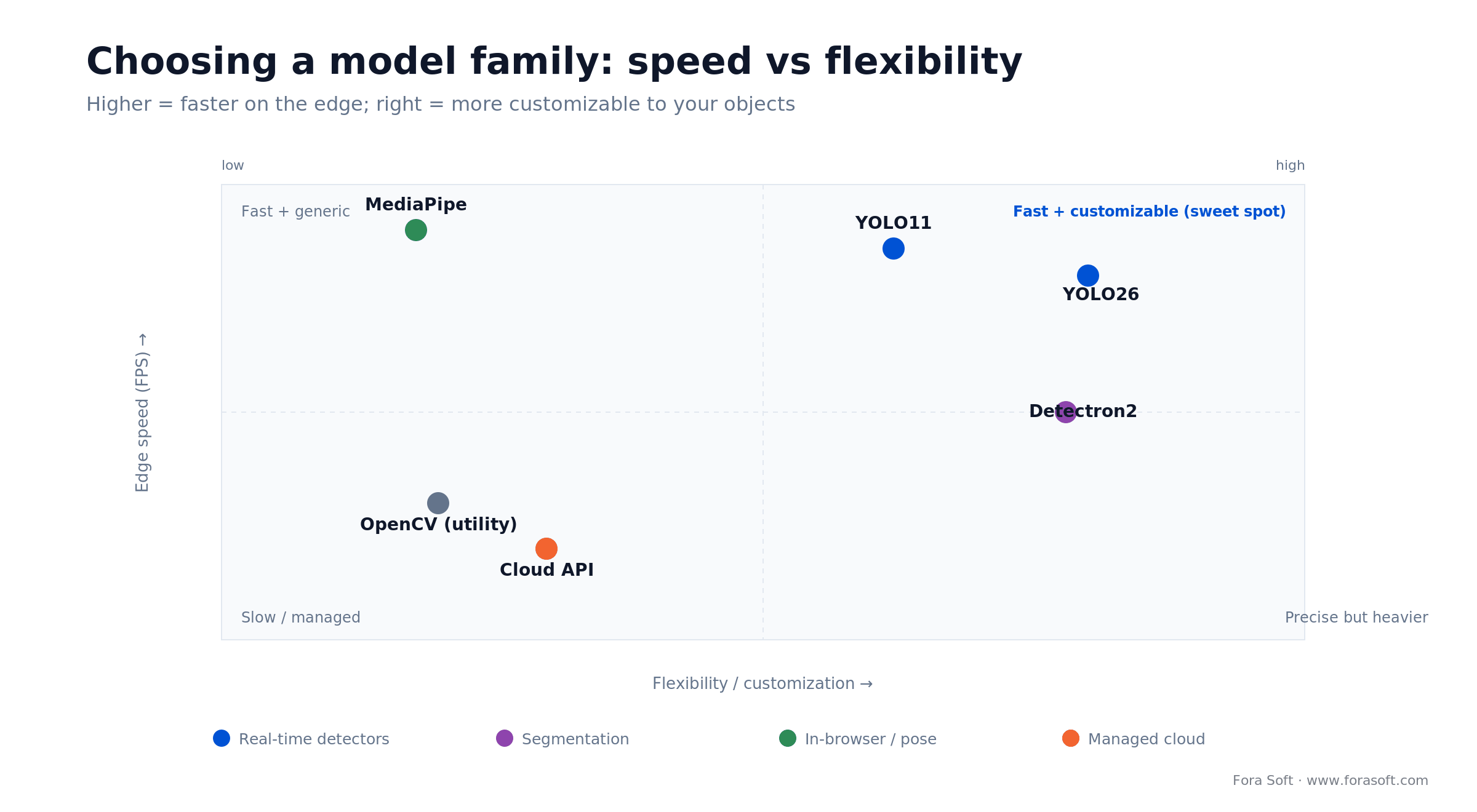
Figure 2. Speed versus flexibility for the main model families. Fine-tuned YOLO11 on the edge is the sweet spot for most builds.
Cloud video recognition APIs
AWS Rekognition
Detects: Objects, faces, text (OCR), celebrities, unsafe content. Pricing (2026): the image API is about $1.00 per 1,000 images ($0.001 each) for the first 1M/month; the video API is $0.10 per minute, dropping to $0.04 at 50K+ minutes. Run 200 cameras through the video API around the clock and that’s ~8.6M minutes ≈ $864K/month — which is exactly why you sample frames or move to the edge. Upside: Managed, no model training. Downside: Expensive at continuous scale; no on-device option; API latency (1–3 seconds).
Google Cloud Vision
Detects: Objects, text, logos, properties (colors, landmarks). Pricing (2026): $1.50 per 1,000 units for label, OCR, face, and logo detection (first 1,000 units/month free per feature); the separate Video Intelligence API bills roughly $0.10 per minute for label detection. Upside: Best-in-class OCR; generous free tier for POCs. Downside: Per-unit image cost is higher than AWS at volume.
Microsoft Azure Computer Vision
Detects: Objects, text (OCR), faces, video indexing. Pricing (2026): roughly $1 per 1,000 transactions for the image API; Azure Video Indexer bills per minute of processed video. Upside: Tight fit if you already run on Azure; solid batch OCR. Downside: Still expensive for continuous 200+ camera monitoring.
Custom SaaS: Hive, Clarifai, others
Specialized providers focus on moderation (Hive detects adult content, violence), product detection, facial age estimation for age verification software, or custom models. Pricing: $500–5,000/month for typical small deployments. Use if: Your use case is very specific (e.g., brand safety in user-generated video) and building custom models is not core to your product.
Reach for cloud APIs when: your volume is < 50 cameras, your latency tolerance is > 1 second, or you’re validating product–market fit in week 1. Switch to edge or hybrid by month 3 if the project survives.
Edge vs cloud inference: where to run the model
Edge inference: Run the model on local hardware (Jetson Orin, Google Coral, GPU server). Latency: <200 ms. Cost per camera: $50–200/month (amortized hardware). Privacy: data never leaves your site. Scalability: add cameras cheaply; one Jetson Orin handles 8–16 streams.
Cloud inference: Send frames to AWS/Google/Azure. Latency: 1–3 seconds. Cost per camera: $50–500/month depending on frame rate and resolution. Privacy: frames leave your network (compliance issues for healthcare, finance). Scalability: auto-scales; pay as you grow.
Hybrid (recommended for production): Run YOLO11 locally on Jetson for real-time alerts; send key frames to AWS Rekognition monthly for expensive tasks (face verification against watchlist, legal hold). Cuts cost by 70–90% vs pure cloud.
Edge hardware tiers: Jetson Orin Nano ($249, <8W, 1 stream) → Jetson Orin NX ($349, <25W, 4 streams) → Jetson Orin ($499, <70W, 8–16 streams) → Jetson AGX Orin ($1,099, <300W, 32+ streams). Google Coral ($60) runs only lightweight models but is cheaper and uses no power.
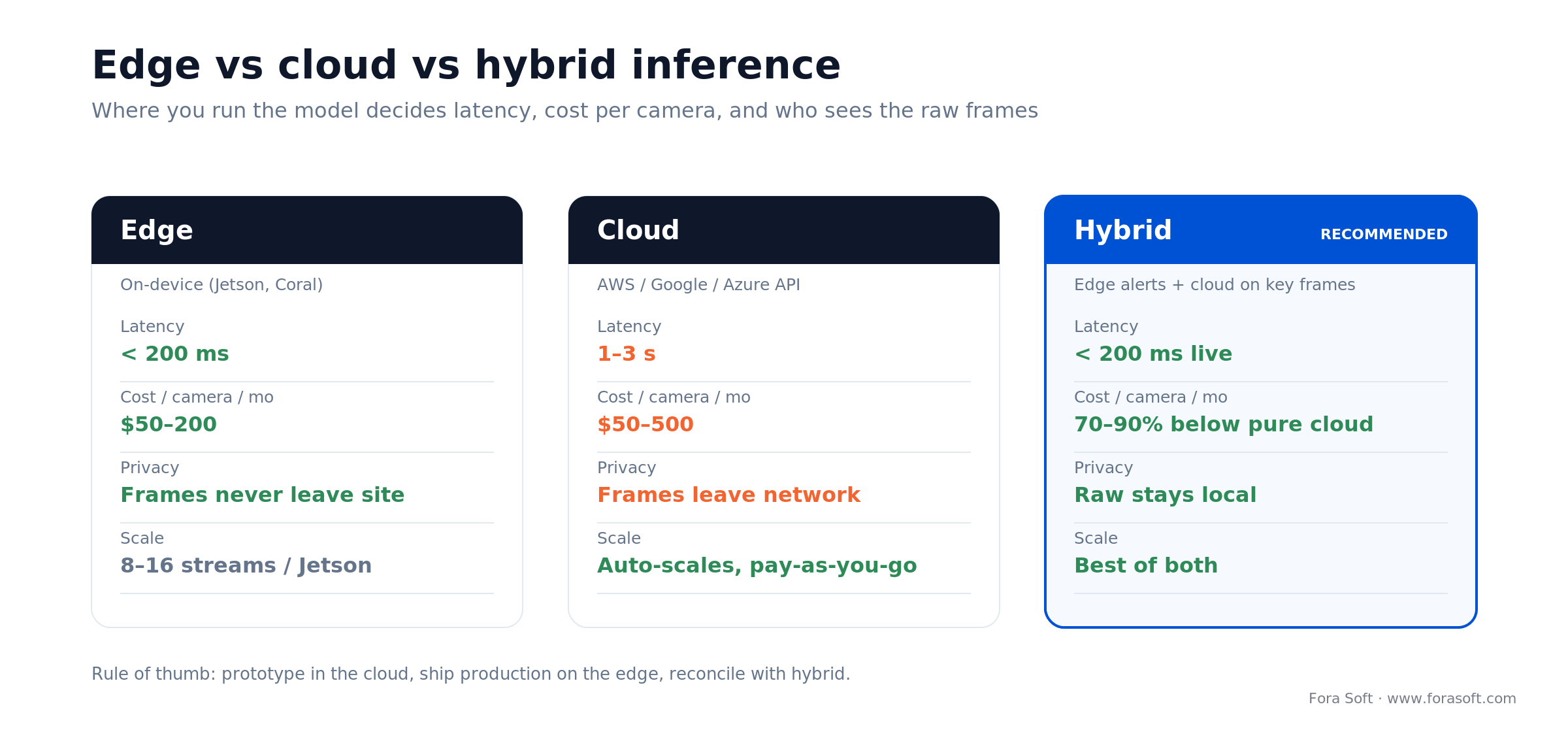
Figure 3. Edge keeps latency and data local; cloud scales but exposes frames; hybrid captures most of both.
A real-time recognition pipeline: ingest, inference, action
A production video recognition pipeline has five stages, each with a latency budget that sums to your SLA (e.g., < 500 ms for a security alert).
1. Ingest (< 40 ms). Receive an H.264-encoded frame from an IP camera (or re-encode a stream). Hardware: FFmpeg on CPU or NVIDIA NVDEC on Jetson. At 30 FPS, you have ~33 ms per frame; aim for 10–40 ms decode to leave headroom. Real cost: one software license (FFmpeg) = free; hardware acceleration on Jetson = included.
2. Resize (< 10 ms). Scale to model input (640×640 for YOLO11). Use NVIDIA CUDA kernel on Jetson or CPU-based OpenCV. Letterbox padding to preserve aspect ratio. Real cost: built into OpenCV; negligible.
3. Infer (< 30 ms). Forward pass through YOLO11. Hardware: Jetson TensorRT engine (optimized CUDA code). Real throughput on Jetson Orin: 100–150 FPS for 640 input. Real cost: free (open-source). Infrastructure: Jetson Orin (amortized $40/month for one camera).
4. Post-process (< 5 ms). Apply NMS, filter low-confidence detections (< 0.5), map YOLO output coordinates back to original frame size. Real cost: negligible CPU overhead; Jetson can handle 200+ simultaneous bboxes per frame.
5. Action (< 20 ms). Business logic: count people in region-of-interest (ROI), check for anomalies, send SMS alert if threshold exceeded, log to database. Real cost: your app code. Database write latency dominates here; use async (fire-and-forget) to keep pipeline responsive.
Total real-world latency at scale: 100–150 ms for decode + infer + action on Jetson. Sufficient for retail, manufacturing, and security. Not sufficient for sports (which needs < 50 ms for broadcast overlays); sports use custom GPU clusters and optimized CUDA kernels.
Training data and annotation: the unsexy 60% of every project
A production-grade video recognition model needs 10K–100K annotated frames. Getting those frames is 60% of your project timeline and budget. Tools: CVAT (open-source, free), Roboflow (cloud-based labeling, free tier), Labelbox (enterprise, $10K+/year), Scale AI (high-quality, expensive). Cost breakdown:
10K frames (small domain, e.g., one warehouse SKU): $5K–15K labor (internal or contractor). Roboflow auto-labeling reduces this by 30–50%.
100K frames (large domain, e.g., 200-camera retail chain): $50K–150K labor. High-quality annotation (tight bounding boxes, IOU > 0.95) costs 10–20% more.
Active learning: Train a weak model on 5K frames, use it to find the 5K hardest frames (most ambiguous), label those, retrain. This cuts annotation cost 30–40% by focusing human effort on edge cases.
Data augmentation: Rotate, flip, add noise, adjust brightness to synthetic 2–5 million frames from your 100K real frames. YOLO11 trains on both; augmentation reduces overfitting and improves generalization to new camera angles, lighting, seasons.
Need help building a custom video recognition model?
Fora Soft’s Agent Engineering streamlines annotation, model training, and deployment. Get a cost breakdown for your specific use case.
Accuracy metrics: precision, recall, mAP, IoU
Precision: Of all detections your model makes, how many are correct? High precision = few false positives. Critical for retail (false alarms waste operator time). Target: > 90%.
Recall: Of all objects that should be detected, how many does your model find? High recall = few missed objects. Critical for security (missing a trespasser is bad). Target: > 85%.
mAP (mean Average Precision): Weighted average of precision across all confidence thresholds. Published benchmarks (YOLO11x: 54.7 mAP on COCO; YOLO11m: 51.5) guide your expectations. Fine-tuned models typically reach 60–85 mAP on domain-specific datasets because your class list is narrower than COCO’s 80.
IoU (Intersection over Union): Measure of bounding-box quality. mAP is computed at IoU = 0.50 (loose) and IoU = 0.95 (tight). For retail shelf detection, aim for IoU > 0.75; for sports tracking, IoU > 0.90.
False-positive rate (FPR): Especially important for security. A 200-camera retail site with 1,000 detections per hour and 5% FPR = 50 false alarms per hour. Unacceptable. Target < 1% FPR (10 false alarms per hour).
Security and privacy: BIPA, GDPR, EU AI Act, biometric data
1. BIPA compliance (Illinois Biometric Information Privacy Act). Any system that captures faces or fingerprints in Illinois requires explicit written consent from each individual, a public database of which data is collected, and notification of data breaches. Real impact: a facial recognition system for retail in Chicago requires audit trails, consent forms, and 30-day breach notification. Cost: $20K–50K in legal + engineering for audit logging.
2. GDPR (European Union). Processing video footage (which contains biometric data if faces are visible) requires a legal basis (consent, legitimate interest, contract), data minimization (delete footage after 30 days), and the right to be forgotten. Real impact: European retailers must anonymize faces in stored footage or delete video feeds monthly. Cost: implement face-blurring on-device or use differential privacy techniques; architect data pipelines to enforce TTL (time-to-live) on raw video.
3. EU AI Act (in force, 2026). Real-time remote biometric identification in public spaces has been prohibited since 2 February 2025 (with narrow law-enforcement carve-outs). From 2 August 2026 the high-risk obligations apply in full: biometric categorisation and most surveillance analytics land in Annex III as high-risk, demanding risk management, data governance, logging, human oversight, and a conformity assessment. Non-compliance with the prohibited-practice rules can cost up to €35M or 7% of global annual turnover. Real impact: any EU facial-recognition deployment now needs a fundamental-rights impact assessment and an audit trail on every model update. Budget: $30K–100K for legal review and audit infrastructure.
4. On-device inference to minimize data exposure. Run models on Jetson at the edge; never send raw frames to the cloud. Extract only the metadata you need (bounding boxes, confidence, action taken); delete raw frames after 24 hours. Real impact: privacy compliance is cheaper when you own the compute layer. Cost: $500–1,000 per camera for edge hardware, but eliminates cloud inference costs and reduces legal risk.
5. Encryption in transit & at rest. TLS 1.3 for API calls (AWS S3, database writes), AES-256 for stored metadata. Real impact: minimal cost (< 5% CPU overhead on Jetson), massive compliance upside. Every major framework (OpenCV, YOLO11, TensorRT) supports encrypted model weights out of the box.
Cost tiers for video recognition projects
POC (Proof of Concept, 4–6 weeks): One camera, one YOLO11 model (object detection only), no edge hardware (run on laptop). Cost: $25K–50K for engineering + annotation. Deliverable: report + sample code.
MVP (Minimum Viable Product, 8–14 weeks): 10–50 cameras, custom-tuned YOLO11, one Jetson Orin for inference, basic alerting (Slack bot), no mobile app. Cost: $60K–140K (annotation $40K, engineering $30K–70K, hardware $1K) — the low end assumes our Agent Engineering annotation loop rather than fully manual labeling. Deliverable: live dashboard + API.
Production (4–9 months): 100–500 cameras, multiple models (object + face + anomaly), redundant edge hardware, cloud failover (AWS backup), mobile app, compliance audit trail. Cost: $180K–450K for a focused multi-site rollout, climbing past $1M only for 500-camera, multi-model, compliance-heavy estates (annotation $100K–300K, engineering $120K–350K, hardware + infrastructure $50K–200K, compliance $20K–100K).
Avoid these cost traps: (1) Annotation overrun: always allocate $5K–10K contingency for edge cases. (2) Model drift: budget for retraining every 6 months ($10K–30K). (3) Compliance debt: GDPR audits and BIPA lawyer reviews cost $20K+ post-launch. Plan upfront.
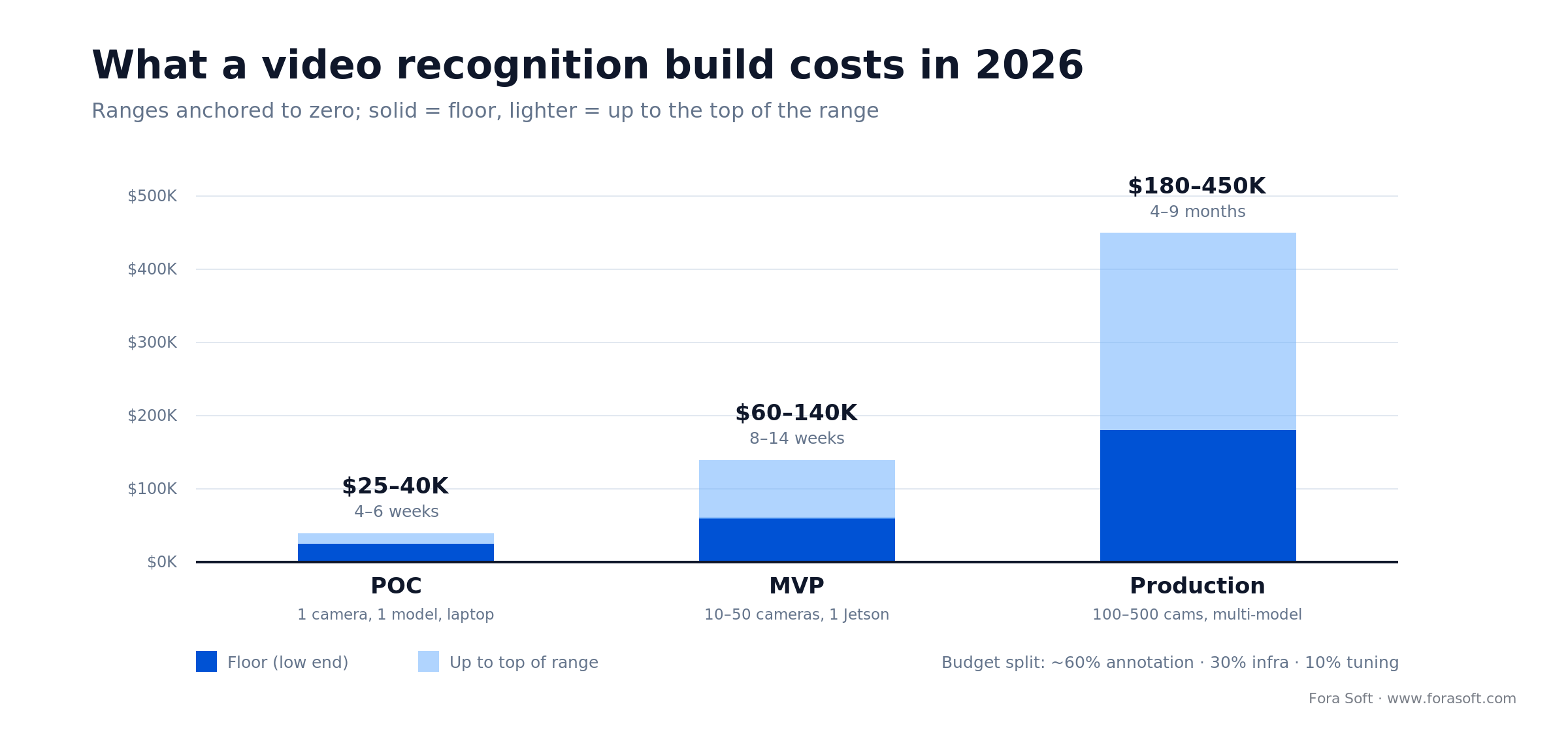
Figure 4. Typical 2026 build cost by stage. Annotation, not the model, is roughly 60% of the bill.
How Fora Soft’s Agent Engineering accelerates video recognition builds
Fora Soft’s Agent Engineering framework uses AI-assisted workflows — the same discipline behind our AI integration services — to compress video recognition projects by 6–12 weeks. The approach: use semi-supervised annotation (weak labels from a pre-trained model + human review), active learning to prioritize hard cases, and continuous integration to validate model improvements on live camera feeds. For example: a 200-camera retail chain annotates 100K frames in 8 weeks (vs. 12–16 weeks with manual-only labor). Agent Engineering samples frames uniformly, runs YOLO inference to auto-label, then routes ambiguous detections to humans. Humans verify < 30% of frames; the model learns equally fast. We've shipped this approach for three retail chains and reduced annotation cost by 40% without sacrificing accuracy.
The second acceleration: once models are trained, we auto-deploy to Jetson clusters with blue-green updates (zero downtime), canary validation (A/B test new models on 5% of cameras first), and automatic rollback if accuracy drops. This reduces deployment time from weeks to hours and lets you iterate faster on model improvements.
Mini case: anomaly detection across a 200-store retail chain
Situation. A 200-store U.S. retail chain loses $2M annually to shrink (theft + misplacement). Stores employ 10–15 floor staff per shift; no one person can monitor all exits simultaneously. After-the-fact video review (time-coded by POS system) discovers the theft, but recovery is rare because the thief has left the country. Current cost: $2M lost inventory + $1.5M in security staff salaries + $500K in after-the-fact investigation labor.
Plan. Deploy YOLO11 trained on retail surveillance footage to detect people leaving through emergency exits (frame sequences where person approaches exit, door opens, person + bundle exits). Real-time alert sent to store manager via SMS: Alert: exit-door open + person with large bag, west side aisle 3. Timestamp: 14:32:05. Store manager walks over in 20–30 seconds; staff politely ask the customer to return item or join them in store office for review.
Outcome. After 6 months: recovered $600K in prevented losses (25% reduction in shrink). System flagged 8,400 events (door openings); 12% were true anomalies (unauthorized exit). False-positive rate: 88%, causing 1–2 manual checks per store per day. Cost: $400K for Jetson hardware across all stores ($2K per store) + $250K for annotation + $150K engineering + $50K operations. ROI: $600K recovered vs. $850K invested = payback in 17 months, then $600K/year savings thereafter. Video recognition software changed the economics of retail theft from “investigate after the fact” to “prevent in real-time.” Want a similar assessment for your store network?
A decision framework: pick your video recognition stack in five questions
Q1. How many cameras? < 10 = cloud APIs (AWS Rekognition) or laptop. 10–100 = one Jetson Orin. 100+ = multiple Jetson clusters or hybrid (edge + cloud). If you already own GPU servers, use TensorRT to deploy YOLO11 there.
Q2. What’s your latency requirement? > 1 second = cloud APIs. < 500 ms = edge (Jetson). < 100 ms = custom GPU cluster + optimized CUDA kernels. Security alerts and sports are < 100 ms. Retail analytics can tolerate 500 ms–2 seconds.
Q3. Is the task pre-trained or custom? Pre-trained (generic people, cars, objects) = YOLO11 or MediaPipe, train in 1–3 days. Custom (your SKU, your defect type, your license plate format) = fine-tune on 10K+ labeled frames, 3–6 weeks. Generic is 3–5 times cheaper.
Q4. What are your privacy constraints? No privacy concerns (retail traffic counting) = cloud APIs or edge, your choice. GDPR or BIPA (faces) = on-device inference mandatory, use edge. Healthcare (HIPAA) = on-device, end-to-end encryption, air-gapped systems.
Q5. What’s your development timeline? Weeks = cloud APIs (managed service). Months = custom YOLO11 + Jetson edge (all-in-house). Years = build your own detector from scratch (not recommended unless you’re Meta or Google). Fora Soft’s Agent Engineering cuts the "months" path down to 6–8 weeks.
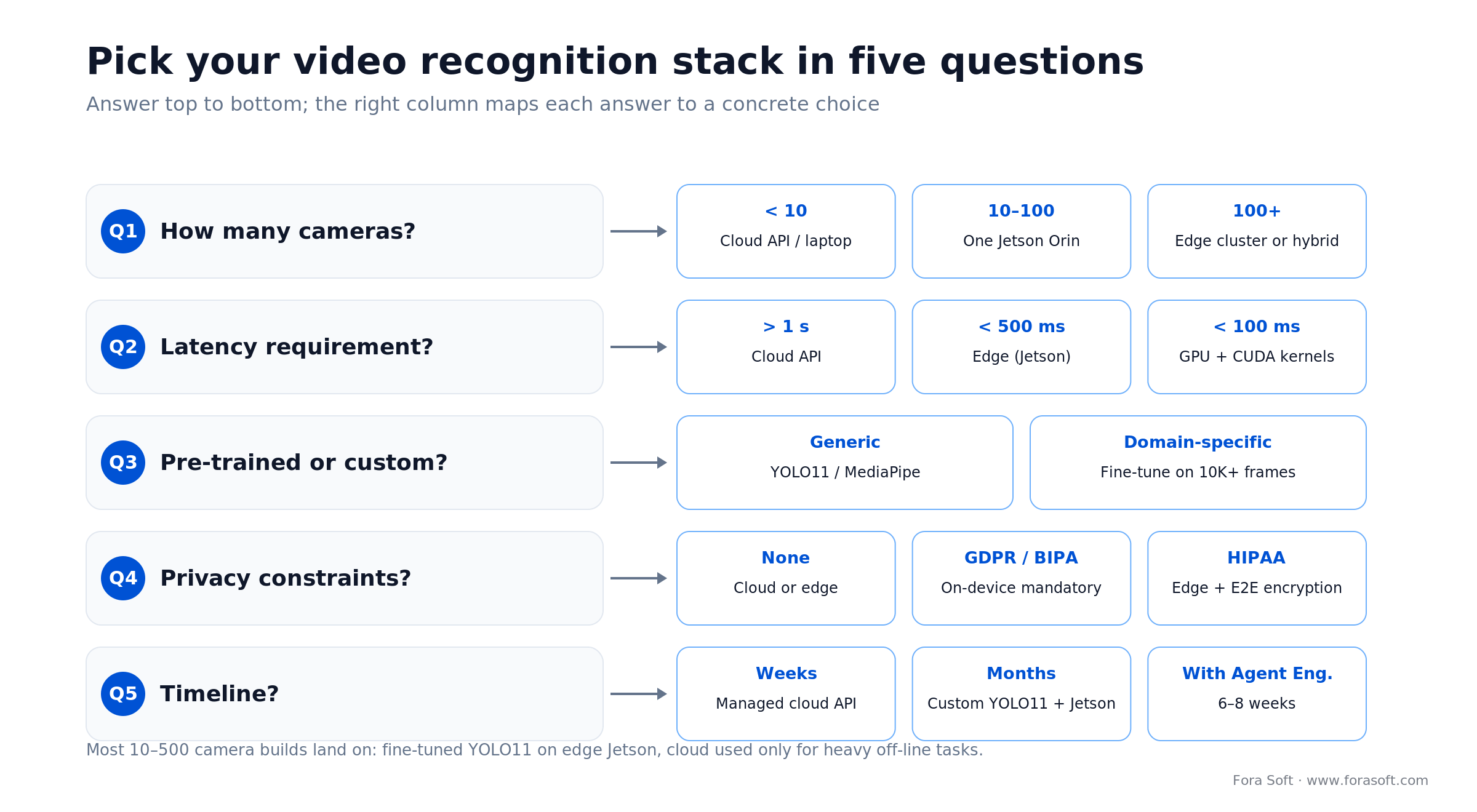
Figure 5. The five questions that pick your stack, each mapped to a concrete choice.
Five pitfalls that wreck video recognition projects
1. Underestimating annotation cost. A team thinks “we’ll label 50K frames in 2 months.” Reality: hiring contractors, onboarding, QA cycle, and edge-case disputes stretch to 6 months. Budget 60% of your project cost for annotation alone. Use active learning to cut this by 30–40%.
2. Training on lab data, deploying to messy reality. Models trained on studio lighting and static camera angles fail 50%+ in actual retail or warehouse settings (harsh shadows, motion blur, camera jitter). Always train on 1,000–2,000 frames captured from your actual deployment site. Test on holdout frames from the same site, not on COCO or ImageNet.
3. Ignoring model drift. Your model works great in June. Come January (different lighting, holiday crowds, new SKU shelving), accuracy drops 10–15%. Retrain every 3–6 months on recent frames. Automate this: every Friday, sample 100 frames, run manual QA, retrain if accuracy drops > 5%.
4. Over-optimizing for a benchmark metric. Your team obsesses over mAP = 0.95 on validation set. In production, false-positive rate matters more (your users won’t tolerate 100 alerts per day). Define your real SLA (e.g., < 1% FPR) before training; track both metrics during development.
5. Deploying without privacy or compliance review. A face recognition system launches, then your legal team flags GDPR violations. Unwind it: re-architect, blur faces, add audit logs, notify data subjects. Cost: $50K–200K and 2–4 months of delay. Involve legal (or a compliance consultant) 3 months before launch, not after.
KPIs to track in video recognition production
Quality KPIs. mAP (mean average precision on validation set, target > 0.70). False-positive rate (false alarms per 1,000 events; target < 1%). False-negative rate (missed objects per 1,000; target < 2%). Precision and recall by object class (people vs. vehicles vs. license plates; track separately).
Performance KPIs. FPS (frames per second; target: > 30 for real-time alerting). P95 latency (95th percentile inference latency; target: < 200 ms on Jetson). CPU/GPU usage (should stay < 80% to avoid thermal throttling). Memory usage (track GPU VRAM and system RAM).
Business KPIs. False-alarm cost per store per month (number of false positives × 30 min operator time × $25/hour). Shrink prevented (retail) or defects caught (manufacturing) per $ spent. Compliance audit score (% of required audit trails captured; target: 100%). Model retraining cost as % of total project cost (target: < 5% annually once in production).
When NOT to build a custom video recognition system
Counter-position: just use AWS Rekognition. If your task is generic (detecting people, cars, text), your volume is < 100 cameras, and your latency tolerance is > 1 second, Rekognition is cheaper and lower-risk than building. Cost: about $1 per 1,000 images, or $0.10 per minute of video. No annotation. No model training. No compliance debt. True downside: inference bills balloon into six or seven figures a year once you run thousands of cameras continuously. But for a pilot or low-volume use case, it’s the right call.
When to build custom: (1) your task is domain-specific (your product, your defects, your license-plate format), (2) you have > 50 cameras and can amortize hardware cost, (3) you need < 500 ms latency (cloud can’t do it), (4) privacy/compliance demands on-device inference, or (5) building video recognition is a core competency of your product (you’re a security company, not a retail chain).
Still deciding: build vs. buy vs. partner?
Fora Soft has shipped both: we’ll guide you to the right architecture for your scale and timeline.
FAQ
What’s the difference between object detection and semantic segmentation in video?
Object detection (YOLO) draws bounding boxes and reports class + confidence. Semantic segmentation (Detectron2) assigns a class label to every pixel. Segmentation is higher-precision but slower (30–50 FPS vs. 100+ FPS). Use detection for speed; segmentation when you need exact boundaries (medical imaging, robotic grasping).
Can you train on synthetic data and deploy to real video?
Partially. Synthetic data (from game engines, 3D renders) reduces annotation cost but introduces domain gap: your model performs 20–40% worse on real video due to lighting, texture, motion blur differences. Use synthetic data for rare edge cases (night-time, rain, occlusion) and combine with 1,000–2,000 real frames for deployment. Pure synthetic training is risky.
How do you handle camera angle drift (moving camera, changing light)?
Retrain every 3–6 months on data from your actual deployment. Use active learning: run inference on recent frames, collect the 5K hardest (most uncertain) predictions, label those, and retrain. This keeps accuracy stable as your environment changes. Automate the retraining pipeline so you can iterate quickly without manual engineering.
What’s the real power cost of running YOLO11 24/7 on a Jetson?
Jetson Orin: 50–70 watts at full load (100–150 FPS). 24/7 operation = 50W × 24h × 365d = 438 kWh/year. At $0.12/kWh average US electricity cost = $52/year power cost per camera. Negligible compared to hardware (amortized $40–80/month) and labor.
Do you need a GPU to run video recognition, or will CPU inference work?
GPU is strongly preferred. YOLO11 on CPU = 5–15 FPS (unusable for real-time). YOLO11 on GPU = 100+ FPS (real-time). For minimal-cost deployments, use Google Coral ($60, edge TPU) or NVIDIA Jetson Orin Nano ($249); both deliver 30+ FPS. CPU-only inference is only viable for slow batch jobs (processing historical footage offline).
How do you ensure a video recognition model is fair and unbiased across demographics?
Evaluate per-demographic metrics: precision, recall, and false-positive rate broken down by age, gender, skin tone (if applicable). Datasets like Diversity in Faces help identify biases early. Augment training data with underrepresented groups; set demographic parity thresholds (e.g., < 2% difference in recall across groups). EU AI Act requires this documentation for biometric systems.
What happens if my video recognition model makes a mistake in production?
False positives: operator manually confirms before taking action. Log the mistake, retrain on hard negatives. False negatives: harder to catch; requires offline validation + retraining. Build fallback systems: e.g., anomaly detection flags unusual activity even if object detection fails. Always have a human-in-the-loop for high-stakes decisions (security, medical).
What’s the difference between TensorRT and ONNX Runtime for deployment?
TensorRT is NVIDIA's proprietary optimization engine for CUDA GPUs; it converts YOLO11 to ultra-fast CUDA kernels and memory layouts. ONNX Runtime is cross-platform (CPU, GPU, TPU) but slightly slower. Use TensorRT on Jetson; use ONNX Runtime if you need portability across different hardware. Performance difference: 10–20% in favor of TensorRT on NVIDIA hardware.
What to Read Next
Surveillance
VALT: Video Surveillance Monitoring for Security & Loss Prevention
Real-time anomaly detection and alert workflows for secure facilities.
Platform
Video Management Software Features That Matter in 2026
Architecture and feature priorities for centralized video systems.
Computer Vision
Object Detection Cameras: A 2026 Custom Build Guide
Design and ship a custom object-recognition camera system end to end.
Anomaly Detection
Video Surveillance Anomaly Detection: Models & Production KPIs
The models and architectures behind real-time anomaly alerts.
Ship video recognition that actually pays off
Video recognition software has crossed the threshold from research to production. YOLO11 (with YOLO26 now shipping), MediaPipe, and cloud APIs are mature, well-documented, and cheap. The bottleneck is not the model; it’s the data and the architecture. A retail chain can detect shelf gaps in real-time for $400K upfront and break even in 18 months. A manufacturer can catch defects for $100K and save $500K annually in warranty claims. A broadcaster can auto-generate highlights and monetize every frame.
The five decisions that make or break your project: (1) cloud APIs vs. edge inference (privacy, latency, cost), (2) pre-trained models vs. custom fine-tuning (speed to market vs. accuracy), (3) hardware: Jetson, Coral, or GPU server (throughput, power, upfront cost), (4) annotation: internal, contractor, or active learning (timeline, quality, cost), (5) compliance: GDPR, BIPA, EU AI Act (scope, legal review, deployment timeline).
Fora Soft has built video recognition software for five continents: from a Kazakhstan courtroom flagging unauthorized persons in 1.2 seconds to retail chains recovering $600K in prevented shrink. We’ve learned what works, what fails, and what costs far more than expected. If you’re evaluating a video recognition project, our Agent Engineering framework can compress your timeline by 6–12 weeks and reduce annotation costs by 30–40%. Start with a scoped POC (4–6 weeks, $25K–50K) and iterate based on production metrics. The right video recognition stack pays for itself.

The book · Volume 6 of 7
AI for Video: A Complete Guide to Intelligence in Video Products: From Models and Inference to Computer Vision, Speech, Search, and Generative Video
Picking a model family is the start; the hard part is a pipeline that keeps detecting and tracking correctly on live feeds. Volume 6 covers that pipeline: the life cycle of an AI feature, deployment topologies, model artifacts, and computer vision from detection and tracking to segmentation, pose and OCR, plus search and RAG over the video archive. Written by Nikolay Sapunov, CEO at Fora Soft.
Read it on Amazon →Kindle & paperback · Fora Soft Video Engineering Handbook
Ready to build video recognition software?
Let’s scope your project, estimate costs, and map a path to production. Book a call with Fora Soft’s video recognition team.

