

Key takeaways
• Video management software is the brain, not the box. A VMS records every camera, indexes footage for sub-second search, runs analytics, and fans out alerts — independent of any single camera vendor.
• ONVIF Profile T is the 2026 baseline. Profile T is what lets a modern VMS pull H.265 from any brand, and ONVIF accepts no new Profile S conformance submissions after 31 March 2027. Profile G handles edge recording; Profile M carries AI metadata.
• Hybrid analytics win. Edge inference answers in 50–150 ms for live defense; cloud inference (0.5–5 s) does the forensic heavy lifting. Run both.
• Storage is the line that grows fastest. H.265 roughly halves the disk bill versus H.264 at the same quality. That matters more in 2026: a 30 TB enterprise SSD cost about 6.5× its year-earlier price in Q3 2026 (VDURA), so keep flash for a short hot tier and record the rest to HDD.
• NDAA and encryption are non-negotiable. For US public-sector work, Section 889 bans Hikvision and Dahua outright; TLS 1.2+, AES-256, MFA, and FIPS-validated crypto are table stakes.
Updated October 2026: new section on what video management software costs, with Q3 2026 disk prices; ONVIF Profile S retirement (31 March 2027); the FCC’s July 2026 equipment rules; EU AI Act biometric dates after the Digital Omnibus.
Why Fora Soft Wrote This Video Management Software Guide
We've been building video and computer-vision software for video surveillance since 2005 — 250+ projects, 50+ in-house specialists, and two decades of shipping systems that record, search, and reason about live video. One of them is VALT, a video management platform we've been the sole development team for over 10+ years. It runs in 770+ US organizations, serves 50,000+ users, and holds HIPAA workloads. That's the vantage point this guide is written from: not a spec sheet, but the decisions that actually decide whether a VMS survives contact with 1,000 cameras and a real security team.
Whether you're choosing between Milestone and a custom build, sizing storage for a 30-day retention policy, or trying to work out why your "ONVIF-compatible" cameras won't stream, the core trade-offs are the same. This guide walks the full stack — features, protocols, AI analytics, storage math, security, and the build-versus-buy call — with the numbers and the honest caveats. Our surveillance and computer-vision practice, led out of our video surveillance development team, is where these lessons come from.
Architecting your video management software?
Talk to the engineers behind a 770-organization VMS about ONVIF, AI analytics, and storage strategy — in 30 focused minutes.
What Is Video Management Software? VMS vs NVR vs DVR vs VSaaS
Video management software (VMS) is the software layer that ingests live streams from IP cameras, records them, indexes them for search and playback, runs analytics, raises alerts, and ties into access control and alarms. Everything else in a surveillance system — cameras, switches, disks — is plumbing. The VMS is where the plumbing turns into answers. Here's how it differs from the hardware categories people mix it up with.
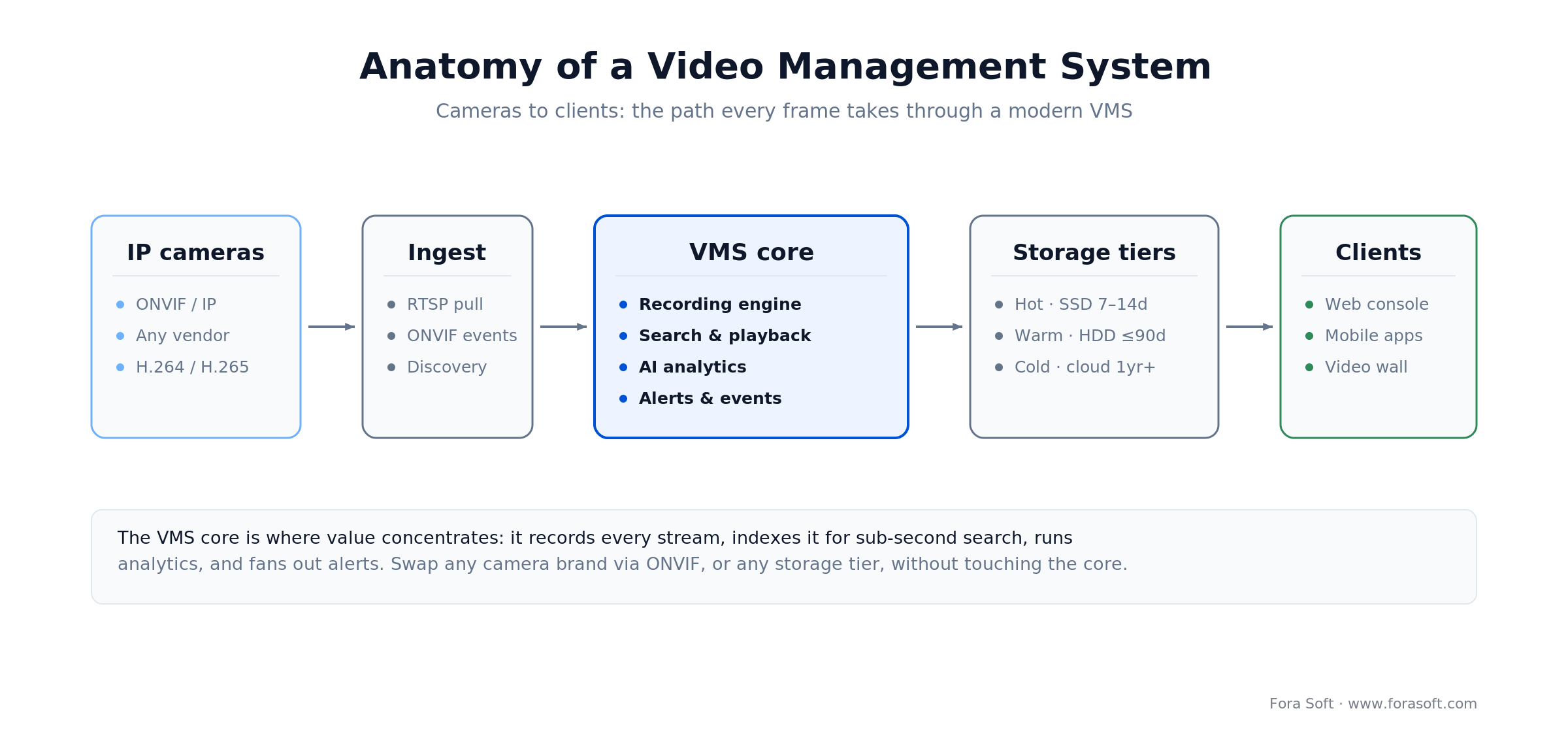
Figure 1. The path every frame takes: cameras stream in over ONVIF/RTSP, the VMS core records and indexes them, storage tiers hold the archive, and clients watch and search. Swap a camera brand or a storage tier without touching the core.
VMS (video management software)
A pure software platform on standard servers or appliances. It records from any ONVIF IP camera, scales to thousands of cameras across sites, and centralizes management, search, and analytics. Milestone XProtect, Genetec Security Center, and Axis Camera Station are the household names.
NVR (network video recorder)
A hardware appliance with VMS software baked in, sized for a fixed camera count (usually 8–64). Simple to deploy, hard to scale. It's the right answer for one small site with a stable number of cameras, and the wrong answer the moment you add a second building.
DVR (digital video recorder)
Analog-era hardware that records from coax cameras over proprietary protocols. No multi-vendor support, end-of-life in most markets. Don't design a new system around one.
VSaaS (video surveillance as a service)
A cloud-hosted VMS: cameras stream to the vendor's servers, and you get a browser and an app instead of on-prem hardware. Verkada Command and Eagle Eye Networks are the reference examples. You trade bandwidth, latency, and data control for operational simplicity.
Reach for VSaaS when: you run many small, distributed sites with little on-site IT, you can live with 0.5–5 s live latency, and you'd rather pay per camera per month than stand up recording servers. Reach for on-prem or hybrid VMS the moment data residency, air-gapped networks, or sustained 1,000+ camera counts enter the picture.
Core Features of Video Management Software
A production VMS carries a defined set of responsibilities. Skip any of these twelve and you'll feel the gap within the first month of operation. For an RFP-ready version of this list, use our 12 must-have VMS software features.
1. Multi-camera support and auto-discovery. The VMS ingests dozens to thousands of streams without hand-registering each camera. UPnP or WS-Discovery makes adding cameras a click, and load-balancing across recording nodes stops any one node becoming the bottleneck. At scale, automatic failover and health checks are what keep the wall of green from turning red.
2. ONVIF compliance. ONVIF is the open standard for multi-vendor IP-camera interoperability. A VMS that honors ONVIF Profile S and T lets you swap camera brands without writing drivers — the single biggest defense against vendor lock-in. More on the profiles below.
3. Live monitoring and PTZ. Operators need low-latency grids of 1, 10, or 100+ cameras. Efficient transport (RTSP, WebRTC, HLS) and hardware decoding keep CPU and bandwidth honest, and pan-tilt-zoom control has to feel instant — sub-200 ms or operators stop trusting it.
4. Continuous recording and retention. Record 24/7 from every camera, survive network glitches with buffer-and-resume, and enforce tiered retention. Most deployments keep 7–30 days on fast storage and roll older footage to cheaper tiers.
5. Search and playback. Finding a 15-second incident in 30 days of footage is worthless if it takes two hours. The VMS indexes by timestamp, camera, and metadata, and gives operators frame-accurate seek, multi-camera sync, and export to MP4.
6. AI analytics. Motion filtering, object recognition, license-plate reading, face search, loitering, line-crossing, anomaly detection. Edge inference handles the real-time alerts; cloud handles the cross-camera correlation. This is where a modern VMS earns its keep.
7. Alerts and event management. Analytics and external inputs (access control, alarm panels, sensors) trigger alerts that route to operators by email, SMS, webhook, or push. Suppression rules — "ignore motion on this camera during business hours" — are what keep the alert stream signal, not noise.
8. Users and role-based access. View-only, search-only, PTZ, export, admin: granular roles with audit logs on every login, view, export, and config change. MFA is the difference between a stolen password and a stolen surveillance network.
9. Third-party integrations. Access control, alarm panels, building management, MQTT brokers, ticketing. Open webhooks and REST APIs decide whether the VMS is a hub or an island.
10. Mobile apps. Live view, playback, alerts, and PTZ over LTE and 5G, degrading gracefully on lossy networks. Push notifications are how a manager hears about an incident before the shift report.
11. Cybersecurity and encryption. TLS 1.2+ in transit, AES-256 at rest, FIPS-validated crypto where required, and NDAA-clean hardware for US federal work. Cameras are the softest endpoints on most networks; the VMS has to assume they'll be attacked.
12. Health monitoring. Recording uptime per camera, disk usage, frame loss, database health, failover status — on a dashboard that warns you before a camera goes dark, not after the incident you needed it for.
Comparing Leading VMS Platforms in 2026
The 2026 market splits into perpetual-license on-prem platforms, hybrids, pure cloud (VSaaS), and open-source. Prices below are 2026 list-order figures for planning only — every serious deployment gets a custom quote — but they're accurate enough to shape a build-versus-buy conversation. Two 2026 changes to note: Milestone shipped XProtect 2026 R1 in April with Device Pack 14.1, covering 16,300+ verified devices, and Verkada raised list prices for orders placed from 5 June 2026, citing AI, memory and storage costs. For the full vendor list, see our ranking of top video surveillance software companies; for the selection process itself, our guide on how to choose a video surveillance management system.
| Platform | Deployment | Pricing (2026, approx.) | AI analytics | Best for |
|---|---|---|---|---|
| Milestone XProtect | On-prem / hybrid | Base licence plus a per-camera device licence (Professional+ ≈ $177/camera at a US reseller, Oct 2026); Milestone Care extra | Motion, object, LPR, face (native + partner ecosystem; 16,300+ verified devices) | Large multi-site enterprise, open integrations |
| Genetec Security Center | On-prem / hybrid | Per-camera licence via integrators, plus a yearly Genetec Advantage support plan | Motion, object, face, loitering, line-crossing; unified access | Unified VMS + access control, regulated sites |
| Verkada Command | Cloud-native (VSaaS) | Per-camera cloud licence on 1–10-year terms; camera hardware separate; list prices raised June 2026 | Object, face, LPR, people search (cloud) | Distributed sites, minimal on-site IT |
| Eagle Eye Networks | Cloud-native (VSaaS) | Per-camera monthly subscription through resellers | Motion, object, face (cloud analytics) | Retail, hospitality, multi-location chains |
| Frigate (open-source) | Self-hosted, on-prem | Free software (0.17.2, June 2026); you pay for hardware + ops | Object, face via edge AI (Coral / TensorRT) | 10–100 cameras, engineering-led teams |
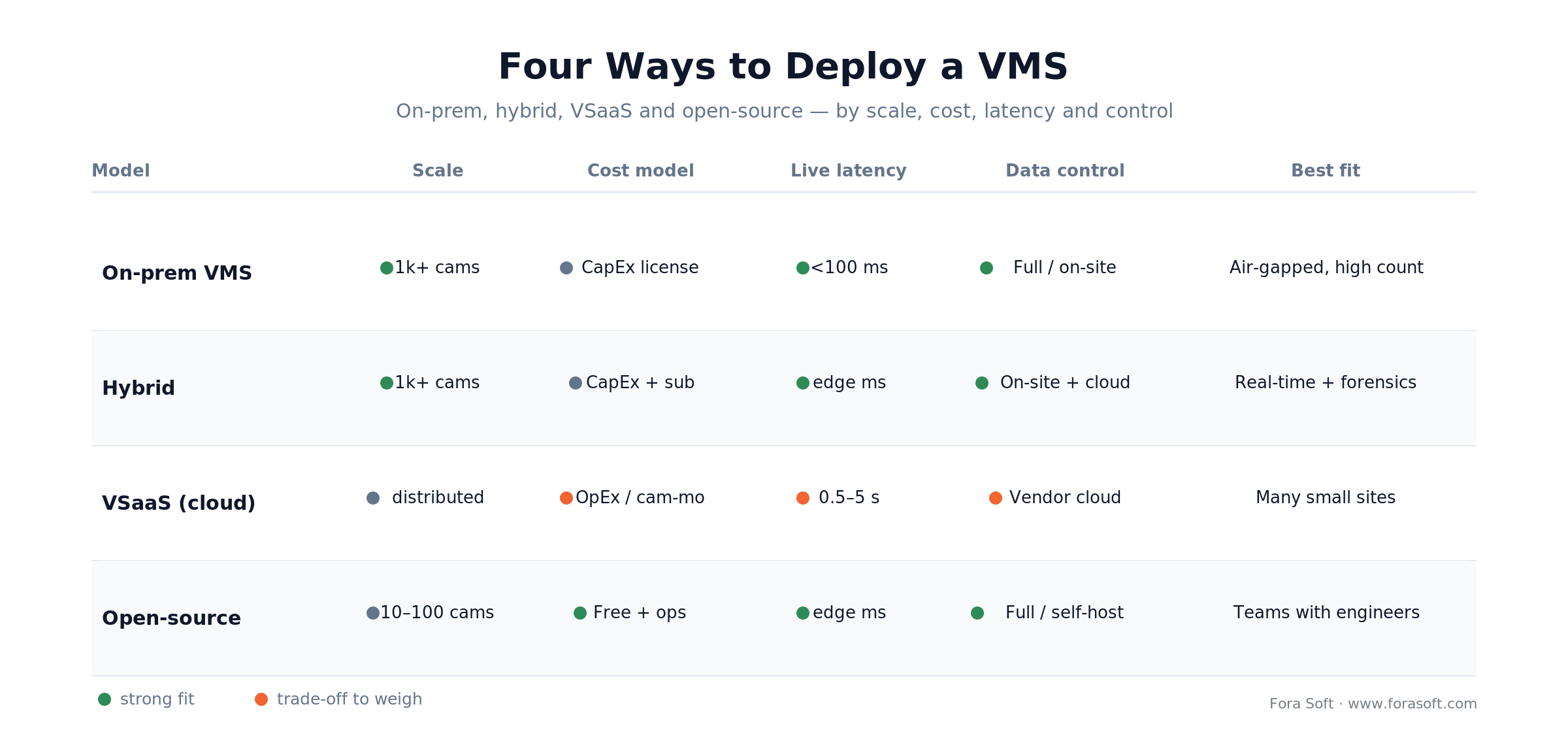
Figure 2. The named platforms above map onto four deployment models. This is the cut that actually drives cost and latency: where the software runs, not whose logo is on it.
Reach for an open-platform VMS (Milestone or Genetec) when: you need to mix camera brands, integrate access control and alarms, and keep a perpetual license you own. The upfront CapEx is higher than a subscription, but at 500+ cameras over five years it usually undercuts per-camera-per-month cloud fees — and you keep your footage on your own disks.
How Much Does Video Management Software Cost?
Video management software cost has four parts: the licence or subscription, storage, servers and network, and ongoing maintenance. The licence is the line everyone compares, but over five years servers, storage and yearly support can outweigh it. For scale: a Milestone XProtect Professional+ device licence lists at about $177 per camera at a US reseller in October 2026, plus a one-time base licence, while cloud VSaaS swaps that for a per-camera subscription that also covers hosting.
| Cost line | What you pay for | 2026 reference point | Recurring? |
|---|---|---|---|
| On-prem software licence | Base licence plus one device licence per camera | Milestone XProtect Professional+ device licence ≈ $177 per camera at a US reseller (Oct 2026) | One-time, plus a yearly support plan |
| Cloud subscription (VSaaS) | Per-camera licence, hosting, updates, remote access | Quote-based; Verkada raised list prices for orders from 5 June 2026 | Every term |
| Storage: nearline HDD | Recording capacity for warm footage and long retention | ≈ $41/TB for a 30 TB drive in Q3 2026, up from ≈ $16.50/TB a year earlier (VDURA) | Failed-disk replacement and growth |
| Storage: enterprise SSD | Small hot tier (recent days) for instant search | ≈ $750/TB for a 30 TB TLC drive in Q3 2026, about 6.5× a year earlier (VDURA) | Growth only |
| Servers and network | Recording nodes, switches, PoE, a separate camera VLAN | Sized by total bitrate and camera count | Hardware refresh |
| Ongoing maintenance | Support renewals, firmware and OS patches, failover drills, camera swaps | Ask for the renewal rate in writing in every quote | Yearly |
A worked example at 2026 prices. 100 cameras at 1080p, 30 days of continuous recording, H.265 at 1.5 Mbps: 1.5 × 10.8 = 16.2 GB per camera per day, times 100 cameras and 30 days, is about 49 TB. On nearline HDD at roughly $41/TB (VDURA Flash Volatility Index, Q3 2026) that is about $2,000 of raw disk before RAID and spares. The same 49 TB on enterprise SSD would be about $37,000. Record in H.264 and the disk figure roughly doubles. For comparison, 100 Professional+ device licences at the same reseller price come to about $17,700, so on HDD the licence, not the disk, is the bigger one-time line. That gap is why we keep flash for a small hot tier and put everything else on HDD.
What ongoing VMS maintenance costs. The recurring bill has five parts: support-plan renewals on perpetual licences (Milestone Care, Genetec Advantage); failed-disk replacement and capacity growth; firmware and security patching on cameras and servers; keeping the camera fleet compliant as rules move, such as ONVIF Profile S retirement and the FCC’s July 2026 equipment rules; and operator time for health monitoring and failover drills. The support renewal is the line first-year budgets miss most often, so get its rate in writing before you sign. If you want one team to own that upkeep, our software maintenance and support team handles monitoring, security patches, releases and performance tuning for video products after launch.
AI Video Analytics: Capabilities and Real-World Use Cases
AI analytics turn raw streams into events you can search and act on. The honest framing for 2026: these models are good, not perfect. Publish realistic precision, tune thresholds per camera, and never promise "100% accuracy" — the day it misses, that promise is what gets quoted back to you. When the stock analytics in a VMS can't reach the precision your cameras need, our AI video recognition engineers train and deploy custom detection, tracking, face and ANPR models that run at the edge.
Smart motion detection
Classic motion detection fires on traffic, leaves, and shadows. Modern ML filters human motion from environmental noise, and rules like "alert only if a person enters zone X between 18:00 and 06:00" cut false positives by 80–90% in the field.
Object detection and classification
The camera stops just recording and starts understanding: person, vehicle, bicycle, package, animal — and truck versus sedan versus motorcycle. Retail counts foot traffic; parking flags abandoned vehicles; security focuses operators on real threats.
License-plate recognition (LPR)
LPR extracts plates as searchable metadata for access, tolling, and investigations. Accuracy runs 95%+ on well-lit, front-on plates and degrades in poor light or sharp angles — design the camera placement for the plate, not the pretty shot.
Face search and person re-identification
Face embeddings answer "show every appearance of this person across cameras A–Z in the last 30 days." Deploy it with audit logging, bias testing, and documented consent — in the EU and several US states it's a legal question before it's a technical one. Under the EU AI Act, untargeted scraping of facial images and, with narrow exceptions, real-time remote biometric identification in public spaces for law enforcement have been banned since 2 February 2025. Other remote biometric identification systems are high-risk, and the Digital Omnibus (Regulation (EU) 2026/1744) moved those high-risk obligations to 2 December 2027.
Loitering, line-crossing, and anomaly detection
Loitering flags someone lingering past a threshold (an ATM vestibule, a stockroom). Line-crossing draws a virtual perimeter and alerts on breach. Anomaly detection learns "normal" and surfaces the outlier. All three live or die on threshold tuning — set them too tight and operators mute the alerts within a week.
Edge AI vs Cloud AI: Where Should Analytics Run?
Run fast, cheap models at the edge and heavy, correlating models in the cloud. That hybrid split is the 2026 default, and the reason is latency: the distance between an event and an alert decides whether a guard intervenes or writes a report.
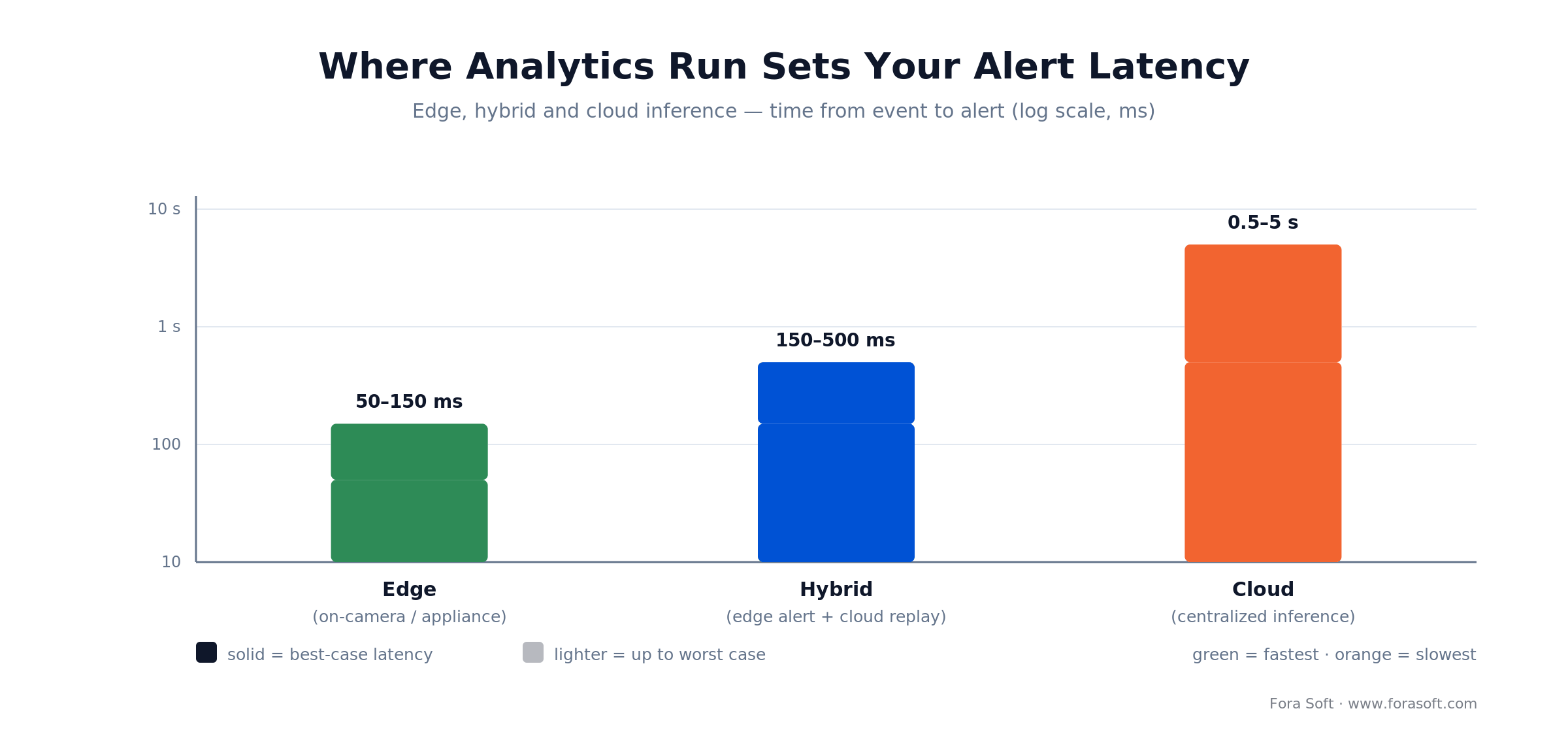
Figure 3. Event-to-alert latency by where inference runs. Edge answers in tens of milliseconds; cloud answers in seconds. The gap is why the two do different jobs.
Edge AI (camera or on-site appliance)
Inference runs on the camera or a local box: 50–150 ms from event to alert, video never leaves the premises, and WAN bandwidth stays low. The cost is compute — edge boxes run lighter models, can't correlate across cameras, and add firmware to maintain.
Reach for edge AI when: the job is live defense — intruder in a restricted zone, guard alerted, door released — or when privacy or bandwidth rules out sending raw video off-site. Sub-second response is the whole point.
Cloud AI (centralized analytics)
The cloud runs the full model suite — face search, LPR correlation, anomaly detection — across every camera at once, and scales without on-site AI hardware. The cost is 0.5–5 s of round-trip latency, egress bandwidth, and handing footage to a provider.
Reach for cloud AI when: the job is forensic — "replay last night's theft and find this person across 500 cameras" — where seconds of latency don't matter and cross-camera reach does. Pair it with edge alerting; don't make it your live-defense path.
The hybrid pattern
Light models (motion, basic object) on the edge for real-time alerts; full video plus edge metadata streamed to the cloud; heavy models (face search, LPR correlation, anomaly) in the cloud for forensics. Edge gives you the millisecond response; cloud gives you the memory. A VMS that supports both patterns is the one that earns operator trust.
Weighing Milestone against a custom build?
We've shipped both. We'll model TCO, lock-in risk, and AI capability for your exact camera count — no pitch, just the math.
Protocols That Power Modern VMS: ONVIF, RTSP, MQTT
Open protocols are what let one VMS talk to cameras from twenty vendors. Get the ONVIF profiles right and integration is boring; get them wrong and you're writing drivers at 2 a.m. before a go-live.
ONVIF profiles, explained correctly
ONVIF, created in 2008 by Axis, Bosch, and Sony, is the physical-security industry's only real multi-vendor standard. Its profiles are a-la-carte, not cumulative — a camera implementing one profile tells you nothing about the others.
- Profile S (basic streaming): H.264 video, PTZ, and WS-Discovery. The old baseline, now being retired: ONVIF accepts no new Profile S conformance submissions after 31 March 2027 and names Profile T as the successor. Products already registered as Profile S stay conformant.
- Profile T (advanced streaming): adds H.265, imaging controls, tampering events, metadata, and two-way audio. Introduced in 2018, Profile T is the 2026 baseline for IP video — if a camera only claims Profile S, its H.265 support isn't guaranteed through ONVIF.
- Profile G (recording and storage): edge storage and retrieval — managing video that lives on the camera or recorder itself. (This is recording, not "gait recognition" — a common mix-up.)
- Profile M (metadata and analytics): standardized AI-event and object metadata, so rule-based alerting works across brands.
- Profiles A, C, D (access control): credential and door configuration, physical access control, and peripheral devices like readers and sensors — relevant when the VMS unifies video and access.
In practice a camera implements S or T for streaming, G for edge recording, and M for analytics, plus A/C/D when access control is in scope. Demand Profile T support and test it with multi-brand cameras before production. For the profile-by-profile decision, our ONVIF Profile S/G/T/M decision guide walks the choice, and our deep dive on ONVIF profiles in security systems covers the add-ons.
RTSP and RTSPS
RTSP (default port 554) is the workhorse for pulling video from IP cameras into the VMS; RTSPS wraps it in TLS. A VMS has to speak both, and its stream ingest and failover logic is built on RTSP URIs, usually obtained through ONVIF GetStreamUri (rtsp://camera-ip:554/stream1).
MQTT and message brokers
MQTT makes integration event-driven. A camera detects motion, publishes to a broker, and the VMS subscribes and triggers downstream actions — alert, siren, door release. Because each component is decoupled, you can scale and test them independently, which matters a lot at 1,000 cameras.
Storage Architecture and the Retention Math
Storage is the line that grows fastest in a VMS deployment, and it's the one people underestimate first. The good news: the arithmetic is simple, and the codec choice is a lever worth tens of terabytes.
The one formula you need
Storage per day in gigabytes is roughly the stream bitrate in Mbps times 10.8 (that's 86,400 seconds a day, divided by 8 bits per byte, divided by 1,000). Multiply by cameras and retention days for the total. A 1080p camera at H.264 runs ~2.5–3.5 Mbps (27–38 GB/day); the same camera at H.265 runs ~1.2–1.8 Mbps (13–19 GB/day). A 4K H.265 stream is closer to 8 Mbps, or ~86 GB/day per camera continuous.
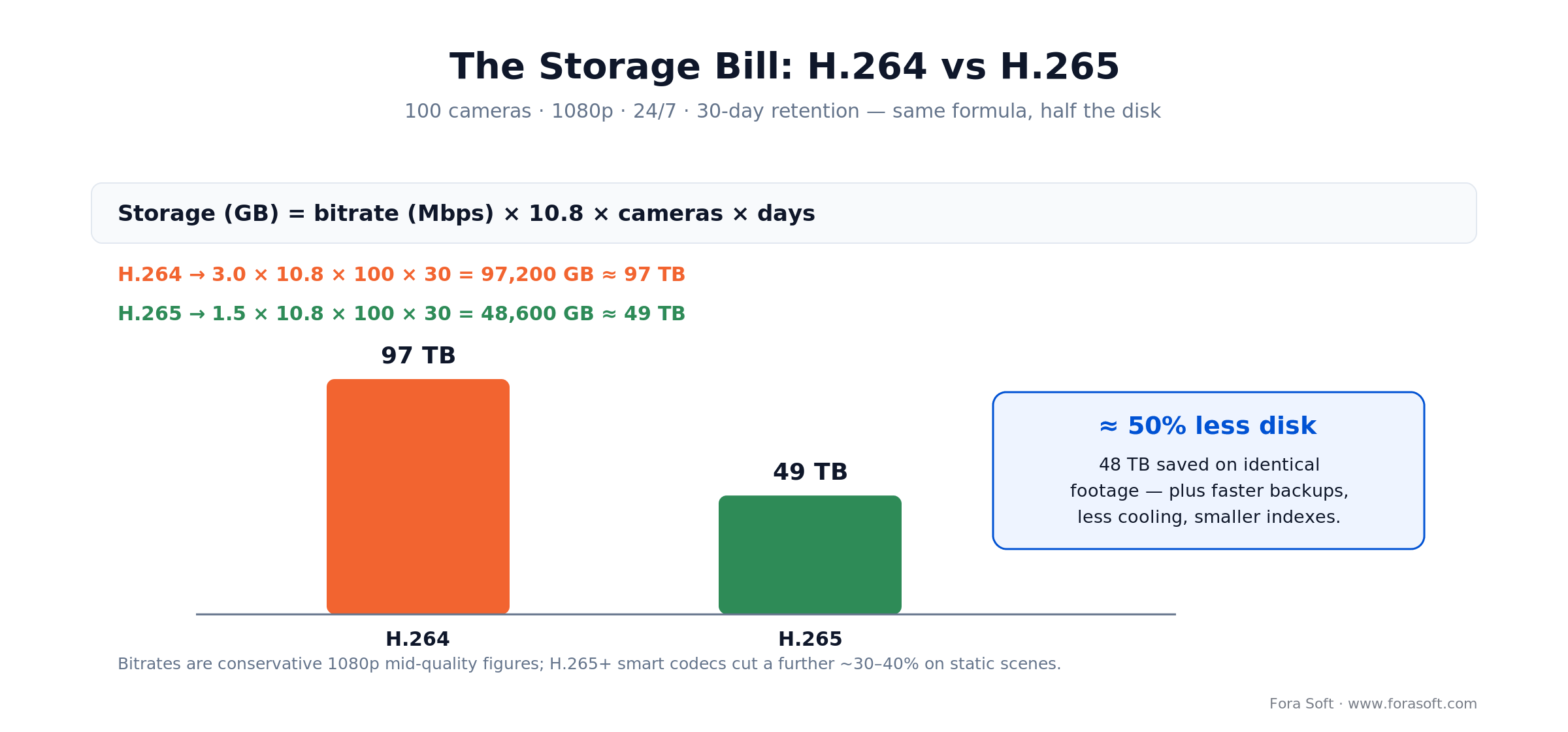
Figure 4. Same 100-camera fleet, same 30-day policy, run the formula: H.264 needs ~97 TB, H.265 ~49 TB. The codec choice alone saves ~48 TB — and shrinks backups, cooling, and search indexes with it.
Tiered storage
Hot (SSD/NAS, 7–14 days): sub-second search for recent incidents, highest cost per TB. Warm (HDD arrays, 15–90 days): investigations past a week, 2–5 s search is fine. Cold (archive or cloud object storage, 1+ years): compliance holds and disaster recovery, retrieval in minutes, negligible cost per TB. The VMS should tier automatically: newest video on SSD, rolled to HDD at day 14, archived at day 90, deleted at policy expiry.
Retention by industry
- Retail: 30 days hot for fast theft/fraud review, 90 days warm for forensics.
- Banking: 90 days hot for the exam window, up to 7 years cold for regulatory archive.
- Manufacturing: 14 days hot for safety review, 1 year cold for incident investigation.
- Smart city: 7 days hot for traffic and safety response, 1 year cold for planning and audits — across hundreds to thousands of cameras.
Cybersecurity and NDAA Compliance for VMS
A compromised VMS is a foothold into door locks, alarms, and the corporate network. Treat cameras as the least-trusted devices on the network and design the security in from day one.
Encryption and authentication
TLS 1.2+ on every hop (camera-to-VMS, VMS-to-client, VMS-to-cloud), AES-256 at rest, and MFA on every operator account. Service accounts for integrations use scoped API tokens with 90–180-day expiry. Where US federal rules apply, cryptographic modules must be FIPS 140-validated, not just "AES somewhere."
NDAA Section 889 — the one that ends deals
For any system that touches US federal money, NDAA Section 889 bans video-surveillance gear from Hikvision, Dahua, Hytera, Huawei, and ZTE, plus their subsidiaries and OEM rebrands. The FCC stopped authorizing new covered equipment in 2022, reaffirmed it in an October 2025 fact sheet, and in the same month pushed major retailers to pull millions of prohibited-camera listings. On 22 July 2026 it went further (FCC 26-50): it now refuses authorization for devices that contain logic-bearing chips made by Covered List companies, requires online marketplaces to show the FCC ID at the point of sale, and narrowed its definition of critical infrastructure after a D.C. Circuit remand. Equipment that was already authorized can still be sold and used. If federal work is anywhere in your future, confirm your camera supply chain is NDAA-clean before you buy — a rebadged sensor can disqualify an entire contract.
Audit logging and network segmentation
Log every login, view, export, and config change to immutable, append-only storage shipped to a SIEM. Put cameras and the VMS on a dedicated VLAN with strict firewall rules and no direct internet exposure. If you can't segment the camera network, you're not ready to run enterprise VMS. For the wider picture, see our guide to video app security features.
Integration Ecosystem: Connecting VMS to Your Stack
A VMS that stands alone is worth a fraction of one wired into access control, alarms, and business systems. The integrations below are what turn video into an operational tool.
Access control. A card swipe opens a door, and the VMS attributes that door's footage to the cardholder at that timestamp — an audit trail that writes itself. Genetec and Milestone build this tightly into unified platforms.
Alarm panels and sensors. A glass-break or door sensor fires, and the VMS starts recording nearby cameras, stores the event, and routes the alert — correlating physical and video events cuts response time.
Building management. Occupancy and HVAC state let the VMS reason: "motion after-hours in zone X while HVAC is off" reads as intrusion. It can also drive the BMS — incident on floor 3, release the emergency exits.
Ticketing and BI. An alert auto-opens a ticket in Jira or ServiceNow with camera, timestamp, and type; uptime and false-alarm metrics flow into dashboards managers already watch. Webhooks and REST APIs are what make all of this possible — a VMS without them is a dead end.
Video Management Software by Industry
The same VMS features get assembled very differently by vertical. Here's how the priorities shift.
Retail and hospitality. Central VMS over 100–1,000+ cameras across dozens of stores, POS integration to tie till transactions to footage, and search measured in minutes. VSaaS platforms dominate here because they erase on-site IT.
Healthcare. Security plus operational monitoring under HIPAA and HITECH — encryption, access control, audit trails, and video kept separate from the EHR. This is the terrain our team knows best; our video surveillance development practice ships HIPAA-grade systems.
Education. Campus safety on tight budgets, which is where open-source (Frigate) gets traction. Recording children means local storage, strict access controls, and parental-notice policy — cloud-only rarely clears the bar.
Manufacturing and logistics. Safety (fall and PPE detection), quality (vision inspection), and shrinkage, often fused with industrial IoT data. Edge AI on-prem is preferred so production video never hits the cloud. Our writeup on AI-powered video surveillance goes deeper.
Smart cities. Hundreds to thousands of traffic and public-safety cameras, cross-agency sharing, and hybrid or SaaS scale — with governance, audit trails, and clear retention limits to satisfy civil-liberties scrutiny.
How Fora Soft Builds Custom Video Management Software
When we build a custom VMS, we treat it as a set of independent services rather than one monolith: a recording service, a search service, an analytics service, an alert service, each scaling on its own and talking over event-driven protocols (MQTT, webhooks). It's the pattern that let VALT grow to 770+ organizations without a rewrite. Past a few hundred cameras, the five decisions in our scalable video management systems playbook decide whether that split holds, and our VMS architecture breakdown walks through the six layers inside.
Two engineering choices carry most of the weight. Stateless services mean any node can scale horizontally. Event sourcing — logging every state change — gives you auditing and replay for free, which regulated customers need anyway. And we design for no single point of failure: recording nodes replicate, search indexes distribute, alerts queue and retry. An operator can lose the primary server and keep recording and doing basic playback on edge nodes. That resilience is what pays off during migrations and outages, exactly when a security team can least afford to go blind.
Because we use agent-assisted engineering, our estimates tend to come in faster and leaner than a traditional per-camera integration quote. If you want that number for your scope, the video platform development cost breakdown is a good starting frame.
Case Study: 200-Camera Retail Chain Migration to H.265
An 18-store retail chain ran 200 cameras (10 per store) on an older H.264 VMS, burning 160 TB of hot storage for 30-day retention. They wanted 30 more cameras. The storage was already full, and a forklift replacement of the platform wasn't in the budget.
What we did. Rather than replace the VMS, we added edge nodes at each store that transcoded the existing streams to H.265 in real time on hardware-accelerated nodes (about 0.5% CPU overhead per camera) and recorded new footage in H.265 natively. The existing H.264 archive stayed put for compliance; the 30 new cameras were provisioned straight to H.265.
The result, over a 12-week project. Hot storage dropped from 160 TB to ~112 TB — a 30% cut, blended because the old archive stayed H.264. The 30 extra cameras fit inside the same footprint, retention stretched from 30 to 42 days on the same disks, and operators couldn't tell the H.265 streams from the old ones. It pushed a storage-and-server expansion, budgeted in the low tens of thousands, out of that fiscal year entirely.
The lesson is that codec and storage-tiering decisions have ROI most VMS buyers never model: a storage cut is also faster backups, less cooling, and smaller, quicker search indexes. Want a similar assessment of your deployment?
Five Questions to Guide Your VMS Decision
Answer these before you build, buy, or migrate. They decide the architecture more than any feature checklist.
1. How many cameras and sites, and where's the growth? Under 50 cameras at one site, an NVR or small VMS is plenty. At 100–1,000+ across sites, you need a distributed VMS or VSaaS. Budget 2–3x headroom in storage, compute, and licensing for the growth you're actually planning.
2. How much cloud can you tolerate? Air-gapped networks (manufacturing, defense, some healthcare) rule out cloud VMS. Full cloud trust points to VSaaS. Most land on hybrid: on-prem recording, cloud search.
3. What has to be real-time versus forensic? Sub-second alerting needs edge AI on cameras or recording nodes. Forensic replay tolerates cloud analytics. Most deployments want both.
4. Which integrations are non-negotiable? If the VMS must sync with access control, BMS, and ticketing, you need open APIs and webhooks. Proprietary platforms make every integration a paid project — ask past customers how that went.
5. CapEx or OpEx? Perpetual licenses (Milestone, Genetec) are high upfront, low running cost. Subscriptions (VSaaS) spread the cost but total more over five years. Map the 5-year plan and pick against it, not against the first invoice.
Five Common Video Management Software Pitfalls
The mistakes below are the ones we're most often called in to unwind. All five are avoidable at design time.
1. Fake ONVIF support. Some vendors advertise "ONVIF" but gate PTZ, metadata, or analytics behind their own cameras. You end up locked in anyway. Demand strict Profile S and T, and test with multi-vendor cameras before production.
2. Underestimating storage. Plan for peak bitrate, not the brochure average — expect ~1.5 GB/hour per 1080p H.264 camera, not 0.8. A 30-day estimate that ignores peaks and growth becomes a capacity crisis in month three. Build in 50% headroom.
3. Skipping network segmentation. Cameras on the corporate LAN are soft endpoints that get pivoted into critical systems. Dedicated VLAN, strict firewall rules, no exceptions. If you can't segment, you're not ready.
4. Cloud failover as an afterthought. A 100%-cloud VSaaS assumes perfect internet. One ISP outage and operators are blind. Keep local recording and playback on edge nodes and answer "how do we run with no internet?" before you sign.
5. Deferring security to "phase 2." Encryption, MFA, audit logging, and segmentation bolted on later are brittle and expensive. Designed in from day one, they're nearly free. A breach or a failed audit is the costliest way to learn this.
Measuring VMS Health: The KPIs That Matter
Three buckets tell you whether your video management software is actually healthy. Track them per camera, not just in aggregate.
Reliability KPIs. Recording uptime per camera (target >99.5%, under 4 hours of outage a month), frame-loss rate (target <0.1%), and search-query latency (<2 s on hot storage, <10 s on archive). Tracked per camera, these surface the one flaky model or bad network path before it costs you an incident.
Storage KPIs. Disk usage (target 70–85% — above that risks unplanned deletion, below it means you over-bought) and actual-versus-policy retention (are you really keeping the 30 days you promised?). Drift here means failed tiering or a silent budget cut.
Operations KPIs. Time-to-locate an incident (target <5 minutes via search, <30 via scrubbing), false-alert rate (target <10% — higher and operators tune out real threats), and mean time to recovery from a node failure (<5 minutes automatic failover). Test the failover quarterly; a drill you never run is a plan you don't have.
When Should You Buy Instead of Build?
Buy off-the-shelf when your needs are standard and your timeline is short; build custom when scale, data control, or a unique workflow justify owning the stack. Most organizations should buy — here's the honest split.
Reach for off-the-shelf when: you run under ~100 cameras, need no exotic AI, lack in-house video-systems engineers, or must be operational in months. Axis Camera Station, Milestone Express, or a VSaaS subscription will be cheaper and faster than any custom build, which takes 12–24 months to reach production maturity.
Build custom when: you run 1,000+ cameras with bespoke AI workflows (say, defect detection that auto-rejects parts), face strict data-residency rules (GDPR, healthcare, defense), already have video engineers and want to own the full stack, or are building a platform business where the VMS is your product and IP. At that scale the engineering advantage compounds year over year. We cover the deeper trade-offs in our guide to video surveillance software development.
Scoping a multi-site VMS rollout?
Whether it's 10 cameras or 10,000, we'll give you a realistic plan, timeline, and budget — grounded in a decade running a 770-organization platform.
Video Management Software FAQ
What is video management software?
Video management software (VMS) is the software that ingests IP-camera streams, records and indexes them, runs analytics, raises alerts and connects to access control and alarms. It runs on standard servers or in the cloud and works with cameras from many brands through ONVIF.
How much does video management software cost?
On-prem VMS is priced per camera: a Milestone XProtect Professional+ device licence is about $177 at a US reseller (October 2026), plus a base licence and a yearly support plan. Cloud VSaaS is a per-camera subscription. Servers, storage and yearly support come on top, so compare vendors on five-year cost, not the first invoice.
What is the best video management software?
There is no single best VMS; it depends on scale and where the software runs. Milestone XProtect and Genetec Security Center lead for large on-prem or hybrid multi-site systems, Verkada and Eagle Eye Networks for cloud-managed distributed sites, and Frigate for engineering-led setups of 10–100 cameras.
What is the difference between an NVR and a VMS?
An NVR is a hardware appliance with a fixed camera count and limited scale; a VMS is software that scales to thousands of cameras across multiple sites. If you'll grow past ~64 cameras or run more than one site, choose a VMS. NVRs are fine for small, static deployments.
Can I mix cameras from different brands in one VMS?
Yes, if the VMS and cameras support ONVIF — ideally Profile T. ONVIF-compliant cameras from Axis, Bosch, Hanwha, and others interoperate without custom drivers. Older or proprietary models may need extra work, so test multi-brand setups before production; ONVIF profile coverage is occasionally incomplete.
How much does VMS storage cost, and how do I cut it?
Disk prices jumped in 2026: a 30 TB nearline HDD worked out to about $41/TB and a 30 TB enterprise SSD to about $750/TB in Q3 2026, against about $16.50 and $115 a year earlier (VDURA Flash Volatility Index). A 100-camera, 30-day H.265 system needs about 49 TB, or roughly $2,000 of raw HDD before RAID. Cut it with H.265, a short SSD hot tier and tiering to HDD or cloud archive.
Should I choose cloud VSaaS or on-premises VMS?
VSaaS (Verkada, Eagle Eye) suits distributed sites with light IT: low upfront cost, auto-scaling, mobile-first. On-prem or hybrid VMS wins for strict data residency, air-gapped networks, or sustained 1,000+ camera counts where cumulative cloud fees exceed a perpetual license. Compare 5-year total cost for your scale.
Is H.265 worth it over H.264?
For 100+ cameras or any growth plan, yes. H.265 roughly halves storage for the same perceived quality, so it pays back in 12–18 months through deferred storage. The catch: older cameras and legacy VMS may not support it, so test codec compatibility before committing.
Is ONVIF Profile S still supported?
Existing Profile S cameras keep working and stay conformant, but ONVIF accepts no new Profile S conformance submissions after 31 March 2027. For new cameras and VMS integrations, require Profile T, which adds H.265 and stronger authentication options.
What does NDAA compliance mean for camera choice?
NDAA Section 889 bans Hikvision, Dahua, Hytera, Huawei, and ZTE gear (and rebrands) from systems tied to US federal contracts. If federal work is possible, buy NDAA-clean cameras and confirm the supply chain — an OEM-rebadged sensor can disqualify a whole deployment.
What happens to my recordings if the VMS or NVR fails?
A single NVR with no RAID loses its recordings on a disk failure. Enterprise VMS uses RAID 6 or mirrored SSD against single-disk failure, and critical deployments replicate to a second site in real time. Never trust one device or one site with irreplaceable video.
Can I run open-source VMS like Frigate in production?
Yes, with engineering resources. Frigate is production-viable for 10–100 cameras with edge AI and in-house ops. Open-source is cost-effective and flexible, with trade-offs: slower feature velocity, fewer off-the-shelf integrations, and more operational burden. It fits teams with real engineering capacity and custom requirements.
What to Read Next
Go deeper on the topics this guide touched:
Surveillance
VALT: Intelligent Video Surveillance
A real 770-organization VMS deployment, up close.
Buyer & builder
Video Surveillance Management Systems
The 2026 buyer and builder playbook for VMS.
Standards
ONVIF Profiles in Security Systems
S, T, G, M, A, C, D and their add-ons, explained.
Encoding
Video Encoding 101
Codecs and bitrate — the layer under every VMS.
Cost
Video Platform Development Cost
2026 pricing from MVP to enterprise build.
Where Video Management Software Goes Next
Video management software has grown from a niche security tool into critical infrastructure. AI analytics, hybrid edge-and-cloud processing, and open standards like ONVIF Profile T and MQTT mean you can now stand up a production-grade system — bought, built, or hybrid — that would have been an enterprise-only luxury a few years ago.
The decisions that matter haven't changed: scale, growth, integration depth, data residency, and CapEx versus OpEx. Answer those honestly and the right architecture — an off-the-shelf platform, a hybrid, or a custom build — falls out of the answers. Run the storage math early, insist on real ONVIF Profile T, keep security in the design from day one, and confirm NDAA-clean hardware if federal work is anywhere on the horizon.
Whichever path you take, the fundamentals hold: know your requirements, test multi-vendor interoperability, and design for resilience. Video is too valuable to lose.



The handbook · 7 volumes
Fora Soft Video Engineering Handbook
A VMS that records, indexes and alerts across hundreds of cameras is a video product built on several layers at once. We wrote a seven-volume handbook covering the whole stack, from encoding and delivery to sound and AI; for surveillance, start with Volume 6 on detection, tracking and video search, then Volume 1 on HEVC compression and Volume 7 on edge serving and compliance. Written by Nikolay Sapunov, CEO at Fora Soft.
Browse the handbook on Amazon →7 volumes · 9,000+ pages · Kindle & paperback
Let's ship the right VMS for your operation
We'll help you decide between Milestone, Genetec, Verkada, or a custom build — in one focused call with the team behind a 770-organization platform.

