


Why this matters
If you are specifying a camera, building a Video Management System, or writing the interoperability section of a tender, the profile letters on a datasheet are the difference between a system that works and a procurement you regret. "ONVIF" alone tells you a device speaks the common language; the profile tells you which sentences it is guaranteed to understand. Pick a profile that is too thin and the one capability your project depends on — recording management, analytics events, secure streaming — quietly falls outside the guarantee. Pick without checking the device-versus-client split and you buy a "Profile T" camera that pairs with a "Profile S" recorder and silently drops to the lower common denominator. This article gives you the mental model to choose the right profile combination, write a specification a vendor cannot wriggle out of, and avoid the deprecation cliff that retires Profile S in 2027. If you have not yet read what ONVIF actually is and standardizes, start there; this guide picks up where that one ends, at the moment you have to choose.
Profiles are a menu, not a ladder
Start with the single idea that prevents the most mistakes. A modern surveillance product can hold more than one ONVIF profile at the same time, and the profiles are designed to be combined rather than ranked. ONVIF says so directly: "a network camera with local storage can conform to both Profile T and G" (ONVIF, Profiles). So a profile is not a tier — Profile T is not "better" than Profile S the way a premium plan beats a basic one. Each profile is a self-contained bundle of features aimed at a specific job, and a product picks the bundles that match the jobs it has to do.
A useful picture is a restaurant menu with sections. There is a "streaming" section, a "recording" section, and an "analytics" section. You order one dish from each section that you actually need, and the kitchen — the device, the client — promises to make exactly those dishes. You do not order "the most expensive thing on the menu and everything below it." You order the combination that feeds your system.
To make the rest of the article precise, two terms, defined before they are used. The software that finds, configures, records, and displays many camera streams at once, called a Video Management System (VMS), is the ONVIF client — the side that asks and commands. The thing that produces video and answers questions about itself, usually a camera, is the ONVIF device — the side that answers. (If a VMS, a Network Video Recorder, and a Digital Video Recorder still blur together, the NVR vs DVR explainer untangles them.) Keep "client" and "device" separate in your head, because the whole profile decision turns on the fact that each one conforms on its own.
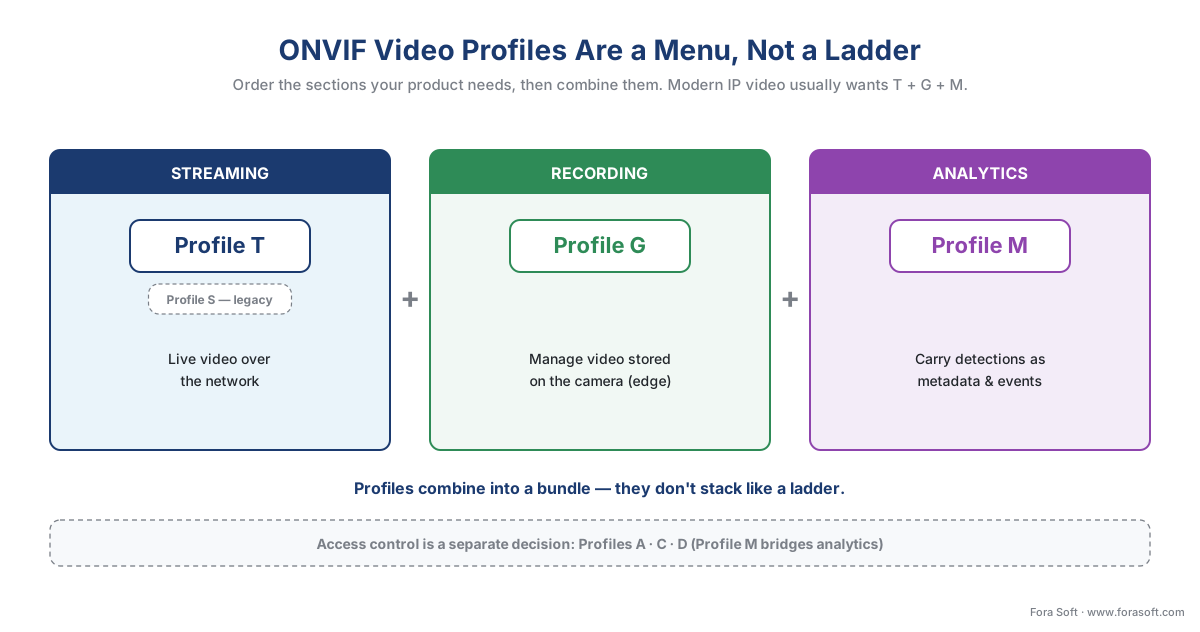 Figure 1. ONVIF video profiles are a menu, not a ladder. Profile T (with S as the legacy streaming option) covers streaming, Profile G covers recording and on-camera storage, and Profile M covers analytics metadata. A product orders the combination it needs; a modern IP-video system usually wants T + G + M.
The four video profiles, in plain language
ONVIF currently defines seven active profiles. Four are for IP video — S, T, G, and M — and three are for access control — A, C, and D — though ONVIF now lists Profile M and Profile D under both categories because metadata and peripherals span the two worlds (ONVIF, Profiles). This guide is about the video four; the access-control three are summarized at the end and covered in their own right elsewhere. Here is what each video profile guarantees, in plain terms.
Profile S — basic video streaming. This is the original 2012 streaming profile, and for a decade it was what "ONVIF camera" meant. A Profile S device sends video over the network to a Profile S client; the profile also covers pan-tilt-zoom control, audio in, multicasting, and relay outputs for devices and clients that support them (ONVIF, Profile S). Profile S is now in formal deprecation — more on that below — so for a new design it is the legacy fallback for older hardware, not the target.
Profile T — advanced video streaming. Introduced in 2018, Profile T is the 2026 baseline for IP video. It adds H.265 (a more efficient video compression format) alongside the older H.264, plus imaging settings, motion-alarm and tampering events, metadata streaming, and two-way audio (ONVIF, Profile T). ONVIF states that Profile T "contains virtually all the features of Profile S, in addition to other advanced features for video surveillance," and that most conformant products on the market support both S and T (ONVIF, Profile S Deprecation Q&A). If you specify one streaming profile in 2026, specify Profile T.
Profile G — recording and on-camera storage. Profile G is about managing video that lives on the camera or recorder itself, called edge storage because it sits at the edge of the network rather than in a central server. A Profile G device can record video over the network or on the device; a Profile G client can configure, request, and control that recording, and search and play it back (ONVIF, Profile G). If your design uses cameras with onboard SD-card or built-in storage and you want the VMS to manage those recordings through the standard, you need Profile G. The Profile G specification was refreshed to version 1.1 in November 2025, so it remains actively maintained even as Profile S retires.
Profile M — metadata and analytics. Profile M standardizes how a device describes what its analytics saw and how that description reaches the software. It covers analytics configuration, metadata streaming, generic object classification, and specific metadata for geolocation, vehicles, license plates, and human faces and bodies; it carries events for object counting, face recognition, and license-plate recognition; and it can deliver those events over the metadata stream, the ONVIF event service, or MQTT, a lightweight messaging protocol used by Internet-of-Things systems (ONVIF, Profile M). The crucial point, repeated throughout this section: Profile M standardizes the interface for analytics results, never their accuracy. Two Profile M cameras can both correctly speak the metadata language while one detects people reliably and the other misses half of them in poor light.
| Profile | The job it does | Device must (mandatory highlights) | Client must (mandatory highlights) | 2026 status |
|---|---|---|---|---|
| S | Basic video streaming | Send a configurable video stream | Configure and receive the stream | Deprecating — last conformance submissions 2027-03-31 |
| T | Advanced video streaming | H.264/H.265, on-screen display, metadata streaming, imaging, motion/tamper events | Receive stream, PTZ control | The streaming baseline; replaces S |
| G | Recording / edge storage | Record over network or on-device | Configure, search, replay recordings | Active; spec refreshed to v1.1, Nov 2025 |
| M | Analytics metadata & events | Stream metadata; classify objects per the standard | Configure and consume metadata/events | Active; the interface, not the accuracy |
Table 1. The four ONVIF video profiles and what each side must do. The mandatory highlights are illustrative, not the full conformance list — the authoritative source is the ONVIF Profile Feature Overview, which marks every feature mandatory (M) or conditional (C) per side. Access-control profiles A, C, and D are out of scope here.
The two-sided promise: device conformance is not client conformance
Here is the part that almost every "ONVIF profiles explained" article skips, and the part that decides whether your system actually works. A profile is conformed to twice — once by the device, once by the client — and the two have different mandatory feature lists. The guarantee only exists where both sides overlap.
Profile T is the clearest example, and ONVIF spells it out. For a Profile T device, mandatory features include on-screen display and metadata streaming. For a Profile T client, mandatory features include pan-tilt-zoom control (ONVIF, Profile T). Read that again: a feature that is required on the client is not necessarily the same feature required on the device. So "both ends are Profile T" does not mean "both ends do the same things" — it means each end has met its own side of the Profile T checklist, and the working system is the intersection of the two.
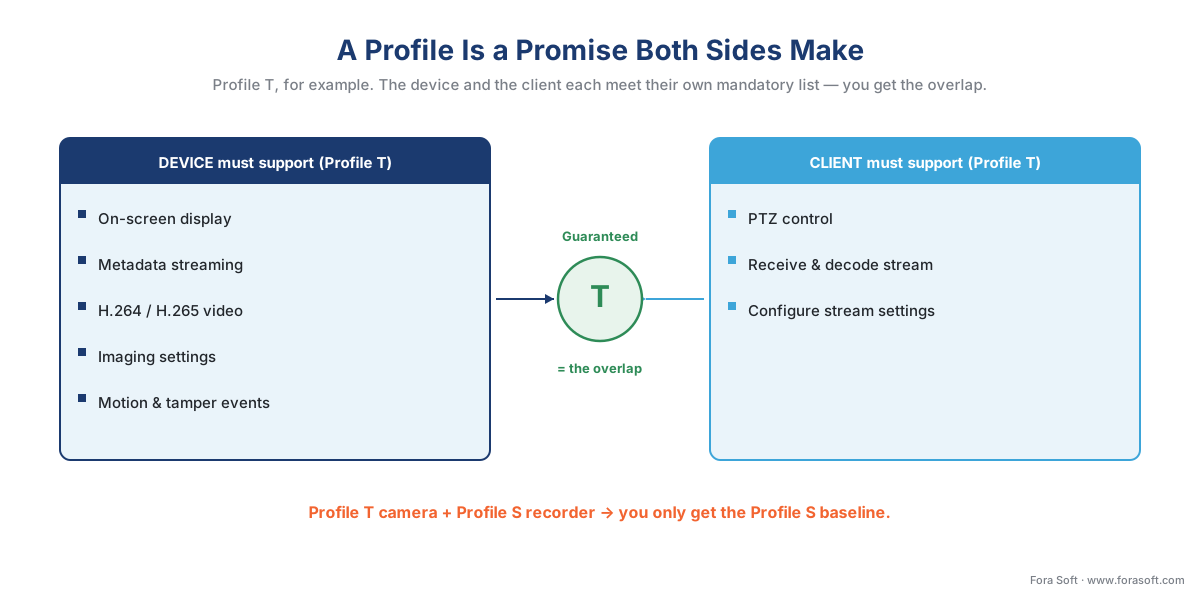 Figure 2. A profile is a promise both sides make separately. For Profile T, the device must support on-screen display and metadata streaming; the client must support PTZ control. The guaranteed system is where the two conformance sets overlap — which is why a Profile T camera and a Profile S recorder give you only the Profile S baseline.
This is why the mismatch trap is so common. A buyer pairs a fully conformant Profile T camera with a recorder that only implements Profile S, and the system quietly operates at the Profile S level — no H.265 management, no standardized metadata, no tamper events — even though the camera box proudly says "Profile T." Neither product is broken; the match is. The lesson for specification writing: state the profile and the side for every component. "All cameras shall be ONVIF Profile T device-conformant; the VMS shall be ONVIF Profile T, G, and M client-conformant" is a sentence a vendor cannot reinterpret.
You can make the overlap idea exact with a little set arithmetic. Suppose your VMS is client-conformant to profiles {T, G, M} and a candidate camera is device-conformant to {S, T}. The guaranteed, standardized interoperability is the intersection of the two sets:
guaranteed overlap = {T, G, M} ∩ {S, T}
= {T}
So with that pairing you are guaranteed Profile T streaming — and nothing standardized for recording management (G) or analytics metadata (M), because the camera does not hold those profiles. If recording management matters, either pick a camera that is also device-conformant to G, or plan to manage recording another way. The intersection, not the longer of the two lists, is what you actually get.
Mandatory versus conditional: the fine print that decides your project
Inside any profile, features come in two flavors, and the difference is the most expensive thing to misunderstand. Mandatory features must be present in every conformant product — they are the guarantee. Conditional features are, in ONVIF's exact words, features that "shall be implemented by an ONVIF device or ONVIF client if it supports that feature in any way, including any proprietary way" (ONVIF, Profiles). In plain language: a conditional feature is only promised if the product has that capability at all — and if it does, it must expose it the ONVIF way rather than only a private way.
That phrase quietly redraws the boundary of what "conformant" buys you. Conformance guarantees the mandatory list. It does not guarantee any particular conditional feature is present, because a product can be fully conformant while simply not having that capability. So if your project lives or dies on a specific feature — say, audio, or a particular event type, or motion-region configuration — confirming "the camera is Profile T conformant" is not enough. You must confirm that the specific feature is implemented, and on the side you need it.
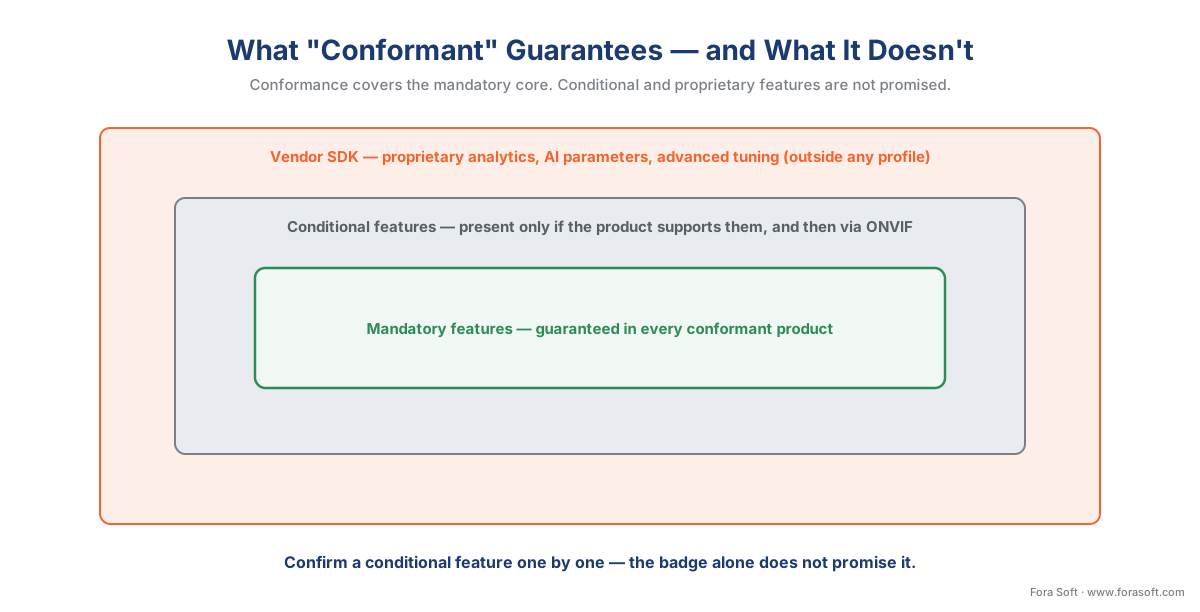 Figure 3. Conformance guarantees the mandatory core. Conditional features are promised only if the product has them at all (and then must use the ONVIF interface). The outermost ring — advanced analytics tuning, vendor AI parameters — lives in the manufacturer's own software kit, outside any profile.
The authoritative place to settle a mandatory-versus-conditional question is the ONVIF Profile Feature Overview, a comparison table ONVIF publishes that marks every feature as mandatory (M) or conditional (C) for each profile and each side (ONVIF, Profile Feature Overview v2.6). Before you commit a specification, read the row for the feature you care about. And remember the boundary one ring further out, established in the ONVIF explainer: the newest, most differentiated capabilities — advanced motion zones, vendor-specific AI parameters, proprietary analytics — usually live only in the manufacturer's own software kit, not in any profile. That tradeoff, and when it forces you off ONVIF, is the subject of proprietary camera SDKs: when ONVIF is not enough.
How to combine profiles for a real product
With the mental model in place, the actual decision is short. Work through it for the device and the client separately, and add a profile only when a real job demands it.
A streaming-only camera — it produces video and nothing else — needs Profile T (device). Profile S is the fallback only if you must interoperate with old Profile-S-only clients still in the field.
A camera with onboard recording — it stores video on an SD card or internal disk — needs Profile T + Profile G (device), so the VMS can both stream live and manage the recordings the standard way.
A camera or edge box that runs analytics — it detects objects, counts people, reads plates — needs Profile T + Profile M (device), and usually + G if it also records. Profile M is what carries the detections out as standardized metadata and events.
A VMS — the software platform — should be Profile T, G, and M client-conformant to manage a modern mixed fleet: T to ingest and control streams, G to manage edge recordings, M to consume analytics. Add Profile S client support only for backward compatibility with legacy cameras.
A system that also includes access control — doors, readers, credentials — reaches for the access-control profiles A (configuration), C (door control and events), and D (peripherals such as readers and locks), with M bridging analytics into the same system (ONVIF, Profile M). Those are a separate decision from the video four.
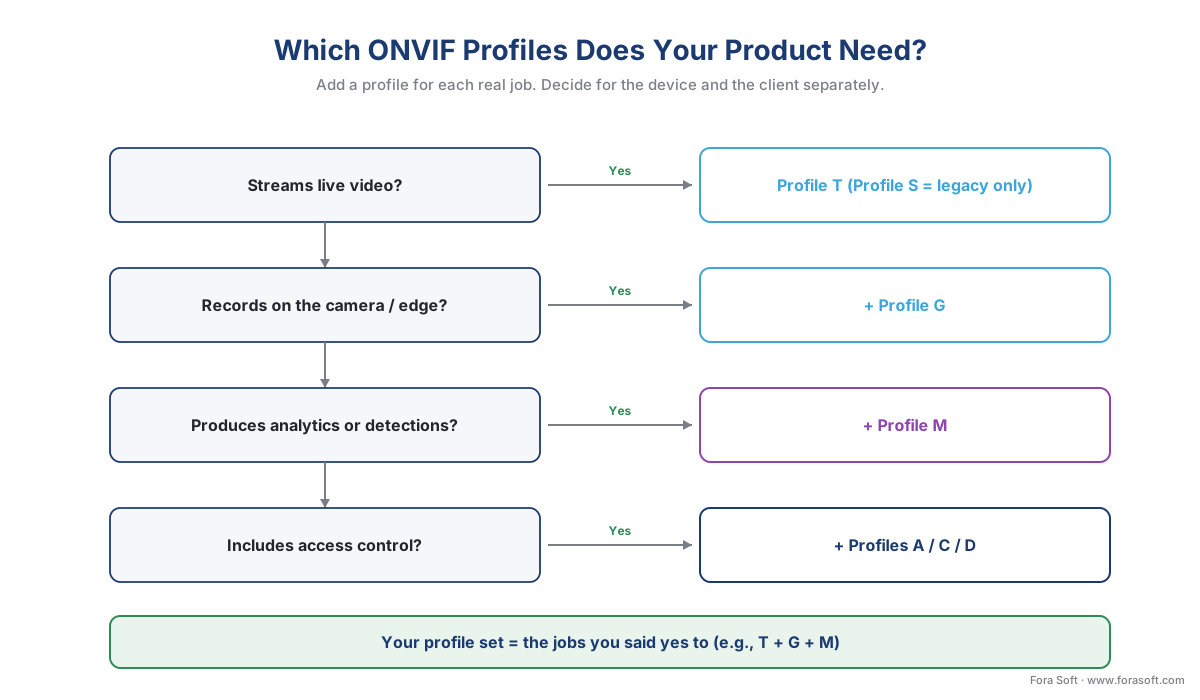 Figure 4. The profile decision in one tree. Start from the role (device or client), then add a profile for each real job: Profile T to stream, Profile G to record on the edge, Profile M to carry analytics, and Profiles A/C/D when access control is in scope.
A worked number makes the analytics decision concrete, because Profile M is often justified by the bandwidth it saves. Sending full video to a central server so the server can analyze it is expensive; sending only the metadata — "person at coordinates X,Y at 14:02:11" — is tiny. Take a single 1080p camera streaming continuously at a typical 4 Mbps. A Profile M metadata-and-events stream describing what it detected runs on the order of 50 kbps. Compare the two:
bandwidth saved per camera = 4,000 kbps − 50 kbps = 3,950 kbps
reduction = 3,950 ÷ 4,000 = 0.9875 = 98.75%
So pushing detections as Profile M metadata instead of hauling full video to a central analytics engine cuts the per-camera network load by roughly 99% for the analytics path. Multiply across hundreds of cameras and the architecture choice — analyze at the edge and ship metadata, versus ship video and analyze centrally — is one of the biggest levers in the whole system. The deployment side of that tradeoff is covered in edge vs cloud video analytics; the model internals belong to the AI for Video Engineering section. Profile M is simply the standard that carries the result.
The Profile S sunset: migrate to Profile T before March 31, 2027
The most time-sensitive fact in this guide. ONVIF is retiring Profile S. After March 31, 2027, manufacturers can no longer submit new products — or existing products with new firmware — for Profile S conformance (ONVIF, Profile S Deprecation Q&A). The reason is security, not obsolescence of streaming: Profile S mandates an authentication method called username token, and ONVIF has concluded that this method "is no longer consistent with current cybersecurity recommendations" (ONVIF, Profile S Deprecation Q&A). Profile T, by contrast, supports stronger mechanisms — digest authentication and TLS, the encryption layer behind HTTPS.
What this means in practice is calmer than "sunset" sounds. Existing Profile S devices keep working; you can still stream between Profile S products. But ONVIF strongly encourages moving off username-token authentication, and because Profile T was introduced back in 2018 and "contains virtually all the features of Profile S," the migration is usually a configuration and procurement choice rather than a redesign (ONVIF, Profile S Deprecation Q&A). For anything you are specifying in 2026, the guidance is unambiguous: target Profile T, treat Profile S as legacy compatibility only, and put a firmware-and-replacement plan against any Profile-S-only hardware so you are not caught when the conformance door closes.
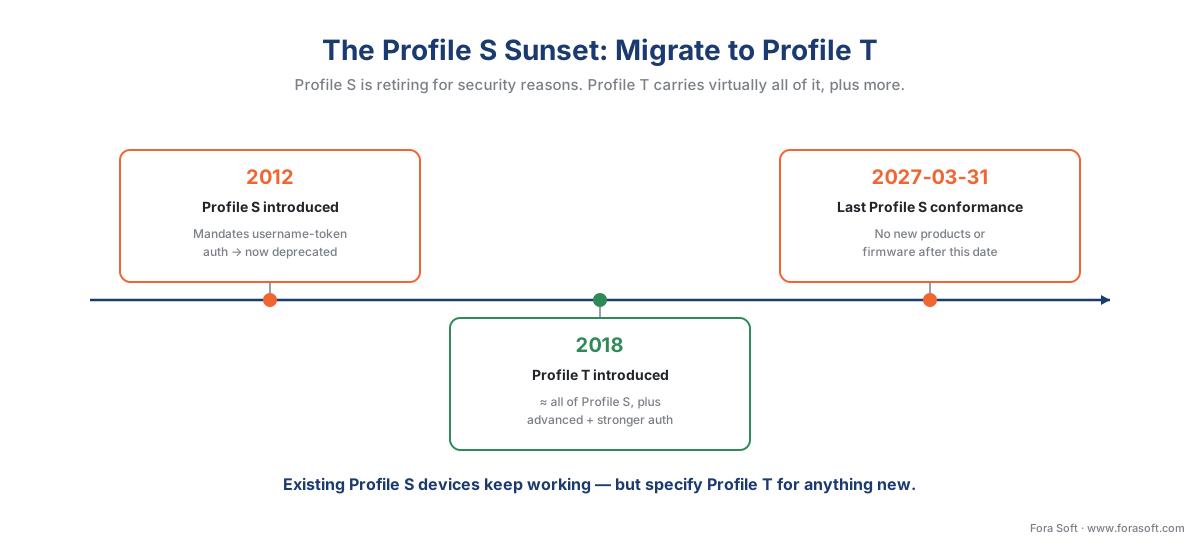 Figure 5. The streaming-profile timeline. Profile S (2012) is being retired because it mandates username-token authentication; Profile T (2018) carries virtually all of S plus advanced features and stronger security. The last date for new Profile S conformance submissions is March 31, 2027.
A common mistake to avoid
The costliest pattern in profile selection is reading the profile letter as a complete guarantee and stopping there, and it shows up in three forms. First, ignoring the device-versus-client split: "the camera is Profile T" says nothing about whether your recorder is a conforming Profile T client, and the system runs at the overlap, not the higher of the two. Second, assuming a conditional feature is present: conformance guarantees the mandatory list, so if you need audio, a specific event, or motion-region configuration, confirm that exact feature against the Profile Feature Overview rather than trusting the badge. Third, treating Profile M as an accuracy promise: Profile M standardizes how a detection is described and delivered, never how often the detection is right — judge analytics by measured precision and recall in your own scene, never by the presence of a profile. None of these is exotic; all three are predictable, and all three are far cheaper to design around than to discover after the cameras are mounted.
Where Fora Soft fits in
Fora Soft has built real-time video, streaming, and computer-vision software since 2005, across 625+ shipped projects, and the profile decision is where multi-vendor surveillance products quietly succeed or fail. The hard part is rarely one conformant camera on a bench; it is a mixed fleet where some cameras are Profile T device-conformant, some are still Profile S, a few expose analytics over Profile M and the rest only over a vendor kit, and all of them must stream, record, and surface events into one VMS that keeps working after a firmware update shifts a camera's behavior. We build that layer: a VMS client that conforms to Profile T, G, and M, falls back cleanly to Profile S or raw RTSP where a device's implementation is thin, and reaches into the vendor SDK only for the features no profile covers. We lead with how the integration behaves on the messy day — the partial implementation, the mid-deployment Profile S device — then the feature list, because an interoperability layer that survives a non-conformant camera beats one that demos well against a perfect one.
What to read next
- ONVIF explained for engineers: profiles, discovery, and what it really standardizes
- Proprietary camera SDKs: when ONVIF is not enough
- Events, metadata, and the ONVIF analytics interface
For the commercial, at-a-glance overview of the profile system, Fora Soft's own guide to ONVIF profiles in security systems is the companion to this engineering decision guide.
Call to action
- Talk to a surveillance engineer — book a 30-minute scoping call to talk through your onvif profile s g t m plan.
- See our case studies — 250+ shipped projects across video streaming, WebRTC, OTT, telemedicine, e-learning, surveillance, and AR/VR.
- Download the ONVIF Profile Decision Cheat Sheet — One-page cheat sheet: the four ONVIF video profiles (S, T, G, M) with what each guarantees on the device and client side, the typical T+G+M bundle, the two-sided conformance rule, the Profile S sunset (last submissions 2027-03-31), and….
References
- ONVIF — "ONVIF Profiles" (a profile is a fixed set of features a conformant device and client must support; conditional features "shall be implemented... if it supports that feature in any way, including any proprietary way"; clients and devices can support more than one profile, e.g. a camera with local storage can conform to both Profile T and G; video systems use D, G, M, S, T and access control uses A, C, D, M; conformance to profiles is the only assurance of compatibility; compliance to regulations is outside ONVIF's scope; Profile Q deprecated April 1, 2022; Profile Policy v3.5, October 2024). Primary (tier 1). https://www.onvif.org/profiles/
- ONVIF — "Profile T" (advanced video streaming; H.264/H.265, imaging settings, motion and tampering events, metadata streaming, bi-directional audio; mandatory for devices includes on-screen display and metadata streaming, mandatory for clients includes PTZ control; also covers HTTPS streaming, PTZ configuration, motion region configuration, digital inputs and relay outputs; Profile T Specification v1.0, 2018). Primary (tier 1). https://www.onvif.org/profiles/profile-t/
- ONVIF — "Profile S" (basic video streaming; a Profile S device sends video to a Profile S client; also covers PTZ control, audio in, multicasting, relay outputs; deprecation in process, last product conformance submissions March 31, 2027; Profile S Specification v1.3). Primary (tier 1). https://www.onvif.org/profiles/profile-s/
- ONVIF — "Profile S Deprecation Q&A" / press release "ONVIF to End Support for Profile S; Recommends Profile T as Replacement" (last conformance submissions March 31, 2027; Profile S mandates username token authentication, no longer consistent with current cybersecurity recommendations; existing devices keep working but ONVIF recommends digest authentication or TLS/HTTPS; Profile T introduced 2018, contains virtually all Profile S features; most conformant products support both S and T). Primary (tier 1). https://www.onvif.org/profiles/profile-s/profile-s-deprecation-qna/
- ONVIF — "Profile G" (edge storage and retrieval; a Profile G device records over an IP network or on the device itself; a Profile G client configures, requests, and controls recording, plus search and replay; receives audio and metadata stream if supported; Profile G Specification v1.1, November 2025). Primary (tier 1). https://www.onvif.org/profiles/profile-g/
- ONVIF — "Profile M" (metadata and events for analytics; analytics configuration and metadata query/streaming; generic object classification; metadata for geolocation, vehicle, license plate, human face and body; event interfaces for object counting, face and license-plate recognition; delivery via metadata stream, ONVIF event service, or MQTT; combines with Profile S/T for video and A/C/D for access control; Profile M Specification v1.1, April 2024). Primary (tier 1). https://www.onvif.org/profiles/profile-m/
- ONVIF — "ONVIF Profile Feature Overview v2.6 (April 2022)" (the comparison table marking every profile feature mandatory (M) or conditional (C) for each conformant device and client — the authoritative source for per-feature, per-side conformance). Primary (tier 1). https://www.onvif.org/wp-content/uploads/2022/04/onvif-profile-feature-overview.pdf
- ONVIF — "ONVIF Profile Policy v3.5 (October 2024)" (the principles of the profile and add-on concept; how a profile is created, modified, and deprecated). Primary (tier 1). https://www.onvif.org/wp-content/uploads/2024/10/onvif-profile-policy-v3-5.pdf
- ONVIF — "Conformant Products" (the registry of products registered as conformant to a profile; conformance claims should be verified here, not taken from a datasheet). Primary (tier 1). https://www.onvif.org/conformant-products/
- ITU-T — "H.265 : High efficiency video coding (HEVC)" (the more efficient codec Profile T adds alongside H.264; cited for the surveillance framing — codec depth lives in the Video Encoding section). Primary (tier 1). https://www.itu.int/rec/T-REC-H.265
- Security Info Watch — "ONVIF to Phase Out Support for Profile S, Promotes Profile T as Successor" (October 2025 industry coverage of the Profile S deprecation announcement; corroborates the March 31, 2027 date and the Profile T recommendation). Institutional / analyst (tier 5). https://www.securityinfowatch.com/video-surveillance/press-release/55322371/
