


Why this matters
If your surveillance system is ever going to do more than record — if it is going to alert on a person crossing a line, count visitors, read plates, or let an operator search six months of footage for "every vehicle near the loading dock" — then the events and metadata interface is the seam where that intelligence either flows cleanly or falls apart. This article is for the product manager, integrator, or security lead who needs to specify a camera-and-VMS combination that actually talks, and to talk to engineers about why a "Profile M compliant" badge on a datasheet is not the same as the feature you need. You will not write the parsing code, but you will understand exactly what an analytic emits, how it reaches the VMS, and the four predictable ways the connection breaks. Get this right and your analytics are searchable, alertable, and portable across vendors; get it wrong and you have a camera that "detects" things nobody downstream can see.
Two different things travel: events and metadata
Start by separating two words that get blurred together, because they are two different jobs.
An event is a notification that something happened at a moment in time: motion started, a line was crossed, a tamper was detected, a person count changed. It is small, discrete, and timestamped — the surveillance equivalent of a doorbell ring.
Metadata is a continuous description of what is in the scene: for each video frame, a list of the objects the camera is tracking, where their boxes are, and what class each one is. It is a running commentary, not a single ping.
The two are related — an event is often the camera's analytics deciding that the metadata has crossed some rule ("an object entered this zone") — but they travel on different channels, and a VMS consumes them differently. Events drive alerts; metadata drives search and overlay. The software that ingests, records, and manages many camera streams — the Video Management System, or VMS — needs both. This article assumes you already know roughly what ONVIF is (the open standard that lets cameras and software from different makers interoperate); if not, start with ONVIF explained for engineers, and for the commercial overview Fora Soft maintains, see ONVIF profiles in security systems.
ONVIF events: how a camera says "something happened"
When a camera fires an event, it does not invent its own format. ONVIF events ride on a pair of open web-services standards from OASIS — WS-BaseNotification 1.3 and WS-Topics 1.3, both OASIS Standards since 1 October 2006 — which define a topic-based publish/subscribe pattern: a producer (the camera) emits notifications on named topics, and a consumer (the VMS) subscribes to the topics it wants.
Every ONVIF event carries a topic drawn from a tree, written with a namespace prefix. A few real ones:
tns1:VideoSource/MotionAlarm— basic motion, with a state that is true while motion is in progress.tns1:RuleEngine/CellMotionDetector/Motion— grid-based motion from the rule engine.tns1:RuleEngine/FieldDetector/ObjectsInside— an object is inside a zone you defined.tns1:RuleEngine/LineDetector/Crossed— an object crossed a tripwire.
The topic is the filter. A VMS that only cares about line crossings subscribes to that branch of the tree and never has to wade through every motion ping. A single notification looks, stripped down, like this — note the obviously fake tokens:
<wsnt:NotificationMessage>
  <wsnt:Topic>tns1:RuleEngine/FieldDetector/ObjectsInside</wsnt:Topic>
  <wsnt:Message>
    <tt:Message UtcTime="2026-06-08T09:14:02Z" PropertyOperation="Changed">
      <tt:Source>
        <tt:SimpleItem Name="VideoSourceConfigurationToken" Value="vsc-0"/>
        <tt:SimpleItem Name="Rule" Value="LoadingDockZone"/>
      </tt:Source>
      <tt:Data>
        <tt:SimpleItem Name="IsInside" Value="true"/>
      </tt:Data>
    </tt:Message>
  </wsnt:Message>
</wsnt:NotificationMessage>
That PropertyOperation attribute is worth one sentence of attention, because it encodes a subtlety that trips up integrators. Some events are stateful properties — MotionAlarm is either on or off, and the camera reports Initialized, then Changed when it flips, then can be queried for current state — while others are one-shot. A client that treats a property's "on" event as a one-shot pulse will get the alert but never learn when it cleared, which is how a motion indicator gets stuck on forever in a poorly written integration.
Pull or push: two ways the event reaches the VMS
ONVIF gives a device two delivery mechanisms, and a conformant device supports at least one of them. The choice has real consequences for firewalls and scale.
Pull (PullPoint). The VMS creates a pull-point subscription and then repeatedly calls PullMessages to fetch whatever events have queued up since last time. The camera never has to open a connection back to the VMS; the VMS does all the reaching. This is the firewall-friendly option — the camera sits behind its network, says nothing unprompted, and the VMS knocks on a schedule.
Push (Base Notification). The VMS subscribes once, and from then on the camera sends a Notify message to the VMS the instant an event fires, renewing the subscription periodically. This is lower-latency — no polling gap — but it requires the camera to be able to open a connection to the VMS, which is a problem across some network boundaries.
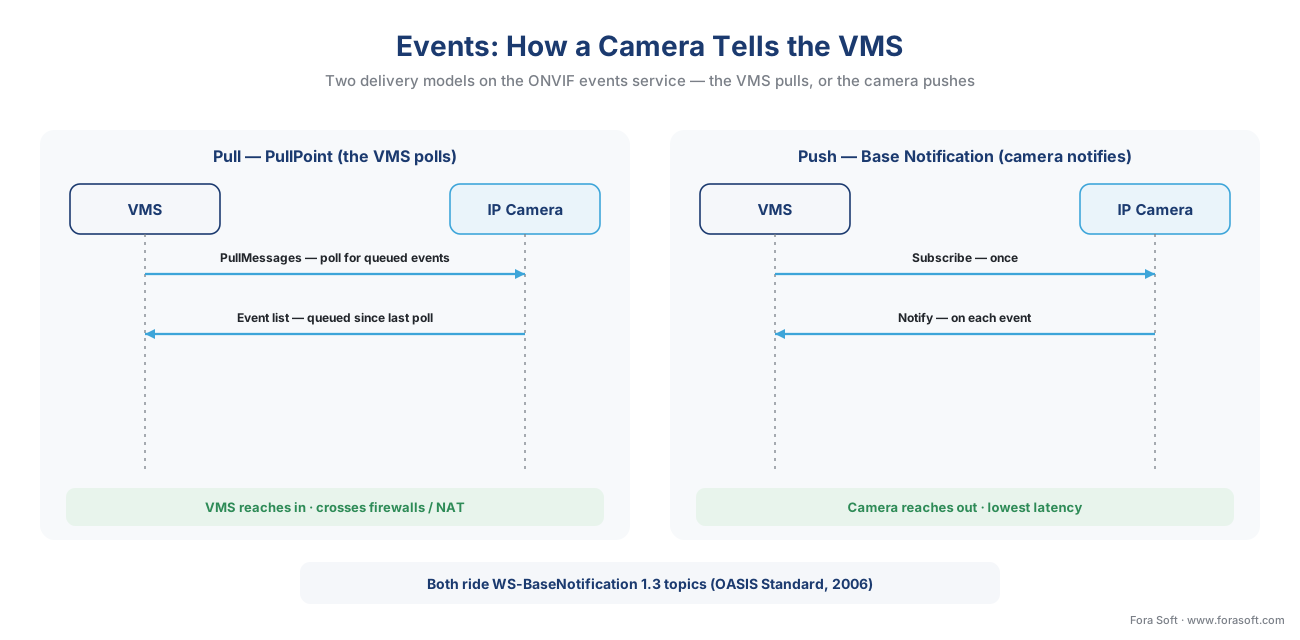 Figure 1. Two ways an event reaches the VMS. Pull (PullPoint) has the VMS poll for queued events and crosses firewalls easily; push (Base Notification) has the camera notify the VMS instantly but needs a path back to the VMS. Both ride WS-BaseNotification topics.
The practical rule: pull is the safe default across segmented or firewalled networks and the one most multi-vendor VMS integrations lean on; push wins where you control the network and need the lowest alert latency. A serious VMS supports both and chooses per camera.
ONVIF metadata: the scene description
Events tell you that something happened. Metadata tells you what the camera sees, continuously, so the VMS can draw boxes on the live view and — far more valuable — make months of recording searchable.
The format is the ONVIF scene description, an XML structure defined in the ONVIF Analytics Service Specification. Think of it as the camera narrating the scene frame by frame. Each tt:Frame carries the objects present at that instant; each tt:Object has a tracking id and a shape:
<tt:Frame UtcTime="2026-06-08T09:14:02.500Z">
  <tt:Object ObjectId="42">
    <tt:Appearance>
      <tt:Shape>
        <tt:BoundingBox left="0.12" top="0.34" right="0.28" bottom="0.71"/>
        <tt:CenterOfGravity x="0.20" y="0.55"/>
      </tt:Shape>
      <tt:Class>
        <tt:Type Likelihood="0.92">Human</tt:Type>
      </tt:Class>
    </tt:Appearance>
  </tt:Object>
</tt:Frame>
Three fields do most of the work. The bounding box is the rectangle around the object, in normalized coordinates so it maps onto any display size. The center of gravity is a single point for the object's position, useful for tracking and heat-mapping. The object id is a tracking handle that stays stable within a session — and here is a limit worth stating plainly: that id resets when the camera reboots, and re-identifying the same person across two different cameras is a separate, harder problem that ONVIF metadata does not solve. That belongs to the analytics model, covered in the AI for Video Engineering section and in this section's object tracking and re-identification article — link out, do not expect the camera's metadata to do it for free.
This XML does not travel over a web-services call like events do. It is streamed as a metadata track inside the same RTP delivery that carries the video, with the encoding name VND.ONVIF.METADATA (you may see it as application/vnd.onvif.metadata, typically on dynamic payload type 96). In other words, the camera opens one RTSP session and the VMS pulls video and a parallel metadata stream from it. The transport mechanics — RTSP as the remote control, RTP as the media carrier — are exactly the ones covered in RTSP, RTP, and how surveillance video moves on the wire; the metadata simply rides the same rails as a second track.
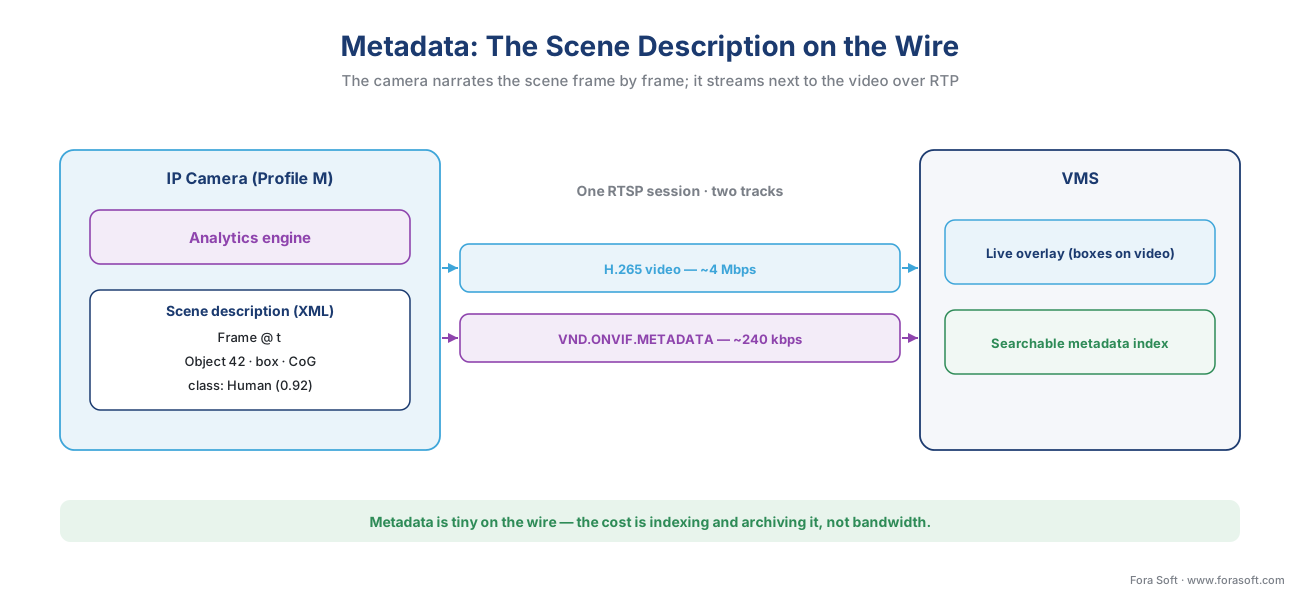 Figure 2. The metadata path. The analytics engine emits a scene description — for each frame, the tracked objects with their boxes, positions, and class — which streams as a VND.ONVIF.METADATA track over RTP next to the video, so the VMS can overlay it live and index it for search.
The analytics interface: configuring what the camera looks for
So far the camera is emitting events and metadata. But who decides what it detects, and how does a VMS tune it without the camera maker's own software? That is the job of the ONVIF Analytics Service — a configuration framework, not a fixed feature.
Through the analytics interface, a client asks the camera which analytics modules it runs (motion, tamper, object detection, line crossing, loitering, people counting, license-plate or face detection), reads each module's current configuration, and can add, remove, or modify them. Sitting on top is the rule engine: rules like "trigger when an object enters this polygon" or "count objects crossing this line" are the things that turn raw detections into the events from the previous section. Configure a FieldDetector with a zone, and the camera starts emitting ObjectsInside events on that zone's topic.
This is where the single most important idea in the whole section reappears, so let us state it directly. ONVIF standardizes the interface and the output, not the intelligence. It gives you a standard way to discover modules, set a rule, receive the events, and read the metadata. It does not standardize how good the detection is, and it does not make a rule you authored on one vendor's camera portable to another's — the event output is standard, but the rule-authoring format is still vendor-specific. "ONVIF-conformant" means the baseline plumbing works; advanced analytics tuning and exotic attributes still reach for the vendor SDK, exactly as covered in proprietary camera SDKs: when ONVIF is not enough.
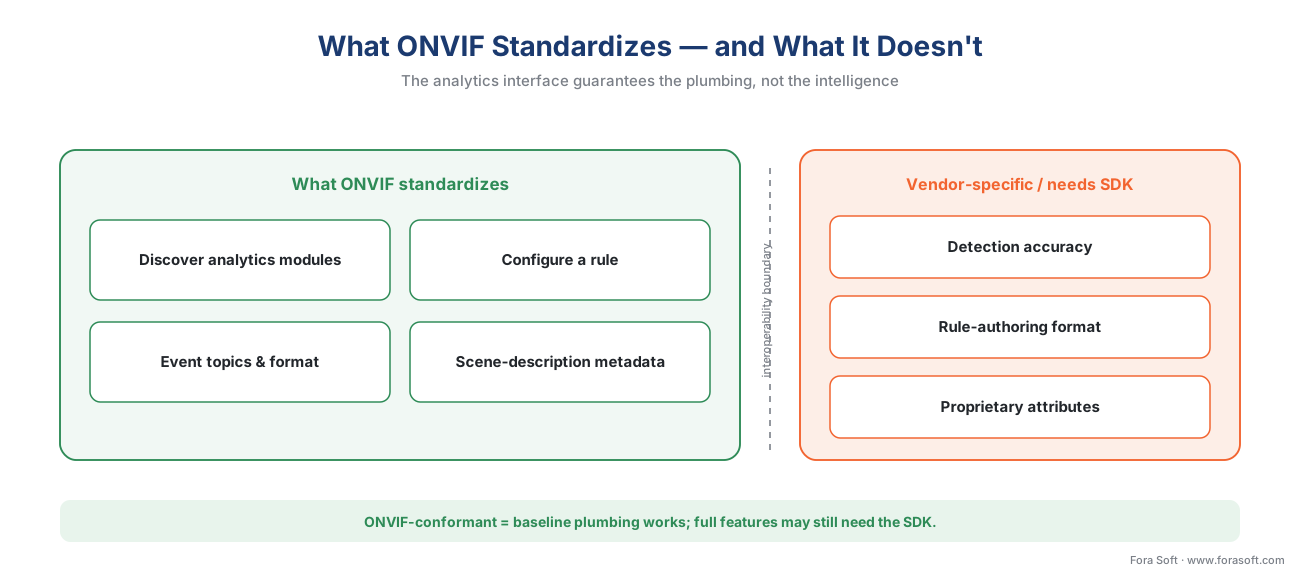 Figure 3. The standards boundary. ONVIF standardizes how you discover analytics, configure a rule, and receive events and metadata. It does not standardize how accurate the detection is or how a rule is authored — those stay vendor-specific and may need an SDK.
Profile M: the profile that ties it together
A camera can speak ONVIF events and metadata at many levels of completeness, so ONVIF bundles the metadata-and-analytics capabilities into a named conformance profile: Profile M ("metadata and events for analytics applications"), first published in 2021 with the current specification at version 1.1 (April 2024). Profile M is the answer to "which camera and which VMS are guaranteed to agree on analytics?"
Per the ONVIF Profile M specification, a conformant product covers: analytics configuration and metadata query; configuration and streaming of metadata; generic object classification; metadata definitions for geolocation, vehicle, license plate, human face, and human body; event interfaces for object counting and for face and license-plate recognition analytics; sending events through the metadata stream, the ONVIF events service, or over MQTT; and rule configuration. A Profile M device can be an edge camera or a cloud analytics service; a Profile M client can be a VMS, an NVR, or a cloud service. Profile M layers on top of a streaming profile — you pair it with Profile S or Profile T so the same camera delivers both pixels and meaning.
Two things about Profile M decide whether it actually solves your problem, and both are easy to miss:
Mandatory versus optional. The metadata stream and the analytics service are mandatory for conformance; the MQTT event binding, the rule engine, geolocation, and the rich face/plate attributes are optional. A camera can wear the Profile M badge and still not emit plate text or speak MQTT. The badge says "passed a conformance test"; the Declaration of Conformance (the per-product document on the ONVIF site) says which optional features this exact firmware actually implements. Read the Declaration of Conformance, not the marketing sheet — a point we expand in the commercial companion piece, ONVIF Profile M in 2026.
The MQTT bridge. Optionally, Profile M lets a camera publish its events as JSON over MQTT — the lightweight messaging protocol that Internet-of-Things brokers speak. That turns a camera into a first-class IoT device: one detection can fan out to a VMS, a retail-analytics dashboard, and a building-automation system at once, none of them needing to know the camera's brand. It is powerful, and it is the part most likely to be missing on a given unit.
Show the math: the real cost is indexing, not bandwidth
A common surprise is where the load lands. Metadata itself is cheap to move and expensive to make searchable. Walk the arithmetic.
A scene-description frame for a handful of objects is a few kilobytes of XML. Stream it at, say, 10 metadata frames per second and you get roughly:
Metadata bandwidth:  3 KB/frame × 10 frames/s × 8 bits = ~240 kbps per camera
Compare the video:   a 4 MP H.265 stream            = ~4,000 kbps per camera
So metadata is a rounding error next to video on the wire — under a tenth of the bandwidth. The cost shows up somewhere else: events to parse and index. Take a modest deployment of 50 cameras in a busy scene, each emitting around 20 analytics events per second at default sensitivity:
Event rate:  50 cameras × 20 events/s = 1,000 events/s the VMS must parse, route, and index
Over a day:  1,000 × 86,400           = ~86 million events to store and keep searchable
That is the number that decides whether forensic search returns in one second or one minute. The lever is not bandwidth; it is sensitivity and filtering — raise the confidence threshold, aggregate by object id at the source, and subscribe to only the topics you need, or the index drowns. Detection sensitivity is a precision-versus-recall dial set by the analytics model, never a single "accuracy" number; the honest treatment lives in tuning analytics: false alarms and accuracy.
How it surfaces in the VMS
Pulling the channels together: the camera's analytics produce metadata (the running scene description) and events (the rule hits). The metadata streams over RTP and the VMS overlays it on live video and, if it is configured to, archives it as a searchable index. The events arrive over the ONVIF events service (pull or push) or MQTT, and the VMS turns them into alerts, bookmarks, and the entries you later search by.
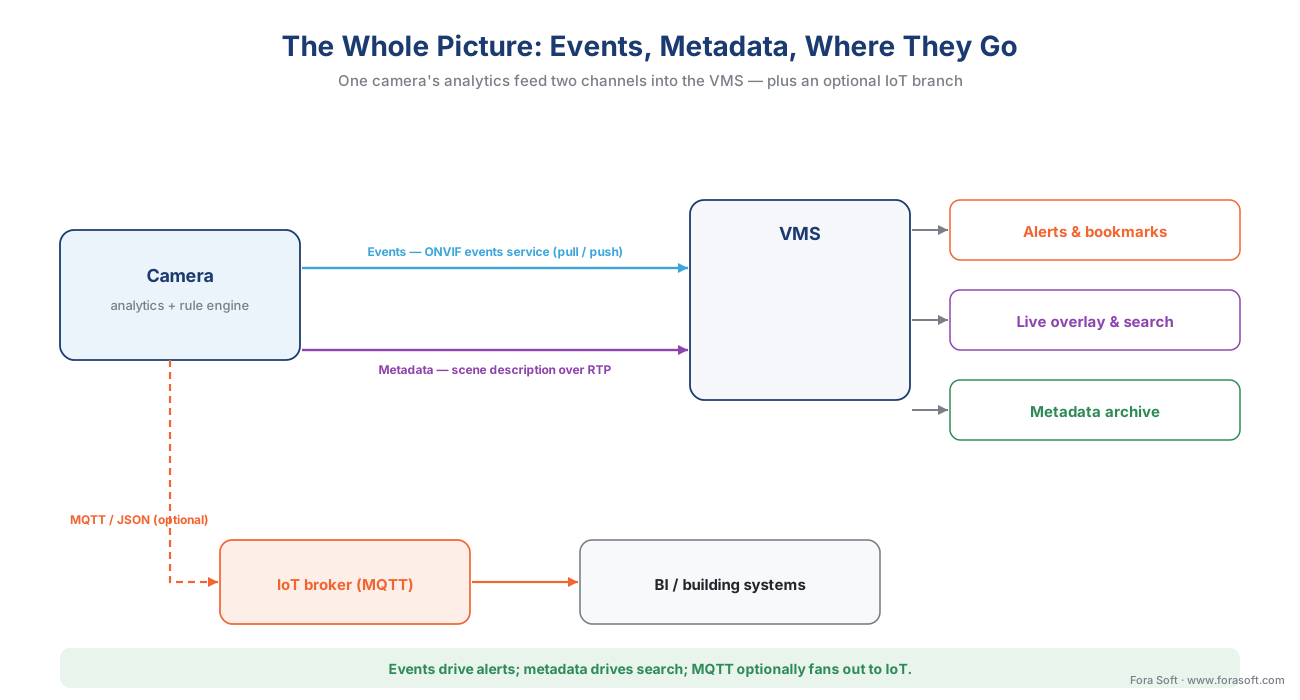 Figure 4. The whole picture. One camera's analytics feed two channels — events (over the ONVIF events service or, optionally, MQTT) drive alerts and an IoT fan-out; metadata (over RTP) drives live overlay, a searchable archive, and forensic search. This is the machinery behind search by event: making months of footage findable — "show me every Human in the loading-dock zone last Tuesday night" is a query against archived ONVIF metadata, nothing more exotic. And the whole multi-vendor fleet, each camera's events and metadata normalized into one searchable system, is the destination of the multi-vendor reference pattern. Events and metadata are also what onboarding (the previous article, camera discovery and onboarding at scale) exists to switch on — a camera is only useful once its events reach the VMS.
Common mistakes this interface invites
A handful of errors recur on almost every analytics integration, and naming them is half the cure.
Discarding the metadata. Most VMS platforms record video and throw the metadata stream away by default — then forensic search is useless a week later because there is no index to search. If search is in scope, configure metadata archival before go-live, not after the investigator asks "what was in that zone at 02:14?"
Trusting clocks you did not sync. ONVIF does not force time synchronization. If a camera's clock drifts from the VMS by even half a second, its metadata appears to belong to a different video frame, and operators start doubting the whole system. Enforce NTP across the fleet; a few hundred milliseconds of drift is enough to mislead an investigation.
Assuming class labels match. One vendor's "Human" is another's "Person" is another's "Pedestrian." The metadata format is standard; the vocabulary inside it is not. A multi-vendor system needs a class-mapping table, or "show me all people" silently misses a third of the cameras.
Letting events storm. Default sensitivity on a busy scene can emit tens of events per second per camera, swamping the broker and the index (see the math above). Set thresholds, aggregate at the source, and filter by topic.
Reading the badge as a feature list. "Profile M compliant" does not promise MQTT, plate text, or geolocation — those are optional. Read the Declaration of Conformance for the exact firmware you will ship.
Where Fora Soft fits in
We build the layer that has to consume real, mixed-vendor events and metadata — not a single-camera demo. In practice that means a VMS that subscribes to ONVIF events by pull where the network is firewalled and by push where latency matters, parses the scene-description metadata into a searchable index, maps every vendor's class vocabulary into one, and survives the event-storm moment instead of melting under it. Our bias is accuracy-vs-performance: we measure how the events and metadata pipeline behaves at real camera counts and real event rates — where the indexing cost and the clock drift actually bite — before we promise an integrator clean cross-vendor search. Surveillance and computer vision sit at the center of what Fora Soft has shipped across 625+ projects since 2005, including ONVIF and Profile M integrations across retail, smart-city, and industrial fleets.
What to read next
- ONVIF Profile S, G, T, and M — which profile your product needs — where Profile M fits in the profile system.
- Search by event: making months of footage findable — what archived metadata unlocks.
- Proprietary camera SDKs: when ONVIF is not enough — when the analytics interface runs out.
Call to action
- Talk to a surveillance engineer — book a 30-minute scoping call to talk through your onvif events plan.
- See our case studies — 250+ shipped projects across video streaming, WebRTC, OTT, telemedicine, e-learning, surveillance, and AR/VR.
- Download the ONVIF Events & Metadata Integration Cheat Sheet — One-page reference: the ONVIF events service (pull vs push), the event topic tree, the scene-description metadata fields, Profile M's mandatory-vs-optional split, and the four integration traps (metadata archive, NTP drift,….
References
- ONVIF Profile M Specification, Version 1.1, ONVIF (issuing body / official standard). Defines conformance for metadata and events for analytics applications: analytics configuration and metadata query; configuration and streaming of metadata; generic object classification; metadata for geolocation, vehicle, license plate, human face and body; event interfaces for object counting and face/LPR analytics; events via the metadata stream, the ONVIF events service, or MQTT; and rule configuration. Device = edge camera or service; client = VMS/NVR/cloud. First published 2021; v1.1 dated April 2024. Tier 1. https://www.onvif.org/wp-content/uploads/2024/04/onvif-profile-m-specification-v1-1.pdf (accessed 2026-06-08)
- ONVIF Analytics Service Specification, ONVIF (issuing body / official standard). Defines the analytics configuration framework (discover, add, remove, modify analytics modules), the rule engine, and the XML scene-description interface — tt:Frame, tt:Object, ObjectId, tt:Appearance/tt:Shape/tt:BoundingBox, tt:CenterOfGravity, tt:Polygon, and class/type. The controlling source for the metadata format and the analytics interface. Tier 1. https://www.onvif.org/specs/srv/analytics/ONVIF-Analytics-Service-Spec.pdf (accessed 2026-06-08)
- ONVIF Core Specification (Events), ONVIF (issuing body / official standard). Defines the ONVIF events service, including the two notification delivery mechanisms — pull-point (CreatePullPointSubscription / PullMessages) and base notification (Subscribe / Notify / Renew) — topic filtering, and property versus simple events with PropertyOperation. Tier 1. https://www.onvif.org/specs/core/ONVIF-Core-Specification.pdf (accessed 2026-06-08)
- ONVIF Streaming Specification, ONVIF (issuing body / official standard). Defines how metadata is streamed to a client over RTP, including the VND.ONVIF.METADATA encoding carried as a metadata track alongside the video in the RTSP session. The source for the metadata-over-RTP transport claim. Tier 1. https://www.onvif.org/specs/stream/ONVIF-Streaming-Spec.pdf (accessed 2026-06-08)
- Web Services Base Notification 1.3 (WS-BaseNotification), OASIS (issuing body / official standard). Defines the publish/subscribe notification pattern ONVIF events are built on: NotificationProducer, NotificationConsumer, Subscribe, Notify, and the subscription model. Approved as an OASIS Standard, 1 October 2006. Tier 1. https://docs.oasis-open.org/wsn/wsn-ws_base_notification-1.3-spec-os.pdf (accessed 2026-06-08)
- Web Services Topics 1.3 (WS-Topics), OASIS (issuing body / official standard). Defines the topic mechanism — the named, hierarchical topics and topic-expression dialects — used to organize and filter ONVIF event subscriptions (e.g., tns1:RuleEngine/FieldDetector/ObjectsInside). Approved as an OASIS Standard, 1 October 2006. Tier 1. https://docs.oasis-open.org/wsn/wsn-ws_topics-1.3-spec-os.pdf (accessed 2026-06-08)
- ONVIF Profile T Specification, Version 1.0, ONVIF (issuing body / official standard). States that Profile T devices shall be able to stream metadata over RTP/UDP using the selected media profile, and defines the advanced-streaming context (H.265, alarm/event handling) Profile M typically pairs with. Tier 1. https://www.onvif.org/wp-content/uploads/2018/09/ONVIF_Profile_T_Specification_v1-0.pdf (accessed 2026-06-08)
- Profile M — Metadata and events for analytics applications, ONVIF (issuing body, profile overview). The official feature summary used for the Profile M capability list and the device/client roles, and the statement that Profile M combines with Profile S/T for streaming and A/C/D for access control. Tier 1. https://www.onvif.org/profiles/profile-m/ (accessed 2026-06-08)
- ONVIF scene metadata and event data formats, Axis Communications developer documentation (first-party engineering / standards author). Vendor implementation reference for the ONVIF scene-description metadata fields and event data streaming on a major camera maker's devices; used to ground the concrete field examples, not as the controlling standard. Tier 3. https://developer.axis.com/analytics/axis-scene-metadata/reference/data-formats/onvif/ (accessed 2026-06-08)
- ONVIF events (third-party integration), Milestone Systems (first-party engineering, VMS side). VMS-side reference for how an ONVIF driver subscribes to and maps camera events into a VMS; supports the "how it surfaces in the VMS" framing and the pull/push integration reality. Tier 3. https://doc.milestonesys.com/latest/en-US/onvifdriver/events.htm (accessed 2026-06-08)
- ONVIF Profile M in 2026: the metadata standard that ends multi-vendor analytics chaos, Fora Soft (first-party engineering blog / commercial companion). Practitioner playbook on Profile M integration — the Declaration-of-Conformance checklist, the metadata-archive and NTP-drift traps, event-storm guardrails, and the mandatory-vs-optional reality. Used for operational framing and as the commercial companion link; not a standards citation. Tier 4. https://www.forasoft.com/blog/article/onvif-profile-m (accessed 2026-06-08)
